1
Preparing the Remote
Getting the remote ready to use
Preparing the Remote
Français
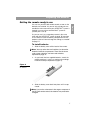
To install batteries
1.
Slide the battery cover off the back of the remote.
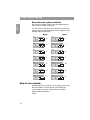
Note: You may notice the small switches just above the
batteries inside the compartment. These are the house
code, stream selection, and room code switches,
explained on page 12.
2.
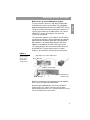
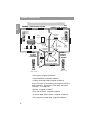
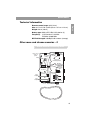
As you install the four supplied batteries, match the
polarity markings (+ and –) on each one to markings
inside the battery compartment (Figure 2).
Figure 2
+
Polarity marked on
the batteries
+
+
+
3.
Español
Or, you can use it as a secondary remote in the same
room with the LIFESTYLE® system instead. To learn how
to set switches inside the battery compartment for that
purpose, refer to “How to change the settings, as needed”
on page 17.
English
You can use your RC-38S remote control as soon as the
batteries are installed. It is pre-set at the factory for use
outside the main room where your LIFESTYLE® system is
located, in an area where another Bose® system or
speaker pair is set up.
Slide the battery cover back into place until it snaps
closed.
Note: If you notice a decrease in the range or response of
the RC-38S remote control, the batteries may need to be
changed.
7