Transcript
Pots
1
2
3
4
5
6
7
8
Assign
Gain /
Trim
A
Pan
B
Fx Param. Offset
-8
+8
GAIN = +48V on/off PAN = LR on/off EQ = EQ on/off
Effects
EQ
C
Fx1
SOLO
SOLO
SOLO
SOLO
SOLO
SOLO
SOLO
SOLO
Bank
-
Bank
+
MUTE
MUTE
MUTE
MUTE
MUTE
MUTE
MUTE
MUTE
Ch
-
Ch
+
SELECT
SELECT
SELECT
SELECT
SELECT
SELECT
SELECT
SELECT
Fx2
Fx3
Fx4
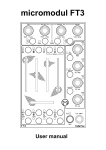
The graphic reflects the controles layed out on a Mackie Control Universal
and the labels correspond to X32-Edit functions.
Fx7
Fx8
Monitor
Recorder
Scenes
M ain Screens
Meters
Routing
Setup
Library
Home
Screen
Effects
1
2
3
4
5
6
Assign Buttons
Mackie Control Remote Capability
1. Open X32-Edit
2. Connect an MCU-compatible device with your computer, such as an X32
in remote operation.
3. Go to SETUP menu and choose the "remote" tab.
4. Select your device as Midi Input and Midi Output.
5. Click on Mackie Control ENABLE on the left side of the tab.
Fx6
Mute Groups
FX Param
on Fader
X32-Edit V1.20 and later versions have a possibility to remote control the
app via any MCU-compatible device. To use this function please follow
these instructions:
Fx5
1
2
3
4
5
6
7
USB Recorder Transport
RWD
FWD
STOP
Layer / Scene / Track / Tab Select
Up
Left
Enter
Down
Right
PLAY
Scene / Library
Preset Select
REC
Sends on
Fader