1
Section 2: Installation
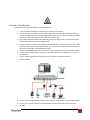
Follow these instructions for installation of DVI-SPLITPRO-2B:
1.
2.
3.
4.
5.
6.
7.
8.
9.
Ensure that DVI-SPLITPRO-2B and all other source devices are turned off
Connect a monitor, a projector or other displays that comes with DVI and/or VGA inputs by using 1
male-to-male DVI (VGA) cable to DVI-SPLITPRO-2B DVI output (you can connect 2 displays equipped
with DVI and VGA respectively by a DVI to DVI/VGA breakout cable
Plug in DVI to DVI/VGA breakout cable (DDVY01) to DVI-IN and plug in VGA to component breakout
cable to the VGA connector of the breakout cable.
Connect a monitor, projector, other displays that come with DVI / VGA inputs by using 1 male – male
DVI (VGA) cable to DVI-SPLITPRO-2B DVI output. (you can connect 2 displays equipped with DVI and
VGA respectively by DVI – DVI/VGA breakout cable)
Connect a device equipped with DVI output (such as PC) to the DVI connector of the breakout cable.
Connect a device equipped with component video output (YPbPr such as DVD player or camera) to
the 3-RCA jack.
Connect a device equipped with VGA output (such as laptop) to the VGA connector of
DVI-SPLITPRO-2B.
Connect a device equipped with composite video output to composite input of the DVI-SPLITPRO-2B.
Connect your computer with the DVI-SPLITPRO-2B by a 9-pin RS-232 cable and then install the
software.
www.avenview.com
9