1
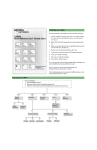
Playing messages
From your telephone:
1. Enter the CallPilot system telephone number and then enter the CallPilot extension.
2.
3.
Enter your mailbox number and password and press £.
Follow the voice prompts and press the dialpad keys for the features you want to use.
⁄
When there are messages
in your mailbox these
commands are available.
Skip
Back
‹
¤
Play Current
Message
›
Skip
Forward
·
fl
Previous
Message
Next
Message
Call
Sender
£
Stop
Use these commands to
review, send and respond to
messages.
‡‚
Message
Options
‡¤
‡‹
Message
Envelope
Forward
Message
‡⁄
Reply
‡fi
‡fl
Compose
Message
Delete
Message
‡›
Reply
All
‡·
Send
Message
To retrieve a deleted message
You can retrieve a deleted message if you are still in a CallPilot
session. A deleted message remains in your mailbox until you end
your current CallPilot session. If you have listened to all your new
and saved messages, you can play and retrieve your deleted
messages.
Return to your deleted message and press ‡fl to restore the
message.
Sending messages
From your telephone:
1. Enter the CallPilot extension or press the MSG key.
2.
3.
Enter your mailbox number and password and press £.
‡fi
Follow the voice prompts and press the dialpad keys for the features you want to use.
Press ‡fito compose a message.
Compose a Message
Enter Address (mailbox number)
then press £
More about addresses:
• Continue to enter addresses and then
press £.
• Press ‚£to cancel an address
• You can press ⁄⁄ to dial by name.
• When you are finished entering
addresses, press £ again to end the
list.
fi
Record Message
£
End Recording
¤
fi
‡‚
‡fl
Play Message
Re-record
Message Options
Delete
⁄
›
Urgent
Private
‡·
Send
fi
fl
Acknowledge
Timed
Delivery