1
Chapter 9 Registering Nortel 20XX and 11XX IP telephones
75
To access the local configuration menu on an IP telephone
2001/2002/2004 phones
1
Restart the telephone by disconnecting the power, then reconnecting the power.
After about four seconds, the top light flashes and NORTEL NETWORKS appears on the screen.
2
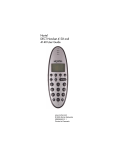
When the greeting appears, immediately, and quickly press the four display buttons one at a
time, from left to right. See Figure 12. These buttons are located directly under the display.
2033 phone
1
Restart the telephone by disconnecting the power, then reconnecting the power.
After about four seconds, the top light flashes and NORTEL NETWORKS appears on the screen.
2
When the greeting appears, immediately, and quickly press the three display buttons one at a
time, from left to right. See Figure 12. These buttons are located directly under the display.
2007 phone
1
Restart the telephone by disconnecting the power, then reconnecting the power.
After about four seconds, NORTEL appears on the screen.
2
When the greeting appears, immediately, and quickly press 007* on the dialpad.
Using the dialpad
1
Tap the tool icon. See Figure 12.
2
When prompted for a password, using the dialpad enter COLOR*SET (26567*738).
1120E/1140E phones
1
Restart the telephone by disconnecting the power, then reconnecting the power.
After about four seconds, the top light flashes and NORTEL NETWORKS appears on the screen.
2
When the greeting appears, immediately, and quickly press the four display buttons one at a
time, from left to right. See Figure 12. These buttons are located directly under the display.
Using the dialpad
1
Press the Services key twice, quickly. See Figure 12.
2
Use the navigation keys to find the service to modify.
3
Press Select.
BCM 4.0 Telephony Device Installation Guide