1
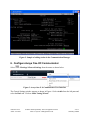
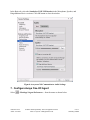
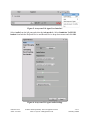
Figure 2: Sample of adding station in the Communication Manager 6. Configure Avaya One-X® Communicator Select SettingsGeneral Settings from the menu as shown below. Figure 3: Avaya One-X ® Communicator User Interface The General Settings window appears as shown in Figure 4. Select Audio from the left pane and select the Basic tab. Click on Audio Tuning Wizard. KP; Reviewed: SPOC 10/5/2011 Solution & Interoperability Test Lab Application Notes ©2011 Avaya Inc. All Rights Reserved. 5 of 13 SENNH_UUSB8