1
About the Avaya 1140E IP Deskphone
About the Avaya 1140E IP
Deskphone
The Avaya 1140E IP Deskphone brings voice and data to the desktop by
connecting directly to a Local Area Network (LAN) through an Ethernet
connection.
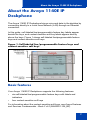
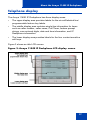
In this guide, sefl-labeled line/programmable feature key labels appear
beside the keys, and context-sensitive soft key labels appear directly
above the keys. Figure 1 shows self-labeled line/programmable feature
keys and context-sensitive soft keys.
Figure 1: Self-labeled line/programmable feature keys and
context-sensitive soft keys
Basic features
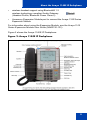
Your Avaya 1140E IP Deskphone supports the following features:
•
six self-labeled line/programmable feature keys with labels and
indicators
•
four context-sensitive soft keys
For information about the context-sensitive soft keys, see Avaya Features
and Services Fundamentals - Book 2 of 6 (NN43001-106_B2).
7