1
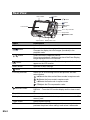
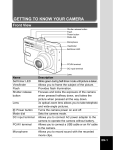
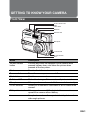
Rear View
LED indicator
button
/
/
button
button
MENU
LCD monitor
MENU button
button
Four - way controller
Strap holder
DISPLAY button
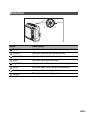
Tripod socket
Name
Battery/card cover
Description
LED indicator
Indicates the camera’s current state.
/
button
Zooms the lens to wide-angle position.
Changes the display into nine images (thumbnail) in the
playback mode.
/
button
Zooms the lens to telephoto position.
During zoom playback, it changes the size of the Zoom Display
image displayed on the LCD monitor.
button
MENU button
button
Four-way controller
Switches to Playback mode. The latest image and information
appear on the LCD monitor.
Switches to Menu settings.
Allows you to delete the picture.
Allows you to scroll through menus and pictures, and then
select choices.
/ SSelects the drive and self-timer modes in capture mode.
/ XSelects the focus mode in capture mode.
/ WSelects the flash mode in capture mode.
/ TAdjusts the EV compensation value.
/DISPLAY button
EN-2
Confirms the menu item selection.
DISPLAY - Turns the LCD monitor display and live view on and
off.
Strap holder
Camera strap attachment.
Battery/card cover
Allows you to access to the battery and insert or remove the SD
memory card.
Tripod socket
Allows tripod mounting.
LCD monitor
Provides menu information to operate the camera, and
previews the picture before taking it and review it afterwards.