1
TMa550.book Page 64 Wednesday, October 3, 2001 10:57 AM
64
5 Software
BIOS Setup Utility
The BIOS Setup Utility is a hardware configuration program built into
your computer’s BIOS (basic input/ouput system).
Your computer is already properly configured and optimized, and you
do not need to run this utility. However, if you encounter
configuration problems, you may need to run it. Please also refer to
Chapter 6, Troubleshooting when a problem arises.
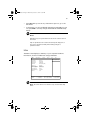
To activate the BIOS Setup Utility, press F2 during POST.
Main
System Devices
Security
Others
Boot
Exit
Item Specific Help
System Time:
System Date:
[11:21:00]
[09/11/2001]
Floppy Drive:
Hard Disk:
1.44MB, 3½”
IBM-DJSA-220-(PM)
Quiet Boot:
Power on display:
LCD Display stretch:
[Enabled]
[Auto-Selected]
[Enabled]
System Memory:
Extended Memory:
640 KB
113664 KB
BIOS Ver.
V0.01
F1 Help
Esc Exit
↑↓ Select Item
←→ Select Menu
F5/F6 Change Values
Enter Select > Sub-Menu
F9 Setup Defaults
F10 Save and Exit
Navigating the BIOS Setup Utility
There are six menu options: Main, System Devices, Security, Others,
Boot and Exit.
Follow these instructions:
•
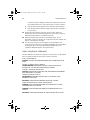
To choose a menu, use the cursor left/right keys (← → ).
•
To choose a parameter, use the cursor up/down keys (↑↓).
•
To change the value of a parameter, press F5 or F6.
Note: You can change the value of a parameter if it is enclosed in
square brackets.
•
A plus sign (+) indicates the item has sub-items. Press Enter to
expand this item.