1
Windows RT on Surface RT is great for learning with the thousands of Windows Store apps aligned with Common Core State Standards and
Next Generation Science Standards. Internet Explorer on Windows RT provides full web support for the millions of educational websites that use
Flash-based content for curriculum games, interactive lessons, and web video. With the addition of Microsoft Office 2013, students and teachers
have the core applications needed for open learning and robust creative production. Microsoft is thrilled to see Surface RT used in schools to
support the broad needs of curious creators and collaborative communities for Common Core State Standards and next-generation learning.
Because of the increasing popularity of Surface RT in education, Microsoft is working directly with Smarter Balanced Assessment Consortium
(SBAC), the Partnership for Advancing Readiness for College and Career (PARCC), and their partners to enable formal state assessments on all
Windows RT devices, including Surface RT. School leaders can have confidence that Windows RT will be ready for online, computer-based
testing during the national rollouts by the respective assessment consortia. More information will be shared as it is available.
Surface RT for Schools and Universities
Communicate with Skype and Lync
Microsoft Surface RT is a great choice for schools and universities who
want powerful, affordable touch-enabled tablets for students, educators
and staff. In addition to cutting edge hardware specs, Surface RT comes
with many software and cloud features that will have educators and
students teaching and learning in no time.
Today schools are using Skype and Lync to host virtual classes, invite
prominent speakers into classrooms, and connect with other schools
from around the world. Lync when combined with Office 365 for Education is an enterprise-grade web meeting and collaboration solution that
provides HD video conferencing, instant messaging and presenting
content. Many students and schools choose Skype for its simplicity, high
quality video and voice conference calls and very large user base. Both
Lync and Skype are available as free downloads to use on Surface RT from
the Windows Store.
Microsoft Office Built-In
Included with Surface RT is Microsoft Office Home and Student 2013 RT,
providing students and educators with the productivity tools they use
most – Word, PowerPoint, Excel and OneNote – all optimized for a touch
screen1. Students can write reports, crunch numbers, take notes and
present their findings with Surface RT – without having to install additional software. And with the upcoming free Windows RT 8.1 update,
Outlook 2013 RT will be included for email, calendar, tasks and more.
Versatile Hardware
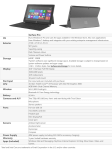
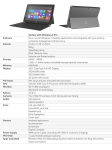
The HD display makes Surface RT ideal for reading digital textbooks and
watching instructional videos. With a sturdy, built-in Kickstand, Surface
RT can become more than a great tablet. The rear camera is angled, so
students can record lectures when Surface is resting on a desk or table.
Click in an attachable keyboard/cover and Surface RT lets students and
educators work like they would on a laptop.
Great Battery and Easy to Carry
Get up to 8 hours of battery life with Surface RT. At only 1.5 lbs and .37
inches thin, Surface RT is about the size of a standard paper notebook, so
it’s easy for students to tote around anywhere on campus.
Reading Digital Textbooks and Multitasking
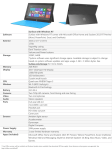
The 10.6” ClearType HD display makes reading easy on the eyes. Next
generation digital textbooks come to life with 5-point multi-touch functionality. Crisp, clear text makes reading a joy. Unlike many other tablets,
Surface RT is optimized for using two apps open side by side. Now,
students can pull their notes up in OneNote alongside the article they’re
reading, or collaborate with classmates on Skype while creating a report
in PowerPoint.
Expandable for Research, Presenting and Printing
Surface RT has two coveted ports: a USB port and a HD video out port2.
A USB port makes connecting a USB-enabled camera, wireless mouse or
printer easy, even when there isn’t Internet access available. Students can
also use the USB port to share files with one another on a thumb drive.
The video out port makes it simple for students to project their screen to
any compatible monitor or HD TV.
With both front- and rear-facing 720p HD cameras, two microphones
and stereo speakers, Surface RT is perfect for virtual classrooms, data collection and more.
Share between Multiple Users
Most schools need devices that can be shared between students. Surface
RT allows multiple students to share the device by creating their own
unique Microsoft Account. Settings adjust to the student when they log
in using that account. This is perfect for mobile classrooms, or sharing
devices between many students in a classroom or school.
Classroom in the Cloud
With Office 365 for Education and SkyDrive3, your school can extend the
classroom into the cloud. Students and educators can collaborate in real
time on homework, host virtual classes and tutoring sessions, store and
share documents. Surface RT is the perfect tool for connecting to the
virtual classroom from home and from school.
Educational Apps
With over 20,000 educationally-relevant apps worldwide in the Windows
Store from many of the biggest names in education - Khan Academy, Kno
and leading publishers - there is an app for almost every subject.4 Microsoft has optimized the web browsing experience for HTML 5 and Flash, to
ensure that the web works best with Windows.
In-Classroom Management and Security
Surface RT works with Windows Multipoint Server 2012 (sold separately)
to provide in-classroom management and orchestration to ensure students are using their Surface RTs for learning and collaboration, instead
of getting distracted with games or social media sites. In addition, parents of K-12 students can use the Family Safety feature for user account
control, web filtering, monitoring PC activity and every Surface RT has
device encryption.
With the free Windows RT 8.1 update, there will be improved support for
Virtual Private Networks (VPN) and mobile device management (MDM)
using AirWatch, MobileIron, Windows Intune or other OMADM-compatible providers.
Preparing Students and Educators for 21st Century Careers
As schools prepare students for college and their career, while ensuring educator skills stay current, professional training and development
is critical to improving educational outcomes. Microsoft invests in the
development of technical skills through Microsoft Partners in Learning
and Microsoft IT Academy. Microsoft IT Academy (ITA) program provides
institutions with industry-leading technology skills to help bridge the
skills gap for students and increase productivity for teachers. Partners in
Learning provides professional development and community resources
for educators so they can better integrate technology into the curriculum. Schools can access the Partners in Learning Network for free and
access introductory courses on Windows 8 and Office 2013 available in IT
Academy.
Free Windows RT. 8.1 Update
The upcoming release of Windows RT 8.1 will include a number of major
enhancements to user interface, Outlook 2013 RT, Mobile Device Management to support Microsoft and third party management solutions,
improved VPN support and more. This major update is free for all Surface RT users.5
Some features and programs unsupported. See http://office.com/officeRT.
Cables and adapters sold separately.
3
Office 365 for Education (A2) version and SkyDrive are free, requires activation
from Microsoft and ISP fees for download may apply.
4
Works exclusively with apps from the Windows Store.
5
Download required; ISP fees may apply.
1
2
For more information or to place an order,
email [email protected]