1
3) Answer a call
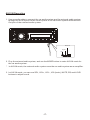
During ringing, the incoming telephone number displays in the LCD. If you want to
receive it, press the
button on control panel or press the
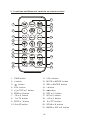
button on remote
control; if you want to reject it, press the
button on control panel or press the
button on remote control.
4) End phone talking
When you want to end phone talking, press the
or
button.
5) Switch audio between car A/V system and mobile phone
During phone talking using the BT handfree system of the car audio system, if you
want to change the phone audio to your mobile phone, press the
button on the
control panel or press the
button on remote control.
6) Adjust volume level during phone talking
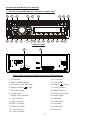
During phone talking, use VOL knob or VOL+ and VOL- buttons to adjust volume
level ; use MUTE button to mute sound .
*
* / # buttons
they perform as * / # buttons on mobile phone.
3 . BT MUSIC
1 ) Pressing MODE button enter BT AUDIO mode and display BT AUDI in the LCD;
2 ) When using your mobile phone with BT function to play audio/video , if it is paired
and connected with the BT device of the car audio system, the audio of the mobile
phone will change into the car a udio system .
The BT device of the car audio system support A2DP, if your mobile phone with BT
function support A2DP, the car audio system can output stereo audio from your
mobile phone.
3 ) T he BT device of the car audio system supports AVRCP, so these media buttons
of the >||, > and < on remote control and >||, |<< and >>| on control panel are
available for audio/video playback of your mobile phone during playback. But n o
fast forward/backward functions for the |<< and >>| buttons .
* If you don’t want to use the BT function of the car a udio system , r epeatedly press
SEL button to display BT, then use VOL knob or VOL+ and VOL- buttons to switch
BT off .
-13-