1
20
Setup for Macintosh
AXIS 540/640 User’s Guide
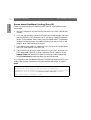
Setting the IP address
Follow the step-by-step procedure below to set the IP address, enabling access to the
AXIS 540+/542+ via any standard Web browser:
1. Open the Chooser and select a network printer driver, any LaserWriter will do.
2. Select the Axis printer port which name ends with "_CFG" and close the
Chooser.
3. Open a text editor, e.g. SimpleText and write a text file containing the following:
INT_ADDR: <IP address>
Example:
INT_ADDR: 171.16.2.143
4. Print the above text file. The settings will be stored in the AXIS 540+/542+.
Macintosh
5. Open the Chooser and select the printer port you wish to use for printing
documents. Close the Chooser.
Note:
The _CFG port disappears 60 minutes after the AXIS 540+/542+ has been powered on. If you
want it to reappear, you must restart the AXIS 540+/542+.