1
Chapter 1: Overview of Virtualization
Xen relies on network virtualization through the Linux bridge-utils package to enable your virtual
machines to appear to have unique physical addresses (Media Access Control, or MAC, addresses)
and unique IP addresses. Other server-virtualization solutions, such as UML, use the Linux virtual
Point-to-Point (TUN) and Ethernet (TAP) network devices to provide user-space access to the host’s
network. Many advanced network switches and routers use techniques such as Virtual Routing and
Forwarding (VRF), VRF-Lite, and Multi-VRF to segregate customer traffic into separately routed
network segments and support multiple virtual-routing domains within a single piece of network
hardware.
Discussing virtual private networks and other virtual LAN technologies is outside the scope of this
book. Virtual networking as it applies to and is used by Xen is discussed in Chapter 8.
Server and Machine Virtualization
The terms “server virtualization” and “machine virtualization” describe the ability to run an entire
virtual machine, including its own operating system, on another operating system. Each virtual machine
that is running on the parent operating system is logically distinct, has access to some or all of the
hardware on the host system, has its own logical assignments for the storage devices on which that
operating system is installed, and can run its own applications within its own operating environment.
Server virtualization is the type of virtualization technology that most people think of when they hear
the term “virtualization”, and is the type of virtualization that is the focus of this book. Though not as
common, I find the term “machine virtualization” useful to uniquely identify this type of virtualization,
because it more clearly differentiates the level at which virtualization is taking place — the machine itself
is being virtualized — regardless of the underlying technology used. Machine virtualization is therefore
the technique used by virtualization technologies such as KVM, Microsoft Virtual Server and Virtual PC,
Parallels Workstation, User Mode Linux, Virtual Iron, VMware, and (of course) Xen. See the section
“Other Popular Virtualization Software” in Chapter 2 for an overview of each of these virtualization
technologies, except for Xen, which (as you might hope) is discussed throughout this book.
In the maddening whirlwind of terms that include the word “virtual,” server virtualization is usually
different from the term “virtual server,” which is often used to describe both the capability of operating
system servers such as e-mail and Web servers to service multiple Internet domains, and system-level
virtualization techniques that are used to provide Internet service provider (ISP) users with their own
virtual server machine.
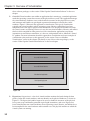
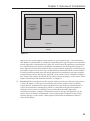
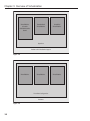
The key aspect of server or machine virtualization is that different virtual machines do not share the
same kernel and can therefore be running different operating systems. This differs from system-level
virtualization, where virtual servers share a single underlying kernel (discussed in more detail later in
this chapter) and provide a number of unique infrastructure, customer, and business opportunities.
Some of these are:
4
❑
Running legacy software, where you depend on a software product that runs only on a specific
version of a specific operating system. Being able to run legacy software and the legacy
operating system that it requires is only possible on virtual systems that can run
multiple operating systems.
❑
Software system-test and quality-assurance environments, where you need to be able to test a
specific software product on many different operating systems or versions of an operating system.
Server virtualization makes it easy to install and test against many different operating systems or
versions of operating systems without requiring dedicated hardware for each.