1
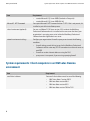
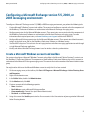
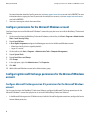
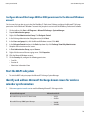
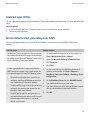
Service failed to start, generating error 5305
Getting Started Guide
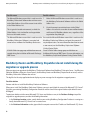
Possible cause
Possible solution
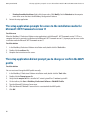
2.
Install or re-apply Microsoft Exchange Administration 4.5
Service Pack 4 or the Microsoft Exchange System
Management Tools for Microsoft Exchange 2000 or
Microsoft Exchange 2003.
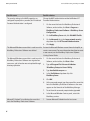
The Server Routing Protocol (SRP) identifier is not listed Uninstall and then re-install the BlackBerry Professional
in Exchange 5.5 Administrator > Configuration >
Software using the same configuration information that you
BlackBerry Servers > System Info.
used in the original installation.
Do not click the Remove Server button at BlackBerry Servers.
Removing the server eliminates any possibility of restoring
existing user accounts that are serviced by the BlackBerry
Professional Software.
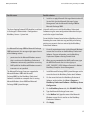
In a Microsoft Exchange 2000 or Microsoft Exchange 1.
2003 environment, this message might appear for one
of the following reasons:
•
•
permissions for the Microsoft Windows account
2.
that is used to run the BlackBerry Professional
Softwareare not correctly specified or are missing
MAPI profile for the Microsoft Windows account is
incorrect or is not specified
The Microsoft Exchange Server was upgraded to
Microsoft Windows 2003 with Microsoft
Exchange2003, but the BlackBerry Professional
Software is installed on a computer that is running
Microsoft Windows Server 2000 and Microsoft
Exchange 2000 System Manager.
Grant all required permissions to the Microsoft Windows
account that is used to run the BlackBerry Professional
Software. For more information, see the BlackBerry
Professional Software Getting Started Guide.
When you are prompted for the MAPI profile name, type
the MAPIProfile name that is in the registry at
HKEY_CURRENT_USER/Software/Research In Motion/
BlackBerry Enterprise Server/Management.
1.
Install Microsoft Exchange 2003 System Manager on the
server that hosts the BlackBerry Professional Software.
2.
On the server that hosts the BlackBerry Professional
Software, on the taskbar, click Start > Programs >
BlackBerry Professional Software > BlackBerry Server
Configuration.
3.
On the BlackBerry Server tab, click Edit MAPI Profile.
4.
Type the Microsoft Exchange Server name.
5.
In the Mailbox field, type the name of the Microsoft
Windows account that is used to run the BlackBerry
Professional Software.
6.
Click Apply.
37