1
AXIS 241Q, AXIS 241S,
AXIS 241QA and AXIS 241SA
Video Servers
User’s Manual
2
About This Document
This manual is intended for administrators and users of the
AXIS 241Q and AXIS 241S Video Server (firmware release
4.30), and the AXIS 241QA and 241SA Video Server
(firmware release 4.30). It includes instructions for using
and managing the Video Server on your network. Previous
experience of networking will be of use when installing
and using this product. Some knowledge of UNIX or
Linux-based systems would also be beneficial, for
developing shell scripts and applications. Later versions of
this document will be posted to the Axis Website, as
required. See also the product’s online help, available via
the Web-based interface.
Safety Notices Used In This Manual
Caution! - Indicates a potential hazard that can damage the
product.
Important! - Indicates a hazard that can seriously impair
operation.
Do not proceed beyond any of the above notices until you
have fully understood the implications.
Intellectual Property Rights
Axis AB has intellectual property rights relating to
technology embodied in the product described in this
document. In particular, and without limitation, these
intellectual property rights may include one or more of the
patents listed at http://www.axis.com/patent.htm and one
or more additional patents or pending patent applications
in the US and other countries.
This product contains licensed third-party software. See the
menu item “About” in the product’s user interface for more
information.
Legal Considerations
Camera and audio surveillance can be prohibited by laws
that vary from country to country. Check the laws in your
local region before using this product for surveillance
purposes. This product includes one (1) MPEG-4 decoder
license. To purchase further licenses, contact your reseller.
Electromagnetic Compatibility (EMC)
This equipment generates, uses and can radiate radio
frequency energy and, if not installed and used in
accordance with the instructions, may cause harmful
interference to radio communications. However, there is no
guarantee that interference will not occur in a particular
installation. If this equipment does cause harmful
interference to radio or television reception, which can be
determined by turning the equipment off and on, the user is
encouraged to try to correct the interference by one or
more of the following measures: Re-orient or relocate the
receiving antenna. Increase the separation between the
equipment and receiver. Connect the equipment to an
outlet on a different circuit to the receiver. Consult your
dealer or an experienced radio/TV technician for help.
Shielded (STP) network cables must be used with this unit
to ensure compliance with EMC standards.
USA - This equipment has been tested and found to
comply with the limits for a Class B computing device
pursuant to Subpart B of Part 15 of FCC rules, which are
designed to provide reasonable protection against such
interference when operated in a commercial environment.
Operation of this equipment in a residential area is likely to
cause interference, in which case the user at his/her own
expense will be required to take whatever measures may be
required to correct the interference.
Europe -
This digital equipment fulfills the requirements
for radiated emission according to limit B of EN55022/1998,
and the requirements for immunity according to EN55024/1998
residential, commercial, and light industry.
Liability
Every care has been taken in the preparation of this manual;
Please inform your local Axis office of any inaccuracies or
omissions. Axis Communications AB cannot be held responsible
for any technical or typographical errors and reserves the right
to make changes to the product and manuals without prior
notice. Axis Communications AB makes no warranty of any
kind with regard to the material contained within this
document, including, but not limited to, the implied warranties
of merchantability and fitness for a particular purpose. Axis
Communications AB shall not be liable nor responsible for
incidental or consequential damages in connection with the
furnishing, performance or use of this material.
Trademark Acknowledgments
Ethernet, Internet Explorer, Linux, Microsoft, Mozilla, OS/2,
UNIX, Windows, WWW are registered trademarks of the
respective holders. QuickTime™ is a trademark of Apple
Computer, Inc., registered in the U.S. and other countries. Java
and all Java-based trademarks and logos are trademarks or
registered trademarks of Sun Microsystems, Inc. in the United
States and other countries. Axis Communications AB is
independent of Sun Microsystems Inc. UPnP™ is a certification
mark of the UPnP™ Implementers Corporation.
Support Services
Should you require any technical assistance, please contact
your Axis reseller. If your questions cannot be answered
immediately, your reseller will forward your queries through
the appropriate channels to ensure a rapid response. If you are
connected to the Internet, you can:
• download user documentation and firmware updates
• find answers to resolved problems in the FAQ database.
Search by product, category, or phrases
• report problems to Axis support staff by logging in to your
private support area
• visit the Axis Support Web at www.axis.com/techsup/
Safety Notice - Battery Replacement
The Video Server uses a 3.0V CR2032 Lithium battery as the
power supply for its internal real-time clock (RTC). This battery
will, under normal conditions, last for a minimum of 5 years.
Low battery power affects the operation of the RTC, causing it
to reset at every power-up. A log message will appear when
battery replacement is required.
The battery should not be replaced unless required!
If the battery does need replacing, observe the following points:
Caution!
• Danger of Explosion if battery is incorrectly replaced
• Replace only with the same or equivalent battery, as
recommended by the manufacturer.
• Dispose of used batteries according to the manufacturer's
instructions.
AXIS 241Q/S/QA/SA Video Servers User’s Manual
Revision 1.1
Dated:November 2005
Part No: 26217
Copyright© Axis Communications AB, 2005
AXIS 241Q/S/QA/SA
Table of contents
Product Description . . . . . . . . . . . . . . . . . . . . . . . . . . . . . . . . . . . . . . . . . . . . . . . . . . . . . . . . . . . . . . 5
AXIS 241Q/QA Front Panel . . . . . . . . . . . . . . . . . . . . . . . . . . . . . . . . . . . . . . . . . . . . . 6
AXIS 241S/SA Front Panel . . . . . . . . . . . . . . . . . . . . . . . . . . . . . . . . . . . . . . . . . . . . . . 8
Video Server Rear Panel . . . . . . . . . . . . . . . . . . . . . . . . . . . . . . . . . . . . . . . . . . . . . . 10
Using the Video Server . . . . . . . . . . . . . . . . . . . . . . . . . . . . . . . . . . . . . . . . . . . . . . . . . . . . . . . . . . . 11
Accessing the Video Server . . . . . . . . . . . . . . . . . . . . . . . . . . . . . . . . . . . . . . . . . . . . 11
The Live View page . . . . . . . . . . . . . . . . . . . . . . . . . . . . . . . . . . . . . . . . . . . . . . . . . . . 12
Video and Audio Streams . . . . . . . . . . . . . . . . . . . . . . . . . . . . . . . . . . . . . . . . . . . . . . . . . . . . . . . . . 14
Video Stream Types . . . . . . . . . . . . . . . . . . . . . . . . . . . . . . . . . . . . . . . . . . . . . . . . . . 14
MPEG-4 protocols and communication methods . . . . . . . . . . . . . . . . . . . . . . . . . . 15
The AXIS Media Control . . . . . . . . . . . . . . . . . . . . . . . . . . . . . . . . . . . . . . . . . . . . . . . 15
How to stream MPEG-4 . . . . . . . . . . . . . . . . . . . . . . . . . . . . . . . . . . . . . . . . . . . . . . . 15
Other methods of accessing the video stream . . . . . . . . . . . . . . . . . . . . . . . . . . . . . 16
Configuring the Video Server. . . . . . . . . . . . . . . . . . . . . . . . . . . . . . . . . . . . . . . . . . . . . . . . . . . . . . 19
Accessing the Setup tools . . . . . . . . . . . . . . . . . . . . . . . . . . . . . . . . . . . . . . . . . . . . . 19
Video & Image Settings . . . . . . . . . . . . . . . . . . . . . . . . . . . . . . . . . . . . . . . . . . . . . . . . . . . . . . . . . . 20
Image Settings . . . . . . . . . . . . . . . . . . . . . . . . . . . . . . . . . . . . . . . . . . . . . . . . . . . . . . 20
Video Source Settings . . . . . . . . . . . . . . . . . . . . . . . . . . . . . . . . . . . . . . . . . . . . . . . . 21
Overlay/Mask Settings . . . . . . . . . . . . . . . . . . . . . . . . . . . . . . . . . . . . . . . . . . . . . . . . 22
Advanced - MPEG-4 Settings . . . . . . . . . . . . . . . . . . . . . . . . . . . . . . . . . . . . . . . . . . 24
Quad Stream Settings (AXIS 241QA/SA only) . . . . . . . . . . . . . . . . . . . . . . . . . . . . . 24
Audio (AXIS 241QA/SA only) . . . . . . . . . . . . . . . . . . . . . . . . . . . . . . . . . . . . . . . . . . . . . . . . . . . . . . 25
Audio Settings . . . . . . . . . . . . . . . . . . . . . . . . . . . . . . . . . . . . . . . . . . . . . . . . . . . . . . 25
Live View Config . . . . . . . . . . . . . . . . . . . . . . . . . . . . . . . . . . . . . . . . . . . . . . . . . . . . . . . . . . . . . . . . 29
Layout . . . . . . . . . . . . . . . . . . . . . . . . . . . . . . . . . . . . . . . . . . . . . . . . . . . . . . . . . . . . . 29
HTML Examples. . . . . . . . . . . . . . . . . . . . . . . . . . . . . . . . . . . . . . . . . . . . . . . . . . . . . . 31
External Video. . . . . . . . . . . . . . . . . . . . . . . . . . . . . . . . . . . . . . . . . . . . . . . . . . . . . . . 32
Sequence Mode . . . . . . . . . . . . . . . . . . . . . . . . . . . . . . . . . . . . . . . . . . . . . . . . . . . . . 32
Event Configuration . . . . . . . . . . . . . . . . . . . . . . . . . . . . . . . . . . . . . . . . . . . . . . . . . . . . . . . . . . . . . 33
Event Servers. . . . . . . . . . . . . . . . . . . . . . . . . . . . . . . . . . . . . . . . . . . . . . . . . . . . . . . . 33
Event Types . . . . . . . . . . . . . . . . . . . . . . . . . . . . . . . . . . . . . . . . . . . . . . . . . . . . . . . . 34
Motion Detection . . . . . . . . . . . . . . . . . . . . . . . . . . . . . . . . . . . . . . . . . . . . . . . . . . . . 36
Port Status . . . . . . . . . . . . . . . . . . . . . . . . . . . . . . . . . . . . . . . . . . . . . . . . . . . . . . . . . 37
Pan Tilt Zoom . . . . . . . . . . . . . . . . . . . . . . . . . . . . . . . . . . . . . . . . . . . . . . . . . . . . . . . . . . . . . . . . . . 38
Installing PTZ Devices. . . . . . . . . . . . . . . . . . . . . . . . . . . . . . . . . . . . . . . . . . . . . . . . . 38
3
4
AXIS 241Q/S/QA/SA
PTZ Configuration. . . . . . . . . . . . . . . . . . . . . . . . . . . . . . . . . . . . . . . . . . . . . . . . . . . . 39
PTZ Controls . . . . . . . . . . . . . . . . . . . . . . . . . . . . . . . . . . . . . . . . . . . . . . . . . . . . . . . . 40
System Options . . . . . . . . . . . . . . . . . . . . . . . . . . . . . . . . . . . . . . . . . . . . . . . . . . . . . . . . . . . . . . . . . 45
Security . . . . . . . . . . . . . . . . . . . . . . . . . . . . . . . . . . . . . . . . . . . . . . . . . . . . . . . . . . . . 45
Date & Time . . . . . . . . . . . . . . . . . . . . . . . . . . . . . . . . . . . . . . . . . . . . . . . . . . . . . . . . 46
Network - Basic TCP/IP Settings . . . . . . . . . . . . . . . . . . . . . . . . . . . . . . . . . . . . . . . . 47
Network - Advanced TCP/IP Settings . . . . . . . . . . . . . . . . . . . . . . . . . . . . . . . . . . . . 48
SOCKS . . . . . . . . . . . . . . . . . . . . . . . . . . . . . . . . . . . . . . . . . . . . . . . . . . . . . . . . . . . . . 49
SMTP (email) . . . . . . . . . . . . . . . . . . . . . . . . . . . . . . . . . . . . . . . . . . . . . . . . . . . . . . . . 49
SNMP. . . . . . . . . . . . . . . . . . . . . . . . . . . . . . . . . . . . . . . . . . . . . . . . . . . . . . . . . . . . . . 50
UPnP™ . . . . . . . . . . . . . . . . . . . . . . . . . . . . . . . . . . . . . . . . . . . . . . . . . . . . . . . . . . . . . 50
RTP (Multicast)/MPEG-4 . . . . . . . . . . . . . . . . . . . . . . . . . . . . . . . . . . . . . . . . . . . . . . 50
Ports & Devices. . . . . . . . . . . . . . . . . . . . . . . . . . . . . . . . . . . . . . . . . . . . . . . . . . . . . . 50
Maintenance . . . . . . . . . . . . . . . . . . . . . . . . . . . . . . . . . . . . . . . . . . . . . . . . . . . . . . . . 51
Support . . . . . . . . . . . . . . . . . . . . . . . . . . . . . . . . . . . . . . . . . . . . . . . . . . . . . . . . . . . . 52
Advanced. . . . . . . . . . . . . . . . . . . . . . . . . . . . . . . . . . . . . . . . . . . . . . . . . . . . . . . . . . . 52
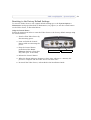
Resetting to the Factory Default Settings . . . . . . . . . . . . . . . . . . . . . . . . . . . . . . . . 53
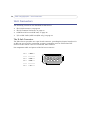
Unit Connectors . . . . . . . . . . . . . . . . . . . . . . . . . . . . . . . . . . . . . . . . . . . . . . . . . . . . . . . . . . . . . . . . 54
The D-Sub Connector . . . . . . . . . . . . . . . . . . . . . . . . . . . . . . . . . . . . . . . . . . . . . . . . . 54
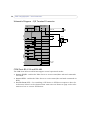
The I/O Terminal Connector . . . . . . . . . . . . . . . . . . . . . . . . . . . . . . . . . . . . . . . . . . . 55
Schematic Diagram - I/O Terminal Connector . . . . . . . . . . . . . . . . . . . . . . . . . . . . . 56
COM Ports RS-232 and RS-485 . . . . . . . . . . . . . . . . . . . . . . . . . . . . . . . . . . . . . . . . 56
Y/C to BNC Cable (AXIS 241S/SA only) . . . . . . . . . . . . . . . . . . . . . . . . . . . . . . . . . . 57
Troubleshooting . . . . . . . . . . . . . . . . . . . . . . . . . . . . . . . . . . . . . . . . . . . . . . . . . . . . . . . . . . . . . . . . 58
Checking the Firmware . . . . . . . . . . . . . . . . . . . . . . . . . . . . . . . . . . . . . . . . . . . . . . . 58
Upgrading the Firmware . . . . . . . . . . . . . . . . . . . . . . . . . . . . . . . . . . . . . . . . . . . . . . 58
Support . . . . . . . . . . . . . . . . . . . . . . . . . . . . . . . . . . . . . . . . . . . . . . . . . . . . . . . . . . . . 59
Technical Specifications . . . . . . . . . . . . . . . . . . . . . . . . . . . . . . . . . . . . . . . . . . . . . . . . . . . . . . . . . . 63
General performance considerations . . . . . . . . . . . . . . . . . . . . . . . . . . . . . . . . . . . . 66
Optimizing your system . . . . . . . . . . . . . . . . . . . . . . . . . . . . . . . . . . . . . . . . . . . . . . . 66
Frame rates - Motion JPEG . . . . . . . . . . . . . . . . . . . . . . . . . . . . . . . . . . . . . . . . . . . . 67
Frame rates - MPEG-4 . . . . . . . . . . . . . . . . . . . . . . . . . . . . . . . . . . . . . . . . . . . . . . . . 67
Bandwidth. . . . . . . . . . . . . . . . . . . . . . . . . . . . . . . . . . . . . . . . . . . . . . . . . . . . . . . . . . 68
Glossary . . . . . . . . . . . . . . . . . . . . . . . . . . . . . . . . . . . . . . . . . . . . . . . . . . . . . . . . . . . . . . . . . . . . . . . 69
Index . . . . . . . . . . . . . . . . . . . . . . . . . . . . . . . . . . . . . . . . . . . . . . . . . . . . . . . . . . . . . . . . . . . . . . . . . 71
AXIS 241Q/S/QA/SA - Product Description
Product Description
This manual is applicable for the following Axis Video Servers:
•
•
•
•
•
AXIS 241S: 1-port video server
AXIS 241Q: 4-port video server
AXIS 241SA: 1-port video server including 2-way audio
AXIS 241QA: 4-port video server including 2-way audio
Blade versions
The information provided in this manual applies to all models, unless otherwise indicated.
The Video Server is fully featured for security surveillance and remote monitoring needs. It
is based on the AXIS ARTPEC-2 compression chip, and can digitize up to 4 analog video
sources and make these available on the network as real-time, full frame rate Motion JPEG
and/or MPEG-4 video streams.
The AXIS 241Q/241QA has 4 BNC inputs for analog video devices and the AXIS 241S/SA
has 1 BNC input and a matching loop-through output. The AXIS 241S/SA can also
accommodate Y/C video using an Y/C to BNC cable (not included).
The Video Server is equipped with RS-232 and RS-485 ports for connecting third party
PTZ systems. It also has 4 alarm inputs and 4 alarm outputs, which can be used to connect
various third party devices, e.g. door sensors and alarm bells.
The AXIS 241QA/241SA has a Line/Mic In (mono) for connecting an external microphone
or other source producing a line level signal. An active speaker with a built-in amplifier
can be connected to Line Out (mono) to enable two-way communication. Audio
communication can be bi-directional (full-duplex), push to talk (half-duplex) or in one
direction only (simplex).
Up to 20 viewers can access the Video Server simultaneously when using Motion JPEG and
MPEG-4 unicast. Each MPEG-4 viewer requires a separate MPEG-4 decoder license, of
which one is included. Additional licenses can be purchased separately from your Axis
dealer. If using other clients to view the MPEG-4 video stream, no further MPEG-4 decoder
licenses are required.
Video can be viewed in 5 resolutions (up to 4CIF), and image compression is configurable.
The Video Server contains support for video motion detection, which allows the unit to
trigger on activity in the video image, and advanced scheduling tools which can also be
used to trigger an event. As the Video Server is designed for use in security systems, it is
equipped with several security features, such as IP address filtering, several user levels with
passwords and HTTPS.
5
6
AXIS 241Q/S/QA/SA - Product Description
The Video Server has a built-in web server, providing full access to all features through the
use of a standard browser. The built-in scripting tool allows basic applications to be
created, providing basic surveillance solutions. For advanced functionality, the Video
Server can be integrated via the use of the AXIS HTTP API (see www.axis.com/developer).
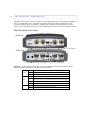
AXIS 241Q/QA Front Panel
AXIS 241Q
Control Button
AXIS 241QA
Control Button
Indicators - After completion of the startup and self-test routines, the multi-colored
Network, Status and Power Indicators flash as follows:
Network
Unlit
No connection.
Green
Steady for connection to a 100 Mbit/s network. Flashes for network activity.
Amber
Steady for connection to a 10 Mbit/s network. Flashes for network activity.
Unlit
When configured for “no flash” on camera access.
Green
Steady for normal operation. Can be configured to flash green at intervals
whenever the camera is accessed. See the online help for more information.
Amber
Steady during startup, reset to factory default or when restoring settings.
Red
Slow flash for failed upgrade.
Green
Normal operation.
Amber
Flashes green/amber during firmware upgrade.
Status
Power
AXIS 241Q/S/QA/SA - Product Description
DIP Switches - A corresponding line termination switch for each of the supported video
inputs. All units are shipped with the line termination enabled for each supported video
input; that is, with the DIP switches set in the down-position.
Note: If the video source is to be connected in parallel with other equipment, disable the input termination by
turning the corresponding DIP switch to the up-position (OFF). Failure to do so may cause reduced image
quality.
Control Button - Press this button to restore the factory default settings, as described in
Resetting to the Factory Default Settings, on page 53, or to install using AXIS Internet
Dynamic DNS Service (See AXIS 241Q/S/QA/SA Video Server Installation Guide).
Video Inputs - Accommodates up to 4 separate video sources (VIDEO 1 - VIDEO 4)
simultaneously. Each supported video input is connected using a coax/BNC connector.
Physical connections made using e.g. 75 Ohm coax video cable have a recommended
maximum length of 800 feet (250 meters).
Line Out (AXIS 241QA only) - Mono audio output (line level), which can be connected to a
public address (PA) system or an active speaker with a built-in amplifier. A pair of
headphones can also be attached.
Line/Mic In (AXIS 241QA only) - One 3.5mm input for a mono microphone, or for line-in
mono signal (only the left channel is used from a stereo signal).
7
8
AXIS 241Q/S/QA/SA - Product Description
AXIS 241S/SA Front Panel
AXIS 241S
Control Button
AXIS 241SA
Control Button
Indicators - After completion of the startup and self test routines, the multi-colored
Network, Status, Power Indicators flash as follows:
Network
Unlit
No connection.
Green
Steady for connection to a 100 Mbit/s network. Flashes for network activity.
Amber
Steady for connection to a 10 Mbit/s network. Flashes for network activity.
Unlit
When configured for “no flash” on camera access.
Green
Steady for normal operation. Can be configured to flash green at intervals
whenever the camera is accessed. See the online help for more information.
Amber
Steady during startup, reset to factory default or when restoring settings.
Red
Slow flash for failed upgrade.
Green
Normal operation.
Status
Power
DIP Switches - upon delivery the AXIS 241S/SA is configured for composite video input.
Switch
1
2
3
4
75 ohm video in
termination
75 ohm video out
termination
Connects video in and
video out
Not used
Composite video input
on
off
on
n/a
Y/C video input
on
on
off
n/a
Description
Note: If the AXIS 241S/SA is to be connected in loop-through with other equipment, disable the input termination by setting switch 1 to the up-position (OFF). Failure to do this may cause reduced image quality.
Control Button - Press this button to restore the factory default settings, as described in
Resetting to the Factory Default Settings, on page 53, or to install using AXIS Internet
Dynamic DNS Service (see AXIS 241Q/S/QA/SA Video Server Installation Guide).
AXIS 241Q/S/QA/SA - Product Description
Video Input - Coaxial BNC connector supporting a single composite video source. The
physical connection is made using 75 Ohm coax video cable with a recommended
maximum length of 800 feet (250 meters).
Note: The AXIS 241S/SA supports conversion between composite video and Y/C (S-video) using an Y/C to BNC
cable.
Video Output - A single video loop-through (VIDEO OUT) connected in parallel with
VIDEO IN and terminated with a coax/BNC connector. Allows direct connection of e.g. an
external monitor. Set DIP switch to OFF when in use.
Line Out (AXIS 241SA only) - Mono audio output (line level), which can be connected to a
public address (PA) system or an active speaker with a built-in amplifier. A pair of
headphones can also be attached.
Line/Mic In (AXIS 241SA only) - One 3.5mm input for a mono microphone, or for line-in
mono signal (only the left channel is used from a stereo signal).
9
10 AXIS 241Q/S/QA/SA - Product Description
Video Server Rear Panel
The Serial Number is
located on the label
on the underside of
the unit.
Power Supply Connector - A single socket for connection of the PS-K power adapter.
I/O Terminal connector - The I/O Terminal connector provides the physical interface to 4
digital transistor outputs, 4 digital inputs and an RS-485 interface. See Unit Connectors, on
page 54 for more information.
Note: The I/O Terminal connector also provides an auxiliary connection point for DC
power.
Network Connector - The Video Server connects to the network via a standard network
cable, and automatically detects the speed of the local network segment
(10BaseT/100BaseTX Ethernet).
RS-232 Serial Connector - A 9-pin D-sub connector providing an RS-232 serial
connection. Typically used for connecting Pan/Tilt/Zoom devices. See Unit Connectors, on
page 54 for more information.
AXIS 241Q/S/QA/SA - Using the Video Server
Using the Video Server
The Video Server can be used with most standard operating systems and browsers. The
recommended browser is Internet Explorer with Windows, and Mozilla with other
operating systems. See also the Technical Specifications, on page 63.
Note: For information on installing the Video Server, please refer to the Installation Guide.
Accessing the Video Server
1. Start your browser.
2. Enter the IP address or host
name of the Video Server in
the Location/Address field of your browser.
3. Enter the user name and password set by the administrator.
4. A video image is displayed in your browser.
11
12 AXIS 241Q/S/QA/SA - Using the Video Server
Notes:
•To view streaming video in Microsoft Internet Explorer, you must set your browser to allow the
AXIS Media Control (AMC) to be installed on your computer. AMC is required to use audio in the
AXIS 241QA/SA. AMC also provides an MPEG-4 decoder for viewing MPEG-4 video streams. This
decoder is installed the first time an MPEG-4 video stream is accessed. Please note that the
product administrator may have disabled the installation of the decoder, as a license is required
for each instance. See page 31 for more information.
•If your workstation restricts the use of additional software components, the Video Server can be
configured to use a Java applet for updating JPEG images. Please see the online help for more
information.
The Live View page
If your Video Server has been customized to meet specific requirements, the buttons and
other items described below may or may not be displayed on the Live View page. The
following provides an overview of each available button:
To resize the displayed image, click the View Size buttons: half-size
(x1/2), full-size (x1), x2 or x4. This will not change the resolution of the
image (not available in Sequence Mode).
The Video Format drop-down list allows the video format on the Live
View page to be temporarily changed.
The Output buttons control an output directly from the Live View page. These
buttons are configured under Setup > Live View Config > Layout.
Pulse - click this button to activate the port for a defined period of time, e.g. to
switch on a light for 20 seconds.
Active/Inactive - click these buttons to manually start and stop a connected
device, e.g. switch a light on/off.
These buttons start/stop the Sequence Mode. This mode is created in Setup >
Live View Config > Sequence mode and automatically displays the view
from 2 or more video sources at set intervals.
From the Source list, select the desired video image(s). The list can
contain internal video sources, external video sources, or the Quad
Stream view (AXIS 241Q/QA only). The Quad Stream option displays
all four video images in one stream.
The Action buttons trigger an event directly from the Live View page. These
buttons are configured under Setup > Live View Config > Layout. Click these
buttons to manually start and stop events.
AXIS 241Q/S/QA/SA - Using the Video Server
Use the Snapshot button to capture a snapshot of the image currently being
displayed in the window. Right-click on the image to save it in on your
computer.
The AMC viewer toolbar (AXIS Media Control) is available in Microsoft Internet
Explorer only and displays the following buttons:
The Play/Stop buttons start and stop the media stream.
The Snapshot button takes a snapshot of the currently displayed image. The
Snapshot function and the target directory for saving snapshots can be configured
from AMC (AXIS Media Control), which is available from the Windows Control
Panel (Internet Explorer only).
Click the View Full Screen button and the video image will fill the entire screen
area. No other windows will be visible. Press Esc (Escape) on your keyboard to
cancel full screen view.
Audio controls for AXIS 241QA/SA
Click the Speaker and Microphone buttons to switch the sound off and on for the
speaker and microphone, respectively.
Use the slider to control the volume on the speaker and microphone.
The volume can be set between 0 and 100.
When using Half-duplex mode, this button toggles between allowing you to speak
and listen. The first icon indicates that you can talk and the speaker attached to the
Video Server will play your voice. The second icon indicates that you will hear
audio from the Video Server, but no audio will be sent to any web clients. When in
simplex talk mode, the icon toggles between allowing you to speak and is dimmed when
you do not want other clients to receive any audio.
Note that these AMC toolbar functions can also be accessed by right-clicking in the image.
For information on using Pan/Tilt/Zoom controls, please see Pan Tilt Zoom, on page 38.
13
14 AXIS 241Q/S/QA/SA - Video and Audio Streams
Video and Audio Streams
The Video Server provides several different video and audio stream formats. The type to
use depends on your requirements and on the properties of your network.
The Live View page in the Video Server provides access to Motion JPEG and MPEG-4
video and audio streams, as well as to single JPEG images. Other applications and clients
can also access these video and audio streams/images directly, without going via the Live
View page.
Video Stream Types
Motion JPEG
This format uses standard JPEG still images in the video stream. These images are then
displayed and updated at a rate sufficient to create a stream that shows constantly updated
motion.
The Motion JPEG stream uses considerable amounts of bandwidth, but also provides
excellent image quality and access to each and every individual image contained in the
stream.
Note also that multiple clients accessing Motion JPEG streams can use different image
settings.
MPEG-4
This is a video compression standard that makes good use of bandwidth, and which can
provide high-quality video streams at less than 1 Mbit/s.
The MPEG-4 standard provides scope for a large range of different coding tools for use by
various applications in different situations, and the Video Server provides certain subsets
of these tools. These are represented as Video object types, which are selected for use with
different viewing clients. The supported video object types are:
• Simple - sets the coding type to H.263
• Advanced Simple - in Axis products, this sets the coding type to MPEG-4 Part 2
AMC (AXIS Media Control) supports both object types, whilst e.g. QuickTime™ requires the
Simple object type.
When using MPEG-4 it is also possible to control the bit rate, which in turn allows the
amount of bandwidth usage to be controlled. CBR (constant bit rate) is used to achieve a
specific bit rate by varying the quality of the MPEG-4 stream. When using VBR (variable
bit rate), the quality of the video stream is kept as constant as possible, at the cost of a
varying bit rate.
AXIS 241Q/S/QA/SA - Video and Audio Streams
Notes:
•MPEG-4 is licensed technology. The Video Server includes one license for the decoder required
for viewing in AMC. Installing additional unlicensed copies of this decoder is prohibited. To purchase more decoder licenses, contact your Axis reseller.
•All clients viewing the MPEG-4 stream must use the same image settings.
MPEG-4 protocols and communication methods
To deliver live streaming video over IP networks, various combinations of transport
protocols and broadcast methods are employed.
• RTP (Real-Time Transport Protocol) is a protocol that allows programs to manage the
real-time transmission of multimedia data, via unicast or multicast.
• RTSP (Real-Time Streaming Protocol) serves as a control protocol, to negotiate which
transport protocol to use for the stream. RTSP is thus used by a viewing client to start a
unicast session, see below.
• UDP (User Datagram Protocol) is a communications protocol that offers limited service
for exchanging data in a network that uses the Internet Protocol (IP). UDP is an alternative to the Transmission Control Protocol (TCP). The advantage of UDP is that it is not
required to deliver all data and may drop network packets when there is e.g. network
congestion. This is suitable for live video, as there is no point in re-transmitting old
information that will not be displayed anyway.
• Unicasting is communication between a single sender and a single receiver over a network. This means that the video stream goes independently to each user, and each user
gets their own stream. A benefit of unicasting is that if one stream fails, it only affects
one user.
• Multicast is bandwidth-conserving technology that reduces bandwidth usage by simultaneously delivering a single stream of information to multiple network recipients. This
technology is used primarily on delimited networks (intranets), as each user needs an
uninterrupted data flow and should not rely on network routers.
The AXIS Media Control
The recommended method of accessing live video (MPEG-4 and/or Motion JPEG) and
audio from the Video Server is to use the AXIS Media Control (AMC) in Microsoft Internet
Explorer in Windows. This ActiveX component is automatically installed on first use, after
which it can be configured by opening the AMC Control Panel applet from the Windows
Control Panel. Alternatively, right-click the video image in Internet Explorer.
How to stream MPEG-4
Deciding on the combination of protocols and methods to use depends on your viewing
requirements, and on the properties of your network. Setting the preferred method(s) is
done in the control applet for AMC, which is found in the Windows Control Panel. When
this has been set, AMC will test all the selected methods in the specified order, until the
first functioning one is found.
15
16 AXIS 241Q/S/QA/SA - Video and Audio Streams
RTP+RTSP
This method (actually RTP over UDP and RTSP over TCP) should be your first
consideration for live video, especially when it is important to always have an up-to-date
video stream, even if some images do get dropped. This can be configured as multicast or
unicast.
Multicasting provides the most efficient usage of bandwidth, especially when there are
large numbers of clients viewing simultaneously. Note however, that a multicast broadcast
cannot pass a network router unless the router is configured to allow this. It is thus not
possible to multicast over e.g. the Internet.
Unicasting should be used for video-on-demand broadcasting, so that there is no video
traffic on the network until a client connects and requests the stream. However, if more
and more unicast clients connect simultaneously, the server will at some point become
overloaded. There is also a maximum of 20 simultaneous viewers to be considered.
RTP/RTSP
This unicast method is RTP tunneled over RTSP. This can be used to exploit the fact that it
is relatively simple to configure firewalls to allow RTSP traffic.
RTP/RTSP/HTTP or RTP/RTSP/HTTPS
These two methods can also be used to traverse firewalls. Firewalls are commonly
configured to allow the HTTP protocol, thus allowing RTP to be tunneled.
Other methods of accessing the video stream
Video/images from the Video Server can also be accessed in the following ways:
• If supported by the client, the Video Server can use Motion JPEG server push to display
video. This option maintains an open HTTP connection to the browser and sends data as
and when required, for as long as required.
• As single JPEG images in a browser. Enter e.g. the path:
http://<ip>/axis-cgi/jpg/image.cgi?resolution=CIF
• Windows Media Player. This requires AMC and the MPEG-4 decoder to be installed. The
paths that can be used are listed below, in the order of preference.
• Unicast via RTP: axrtpu://<ip>/mpeg4/#/media.amp
• Unicast via RTSP: axrtsp://<ip>/mpeg4/#/media.amp
• Unicast via RTSP, tunneled via HTTP: axrtsphttp://<ip>/mpeg4/#/media.amp
• Unicast via RTSP, tunneled via HTTPS: axrtsphttps://<ip>/mpeg4/#/media.amp
• Multicast: axrtpm://<ip>/mpeg4/#/media.amp
Notes: • <ip> = IP address.
• # = video source number or the quad stream. This is set to 1 if omitted.
AXIS 241Q/S/QA/SA - Video and Audio Streams
Other MPEG-4 clients
Although it may be possible to use other clients to view the MPEG-4 stream, it is not
guaranteed to work in all cases.
For some other clients, e.g. QuickTime™ the Video Object Type must be set to Simple. It
may also be necessary to adjust the advanced MPEG-4 settings.
To assess the video stream from e.g. QuickTime™ the following path can be used:
rtsp://<ip>/mpeg4/#/media.amp
This path is for all supported methods, and the client will negotiate with the Video Server
to determine exactly which transport protocol to use.
Notes: • <ip> = IP address.
• # = video source number or the quad stream. This is set to 1 if omitted.
Audio transmission methods
The audio stream can be accessed in the Live View page when viewing either Motion JPEG
or MPEG-4.
Using Motion JPEG
The basic transmission method of audio used in conjunction with Motion JPEG video
streaming is transmission over HTTP. The video and audio streams are not synchronized
when using Motion JPEG so the streams may be slightly out of sync. The latency in any
stream should be low, but this will depend on the network infrastructure.
Using MPEG-4
When using MPEG-4, audio is streamed using the same protocol as the video stream.
When audio is transmitted using MPEG-4, the Axis product sends synchronization
information along with the streams to the client that is performing the synchronization.
Note: Audio is streamed from the client to the server over HTTP when using Motion JPEG and MPEG-4.
Accessing the Audio Streams
In addition to accessing audio in the Live View page using AMC, audio from the Video
Server can also be accessed in the following ways:
HTTP-API
You can read about accessing audio for the other protocols through the HTTP-API at
http://www.axis.com/techsup
QuickTime/Windows Media Player
It is possible to use QuickTime and Windows Media Player to listen to the audio stream
using the same methods to access video streams.
17
18 AXIS 241Q/S/QA/SA - Video and Audio Streams
Java Applet
The Java applet supports simplex audio.
AXIS 241Q/S/QA/SA - Configuring the Video Server
Configuring the Video Server
This section describes how to configure the Video Server and is intended for:
• administrators, who have unrestricted access to all the Setup tools
• operators, who have access to the Video & Image, Audio, Live View Config and Event
Configuration settings.
The Video Server is configured from the Setup link, in a standard browser (see also the
Technical Specifications on page 63).
Accessing the Setup tools
Follow the instructions below to access the Setup Tools from a browser.
1. Start the browser and enter the IP address or host name of the Video Server in the
location/address field.
2. The Live View page is now displayed. Click Setup to display the Setup tools.
Setup
19
20 AXIS 241Q/S/QA/SA - Video & Image Settings
Video & Image Settings
The following descriptions show examples of the available features in the Video Server.
For details of each setting, please refer to the online help available from each page.
Click
to access the online help.
Image Settings
Image Appearance
Modify the Image Appearance to optimize the video images according to your
requirements.
All configuration of images and overlays will affect the performance of the Video Server,
depending on the usage and the available bandwidth.
• High resolution generates larger files
• Lower compression improves image quality, but generates larger files
• Black & White uses less bandwidth than Color
• Rotating the image 90 or 270 degrees will lower the maximum frame rate
See also the specifications for frame rates and bandwidth on page 67.
AXIS 241Q/S/QA/SA - Video & Image Settings
Text Overlay Settings
Include date, time and/or text of your choice to be viewed on the image. The color of the
text may be set to white or black, while background color may be set to white, black,
transparent or semitransparent. The position of the text is set either to the top or the bottom of the image.
Video Stream
The Maximum video stream time can be set as Unlimited, or a maximum stream time per
session in seconds, minutes or hours can be defined. When the set time has expired, a new
stream can be started by refreshing the page in the Web browser. Note that the maximum
video stream time does not apply to clients connecting via multicast.
To avoid bandwidth problems on the network, the frame rate allowed to each viewer can
also be limited. Select either Unlimited or define a maximum frame rate per viewer.
Test
For a preview of the image and overlay settings before saving, click Test. When you are
satisfied with the settings, click Save.
Video Source Settings
These settings allow you to enter a descriptive name for the video source, and also to
eliminate any black borders surrounding the image, by making Offset adjustments. See the
online help for more information.
AXIS 241S only:
Select the physical connector the video source is connected to, BNC or Y/C. The AXIS 241S
supports conversion between composite video and Y/C (s-video) using an ACC Y/C to BNC
cable.
• BNC (composite video) connects a standard video camera or other video equipment
• Y/C (S-video) connects a Y/C (S-video) camera or other video equipment
21
22 AXIS 241Q/S/QA/SA - Video & Image Settings
Overlay/Mask Settings
Overlay/Mask Type
Date &
Overlay/Mask Type allows you to
Time
place an overlay, or up to three
image
privacy masks over the video
Overlay
image:
• Upload and place an image as
an overlay - usually used to
provide extra information in
the video image.
• Place up to three privacy masks
- up to 3 configurable masks
can be used to conceal different
areas of the video image.
Selecting the overlay/mask type from the menu will display further settings available for
the selected type. See the online help for further information.
Note: If you need to see an area of the video that is covered by an overlay or mask, a privacy mask cannot be
bypassed. An overlay image, however, can be bypassed with the help of the AXIS HTTP API.
Upload and use an overlay
To upload an overlay image to the camera:
1. Select Uploaded image as overlay in the drop-down list for Overlay/Mask Type.
New options appear.
2. In the field Upload own image, click the Browse button and locate the image file
on your computer or server.
3. Click the Upload button and follow the on-screen instructions.
To use an already uploaded image:
1. Select an uploaded image from the Use image drop-down list.
2. Place the image at the required location by entering the x and y coordinates.
3. Click Save.
AXIS 241Q/S/QA/SA - Video & Image Settings
Overlay image requirements:
Image Formats
Image Size
•
Windows 24-bit BMP (full color)
•
Windows 4-bit BMP (16 colors)
The height and width of the overlay image in
pixels must be exactly divisible by 4.
Overlay image limitations:
• The maximum overlay image size supported by the Video Server is the same as the
maximum image resolution. See Technical Specifications, on page 63.
• When a text overlay is also used, this reduces the amount of space available to the
overlay image. To keep the text readable at lower resolutions, the text overlay occupies
proportionally more of the image at lower resolutions.
• If the overlay is initially positioned so that part of it is outside the video image, it will
be relocated so that it appears over the video image, i.e. it is always the entire image
that is displayed.
Please see the online help for more information.
Use a Privacy Mask
To use privacy masks to hide different areas of the video image:
1. Select Configurable areas as privacy mask in the drop-down list for
Overlay/Mask Type. New options appear.
2. Enter the (x,y) coordinates of the top left hand corner of the mask, and the height
and width to define the masks’ placement and size.
3. Select the privacy masks’ color: black, grey, white, or red.
4. Click in the box beside Enable to enable one or more of the masks you have
defined and click on Save.
23
24 AXIS 241Q/S/QA/SA - Video & Image Settings
Advanced - MPEG-4 Settings
Tools for adjusting the MPEG-4 settings and for controlling the video bit rate.
The MPEG-4 standard provides many different coding tools for various applications in
different situations. As most MPEG-4 clients do not support all of these tools, it is usual to
instead define and use subsets for different clients or groups of clients. These settings allow
you to define the type of viewing client to use.
Adjusting the maximum bit rate and setting it to variable or constant is a good way of
controlling the bandwidth used by the MPEG-4 video stream.
For more information on these advanced settings, please see the online help.
Quad Stream Settings (AXIS 241QA/SA only)
The settings are the same as the individual image settings and are active only when the
quad stream view is selected, see Image Settings, on page 20.
AXIS 241Q/S/QA/SA - Audio (AXIS 241QA/SA only)
Audio (AXIS 241QA/SA only)
The AXIS 241QA/SA can transmit audio to other clients using an external microphone and
can play audio received from other clients by attaching a speaker. The Setup page for the
AXIS 241QA/SA has an additional menu item called Audio, that allows different audio
configurations to be set up, e.g. full duplex, half duplex and simplex.
Note: The speaker attached to the audio output of the AXIS 241QA/SA must have a
built-in amplifier, e.g. some PC speakers.
Audio Settings
This section describes how to configure the basic audio settings for the AXIS 241QA/SA,
e.g. set the communication mode and adjust the sound levels in the microphone and
speaker connected to the camera.
Enable Audio
Select the video sources that the AXIS 241QA/SA will transmit and receive audio from.
Audio Channels
There are two mono audio channels between the AXIS 241QA/SA and other clients, one for
receiving audio and one for transmitting audio. Each audio channel can be turned on or
off, which means that there are four audio mode options that can be used.
25
26 AXIS 241Q/S/QA/SA - Audio (AXIS 241QA/SA only)
Full-duplex mode means that you can transmit and receive audio (talk and listen) at the
same time, without having to use any of the controls. This is just like having a telephone
conversation. The only controls you may wish to use are the mute buttons to turn off the
sound, and the sliders, to adjust the input/output volume levels. This mode requires that
the client PC has a sound card with support for full-duplex audio. If your available
bandwidth is 0.2 Mbit/s or less, it is recommended that you use Half-duplex mode instead.
Half-duplex mode also transmits and receives audio in both directions, but only in one
direction at a time. This means that you must select when to receive or transmit audio with
the help of the push-to-talk button. To speak, press and hold the button (check that the
microphone is not muted). When finished speaking, release the button. You will now be
receiving audio from the other end of the connection.
Note that the push-to-talk button is configured from AMC, see The AXIS Media Control,
on page 15. It is also possible to configure the push-to-talk button so that it toggles
between speaking and listening modes. Half-Duplex mode is best if you only have limited
bandwidth available.
When you select Simplex - AXIS 241QA/SA speaker only mode, the speaker connected to
the AXIS 241QA/SA will play audio, but no audio will be transmitted from the AXIS
241QA/SA to other web clients. This could be used to e.g. provide spoken instructions to a
person seen in a camera. This mode requires you to use the push-to-talk button.
Simplex - AXIS 241QA/SA microphone only mode only transmits audio from the AXIS
241QA/SA to any web clients. It will not receive audio from any other web clients. This
can be used in remote monitoring, web attractions etc., to provide live audio, as well as
video, of a monitored situation.
When using half-duplex, the Send the sound from the active client to all other clients
option transmits the audio signal from the client that is talking to all the other clients.
Audio Input
Audio from an external microphone or a line source can be connected to the Line/Mic in
jack of the AXIS 241QA/SA. The audio source can be set to Microphone or Line. If you are
using a microphone, the input sensitivity can be set to High or Low. See Technical
Specifications, on page 63 for the exact maximum levels.
The Enable microphone power option provides DC power for the external microphone. If
you use a small electret condenser microphone such as a clip-on mic or a PC microphone,
this option needs to be enabled.
To use a high impedance dynamic microphone, DC power should not be enabled. DC power
will not harm the microphone, but if you are uncertain, try switching it off and on. By
default value is DC power enabled. To use a professional microphone requiring 48V
phantom power, you need an external power supply and must use a balanced-unbalanced
converter (audio transformer) in between.
AXIS 241Q/S/QA/SA - Audio (AXIS 241QA/SA only)
If there are problems with the sound input being too low or high, it is possible to adjust the
input gain for the microphone attached to the AXIS 241QA/SA.
Audio Output
If the sound from the speaker is too low or high it is possible to adjust the output gain for
the active speaker attached to the Video Server.
When satisfied with the settings, click Save, or click Reset to revert to the previously saved
settings.
Advanced Audio Settings
The Advanced Quality Settings allows you to tune the audio input to suit your
environment.
Enable speech filter improves the sound quality if using a microphone that is placed close
to the person talking and can also help reduce background noise. The filter cuts the lowest
and the highest frequencies. The bypass frequency range is approximately 250Hz to
3700Hz (measured at -10dB cut-off break points).
Enable echo cancellation can reduce the feedback generated when using full duplex. If
sound distortion is encountered, turning echo cancellation off may improve the sound
quality.
Noise canceling is a way of reducing the background noise when there is no useful audio
present. A typical application could be when there a noisy environment and you are only
interested in hearing the sound when someone is speaking close to a microphone. There are
two adjustable parameters available to optimize this function:
• Noise canceller threshold value
• Noise canceller attenuation
27
28 AXIS 241Q/S/QA/SA - Audio (AXIS 241QA/SA only)
When the incoming sound is louder than the threshold, it will pass without any changes.
When lower than the threshold, the incoming sound will be reduced by a certain
attenuation factor. The threshold value should be set higher than the background noise,
but lower than the useful audio.
The noise canceller threshold value can be set to High, Medium High, Medium low and
Low. A lower threshold will accept most of the audio to pass. Only the weakest
background noise will be reduced. A higher threshold will make the noise canceller act on
even stronger background noise. At the maximum level High, there is a risk of reducing
useful audio as well.
There is a trade-off between noise canceling and sound quality. In other words, increasing
the noise canceller attenuation deteriorates sound quality. Adjust the threshold and the
attenuation to an optimum by listening and changing the levels.
AXIS 241Q/S/QA/SA - Live View Config
Live View Config
Layout
These are the tools for deciding the layout
of the Live View page.
The layout can be set in 3 ways:
• Use Axis look - the layout is
unchanged.
• Use custom settings - modify the
default page with your own colors,
images etc. Click the Configure button
and see the following page.
• Own Home Page - Upload and use your
own custom made page as the default
web page. Click the Configure button
and see the following page.
The other settings on this page concern
which other features to include, e.g.
buttons and links. See page 30 for more
information.
Customizing the
default page
The appearance of
the default Video
Server Live View
page can be
customized to suit
your own
requirements, or you
can upload and use
your own home
page. To upload your
own files, click the
Upload/Remove
button and see the
description below.
Upload Own Web
Note that the setup address is http://<ip address>/operator/basic.shtml
29
30 AXIS 241Q/S/QA/SA - Live View Config
Files
Your own web files, background picture, color etc. must first be uploaded to the Video
Server in order to be available for selection in the Custom Settings setup dialog. Once
uploaded, the files are shown in the drop-down list.
1. Enter the path to the file, e.g. a file located on your workstation or click the
Browse button.
2. Select the user level for the uploaded file. Setting the user access level means that
you have complete control over which pages can be viewed by which users.
3. When the path is shown correctly in the text field, click the Upload button.
All uploaded files are shown in the list in the lower section of the page. To remove a file,
check the box provided next to it and then click the Remove button.
• To use your uploaded file, click the radio button and select the file from the drop-down
list by Own.
• To use an external file located somewhere other than in the Video Server, click the radio
button and enter the URL by External:
Own Home Page
To use a previously uploaded web page as the default page, check the checkbox, select the
page from the drop-down list and click OK.
User Defined Links
Enter a descriptive name and enter the URL in
the provided field. The link will appear on the
Live View page.
User defined CGI links can be used to issue
HTTP API requests, e.g. PTZ commands.
Example:
1. Check Show Custom Link 1
2. Enter a descriptive name, e.g. CAM1 Start
PTZ.
3. Enter the cgi link:
http://192.168.0.125/axis-cgi/com/ptz.cgi?
camera=1&continuouspantiltmove=30,-30
4. Check Show Custom Link 2.
User Defined Links
5. Enter a descriptive name, e.g. CAM1 Stop
PTZ.
6. Enter the cgi link:
http://192.168.0.125/axis-cgi/com/ptz.cgi?camera=1&continuouspantiltmove=0,0
7. These links will appear in the web interface and can be used to control the PTZ camera
AXIS 241Q/S/QA/SA - Live View Config
For more information on the Axis HTTP API, see the Support / Developer pages on the Axis
Web site at http://www.axis.com. See also the section on PTZ, on page 38.
Action Buttons
These buttons can be used to manually trigger and stop an event from the Live View page.
See Event Servers, on page 33. The snapshot button allows you to take a snapshot of the
video stream and save it to a computer.
Output Buttons
These buttons are used to control the outputs on the Video Server and thus the equipment
connected to them, e.g. to switch a light on or off:
• The Pulse button activates the port for a defined period
• Active/Inactive displays 2 buttons, one for each action (on/off)
Default Video Format
Select the default format to use on the Live View page. Checking the box for Show video
format selection displays a drop-down list on the Live View page allowing you to
temporarily change the format.
Viewer Settings
Checking the Show viewer toolbar box displays the AMC toolbar under the video stream
in Microsoft Internet Explorer.
By checking the Enable MPEG-4 decoder installation box, it is also possible for the
Administrator to enable or disable the installation of the MPEG-4 decoder. This is used to
prevent the installation of unlicensed copies. Further decoder licenses can be purchased
from your Axis dealer.
Default Viewer for Motion JPEG
Select the appropriate radio button to define the method for viewing moving video images,
depending on your browser and settings.
Please see the online help
for more information.
HTML Examples
You can add live video from your Video Server to your own web site. The Video Server can
send Motion-JPEG or MPEG-4 images to up to 20 simultaneous connections, although an
administrator can restrict this to fewer. This does not affect or include the number of
multicast viewers.
Enter the Image Type, Image size and other settings to suit your web page and click
Update.
31
32 AXIS 241Q/S/QA/SA - Live View Config
External Video
You can add links to other Axis network devices available over the network. These sources
can be displayed on the Live View page, just as if they were video sources connected
directly to the Video Server.
Click the Add button to open the External Video Source Setup dialog, which is used to
make all the necessary settings.
Example of a path to an external video source:
http://192.168.0.125/axis-cgi/mjpeg/video.cgi
Sequence Mode
The live view page can be configured to rotate through
selected internal and/or external video sources, in order or
randomly. PTZ preset positions can also be included.
Select the desired video sources and enter the time in seconds to display each source (up to
59 minutes). Click Save.
The Sequence buttons will appear on the Live View page to allow the viewer to start and
stop the sequence mode.
Please see the online help
for more information.
AXIS 241Q/S/QA/SA - Event Configuration
Event Configuration
This section describes how to configure the Video Server for alarm handling. Various
actions can be configured to run when certain types of events occur.
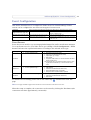
Event type
A set of parameters describing how and when the Video Server is to perform certain actions
Triggered Event (see page 34)
- the circumstances that start an event
Scheduled Event (see page 35) - the circumstances that start an event
- what occurs when the event runs
Action
e.g. at a signal from an external device, such as a door
switch or a motion sensor
e.g. at a pre-programmed time
e.g. video images uploaded to an FTP server, email notification sent, etc.
Event Servers
Event Servers are used for e.g. receiving uploaded image files and/or notification messages.
To set up Event server for your Video Server, go to Setup > Event Configuration > Event
Servers and enter the required information according to the selected server type.
Server type
Purpose
•
•
•
•
•
• receives notification messages
• receives uploaded images
•
•
•
•
•
• receives notification messages
• Descriptive name of your choice
• User Name and Password (for TCP server)
• Port number
FTP Server
HTTP Server
TCP Server
Information required
• receives uploaded images
Descriptive name of your choice
User Name and Password (to FTP server)
Upload path, e.g. images/
Port number
Use passive mode if there is a firewall between the Video
Server and FTP server
•Use temporary file if your FTP server doesn’t allow an existing file to be overwritten by a new file with the same
name.
Descriptive name of your choice
URL (address)
User Name and Password (to HTTP server)
Proxy address/Proxy port (if required)
Proxy User Name and Password (if required)
For details on each setting, please refer to the online help
page.
available from each web
Note: Pre-trigger and Post-trigger buffers will be lost if the connection to the event server fails.
When the setup is complete, the connection can be tested by clicking the Test button (the
connection test takes approximately 10 seconds).
33
34 AXIS 241Q/S/QA/SA - Event Configuration
Event Types
An Event Type is a set of
parameters describing how
and when the Video Server
is to perform certain
actions.
Example: If somebody walks past
the connected camera, and an event
has been configured to act on this,
the Video Server can e.g. record and
send video images to an FTP server, or send a notification email to a pre-configured email address with a pre-configured message. Video images can be sent as an attachment with the email.
Triggered Event
A triggered event is activated by e.g:
•
•
•
•
•
a push button connected to an input port on the Video Server
detected movement in a configured motion detection window
a lost signal from a video source
a manually activated action e.g. from an action button in the web interface
on restart (reboot) after e.g. power loss
How to set up a triggered event
This example describes how to set the Video Server to upload images when the main door
is opened:
1. Click Add triggered on the Event types page.
2. Enter a descriptive name for the event, e.g. Main door.
3. Set the priority - High, Normal or Low (see online help files).
4. Select which Video Source the event is to act on, e.g. Video 1 on Main door.
5. Set the Respond to Trigger... parameters when the event is to be active,
e.g. only after office hours
6. Select the trigger alternative from the Triggered by... drop-down list,
e.g. an Input port with a connected sensor if the door is opened.
7. Set the When Triggered... parameters, i.e. set what the Video Server should do if
the main door is opened, e.g. upload images to an FTP server.
8. Click OK to save the event in the Event Types list.
Please see the online help
for descriptions of each available option.
AXIS 241Q/S/QA/SA - Event Configuration
Pre-trigger and Post-trigger buffers
This function is very useful when checking to see what happened immediately before and
after a trigger, e.g. 2 minutes before and after a door was opened. Check the Upload
images checkbox under Event Types > Add Triggered... > When triggered... to expand
the web page with the available options.
Buffer size - AXIS 241Q/QA - up to 36 MB buffer; AXIS 241S/SA - up to 9 MB buffer.
The maximum length of time of the pre-/post-buffer depends on the selected image size
and frame rate.
Include pre-trigger buffer - images stored internally in the server from the time
immediately preceding the trigger. Check the box to enable the pre-trigger buffer, enter the
desired length of time and specify the required image frequency.
Include post-trigger buffer - contains images from the time immediately after the trigger.
Configure as for pre-trigger.
Note: If the pre- or post-buffer is too large for the Video Server's internal memory, the frame rate will be reduced
and individual images may be missing. If this occurs, an entry will be created in the unit's log file.
Continue image upload (unbuffered) - enable the upload of images for a fixed length of
time. Specify the length of time for the uploaded recording, in seconds, minutes or hours,
or for as long as the trigger is active. Finally, set the desired image frequency to the
maximum (the maximum available) or to a specified frame rate. The frame rate will be the
best possible, but might not be as high as specified, especially if uploading via a slow
connection.
Scheduled Event
A Scheduled event can be activated at pre-set times, in a repeating pattern on selected
weekdays.
How to set up a scheduled event
This example describes how to set the Video Server to send an email notification with
saved images from a set time:
1. Click Add scheduled on the Event types page.
2. Enter a descriptive name for the event, e.g. Scheduled email.
3. Set the priority (High, Normal or Low).
4. Select the video source i.e. the source the event should act on,
e.g. Video 2 in Storage room.
5. Set the Activation Time parameters (24h clock) when the event should be active,
e.g. start on Sundays at 13.00 with a duration of 12 hours.
6. Set the When Activated... parameters i.e. set what the Video Server should do at
the specified time e.g. send uploaded images to an email address.
7. Click OK to save the Event in the Event Types list.
35
36 AXIS 241Q/S/QA/SA - Event Configuration
Please see the online help
for descriptions of each available option.
Motion Detection
In the Motion Detection menu, you can configure the video source(s) for motion detection.
The motion detection feature is used to generate an alarm whenever movement occurs (or
stops) in the image. The AXIS 241Q/QA can use a maximum of 40 Include/Exclude
windows, whilst the AXIS 241S/SA can use a maximum of 10.
• Include windows target specific areas within the image
• Exclude windows are areas to be ignored within the Include window
Once configured, the motion detection windows will appear in a list when motion
detection is selected to trigger an event. See How to set up a triggered event above.
Note: Using the motion detection feature may decrease overall performance in the Video Server.
How to configure Motion Detection
This example describes how to configure Video 1 for motion detection:
1. Click Motion Detection in the Event Configuration menu.
2. Select video source 1 from the menu (AXIS 241Q/QA only).
3. Click the Configure Included Windows radio button.
4. Click New.
5. Enter a descriptive name of your choice under Windows name.
AXIS 241Q/S/QA/SA - Event Configuration
6. Adjust the size (drag the bottom right-hand corner) and position (click on the text
at the top and drag to the desired position).
7. Adjust the Object size, History and Sensitivity profile sliders (see table below for
details). Any detected motion within an active window is then indicated by red
peaks in the Activity window (the active window has a red frame).
8. Click Save.
If there are parts of the Include window that you wish to exclude, click the
Configure Excluded Windows radio button and repeat steps 1-8 above.
Please use the online help
for descriptions of each available option.
Parameter
Size
History
Sensitivity
High
Only very large objects
trigger motion detection
An object that appears in the region will
trigger the motion detection for a long
period
Ordinary colored objects against ordinary
backgrounds will trigger the motion
detection
Low
Even very small objects
trigger motion detection
An object that appears in the region will
trigger motion detection for only a very
short period
Only very bright objects against a dark
background will trigger motion detection
Medium to High
Medium to High
Default values Low
Examples:
•
•
•
Avoid triggering on small objects in the image by selecting a high size level.
To trigger motion detection as long as there is activity in the area, select a high history level.
To only detect flashing light, low sensitivity can be selected. In other cases, a high sensitivity level is
recommended.
Port Status
Under Event Configuration > Port Status, there is a list that shows the status for the
connected inputs and outputs of the Video Server. This is for the benefit of an operator,
who cannot access the System Options section.
Example: If the Normal state for a push button connected to an input is set to Open circuit, as long as the button is
not pushed, the state is inactive. If the button is pushed, the state of the input changes to active.
37
38 AXIS 241Q/S/QA/SA - Pan Tilt Zoom
Pan Tilt Zoom
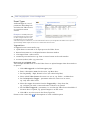
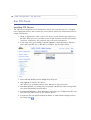
Installing PTZ Devices
The Video Server supports several PTZ devices. Please see www.axis.com for a complete
list of supported devices, and to obtain the correct driver. Follow the instructions below to
install a PTZ device:
1. Using an appropriate cable, connect the device to your selected port (RS-232 or
RS-485). These ports are available via the D-Sub connector and the I/O terminal
connector, respectively. See pages 54 and 56 for more information.
2. In the setup tools, go to Setup > System Options > Ports & Devices and then
select either port RS-232 or RS-485 to configure. See the figure below.
3. Select Pan Tilt Zoom from the Usage drop-down list.
4. Click Upload to install a PTZ driver.
(PTZ drivers are available from the Axis Web site at www.axis.com)
5. Click Port Options... to modify the port settings. The default values correspond to
the values specified by the PTZ driver.
6. From System Options > Ports & Devices, select the port configured for PTZ and
then select the video source to use with the device.
7. If required, click the Advanced Options button to make further settings and see
the online help.
AXIS 241Q/S/QA/SA - Pan Tilt Zoom
Note: Advanced users and application developers can also use the Axis Application Programming Interface and
HTTP specification for generic control of PTZ devices using CGI commands or a TCP/IP client. Please refer to
the Axis Website at www.axis.com for further information.
PTZ Configuration
Once PTZ has been installed for the Video Server, PTZ Configuration now appears in the
menu to the left along with the following submenus.
Preset Positions
A preset position is a pre-defined camera view than can be used to quickly move the
camera to a specific location.
From Preset Position Setup, use the Pan, Tilt and Zoom (PTZ) controls to steer the camera
to the required position. When satisfied with the camera's position, enter a descriptive
name. The camera position, iris and focus settings are then saved as a preset position.
The position can be assumed at any time, by selecting the preset's name from the Preset
positions drop-down list. Preset positions can be selected in Live View, from events and in
Sequence mode.
One position can be set as the Home position, which is readily accessible by clicking in the
box beside Use current position as Home. The position's name will then have (H) added,
e.g. Office Entrance (H).
39
40 AXIS 241Q/S/QA/SA - Pan Tilt Zoom
PTZ Controls
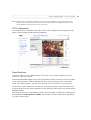
If the Video Server has been appropriately configured, the Live View page will display the
controls available for the installed Pan Tilt Zoom (PTZ) device. The administrator can
enable/disable the controls for specified users.
Preset positions
Video sources
Tilt bar (relative)
The exact controls shown depends on the make and model of PTZ device. There may be
e.g. Focus and Iris bars available as well, but the most common controls are;
• the Pan bar - moves the camera to the right and left
• the Tilt bar - tips the camera up and down
• the Zoom bar - zooms the view in and out. Note that this is only available if the
camera is fitted with a zoom lens.
• the Iris bar - adjusts the brightness of the image
Clicking on the bars themselves or on the arrows at the end of the bars will move the
camera to a new position. The type of movement and the location of this new position
depends on the type of PTZ driver.
When controlling the camera using a relative PTZ driver (see the bars in the illustration
above) the new position will be relative to the previous position, e.g. left of, below, above,
etc. Clicking the bar further from the center results in a larger movement.
AXIS 241Q/S/QA/SA - Pan Tilt Zoom
In contrast, when using an absolute driver, each
position on the bar (see right) represents a defined
position in the device’s range of movement, with the center of the bar representing the
point midway between the two extremes of movement.
Clicking a position directly on the bar moves the camera directly to the new position in
one smooth movement. Clicking on the arrows at the ends of a bar causes a stepped,
incremental change.
Using CGI links to control PTZ devices
User-defined CGI links on the Live View page can be used to issue HTTP API requests, e.g.
PTZ commands. These links are configured in the Live View Layout settings, see page 11.
PTZ Control Modes
The PTZ device can also be controlled using click-in-image movement, which has two
different types of navigation; Center and Joystick.
Center mode means that when clicking in the image, the camera view will center on the
absolute position that was clicked.
Joystick mode moves the camera in the direction of the mouse pointer. By clicking and
holding the mouse button down in the image, the PTZ device moves the camera in that
direction, relative to the center of the image. The further from the center the image is
clicked, the greater the movement. The camera stops moving when the button is released.
Control Panel
The focus and iris (image brightness) can be adjusted manually by using the control bars,
or they can be set for automatic adjustment, by clicking the Auto iris and Auto focus
buttons.
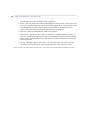
To access the Auto iris and Auto focus buttons, click on the Control
panel button. The menu to the right will then appear in the upper left
hand corner of the screen.
There are also driver specific shortcuts that can appear in the Control
Panel. In the screen to the right, a driver has been installed that
brings up the Wiper shortcut button, which allows the user to
configure and use a windshield wiping action with the Video Server.
41
42 AXIS 241Q/S/QA/SA - Pan Tilt Zoom
Preset Positions
Also available with many PTZ devices are Preset positions. These presets are selected from
the drop-down Source list on the Live View page and will move and/or zoom the camera
to a pre-defined position, i.e. to cover an area of particular interest. Events can also be
configured to go to preset positions when triggered. For information on setting up preset
positions, please see Preset Positions, on page 39 and the online help.
Guard Tour
A guard tour moves between chosen Preset Positions, one-by-one, in a pre-determined
order or randomly, and for configurable time periods. Unlike the Sequence Mode, which is
a viewing application under Live View Config (see Live View Config, on page 29), the
guard tour sequence will keep running after the user has logged off or closed the Web
browser.
Advanced
Device Settings - The device settings window is for driver specific settings, so the
appearance of this window can vary depending on the driver installed. Options that can be
configured include: Driver Specific Settings for Video Source 1, Mechanical Limits for
Moving Video Source 1, Light Control for Video Source 1, and Extended Driver Specific
Settings for Video Source 1.
Ctrl Panel - The Panel View Settings window contains tools for creating and saving short
command buttons that are located under the Control panel. These buttons provide direct
access to various built-in auxiliary commands provided by the PTZ driver and are
displayed in the PTZ Panel.
Limits - Define the pan, tilt, zoom and focus limits for the Video Server. Movements to the
left and right, up and down can be restricted to narrow the area under surveillance. The
near focus limit can be set to avoid focusing on objects too close to the camera.
AXIS 241Q/S/QA/SA - Pan Tilt Zoom
OSD Menu - If the PTZ unit supports an internal configuration menu, this can be accessed
using the On-Screen Display (OSD). Configure the analog camera by opening and
navigating through its internal menu in this display.
PTZ Control Queue
Use the PTZ Control Queue window to enable and disable PTZ queueing. This window
allows you to set up a queue for viewers wanting to access the Video Server, and limits the
number of viewers and the length of time each viewer can access and control the video
stream. For more information on how to set up the control queue, please see the online
help.
Note also that a viewer who belongs to a group (see Security, on page 45) that has a
higher PTZ priority can go in front of other users in the queue and take control of the
Video Server.
The order of priority for taking control of the queue is listed below:
1. Administrators - An administrator may take the PTZ control regardless of who is
currently first in queue. The administrator will be removed from queue 60
43
44 AXIS 241Q/S/QA/SA - Pan Tilt Zoom
seconds after the their last PTZ control command.
2. Event - You can set up the AXIS 241Q/S/QA/SA to take control of the queue and
move to a specific position for 20 seconds when triggered by an alarm. The event
will immediately be place first in queue except when an administrator is in
control. For more information see Triggered Event, on page 34.
3. Operator - Same as administrator with lower priority.
4. Guard Tour - Guard tour has control of PTZ for an indefinite period of time. It
may be overridden by, Operator, Event or administrator. Guard Tour will resume
when higher priority groups leaves the queue. For more information see Guard
Tour, on page 42.
5. Viewer - Multiple viewers will need to wait for their turn. The viewer has 60
seconds to control PTZ until control is passed to the next viewer in queue.
Note: In order to be able to identify different users in the viewer group, cookies need to be enabled on the client.
AXIS 241Q/S/QA/SA - System Options
System Options
Security
User access control is enabled by default, when the administrator sets the root password on
first access. New users are authorized with user names and passwords, or the administrator
can choose to allow anonymous viewer login to the Live View page, as described below:
Users - the user list displays the authorized users and access levels:
Viewer
Provides the lowest level of access, which only allows the user access to the Live View page
Operator
An Operator can view the Live View page, create and modify event types and adjust certain other
settings. The Operator does not have access to the Systems Options configuration pages.
Administrator
An administrator has unrestricted access to the Setup Tools and can determine the registration of
all other users.
User Settings - check the corresponding checkboxes to enable:
• Anonymous viewer login - allows any viewer direct access to the Live View page.
• Anonymous PTZ control login - allows any viewer access to the Pan Tilt Zoom controllers on the Live View page (if Pan/Tilt/Zoom is available).
IP Address Filtering
Checking the Enable IP address filtering box enables the IP address filtering function. Up
to 256 IP address entries may be specified (a single entry can contain multiple IP
addresses). Click the Add button to add new filtered addresses.
When the IP address filter is enabled, addresses added to the list are set as allowed or
denied addresses. All other IP addresses not in this list will then be allowed or denied
access accordingly, i.e. if the addresses in the list are allowed, then all others are denied
access, and vice versa. See also the online help for more information.
Note that users from IP addresses that will be allowed must also be registered with the
appropriate access rights (User, Operator or Administrator). This is done from Setup >
System Options > Security > Users.
Referrals - to prevent unauthorized sources from including the video stream from the
Video Server into external Web pages, check the Referrals box and enter the IP address or
Host name of the computer that hosts the Web pages with the included video stream.
Multiple IP addresses/host names can be defined and are separated by semicolons(;)
45
46 AXIS 241Q/S/QA/SA - System Options
Notes:
•If the referrals feature is enabled and you wish to also allow normal access to the Live View
page, the product's own IP address or host name must be added to the list of allowed referrers.
•Restricting referrers has no effect on an MPEG-4 video stream. To restrict an MPEG-4 stream, IP
address filtering must be enabled.
•Restricting referrers is of greatest value when not using IP address filtering. If IP address filtering is used, then the allowed referrers are automatically restricted to those allowed IP
addresses.
HTTPS
For greater security, the Video Server can be configured to use HTTPS (Hypertext Transfer
Protocol over SSL (Secure Socket Layer)). That is, all communication that would otherwise
go via HTTP will instead go via an encrypted HTTPS connection.
Certificate - to use HTTPS for communication with the Video Server, a Certificate must be
created using one of these methods:
• A self-signed certificate can be created in the Video Server, but this does not guarantee
the same level of security as an official certificate.
• An official certificate issued by a CA (Certificate Authority). A CA issues and manages
security credentials and public keys for message encryption.
1. Click either Create self-signed certificate or Create Certificate Request and enter
the required information in the provided fields
2. Click OK.
3. Create self-signed certificate generates and installs a certificate which will be
displayed under Installed Certificate.
Create Certificate Request generates a PEM formatted request which you copy
and send to a CA for signing. When the signed certificate is returned, click Install
signed certificate... to install the certificate in the Video Server.
4. Set the HTTPS Connection Policy for the administrator, Operator and Viewer to
enable HTTPS connection (set to HTTP by default)
Please refer to the home page of your preferred CA for information on where to send the
request etc. For more information, please see the online help
Date & Time
Current Server Time - displays the current date and time (24h clock). The time can be
displayed in 12h clock format in overlay images.
New Server Time - Select your time zone from the drop-down list and check the daylight
saving time changes, if desired.
AXIS 241Q/S/QA/SA - System Options
From the Time Mode section, select the preferred method to use for setting the time:
• Synchronize with computer time - sets the time from the clock on your computer.
• Synchronize with NTP Server - the Video Server will obtain the time from an NTP
server every 60 minutes. Specify the NTP server's IP address or host name.
Note: Note that if using a host name for the NTP server, a DNS server must be configured under TCP/IP settings.
See Network > Advanced TCP/IP Settings below.
• Set manually - this option allows you to manually set the time and date.
Date & Time Format Used in Images - specify the formats for the date and time (12h or
24h) displayed in the Live View video streams.
Use the predefined formats or use your own custom date and time formats. See File
for information on how to create
Naming & Date/Time Formats in the online help
your own file formats.
Network - Basic TCP/IP Settings
IP Address Configuration
The IP address of the Video Server can be set automatically via DHCP, or a fixed IP address
can be set manually. DHCP is enabled by default. To use a fixed IP address, you must also
enter the correct subnet mask and default router.
Notes:
•DHCP is a protocol for automatic IP address assignment on a network. IP address assignment via
DHCP may lead to the situation where the IP address changes and you lose contact. Configure
the options for notification of IP address change (under Services) to receive notification from
the Video Server when the IP address changes.
•Alternatively, if your DHCP server can update a DNS server, you can access the Video Server by
host name which is always the same, regardless of the IP address.
Services
Options for notification of IP address change - if the IP address for the Video Server
changes, e.g. automatically by DHCP, you can choose to be notified of the change. Click
Settings... and enter the required information.
AXIS Internet Dynamic DNS Service - If the Video Server has been registered with the
Axis Internet Dynamic DNS service and the IP address for the product changes, the service
is updated to reflect the change. Check the box to enable/disable automatic updates.
The domain name currently registered at the Axis Internet Dynamic DNS service for your
product can at any time be removed. To do this click Settings... and follow the
instructions. For more information, please refer to the online help
47
48 AXIS 241Q/S/QA/SA - System Options
Network - Advanced TCP/IP Settings
DNS Configuration
DNS (Domain Name Service) provides the translation of host names to IP addresses on
your network.
Obtain DNS server address via DHCP - automatically use the DNS server settings provided
by the DHCP server. Click the View button to see the current settings.
Use the following DNS server address - enter the desired DNS server by specifying the
following:
Domain name - enter the domain(s) to search for the host name used by the Video Server.
Multiple domains can be separated by semicolons (;). The host name is always the first part
of a Fully Qualified Domain Name, e.g. myserver is the host name in the Fully Qualified
Domain Name myserver.mycompany.com where mycompany.com is the Domain name.
DNS servers - enter the IP addresses of the primary and secondary DNS servers.
NTP
Obtain NTP server address via DHCP - use a DHCP server to automatically find an NTP
server to synchronize clock of the Video Server with the other devices on the network
Use the following NTP server address - use the host name or IP address of a specific NTP
server for time synchronization.
Host Name Configuration
The Video Server can be accessed using a host name, instead of an IP address. The host
name is usually the same as the assigned DNS Name.
For more information, please see the online help
Link-Local Address
This is enabled by default and assigns the Video Server an additional IP address for use
with UPnP™. The Video Server can have both a Link-Local IP and a static/DHCP-supplied
IP address at the same time - these will not affect each other.
HTTP
The default HTTP port number (80) can be changed to any port within the range
1024-65535. This is useful for e.g. simple port mapping.
AXIS 241Q/S/QA/SA - System Options
HTTPS
The default HTTP port number (443) can be changed to any port within the range
1024-65535. This is useful for e.g. simple port mapping.
NAT traversal
Use NAT traversal when your video server is located on an intranet and you want to make
it available from the other side of a NAT router.
RTSP
The RTSP protocol allows a connecting client to start an MPEG-4 stream. Enter the RTSP
port number to use. The default setting is 554.
Network Traffic
The default setting is Auto-negotiate which means that the correct speed is automatically
selected. If necessary, you can set the connection speed by selecting it from the drop-down
list.
Maximum bandwidth - Specify, in Mbit/s or kbit/s, the maximum bandwidth that the
Video Server is allowed to use on your network. This is a useful function when connecting
your Video Server to busy or heavily loaded networks. The default setting is Unlimited.
Note: When using MPEG-4 as the video format, remember that setting a maximum bandwidth value here may
create problems for individual video streams if the maximum value is less than the sum of the bit rates set
for the video streams.
For more information, please see the online help
SOCKS
SOCKS is a networking proxy protocol. The Video Server can be configured to use a SOCKS
server to reach networks on the other side of a firewall/proxy server. This functionality is
useful if the Video Server is located on a local network behind a firewall, but notifications,
uploads, alarms, etc., need to be sent to a destination outside the local network (e.g. to the
Internet).
SMTP (email)
Enter the host names or addresses for your primary and secondary mail servers in the fields
provided, to enable event and error email messages from the Video Server to predefined
addresses, via SMTP.
If the mail server requires SMTP authentication, check the box for Use authentication to
log in to this server and enter the user name and password used for logging in. Several
different methods of authentication are available. See the online help for more
information.
49
50 AXIS 241Q/S/QA/SA - System Options
SNMP
The Simple Network Management Protocol (SNMP) allows the remote management of
network devices. Select the version of SNMP to use, depending on the level of security
required. Select the version of SNMP to use, by checking the appropriate box. The three
levels of security are:
• SNMP V1 - includes no security
• SNMP V2c - uses very simple security, e.g. community name as password
• SNMP V3 - provides encryption and secure passwords. Use with HTTPS.
If using V1 and V2c, enter the community name for read-only access to all supported
SNMP objects (except the root password and other objects that require write access).
Default value = public. You can also specify the community name for read/write access to
all supported SNMP objects (except read-only objects). Default value = pass.
If using HTTPS enter the password if it has not already been set. To set the password again,
the Video Server must be reset to the factory default settings.
UPnP™
The Video Server includes support for UPnP™ in Windows ME and Windows XP. UPnP™ is
enabled by default.
Note: UPnP™ must be installed on your workstation if running Windows XP. To do this, open the Control Panel
from the Start Menu and select Add/Remove Programs. Select Add/Remove Windows Components and
open the Networking Services section. Click Details and then select UPnP™ as the service to add.
RTP (Multicast)/MPEG-4
These settings are the IP address, port number, and Time-To-Live value to use for the
media stream(s) in multicast MPEG-4 format. Only certain IP addresses and port numbers
should be used for multicast streams. For more information, please see the online help.
Ports & Devices
I/O Ports - the pinout, interface support and the control and monitoring functions
provided by this connector are described in Unit Connectors, on page 54.
RS232 - The COM port RS-232 on the AXIS 241Q/S/QA/SA supports several operational
modes listed on this page. For more information, please see COM Ports RS-232 and
RS-485, on page 56.
RS485 - The COM ports on the AXIS 241Q/S/QA/SA supports several operational modes
listed on this page. For more information, please see COM Ports RS-232 and RS-485, on
page 56.
AXIS 241Q/S/QA/SA - System Options
Maintenance
• Restart - The unit is restarted without changing any of the settings. Use this method if
the unit is not behaving as expected.
• Restore - The unit is restarted and most current settings are reset to factory default values. The settings that will not be reset are as follows:
• the boot protocol (DHCP or static)
• the static IP address
• the default router
• the subnet mask
• the system time
• Default - The default button should be used with caution. Pressing this will return all of
the Video Server's settings to the factory default values (including the IP address)
Upgrade Server - See Upgrading the Firmware, on page 58.
Backup - To take a backup of all of the parameters, and any user-defined scripts, click this
button. If necessary, it is then possible to return to a previous configuration if settings are
changed and there is unexpected behavior.
Restore - click the Browse button to locate the saved backup file (see above) and then click
the Restore button. The settings will be restored to the previous configuration.
Note: Backup and Restore can only be used on the same unit running the same firmware. This feature is not
intended for multi-configurations or for firmware upgrades.
51
52 AXIS 241Q/S/QA/SA - System Options
Support
The support overview page provides valuable information on troubleshooting and contact
information, should you require technical assistance.
The System Overview gives a quick look over the status of the camera.
Logs & Reports - when contacting Axis support, please be sure to provide a valid Server
Report with your query.
Information - The Log report and the Parameter List also provide valuable information
for troubleshooting and when contacting Axis’ support service.
Configuration:
Log Level for Log Files - from the drop-down list, select the level of information to be
added to the Log file
Log Level for Email - from the drop-down list, select the level of information to send as
email and enter the destination email address.
Advanced
Scripting is an advanced function that provides the possibility to customize and use
scripts. This function is a very powerful tool.
Caution!
Improper use may cause unexpected behavior or even cause loss of contact with the
unit. If a script does cause problems, reset the unit to its factory default settings. A
backup file may be of use to return the unit to its latest configuration).
Axis strongly recommends that you do not use this function unless you fully
understand the consequences. Note that Axis support does not provide assistance for
problems with customized scripts.
For more information, please visit the Developer pages at www.axis.com/developer
Plain Config - this function is for the advanced user with experience of Axis Video
Server configuration. All parameters can be set and modified from this page,
including the audio encoding format. Help is available from the standard help pages.
AXIS 241Q/S/QA/SA - System Options
Resetting to the Factory Default Settings
To reset the Video Server to the original default settings, go to the System Options >
Maintenance web page (described in Maintenance, on page 51) or use the control button
on the Video Server, as described below:
Using the Control Button
Follow the instructions below to reset the Video Server to the factory default settings using
the Control Button.
1. Switch off the Video Server by
disconnecting power.
2. Press and hold the Control
Button while reconnecting the
power.
3. Keep the Control button
pressed until the Status
Indicator displays yellow (this
may take up to 15 seconds).
Status Indicator
Control Button
4. Release the Control Button.
5. When the Status Indicator changes to Green (may take up to 1 minute), the
process is complete and the Video Server has been reset.
6. Re-install the Video Server, as described in the Installation Guide.
53
54 AXIS 241Q/S/QA/SA - Unit Connectors
Unit Connectors
The following connectors are described in this section:
•
•
•
•
The D-Sub Connector, on page 54
The I/O Terminal Connector, on page 55
COM Ports RS-232 and RS-485, on page 56
Y/C to BNC Cable (AXIS 241S/SA only), on page 57
The D-Sub Connector
The Video Server provides one 9-pin D-sub connector, providing the physical interface for
an RS-232 port, used for connecting accessory equipment; such as stand-alone PTZ
devices for the remote control of connected video cameras.
Pin assignment table and pinout of the RS-232 connector:
Pin
Function
1
CD
2
- RXD
3
- TXD
4
DTR
5
GND
6
DSR
7
RTS
8
CTS
9
RI
1
2
6
3
7
4
8
5
9
AXIS 241Q/S/QA/SA - Unit Connectors
The I/O Terminal Connector
This section describes the pinout and interface support provided by the 12-pin I/O terminal
connector, which includes:
•
•
•
•
4 digital transistor outputs
4 digital inputs
an RS-485 interface
auxiliary power and GND
The terminal connector is used in applications for e.g. motion detection, event triggering,
time lapse recording, alarm notification via email, image storage to FTP locations, etc.
• Inputs - e.g. a push button. If the button is pressed, the state changes, and the input will
be active (shown under Event Configuration > Port Status).
• Outputs - e.g. an alarm device that can be activated from Output buttons on the Live
View page or as an action to an Event Type. The output will show as active (in Event
Configuration > Port Status), if the device is activated.
Pin
Function
Description
1
Auxiliary DC Power Input
7-20 VDC/min 8W. Electrically connected in parallel with PS-k power
connector, provides an auxiliary connector for mains power to the unit.
If the product is powered via this pin, use a fuse (Fuse rating: 1A Slow).
This pin can also be used to power auxiliary equipment, max 100mA
2
GND
3
Digital Input 1
4
Digital Input 2
5
Digital Input 3
6
Digital Input 4
7
Transistor Output
8
Transistor Output
9
Transistor Output
10
Transistor Output
11
RS-485 - A (non-inverting)
12
RS-485 - B (inverting)
Connect to GND to activate or leave floating (or unconnected) to
deactivate.
With a maximum load of 100mA and maximum voltage of 24V DC, this
output has an open-collector NPN transistor with the emitter
connected to pin 2 (GND). If it is to be used with an external relay, a
diode must be connected in parallel with the load for protection
against any voltage transients.
A half-duplex RS-485 interface for controlling auxiliary equipment,
e g. PTZ devices.
The Video Server includes one (green) 12-pin connector block. Connect input/output
devices to this block:
1. Loosen the corresponding screw on top of the pin on the connector block (see the
table above to determine which pin to use).
2. Push the cable into the connector block and secure it by fastening the screw.
3. Once all devices are connected, connect the connector block to the Video Server’s
terminal connector.
55
56 AXIS 241Q/S/QA/SA - Unit Connectors
Schematic Diagram - I/O Terminal Connector
Switch
Mode
Power
Supply
3.3V
Video Server
Video Server
+
o
PS-K 9W
o
!
1
o
GND 2 o
e.g. push button
!
3o
4o
5o
Relay
o
o
o
Device
oo
6o
o
7
RS-485
A
B
!
8o
!
9o
!
10o
11o
12o
GND PIN 5 o
!
RS-232
D-SUB
!
COM Ports RS-232 and RS-485
The COM Ports RS-232 and RS-485 support several operational modes:
• Generic TCP/IP - enables the Video Server to receive status/data and send commands
via TCP/IP
• Generic HTTP - enables the Video Server to receive status/data and send commands via
HTTP
• Pan Tilt Zoom (PTZ) - for controlling a PTZ device. A PTZ device requires a driver for
its function. Drivers can be obtained from www.axis.com. Please see page 38 for information on how to connect PTZ devices.
AXIS 241Q/S/QA/SA - Unit Connectors
Y/C to BNC Cable (AXIS 241S/SA only)
The AXIS 241S/SA supports conversion from Y/C (S-video) to composite video using an
Y/C to BNC cable. The cable is available as an accessory - see the Axis Web site at:
http://www.axis.com. Follow these instructions to connect the Y/C to BNC cable:
1. Connect the BNC connector marked IN to the Video In connector on the Video
Server.
2. Connect the BNC connector marked OUT to the Video OUT connector on the
Video Server.
3. Connect the Y/C connector to the Y/C video unit (S-video).
4. Set the dip switches on the front panel of the unit to 1=on, 2=on, 3=off, 4=off.
5. Go to the AXIS 241S/SA Web pages under Setup > Video & Image > Video
Source and select Y/C (S-video) from the Physical connector drop-down list.
One female MiniDin 4-pol connector
split into two BNC connectors
Below is a description of how the cable is assembled for those who wish to use standard
components:
1. Use two male BNC connectors and one female 4-pole
MiniDin connector.
2. Connect pin 1, 2 and shield on the MiniDin connector to
the shield on the two BNC connectors.
3. Connect pin 3 (Y) on the MiniDin connector to centre pin
on one of the male BNC connectors, mark this BNC
connector with IN.
4. Connect pin 4 (C) on the MiniDin connector to centre pin
on the other male BNC connector, mark this BNC connector
with OUT.
The pins on the
MiniDin connector
57
58 AXIS 241Q/S/QA/SA - Troubleshooting
Troubleshooting
Checking the Firmware
Firmware is software that determines the functionality of the Video Server. One of your
first actions when troubleshooting a problem should be to check the currently installed
version. The latest version may contain a correction that fixes your particular problem. The
current firmware version in your Video Server can be seen under Setup > Basic
Configuration.
Upgrading the Firmware
When you download firmware from the Axis Web site, your Axis product will receive the
latest available functionality. Always read the upgrade instructions and release notes
available with each new release, before updating the firmware.
New firmware can be downloaded to the Video Server over the network.
Note: Pre-configured and customized settings will be retained for use when the new firmware is running (provided the features are available in the new firmware) although this is not guaranteed by Axis Communications.
1. Save the firmware file to your computer. The latest version of the Video Server
firmware is available free of charge from the Axis Web site at
www.axis.com/techsup or from your local distributor.
2. Go to Setup > System Options > Maintenance in the Video Server’s Web pages.
3. In the Upgrade Server section and browse to the desired firmware file on your
computer. Click Upgrade.
Notes:
•Always read the upgrade instructions available with each new release, before updating the
firmware.
•After starting the process, you should always wait at least 20 minutes before restarting the
Video Server, even if you suspect the procedure has failed.
•Your dealer reserves the right to charge for any repair attributable to faulty updating by the
user.
AXIS 241Q/S/QA/SA - Troubleshooting
Emergency Recovery Procedure
If power or the network connection to the Video Server is lost during the upgrade, the
process will fail and the unit will become unresponsive. A flashing red Status LED indicates
a failed upgrade. To recover the unit, follow the steps below. The serial number is found on
the underside label on the product casing.
1. Unix/Linux - From the command line, type the following:
arp -s <IP address of Video Server> <Serial number> temp
ping -s 408 <IP address of Video Server>
Windows - From a command/DOS prompt, type the following:
arp -s <IP address of Video Server> <Serial number>
ping -l 408 -t <IP address of Video Server>
2. If the unit does not reply within a few seconds, restart it and wait for a reply. Press
CTRL+C to stop Ping.
3. Open a browser and type in the Video Server’s IP address. In the page that appears, use
the Browse button to select the upgrade file to use, e.g. axis241qa.bin or axis241sa.bin.
Then click the Load button to restart the upgrade process.
4. After the upgrade has completed (1-10 minutes), the unit will automatically restart and
show a steady green on the Power and Status LEDs and flashing green or amber on the
Network LED.
5. Reinstall the Video Server.
If the emergency recovery procedure does not get the Video Server up and running again,
please contact Axis support at www.axis.com/techsup/
Support
If you contact Axis support, please help us help you resolve your problems expediently by
providing a server report, log file and a brief description of the problem.
Server Report - go to Setup > System Options > Support Overview. The server report
contains important information about the server and its software, as well as a list of the
current parameters.
Log file - go to Setup > System Options > Logs & Reports. The Log file records events
within the unit since the last restart of the system and can prove a useful diagnostic tool
for troubleshooting.
59
60 AXIS 241Q/S/QA/SA - Troubleshooting
Symptoms, Possible Causes and Remedial ActionsI
Problems setting the IP address
Using ARP/Ping - the IP address Restart the server and try again. Ensure also the ping length is set to 408. (See AXIS
must be set within two minutes 241Q/S/QA/SA Video Server Installation Guide)
after power has been applied to
the Video Server
The Video Server is located on a If the IP address intended for the Video Server and the IP address of your computer are located
different subnet.
on different subnets, you will not be able to set the IP address. Contact your network administrator for an IP address on the same subnet as the computer you are performing the installation
from.
The IP address is being used by
another device
Disconnect power from the Video Server.
Run the Ping command (in a Command/DOS window, type ping <IP address of unit>
If you receive: Reply from <IP address>: bytes = 32; time = 10 ms..... - this means that the IP
address may already be in use by another device on your network. You must obtain a new IP
address and reinstall the unit.
If you receive: Request timed out - this means that the IP address is available for use with your
Video Server. In this case, check all cabling and reinstall the unit.
The Video Server cannot be accessed from a Web browser
Cannot log in
If the Video Server has been configured to use HTTPS, check that the protocol in the URL used
to access the unit is correct. You may need to type this in manually (i.e. http or https) in the
browser’s address field.
The IP address has been changed 1) Move the Video Server to an isolated network or to one with no DHCP or BOOTP server. Set
by DHCP
the IP address again, using the ARP Ping command.
2) Access the unit and disable BOOTP and DHCP in the TCP/IP settings. Return the unit to the
main network. The unit now has a fixed IP address that will not change.
3) As an alternative to 2), if dynamic IP address via DHCP or BOOTP is required, select the
required service and then configure IP address change notification from the network settings.
Return the unit to the main network. The unit will now have a dynamic IP address, but will
notify you if the address changes.
Other networking problems
Test the network cable by connecting it to another network device, then Ping that device from
your workstation. See instructions above.
Cannot send notifications, uploads, alarms, etc, to a destination outside the local network
Firewall protection
The Video Server can be configured to use a SOCKS server to reach networks on the other side
of a firewall/proxy server
Your Video Server is accessible locally, but not externally
Firewall protection
Check the Internet firewall with your system administrator.
Default routers required
Check if you need to configure the default router settings.
The Internet site is too heavily
loaded
Use a script on your web server to relay images from the Video Server to the Internet.
The Power indicator is not constantly lit
Faulty power supply
Verify that you are using an AXIS PS-K power supply.
The Status indicator is flashing red and the server is inaccessible
A firmware upgrade has been
interrupted or the firmware has
been damaged in some other
way.
A rescue firmware is running in the product. First, set the IP address using AXIS IP utility or ARP
and Ping, (See AXIS 241Q/S/QA/SA Video Server Installation Guide). Then, using a browser,
access the unit and download the latest firmware to the product, see Upgrading the Firmware,
on page 58.
AXIS 241Q/S/QA/SA - Troubleshooting
No images displayed in the Web interface
Problem with AMC
(Internet Explorer only)
To enable the updating of images in Microsoft Internet Explorer, set your Web browser to allow
ActiveX controls. Also, make sure that AXIS Media Control (AMC) component is installed on
your workstation.
Installation of additional ActiveX Configure your Video Server to use a Java applet for updating the images under
component restricted or prohib- Live View Config > Layout > Default Viewer for Internet Explorer. See the online help for more
information.
ited
Video Image Problems
Image too dark or too light.
Check that the termination dip switch for the video source is set to the correct position. See
also the online help on Video Source Settings
Black borders around the video
image
Adjust the X and/or Y offset, in the Video Source Settings. See the online help for information.
Problems uploading own files
There is only limited space available for the upload of your own files. Try deleting one or more
existing files, to free up space
Missing images in uploads
This can occur when trying to use a larger image buffer than is actually available. Try lowering
the frame rate or the upload period.
Slow image update
Configuring e.g. pre-buffers, motion detection, high resolution images, high frame rates, etc.,
will reduce the performance of the Video Server.
Slow performance
Slow performance may be caused by e.g. heavy network traffic, multiple users accessing the
unit, low performance clients, use of features such as Motion Detection, Event handling, Image
rotation.
Bad snapshot images
Display incorrectly configured on In Display Properties, configure your display to show at least 65000 colors, i.e. at least 16-bit.
your workstation
Using only 16 or 256 colors on your display will produce dithering artifacts in the image.
Incorrect exposure in images
Incorrect line termination
If the Video Server is to be connected in loop through with other equipment, disable the input
termination by turning the corresponding DIP switch to OFF.
Problems with the MPEG-4 format
Lower frame rate than expected. Check with the administrator that there is enough bandwidth available. Check also the settings
for bit rate control, in the Video & Image > Advanced > MPEG-4 settings. Using an inappropriate video object type can also affect the frame rate. See the online help for more information.
Check in the AMC control panel applet (MPEG-4 tab) that video processing is not set to Decode
only I frames.
Lower the image resolution.
Reduce the number of applications running on the client computer.
No MPEG-4 displayed in the
client.
Check that the correct network interface is selected in the AMC control panel applet (network
tab).
Check that the relevant MPEG-4 connection methods are enabled in the AMC control panel
applet (network tab).
In the AMC control applet, select the MPEG-4 tab and click the button Set to default MPEG-4
decoder.
No multicast MPEG-4 displayed Check with your network administrator that the multicast addresses used by the
in the client.
Video Server are valid for your network.
Check with your network administrator to see if there is a firewall preventing viewing.
Multicast MPEG-4 only accessi- Check if your router supports multicasting, or if the router settings between the client and the
server need to be configured. The TTL (Time To Live) value may need to be increased.
ble by local clients.
61
62 AXIS 241Q/S/QA/SA - Troubleshooting
Poor rendering of MPEG-4
images.
Color depth set incorrectly on clients. Set to 16-bit or 32-bit color.
If text overlays are blurred, or if there are other rendering problems, you may need to enable
Advanced Video Rendering. This is done on the MPEG-4 tab in the AMC control panel applet.
Ensure that your graphics card is using the latest device driver. The latest drivers can usually be
downloaded from the manufacturer's web site.
Color saturation is different in
MPEG-4 and Motion JPEG.
Modify the settings for your graphics adapter. Please see the adapter's documentation for more
information.
No audio
Incorrect setup.
Check that the sound card in the PC and the connections to the speaker and microphone are
working. Ensure that the mute button is not pressed and the volume settings are correct.
Ensure that full-duplex is selected if you want to have two way audio communication.
Post Content Length in proxy
server.
The Post Content Length set in the proxy server is too low. Set the value of the Post Content
Length in your proxy server to 1MB or more. You may need to contact your system administrator to do this.
Full duplex not supported.
Sound card does not support full-duplex. For information on how to check if your sound card
supports full-duplex, please visit http://support.microsoft.com
Firewall or router settings.
AXIS 241Q/S/QA/SA works locally, but not externally. Check the Internet firewall settings with
your system administrator or reconfigure the default router settings.
DC power not enabled for micro- If the microphone has a built-in amplifier then the DC power must be enabled on the Audio
Settings page.
phone.
Audio volume too low/high
Volume settings incorrect.
The volume of the microphone or speaker connected to the AXIS 241Q/S/QA/SA is either too
high or too low. Change the volume for the speaker or microphone in the Live View page.
Input and output gain set incor- Change the input gain for the microphone and the output gain for the speaker to adjust the
audio levels on the Audio Settings page.
rectly.
Poor audio quality
Too many users.
Too many users/clients listening to audio from the AXIS 241Q/S/QA/SA may adversely affect
the sound quality.
User too close to microphone.
Enable the speech filter in Audio > Advanced Settings.
Feedback from speaker.
Enable the echo cancellation filter in Audio > Advanced Settings.
Background noise.
Adjust the noise cancellation threshold and attenuation to reduce background noise levels in
Audio > Advanced Settings.
CPU overloaded.
Reduce the number of listeners and viewers and decrease the image resolution and compression.
For additional assistance, please contact your reseller or check the product’s support pages
on the Axis Website at www.axis.com/techsup
AXIS 241Q/S/QA/SA - Technical Specifications
Technical Specifications
Item
Specification
Models
• AXIS 241S: 1-channel video server
• AXIS 241Q: 4-channel video server
• AXIS 241SA: 1-channel video server with audio
• AXIS 241QA: 4-channel video server with audio
Video compression
• Motion-JPEG, including single snapshot JPEG images.
• MPEG-4 Part2 (ISO/IEC 14496-2), Profiles: ASP and SP
Resolutions
• 4CIF, 2CIF Expanded, 2CIF, CIF, QCIF
• Maximum 768x576 (PAL) 704x480 (NTSC)
• Minimum 176x144 (PAL) 160x120 (NTSC)
Frame rates
• Motion JPEG: up to 25/30 fps in 4CIF (1 channel),
up to 25/30 fps in CIF (4 channels)
• MPEG-4: up to 25/30 fps in 2CIF (1 channel),
up to 17/20 fps in CIF (4 channels)
Video streaming
• Simultaneous Motion JPEG and MPEG-4
• Controllable frame rate and total bandwidth
• Constant and variable bit rate (MPEG-4)
Image settings
• Compression levels: 11 (Motion JPEG), 23 (MPEG-4)
• Rotation: 90o, 180o, 270o
• Aspect ratio correction
• Color and black/white
• Overlays: time, date, text, image
Audio features
Full-duplex audio. Select the encoding format from System Options:
ADPCM format at 24kbps, 8 kHz sampling (G.726 - select G723 from drop-down list)
ADPCM format at 32kbps, 8 kHz sampling (G.726 - select G721 from drop-down list)
PCM µ−law format at 64kbps, 8 kHz sampling (G.711 default)
Security
• Multiple user levels with password protection
• IP address filtering
• HTTPS encryption
Users
• 20 simultaneous viewers for Motion JPEG and/or unicast MPEG-4
• More than 20 viewers possible when using MPEG-4 multicast
Alarm and event
management
• Events triggered by built-in multi-window motion detection, external inputs or
according to set schedule
• Image uploads via FTP, email and HTTP
• Event notification via TCP, email, HTTP and external outputs
• Pre- and post-alarm buffer of 9 MB per channel (approx 4 min CIF video at 4 fps)
Pan/Tilt/Zoom
• Drivers for all supported PTZ units available from www.axis.com
• PTZ control queuing capability
63
64 AXIS 241Q/S/QA/SA - Technical Specifications
Item
Connectors
Specification
• Analog composite video, PAL/NTSC autosensing inputs
• AXIS 241Q/QA: 4 BNC video inputs
• AXIS 241S/SA: 1 BNC video input, 1 BNC output (loop through) or Y/C video input
• Ethernet 10BaseT/100BaseTX, RJ-45
• Terminal block: 4 alarm inputs, 4 output transistors (max 24V, 0.1 A), 2-wire
RS-485/422 (half-duplex), alternative voltage input
• D-Sub connector: RS-232
• Power: 9V DC
Line/Mic in
Single 3.5mm input for a mono microphone, or for line-in mono signal (only left
channel is used from a stereo signal).
Mic input - High sensitivity: max -38 dBu (27 mVpp)
Mic input - Low sensitivity: max -32 dBu (54 mVpp)
Line/Mic In (mono): max 1.5 dBu (2.6 Vpp)
DC power for an external microphone is supported through the input connector.
Line out
Mono audio output (line level). Can be connected to a PA system or active speaker
with a built-in amplifier. Headphones can also be attached.
Line Out: max 1.5 dBu (2.6 Vpp)
Line Out impedance: min 32 ohm
Processors and memory
• CPU: ETRAX-100 LX 32-bit
• Video processing and compression: ARTPEC-2 chip
• RAM AXIS 241Q/QA - 64MB
• RAM AXIS 241S/SA - 32MB
• Flash memory - 8 MB
Power
• External power adapter PS-K (included): 9V DC, 9W
• Via terminal connector: 7-20V DC, max 8W
Operating conditions
• Temperature: 5oC (41oF) to 50oC (122oF)
• Humidity: 20-80% RH (non-condensing)
System integration
support
• API for software integration available at www.axis.com includes HTTP API, AXIS
Media Control SDK
• Event trigger data in video stream
• Embedded scripting
• Access to serial port peripherals via HTTP/TCP
• Embedded operating system: Linux 2.4
Minimum web browsing
requirements
• Pentium III 500 MHz or higher or equivalent AMD
• 128 MB RAM
• AGP graphics card, DirectDraw, 32 MB video RAM
• Windows: XP, 2000, NT 4.0, ME or 98 NT4.0, ME or 98 is only Mjpeg (And not
supported by AMC according to README)
• DirectX 9.0 or later
• Internet Explorer I.E 6.x or later
For other operating systems and browsers, see www.axis.com/techsup
Supported protocols
HTTP, HTTPS, SSL/TLS*, TCP SNMPv1/v2c/v3 (MIB-II), RTSP, RTP, UDP, IGMP, RTCP,
SMTP, FTP, DHCP, UPnP, ARP, DNS, DynDNS, SOCKS
*This product includes software developed by the Open SSL Project for use in the
Open SSL Tool kit. See www.openssl.org
AXIS 241Q/S/QA/SA - Technical Specifications
Item
Specification
Approvals - EMC
• EN55022:1998+A1 (CISPR 22:1997+A1) Class B
• EN55024:1998+A1+A2
• EN61000-3-2:2000
• EN61000-3-3:1995+A1
• VCCI:2003, Class B, ITE (CISPR 22:1997+A1:2000, Class B)
• C-Tick AS/NZS 3548
• FCC part 15, Subpart B, Class B, demonstrated by compliance with EN55022:1998
(CISPR 22:1997) Class B
• ICES-003 Class B, demonstrated by compliance with EN 55022:1998, Class B
Approvals - Safety
• EN60950
• UL, CSA (PS-K power adapter)
Dimensions
• HxWxD = 42 x 140 x 155mm (1 11/16 x 5 1/2 x 6 1/8”)
• Weight: 540g (1.2 lb) excluding power adapter
Complimentary Software
• AXIS Media Control (AMC) - ActiveX component software required for Microsoft
Internet Explorer, installed automatically on first use.
• Optional: AXIS IP Utility - Windows installation
MPEG-4 licensing
License for one MPEG-4 encoder and one MPEG-4 decoder included. Additional
licenses available from Axis dealers.
65
66 AXIS 241Q/S/QA/SA - Technical Specifications
General performance considerations
When setting up your system, it is important to consider how various settings and
situations will affect performance. Some factors affect the amount of bandwidth (the bit
rate) required, others can affect the frame rate, and some will affect both. If the load on the
CPU reaches its maximum, this will also affect the frame rate.
The following factors are among the most important to consider:
• High image resolutions and/or lower compression levels result in larger images. Bandwidth affected.
• Access by large numbers of Motion JPEG and/or unicast MPEG-4 clients. Bandwidth
affected.
• Simultaneous viewing of different streams (resolution, compression, etc.) by different
clients. Frame rate and bandwidth affected.
• Accessing both Motion JPEG and MPEG-4 video streams simultaneously. Frame rate
and bandwidth affected.
• Heavy usage of event settings affects the CPU load. Frame rate affected.
• Enabled motion detection. Frame rate and bandwidth affected.
• Heavy network utilization due to poor infrastructure. Bandwidth affected
• Viewing on poorly performing client PC lowers perceived performance. Frame rate
affected.
• Access by large number of audio clients using full-duplex mode. Bandwidth affected.
Optimizing your system
To see the bandwidth and frame rate currently required by the video stream, the Video
Server provides a tool that can be used to display these values directly in the video image.
To do this, special format strings are added as part
of a text overlay. Simply add #r (average frame
rate in fps) and/or #b (average bandwidth in Kbps)
to the overlay.
For detailed instructions, please see the online help
for Video & Image > Overlay Settings, and the
help for File Naming & Date/Time Formats.
Important!
•The figures displayed here are the values as delivered by the server. If other restrictions are
currently in force, (e.g. bandwidth limitation) these values might not correspond to those
actually received by the client.
•For Motion JPEG, these values will only be accurate as long as no frame rate limit has been
specified.
AXIS 241Q/S/QA/SA - Technical Specifications
Frame rates - Motion JPEG
The following test results show the frame rates in frames/second (fps) for Motion JPEG
streams from the Video Server, using a compression level of 50%. Note that these values
are guidelines only - actual values may vary.
4CIF
fps (PAL/NTSC)
1 channel
fps (PAL/NTSC)
4 channels
25/30
8/10
2CIF expanded
25/30
13/15
2CIF
25/30
22/27
CIF
25/30
25/30
QCIF
25/30
25/30
Frame rates - MPEG-4
The following test results show the frame rates in frames/second (fps) for MPEG-4 streams
from the Video Server. Note that these values are guidelines only - actual values may vary.
The MPEG-4 test conditions:
• Compression level = 50%
• Video Object Type = Advanced Simple
• GOV structure = IP*
fps (PAL/NTSC)
1 channel
fps (PAL/NTSC)
4 channels
4CIF
17/21
3/4
2CIF expanded
17/21
4/5
2CIF
25/30
9/10
CIF
25/30
17/20
QCIF
25/30
25/30
*Note that setting the GOV structure to use “I-frames only” will increase the frame rate.
67
68 AXIS 241Q/S/QA/SA - Technical Specifications
Bandwidth
As there are many factors affecting bandwidth, it is very difficult to predict the required
amounts. The settings that affect bandwidth are:
•
•
•
•
•
•
•
the image resolution
the image compression
the frame rate
the MPEG-4 object type
the MPEG-4 GOV structure
the analog cameras connected to the Video Server
the audio settings
There are also factors in the monitored scene that will affect the bandwidth. These are:
• the amount of motion
• the image’s complexity
• the lighting conditions.
For MPEG-4, if there is only limited bandwidth available, and if this is more important
than the image quality, using a constant bit rate (CBR) is recommended. Use a variable bit
rate (VBR) if the image quality needs to be maintained at a higher level. If supported on the
network, consider also using MPEG-4 multicasting, as the bandwidth consumption will be
much lower.
AXIS 241Q/S/QA/SA - Glossary
Glossary
Active Speaker - a speaker with a built-in power
amplifier.
ActiveX - A control (or set of rules) used by a browser.
ActiveX controls are often downloaded and installed
automatically as required.
AMC - AXIS Media Control. The control required for
viewing video images in Internet Explorer. Installs
automatically on first use.
API - Application Programming Interface. The Axis API
can be used for integrating Axis products into other
applications.
ARP - Address Resolution Protocol. Used to associate an
IP address to a hardware MAC address. A request is
broadcast on the local network to find out what the MAC
address is for the IP address.
ARTPEC - Axis Real Time Picture Encoder - used for
image compression.
BOOTP - A protocol that can automatically configure a
network device (give it an IP address).
CGI - Common Gateway Interface. A set of rules (or a
program) that allows a Web Server to communicate with
other programs.
Client/Server - Describes the network relationship
between two computer programs, in which one, the client,
makes a service request from another - the server.
DC-Iris - This special type of iris is electrically controlled
by the Axis camera, to automatically regulate the amount
of light allowed to enter.
dB (Decibels) - A unit to measure sound level changes. A
3dB change is the smallest level change we can hear. A
3dB change is actually twice or half the audio power
level. A gain of 0dB will leave the signal level unchanged.
De-interlacing - De-interlacing is the process taking a
stream of interlaced frames and converting it to a stream
of progressive frames.
DSL - Digital Subscriber Line. A means of transferring
data via standard phone lines.
Ethernet - A widely used networking standard.
ETRAX - Axis' own microprocessor.
Firewall - A virtual barrier between a LAN (Local Area
Network) and other networks, e.g. the Internet.
FTP - File Transfer Protocol. Used for the simple transfer
of files to and from an FTP-server.
Full-duplex - Transmission of data, e.g. audio, in two
directions simultaneously.
G.711 - G.711 is the international standard for encoding
telephone audio on 64 kbps channel. It is a pulse code
modulation (PCM) scheme operating at 8 kHz sample rate.
G.726 - Frequently used speech-compression algorithm in
telecommunications due to its high perceived speech
quality and low resource requirements.
Half-duplex- A half-duplex link communicates in one
direction at a time only, much like a walkie-talkie. Two
way communication is possible, but not simultaneously.
HTTP - Hypertext Transfer Protocol. The set of rules for
exchanging files (text, images, sound, video, and other
files) on the World Wide Web.
HTTP-S (HTTPS)- An extension to the HTTP protocol to
support sending data securely over the World Wide Web.
Intranet - A private network limited to an organization or
corporation. Usually closed to external traffic.
IP - Internet Protocol. See TCP/IP.
IP address - A unique number used by a computer on the
network to allow it to be identified and found.
ISMA - Internet Streaming Media Alliance.
JPEG - A standard image format, used widely for
photographs. Also known as JPG.
LAN - A local area network (LAN) is a group of computers
and associated devices that typically share common
resources within a limited geographical area.
Linux - A popular operating system that is “open source”
and practically free of charge.
Lux - A standard unit for light measurement.
Mbit/s - Megabits per second. A unit for measuring
speeds in networks. A LAN might run at 10 or 100 Mbit/s.
MPEG-4 - A video compression standard that makes good
use of bandwidth, and which can provide DVD-quality
video streams at less than 1 Mbit/s.
Multicast - A bandwidth-conserving technology that
reduces bandwidth usage by simultaneously delivering a
single stream of information to multiple network
recipients.
PEM - Privacy Enhanced Mail. An early standard for
securing electronic mail. The PEM-format is often used
for representing an HTTPS certificate or certificate
request.
Ping - A small utility used for sending data packets to
network resources to check that they are working and that
the network is intact.
Pre/post alarm image - The images from immediately
before and after an alarm.
Protocol - A special set of rules governing how two
entities will communicate. Protocols are found at many
levels of communication, and there are hardware
protocols and software protocols.
Router - A device that determines the next network point
69
70 AXIS 241Q/S/QA/SA - Glossary
to which a packet should be forwarded on its way to its
final destination. A router is often included as part of a
network switch (see below).
RTP- Real-Time Transfer Protocol. A transfer protocol
designed for the delivery of live content, e.g. MPEG-4.
Simplex - In simplex operation, a network cable or
communications channel can only send information in
one direction; it's a “one-way street”.
SMTP - Simple Mail Transfer Protocol is the protocol used
to send e-mail across the Internet. SMTP authentication is
a way of allowing people outside of a domain to use an
SMTP server when sending e-mail.
SNMP - Simple Network Management Protocol. An
application layer protocol that facilitates the exchange of
management information between network devices. It is
part of the Transmission Control Protocol/Internet
Protocol (TCP/IP) protocol suite.
Subnet Mask - An IP address consists of two
components: the network address and the host address.
“Subnetting’ enables a network administrator to further
divide the host part of the address into two or more
subnets. The subnet mask identifies the subnet to which
an IP address belongs.
Switch - Whilst a simple hub transmits all data to all
devices connected to it, a switch only transmits the data
to the device it is specifically intended for.
TCP/IP - Transmission Control Protocol/Internet Protocol.
A suite of network protocols that determine how data is
transmitted. TCP/IP is used on many networks, including
the Internet. TCP keeps track of the individual packets of
information and IP contains the rules for how the packets
are actually sent and received.
UDP - The User Datagram Protocol is a communications
protocol that offers a limited amount of service when
messages are exchanged between computers in a network
that uses the Internet Protocol (IP). UDP is an alternative
to the Transmission Control Protocol (TCP) and, together
with IP, is also known as UDP/IP.
Unicast - Communication between a single sender and a
single receiver over a network. A new connection is
established for each new user.
URL - Uniform Resource Locator. An “address" on the
network.
Varifocal - A varifocal lens provides a wide range of
focal lengths, as opposed to a lens with a fixed focal
length, which only provides one.
WAN - Wide-Area-Network. Similar to a LAN, but on a
larger geographical scale.
Web server - A program on a computer that delivers the
resources (usually web pages) requested by the web user
(the client).
AXIS 241Q/S/QA/SA - Index 71
Index
A
Action 33
Action buttons 12, 31
Active/Inactive 12, 31
Administrators 19, 45
Advanced TCP/IP settings 48
Alarm 33, 36, 55
Allowed IP addresses 45
AMC 15
Anonymous viewers 45
Audio input 26
Audio mode 25
Audio output 27
Audio transmission 17
AXIS Internet Dynamic DNS Service 47
AXIS Media Control 26
B
Backup 51
Bandwidth 14, 68
Basic TCP/IP settings 47
Buffers 35
C
CGI links 30, 41
Click-in-image 41
COM Port RS-485 56
Constant bit rate 14
Control button 7, 8, 53
Customize 29
D
Date & Time 46
DC power 55
Default viewer 31
Digital input 55
DIP switch 7, 8
DNS configuration 48
E
Email server 49
Emergency recovery 59
Event servers 33
Event types 33
External video 32
External video sources 12
F
Factory default settings 53
Frame rates 21, 67
FTP server 33
Full duplex 25, 26
G
Generic HTTP 56
Generic TCP/IP 56
H
Half duplex 25, 26
Host name 48
HTML examples 31
HTTP API 30, 41
HTTP port number 48, 49
HTTP server 33
HTTP-API 17
HTTPS 46
I
I/O Ports 50
I/O terminal connector 10
Include windows 36
Installing PTZ devices 38
Internal video sources 12
IP address filtering 45
L
Line out 7, 9, 64
Line/Mic in 7, 9, 64
Live view config 29
Live View page 19
Logs & Reports 52
72 AXIS 241Q/S/QA/SA - Index
M
Maximum bandwidth 49
Motion detection 36
Motion JPEG 14, 17
MPEG-4 14, 17
MPEG-4 clients 17
MPEG-4 protocols 15
MPEG-4 settings 50
Multicasting 15
N
Network indicator 8
Network settings 47
Network traffic 49
Notification of IP address change 47
O
Operators 45
Output buttons 12, 31
Overlays 21
Own home page 30
Own web files 29
P
Pan/Tilt/Zoom 40, 56
Pinout - I/O connectors 55
Port status 37
Ports & Devices 50
Post-trigger buffer 35
Preset positions 42
Pre-trigger buffer 35
PTZ commands 30, 41
PTZ control queue 43
Pulse 12, 31
Push to talk 26
Restart 51
Restore 51
RS-232 serial connector 10
RS-485 55
RTP 15, 50
RTSP 15, 49
S
Scheduled event 33
Security 45
Sequence mode 12, 32
Serial number 10
Services 47
Simplex 25
SMTP settings 49
Snapshot 13
SOCKS server 49
Specifications 63
Streaming MPEG-4 15
Support 52
S-Video 57
Synchronization 17
System options 45
T
TCP server 33
TCP/IP settings 47
Transistor output 55
Triggered event 33
Troubleshooting 58
U
Quad stream 12, 24
UDP 15
Unicasting 15
Upgrade Server 51
UPnP 50
User defined links 30
Users 45
R
V
Q
Recovery 59
Referrals 45
Relative and absolute PTZ drivers 40
Variable bit rate 14
Video input 7, 9
Video output 9
AXIS 241Q/S/QA/SA - Index 73
Video source 12, 21
Video streams 14, 16, 21
View size 12
Y
Y/C to BNC cable 57