1
the recording setting.
4.3.7 Setting language
Push the
or
button to select language: German, English, French,
Spanish, Italian,Dutch,Portuguese or Hungarian. Press the MENU button
to save the selected language.
4.3.8 Exit
Return to previous mode.
4.4 Preview function
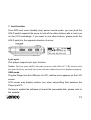
From MP3 mode or voice standby mode, you can press the MENU button to
enter the main menu, and push the
or
button to select the preview
function setting, and then press the MENU button to begin previewing. During
preview, it will play the initial 10 seconds of each music file and then skip to
next. You can press the
button to exit.
15