1
Network Analysis Module (NM-NAM)
The Network Analysis Module (NM-NAM) feature is a network module that monitors and analyzes
network traffic for a system using extended Remote Monitoring (RMON) standards, RMON2, and other
Management Information Bases (MIBs).
Note
The Network Analysis Module (NAM) is available in multiple hardware forms for some Cisco routers
and Catalyst switches. This document applies only to the NAM for branch routers, also known as
modular access, multiservice, or integrated services routers.
NAM provides Layer 2 to Layer 7 visibility into network traffic for remote troubleshooting, real-time
traffic analysis, application performance monitoring, capacity planning, and managing network-based
services, including quality of service (QoS) and Voice over IP (VoIP). The NAM Traffic Analyzer is
software that is embedded in the NM-NAM that gives you browser-based access to the RMON1,
RMON2, DSMON, and voice monitoring features of the NAM.
Feature History for NM-NAM
Release
Modification
12.3(4)XD
This feature was introduced on the following platforms: Cisco 2600XM series,
Cisco 2691, Cisco 3660, Cisco 3725, and Cisco 3745.
12.3(7)T
This feature was integrated into Cisco IOS Release 12.3(7)T.
12.3(8)T4
This feature was implemented on the following platforms: Cisco 2811, Cisco 2821,
and Cisco 2851.
12.3(11)T
This feature was implemented on the Cisco 3800 series.
Finding Support Information for Platforms and Cisco IOS Software Images
Use Cisco Feature Navigator to find information about platform support and Cisco IOS software image
support. Access Cisco Feature Navigator at http://www.cisco.com/go/fn. You must have an account on
Cisco.com. If you do not have an account or have forgotten your username or password, click Cancel at
the login dialog box and follow the instructions that appear.
Corporate Headquarters:
Cisco Systems, Inc., 170 West Tasman Drive, San Jose, CA 95134-1706 USA
Copyright © 2004 Cisco Systems, Inc. All rights reserved.
Network Analysis Module (NM-NAM)
Contents
Contents
•
Prerequisites for the Network Analysis Module (NM-NAM), page 2
•
Restrictions for the Network Analysis Module (NM-NAM), page 2
•
Information About the Network Analysis Module (NM-NAM), page 3
•
How to Configure and Manage the Network Analysis Module (NM-NAM), page 12
•
Configuration Examples for the Network Analysis Module (NM-NAM), page 47
•
Additional References, page 53
•
Command Reference, page 55
•
Glossary, page 75
Prerequisites for the Network Analysis Module (NM-NAM)
•
Install Cisco IOS Release 12.3(4)XD, Cisco IOS Release 12.3(7)T, or a later release.
•
Install the NM-NAM network module. Make sure that the network module is properly seated and
that the EN (enable) and PWR (power) LEDs come on. Refer to the Cisco Network Modules
Hardware Installation Guide.
•
For Cisco 2691, Cisco 3725, and Cisco 3745 routers only, make sure that the router runs ROM
Monitor (ROMMON) Version 12.2(8r)T2 or a later version. This ROMMON version contains a fix
that prevents the router from resetting all the network modules when it is reloaded. Refer to the ROM
Monitor Download Procedures for Cisco 2691, Cisco, 3631, Cisco 3725, and Cisco 3745 Routers.
Restrictions for the Network Analysis Module (NM-NAM)
General Restrictions
•
Cisco IOS Release 12.3(4)XD, Cisco IOS Release 12.3(7)T, or a later release is required.
•
Network Analysis Module Release 3.2 or a later release is required.
•
Only one NM-NAM can be installed in the router at any time.
•
SNMPv3 is not supported.
•
Online insertion and removal (OIR), or hot swapping network modules, is supported on some
platforms. To find out if your router supports hot swapping, refer to the Network Modules Quick
Start Guide.
Traffic Monitoring Restrictions for the Internal NAM Interface
The following restrictions apply only to traffic that is monitored through the internal NAM interface:
•
Only IP traffic can be monitored.
•
The NAM Traffic Analyzer (web GUI) provides Layer 3 and higher layer information about the
original packets. The Layer 2 header is modified by the router when it forwards the packets to the
NAM, so the Layer 2 information that the NAM records is not applicable to the original packets.
•
When Network Address Translation (NAT) is used, the router forwards packets containing the NAT
“inside” network addresses to the NAM.
Cisco IOS Release: Multiple releases (see the Feature History Table)
2
Network Analysis Module (NM-NAM)
Information About the Network Analysis Module (NM-NAM)
•
When access control lists are used:
– Packets dropped by an inbound access list are not forwarded to the NAM.
– Packets dropped by an outbound access list are forwarded to the NAM for analysis.
•
The NAM does not monitor the following:
– Packets that are dropped by the Cisco IOS because of errors
– Outbound IP multicast, IP broadcast, and User Datagram Protocol (UDP) flooding packets
– Packets in generic routing encapsulation (GRE) tunnels
Note
The previous restrictions (in the “Traffic Monitoring Restrictions for the Internal NAM Interface”
section) do not apply to traffic monitored through the external NAM interface.
Information About the Network Analysis Module (NM-NAM)
To configure and manage the NM-NAM, you should understand the following concepts:
Note
•
NM-NAM Hardware, page 3
•
NAM User Interfaces, page 4
•
NAM Network Interfaces, page 5
•
NM-NAM Operating Topologies and IP Address Assignments, page 6
•
NAM CLI, page 11
For NM-NAM features and benefits, supported hardware and software, and other product information,
refer to the Cisco Branch Router Network Analysis Module Data Sheet.
NM-NAM Hardware
For information on hardware installation and cable connections, refer to the Cisco Network Modules
Hardware Installation Guide.
Specifications
Table 1
NM-NAM Specifications
Specification
Description
Processor
500 Mhz Intel Mobile Pentium III
SDRAM
256 MB
Internal disk storage
NM-NAM 20 GB IDE
Dimensions (H x W x D)
1.55 x 7.10 x 7.2 in. (3.9 x 18.0 x 19.3 cm)
Weight
1.5 lb (0.7 kg) (maximum)
Operating temperature
3° to 104°F (0° to 40°C)
Cisco IOS Release: Multiple releases (see the Feature History Table)
3
Network Analysis Module (NM-NAM)
Information About the Network Analysis Module (NM-NAM)
Table 1
NM-NAM Specifications (continued)
Specification
Description
Nonoperating temperature
–40° to 185°F (–40° to 85°C)
Humidity
5 to 95% noncondensing
Operating altitude
0 to 10,000 ft (0 to 3,000 m)
Faceplate and LEDs
Figure 1
NM-NAM Faceplate and LEDs
1
2
3
NM-NAM
WARNING!!
Shut down NM-NAM application
before removing or power cycling.
DISK
PWR
ACT
EN
CF
FastEthernet 0
4
95749
LINK
5
Figure 1
Callout
LED
Indicates
1
DISK
There is activity on the hard drive.
2
LINK
The Fast Ethernet connection is available to the network module.
3
ACT
There is activity on the Fast Ethernet connection.
4
PWR
Power is available to the network module.
5
EN
The module has passed self-test and is available to the router.
NAM User Interfaces
The NAM has three user interfaces:
•
Web GUI—The NAM Traffic Analyzer provides a browser-based GUI to configure and monitor the
NAM.
•
CLI—A NAM-specific command-line interface is used to configure NAM. It can be accessed
through a NAM console session from the router or through Telnet or Secure Shell Protocol (SSH)
over the network.
•
SNMP—The NAM supports SNMPv1 and SNMPv2c access to the RMON MIBs. Note that the
NAM Simple Network Management Protocol (SNMP) agent is separate from the SNMP agent in the
router; the agents use different IP addresses and have independent communities.
Cisco IOS Release: Multiple releases (see the Feature History Table)
4
Network Analysis Module (NM-NAM)
Information About the Network Analysis Module (NM-NAM)
NAM Network Interfaces
The NAM uses three interfaces for communication (see Figure 2):
Note
•
Analysis-Module Interface
•
Internal NAM Interface
•
External NAM Interface
The NM-NAM does not have an external console port. To access the NAM console, open a NAM console
session from the router or use Telnet or SSH over the network. The lack of an external console port on
the NM-NAM means that the initial boot configuration is possible only through the router.
Figure 2
NAM Network Interfaces
2
1
CN/LP
RXC
RXD
TXC
TXD
DISK
LINK
RXC
RXC
RXD
CN/LP
ACT
RXD
PWR
RXC
RXD
TXC
TXD
CN/LP
RXC
RXC
RXC
FAST ETHE
RNET
RXD
TXC
TXD
Shut down WARN
ING!
the NM-NA
before
removing
M applic
or power
ation
cycling
EN
TXC
TXC
TXD
CN/LP
TXD
CN/LP
RXC
RXC
RXD
RXD
RXD
RXD
TXC
CN/LP
RXC
CN/LP
CN/LP
RXD
RXC
RXC
RXC
TXD
RXC
TXC
TXC
TXC
TXD
TXC
RXD
RXD
RXD
RXD
TXD
TXC
TXC
TXC
TXC
CN/LP
TXD
TXD
CONN
RXC
CN/LP
CN/LP
TXD
CN/LP
TXD
CN/LP
RXD
RXC
RXC
RXC
RXC
TXC
RXD
RXD
RXD
RXD
W1
TXD
TXC
TXC
TXC
TXC
TXD
SERIAL
TXD
W0
TXD
TXD
LINK TOKE
N RING
CF
CONN
Cisco 261
2
SERIAL
W0
TXD
TXD
W0
0/0 ACT
LINK ETHE
RNET
0/0 ACT
CONSOLE
100-240V
50/60 Hz – 1A
47 W
AUX
99963
NM-NAM
3
Figure 2
Callout
Interface
Location
Configure and
Manage From
1
Internal NAM interface
NM-NAM internal
NAM CLI
2
Analysis-Module interface
Router internal
Cisco IOS CLI
3
External NAM interface
NM-NAM faceplate
NAM CLI
Analysis-Module Interface
The Analysis-Module interface is used to access the NAM console for the initial configuration. After
configuring the NAM IP parameters, the Analysis-Module interface is typically used only during NAM
software upgrades and while troubleshooting if the NAM Traffic Analyzer is inaccessible.
Visible only to the Cisco IOS software on the router, the Analysis-Module interface is an internal Fast
Ethernet interface on the router that connects to the internal NAM interface. The Analysis-Module
interface is connected to the router’s Peripheral Component Interconnect (PCI) backplane, and all
configuration and management of the Analysis-Module interface must be performed from the Cisco IOS
CLI.
Cisco IOS Release: Multiple releases (see the Feature History Table)
5
Network Analysis Module (NM-NAM)
Information About the Network Analysis Module (NM-NAM)
Internal NAM Interface
The internal NAM interface is used for monitoring traffic that passes through router interfaces. You can
also select the internal NAM interface as the management interface for the NAM.
Visible only to the NAM software on the NM-NAM, the internal NAM interface is the Fast Ethernet
interface on the NM-NAM that connects to the Analysis-Module interface on the router. The internal
NAM interface is connected to the PCI bus on the NM-NAM, and all configuration and management of
the internal NAM interface must be performed from the NAM software.
External NAM Interface
The external NAM interface can be used to monitor LAN traffic. You can also select the external NAM
interface as the management interface for the NAM.
Visible only to the NAM software on the NM-NAM, the external NAM interface is the Fast Ethernet
interface on the NM-NAM faceplate (see Figure 1 on page 4). The external NAM interface supports data
requests and data transfers from outside sources, and it provides direct connectivity to the LAN through
an RJ-45 connector. All configuration and management of the external NAM interface must be
performed from the NAM software.
NM-NAM Operating Topologies and IP Address Assignments
This section includes the following topics:
•
Management Traffic—Choose One of the NM-NAM Interfaces, page 6
•
Monitored Traffic—Use One or Both of the NM-NAM Interfaces, page 7
•
Sample Operating Topologies, page 8
Management Traffic—Choose One of the NM-NAM Interfaces
Select either the internal or external NAM interface to handle management traffic such as IP, HTTP,
SNMP, Telnet, and SSH. You cannot send management traffic through both NAM interfaces at the same
time.
How you assign IP addresses on the NAM network interfaces depends on which NAM interface, internal
or external, you use for management traffic. See the following sections:
•
Internal NAM Interface for Management Traffic—How to Assign IP Addresses, page 6
•
External NAM Interface for Management Traffic—How to Assign IP Addresses, page 7
Internal NAM Interface for Management Traffic—How to Assign IP Addresses
If you select the internal NAM interface to handle management traffic:
•
For the Analysis-Module interface (in Cisco IOS CLI), assign an IP address from a routable subnet.
To conserve IP address space, you can configure the Analysis-Module as an IP unnumbered
interface and borrow the IP address of another router interface, such as a Fast Ethernet or loopback
interface. The borrowed IP address must come from a routable subnet.
•
For the NAM system (in NAM CLI), assign an IP address from the same subnet that is assigned to
the Analysis-Module interface.
Cisco IOS Release: Multiple releases (see the Feature History Table)
6
Network Analysis Module (NM-NAM)
Information About the Network Analysis Module (NM-NAM)
External NAM Interface for Management Traffic—How to Assign IP Addresses
If you select the external NAM interface to handle management traffic:
•
For the Analysis-Module interface (in Cisco IOS CLI), we recommend that you use the IP
unnumbered interface configuration to borrow the IP address of another router interface. The subnet
does not need to be routable.
•
For the NAM system (in NAM CLI), assign an IP address from the subnet that is connected to the
external NAM interface.
Monitored Traffic—Use One or Both of the NM-NAM Interfaces
You can use either or both the internal and external NAM interfaces for monitoring traffic:
•
Internal NAM Interface—Monitor LAN and WAN Traffic, page 7
•
External NAM Interface—Monitor LAN Traffic, page 7
The same interface can be used for both management traffic and monitored traffic simultaneously.
Internal NAM Interface—Monitor LAN and WAN Traffic
When you monitor traffic through the internal NAM interface, you must enable NAM packet monitoring
on each router interface that you want to monitor. NAM packet monitoring uses Cisco Express
Forwarding (CEF) to send a copy of each packet that is received or sent out of the router interface to the
NAM.
Note
Some restrictions apply when monitoring traffic through the internal NAM interface. See the “Traffic
Monitoring Restrictions for the Internal NAM Interface” section on page 2.
Monitoring traffic through the internal NAM interface enables the NAM to see any encrypted traffic after
it has already been decrypted by the router.
Note
Traffic sent through the internal NAM interface—and the router’s Analysis-Module interface—uses
router resources such as CPU, SDRAM bandwidth, and backplane PCI bandwidth. Therefore, we
recommend that you use the internal NAM interface to monitor WAN interfaces, and use the external
NAM interface to monitor LAN interfaces.
External NAM Interface—Monitor LAN Traffic
Monitoring traffic through the external NAM interface does not impact router resources. Therefore, we
recommend that you use the external NAM interface to monitor LAN traffic.
To monitor ports on Ethernet switching cards or modules (NM-16ESW-x, NMD-36ESW-x,
HWIC-4ESW, or HWIC-D-9ESW), configure a Switched Port Analyzer (SPAN) session whose
destination is the Ethernet switch port that connects to the external NAM interface. For more information
about configuring SPAN for these cards and modules, refer to the following documents:
•
16- and 36-Port Ethernet Switch Module for Cisco 2600 Series, Cisco 3600 Series, and Cisco 3700
Series, Cisco IOS feature module
•
Cisco HWIC-4ESW and HWIC-D-9ESW EtherSwitch Interface Cards, Cisco IOS feature module
Cisco IOS Release: Multiple releases (see the Feature History Table)
7
Network Analysis Module (NM-NAM)
Information About the Network Analysis Module (NM-NAM)
Sample Operating Topologies
In each of the following topologies, the router’s LAN interface is monitored through the external NAM
interface, and the router’s WAN interface is monitored through the internal NAM interface:
•
NAM Management Interface Is Internal and Analysis-Module Interface Is Assigned an IP Address,
page 8
•
NAM Management Interface Is Internal and Analysis-Module Interface Is IP Unnumbered, page 9
•
NAM Management Interface Is External and Analysis-Module Interface Is IP Unnumbered, page 10
To see sample configurations for the following topologies, see the “Configuration Examples for the
Network Analysis Module (NM-NAM)” section on page 47.
NAM Management Interface Is Internal and Analysis-Module Interface Is Assigned an IP Address
Figure 3 shows a sample topology, in which:
•
The internal NAM interface is used for management traffic.
•
IP addresses from the same routable subnet are assigned to the Analysis-Module interface and the
NAM system.
Figure 3
Sample Topology: NAM Management Interface Is Internal and Analysis-Module Interface
Is Assigned an IP Address
Figure 3
Callout
Interface
Location
1
Analysis-Module interface
Router internal
2
Internal NAM interface (management)
NM-NAM internal
3
External NAM interface
NM-NAM faceplate
Cisco IOS Release: Multiple releases (see the Feature History Table)
8
Network Analysis Module (NM-NAM)
Information About the Network Analysis Module (NM-NAM)
Figure 3
Callout
Interface
Location
4
Serial interface
WAN interface card (WIC)
5
Fast Ethernet interface
Router rear panel
NAM Management Interface Is Internal and Analysis-Module Interface Is IP Unnumbered
Figure 4 shows a sample topology, in which:
•
The internal NAM interface is used for management traffic.
•
IP addresses from the same routable subnet are assigned to the Analysis-Module interface and the
NAM system.
•
To conserve IP address space, the Analysis-Module interface is configured as IP unnumbered to
borrow the IP address of the Fast Ethernet interface.
Figure 4
Sample Topology: NAM Management Interface Is Internal and Analysis-Module Interface
Is IP Unnumbered
Figure 4
Callout
Interface
Location
1
Analysis-Module interface
Router internal
2
Internal NAM interface (management)
NM-NAM internal
3
External NAM interface
NM-NAM faceplate
4
Serial interface
WAN interface card (WIC)
5
Fast Ethernet interface
Router rear panel
Cisco IOS Release: Multiple releases (see the Feature History Table)
9
Network Analysis Module (NM-NAM)
Information About the Network Analysis Module (NM-NAM)
NAM Management Interface Is External and Analysis-Module Interface Is IP Unnumbered
Figure 5 shows a sample topology where:
•
The external NAM interface is used for management traffic.
•
The Analysis-Module interface is configured as IP unnumbered to borrow an IP address from the
loopback interface.
•
The borrowed loopback interface IP address is not routable.
•
The NAM system is configured with an IP address from the LAN subnet that is connected to the
external NAM interface.
Figure 5
Sample Topology: NAM Management Interface Is External and Analysis-Module Interface
Is IP Unnumbered
Figure 5
Callout
Interface
Location
1
Analysis-Module interface
Router internal
2
Internal NAM interface
NM-NAM internal
3
External NAM interface (management)
NM-NAM faceplate
4
Loopback interface
Router internal
5
Serial interface
WAN interface card (WIC)
6
Fast Ethernet interface
Router rear panel
Cisco IOS Release: Multiple releases (see the Feature History Table)
10
Network Analysis Module (NM-NAM)
Information About the Network Analysis Module (NM-NAM)
NAM CLI
This section includes the following topics:
•
NAM CLI Access
•
NAM CLI Prompt
•
Basic NAM CLI Commands
•
NAM CLI Context-Sensitive Help
NAM CLI Access
There are three ways to access the NAM CLI:
•
Open a NAM console session from the router in which the NM-NAM is installed—See the “Opening
and Closing a NAM Console Session from the Router” section on page 18.
•
Telnet—See the “Opening and Closing a Telnet or SSH Session to the NAM” section on page 38.
•
SSH—See the “Opening and Closing a Telnet or SSH Session to the NAM” section on page 38.
Until you properly configure the NAM IP parameters, the only way to access the NAM CLI is by opening
a NAM console session from the router.
NAM CLI Prompt
The NAM CLI prompt is root@nam-system-hostname#. For example, if the NAM system hostname is
configured as “nam1,” then the NAM CLI prompt appears as root@nam1#.
If the NAM system hostname has not yet been configured, the NAM CLI prompt is root@localhost#.
Basic NAM CLI Commands
Table 2 briefly describes the basic NAM CLI commands that are used for initial configuration and
maintenance of the NM-NAM. For a complete description of all NAM CLI commands, refer to the
Network Analysis Module Command Reference for your NAM software release.
Note
Although NAM CLI commands appear similar to Cisco IOS commands, the commands described in
Table 2 operate in the NAM CLI only.
Table 2
Basic NAM CLI Commands
NAM CLI Command
Purpose
exsession on
Enables outside logins (Telnet).
exsession on ssh
Enables outside logins (SSH).
ip address
Sets the system IP address.
ip broadcast
Sets the system broadcast address.
ip domain
Sets the system domain name.
ip gateway
Sets the system default gateway address.
ip host
Sets the system hostname.
Cisco IOS Release: Multiple releases (see the Feature History Table)
11
Network Analysis Module (NM-NAM)
How to Configure and Manage the Network Analysis Module (NM-NAM)
Table 2
Basic NAM CLI Commands (continued)
NAM CLI Command
Purpose
ip http secure server enable
Enables the secure HTTP server.
ip http server enable
Enables the HTTP server.
ip interface external
Selects the external NAM interface for
management traffic.
ip interface internal
Selects the internal NAM interface for
management traffic.
ip nameserver
Sets the system name server address.
password root
Sets a new password to access the root
(read/write) level of NAM.
patch
Downloads and installs a software patch.
ping
Checks connectivity to a network device.
show ip
Displays the NAM IP parameters.
NAM CLI Context-Sensitive Help
Table 3 shows how to use the NAM CLI context-sensitive help.
Table 3
NAM CLI Context-Sensitive Help Commands
NAM CLI Command
Purpose
(prompt)# ?
Displays a list of commands available for the
command mode.
or
(prompt)# help
(prompt)# abbreviated-command-entry<Tab>
Lists commands in the current mode that begin
with a particular character string.
(prompt)# command ?
Lists the available syntax options (arguments and
keywords) for the command.
(prompt)# command keyword ?
Lists the next available syntax option for the
command.
How to Configure and Manage the Network Analysis Module
(NM-NAM)
This section contains the following procedures:
•
Configuring the Analysis-Module Interface on the Router, page 13 (required)
•
Disabling AAA Login Authentication on the NAM Console Line, page 16 (optional)
•
Opening and Closing a NAM Console Session from the Router, page 18 (required for initial
configuration)
•
Configuring the NM-NAM, page 22 (required for initial configuration)
Cisco IOS Release: Multiple releases (see the Feature History Table)
12
Network Analysis Module (NM-NAM)
How to Configure and Manage the Network Analysis Module (NM-NAM)
•
Configuring a Static Route to the NAM Through the Analysis-Module Interface, page 25 (required
for using the internal NAM interface for management traffic)
•
Enabling NAM Packet Monitoring, page 27 (required for monitoring traffic through the internal
NAM interface)
•
Enabling and Accessing the NAM Traffic Analyzer, page 29 (required)
•
Changing the NAM Root Password, page 32 (optional)
•
Resetting the NAM Root Password to the Default Value, page 34 (optional)
•
Opening and Closing a Telnet or SSH Session to the NAM, page 38 (optional)
•
Upgrading the NAM Software, page 41 (optional)
Configuring the Analysis-Module Interface on the Router
This section describes how to configure the Analysis-Module interface on the router. For general
information on the Analysis-Module interface, see the “Analysis-Module Interface” section on page 5.
For information on assigning the IP address of the Analysis-Module interface, see the “NM-NAM
Operating Topologies and IP Address Assignments” section on page 6.
SUMMARY STEPS
1.
enable
2.
configure terminal
3.
interface type number
4.
ip address ip-address mask
5.
interface analysis-module slot/0
6.
ip unnumbered interface number
or
ip address ip-address mask
7.
no shutdown
8.
end
9.
show ip interface brief
or
show running-config
Cisco IOS Release: Multiple releases (see the Feature History Table)
13
Network Analysis Module (NM-NAM)
How to Configure and Manage the Network Analysis Module (NM-NAM)
DETAILED STEPS
Step 1
Command or Action
Purpose
enable
Enables privileged EXEC mode.
•
Enter your password if prompted.
Example:
Router> enable
Step 2
configure terminal
Enters global configuration mode.
Example:
Router# configure terminal
Step 3
interface type number
Example:
(Optional) Configures an interface, and enters interface
configuration mode.
•
Perform this step if you plan to configure the
Analysis-Module interface as an IP unnumbered
interface.
•
This step configures the router interface (such as a
loopback or Fast Ethernet interface) whose IP address
you plan to borrow for the IP unnumbered
Analysis-Module interface.
Router(config)# interface loopback 0
Step 4
ip address ip-address mask
(Optional) Sets an IP address and mask for the interface.
•
Perform this step if you plan to configure the
Analysis-Module interface as an IP unnumbered
interface.
•
If you plan to use the internal NAM interface for
management traffic, this IP address must come from a
routable subnet.
Example:
Router(config-if)# ip address 10.20.30.40
255.255.255.0
Step 5
interface analysis-module slot/0
Configures the Analysis-Module interface.
•
Example:
This is the Fast Ethernet interface on the router that is
connected to the internal NM-NAM interface.
Router(config)# interface analysis-module 1/0
Step 6
ip unnumbered interface number
or
ip address ip-address mask
Example:
Configures the Analysis-Module interface as IP
unnumbered and specifies the interface whose IP address is
borrowed by the Analysis-Module interface.
or
Sets an IP address and mask on the Analysis-Module
interface.
Router(config-if)# ip unnumbered loopback 0
•
Example:
Router(config-if)# ip address 10.20.30.40
255.255.255.0
Cisco IOS Release: Multiple releases (see the Feature History Table)
14
Use the ip unnumbered command if you performed
Step 3 and Step 4.
Network Analysis Module (NM-NAM)
How to Configure and Manage the Network Analysis Module (NM-NAM)
Step 7
Command or Action
Purpose
no shutdown
Activates the Analysis-Module interface.
Example:
Router(config-if)# no shutdown
Step 8
Returns to privileged EXEC mode.
end
Example:
Router(config-if)# end
Router#
Step 9
show ip interface brief
or
show running-config
Displays the IP addresses and summary status of the
interfaces.
or
Displays the contents of the currently running configuration
file.
Example:
Router# show ip interface brief
•
Verify that you properly configured the
Analysis-Module interface.
Example:
•
If you configured the Analysis-Module interface as IP
unnumbered, then use the show running-config
command to verify proper configuration of both the
Analysis-Module interface and the interface whose IP
address you borrowed for the Analysis-Module
interface.
Router# show running-config
Tip
To avoid losing your configuration at the next system reload or power cycle, save the running
configuration to the startup configuration by entering the copy run start command in privileged EXEC
mode.
Examples
This section provides the following examples:
•
Configuring the Analysis-Module Interface—Routable Subnet: Example, page 15
•
Configuring the Analysis-Module Interface—IP Unnumbered with Routable Subnet: Example,
page 16
•
Configuring the Analysis-Module Interface—IP Unnumbered with Subnet That Is Not Routable:
Example, page 16
•
Sample Output for the show ip interface brief Command, page 16
Configuring the Analysis-Module Interface—Routable Subnet: Example
In the following example, the Analysis-Module interface is configured with a routable IP address. The
NM-NAM is installed in router slot 2.
!
interface Analysis-Module 2/0
ip address 209.165.200.230 255.255.255.224
no shutdown
Cisco IOS Release: Multiple releases (see the Feature History Table)
15
Network Analysis Module (NM-NAM)
How to Configure and Manage the Network Analysis Module (NM-NAM)
Configuring the Analysis-Module Interface—IP Unnumbered with Routable Subnet: Example
In the following example, the Analysis-Module interface is IP unnumbered and borrows the IP address
of the Fast Ethernet interface. The IP address is from a routable subnet, and the NM-NAM is installed
in router slot 1.
!
interface FastEthernet 0/0
ip address 209.165.202.129 255.255.255.224
no shutdown
!
interface Analysis-Module 1/0
ip unnumbered FastEthernet 0/0
no shutdown
!
Configuring the Analysis-Module Interface—IP Unnumbered with Subnet That Is Not Routable: Example
In the following example, the Analysis-Module interface is IP unnumbered and borrows a loopback
interface IP address that is not routable. The NM-NAM is installed in router slot 3.
!
interface loopback 0
ip address 10.20.30.40 255.255.255.0
!
interface Analysis-Module 3/0
ip unnumbered loopback 0
no shutdown
!
Sample Output for the show ip interface brief Command
Router# show ip interface brief
Interface
FastEthernet0/0
FastEthernet0/1
Analysis-Module2/0
Router#
IP-Address
172.20.105.213
172.20.105.53
10.1.1.1
OK?
YES
YES
YES
Method
NVRAM
NVRAM
manual
Status
up
up
up
Protocol
up
up
up
What to Do Next
If you configured authentication, authorization, and accounting (AAA) on your router, then proceed to
the “Disabling AAA Login Authentication on the NAM Console Line” section on page 16.
Otherwise, proceed to the “Opening and Closing a NAM Console Session from the Router” section on
page 18.
Disabling AAA Login Authentication on the NAM Console Line
If you configured authentication, authorization, and accounting (AAA) on your router, then you may
have to log in twice to open a NAM console session from the router: first with your AAA username and
password, and second with the NAM login and password.
If you do not want to log in twice to open a NAM console session from the router, then disable AAA
login authentication on the router’s NAM console line by performing the steps in this section.
Note, however, that if your router contains both the NM-NAM and the NM-CIDS, the Cisco intrusion
detection system network module, then AAA can be a useful tool for centrally controlling access to both
network modules. For information about AAA, refer to the Cisco IOS Security Configuration Guide.
Cisco IOS Release: Multiple releases (see the Feature History Table)
16
Network Analysis Module (NM-NAM)
How to Configure and Manage the Network Analysis Module (NM-NAM)
SUMMARY STEPS
1.
enable
2.
configure terminal
3.
aaa authentication login list-name none
4.
line number
5.
login authentication list-name
6.
end
7.
show running-config
DETAILED STEPS
Step 1
Command or Action
Purpose
enable
Enables privileged EXEC mode.
•
Enter your password if prompted.
Example:
Router> enable
Step 2
Enters global configuration mode.
configure terminal
Example:
Router# configure terminal
Step 3
Creates a local authentication list.
aaa authentication login list-name none
•
Example:
The none keyword specifies no authentication for this
list.
Router(config)# aaa authentication login nam
none
Step 4
Enters line configuration mode for the line to which you
want to apply the authentication list.
line number
•
Example:
Router(config)# line 33
The number value is determined by the slot number in
which the NM-NAM is installed:
number = (32 x slot) + 1 (for Cisco 3700 series)
number = ( (32 x slot) + 1) x 2 (for Cisco 2800 and
Cisco 3800 series)
Step 5
Applies the authentication list to the line.
login authentication list-name
•
Specify the list name that you configured in Step 3.
Example:
Router(config-line)# login authentication nam
Cisco IOS Release: Multiple releases (see the Feature History Table)
17
Network Analysis Module (NM-NAM)
How to Configure and Manage the Network Analysis Module (NM-NAM)
Step 6
Command or Action
Purpose
end
Returns to privileged EXEC mode.
Example:
Router(config-line)# end
Router#
Step 7
show running-config
Displays the contents of the currently running configuration
file.
•
Example:
Router# show running-config
Verify that you configured the local authentication list
and applied it to the line associated with the NM-NAM.
What to Do Next
Proceed to the “Opening and Closing a NAM Console Session from the Router” section on page 18.
Opening and Closing a NAM Console Session from the Router
This section describes how to open and close a NAM console session from the router.
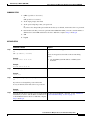
SUMMARY STEPS
1.
enable
2.
service-module analysis-module slot/0 session
3.
Press Return.
or
If a username prompt appears, then log in with your AAA username and password.
4.
At the login prompt, enter root.
5.
At the password prompt, enter your password.
or
If you have not changed the password from the factory-set default, enter root as the root password.
6.
Perform the tasks that you need to perform in the NAM CLI. When you want to end the NAM
console session and return to the Cisco IOS CLI, complete Step 7 through Step 10.
7.
exit
8.
Hold Ctrl-Shift and press 6. Release all keys, and then press x.
9.
disconnect
10. Press Enter.
Cisco IOS Release: Multiple releases (see the Feature History Table)
18
Network Analysis Module (NM-NAM)
How to Configure and Manage the Network Analysis Module (NM-NAM)
DETAILED STEPS
Step 1
Command or Action
Purpose
enable
Enables privileged EXEC mode.
•
Enter your password if prompted.
Example:
Router> enable
Step 2
service-module analysis-module slot/0 session
Establishes a console session with the NAM.
•
Example:
Router# service-module analysis-module 1/0
session
If you cannot open a NAM console session, make sure
that the NAM console line is clear by first entering the
service-module analysis-module slot/0 session clear
command in privileged EXEC mode.
Example:
Router# service-module analysis-module 1/0
session clear
[confirm]
[OK]
Router# service-module analysis-module 1/0
session
Step 3
Press Return.
Activates the NAM console line.
or
or
If a username prompt appears, then log in with your
AAA username and password.
Completes AAA login authentication and activates the
NAM console line.
•
Example:
Trying 10.1.1.1, 2065 ... Open
<Press Return>
If AAA is configured on your router and you do not
want to log in twice to access the NAM console, then
complete the steps in the “Disabling AAA Login
Authentication on the NAM Console Line” section on
page 16.
Cisco Network Analysis Module (NM-NAM)
nam1.cisco.com login:
Example:
Trying 10.1.1.1, 2065... Open
User Access Verification
Username: myaaausername
Password: <myaaapassword>
Cisco Network Analysis Module (NM-NAM)
nam1.cisco.com login:
Step 4
At the login prompt, enter root.
Accesses the root (read/write) level of NAM.
Example:
login: root
Cisco IOS Release: Multiple releases (see the Feature History Table)
19
Network Analysis Module (NM-NAM)
How to Configure and Manage the Network Analysis Module (NM-NAM)
Step 5
Command or Action
Purpose
At the password prompt, enter your password.
—
or
If you have not changed the password from the
factory-set default, enter root as the root password.
Example:
Password: <root>
Step 6
Step 7
Perform the tasks that you need to perform in the NAM
CLI. When you want to end the NAM console session
and return to the Cisco IOS CLI, complete Step 7
through Step 10.
For initial configuration tasks, see the “Configuring the
NM-NAM” section on page 22.
exit
Logs out of the NAM system or leaves a subcommand
mode.
For help using NAM CLI commands, see the “NAM CLI
Context-Sensitive Help” section on page 12.
•
Example:
root@localhost(sub-custom-filter-capture)# exit
root@localhost# exit
If you are in a subcommand mode, continue to enter the
exit command until you see the NAM login prompt.
login:
Step 8
Hold Ctrl-Shift and press 6. Release all keys, and then Suspends and closes the Telnet session.
press x.
Example:
login: <suspend keystroke>
Router#
Step 9
Disconnects a line.
disconnect
Example:
Router# disconnect
Step 10
Press Enter.
Confirms that you want to disconnect the line.
Example:
Closing connection to 10.20.30.40 [confirm]
<Enter>
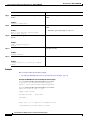
Examples
This section provides the following examples:
•
Opening and Closing a NAM Console Session When AAA Authentication Is Not Configured or Is
Disabled on the NAM Console Line: Example, page 21
•
Opening and Closing a NAM Console Session When AAA Authentication Is Configured and
Enabled on the NAM Console Line: Example, page 21
Cisco IOS Release: Multiple releases (see the Feature History Table)
20
Network Analysis Module (NM-NAM)
How to Configure and Manage the Network Analysis Module (NM-NAM)
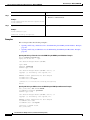
Opening and Closing a NAM Console Session When AAA Authentication Is Not Configured or Is Disabled on the
NAM Console Line: Example
In the following example, a NAM console session is opened and closed from the router. The NM-NAM
is installed in router slot 2.
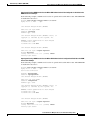
Router# service-module analysis-module 2/0 session
Trying 10.1.1.1, 2065 ... Open
Cisco Network Analysis Module (NM-NAM)
nam1.cisco.com login: root
Password: <password>
Terminal type: vt100
Cisco Network Analysis Module (NM-NAM) Console, 3.2
Copyright (c) 1999-2003 by cisco Systems, Inc.
WARNING! Default password has not been changed!
[email protected]#
[email protected]# exit
Cisco Network Analysis Module (NM-NAM)
nam1.cisco.com login: <suspend keystroke>
Router# disconnect
Closing connection to 10.1.1.1 [confirm] <Enter>
Deleting login session
Opening and Closing a NAM Console Session When AAA Authentication Is Configured and Enabled on the NAM
Console Line: Example
In the following example, a NAM console session is opened and closed from the router. The NM-NAM
is installed in router slot 2.
Router# service-module analysis-module 2/0 session
Trying 10.1.1.1, 2065 ... Open
User Access Verification
Username: myaaausername
Password: <myaaapassword>
Cisco Network Analysis Module (NM-NAM)
nam1.cisco.com login: root
Password: <nampassword>
Terminal type: vt100
Cisco Network Analysis Module (NM-NAM) Console, 3.2
Copyright (c) 1999-2003 by cisco Systems, Inc.
WARNING! Default password has not been changed!
[email protected]#
[email protected]# exit
Cisco Network Analysis Module (NM-NAM)
nam1.cisco.com login: <suspend keystroke>
Router# disconnect
Closing connection to 10.1.1.1 [confirm] <Enter>
Deleting login session
Cisco IOS Release: Multiple releases (see the Feature History Table)
21
Network Analysis Module (NM-NAM)
How to Configure and Manage the Network Analysis Module (NM-NAM)
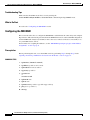
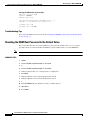
Troubleshooting Tips
Make sure that the NAM console line is clear by entering the
service-module analysis-module slot/0 session clear command in privileged EXEC mode.
What to Do Next
Proceed to the “Configuring the NM-NAM” section.
Configuring the NM-NAM
This section describes how to configure the NM-NAM to establish network connectivity and configure
IP parameters. This task must be performed from the NAM CLI. For more advanced NAM configuration,
use the NAM Traffic Analyzer (web GUI) or refer to the Network Analysis Module Command Reference
for your NAM software release.
For information on assigning IP addresses, see the “NM-NAM Operating Topologies and IP Address
Assignments” section on page 6.
Prerequisites
Before performing this task, access the NAM console by performing Step 1 through Step 5 in the
“Opening and Closing a NAM Console Session from the Router” section on page 18.
SUMMARY STEPS
1.
ip interface {internal | external}
2.
ip address ip-address subnet-mask
3.
ip broadcast broadcast-address
4.
ip gateway ip-address
5.
exsession on
or
exsession on ssh
6.
ip domain name
7.
ip host name
8.
ip nameserver ip-address [ip-address][ip-address]
9.
ping {host | ip-address}
10. show ip
Cisco IOS Release: Multiple releases (see the Feature History Table)
22
Network Analysis Module (NM-NAM)
How to Configure and Manage the Network Analysis Module (NM-NAM)
DETAILED STEPS
Step 1
Command or Action
Purpose
ip interface {internal | external}
Specifies which NAM interface will handle management
traffic.
Example:
root@localhost# ip interface internal
Example:
root@localhost# ip interface external
Step 2
Configures the NAM system IP address.
ip address ip-address subnet-mask
•
Example:
root@localhost# ip address 172.20.104.126
255.255.255.248
Step 3
For information on assigning the IP address, see the
“Management Traffic—Choose One of the NM-NAM
Interfaces” section on page 6.
(Optional) Configures the NAM system broadcast address.
ip broadcast broadcast-address
Example:
root@localhost# ip broadcast 10.255.255.255
Step 4
ip gateway ip-address
Configures the NAM system default gateway address.
Example:
root@localhost# ip gateway 172.20.104.125
Step 5
exsession on
(Optional) Enables outside logins.
or
•
exsession on enables Telnet access.
exsession on ssh
•
exsession on ssh enables SSH access.
Note
Example:
root@localhost# exsession on
The NAM software K9 crypto patch is required to
configure the ssh option. You can download the
patch from Cisco.com.
Example:
root@localhost# exsession on ssh
Step 6
ip domain name
(Optional) Sets the NAM system domain name.
Example:
root@localhost# ip domain cisco.com
Step 7
ip host name
(Optional) Sets the NAM system hostname.
Example:
root@localhost# ip host nam1
Step 8
ip nameserver ip-address
[ip-address][ip-address]
(Optional) Sets one or more NAM system name servers.
•
Example:
We recommend that you configure a name server for the
NAM system to resolve Domain Name System (DNS)
requests.
root@nam1# ip nameserver 209.165.201.1
Cisco IOS Release: Multiple releases (see the Feature History Table)
23
Network Analysis Module (NM-NAM)
How to Configure and Manage the Network Analysis Module (NM-NAM)
Step 9
Command or Action
Purpose
ping {host | ip-address}
Checks connectivity to a network device.
•
Verify connectivity to the router or another known host.
Example:
root@nam1# ping 10.20.30.40
Step 10
Displays the NAM IP parameters.
show ip
•
Verify that you properly configured the NM-NAM.
Example:
root@nam1# show ip
Examples
This section provides the following examples:
•
Configuring the NM-NAM: Example, page 24
•
Checking Network Connectivity with Ping: Example, page 24
•
Sample Output for the show ip NAM CLI Command, page 25
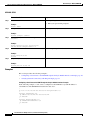
Configuring the NM-NAM: Example
In the following example, the external NAM interface is used for management traffic. The HTTP server
and Telnet access are enabled. The resulting NAM CLI prompt is [email protected]#.
!
ip address 172.20.105.215 255.255.255.192
!
ip host "nam1"
!
ip domain "cisco.com"
!
ip gateway 172.20.105.210
!
ip broadcast 10.255.255.255
!
ip nameserver 209.165.201.29
!
ip interface external
!
ip http server enable
!
exsession on
!
Checking Network Connectivity with Ping: Example
[email protected]# ping 172.20.105.213
PING 172.20.105.213 (172.20.105.213) from 172.20.105.215 : 56(84) bytes of data.
64 bytes from 172.20.105.213: icmp_seq=0 ttl=255 time=353 usec
64 bytes from 172.20.105.213: icmp_seq=1 ttl=255 time=289 usec
64 bytes from 172.20.105.213: icmp_seq=2 ttl=255 time=284 usec
64 bytes from 172.20.105.213: icmp_seq=3 ttl=255 time=283 usec
64 bytes from 172.20.105.213: icmp_seq=4 ttl=255 time=297 usec
--- 172.20.105.213 ping statistics --5 packets transmitted, 5 packets received, 0% packet loss
round-trip min/avg/max/mdev = 0.283/0.301/0.353/0.028 ms
[email protected]#
Cisco IOS Release: Multiple releases (see the Feature History Table)
24
Network Analysis Module (NM-NAM)
How to Configure and Manage the Network Analysis Module (NM-NAM)
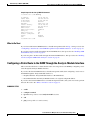
Sample Output for the show ip NAM CLI Command
[email protected]# show ip
IP address:
Subnet mask:
IP Broadcast:
IP Interface:
DNS Name:
Default Gateway:
Nameserver(s):
HTTP server:
HTTP secure server:
HTTP port:
HTTP secure port:
TACACS+ configured:
Telnet:
SSH:
[email protected]#
172.20.105.215
255.255.255.192
10.255.255.255
External
nam1.cisco.com
172.20.105.210
209.165.201.29
Enabled
Disabled
80
443
No
Enabled
Disabled
What to Do Next
If you selected the internal NAM interface to handle management traffic in Step 1, then proceed to the
“Configuring a Static Route to the NAM Through the Analysis-Module Interface” section on page 25.
If you plan to monitor traffic through the internal NAM interface, then proceed to the “Enabling NAM
Packet Monitoring” section on page 27.
If you do not plan to monitor traffic through the internal NAM interface, then proceed to the “Enabling
and Accessing the NAM Traffic Analyzer” section on page 29.
Configuring a Static Route to the NAM Through the Analysis-Module Interface
This section describes how to ensure that the router can route packets to the NAM by configuring a static
route through the Analysis-Module interface.
If you select the internal NAM interface to handle management traffic, then configuring a static route to
the NAM through the Analysis-Module interface is:
•
Required when the Analysis-Module interface is IP unnumbered.
•
Recommended when the Analysis-Module interface is assigned a unique IP address.
If you select the external NAM interface to handle management traffic, then you do not need to perform
this task. Proceed to the “What to Do Next” section on page 27.
SUMMARY STEPS
1.
enable
2.
configure terminal
3.
ip route nam-ip-address mask analysis-module slot/unit
4.
end
5.
ping {nam-ip-address | nam-hostname}
Cisco IOS Release: Multiple releases (see the Feature History Table)
25
Network Analysis Module (NM-NAM)
How to Configure and Manage the Network Analysis Module (NM-NAM)
DETAILED STEPS
Step 1
Command or Action
Purpose
enable
Enables privileged EXEC mode.
•
Enter your password if prompted.
Example:
Router> enable
Step 2
configure terminal
Enters global configuration mode.
Example:
Router# configure terminal
Step 3
ip route nam-ip-address mask analysis-module
slot/unit
Establishes a static route to the NAM.
Example:
Router(config)# ip route 172.20.105.215
255.255.255.192 analysis-module 1/0
Step 4
Returns to privileged EXEC mode.
end
Example:
Router(config-if)# end
Router#
Step 5
ping {nam-ip-address | nam-hostname}
Verifies network connectivity to the NAM.
Example:
Router# ping 172.20.105.215
Examples
This section provides the following examples:
•
Configuring a Static Route to the NAM Through the Analysis-Module Interface: Example, page 26
•
Verifying Network Connectivity with Ping: Example, page 27
Configuring a Static Route to the NAM Through the Analysis-Module Interface: Example
In the following example, a static route is configured to the NAM whose system IP address is
172.20.105.215. The NM-NAM is installed in router slot 1.
!
ip route 172.20.105.215 255.255.255.192 analysis-module 1/0
!
interface FastEthernet 0/0
ip address 209.165.202.129 255.255.255.224
no shutdown
!
interface Analysis-Module 1/0
ip unnumbered FastEthernet 0/0
no shutdown
!
Cisco IOS Release: Multiple releases (see the Feature History Table)
26
Network Analysis Module (NM-NAM)
How to Configure and Manage the Network Analysis Module (NM-NAM)
Verifying Network Connectivity with Ping: Example
In the following example, entering the ping command verifies network connectivity to the NAM with IP
address 172.20.105.215.
Router# ping 172.20.105.215
Type escape sequence to abort.
Sending 5, 100-byte ICMP Echos to 172.20.105.215, timeout is 2 seconds:
!!!!!
Success rate is 100 percent (5/5), round-trip min/avg/max = 1/1/1 ms
Router#
What to Do Next
If you plan to monitor traffic through the internal NAM interface, then proceed to the “Enabling NAM
Packet Monitoring” section on page 27.
If you do not plan to monitor traffic through the internal NAM interface, then proceed to the “Enabling
and Accessing the NAM Traffic Analyzer” section on page 29.
Enabling NAM Packet Monitoring
This section describes how to enable NAM packet monitoring on router interfaces that you want to
monitor through the internal NAM interface.
When you enable NAM packet monitoring on an interface, CEF sends an extra copy of each IP packet
that is received or sent out on that interface to the NAM through the Analysis-Module interface on the
router and the internal NAM interface.
SUMMARY STEPS
1.
enable
2.
configure terminal
3.
ip cef
4.
interface type slot/port
or
interface type slot/wic-slot/port
5.
analysis-module monitoring
6.
Repeat Step 4 and Step 5 for each interface that you want the NAM to monitor.
7.
end
8.
show running-config
Cisco IOS Release: Multiple releases (see the Feature History Table)
27
Network Analysis Module (NM-NAM)
How to Configure and Manage the Network Analysis Module (NM-NAM)
DETAILED STEPS
Step 1
Command or Action
Purpose
enable
Enables privileged EXEC mode.
•
Enter your password if prompted.
Example:
Router> enable
Step 2
configure terminal
Enters global configuration mode.
Example:
Router# configure terminal
Step 3
Enables the CEF switching path.
ip cef
Example:
Router(config)# ip cef
Step 4
interface type slot/port
Selects an interface for configuration.
or
interface type slot/wic-slot/port
Example:
Router(config)# interface serial 0/0
Step 5
analysis-module monitoring
Enables NAM packet monitoring on the interface.
Example:
Router(config-if)# analysis-module monitoring
Step 6
Repeat Step 4 and Step 5 for each interface that you
want the NAM to monitor through the internal NAM
interface.
—
Step 7
end
Returns to privileged EXEC mode.
Example:
Router(config-if)# end
Router#
Step 8
show running-config
Displays the contents of the currently running configuration
file.
•
Example:
Router# show running-config
Verify that you enabled the CEF switching path and
enabled packet monitoring on the correct interfaces.
Example
This section provides the following example:
•
Enabling NAM Packet Monitoring: Example, page 29
Cisco IOS Release: Multiple releases (see the Feature History Table)
28
Network Analysis Module (NM-NAM)
How to Configure and Manage the Network Analysis Module (NM-NAM)
Enabling NAM Packet Monitoring: Example
In the following example, NAM packet monitoring is enabled on the serial interfaces:
interface Serial 0/0
ip address 172.20.105.213 255.255.255.240
ip route-cache flow
speed auto
full-duplex
analysis-module monitoring
no mop enabled
!
interface Serial 0/1
ip address 172.20.105.53 255.255.255.252
ip route-cache flow
duplex auto
speed auto
analysis-module monitoring
!
interface Analysis-Module 2/0
ip address 10.1.1.1 255.255.255.0
hold-queue 60 out
!
What to Do Next
Proceed to the “Enabling and Accessing the NAM Traffic Analyzer” section on page 29.
Enabling and Accessing the NAM Traffic Analyzer
This section describes how to enable and access the NAM Traffic Analyzer (web GUI).
Prerequisites
•
Make sure that your web browser supports your NAM software release. For a list of supported
browsers, refer to the NAM software release notes.
•
If you plan to use the HTTP secure server (HTTPs), then you must first download and install the
NAM software K9 crypto patch. Until you install the patch, the ip http secure commands are
disabled. You can download the NAM software K9 crypto patch from Cisco.com.
Restrictions
You can use the HTTP server or the HTTP secure server, but you cannot use both simultaneously.
SUMMARY STEPS
1.
Open a NAM console session from the router. See the “Opening and Closing a NAM Console
Session from the Router” section on page 18.
or
Open a Telnet or SSH session to the NAM. See the “Opening and Closing a Telnet or SSH Session
to the NAM” section on page 38.
2.
ip http server enable
or
ip http secure server enable
Cisco IOS Release: Multiple releases (see the Feature History Table)
29
Network Analysis Module (NM-NAM)
How to Configure and Manage the Network Analysis Module (NM-NAM)
3.
Enter a web username.
or
Press Return to enter the default web username “admin”.
4.
Enter a password.
5.
Enter the password again.
6.
On your PC, open a web browser.
7.
In the web browser, enter the NAM system IP address or hostname as the URL.
DETAILED STEPS
Command or Action
Step 1
Purpose
Open a NAM console session from the router. See the Accesses the NAM CLI.
“Opening and Closing a NAM Console Session from
the Router” section on page 18.
or
Open a Telnet or SSH session to the NAM. See the
“Opening and Closing a Telnet or SSH Session to the
NAM” section on page 38.
Step 2
ip http server enable
Enables the HTTP server.
or
or
ip http secure server enable
Enables the HTTP secure server (HTTPs).
Example:
root@localhost# ip http server enable
Example:
root@localhost# ip http secure server enable
Step 3
Enter a web username.
Configures a web username.
or
•
Press Return to enter the default web username
“admin”.
The NAM requires at least one web username and
password configuration.
•
If NAM does not prompt you for a web username and
password, then at least one web username and password
combination was previously configured.
Example:
Please enter a web administrator user name
[admin]: joeadmin
Example:
Please enter a web administrator user name
[admin]: <cr>
Step 4
Enter a password.
Configures a password for the web username.
Example:
New password: <adminpswd>
Cisco IOS Release: Multiple releases (see the Feature History Table)
30
Network Analysis Module (NM-NAM)
How to Configure and Manage the Network Analysis Module (NM-NAM)
Step 5
Command or Action
Purpose
Enter the password again.
Confirms the password for the web username.
Example:
Confirm password: <adminpswd>
Step 6
On your PC, open a web browser.
Step 7
In the web browser, enter the NAM system IP address Opens the NAM Traffic Analyzer in your web browser.
or hostname as the URL.
• You are automatically redirected to the NAM Traffic
Analyzer login page.
Example:
—
http://172.20.105.215/
Example:
https://172.20.105.215/
Example:
http://nam1/
Examples
This section provides the following examples:
•
Enabling the NAM Traffic Analyzer: Example, page 31
•
Accessing the NAM Traffic Analyzer: Example, page 31
Enabling the NAM Traffic Analyzer: Example
root@nam1# ip http server enable
Enabling HTTP server...
No web users are configured.
Please enter a web administrator user name [admin]: <cr>
New password: <pswd>
Confirm password: <pswd>
User admin added.
Successfully enabled HTTP server.
root@nam1#
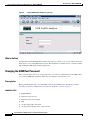
Accessing the NAM Traffic Analyzer: Example
Figure 6 shows the NAM Traffic Analyzer login page that appears when you enter the NAM system IP
address or hostname as the URL in a web browser.
Cisco IOS Release: Multiple releases (see the Feature History Table)
31
Network Analysis Module (NM-NAM)
How to Configure and Manage the Network Analysis Module (NM-NAM)
Figure 6
Sample NAM Traffic Analyzer Login Page
What to Do Next
For information on the NAM Traffic Analyzer, refer to the User Guide for the Network Analysis Module
Traffic Analyzer for your NAM software release. This document is available on Cisco.com and as online
help within the NAM Traffic Analyzer application.
Changing the NAM Root Password
This section describes how to set a new password to access the root (read/write) level of NAM, where
you can enter NAM CLI commands. The factory-set default root password is “root”.
Prerequisites
Before performing this task, access the NAM console by performing Step 1 through Step 5 in the
“Opening and Closing a NAM Console Session from the Router” section on page 18.
SUMMARY STEPS
1.
password root
2.
Enter the new password.
3.
Enter the new password again.
4.
exit
5.
At the login prompt, enter root.
6.
At the password prompt, enter your password.
Cisco IOS Release: Multiple releases (see the Feature History Table)
32
Network Analysis Module (NM-NAM)
How to Configure and Manage the Network Analysis Module (NM-NAM)
DETAILED STEPS
Step 1
Command or Action
Purpose
password root
Starts the process of changing the NAM’s root (read/write)
level password.
Example:
[email protected]# password root
Step 2
Enter the new password.
Enters the new password.
Example:
New UNIX password: <password>
Step 3
Enter the new password again.
Confirms the new password.
Example:
Retype new UNIX password: <password>
Step 4
Logs out of the NAM system.
exit
Example:
root@localhost# exit
Step 5
At the login prompt, enter root.
Accesses the root (read/write) level of NAM.
Example:
login: root
Step 6
At the password prompt, enter your password.
Verifies that the new password is accepted.
Example:
Password: <password>
Examples
This section provides the following examples:
•
Changing the NAM Root Password: Example, page 33
•
Verifying the NAM Root Password: Example, page 34
Changing the NAM Root Password: Example
[email protected]# password root
Changing password for user root
New UNIX password: <rtpswd>
Retype new UNIX password: <rtpswd>
passwd:all authentication tokens updated successfully
[email protected]#
[email protected]# exit
Cisco IOS Release: Multiple releases (see the Feature History Table)
33
Network Analysis Module (NM-NAM)
How to Configure and Manage the Network Analysis Module (NM-NAM)
Verifying the NAM Root Password: Example
nam1.cisco.com login: root
Password: <rtpswd>
Terminal type: vt100
Cisco Network Analysis Module (NM-NAM) Console, 3.2
Copyright (c) 1999-2003 by cisco Systems, Inc.
[email protected]#
[email protected]# exit
Troubleshooting Tips
If you forget the NAM root password, see the “Resetting the NAM Root Password to the Default Value”
section on page 34.
Resetting the NAM Root Password to the Default Value
This section describes how to reset the NAM root password to the default value of “root”. Use this
procedure when you cannot remember the NAM root password but need to access the NAM CLI.
Note
This procedure requires that you reload the NAM software.
SUMMARY STEPS
1.
enable
2.
service-module analysis-module slot/0 reload
3.
y
4.
service-module analysis-module slot/0 session
5.
When prompted, enter *** to change the boot configuration.
6.
boot flash
7.
When prompted to select from the helper menu, enter 6.
8.
When prompted to select from the helper menu, enter r.
9.
y
10. Hold Ctrl-Shift and press 6. Release all keys, and then press x.
11. disconnect
12. Press Enter.
Cisco IOS Release: Multiple releases (see the Feature History Table)
34
Network Analysis Module (NM-NAM)
How to Configure and Manage the Network Analysis Module (NM-NAM)
DETAILED STEPS
Step 1
Command or Action
Purpose
enable
Enables privileged EXEC mode.
•
Enter your password if prompted.
Example:
Router> enable
Step 2
service-module analysis-module slot/0 reload
Reloads the software on the NM-NAM.
Example:
Router# service-module analysis-module 1/0
reload
Step 3
Confirms that you want to proceed with the NAM software
reload.
y
Example:
Do you want to proceed with reload?[confirm] y
Step 4
service-module analysis-module slot/0 session
Establishes a console session with the NAM.
•
Perform this step immediately after reloading the NAM
software.
•
If you cannot open a NAM console session, make sure
that the NAM console line is clear by first entering the
service-module analysis-module slot/0 session clear
command in privileged EXEC mode.
Example:
Router# service-module analysis-module 1/0
session
Example:
Router# service-module analysis-module 1/0
session clear
[confirm]
[OK]
Router# service-module analysis-module 1/0
session
Step 5
When prompted, enter *** to change the boot
configuration.
Interrupts the boot loader.
•
Enter *** immediately after the prompt appears.
•
If you do not enter *** in time to interrupt the boot
loader, then the NAM login prompt eventually appears.
Complete Step 10 through Step 12 to return to the
Cisco IOS CLI on the router, and then retry this task,
starting with Step 2.
Example:
Please enter '***' to change boot
configuration: ***
Step 6
Loads the NAM helper image.
boot flash
•
Example:
This command is entered in the boot loader CLI, which
is separate from the NAM CLI and Cisco IOS CLI.
ServicesEngine boot-loader> boot flash
Step 7
When prompted to select from the helper menu,
enter 6.
Selects the menu option to reset the root password to the
default value of “root”.
Example:
Selection [12345678rh]: 6
Cisco IOS Release: Multiple releases (see the Feature History Table)
35
Network Analysis Module (NM-NAM)
How to Configure and Manage the Network Analysis Module (NM-NAM)
Step 8
Command or Action
Purpose
When prompted to select from the helper menu,
enter r.
Selects the menu option to exit the helper and reset the
NAM.
Example:
Selection [12345678rh]:r
Step 9
Confirms that you want to exit the helper and reset the
NAM.
y
•
Example:
This time, ignore the prompt to enter ***.
About to exit and reset Services Engine.
Are you sure? [y/N] y
Step 10
Hold Ctrl-Shift and press 6. Release all keys, and then Suspends and closes the Telnet session.
press x.
Example:
login: <suspend keystroke>
Router#
Step 11
Disconnects a line.
disconnect
Example:
Router# disconnect
Step 12
Press Enter.
Confirms that you want to disconnect the line.
Example:
Closing connection to 10.20.30.40 [confirm]
<Enter>
Example
This section provides the following example:
•
Resetting the NAM Root Password to the Default Value: Example, page 36
Resetting the NAM Root Password to the Default Value: Example
Router# service-module analysis-module 1/0 reload
Do you want to proceed with reload?[confirm] y
Trying to reload Service Module Analysis-Module1/0.
Router# service-module analysis-module 1/0 session
Trying 172.20.104.87, 2033 ... Open
.
<debug output omitted>
.
Booting from flash..., please wait.
[BOOT-ASM]
7
Please enter '***' to change boot configuration: ***
ServicesEngine Bootloader Version :1.0.6aN
Cisco IOS Release: Multiple releases (see the Feature History Table)
36
Network Analysis Module (NM-NAM)
How to Configure and Manage the Network Analysis Module (NM-NAM)
ServicesEngine boot-loader> boot flash
.
<debug output omitted>
.
==============================================================================
Cisco Systems, Inc.
Services engine helper utility for NM-NAM
Version 1.1(1) [200311111641]
----Main menu
1 - Download application image and write to HDD
2 - Download application image and reformat HDD
3 - Download bootloader and write to flash
4 - Download helper and write to flash
5 - Display software versions
6 - Reset application image CLI passwords to default
7 - Change file transfer method (currently ftp/http)
8 - Show upgrade log
9 - Send Ping
r - Exit and reset Services Engine
h - Exit and shutdown Services Engine
Selection [123456789rh]: 6
Restored default CLI passwords of application image.
==============================================================================
Cisco Systems, Inc.
Services engine helper utility for NM-NAM
Version 1.1(1) [200311111641]
----Main menu
1 - Download application image and write to HDD
2 - Download application image and reformat HDD
3 - Download bootloader and write to flash
4 - Download helper and write to flash
5 - Display software versions
6 - Reset application image CLI passwords to default
7 - Change file transfer method (currently ftp/http)
8 - Show upgrade log
9 - Send Ping
r - Exit and reset Services Engine
h - Exit and shutdown Services Engine
Selection [123456789rh]: r
About to exit and reset Services Engine.
Are you sure? [y/N] y
INITSending all processes the TERM signal...
Sending all processes the KILL signal...
Unmounting file systems:
Please stand by while rebooting the system...
Restarting system.
.
<debug output omitted>
.
Cisco Network Analysis Module (NM-NAM)
nam1.cisco.com login: <suspend keystroke>
Router#
Router# disconnect
Closing connection to 10.1.1.1 [confirm] <Enter>
Deleting login session
Cisco IOS Release: Multiple releases (see the Feature History Table)
37
Network Analysis Module (NM-NAM)
How to Configure and Manage the Network Analysis Module (NM-NAM)
Troubleshooting Tips
If you have trouble opening a NAM console session from the router, make sure that the NAM console
line is clear by entering the service-module analysis-module slot/0 session clear command in
privileged EXEC mode.
What to Do Next
Verify that the default root password of “root” is accepted by performing Step 1 through Step 5 in the
“Opening and Closing a NAM Console Session from the Router” section on page 18.
To change the NAM root password, see the “Changing the NAM Root Password” section on page 32.
Opening and Closing a Telnet or SSH Session to the NAM
This section describes how to open and close a Telnet or SSH session to the NAM. This task is not
commonly performed, because you would typically use the NAM Traffic Analyzer (web GUI) to monitor
and maintain the NAM. If, however, you cannot access the NAM Traffic Analyzer, then you might want
to use Telnet or SSH to troubleshoot from the NAM CLI.
If your NM-NAM is not properly configured for Telnet or SSH access (see the following Prerequisites
section), then you can open a Telnet session to the router in which the NM-NAM is installed, and then
open a NAM console session from the router. See the “Opening and Closing a NAM Console Session
from the Router” section on page 18.
Prerequisites
•
Configure the NAM system IP address. Optionally, set the NAM system hostname. See the
“Configuring the NM-NAM” section on page 22.
•
Verify NAM network connectivity by performing one of the following ping tests:
– From a host beyond the gateway, ping the NAM system IP address.
– From the NAM CLI, ping the NAM system default gateway.
Telnet Prerequisites
•
Enter the exsession on NAM CLI command. See Step 5 of the “Configuring the NM-NAM” section
on page 22.
SSH Prerequisites
•
Install the NAM software K9 crypto patch, which you can download from Cisco.com.
•
Enter the exsession on ssh NAM CLI command. See Step 5 of the “Configuring the NM-NAM”
section on page 22.
Cisco IOS Release: Multiple releases (see the Feature History Table)
38
Network Analysis Module (NM-NAM)
How to Configure and Manage the Network Analysis Module (NM-NAM)
SUMMARY STEPS
1.
telnet {ip-address | hostname}
or
ssh {ip-address | hostname}
2.
At the login prompt, enter root.
3.
At the password prompt, enter your password.
or
If you have not changed the password from the factory-set default, enter root as the root password.
4.
Perform the tasks that you need to perform in the NAM CLI. When you want to end the Telnet or
SSH session to the NAM and return to the Cisco IOS CLI, complete Step 5 and Step 6.
5.
exit
6.
logout
DETAILED STEPS
Step 1
Command or Action
Purpose
telnet {ip-address | hostname}
Logs in to a host that supports Telnet.
or
or
ssh {ip-address | hostname}
Starts an encrypted session with a remote networking
device.
Example:
•
Router# telnet 10.20.30.40
Use the NAM system IP address or NAM system
hostname.
Example:
Router# ssh 10.20.30.40
Step 2
At the login prompt, enter root.
Accesses the root (read/write) level of NAM.
Example:
login: root
Step 3
At the password prompt, enter your password.
—
or
If you have not changed the password from the
factory-set default, enter root as the root password.
Example:
Password: root
Step 4
Perform the tasks that you need to perform in the NAM For help using NAM CLI commands, see the “NAM CLI
CLI. When you want to end the Telnet or SSH session Context-Sensitive Help” section on page 12.
to the NAM and return to the Cisco IOS CLI, complete
Step 5 and Step 6.
Cisco IOS Release: Multiple releases (see the Feature History Table)
39
Network Analysis Module (NM-NAM)
How to Configure and Manage the Network Analysis Module (NM-NAM)
Step 5
Command or Action
Purpose
exit
Leaves a subcommand mode.
•
Return to command mode.
Example:
root@localhost(sub-custom-filter-capture)# exit
root@localhost#
Step 6
Logs out of the NAM system.
logout
Example:
root@localhost# logout
Connection closed by foreign host.
Examples
This section provides the following examples:
•
Opening and Closing a Telnet Session to the NAM Using the NAM System IP Address: Example,
page 40
•
Opening and Closing an SSH Session to the NAM Using the NAM System Hostname: Example,
page 40
Opening and Closing a Telnet Session to the NAM Using the NAM System IP Address: Example
Router> telnet 172.20.105.215
Trying 172.20.105.215 ... Open
Cisco Network Analysis Module (NM-NAM)
login: root
Password: <password>
Terminal type: vt100
Cisco Network Analysis Module (NM-NAM) Console, 3.2
Copyright (c) 1999-2003 by cisco Systems, Inc.
WARNING! Default password has not been changed!
[email protected]#
[email protected]# logout
[Connection to 172.20.105.215 closed by foreign host]
Router>
Opening and Closing an SSH Session to the NAM Using the NAM System Hostname: Example
host [/home/user] ssh -l root nmnam2
root@nmnam2’s password: <password>
Terminal type: vt100
Cisco Network Analysis Module (NM-NAM) Console, 3.2
Copyright (c) 1999-2003 by cisco Systems, Inc.
WARNING! Default password has not been changed!
[email protected]#
[email protected]# logout
Connection to nmnam2 closed.
host [/home/user]
Cisco IOS Release: Multiple releases (see the Feature History Table)
40
Network Analysis Module (NM-NAM)
How to Configure and Manage the Network Analysis Module (NM-NAM)
Upgrading the NAM Software
This section describes how to upgrade the NAM software. This task is performed from the NAM CLI.
NAM Software Images
The NM-NAM contains three NAM software images:
•
NAM application image on the hard drive—Source of the NAM Traffic Analyzer and NAM CLI
•
Helper image in flash memory—Used to recover or upgrade NAM software images
•
Bootloader image in flash memory—Used to specify whether to boot the NAM application image
or the helper image
Types of NAM Software Upgrades
NAM software upgrades are available in two forms:
•
Patches—Incremental updates to software releases that are installed with the patch NAM CLI
command. Patches are available only for the NAM application image.
•
Images—Full image releases that are installed from the helper image. Full image upgrades are
typically used to update the NAM application image, but if necessary and recommended by technical
support, you can also use the helper image to upgrade the bootloader image or helper image.
•
Download the NAM software image from Cisco.com, and copy the image to an FTP server.
•
Before performing this task, access the NAM console by completing Step 1 through Step 5 in the
“Opening and Closing a NAM Console Session from the Router” section on page 18.
Prerequisites
Perform one of the following tasks in this section, depending on whether you are adding a patch to your
NAM application or are performing a full software image upgrade:
•
Upgrading the NAM Software—Patch, page 41
•
Upgrading the NAM Software—Full Image, page 42
Upgrading the NAM Software—Patch
Perform this task to add a patch to your NAM application image. This task is performed from the
NAM CLI.
SUMMARY STEPS
1.
patch ftp://user:passwd@host/full-path/filename
or
patch ftp://user@host/full-path/filename
2.
show patches
Cisco IOS Release: Multiple releases (see the Feature History Table)
41
Network Analysis Module (NM-NAM)
How to Configure and Manage the Network Analysis Module (NM-NAM)
DETAILED STEPS
Step 1
Command or Action
Purpose
patch
ftp://user:password@host/full-path/filename
Downloads and installs a software patch.
•
Use the first option, which includes the password, if the
FTP server does not allow anonymous users.
patch ftp://user@host/full-path/filename
•
If you use the second option, enter your password when
prompted.
Example:
•
Remember to perform this task in the NAM CLI.
or
[email protected]# patch
ftp://person:mypwd@examplehost/dir/subdir/nam-a
pp.3-2.cryptoK9.patch.1-0.bin
Example:
[email protected]# patch
ftp://person@examplehost/dir/subdir/nam-app.3-2
.cryptoK9.patch.1-0.bin
Proceeding with installation. Please do not
interrupt.
If installation is interrupted, please try
again.
Downloading nam-app.3-2.cryptoK9.patch.1-0.bin.
Please wait...
Password for person@examplehost: <mypwd>
Step 2
Displays all installed patches.
show patches
•
Verify that your patch was successfully installed.
Example:
[email protected]# show patches
Upgrading the NAM Software—Full Image
Perform this task to upgrade one of your NAM software images to a new release. This task is performed
from the NAM CLI.
SUMMARY STEPS
1.
reboot
2.
y
3.
When prompted, enter *** to change the boot configuration.
4.
boot flash
5.
When prompted to select from the helper menu, enter 1.
6.
ftp://ip-address/path/nam-image-file
7.
y
8.
r
9.
y
Cisco IOS Release: Multiple releases (see the Feature History Table)
42
Network Analysis Module (NM-NAM)
How to Configure and Manage the Network Analysis Module (NM-NAM)
DETAILED STEPS
Step 1
Command or Action
Purpose
reboot
Shuts down and restarts the NAM.
•
Remember to perform this task in the NAM CLI.
Example:
[email protected]# reboot
Step 2
Confirms that you want to reboot the NAM.
y
•
Example:
Reboot the NAM? (Y/N) [N]: y
Step 3
When prompted, enter *** to change the boot
configuration.
After you confirm the reboot, the NAM displays a
series of messages as it stops processes, shuts down,
and then restarts.
Interrupts the boot loader.
•
Enter *** immediately after the prompt appears.
•
If you do not enter the *** in time to interrupt the boot
loader, then return to Step 1 and try again.
Example:
Please enter '***' to change boot
configuration: ***
Step 4
Loads the NAM helper image.
boot flash
•
Example:
This command is entered in the boot loader CLI, which
is separate from the NAM CLI and Cisco IOS CLI.
ServicesEngine boot-loader> boot flash
Step 5
When prompted to select from the helper menu, enter 1 Selects the menu option to download the NAM software
or 2.
image onto the NM-NAM internal memory.
•
Option 1 preserves all configuration and report data
while installing the NAM software image.
•
Option 2 reformats the NM-NAM hard drive, deleting
all report data and NAM software configurations,
except the basic IP configuration. Although useful for
recovering a corrupted hard drive, Option 2 should be
used with caution or when recommended by technical
support.
•
The helper menu also has an option (7) to change the
file transfer method from the default FTP method.
Before performing Step 5, you may enter 7 to select the
TFTP transfer method. Because many TFTP servers
have problems transferring files as large as the NAM
application image, we recommend that you use the
default FTP method.
Example:
Selection [12345678rh]: 1
Example:
Selection [12345678rh]: 2
Step 6
Specifies the FTP location and filename of the NAM
software image.
ftp://ip-address/path/nam-image-file
Example:
Download NAM application image via ftp and
write to HDD
URL of application image []:
ftp://172.20.98.136/dir1/dir2/nam-image.bin.gz
Cisco IOS Release: Multiple releases (see the Feature History Table)
43
Network Analysis Module (NM-NAM)
How to Configure and Manage the Network Analysis Module (NM-NAM)
Step 7
Command or Action
Purpose
y
Confirms that you want to install the specified NAM
software image.
Example:
Do you want to proceed installing it? [y/N] y
Step 8
Selects the menu option to exit the helper and reset the
NAM.
r
Example:
Selection [12345678rh]:r
Step 9
Confirms that you want to exit the helper and reset the
NAM.
y
•
Example:
This time, ignore the prompt to enter ***.
About to exit and reset Services Engine.
Are you sure? [y/N] y
Examples
This section provides the following examples:
•
Upgrading the NAM Software—Patch: Example, page 44
•
Upgrading the NAM Software—Full Image: Example, page 45
Upgrading the NAM Software—Patch: Example
Router> enable
Password: <password>
Router#
Router# service-module analysis-Module 1/0 session
Trying 172.20.104.86, 2033 ... Open
Cisco Network Analysis Module (NM-NAM)
nam1.cisco.com login: root
Password: <password>
Terminal type:vt100
Cisco Network Analysis Module (NM-NAM) Console, 3.2(0.10)
Copyright (c) 1999-2003 by cisco Systems, Inc.
WARNING! Default password has not been changed!
[email protected]# patch
ftp://person@examplehost/dir/subdir/nam-app.3-2.cryptoK9.patch.1-0.bin
Proceeding with installation. Please do not interrupt.
If installation is interrupted, please try again.
Downloading nam-app.3-2.cryptoK9.patch.1-0.bin. Please wait...
Password for person@examplehost: <mypwd>
ftp://person@examplehost/dir/subdir/nam-app.3-2.cryptoK9.patch.1-0.bin
(1K)
/usr/local/nam/patch/wor [########################]
1K | 104.43K/s
1894 bytes transferred in 0.02 sec (102.35k/sec)
Verifying nam-app.3-2.cryptoK9.patch.1-0.bin. Please wait...
Patch nam-app.3-2.cryptoK9.patch.1-0.bin verified.
Cisco IOS Release: Multiple releases (see the Feature History Table)
44
Network Analysis Module (NM-NAM)
How to Configure and Manage the Network Analysis Module (NM-NAM)
Applying /usr/local/nam/patch/workdir/nam-app.3-2.cryptoK9.patch.1-0.bin.
Please wait...
########################################### [100%]
########################################### [100%]
Patch applied successfully.
[email protected]# show patches
Tue Aug 31 21:04:28 2004 Patch:nam-app.3-2.strong-crypto-patchK9-1-0
Description:Strong Crypto Patch for NAM.
[email protected]#
Upgrading the NAM Software—Full Image: Example
Router> enable
Password: <password>
Router#
Router# service-module analysis-Module 1/0 session
Trying 172.20.104.86, 2033 ... Open
Cisco Network Analysis Module (NM-NAM)
nam1.cisco.com login: root
Password: <password>
Terminal type:vt100
Cisco Network Analysis Module (NM-NAM) Console, 3.2(0.10)
Copyright (c) 1999-2003 by cisco Systems, Inc.
WARNING! Default password has not been changed!
[email protected]#
[email protected]# reboot
Reboot the NAM? (Y/N) [N]: y
System reboot in process...
.
<debug output omitted>
.
Booting from flash..., please wait.
[BOOT-ASM]
7
Please enter '***' to change boot configuration: ***
ServicesEngine Bootloader Version :1.0.6-NAM
ServicesEngine boot-loader>
ServicesEngine boot-loader> boot flash
.
<debug output omitted>
.
==============================================================================
Cisco Systems, Inc.
Services engine helper utility for NM-NAM
Version 1.1(1) [200311111641]
-----
Cisco IOS Release: Multiple releases (see the Feature History Table)
45
Network Analysis Module (NM-NAM)
How to Configure and Manage the Network Analysis Module (NM-NAM)
Main menu
1 - Download application image and write to HDD
2 - Download application image and reformat HDD
3 - Download bootloader and write to flash
4 - Download helper and write to flash
5 - Display software versions
6 - Reset application image CLI passwords to default
7 - Change file transfer method (currently ftp/http)
8 - Show upgrade log
9 - Send Ping
r - Exit and reset Services Engine
h - Exit and shutdown Services Engine
Selection [123456789rh]: 1
----Download NAM application image via ftp and write to HDD
URL of application image []: ftp://172.20.98.136/dir1/dir2/nam-image.bin.gz
Getting c6svc-nam.mainline-DAILY_20030825.bin.gz from 171.69.17.19 via ftp.
ftp://172.20.98.136/dir1/dir2/nam-image.bin.gz
(46389K)
[########################]
46389K | 7421.38K/s
47502347 bytes transferred in 6.25 sec (7421.14k/sec)
upgrade.bin size:48241545
File transfer successful.
Checking upgrade.bin
Do you want to proceed installing it? [y/N] y
.
<debug output omitted>
.
Application image upgrade complete. You can boot the image now.
==============================================================================
Cisco Systems, Inc.
Services engine helper utility for NM-NAM
Version 1.1(1) [200311111641]
----Main menu
1 - Download application image and write to HDD
2 - Download application image and reformat HDD
3 - Download bootloader and write to flash
4 - Download helper and write to flash
5 - Display software versions
6 - Reset application image CLI passwords to default
7 - Change file transfer method (currently ftp/http)
8 - Show upgrade log
9 - Send Ping
r - Exit and reset Services Engine
h - Exit and shutdown Services Engine
Selection [123456789rh]: r
About to exit and reset Services Engine.
Are you sure? [y/N] y
Troubleshooting Tips
If you have trouble opening a NAM console session from the router, make sure that the NAM console
line is clear by entering the service-module analysis-module slot/0 session clear command in
privileged EXEC mode.
Cisco IOS Release: Multiple releases (see the Feature History Table)
46
Network Analysis Module (NM-NAM)
Configuration Examples for the Network Analysis Module (NM-NAM)
Configuration Examples for the Network Analysis Module
(NM-NAM)
This section provides the following configuration examples:
•
NAM Management Interface Is Internal and Analysis-Module Interface Is Assigned an IP Address:
Example, page 47
•
NAM Management Interface Is Internal and Analysis-Module Interface Is IP Unnumbered:
Example, page 49
•
NAM Management Interface Is External and Analysis-Module Interface Is IP Unnumbered:
Example, page 51
NAM Management Interface Is Internal and Analysis-Module Interface Is
Assigned an IP Address: Example
In this configuration example:
•
The internal NAM interface is used for management traffic.
•
IP addresses from the same routable subnet are assigned to the Analysis-Module interface and the
NAM system.
•
A static route to the NAM through the Analysis-Module interface is configured.
•
The internal NAM interface is used to monitor WAN traffic on interface Serial 0/0, and the external
NAM interface is used to monitor LAN traffic on interface Fast Ethernet 0/0.
•
The NM-NAM is installed in router slot 2.
Figure 7 shows the topology used in the example, and the following sections show the router and NAM
configurations:
•
Router Configuration (Cisco IOS Software), page 48
•
NAM Configuration (NAM Software), page 49
Cisco IOS Release: Multiple releases (see the Feature History Table)
47
Network Analysis Module (NM-NAM)
Configuration Examples for the Network Analysis Module (NM-NAM)
Figure 7
NAM Management Interface Is Internal and Analysis-Module Interface Is Assigned an IP
Address
Figure 7
Callout
Interface
Location
1
Analysis-Module interface
Router internal
2
Internal NAM interface (management)
NM-NAM internal
3
External NAM interface
NM-NAM faceplate
4
Serial interface
WAN interface card (WIC)
5
Fast Ethernet interface
Router rear panel
Router Configuration (Cisco IOS Software)
!
ip cef
!
ip route 209.165.200.226 255.255.255.224 analysis-module 2/0
!
interface FastEthernet0/0
ip address 209.165.202.129 255.255.255.224
ip route-cache flow
speed auto
full-duplex
no mop enabled
no shutdown
!
interface Serial 0/0
encapsulation ppp
ip address 209.165.201.1 255.255.255.224
analysis-module monitoring
no shutdown
Cisco IOS Release: Multiple releases (see the Feature History Table)
48
Network Analysis Module (NM-NAM)
Configuration Examples for the Network Analysis Module (NM-NAM)
!
interface analysis-module 2/0
ip address 209.165.200.225 255.255.255.224
hold-queue 60 out
no shutdown
!
NAM Configuration (NAM Software)
!
ip address 209.165.200.226 255.255.255.224
!
ip host "nam1"
!
ip domain "cisco.com"
!
ip gateway 209.165.200.225
!
ip broadcast 10.255.255.255
!
ip nameserver 172.16.201.29
!
ip interface internal
!
ip http server enable
!
exsession on
!
NAM Management Interface Is Internal and Analysis-Module Interface Is IP
Unnumbered: Example
In this configuration example:
•
The internal NAM interface is used for management traffic.
•
IP addresses from the same routable subnet are assigned to the Analysis-Module interface and the
NAM system.
•
To conserve IP address space, the Analysis-Module interface is configured as IP unnumbered to
borrow the IP address of the Fast Ethernet interface.
•
A static route to the NAM through the Analysis-Module interface is configured.
•
The internal NAM interface is used to monitor WAN traffic on interface Serial 0/0, and the external
NAM interface is used to monitor LAN traffic on interface Fast Ethernet 0/0.
•
The NM-NAM is installed in router slot 2.
Figure 8 shows the topology used in the example, and the following sections show the router and NAM
configurations:
•
Router Configuration (Cisco IOS Software), page 50
•
NAM Configuration (NAM Software), page 51
Cisco IOS Release: Multiple releases (see the Feature History Table)
49
Network Analysis Module (NM-NAM)
Configuration Examples for the Network Analysis Module (NM-NAM)
Figure 8
Sample Topology: NAM Management Interface Is Internal and Analysis-Module Interface
Is IP Unnumbered
Figure 8
Callout
Interface
Location
1
Analysis-Module interface
Router internal
2
Internal NAM interface (management)
NM-NAM internal
3
External NAM interface
NM-NAM faceplate
4
Serial interface
WAN interface card (WIC)
5
Fast Ethernet interface
Router rear panel
Router Configuration (Cisco IOS Software)
!
ip cef
!
ip route 209.165.200.226 255.255.255.224 analysis-module 2/0
!
interface FastEthernet0/0
ip address 209.165.200.225 255.255.255.224
ip route-cache flow
speed auto
full-duplex
no mop enabled
no shutdown
!
interface Serial 0/0
encapsulation ppp
ip address 209.165.201.1 255.255.255.224
analysis-module monitoring
no shutdown
Cisco IOS Release: Multiple releases (see the Feature History Table)
50
Network Analysis Module (NM-NAM)
Configuration Examples for the Network Analysis Module (NM-NAM)
!
interface analysis-module 2/0
ip unnumbered FastEthernet0/0
no shutdown
hold-queue 60 out
!
NAM Configuration (NAM Software)
!
ip address 209.165.200.226 255.255.255.224
!
ip host "nam1"
!
ip domain "cisco.com"
!
ip gateway 209.165.200.225
!
ip broadcast 10.255.255.255
!
ip nameserver 172.16.201.29
!
ip interface internal
!
ip http server enable
!
exsession on
!
NAM Management Interface Is External and Analysis-Module Interface Is IP
Unnumbered: Example
In this configuration example:
•
The external NAM interface is used for management traffic.
•
The Analysis-Module interface is configured as IP unnumbered to borrow the IP address of the
loopback interface.
•
The borrowed loopback interface IP address is not routable.
•
The NAM system is configured with an IP address from the LAN subnet that is connected to the
external NAM interface.
•
The internal NAM interface is used to monitor WAN traffic on interface Serial 0/0, and the external
NAM interface is used to monitor LAN traffic on interface Fast Ethernet 0/0.
•
The NM-NAM is installed in router slot 3.
Figure 9 shows the topology used in the example, and the following sections show the router and NAM
configurations:
•
Router Configuration (Cisco IOS Software), page 52
•
NAM Configuration (NAM software), page 53
Cisco IOS Release: Multiple releases (see the Feature History Table)
51
Network Analysis Module (NM-NAM)
Configuration Examples for the Network Analysis Module (NM-NAM)
Figure 9
Sample Topology: NAM Management Interface Is External and Analysis-Module Interface
Is IP Unnumbered
Figure 9
Callout
Interface
Location
1
Analysis-Module interface
Router internal
2
Internal NAM interface
NM-NAM internal
3
External NAM interface (management)
NM-NAM faceplate
4
Loopback interface
Router internal
5
Serial interface
WAN interface card (WIC)
6
Fast Ethernet interface
Router rear panel
Router Configuration (Cisco IOS Software)
!
ip cef
!
interface loopback 0
ip address 10.1.1.1 255.255.255.0
!
interface FastEthernet0/0
ip address 209.165.201.1 255.255.255.224
ip route-cache flow
speed auto
full-duplex
no mop enabled
no shutdown
Cisco IOS Release: Multiple releases (see the Feature History Table)
52
Network Analysis Module (NM-NAM)
Additional References
!
interface Serial 0/0
encapsulation ppp
ip address 209.165.202.129 255.255.255.224
analysis-module monitoring
no shutdown
!
interface analysis-module 3/0
ip unnumbered loopback 0
hold-queue 60 out
no shutdown
!
NAM Configuration (NAM software)
!
ip address 209.165.201.2 255.255.255.224
!
ip host "nam1"
!
ip domain "cisco.com"
!
ip gateway 209.165.201.1
!
ip broadcast 10.255.255.255
!
ip nameserver 209.165.201.29
!
ip interface external
!
ip http server enable
!
exsession on
!
Additional References
The following sections provide references related to the Network Analysis Module (NM-NAM) feature.
Related Documents
Related Topic
Document Title
Compatibility matrixes for NAM software releases,
Cisco IOS releases, and platforms
Cisco Network Analysis Module (NAM)
Links to software downloads, product documentation,
and technical documentation, including NAM software
release notes, user guide, and command reference
Installing and cabling network modules
Cisco Network Modules Hardware Installation Guide
Safety and compliance
Cisco Network Modules and Interface Cards Regulatory
Compliance and Safety Information
Cisco IOS interface commands: complete command
syntax, command mode, command history, defaults,
usage guidelines, and examples
Cisco IOS Interface and Hardware Component Command Reference
Cisco IOS Release: Multiple releases (see the Feature History Table)
53
Network Analysis Module (NM-NAM)
Additional References
Related Topic
Document Title
Router documentation
Modular Access Routers
IP unnumbered interfaces
Understanding and Configuring the ip unnumbered Command
Authentication, authorization, and accounting (AAA)
Cisco IOS Security Configuration Guide
Standards
Standards
Title
No new or modified standards are supported by this
—
feature, and support for existing standards has not been
modified by this feature.
MIBs
MIBs
MIBs Link
Router MIBs:
To locate and download MIBs for selected platforms, Cisco IOS
releases, and feature sets, use Cisco MIB Locator found at the
following URL:
•
CISCO-ENTITY-VENDORTYPE-OID-MIB
Network Analysis Module (NAM) MIBs:
•
ART-MIB
•
DSMON-MIB
•
HC-RMON-MIB
•
MIB-II
•
RMON-MIB
•
RMON2-MIB
•
SMON-MIB
http://www.cisco.com/go/mibs
RFCs
RFCs
Title
RFC 2021
Remote Network Monitoring Management Information Base
Version 2 using SMIv2
RFC 2074
Remote Network Monitoring MIB Protocol Identifiers
RFC 2613
Remote Network Monitoring MIB Extensions for Switch Networks
Version 1.0
RFC 2819
Remote Network Monitoring Management Information Base
RFC 3273
Remote Network Monitoring Management Information Base for
High Capacity Networks
RFC 3287
Remote Monitoring MIB Extensions for Differentiated Services
Cisco IOS Release: Multiple releases (see the Feature History Table)
54
Network Analysis Module (NM-NAM)
Command Reference
Technical Assistance
Description
Link
Technical Assistance Center (TAC) home page,
containing 30,000 pages of searchable technical
content, including links to products, technologies,
solutions, technical tips, and tools. Registered
Cisco.com users can log in from this page to access
even more content.
http://www.cisco.com/public/support/tac/home.shtml
Command Reference
This section documents new commands. All other commands used with this feature are documented in
the Cisco IOS Release 12.3 command reference publications.
•
analysis-module monitoring
•
interface analysis-module
•
service-module analysis-module reload
•
service-module analysis-module reset
•
service-module analysis-module session
•
service-module analysis-module shutdown
•
service-module analysis-module status
•
show controllers analysis-module
•
show interfaces analysis-module
Cisco IOS Release: Multiple releases (see the Feature History Table)
55
Network Analysis Module (NM-NAM)
analysis-module monitoring
analysis-module monitoring
To enable Network Analysis Module (NAM) packet monitoring on an interface, use the
analysis-module monitoring command in interface configuration mode. To disable NAM packet
monitoring, use the no form of this command.
analysis-module monitoring
no analysis-module monitoring
Syntax Description
This command has no arguments or keywords.
Defaults
NAM packet monitoring is disabled.
Command Modes
Interface configuration
Command History
Release
Modification
12.3(4)XD
This command was introduced on the following platforms: Cisco 2600XM
series, Cisco 2691, Cisco 3660, Cisco 3725, and Cisco 3745.
12.3(7)T
This command was integrated into Cisco IOS Release 12.3(7)T.
12.3(8)T4
This command was implemented on the following platforms: Cisco 2811,
Cisco 2821, Cisco 2851, and Cisco 3800 series.
12.3(11)T
This command was implemented on the Cisco 3800 series.
Usage Guidelines
Note
Examples
When you enable NAM packet monitoring on an interface, Cisco Express Forwarding (CEF) sends an
extra copy of each IP packet that is received or sent on that interface to the NAM through the analysis
module interface on the router and then through the internal NM-NAM interface.
Traffic sent through the internal NAM interface—and the router’s analysis module interface—uses
router resources such as CPU, SDRAM bandwidth, and backplane Peripheral Component
Interconnect (PCI) bandwidth. Therefore, Cisco recommends that you use the internal NAM interface
to monitor WAN interfaces and that you use the external NAM interface to monitor LAN interfaces.
The following example shows how to enable NAM packet monitoring on a serial interface:
Router(config)# interface serial 0/0
Router(config-if)# analysis-module monitoring
Cisco IOS Release: Multiple releases (see the Feature History Table)
56
Network Analysis Module (NM-NAM)
interface analysis-module
interface analysis-module
To configure the Analysis-Module interface on the router that connects to an installed Network Analysis
Module (NM-NAM), use the interface analysis-module command in global configuration mode. This
command does not have a not form.
interface analysis-module slot/unit
Syntax Description
slot
Number of the router chassis slot for the network module.
/unit
Number of the daughter card on the network module. For NM-NAM, always
use 0. The slash (/) between the slot and unit arguments is required.
Defaults
The interface is not configured.
Command Modes
Global configuration
Command History
Release
Modification
12.3(4)XD
This command was introduced on the following platforms:
Cisco 2600XM series, Cisco 2691, Cisco 3660, Cisco 3725, and Cisco 3745.
12.3(7)T
This command was integrated into Cisco IOS Release 12.3(7)T.
12.3(8)T4
This command was implemented on the following platforms: Cisco 2811,
Cisco 2821, and the Cisco 2851 series.
12.3(11)T
This command was made available on the Cisco 3800 series.
Usage Guidelines
The Analysis-Module interface is a Fast Ethernet interface on the router that connects to the internal
interface on the Network Analysis Module (NM-NAM).
This type of interface cannot be configured for subinterfaces or for speed, duplex mode, and similar
parameters. See the command-line interface (CLI) help for a list of valid parameters.
The interface analysis-module command enters Analysis-Module interface configuration mode.
Examples
The following example shows how to configure the Analysis-Module interface when the NM-NAM is in
router slot 1:
Router(config)# interface analysis-module 1/0
Cisco IOS Release: Multiple releases (see the Feature History Table)
57
Network Analysis Module (NM-NAM)
interface analysis-module
Related Commands
Command
Description
ip unnumbered
Enables IP processing on an interface without assigning an explicit IP
address to the interface.
show interfaces
analysis-module
Displays status, traffic data, and configuration information about the
Analysis-Module interface.
Cisco IOS Release: Multiple releases (see the Feature History Table)
58
Network Analysis Module (NM-NAM)
service-module analysis-module reload
service-module analysis-module reload
To perform a graceful halt and reboot of the Network Analysis Module (NAM) software on the
NM-NAM network module, use the service-module analysis-module reload command in privileged
EXEC mode.
service-module analysis-module slot/unit reload
Syntax Description
slot
Number of the router chassis slot for the network module.
/unit
Number of the daughter card on the network module. For the NM-NAM,
always use 0. The slash mark is required between the slot argument and the
unit argument.
Command Modes
Privileged EXEC
Command History
Release
Modification
12.3(4)XD
This command was introduced on the following platforms: Cisco 2600XM
series, Cisco 2691, Cisco 3660, Cisco 3725, and Cisco 3745.
12.3(7)T
This command was integrated into Cisco IOS Release 12.3(7)T.
12.3(8)T4
This command was implemented on the following platforms: Cisco 2811,
Cisco 2821, and Cisco 2851.
12.3(11)T
This command was implemented on the Cisco 3800 series.
Usage Guidelines
The service-module analysis-module reload command is the Cisco IOS equivalent of the reboot
NAM CLI command. These commands can be used to initiate the NAM software upgrade process or to
access the NAM helper image.
Examples
The following example shows how to gracefully halt and reboot the NAM application software:
Router# service-module analysis-module 1/0 reload
Do you want to proceed with reload?[confirm]
Trying to reload Service Module Analysis-Module1/0.
Related Commands
Command
Description
service-module analysis-module Resets the hardware on the NM-NAM.
reset
service-module analysis-module Gracefully halts the operating system on the NM-NAM.
shutdown
service-module analysis-module Displays hardware and software status information about the
status
NM-NAM.
Cisco IOS Release: Multiple releases (see the Feature History Table)
59
Network Analysis Module (NM-NAM)
service-module analysis-module reset
service-module analysis-module reset
To reset the hardware on the Network Analysis Module (NM-NAM), use the service-module
analysis-module reset command in privileged EXEC mode.
service-module analysis-module slot/unit reset
Syntax Description
slot
Number of the router chassis slot for the network module.
/unit
Number of the daughter card on the network module. For the NM-NAM,
always use 0. The slash mark is required between the slot argument and the
unit argument.
Command Modes
Privileged EXEC
Command History
Release
Modification
12.3(4)XD
This command was introduced on the following platforms: Cisco 2600XM
series, Cisco 2691, Cisco 3660, Cisco 3725, and Cisco 3745.
12.3(7)T
This command was integrated into Cisco IOS Release 12.3(7)T.
12.3(8)T4
This command was implemented on the following platforms: Cisco 2811,
Cisco 2821, and Cisco 2851.
12.3(11)T
This command was implemented on the Cisco 3800 series.
Usage Guidelines
Use the service-module analysis-module reset command to bring up the NM-NAM after it has been
shut down using the service-module analysis-module shutdown command.
Examples
The following example shows how to reset the hardware on the NM-NAM:
Router# service-module analysis-module 1/0 reset
Use reset only to recover from shutdown or failed state
Warning:May lose data on the hard disc!
Do you want to reset?[confirm]
Trying to reset Service Module Analysis-Module1/0.
Related Commands
Command
Description
service-module analysis-module
reload
Gracefully halts and reboots the software on the NM-NAM.
service-module analysis-module
shutdown
Gracefully halts the operating system on the NM-NAM.
service-module analysis-module
status
Displays hardware and software status information about the
NM-NAM.
Cisco IOS Release: Multiple releases (see the Feature History Table)
60
Network Analysis Module (NM-NAM)
service-module analysis-module session
service-module analysis-module session
To access the Network Analysis Module (NAM) console from the router, use the service-module
analysis-module session command in privileged EXEC mode.
service-module analysis-module slot/unit session [clear]
Syntax Description
slot
Number of the router chassis slot for the network module.
/unit
Number of the daughter card on the network module. For the NM-NAM, always use
0. The slash mark is required between the slot argument and the unit argument.
clear
(Optional) Clears the NAM console line.
Defaults
The router cannot access the NAM console.
Command Modes
Privileged EXEC
Command History
Release
Modification
12.3(4)XD
This command was introduced on the following platforms: Cisco 2600XM series,
Cisco 2691, Cisco 3660, Cisco 3725, and Cisco 3745.
12.3(7)T
This command was integrated into Cisco IOS Release 12.3(7)T.
12.3(8)T4
This command was implemented on the following platforms: Cisco 2811, Cisco
2821, and Cisco 2851.
12.3(11)T
This command was implemented on the Cisco 3800 series.
Usage Guidelines
When entered without the clear keyword, this command opens a NAM console session from the router.
Examples
Opening a NAM console Session
The following example shows how to open a NAM console session when the NM-NAM is installed in
router slot 2:
Router# service-module analysis-module 2/0 session
Trying 10.1.1.1, 2065 ... Open
<Press Return>
Cisco Network Analysis Module (NM-NAM)
nam1.cisco.com login: root
Password: <password>
Terminal type: vt100
Cisco Network Analysis Module (NM-NAM) Console, 3.2(0.9)
Copyright (c) 1999-2003 by Cisco Systems, Inc.
Cisco IOS Release: Multiple releases (see the Feature History Table)
61
Network Analysis Module (NM-NAM)
service-module analysis-module session
WARNING! Default password has not been changed!
[email protected]#
Clearing the NAM Console Line
The following example shows how to clear the NAM console line when the NM-NAM is installed in
router slot 1:
Router# service-module analysis-module 1/0 session clear
[confirm]
[OK]
Related Commands
Command
Description
ssh
Starts an encrypted session with a remote networking device.
telnet
Logs in to a host that supports Telnet.
Cisco IOS Release: Multiple releases (see the Feature History Table)
62
Network Analysis Module (NM-NAM)
service-module analysis-module shutdown
service-module analysis-module shutdown
To gracefully halt the operating system on the Network Analysis Module (NM-NAM), use the
service-module analysis-module shutdown command in privileged EXEC mode.
service-module analysis-module slot/unit shutdown [no-confirm]
Syntax Description
slot
Number of the router chassis slot for the network module.
/unit
Number of the daughter card on the network module. For the NM-NAM,
always use 0. The slash mark is required between the slot argument and the
unit argument.
no-confirm
(Optional) No confirmation message appears before shutdown.
Command Modes
Privileged EXEC
Command History
Release
Modification
12.3(4)XD
This command was introduced on the following platforms: Cisco 2600XM
series, Cisco 2691, Cisco 3660, Cisco 3725, and Cisco 3745.
12.3(7)T
This command was integrated into Cisco IOS Release 12.3(7)T.
12.3(8)T4
This command was implemented on the following platforms: Cisco 2811,
Cisco 2821, and Cisco 2851.
12.3(11)T
This command was implemented on the Cisco 3800 series.
Usage Guidelines
The service-module analysis-module shutdown command properly brings down the operating system
of the Network Analysis Module (NM-NAM) to protect the network module’s hard drive. When the
operating system has been shut down, the NM-NAM can be removed from the router.
At the confirmation prompt, press Enter to confirm the action or n to cancel.
If you enter the no-confirm keyword, the confirmation prompt does not appear.
Examples
Gracefully Halt the Operating System with Confirmation
The following example shows how to gracefully halt the operating system of the NM-NAM in slot 1:
Router# service-module analysis-module 1/0 shutdown
Shutdown is used for Online removal of Service Module.
Do you want to proceed with shutdown?[confirm]
Use service module reset command to recover from shutdown.
Cisco IOS Release: Multiple releases (see the Feature History Table)
63
Network Analysis Module (NM-NAM)
service-module analysis-module shutdown
Gracefully Halt the Operating System — No Confirmation
The following example shows how to gracefully halt the operating system of the NM-NAM in slot 2
without any user confirmation:
Router# service-module analysis-module 2/0 shutdown no-confirm
Use service module reset command to recover from shutdown.
Related Commands
Command
Description
service-module analysis-module
reload
Gracefully halts and reboots the software on the NM-NAM.
service-module analysis-module
reset
Resets the hardware on the NM-NAM.
service-module analysis-module
status
Displays hardware and software status information about the
NM-NAM.
Cisco IOS Release: Multiple releases (see the Feature History Table)
64
Network Analysis Module (NM-NAM)
service-module analysis-module status
service-module analysis-module status
To display hardware and software status information about the Network Analysis Module (NM-NAM),
use the service-module analysis-module status command in privileged EXEC mode.
service-module analysis-module slot/unit status
Syntax Description
slot
Number of the router chassis slot for the network module.
/unit
Number of the daughter card on the network module. For the NM-NAM,
always use 0. The slash mark is required between the slot argument and the
unit argument.
Command Modes
Privileged EXEC
Command History
Release
Modification
12.3(4)XD
This command was introduced on the following platforms:
Cisco 2600XM series, Cisco 2691, Cisco 3660, Cisco 3725, and Cisco 3745.
12.3(7)T
This command was integrated into Cisco IOS Release 12.3(7)T.
12.3(8)T4
This command was implemented on the following platforms: Cisco 2811,
Cisco 2821, and Cisco 2851.
12.3(11)T
This command was implemented on the Cisco 3800 series.
Usage Guidelines
Examples
Use the service-module analysis-module status command to:
•
Display the NAM software release version.
•
Check the NAM status (steady or down).
The command in the following example displays information about the NM-NAM in router slot 1:
Router# service-module analysis-module 1/0 status
Service Module is Cisco Analysis-Module1/0
Service Module supports session via TTY line 33
Service Module is in Steady state
Getting status from the Service Module, please wait...
Cisco Network Analysis Module (NM-NAM), version 3.2(0.8)
Related Commands
Command
Description
show controllers analysis-module
Displays controller information for the analysis module
interface.
show interfaces analysis-module
Displays status, traffic data, and configuration information
about the analysis module interface.
Cisco IOS Release: Multiple releases (see the Feature History Table)
65
Network Analysis Module (NM-NAM)
show controllers analysis-module
show controllers analysis-module
To display controller information for the analysis module interface, use the show controllers
analysis-module command in user EXEC or privileged EXEC mode.
show controllers analysis-module slot/unit
Syntax Description
slot
Number of the router chassis slot for the network module.
/unit
Number of the daughter card on the network analysis module (NAM). For
NAM, always use 0. The slash (/) between the slot and unit arguments is
required.
Command Modes
User EXEC
Privileged EXEC
Command History
Release
Modification
12.3(4)XD
This command was introduced on the following platforms:
Cisco 2600XM series, Cisco 2691, Cisco 3660, Cisco 3725, and Cisco 3745.
12.3(7)T
This command was integrated into Cisco IOS Release 12.3(7)T.
12.3(8)T4
This command was implemented on the following platforms: Cisco 2811,
Cisco 2821, and Cisco 2851.
12.3(11)T
This command was implemented on the Cisco 3800 series.
Usage Guidelines
The output from this command is generally useful for diagnostic tasks performed by technical support
only. Nevertheless, you can use the displayed HARDWARE STATISTICS information to obtain the
receive and transmit packet statistics that are collected by the hardware controller during packet
processing.
Examples
The following example shows how to display controller information for the analysis module interface
when the NAM is installed in router slot 2:
Router# show controllers analysis-module 2/0
Interface Analysis-Module2/0
Hardware is Intel 82559 FastEthernet
IDB: 64AD5AB0, FASTSEND: 609A0494, MCI_INDEX: 0
INSTANCE=0x64AD7278
Rx Ring entries = 64
Rx Shadow = 0x64AD741C
Rx Ring = 0x F7C9FE0
Rx Ring Head = 32
Rx Ring Last = 31
Rx Buffer Descr = 0x F7CA420
Rx Buffer Descr Head = 32
Rx Buffer Descr Last = 31
Rx Shadow (malloc) = 0x64AD741C
Cisco IOS Release: Multiple releases (see the Feature History Table)
66
Network Analysis Module (NM-NAM)
show controllers analysis-module
Rx
Rx
Tx
Tx
Tx
Tx
Tx
Tx
Tx
Tx
Tx
Tx
Tx
Tx
Tx
Tx
Tx
Tx
Ring (malloc) = 0x4F7C9FE0
Buffer Descr (malloc) = 0x4F7CA420
Ring entries = 128
Shadow = 0x64AD754C
Shadow Head = 117
Shadow Tail = 117
Shadow Free = 128
Ring = 0x F7CA860
Head = 19
Last = 18
Tail = 19
Count = 0
Buffer Descr = 0x F7CB8A0
Buffer Descr Head = 0
Buffer Descr Tail = 0
Shadow (malloc) = 0x64AD754C
Ring (malloc) = 0x4F7CA860
Buffer Descr (malloc) = 0x4F7CB8A0
CONTROL AND STATUS
SCB Intr Mask
SCB CU/RU Cmd
SCB Intr Status
SCB CU Status
SCB RU Status
SCB General Ptr
PORT
EEPROM
FLASH
MDI
Rx Byte Count
PMDR
FC Cmd
FC Threshold
Early Rx
General Status
General Control
REGISTERS (CSR)=0x3E000000
= 00
= 00
= 00
= 01
= 04
= 00000000
= 00000000
= 0008
= 0002
= 1821782D
= 00000608
= 80
= 00
= 03
= 00
= 07
= 00
PHY REGISTERS
Register 0x00:
Register 0x08:
Register 0x10:
Register 0x18:
1000
0000
0203
0001
HARDWARE STATISTICS
Rx good frames:
Rx CRC:
Rx alignment:
Rx resource:
Rx overrun:
Rx collision detects:
Rx short:
Tx good frames:
Tx maximum collisions:
Tx late collisions:
Tx underruns:
Tx lost carrier sense:
Tx deferred:
Tx single collisions:
Tx multiple collisions:
Tx total collisions:
FC Tx pause:
FC Rx pause:
FC Rx unsupported:
782D
0000
0000
0000
02A8
0000
0001
8B10
0154
0000
0000
0000
0501
0000
0000
0000
45E1
0000
0000
0000
0003
0000
0000
0000
0000
0000
0000
0000
800
0
0
0
0
0
0
614125
0
0
0
164
0
0
0
0
0
0
0
Cisco IOS Release: Multiple releases (see the Feature History Table)
67
Network Analysis Module (NM-NAM)
show controllers analysis-module
INTERRUPT STATISTICS
CX = 613298
FR = 805
CNA = 0
RNR = 0
MDI = 0
SWI = 0
FCP = 0
Receive All Multicasts = enabled
Receive Promiscuous = disabled
Loopback Mode = disabled
Table 4 describes the significant fields shown in the display.
Table 4
Related Commands
show controllers analysis-module Field Descriptions
Field
Description
Hardware is
Description of the chip being used.
IDB, FASTSEND
Address in router memory of the Interface
Descriptor Block (IDB) and the fastsend routine.
INSTANCE
Device-specific data stored in router memory that
lists the memory locations and current indexes of
receive (Rx) and transmit (Tx) rings in router I/O
memory.
CONTROL AND STATUS REGISTERS (CSR)
Control and status registers that are physically
located on the chip itself and that are accessed by
the CPU over the Peripheral Component
Interconnect (PCI) bus.
PHY REGISTERS
Contents of the PHY registers. PHY is a device
that interfaces the physical Ethernet line and that
is located between the chip and the physical line.
HARDWARE STATISTICS
Receive (Rx) and transmit (Tx) traffic statistics
collected by the chip.
INTERRUPT STATISTICS
Transmit (Tx), Receive (Rx), control, software,
and flow control interrupt statistics collected by
the chip.
Command
Description
service-module
Displays hardware and software status information about the NM-NAM.
analysis-module status
show interfaces
analysis-module
Displays status, traffic data, and configuration information about the
analysis module interface.
Cisco IOS Release: Multiple releases (see the Feature History Table)
68
Network Analysis Module (NM-NAM)
show interfaces analysis-module
show interfaces analysis-module
To display status, traffic data, and configuration information about the analysis module interface, use the
show interfaces analysis-module command in user EXEC or privileged EXEC mode.
show interfaces analysis-module slot/unit
Syntax Description
slot
Number of the router chassis slot for the network module.
/unit
Number of the daughter card on the network analysis module (NAM). For
NAM, always use 0.
Command Modes
User EXEC
Privileged EXEC
Command History
Release
Modification
12.3(4)XD
This command was introduced on the following platforms:
Cisco 2600XM series, Cisco 2691, Cisco 3660, Cisco 3725, and Cisco 3745.
12.3(7)T
This command was integrated into Cisco IOS Release 12.3(7)T.
12.3(8)T4
This command was implemented on the following platforms: Cisco 2811,
Cisco 2821, and Cisco 2851.
12.3(11)T
This command was implemented on the Cisco 3800 series.
Usage Guidelines
The analysis module interface is a Fast Ethernet interface on the router that connects to the internal
interface on the Network Analysis Module (NM-NAM).
Examples
The command in the following example displays status, traffic data, and configuration information about
the analysis module interface when the NM-NAM is installed in slot 2 of a Cisco 3745.
Router# show interfaces analysis-module 2/0
Network-Analyzer2/0 is up, line protocol is up
Hardware is I82559FE, address is 0001.a535.0920 (bia 0001.a535.0920)
Internet address is 10.1.1.1/24
MTU 1500 bytes, BW 100000 Kbit, DLY 100 usec,
reliability 255/255, txload 1/255, rxload 1/255
Encapsulation ARPA, loopback not set
Keepalive set (10 sec)
ARP type: ARPA, ARP Timeout 04:00:00
Last input 00:00:26, output 00:00:00, output hang never
Last clearing of "show interface" counters never
Input queue: 0/75/0/0 (size/max/drops/flushes); Total output drops: 4682
Queueing strategy: fifo
Output queue: 0/60 (size/max)
5 minute input rate 0 bits/sec, 0 packets/sec
5 minute output rate 36000 bits/sec, 22 packets/sec
905 packets input, 38190 bytes, 0 no buffer
Received 0 broadcasts, 0 runts, 0 giants, 0 throttles
Cisco IOS Release: Multiple releases (see the Feature History Table)
69
Network Analysis Module (NM-NAM)
show interfaces analysis-module
0 input errors, 0 CRC, 0 frame, 0 overrun, 0 ignored
0 input packets with dribble condition detected
671863 packets output, 96101624 bytes, 0 underruns
0 output errors, 0 collisions, 1 interface resets
0 babbles, 0 late collision, 0 deferred
0 lost carrier, 0 no carrier
0 output buffer failures, 0 output buffers swapped out
Table 5 describes the significant fields shown in the display.
Table 5
show interfaces analysis-module Field Descriptions
Field
Description
Network-Analyzer
Indicates whether the analysis module interface
hardware is currently active. The analysis module
interface is the router-side interface for the internal
Ethernet segment between the router and the NAM
network module.
If the analysis module interface hardware is
operational, the output states that the
“Network-Analyzer 1/0 is up.” If the interface has
been taken down by an administrator, the output
states that the “Network-Analyzer 1/0 is
administratively down.”
line protocol is
Indicates whether the software processes that handle
the line protocol consider the line usable or whether
the line has been taken down by an administrator.
Hardware is...address is
Hardware type and address.
MTU
Maximum transmission unit (MTU) of the analysis
module interface.
BW
Bandwidth of the interface, in kbps.
DLY
Delay of the interface, in microseconds.
reliability
Reliability of the interface as a fraction of 255
(255/255 is 100 percent reliability), calculated as an
exponential average over 5 minutes.
txload
Transmit load on the interface as a fraction of 255
(255/255 is completely saturated), calculated as an
exponential average over 5 minutes.
rxload
Receive load on the interface as a fraction of 255
(255/255 is completely saturated), calculated as an
exponential average over 5 minutes.
Encapsulation
Encapsulation method assigned to the interface.
loopback
Indicates whether or not loopback is set.
Keepalive
Indicates whether or not keepalives are set and the
interval between keepalives if they have been set.
ARP type...ARP Timeout
Type of Address Resolution Protocol (ARP)
assigned and length of timeout.
Cisco IOS Release: Multiple releases (see the Feature History Table)
70
Network Analysis Module (NM-NAM)
show interfaces analysis-module
Table 5
show interfaces analysis-module Field Descriptions (continued)
Field
Description
Last input
Number of hours, minutes, and seconds since the last
packet was successfully received by the interface
and processed locally on the router. This field is
useful for detecting when a dead interface failed.
Note
This field is not updated by fast-switched
traffic.
output
Number of hours, minutes, and seconds since the last
packet was successfully transmitted by the interface.
This field is useful for detecting when a dead
interface failed.
output hang
Number of hours, minutes, and seconds (or never)
since the interface was last reset because a
transmission took too long. When the number of
hours in any of the “last” fields exceeds 24 hours, the
number of days and hours is printed. If that field
overflows, asterisks are printed.
Last clearing
Time at which the counters that measure cumulative
statistics (such as number of bytes transmitted and
received) shown in this report were last reset to zero.
Note that variables that might affect routing (for
example, load and reliability) are not cleared when
the counters are cleared.
Asterisks (***) indicate that the elapsed time is too
large to be displayed.
Input queue
Number of packets in the input queue. Each number
is followed by a slash, the maximum size of the
queue, the number of packets dropped because of a
full queue, and the number of times that queued
packets have been discarded.
Total output drops
Number of packets in the output queue that have
been dropped because of a full queue.
Queueing strategy
Queueing strategy applied to the interface, which is
configurable under the interface. The default is FIFO
(first-in, first-out).
Output queue
Number of packets in the output queue, and the
maximum size of the queue. Each number is
followed by a slash.
Cisco IOS Release: Multiple releases (see the Feature History Table)
71
Network Analysis Module (NM-NAM)
show interfaces analysis-module
Table 5
show interfaces analysis-module Field Descriptions (continued)
Field
Description
5 minute input rate, 5 minute output rate
Average number of bits and packets transmitted per
second in the last 5 minutes. If the interface is not in
promiscuous mode, it senses network traffic that it
sends and receives (rather than all network traffic).
The 5-minute input and output rates should be used
only as an approximation of traffic per second during
a given 5-minute period. These rates are
exponentially weighted averages with a time
constant of 5 minutes. A period of four time
constants must pass before the average will be
within 2 percent of the instantaneous rate of a
uniform stream of traffic over that period.
Note
packets input
Total number of error-free packets received by the
system.
bytes
Total number of bytes, including data and MAC
encapsulation, in the error-free packets received by
the system.
no buffer
Number of received packets discarded because there
was no buffer space in the main system. Compare
with ignored count. Broadcast storms on Ethernets
and bursts of noise on serial lines are often
responsible for no input buffer events.
Received...broadcasts
Number of broadcasts received.
runts
Number of packets that are discarded because they
are smaller than the minimum packet size of the
medium. For instance, any Ethernet packet that is
less than 64 bytes is considered a runt.
giants
Number of packets that are discarded because they
exceed the maximum packet size of the medium. For
example, any Ethernet packet that is greater than
1518 bytes is considered a giant.
throttles
Number of times that the interface requested another
interface within the router to slow down.
input errors
Errors that include runts, giants, no buffer, cyclic
redundancy checksum (CRC), frame, overrun, and
ignored counts. Other input-related errors can also
cause the input errors count to be increased, and
some datagrams may have more than one error;
therefore, this sum may not balance with the sum of
enumerated input error counts.
Cisco IOS Release: Multiple releases (see the Feature History Table)
72
The 5-minute period referenced in this
output is a load interval that is configurable
under the interface. The default value is
5 minutes.
Network Analysis Module (NM-NAM)
show interfaces analysis-module
Table 5
show interfaces analysis-module Field Descriptions (continued)
Field
Description
CRC
Errors created when the CRC generated by the
originating LAN station or far-end device does not
match the checksum calculated from the data
received. On a LAN, this usually indicates noise or
transmission problems on the LAN interface or the
LAN bus itself. A high number of CRCs is usually
the result of collisions or a station that is
transmitting bad data.
frame
Number of packets received incorrectly that have a
CRC error and a noninteger number of octets. On a
LAN, this is usually the result of collisions or a
malfunctioning Ethernet device.
overrun
Number of times that the receiver hardware was
unable to hand received data to a hardware buffer
because the input rate exceeded the receiver’s ability
to handle the data.
ignored
Number of received packets that were ignored by the
interface because the interface hardware ran low on
internal buffers. These buffers are different from
system buffer space described. Broadcast storms and
bursts of noise can cause the ignored count to
increase.
input packets with dribble condition detected
Number of packets with dribble condition. Dribble
bit error indicates that a frame is slightly too long.
This frame error counter is incremented just for
informational purposes; the router accepts the frame.
packets output
Total number of messages that have been transmitted
by the system.
bytes
Total number of bytes, including data and MAC
encapsulation, that have been transmitted by the
system.
underruns
Number of times that the transmitter has run faster
than the router could handle. This may never be
reported on some interfaces.
output errors
Sum of all errors that prevented the final
transmission of datagrams out of the interface that is
being examined. Note that this may not balance with
the sum of the enumerated output errors, because
some datagrams may have more than one error, and
others may have errors that do not fall into any of the
specifically tabulated categories.
Cisco IOS Release: Multiple releases (see the Feature History Table)
73
Network Analysis Module (NM-NAM)
show interfaces analysis-module
Table 5
Related Commands
show interfaces analysis-module Field Descriptions (continued)
Field
Description
collisions
Number of messages that have been retransmitted
because of an Ethernet collision. This is usually the
result of an overextended LAN (Ethernet or
transceiver cable too long, more than two repeaters
between stations, or too many cascaded multiport
transceivers). A packet that collides is counted only
once in output packets.
interface resets
Number of times an interface has been completely
reset. This can happen if packets that were queued
for transmission were not sent within several
seconds. On a serial line, this can be caused by a
malfunctioning modem that is not supplying the
transmit clock signal or by a cable problem. If the
system notices that the carrier detect line of a serial
interface is up, but the line protocol is down, it
periodically resets the interface in an effort to restart
it. Interface resets can also occur when an interface
is looped back or shut down.
babbles
Count of frames greater than 1518 bytes that have
been transmitted, indicating that the transmitter has
been on the interface longer than the time necessary
to transmit the largest frame.
late collision
Number of late collisions. A collision becomes a late
collision when it occurs after the preamble has been
transmitted.
deferred
Deferred indicates that the chip, while ready to
transmit a frame, had to defer because the carrier
was asserted.
lost carrier
Number of times that the carrier was lost during
transmission.
no carrier
Number of times that the carrier was not present
during the transmission.
output buffer failures, output buffers swapped
out
Number of failed buffers and number of buffers
swapped out.
Command
Description
show controllers
analysis-module
Displays controller information for the analysis module interface.
Cisco IOS Release: Multiple releases (see the Feature History Table)
74
Network Analysis Module (NM-NAM)
Glossary
Glossary
AAA—authentication, authorization, and accounting. Pronounced “triple a.”
access list—A list kept by routers to control access to or from the router for a number of services (for
example, to prevent packets with a certain IP address from leaving a particular interface on the router).
CEF—Cisco Express Forwarding.
DSMON—Differentiated Services Monitoring.
flooding—Traffic passing technique used by switches and bridges in which traffic received on an
interface is sent out all the interfaces of that device except the interface on which the information was
received originally.
GRE—generic routing encapsulation. Tunneling protocol developed by Cisco that can encapsulate a
wide variety of protocol packet types inside IP tunnels, creating a virtual point-to-point link to Cisco
routers at remote points over an IP internetwork. By connecting multiprotocol subnetworks in a
single-protocol backbone environment, IP tunneling using GRE allows network expansion across a
single-protocol backbone environment.
GUI—graphical user interface. A user environment that uses pictorial as well as textual representations
of the input and the output of applications and the hierarchical or other data structure in which
information is stored. Such conventions as buttons, icons, and windows are typical, and many actions are
performed using a pointing device (such as a mouse). Microsoft Windows and the Apple Macintosh are
prominent examples of platforms using a GUI.
IP multicast—Routing technique that allows IP traffic to be propagated from one source to a number of
destinations or from many sources to many destinations. Rather than sending one packet to each
destination, one packet is sent to a multicast group identified by a single IP destination group address.
MIB—Management Information Base. Database of network management information that is used and
maintained by a network management protocol, such as SNMP or Common Management Information
Protocol (CMIP). The value of a MIB object can be changed or retrieved using SNMP or CMIP
commands, usually through a GUI network management system. MIB objects are organized in a tree
structure that includes public (standard) and private (proprietary) branches.
NAT—Network Address Translation. Mechanism for reducing the need for globally unique IP
addresses. NAT allows an organization with addresses that are not globally unique to connect to the
Internet by translating those addresses into globally routable address space. Also known as Network
Address Translator.
NetFlow—A feature of some routers that allows them to categorize incoming packets into flows.
Because packets in a flow often can be treated in the same way, this classification can be used to bypass
some of the work of the router and accelerate its switching operation.
PCI—Peripheral Component Interconnect. An industry local bus standard.
QoS—quality of service. Cisco IOS QoS technology lets complex networks control and predictably
service a variety of networked applications and traffic types.
RMON—remote monitoring. MIB agent specification described in RFC 1271 that defines functions for
the remote monitoring of networked devices. The RMON specification provides numerous monitoring,
problem detection, and reporting capabilities.
SNMP—Simple Network Management Protocol. Network management protocol used almost
exclusively in TCP/IP networks. SNMP provides a means to monitor and control network devices, and
to manage configurations, statistics collection, performance, and security. SNMPv2c supports
centralized and distributed network management strategies and includes improvements in the Structure
Cisco IOS Release: Multiple releases (see the Feature History Table)
75
Network Analysis Module (NM-NAM)
Glossary
of Management Information (SMI), protocol operations, management architecture, and security.
SNMPv3 provides secure access to devices by a combination of authenticating and encrypting packets
over the network.
SSH—Secure Shell Protocol. A protocol that provides a secure remote connection to a router through a
Transmission Control Protocol (TCP) application.
UDP—User Datagram Protocol. Connectionless transport layer protocol in the TCP/IP protocol stack.
UDP is a simple protocol that exchanges datagrams without acknowledgments or guaranteed delivery,
requiring that error processing and retransmission be handled by other protocols. UDP is defined in
RFC 768.
VoIP—Voice over IP. The capability to carry normal telephony-style voice over an IP-based Internet
with POTS-like functionality, reliability, and voice quality. VoIP enables a router to carry voice traffic
(for example, telephone calls and faxes) over an IP network. In VoIP, the digital signal processor (DSP)
segments the voice signal into frames, which then are coupled in groups of two and stored in voice
packets. These voice packets are transported using IP in compliance with ITU-T specification H.323.
Note
Refer to Internetworking Terms and Acronyms for terms not included in this glossary.
CCVP, the Cisco logo, and Welcome to the Human Network are trademarks of Cisco Systems, Inc.; Changing the Way We Work, Live, Play, and Learn is
a service mark of Cisco Systems, Inc.; and Access Registrar, Aironet, Catalyst, CCDA, CCDP, CCIE, CCIP, CCNA, CCNP, CCSP, Cisco, the Cisco
Certified Internetwork Expert logo, Cisco IOS, Cisco Press, Cisco Systems, Cisco Systems Capital, the Cisco Systems logo, Cisco Unity,
Enterprise/Solver, EtherChannel, EtherFast, EtherSwitch, Fast Step, Follow Me Browsing, FormShare, GigaDrive, HomeLink, Internet Quotient, IOS,
iPhone, IP/TV, iQ Expertise, the iQ logo, iQ Net Readiness Scorecard, iQuick Study, LightStream, Linksys, MeetingPlace, MGX, Networkers,
Networking Academy, Network Registrar, PIX, ProConnect, ScriptShare, SMARTnet, StackWise, The Fastest Way to Increase Your Internet Quotient,
and TransPath are registered trademarks of Cisco Systems, Inc. and/or its affiliates in the United States and certain other countries.
All other trademarks mentioned in this document or Website are the property of their respective owners. The use of the word partner does not imply a
partnership relationship between Cisco and any other company. (0711R)
Copyright © 2004 Cisco Systems, Inc. All rights reserved.
Cisco IOS Release: Multiple releases (see the Feature History Table)
76