1
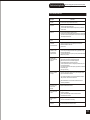
Trouble shooting Guide
Check the following guide for a possible correction to a problem
before contacting customer service.
SYMPTOMS AND CORRECTION
Correction
Symptom
No power
Connect the power plug into the wall outlet securely.
No picture
Verify the connection from the DVD video output to the TV video input. Then
Switch TV to appropriate mode(video 1)
Connect the video cable into the jacks securely. Refer to your television
owners manual.
No sound
Connect the audio cables into the jacks securely.
Verify the connection from the DVD audio output to the TV or receiver audio
input. Then switch to the appropriate source on the receiver. Refer to your
Audio amplifier owners manual.
Black & White
picture
The playback
picture Has
occasional distortion
Damaged S connector (bent pin)
A small amount of picture distortion may appear because of a poor quality
video/sound transfer to disc. This is especially true of some discs
Manufactured between 1997-1998.
Scratched disc
Brightness is
unstable or noises
are produced on
playback pictures
Connect the DVD player directly through the TV and not through any other
source. What you're viewing is the effect of the copy protection circuitry
Required on all DVD players.
If you don't have a video input on your TV, you must purchase an Therefore
Adapter from your dealer.
The DVD video
player does not start
playback
Place the disc with the graphics side up.
Place the disc on the disc tray correctly inside the guide.
Make sure the disc is free from scratches & fingerprints.
Press the SETUP button to turn off the menu screen.
Cancel the parental lock function or change the parental lock level. (The
Pre-set password is 3308.)
Turn the power off then disconnect the power plug and reinsert it back into
the wall. Retry again.
Use region 1 discs only.
MP3 won't read disc
or It skips
Return disc as the software edition used may not be compatible with the
player. Check web site for instruction.
Use new editions of software such as Voyetra Audiostation 4, Adaptec's
Easy CD Creator , NTI or Roxio's Toast Titanium.
Make sure MP3 file are not encoded with a variable bit rate such as
provided by Real Networks.
The remote control
does not work
Properly
Replace the batteries with new ones.
The recorder cannot
record.
The
The
The
The
Some keys do not
work
The type of the disc is wrong, it's not a DVD+RW or DVD+R disc.
The unit is in record mode or it is recording.
The image is
distorted.
The setup of interlaced or Progressive is wrong.
Press the I/P button to switch from each other.
type of the disc is wrong, it's not a DVD+RW or DVD+R disc.
disc is recorded full.
disc (DVD+R,DVD+RW) is locked, it should be unlocked.
DVD+R has been finilized.
33