1
Philips Sound Solutions
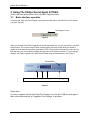
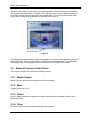
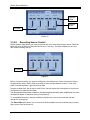
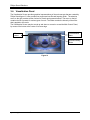
The Main Control Panel is in the center of the expanded mode, and is covered by the Visualization
Panel, which slides up and down. The Main Control panel provides access to advanced settings for
most PSA2 controls, which are grouped in five separate tabs. To uncover the Main Control Panel,
click on the pull down arrow at the bottom of the panel. See Figure 10.
Pull down arrow
Figure 10
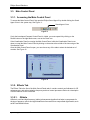
The Visualization Panel provides a graphic representation for advanced audio processing features of
the Dynamic Edge. It also includes controls to enable the environmental effects. The Visualization
Panel appears only in the expanded mode as a sliding cover for the Main Control Panel.
3.2. Details of Compact Control Panel
The Compact Control Panel contains the following controls:
3.2.1. Master Volume
Master Volume controls the overall output level of the soundcard.
3.2.2. Mute
Toggles all sound on or off.
3.2.3. Resize
Resize Toggles between the compact mode (basic controls) and the expanded mode (for more
advanced options).
3.2.4. Close
Closes the PSA2 control panel without affecting audio operation.
Dynamic Edge™ Soundcard User’s Guide
15