1
2 Propellers
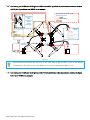
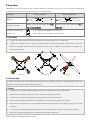
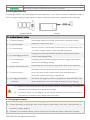
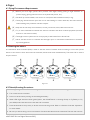
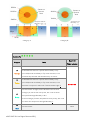
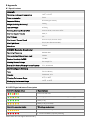
PHANTOM 2 uses the original 9-inch propellers which are classified by the color of each central nut. Damaged
propellers should be replaced by purchasing new ones if necessary.
Propellers
Grey Nut (9450)
Black Nut (9450 R)
Attach to the motor thread that does
Attach to the motor thread that has a
not have a black dot.
black dot.
Diagram
Assembly Location
Fastening/Un-fastening
Lock: Tighten the propeller in this direction.
Instructions
Unlock: Remove the propeller in this direction.
2.1 Assembly
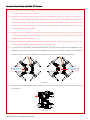
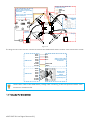
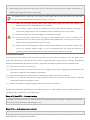
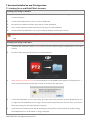
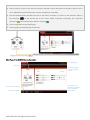
1. (Figure 2-1)Remove the four warning cards from the motors after you’ve read them.
2. (Figure 2-2)Prepare the two grey nut propellers and two black nut propellers. Make sure to match the
black nut propellers with the correctly marked black dot motors. Tighten the propellers according to the
fastening instructions.
Figure 2-1
Figure 2-2
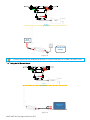
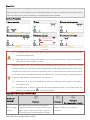
Figure2-3
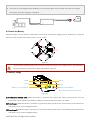
2.2 Disassembly
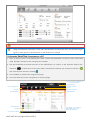
(Figure 2-3)Keep the motor deadlocked in place with the assistant wrench (or one hand) and remove the
propeller according to the un-fastening instructions.
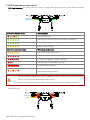
2.3 Notes
1. Propellers are self tightening during flight. DO NOT use any thread locker on the threads.
2. Make sure to match the propeller nut colors with the corresponding motors.
3. It is advised to wear protective gloves during propeller assembly and removal.
4. Check that the propellers and motors are installed correctly and firmly before every flight.
5. Check that all propellers are in good condition before flight. DO NOT use any ageing, chipped, or broken
propellers.
6. To avoid injury, STAND CLEAR of and DO NOT touch the propellers or motors when they are spinning.
7. ONLY use original DJI propellers for a better and safer flight experience.
©2013-2015 DJI. All Rights Reserved.13 |