1
 Opening and Closing Grip 500
Configuration Software
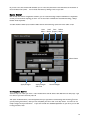
When you close the application, an icon will remain in the system tray. You can relaunch the application by double clicking on the Turtle Beach icon in the system tray
Double'Click'to'Launch'Program'
You can also start the application by launching it from the Windows Start menu (in
Windows 7) or from the Apps launcher (in Windows 8).
You can minimize the application by pressing the _ icon. In this cause the application
to remain open in the background and can be quickly reopened from the Task Bar. You
can close the application by pressing the X icon. This closes the application but it
remains available in the System Tray.
6