1
Playing music from USB flashdisk or USB harddisk
To play music from a USB flashdisk or USB harddisk, connect it (the
latter with an appropriate cable) to one of the two USB connectors on
the front or back of the Stream Box DS net. Then go to the root menu with
a push on the
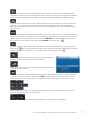
and there into USB 1 for the front connector or
USB 2 for the connector on the back. Then the menu you see on the
right will be shown in the display. The menu operation is similar to what
is described in the chapter „Playing music from a media server“.
The main difference to the playback from media servers is,
that from USB disks the Stream Box DS net only can show the
folder structure as you would see it on a normal computer. Additionally,
it doesn’t display the title names extracted from tag information, but
only the normal computer file names. Because of that the sort sequence
is alphabetical only. If you want to play the tracks of an album in the
original order, you have to make sure that the files are named in such
a way, that they will be sorted in the correct order. A good solution for
that is to name the files with leading numbers corresponding to the track
number on the original album. Some CD ripping programs do that
automatically.
Playing internet radio stations
A great number of radio stations all over the world are transmitting their programs not only to the air, but into
the internet too. This way everyone is able to receive his preferred radio programs at every place in the world
with internet connection, without interference and mostly in better quality than with a normal radio receiver.
You only need a internet connection and a device that is able to decode and receive the internet data, e.g. a
normal computer with an internet program, for instance Mozilla Firefox. Unfortunately the search for a certain
radio station can be a tedious task. Moreover, you may not want to switch on your computer only to listen to a
radio station.
The Stream Box DS net enables you to listen to internet radio without a PC. Furthermore it substantially simplifies
the search for radio stations because it makes use of the internet service vTuner. This service is free of charge
for all owners of the Stream Box DS net and provides a number of criteria for search and sorting. vTuner makes
the navigation to the desired radio station very fast and easy.
If you want to compile your own favorites list, it’s easier and less complicated to do that with your PC than with
the Stream Box DS net. You can do that with vTuner over the internet and will find the instructions for that process
on pages 15 and 16.
14
© Pro-Ject Audio Systems · Stream Box DS net · Version: December 1st, 2014