1
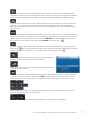
switches from title/picture/Internet radio playback display to the menu the title/picture/Radio station was
started from. A second push switches back to the playback display. Even if you have navigated to a different
menu, the display changes back to playback. The audio will not be interrupted during display changes.
switches from title/picture/Internet radio playback display to the root menu (the menu the units shows after
switching it on). A second push switches back to the playback display. Even if you have navigated to a
different menu, the display changes back to playback. The audio playback will not be interrupted during
display changes.
With a push on this button the Stream Box DS plays music tracks in random order. For this it uses all tracks in
the menu the playback was started from. E.g. if you started the playback out of an album, all album tracks
will be played back in random order. If you started out of All Titles, the Stream Box DS plays all tracks on
the respective server in random order. With activated Shuffle, the display shows
.
Repeated playback. After the first push on this button the unit repeats the title that actually is playing. The
display shows .After a second push on this button the unit repeats the complete playback list the track that
actually is playing was started from, e.g. a complete album. The display then shows
.
Adds the title/Internet radio station that is actually playing to the list of
favorites. You can reach this list through the root menu.
If you are in the list of favorites, this function deletes the track/Internet
radio station that is selected.
mutes the audio output. This is helpful mainly with Internet radio stations, because it isn’t possible to pause
or stop their continuous program. With activated Mute the playback of music titles from media servers is
continued, only the audio is switched off. A second push on this button brings the audio back on again.
Alphanumeric keys. Used for searching Internet radio stations or to enter some settings. Their function is
similar to the respective keys of a mobile phone.
These keys have no function with the Stream Box DS net, a volume control is not possible.
© Pro-Ject Audio Systems · Stream Box DS net · Version: December 1st, 2014
7