1
Introduction
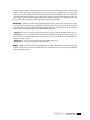
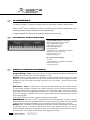
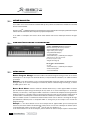
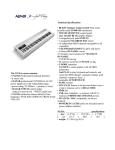
The SL-990PRO is a Master Controller keyboard that will allow you to control Midi Sound Modules and
any Midi Accessories.
With the SL-990PRO, beginners can take their first steps in music and professionals can use it as a fullfeatured instrument for working on their own compositions.
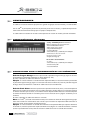
SL-990PRO provides an 88 key keyboard with weighted hammer action keys for true piano feel. The
patented weighted hammer action provides the pianist with true piano feel and eight velocity settings
allow a wide range of control over the velocity response of the keys.
Technical Specifications
• 88 key-TP40GH keybed with Graduated Hammer
action Keys for a true piano feel.
• Pitch and Modulation Wheels
• Eight velocity curve settings
• Two parallel Midi Outputs
• Sustain Pedal Jack
• 9VDC 500mA (Tip +) stabilized power adaptor
• Dimensions: in.52.3x 13.75x 4.75
(cm.132,8 x 34,92 x 12,07)
• Weight: lb. 44 (kg. 20)
The SL-990PRO carton contains:
• SL-990PRO
• 9VDC 500mA (Tip +) stabilized power adaptor
• PS100 Sustain pedal
• Instruction Manual
Changing the settings:
Program Change Button -The program change function is used to select which preset sound you
want from your MIDI module. You can select the program change number by pressing and holding the
Program Change button and entering the number in the second octave/numeric entry field which corresponds to the preset sound you desire. When you release the Program Change button, the message will be
sent. Values run from 1-128.
The SL-990PRO will transmit the program change when you let go of the button.
Example: If you want to play sound No. 56 on the MIDI device, hold down the Program Change button,
enter the number 56 on the numeric entry field and let go of the Program Change button.
The SL-990PRO will now play with sound No. 56.
Bank Select Button - The bank select function allows you to change the patch bank of your MIDI
module or keyboard. Due to different manufacturer approaches to this function, the format for entering this parameter depends on the model and manufacturer of your MIDI module or keyboard. Please
refer to the MIDI Implementation Chart found in the manual of your MIDI module or keyboard for
information on the format that your unit requires.
1) If your module requires a value sent only on control channel 32, you will simply need to press and
hold the Bank Select button, and enter the bank number desired in the second octave/numeric entry
field. When you release the Bank Select button, the message will be sent.
2
english