1
2
RECEIVER FEATURES
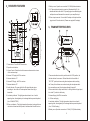
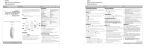
11. Battery cover: Open the cover and set 2X1.5VAA)Alkaline batteries.
12. 1/4" phone jack audio output connector (Unbalanced high Z): An
unbalanced audio cable with 1/4" phone plug(such as standard guitar
cable)can be used between this connector to your amplifier input
13. Power input connector: Connect the AC adapter to this jack and then
plug into an AC electrical outlet.(Please use supplied AC adapter)
3
TRANSMITTER FEATURES
1. Power button: Turns ON/OFF the receiver
2. Squelch control button.
3. Volume Control: Rotate the knob to increase or decrease the volume
of the receiver output.
4. Antenna "A":Supply the RF for receiver
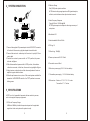
1. Power and audio mute switch: push the switch to "ON" position, the
5. Antenna indicator "A".
indicator shines for a moment. Pushed the switch to the middle of
6. Antenna"B":Supply the RF for receiver
"ON""OFF" position, allows muting the microphone audio, avoiding
7. Antenna indicator "B"
the "thump "noise that can occur when turning the microphone audio.
8. Audio indicator: The green light of the AF signal indicator glows
it is recessed to prevent it from being accidentally turned off.
according to the volume of the microphone when talk or sing to
2. Gain control switch: Adjust audio level, for fitting all kinds of signal input,
transmitter
it is on the "L "position in the factory.
9. Low battery indicator: This light glows when there is less of useful
3. Antenna:Supply the RF for transmitter
operating time, allowing battery to be changed before power is depleted.
4. .6.35mm audio plug.
(Use 1.5VAA BATTERY)
5. Low battery indicator: This light glows when there is less of useful
10. Power on indicator: This light glows when the receiver is plugged into an
electrical outlet and switch is pushed, it indicates that the receiver is on.
operating time, allowing battery to be changed before power is depleted.
(Use 1.5V AAA battery)
6.Battery cover:Open the cover and set 1 XAAA(1.5V)Alkaline battery.
3
4