1
3.Physical Installation
Lens Shift
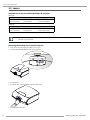
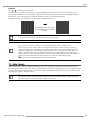
In addition to using the adjustable feet to adjust projection angle, you can also use the Lens Shift function to adjust the
projected image.
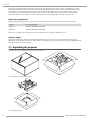
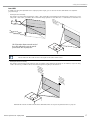
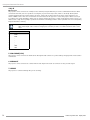
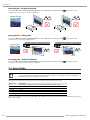
• Moving the lens vertically
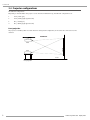
The distance of vertical lens movement is +110% , -30% of half the screen height in both directions.For instance, if you are
using a 80" × 50" screen, you will be able to move the image upwards no more than 27.5'' or downwards no more than 7.5''.
Ra
lennge
o
ad s sh f ve
jus ift rtic
tm
al
en
t
Range o
fv
lens shif ertical
t adjustm
ent
This illustration shows normal vertical
lens shift without the use of special
specification lens or projector.
Please make sure the center of lens is retangular to the center of the screen.
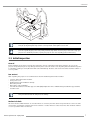
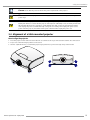
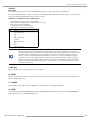
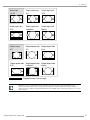
• Moving the lens horizontally
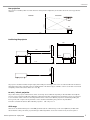
The distance of horizontal lens movement is 10% of half the screen width in both directions. For instance, if you are using
a 80" × 50" screen, you will be able to move the image left or right by no more than 4".
Ra
n
ho ge o
riz
f
len ont
s s al
ad hif
jus t
tm
en
t
Ra
n
ho ge o
riz
f
len ont
s s al
ad hif
jus t
tm
en
t
This illustration shows normal horizontal lens shift without the use of special specification lens or projector.
PFWX-51B/PFWU-51B 10/02/2014
17