1
OPERATING INSTRUCTION
NS
4.
After shredding, ppress the stand-by button Ⓑ to turn offf the shredder and
turn off the powerr switch in back of sshredder Ⓐ.
5.
Empty the waste bin regularly to pre
event jams and dam
mage to cutting
mechanism.
6.
Stand-by button Ⓑ blinks when bin is opened. After biin is returned to
7.
engaged positionn, the machine will rresume operation.
Cooling fan will ooperate when shred
dder is in continuous run mode. Some
e
noise may occur when fan operatess.
JAM-ALER
RT
gy. The jam-alert iccon Ⓕ will blink
This uniit is equipped with jjam-alert technolog
indicatin
ng that the maximuum sheet capacity h
has been exceeded
d. Reduce the num
mber
of sheetts and place the paaper back into the p
paper feed.
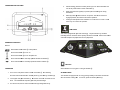
SHREDDER CONTROLS
Buttons
Switch Main Powe
er Switch Ⓐ to ON position.
Press Power Butto
on Ⓑ to turn on.
Press Power Butto
on Ⓑ to turn the po
ower off.
Press and hold FW
WD to manually ope
erate shredder in fo
orward Ⓒ.
Press and hold RE
EV to manually operate shredder in rev
verse Ⓓ.
BIN FULL
OPERATION
1.
2.
T
Turn on the main po
ower switch in back
k of shredder Ⓐ. The
T following
STAND
DBY MODE
ffunction buttons will illuminate: stand-b
by button Ⓑ, the FW
WD Ⓒ and REV Ⓓ.
Ⓓ
The shrredder is equipped with an energy savving standby mode which will activate
Insert paper into pa
aper feed slot Ⓖ. Do
D not fee more tha
an 12 sheets at one
e
after 30 minutes of being iddle. To resume, prress the stand-by b
button Ⓑ.
ttime. The shredderr will stop after pap
per has passed thro
ough.
3.
When waste
w
bin is full, a ggreen “Full” light will flash Ⓔ.
T
To shred a CD, DVD or credit card ins
sert through designated slot Ⓖ.