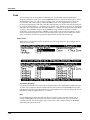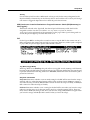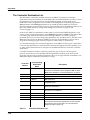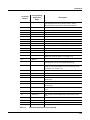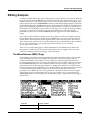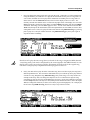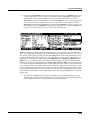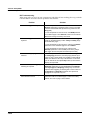
1
Musician’s Guide (For PC3LE6, PC3LE7, and PC3LE8) ® Kurzweil is a registered trademark of Young Chang Co., Ltd. ©2011 All rights reserved. Young Chang®, Kurzweil ®, V. A. S. T. ®, PC3LE®, PC3®, X‐Pro, PC3K, KDFX®, Pitcher®, and LaserVerb®, KSP8 ™, K2661™, K2600™, K2500™, and K2000™ are trademarks of Young Chang Co., Ltd. All other products and brand names are trademarks or registered trademarks of their respective companies. Product features and specifications are subject to change without notice. You may legally print up to two (2) copies of this document for personal use. Commercial use of any copies of this document is prohibited. Young Chang Co. retains ownership of all intellectual property represented by this document. 910520-004 – V2 May 2011 The lightning flash with the arrowhead symbol, within an equilateral triangle, is intended to alert the user to the presence of uninsulated "dangerous voltage" within the product's enclosure that may be of sufficient magnitude to constitute a risk of electric shock to persons. CAUTION RISK OF ELECTRIC SHOCK DO NOT OPEN The exclamation point within an equilateral triangle is intended to alert the user to the presence of important operating and maintenance (servicing) instructions in the literature accompanying the product. CAUTION: TO REDUCE THE RISK OF ELECTRIC SHOCK, DO NOT REMOVE THE COVER NO USER SERVICEABLE PARTS INSIDE REFER SERVICING TO QUALIFIED SERVICE PERSONNEL IMPORTANT SAFETY & INSTALLATION INSTRUCTIONS INSTRUCTIONS PERTAINING TO THE RISK OF FIRE, ELECTRIC SHOCK, OR INJURY TO PERSONS WARNING: When using electric products, basic precautions should always be followed, including the following: 1. Read all of the Safety and Installation Instructions and Explanation of Graphic Symbols before using the product. 2. This product must be grounded. If it should malfunction or break down, grounding provides a path of least resistance for electric current to reduce the risk of electric shock. This product is equipped with a power supply cord having an equipment-grounding conductor and a grounding plug. The plug must be plugged into an appropriate outlet which is properly installed and grounded in accordance with all local codes and ordinances. DANGER: Improper connection of the equipment-grounding conductor can result in a risk of electric shock. Do not modify the plug provided with the product - if it will not fit the outlet, have a proper outlet installed by a qualified electrician. Do not use an adaptor which defeats the function of the equipment-grounding conductor. If you are in doubt as to whether the product is properly grounded, check with a qualified serviceman or electrician. 3. WARNING: This product is equipped with an AC input voltage selector. The voltage selector has been factory set for the mains supply voltage in the country where this unit was sold. Changing the voltage selector may require the use of a different power supply cord or attachment plug, or both. To reduce the risk of fire or electric shock, refer servicing to qualified maintenance personnel. 4. Do not use this product near water - for example, near a bathtub, washbowl, kitchen sink, in a wet basement, or near a swimming pool, or the like. 5. This product should only be used with a stand or cart that is recommended by the manufacturer. 6. This product, either alone or in combination with an amplifier and speakers or headphones, may be capable of producing sound levels that could cause permanent hearing loss. Do not operate for a long period of time at a high volume level or at a level that is uncomfortable. If you experience any hearing loss or ringing in the ears, you should consult an audiologist. 7. 8. 9. 10. 11. 12. 13. 14. 15. The product should be located so that its location or position does not interfere with its proper ventilation. The product should be located away from heat sources such as radiators, heat registers, or other products that produce heat. The product should be connected to a power supply only of the type described in the operating instructions or as marked on the product. This product may be equipped with a polarized line plug (one blade wider than the other). This is a safety feature. If you are unable to insert the plug into the outlet, contact an electrician to replace your obsolete outlet. Do not defeat the safety purpose of the plug. The power supply cord of the product should be unplugged from the outlet when left unused for a long period of time. When unplugging the power supply cord, do not pull on the cord, but grasp it by the plug. Care should be taken so that objects do not fall and liquids are not spilled into the enclosure through openings. The product should be serviced by qualified service personnel when: A. The power supply cord or the plug has been damaged; B. Objects have fallen, or liquid has been spilled into the product; C. The product has been exposed to rain; D. The product does not appear to be operating normally or exhibits a marked change in performance; E. The product has been dropped, or the enclosure damaged. Do not attempt to service the product beyond that described in the user maintenance instructions. All other servicing should be referred to qualified service personnel. WARNING: Do not place objects on the product’s power supply cord, or place the product in a position where anyone could trip over, walk on, or roll anything over cords of any type. Do not allow the product to rest on or be installed over cords of any type. Improper installations of this type create the possibility of a fire hazard and/or personal injury. RADIO AND TELEVISION INTERFERENCE WARNING: Changes or modifications to this instrument not expressly approved by Young Chang could void your authority to operate the instrument. IMPORTANT: When connecting this product to accessories and/or other equipment use only high quality shielded cables. NOTE: This instrument has been tested and found to comply with the limits for a Class B digital device, pursuant to Part 15 of the FCC Rules. These limits are designed to provide reasonable protection against harmful interference in a residential installation. This instrument generates, uses, and can radiate radio frequency energy and, if not installed and used in accordance with the instructions, may cause harmful interference to radio communications. However, there is no guarantee that interference will not occur in a particular installation. If this instrument does cause harmful interference to radio or television reception, which can be determined by turning the instrument off and on, the user is encouraged to try to correct the interference by one or more of the following measures: • Reorient or relocate the receiving antenna. • Increase the separation between the instrument and the receiver. • Connect the instrument into an outlet on a circuit other than the one to which the receiver is connected. • If necessary consult your dealer or an experienced radio/television technician for additional suggestions. NOTICE This apparatus does not exceed the Class B limits for radio noise emissions from digital apparatus set out in the Radio Interference Regulations of the Canadian Department of Communications. AVIS Le present appareil numerique n’emet pas de bruits radioelectriques depassant les limites applicables aux appareils numeriques de la class B prescrites dans le Reglement sur le brouillage radioelectrique edicte par le ministere des Communications du Canada. SAVE THESE INSTRUCTIONS ii Important Safety Instructions 1) 2) 3) 4) 5) 6) 7) Read these instructions Keep these instructions. Heed all warnings. Follow all instructions. Do not use this apparatus near water. Clean only with dry cloth. Do not block any of the ventilation openings. Install in accordance with the manufacturer’s instructions. 8) Do not install near any heat sources such as radiators, heat registers, stoves, or other appara‐ tus (including amplifiers) that produce heat. 9) Do not defeat the safety purpose of the polarized or grounding‐type plug. A polarized plug has two blades with one wider than the other. A grounding type plug has two blades and a third grounding prong. The wide blade or the third prong are provided for your safety. If the provided plug does not fit into your outlet, consult an electrician for replacement of the obso‐ lete outlet. 10) Protect the power cord from being walked on or pinched, particularly at plugs, convenience receptacles, and the point where they exit from the apparatus. 11) Only use attachments/accessories specified by the manufacturer. 12) Use only with a cart, stand, tripod, bracket, or table specified by the man‐ ufacturer, or sold with the apparatus. When a cart is used, use caution when moving the cart/apparatus combination to avoid injury from tip‐ over. 13) Unplug this apparatus during lightning storms or when unused for long periods of time. 14) Refer all servicing to qualified service personnel. Servicing is required when the apparatus has been damaged in any way, such as power‐supply cord or plug is damaged, liquid has been spilled or objects have fallen into the apparatus, the apparatus has been exposed to rain or moisture, does not operate normally, or has been dropped. Warning: To reduce the risk of fire or electric shock, do not expose this apparatus to rain or mois‐ ture. Do not expose this equipment to dripping or splashing and ensure that no objects filled with liquids, such as vases, are placed on the equipment. To completely disconnect this equipment from the AC Mains, disconnect the power supply cord plug from the AC receptacle. iii Kurzweil International Contacts Contact the Kurzweil office listed below to locate your local Kurzweil representative. American Music & Sound 5304 Derry Avenue #C Agoura Hills California 91301 USA telephone: (800) 994‐4984 fax: (818) 597‐0411 Email: [email protected] Kurzweil Co., LTD iPark Building #102, Floor 9 Jeongja‐Dong 9, Bundang‐Gu Soungnam‐Shi, Gyeonggi‐Do 463‐859 South Korea www.ycpiano.co.kr www.youngchang.com www.kurzweil.com TECHNICAL SUPPORT Email: [email protected] iv Table Of Contents Kurzweil International Contacts......................................................................................................................................iv Chapter 1 Introduction Sounds and Features .......................................................................................................................................................1‐1 Keeping Current ..............................................................................................................................................................1‐2 Overview of the PC3LE...................................................................................................................................................1‐2 How the PC3LE Works ...................................................................................................................................................1‐2 V.A.S.T. Synthesis.............................................................................................................................................................1‐2 KB3 Tone Wheel Emulation ...........................................................................................................................................1‐3 KVA Programs..................................................................................................................................................................1‐3 How to Use This Manual ................................................................................................................................................1‐3 Do I Have Everything?....................................................................................................................................................1‐3 Boot Loader.......................................................................................................................................................................1‐3 Options ..............................................................................................................................................................................1‐4 Pedals..........................................................................................................................................................................1‐4 USB Storage Device ..................................................................................................................................................1‐4 Chapter 2 Startup Make Connections ...........................................................................................................................................................2‐1 Make Music.......................................................................................................................................................................2‐1 Startup—the Details ........................................................................................................................................................2‐2 Before You Start... .....................................................................................................................................................2‐2 Connecting the Power Cable (Line Cord) .............................................................................................................2‐2 Connecting Audio Cables........................................................................................................................................2‐2 Connecting MIDI ......................................................................................................................................................2‐3 Pedals..........................................................................................................................................................................2‐3 Switching On the Power ..........................................................................................................................................2‐4 USB Storage Port.......................................................................................................................................................2‐4 USB Computer Port ..................................................................................................................................................2‐5 PC3LE Programs ..............................................................................................................................................................2‐6 Selecting Programs ...................................................................................................................................................2‐6 Easy Audition............................................................................................................................................................2‐6 Program Mode Display ...........................................................................................................................................2‐6 V.A.S.T. Programs .....................................................................................................................................................2‐7 KB3 Programs............................................................................................................................................................2‐7 Setups ................................................................................................................................................................................2‐8 Quick Access.....................................................................................................................................................................2‐8 The Other Modes .............................................................................................................................................................2‐9 Software Upgrades ..........................................................................................................................................................2‐9 Chapter 3 User Interface Basics Mode Selection .................................................................................................................................................................3‐1 Mode Buttons ...................................................................................................................................................................3‐2 Assignable Controls ........................................................................................................................................................3‐2 Pads....................................................................................................................................................................................3‐3 i Assignable Switches ........................................................................................................................................................3‐3 The Save Button ...............................................................................................................................................................3‐3 Category Buttons .............................................................................................................................................................3‐4 Picking Favorites.......................................................................................................................................................3‐4 Pitch Wheel and Mod Wheel .........................................................................................................................................3‐5 Navigation ........................................................................................................................................................................3‐6 The Display................................................................................................................................................................3‐6 Pages ...........................................................................................................................................................................3‐6 The Top Line..............................................................................................................................................................3‐6 The Bottom Line........................................................................................................................................................3‐6 The Soft Buttons........................................................................................................................................................3‐7 The Cursor Buttons ..................................................................................................................................................3‐7 The Chan/Zone Buttons...........................................................................................................................................3‐8 The Edit Button .........................................................................................................................................................3‐8 The Exit Button .........................................................................................................................................................3‐8 Data Entry .........................................................................................................................................................................3‐9 The Alpha Wheel ......................................................................................................................................................3‐9 The ‐/ + Buttons .........................................................................................................................................................3‐9 The Alphanumeric Pad ............................................................................................................................................3‐9 Double Button Presses ...........................................................................................................................................3‐11 Intuitive Controller Selection/Data Entry...................................................................................................................3‐12 Search...............................................................................................................................................................................3‐12 Quick Song Recording and Playback..........................................................................................................................3‐13 Chapter 4 The Operating Modes What the Modes Are .......................................................................................................................................................4‐1 Selecting Modes ...............................................................................................................................................................4‐1 Finding Square One..................................................................................................................................................4‐2 Using the Modes ..............................................................................................................................................................4‐2 Program Mode ..........................................................................................................................................................4‐2 Setup Mode................................................................................................................................................................4‐2 Quick Access Mode ..................................................................................................................................................4‐3 Master Mode .............................................................................................................................................................4‐3 Song Mode .................................................................................................................................................................4‐3 Storage Mode ............................................................................................................................................................4‐3 Chapter 5 Editing Conventions Introduction to Editing ...................................................................................................................................................5‐1 What’s an Object?......................................................................................................................................................5‐1 Object Type and ID ..........................................................................................................................................................5‐2 Saving and Naming.........................................................................................................................................................5‐3 ROM Objects .............................................................................................................................................................5‐4 Memory Objects ........................................................................................................................................................5‐4 Keyboard Naming ....................................................................................................................................................5‐5 Deleting Objects ...............................................................................................................................................................5‐6 Dependent Objects ...................................................................................................................................................5‐6 Saving and Loading Files—Storage Mode...................................................................................................................5‐6 ii Chapter 6 Program Mode The Program Mode Page ................................................................................................................................................6‐2 Selecting Programs ...................................................................................................................................................6‐2 Easy Audition............................................................................................................................................................6‐2 Picking Favorite Programs ......................................................................................................................................6‐2 The Soft Buttons in Program Mode .......................................................................................................................6‐3 Saving Controller Settings.......................................................................................................................................6‐3 Arpeggiator Settings (Arp Settings Button)..........................................................................................................6‐4 Split/Layer Button.....................................................................................................................................................6‐4 Tap Tempo Button ....................................................................................................................................................6‐4 V.A.S.T. and KB3 Programs ............................................................................................................................................6‐5 KB3 Effects And Real‐time Controls......................................................................................................................6‐6 The Program Editor .........................................................................................................................................................6‐9 The PARAMETERS Page .........................................................................................................................................6‐9 The BASIC Page ......................................................................................................................................................6‐11 The PADS Page .......................................................................................................................................................6‐12 The EFFECTS (FX) Page.........................................................................................................................................6‐13 The ARPEGGIATOR 1 & 2 Pages (ARP 1, ARP 2) .............................................................................................6‐15 The Program Editor Utility Soft Buttons.............................................................................................................6‐15 The V.A.S.T. Soft Button.........................................................................................................................................6‐16 Chapter 7 Setup Mode Split/Layer Button............................................................................................................................................................7‐2 Adding a Split Zone .................................................................................................................................................7‐2 Adding a Layer Zone ...............................................................................................................................................7‐4 Tap Tempo Button............................................................................................................................................................7‐4 The Setup Editor ..............................................................................................................................................................7‐5 The Channel/Program (CH/PROG) Page 7‐6 Program......................................................................................................................................................................7‐6 Destination.................................................................................................................................................................7‐6 Channel ......................................................................................................................................................................7‐7 MidiBank....................................................................................................................................................................7‐7 MIDI Program (MidiProg) ......................................................................................................................................7‐7 Status ..........................................................................................................................................................................7‐8 Input Channel ...........................................................................................................................................................7‐8 MIDI Bank Mode (BankMode) ...............................................................................................................................7‐9 Entry Program Change (EntryProgChg)...............................................................................................................7‐9 Arpeggiator ...............................................................................................................................................................7‐9 Controllers (CTRLS) Page 7‐10 Knobs, CC Pedal, Modwheel, Pitchbend up/dn (Pitch Wheel,) Pressure ......................................................7‐11 SW Pedal 1 & 2, Arp. switch, Arp. latch sw, Switch 1‐10..................................................................................7‐14 Pads...........................................................................................................................................................................7‐16 The Controller Destination List ............................................................................................................................7‐18 Shift Key Number, Shift Key (ShKeyNum, ShiftKey) .......................................................................................7‐23 The Pan/Volume (PAN/VOL) Page 7‐26 Entry Volume, Exit Volume...................................................................................................................................7‐26 Entry Pan, Exit Pan .................................................................................................................................................7‐26 The Key/Velocity (KEY‐VEL) Page 7‐27 Low Key (LoKey), High Key (HiKey) .................................................................................................................7‐27 Transpose .................................................................................................................................................................7‐28 iii Note Map .................................................................................................................................................................7‐28 Velocity Scale (VelScale) ........................................................................................................................................7‐29 Velocity Offset (VelOffset) .....................................................................................................................................7‐30 Velocity Curve (VelCurve).....................................................................................................................................7‐32 Low Velocity (LoVel), HighVelocity (HiVel).......................................................................................................7‐34 The ARPEGGIATOR & ARPEGGIATOR 2 (ARP1, ARP2) Pages 7‐35 The ARPEGGIATOR Page.....................................................................................................................................7‐35 The ARPEGGIATOR 2 Page..................................................................................................................................7‐42 Real‐time Control of Arpeggiator Parameters ...................................................................................................7‐46 Riffs 7‐48 The RIFF1 Page .......................................................................................................................................................7‐48 The RIFF2 Page .......................................................................................................................................................7‐51 Real‐time Control of Riff Parameters...................................................................................................................7‐56 The BEND Page 7‐57 Bend Range (Semitones) and Bend Range (Cents): Up and Down .................................................................7‐57 The FX Pages: FX, AUXFX1, AUXFX2 7‐59 Effects Overview.....................................................................................................................................................7‐59 The FX Page .............................................................................................................................................................7‐61 The AUXFX1 and AUXFX2 Pages ........................................................................................................................7‐62 The COMMON Page 7‐63 Tempo.......................................................................................................................................................................7‐63 Clock Source ............................................................................................................................................................7‐64 Arpeggiator Global (ArpGlobal) ..........................................................................................................................7‐64 Aux FX Channel......................................................................................................................................................7‐64 KB3 Channel............................................................................................................................................................7‐64 TRIGGER KEYS (KEYTRG) 7‐64 The Setup Editor Utility Soft Buttons 7‐65 Name ........................................................................................................................................................................7‐65 Save...........................................................................................................................................................................7‐65 Delete........................................................................................................................................................................7‐65 New Zone (NewZn) ...............................................................................................................................................7‐65 Duplicate Zone (DupZn) .......................................................................................................................................7‐65 Import Zone (ImpZn).............................................................................................................................................7‐65 Delete Zone (DelZn)...............................................................................................................................................7‐66 Set Controls KB3 (KB3CTL) ..................................................................................................................................7‐66 Set Controls Zone Mutes (MUTES)......................................................................................................................7‐66 Recording A Setup To Song Mode ..............................................................................................................................7‐67 The Control Setup..........................................................................................................................................................7‐69 Chapter 8 Quick Access Mode Soft Buttons In Quick Access Mode.......................................................................................................................8‐2 The QA Editor ..................................................................................................................................................................8‐2 Chapter 9 Master Mode Master Mode Page 1 (MAST 1) ......................................................................................................................................9‐1 Tune ............................................................................................................................................................................9‐2 Transpose ...................................................................................................................................................................9‐2 Tempo.........................................................................................................................................................................9‐2 Velocity Map (Vel Map) (Master) ...........................................................................................................................9‐3 iv Pads Velocity Map (PadVelMap)............................................................................................................................9‐4 Pressure Map (Press Map) (Master).......................................................................................................................9‐5 Intonation...................................................................................................................................................................9‐6 Intonation Key (Int.Key)..........................................................................................................................................9‐7 Master Mode Page 2 (MAST 2) ......................................................................................................................................9‐8 Clock Source ..............................................................................................................................................................9‐8 Digital Output Volume (Dig.Out Vol) ...................................................................................................................9‐8 FX Mode.....................................................................................................................................................................9‐8 OS/Object Ver (Operating System/Object Version)..............................................................................................9‐9 Default Song ..............................................................................................................................................................9‐9 Output Clock .............................................................................................................................................................9‐9 Drum Remap .............................................................................................................................................................9‐9 General MIDI.............................................................................................................................................................9‐9 Demo Button ...........................................................................................................................................................9‐10 Buttons Mode ..........................................................................................................................................................9‐11 MIDI Transmit (XMIT) ..................................................................................................................................................9‐12 Destination...............................................................................................................................................................9‐12 Channel ....................................................................................................................................................................9‐13 Transpose .................................................................................................................................................................9‐13 Velocity Map (Transmit) ........................................................................................................................................9‐14 Pressure Map (Transmit) .......................................................................................................................................9‐15 Program Change (ProgChange) ...........................................................................................................................9‐16 Change Setups (ChgSetups)..................................................................................................................................9‐16 MIDI Receive (RECV)....................................................................................................................................................9‐17 Basic Channel ..........................................................................................................................................................9‐17 MIDI Receive Mode (MIDI Mode) .......................................................................................................................9‐17 Velocity Map (Receive) ..........................................................................................................................................9‐18 Pressure Map (Receive) .........................................................................................................................................9‐19 All Notes Off ...........................................................................................................................................................9‐20 Program Change Mode (PrgChgMode) ..............................................................................................................9‐20 System Exclusive ID (SysExID) ............................................................................................................................9‐20 Bank Select ...............................................................................................................................................................9‐20 Local Keyboard Channel (LocalKbdCh) .............................................................................................................9‐21 Program Change Formats.............................................................................................................................................9‐25 Extended Program Changes .................................................................................................................................9‐25 Soft Buttons In Master Mode .......................................................................................................................................9‐26 Reset..........................................................................................................................................................................9‐26 Delete........................................................................................................................................................................9‐26 UTILITIES .......................................................................................................................................................................9‐26 MIDI..........................................................................................................................................................................9‐27 VOICES ....................................................................................................................................................................9‐27 About........................................................................................................................................................................9‐27 OBJECT ....................................................................................................................................................................9‐28 Loader.......................................................................................................................................................................9‐29 Chapter 10 Song Mode and the Song Editor Getting Started with the Sequencer ............................................................................................................................10‐1 What is a Sequencer?..............................................................................................................................................10‐1 Song Mode: The MAIN Page .......................................................................................................................................10‐1 Current Song (CurSong) ........................................................................................................................................10‐2 v Tempo.......................................................................................................................................................................10‐2 Recording Track (RecTrk) ......................................................................................................................................10‐3 Program (Prog) .......................................................................................................................................................10‐3 Track Number (Trk:#).............................................................................................................................................10‐3 Volume (Vol)............................................................................................................................................................10‐4 Pan ............................................................................................................................................................................10‐5 Mode.........................................................................................................................................................................10‐6 Location (Locat) ......................................................................................................................................................10‐6 Mode Indicators (+ and x): ....................................................................................................................................10‐6 Activity Indicators ..................................................................................................................................................10‐6 Track Status Indicators...........................................................................................................................................10‐7 Track Channels........................................................................................................................................................10‐7 Soft Buttons on the MAIN Page ........................................................................................................................... 10‐7 The Save Changes Dialog ......................................................................................................................................10‐9 Song Mode: The BIG Page ..........................................................................................................................................10‐10 Time In ...................................................................................................................................................................10‐11 Time Out ................................................................................................................................................................10‐11 Song End ................................................................................................................................................................10‐11 Loop........................................................................................................................................................................10‐11 RecMode ................................................................................................................................................................10‐11 Metron ....................................................................................................................................................................10‐11 Song Mode: The FX Pages ..........................................................................................................................................10‐12 Song Mode: The MIXER Page ....................................................................................................................................10‐12 The Rec, Play, and Stop Soft Buttons .................................................................................................................10‐12 The Keep Soft Button ...........................................................................................................................................10‐13 The Done Soft Button ...........................................................................................................................................10‐13 Song Mode: The METRONOME Page......................................................................................................................10‐13 Metronome ............................................................................................................................................................10‐13 CountOff ................................................................................................................................................................10‐13 Program..................................................................................................................................................................10‐14 Channel ..................................................................................................................................................................10‐14 Strong Note............................................................................................................................................................10‐14 Strong Vel...............................................................................................................................................................10‐14 Soft Note ................................................................................................................................................................10‐14 Soft Vel ...................................................................................................................................................................10‐14 The Rec, Play, and Stop Soft Buttons .................................................................................................................10‐14 The Done Soft Button ...........................................................................................................................................10‐14 Song Mode: The Filter Pages (RECFLT and PLYFLT).............................................................................................10‐15 Notes.......................................................................................................................................................................10‐15 LoKey .....................................................................................................................................................................10‐15 Hi.............................................................................................................................................................................10‐15 LoVel.......................................................................................................................................................................10‐16 Hi.............................................................................................................................................................................10‐16 Controllers .............................................................................................................................................................10‐16 Controller...............................................................................................................................................................10‐16 LoVal.......................................................................................................................................................................10‐16 Hi.............................................................................................................................................................................10‐16 PitchBend ...............................................................................................................................................................10‐16 ProgChange ...........................................................................................................................................................10‐16 MonoPress .............................................................................................................................................................10‐16 PolyPress ................................................................................................................................................................10‐16 vi The Rec, Play, and Stop Soft Buttons .................................................................................................................10‐16 The Done Soft Button ...........................................................................................................................................10‐17 Song Mode: The MISC Page .......................................................................................................................................10‐17 Control Chase........................................................................................................................................................10‐17 Quant ......................................................................................................................................................................10‐17 Grid.........................................................................................................................................................................10‐18 Swing ......................................................................................................................................................................10‐18 Release....................................................................................................................................................................10‐18 Key Wait.................................................................................................................................................................10‐18 Song Mode: The STATS Page .....................................................................................................................................10‐18 The Song Editor............................................................................................................................................................10‐19 Song Editor: The COMMON Page ............................................................................................................................10‐19 Tempo.....................................................................................................................................................................10‐20 TimeSig...................................................................................................................................................................10‐20 FX Track .................................................................................................................................................................10‐20 DrumTrack (DrumTrk) ........................................................................................................................................10‐20 MIDI Destination (MidiDst)................................................................................................................................10‐20 Soft Buttons on the COMMON Page .................................................................................................................10‐21 Song Editor: The TRACK Page ..................................................................................................................................10‐21 Common Parameters for Edit Song: Track Functions .....................................................................................10‐22 Region/Criteria Box Parameters .........................................................................................................................10‐22 Soft Buttons on the TRACK Page .......................................................................................................................10‐23 Song Editor: Track Functions .....................................................................................................................................10‐24 Erase .......................................................................................................................................................................10‐24 Copy .......................................................................................................................................................................10‐24 Bounce ....................................................................................................................................................................10‐25 Insert .......................................................................................................................................................................10‐26 Delete......................................................................................................................................................................10‐26 Quantize.................................................................................................................................................................10‐27 Shift.........................................................................................................................................................................10‐28 Transpose ...............................................................................................................................................................10‐28 Grab ........................................................................................................................................................................10‐29 Change ...................................................................................................................................................................10‐30 Remap.....................................................................................................................................................................10‐31 Song Editor: The EVENT Page...................................................................................................................................10‐31 Initial Program, Volume, Pan..............................................................................................................................10‐32 Location..................................................................................................................................................................10‐32 Bar, Beat, and Tick ................................................................................................................................................10‐32 Event Type and Value ..........................................................................................................................................10‐32 Soft Buttons on the EVENT Page .......................................................................................................................10‐33 Tempo Track ..........................................................................................................................................................10‐33 Chapter 11 Storage Mode Storage Mode Page ........................................................................................................................................................11‐1 Using USB Devices .................................................................................................................................................11‐2 Storage Mode Common Features ................................................................................................................................11‐4 Directories................................................................................................................................................................11‐4 Path ...........................................................................................................................................................................11‐4 Common Dialogs ....................................................................................................................................................11‐5 The STORE Page ............................................................................................................................................................11‐6 vii The Store Advanced Page......................................................................................................................................11‐6 The LOAD Page .............................................................................................................................................................11‐8 Loading Individual Objects...................................................................................................................................11‐9 Loading Methods..................................................................................................................................................11‐10 The Utilities (UTILS) Page ..........................................................................................................................................11‐10 Soft Buttons on the Utilities Page .......................................................................................................................11‐10 Export ............................................................................................................................................................................11‐11 Format ...........................................................................................................................................................................11‐11 Chapter 12 Keymap and Sample Editing The Keymap Editor .......................................................................................................................................................12‐1 Keymap Editor Parameters ...................................................................................................................................12‐3 The Soft Buttons in the Keymap Editor...............................................................................................................12‐5 Special Double Button Presses in the Keymap Editor.......................................................................................12‐6 Building a Keymap ........................................................................................................................................................12‐7 Editing Samples .............................................................................................................................................................12‐9 The Miscellaneous (MISC) Page ........................................................................................................................... 12‐9 The TRIM Page......................................................................................................................................................12‐12 Chapter 13 Tutorial: Song Mode Part 1: Assign Instruments To Tracks ..................................................................................................................13‐2 Part 2: Set The Tempo.............................................................................................................................................13‐3 Part 3: Record Your First Track, Save The Song .................................................................................................13‐4 Part 4: Record Additional Tracks..........................................................................................................................13‐7 Part 5: Fixing Mistakes ...........................................................................................................................................13‐8 Part 6: Adjusting The Volume Of Each Instrument .........................................................................................13‐10 Part 7: Learning More About Song Mode .........................................................................................................13‐15 Chapter 14 Tutorials: Setup Mode The Setup Editor ............................................................................................................................................................14‐3 Using And Editing A Split Program Setup ................................................................................................................14‐4 Using Setup Mode To Play Layers Of Instruments ..................................................................................................14‐8 Adjusting The Volume And Pan Of Zones ..............................................................................................................14‐10 Assigning Multiple Knobs To Control Volume In Different Zones......................................................................14‐12 Assigning A Single Knob To Control Relative Volume In Different Zones ........................................................14‐16 Offset Method .......................................................................................................................................................14‐16 Scale Method .........................................................................................................................................................14‐20 Assigning A Single Knob to Crossfade Between The Volume Of Different Zones............................................14‐24 Switch Between Zones Based On Played Keyboard Velocity................................................................................14‐29 Creating A New Setup ................................................................................................................................................14‐32 Basics Of Using Riffs ...................................................................................................................................................14‐35 Adding A Riff, Sync Riffs ....................................................................................................................................14‐35 Transposing A Riff As It Is Triggered ................................................................................................................14‐42 Using A Single Song For Multiple Riffs ............................................................................................................14‐46 Chapter 15 Power User Tips General Tips....................................................................................................................................................................15‐2 Set The Start‐up Program And MIDI Channel...................................................................................................15‐2 viii Picking Favorite Programs For Each Category ..................................................................................................15‐2 Easy Audition (Play A Demo Song For Each Program) ...................................................................................15‐3 Program Mode General Tips.................................................................................................................................15‐3 Advanced Tips ...............................................................................................................................................................15‐4 Intuitive Controller Selection/Data Entry ...........................................................................................................15‐4 Search Function (Find A Program Or Setup By Name) ....................................................................................15‐4 Quick Song Recording And Playback (Record An Idea From Any Mode) ...................................................15‐5 Program Mode ........................................................................................................................................................15‐6 Setup Mode..............................................................................................................................................................15‐8 Appendix A Specifications MIDI Implementation Chart .........................................................................................................................................A‐1 Specifications ...................................................................................................................................................................A‐2 Appendix B PC3LE Bootloader Using the Bootloader Menu ................................................................................................................................... B‐1 Updating PC3LE Software and Objects................................................................................................................ B‐2 Run Diags ................................................................................................................................................................. B‐3 System Reset............................................................................................................................................................. B‐3 File Utilities............................................................................................................................................................... B‐3 Appendix C PC3LE Legacy File Conversion Object Types and Conversion Details .......................................................................................................................... C‐1 Keymap Objects ....................................................................................................................................................... C‐1 Program Objects....................................................................................................................................................... C‐1 Setup Objects ............................................................................................................................................................ C‐2 Index ix x Introduction Sounds and Features Chapter 1 Introduction Thank you for purchasing the PC3LE. The PC3LE is a performance instrument designed for fun and fast operation on stage, in the studio, and at home. The PC3LE is available in 61, 76, and 88 key models known as the PC3LE6, PC3LE7, and PC3LE8 respectively. This guide can be used for for any of these models, and refers to all models as the PC3LE. The PC3LE gives you access to many of the same realistic sounds and useful features that are found in Kurzweil’s powerful PC3, with the benefit of a streamlined interface. With the PC3LE you can quickly select sounds, customize them with the turn of a knob, and save the result with two button presses. We hope that the PC3LE will become a valuable musical tool that you will use for years to come. Read this guide to learn how to get the most out of your PC3LE. This chapter will give you an overview of the PC3LE’s capabilities. Read chapters 2 and 3, Startup and User Interface Basics to start using the PC3LE right away. Experienced users may wish to browse the topics in Chapter 15, Power User Tips. Once you get familiar with using the PC3LE you will be able to take control of your sound and quickly transition from inspiration to performance. Sounds and Features • Over 1000 preset sounds (play real sampled instruments sounds, simulated tonewheel organs, or virtual analog synthesis sounds.) • 8 assignable pads (velocity sensitive, use these to play drums or other sounds, trigger note sequences with riffs, or control other functions.) • Assignable knobs (use the shift button to access 3 different functions for each knob to control up to 15 parameters.) • Convenient knob presets (each preset has its own knob assignments for effects and other parameters so you can easily adjust the settings of any sound. View the assignment of the last moved knob on the left of the program window, or press the Info soft button to see destinations for all controls that are assigned.) • Assignable switches (use the shift button to access 2 different functions for the 5 assignable switches to control up to 10 parameters, (plus two more parameters can be controlled using the assignable Arp Enable and Arp Latch buttons.) Use these to enable or disable effects, mute layers of sound, or control other functions.) • Easy controller assignment (in Program mode press the Edit button, then the PARAMS soft button. On the Parameters page, select a parameter to control from the list, highlight the control source column, then assign a control by holding the Enter button and touching the drum pad, knob, switch, or other control that you wish to assign.) • Easily set favorite sounds (for each category of sounds, make your favorite program get selected first when you press its category button. Just select your favorite program in a category and hold its category button for a few seconds.) • “Split/Layer“ button (press this button to quickly create setups that split the keyboard into ranges of different instrument sounds, or layer instrument sounds on the same keys.) • “Arp Settings” button (easily access the arpeggiator settings for a complete set of arpeggiator parameters.) • “Save” button (save your settings with two easy button presses.) 1-1 Introduction Keeping Current The PC3LE contains many of the same sounds as the PC3. This includes detailed acoustic and electric pianos, rich orchestral sounds, and many other instruments from Kurzweil’s extensive sample collections. The PC3LE comes with over 1000 instrument programs, all of which can be edited or copied to a user program to customize your sound. In addition to sample based programs, the PC3LE includes Kurzweil’s KB3 organ simulator for realistic tonewheel organ sounds as well as KVA oscillators for virtual analog synthesis. The PC3LE includes many hardware features designed for live performance. There are five knobs, each of which can be assigned to 3 separate parameters (each parameter accessed through use of a shift button,) allowing for the control of a total of 15 parameters. There are eight drum pads which are assignable to notes or control functions. The PC3LE also includes 12 assignable switches, mod and pitch wheels, as well as inputs for foot switches and an expression pedal. Keeping Current Check for new documentation and operating system upgrades before you start using your instrument. When new software is available for the PC3LE, it will be posted at www.kurzweil.com. You can use the PC3LE’s Boot Loader (described in this manual) to easily upgrade your instrument with new software and sounds, which will be released periodically by Kurzweil. Overview of the PC3LE The PC3LE’s 1000+ programs include samples from our PC2’s Base ROM, Orchestral ROM, Classic Keys ROM, and a new String Sections ROM, as well as support for General MIDI. Multi‐ zone performance setups are also provided; many of these setups use note triggers to play factory‐recorded riffs and arpeggiations that provide instant grooves and backing parts. An on‐ board sequencer (Song mode) with front panel transport buttons lets you record your musical ideas any time inspiration strikes. The PC3LE has 64‐voice polyphony with 16 multi‐timbral channels, so that different programs can be played on each MIDI channel. The PC3LE features a world‐class effects processor which provides multiple simultaneous effects, along with real‐time effects control via the front panel controls or MIDI. For backup, storage, and moving files, the PC3LE features two USB ports on the rear panel. A USB storage port allows you to connect a USB device such as a thumb drive, and a second USB Computer port lets you connect the PC3LE to a computer for file transfer and MIDI connectivity. How the PC3LE Works The PC3LE integrates a keyboard, high quality samples, a powerful synthesis engine and a high‐ end effects processor. MIDI events generated by playing the keyboard cause the sound engine to trigger samples or oscillators which are then processed by Kurzweil’s powerful V.A.S.T. digital signal processing. The resulting sound is then routed through the PC3LE’s effects and to the audio outputs. V.A.S.T. Synthesis The PC3LE’s uses Kurzweil’s Variable Architecture Synthesis Technology (V.A.S.T.) to process samples and oscillators with a variety of powerful digital signal‐processing (DSP) tools and functions. All of this happens “under the hood,” so you don’t have to worry about how the sound you are using is constructed in order to modify it. The PC3LE gives you easy access to a Program’s relevant parameters via the front panel knobs and buttons, allowing you to easily modify a program without having to navigate through a series of menus. For further Program modification, the PC3LE features a simplified Program Editor. For those who need more editing options, use the simplified Program Editor to enter the V.A.S.T. Program Editor, which allows you to access most of the same V.A.S.T. parameters that are available in the PC3. 1-2 Introduction KB3 Tone Wheel Emulation KB3 Tone Wheel Emulation In addition to sample playback and V.A.S.T. synthesis, the PC3LE features Kurzweilʹs KB3 organ simulator, which is designed to emulate the signature sound of classic tone wheel organs like the Hammond B3. The five knobs (which can control 15 parameters with the Shift button) on the PC3LEʹs front panel provide real‐time control for 9 virtual drawbars. The PC3LEʹs assignable switches control rotary speaker speed, percussion volume and duration and chorus/vibrato settings, all of which are silk‐screened on the front panel. You can find KB3 programs by pressing the Organ category button while in Program mode. The programs that use KB3 mode will light the KB3 LED to the left of the knobs, indicating that the PC3LE’s knobs and switches are now dedicated to the organ controls that are labeled on the front panel. KVA Programs The KVA (Kurzweil Virtual Analog) programs included with the PC3LE offer realistic emulations of classic analog synthesizers, built from Kurzweil’s unique anti‐aliased DSP‐ generated oscillators (called KVA oscillators.) These oscillators, combined with the PC3LEʹs array of filters and DSP tools, can produce stunningly realistic analog emulations as well as never‐before‐heard synthetic sound‐scapes. How to Use This Manual This manual describes how to connect and power up your PC3LE, getting around the front panel, and a description of the operating modes, as well as step‐by‐step tutorials for commonly performed functions. The best way to read this manual is with your PC3LE in front of you. By trying the examples provided, which illustrate various functions, you can get a quick understanding of the basics, then move on to the more advanced features. You’ll find lists of the PC3LE’s objects – programs, setups, and so forth – at the www.kurzweil.com website. Do I Have Everything? Your PC3LE shipping carton should include the following in addition to your instrument: • Power cable • USB cable • Musician’s Guide (this book) • Sustain (switch) pedal • 4 stick‐on rubber feet If you don’t have all of these components, contact your Kurzweil/Young Chang dealer. You may also want to purchase a USB thumb drive for portable backups and storage (see USB Storage Device below for details.) Boot Loader When you need to update the PC3LE’s software or run diagnostic tests, you’ll use the Boot Loader. To bring up the Boot Loader, hold down the Exit button (directly to the right of the display) while powering on your PC3LE. Refer to Appendix B for details on the Boot Loader. 1-3 Introduction Options Options Pedals The PC3LE has two stereo jacks (labeled SW1 & SW2) for switch pedals (assignable to on/off functions, these pedals control sustain and sostenuto by default.) The PC3LE also has one jack for a continuous pedal (assignable to continuous controller functions, this pedal controls volume by default.) Ask your Kurzweil dealer about the following optional pedals: FS‐1 KFP‐1 KFP‐2M CC‐1 Standard box‐shaped switch pedal Single piano‐style switch pedal Double piano‐style switch pedal unit Continuous pedal USB Storage Device You can plug a USB mass storage device such as a “thumb drive” into the PC3LE for backing up, archiving, sharing your work, and updating your software. Any size USB mass storage device will work, though thumb drives are recommended for their portability, durability, and low price. Note: Most USB thumb drives are compatible with the PC3LE, but some older USB thumb drives and larger USB bus powered drives will not work with the PC3LE if they require more than 500 mA of current. When attempting to use an incompatible USB device, the PC3LE will display the message “USB device requires too much power”. Power requirement specifications for thumb drives are not always made clearly available by the manufacturer, but a newly purchased thumb drive will most likely be compatible. If possible, check the power requirement specifications of your USB device before purchase. 1-4 Startup Make Connections Chapter 2 Startup If hooking up new gear is familiar to you, and you just want to get going, here’s a quick description of what you need to get started with your PC3LE. If you need more information, thorough descriptions of each step follow. Make Connections 1. Set the keyboard on a hard, flat, level surface. Make sure to leave plenty of room for ventilation. 2. Four adhesive‐backed rubber feet are provided with your PC3LE. If you want to attach them to the bottom of the PC3LE (recommended to prevent scratching your tabletop), carefully turn the keyboard over, remove the paper backing from the rubber feet and attach them now, near each corner, all on the same level. 3. Connect the power cable. 4. Make sure your sound system is at a safe volume level. Also make sure that the PC3LE’s MASTER VOLUME slider (on the far left side of the front panel) is all the way down. 5. Plug in a pair of stereo headphones or run standard (1/4‐inch) audio cables from your amplifier or mixer to the Balanced Analog Outputs on the PC3LE. (Use the Balanced Analog Outputs Left out for mono.) Balanced (“TRS” or “Stereo”) cables are recommended. Make Music 1. Power up your PC3LE, raise the level of the MASTER VOLUME slider, and check out some of the programs. The PC3LE starts up in Program mode by default. 2. Scroll through the program list with the Alpha Wheel, ‐/+ buttons, or use the category buttons to select programs and try the PC3LE’s many sounds. 2-1 Startup Startup—the Details Startup—the Details This section walks you through the hookup of your PC3LE. We’ll take a look at the rear panel, then describe the power, audio, and other cable connections. Before You Start... Don’t connect anything until you make sure your PC3LE is properly and safely situated. Also, if your PC3LE has been out in the cold, give it time to warm up to room temperature before starting it, since condensation may have formed inside the PC3LE. It is normal for the rear panel near the MIDI jacks to become warm after a while. Connecting the Power Cable (Line Cord) The PC3LE runs on AC power and works with voltages from 90‐260 volts at 50–60 Hz. The voltage level is detected and set automatically by the PC3LE. As you face the back of the PC3LE, the power connection is at the left. First connect the power cable to the PC3LE, then plug the power cable into a grounded outlet. If your power source does not have the standard three‐hole outlet, you should take the time to install a proper grounding system. This will reduce the risk of a shock. Connecting Audio Cables Analog After you’ve turned down the level on your sound system, connect the PC3LE’s analog audio outputs to your sound system using a pair of stereo or mono audio cables. Mono cables will always work, but if you’re going into balanced inputs, use stereo cables for a better signal‐to‐ noise ratio and a bit more volume. The PC3LE’s analog outputs are balanced, and generate a “hotter” signal than some previous Kurzweil instruments. Connect one end of each audio cable to your mixing board or PA system inputs, and connect the other end to the jacks marked Main Left and Right on the rear panel of the PC3LE. If you have only one input available, use the PC3LE’s Main Left output to get the full signal in mono. Alternatively, connect a pair of headphones to the headphone out for private listening. Digital For digital audio output from the PC3LE, connect a 75‐Ohm coaxial cable from the PC3LE’s RCA Digital Out jack to the AES or S/PDIF input of the receiving device. You may need an RCA‐to‐ XLR adapter to connect with the receiving device. If the receiving device receives only optical signals, you’ll need a converter as well. The PC3LE’s S/PDIF output sends digital audio at a 48 kHz fixed sample rate. 2-2 Startup Startup—the Details Connecting MIDI The simplest MIDI configuration uses a single 5‐pin MIDI cable: either from the MIDI Out port of your PC3LE to the MIDI In port of another instrument, or from the MIDI Out port of another MIDI controller to the MIDI In port of the PC3LE. There are all sorts of possible configurations, including additional synths, personal computers, MIDI effects processors, and MIDI patch bays. Depending on your system, you may want to use the PC3LE’s MIDI Thru port to pass MIDI information from a MIDI controller to the PC3LE and on to the next device in your system. You can also connect MIDI devices to the PC3LE’s MIDI Out port, which can send channelized MIDI information from the keyboard or through the PC3LE from your MIDI controller. You can also use the PC3LE’s USB Computer port to send and receive MIDI. By default the PC3LE will show up as a USB MIDI device. If you choose USB Temporary Drive from Storage mode, the PC3LE will temporarily (while on that Storage mode page) become a “virtual storage device” and USB MIDI will be disabled. Different host programs on your computer may indicate various errors as the USB MIDI device is no longer present. Leaving Storage mode will restore USB MIDI functionality. USB MIDI and 5‐pin MIDI can be used at the same time; the MIDI signals will be combined into a single 16‐channel MIDI stream. Pedals Plug your switch or continuous pedals into the corresponding jacks on the PC3LE’s rear panel. We recommend using the Kurzweil pedals described on page page 1‐4, but you can use almost any switch or continuous pedal, as long as it adheres to the following specifications (as most pedals do): Switch pedals Continuous pedals 1 /4‐inch tip‐sleeve plug 10‐kOhm linear‐taper potentiometer, 1/4‐inch tip‐ring‐sleeve plug with the wiper connected to the tip. If you use a third‐party (non‐Kurzweil) switch pedal, make sure it’s connected before you turn on your PC3LE. This ensures that the pedal will work properly (it might function backward—off when it’s down and on when it’s up—if you turn on your PC3LE before plugging in the pedal). Similarly, don’t press any of your switch pedals while powering up, because the PC3LE verifies each pedal’s orientation during power up. If you’re pressing a pedal, you might cause it to work backward. The pedals are independently assignable within each zone of every setup. Here are the default settings for the three pedals you can use with the PC3LE: Switch Pedal 1 Switch Pedal 2 Continuous Control Pedal 1 Controller 64 (Sustain) Controller 66 (Sostenuto) Controller 11 (Expression / Volume) 2-3 Startup Startup—the Details Switching On the Power The PC3LE’s power switch is on the rear panel, adjacent to the power cable connection. When you power up, the display briefly shows some startup information. The Program mode display then appears. It looks like the diagram below, though your PC3LE may be different from the example. The first time you power up (or after a reset), your instrument will be set to operate on MIDI Channel 1 (as shown at the far right of the top line above). Set the volume at a comfortable level. You’ll get the best signal‐to‐noise ratio if you keep the PC3LE at full volume, and adjust the level from your mixing board. You may also want to adjust the display contrast by using the small contrast knob on the rear panel of the PC3LE. USB Storage Port You can plug a USB mass storage device such as a “thumb drive” into the PC3LE for backing up, archiving, sharing your work, and updating your software. Any size USB mass storage device will work, though thumb drives are recommended for their portability, durability, and low price. The USB Storage port is on the back panel of the PC3LE, but it is easily accessible from the front of the instrument. A USB connector will only fit into the port if oriented properly, so don’t force it into the port, as this may damage your PC3LE or USB device. If you are having trouble inserting your USB connector into the port, try flipping the connector over. Caution: Do not remove a USB device while the display says Loading... or Saving.... Removing a USB device during a file transfer can cause data corruption. Note: Most USB thumb drives are compatible with the PC3LE, but some older USB thumb drives and larger USB bus powered drives will not work with the PC3LE if they require more than 500 mA of current. When attempting to use an incompatible USB device, the PC3LE will display the message “USB device requires too much power”. Power requirement specifications for thumb drives are not always made clearly available by the manufacturer, but a newly purchased thumb drive will most likely be compatible. If possible, check the power requirement specifications of your USB device before purchase. 2-4 Startup Startup—the Details USB Computer Port Next to the USB Storage port on the back panel of the PC3LE is a USB Computer port. The USB Computer port works for MIDI (transmit and receive) or to connect your PC3LE to a computer for file transfer. By default, the USB port is set to MIDI mode. When selecting USB PC connection in Storage mode, USB MIDI will temporarily be disabled. We recommend that you use the USB cable provided with your PC3LE and do not use extension USB cables. The PC3LE’s USB Computer port is only intended for connection to a USB Type A port. In USB Storage mode, a ʺPC3LEʺ virtual drive will appear on your computer desktop. One important thing to know here is that this is a virtual drive. You can save to this drive from the PC3LE, but you must immediately transfer that file to your desktop (or other folder). You must copy data from the PC3LE virtual drive to your computer’s drive or else the data will be lost. When you leave Storage Mode, there will be a prompt telling you that the PC3LE is turning back into a USB MIDI device ‐ which you have to acknowledge. If you haven’t copied the file(s) to your desktop (or other place on the computer) it won’t be on the virtual disk when you leave storage mode. Depending on your computer’s operating system, you may sometimes see a scary device removal warning on your desktop (for example, when the PC3LE leaves the Boot Loader). You may disregard such a message without worries of damage to your PC3LE or computer. 2-5 Startup PC3LE Programs PC3LE Programs The PC3LE powers up in Program mode, where you can select and play programs (called patches, presets, or voices on other instruments). Programs are preset sounds composed of up to 32 layers of samples, waveforms, or oscillators. If you’ve left Program mode, just press the Program mode button or Exit button to return. Selecting Programs When you are in Program mode, there are two basic ways to select a PC3LE program: • Press a Category button to list all programs in that category, then use the Alpha Wheel, ‐/+ buttons, or cursor up/down buttons to scroll through the list. The Category buttons are on the front panel, to the right of the display. Press the All category to list programs in all categories. • Press the Shift category button and use the numbered category buttons to enter a specific program ID number, then press the Enter category button. Press the Shift category button again to return the category buttons to their primary function. The PC3LE has various settings for responding to MIDI Program Change commands from external sources. These are explained in Chapter 9, so we won’t go into them here. You should be able to change programs by sending Program Change commands from your MIDI controller. Easy Audition Any time you want to hear what a program sounds like, highlight the program’s name (while in Program mode) then press the Play/Pause button to play a brief sample. The Demo Button parameter on the Master Mode 2 page must be on for Easy Audition to work; the parameter is on by default. Master mode is described in Chapter 9. Program Mode Display Take a minute to familiarize yourself with the Program mode display. The top line shows you the MIDI transposition, the current program’s category, and what MIDI channel you’re on. The currently selected program is highlighted in the list on the right side of the screen. Info Box There’s an info box at the left side of the display. Changing the value of a control (moving a knob or pressing a switch) will display the name of the last moved controller along with its parameter assignment (there’s also an info box for Setup mode.) 2-6 Startup PC3LE Programs Soft buttons On most PC3LE screens, the bottom line of the display identifies the function of each of the buttons beneath the display. We call these buttons soft buttons, because they do different things depending on what’s currently showing in the display. In Program and Quick Access modes, you can change octaves with the Octav‐ and Octav+ buttons under the display. The Info soft button shows you relevant details about the current item. The Xpose‐/Xpose+ buttons are a shortcut for quick transposition in semitone (half step) increments. You can use them to transpose the entire PC3LE as much as three octaves up or down. The top line of the display shows the current amount of transposition (Xpose). Press both Xpose buttons simultaneously to return transposition to zero. The Panic button (or a double press of Shift and Enter at the bottom of the alphanumeric keypad) sends an All Notes Off message and an All Controllers Off message—both to the PC3LE and over all 16 MIDI channels. You won’t need it often, but it’s nice to have. V.A.S.T. Programs Most of the included factory programs use V.A.S.T. synthesis, which play up to 32 layers of samples, routed through digital signal processing. KB3 Programs KB3 (organ) programs differ from V.A.S.T. programs in that they don’t play samples. Instead they rely on oscillators that mimic the tone wheels used in many popular organs. Because of their architecture, KB3 programs require different processing within the PC3LE. KB3 programs can play only on a single channel at a time, which you designate (V.A.S.T. programs will work fine on that channel, too). When you’re ready to learn about editing programs, check out Chapter 6. 2-7 Startup Setups Setups Setups allow you to play a combination of programs, as well as giving you advanced performance and control options. Setups can have up to 16 zones, each of which can be assigned to any range of the keyboard (overlapping or split). Each zone can have its own program, MIDI channel, and MIDI control assignments, as well as riff and arpeggiator settings. Press the Setup mode button to the left of the display. Its LED will light, telling you that you’re in Setup mode. Notice that the Setup mode display is similar to the Program mode display. Press the Info soft button to which programs and assignments are set for each zone. See page 7‐1 for a more detailed description. Many setups include arpeggiation and note‐triggered songs to create grooves that you can use as is, or as templates for your own material. As you play with these setups, experiment with the knobs and other controllers for a wide range of effects. Some of these grooves keep playing after you’ve released the controls that got them going. When you want to stop them, select another setup, press the Setup mode button, or press the Stop button. Quick Access A convenient way to select programs and setups is to use Quick Access mode, where you select a Quick Access bank from a list of factory preset or user‐programmed banks. Each bank contains ten memory slots, or entries, where you can store any combination of programs or setups. While you’re in Quick Access mode, you can select any program or setup in the bank with buttons 0 through 9 or the cursor keys. The PC3LE comes with a few Quick Access banks already programmed so you can get an idea of how they work. Create your own Quick Access banks to help you select programs and setups with a minimum of searching. Press the Quick Access mode button to the left of the display. Its LED lights, to tell you you’re in Quick Access mode. The top line of the display tells you which Quick Access bank is selected. Use the Chan/Zone buttons (to the left of the display) to scroll through the banks. The names of each of the ten entries in the bank are listed in the center of the display. Longer names will be abbreviated. The currently selected entry’s full name is shown near the bottom of the display. The amount of transposition is displayed to the left of the entry name. If the current entry is a program, you’ll see the current keyboard (MIDI) channel displayed to the right of the entry’s name. If it’s a setup, you’ll see the word Setup. The entries on the Quick Access page are arranged to correspond to the layout of the numeric buttons on the alphanumeric pad (except for the 0 button.) When you’re ready to create your own Quick Access banks, turn to Chapter 8 to learn about the Quick Access Editor. 2-8 Startup The Other Modes The Other Modes There are three other mode buttons on the front panel. See Chapters 3 and 4 for more detailed descriptions of the modes. Master mode Define performance and control settings, Configure the PC3LE for sending and receiving MIDI information. Song mode Record and edit sequences (songs); play Type 0 and Type 1 MIDI sequences. Storage mode Load and save programs, setups, sequences, and other objects via USB. Software Upgrades It’s easy to upgrade the PC3LE’s operating system and objects (programs, setup, etc.) using the boot loader to install upgrades into flash ROM. When upgrades are available you can download them from www.kurzweil.com and install them via one of the PC3LE’s two USB ports. When you’ve downloaded an upgrade, you can install it yourself in a matter of minutes. Follow the instructions included with the upgrade files. 2-9 Startup Software Upgrades 2-10 User Interface Basics Mode Selection Chapter 3 User Interface Basics This chapter will show you how to get around the front panel of your PC3LE. Your interactions can be divided into three primary operations: mode selection, navigation, and data entry. There is also an assignable control section. CATEGORY MODE ASSIGNABLE SWITCHES Program Setup Chan/Zone Song Piano Shift MASTER VOLUME 1 SW1 SW2 SW3 Slow / Fast SW4 SW5 Brake On / Off Chor / Vib Depth SW6 SW7 SW8 SW9 On / Off Loud / Soft Decay F/S Pitch H/L Rotary Vibrato 4 Q Access SW10 Master Storage FX Bypass Compare Strings On / Off 7 Arp Settings Split / Layer Tap Tempo Record Play/Pause Stop Guitar Exit Edit ASSIGNABLE CONTROLS ABC Shift Voices MNO Timbre Mod Envelope Effect Reverb 16' 5 1/3' 8' 4' 2 2/3' CTL6 CTL7 CTL8 CTL9 CTL10 2' 1 3/5' 1 1/3' 1' Swell CTL11 CTL12 CTL13 CTL14 CTL15 Jump User YZ 2 Pads 5 Brass 8 Clavier Organ 3 Synth Clear Syn Bass 6 Winds +/- Ensemble 9 Bass DEF Mallets PQR Drums 0 Percussion GHI JKL Hybrid Misc STU VWX Shift Enter All Space Panic 1 Arp Enable E Piano Click Percussion KB3 Leads Save 2 3 4 5 6 7 8 Arp Latch Mode Selection The PC3LE is always in one of six primary operating modes. Select a mode by pressing one of the mode buttons — they’re to the left of the display. Each mode button has an LED that lights to indicate the current mode. Only one mode can be selected at a time. Program mode Select and play programs, and modify them with the Program Editor. Setup mode Select and play setups (16 keyboard zones with independent MIDI channel, program and control assignments), and modify them with the Setup Editor. Quick Access mode Select from a list of preset banks, each containing a list of ten programs and/or setups that can be viewed in the display for easy selection. Modify the preset banks and create your own with the Quick Access Editor. Master mode Define performance and control characteristics for the entire PC3LE, and how your PC3LE sends and receives MIDI information. Song mode Use the PC3LE’s sequencer to record and play back your keyboard performance, play Type 0 and Type 1 MIDI sequences, and record multi‐ timbral sequences received via MIDI. Storage mode Interface with the PC3LE’s USB ports to load and save programs, setups, and transfer software updates. 3-1 User Interface Basics Mode Buttons The PC3LE’s tone wheel organ emulation is called KB3 mode. You automatically enter this mode when you select a KB3 program. You can find KB3 programs by pressing the Organ category button while in Program mode. The programs that use KB3 mode will light the KB3 LED to the left of the knobs, indicating that the PC3LE’s knobs and switches are now dedicated to the organ controls that are labeled on the front panel. Mode Buttons MODE Program Q Access Setup Song Master Storage FX Bypass Compare When you press a mode button, its LED lights up to indicate that the mode has been selected. If pressing a mode button does not light its LED, press the Exit button one or more times, then try again. Assignable Controls KB3 ASSIGNABLE CONTROLS Shift Timbre Mod Envelope Effect Reverb 16' 5 1/3' 8' 4' 2 2/3' CTL6 CTL7 CTL8 CTL9 CTL10 2' 1 3/5' 1 1/3' 1' Swell CTL11 CTL12 CTL13 CTL14 CTL15 The PC3LE’s Assignable Controls (see above) are the five knobs on the left of the front panel. Each of the five Assignable Controls can control three separate functions independently, giving you access to knob control of 15 parameters. Use the Shift button to the left of these knob controls to toggle between accessing controls 1‐5 (Timbre‐Reverb,) CTL 6‐10, or CTL 11‐15. Pressing this Shift button will light one of the LEDs of the three rows of labels below the Assignable Controls. This lets you know which set of controls you are using (either controls 1‐5 (Timbre‐Reverb,) CTL 6‐10, or CTL 11‐15.) Each knob can be used to control a program specific parameter, or to send MIDI continuous controller values to external equipment. Press the Info soft button from the Program, Setup or QA mode main pages to see the assignments set for each control. 3-2 User Interface Basics Pads When using a KB3 organ program, the blue KB3 LED will light (above the Shift button at the left of the Assignable Controls,) and the Assignable Controls will control the KB3 organ functions labeled below the control names. For example, the control labeled Timbre emulates an organ’s 16’ drawbar (as is labeled below Timbre.) Use the Assignable Controls Shift button to access more organ controls. Pads The PC3LE’s eight pads are located below the display. The pads can be assigned to trigger notes or control other functions. When you select a PC3LE program in Program mode, the PC3LE will also select an associated Drum program to be triggered by the Pads. The program for the Pads is assigned to MIDI channel 10. Assignable Switches The Assignable Switches (see below) are located in the upper left of the panel. Use these to switch FX on and off, mute layers of sound, or control other functions. Each of the 5 switches can control two separate functions independently, effectively giving you access to 10 switches. Use the Shift button to the left of these switches to toggle between accessing switches 1‐5 or 6‐10. Pressing this Shift button will light one of the LEDs of the two rows of labels below the Assignable Switches. This lets you know which set of switches you are using (either SW1‐SW5 or SW6‐SW10.) When using a KB3 program, the blue KB3 LED will light (below the LED for the two rows of labels,) and the Assignable Switches will control the KB3 organ functions labeled below the switch names. ASSIGNABLE SWITCHES Shift SW1 SW2 SW3 SW4 SW5 Slow / Fast Brake On / Off Chor / Vib Depth SW6 SW7 SW8 SW9 SW10 On / Off Loud / Soft Decay F/S Pitch H/L On / Off Rotary Vibrato Percussion Click The Save Button The Save button is located to the right of the display. While on the Program mode main page, the LED on the Save button will light when you have changed any of the control states of the assignable knobs, switches, or other control sources (for example turning a switch on or off, changing a knob position, etc.) When the LED on the Save button is lit, press the Save button twice to quickly save your “tweaked” version of the current program. If you haven’t previously edited the program, this will save a new copy of the program under a new ID#. If you have previously edited the program, this will replace the current program by saving under the same ID#. 3-3 User Interface Basics Category Buttons Category Buttons Use the Category buttons to select a grouping of PC3LE programs by instrument type. Press the All Category button to list all programs regardless of type. The Category buttons also double as an alphanumeric pad (See Data Entry, below.) CATEGORY Piano 1 Leads 4 Strings 7 Guitar ABC Voices MNO User YZ E Piano 2 Pads 5 Brass 8 Bass DEF Mallets PQR Clavier Organ 3 Synth Clear Syn Bass 6 Winds +/- Ensemble 9 Drums 0 Percussion GHI JKL Hybrid Misc STU VWX All Space Shift Enter Panic Picking Favorites You can select a favorite program within each category that will be automatically recalled when you choose that category. To do this, first select a category by pressing one of the Category buttons while in Program mode (make sure the category Shift button is not lit.) Next, find your favorite program in that category by using the Alpha wheel, ‐/+ buttons, or up/down cursor buttons. (Alternatively, you can find the program by pressing the category Shift button and using the numbered category buttons to enter the program’s ID number, then press the category Enter button. If you use this method, make sure to unlight the category shift button by pressing it again after making your selection.) Lastly, hold the category button that you wish to save a favorite for for a few seconds. The next time you choose that category, your favorite will be selected. 3-4 User Interface Basics Pitch Wheel and Mod Wheel Pitch Wheel and Mod Wheel Arp Enable Pitch Arp Latch Mod To the left of the PC3LE’s keyboard are the Pitch Wheel and the Mod Wheel, as well as the Arp Enable and Arp Latch buttons. Push the Pitch Wheel away from you to raise the pitch of the note(s) you are playing. Pull it towards you to lower the pitch. Most programs are set so that the pitch wheel will raise and lower pitch by a whole step, although some programs use the pitch wheel to lower pitch by as much as an octave. The Pitch Wheel has a spring so that it will snap back to place (i.e., back to the original pitch) when you release it. The Mod Wheel performs a variety of functions. Different programs may use it for filter sweeps, tremolo/vibrato, wah, or zone volume. The Arp Enable button is set by default to turn on and off the PC3LE’s Arpeggiator. It can also be assigned to control other parameters. The Arp Latch button is set by default to trigger the Arp Latch function. It can also be assigned to control other parameters. 3-5 User Interface Basics Navigation Navigation The navigation section of the front panel consists of the display and the buttons surrounding it. These navigation buttons will take you to every one of the PC3LE’s programming parameters. The Display Your primary interface with the PC3LE is its backlit graphic display. As you press various buttons, this fluorescent display reflects the commands you enter and the editing changes you make. Pages Within each mode, the functions and parameters are organized into smaller, related groups that appear together in the display. Each one of these groups of parameters is called a page. Each mode has what we call an entry‐level page; it’s the page that appears when you select that mode with one of the mode buttons. Within each mode and its editor(s), the various pages are selected with the navigation buttons. There are many pages, but there are a few features common to each page. This is the entry‐level page for Program mode: The Top Line On the top line of most pages, there’s a reminder of which mode you’re in and which page you’re on. Many pages display additional information in the top line, as well. The Program mode page above, for example, shows you the current amount of MIDI transposition, the current program’s category, and the currently selected MIDI channel. The top line is almost always “reversed”—that is, it has a white background with blue characters. The Bottom Line The bottom line is divided into six (sometimes fewer) sets of reversed characters that serve as labels for the six buttons directly beneath the display. These labels—and the functions of the buttons—change depending on the currently selected page. Consequently the buttons that select these functions are called “soft” buttons. 3-6 User Interface Basics Navigation The Soft Buttons The soft buttons are located directly under the display (see below.) The soft buttons are called “soft” because their functions change depending on the currently selected mode and page. Sometimes they perform specific functions, like changing MIDI transposition. In the Program Editor and other editors, they’re also used to move to different pages of programming parameters. If a soft button’s label is in all capital letters (ARP1, for example), pressing the corresponding soft button takes you to a page of parameters. If the soft button is labeled in lower‐case or mixed‐case letters (Save, for example), the soft button performs some kind of function. The Cursor Buttons To the right of the display are four buttons arranged around the Alpha Wheel (see below.) These are called the cursor buttons. They move the cursor around the currently selected page, in the direction indicated by their labels. The cursor is a highlighted (reversed) rectangle (sometimes it’s an underscore). It marks the value of the currently selected parameter. Programming the PC3LE involves selecting various parameters and changing their values. Select parameters by highlighting their values with the cursor. You can change the highlighted value with any of the data entry methods described in the data entry section below. 3-7 User Interface Basics Navigation The Chan/Zone Buttons To the left of the display are two buttons labeled Chan/Zone. Their function depends on the current mode. In Program mode, for example, they shift through the MIDI channels, showing the program assigned to each channel. This changes the MIDI channel the PC3LE uses internally, as well as the channel you’re using to send information to other synths connected to the PC3LE’s MIDI Out or USB port (MIDI slaves). Changing the current MIDI channel also changes the corresponding setting on the Master Mode MIDI Transmit page. When you press both Chan/Zone buttons at the same time on the Program mode main page you will be returned to Channel 1. Check out the chart on page 3‐11 for more shortcuts you can make with double button presses. In the Setup Editor, the Chan/Zone buttons scroll through the zones in the current setup. In Quick Access mode, they scroll through the Quick Access banks, and in Song mode they scroll through recording tracks. We’ll let you know, when applicable, what the Chan/Zone buttons do. The Edit Button The Edit button (located to the left of the display) activates each of the PC3LE’s editors. Pressing the Edit button tells the PC3LE that you want to change some aspect of the object marked by the cursor. For example, when a program is selected and you press Edit, you enter the Program Editor. If a setup is selected, you enter the Setup Editor. There are editors accessible from every mode except Master and Storage mode. To enter an editor, choose one of the modes (mode selection), and press Edit. An editing page for that mode will appear. You can then select parameters (navigation) and change their values (data entry). If the value of the selected parameter has its own editing page (like when selecting programs in Setup mode,) pressing the Edit button will take you to that page. The Exit Button Press Exit (located to the right of the display) to leave the current editor. If you’ve changed the value of any parameter while in that editor, the PC3LE will ask you whether you want to save your changes before you can leave the editor. See Chapter 5 for information on saving and naming. The Exit button also takes you to Program mode if you’re on the entry level page of one of the other modes. If at some point you can’t seem to get where you want to go, press Exit one or more times to return to Program mode, then try again. 3-8 User Interface Basics Data Entry Data Entry The data entry section of the front panel includes the Alpha wheel, the ‐/+ buttons, and the alphanumeric pad (the Shift functions of the Category buttons.) The Alpha Wheel The Alpha Wheel (see below) is located to the right of the display. It is useful to quickly enter large or small changes in value. If you turn the Alpha Wheel one click to the right, you’ll increase the value of the currently selected parameter by one increment. One click to the left decreases the value by one increment. If you turn it rapidly, you’ll jump by several increments. You can also use the Alpha Wheel to enter names when you’re saving objects. Jump The -/ + Buttons The ‐/+ buttons are located just under the Alpha Wheel (see above.) The “+” (plus) button increases the value of the currently selected parameter by one, and the “‐” (minus) button decreases it by one. These buttons are most useful when you’re scrolling through a short list of values, or when you want to be sure you’re changing the value by one increment at a time. One press of the plus or minus button corresponds to one click to the right or left with the Alpha Wheel. These buttons will repeat if pressed and held. Pressing the plus and minus buttons simultaneously will move you through the current list of values in large chunks instead of one by one. Don’t confuse these buttons with the +/‐ button in the category buttons. That category button is used primarily for entering negative numeric values and switching from uppercase to lowercase letters (and vice versa). The Alphanumeric Pad When you press the Shift button on the bottom row of the Category buttons, you can use the Category buttons as an alphanumeric pad to enter numeric values, and enter names one letter at a time. Pressing the Shift button lights its LED, indicating that the category buttons will correspond to the numbers, letters, and other functions printed on the buttons. On the main page for Program mode, the category buttons choose the program category, and you must press the Category Shift button to enter numbers. On the Quick Access mode main page, the numbered category buttons select Quick Access programs based on how programs are laid out on the display, with no need to press the Shift button. In Master and Storage modes, as well as 3-9 User Interface Basics Data Entry the editors for Program, Setup, Song, and Quick Access modes, the Category buttons will automatically enter letters or numbers into parameter fields when appropriate. When you’re entering numeric values, press the corresponding numeric buttons, ignoring decimal places if any (to enter 1.16, for example, press 1, 1, 6, Enter). The display will reflect your entries, but the value won’t actually change until you press Enter. Before pressing Enter, you can return to the original value by pressing Cancel. Pressing Clear is the same as pressing 0 without pressing Enter. When entering names, you can use the Left/Right cursor buttons or the <<< / >>> soft buttons to move the cursor to the character you want to change. Use the labels on the Category buttons as a guide to character entry. Press the corresponding button one or more times to insert the desired character above the cursor. The Enter button is equivalent to OK. The Clear button replaces the currently selected character with a space. The +/‐ button toggles between uppercase and lowercase letters. There’s also a convenient feature called keyboard naming, which lets you use the keyboard to enter characters in names. See page 5‐5. 3-10 User Interface Basics Data Entry Double Button Presses Pressing two or more related buttons simultaneously executes a number of special functions depending on the currently selected mode. Make sure to press them at exactly the same time. In this mode or editor… …pressing these buttons simultaneously… Octav-, Octav+ Program mode Setup mode Song mode Storage mode Any Editor Save Dialog Rename Dialog …does this: Reset MIDI transposition to 0 semitones. Double-press again to go to previous transposition. Chan/Zone Set current MIDI channel to 1. Plus/Minus Step to next Program bank (increments of 128). Up/Down cursor buttons Starts playback of demo song for current Program. Stop with Stop transport button. Left/Right cursor buttons Brings up Tap Tempo page. Plus/Minus Moves through list of Setups in increments of 128. Chan/Zone Set zone 1. Left/Right cursor buttons Brings up Tap Tempo page. Up/Down cursor buttons Toggle between Play and Stop. Chan/Zone Select all tracks on any TRACK page in Song Editor. Left/Right cursor buttons Brings up Tap Tempo page. Left/Right cursor buttons Select all items in a list. Move cursor to end of name in naming dialog. up/down cursor buttons Clear all selections in a list. Move cursor to beginning of name in naming dialog. Plus/Minus Scroll through the currently selected parameter’s list of values in regular or logical increments (varies with each parameter). Left/Right cursor buttons Display Tap Tempo page. Up/Down cursor buttons Toggle between Play and Stop of current song. Shift/Enter Panic (sends all notes/controllers off message on all 16 channels). Plus/Minus buttons Toggle between next free ID and original ID. Plus/Minus buttons Moves cursor to the end of the name. Left/Right cursor buttons Moves cursor to the end of the name. 3-11 User Interface Basics Intuitive Controller Selection/Data Entry Intuitive Controller Selection/Data Entry For certain parameters you can select values “intuitively,” rather than having to scroll through a list. Do this by selecting the desired parameter, then holding the Enter button while moving the desired physical control. For example, on the Program Mode PARAMETERS page (see page 6‐11) you can assign a physical controller for a parameter by selecting the Control Source column for a parameter, holding the Enter button and moving the desired controller. On the Setup Mode Controllers page (see page 7‐10,) you can choose the controller that you wish to make an assignment for by selecting the Controller field, holding the Enter button and moving the desired controller. A similar technique can be used when setting key ranges. For example, on the KEY‐VEL page in the Setup Editor, you can set the range of the currently selected zone as follows: use the cursor buttons to move the cursor to the value for the LoKey parameter, press (and hold) the Enter button, then press the note you wish to be the lowest note for the currently displayed zone. The note you triggered will appear as the value for the LoKey parameter. Repeat the process for the HiKey parameter. Search You can find programs or setups by searching for a string of characters from the Program or Setup mode main pages (or when selecting programs from with the Setup Editor.) On these pages, hold the Enter button and press any of the numeric Category buttons to display the Search dialog. Type in the string of characters you want to find using the alphanumeric pad. For example, if you’re looking at the program list and you want to find all programs containing the word “Horn,” you would type h‐o‐r‐n. This function is not case‐sensitive; it will find upper and lower case characters regardless of what you type. When you’ve typed the string of characters you want to find, press Enter. The PC3LE searches through the current list of objects or values, finds all items that match the string of characters you typed, and displays the first one it finds. Hold Enter and press one of the Plus/Minus buttons to move to the next higher‐ or lower‐numbered object that contains the string of characters. The string you search for remains in memory. You can store and select a string of characters with each of the numeric buttons. Hold Enter and press one of the numeric buttons at any time to select that string for a search. When the string appears, you can change it, or just press Enter to find that string. 3-12 User Interface Basics Quick Song Recording and Playback Quick Song Recording and Playback There are three buttons—labeled Record, Play/Pause, and Stop—below the mode selection buttons. They control the recording and playback of songs from any mode; you don’t have to be in Song mode to record or play back. However, you’ll need to make sure that the Demo Button parameter on Master Mode Page 2 is set to “Off.” Otherwise these buttons are used for Easy Audition (see page 2‐6). Master Mode is described in Chapter 9. Record Play/Pause Stop Using these buttons affects the current track of the current song—that is, the song and track that were selected the last time you were in Song mode. When you record, the recording track and recording mode are determined by the current settings in Song mode; likewise for the playback mode when you’re playing a song. When the sequencer status is STOPPED (neither the Record‐button LED nor the Play/Pause‐ button LED is lit or flashing), press Record to put the sequencer in REC READY status. The Record‐button LED lights (red). Then press Play/Pause to start recording. The Play/Pause‐ button flashes (green) to indicate the tempo. Any countoff is determined by the current Song‐ mode setting for the CountOff parameter. Press Play/Pause or Stop to end recording and go to the Save dialog, where you can save the song, or discard it. When the sequencer status is STOPPED, press Play/Pause to begin playing the current song. Press Play/Pause again to pause playback, and again to resume. Press Stop to end playback. See Chapter 12 for more information on Song Mode. 3-13 User Interface Basics Quick Song Recording and Playback 3-14 The Operating Modes What the Modes Are Chapter 4 The Operating Modes In this chapter we’ll discuss the theory behind the mode concept, and we’ll describe the basic operating features of each mode. What the Modes Are The modes exist to make the PC3LE logical to work with. With as many performance and programming features as the PC3LE has, it’s helpful to break them into groups. These groups are called modes. There are six primary modes; they’re described briefly in the section called Using the Modes on page 4‐2, then the rest of the manual is dedicated to explaining each primary mode in turn. Each mode is named for the kind of operations you perform while in that mode, and each mode’s editor (if any) contains all of the parameters related to editing the type of object found in that mode. In Setup mode, for example, you select setups (and only setups) for performance or editing. All of the setup‐editing parameters are grouped together on the Setup‐Editor page, which is accessible through Setup mode. Selecting Modes When the PC3LE is on, it’s always operating in one of the six primary modes represented by the LED‐highlighted buttons to the left of the display—or in one of the editors corresponding to the current operating mode. Pressing one of the mode buttons selects the corresponding mode. This is the mode’s entry level. At the entry level, the LED of the selected mode is lit. Only one mode can be selected at a time. From any primary mode, you can get to any other primary mode simply by pressing one of the mode buttons. If you’re in an editor, however, you must press Exit to return to the mode’s entry level before selecting another mode. All of the modes except Master and Storage mode give you access to one or more editors for changing the values of the parameters within that mode. Press the Edit button to enter the editor of the currently selected mode. When you do this, the mode LED goes out. It’s possible to enter another mode’s editor without leaving the currently selected mode. For example, if you press Edit while in Setup mode, you’ll enter the Setup Editor. The Setup‐Editor page will appear, and the Program parameter will be highlighted by the cursor. If you press Edit again, you’ll enter the Program Editor, where you can edit the currently selected program. While you can edit and save programs as you normally would, you’re still in Setup mode, and you can’t select another mode at this point. When you exit the Program Editor, you’ll return to the Setup‐Editor page (and be prompted to save any changes made to the program.) Press Exit again, and you’ll leave the Setup Editor, returning to the Setup mode page. 4-1 The Operating Modes Using the Modes The following table lists the procedures for moving between modes and editors. Note that the Exit button won’t always take you where the table says it will; it often depends on how you got where you are. The table assumes that you’ve entered a given editor via its corresponding mode. You’ll always return to Program mode eventually if you press Exit repeatedly. Current Mode/ Editor Status Available Modes/ Editors How to Get There Any mode All other modes Press corresponding mode button Program mode Program Editor Press Edit Program Editor Program mode Press Exit Setup mode Setup Editor Press Edit Setup mode Press Exit Program Editor On CH/PRG page: select Program parameter; press Edit Quick Access mode Quick Access Editor Press Edit Quick Access Editor Quick Access mode Press Exit Setup Editor Song mode Most editors Song Editor Select CurSong parameter; press Edit Program Editor Select Program parameter; press Edit Previous mode or editor Press Exit Finding Square One If at any time you don’t know where you are, and the mode LEDs are all unlit, press Exit one or more times. This will return you to the entry level of whatever mode you were in, and if you press Exit enough times, you will always return to Program mode, the startup mode. If you’ve made any changes, you’ll be asked whether you want to save before leaving any editor. Press the No soft button or the Exit button if you don’t want to save. If you want to save, press the Rename or Yes soft button, and you’ll see the Save dialog, which is described in Saving and Naming on page 5‐3. Using the Modes You can play your PC3LE regardless of the mode you’re in. The PC3LE’s MIDI response is almost always active. Even so there are three modes that are more performance‐oriented than the others. These are Program, Setup, and Quick Access modes. We’ll describe each of the six modes briefly in this section. Program Mode The PC3LE starts up in Program mode, where you can select, play, and edit programs. The Program mode entry‐level page shows the currently selected program, as well as a small segment of the program list. The Program Editor takes you to the core of the PC3LE’s sound editing parameters. Setup Mode Setup mode lets you select, play, and edit setups. Setups consist of up to 16 separate zones, split or overlapping, each having its own program, MIDI channel, and control parameters. Setups are great for performance situations, whether you’re playing multiple PC3LE programs or controlling additional synths connected to the PC3LE’s MIDI Out port. Chapter 7 describes Setup mode. 4-2 The Operating Modes Using the Modes If you’re using a different MIDI controller, you can make use of Setup mode even if your MIDI controller can transmit on only one MIDI channel at a time. To do this, go to the MIDI Receive page in Master mode (by pressing the RECV soft button while in Master mode), and set the Local Keyboard Channel parameter to a value that matches the transmit channel of your MIDI controller. When you select Setup mode, the PC3LE will interpret incoming MIDI information according to the settings for the currently selected setup. See the discussion of the Local Keyboard Channel parameter in Chapter 10 for details. Quick Access Mode Another feature for live performance, Quick Access mode enables you to combine programs and setups into banks of ten entries. Each of these programs or setups can be selected with a single alphanumeric button. Different banks are selected with the Chan/Zone buttons. There’s a selection of factory preset banks, and you can use the Quick Access Editor to create your own banks and store them in the PC3LE’s memory. There’s a full description in Chapter 8. You can also use Quick Access banks as a way to remap incoming or outgoing Program Change commands. Master Mode Master mode, described in Chapter 9, contains the parameters that control the entire PC3LE. Global settings for tuning, transposition, velocity and aftertouch sensitivity, and other preferences are adjusted here. You can also get to General MIDI Mode from here. Song Mode Song mode enables you to play sequences (songs) stored in the PC3LE’s memory, and provides a fully featured sequencer that you can use to record songs. You can also record multi‐timbrally via MIDI, or load standard MIDI files (Type 0 or 1). The Song Editor also enables you to modify existing sequences stored in memory. See Chapter 10. Storage Mode Storage mode lets you load and save programs and other objects using a USB device. See Chapter 11. 4-3 The Operating Modes Using the Modes 4-4 Editing Conventions Introduction to Editing Chapter 5 Editing Conventions Introduction to Editing Editing programs, setups and songs on the PC3LE always involves three basic operations: mode selection, navigation, and data entry. First, select the mode that relates to the object you want to edit—a program, a setup, etc. Then select the object you want to edit, and press the Edit button to enter the editor within that mode. For programs, setups, songs, and quick access banks, these objects are “selected” when you are on the main page of their corresponding mode. In these cases you can press the Edit button with anything selected on their main page to access their editor. Often their will be more objects inside of these “main page” editors, such as shift patterns and velocity patterns, and they can be edited by selecting their parameter with the cursor and pressing the Edit button. An editor contains all the parameters that define the object you’re programming. Next, navigate around the editor’s page(s) with the soft buttons and select parameters with the cursor (arrow) buttons. When you’ve selected a parameter (its value is highlighted by the cursor), you can change its value with one of the data entry methods. When you change a value, you’ll normally hear its effect on the object you’re editing. The PC3LE doesn’t actually write your editing changes to memory until you save the object you’re working on. It then allows you to choose between writing over the original object, or storing the newly edited version in a new memory location. What’s an Object? If you’ve been wondering what we mean by the term “object,” it’s an expression we use for anything that can be named, saved, deleted, or edited. A complete list of the latest PC3LE factory objects can be found at kurzweil.com. Here’s a list of all the types of objects: Programs Factory‐preset or user‐programmed sounds stored in ROM or flash memory. A program is one or more layers of sound generated by samples or oscillators, which is then routed through digital signal processing. Setups Factory‐preset or user‐programmed MIDI performance presets consisting of up to 16 zones, each with its own program, MIDI channel, and controller assignments, and (optionally) arpeggiation and/or riff specifications. Songs Sequence files loaded into memory, or MIDI data recorded in Song mode. Quick Access banks Factory‐preset or user‐programmed banks of ten entries each, that store programs and setups for single‐button access in Quick Access mode. Shift patterns Factory‐preset or user‐programmed sequences of note shift information, used by the arpeggiator for detailed arpeggiations, or by the Shift Key Number controller destination. Velocity patterns Factory‐preset or user‐programmed sequences of note velocity shift information, used by the arpeggiator for detailed velocity triggering in arpeggiation. 5-1 Editing Conventions Object Type and ID Algorithms Factory‐preset or user‐programmed routing (virtual wiring) for V.A.S.T. DSP Functions. Master tables The values that are set for the global control parameters on the Master mode page, as well as the settings for the parameters on the Transmit, Receive, and Channels pages in MIDI mode, and the programs currently assigned to each MIDI channel. Object Type and ID The PC3LE stores its objects in memory using a system of ID numbers. Each object is identified by its object type and object ID. An object’s type is simply the kind of object it is, whether it’s a program, setup, song, etc. The object ID is a number that distinguishes each object from other objects of the same type. For example you can have a setup, a program, and an effect, all with ID 4 because they are different object types. You can’t, however, have two programs with ID 4. Object Type Object ID Object Name Program 4 Horowitz Grand Setup 4 Acoustic Split Velocity Map 4 Light 3 When you save objects that you’ve edited, the PC3LE will ask you to assign an ID. If the original object was a ROM object (factory preset,) the PC3LE will suggest the first available ID in the User category (starting at 1025). If the original object was a memory object (user created,) you’ll have the option of saving to an unused ID, or replacing the original object. Double press the ‐ and + buttons (beneath the Alpha Wheel) to select the next available user location. Objects of different types can have the same ID, but objects of the same type must have different IDs to be kept separate. When you’re saving an object that you’ve edited, you can replace an existing object of the same type by giving it the same ID. The object you are replacing will be deleted permanently. There is one exception to this: If you write over a ROM object (factory preset,) you can always revert to the original factory ROM object by deleting you new object that uses the ID. The object that you had replaced the ROM object with will be permanently deleted, and the original ROM object will appear in its place. Many parameters have objects as their values—the ShiftPattrn parameter on the ARPEGGIATOR page, for example. In this case, the object’s ID appears in the value field along with the object’s name. You can enter objects as values by entering their IDs with the alphanumeric pad. This is especially convenient for programs, since their ID numbers are usually the same as their MIDI program change numbers. The object type and ID enable you to store hundreds of objects without losing track of them, and also to load files from storage without having to replace files you’ve already loaded. 5-2 Editing Conventions Saving and Naming Saving and Naming When you’ve edited an object to your satisfaction, you’ll want to store it in memory. There’s a standard procedure for saving and naming, which applies to all objects. In any mode or editor, the LED on the Save button to the right of the display will light if you have made any changes which can be saved for the object associated with the current mode or editor that you are using. When the Save button is lit, press the Save button to bring up a save dialog. Pressing the Save button again while viewing this save dialog will save the object to the displayed ID#. If you have edited the object before, pressing save a second time will overwrite the object at its previous ID#. If you haven’t edited the object before, pressing save a second time will save the object at a new ID#. Also, if you have changed something in an editor that can be saved, a save dialog will appear when you press the Exit button. If you haven’t actually changed anything while in the editor, you’ll simply exit to the mode you started from. If you have made changes, however, the PC3LE will ask you if you want to save those changes. The first Save dialog gives you options via soft buttons: Press Cancel to resume editing, No to exit the editor without saving, or Yes to save your edits and move to the Save page. The Rename soft button on the Save page takes you immediately to the naming dialog, where you assign a name to the object you’re saving. You haven’t saved yet, but you’ll be able to after you’ve named the program. The cursor underlines the currently selected character. Press the <<< or >>> soft buttons to move the cursor without changing characters. Press an alphanumeric button one or more times to enter a character above the cursor. The characters that correspond to the alphanumeric buttons are labeled under each button. If the character that appears is not the one you want, press the button again. Press the +/‐ button on the alphanumeric pad to switch between upper and lower case characters. Use the numbered buttons to enter the numerals 0 through 9. Press Clear (on the alphanumeric pad) to erase the selected character without moving any other characters. Press the Delete soft button to erase the selected character. All characters to the right of the cursor will move one space left. Press the Insert soft button to insert a space above the cursor, moving all characters to the right of the cursor one space to the right. Press the Cancel soft button if you decide not to name the object. Press OK when the name is set the way you want to save it. In addition to the letters and numerals, there are three sets of punctuation characters. The easiest way to get to them is to press one of the alphanumeric buttons to select a character close to the one you want, then scroll to it with the Alpha Wheel. Here’s the whole list: ! “ # $ % & ’ ( ) * + , ‐ . / 0 1 2 3 4 5 6 7 8 9 : ; < = > ? @ A through Z [ \ ] ^ _ ` a through z. (space). Pressing the ‐/+ buttons simultaneously is a short cut to the following characters: 0, A, a and (space). If you’re wondering how we came up with this sequence of characters, it’s composed of ASCII characters 33 through 122. When you press OK, the final Save dialog appears, where you assign an ID to the edited object. If you change your mind about the name, press the Rename soft button for another try. Note: For an additional naming method, see Keyboard Naming below. 5-3 Editing Conventions Saving and Naming ROM Objects If the object you edited was a ROM (factory preset) object, the PC3LE will automatically suggest the next available (unused) ID as the ID for the edited object upon saving. If that’s the ID you want, press the Save soft button, and the object will be stored in memory with that ID. Otherwise, you can select any ID from 1 to the maximum. This page also gives you the opportunity to return to the naming dialog (as described in the previous section.) If you select an ID that’s already in use, the PC3LE will tell you that you’re going to replace the ROM object that’s already been assigned that ID. If you don’t want to do that, you can select a different ID. You can also press the ‐ / + buttons simultaneously to toggle between the ID that the PC3LE suggested and the original ID. Or press the Cancel soft button to cancel the operation. If you decide not to cancel or change the ID, and you press the Replace soft button, the PC3LE will write your newly edited object over the existing ROM object. Actually, it only appears that way, since you can’t truly write to ROM. The ROM object will reappear if you delete the newly edited object (there are soft buttons in each editor for deleting objects). Memory Objects If the original object was a memory object, the PC3LE will assume you want to replace it, and will suggest the same ID as the original object. (In all modes other than Song mode, a diamond icon preceding an item’s ID indicates a memory object). As with ROM objects, you can cancel, replace, or change the ID and save to an unused ID. If you replace a memory object, however, it’s definitely gone! 5-4 Editing Conventions Saving and Naming Keyboard Naming The keyboard naming feature makes naming objects convenient, by letting you use the keyboard (or your MIDI controller) to enter the name of the object you’re modifying. When you’re in a Rename dialog, use either of the Chan/ Zone buttons to change between the keyboard naming states: Off (disabled), On, and Adv (Advance). When set to On or Adv, the keys (MIDI note numbers, actually) correspond to all the characters shown on page 5‐3. There are also equivalents to the cursor movement, insertion, deletion, and OK (Enter) buttons. On requires you to move the cursor to enter each letter, just as you have to do when using the normal data entry methods for naming. Adv automatically moves the cursor one space to the right each time you strike a key, just like a typewriter or computer keyboard. This is the most convenient setting. A0 to C8 (Standard 88-note Keyboard) A0 Move cursor to start of name C2 Move cursor left one space (Shift) 1 Wheel ! tch Absolute Value (Space) 2 @ a A 3 # b B c C C3 d D f F 6 ^ g G 7 & h H 8 * i I C4 k K m M n N o O C5 r R _ (Underscore) = (Equals) + ; (Semicolon) ' (Apostrophe) s S t T , (Comma) u U / (Slash) w W C6 y Y : (Colon) '' (Quote) < . (Period) v V > ? [ (Left bracket) ` (Back quote) ] (Right bracket) \ (Backslash) z Z (Space) (OK, Enter) (Shift) Delete; move characters left one space Move cursor left one space Insert; move characters right one space Move cursor right one space Move cursor to end of name - (Hyphen) (Backspace) p P x X 9 ( 0 (zero) ) l L q Q 4 $ 5 % e E j J Delete; move characters left one space Insert; move characters right one space Move cursor right one space C7 Use the (Shift) keys or Sustain pedal to enter upper-case and special characters C8 5-5 Editing Conventions Deleting Objects Deleting Objects Within most editors, there are soft buttons for deleting objects. When you want to delete an object, press the Delete soft button, and the PC3LE will ask you if you want to delete the object. (At this point in the dialog, you can select another object with any of the data entry methods.) Press OK if you want to delete it, or press Cancel if you don’t. The PC3LE won’t let you delete ROM objects (also known as “factory” objects). Memory objects, on the other hand, are gone when you delete them! If you’ve “replaced” a ROM object by saving a memory object with the same ID, the ROM object is invisible, but still there. Deleting the memory object stored at the same ID will restore the ROM object. You’ll often delete objects to gain memory space, or to organize the memory banks before saving objects to storage. Dependent Objects A dependent object is an object that’s linked in memory with at least one other object. For example, if you create a setup that uses a program that you also created, that program is a dependent object of the setup. When you start to delete an object that has dependent objects, the Delete dialog gives you a choice: Delete dependent objects? If you press Yes, the PC3LE will delete the object and all its dependent objects when you execute the Delete function. Continuing with the example from above, if you were deleting the setup you created, and you chose to delete dependent objects, the dependent program would get deleted as well. If you press No at the Delete dependent objects? prompt, the PC3LE deletes only the object, but keeps the dependent objects. In this example, the setup would get deleted, but the dependent program would remain. When deleting objects and their dependents, the PC3LE deletes only those dependent objects that aren’t dependent on other objects that you’re not deleting. For example, suppose you have two setups that contain the same program. If you delete one of the setups, and delete dependent objects with it, the setup gets deleted, but the program that’s contained in the other setup remains in memory. Saving and Loading Files—Storage Mode Saving a file simply involves selecting single objects or all user objects to be stored as a single file. When you load a file, the PC3LE asks you if you want to maintain the ID#s that were saved with the original objects (which will replace any objects on the PC3LE that share those ID#s) or if you would like to add them to the PC3LE’s existing objects (this will not replace any objects, the PC3LE will instead automatically reassign the object ID#s if they are already being used.) See Chapter 11 for more information on loading and saving files. 5-6 Program Mode Chapter 6 Program Mode Programs are the PC3LE’s performance‐level sound objects. They’re preset sounds equivalent to the patches, presets, voices, or multis that you find on other synths. Program mode is the heart of the PC3LE, where you select programs for performance and editing. The PC3LE is packed with great sounds powered by the same powerful synthesis as used in Kurzweil’s PC3. The PC3LE gives you easy access to this synthesis. For each factory ROM Program there are synthesis parameters assigned to the PC3LE’s assignable controls. You can start tweaking sounds right away from the Program mode main page by moving the knobs and using the assignable switches. These synthesis parameters are also available to edit in the simplified PC3LE Program Editor, along with the ability to change FX chains and arpeggiator settings. For more in depth Program editing capabilities, press the V.A.S.T. soft button in the Program Editor to enter the V.A.S.T. Program Editor, which allows you to edit programs using almost all of the same parameters that are available on the PC3. Pads When you select a PC3LE program, the PC3LE will also select an associated Drum program to be triggered by the Pads. The program for the Pads is assigned to MIDI channel 10. Also, any factory program in the Drums category is playable from the pads. See The PADS Page on page 6‐12 for details on changing the drum kit for each program. Assignable Knobs, Switches, Pedals, and Wheels In Program mode, each of the PC3LE’s assignable knobs, switches, pedals and wheels can be used to control a program specific parameter, or to send MIDI continuous controller values to external equipment. Each factory program has some of these controllers assigned to program parameters (for example, filter frequency, attack time, distortion drive, etc.) Press the Info soft button from the Program mode main page to see a list the assignments set for each control. To edit these assignments, see The PARAMETERS Page on page 6‐9. The PC3LE’s five knobs can control up to 15 parameters per program, acting as 15 virtual knobs. Each of the five knobs can control 3 different parameters, and you can access three groups of five parameters at a time (one for each knob at a time.) Press the Shift button to the left of the knobs to switch between lighting one of the LED’s for the three rows below the knobs. When a row’s LED is lit it indicates that one of the 3 sets of five parameters (if assigned) can currently be controlled from the knobs. Each knob row represents 5 of the 15 virtual knob parameters. The top row (labeled Timbre‐ Reverb) represents knobs 1‐5, the middle row (labeled CTL 6‐10) represents knobs 6‐10, and the bottom row (labeled CTL 11‐15) represents knobs 11‐15. The top knob row has general parameter names, indicating the parameter type generally assigned for each factory program. Press the Info soft button from the Program mode main page to see exactly what parameters are being controlled. Knob 5 (labeled Reverb) almost always controls the aux send level to a reverb effect (sometimes it’s a delay effect.) KB3 organ programs conform to a different set of controller assignments, see KB3 Effects And Real‐time Controls on page 6‐6. 6-1 Program Mode The Program Mode Page The Program Mode Page The top line of the Program mode main page shows your mode location, the present MIDI transposition, and the current MIDI channel. The info box at the left of the Program mode page gives you information about the current program’s controller assignments. Changing the value of a control (moving a knob or pressing a switch) will display the name of the last moved controller along with its parameter assignment. Selecting Programs When you are in Program mode, there are two basic ways to select a PC3LE program: • Press a Category button to list all programs in that category, then use the Alpha Wheel, ‐/+ buttons, or cursor up/down buttons to scroll through the list. The Category buttons are on the front panel, to the right of the display. Press the All category to list programs in all categories. • Press the Shift category button and use the numbered category buttons to enter a specific program ID number, then press the Enter category button. Press the Shift category button again to return the category buttons to their primary function. A list of PC3LE factory programs and other objects (as well as their ID#s) can be found at kurzweil.com. When not in General MIDI mode, default programs used for GM mode can be accessed starting at ID# 4096 (see General MIDI on page 9‐9 for details.) The PC3LE has various settings for responding to MIDI Program Change commands from external sources. These are explained in Chapter 9, so we won’t go into them here. You should be able to change programs by sending Program Change commands from your MIDI controller. Easy Audition Any time you want to hear what a program sounds like, highlight the program’s name (while in Program mode) then press the Play/Pause button to play a brief sample. The Demo Button parameter on the Master Mode 2 page must be on for Easy Audition to work; the parameter is on by default. Master mode is described in Chapter 9. Picking Favorite Programs You can select a favorite program within each category that will be automatically recalled when you choose that category. To do this, first select a category by pressing one of the Category buttons while in Program mode (make sure the category Shift button is not lit.) Next, find your favorite program in that category by using the Alpha wheel, ‐/+ buttons, or up/down cursor buttons. (Alternatively, you can find the program by pressing the category Shift button and using the numbered category buttons to enter the program’s ID number, then press the category 6-2 Program Mode The Program Mode Page Enter button. If you use this method, make sure to unlight the category shift button by pressing it again after making your selection.) Lastly, hold the category button that you wish to save a favorite for for a few seconds. The next time you choose that category, your favorite will be selected. Startup Program You can save the current settings for program mode (selected channel, selected program on each channel) by entering and then exiting master mode. This saves a master table (see Chapter 9, Master Mode for details.) By doing this, your selected channel and program will load the next time you power on the PC3LE. The Soft Buttons in Program Mode Use the Octav– and Octav+ soft buttons to transpose up or down by a full octave. Pressing both Octav buttons simultaneously returns the transposition to its original setting. Pressing the Panic soft button sends an All Notes Off message and an All Controllers Off message on all 16 MIDI channels. Press the Info soft button to see all of the controller assignments of the current program. Scroll down the page using the Alpha Wheel or the ‐/+ buttons. Info text is automatically created when assigning a controller to a parameter within the Program Editor (see Automatic Info Creation on page 6‐51 for details.) The Xpose‐/Xpose+ buttons are a shortcut for quick transposition in semitone (half step) increments. You can use them to transpose the entire PC3LE as much as three octaves up or down. The top line of the display shows the current amount of transposition (Xpose). Pressing both Xpose buttons simultaneously returns the transposition to zero. The Xpose buttons transpose the PC3LE, as well as any MIDI devices connected to the PC3LE’s MIDI Out port. Changing the transposition with the soft buttons also changes the corresponding setting on the Master mode MIDI Transmit page. Saving Controller Settings Saving On Program Mode Main Page Vs. The Program Editor It is important to keep in mind how programs are saved when on the Program mode main page vs. when using the Program Editor. On the Program mode main page, if you change the settings of any controls (knob position, assignable switch on/off, Mod Wheel position, as well as Arp Settings,) the LED on the Save button will light. Press the Save button to bring up the save dialog and save your edited program. If you switch to a different program, the alterations that you made to the previous program will be lost without warning. When using the Program Editor, the LED on the Save button will light when you have altered the current program, and the PC3LE will ask if you would like to save the current program if you exit the Program Editor. Saving A Newly Edited Program If you are saving changes to a program that you have not previously edited, the save dialog will choose the first available user ID# as a save location (so that you don’t replace the original program.) You can also choose a different ID# to save the program to and rename the program if desired. If you have edited a factory ROM program and wish to save over the original program 6-3 Program Mode The Program Mode Page at the original ID#, simultaneously press the +/‐ buttons to jump between selecting the program’s original ID# and the first available User category ID#. Saving at the program’s original factory ID# will replace the factory program, but you can always return a factory ROM program to it’s original settings by deleting the program at that ID# (see Delete on page 6‐15.) Updating A Previously Edited Program If you are saving changes to a program that you have previously edited, the same ID# that the edited program was saved with will automatically be selected, and you can simultaneously press the +/‐ buttons to jump between selecting the program’s same ID# and the first available User category ID#. If you wish to make an updated edit to a previously edited program and replace the old version at the same ID#, pressing the Save button twice will have the same result as pressing the Save button and then the save soft button. Arpeggiator Settings (Arp Settings Button) Each program has its own arpeggiator settings. Press the Arp Settings button on the front panel (below the mode buttons.) This will bring you to the Arpeggiator 1 page where you can access the arpeggiator settings for the currently selected program. See Chapter 7, The ARPEGGIATOR Page for more on these settings. The arpeggiator in Program mode acts the same as a single arpeggiator does in Setup mode, but in Program mode the Arpeggiator 2 page has no SyncTo, SyncType, or Num Beats parameters as it does in Setup mode. Split/Layer Button Press the Split/Layer button to create a split or layered setup using the currently selected program, which you can then play in Setup mode. You will be brought to the Split/Layer page. See Chapter 7, Split/Layer Button for details on how to use this page. Note: When entering the Split/Layer page from Program mode, it acts the same as it does in Setup mode, except that your result will be a new setup, instead of adding a new split or layer zone to an existing setup as you would with when entering the Split/Layer page from Setup mode. Also, when entering the Split/Layer page from Program mode the currently selected program will be assigned to zone 1 of a new setup, and the PC3LE’s physical controllers will be assigned to zone 1’s program by default (though you can edit this later in setup Edit mode.) Tap Tempo Button You can use the Tap Tempo button to set the tempo of the Arpeggiator while in Program mode (or to set the System or Song tempo in other modes.) Tap the Tap Tempo button on quarter note beats for a measure or two at the desired tempo to set a tempo. You need to tap at least twice for a tempo to be calculated, though tapping several times (like on each beat of one or more measures) works best. This also brings up the Tap Tempo page which gives you more Tap Tempo options. The newly tapped tempo is displayed in the tempo field, and LED on the Tap Tempo button blinks at that tempo. Press the Exit button or the Done soft button to return to the Program mode main page. 6-4 Program Mode V.A.S.T. and KB3 Programs Alternatively, a temporary controller can be set for use in the Temporary TAP controller field, or you can tap the Tap soft button. The Temporary TAP controller works only while on the Tap Tempo screen and will remain selected when accessing the Tap Tempo screen from other modes, but the selection will return to OFF the next time the PC3LE is turned on. You can also assign a controller (such as a footswitch) to controller destination 168, Tap Tempo, to be used as a tap tempo button when not viewing the Tap Tempo page. This can be done in the Control Setup (see The Control Setup on page 7‐69.) Any MIDI values received by destination 168 send a tap signal to the tap tempo function. This would be best used with a assignable switch (or footswitch.) Configure the selected switch so that it is Toggled, has it’s On and Off Controls set to destination 168 (Tap Tempo,) and set the On and Off Values to any value other than None. Entry and Exit State should be set to None. V.A.S.T. and KB3 Programs It is important to understand the difference between V.A.S.T. programs and KB3 programs. V.A.S.T. programs contain up to 32 layers. Each layer contains either samples (most often used to recreate conventional instrument sounds,) or KVA oscillators (used for virtual analog synthesis.) Each layer is preset to be triggered by the keyboard in specific ranges and velocity levels. The ability to trigger so many layers results in detailed and more realistic programs. Each layer is also routed through sophisticated digital signal processing (DSP) algorithms which shape the tone and other behaviors of the sounds. KB3 programs use a much different architecture. There are no layers or algorithms, just a set of oscillators (designed to emulate the tonewheels in a Hammond Organ) that start running as soon as you select a KB3 program. We’ve done extensive testing and analysis with several tone wheel organs, and created our own models to emulate the unique tone wheel sound. Each oscillator operates independently, and has its own pitch and amplitude settings. The oscillators—we’ll call them tone wheels from here on—are divided into an upper and lower group. The upper tone wheels use the samples in the PC3LE’s keymaps to generate sound, while the lower tone wheels use sine waves. KB3 programs are different enough from V.A.S.T. programs that we use the term KB3 mode to describe what’s going on when you play a KB3 program. Whenever you play a KB3 program, you are in KB3 mode. You can find KB3 programs by pressing the Organ category button while in Program mode. The programs that use KB3 mode will light the KB3 LED to the left of the knobs, indicating that the PC3LE’s knobs and switches are now dedicated to the organ controls that are labeled on the front panel. KB3 program will also be displayed in the program mode info box. Note: You can play KB3 programs only on a single channel at a time. When a channel other than the currently selected channel is using a KB3 program, the info box on the program mode main page will indicate which MIDI channel is using a KB3 program. 6-5 Program Mode V.A.S.T. and KB3 Programs KB3 Effects And Real-time Controls You have real‐time control over many components of KB3 programs directly from the front panel. The knobs emulate the drawbars that are so essential to the tone wheel sound, while the assignable switches above them can control the KB3 effects: Leslie, vibrato, chorus, and percussion. Use the Shift button next to each set of controls in order to access all of the available parameters. When using a KB3 program in Program mode, the assignable knobs and switches always control KB3 effects. In Setup mode the assignable switches mute and unmute zones by default. If you want the assignable switches to control the functions of a KB3 program in a setup, you can edit the setup and automatically assign the KB3 controls using the KB3CTL soft button in the Setup Editor. See Set Controls KB3 (KB3CTL) on page 7‐66. Drawbars In KB3 Mode One of the standard performance features of many tone wheel organs is the set of drawbars for emulating the stops on a pipe organ. Moving the drawbars controls the amplitude of either the fundamentals or the harmonics of the notes (out to increase amplitude, in to decrease it.) The PC3LE’s knobs serve as the nine drawbars found on most tone wheel organs. Turning the knobs down is the equivalent of pushing the drawbars in (removing fundamentals or harmonics.) The table below shows how the PC3LE’s knobs relate to standard drawbar functions. Subharmonics Fundamental Harmonics 16' 5 1/3' 8' 4' 2 2/3' 2' 1 3/5' 1 1/3' 1' Knob 1 Knob 2 Knob 3 Knob 4 Knob 5 Knob 6 Row 2 Knob 7 Row 2 Knob 8 Row 2 Knob 9 Row 2 Table 6-1 Standard Drawbar Settings for the Hammond B3 KB3 Mode Effects Buttons (Assignable Switches) When using a KB3 program, the PC3LE’s assignable switches control KB3 effects. The LEDs of the assignable switches indicate the status of the various effects for the current KB3 program. This status is saved as part of each KB3 program. You can change the effects in real time by pressing the buttons (or by sending the appropriate MIDI Controller values from an external MIDI controller, see Table 6‐3 on page 6‐8 for details.) On/off settings of the assignable switches for a KB3 program are not automatically saved; the switches return to their programmed on or off state the next time you select the program. If you’ve made changes to their state that differ from those saved with the program, the Save button will light. Press the Save button to save changes to the current program, or to rename the program and save it under a new ID#. When choosing an ID#, press the ‐ and + buttons simultaneously (below the Alpha Wheel) to jump to the original ID# if you would like to replace the original program. If you change the state of the assignable switches while in the Program Editor, the PC3LE will prompt you to save the changes when exiting the Program Editor. If you don’t like the changes, you can exit without saving, and the program will revert to its previous settings. In KB3 mode the assignable switches also respond to and send MIDI Controller messages. See Table 6‐3 on page 6‐8 for details. 6-6 Program Mode V.A.S.T. and KB3 Programs You can also change the programmed settings for the KB3‐mode buttons to perform non‐KB3 functions, such as controlling an Aux effect, by changing the settings on the Program Editor Parameters page. Effect Category Switch # 1 2 Rotary 3 4 Vibrato 5 6 (row 2) 7 (row 2) 8 (row 2) Percussion 9 (row 2) 10 (row 2) Table 6-2 Click Button Name Corresponding Parameter Comments Slow/Fast Rotary Slow/Fast Brake Rotary Brake On / Off Chorus/Vibrato On/Off Chorus / Vibrato Chorus/Vibrato Select Disabled if Switch 3 is off Depth 1 / 3 Chorus/Vibrato Depth Disabled if Switch 3 is off On / Off Percussion On/Off Volume Loud / Soft Percussion Level Disabled if Switch 6 is off Decay Fast / Slow Percussion Decay Disabled if Switch 6 is off Pitch High / Low Percussion Pitch Disabled if Switch 6 is off On / Off KeyClick On/Off KB3 Mode Effects Buttons and Corresponding Parameters Additional Controller Assignments In KB3 Mode Other default assignments for factory KB3 programs include: Knob 10 and CC Pedal 1 control the Swell (volume pedal) parameter. Knob 11 controls the Leakage parameter, which controls the level of simulated signal “bleed” of adjacent tone wheels. Generally, turning up the leakage parameter creates a “dirtier” organ sound. This can be used for emulating different aged organs, as an older organ will have more leakage as it ages and its capacitors begin to leak. The Mod Wheel controls Distortion Drive. Switch Pedal 1 (the sustain pedal) controls the Rotary FootSw parameter, which toggles the Rotary speed between slow or fast. 6-7 Program Mode V.A.S.T. and KB3 Programs MIDI Control of KB3 Programs Controller Numbers Table 6‐3 lists the MIDI Controller numbers that control KB3 features. Send the listed controller number and appropriate controller value to control each KB3 feature via MIDI. The PC3LE also sends these Controller numbers to its MIDI Out port when using each of these KB3 features. KB3 Program Feature MIDI Controller Number Dist Drive (Mod Wheel) Swell (CC/Volume/Expression Pedal) 1 0 = Minimum Distortion Drive. 127 = Maximum Distortion Drive. Values between 0 and 127 scale between minimum and maximum Distortion Drive. 11 0 = Minimum Swell. 127 = Maximum Swell. Values between 0 and 127 scale between minimum and maximum Swell. Drawbar1 (Knob 1) 14 Drawbar2 (Knob 2) 15 Drawbar3 (Knob 3) 16 Drawbar4 (Knob 4) 17 With Steps parameter set to (0-8) (See Steps on page 6-61 for details) With Steps parameter set to (0-127) (See Steps on page 6-61 for details) 115-127 = volume 8 101-114 = volume 7 87-100 = volume 6 73-86 = volume 5 58-72 = volume 4 44-57 = volume 3 30-43 = volume 2 16-29 = volume 1 0-15 = volume 0 0 = minimum volume. 127 = maximum volume. Values between 0 and 127 scale between minimum and maximum volume. Drawbar5 (Knob 5) 18 Drawbar6 (Knob 6) 19 Drawbar7 (Knob 7) 20 Drawbar8 (Knob 8) 21 Drawbar9 (Knob 9) 22 Swell Ctl (Knob 10) 23 0 = Minimum Swell. 127 = Maximum Swell. Values between 0 and 127 scale between minimum and maximum Swell. Leak Level (Knob 11) 24 0 = Minimum Leak Level. 127 = Maximum Leak Level. Values between 0 and 127 scale between minimum and maximum Leak Level. Rotary Slow/Fast (Switch 1) 80 0-63 = Slow, 64-127 = Fast Rotary Brake (Switch 2) 81 0-63 = Brake Off, 64-127 = Brake On Chorus/Vibrato On/Off (Switch 3) 82 64-127 = On, 0-63 = Off Chorus/Vibrato Select (Switch 4) 83 0-63 = Vibrato, 64-127 = Chorus Chorus/Vibrato Depth (Switch 5) 85 0-42 = Depth 1, 43-85 Depth 2, 86-127 Depth 3 Percussion On/Off (Switch 6) 86 64-127 = On, 0-63 = Off Percussion Level Loud/Soft (Switch 7) 87 64-127 = Loud, 0-63 = Soft Percussion Decay Fast/Slow (Switch 8) 88 64-127 = Fast, 0-63 = Slow Percussion Pitch High/Low (Switch 9) 89 64-127 = High, 0-63 = Low KeyClick On/Off (Switch 10) 90 64-127 = On, 0-63 = Off Table 6-3 6-8 Values KB3 MIDI Controller Assignments Program Mode The Program Editor The Program Editor You can use the Program Editor to further modify the PC3LE’s factory preset ROM sounds. To enter the Program Editor, start in Program mode by pressing the Program mode button on the front panel, then press the Edit button on the front panel. The EditProg:PARAMETERS page will appear (see below,) along with soft buttons for other basic Program Editor pages. For more advanced editing parameters, see The V.A.S.T. Soft Button on page 6‐16. Parameter MIDI Value Control Source The PARAMETERS Page Press the PARAMS soft button to display the PARAMETERS page (see above.) The PARAMETERS page allows you to access all of the controlable parameters for the current program. All programs have at least these five basic parameters: Pan, Expression (program volume,) Aux FX1 Wet/Dry, Sustain, and Sostenuto. The parameters page will also display any available V.A.S.T. synthesis parameters for the current program and parameters for the current program’s insert and aux effects (if effects are in use.) All available parameters are listed (additional V.A.S.T. parameters can be added by making parameter control assignments in the V.A.S.T Program Editor, see page 6‐16 for details.) For each parameter you can set a MIDI value as well as a control source. The left column lists the available parameters, the center column shows the MIDI value for each parameter, and the right column shows the control source (either a physical controller or MIDI CC number) which that parameter is controlled by. For each parameter selected, the right top line of the page displays what type of parameter it is. The three parameter types are Prog (either one of the 5 basic parameters, or a parameter specific to the program,) FXAux1 (a parameter for the program’s current Aux FX chain,) or FXInsert1 (a parameter for the program’s current Insert FX chain. Drum programs may have more than 1 insert effects chain.) If you stop hearing sound from programs on one MIDI channel, or if programs only play from the left or right speaker for a MIDI channel, it may be because of changes you’ve made on the Parameters page, even if you haven’t saved a program. See the notes below for explanations and solutions. Parameters Use the cursor buttons to select a parameter in the left column, and use the Alpha Wheel, ‐/+ buttons, or cursor up/down buttons to scroll through parameters in that column. All programs have at least these five basic parameters: Pan, Expression (program volume,) Aux FX1 Wet/Dry, Sustain, and Sostenuto. The parameters column will also display any available VAST synthesis parameters for the current program and parameters for the current program’s insert and aux effects (if effects are in use.). All available parameters are listed (additional V.A.S.T. parameters can be added by making parameter control assignments in the V.A.S.T Program Editor, see The V.A.S.T. Soft Button on page 6‐16 for details.) See A Note About Processor Power Allocation on page 6‐13 for details on parameters labeled Not Available. 6-9 Program Mode The Program Editor MIDI Values To change the MIDI value or controller for a parameter, press the right cursor button to highlight the center or right column. In the MIDI value (center) column, use the Alpha Wheel or the ‐/+ buttons to enter a MIDI value from 0‐127, or a value of None by scrolling below 0. You can also use the alphanumeric pad followed by the Enter button to enter a MIDI value. For parameters that are using a Switch or Footswitch as a control source, the available MIDI values are None, Off, and On. You can enter these values with the alphanumeric pad. For a value of None, enter ‐1 (negative 1) followed by the Enter button. For a value of Off, enter 0 (or any number less than 64) followed by the Enter button. For a value of On, enter 127 (or any number greater than 63) followed by the Enter button. Important Note About Values of None For all factory ROM programs, four of the standard parameters (Pan, Expression (program volume,) Sustain, and Sostenuto) are always set to None by default. If you change one of these values, either on the Parameters page in the Program Editor, or with a physical controller from Program Mode (or the Program Editor,) the same value will be used for any other program you select, if you select another program that uses a value of None for the same parameter. These values remain set even if you don’t save the program. This can be useful, for example, when using an expression pedal to control program volume. By default, all factory ROM programs have their Expression parameter set to a value of None, and Expression (program volume) by default can be controlled by an expression pedal plugged into the CC Pedal jack (see The Control Setup section on page 7‐69 for more about default controller settings.) With an expression pedal plugged into the CC Pedal jack, you can control the volume of any factory ROM program, but when you select another factory ROM program, it will have the same volume that you set with the expression pedal in the last program. This way, the volume of your programs will stay consistent, and can always be changed by the expression pedal. If you want a program to have a default volume, you must set a MIDI Value other than None for the Expression parameter. For all parameters with a MIDI Value of None, any values set with a physical control will not be saved when saving the program. You must set the MIDI Value column for that parameter to something other than None in order to set and save a value. Note About KB3 Programs: For KB3 Programs, the Drawbar parameters only accept MIDI values from 0‐8 (representing the settings for Drawbar stops,) as well as values of None. Control Source In the Control Source (right) column, set one of the PC3LE’s physical controllers as a control source by holding the Enter button on the alphanumeric pad and moving the desired controller. You can also use the Alpha Wheel or the ‐/+ buttons to choose one of the PC3LE’s physical controllers as a control source, or choose a value of None if you don’t want to use a physical controller for this parameter. You can also choose a value of None by entering ‐1 with the alphanumeric pad followed by the Enter button. To choose an external MIDI CC number as a control source, you must enter the number of the controller with the alphanumeric pad followed by the Enter button. Using the Alpha Wheel or the ‐/+ buttons will bring you back to the list of the PC3LE’s physical controllers. Also, the PC3LE’s physical controllers each use one of the available MIDI CC numbers, so you must choose one of the other available CC numbers when using an external MIDI control source. See page 7‐70 for a list of the default CC numbers that are used by the PC3LE’s physical controllers. Important Note About Selecting A Control Source: When you change the control source for a parameter, the new control source immediately sets its current value for the MIDI value of the current parameter. If the MIDI value of the parameter is set to None, the new value will be set, but the MIDI Value column for the parameter will still display None (see above for an Important Note About Values of None.) This can be troublesome, for example, if you were to change the Control Source for the Expression parameter, you may 6-10 Program Mode The Program Editor accidentally set the MIDI Value to 0, but wouldn’t know it because None would still be displayed. If you edit the parameters of a program and suddenly can’t produce any sound from the program, this may be the cause. In this case, either set the MIDI Value for Expression to something other than None, or use the Control Source that you set for Expression to increase the MIDI Value. The BASIC Page On the BASIC page you can adjust basic settings for the currently selected program (see below.) OutGain Adjust the output level of the currently selected program by up to ‐96 dB or +20 dB. Bend Up, Bend Down Use these parameters to define how much the pitch will change when you move your Pitch Wheel. You can set either Bend parameter to bend by up to 72 half‐steps up or down. Pitch values are set in cents, where 100 cents = 1 half‐step. For both Bend parameters, positive values will cause the pitch to bend up, while negative values will cause the pitch to bend down. Large positive values can cause samples to bend to their maximum upward pitch shift before the Pitch Wheel is fully up (or down). This will not happen when bending pitch down. Category This parameter sets the category that the program will be program will be grouped with when you press one of the Category buttons from the Program mode main page. For example, if you were to edit a program in the Leads category that you want to use primarily as a Synth Bass, you could make it appear in the Syn Bass category by changing this parameter to SynBass. While this parameter is selected, you can choose a category by pressing the corresponding Category button on the front panel. You can also set a category by using the Alpha Wheel or ‐/+ buttons. In addition to the category set here, all edited programs can be viewed by pressing the User Category button. 6-11 Program Mode The Program Editor The PADS Page Use the PADS page to assign notes to the PC3LE’s eight pads (see below.) When you select a PC3LE program, the PC3LE will also select an associated Drum program to be triggered by the pads. The program for the pads is assigned to MIDI channel 10. Also, any factory program in the Drums category is playable from the pads. Pads can be used for additional functions in Setup mode, see Pads on page 7‐16 for details. Drum Pad Program Use this field to select the PC3LE program that will be played by the pads. To select a program, press one of the Category buttons, then scroll through the list of programs by using the Alpha Wheel or ‐/+ buttons. You can also enter a program ID# number by pressing the Shift category button so that its LED is lit, and using the alphanumeric pad to enter and ID# and pressing Enter. You can also set this parameter to Self by entering ‐1 on the alphanumeric pad and pressing Enter or scrolling to the bottom of the program list. Setting this parameter to Self assigns the pads to trigger notes on the current MIDI channel. This is recommended over choosing the same program for the Drum Pad Program, because that uses two channels worth of effects resources (the current channel, and channel 10, the pads channel.) A value of Self uses the same effects resources as the current channel, saving effects resources for other tracks. To turn the pads off, set this parameter to None by entering 0. Note: Channel 10 can only use its current program as the Drum Pad Program, despite what is selected on the PADS page. Also, all factory programs in the Drums category have Self selected as the Drum Pad Program by default. Pad Assignments On the Pads page, eight boxes represent the eight pads, and each box displays the note which that pad triggers. To change a pad’s note assignment, first select the pad with the cursor buttons, then select the note. To select a note, hold the Enter button and play the desired note on the keyboard, or use the Alpha Wheel or ‐/+ buttons to scroll through the list of notes. You can also select a note by MIDI note number. To do this, enter the number on the alphanumeric pad and then press the Enter button. Aux Send Level Offset Use this field to offset the amount of signal sent from the pads program on MIDI channel 10 to the Aux effects of the program on the currently selected MIDI channel. Each program that is selected for MIDI channel 10 (as well as programs for all other channels) is stored with a send level which determines how much signal is sent to the Aux effects. Using the Aux Send Level Offset parameter on the PADS page allows you to quickly change the Aux send level of the program on MIDI channel 10 without editing that program. 6-12 Program Mode The Program Editor The EFFECTS (FX) Page Press the FX soft button to call up the EFFECTS page. Use this page to apply audio effects to a program. You can choose an effects Chain for insert effects and an effects Chain for aux effects. Some drum programs use multiple insert effects chains. The PC3LE’s chains contain a variety of effects including different types of reverb, chorus, delay, flanger, phaser, tremolo, panner, leslie, distortion, EQ, compression, filter, envelope following filter, frequency stimulator, ring modulator, frequency offset, pitch LFO, and stereoizer. Chains 1 through 81 contain many configurations of these effects, which are useful for quickly finding a suitable effect. The remaining chains are used by the PC3LE’s factory programs, setups, and songs, though they can be used for any user program, setup, or song as well. If you discover a factory program, setup, or song that uses an effect that you like, look at the chain number in the program, setup or song editor so that you can use it later in your own program, setup, or song. A complete list of the PC3LE’s effects chains can be found at www.kurzweil.com. On the PC3LE, a program can have a Chain of up to 8 insert effects and a Chain of 8 aux effects (see note below for details on chain size limitations.) Insert effects are applied only to the current program, while aux effects receive signal from all active programs’ aux sends. A Note About Processor Power Allocation Each effects Chain is composed of an effect‐box or a series of effect‐boxes. Each effect‐box uses a certain amount of the PC3LE’s effects processing power. The amount of processing power used by a Chain reflects how complex the effect’s algorithm is—more complex effects require more processing power. The processing (DSP) power needed for each Chain is represented by a number of “DSP units.” All insert and aux effects for the currently selected mode share the PC3LE’s 10 available DSP units. At the top right of the EFFECTS page, you can see how many DSP units are being used by the selected Chain. The left‐hand number is the DSP unit size of the selected Chain, and the right‐ hand number is the total number of DSP units being used by the program. If you exceed 10 DSP units when adding effects, no effects will be applied to the program. The top right of the EFFECTS page will display (Max 10) when you have exceeded the maximum number of 10 available DSP units. The PC3LE’s 10 available DSP units are most often enough processing power for single program, but if you use many programs with insert effects at once, you may have to remove effects on one program in order to allocate more DSP units for other programs. If a chain is selected for the Insert and/or Aux effect, but there are not enough DSP units available to load the chain(s), the parameters for that chain or chains will be displayed as Not available on the PARAMETERS page (see page 6‐9 for details on the PARAMETERS page.) 6-13 Program Mode The Program Editor In Program mode, since you can play up to 16 programs (one on each of 16 MIDI channels,) the PC3LE attempts to load as many effects as is possible for all channels until it uses all of the DSP units. The program of the currently selected channel will have priority for using DSP units and loading effects, followed by the pad program of the program on the currently selected channel (which replaces the program on channel 10, if the current channel’s program has a pad program, see Drum Pad Program on page 6‐12,) followed by the lowest to highest remaining MIDI channels. Parameters On The EFFECTS Page: Insert Choose an effects Chain that will be applied to the current program. If you only need to use one effect at a time on one MIDI channel, Insert effects may be all you need. If you plan to use multiple types of effects or multiple programs on different MIDI channels, it is best to use both Insert and Aux effects (see Aux below.) Aux effects have the advantage of being available to all programs on each MIDI channel at the same time. Insert Effects Chains For Drum Programs Some drum programs use multiple insert effects chains so that different effects can be applied to different parts of the drum kit. One insert chain may only apply to a group of the program’s kick drum samples, another may only apply to certain snare drum samples, and one may apply to the whole program. The number of insert chains and their configuration depends on the program. When more than one insert is being used, the total number of inserts being used will be displayed on the top line of the EFFECTS page (for an example see program 373 EpicRemixDrums.) To view or change the additional insert effects chains, use the cursor buttons to select the 1 field to the left of the current insert chain name. With this field selected use the Alpha Wheel or ‐ /+ buttons to see the other insert effects chains, whose names will appear in the field to the right. You can also use the Chan/Zone buttons to the left of the display to change the insert number being viewed. The insert’s chain name will usually give you a clue about which samples it applies to (for example, an insert chain with “snare” in the name will usually apply to some of the snare samples.) To check which samples the current insert chain applies to, you could play a key or group of keys while changing the insert chain. When the current insert chain applies to a sample, you should be able to hear the sound of the sample changing as you change the insert chain. Aux Choose an Aux effect that will be applied to the auxiliary audio bus. The aux bus is an audio channel with a shared effects Chain that can be used by programs on any of the PC3LE’s 16 MIDI channels. The aux effect is useful when you want to use the same type of effect for multiple channels. You apply the aux effect to the program on a MIDI channel by “sending” the audio from that channel to the aux bus. Every channel is connected to the aux bus, but the aux bus doesn’t receive the signal until you turn up the aux “send” level for that channel, which controls a channel’s input level to the aux bus. On each MIDI channel you can control the aux send level for that channel’s program, in turn controlling how loudly you can hear the aux effect applied to that channel’s program. The aux send level is set by the Aux FX Wet/Dry parameter on the PARAMETERS page for each program (see The PARAMETERS Page on page 6‐9.) For each factory program, by default the Aux FX Wet/Dry parameter is assigned to be controlled by knob 5 (labeled Reverb, located to the left of the display.) As you turn up an Aux send, the PC3LE automatically turns down that channels unprocessed signal (this does not happen for Aux Effects in Setup and Song mode.) With an Aux send turned half way up (a MIDI value of 64,) you hear an equal amount of processed and unprocessed signal (called wet and dry, respectively.) With an Aux send turned all the way up (a MIDI value of 127,) you hear only the processed (wet) signal and none of the original unprocessed (dry) signal. 6-14 Program Mode The Program Editor Note: Though aux effects Chains are stored for each program, only one channel at a time (the currently selected channel) can use its aux effects Chain on the aux bus. Aux effects Chains on other channels are made inactive. The ARPEGGIATOR 1 & 2 Pages (ARP 1, ARP 2) Each program has its own arpeggiator settings. Press the ARP 1 or ARP 2 soft button to go to one of the two pages of arpeggiator settings for the current program. (You can also view and edit these settings from the Program mode main page by pressing the Arp Settings button on the front panel, below the mode buttons.) See Chapter 7, The ARPEGGIATOR Page for more on these settings. The arpeggiator in Program mode acts the same as a single arpeggiator does in Setup mode, but in Program mode the Arpeggiator 2 page has no SyncTo, SyncType, or Num Beats parameters as it does in Setup mode. The Program Editor Utility Soft Buttons Import Arpeggiator Settings (ImpArp) The ImpArp button allows you to import arpeggiator settings from other programs. Pressing the ImpArp button brings you to the ImportArp page. On the ImportArp page, select a program from the list and press the Import soft button to import the arpeggiator settings from the selected program to the current program. Delete This erases a program from memory, freeing up space to store programs in other locations. (You can check the free memory in the PC3LE at any time, on the top line of the Master mode page.) Press Delete, and you will be given a choice to Delete or Cancel. Press Delete again, and an “Are You Sure?” message will appear. Press Yes to delete the setup, or No to cancel. If you delete a user edited program, there is no way to recover it. If you delete an edited program that has been saved over a factory ROM ID#, the original factory ROM program will re‐ appear. Factory ROM programs can not be deleted. 6-15 Program Mode The Program Editor The V.A.S.T. Soft Button Pressing the V.A.S.T. soft button enters the V.A.S.T. Program Editor (or the KB3 Program Editor for KB3 Programs,) which provides much deeper editing parameters than are available on the PC3LE’s main Program Editor pages. Adding Parameters To The PARAMETERS Page To add parameters to the PARAMETERS page in the PC3LE’s main Program Editor, make assignments to the source field for the desired parameter in the V.A.S.T. Editor. (See page 6‐9 for details on the PARAMETERS page.) For details on controllable parameters of VAST programs, see the following sections: The DSP Modulation (DSPMOD) Page on page 6‐35, The LFO Page on page 6‐42, The ASR Page on page 6‐43, The Function (FUN) Page on page 6‐45, and The Envelope Control (ENVCTL) Page on page 6‐49. For KB3 programs, see the following sections: KB3 Editor: The PITCH Page on page 6‐62, KB3 Editor: The AMP Page on page 6‐62, and KB3 Editor: The LFO, ASR, and FUN Pages on page 6‐70. For each program, the Program Editor can be used to assign the PC3LE’s physical controllers or external MIDI controller CC numbers to control parameters. Controllable parameters each have a source field. Source fields are named differently depending on their page: Src1, Src2, RateCt, Trigger, Input a, Input b, and Source. To assign a PC3LE physical controller, select the source field for the parameter, hold the Enter button and move the controller. To assign a CC number to a source field, enter the number with the alphanumeric pad, then press Enter. A CC number for an external controller can also be set by selecting the source field for the parameter, holding the Enter button, and sending a CC value from the external MIDI controller. When assigning a CC number to a source field, the number may be displayed in the source field as the name of that CC’s default use. VAST Program Structure The diagram below depicts the hierarchy of a V.A.S.T. Program, from individual samples all the way up to Setups, which can contain up to 16 Programs. Every V.A.S.T. Program contains at least one layer. A layer consists of a keymap and an algorithm for processing the samples contained in the keymap. Each sample is a separate digital recording of some kind of sound: musical, vocal, industrial, any sound at all. Individual samples are assigned to specific key ranges (from A 2 to D 3, for example), and are also assigned to be triggered at specific attack velocities. These assignments constitute the keymap. When you trigger a note, the PC3LE looks to the keymap of each layer of the currently active V.A.S.T. Program(s) to determine which samples to play. The sound engine then fetches the requested samples and generates a digital signal representing the sound of the samples. This signal first passes through the five DSP functions that make up the algorithm. It then passes through the PC3LE’s effects processor, and finally appears—with some level of effects applied to it—at one or more of the audio outputs. The layer is the V.A.S.T. Program’s basic unit of polyphony, that is, each layer constitutes one of the 64 voice channels the PC3LE can activate at any time. If you have a Program that consists of two layers covering the note range from A 0 to C 8, each key you strike triggers two voice channels. Note: One exception to this structure is when using a KVA oscillator, the sound source for that layer is not derived from a keymap, but is generated at the algorithm stage (though keymap information is still used to set key range and maximum amplitude.) After this, the structure is the same as described above. See Editing VAST Programs With KVA Oscillators on page 6‐53 for more details. 6-16 Program Mode The Program Editor Zone 1 Zone 2 Zone 3 Zone 4 Zone 5 Zone 6 Zone 7 Zone 8 16 keyboard zones— each with independent program, MIDI channel, and control assignments Selected for performance and editing in Program mode; up to 32 layers per program A keymap processed through an algorithm, modulated by control sources Up to 128 sample roots, assigned to play at programmable key and velocity ranges Individual digital sound recordings stored in ROM; stereo samples use two voices of polyphony 6-17 Program Mode The Program Editor Editing V.A.S.T. Programs Note: This section describes the V.A.S.T. Program Editor. See Editing KB3 Programs on page 6‐59 for information about advanced editing of KB3 programs. The V.A.S.T. Program Editor is allows you to modify the PC3LE’s resident sounds, and to build your own sounds around sample keymaps or KVA oscillators (see Editing VAST Programs With KVA Oscillators on page 6‐53 for some differences.) There’s virtually no limit to the sounds you can create using the tools in the Program Editor. The top line of the display gives you the usual reminder of your location. It also tells you which layer you’re viewing, and how many layers there are in the program. You can use the Chan/Layer buttons to scroll through the layers, if the program has more than one. Here’s a method for jumping quickly to a specific layer in a program—it’s especially useful in multi‐layered drum programs. Hold the Enter button and strike a key. The display will show the layer(s) assigned to that key. If more than one layer is assigned to the same key, repeatedly striking the key (while continuing to hold the Enter button) will cycle through all layers assigned to that key. This method will work in most places within the Program Editor, but there is an exception: if the parameter you have highlighted has a note number or control source as its value, then holding Enter and striking a note will call up that note or control source. For all other parameters, however, this method will switch between layers. The Soft Buttons in the Program Editor The Program Editor’s soft buttons are labeled by the words that appear in the bottom line of the display. These buttons have two important jobs in the Program Editor: selecting pages, and selecting specific functions. If a soft button is labeled in all uppercase letters, pressing it will take you to the page it describes. If the button is labeled in mixed uppercase and lowercase letters, pressing it will execute the software function described by the label. Pressing the LAYER soft button, for example, will take you to the Layer page, while pressing the NewLyr soft button will create a new layer for the program. There are more pages and functions in the Program Editor than there are soft buttons. Therefore, two of the soft buttons are dedicated to scrolling through the list of pages and functions. If you don’t see the button for the page or function you want to select, press one of the soft buttons labeled more, and the labels will change. This doesn’t change the currently selected page, it merely changes the selection of available soft buttons. Two of the soft buttons in the Program Editor are special cases. They’re the soft buttons that select the editing pages for the first and last DSP functions (Pitch and Level, respectively) of the current program’s algorithm. One of these soft buttons is labeled PITCH, and pressing it will take you to the DSPCTL (DSP Control) page with the Pitch parameter highlighted. The other one of these soft buttons is labeled AMP, and pressing it will take you to the DSPCTL page with the Level parameter highlighted. Additionally, pressing the DSPCTL soft button will take you to the DSPCTL page. 6-18 Program Mode The Program Editor The MODE Buttons in the Program Editor When in the V.A.S.T. Program editor, the MODE select buttons have different functions. Mute Layer 1, 3 Pressing the Program button mutes layer 1, pressing the Setup button mutes layer 3. Solo Current Layer Pressing the Q Access button solos the current layer. Mute Current Layer Pressing the Song button mutes the current layer. Compare Pressing the Storage button calls up the Compare Editor, which recalls the program pre‐edit settings, allowing you to compare your edited program with the original program. Pressing the Storage button again returns you to the Program editor. Using the Compare Editor makes no changes to the current program. FX Bypass Press the Master button to bypass or enable the program’s FX while editing. The KEYMAP Page Press the KEYMAP soft button to call up the KEYMAP page. The parameters on this page affect sample root selection, i.e., which samples are played on which keys. Parameter Range of Values Default Keymap Keymap List 1 Piano f Left Transpose -128 to 127 semitones 0 Key Tracking ± 2400 cents per key 100 Velocity Tracking ± 7200 cents 0 Alt Method Switched, Continuous Switched Stereo Off, On Off Timbre Shift ± 60 semitones 0 Playback Mode Norm, Rvrs, Bidirectional, Noise Normal Alt Control Control Source List Off 6-19 Program Mode The Program Editor Keymap Assign a keymap from ROM to the current layer. Keymaps are collections of samples assigned to note and velocity ranges. Transpose (Xpose) Transpose the current keymap up as much as 127 semitones (ten octaves and a perfect fifth) or down as much as 128 semitones (ten octaves and a minor sixth). Key Tracking (KeyTrk) This is one of the six common DSP control parameters. On the KEYMAP page, key tracking affects the interval between notes. The default value of 100 cents (a cent is a hundredth of a semitone) gives you the normal semitone interval between each note. Higher values increase the interval; lower values decrease it. Negative values will cause the pitch to decrease as you play higher notes. When you make changes to this parameter, you’ll need to keep in mind that KeyTrk on the KEYMAP page works in conjunction with KeyTrk on the PITCH page. Therefore, you’ll need to check the KeyTrk value on both pages to see how key tracking works within a program. Unless you’re looking for nonstandard note intervals, the values of the KeyTrk parameters on the PITCH and KEYMAP pages should add up to 100 cents. Velocity Tracking (VelTrk) This is another common DSP control parameter. As with the other parameters on the KEYMAP page, this shifts the position of the keymap. Different attack velocities will play different pitch shifts of the sample root assigned to that note range. If the shift is great enough, the next higher or lower sample root will be played, which in some cases (many drum programs, for example) will play an entirely different sound. Positive values will play higher pitches of the sample root when you use hard attack velocities (they shift the keymap downward), while negative values will play lower pitches. Method (AltMethod) See Alternative Switch (AltControl and AltMethod) below. Stereo You’ll use this parameter when you’re working with stereo samples. When you set this parameter to On, the KEYMAP page changes slightly: 6-20 Program Mode The Program Editor An additional Keymap parameter appears. The two keymap parameters are distinguished as Keymap 1 and Keymap 2. The KEYMAP page parameters will affect both keymaps. When the Stereo parameter is set to On, the OUTPUT page for the current layer will show an additional pair of Pan parameters. The PC3LE contains both stereo and mono samples. Keymaps designed for stereo use are labeled with names beginning with “Stereo” or ending in “Left,” “Right,” “L,” or “R.” For stereo keymap playback, set Stereo “On” and assign corresponding Left and Right keymaps to Keymap1 and Keymap2 respectively. For keymaps beginning with “Stereo,” assign the same keymap to both Keymap1 and Keymap2. If you select the same keymap for Keymap1 and Keymap2, the PC3LE automatically uses the left side for Keymap1 and the right side for Keymap2. Once you have the keymaps assigned, go to the OUTPUT page and set the panning for each sample as desired. Keep in mind that using stereo keymaps reduces the polyphony of the program. For example, if you had a two‐layer program with stereo keymaps in each layer, each note you play would use 4 of your 128 voices, allowing a total of 32 notes before all the voices have been used. If you’re not using stereo samples, you should set this parameter’s value to Off. Timbre Shift This parameter works only on multi‐sample keymaps, and changes the root selection for each key you play. With this parameter you can radically alter the current layer’s timbre (basic sound characteristics). The nature of the change depends on the timbre itself, so this parameter calls for experimentation. Basically, timbre shifting changes a note’s timbre by imposing different harmonic qualities onto the note. A timbre‐shifted note retains its original pitch, but its harmonics are those of the same timbre at a higher or lower pitch. Positive values for this parameter tend to brighten a sound, while negative values darken. Here’s an example. If you shift the timbre up 4 semitones, then playing C 4 will result in the pitch C 4, but will actually play the sample normally assigned to G# 3, and shift its pitch up four semitones. This will increase the playback rate of the sample, so although the pitch remains normal, the timbre is brighter. You’d get the same effect by setting the Xpose parameter on the KEYMAP page to ‐4 semitones, then setting the Adjust on the PITCH page to +4 semitones. For multi‐sample layers with narrow key ranges, large amounts of timbre shifting will cause different sample roots to be played back. Playback Mode This gives you numerous options for manipulating the samples in the current layer as you trigger them. Normal leaves the samples unaffected, while Reverse plays them in reverse. At a value of Reverse, the samples will continue to loop as long as notes are sustained. To play them just once in reverse, you would adjust the length of the layer’s amplitude envelope (explained later in this chapter). BiDirect (bidirectional) causes the samples to loop infinitely, alternating between normal and reversed playback. Noise replaces the samples with a white noise generator. Alternative Controller (AltControl) See Alternative Switch (AltControl and AltMethod) below. 6-21 Program Mode The Program Editor Alternative Switch (AltControl and AltMethod) Many, but not all, PC3LE sample roots have been pre‐assigned a carefully chosen alternate sample start point that can be selected using the Alternate Switch feature (AltControl and AltMethod parameters). This feature allows you to control the sample playback start/end time triggered by any control source. (The alternate sample start point can be adjusted by editing a sample, see Editing Samples on page 12‐9 and The TRIM Page on page 12‐12 for details.) Use the AltControl parameter to specify a control source that will cause the sample to begin or end at the Alt point. Then use the AltMethod parameter to choose between switched and continuous calculation of the Alt point. If the value of AltMethod is Switched, the PC3LE will use the Alt point when the relevant control source is at a value greater than 64 at Note Start. If AltMethod is Continuous, the Alt point will vary depending on the value of the relevant control source at Note Start. As an example, suppose you’re working with a flute keymap and wish to control the amount of chiff heard at the beginning of the sound. On the KEYMAP page in the Program Editor, set AltControl to MWheel. Now the Mod Wheel controls how much of the initial sample attack is used. If you set AltMethod to Switched and move the Mod Wheel at least half‐way up, at Note Start the sample will begin at the pre‐set alternate start point (in this case, slightly past the initial chiff). If you set the AltMethod to Continuous, the PC3LE will interpolate the sample’s starting point based on the position of the Mod Wheel. If the Mod Wheel is 75% of the way up at Note Start. the sample will begin 75% of the way between normal and alternate start points. Emulating Legato Play If you place the Alt point after the initial attack transients of the sample, then you can use the Alt Switch to emulate legato playing in an acoustic instrument. As an example, set Keymap to 14 Flute. Now set the AltControl parameter to Chan St (Channel State). Now if you play notes separately, the initial breathy chiff will be heard. But if you play the notes legato (connecting them smoothly), the Alt point is used and you do not hear the chiff. This is because the Chan St is turned on as long as any note is being held. Most of the PC3LE’s ROM samples have their Alt points set for purposes of legato play. In most cases the difference in attacks is subtle, but for some sounds, like drums, the difference can be more noticeable. The LAYER Page Press the LAYER soft button to call up the LAYER page. Here you’ll set a number of parameters that affect the current layer’s keyboard range, attack and release characteristics, and response to various controls. 6-22 Parameter Range of Values Default Low Key C -1 to G 9 C0 High Key C -1 to G 9 C8 Program Mode The Program Editor Parameter Range of Values Default Low Velocity ppp to fff ppp High Velocity ppp to fff fff Bend Off, Key, All All Trig Normal, Reversed Normal Delay Control Control Source list Off Minimum Delay 0 to 25 seconds 0 Maximum Delay 0 to 25 seconds 0 Layer Enable Control Source list On Enable Sense Enable Min Enable Max Normal, Reversed ± 127 ± 127 Normal 64 127 Opaque Layer Off, On Off Sustain Pedal Off, On, On2 On Sostenuto Pedal Off, On On Freeze Pedal Off, On On Ignore Release Off, On Off Hold Through Attack Off, On Off Hold Until Sustain Off, On Off Low Key (LoKey) This sets the lowest active note for the current layer. This parameter’s value cannot be set higher than the value for HiKey. The standard MIDI key range is C 1—G 9 (0‐127). Middle C is C 4. High Key (HiKey) Here you set the highest active note for the current layer. This parameter’s value cannot be set lower than the value for LoKey. Low Velocity (LoVel) With this parameter you define the lowest attack velocity at which the layer will be enabled (generate a sound). The values for this parameter and the next are expressed in the standard musical dynamics markings, similar to the values available for the velocity maps. Attack velocities that are below this threshold will not trigger notes. If you set this parameter’s value higher than the HiVel value, the layer will not play at all. High Velocity (HiVel) Similarly, this will set the highest attack velocity at which the layer will be enabled. Attack velocities above this threshold will not trigger notes in this layer. Using LoVel and HiVel, you can set up velocity switching between up to eight layers. If you need even more, you can do it using the Enable and Enable Sense (S) parameters (page 6‐24). 6-23 Program Mode The Program Editor Pitch Bend Mode (Bend) This determines how Pitch bend control messages will affect the current layer. A value of All bends all notes that are on when the Pitch bend message is generated. A value of Key bends only those notes whose triggers are physically on when the Pitch bend message is generated (notes held with the sustain pedal, for example, won’t bend). This is great for playing guitar solos on top of chords—play a chord, hold it with the Sustain pedal, then play your licks and bend them all you want; the chord won’t bend with it. A value of Off disables Pitch bend for the current layer. Trigger (Trig) Set Trig to Rvrs to have notes triggered on key‐up. The initial velocities of notes triggered this way are determined by the release velocities of the keys that trigger them. The default setting is Norm. Delay Control (DlyCtl) Here you select, from the Control Source list, a control source that will delay the start of all notes in the current layer. The length of the delay is determined by MinDly and MaxDly (described below). You’ll assign a continuous control like MWheel for the DlyCtl parameter when you want to vary the delay time, and a switch control if you want the delay to either be its minimum value (switch off), or its maximum (switch on). The delay control will affect only those notes triggered after the delay control source is moved; the delay time is calculated at each note start, based on the status of the delay control source at that time. Minimum Delay (MinDly), Maximum Delay (MaxDly) When using Delay Control (DlyCtl) (see above,) the length of the delay before notes are triggered is determined by these two parameters. When the control source assigned to DlyCtl is at its minimum, the delay will be equal to the value of MinDly. The delay will be equal to the value of MaxDly when the control source is at its maximum. If DlyCtl is set to OFF, you get the minimum delay. If it’s set to ON, you get the maximum delay. This doesn’t change the note’s attack time, just the time interval between the Note On message and the start of the attack. The delay is measured in seconds. Enable This assigns a control source to activate or deactivate the layer. When the value of the assigned control source is between the minimum and maximum thresholds set by the Sense (S) parameter, the layer is active. When the value of the assigned control source is below the minimum or above the maximum, the layer is inactive. By default, many layers have the Enable parameter set to ON, so the minimum and maximum thresholds don’t matter. They’re relevant only when Enable is set to a specific control source (like MWheel). Some local control sources (KeyNum and AttVel, for example) are not valid for the Enable parameter. In these cases, you should use the global equivalent (GKeyNum and GAttVel in this example). Enable Sense (S) This parameter determines how and when a layer is enabled by the control source assigned for the Enable parameter. Enable Sense has three values: orientation, minimum, and maximum. 6-24 Program Mode The Program Editor Suppose for a moment that you’re editing a program, and in the current layer you’ve set the value of Enable to MWheel, which causes the Mod Wheel to control whether the layer is active. The default values for Enable Sense are as follows: orientation is Norm; minimum is 64, and maximum is 127. This means that when the Mod Wheel is less than halfway up, the layer is disabled. The layer plays only when the Mod Wheel is more than halfway up. Change the orientation to Rvrs, and the layer plays only when the Mod Wheel is less than halfway up. Change the orientation back to Norm, and change the minimum to 127. Now the layer plays only when the Mod Wheel is all the way up. You could use this parameter to set up a two‐layer program that would let you use a MIDI control to switch between layers, say a guitar sound and a distorted guitar. Both layers would have their Enable parameters set to the same control source, say MWheel. One layer would have its Enable Sense orientation set to Norm, and the other would have it set to Rvrs. Both layers would have their Enable Sense minimums set to 64, and their maximums to 127. The first layer would play when your Mod Wheel was above its midpoint, and the second layer would play when the Mod Wheel was below its midpoint. (You could achieve the same effect by having the Enable Sense orientation in both layers set to Norm, and the minimum and maximum values set as follows: minimum 0 and maximum 63 for one layer; minimum 64 and maximum 127 for the other.) Using this parameter in conjunction with the Enable parameter, you can easily create velocity‐ switching for as many layers as you have in your program. This is useful for drum programs, since you can define a different velocity‐trigger level for each of the 32 layers available in drum programs. First, set the Enable parameter for the Layer 1 to a value of GAttVel (global attack velocity). This causes the layer to play based on the attack velocity of your keystrokes. Then set the Enable Sense (S) parameter to a value of Norm, and adjust its minimum and maximum values (the two numerals to the right of Norm) to a narrow range. Don’t use negative values, since they don’t apply when you’re using GAttVel as the layer enabler. Repeat this for each layer in the program. Bear in mind that if you want to set up 32 different velocity levels for a program, with equal intervals between each layer, then you have a range of 4 for each level (Layer 1 is 0–3, Layer 2 is 4–7, and so on). It won’t be easy to play precisely enough to trigger the layer you want. On the other hand, if you’re using Song mode or an external sequencer, you can edit attack velocity levels, and get exactly the results you want. Opaque An opaque layer blocks all higher‐numbered layers in its range, allowing only the opaque layer to play. This is an easy way to change a small range of notes in a program, leaving the original sound playing above and below the new sound. Start with a one‐layer program, and create a new layer (Layer 2) with the NewLyr soft button. On the KEYMAP page for Layer 2, select the keymap you want to use, then on the LAYER page, set Layer 2’s range (say, C 3 to D 3), and set its Opaque parameter to On. Then go to Layer 1, and duplicate it (with the DupLyr soft button); the duplicate layer becomes Layer 3. You now have a three‐layer program. Delete Layer 1 (the original layer); Layer 2 (the new layer you created) becomes Layer 1, and Layer 3 becomes Layer 2. Now Layer 2 blocks out Layer 3 (the duplicate of the original layer) at the notes C 3–D 3. 6-25 Program Mode The Program Editor Sustain Pedal (SusPdl) When this parameter is on, the layer will respond to all sustain messages (Controller destination 64, Sustain). When off, the current layer will ignore sustain messages. On2 means that the sustain pedal will not catch the release of a note that is still sounding when the sustain message is received; this can be very useful in a program that uses amplitude envelopes with a long release time. Sostenuto Pedal (SosPdl) When Sostenuto is on, the layer will respond to all sostenuto messages (Controller destination 66, Sostenuto). When off, the layer ignores sostenuto messages. Sostenuto, as you may know, is a feature found on pianos that have three pedals. Pressing the Sostenuto pedal on a piano (usually the middle pedal) sustains the notes whose keys you were holding down when you pressed the pedal. Notes played after the pedal is already down do not get sustained. Freeze Pedal (FrzPdl) This parameter activates or deactivates the layer’s response to Freeze pedal messages (Controller destination 69, Freeze). The Freeze pedal control causes all notes that are on to sustain without decay until the Freeze pedal control goes off. If a note is already decaying, it will freeze at that level. Ignore Release (IgnRel) When IgnRel is off, the layer responds normally to Note Off messages. When on, the layer will ignore all Note Off messages that it receives. This should be used only with sounds that decay to silence when a note is held, otherwise the sounds will sustain forever (press the Cancel and Enter buttons simultaneously to stop sustained notes.) This parameter can come in handy when your PC3LE is slaved to a drum machine or sequencer, which sometimes generates Note Ons and Note Offs so close together that the envelope doesn’t have time to play before the note is released. If used in combination with ThrAtt or TilDec (see below,) IgnRel allows you play staccato, yet still hear the entire length of the attack and decay sections of the amplitude envelope. Hold Through Attack (ThrAtt) When on, this parameter causes all notes in the layer to sustain through the entire first attack segment of their amplitude envelopes, even if the notes have been released. If you have a sound with a slow attack, or an attack that’s delayed with the delay control, setting this parameter to On will make sure your notes reach full amplitude even if you’re playing fast. When set to Off, notes will release as soon as you release the note (generate a Note Off). If the first attack segment of the layer’s amplitude envelope is very short, you probably won’t notice a difference between values of On and Off. Hold Until Decay (TilDec) When on, this parameter causes all notes in the layer to sustain through all three attack segments in their amplitude envelopes even if the notes have been released. Looped amplitude envelopes will not loop, however, if the notes are released before reaching the end of the final attack segment. Notes will go into their normal releases if they are released after the envelope has looped. When set to Off, notes will release as soon as a Note Off message is generated. 6-26 Program Mode The Program Editor The PITCH Page Pressing the PITCH soft button takes you to the DSPCTL page with the Pitch function highlighted. See The DSP Control (DSPCTL) Page on page 6‐33 for more information on the Pitch function. The AMP Page Pressing the AMP soft button takes you to the DSPCTL page with the Amp function (labeled as “Level”) highlighted. See The DSP Control (DSPCTL) Page on page 6‐33 for more information on the Amp function. The Algorithm (ALG) Page Press the ALG soft button to call up the Algorithm (ALG) page. The top line of the display gives you the usual mode reminder, and tells you which layer you’re looking at, as well as how many layers are in the current program. You can view the ALG pages of any other layers in the program by using the Chan/Layer buttons. The basic definition: an algorithm is the “wiring” (signal path) of a sample to the audio outputs, through a series of digital signal processing (DSP) functions that you select. The PC3LE’s algorithms are the core of Variable Architecture Synthesis Technology. The DSP functions are synthesis tools (filters, oscillators, etc.) that you assign to the various stages of the algorithm. The DSP functions you choose determine the type of synthesis you use. The central portion of the page shows the algorithm for the currently selected layer. You see the number of the algorithm (from 1 to 28, 101 to 131, and the IDs for any user‐defined algorithms) and a graphic representation of the signal path, as well as the currently selected DSP functions within the signal path. To use a different algorithm, select the Algorithm parameter and use any data entry method to select a different one. To change the DSP function within an algorithm, move the cursor to the block you want to change, then use the Alpha Wheel or Plus/Minus buttons. There’s a staggering number of combinations of algorithms and DSP functions alone, not to mention the numerous controls that can be used to modify the DSP functions. Note: Changing a layer’s algorithm can affect the layer’s sound drastically. It’s a good idea to bring down the volume of your PC3LE or your sound system before changing algorithms. See Algorithm Basics below for information on editing algorithms. 6-27 Program Mode The Program Editor Algorithm Basics Each of the 59 available algorithms represents a preset signal path. With our new Dynamic V.A.S.T. feature, you can edit any preset signal path and make your own, unique algorithms, but that will be explained further on in this section. Take a look at Algorithm 1 in the diagram below. It’s one of the simplest algorithms. The DSP functions are represented by the rectangular blocks. The lines connecting the blocks together indicates the flow of the digital signal from left to right; they represent what we call the “wire” of the algorithm: the actual physical path that the signal follows through the algorithm. Selecting different algorithms can be compared to connecting different DSP functions with different wiring diagrams. Think of the left side of each block as its input, and the right side as its output. Depending on the algorithm, the signal may split into two wires, enabling part of the signal to bypass certain portions of the algorithm. Split wires may rejoin within the algorithm, or they may pass all the way through as split signals. If the last block has two wires at its output, we call it a double‐ output algorithm. If it has one wire, it’s a single‐output algorithm, even if there are two wires in earlier portions of the algorithm. Each block of the algorithm represents a certain function in the signal path. In every non‐ cascaded algorithm (see Alt Input for Algorithms (Cascade Mode) below), the signal flows first through a one‐stage DSP function that controls the pitch of the samples in the keymap (this function is represented as a block labeled PITCH in the upper right‐hand corner of the display). In fact, the first DSP function in each algorithm always controls pitch, even though it doesn’t apply in every instance and, as will be explained later in this section, it is bypassed in cascaded algorithms. Similarly, the last DSP function always controls the final amplitude of the signal (this function is represented as a block labeled AMP in the upper right‐hand corner of the display). The number of function‐parameters a DSP function can have depends on the relative size of its function‐block on the Algorithm page (four slots is the largest block size.) For instance, a function‐block that is three slots long can have up to three function‐parameters, whereas a function‐block that is two slots long can have up to two function‐parameters. For each function‐ parameter, there’s a corresponding “subpage” on both the DSPCTL and DSPMOD pages. On the DSPCTL subpages, there are fine adjust and hard‐wired parameters with which you can make fixed adjustments to the function‐parameter. On the DSPMOD subpages, there are programmable parameters that you can assign to any control source in the Controller List to modulate the function‐parameter. The above italicized parameter‐types are described in Common DSP Control Parameters on page 6‐29. More information on the subpages can be found in The DSP Control (DSPCTL) Page on page 6‐33 and The DSP Modulation (DSPMOD) Page on page 6‐35. Highlighting any of the function‐blocks on the ALG page and pressing the Edit button takes you to the DSPCTL page. 6-28 Program Mode The Program Editor Common DSP Control Parameters The type of DSP function available for any function block depends on the algorithm. Some of the specialized functions like the PANNER are always located just before the final AMP function. Others, like the two‐input functions, appear only in algorithms that are structured for two‐input functions. You can change the nature of each layer of a program simply by assigning different DSP functions to the layer’s algorithm. Your level of control goes much deeper than that, however. Each DSP function has one or more parameters to which you can patch a variety of control sources to modify the behavior of the DSP functions themselves. The parameters on the various control‐input pages are very similar; in fact, there are six parameters that appear on almost every page. Consequently we refer to them as the common DSP control parameters. Although the parameters on the control‐input pages differ slightly from function to function, you can expect to see some or all of the common DSP control parameters whenever you select the control‐input page for any of the DSP functions. You’ll recognize the common DSP control parameters, along with several other parameters. Keep in mind that there’s a set of common control parameters for each of the DSP functions; in this case we’re describing them only as they apply to the pitch control function. Function-parameter Unlike the other five common DSP parameters, the function‐parameters are accessible on both the DSPCTL page and the DSPMOD page. They are listed along the left‐hand side of each page; any changes made to them on one page are reflected in the other. The label of each function‐ parameter depends on its function in the current program’s algorithm. For example, the Pitch function’s function‐parameter is labeled Pitch; whereas the two‐block Lopass function’s function‐parameters are labeled LP Frq and LP Res. By adjusting the function‐parameter, you can add a fixed amount of adjustment to any DSP function. For the Pitch function, adjusting the function‐parameter will change the pitch in semitone increments. Use this as a starting point to set the pitch where you want it to be normally. This will shift the pitch of the currently selected layer, and will affect the playback rate of sampled sounds. Sampled sounds have an upper limit on pitch adjustment (one octave up from sample’s original pitch.) It’s normal for the pitches of sampled sounds to “pin” (stop getting higher) when you adjust the pitch upward in large amounts. The oscillator waveforms can be pitched higher. Any sound can be pitched downward without limit. The primary use of adjusting the function‐parameter or fine adjust parameter (which will be explained under the next heading) is to offset the cumulative effects of the other DSP function parameters. For example, you might set a high value for key tracking (defined below) for a dramatic change in effect across the keyboard. The effect might be too much at one end of the keyboard, however, so you could use one of the adjust parameters to reduce the initial amount of that effect. 6-29 Program Mode The Program Editor The PC3LE always uses real values of measurement, rather than just arbitrary numbers, for adjustable parameters. This means that you specify pitch in semitones (ST) and cents (ct), and amplitude in decibels (dB). Remember that the parameters on the control‐input pages are cumulative—they can add to or subtract from the effects of the other parameters on the page, depending on their values. For example, even if you’ve adjusted the pitch of a sample so high that it pins, the effects of the other parameters may bring the pitch back down to a workable range. Fine Adjust Parameter You can add slight detuning to the pitch with the fine adjust parameters. Notice that there are actually two fine adjust parameters for the Pitch function: one that changes the pitch in cents (100ths of a semitone), and one that changes it according to its frequency (in increments of Hertz—cycles per second). Since we’re discussing the universal control sources here, and not specifically pitch, we’ll move on for now, as the Hz parameter applies only to pitch‐related functions. See The PITCH Page on page 6‐27 for a more thorough description of Hz. Hard-wired Parameters Key Tracking This is a quick way to get additional control based on the MIDI note number of each note you trigger. Key tracking applies a different control signal value for each note number. In the case of pitch, key tracking enables you to change the tuning of each note relative to its normal pitch. Middle C is the zero point. Regardless of the key tracking value, there is no effect on Middle C. If you set a nonzero value for key tracking, the effect increases for each note above or below Middle C. In the case of pitch, for example, say you assign a value of 5 cents per key for the key tracking parameter. Triggering Middle C (C 4 on the PC3LE) will play a normal C 4. Triggering C# 4 will play a note 5 cents higher than C# 4. Triggering D 4 will play a note 10 cents higher than D 4, and so on. Notes below Middle C will be tuned lower than their normal pitches. If you set a negative value for key tracking, notes above Middle C will be tuned lower than their normal pitches. Keep in mind that key tracking on the PITCH page works in conjunction with the key tracking parameter on the KEYMAP page. This is why you can set the KeyTrk parameter on the PITCH page to 0ct/key, and notes still increase in pitch by 100 cents/key as you go up the keyboard. It’s because the KeyTrk parameter on the KEYMAP page is already set at 100 cents per key. Velocity Tracking A positive value for velocity tracking will raise the pitch as you trigger notes with higher attack velocities. This is great for getting a trace of detuning based on your attack velocity, especially in drum programs, where you can make the pitch of the drum samples rise slightly with higher‐ velocity Note Ons, just as drums do when you strike them harder. Negative values will lower the pitch as you increase the attack velocity. Programmable Parameters Source 1 (Src1) This parameter takes its value from a long list of control sources including every MIDI control number, a host of LFOs, ASRs, envelopes and other programmable sources. 6-30 Program Mode The Program Editor Src1 works in tandem with the parameter beneath it on the page: Depth. Choose a control source from the list for Src1, then set a value for Depth. When the control source assigned to Src1 is at its maximum, the pitch will be altered to the full depth you set. For example, if you set Src1 to MWheel, and set Depth to 1200 ct, the pitch will rise as you push the Mod Wheel up on your PC3LE or MIDI controller, reaching a maximum of 1200 ct (12 semitones, or one octave). Source 2 (Src2) This one’s even more programmable. Like Src1, you choose a control source from the list. But instead of setting a fixed depth, you can set a minimum and maximum depth, then assign another control source to determine how much depth you get. Try this example. (Make sure Src1 is set to OFF first, so the two sources don’t interact.) Start with Program 199, and press Edit. Press the PITCH soft button to select the PITCH page. Set the Src2 parameter to a value of LFO1, then set the Minimum Depth parameter to 100 ct, and Maximum Depth to 1200 ct. Then set the Depth Control parameter to MWheel. This lets you use the Mod Wheel to vary the depth of the oscillation in pitch generated by the LFO. Now, when the Mod Wheel is down, the pitch will oscillate between a semitone (100 ct) up and a semitone down (the default waveform for LFO1 is a sine wave, which goes positive and negative). With the Mod Wheel up, the pitch will oscillate between an octave up and an octave down. Since the Mod Wheel is a continuous control, you can achieve any amount of depth control between the minimum and maximum. If you had set the Depth Control to Sustain, for example, then you’d get only two levels of depth control: the maximum (1200 cents) with your MIDI controller’s sustain pedal down, or the minimum (100 cents) with the sustain pedal up. Alt Input for Algorithms (Cascade Mode) Cascade mode is a particularly powerful feature of the PC3LE that allows you to create unique algorithms of previously unattainable levels of complexity. The following three figures show the signal path of a program configured using the PC3LE’s new Cascade mode: 6-31 Program Mode The Program Editor On the ALG (Algorithm) page of every layer, the Alt Input parameter lets you select any other layer to go through the current layer’s DSP. You can set it up so that layer 1 goes into layer 2 into 3 (as shown above). If you turn down the volume on layers 1 and 2, then you are hearing true cascading—it’s like a big chain with each algorithm feeding into the next, and what you hear is layer 3’s output. You can also have the volumes of all three layers turned up, which will mix the signal of all three layers. You could, in the same program, also decide to run layer 4 into 5 into 6 into 13 into 25 if you wanted. Any of the 32 layers can go into any other layer. The Cascade mode algorithms (very much like triple mode on a K2600) start at ID 101. Note in the above figures how algorithm 101 looks very similar to algorithm 1. Each Cascade mode algorithm corresponds to its non‐cascade equivalent, which has the same ID number minus 100. For example, algorithm 105 is a cascade mode version of algorithm 5. On the Alg page, select which layer you want to have running through your cascade layer with the Alt Input parameter. Make sure to turn down the Amp volume on your source layers if you only want to hear whatʹs coming out of the final cascade layer. Dynamic VAST The Dynamic VAST editor is yet another particularly powerful feature of the PC3LE that allows you to edit the wiring of an algorithm. With Dynamic VAST, literally thousands of wiring schemes are possible. Using Cascade mode in conjunction with Dynamic VAST gives you almost infinite control over your program’s sound and behavior by enabling you to create your own unique, complex algorithms. To enter the Dynamic VAST editor, select the ALG (Algorithm) page by pressing the ALG soft button. Highlight the Algorithm parameter, select an algorithm, and press the Edit button. This action calls up the Edit Algorithm (EditAlg) page in which you can edit the wiring of the selected algorithm. 6-32 Program Mode The Program Editor Parameter Range of Values Default Inputs 1, 2 1 Outputs 1, 2 1 Number of Blocks 1 to 4 2 Output Mode Normal, Sep. L/R Normal In addition to having a selectable function, each function block has three editable parameters: number of inputs, number of outputs, and block size (the Output Mode parameter is an editable parameter of the algorithm as a whole). When you first enter the EditAlg page, there will be a cursor in the parameter field, and the first block of the algorithm will be highlighted. To select a block for editing, move the cursor down the display until no parameter field is highlighted; then, using the < and > buttons, highlight the block you wish to edit. Press the ^ button to move the cursor back into the parameter fields, and then select the parameter you wish to edit. The Output Mode parameter determines the number of outputs from the algorithm. With Output Mode set to Normal, the algorithm has one output. With Output Mode set to Sep. L/R, the algorithm has two outputs, each of which is sent to a separate stereo channel. To edit the signal path, select either an input of a block or an output of the entire algorithm. By scrolling with Alpha Wheel or the ‐ and + buttons, you can see every possible configuration for that selected signal path. The DSP Control (DSPCTL) Page Before reading further, be sure to read Algorithm Basics on page 6‐28 and Common DSP Control Parameters on page 6‐29. Press the DSPCTL soft button to call up the DSP Control (DSPCTL) page, which is displayed below: 6-33 Program Mode The Program Editor Function Pitch Parameter Range of Values Default Pitch -128 to 127 semitones 0 Fine Adjust ± 100 cents 0 Hertz Adjust ± 10.00 Hertz 0 Key Tracking ± 2400 cents/key 0 Velocity Tracking ± 7200 cents 0 (Function) (Function-Parameter) (Depends on Function) (Depends on Function) (Function) (Function-Parameter) (Depends on Function) (Depends on Function) (Function) (Function-Parameter) (Depends on Function) (Depends on Function) (Function) Level (Function-Parameter) (Depends on Function) (Depends on Function) Level -96 to 24 decibels -6 Key Tracking ± 2.00 decibels/key 0 Velocity Tracking ± 96 decibels 35 Each field in the left‐hand column of the page is a function‐parameter of the current layer’s algorithm. You can coarsely adjust the function‐parameter in these left‐hand fields—as noted in Common DSP Control Parameters, any adjustments made to the function‐parameters on the DSPCTL page are reflected in the corresponding function‐parameters on the DSPMOD page. The right‐hand side of the DSPCTL page is the subpage of the highlighted function‐parameter— on the subpage are the fine adjust parameters and hard‐wired parameters. To access the parameters on the subpage, highlight the function‐parameter you wish to edit, and then press the > button to move the cursor into the subpage. The label of a function‐parameter depends on its corresponding function‐block in the current layer’s algorithm. The above DSPCTL page corresponds to the following algorithm: 6-34 Program Mode The Program Editor The DSP Modulation (DSPMOD) Page Before reading further, be sure to read Algorithm Basics on page 6‐28 and Common DSP Control Parameters on page 6‐29. Press the DSPMOD soft button to call up the DSP Modulation (DSPMOD) page, which is displayed below: Parameter Range of Values Default Source 1 Control Source List Off Depth (Depends on Function) 0 Source 2 Control Source List Off Depth Control Control Source List Off Minimum Depth (Depends on Function) 0 Maximum Depth (Depends on Function) 0 Each field in the left‐hand column of the page is a function‐parameter of the current layer’s algorithm. You can coarsely adjust the function‐parameter in these left‐hand fields—as noted in Common DSP Control Parameters, any adjustments made to the function‐parameters on the DSPMOD page are reflected in the corresponding function‐parameters on the DSPCTL page. The right‐hand side of the DSPCTL page is the subpage of the highlighted function‐parameter— on the subpage are the programmable parameters. To access the parameters on the subpage, highlight the function‐parameter you wish to edit, and then press the > button to move the cursor into the subpage. Each function‐parameter’s subpage contains the programmable parameters of the highlighted function‐parameter. By assigning control sources to modulate a function‐parameter, you can enable real‐time control of your program’s sound and behavior. You can assign Src1 to any control source, and can specify its maximum value with the Depth parameter. Src2 is different— you can assign it to any control source, but can also assign a control source to its maximum value with the DptCtl parameter. You can then specify the range of Src2’s depth with the MinDepth and MaxDepth parameters. Note: The PC3LE features an easy shortcut for quickly assigning any of the PC3LE’s realtime controllers (knobs, wheels, buttons, etc.) to a currently selected parameter (such as the Src1 and Src2 parameters above.) With a source parameter field selected, simply hold the Enter button and move the desired controller to select it as a control source. The label of a function‐parameter depends on its corresponding function‐block in the current layer’s algorithm. The above DSPMOD page corresponds to the following algorithm: 6-35 Program Mode The Program Editor The OUTPUT Page Press the OUTPUT soft button to get to the OUTPUT page, where you set the layer’s pre‐FX panning. On the Output page there are parameters for adjusting the pan position, the pan mode, the pan table (if any), the crossfade control, and the crossfade sense. Layers that use stereo keymaps have two Pan parameters on their OUTPUT pages. Some factory ROM drum programs have layer specific effects, in which case the OUTPUT page for layers with layer specific effects will have the additional parameters Out Gain, Out Pan, and Out Mode. The following page is for a mono keymap program: Parameter 6-36 Range of Values Default Pan (or Pan 1) ± 64 0 (Pan 2) ± 64 63 Pan Mode Fixed, +MIDI, Auto, Reverse +MIDI (Output Pan) ± 64 0 (Output Gain) -96 to 48 decibels 0 (Output Pan Mode) Fixed, +MIDI +MIDI Pan Table Pan Table List 0 None Crossfade Control Control Source List Off Crossfade Sense Normal, Reversed Norm Drum Remap Off, Kurz1, Kurz2 Off Exclusive Zone Map Zone Map List 0 None Program Mode The Program Editor Pan Use this parameter to position the current layer’s pre‐FX signal. Negative values pan the signal to the left channel, positive values pan to the right, and a value of zero pans to the center. To adjust the post‐FX, final‐stage gain and panning of the current program, go to the COMMON page and adjust the Output parameters (see The COMMON Page on page 6‐39). An additional pan parameter (Pan2) appears if you have the Stereo parameter on the KEYMAP page set to a value of On. Pan Mode When the mode is Fixed the pan position remains as defined with the Pan parameter, ignoring MIDI pan messages. When the mode is +MIDI, MIDI pan messages (MIDI 10) will shift the sound to the left or right of the Pan parameter setting. Message values below 64 shift it left, while those above 64 shift it right. A setting of Auto assigns the pan setting of each note based on its MIDI note number. In this case, Middle C (MIDI note number 60) is equivalent to the Pan parameter’s setting. Lower notes shift increasingly left, while higher notes shift increasingly right. A setting of Reverse shifts low notes right, and high notes left. MIDI pan messages will also affect the pan position when values of Auto and Reverse are selected. Output: Pan, Gain, and Mode Some factory ROM drum programs have layer specific effects. For these programs three additional parameters appear on the OUTPUT page: Out Pan, Out Gain, and Out Pan Mode. These parameters are analogous to the output parameters on the COMMON page, but are layer‐ specific—the COMMON output parameters apply to all layers. You can use the output parameters on the OUTPUT page to adjust the panning and gain of the post‐FX signal of the current layer. 6-37 Program Mode The Program Editor Pan Table The factory preset pan tables are key‐specific panning schemes by which the note that each key produces is uniquely panned. These tables are particularly useful for producing the stereo image of a drum set when creating percussion programs, or for producing the stereo image of a piano when creating piano programs. Crossfade and Crossfade Sense (XFadeSense) The Crossfade parameter lets you select a control source to fade the current layer’s amplitude from zero to maximum. When XFadeSense is Normal, the layer is at full amplitude when the Crossfade control is at minimum. With XFadeSense set to Reverse, the layer is at zero amplitude when the Crossfade control is at minimum. This parameter is similar to the Src1 and Depth parameters for the Amp function on the DSPCTL and DSPMOD pages, but the attenuation curve for the Crossfade parameter is optimized specifically for crossfades. To crossfade two layers in the same program, assign the same control source for the CrossFade parameters in both layers, then set one of their XFadeSense parameters to a value of Norm, and the other’s to Rvrs. Drum Remap The Drum Remap parameter should generally not be changed. This parameter lets the PC3LE know how drum programs are mapped so that drum sounds can be properly remapped when using the General MIDI (GM) drum map (see below.) Kurz1 designates that the current drum program was originally a PC2 program, and that it uses the PC2 drum map (programs 113‐119 use this map.) Kurz2 designates that the current drum kit uses the new PC3LE drum map (all other factory drum programs use this map: 120, 241‐248, 369‐376.) The new drum map is similar to that of the PC2, except tom‐tom sounds have been moved into octave C3‐C4, so they are more easily playable with the main kick and snare drum sounds in that octave. When editing a kit, make sure to follow the layout of the drum map being used if you want to be able to properly remap the kit to the GM drum map. Programs that have the Drum Remap parameter set to Off will not be viewed by the PC3LE as drum programs and will not be affected when remapping to the GM drum map. In most keyboards and synthesizers, drum programs are mapped as dictated by the General MIDI (GM) industry standard. The GM drum map isn’t optimally intuitive in terms of playability, so we developed our own unique keymap that is more intuitive and lends better to performance. However, the GM drum map is so commonplace that many players feel most comfortable playing drum programs with the GM drum map. So, we designed the PC3LE such that you can remap drum programs to the GM drum map. You can set drum programs to remap to the GM drum map in Master Mode. On the Master Mode 2 screen set the drum remap parameter to GM. To return drum programs to their original maps, set this parameter to None. See Drum Remap on page 9‐9 in the Master Mode chapter for more information. Exclusive Zone Map The Exclusive Zone Map is another parameter that applies principally to drum programs. When using a drum program, you may want the closed hi‐hat sounds to “cut off” open hi‐hat sounds. Since you can remap the keymaps of drum programs, this parameter remaps “cut off keys” accordingly. Like Drum Remap, you can use this parameter on any program, but you probably won’t want to do this. 6-38 Program Mode The Program Editor The COMMON Page The COMMON page is reached by pressing the COMMON soft button in the Program Editor. Here’s where you find 12 frequently‐used parameters that affect the entire current program, not just the current layer. Notice that when the Monophonic parameter is set to its default value of Off, the five monophonic parameters do not appear on the page. Parameter Range of Values Default Pitch Bend Range Up ± 7200 cents 200 Pitch Bend Range Down ± 7200 cents -200 Monophonic Off, On Off (Legato Play) Off, On Off (Portamento) Off, On Off (Portamento Rate) 1 to 3000 keys per second 70 (Attack Portamento) Off, On On (Mono Sample XFade) Off, On Off Globals Off, On Off Output Gain -96 to 24 decibels 0 Output Pan ± 64 0 Output Pan Mode Fixed, +MIDI +MIDI Demo Song Demo Song List 0 None Pitch Bend Range Up and Down Use these parameters to define how much the pitch will change when you move your Pitch Wheel. For both Pitch Bend Range parameters, positive values will cause the pitch to bend up, while negative values will cause the pitch to bend down. Large positive values can cause samples to bend to their maximum upward pitch shift before the Pitch Wheel is fully up (or down). This will not happen when bending pitch down. Monophonic When off, the program is polyphonic—it can play up to 128 notes at a time. Notice that when the Monophonic parameter is off, the LegatoPlay parameter and the three Portamento parameters do not appear on the COMMON page. This is because only monophonic programs can use portamento. 6-39 Program Mode The Program Editor When On, the program will play only one note at a time. This makes it possible to use and to determine the behavior of the portamento feature. Do not set Ignore Release On (page 6‐26) when you are using Monophonic programs, since the lack of Note Off messages will prevent you from switching programs properly. Legato Play When Legato Play is on, a note will play its attack only when all other notes have been released. This is useful for realistic instrumental sounds. Portamento This parameter is either on or off. The default value of Off means that portamento is disabled for the current program. Portamento is a glide between pitches. On actual acoustic instruments like violin and bass, it’s achieved by sliding a finger along a vibrating string. On most keyboards that offer portamento, it’s achieved by holding down a key that triggers the starting note, then striking and releasing other keys. The pitch glides toward the most recently triggered note, and remains at that pitch as long as the note remains on. The PC3LE gives you two ways to get portamento. See the Attack Portamento parameter below. When applying portamento to multi‐sampled sounds (Acoustic Guitar, for example), the PC3LE will play more than one sample root as the pitch glides from the starting pitch to the ending pitch. This may cause a small click at each sample root transition. You can eliminate clicks by using the Mono Sample XFade parameter (see below.) Portamento Rate The setting for Portamento rate determines how fast the current note glides from starting pitch to ending pitch. The value of this parameter tells you how many seconds the note takes to glide one semitone toward the ending pitch. At a setting of 12 keys/second, for example, the pitch would glide an octave every second. The list of values is nonlinear; that is, the increments get larger as you scroll to higher values. Attack Portamento (AttPt) This parameter toggles between two types of portamento. When set to On, the PC3LE remembers the starting pitch so you don’t have to hold a note on to achieve portamento. The pitch always glides to each new note from the previously triggered note. When set to Off, the pitch will glide to the most recently triggered note only when the previous note is still on (in other words, you must use legato fingering). 6-40 Program Mode The Program Editor Mono Sample XFade When applying portamento to multi‐sampled sounds (Acoustic Guitar, for example), the PC3LE will play more than one sample root as the pitch glides from the starting pitch to the ending pitch. This may cause a small click at each sample root transition. You can eliminate clicks by setting the Mono Sample XFade parameter to On. When the Mono Sample XFade parameter is set to On, the PC3LE performs a crossfade at each sample root transition to eliminate clicks. Globals This is another toggle, which affects LFO2, ASR2, FUNs 2 and 4. When off, these three control sources are local; they affect each individual note in the layers that use them as a control source. They begin operating each time a note in that layer is triggered. When the Globals parameter is set to On, these control sources become global, that is they affect every note in every layer of the current program, they’re not specific to any one layer. When these control sources are global, they begin operating as soon as the program is selected. When Globals are on, LFO2, ASR2, and FUNs 2 and 4 will appear on their respective pages preceded by the letter G to indicate that they’re global. You’ll use global control sources when you want to affect all notes in a program uniformly, and local control sources when you want to affect each note independently. For example, you’d use a global LFO controlling pitch to create a Leslie effect on an organ sound, since you want the effect applied to all the notes you play. You’d use a local LFO controlling pitch to create a vibrato for a solo violin, since you want to be able to vary the rate and depth of the vibrato for each note. Output: Gain, Pan, and Pan Mode (OutGain, OutPan, OPanmode) The Output parameters on the COMMON page allow you to adjust the final‐stage gain and panning of the entire program’s post‐FX signal. Use the OutGain parameter to cut or boost the signal. Use the OutPan parameter to pan the signal; negative values pan the audio signal to the left channel, positive values to the right, and a value of zero pans to the center. When the OPanmode parameter is set to Fixed the pan position remains as defined with the OutPan parameter, ignoring MIDI pan messages. When the OPanMode is set to +MIDI, MIDI pan messages (MIDI 10) will shift the sound to the left or right of the Pan parameter setting. Message values below 64 shift it left, while those above 64 shift it right. Demo Song The Demo Song parameter allows you to choose the demo song for the current program. The demo song is a short, pre‐programmed song that gives you a demonstration of the program in a musical context. You can play a program’s demo song in any page in the Program mode by pressing the Play/Pause button, and stop the song by pressing the Stop button (both buttons are located under the MODE buttons on the front panel). When in the Program mode entry‐level page, you can hear a demo song in whatever program you want by pressing the Play/Pause button with one program selected, and then selecting another program. Note: You can also trigger and stop demo songs with a simultaneous double button press of the up and down cursor buttons. 6-41 Program Mode The Program Editor The LFO Page LFOs are low‐frequency oscillators. LFOs are used to automate the modulation of a parameter based on the shape and frequency of an audio waveform. You’ll use the LFO page to define the behavior of the two LFOs available to each layer. LFOs are periodic (repeating) control sources. The basic elements are the rate, which defines how frequently the LFO repeats, and shape, which defines the waveform of the modulation signal it generates. With the PC3LE, you can set upper and lower limits on each LFO’s rate, and assign a control source to change the LFO’s rate in realtime, if you wish. Because of its periodic nature, the LFO is perfect for creating effects like vibrato (cyclic variation in pitch) and tremolo (cyclic variation in amplitude). When you’re editing LFOs, or any control source, remember that it must be assigned to control some parameter before you’ll hear the effects of your edits. LFO1 is always local, meaning that it’s triggered with each Note On event, and runs independently for each note in the layer. LFO2 is local by default, but can be made global. This is done on the COMMON page, by setting the Globals parameter to On, which causes LFO2, ASR2, FUN2 and FUN4 all to become global. Global controls uniformly affect every note in each layer. Parameter Group (Available for each of LFO1 and LFO2) Range of Values Default Minimum Rate 1/4 note, 1/8 note, 1/8 triplet, 1/16 note, 0 to 24 Hz 0.00 Maximum Rate 0 to 24 Hz 0.00 Rate Control Control Source List Off LFO Shape LFO Shape List (Ref. Guide) Sine LFO Start Phase 0, 90, 180, 270 Degrees 0 Minimum Rate This is the slowest rate at which the LFO runs. When its Rate Control is set to OFF, or when the control source assigned to it is at its minimum, the LFO runs at its minimum rate. As previously mentioned, the values 1/4 note, 1/8 note, 1/8 triplet, and 1/16 note sync the Minimum Rate with the PC3LE’s system tempo. Of course, if you choose to tempo sync your LFO, then the LFO rate is fixed, and you can specify neither Maximum Rate nor Rate Control. The display changes thusly: 6-42 Program Mode The Program Editor Maximum Rate This is the fastest possible rate for the LFO. When its Rate Control is set to ON, or when the control source assigned to it is at its maximum, the LFO runs at its maximum rate. Rate Control Assign any control source in the list to modulate the LFO’s rate between its minimum and maximum. A continuous control like the Mod Wheel is a natural choice, enabling you to get just about any rate between minimum and maximum. But you can use a switch control too, to get just the minimum or maximum with nothing in between. Assigning MPress (aftertouch) as the rate control for an LFO vibrato gives you an easy way to increase the vibrato rate in realtime, as you can on many acoustic instruments. LFO Shape The shape of the LFO waveform determines the nature of its effect on the signal its modulating. An easy way to check the effects of the different LFO shapes is to set LFO1 as the value for the Src1 parameter on the PITCH page, and set the Depth for Src1 to 400 cents or so. Then go to the LFO page, set the Min and Max rates for LFO1 at 0.00 Hz and 4.00 Hz or so, and set the Rate control to MWheel. Now play your MIDI controller and you’ll hear the LFO’s rate change when you move its Mod Wheel. Select different LFO Shapes and check out the effect on the pitch. LFO Phase Use this parameter to determine the starting point of the LFO’s cycle. One complete cycle of the LFO is 360 degrees. 0 degrees phase corresponds to a control signal value of 0, becoming positive. Each 90‐degree increment in the phase represents a quarter‐cycle of the LFO. When an LFO is local, the phase parameter gives you control over the starting point of the LFO for each note (for example, you could make sure every vibrato started below the pitch you played instead of at the pitch you played). The LFO’s phase also affects global LFOs, although it’s often indistinguishable, since global LFOs start running as soon as the program containing them is selected, even if you don’t play any notes. The ASR Page ASRs are three‐section unipolar envelopes—attack, sustain, and release. The PC3LE’s ASRs can be triggered by a programmable control source, and can be delayed. ASR1 is always a local control. ASR2 is local by default, but becomes global if the Globals parameter on the COMMON page is set to On. ASRs are frequently used to ramp the depth of pitch or amplitude in a vibrato or tremolo, enabling delays in those effects. The ASR page consists of two rows of five parameters, one row for each of the ASRs. 6-43 Program Mode The Program Editor Parameter Range of Values Default Trigger Control Source List Off Mode Normal, Hold, Repeat Normal Delay 0 to 30 seconds 0 seconds Attack 0 to 30 seconds 0 seconds Release 0 to 30 seconds 0 seconds Trigger This defines the control source that starts the current layer’s ASRs. The ASR starts when the trigger switches from off to on. If the Trigger parameter is set to ON, a global ASR starts running immediately when you select a program that contains it. A local ASR starts running as soon as you trigger a note in the layer that contains it. Switch controls are better suited for ASR triggers because of their binary (on/off) nature. A continuous control will trigger the ASRs when its signal value is above its midpoint. Mode This parameter sets the sustain section of the ASR. The ASR’s mode determines what the ASR does when it finishes its attack section. If the Mode parameter is set to Normal, the ASR will run directly from its attack section to its release section (no sustain). At a setting of Repeat, the ASR will cycle through the attack and release sections, then loop forward and cycle through again until the ASR’s trigger switches off. If the mode is set to Hold, the ASR maintains its position at the end of the attack section until the ASR’s trigger switches off. The ASR then goes into its release section. If the ASR’s trigger switches off before the attack section is complete, the ASR goes directly to its release section. Delay When the ASR’s trigger switches on, the ASR will start immediately if this parameter is set to zero. Nonzero values will cause a corresponding delay between the ASR trigger and the start of the ASR. Attack This defines how long the ASR takes to ramp up from minimum to maximum effect on whatever it’s assigned to. 6-44 Program Mode The Program Editor Release This defines how long the ASR takes to fade to minimum from its maximum. If the ASR’s trigger switches off before the ASR has reached maximum, the ASR releases from that level. The Function (FUN) Page FUN is short for function. The PC3LE’s four FUNs greatly extend the flexibility of the control sources. Each FUN accepts input from any two control sources, performs a selectable function on the two input signals, and sends the result as its output, which can be assigned like any other control source. Using the FUNs involves defining them on the FUN page, then assigning one or more of them as control sources. The FUN page looks like this: There are three parameters for each FUN. Inputs a and b can be any control source from the Control Source list. The control sources you want to combine are the ones you’ll assign as the values for these parameters. The Function parameter determines what mathematical function is applied to the two inputs. When a FUN has been assigned as a control source, the PC3LE reads the values of the two control sources defined as Inputs a and b. It then processes them according to the setting for the Function parameter, and the resulting value is the FUN’s output. 6-45 Program Mode The Program Editor The Amplitude Envelope (AMPENV) Page Amplitude envelopes have three sections: attack, decay, and release. The attack section determines how long each note takes to reach its assigned amplitude level after you trigger a Note On event. The decay section determines how quickly and how much a sustained sound fades before a Note Off is triggered. The release section determines how quickly a sound fades to silence after a Note Off is triggered. Press the AMPENV soft button to reach the Amplitude Envelope page. For many programs, it will look like the diagram below, which tells you that the amplitude envelope for the current layer is the sample’s default “natural” envelope. Many factory ROM programs use the natural envelope, which is custom designed for each sample and waveform during its original development process. A natural envelope usually contains more detail than a user envelope, and may make samples of acoustic instruments sound more realistic. If you want to build your own amplitude envelope, just turn the Alpha Wheel a click. The value Natural will change to User, and a set of AMPENV parameters will appear. The sound will change when you do this, because the default settings for the User envelope, as shown in the diagram below, take effect as soon as you leave Natural mode. Returning to Natural mode applies the original amplitude envelope once again. You’ll tweak the parameters on the AMPENV page when you want to shape the amplitude characteristics of your sounds. A graphic view of the amplitude envelope will appear on the display to give you a visual sense of the envelope’s characteristics. The dots along the envelope graphic indicate the breakpoints between the envelope’s various segments. The AMPENV page’s top line gives you the usual location reminder, points out the currently selected layer, and tells you the relative scale of the envelope’s graphic view. The envelope graphic shrinks in scale as the segment times get longer. This auto‐zoom feature maximizes the available display space. Try lengthening one of the segment times. The envelope graphic will stretch to fill the display from left to right. When it fills the display, it will shrink to half its size, and the top line will indicate that the scale has changed (from [1/1] to [1/2], for example). 6-46 Program Mode The Program Editor Each parameter on this page has two values, as listed below. For the envelope segments, the first (upper) value is the duration of the segment, and the second is the amplitude level at the completion of the segment. For the Loop parameter, the values define how the envelope loops, and how many times the loop cycles. Parameter Group Attack Segment 1, 2, 3 Decay Segment Release Segment 1, 2, 3 Loop Parameter Range of Values Time 0 to 60 seconds Level 0 to 100% Time 0 to 60 seconds Level 0 to 100% Time 0 to 60 seconds Level 0 to 150% (Release Segment 3 is always set to 0%) Type Off, Forward, Bidirectional # of loops Infinite, 1 to 31 times Attack Segment Times These indicate how long (in seconds) it takes for the current layer’s amplitude to reach its final level from its starting level. Attack Segment Levels These are the final levels that each segment achieves at completion. The levels are expressed as percentages of the maximum possible amplitude for the current layer. (The maximum possible amplitude for the current layer can be set with the Level parameter on the DSPCTL page by pressing the AMP soft button.) Attack segment 1 always starts at zero amplitude, and moves to its assigned level in the time specified by its time value. So the default settings of 0 seconds and 100% mean that the first segment of the attack section moves instantly from zero amplitude to 100% amplitude. Increase the time of Attack segment 1 if you want the sound to ramp up more slowly. Attack segments 2 and 3 affect the sound only when you set a nonzero value for time. They will then move to their assigned levels in the time specified. Their starting levels are equal to the final levels of the preceding segment. Decay Segment The decay section has only one segment. It has values for time and level, just as for the attack section. The decay section begins as soon as the attack section has been completed. It starts at the same amplitude level as the attack segment preceding it, and moves to its assigned level in the time specified. You’ll hear a note’s decay section only when the attack section is completed before a Note Off message is generated for that note. To create a sustaining envelope, simply set the Decay segment’s level to a nonzero value. Release Segments Like the attack and decay sections, each of the three segments in the release section has values for time and level. Each segment reaches its assigned level in the time specified for that segment. Release segment 1 starts at the Note Off event for each note, at the current amplitude level of that note—whether it’s in the attack section or the decay section. It then moves to its assigned level in the time specified. Release segments 2 and 3 start at the final levels of the segments 6-47 Program Mode The Program Editor before them. Release segments 1 and 2 can be set to any level from 0 to 150%. Release segment 3 always has a level of 0%, so you can’t adjust its level. In place of its Level parameter you see a parameter that lets you toggle between User envelopes and the sound’s preprogrammed natural envelope. Loop Type There are seven different values for Loop type. A value of Off disables looping for the current layer’s amplitude envelope. Values of seg1F, seg2F, and seg3F are forward loops. In each case, the amplitude envelope plays through the attack and decay sections, then loops back to the beginning of the first, second, or third attack segments, respectively. Values of seg1B, seg2B, and seg3B, are bidirectional loops. The amplitude envelope plays through the attack and decay sections, then reverses and plays backward to the beginning of the first, second, or third attack segment, respectively. When it reaches the beginning of the assigned attack segment, it reverses again, playing forward to the end of the decay section, and so on. Number of Loops A value of Inf makes the amplitude envelope loop until a Note Off is generated. Values of 1 through 31 indicate how many times the loop will repeat after the amplitude envelope has played once through its normal cycle. Regardless of the loop type and the number of loops, each note goes into its release section as soon as its Note State goes off (that is, when a Note Off is generated). The envelope will continue to loop as long as Note State remains on, whether it’s held on by a pedal, by the IgnRel parameter (described in the section entitled The LAYER Page on page 6‐22), or anything else. The Envelope 2 (ENV2) and Envelope 3 (ENV3) Pages The PC3LE offers two envelopes in addition to AMPENV. Like AMPENV, ENV2 and ENV3 can be assigned like any other control source. Unlike AMPENV, however, ENV2 and ENV3 can be bipolar. This means that you can set negative values for them. (Obviously, you can’t have an amplitude less than zero, so AMPENV is unipolar—the values range from either 0 to 100% or 0 to 150%.) A bipolar envelope controlling pitch, for example, could modulate the pitch both above and below its original level. Another difference is that AMPENV always controls the amplitude of the layer, so even if you use it as a control source for other functions, it will still affect the layer’s amplitude. ENV2 and ENV3 affect only those layers that have them assigned as a control source. Also, AMPENV uses an exponential attack (the amplitude rises much faster at the end of the attack segment than it does at the beginning), while ENV2 and ENV3 use linear attacks (the attack segment increases at the same rate from start to finish). 6-48 Program Mode The Program Editor The pages for Envelopes 2 and 3 are reached with the soft buttons ENV2 and ENV3. When you select these pages, you’ll find a display that looks very much like the AMPENV page. The only differences are that you can program an amount for Rel3; the Rel1 and Rel2 limits, which are ±100%; and in the envelope graphic, which has a dotted line running horizontally across the display. This is the zero level line; negative level values for the various envelope segments will cause the envelope graphic to dip below this line. The Envelope Control (ENVCTL) Page The Envelope Control page gives you realtime control over the rates of each section of the amplitude envelope for both natural and user envelopes (see The Amplitude Envelope (AMPENV) Page on page 6‐46.) Press the ENVCTL soft button to reach the ENVCTL page. The display’s top line reminds you of the current layer. The column on the left lists the three section types of the amplitude envelope, and each corresponding line lists the values for the five DSP control parameters that are available for each section type. The DSP control parameters are: Adjust, Key tracking, Velocity tracking, and Source/Depth, which are listed at the top of each corresponding column. When AMPENV is set to User mode, the Attack and Release sections on this page apply to the attack and release sections on the AMPENV page. It’s important to keep in mind that the values for the various parameters are cumulative, meaning that if for example you set attack to be controlled by Keytrk and VelTrk, the resulting change on Attack would be affected by the combination of the values produced by KeyTrk and VelTrk. Also note that unlike previous Kurzweil models, ENVCTL does affect the attack sections of natural envelopes. Additionally, the bottom line of this page lets you make use of the Impact feature, which lets you boost or cut the amplitude of the first 20 milliseconds of a note’s attack. The parameters and values in the following parameters list (see below) apply to each of the three envelope sections—attack, decay, and release. We’ll describe them only once, since their functions are largely the same for each envelope section. The only difference is with velocity tracking, which is only available as a parameter to control attack sections of the amplitude envelope (however, you can assign attack velocity as the value for the Source parameter in each of the sections). The values of each of these parameters multiply the rates of the envelope sections they control. Values greater than 1.000x make the envelope sections run faster (they increase the rate), while values less than 1.000x make the envelope sections run slower. Say for example that on the current layer’s AMPENV page you had set the Decay section’s time at 2.00 seconds, and its level at 0%. This sets the layer’s amplitude to fade to silence two seconds after the completion of the last attack segment. The decay time is two seconds; the decay rate is 50% per second. Now if you select the ENVCTL page and set the Decay Adjust parameter to a value of 2.000x, you’ve increased the decay rate by a factor of two, making it twice as fast. The rate increases to 100% per second, and the decay time is now one second instead of two. 6-49 Program Mode The Program Editor Note: Since 0 multiplied by any number equals 0, the envelope parameters on this page will have no effect on any AMPENV sections set to 0 seconds. A way around this is to change any AMPENV sections set to 0 to 0.02 seconds. Parameter Group (Available for each of Att, Dec, Rel, Imp) Range of Values Adjust 0.018 to 50.000x (-24.0 to 24.0 dB for Imp) Key Tracking 0.018 to 50.000x (-2.00 to 2.00 dB for Imp) Velocity Tracking 0.018 to 50.000x (Not available for Dec or Rel; -24.0 to 24.0 dB for Imp) Source Control Source List Depth 0.018 to 50.000x (-24.0 to 24.0 dB for Imp) Adjust This is the familiar Coarse adjust found on many other pages. Use it here to change the rate of one of the envelope sections without reprogramming the envelope itself. This parameter doesn’t give you realtime control over the envelope. It is, however, a good way to adjust the natural envelopes without switching to a User envelope and trying to approximate the Natural envelope. Key Tracking This uses the MIDI note number of each key as the control input for the current layer’s corresponding envelope section. When the value of this parameter is greater than 1.000x, notes above C 4 will make the envelope section run faster, while notes below C 4 will make it run slower. When the value of this parameter is less than 1.000x, notes above C 4 will make the envelope section run slower, and notes below C 4 will make it run faster. This gives you realtime envelope control right from your MIDI controller. You might use it, for example, to cause an acoustic guitar sound to decay quicker at the high end of the keyboard (set the key tracking to a positive value). Velocity Tracking Use your attack velocity as the control input for the current layer’s attack section (this parameter doesn’t apply to decay or release). When the value of this parameter is greater than 1.000x, attack velocities greater than 64 make the attack section run faster, and attack velocities below 64 make it run slower. This gives you realtime attack control over the envelope. Source, Depth These two parameters work together to let you assign a control like the Mod Wheel to affect the current layer’s amplitude envelope in realtime. The value of the Source parameter defines which control affects the envelope section, and the value of the Depth parameter defines how much the rate is multiplied when the control is at its maximum value, 127. No effect is had when the control is at its minimum value, 0, and Depth values are scaled for controller values in between. Note: For each note triggered, you can only set the controller value that will scale the Depth parameter of an envelope section before that section of the envelope is triggered. For controllers assigned for Attack, the controller value used will be the last received before the note is triggered. For controllers assigned for Decay, the controller value used will be the last received before the final section of the attack envelope reaches its maximum amplitude. For controllers assigned for Release, the controller value used will be the last received before the note is released. To put it another way, for each envelope section, you cannot change the rate of a note’s envelope once that section of the envelope has been triggered. 6-50 Program Mode The Program Editor Impact Impact can boost or cut note volume by up to 24 dB during the first 20 milliseconds of the attack of an envelope. This feature is an easy way to get more “thump” from your bass and drum sounds. INFO Press the INFO soft button to go to the INFO page where you can edit the controller assignment info for the current program. Each info entry is a description of a program parameter that you have assigned to be controlled by a physical controller or MIDI CC number. Info can be viewed from the Program mode or Setup mode main page by pressing the Info soft button. Controllers with info text will also show the info on the left side of the Program mode or Setup Mode main page when moved. On the INFO page, use the Chan/Layer buttons to scroll through the current program’s list of controller assignment info. Each assignment info entry has a MIDI controller number and a Text parameter to describe what the assignment controls. One info entry can be made for each MIDI CC number. To edit the text of a controller assignment, press the Text soft button. To create a new controller assignment info entry, press the New soft button (you will be prompted for a MIDI controller number.) To create a new controller assignment info entry with the same text as the current info entry, press the Dup soft button (you will be prompted for a new MIDI controller number, only one info entry can be made for each MIDI CC number.) To delete the current controller assignment info entry, press the Delete soft button (you will be prompted to confirm or cancel.) To return to the program editor press the Done soft button or the Exit button. See Export on page 11‐11 for details on exporting program info. Automatic Info Creation When assigning a controller to a parameter on any of the Program Editor pages, an Info text entry is automatically created. An i appears on the top line of the page to indicate that Info text has been created. If you return the controller assignment to OFF, the i disappears, indicating that the Info text has been removed (unless you have gone to the INFO page, see note below.) The automatically created info will use the parameter name for the Info text. To rename the Info text, press the Edit button while the controller assignment field is still selected. This will bring you to the Info Editor page (see above) and the Info entry for the assigned controller. From the Info Editor page, press the Exit button to return to the page where you made the controller assignment. Note: After assigning a controller to parameter, if you go to the INFO page, the Info text entries for each controller assignment will remain set unless you remove them with the Delete soft button on the INFO page. If you change the controller assignment for a parameter after going to the INFO page, the parameter’s last Info text entry will remain in addition to the newer Info text entry automatically made for the controller assignment. This is done a to ensure that user renamed Info text does not get deleted if a controller assignment was accidentally changed while editing the program. To remove an unused Info text entry, locate the entry on the INFO page and use the Delete soft button. 6-51 Program Mode The Program Editor Function Soft Buttons This section describes the soft buttons that perform specific functions, as opposed to selecting programming pages. The descriptions below are arranged in the order in which you would see the soft buttons if you pressed the more> button repeatedly. You can always get to these buttons, regardless of which page is currently selected. New Layer (NewLyr) Create a new layer, numbered one above the highest existing layer. The new layer’s parameters are those of the single layer in Program 999, called Default Program. When you press this button, the PC3LE will tell you that it is creating a new layer, then will return to the page you were on. The new layer becomes the current layer, and is the highest‐numbered layer in the program. If the current program already has its maximum number of layers, the PC3LE will tell you that you can’t add any more. Program 999 makes a good template for programs that you build from the algorithm up. You might want to edit Program 999 to adjust one or more parameters to values you want to use in your template program. If you like the settings of the default layer as they are, however, remember not to make any permanent changes to Program 999. Duplicate Layer (DupLyr) Create a copy of the current layer, duplicating the settings of all its parameters. The copy becomes the current layer, and is the highest‐numbered layer in the program. Import Layer (ImpLyr) Copy a specific layer from another program into the current program. This button brings up a dialog that prompts you to select a layer number and a program number. The dialog tells you the currently selected layer, and the total number of layers in the program. Use the Layer– or Layer+ soft buttons (or the alpha wheel) to change the layer number. If the current program has only one layer, pressing these buttons will have no effect. Use Prog– or Prog+ soft buttons (or the alpha wheel) to change the program number. While you are in this dialog, you can listen to the layer you are selecting to import, along with all other layers in the current program. If you want to hear the layer to be imported by itself, you must mute the other layers. When you have selected the desired layer from the desired program, press the Import soft button, and the selected layer will be copied from the selected program, becoming the current layer. Importing layers is a convenient alternative to creating layers from scratch. If you have a favorite string sound, for example, and you want to use it in other programs, just import its layer(s) into the program you’re building. This will preserve the envelopes and all the control settings so you don’t have to reprogram them. Delete Layer (DelLyr) Delete the current layer. When you press this button, the PC3LE asks you if you want to delete the layer; press the Yes soft button to start the deletion process, or the No soft button to cancel it. This prompt prevents you from accidentally deleting a layer. 6-52 Program Mode The Program Editor Editing VAST Programs With KVA Oscillators The PC3LE uses KVA oscillators as another way to generate sounds in VAST programs. Unlike keymaps, which play samples stored in ROM, KVA oscillators create DSP‐generated waveforms every time they are triggered. The KVA oscillators can create a range of waveforms, from high quality simple waveforms familiar to users of classic analog synths, to complex waveforms which take advantage of the PC3LE’s internal processing power and complex signal routing capabilities. Though the PC3LE does have keymaps containing samples of basic synth waveforms, the use of KVA oscillators provides users with better portamento, more modulation options, higher sound quality, and other advantages which will be explained in this section. Learning to use KVA oscillators instead of keymaps (where appropriate) is simple and will increase the versatility of your VAST editing capabilities. VAST programs using layers with KVA oscillators can also be combined with other layers using keymaps. Basic Use of KVA Oscillators To understand the basic minimal setup of a KVA based program, select the program 1019 VA1NakedPWMPoly, press the Edit button, then press the V.A.S.T. soft button to enter the V.A.S.T. Program Editor. If you are familiar with editing VAST programs, the first thing you may notice is that on the KEYMAP page, Keymap is set to 999 Silence (More on this in Advanced Use Of KVA Oscillators on page 6‐55.) Next, look at the AMPENV page. The AMPENV mode is set to User, which gives you control over the amplitude envelope (more on using Natural mode later.) Finally, look at the ALG page. In the current algorithm the 3 block KVA oscillator PWM has been selected, which generates the sound for this layer of the program. Minimal Settings for Basic Use of KVA Oscillators: The patch described above contains the minimal settings that a KVA layer needs in order to function in the style of a classic analog synth. These minimal settings are: 1. EditProg:KEYMAP Page: Set the Keymap parameter to 999 Silence. 2. EditProg:AMPENV Page: Set the Envelope mode to User, and adjust the amplitude envelope to your liking (see The Amplitude Envelope (AMPENV) Page on page 6‐46.). 3. EditProg:ALG Page: Pick an Algorithm and set an Oscillator (see Setting KVA Oscillator Type below.) Further basic VAST settings that you will likely want to adjust are: • Monophonic On/Off (see The COMMON Page on page 6‐39.) • Level Velocity Tracking (see The DSP Control (DSPCTL) Page on page 6‐33.) Read the Setting KVA Oscillator Type section below to learn about how set each type of oscillator. After doing this, you can experiment with making KVA programs by following the above settings, and then setting and listening to each type of oscillator. Once you understand how to do this, read on to the Advanced Use Of KVA Oscillators section on page 6‐55 (see below) to learn how to make your KVA patches more expressive through the use of DSP modulation. Pitch Settings for KVA Oscillators Each oscillator (except for noise functions) has its own pitch parameters, and is unaffected by pitch settings that would normally affect keymaps (such as those on the Keymap page.) On a program layer, the coarse pitch parameter for the oscillator in use can be found on both the DSPCTL and DSPMOD pages, in the parameters list below the standard Pitch parameter for 6-53 Program Mode The Program Editor keymaps. For each oscillator, its coarse pitch parameter is named by an abbreviation of the oscillator name followed by “Pch.” For example, the coarse pitch parameter for a saw wave oscillator will be called Saw Pch. On the DSPCTL sub page for any oscillator Pch. parameter, you can adjust fine pitch by cents and Hertz, as well as KeyTrk and VelTrk settings for pitch. Note: Be sure to differentiate between the different pitch parameters, each used either only for keymaps or only for KVA oscillators. The Pitch parameter on the top left of the DSPCTL and DSPMOD pages always appears in VAST programs but only affects the pitch of keymaps. If a KVA oscillator is being used, this Pitch parameter will have no affect on the layer’s pitch, in which case the oscillator Pch. parameter described above must be used to control the pitch of the oscillator. Setting KVA Oscillator Type The PC3LE comes with 22 different KVA oscillators. There are 11 high quality anti‐aliased oscillators (free of digital artifacts,) and 11 oscillators that exhibit some aliasing (digital artifacts) in the higher octaves. The anti‐aliased oscillators use up more DSP resources than the ones with aliasing, but the improvement in sound quality is quite noticeable. We strongly recommend using the anti‐aliased oscillators for most applications. The tables below list KVA oscillators by type and function block size. Before setting an oscillator, you must choose an algorithm which includes a block that matches the block size for the oscillator that you wish to use. See The Algorithm (ALG) Page on page 6‐27 and Algorithm Basics on page 6‐28 for more on selecting algorithms. Once you have picked an algorithm with the desired block size, highlight the block and use the alpha wheel to scroll through the available functions until you find the desired oscillator. The SYNC SQUARE oscillator is an 8 block oscillator that requires the use of two layers (4 blocks each) and the Alt Input feature of cascade mode. See below for details on setting up the Sync Square oscillator. Note: If you put more than one oscillator in an algorithm, you will only hear the output of the last oscillator in the algorithm, unless an algorithm is used to route the earlier oscillator around the last oscillator and into a MIX function block, or if the last oscillator processes its audio input. Anti-Aliased Oscillators Size Name/Type Size 1 Block LPNOIZ (noise + low pass filter) 1 Block 2 Blocks SINE SAW SINE+ TRI 3 Blocks 4 Blocks 8 Blocks Name/Type SINE SAW SQUARE RES NOISE (noise + low pass filter with resonance) NOISE SQUARE SINE+ PWM (Pulse Width Modulation) SAW+ SYNC SAW NOISE+ SUPER SAW SW+SHP (Sawtooth + Shaper) TRIPLE SAW 6-54 Aliased Oscillators SYNC SQUARE (master) >>, >>SYNC SQUARE (slave) (4 blocks each) 2 Blocks SHAPED SAW PWM (Pulse Width Modulation) Program Mode The Program Editor Setting Up The Sync Square Oscillator: The Sync Square oscillator is actually comprised of two oscillators, a master and a slave, set up to emulate the way sync square oscillators worked on classic analog synthesizers. To create a program using Sync Square, select Default Program, #999. Select ʺnoneʺ on the keymap page. Select ʺuserʺ on the Ampenv page for an amp envelope. On the ALG page, select Algorithm 5 at the top of the page. Use the cursor buttons to select the function block and use the alpha wheel to select the ʺSYNC SQUARE (master) >>ʺ function. Next, press the << soft button to change soft button pages until you see ʺDupLyrʺ. Press DupLyr to duplicate the layer, creating layer 2. In layer 2, on the ALG page, change the function block to ʺ>> SYNC SQUARE (slave)ʺ, and set the Alt Input parameter to ʺLayer 1ʺ. The final step is to go to Layer 1ʹs DSPCTL page and turn the Level parameter all the way down, to ‐96dB (this ensures that you will only hear the output of the slave oscillator on layer 2, which is the intended function of Sync Square.) Now the Sync Square oscillator should be working. The ʺSyncoffʺ parameter, Sync Offset, is the main parameter for shaping the tone of this sound. Syncoff sets the sync offset between the master and slave square waves in each corresponding oscillator, which changes the shape of the waveform output by the slave oscillator. The Sync Square oscillator is most expressive when the Syncoff parameter modulated during performance. Use the DSPMOD page to assign an envelope or continuous controller like the Mod Wheel for this parameter to hear the effect (see The DSP Modulation (DSPMOD) Page on page 6‐35, as well as The DSP Control (DSPCTL) Page on page 6‐33 and Common DSP Control Parameters in Algorithm Basics on page 6‐28, for details on setting up modulation and other ways to control parameters, and see The Envelope 2 (ENV2) and Envelope 3 (ENV3) Pages on page 6‐48 for details on using envelopes as modulation sources.) See Advanced Use Of KVA Oscillators below for some similar examples of how to set and control modulation for oscillator specific functions and other parameters. To add a DSP function to the Sync Square oscillator, youʹll need to use cascade mode. For example, to add a filter, duplicate one of the layers to create layer 3. On layer 3, select the ALG page and choose one of the cascade mode algorithms, algorithms 101‐131. For this example, lets use alg 105 with the filter ʺ4Pole Mogue LPʺ selected for the function block. For the Alt Input parameter, select Layer 2. This routes a pre‐Level parameter copy of Layer 2’s output into Layer 3. Go to layer 2ʹs DSPCTL page and turn its level down to ‐96dB (otherwise the un‐filtered sound from layer 2 will be audible as well as the filtered sound in layer 3.) Now you can hear the Sync Square from layers 1 and 2 running through the filter in layer 3. See Advanced Use Of KVA Oscillators below for examples of how to set and control modulation of filter parameters. Advanced Use Of KVA Oscillators Read the KVA sections above before moving on to this section. If you have tried the program described above in Basic Use of KVA Oscillators, you may have noticed that there is no variation in the notes played aside from pitch. Layers and programs created with KVA oscillators can become much more expressive by introducing variation with DSP modulation. For a KVA oscillator layer, you can use DSP modulation just as you would for keymap layers (see Common DSP Control Parameters in Algorithm Basics on page 6‐28, The DSP Control (DSPCTL) Page on page 6‐33, and The DSP Modulation (DSPMOD) Page on page 6‐35.) Several KVA oscillators also have their own modulation parameters that must be accessed to control the oscillator’s intended function. Aside from these methods, KVA layers can also be altered by using keymaps with natural amplitude envelopes. See below for details on each method. Examples of Simple DSP Control and Modulation: Select the program 1019 VA1NakedPWMPoly, press the Edit button, then press the V.A.S.T. soft button to enter the V.A.S.T. Program Editor. Press the ALG soft button to view the algorithm and function blocks in use. The 3 block PWM oscillator that you see is generating the sound in this program. Select the empty function block to the right of the PWM block, and use the alpha wheel to scroll to the LOPASS function. You should immediately hear a difference in the sound 6-55 Program Mode The Program Editor of the program, because the LOPASS function is set by default to cut some of the high frequencies from any signal that passes through it, in this case the PWM signal is passing through. With the LOPASS function still selected, press the Edit button. This brings you to the main parameter for the LOPASS object on the DSPCTL page, which is LP Frq (you can also reach this page using the DSPCTL soft button.) Here you can adjust the initial value of the function, in this case it is cut off frequency for the low pass filter. For this example, leave this initial value set to its default. With the LP Frq parameter selected, press right on the cursor button to get to this function’s sub page (the right half of the display.) Select the Veltrk parameter and use the alpha wheel or alpha numeric pad to turn it all the way up to 10800ct. Now keyboard velocities will affect the LP Frq parameter. A velocity of 127 will cause the filter’s cut off frequency to move up 10800 cents from its initial value, a velocity of 0 will have no effect on the cut off frequency, and values in between will increase the cut off frequency by a scaling between 0 and 10800 cents. Overall, this will cause higher played velocities to increase the cut off frequency, making the oscillator sound brighter, and lower velocities to lower the cut off frequency, making the oscillator sound duller. This method can be used to control any DSP function that is loaded into an algorithm. See Common DSP Control Parameters in Algorithm Basics on page 6‐28 for other control parameters available on the DSPCTL page. Alternatively, you could assign cut off frequency to be controlled by any continuous controller, such as the Mod Wheel. Start again with the unedited patch 1019 VA1NakedPWMPoly. Follow the same steps as above, but instead of changing any parameters on the DSPCTL page, press the DSPMOD soft button to reach the DSP Modulation page. On the left side of the screen, choose the parameter for LP Frq, and then press the right cursor button to reach the LP Frq sub page. On this sub page, you can assign any continuous controller to control the cut off frequency of the LOPASS function (or the main parameter for any function loaded in the current algorithm.) Select the Src1 parameter, hold the Enter button and move the Mod Wheel to quickly select MWheel (the Mod Wheel) as your control source. Next, press the cursor down button to select the Depth parameter, then use the alpha wheel or alpha numeric pad to turn it all the way up to 10800ct. Now the Mod Wheel will affect the LP Frq parameter. Moving the Mod Wheel all the way up (a value of 127) will cause the filter’s cut off frequency to move up 10800 cents from its initial value, moving the Mod Wheel all the way down (a value of 0) will have no effect on the cut off frequency, and values in between will increase the cut off frequency by a scaling between 0 and 10800 cents. Now you have the same control over cut off frequency as you did in the previous example, but now it is controlled by the Mod Wheel. Overall, moving the Mod Wheel up will increase the cut off frequency, making the oscillator sound brighter, and moving the Mod Wheel down will lower the cut off frequency, making the oscillator sound duller. This is useful to control a classic “filter sweep” sound. The above method can be used to control any DSP function that is loaded into an algorithm, and you can choose any continuous controller as a control source. Note: When adding programs with controller assignments to a setup in Setup mode, your setup must have its controllers assigned to the same destinations that you assigned as control sources in your program. An easy way to do this is by using the Control Setup that you used when making your program as a template for your new setup (see The Control Setup on page 7‐69.) 6-56 Program Mode The Program Editor Oscillator Specific Control And Modulation Parameters: Several KVA oscillators also have their own modulation parameters that must be accessed to control the oscillator’s intended function. Below is a list of these oscillators and their distinctive parameters, grouped by block size. Though the following parameters could be left at one setting, utilizing one of the DSPCTL or DSPMOD techniques described in the above examples will expose a wider range of expression from each oscillator. 1 Block: LPNOIZ A noise generator combined with a low pass filter. Use the Noiz Frq parameter to control the cut off frequency of the filter. NOISE A simple noise generator. Use the Noise parameter to control the noise initial amplitude. SW + SHP (Sawtooth + Shaper) This oscillator is capable of basic FM Synthesis. Its distinctive parameter is Pch Coar. This oscillator must come after the sound source in an algorithm (either keymap or oscillator) in order to hear the effect of Pch Coar, which can radically change whatever the oscillator receives as an input. Works well placed after a Sine source. SINE+ [Aliased (not recommended)] Same as 2 block version, but without the Sine+Am parameter. SAW+ [Aliased (not recommended)] A saw oscillator that can add an input signal to its output. NOISE+ [Aliased (not recommended)] A noise oscillator that can add an input signal to its output. 2 Block: SINE+ A sine oscillator that can add an input signal to its output. The Sin+ Pch and Sine+ Am parameters affect the pitch and amplitude of the sine waveform without affecting the pitch of the input source. RES NOISE A noise generator combined with a low pass filter with resonance control. Use the Noiz Frq parameter to control the cut off frequency of the filter. Use the Noiz Q parameter to control the amplitude of the resonance (a boost or cut at the cut off frequency.) One technique for use of this function is to set a high value for Noiz Q (so that you hear a the resonance create a tone,) and then on the DSPCTL page set C4 as an initial frequency for Noiz Frq, and set Keytrk to 100ct/key on the Noiz Frq sub page. Doing this causes the noise resonance frequency to match the note of the key played. SHAPED SAW The Shaped Saw oscillator is a sawtooth oscillator with the ability to morph its output shape between sawtooth and sine wave (without crossfading.) This oscillator’s distinctive parameter is Shape, which controls the morphing. With Shape set to 0, the oscillator produces a pure sawtooth wave. With Shape set to 127, the oscillator produces a pure sine wave. Values in between morph between the two wave shapes. PWM (Pulse Width Modulation) [Aliased (not recommended)] This oscillator’s distinctive parameter is PWM Wid, which adjusts pulse width from values of 1‐ 99. With PWM Wid set to a value of 50, PWM produces a square wave. The further the PWM Wid parameter is set from 50, the narrower the pulse width becomes, changing the shape of the output waveform and thus altering the oscillator’s tonal quality. 6-57 Program Mode The Program Editor 3 Block: PWM (Pulse Width Modulation) [Anti‐Aliased (recommended)] Same as 2 Block PWM, See above. 4 Block: SYNC SAW Sync Saw consists of two saw waves, one that you hear (the slave) and one that controls the slave (the master.) This oscillator’s distinctive parameter is SyncOff, which controls the offset of the slave and master waves. With SyncOff set to 0, the master has no effect on the slave. When an offset is set, the slave restarts its wave cycle every time the master wave completes a cycle. Offsets cause the slave to restart its cycle in the middle of normal sawtooth cycles, which causes the slave’s waveform shape and sound to be altered. SUPER SAW The Super Saw oscillator consists of two saw waves. This oscillator’s distinctive parameter is Detune, which has settings from 0‐50 cents, allowing you to detune both of the saw waves by up to 50 cents away from the root pitch of the key played. Detune affects both saw waves, one is detuned above the original root pitch, and the other is detuned below the original root pitch. TRIPLE SAW The Triple Saw oscillator consists of three saw waves. This oscillator’s distinctive parameter is Detune, which has settings from 0‐50 cents, allowing you to detune two of the saw waves by up to 50 cents away from the root pitch of the key played. Detune affects two of the saw waves, one is detuned above the original root pitch, and the other is detuned below the original root pitch. The third saw wave always plays the root pitch and is not affected by Detune. 8 Block: SYNC SQUARE (master) >>, >>SYNC SQUARE (slave) See above, Setting Up The Sync Square Oscillator: on page 6‐55. Use Of Keymaps and Natural Amplitude Envelopes With KVA Oscillators: Keymaps are important in layers using KVA oscillators, even though their samples are not usually heard in these layers (see the note below for exceptions.) Keymap selection is important because the maximum amplitude set for each key in the keymap is applied to the oscillator. For most uses of KVA oscillators, users will want to use the 999 Silence keymap because each key in the keymap is set to the same maximum amplitude, unlike many instrument keymaps. The 999 Silence keymap ensures uniform amplitude behavior of an oscillator, and with the amplitude envelope set to user mode, users can easily shape all aspects of an oscillator’s amplitude. The PC3LE also has the ability to apply natural amplitude envelopes to oscillators. With an amplitude envelope set to natural mode, each oscillator note takes on the amplitude qualities of each sample in a keymap (with each note relative to sample key placement.) Each sample in a keymap has a natural envelope that was created during it’s original development process. Natural envelopes have much more detail than what is possible to create with the user amplitude envelope, and they are useful when trying to mimic specific instrument amplitude envelopes. When using this technique, remember that the maximum amplitude of each key is set by the current keymap. You can still control the overall parameters of a natural envelope by using the ENVCTL page. See the programs 213 Perc>Morph>Bass & 315 ElectroPercSynth for examples of KVA layers that use this technique. Each program uses percussion keymaps with natural envelopes to produce a fast, percussive attack. Also note that when using a KVA oscillator and a keymap other than 999 Silence, the layer will use the name of the keymap in the info box on the main Program page, even though it is not the true sound source of the layer. Note: The samples from a keymap are not heard when using an oscillator, unless an algorithm is used to route the keymap signal around the oscillator and into a MIX function block, or unless it is an oscillator that processes its audio input. 6-58 Program Mode The Program Editor Editing KB3 Programs You can edit a wide assortment of any KB3 program’s parameters. You can also create your own KB3 programs, though you must start with an existing KB3 program to do this. A regular PC3LE program cannot be turned into a KB3 program. If you’re not sure whether the current program is a KB3 program, check the KB3 light (located above knobs). If the blue KB3 LED is on, then the current program is a KB3 program. Enter the KB3 program editor by pressing the Edit button while a KB3 program is selected in program mode, then press the V.A.S.T. soft button to enter the KB3 editor. You’ll quickly see that the KB3 editor differs from the standard VAST program editor. KB3 Editor: The Tone Wheels (TONEWL) Page KB3 Mode uses DSP‐generated waveforms for the lower half of its tone wheels and samples for the upper half of its tone wheels. Using the parameters on the TONEWL page, you can specify which sample you wish to use, the number of tone wheels (which will affect how many other voices are available to you), and other related settings. Parameter Range of Values Upper Tone Wheel Keymap Sample List Upper Volume Adjust -96 to 96 dB Number of Tone Wheels 24 to 91 Organ Map Equal, Peck’s, Bob’s, Eric’s Wheel Volume Map Equal, Bright, Mellow, Junky Globals On, Off Lower Transposition -120 to 127 semitones Upper Transposition -168 to 87 semitones Upper Tone Wheel Keymap Use this parameter to indicate the keymap (and thereby the samples) to use for the upper tone wheels. You can use any keymap from ROM, though you must specify a keymap that uses looped samples for KB3 Mode to work correctly. When in Program mode, the keymap assigned to the program appears in the info box. Upper Volume Adjust Since sample volumes can vary, while the volume of DSP‐generated waveforms will remain consistent, you may find it necessary to adjust the level of the sample‐based tone wheels. This parameter lets you adjust the amplitude of the upper (sample‐based) tone wheels relative to amplitude of the waveform‐generated tone wheels. 6-59 Program Mode The Program Editor Number of Tone Wheels This parameter lets you specify the number of tone wheels used by a KB3 program. The classic tone wheel organs used 91 tone wheels, though the lowest 12 were for the pedals only. Therefore, you may find 79 a good number of tone wheels to specify for realistic organ emulations. This would leave you 88 voices for other programs. You can specify up to 91 tone wheels. The number of PC3LE voices used by a KB3 program is (number of tone wheels + 1) / 2, rounded to the next highest whole number if the result is a fraction. So, for example, with 79 tone wheels specified you would use 40 voices. Keep in mind that these voices are permanently allocated and running while the KB3 program is selected, and cannot be stolen. The additional voice used by KB3 programs is for keyclick. Organ Map The organ map controls the relative amplitude of each key, per drawbar. Like the wheel volume maps, these maps are based on measurements we’ve made on actual organs. Equal uses the same volume for each key and drawbar, and is not based on a real B3. Peck’s is a good normal map, from a B3 in good condition. Eric’s is a bit more idealized; it’s smoothed out, but less realistic. Bob’s is more uneven, based on an old B3. Wheel Volume Map The wheel volume map determines the volume level for each tone wheel. We’ve provided several tone wheel volume maps here, based on measurements we’ve taken on different organs. Equal is a map with all tone wheels at the same volume. It’s not based on a real B3. Bright is a good normal map, based on a B3 in good condition. Junky is based on a B3 with an uneven, rolled‐off response. Mellow is somewhere between Bright and Junky. You can also apply EQ to control wheel volumes based on the frequencies of each tone wheel. See KB3 Editor: The EQ Page on page 6‐69. Globals This is another toggle, which affects LFO2, ASR2, FUNs 2 and 4. When off, these three control sources are local; they affect each individual note in the layers that use them as a control source. They begin operating each time a note in that layer is triggered. When the Globals parameter is set to On, these control sources become global, that is they affect every note in every layer of the current program, not just the one to which they’re applied. When these control sources are global, they begin operating as soon as the program is selected. When Globals are on, LFO2, ASR2, and FUNs 2 and 4 will appear on their respective pages preceded by the letter G to indicate that they’re global. You’ll use global control sources when you want to affect each note in a given layer uniformly, and local control sources when you want to affect each layer’s note independently. Lower Transpose / Upper Transpose These two parameters let you transpose the upper and/or lower tone wheels in semitone steps away from their default tunings. 6-60 Program Mode The Program Editor KB3 Editor: The Drawbars (DRAWBR) Page Press the Drawbr soft button to view the DRAWBR Page. This page lets you edit KB3’s drawbars. Mode When you set Mode to Preset, the preset drawbar settings on this page will be installed at program selection. The drawbar values will immediately change, however, as soon as you move the corresponding drawbar. Set Mode to Live if you want the drawbar volume settings at program selection to be determined by the positions of the drawbar controllers (knobs). With either setting, any engagements of the drawbar controllers subsequent to program selection will affect drawbar volumes. Steps This parameter lets you specify the increments by which drawbar volumes will change. Choose either 0–8, to approximate the drawbar settings on actual organs, or choose 0–127 for a finer degree of resolution. Volume This parameter appears only if you’ve set Mode (see above) to Preset. Use the Volume parameter to set the preset volume of each of the nine drawbars. The available values will be 0–8 or 0–127, depending on the setting of the Steps parameter. See Table 6‐3 on page 6‐8 for details on the MIDI CC numbers and values that each drawbar sends and receives. Tune This parameter lets you tune each of the nine drawbars up or down in semitone steps. The values for the Tune parameter on the DRAWBR page shown above represent standard drawbar settings on a real B3, as shown in the table below. Subharmonics 16' Knob 1 Figure 6-1 Fundamental Harmonics 5 /3' 8' 4' 2 2/3' 2' 1 3/5' 1 1/3' 1' Knob 2 Knob 3 Knob 4 Knob 5 Knob 6 Row 2 Knob 7 Row 2 Knob 8 Row 2 Knob 9 Row 2 1 Standard Drawbar Settings for the Hammond B3 6-61 Program Mode The Program Editor KB3 Editor: The Set Drawbars (SetDBR) Soft Button Press the SetDBR soft button to capture the current position of the drawbars, and use those positions as the preset drawbar positions on the DRAWBR page. KB3 Editor: The PITCH Page The PITCH page parameters for KB3 programs is much like the PITCH page parameters for VAST programs. The only difference is that for KB3 programs, there are no Hz, KeyTrk, or VelTrk parameters. For a full description of the PITCH‐page parameters, see Common DSP Control Parameters on page 6‐29, The DSP Control (DSPCTL) Page on page 6‐33, and The DSP Modulation (DSPMOD) Page on page 6‐35. KB3 Editor: The AMP Page The AMP page parameters for KB3 programs is much like the AMP page parameters for VAST programs. The only difference is that for KB3 programs, there are no KeyTrk or VelTrk parameters. For a full description of the AMP page parameters, see Common DSP Control Parameters on page 6‐29, The DSP Control (DSPCTL) Page on page 6‐33, and The DSP Modulation (DSPMOD) Page on page 6‐35. 6-62 Program Mode The Program Editor KB3 Editor: The PERC1 Page Percussion is a characteristic feature of tone wheel organs. It’s especially useful while soloing, since percussion adds an extra “plink” (actually an extra tone at a defined harmonic) to the attack. You can reach the percussion parameters by pressing the Perc1 and Perc2 soft buttons. Parameter Range of Values Percussion Off, On Volume Soft, Loud Decay Slow, Fast Harmonic Low, High Velocity Tracking 0 to 100% Low Harmonic Drawbar 1 to 9 High Harmonic Drawbar 1 to 9 Steal Bar Drawbar 1 to 9 Percussion This is where you turn the percussion effect on or off. Percussion is created by a decaying envelope applied to one of the nine drawbars. The percussion effect is “single‐triggered,” which means that once it’s triggered, it won’t trigger again until all keys (or whatever you’re using to trigger notes) go up. So if no keys are down, and you play a chord, percussion gets applied to all notes in the chord (and in fact, to all notes that are triggered during the short duration of the percussion envelope). Once the envelope runs its course, any notes you play while at least one key is held down get no percussion. You can turn percussion on or off by pressing Assignable Switch 6 (SW6) (labeled Percussion On/Off.) Assignable Switch 6 also sends and responds to MIDI CC 86; values 64‐127 = On, values 0‐63 = Off. Volume This parameter switches between loud and soft percussion settings. The actual amplitude is set on the PERC2 page. You can toggle between loud and soft by pressing Assignable Switch 7 (SW7) (labeled Percussion Loud/Soft.) Assignable Switch 7 also sends and responds to MIDI CC 87; values 64‐127 = Loud, values 0‐63 = Soft. Decay This parameter switches between fast and slow percussion settings. The actual decay rate is set on the PERC2 page. You can toggle between slow and fast decay by pressing Assignable Switch 8 (SW8) (labeled Percussion Decay F/S.) Assignable Switch 8 also sends and responds to MIDI CC 88; values 64‐127 = Fast, values 0‐63 = Slow. 6-63 Program Mode The Program Editor Harmonic This parameter switches between high and low harmonic percussion settings. The actual pitch is controlled by the LowHarm and HighHarm parameters. You can toggle between low and high harmonics by pressing Assignable Switch 9 (SW9) (labeled Percussion Pitch H/L.) Assignable Switch 9 also sends and responds to MIDI CC 89; values 64‐127 = High, values 0‐63 = Low. VelTrack Here is where you specify the degree to which key velocity controls percussion volume. A value of zero corresponds to no velocity tracking, which is like a real tone wheel organ. Other values add velocity tracking, so that increased velocity results in louder percussion. LowHarm Controls which drawbar is used as the basis for the percussion when Harmonic is set to Low. On an actual tone wheel organ, this is Drawbar 4 (2nd harmonic). The actual pitch obtained depends on the drawbar tuning. HighHarm Controls which drawbar is used as the basis for the percussion when Harmonic is set to High. On an actual tone wheel organ, this is Drawbar 5 (3rd harmonic). The actual pitch obtained depends on the drawbar tuning. StealBar Controls which drawbar is disabled when the percussion effect is turned on. On an unmodified tone wheel organ, the ninth drawbar is the one disabled. Any drawbar can be selected. KB3 Editor: The PERC2 Page Parameter Group (Available for each combination of the Volume and Decay parameters on the PERC1 page) 6-64 Range of Values Percussion Level 0 to 24.0 dB Decay Time 0.01 to 5.10 seconds, in 0.02-second increments Organ Volume Level -12.0 to 12.0 dB Program Mode The Program Editor PercLevel, DecayTime, OrgLevel With these parameters you can control the amplitude and decay time of the percussion effect for all combinations of the Volume and Decay parameters (on the PERC1 page). You can also adjust the level of the organ relative to the percussion, for accurate emulation of classic organs. KB3 Editor: The KEYCLK Page The Key Click feature adds a decaying burst of pitched noise to the attack of notes. Unlike the percussion, the key click is “multi‐triggered,” which means that every new note will trigger it. The parameters on this page primarily control the decay, volume, and pitch of the key click. Parameter Range of Values Key Click Off, On Volume -96.0 to 0.0 dB, in 0.5-dB increments Decay 0.005 to 1.280 seconds, in 0.005-second increments VelTrk 0 to 100% Pitch 1 to 120 Random 0 to 100% Retrig Thresh -96.0 to 0.0 dB, in 0.5-dB increments Note Attack Normal, Hard, PercHard Note Release Normal, Hard KeyClick This is where you turn Key Click on or off. With KeyClick set to Off, you may still hear a click depending on your Note Attack and Note Release settings (see below.) You can turn key click on or off by pressing Assignable Switch 10 (SW10) (labeled Click On/Off.) Assignable Switch 10 also sends and responds to MIDI CC 90; values 64‐127 = On, values 0‐63 = Off. Volume This parameter sets the level of the keyclick; the noise decays from the level you set here. This level is scaled by the drawbar levels, as well as the expression pedal level. Decay Sets the basic decay time of the noise envelope. Smaller values produce a shorter burst. 6-65 Program Mode The Program Editor VelTrk Controls the degree to which key velocity affects the key click volume. A value of zero means that the key velocity has no effect on the key click volume (which is like a real tone wheel organ). Other values add volume as the velocity increases. Pitch Sets the basic pitch of the key click noise, relative to the highest tonewheel’s pitch. The pitch is controlled by a steep lowpass filter applied to white noise. The filter’s cut off frequency is controlled relative to key number, higher keys move the cutoff frequency up, lower keys move the cutoff frequency down. Random Controls the degree to which a random amount of amplitude variation is added to the key click. ReTrigThresh This parameter lets you set the volume level below which key click must decay before it will be retriggered. Note Attack Controls the attack characteristic of notes. Normal provides a smoothed attack, while a setting of Hard has an instant attack and will produce an audible click, in addition to any amount of key click specified with the other parameters on this page (you might prefer not to specify any additional key click when you use this setting). PercHard sets a hard attack level for percussion only; notes without percussion use a normal attack. Note Release Controls the release characteristic of notes. A setting of Normal has a smoothed release, while a setting of Hard has an instant release. Hard will produce an audible click. KB3 Editor: The MISC Page The MISC page contains an assortment of control parameters, including Leslie speed control and vibrato/chorus selection. Parameter 6-66 Range of Values Preamp/Expression Response Off, On Leakage -96.0 to 0.0 dB, in 0.5-dB increments Program Mode The Program Editor Parameter Range of Values Leak Mode None, Type A, Type X, Type Y, Type Z, Type R Speed Control Slow, Fast Vibrato/Chorus Control Off, On Vibrato/Chorus Type Selection Vib1, Vib2, Vib3, Chor1, Chor2, Chor3 Volume Adjust -96 to 96 dB Bend Range Up ± 7200 cents Bend Range Down ± 7200 cents Sustain Off, On Sostenuto Off, On Leslie Pedal None, Sustain, Sost, Soft PreampResp Set this parameter On or Off to enable or disable the preamp+expression pedal part of the KB3 model. Turning this On (the default) makes KB3 programs function like stock organs. The expression pedal in this case is more than a volume pedal; it actually functions like a “loudness control,” varying the frequency response to compensate for the ear’s sensitivity at different volumes. In addition, the preamp provides a de‐emphasis curve to compensate for the built‐in tone wheel volume pre‐emphasis. Turning preamp response Off emulates organs that have been modified to have a direct out (before the preamp and expression pedal). Leakage Controls the level of the simulated crosstalk and signal “bleed” of adjacent tone wheels in the model. This is provided to help “dirty up” the sound to make it a bit more realistic. A setting of ‐96 dB gives the purest tones; other values add more simulated leakage. This level is scaled by the drawbar levels, as well as the expression pedal level. The leakage level can be controlled during performance with knob 11 (labeled CTL 11.) The leakage level can also be controlled by MIDI CC 24; value 0 = ‐96 dB, value 127 = 0 dB, values between 0 and 127 scale between ‐96 dB and 0 dB. When using CC 24, the value displayed for the Leakage parameter will not change. LeakMode Selects between different leakage models, determining which leakage harmonics are emphasized. TypeA provides an overall tone wheel leakage, with all tone wheels leaking a small amount. TypeX, TypeY, TypeZ and TypeR emulate different degrees of drawbar leakage, where the leakage components correspond to the nine drawbars, instead of all the tone wheels. SpeedCtl Select either Fast or Slow to choose the speed of the rotary speaker emulation. You can toggle between fast and slow speed using Assignable Switch 1 (SW1) (labeled Rotary Slow/Fast.) Assignable Switch 1 also sends and responds to MIDI CC 80; a value of 0‐63 = Slow, and 64‐127 = Fast. VibChorCtl Choose On or Off to turn on or off either vibrato or chorus (as selected with the VibChorSel parameter). You can toggle between on and off using Assignable Switch 3 (SW3) (labeled Vibrato On/Off.) Assignable Switch 3 also sends and responds to MIDI CC 82; a value of 64‐127 = On, and 0‐63 = Off. 6-67 Program Mode The Program Editor VibChorSel Choose the vibrato or chorus program (there are three of each) you wish to use with this KB3 program. Note that you must set VibChorCtl (also on the MISC page) to On to hear the effect. You can select the vibrato or chorus you want using Assignable Switches 4 and 5 (SW4 and SW5) (labeled Vibrato Chor/Vib and Vibrato Depth.) Assignable Switches 4 and 5 also send and respond to MIDI CC’s. Switch 4 uses MIDI CC 83; values 0‐63 = Vibrato, 64‐127 = Chorus. Switch 5 uses MIDI CC 85; values 0‐42 = Depth 1, 43‐85 Depth 2, 86‐127 Depth 3. VolAdjust Provides an overall volume adjust for the KB3 model. Use this parameter to “normalize” KB3 programs with other programs. BendRngUp, BendRngDn Respectively control the upward and downward pitch bend ranges of the KB3 program. Sustain Set On or Off to enable or disable response to MIDI sustain (MIDI 64). By default MIDI sustain (MIDI 64) is sent by Switch Pedal 1. Sostenuto Set On or Off to enable or disable response to MIDI sostenuto (MIDI 66). By default MIDI sostenuto (MIDI 66) is sent by Switch Pedal 2. LesliePedal Set the pedal source (Sustain=Switch Pedal 1, CC 64 by default, Sost=Switch Pedal 1, CC 66 by default) to toggle between Fast and Slow for the Leslie™ speaker rotation speed. 6-68 Program Mode The Program Editor KB3 Editor: The EQ Page The four column headers on this page represent two shelving bands of equalization and two parametric bands. The KB3 EQ offered here, though, is not implemented as a true EQ section; instead, it adjusts the volume of the tone wheels based on frequency. If the tone wheels are based on sine waves, then this acts similarly to a real EQ. Parameter Group (Available for each EQ band) Range of Values Gain -24.0 to 24.0 dB, in 0.2-dB increments Frequency 16 to 25088 Hz, in varying increments Width -128 to 128 Semitones, in 2-semitone increments Each EQ section has Gain (G), Frequency (F), and Width (W) controls. Frequency controls the center frequency of the band. Width controls the bandwidth. Gain controls the amount of boost or cut. KB3 Editor: The OUTPUT Page Use this page to route the current program’s post‐FX signals. The two Pan parameters correspond to those of the VAST Program editor OUTPUT page (See page 6‐36). The Out Gain and Demo Song parameters correspond to those of the VAST Program editor COMMON page (See page 6‐39). Exp Pedal Use this parameter to set whether the rear panel CC Pedal input will control volume for the current KB3 program. With a setting of Expression, volume can be controlled by a CC pedal plugged into the rear panel input labeled CC Pedal (volume). With a setting of None, volume control from the CC pedal input is disabled. 6-69 Program Mode The Program Editor KB3 Editor: The LFO, ASR, and FUN Pages The rest of the pages—LFO, ASR, and FUN— are the same for KB3 programs as they are for VAST programs, so we won’t describe them again here. Begin on page 6‐42 to find descriptions of these pages. KB3 Programming Tips This section provides some starting points for creating your own KB3 programs. Remember that you’ll have to start with one of the existing KB3 programs. As described below, the most prominent difference between organ vintages is the number of tone wheels used. Keep in mind, however, that the sound of an actual tone wheel organ will depend not only on its age, but also on how well it has been maintained. Octave folding, where an octave (or part of an octave) is repeated at the top or bottom of the keyboard, is handled automatically by KB3 Mode, emulating the folding done on actual tone wheel organs. Early Tone Wheel Organs. Instruments of this period had 91 tone wheels. To get this sound, go to the TONEWL page, select 91 tone wheels, and set lowest pitch to C 1. Start with the Junky Wheel Volume Map and Bob’s Organ Map. You may also want to increase the Key Click level, since this tends to become louder on older organs. Middle Period Organs. To model one of these instruments, set 82 tone wheels and a low note of A 1. Use the Mellow Wheel Volume Map and Eric’s Organ Map. Set Key Click to a moderate level. The Classic B‐3. For this sound, choose 79 tone wheels and set the low note to be C 2. The best settings here are the Bright Wheel Volume Map and Peck’s Organ Map. You may also want to reduce the Key Click level. 6-70 Setup Mode Chapter 7 Setup Mode In Setup mode, the PC3LE can take on the identity of 16 distinct instruments and 16 distinct MIDI transmitters, each of which can use the setup’s physical controller assignments (or any subset of those controller assignments). For example, you can create a setup that is split into 16 different keyboard regions (called zones). Each zone can play its own program, while also transmitting on its own MIDI channel. Each zone can also have an independent arpeggiator and one riff. You can also record the output of a setup to Song mode. Selecting setups in Setup mode is much like selecting programs in Program mode—just use one of the normal data entry methods to scroll through the list of setups. There are, however, some important differences between a program and a setup. A program plays on a single keyboard zone and on a single MIDI channel. A setup enables you to use up to 16 keyboard (or MIDI controller) zones, each of which can have its own program, MIDI channel, and control assignments. The parameters you define for each setup affect programs only while you are in Setup mode. An exception to this is the control setup, which we discuss on page 7‐69. Press the Setup mode button to enter Setup mode, you’ll see a list of setups with the currently selected setup highlighted in the middle of the list. Select a setup by scrolling through the list with the Alpha Wheel, cursor buttons, or ‐/+ buttons, or enter a setup’s ID# with the alphanumeric pad and press the Enter button. When you move a physical controller (knob, switch, pad, etc.,) that has been assigned to a control destination, the info box on the left‐hand side of the main Setup mode page briefly displays the corresponding Program and controller assignment for the last moved controller (see Controllers (CTRLS) Page on page 7‐10 to learn more.) Press the Info soft button to see a list of all of the controller assignments for all zones of the current setup. On the Info page, use the Alpha Wheel, cursor buttons, or ‐ / + buttons to scroll through the list. You can transpose the entire setup up or down by octaves with the two Octav soft buttons. When you transpose a setup, the split points between zones remain in place; each program is transposed within its respective zone. Use the two Xpose buttons to transpose the setup up or down by half steps. The Panic soft button sends All Notes Off and Reset All Controllers messages to all zones, and stops all arpeggiators and riffs. When you select a setup in Setup mode, the PC3LE sends a number of MIDI messages, on each of the MIDI channels used by the setup. Some of these include: Program Change commands, 7-1 Setup Mode Split/Layer Button MIDI Bank Select messages, Pan and Volume messages, and entry values for physical controllers (entry values are the values that take effect as soon as you select the setup; there are also controller exit values, which are the values of the controllers when you leave the setup—either by selecting another setup or by exiting Setup mode). The values of all these messages depend on the parameters you define in the Setup Editor for each setup. In addition to zone splitting and layering, Setup mode is a powerful way to take advantage of the PC3LE’s assignable knobs, switches, pads, and other controllers. Split/Layer Button Press the Split/Layer button (on the front panel, below the Mode buttons) to add a split or layer zone to the currently selected setup. You will be brought to the Split/Layer page: Press the LoSplt or UpSplt soft button to add a new zone to the lower or upper half of the keyboard, or press the Layer soft button to add a layered zone. Using the Split/Layer button automatically creates and edits a new setup for you, which is convenient for making basic split and layered programs. For more complex splits and layers, it may be necessary to use the setup editor, see The Setup Editor on page 7‐5, and Chapter 14, Tutorials: Setup Mode for details. Adding a Split Zone On the Split/Layer page, press the LoSplt or UpSplt soft button to add a new zone to the lower or upper half of the keyboard, you will be brought to the Split/Layer: LOWERSPLIT or UPPERSPLIT page. Both pages have the same parameters to set. Play the keyboard as you adjust these parameters to find the right settings. Below is the Split/Layer: LOWERSPLIT page: 7-2 Setup Mode Split/Layer Button Parameters on the Split/Layer: LOWERSPLIT and UPPERSPLIT pages: Lower Split Program/ Upper Split Program Use this field to select a program that will become the lower or upper part of your split setup. Select a program from the program list by using the Category buttons, Alpha Wheel, ‐/+ buttons. You can also enter a program’s ID#. To do this, press the Shift Category button, enter the ID# with the alphanumeric pad, then press the Enter button. Transpose Use the Transpose parameter to change the pitch of the zone you are creating, without changing its position on the keyboard. Transpose changes the MIDI note numbers generated by the keys in the zone, without physically shifting the zone. The range is ‐128 to 127 semitones. Since there are 12 semitones (or half steps) to an octave, you can transpose up or down over ten octaves. If you transpose out of the range of the active voice, however, no notes will sound, though MIDI note numbers will still transmit. Split High/Split Low Select the field for the Split High/Split Low parameter and choose your split point by holding the Enter button on the alphanumeric pad and playing a key. You can also use the Alpha Wheel or ‐/+ buttons to enter a note name and number. If you are on the Split/Layer: LOWERSPLIT page, the Split Key will become the highest key that plays in that zone. The Split Key and all below it will play the new zone you are creating, but no keys above it will trigger this zone. If you are on the Split/Layer: UPPERSPLIT page, the Split Key will become the lowest key that plays in that zone. The Split Key and all above it will play the new zone you are creating, but no keys below it will trigger this zone. Volume Use the Volume parameter to set the MIDI volume setting for the new zone you are creating. A setting of 127 is the maximum volume, and a setting of 0 is the minimum volume. Pan Use the Pan parameter to set the MIDI pan setting for the new zone you are creating. The Pan parameter scales the balance of volume between the PC3LE’s left and right outputs, in turn scaling the balance of volume between left and right speakers in a stereo setup (or headphones.) At a Pan value of 64 the zone you are creating will play at equal volume from both speakers, making the sound for that zone appear to come from the center of the sound field. Values between 0 and 64 will increasingly turn down the right speaker as values approach 0, making the sound appear to be coming from increasingly further towards the left side of the soundfield. A Pan value of 0 stops sound from the zone you’re creating from going to the right speaker, and only outputs sound from the left. Values between 64 and 127 will increasingly turn down the left speaker as values approach 0, making the sound appear to be coming from increasingly further towards the right side of the soundfield. A Pan value of 127 stops sound from the zone you’re creating from going to the left speaker, and only outputs sound from the right. 7-3 Setup Mode Tap Tempo Button Adding a Layer Zone On the Split/Layer page, press the Layer soft button to add a new zone to the currently selected setup. You will be brought to the Split/Layer: LAYER page (see below.) Play the keyboard as you adjust these parameters to find the right settings. Parameters on the Split/Layer: LAYER page: Layer Program Use this field to select a program that will become a layer in your new setup. Select a program from the program list by using the Category buttons, Alpha Wheel, ‐/+ buttons. You can also enter a program’s ID#. To do this, press the Shift Category button, enter the ID# with the alphanumeric pad, then press the Enter button. Transpose, Volume, Pan These parameters function the same for Layer zones as they do for Split zones. See the explanations for these parameters in the “Parameters on the Split/Layer: LOWERSPLIT and UPPERSPLIT pages:” section above. LowKey The LowKey parameter specifies the lowest key that will play the new layer zone you are creating. Select the field for the LowKey parameter and choose your Low Key by holding the Enter button on the alphanumeric pad and playing a key. You can also use the Alpha Wheel or ‐ /+ buttons to enter a note name and number. HighKey The HighKey parameter specifies the highest key that will play the new layer zone you are creating. Select the field for the HighKey parameter and choose your High Key by holding the Enter button on the alphanumeric pad and playing a key. You can also use the Alpha Wheel or ‐ /+ buttons to enter a note name and number. Tap Tempo Button Tap the Tap Tempo button (located to the left of the display, below the mode buttons) to set the tempo for the current setup. This controls the tempo of any arpeggiators used in the current setup, any riffs that have their BPM parameter set to Setup, any tempo based effects, and the currently selected song in Song mode. Setups revert to their saved tempo when selected (saved setup tempo is set in the Setup Editor with the Tempo parameter on The COMMON Page, see page 7‐63. You can set this parameter using the Tap Tempo button.) For more on operating the Tap tempo button and the Tap Tempo page, see Tap Tempo Button on page 6‐4.) 7-4 Setup Mode The Setup Editor The Setup Editor From Setup mode, press the Edit button to enter the Setup Editor, where you can make changes to the currently selected setup. Use the soft buttons to select the various Setup Editor pages. The upper line of each page displays the usual mode reminder, as well as the current Setup Editor page, and the current zone. Use the Chan/Zone buttons to select one of up to sixteen different zones, each having its own set of Setup Editor pages. The parameters on the Setup Editor pages define what each of a setup’s zones sends—both to internal programs and to the MIDI Out port. They also determine how the PC3LE responds to MIDI signals received from a MIDI controller connected to the PC3LE’s MIDI In port (when the Local Keyboard Channel matches the transmit channel of your MIDI controller). The Control Setup The Setup stored at ID# 126: Internal Voices has a special function in the PC3LE, and is referred to as the Control Setup. Don’t edit the Control Setup unless you know what you’re doing, (see The Control Setup on page 7‐69 for details.) Compare Pressing the Storage button calls up the Compare Editor, which recalls the setup pre‐edit settings, allowing you to compare your edited setup with the original setup. Pressing the Storage button again returns you to the Setup editor. Using the Compare Editor makes no changes to the current setup. FX Bypass Press the Master button to bypass or enable the setup’s FX while editing. Soloing a Zone To solo a zone, set the Status parameter on the Setup Editor CH/PROG page (see below) to Solo (or Solo+Muted). When a zone is set to Solo (or Solo+Muted,) the Chan/Zone buttons will scroll through the zones of the current setup, soloing each zone. Change the Status parameter of the current zone back to Active in order to stop soloing zones. Additionally, you can configure a setup such that you can solo zones in real time (from outside of the editor) by assigning a controller on the desired zone to destination 162 SoloZn. See Controllers (CTRLS) Page on page 7‐10 for more information on controller destination assignments in Setup mode. See Set Controls Zone Mutes (MUTES) on page 7‐66 for a way to automatically set the assignable switches to mute zones. KB3 Programs In Setup Mode In Setup mode the assignable switches mute and unmute zones by default. If you want the assignable switches to control the functions of a KB3 program in a setup, you can edit the setup and automatically assign the KB3 controls using the KB3CTL soft button in the Setup Editor. See Set Controls KB3 (KB3CTL) on page 7‐66. 7-5 Setup Mode The Setup Editor The Channel/Program (CH/PROG) Page This is the first page you see when you enter the Setup Editor. Here, you can select programs, MIDI channels, and MIDI Bank numbers for each of the setup’s 16 zones. You can also solo or mute each zone. Parameter Range of Values Default Program Program List 1 Standard Grand Destination Destination List USB_MIDI+MIDI+Local Channel 1 to 16 Same as Zone # MIDI Bank 0 to 127 0 MIDI Program (MidiProg) (Depends on MIDI Bank Mode) 1 Status Muted, Active, Solo, Solo+Muted Active InputChannel None, 1-16 L+M, 1-16 M None MIDI Bank Mode (BankMode) MIDI Bank Mode List Ctl 0/32 Entry Program Change (EntryProgChg) On, Off On Arpeggiator On, Off On Program This selects an internal program to play on each zone. As you change the value of Program, notice that MIDI Program and MIDI Bank match the local program and bank numbers (programs 1–127 fall into MIDI Bank 0, 128–255 fall into MIDI Bank 1, and so on—both MIDI Banks and PC3LE banks can hold 128 programs). If you want to transmit different program and bank numbers over MIDI, highlight either MIDI Program or MIDI Bank and select a new value. Note that changing the Program parameter again will reset both the MIDI Program and MIDI Bank parameters to match the local program and bank numbers. You can enter the Program Editor for the program on the currently selected zone by selecting the Program field and pressing the Edit button to the left of the display. Exit the Program Editor to return to the Setup Editor of the current setup. Destination This parameter determines whether the currently selected zone transmits only to the PC3LE (Local), transmits only to the MIDI port (MIDI), transmits only to the USB port (USB_MIDI), transmits to a pair of destinations (MIDI+Local, USB_MIDI+Local, or USB_MIDI+MIDI), or transmits to all destinations (USB_MIDI+MIDI+Local). 7-6 Setup Mode The Setup Editor Channel The Channel parameter defines the MIDI transmit channel for the currently selected zone. You can set it to any of the 16 MIDI channels. Normally, you will want each zone on a separate MIDI channel. This is necessary if you want to combine different programs in the setup. If two zones have the same MIDI channel (and destination), but they have different program settings, there will be conflicts: no MIDI device, including the PC3LE, can respond correctly to two different simultaneous Program Change commands on one channel. The result will be that only one Program Change will be recognized, and every note played will sound double (if Note Maps are on). This can create odd and unpredictable timing effects, and will reduce your polyphony by 50%. Nevertheless, there will be occasions when “stacking” zones on the same MIDI channel might come in handy. Suppose you want a physical controller on the PC3LE to send data for two different numbered MIDI Controllers on the same channel. In this case, you must create two zones assigned to the same channel, but with different controller assignments. Here’s one example: if a receiving synth is using Controller 1 for modulation depth and Controller #13 for modulation speed, you can increase both the depth and the speed with Knob A. Start by assigning Knob A in Zone 1 to MWheel and in Zone 2 to MIDI 13; then assign both zones to the same MIDI channel. (You may want to make sure you aren’t sending doubled notes. Use the Note Map parameter on the KEY/VEL page to set one zone’s Note Map to Linear and the other zone’s Note Map to Off.) Another example: create two or more zones that are identical except for their transposition settings. Now you can play parallel intervals (or chords) with single keystrikes. MidiBank The PC3LE’s programs are divided into 17 MIDI Banks, numbered 0–16. Program 46 in MIDI Bank 3 for example, is 430 Lead Oboe. The MIDI Bank parameter displays which bank the current program is assigned to, and automatically changes to match the Program value you set. You can send Bank Select messages to external MIDI devices as well, by setting the Destination parameter to a destination including MIDI or USB_MIDI, then changing MidiBank. Some instruments may have more banks than the PC3LE. Bank switching via MIDI makes it easy for the PC3LE user to select sounds on external instruments, no matter how many banks they might have. When you change the value of the Program parameter, the value of MidiBank automatically changes correspondingly. If you want to transmit a MIDI Bank number different from the one corresponding to the local program, select the local program first, then change the MIDI bank. If you select an empty bank (like Bank 53), the zone will still produce sound on the PC3LE, provided that Destination is set to a destination including Local. The Program parameter will display whatever internal program you set, but the bank number transmitted over the MIDI Out port will be different from the internal program’s bank number. MIDI Program (MidiProg) MidiProg defines which program number is transmitted out the MIDI Out port on the current zone’s MIDI channel. When you change the value of the Program parameter, the value of MIDIProg automatically changes correspondingly. If you want to transmit a MIDI program change number different from the one corresponding to the local program, select the local program first, then change the MIDI program. 7-7 Setup Mode The Setup Editor Different programs are accessible depending on the value of the BankMode parameter: Value of BankMode Available Programs Ctl 0 or Ctl 32 0 to 127 Ctl 0/32 0 to 127 K2600 0 to 99 None None Status This parameter determines what the current zone does when you select the setup in Setup mode. Muted means that the zone sends and receives program changes and entry/exit controller values, but doesn’t play notes. If the value is Active, the zone sends and receives normally via MIDI. Solo causes only the current zone to play, “backgrounding” all other zones (backgrounded zones send and receive program changes and entry/exit controller values, but don’t play notes). With a value of Solo+Muted, the current zone is both soloed and muted; when the zone isn’t soloed, it won’t produce sound.) See Set Controls Zone Mutes (MUTES) on page 7‐66 for a way to automatically set the assignable switches to mute zones. Input Channel In Setup mode, an external MIDI device (such as a keyboard or sequencer) will play notes of a single program by default (if the Local Keyboard Channel parameter is set to off, see page 9‐21 for details.) The played program will be on a Zone that has a Channel parameter (on the CH/ PROG page) which matches the channel on which the external MIDI device is transmitting. (If no Zone’s Channel parameter matches, the external device will play notes of the last program that was using that channel in Program Mode or from a previously loaded Song or Setup.) When the Program of a Setup Zone is played from an external MIDI device, Setup MIDI parameters (most noticeably key range and transposition) will not be applied. If you want these parameters applied, set the Input Channel parameter to match the channel on which the external MIDI device is transmitting. See the Input Channel Settings section below for details on setting an Input Channel. (To play the entire Setup from an external MIDI device, see Local Keyboard Channel (LocalKbdCh) on page 9‐21.) When Local Keyboard Channel is set to something other than Off, the Input Channel parameter has no effect and will appear in parentheses. Input Channel basically has the same effect as Local Keyboard Channel, except you can choose to play only one or some Setup Zones from an external device, instead of all Zones. To play more than one Zone from an external device, set each desired Zone’s Input Channel parameter to match the channel on which the external MIDI device is transmitting. It is also possible to use the Input Channel parameter to use multiple external devices which each play a specific Zone or Zones. For details on controlling assignments made to the PC3LE’s physical controllers (sliders, switches, mod wheel, etc.) from an external MIDI device when using an Input Channel, see Continuous Controller Messages From External MIDI Devices on page 9‐22. Input Channel Settings When setting a MIDI channel number for the Input Channel parameter, channel 1 for example, you can choose 1 L+M or 1 M (scroll past 16 L+M to see all the choices.) A channel number with a setting of L+M indicates that the zone will be playable from the PC3LE keyboard (L for Local) and from the external MIDI controller (M for MIDI.) A channel number with a setting of M indicates that the zone will be playable only from the external MIDI controller, and not from the PC3LE keyboard. You can also choose Any L+M or Any M for the Input Channel setting. Any L+M and Any M will make the zone receive MIDI on any channel that an external device is transmitting. This is useful if you are using a single external MIDI controller and are not sure which channel it is transmitting on. 7-8 Setup Mode The Setup Editor MIDI Bank Mode (BankMode) The BankMode you choose determines how bank numbers will be sent over MIDI when the setup is selected, and in what format. It also affects how many MIDI banks and programs you can choose. None means no bank number is sent, just the program number. Ctl 0 means that the bank number is sent as a MIDI Controller #0 message. Ctl 32 means it is sent as MIDI Controller #32. Ctl 0/32 means it is sent as a dual‐controller (two‐byte) message, with the most‐significant byte (MSB) of the bank number sent as Controller 0 and the least‐significant byte (LSB) as Controller 32. Bank Select messages allow you to specify banks numbered 0‐127. The MIDI Specification is a little ambiguous when it comes to Bank Select messages, as to whether they should be only Controller 0, only Controller 32, or both Controllers sent as a pair. Different manufacturers design their instruments to respond to different schemes, and if you send Bank Select in a form an instrument doesn’t like, it may ignore it or interpret it incorrectly. The BankMode parameter is designed to allow the greatest flexibility in addressing other MIDI instruments. Usually you can look on the MIDI Implementation chart in the user’s manual of an instrument to determine how it’s designed to receive Bank Select messages, and then set BankMode for each zone to suit the instrument that is receiving data from it. The default setting, which works with the largest number of other instruments, is Ctl 0/32. A BankMode value of K2600 is intended for use with the Kurzweil K2000, K2500, or K2600. The Bank Select message is sent as Controller 32, with a value between 0 and 127. The K2000, K2500, and K2600 support only 10 banks, with 99 programs per bank, so Program Changes 100 or higher are sent as Bank Select 1, followed by the last two digits as a Program Change. For example, if Program 124 is assigned to the zone, this will be sent out the MIDI Out port as Bank Select (Controller 32) 1, and then Program Change 24. Entry Program Change (EntryProgChg) This parameter enables or disables bank and program change commands sent to internal programs or to the MIDI Out jack when you select setups. If it’s set to On, the program numbers for the programs in the 16 zones will be sent via MIDI when a setup is selected. By setting this parameter to Off, you can select a setup on the PC3LE without changing the internal programs or those on MIDI devices receiving from the PC3LE. This is useful if you want to send only controller data to the PC3LE or to MIDI devices, without changing program assignments. Arpeggiator The Arpeggiator parameter determines if the current Zone can be played by an arpeggiator. Normally, the Arpeggiator parameter should be set to On, and the arpeggiator for each Zone should be turned on or off with the Active parameter on the ARPEGGIATOR page for each Zone (see The ARPEGGIATOR Page on page 7‐35 for details.) If the Arpeggiator parameter is set to Off, the zone will not be arpeggiated even if the Active parameter on the ARPEGGIATOR page is set to On. When a global arpeggiator is being used, the Arpeggiator parameter can be set to Off to exclude a Zone from being played by the global arpeggiator. See Arpeggiator Global (ArpGlobal) on page 7‐64 for details on setting a global arpeggiator. 7-9 Setup Mode The Setup Editor Controllers (CTRLS) Page Press the CTRLS soft button to display the Controllers page. The Controllers page allows you to assign any of the PC3LE’s physical controllers (knobs, pads, switches, mod and pitch wheels, foot switches and expression pedal) to control a program specific parameter or MIDI controller number for the currently selected zone. First, use the Chan/Zone buttons to the left of the display to select the desired zone that you wish to assign a controller for. Next, on the Controllers page, use the cursor buttons to select the Control field, hold the Enter button on the alphanumeric pad and then move any of the PC3LE’s physical controllers. This will select that controller and display its available parameters. (You can also scroll through the list of controllers in the Control field by selecting the Control field with the cursor buttons and using the Alpha Wheel or the ‐/+ buttons to scroll through the list.) ASSIGNABLE SWITCHES Shift This is how each shift row for accessing different switches or knobs corresponds to the switch and knob names in the Setup KB3 Editor. Press the Shift button to the left of the switches or Shift knobs to access each row. The LED to the left of each row will light to show which row is being accessed. Switch 1 Switch 2 Switch 3 Switch 4 Switch 5 Switch 6 Switch 7 Switch 8 Switch 9 Switch 10 ASSIGNABLE CONTROLS Knob 1 Knob 2 Knob 3 Knob 4 Knob 5 Knob 6 Knob 7 Knob 8 Knob 9 Knob 10 Knob 11 Knob 12 Knob 13 Knob 14 Knob 15 Once you have selected the desired controller in the Controls field, use the cursor buttons to set the controller destination and other available parameters. See below for explanations of each controller’s parameters. 7-10 Setup Mode The Setup Editor Knobs, CC Pedal, Modwheel, Pitchbend up/dn (Pitch Wheel,) Pressure The parameters for the Knobs, CC Pedal, Modwheel, and Pressure are the same (see an example of the Knob 1 page, below.) The parameters for the Pitch Wheel are the same, but there is a separate page of parameters for moving Pitch Wheel up (Pitchbend up) and moving it down (Pitchbend dn.) The PC3LE features mono pressure, commonly called aftertouch on other keyboards. Parameter Range of Values Default Scale ±300% 100% Curve Linear, Compress, Expand Linear Offset -128 to +127 0 DestType (Destination Type) Ctrl, Param Dependent on controller Destination (Dest) Control Destination List Dependent on controller Entry Value None, 0 to 127 None Exit Value None, 0 to 127 None A word about pressure: Key Range in a zone does not define which notes will generate pressure in that zone. If pressure is enabled in a zone, playing with aftertouch anywhere on the keyboard will produce data. For example, if Zone 1’s Key Range is C3–C5 and you play C2 and push down on the note, pressure messages will be sent from Zone 1. As with any other physical controller, however, you can disable pressure in any zone, or scale it or offset it differently in the various zones. It might help to think of pressure as an extra wheel—wheels operate in a zone regardless of Key Range, and so does pressure. Note: Aside from the Pressure settings on the Controllers page, MIDI pressure values can be affected by settings you make on other pages: See Pressure Map (Press Map) (Master) on page 9‐5 for an overall setting that affects all MIDI pressure values input to the PC3LE, and all MIDI pressure values sent to the internal sound engine and USB or MIDI out ports (except for pressure values output when in Song Mode.) See Pressure Map (Transmit) on page 9‐15 for settings that affect only those MIDI pressure values sent to the USB or MIDI out ports (except for pressure values output when in Song Mode.) See Pressure Map (Receive) on page 9‐19 for settings that affect only those MIDI pressure values received by the USB or MIDI in ports. On each of the pages mentioned above, look at the MIDI signal flow chart to see which pressure maps can affect your velocities depending on which MIDI Sources, MIDI Destinations and operating mode that you are using. 7-11 Setup Mode The Setup Editor Scale After you’ve selected a continuous physical controller, you can modify the controller’s response similarly to the ways you can modify velocity response. Refer to the graphs beginning on page 7‐29 for illustrations of the velocity scaling parameters. Scale lets you amplify or diminish the action of the controller. Full scale is 100%. Higher values will make the controller more sensitive, and lower values will make it less so. Setting the scale to a negative number makes the controller action work in reverse. As with velocity, you can use a controller to crossfade between two zones by setting the scaling for one zone positive and the other negative. Maximum scale values are +300% and ‐300%. Curve This lets you taper the controller response. The default setting is Linear, which means that the response follows a straight line as you move the controller. Setting Curv to Expand produces a curve that is less steep than the linear curve at keystrike velocities below 64, and steeper than the linear curve at keystrike velocities above 64. In other words, when you’re playing softly, you’ll notice velocity differences less than with a linear curve, while when you’re playing hard, you’ll notice velocity differences more. Setting Curv to Compress produces a velocity curve that is the opposite of the expanded curve—that is, you’ll notice velocity differences more when you’re playing softly than when you’re playing hard. You can also create “reverse” versions of the three described curves. First, select your desired curve. Then set the Scale parameter to ‐100%, and set the Offset parameter to 127. This makes the selected controller send a value of 127 when all the way down and a value of 0 when all the way up. To get an idea of how these curves affect controller response, refer to the Velocity Curve charts, which begin on page 7‐29. Offset This adds or subtracts a constant to the controller, and at the same time sets minimum or maximum values (there’s no need for separate Max and Min parameters). If Offset is 25, the minimum value of the controller will be 25. If it is ‐25 (and scale is 100%) the first one‐fifth of the controller’s movement (25/127 Ý 1/5) will send value of 0, and the maximum value of the controller will be 102 (= 127‐25). As with velocity, Scale is a proportional change to the controller, while Offset is a linear change. The values for Offset range from ‐128 to 127. DestType This field determines which type of control destinations will be listed in the Dest field (see below.) Choose Param if you would like to control one of the parameters for the program on the current setup zone, such a parameter for an effect in the program’s effects chain, or a parameter for a synth function such as a filter or LFO used by the program. The parameters listed depend on what parameters exist for the current zone’s program and effects chain (see Dest below for details on available parameters.) Choose Ctrl if you would like to control a MIDI continuous controller number (when Param is selected, each parameter sends a MIDI CC value as well, see the note under Dest, below, for details.) By default, MIDI continuous controller values are sent internally to the program on the controller’s zone, as well as to the USB and MIDI out ports. To change this from the default, see Destination on page 7‐6. 7-12 Setup Mode The Setup Editor Dest Depending on the DestType field (see above,) use this parameter to select a destination either from the Parameters list for the program on the current zone, or from the MIDI Controller Destination list (see page 7‐18.) The Parameters list shows all parameters from the program mode PARAMETERS page of the program on the current zone, including synth, insert and aux effect parameters (see page 6‐9 for details on the PARAMETERS page.) When DestType is set to Param, the Dest field will prefix insert effect parameters with FXInsert1:, and aux effect parameters with FXAux1:. Program specific synth parameters will have no prefix. If the setup has an aux1 or aux2 Override loaded (see page 7‐62,) the parameters for the override aux effects will not appear in the Dest parameters list. Aux Override effect parameters cannot be assigned to controllers. Only a non‐override aux1 effect can be assigned to controllers. If you need to control an aux1 or aux2 Override effect parameter, edit one of the setup’s programs to use the desired chain as the program’s aux effect (see The EFFECTS (FX) Page on page 6‐13.) Then, set the setup’s Aux FX channel (see Aux FX Channel on page 7‐64) to the channel of the zone that contains your newly edited program. Now you will be using the same effects chain that had been your aux Override, but you can assign controllers to its parameters since it is now a regular, non‐override aux. Note: When DestType is set to Param, the parameters in the Dest field are sending MIDI continuous controller values to control each parameter. It can be useful to know the CC number or name used for each parameter, because this is how the controller movements will be labeled when recorded to the PC3LE’s Song mode (see Song Editor: The EVENT Page on page 10‐31) or to an external sequencer. To see the CC number being used for a parameter, you can temporarily change the DestType parameter to Ctrl to see the CC number in the Dest field. Some CC numbers show a name instead of their number on the PC3LE. You can find a CC name’s corresponding number in The Controller Destination List on page 7‐18. See page 7‐67 for details on recording a setup to Song mode. Entry and Exit Values Entry value allows you to specify an initial value for a controller in a setup that will be sent whenever you select that setup. For example, if you want to make sure that all of the modulation in a zone is turned off when you select a setup, assign a physical controller to a destination of MIDI 01 (MWheel) and set Entry Value to 0. Entry values ignore the current position of the physical controller when the setup is selected. In fact, if the physical controller is above or below the entry value when the setup is selected (which it often is), moving the controller will have no effect until it is past its entry value. In the modulation example above, moving the assigned controller won’t turn on any modulation until it’s pushed all the way down, and then up again. An entry value of None is quite different from a value of 0. None means that there will be no initial controller command when the setup is selected, and any subsequent movement of the physical controller will be effective. Exit Value tells the PC3LE to send a value for that controller whenever you leave the setup, either by selecting another setup or by selecting a different mode altogether. It can be very useful when a controller is doing something to the sound, and you don’t want that effect to continue after you leave the setup. For example, if you want to make sure a zone’s pitch returns to normal whenever you leave a setup, you would set Exit Value to 64 for any controller whose Destination parameter is set to PitchUp. Again, None means no command is sent. 7-13 Setup Mode The Setup Editor SW Pedal 1 & 2, Arp. switch, Arp. latch sw, Switch 1-10 The parameters for SW Pedal 1 & 2, Arp. switch, Arp. latch sw, and Switch 1‐10 are the same. See and example of the Switch 1 page below. Use SW Pedal 1 & 2 to assign parameters for footswitch pedals which can be connected to the PC3LE via jacks in the pedals section on the rear panel labeled SW1 and SW2. The PC3LE comes with one piano style sustain switch pedal, see Pedals on page 1‐4 for information on compatible pedals. SW Pedal 1 & 2 are often used to control sustain and sostenuto, though they can be assigned to any other on/off switch function. The PC3LE has 12 switches that you can assign functions to. These switches include the Arp. switch and Arp. latch sw (located above the Pitch and Mod Wheels,) as well as the five buttons labeled Assignable Switches, located above the assignable knobs. Each of the five buttons above the knobs can perform the function of two separate switches; access each function by using the shift button (to the left of these switches.) When the top switch button Shift LED is lit, the switches access switch functions 1‐5. When the bottom switch button Shift LED is lit, the switches access switch functions 6‐10. You can use a switch to control MIDI or other functions on the PC3LE. For both pedals or switches, you can use the Type field to assign the control to Momentary or Toggled. If you choose SW (Momentary) in the Type field, the control will send the value for its OnValue parameter when pressed, and the value for its OffValue parameter when released. If you choose SW (Toggled) in the Type field, the control will alternate between sending the value for its OnValue parameter when pressed and released, and the value for its OffValue parameter the next time it is pressed and released. The parameters for SW (Momentary) and SW (Toggled) behave the same aside from that distinction. SW (Momentary) is suited for use with functions that need to turn on and off quickly for short periods of time, like sustain or portamento. SW (Toggled) is suited for use with functions that you will want to leave on or off for longer periods of time, such as arpeggiator on/off. See below for parameter explanations of both switch types: DestType This field determines which type of control destinations will be listed in the OnControl and OffControl fields (see below.) Choose Params if you would like to control one of the parameters for the program on the current setup zone, such a parameter for an effect in the program’s effects chain, or a parameter for a DSP function such as a filter or LFO used by the program. The parameters listed depend on what parameters exist for the current zone’s program and effects chain. Choose Ctrl if you would like to control a MIDI continuous controller number. By default this MIDI continuous controller value is sent internally to the program on the controller’s zone, as well as to the USB and MIDI out ports. To change this from the default, see Destination on page 7‐6. 7-14 Setup Mode The Setup Editor On Control (OnControl) OnControl determines what parameter control or MIDI Control message will be sent when the switch is on—that is, either pressed and held or toggled on from the off position. The list of available destinations is dependent on the setting for the DestType field (see above.) For more information on MIDI controllers, see the MIDI Controller Destination list on page 7‐18. OnValue The OnValue parameter sets the parameter or MIDI controller value that is sent when the switch sends an on value. In the case of conventionally switched functions, such as sustain, the OnValue should be set to 127 in order to have an affect. Off Control (OffControl) OffControl determines what parameter control or MIDI Control message will be sent when the switch is off—that is, either released or toggled off from the on position. The list of available destinations is dependent on the setting for the DestType field (see above.) For more information on MIDI controllers, see the MIDI Controller Destination list on page 7‐18. OffValue The OffValue parameter sets the parameter or MIDI controller value that is sent when the switch sends an off value. In the case of conventionally switched functions, such as sustain, the OffValue should be set to 0 in order to have an affect. EntryState and ExitState EntryState determines whether an initial setting for the switch will be sent when the setup is selected, and what that initial setting will be. There are three choices: None (no setting is sent when the setup is loaded), Off (the Off value is sent when the setup is loaded), and On (the On value is sent when the setup is loaded). ExitState determines whether a setting for the switch will be sent when you leave the setup (either for another setup or for Program mode,) and if so, what that setting will be. There are three choices: None (no setting is sent when you leave the setup,) Off (the OffValue is sent when you leave the setup,) and On (the OnValue is sent when you leave the setup.) Common Uses for EntryState and ExitState For basic use, most users will want to set the EntryState to On or Off so that the switch is always in the desired on or off state when the setup is selected. A setup that has an EntryState set to None is more suited for a live performance situation. For example if you are using a switch to control a parameter that is common between multiple setups you are using (like a switch set in multiple setups to turn reverb on and off,) you can set the EntryState to None, so that the state of the reverb (on or off) remains the same when you switch to another setup. In this situation, you would want your setups that use the same switch for reverb to have an ExitState set to None. For these setups, an ExitState of On or Off could be used for special situations in which you know you will want to switch the reverb on or off when you choose another setup. 7-15 Setup Mode The Setup Editor Pads You can assign each of the 8 pads to a different note, chord, MIDI controller destination, program parameter or Riff. First, use the Chan/Zone buttons to the left of the display to select the desired zone that you wish to assign a pad to. Next, use the cursor buttons to select the Control field, and select a pad by holding the Enter button on the alphanumeric pad and pressing the desired pad. With the Controller field selected you can also select the desired pad by using the Alpha Wheel or ‐/+ buttons. Next, use the cursor buttons to move to the Type field and select one of the options with the Alpha Wheel or ‐/+ buttons. In the Type field, select Note to assign a note, Chord to assign a chord, Switch to assign a MIDI continuous controller destination or program parameter, or Riff to assign a Riff. Lastly, use the Zone field to set the desired zone that you wish to control with the current pad. You can control either the current zone, or all zones. See below for parameter explanations of each Pad control Type: Note, Chord With Note or Chord selected in the Type field, you can assign the pad to play a single note or chord of up to 8 notes. Key Number (KeyNum) Use the KeyNum field to select the note to be played. The note is displayed by MIDI note name. To select a note, select the KeyNum field with the cursor buttons, hold the Enter button on the alphanumeric pad, then play the desired note on the keyboard. You can also change the note in the field by using the Alpha Wheel or ‐/+ buttons. Zone Use the Zone field to set the desired zone that you wish to control with the current pad. A setting of This Zone makes the pad control the currently selected zone (you can view the currently selected zone in the upper right corner of the screen,) while a setting of All Zones makes the pad control all zones. 7-16 Setup Mode The Setup Editor Velocity Use the Velocity field to select a MIDI attack velocity (0‐127) for the note(s) designated in the KeyNum field(s.) Alternatively, set the Velocity field to Auto and the note’s velocity will change each time it is triggered dependent on how hard the pad is hit each time. MIDI Continuous Controller Destination or Program Parameter: Switch (SW (Momentary) or SW (Toggled)) With Switch selected in the Type field, the selected pad will function just like the PC3LE’s assignable switches. See above, SW Pedal 1 & 2, Arp. switch, Arp. latch sw, Switch 1‐ 10 on page 7‐14 for explanations of the parameters on this page. When a pad is being used as a switch, the pad will light up red when the switch is on. Riff Set the Type to Riff to use the pad as a switch to start or stop the Riff for the current zone (if a Riff is assigned for the current zone, see Riffs on page 7‐48 to learn how.) When a pad is assigned to play a Riff, the pad will light up blue when the riff is started. Trig. Mode (Trigger Mode) With Trig. Mode set to Start/Stop, the pad will act as a toggled switch, meaning it will alternate between starting the Riff when pressed and released, and stopping the Riff the next time the pad is pressed and released. With Trig. Mode set to One Shot, the riff will restart each time the pad is pressed and released. EntryState and ExitState EntryState determines whether or not an initial setting for the Riff will be sent when the setup is selected, and if so, what that initial setting will be. There are three choices: None (no setting is sent when the setup is loaded), Off (the Riff is turned off when the setup is loaded), and On (the Riff is turned on when the setup is loaded). ExitState determines whether or not a setting for the Riff will be sent when you leave the setup (either for another setup or for Program mode,) and if so, what that setting will be. There are three choices: None (no setting is sent when you leave the setup), Off (the Riff is stopped when you leave the setup), and On (the Riff is started when you leave the setup). 7-17 Setup Mode The Setup Editor The Controller Destination List The table below contains the available values for the MIDI CC (continuous controller) destinations. Physical controllers can send MIDI values to these destinations in order to control the parameters of PC3LE programs or external MIDI equipment. In Setup mode, these destinations can be assigned for each controller on the Setup Editor Controllers page with the Dest parameter, if the DestType parameter is set to Ctrl. By default, MIDI CCs sent from physical controllers are sent to their zone’s program internally, and to the MIDI and USB outs on their zone’s MIDI channel (to change these settings see Destination on page 7‐6 and Channel on page 7‐7.) In the PC3LE, MIDI CC destinations are best used to control external MIDI equipment. If you want to control a program parameter, set the DestType parameter to Param on the Setup Editor Controllers page. This has the same result as sending a MIDI CC to control a program parameter, but saves you a lot of setup steps (Parameters also send their own CC numbers to the MIDI and USB out ports by default.) If MIDI CC messages for destinations 0‐127 are sent to programs internally, programs will only respond to some of these CC destinations. For controller messages sent to external equipment via the MIDI or USB out ports, destinations 0‐127 will only perform their named function if the external equipment has the capability to do so. Most of these named functions correspond to the MIDI standard for continuous controller destinations. Controller Destination numbers which are greater than 127 are sent as a PC3LE‐specific protocol, and are thus not sent as MIDI data through MIDI or USB out ports. Most PC3LE programs respond to the controller destinations above 127, though some like 163 RiffOn or 176 ShKeyNum require additional circumstances or setup. Controller Number Description 0 OFF/Bank By default, when you enter 0 or Clear for the Destination parameter, the destination will be assigned to OFF. To select Bank as the destination, use the Alpha Wheel or -/+ buttons. 1 MWheel Default assignment for Mod Wheel 2 Breath Default assignment for breath controller in compatible synths. 3 MIDI 03 MIDI Controller 3 4 Foot Default assignment for continuous foot controller in compatible synths. 5 PortTim Monophonic PC3LE programs respond to this Controller if portamento is turned on 6 Data Almost all PC3LE programs have this Controller assigned to filter frequency or brightness 7 Volume MIDI Volume 8 Balance MIDI Balance 9 MIDI 09 MIDI Controller 9 10 Pan MIDI Pan—programs which use PANNER their effect chain will respond to real-time pan adjustments; all other programs will respond on the next note start, see The Pan/Volume (PAN/VOL) Page on page 7-26. Table 7-1 7-18 Corresponding Destination Name Controller Destination List Setup Mode The Setup Editor Controller Number Corresponding Destination Name Description 11 Express MIDI Expression—Default assignment for CC Pedal 1. In most programs it acts as an volume control. It scales between minimum (0) and the current value of Volume. 12 MIDI 12 MIDI Controller 12 13 MIDI 13 14 MIDI 14 Default destination for Knob 1 (Timbre) 15 MIDI 15 Default destination for Knob 2 (Mod) 16 Ctl A Default destination for Knob 3 (Envelope) 17 Ctl B Default destination for Knob 4 (Effect) 18 Ctl C Default destination for Knob 5 (Reverb) 19 Ctl D Default destination for Knob 6 (CTL6) 20-28 MIDI 20-28 Default destination for Knobs 7-15 (CTL7-CTL15) 29-31 MIDI 29-31 MIDI Controllers 29-31 32 Bank 33–63 MIDI 33–63 MIDI Controllers 33–63 64 Sustain Default destination for Footswitch 1(see SW Pedal 1 & 2, Arp. switch, Arp. latch sw, Switch 1-10 on page 7-14) 65 MIDI 65 66 Sostenut Default destination for Footswitch 2—holds notes that are currently down, but not notes played subsequently 67 Soft Lowers the volume by a preset amount and may soften the timbre as well (see SW Pedal 1 & 2, Arp. switch, Arp. latch sw, Switch 1-10 on page 7-14) 68 Legato Forces mono playback 69 Freeze Envelopes freeze at current state 70–79 MIDI 70–79 MIDI Controllers 70–79 80-83 MIDI 80-83 MIDI Controllers 80–83. Default destination for Switches 1-4 (SW1-SW4) 84 Portamen Standard MIDI controller for setting Portamento starting note. 85–90 MIDI 85–90 MIDI Controllers 85–90. Default destination for Switches 5-10 (SW5-SW10) 91 GM Reverb With PC3LE in General MIDI mode, controls Reverb send level 92 MIDI 92 MIDI Controller 92 93 GM Chorus With PC3LE in General MIDI mode, controls Chorus send level 94-95 MIDI 94-95 MIDI Controllers 94–95 96 Data Inc Equivalent to pressing the plus button 97 Data Dec Equivalent to pressing the minus button 98 NRegParL Non-Registered Parameter Least Significant Byte Table 7-1 Controller Destination List (Continued) 7-19 Setup Mode The Setup Editor Controller Number Description 99 NRegParM Non-Registered Parameter Most Significant Byte 100 RegParL Registered Parameter Least Significant Byte 101 RegParM Registered Parameter Most Significant Byte 102-108 MIDI 102-108 MIDI Controllers 102–108 109 MIDI 109 MIDI Controller 109. Set’s arpeggiator velocity when ARPEGGIATOR velocity is set to MIDI 109 mode 110-119 MIDI 110-119 MIDI Controllers 110–119 120 Sound Off Stops all sound in the corresponding channel 121 RstCtls Reset Controllers to defaults in the corresponding channel 122 Local 123 Notes Off 124 Poly 125 Omni 126 Mono On 127 Mono Off 128 Pitch Pitch—values above and below 64 bend the pitch up and down, respectively 129 PitchRev Pitch—values above and below 64 bend the pitch down and up, respectively Sends Note Off Message to all playing notes in the corresponding channel 130 PitchUp Pitch—values above 0 bend the pitch up 131 PitchDwn Pitch—values above 0 bend the pitch down 132 Pressure Pressure 133 Tempo Tempo 134 KeyNum Triggers playback of notes by Key Number—e.g., C4 is 60. Send a velocity first with Destination135, KeyVel. 135 KeyVel Key Velocity 136 ProgInc Program Increment—increments current program number 137 ProgDec Program Decrement—decrements current program number 138 ProgGoto Go to Program—selects program 139 SetupInc Setup Increment—increments current setup number 140 SetupDec Setup Decrement—increments current setup number 141 SetpGoto Go to Setup—selects setup 142 Start Sequencer function 143 Stop Sequencer function 144 Continue Sequencer function 145 TransUp Transpose Up (ST) 146 TransDown Transpose Down (ST) Table 7-1 7-20 Corresponding Destination Name Controller Destination List (Continued) Setup Mode The Setup Editor Controller Number Corresponding Destination Name Description 147 ArpOn Any value turns Arpeggiator On. (SeeThe ARPEGGIATOR Page on page 7-35) 148 ArpOff Any Value turns Arpeggiator Off. (SeeThe ARPEGGIATOR Page on page 7-35) 149 MuteZn Mute Zone – values above 64 will mute the zone, values below or equal to 64 will unmute the zone. 150 ArpOrder Arpeggiator Order, each range of values selects one of nine options in order on parameters list: 0-14, 15-28, 29-42, 43-56, 57-70, 71-84, 85-98, 99-112, 113-127. (SeeThe ARPEGGIATOR Page on page 7-35) 151 ArpBeats Arpeggiator Beats, each range of values selects one of seven options in order on parameters list: 0-18, 19-36, 37-54, 55-72, 73-90, 91-108, 109-127. (SeeThe ARPEGGIATOR Page on page 7-35) 152 ArpShift The 88 Arpeggiator Shift steps are scaled over the 128 MIDI controller values, so that 0 = 0 steps and 127 = 88 steps. (SeeThe ARPEGGIATOR Page on page 7-35) 153 ArpLimit The 60 Arpeggiator Shift Limit steps are scaled over the 128 MIDI controller values, so that 0 = 0 steps and 127 = 60 steps. (SeeThe ARPEGGIATOR Page on page 7-35) 154 ArpLmtOp Arpeggiator Shift Limit Option, each range of values selects one of seven options in order on parameters list: 0-18, 19-36, 37-54, 55-72, 73-90, 91-108, 109-127. (SeeThe ARPEGGIATOR Page on page 7-35) 155 ArpVel Arpeggiator Velocity, each range of values selects one of twenty-three options in order on parameters list: 0-5, 6-10, 11-15...101-105, 106-110, 111-127. (SeeThe ARPEGGIATOR Page on page 7-35) 156 ArpDur The Arpeggiator Duration% values are scaled over the 128 MIDI controller values, so that 0 = 1% and 127 = 100%. (SeeThe ARPEGGIATOR Page on page 7-35) 157 Latch For Arpeggiator Latch Pedals mode, 0-63 = off, 64-127 = on. (SeeThe ARPEGGIATOR Page on page 7-35) 158 Latch2 For Arpeggiator Latch Pedals mode, 0-63 = off, 64-127 = on. (SeeThe ARPEGGIATOR Page on page 7-35) 159 ArpGliss Arpeggiator Gliss, 0-63 = off, 64-127 = on. (SeeThe ARPEGGIATOR Page on page 7-35) 160 SusLatch For Arpeggiator Latch Pedals mode, 0-63 = off, 64-127 = on. (SeeThe ARPEGGIATOR Page on page 7-35) 161 Panic Panic 162 SoloZn Solo Zone 163 RiffOn Riff On (See Riffs on page 7-48) 164 RiffOff Riff Off (See Riffs on page 7-48) 165 RiffDur Riff Duration (See Riffs on page 7-48) Table 7-1 Controller Destination List (Continued) 7-21 Setup Mode The Setup Editor Controller Number 166 Description RiffVel Riff Velocity (See Riffs on page 7-48) 167 RiffDly Riff Delay (See Riffs on page 7-48) 168 TapTempo Tap Tempo (See Tap Tempo Button on page 7-4) 169 KB3Mutes KB3 Mutes—in Setup Mode, values of 63 and below set the switches to KB3 controls in that setup, and a values of 64 and above set switches to mute zones (see Set Controls KB3 (KB3CTL) on page 7-66.) 170 -Arp Shift Sets ARPEGGIATOR values for Shift to negative. 0-63 = off, 64-127 = on. (SeeThe ARPEGGIATOR Page on page 7-35) 171 ShiftPatt Selects one of the 128 patterns in the current ARPEGGIATOR ShiftPatt Bank. (SeeThe ARPEGGIATOR Page on page 7-35) 172 ShiftPBank A controller value selects the corresponding ShiftPatt Bank for the ARPEGGIATOR page of a controller’s zone. For example, controller value 2 selects bank 2, controller value 7 selects bank 7. (SeeThe ARPEGGIATOR Page on page 7-35) 173 VelPatt Selects one of the 128 patterns in the current ARPEGGIATOR VelPatt Bank. (SeeThe ARPEGGIATOR Page on page 7-35) 174 VelPBank A controller value selects the corresponding VelPatt Bank for the ARPEGGIATOR page of a controller’s zone. For example, controller value 2 selects bank 2, controller value 7 selects bank 7. (SeeThe ARPEGGIATOR Page on page 7-35) 175 VelFixed Set’s arpeggiator velocity when ARPEGGIATOR velocity is set to Fixed. (SeeThe ARPEGGIATOR Page on page 7-35) 176 ShKeyNum Shift Key Number (see below, Shift Key Number, Shift Key (ShKeyNum, ShiftKey) on page 7-23) 177 ShiftKey Shift Key (see below, Shift Key Number, Shift Key (ShKeyNum, ShiftKey) on page 7-23) 178 ShKeyNuV Same as 176 ShKeyNum, but the Shift Pattern’s velocity will be modified by the current velocity pattern of the zone. Table 7-1 7-22 Corresponding Destination Name Controller Destination List (Continued) Setup Mode The Setup Editor Shift Key Number, Shift Key (ShKeyNum, ShiftKey) These controller destinations allow you to play musical scales and single note patterns on any assignable continuous controller in a setup, without the need of playing the physical keys of the keyboard. These destinations can be controlled by any continuous controller, a knob, expression pedal, key pressure, etc. These features are especially useful for playing fast arpeggiations. These destinations only work when combined with other destinations and features, so be sure to read this whole section to gain a complete understanding. Shift Key Number (ShKeyNum, controller destination 176) works in a similar way to Key Number (KeyNum, controller destination 134). Both controllers basically generate a monophonic stream of notes. The difference is that Key Number plays through all notes chromatically, while Shift Key Number only plays notes relative to a Shift Pattern. For example, when controlling Shift Key Number from a knob, notes are triggered from a Shift Pattern in forwards order as you turn the knob up, and backwards order as you turn the knob down. If in our zone we have selected the Shift Pattern 2: minor, the notes being played by the knob will be only the root, the minor third and fifth in the chosen key, triggering notes in any octave up and down the keyboard. (See Shift Key below for details on selecting the root note and octave.) Selecting The Desired Notes: You must select a Shift Pattern for the desired zone in order for Shift Key Number to have an effect. To select a Shift Pattern for the current zone in a setup, enter the setup editor and go to the Arpeggiator page by pressing the ARP1 soft button. Select a Shift Pattern from the ShiftPatt field. If using multiple zones, a different pattern can be selected for each. The ShiftPatt field is usually used with the arpeggiator, but can also be used in combination with the controller destinations Shift Key Note, Shift Key, and Key Velocity. These destinations can use a zone’s Shift Pattern whether the arpeggiator is on or off without conflict. For more information on Shift Patterns such as editing and saving, see Shift Pattern (ShiftPatt) on page 7‐41. (Note that the ShiftPatt Up or Down options, as well as any of the arpeggiator parameters other than ShiftPatt do not have an effect on Shift Key Number.) You can also set controllers to destination 171 (ShiftPatt) to select a pattern from the current bank of 128 shift patterns, and destination 172 (ShiftPBank) to select a bank from banks of 128 shift patterns each. Selecting The Desired Velocity: In order to have a note sound when using Shift Key Number, you first need to send a Key Velocity message (KeyVel, controller destination 135) with a non zero velocity. You must set a controller to this destination, it’s useful to set a knob or other continuous controller in order to control velocity while playing. The next notes to be triggered by Shift Key Number will be played with the last received KeyVel velocity. One note triggered by these controllers sounds until another note is triggered or until a KeyVel message with velocity 0 is sent. 7-23 Setup Mode The Setup Editor Selecting The Desired Key (Root Note): Shift Key (ShiftKey, controller destination 177) allows the user to select the key (root note) of the Shift Pattern triggered by Shift Key Number. A Shift Pattern is a relative pattern based on a root note. All notes triggered by a Shift Pattern are shifted from the root note by the value of each pattern step (in half‐steps.) Shift Key Settings Value Key (root note) 0-9 C 10-19 C# 20-29 D 30-39 D# 40-49 E 50-59 F 60-68 F# 69-78 G 79-88 G# 89-98 A 99-108 A# 109-118 B 119-127 Last Note Played When using a Shift Pattern with Shift Key Number you can select the key with one or more controllers set to the Shift Key destination. You can use a continuous controller such as a knob to cycle through keys, or switches set to predetermined keys. For example, if you are playing a song that moves between 2 or 3 keys, a couple of switches could be programmed in order to send the appropriate Shift Key message for each key change. That way all the notes you are triggering with a Shift Key Number controller will be in the appropriate scale. You could also create a setup for a song with multiple zones, each with its own pre‐set key and appropriate shift pattern. That way, for each chord change you could move a different controller that would create the correct harmony. Another way to choose a key is to set Shift Key to Last Note Played mode, in which the last note played in the zone will set the key. For example, you could set the zone being used for Shift Key Number to have a Key Range that covers only a few of the keyboard’s lowest octaves. This would allow you to play root note bass lines that change the key that Shift Key Number plays in, leaving the upper octaves of the keyboard open for use by other zones. If Shift Key is set to Last Note Played and no note is played, the default key is C. Each zone can have a different Shift Key, so you can have zones preprogrammed with the keys you want to use, or have them all in the same key, or just change the key in real time while you are playing. A Note About Octave Range: When using Shift Key Number, shift patterns with more than 12 steps begin triggering notes in higher octaves. This is done because longer shift patterns use up more of a controller’s range, and limit the number of octaves that a single controller can trigger. Since the lowest octave of a program is often too low to be musically useful, the PC3LE will automatically start triggering notes from longer shift patterns in higher octaves. This saves room in the controller’s range of 7-24 Setup Mode The Setup Editor values for triggering more useful octaves. See the table below for Shift Pattern step ranges and their corresponding starting octave. Default Octave Shifting Total # of Shift Pattern Steps Starting Octave 1-12 C0-C1 13-24 C1-C2 25-36 C2-C3 37-48 C3-C4 Selecting The Desired Octave Range: You adjust the starting octave manually, using the Offset parameter on the corresponding controller’s setup page. In the Offset field, the addition or subtraction of the number of steps in your current shift pattern will raise or lower the starting octave in relationship to the default starting octave. For example, in a shift pattern with 3 steps, an Offset value of 9 would cause a controller value of 0 to make Shift Key Number trigger notes in octave C3‐C‐4, 3 octaves above the default C0‐C1. Offset values that are not multiples of the number of current shift pattern steps will change which step the pattern begins on at controller value 0, thus offsetting the relationship between all of the controller’s values and current shift pattern’s steps. Adjusting Controller Range: When using Shift Key Number, the number of steps in the Shift Pattern also affects the range of values that will cause a controller to trigger a shift pattern step, and in turn affect the useful range of the physical controller. With a shift pattern of 12 notes, the 128 different notes that the PC3LE can trigger are evenly spaced over the range of the controller. Patterns with less than 12 steps will trigger notes in every octave over a shorter range of the controller. For example, in a shift pattern with 3 steps, by default the controller values 0 to 2 will trigger notes starting in the lowest possible octave, and controller values 27 to 30 will trigger notes in the highest possible full octave. Using a knob for this controller, only about 1/4th a turn of the knob would be triggering notes. This decreased useful range makes the controller harder to use accurately. To remedy this, you can adjust a controllers behavior by using the Scale parameter on the corresponding controller’s setup page (see Scale below.) Adjust the Scale value to stretch the useful values of the controller across it’s whole physical range. A scale value of less than 100% will be helpful for patterns with fewer than 12 steps. Experiment by adjusting the scale value until the highest desired note is triggered at the top of the controller’s physical range. See Scale in the Continuous Controller Parameters section of this chapter for more details on the Scale parameter. For shift patterns with more than 12 steps, you will run out of controller values before your shift pattern triggers in every octave. If you want to be able to access all of the available octaves, you can achieve this by setting multiple controllers to Shift Key Number. Next, use the Scale and Offset parameters for each controller, adjusting each to trigger the desired range of octaves. 7-25 Setup Mode The Setup Editor The Pan/Volume (PAN/VOL) Page By changing the parameters on this page, you can define how each zone sends MIDI volume and pan messages. Parameter Range of Values Default Entry Volume None, 0-127 None Exit Volume None, 0-127 None Entry Pan None, 0-127 None Exit Pan None, 0-127 None Entry Volume, Exit Volume Entry Volume enables you to control the initial MIDI volume setting for each zone of the current setup. When you select a setup in Setup mode, MIDI channels for zones that have an Entry Volume value other than None will receive that value as a MIDI volume control message (MIDI Controller 07.) This sets the starting volume level for each zone. Subsequent MIDI volume control signals sent to the setup’s MIDI channels affect the volume normally. When you exit the current setup, each zone sends another volume control message (MIDI Controller 07) to set the volumes on the PC3LE’s MIDI channels, according to the value of the Exit Volume parameter (unless Exit Volume is set to None.) Entry Pan, Exit Pan Entry Pan enables you to control the initial MIDI pan setting for each zone of the current setup. When you select a setup in Setup mode, MIDI channels for zones that have an Entry Pan value other than None will receive that value as a MIDI pan control message (MIDI Controller 10.) This sets the starting pan position for each zone. Subsequent MIDI pan control signals sent to the setup’s MIDI channels affect the pan normally. When you exit the current setup, each zone sends another pan control message (MIDI Controller 10) to set the pan positions on the PC3LE’s MIDI channels, according to the value of the Exit Pan parameter (unless Exit Pan is set to None.) Most programs respond to pan messages on the next keystrike. This means that if you hold a note and change the pan, the current note will stay at its current position until you strike it again. However, a PC3LE program that uses the PANNER effect in a effects Chain will respond to real‐time pan adjustments as well. 7-26 Setup Mode The Setup Editor The Key/Velocity (KEY-VEL) Page The Key/Velocity page allows you to set key range, velocity range, transposition, and Note Maps for each zone. Note: Aside from the settings on this page, MIDI velocities can be affected by settings you make on other pages: See Velocity Map (Vel Map) (Master) on page 9‐3 for an overall setting that affects all MIDI velocities input to the PC3LE, and all MIDI velocities sent to the internal sound engine and USB or MIDI out ports (except for velocities output when in Song Mode.) See Velocity Map (Transmit) on page 9‐14 for settings that affect only those MIDI velocities sent to the USB or MIDI out ports (except for velocities output when in Song Mode.) See Velocity Map (Receive) on page 9‐18 for settings that affect only those MIDI velocities received by the USB or MIDI in ports. On each of the pages mentioned above, look at the MIDI signal flow chart to see which velocity maps can affect your velocities depending on which MIDI Sources, MIDI Destinations and operating mode that you are using. Parameter Range of Values Default Low Key (LoKey) C -1 to G9 C -1 High Key (HiKey) C -1 to G9 G9 Low Velocity (LoVel) 1 to 127 1 High Velocity (HiVel) 1 to 127 127 Transpose -128 to +127 Semitones 0- Note Map Note Map List Linear Velocity Scale (VelScale) ± 300% 100% Velocity Offset (VelOffset) -128 to +127 0 Velocity Curve (VelCurve) Velocity Curve List (seeVelocity Curve (VelCurve) on page 7-32) Linear Low Key (LoKey), High Key (HiKey) The LoKey and HiKey parameters define the note range of the currently selected zone. The easiest way to change these values is to press and hold the Enter button on the alphanumeric pad and press the key of the note you wish to enter. You can set these values with normal data entry methods as well. You can create “negative” ranges as well. To do this, select the HiKey parameter and set its limit lower than the LoKey limit. This results in the zone being active at the top and bottom of the keyboard, but being silent in the range between the two limits. This lets you create a layer with a “hole” in the middle, which you can then fill with a different sound on another zone. The limits of MIDI are C‐1 to G9. The untransposed 88‐key range is A0 to C8. The untransposed 76‐key range is E1 to G7. 7-27 Setup Mode The Setup Editor Transpose This changes the pitch of the zone, without changing its position on the keyboard. It changes the MIDI note numbers generated by the keys in the zone, without physically shifting the zone. The range is ‐128 to 127 semitones. Since there are 12 semitones (or half steps) to an octave, you can transpose up or down over ten octaves. If you transpose out of the range of the active voice, however, no notes will sound; MIDI note numbers will transmit, but notes will not. Note Map Note Map lets you change the way notes are sent from the PC3LE. The default setting is Linear: all notes go out as played. Pressing the Minus button takes you to Off; no notes are sent, but controllers and other non‐note data are. Setting Note Map to Inverse effectively turns the keyboard upside‐down, with the highest key being A 0 and the lowest C 9. If you set Note Map to Constant, all of the keys on the keyboard will play the same note. The note defaults to C4, but you can change this with the Transpose parameter. This works well when you want the sound from a particular key to play with every note of another zone—for example, playing a ride cymbal with every note in a bass line. Next are the alternating note maps, which let you divide the keyboard in some unique ways. If you are using two or more MIDI devices (including the PC3LE), you can expand polyphony by assigning each zone to a different alternating note map. For example, if you have two PC3LEs, you can assign two zones to each play the same program on a different PC3LE, thereby doubling polyphony. To split a zone into one of two alternating note maps, set Note Map to 1 of 2; now the zone plays on every second key, starting on C, but won’t play on any other keys. Set another zone to 2 of 2, and this zone will play on every second key, starting on C#, thus covering the remaining keys. Three‐ and four‐zone alternating notemaps work the same way, but cause each zone to play only on every third and every fourth key, respectively. Note maps are also used to create drum patterns with the arpeggiator. Several of the included factory setups use this feature. 7-28 Setup Mode The Setup Editor Velocity Scale (VelScale) This lets you amplify or diminish velocity response. Normal response is 100%. Higher values make the keyboard more sensitive (you don’t need to play as hard to get higher MIDI velocities) while lower values make it less sensitive (playing harder doesn’t change MIDI velocity as much). You can also set the scale to a negative number, in which case the velocity response is turned upside‐down: playing harder produces a softer sound and vice versa. This is useful for creating velocity‐based crossfades between zones. See the following section on Velocity Offset for ideas about negative scaling. The following illustration shows what happens when you change Velocity Scale. Note that Velocity Scale is the only parameter changed in this example; the other parameters are set to their defaults (offset = 0, curve = linear, min = 1, max = 127). 127 Velocity Scale: 100% MIDI Velocity as you strike the keys harder (increase the velocity) MIDI velocity increases proportionally Velocity Scale: 200% MIDI velocity reaches maximum on medium strike velocity 64 Velocity Scale: 50% MIDI velocity never reaches maximum, even on maximum strike velocity 0 64 127 Strike Velocity 7-29 Setup Mode The Setup Editor Velocity Offset (VelOffset) VelOffset also changes the response, but in a more direct way, by adding or subtracting a constant to the key velocity. For example, if this is set to 25 (assuming a scale of 100%), then 25 is added to the velocity of every keystroke, usually making the sound that much louder. The softest possible keystroke will have a value of 25, while a keystroke with velocity of 102 will produce the same sound as a note with velocity 127 (102+25=127). Negative values diminish the response: a setting of ‐25 means the loudest velocity available will be 102, while any keystroke 25 or below will produce a velocity of 1 (a velocity value of zero has a special meaning in MIDI and cannot be used for Note Ons). You can think of Scale as being a proportional change to the velocity, while Offset is a linear change. The maximum values for Offset are ±127. The following illustration shows the effects of Velocity Offset. Note that Velocity Offset is the only parameter changed in this example; the other parameters are set to their defaults (scale = 100%, curve = linear, min = 1, max = 127). MIDI Velocity 127 Velocity Offset: +64 low velocity keystrikes produce medium MIDI velocity and greater 64 Velocity Offset: -64 low velocity keystrikes result in MIDI velocity of 1; maximum MIDI velocity reduced 0 64 Strike Velocity 7-30 127 Setup Mode The Setup Editor Offset and Scale work together. If scaling takes the velocity out of the ballpark — for example, you want to set it to 300% but that puts all of your notes at maximum velocity — using a negative offset, say around ‐60, can make it possible to still play at different volumes, although your curve will still be a lot steeper than normal. If you use a negative scaling, then you must use an offset: otherwise all of your velocities will end up as zeroes (well, ones actually, since a MIDI note‐on with velocity zero is something else). So to get true inverse scaling (that is, minus 100%), you must set an offset of 127 to get the full range of velocities. Setting the offset to 127 and the scale to ‐100% produces a slope like this (which is the same as the reverse linear curve): MIDI Velocity 127 64 0 64 127 Strike Velocity Note that Offset and Scale affect only MIDI velocities; that is, these parameters don’t change Velocity Tracking in the programs themselves. Therefore, some programs (such as organ sounds, which often have low VelTrk values) may respond only subtly to Offset and Scale, or not at all. 7-31 Setup Mode The Setup Editor Velocity Curve (VelCurve) VelCurve lets you taper the velocity response. The default setting is Linear, which means that the output velocity changes directly proportionally to the played velocity. Expand produces a curve that is less steep than the linear curve at keystrike velocities below 64, and steeper than the linear curve at keystrike velocities above 64. In other words, when you’re playing softly, you’ll notice velocity differences less than with a linear curve, while when you’re playing hard, you’ll notice velocity differences more. Compress produces a velocity curve that is the opposite of the expanded curve—that is, you’ll notice velocity differences more when you’re playing softly than when you’re playing hard. 127 Velocity Curve: Linear MIDI Velocity as you hit the keys harder (increase the velocity) MIDI velocity increases proportionally Velocity Curve: Compress MIDI velocity is greater at medium strike velocity than with Linear curve 64 MIDI velocity is less at medium strike velocity than with Linear curve 0 7-32 Velocity Curve: Expand 64 Strike Velocity 127 Setup Mode The Setup Editor Crossfade is designed to be used in tandem with the Reverse Crossfade curve, enabling you to perform smooth crossfades between different programs. Bump tapers velocity response to resemble a bell curve, so that notes are loudest when your keystrike velocity is 64. Notes get softer as the keystrike velocity approaches 0 or 127. 127 Velocity Curve: Linear MIDI Velocity as you hit the keys harder (increase the velocity) MIDI velocity increases proportionally Velocity Curve: Bump MIDI velocity is greatest at medium strike velocity 64 Velocity Curve: Crossfade Below medium strike velocity, MIDI velocity is less than with Linear curve; above medium strike velocity, MIDI velocity is greater than with Linear curve 0 64 Strike Velocity 127 The next four velocity curves are Reverse Linear (Rvrs Linear), Reverse Expand (Rvrs Expand), Reverse Compress (Rvrs Compress), and Reverse Crossfade (Rvrs Crossfade). These taper velocity in reverse of the five curves we just covered. For example, Reverse Linear’s response is such that striking a key harder will produce a lower volume, striking it softer will produce a higher volume, and so on. This provides a convenient way to achieve negative scaling, by letting you set one parameter instead of two. 127 Velocity Curve: Reverse Linear MIDI Velocity as you hit the keys harder (increase the velocity) MIDI velocity decreases proportionally Velocity Curve: Reverse Compress MIDI velocity is more at medium strike velocity than Reverse Linear curve 64 Velocity Curve: Reverse Expand MIDI velocity is less at medium strike velocity than Reverse Linear curve Velocity Curve: Reverse Crossfade 0 64 Strike Velocity 127 Below medium strike velocity, MIDI velocity is greater than with Reverse Linear curve; above medium strike velocity, MIDI velocity is less than with Reverse Linear curve 7-33 Setup Mode The Setup Editor Low Velocity (LoVel), HighVelocity (HiVel) LoVel and HiVel set the minimum and maximum velocity limits that the current zone transmits. A keystroke in the current zone whose velocity — after it has been scaled and offset — is below the minimum does not generate a Note On. Neither does a keystroke whose velocity after processing is above the maximum. These parameters are useful for “velocity switching”— having a key play different sounds depending on how hard you strike it. The values can be anywhere from 1 to 127. As with other parameters, zones can overlap or be totally discrete, or be identical. Usually, LoVel will have a smaller value than HiVel, but as with LoKey and HiKey, you may also create a gap in velocity response, by setting negative ranges for velocity. MIDI Velocity 127 Velocity Min: 1, Max: 64 No MIDI Note Ons are transmitted when you strike keys with medium velocity or greater 64 0 64 Strike Velocity 127 MIDI Velocity 127 Velocity Min: 64, Max: 127 No MIDI Note Ons are transmitted unless you strike keys with velocity of medium or greater 64 0 7-34 64 Strike Velocity 127 Setup Mode The Setup Editor The ARPEGGIATOR & ARPEGGIATOR 2 (ARP1, ARP2) Pages Each zone in a setup has its own Arpeggiator. When activated, each Arpeggiator takes MIDI note input from the PC3LE keyboard (or via MIDI) and outputs a rhythmic pattern of MIDI notes. You can control the speed and nature of the pattern in real time. Each Arpeggiator can affect both the PC3LE and external MIDI instruments. The notes produced by the Arpeggiator in a given zone go to all of that zone’s destinations: local, MIDI, or both. You can also set one zone’s arpeggiator to override arpeggiators on other zones using the Arpeggiator Global (ArpGlobal) parameter on Setup Mode’s COMMON page. The concept behind the PC3LE’s Arpeggiators is fairly simple, although the options are extensive. You might think of each Arpeggiator as a “note processor,” generating complex output from relatively modest input. You can select any number of notes for the input, and tell the Arpeggiator to recognize and remember them. This is called “latching” the notes. The Arpeggiator then processes them by playing them repeatedly, and/or transposing them up and down the keyboard. You have control over several processing parameters: velocity, order, duration, transposition, orchestration, whether the notes are played simultaneously, and whether the intervals between notes are filled chromatically. You can also tell the Arpeggiator how to deal with new information coming from the keyboard when the Arpeggiator is already processing notes. The arpeggiator also includes step sequencers for note and velocity shifting, allowing you to more precisely control how your MIDI note input is processed. Set the arpeggiator parameters on the ARPEGGIATOR and ARPEGGIATOR2 pages: The ARPEGGIATOR Page Note: In Program Mode, pressing the Arp button will bring you to a similar Arpeggiator screen for the current program. Parameter Range of Values Default Active On/Off Off Beats 1/1 (Whole Notes) to 1/384 (96 notes per beat) 1/16 (16th Notes) Play Order Played, Upwards, Downwards, UpDown, UpDown Repeat, Random, Shuffle, Walking, Simultaneous Played Duration 1% to 100% 100% Velocity First, Played, Last, Aftertouch, MIDI 109, Fixed, Pattern (174 factory patterns, user created patterns,) Human1-4, Chimp1-4, MissNotes1-9 Played ShiftAmount ± 88 Semitones 0 ShiftLimit 0-60 24 Limit Option Stop, Reset, Unipolar, Bipolar, Float Res, Float Uni, Float Bip Unipolar ShftPattrn (Shift Pattern) Off, (1-69 factory patterns, user created patterns) Off 7-35 Setup Mode The Setup Editor Active The first parameter on the Arpeggiator menu is Active, which specifies whether or not the Arpeggiator is on for the current zone. This parameter can be switched from the ARPEGGIATOR page, or for real‐time control, it can be switched on using Controller number 147 (ArpOn) and switched off using Controller number 148 (ArpOff); these Controllers can, of course, be assigned as the destination of a PC3LE physical controller. Turning Active on affects zones whose ZoneArpeg values are also set to On. By setting the ZoneArpeg parameter (on the CH/PRG page) to Off or On in the individual zones of a setup, you can choose which zones will be controlled by the Arpeggiator when it is on. Beats The Beats parameter sets the number of notes per beat. The tempo is based on quarter notes. Therefore, if you set it to 1/4, you will get one note per beat of the clock. At 1/16, you will get 4 notes per beat, and so forth. You can go all the way to 96 notes per beat (1/384), but at most tempos, divisions smaller than 1/64 will sound pretty much the same. To find a Beats value, multiply the notes you want per beat by 4. For example, 4 notes per beat (16th notes) would be 4*4=16, a Beats value of 1/16. Three notes per beat (8th note triplets) would be 3*4=12, a Beats value of 1/12. Six notes per beat (16th note triplets) would be 6*4=24, a Beats value of 1/24. Note that when recording arpeggiations to a PC3LE MIDI track, you must turn on real‐time quantization and set it to the same Grid value in order for the selected Beats value to sync properly with the tempo grid (see Quant and Grid on page 10‐18.) Play Order This parameter determines the order in which the PC3LE plays arpeggiated notes. Played causes them to play back in the chronological order in which you played and latched them. Upwards means that notes play in ascending pitch order, regardless of their chronological order. Downwards means descending pitch order. UpDown causes notes to play from lowest pitch to highest, then from highest pitch to lowest, repeating the cycle until you stop the arpeggiation. The notes at the very top and very bottom only play once. UpDown Repeat is similar to UpDown, except that the notes at the top and bottom play twice (repeat) when the Arpeggiator reverses direction. Random plays the currently latched notes in completely random order. Shuffle plays them at random, but keeps track of the notes so that no note repeats until all of the others have played. Walk is a “random walk” order: each successive note is either the next or previous note (in chronological order). For example, suppose you’ve latched four notes—G 4, B 4, D 5, and F 5— in that order. The first note the Arpeggiator plays is the G 4. The second note will be either B 4 (the next note chronologically), or F 5 (the “previous” note chronologically—that is, the last latched note). If the second note is B 4, the third note will be either D 5 or G 4. If the second note is F 5, the third note will be either G 4 or D 5. Simultaneous makes the Arpeggiator latch each note you play and repeat it in time with the Tempo value, sort of like a digital delay with no decay. If you play a C and hold it while you play an E and a G, the Arpeggiator will play all three notes at the same time and at the same tempo. Simultaneous also works well with Shift and Limit, allowing you to shift multiple notes simultaneously. Duration Duration determines how long each arpeggiated note plays. 100% means that a note sustains until the next one sounds—very legato. 50% means that the note fills half the space between itself and the next note. The lowest value is 1%—stacattissimo. This parameter has no effect on percussion sounds or other sounds whose duration is fixed. 7-36 Setup Mode The Setup Editor Velocity Velocity sets the attack velocity of the played notes. With Velocity set to First, all notes play at the velocity of the first played note. With Velocity set to Played, each note repeats with the same velocity you played it at. With Velocity set to Last, all notes play at the velocity of the most recently played note. With Velocity set to Aftertouch, the velocities are controlled by keyboard pressure: as you hold and push down on any key, the velocities get higher, and as you ease up they get lower. With Velocity set to MIDI 109, MIDI controller 109 continually sets the arpeggiator velocity. This works well when MIDI controller 109 is set to a knob or expression pedal. With Velocity set to Fixed, all notes play with the same velocity. The default Fixed velocity is 100. Like MIDI 109, You can control this velocity amount in real‐time by assigning a controller to VelFixed, controller destination number is 175. Input from any physical controller assigned to send VelFixed (or any entry value for a controller assigned to send VelFixed) overrides the programmed value of the Velocity parameter, disabling it until you select a different setup (or in Program mode, until you select a different control setup on the MIDI‐mode TRANSMIT page). Pattern engages a step sequencer for arpeggiator velocity patterns, which shifts the velocity of each arpeggiated note according to a sequenced pattern. There are 74 pre programed velocity patterns that you can choose from the VelPatt field, some of which create rhythms by using velocity values of ‐127 or “none” to leave rests in the arpeggiation. The sequencer uses the velocity received from the first note played as the center position to shift velocities up or down from. If no other keys are playing, patterns will start over each time a key is pressed (there are some exceptions to this when using ARPEGGIATOR Latch parameters other than “Keys,” though a newly triggered pattern will always start at step 1.) When triggering velocity patterns from more than one key at a time, each consecutive step of the pattern shifts the velocity from a different inputted key, the order of which is decided by the order parameter on the ARPEGGIATOR page. Note: For patterns with negative velocity values, if the velocity of the first played note is low enough that a pattern step could result in a velocity of zero, some notes may have a velocity of zero and therefore produce no sound. You can edit the included patterns by pressing “Edit” with a pattern highlighted in the VelPatt field (see edit screen below.) The top line of the “EditVelocityPatt” page displays the pattern’s name and total number of steps. This page also shows the full name for a pattern whose name does not fit on the ARPEGGIATOR page. Each pattern can have up to 48 steps, and each step can shift velocities by ± 127 steps. You can insert a step with a value of “none” by entering ‐127 and then shifting down one more step. A step with the value “none” causes the arpeggiator to play nothing for that step, allowing you to create rhythmic patterns by using “none” to leave spaces. Pressing Step‐ removes the last step in the list, pressing Step+ inserts a new velocity step at the end of the list (the pattern editor remembers the values of removed steps until you save or exit.) Use the cursor to move between pattern steps, use the alpha wheel, alphanumeric pad, or plus/minus buttons to enter the velocity shift amount for each step. Press More to see a second page for patterns with more than 24 steps. 7-37 Setup Mode The Setup Editor Press Delete to delete the pattern from memory. Press Rename to rename the pattern and save. Pressing Save gives you the option to save the pattern or rename and save. To create a new VelPatt, edit an existing pattern and choose Rename when saving. Press Exit to return to the ARPEGGIATOR page. When exiting the editor, it will automatically give you the option to save the pattern if changes have been made. For more detailed instructions on these functions, see Saving and Naming on page 5‐3. The Human1 through Human4 settings randomly change played note velocity within a range in order to make arpeggiation sound more human like, with each note varying slightly in velocity. The Human settings use the velocity received from the first note played as the center of the randomization range. Each note of the arpeggiator will randomly choose a velocity within the given range. (See the table below for velocity ranges.) The Chimp1 through Chimp4 settings function in a similar fashion to the Human settings (see above.) Like the Human settings, the Chimp settings randomly change played note velocity within a range, but the Chimp settings have larger randomization ranges. The Chimp settings use the velocity received from the first note played as the center of the randomization range. Each note of the arpeggiator will randomly choose a velocity within the given range. (See the table below for velocity ranges.) Note: For Human and Chimp modes, if the velocity of the first played note is low enough that the selected randomization range could result in a velocity of zero, some notes may have a velocity of zero and therefore produce no sound. Velocity Setting 7-38 Velocity Randomization Range Human1 ±3 Human2 ±6 Human3 ± 10 Human4 ± 15 Chimp1 ± 25 Chimp2 ± 35 Chimp3 ± 50 Chimp4 ± 64 Setup Mode The Setup Editor MissNotes1 through MissNotes9 makes the PC3LE randomly miss playing a percentage of inputted notes. See the table below for percentages and their equivalent settings. Each of these settings also randomly changes some of the inputted velocities in a range of ± 5, with the purpose of simulating a more human played sound. Note: Missed Notes are actually output as notes with a velocity of zero. Velocity Setting Approximate % of Notes Missed MissNotes1 % 10 MissNotes2 % 20 MissNotes3 % 30 MissNotes4 % 40 MissNotes5 % 50 MissNotes6 % 60 MissNotes7 % 70 MissNotes8 % 80 MissNotes9 % 90 Shift Amount You can tell the Arpeggiator to transpose all of the currently latched notes each time it plays through them. Shift Amount determines how much transposition will occur for each cycle of notes. For example, if you have latched C4 and F4, and you assign a Shift Amount of 2, the Arpeggiator will play C4, F4, D4, G4, E4, A4, and so on until it reaches the Limit value. The Shift Amount values can range from ‐88 to 88, with 0 (the default) being no transposition. Shift Limit Limit determines how far up or down the Arpeggiator shifts from the original note. The minimum value is 0, and the maximum is 60. When the Arpeggiator reaches the limit, the Arpeggiator responds according to the setting for the Limit Option parameter. Limit Option This parameter determines what the Arpeggiator does when it has shifted the currently latched notes up (or down) to the shift limit. Stop causes the Arpeggiator to stop when it reaches the shift limit. Reset causes the Arpeggiator to return to its original pitch and repeat the latched cycle of notes, transposing each cycle according to the settings for Shift Amount and Shift Limit. If the limit allows the notes to go out of MIDI range (for example, if you set Shift to 12, set the limit to 60, and play C6), then those “ghost” notes don’t sound, but they take up rhythmic space: the Arpeggiator waits for the cycle to play itself out before starting over. 7-39 Setup Mode The Setup Editor Unipolar means that after playing up to the shift limit, the Arpeggiator begins shifting notes in the opposite direction, until it reaches the original pitch, where it reverses again. To determine the next note when it reaches the shift limit, the Arpeggiator calculates the interval between the shift limit and what the next note would be if the shift limit weren’t there. It then plays the note that is the calculated interval lower than the last note before the shift limit. The same thing happens in reverse when the arpeggiated notes get back down to the original pitch. The following table makes this easier to visualize by showing the result of arpeggiating one note (C4) in Unipolar mode, with Shift Amount set to 3 ST and various values for Shift Limit. Resulting Arpeggiation (When LimitOption is Unipolar) Shift Limit 6 ST (F#4) Comment Up Down Up C4, D#4, F#4, D#4, C4 D#4, … Same notes play in both directions when Shift Limit is a multiple of Shift Amount 7 ST (G4) C4, D#4, F#4, E4, C#4, D#4, … Last upward note before shift limit is F#4, next upward note would be A4, which is 2 ST from shift limit (G4); therefore first downward note is E4 (2 ST below last upward note) 8 ST (G#4) C4, D#4, F#4, F4, D4, D#4, … A4 is 1 ST from shift limit, therefore first downward note is F4 (1 ST lower than last upward note) 9 ST (A4) C4, D#4, F#4, A4 F#4, D#4, C4, D#4, … All symmetrical again; now A4 is within shift limit 10 ST (A#4) C4, D#4, F#4, A4, G4, E4, C#4, D#4, … Next upward note would be C5, which is 2 ST from shift limit 11 ST (B4) C4, D#4, F#4, A4, G#4, F4, D4, D#4, … C5 is 1 ST from shift limit 12 ST (C5) C4, D#4, F#4, A4, C5, A4, F#4, D#4, C4, D#4, … Symmetrical again, including C5 Bipolar starts out the same way as Unipolar, but during downward note shifting, it continues past the original pitch until it hits the shift limit in the opposite direction, where it reverses again. Float Res adds a bit of apparent randomness to the process. “Float” means that when the Arpeggiator reaches the shift limit, it resets—but not to its original pitch as with plain Reset. Like Unipolar and Bipolar, it looks at the first note that would exceed the shift limit, and calculates the interval between that note and the shift limit. It then restarts the cycle of latched notes, transposing the entire cycle by the interval it just calculated, then shifting each subsequent cycle by the value of Shift Amount, until it reaches the shift limit again. Here’s a very simple example. Suppose that the only note in the Arpeggiator cycle is C4, Shift Amount is 4 (a third), and Shift Limit is 7 (so notes won’t get shifted above G4). The Arpeggiator plays C4, then E4. The next note should be G#4, but that’s above the shift limit—so the PC3LE calculates the difference between that G#4 and the shift limit (G4): one semitone. It adds that difference to the original starting note (C4) and plays that note next—C#4. The next note (F4) is within the shift limit, but the next note (A4) isn’t, so it gets translated into D4—and so on. Float Uni uses the same concept and applies it to Unipolar mode: when the Arpeggiator reaches the shift limit, it calculates the difference between the next note and the limit, and transposes the next cycle of notes down by that interval, then shifts each subsequent cycle down until it reaches the original pitch. Float Bip is similar to Float Uni, but the downward shift limit isn’t the original pitch, it’s the negative of the Shift Limit value. 7-40 Setup Mode The Setup Editor The Arpeggiator can be a lot of fun, even if you don’t always understand exactly what it’s doing. Keep in mind that the stranger the algorithm you set up, the more unlikely the notes will stay close to one key, so if you want to create something that’s going to sound at all diatonic, keep it simple. Shift Pattern (ShiftPatt) ShiftPatt engages a step sequencer for arpeggiator note patterns. The inputted note number of each played key is shifted according to a sequenced pattern, thus “Shift Pattern.” The PC3LE has pre programed shift patterns including many useful chords, intervals, and rhythms. You can also create your own custom shift patterns (see below for details.) Each pattern can have up to 48 steps, and each step can shift notes by ± 127 half‐steps or play nothing. Steps are played back at the rate set for Beats on the ARPEGGIATOR page. Keep in mind that Shift Patterns are effected by every parameter on the ARPEGGIATOR page, which can be the cause of unexpected variation, or a way to add interesting variation to a pattern. Shift Patterns are most easily used and understood when triggered by only one key at a time. One way to prevent triggering from multiple keys is to use one of the Latch types 1NoteAuto, 1NoteAutoLow, or 1NoteAutoHi when using a shift pattern (see Latch on page 7‐42, below.) Triggering shift patterns from one key allows the pre programed patterns to sound like what you would expect from their names. If no other keys are playing, patterns will start over each time a key is pressed (there are some exceptions to this when using ARPEGGIATOR Latch parameters other than “Keys,” though a newly triggered pattern will always start at step 1.) When triggering Shift Patterns from more than one key at a time, each consecutive step of the pattern shifts the note from a different inputted key, the order of which is decided by the order parameter on the ARPEGGIATOR page. This means that each key will not be shifted by every step of the pattern, causing you to only hear part of the pattern from each key, often making the pattern unrecognizable. Though triggering a Shift pattern from multiple keys can be used creatively, it can also make it hard to predict what the output will be. You can edit the included patterns by pressing “Edit” with a pattern highlighted in the ShiftPatt field (see edit screen below.) Shift Patterns can only be edited from within the Setup Editor (shift patterns edited in the setup editor can be used by the arpeggiator in Program mode.) The top line of the “EditShiftPatt” page shows the full name for a pattern whose name does not fit on the ARPEGGIATOR page. This page also displays the pattern’s total number of steps, as well as pattern direction. Pressing Step‐ removes the last step in the list, pressing Step+ inserts a new note step at the end of the list (the pattern editor remembers the values of removed steps until you save or exit.) Use the cursor to move between pattern steps, use the alpha wheel, alphanumeric pad, or plus/minus buttons to enter the note shift amount for each step. Press More to see a second page for patterns with more than 24 steps. You can insert a step with a value of “none” by entering ‐127 and then shifting down one more step. A step with the value “none” causes the arpeggiator to play nothing for that step, allowing you to create rhythmic patterns by using “none” to leave spaces. When the arpeggiator determines the range of pattern notes played with the Limit parameter (see below,) steps with a value of “none” will be calculated as a step value of 0. Use the chan up/down buttons to change the direction in which pattern steps are played (indicated by Up, Down, or Flat on the right of the top line.) With pattern direction set to Up, the pattern plays as expected, starting at step one and moving up through each step towards step 48. With pattern direction set to Down, the pattern starts at step one, but then moves to the last step and continues to move backwards through the steps down towards step 1. Additionally, patterns set to Down base all notes after step one in the octave below the first note played. These settings are most useful for arpeggiating chord patterns upwards or downwards from the root note. Patterns set to Flat will not repeat in other octaves like those set to Up or 7-41 Setup Mode The Setup Editor Down (depending on the Limit parameter.) Patterns set to Flat play without transposition, the Limit parameter will not transpose the pattern but it can still restrict note range. Press Delete to delete the pattern from memory. Press Rename to rename the pattern and save. Pressing Save gives you the option to save the pattern or rename and save. To create a new ShiftPatt, edit an existing pattern and choose Rename when saving. Press Exit to return to the ARPEGGIATOR page. When exiting the editor, it will automatically give you the option to save the pattern if changes have been made. For more detailed instructions on these functions, see Saving and Naming on page 5‐3. The ARPEGGIATOR 2 Page Parameter Range of Values Default Latch Keys, Overplay, Arpeg, Add, Auto, Pedals, Autohold, 1NoteAuto Keys Low Key C -1 to G9 C -1 High Key C -1 to G9 G9 Glissando Off, On Off SyncTo First Avail., Riff1-16, Main Seq., Arp1-16, FirstRiff.Av., FirstArp.Av., First Avail. SyncType None, DownBeat, AnyBeat, DownBeatWait, AnyBeatWait None Num Beats 1-32 4 Latch Latch determines how the Arpeggiator responds to notes when they are triggered. 7-42 Setup Mode The Setup Editor Keys means that the Arpeggiator plays only while you are holding one or more keys down (or note triggers on). As you play different notes, they get added to the Arpeggiator, and as you release notes, they get taken out. If you play notes faster than the Arpeggiator’s current tempo, each subsequent note will be added to the arpeggiation at the next division of a beat. This can cause a lag between the time you play the note and the time you hear it in the arpeggiation. In the next three modes, the Arpeggiator latches notes only when MIDI Controller 157 (Latch) sends a value of On (64 or higher). An easy way to experiment with these modes is to assign the Mod Wheel to send MIDI 157. In Overplay mode, the Arpeggiator latches any notes that are being held when Latch turns on, and continues playing them, even after you let them go, until Latch turns off. Any notes that you play after Latch is already on do not get arpeggiated, even if they’re in the arpeggiation range. Arpeg is similar: any notes held when Latch goes on are latched and arpeggiated, and keep going until Latch goes off. Any notes you play outside the arpeggiation range play normally. Notes that you play inside the arpeggiation range do not play normally; rather, if you hold them on, they become part of the arpeggiation. They drop out of the arpeggiation as soon as you release them. Like Overplay and Arpeggiation, Add means that all notes being held when Latch goes on get latched, and keep playing until Latch goes off (even if you’ve released the notes). Any notes you play after Latch is already on also get latched. Auto is independent of Latch; every note you play is automatically latched, and the Arpeggiator runs as long as you hold at least one arpeggiated note. As long as you keep holding on at least one note (it doesn’t have to be the same note the whole time), every note you play in the arpeggiation range gets latched. Pedals is sort of a combination of Keys, Add, and Overplay modes. It relies on both Latch (MIDI 157) and Latch2 (MIDI 158). If neither latch controller is on, notes will arpeggiate only while you are holding down keys (similar to Keys mode). If you activate Controller 158, the keys currently held down will latch, and any additional keys played while Controller 158 is on will also latch (similar to Add mode). When Controller 158 is off, any keys that are not currently held down will be removed from the arpeggiation. If you activate Controller 157, keys currently held down will latch, and any additional keys played while Controller 157 is on will play normally (similar to Overplay mode). This mode is called Pedals mode because you might want to assign Footswitch 1 to Latch (Controller 157) and Footswitch 2 to Latch2 (Controller 158) to make the pedals function similarly to sustain and sostenuto pedals. Additionally, you could assign one Footswitch to SusLatch (Controller 160)—doing this makes the Footswitch act as a sustain pedal when Arp is off, and as a Latch pedal when Arp is on. Autohold is similar to Auto. Holding at least one arpeggiated note on and playing other notes latches those notes. Unlike in Auto mode, if you stop holding at least one arpeggiated note on, the arpeggiation continues playing (although you can’t latch any more notes). In this case, if you strike another key within the setup’s arpeggiation range, you start a new arpeggiation sequence. Autohold is useful for arpeggiating chords: when you play a chord, it gets latched, and continues arpeggiating after you release the chord. When you play another chord, the previous chord gets unlatched, and the new one gets latched. You can use the Panic soft button to stop arpeggiation at any time. 1NoteAuto is similar to Autohold, except only the last note played is latched (even if previously played notes are still being held.) 1NoteAuto is specifically designed for use with Shift Patterns (see above,) because Shift Patterns are designed to be played from one note at a time (though you can use 1NoteAuto without a Shift Pattern as well.) Using 1NoteAuto for zones that use a Shift Pattern ensures that Shift Patterns will sound correct by only allowing one note at a time to trigger the pattern. You can use the Panic soft button to stop arpeggiation at any time. 1NoteAutoLow and 1NoteAutoHi are also designed for use with Shift Patterns. They work 7-43 Setup Mode The Setup Editor similarly to 1NoteAuto, except 1NoteAutoLow always latches the lowest note when holding multiple notes, and 1NoteAutoHi always latches the highest note when holding multiple notes. You can also use these latch types without a Shift Pattern if desired. Low Key (LoKey) and High Key (HiKey) The Arpeggiator processes notes within the range of these parameters. Notes outside the specified range play normally, and do not become part of the arpeggiation sequence. Set the LoKey and HiKey parameters using the data entry wheel or buttons. Glissando When the Glissando parameter is On, the Arpeggiator chromatically fills between latched notes. When Glissando is on, the Arpeggiator ignores the Shift Amount, Shift Limit, and Limit Option parameters. You must latch at least two notes to get a result. When Glissando is on, all notes played in the arpeggiation range get latched, although you won’t necessarily get meaningful results from all latched notes. In general, try to get each subsequent note you latch to be a change in direction. For example, try latching the following sequence of notes: C4, C5, G4, G5, C5, C6, G4, G5. The “glissando” changes direction around each change in direction of the latched notes. SyncTo The SyncTo parameter determines what an arpeggiator will sync to. An arpeggiator can sync to another arpeggiator, a riff, or a song playing from Song mode. You can choose a specific arpeggiator or riff to sync to by setting SyncTo to Arp 1–16 or Riff 1‐16, and the current arpeggiator will always sync to that arpeggiator or riff. For example, if you have an arpeggiator on a bass sound in zone 1 and an arpeggiator on a lead sound in zone 2, you may always want the lead arpeggiation in zone 2 to sync to the bass arpeggiation in zone 1. In this case you would set the SyncTo parameter in zone 2 to Arp 1. You may want to have a little more freedom and not be tied to the bass arpeggiation in zone 1 as the main “timekeeper.” Maybe you want to start with the lead arpeggiation in zone 2 and have the bass arpeggiation in zone 1 start later. In this case you would set the SyncTo parameter for zone 2 to FirstArp.Av. With this setting, the arpeggiator will look for the first available arpeggiator to sync to. So if both the bass arpeggiation and the lead arpeggiation have this parameter set to FirstArp.Av., the arpeggiation that is started first will be the main “timekeeper.” If the lead arpeggiator starts first, the bass arpeggiator will see that as the first available arpeggiator to sync to and will do so. If the bass arpeggiator is started first, the lead arpeggiator will see that as the first available arpeggiator to sync to and will do so. This can be very handy if you are using multiple arpeggiators and want to do some live improvisation; you can start and stop different arpeggiators and as long is there is one arpeggiator playing, any arpeggiator with SyncTo set to FirstArp.Av. will sync back up when triggered again. You can also choose FirstRiff.Av., which behaves the same way as FirstArp.Av., but makes your arpeggiator look for the first available riff to sync to. A setting of Main Seq. will sync the arpeggiator to the song currently loaded in Song mode. You can select a song in Song mode, then play it from setup mode with the front panel Play/Pause button. (Doing this temporarily replaces the programs in your setup’s zones with the program used for each channel in the song, so it’s best to make a setup that uses the same programs as your song on the same MIDI channels. If you plan on syncing riffs with a song, it may be easier to start by creating a setup, then recording the setup into a song. See Recording A Setup To Song Mode on page 7‐67 for details.) A setting of First Avail. will sync the arpeggiator to the first available arpeggiator, riff, or song from Song mode. Note: If you have multiple arpeggiators or riffs already playing when using FirstArp.Av., FirstRiff.Av., or First Avail. for the current arpeggiator, the current arpeggiator will sync to the arpeggiator or riff of the lowest numbered zone that has an arpeggiator or riff playing. 7-44 Setup Mode The Setup Editor SyncType The SyncType parameter allows you to choose how your arpeggiator will sync to other arpeggiators, riffs, or a song playing from Song mode. With SyncType set to None, your arpeggiator will start playing as soon as it is triggered. It will not sync to anything. With SyncType set to DownBeat, if there is already something playing to sync to, the current arpeggiator will wait for the downbeat of the next measure before starting; so, you can trigger the arpeggiator to start ahead of time, and have it start in sync at the downbeat of the next measure. If Syncing to an arpeggiator, see Num Beats on page 7‐46 for details on changing when an arpeggiator’s downbeat will occur. With SyncType set to AnyBeat, if there is already something playing to sync to, the arpeggiator will wait only until the next beat. Depending on when you trigger the arpeggiator, it will sync up, but it may be on an upbeat or a downbeat. With SyncType set to DownBeatWait, if there is something playing to sync to, the arpeggiator will wait for the downbeat of the next measure to start. The difference from DownBeat is that if there is nothing to sync to, the arpeggiator will not start. This can be useful if you want to start multiple arpeggiators synced to something else. For example, you could have a bass arpeggiator set to DownBeatWait, for instance, and trigger the arpeggiator while no other arpeggiators are running. As soon as you start something else to sync to, the bass arpeggiator will start playing as well (provided that it is set to sync to something else or the first available.) If something to sync to is already running, DownBeatWait behaves just like DownBeat. With SyncType set to AnyBeatWait, if there is something playing to sync to, the arpeggiator will wait for the next beat to start. The difference from AnyBeat is that if there is nothing to sync to, this arpeggiator will not start. This can be useful if you want to start multiple arpeggiators synced to something else. You could have a bass arpeggiator set to AnyBeatWait, for instance, and trigger the arpeggiator while no other arpeggiators are running. As soon as you start something to sync to, the bass arpeggiator will start playing as well (provided that it is set to sync to something else or the first available). If another arpeggiator is already running, AnyBeatWait behaves just like AnyBeat. With SyncType set to Loop, if there is already a riff or song playing to sync to, the current arpeggiator will wait for the playing riff or song to restart its loop (if it is looped) before starting (see Loop on page 7‐52 for looping riffs, and Loop on page 10‐11 for looping songs.) This way you can trigger the arpeggiator to start ahead of time, and have it start in sync at the start of the playing riff or song’s loop (provided that it is set to sync to a riff, song, or the first available). With SyncType set to Stop, if there is already something playing to sync to, the current arpeggiator will wait for what is playing to stop before starting. This way you can trigger the arpeggiator to start ahead of time, and have it start in sync at the release (stopping) of the riff, arpeggiator, or song that you are syncing to. With SyncType set to StartWait, if there is nothing playing to sync to, the current arpeggiator will wait for something it can sync to to begin playing first before starting. This is similar to DownBeatWait, but it will only trigger the arpeggiator the first time that whatever it is syncing to starts. This way you can trigger the arpeggiator to start ahead of time, and have it start in sync at the start of the riff, arpeggiator, or song that you are syncing to. If you stop the arpeggiator and try to start it again while the thing you are syncing to is already playing, StartWait will not start the arpeggiator. With SyncType set to LoopWait, if there is already a riff or song playing to sync to, the current arpeggiator will wait for the playing riff or song to restart its loop (if it is looped) before starting (see Loop on page 7‐52 for looping riffs, and Loop on page 10‐11 for looping songs.) This way you can trigger the arpeggiator to start ahead of time, and have it start in sync at the start of the playing riff or song’s loop. The difference from Loop is that if there is nothing playing to sync to, the arpeggiator will not start. If the riff or song that you are syncing to is already running, LoopWait behaves just like Loop. 7-45 Setup Mode The Setup Editor With SyncType set to StopWait, if there is already something playing to sync to, the current arpeggiator will wait for what is playing to stop before starting. This way you can trigger the arpeggiator to start ahead of time, and have it start in sync at the release (stopping) of the riff, arpeggiator, or song that you are syncing to. The difference from Stop is that if there is nothing playing to sync to, the arpeggiator will not start. This can be useful if you want to get your arpeggiator ready to sync before you start whatever you are syncing it to. If the riff or song that you are syncing to is already running, StopWait behaves just like Stop. Num Beats This affects the syncing of other arpeggiator or riff zones to the current zone, only if those other zones have a SyncType setting of Downbeat or DownbeatWait. For zones being synced to the current zone’s arpeggiator, this determines how many notes must be played by the current zone’s arpeggiator before a downbeat occurs. By decreasing or increasing the value of the Num Beats parameter, you can make zones with a SyncType setting of Downbeat or DownbeatWait behave as if downbeats are occurring less or more frequently. Real-time Control of Arpeggiator Parameters You can have real‐time control over several arpeggiator parameters, by assigning physical controllers to special arpeggiator Controller Destinations. Any input (or entry value) from a physical controller assigned to an arpeggiator Controller Destination overrides the programmed values for the parameters of the arpeggiator on that controller’s zone. The override remains in effect until you select a different setup (or a different program in Program mode.) Remember, each of the following Controller Destinations affects only the arpeggiator for the zone which your controller is assigned to. Controller Number 7-46 Corresponding ARPEGGIATOR Parameter Operation 147 ArpOn Any controller value turns the Arpeggiator On. 148 ArpOff Any controller value turns the Arpeggiator Off. 150 ArpOrder Arpeggiator Order, each range of values selects one of nine options in order of the parameters list: 0-14 (Played,) 15-28 (Upwards, etc.,) 29-42, 43-56, 57-70, 71-84, 85-98, 99-112, 113-127 (Simultaneous.) 151 ArpBeats Arpeggiator Beats, each range of values selects one of seven options in order of the parameters list: 0-18 (Quarter notes,) 19-36 (8th notes, etc.,) 37-54, 55-72, 73-90, 91-108, 109-127(32nd triplets.) 152 ArpShift The 88 Arpeggiator Shift steps are scaled over the 128 MIDI controller values, so that 0 = 0 steps and 127 = 88 steps. 153 ArpLimit The 60 Arpeggiator Shift Limit steps are scaled over the 128 MIDI controller values, so that 0 = 0 steps and 127 = 60 steps. 154 ArpLmtOp Arpeggiator Shift Limit Option, each range of values selects one of seven options in order on parameters list: 0-18 (Stop,) 19-36 (Reset, etc.,) 37-54, 55-72, 73-90, 91-108, 109-127 (FloatBip.) Setup Mode The Setup Editor Controller Number Corresponding ARPEGGIATOR Parameter Operation 155 ArpVel Arpeggiator Velocity, each range of values selects one of twenty-three options in order on parameters list: 0-5 First,) 6-10 (Played, etc.,) 11-15...101-105, 106-110, 111-127 (MissNotes9.) 156 ArpDur The Arpeggiator Duration % values are scaled over the 128 MIDI controller values, so that 0 = 1% and 127 = 100%. 157 Latch For Arpeggiator Latch Pedals mode, 0-63 = off, 64-127 = on. 158 Latch2 For Arpeggiator Latch Pedals mode, 0-63 = off, 64-127 = on. 159 ArpGliss Arpeggiator Gliss, 0-63 = off, 64-127 = on. 160 SusLatch For Arpeggiator Latch Pedals mode, 0-63 = off, 64-127 = on. 170 -Arp Shift Sets ARPEGGIATOR values for Shift to negative. 0-63 = off, 64-127 = on. 171 ShiftPatt Selects one of the 128 patterns in the ShiftPatt Bank for the ARPEGGIATOR page of a controller’s zone. 172 ShiftPBank A controller value selects the corresponding ShiftPatt Bank for the ARPEGGIATOR page of a controller’s zone. For example, controller value 2 selects bank 2, controller value 7 selects bank 7. 173 VelPatt Selects one of the 128 patterns in the VelPatt Bank for the ARPEGGIATOR page of a controller’s zone. 174 VelPBank A controller value selects the corresponding VelPatt Bank for the ARPEGGIATOR page of a controller’s zone. For example, controller value 2 selects bank 2, controller value 7 selects bank 7. 175 VelFixed Set’s arpeggiator velocity when velocity is set to Fixed for the ARPEGGIATOR page of a controller’s zone. 7-47 Setup Mode The Setup Editor Riffs Riffs are full songs or individual tracks of a song created in the PC3LE’s Song mode that you can trigger in setup mode. Standard MIDI files may also be imported to Song mode and then used as riffs in setups. Every zone in a setup can have itʹs own riff—a completely independent sequence. You can use a setup with many riffs to trigger and stop looped sequences of different instrument parts. Alternatively, a single riff can play multiple instrument parts. Each riff could be used as a different song section of a backing track. For tutorials on how to configure riffs for basic uses, see Basics Of Using Riffs on page 14‐35. Also, see Riff Troubleshooting on page 14‐52 for solutions to common problems. To use a riff, first go to Song mode and note the ID# of the song, section of song and track that you will use for your riff. Next go to Setup mode and create a setup. On the CH/PRG page of the Setup Editor, choose the program that you want to use for the riff on the current zone. Program changes that are recorded in song mode will be ignored when using the song as a riff in a setup. You can also set up the playback event filter in Song mode to ignore other types of events as well. Once you have selected your program, press the more soft button until you get to the RIFF1 and RIFF2 pages. The following sections describe the contents of these pages. Note: By default, setting a zone to trigger a riff will disable the ability to play notes of that zone’s program from the keyboard. To re‐enable this ability, see Local on page 7‐52. The RIFF1 Page The first Riff page appears as shown below, and has the following parameters: Parameter Range of Values Default Riff Off, On Off Song Start Song List 0 None (Bar) (dependent on sequence) 1 (Beat) 1 to (dependent on time signature) 1 (Tick) 0 to 959 0 (Bar) (dependent on sequence) 2 (Beat) 1 to (dependent on time signature) 1 (Tick) 0 to 959 0 Off, On Off Root Note C -1 to G9 C4 SrcTrack (Source Track) ALL, 1 to 128 ALL Re Channel Off, On Off Stop Transpose 7-48 Setup Mode The Setup Editor Riff Setting the Riff parameter to On will enable the riff feature for the current zone in setup mode. Setting this parameter to Off will disable the riff for this zone. Song Select the song you wish to use in the Song parameter by using the Alpha Wheel, ‐/+ buttons, or the alphanumeric pad. Start Use the Start parameter to specify the riff start point. The time format is Bar : Beat : Tick. Bar can be set to any bar in the sequence, and Beat can be set to any beat in that bar (beat range is dependent on time signature.) Tick can be set from 0 to 959. Since there are 960 possible start points within a beat, you can specify your riff to start on any common beat subdivision moments (and a few uncommon ones). The following Tick values correspond to the following beat subdivision moments: Beat Subdivision Moment Beat Subdivision Quarter note 8th note 8th note triplet 16th note 16th note quintuplet 16th note triplet (sextuplets) Table 7-2 Tick Value 1st 0 1st 0 2nd 480 1st 0 2nd 320 3rd 640 1st 0 2nd 240 3rd 480 4th 720 1st 0 2nd 192 3rd 384 4th 576 5th 768 1st 0 2nd 160 3rd 320 4th 480 5th 640 6th 800 Subdivision Values Stop Use the Stop parameter to specify the riff stop point. Like the Start parameter, the time format for Stop is Bar : Beat : Tick. Bar can be set to any bar in the sequence, and Beat can be set to any 7-49 Setup Mode The Setup Editor beat in that bar (beat range is dependent on time signature.) Tick can be set from 0 to 959. Refer to Table 7‐2 for Tick values. The PC3LE restricts the selectable values for the Stop parameter such that the current riff is at least one beat long. Transpose/Root Note With the Transpose parameter set to On, the riff will transpose to the value set in the Root Note parameter. So, if you have a riff whose root note is C4, you can set a new root note in the setup so that the riff will play in the correct range. In this scenario, if you want to trigger your riff from C1 but it was recorded at C4, you would set Transpose to On and Root Note to C1. Your riff will now play in the desired range when triggered from the C1 key, which now corresponds to the note C4. SrcTrack (Source Track) The SrcTrack parameter determines the source track of the riff (from the riff’s original sequence in Song mode.) Along with the Start and Stop parameters, SrcTrack allows you to use a single sequence as a riff for many zones, and to select a different source track and Start/Stop parameter setting for each zone to avoid having to create a special sequence for each riff. To create a setup with multiple riffs each playing a single instrument part, set a single track for the SrcTrack parameter, and that track of the sequence will play with the program on the current zone. Repeat the process on other zones using the same song for the riff, but using a different SrcTrack for each zone. To create a setup with a single riff that plays multiple instrument parts, set SrcTrack to ALL. Each track of the sequence will play its track through the zones which have corresponding MIDI channels (MIDI channels are set for each zone on The Channel/Program (CH/PROG) Page of the Setup Editor, see page 7‐6.) Re Channel Use the Re Channel parameter when the current zone’s MIDI channel and the channel that the riff was recorded on are not the same. When Re Channel is set to On, the track selected for the SrcTrack parameter will play through the MIDI channel of the current zone. For example, if you want to use a riff on zone 2/MIDI channel 2 and the riff was recorded on track 4/MIDI channel 4, you will need to turn Re Channel on. If you were to do this and keep Re Channel set to Off, the riff would play using the program from zone 4 instead of zone 2. When Re Channel is set to On and ALL is selected for SrcTrack, all of the tracks of the sequence will play through the MIDI channel of the current zone. Note: Track numbers don’t have to match MIDI channel numbers in Song mode (though they do by default.) A song that uses non default MIDI channels for its tracks can cause some confusion when using it as a riff. For example, using a riff on zone 1, you could set the riff’s SrcTrack parameter to 1, and expect the riff to play on zone 1 (if it is set to MIDI channel 1.) But in Song mode, if the song you are using for the riff has track 1 set to a MIDI channel other than 1, the riff will play on the zone that has that track’s matching MIDI channel. In this case, set Re Channel to On in order for the riff to play through the program of the riff’s zone. 7-50 Setup Mode The Setup Editor The RIFF2 Page The second Riff page appears as shown below, and has the following parameters: Parameter Trigger Release Range of Values Default (HiKey) C -1 to G9 C -1 (LoKey) C -1 to G9 G9 (HiKey) C -1 to G9 C -1 (LoKey) C -1 to G9 G9 Off, On Off CondRel Local Off, On Off Loop Once, Forever Forever BPM Sequence, Setup, External, 20 to 400 Sequence Sync Zone First Avail., Riff 1-16, Main Seq, Arp 1-16, FirstRiff.Av., First Arp.Av First Avail. Sync Type None, DownBeat, AnyBeat, DownBeatWait, AnyBeatWait, Loop, Stop, StartWait, LoopWait, StopWait None Release Sync Zone (RelSynZn) First Avail., Riff 1-16, Main Seq, Arp 1-16, FirstRiff.Av., First Arp.Av First Avail. Release Sync Type (RelSynTyp) None, DownBeat, AnyBeat, DownBeatWait, AnyBeatWait, Loop, Stop, StartWait, LoopWait, StopWait None Duration 1 to 1000% 100% Velocity 0 to 255% 100% Offset -32768 to 32767 0 Trigger There are a few ways to trigger riffs in setup mode. On the Riff2 page you can use the Trigger field to set a keyboard key to trigger the Riff. Also, any physical controller can be assigned to controller destination 163 RiffOn. Lastly, see Controllers (CTRLS) Page on page 7‐10, Pad section to trigger and release a Riff from a pad. To set the key range to trigger your riff, use the cursor buttons to select the left value in the Trigger field (this will be the low end of the trigger key range.) Now you can select the key number by scrolling the Alpha Wheel, or you can use intuitive entry by pressing and holding the Enter button on the alphanumeric pad and pressing the desired key on your keyboard. You will see this value change as you press a key. Next, move your cursor to the right to highlight the second value of the Trigger field (this will be the high end of the trigger key range.) Use one of the methods described above to select a key value for this trigger field. If you want to have only one key start a riff, set the Trigger key range 7-51 Setup Mode The Setup Editor from A#0 to A#0 for example, and your riff will be triggered to start only by pressing the A#0 key. If you want your trigger key range to be larger, set your Trigger key range to be, for instance, A#0 to A#1. Now any key that is pressed within this range will trigger your riff to start. Note: the LoKey and HiKey values on the KEYVEL page do affect the riff. If your riffʹs trigger and release notes are not within the LoKey and HiKey range on the KEYVEL page, your riff will not be able to be triggered from the keyboard. Release The way you release riffs is analogous to the way you trigger them. You can assign a physical controller to destination 164 RiffOff, or you can select a key or key range with the Release parameter. You set this the same way that you set the trigger range. Move your cursor so that the left field of the Release parameter is highlighted (this will be the low end of the trigger key range.) Now select a key value by using the Alpha Wheel, ‐/+ buttons or intuitive entry. Move your cursor to the right field and repeat the process (this will be the high end of the trigger key range.) If you set both of the Release values to A0, the Riff will stop when you release A0. So, if you use the settings described above and in the Trigger section above, your setup’s riff will start when you press A#0, and it will stop when you press and release A0. Note: the LoKey and HiKey values on the KEYVEL page do affect the riff. If your riffʹs trigger and release notes are not within the LoKey and HiKey range on the KEYVEL page, your riff will not be able to be triggered from the keyboard. Conditional Release (CondRel) The CondRel parameter allows you to have a riff play only while a key is pressed and held, and nothing will stop or restart that riff until the key is released. To use conditional release, set the same range for the Trigger and Release ranges on the RIFF2 page. Any key that is pressed and held within this range will play the selected riff. Release the key and the riff will stop. Playing any other key in this zone while triggering a riff with CondRel–even if they are within the Trigger and Release ranges–will not retrigger or stop the zone’s riff. Local If you want to trigger your riff without playing the current zone’s program, set Local to Off. Local is set to Off by default since most users wont want to play the program in the zone they are using for a riff, but only wish hear that zone’s program as a backing track. With Local set to On, you will play the current zones program any time a key is pressed. This could create undesired “grace notes” if you trigger a riff that has a downbeat at the same time you are playing a note. Loop If you want your riff to loop indefinitely, set this parameter to Forever. If you want to have it play once and then stop until you retrigger it, set this parameter to Once. BPM There are four choices here that will determine what controls the tempo of your riff. With BPM set to Sequence, the original tempo in which the riff was recorded will be used. With BPM set to Setup, the tempo set on the COMMON or Tap Tempo pages will be used. When syncing multiple riffs it is convenient to set each riffs’ BPM parameter to Setup. Doing this, you can change the tempo of all riffs at once with the Tap Tempo button or on the Tap Tempo page (see Tap Tempo Button on page 7‐4.) A value of Setup is also useful for syncing riffs to a zone’s arpeggiator. With Tempo BPM set to External, the riff will sync to external MIDI clock. You can 7-52 Setup Mode The Setup Editor also manually choose a tempo by selecting a value from 20 to 400 for BPM. Use the Alpha Wheel or ‐ /+ buttons to choose between the options or set a tempo. You can also use the alphanumeric pad followed by pressing the Enter button to enter a tempo. SyncZone The SyncZone parameter determines which zone a riff will sync to. You can choose to sync to a riff or arpeggio in a specific zone by setting SyncZone to Riff 1–16 or Arp1‐16, and the current riff will always sync to the riff or arpeggio in the set zone. For example, if you have a drum riff in zone 1 and a bass riff in zone 2, you may always want the bass riff in zone 2 to sync to the drum riff in zone 1. In this case you would set the bass riff SyncZone to Riff 1. You may want to have a little more freedom and not be tied to the drum riff as the main “timekeeper.” Maybe you want to start with the bass riff and have the drum riff start later. In this case you would set SyncZone to FirstRiff.Av. With this setting, the riff will look for the first available riff to sync to. So if both the drum riff and the bass riff have this parameter set to FirstRiff.Av., the riff that is started first will be the master. If the bass riff starts first, the drum riff will see that as the first available riff to sync to and will do so. If the drum riff is started first, the bass riff will see that as the first available riff to sync to and will do so. This can be very handy if you have multiple riffs and want to do some live remixing; you could have the drums drop out, and—as long is there is a riff playing—they will sync back up when triggered again. You can also choose FirstArp.Av., which behaves the same way as FirstRiff.Av., but makes your riff look for the first available arpeggiator to sync to. A setting of Main Seq. will sync the riff to the song currently loaded in Song mode. You can select a song in Song mode, then play it from setup mode with the front panel Play/Pause button. (Doing this temporarily replaces the programs in your setup’s zones with the program used for each channel in the song, so it’s best to make a setup that uses the same programs as your song on the same MIDI channels. If you plan on syncing riffs with a song, it may be easier to start by creating a setup, then recording the setup into a song. See Recording A Setup To Song Mode on page 7‐67 for details.) A setting of First Avail. will sync the riff to the first available riff, arpeggiator, or song from Song mode. Note: If you have multiple riffs or arpeggiators already playing when using FirstRiff.Av., FirstArp.Av., or First Avail. for the current riff, the current riff will sync to the riff or arpeggiator of the lowest numbered zone that has a riff or arpeggiator playing. SyncType The SyncType parameter allows you to choose how your riff will sync to other riffs, arpeggiators, and Songs (depending on your settings made for the SyncZone parameter.) With SyncType set to None, your riff will start playing as soon as it is triggered. It will not sync to anything. With SyncType set to DownBeat, if there is already something playing to sync to, the current riff will wait for the downbeat of the next measure before starting; so, you can trigger the riff to start ahead of time, and have it start in sync at the downbeat of the next measure. If Syncing to an arpeggiator, see Num Beats on page 7‐46 for details on changing when an arpeggiator’s downbeat will occur. With SyncType set to AnyBeat, if there is already a something playing to sync to, the riff will wait only until the next beat. Depending on when you trigger the riff, it will sync up, but it may be on an upbeat or a downbeat. With SyncType set to DownBeatWait, the riff will wait for the downbeat of the next measure to start. The difference from DownBeat is that if there is nothing playing to sync to, the riff will not start. This can be useful if you want to start multiple riffs synced to one riff. You could have a bass riff set to DownBeatWait, for instance, and trigger the riff while no other riffs are running. As soon as you start another riff, the bass riff will start playing as well (provided that it is set to sync to another riff or to the first available riff.) If another riff is already running, DownBeatWait behaves just like DownBeat. 7-53 Setup Mode The Setup Editor With SyncType set to AnyBeatWait, the riff will wait for the next beat to start. The difference from AnyBeat is that if there is nothing playing to sync to, this riff will not start. This can be useful if you want to start multiple riffs synced to one riff. You could have a bass riff set to AnyBeatWait, for instance, and trigger the riff while no other riffs are running. As soon as you start another riff, the bass riff will start playing as well (provided that it is set to sync to another riff or the first available). If something is already playing to sync to, AnyBeatWait behaves just like AnyBeat. With SyncType set to Loop, if there is already a riff or song playing to sync to, the current riff will wait for the playing riff or song to restart its loop (if it is looped) before starting (see Loop on page 7‐52 for looping riffs, and Loop on page 10‐11 for looping songs.) This way you can trigger the riff to start ahead of time, and have it start in sync at the start of the playing riff or song’s loop. With SyncType set to Stop, if there is already something playing to sync to, the current riff will wait for what is playing to stop before starting. This way you can trigger the riff to start ahead of time, and have it start in sync at the release (stopping) of the riff, arpeggiator, or song that you are syncing to. With SyncType set to StartWait, if there is nothing playing to sync to, the current riff will wait for something it can sync to to begin playing first before starting. This is similar to DownBeatWait, but it will only trigger the riff the first time that whatever it is syncing to starts. This way you can trigger the riff to start ahead of time, and have it start in sync at the start of the riff, arpeggiator, or song that you are syncing to. If you stop the riff and try to start it again while the thing you are syncing to is already playing, StartWait will not start the riff. With SyncType set to LoopWait, if there is already a riff or song playing to sync to, the current riff will wait for the playing riff or song to restart its loop (if it is looped) before starting (see Loop on page 7‐52 for looping riffs, and Loop on page 10‐11 for looping songs.) This way you can trigger the riff to start ahead of time, and have it start in sync at the start of the playing riff or song’s loop. The difference from Loop is that if there is nothing playing to sync to, the riff will not start. If the riff or song that you are syncing to is already running, LoopWait behaves just like Loop. With SyncType set to StopWait, if there is already something playing to sync to, the current riff will wait for what is playing to stop before starting. This way you can trigger the riff to start ahead of time, and have it start in sync at the release (stopping) of the riff, arpeggiator, or song that you are syncing to. The difference from Stop is that if there is nothing playing to sync to, the riff will not start. This can be useful if you want to get your riff ready to sync before you start whatever you are syncing it to. If the riff or song that you are syncing to is already running, StopWait behaves just like Stop. RelSynZn (Release Sync Zone) RelSynZn has the same settings available as SyncZone (see SyncZone, above,) but RelSynZn determines what the releasing (stopping) of the current riff will be synced to when a parameter other than None is selected for RelSynTyp (see below.) RelSynTyp (Release Sync Type) RelSynTyp has the same settings available as SyncType (see SyncType, above,) but RelSynTyp determines how the releasing (stopping) of the current riff will be synced to other riffs, arpeggiators, and Songs (depending on your settings made for the RelSynZn parameter.) With RelSynTyp set to None, your riff will stop playing as soon as it is released. It will not sync to anything. With RelSynTyp set to DownBeat, if there is already something playing to sync to, the current riff will wait for the downbeat of the next measure before stopping when released; so, you can trigger the riff to stop ahead of time, and have it stop in sync at the downbeat of the next measure. If Syncing to an arpeggiator, see Num Beats on page 7‐46 for details on changing when an 7-54 Setup Mode The Setup Editor arpeggiator’s downbeat will occur. With RelSynTyp set to AnyBeat, if there is already a something playing to sync to, the riff will wait only until the next beat before stopping when released. Depending on when you release the riff it will stop in sync with a beat, but it may be on an upbeat or a downbeat. With RelSynTyp set to DownBeatWait, the riff will wait for the downbeat of the next measure to stop when released. The difference from DownBeat is that if there is nothing playing to sync to, the riff wont stop when released. If another riff is already running, DownBeatWait behaves just like DownBeat. With RelSynTyp set to AnyBeatWait, if there is already a something playing to sync to, the riff will wait for the next beat before releasing. The difference from AnyBeat is that if there is nothing playing to sync to, this riff will not stop when released. This can be useful if you want to stop a riff in sync only when another riff is playing. If something is already playing to sync to, AnyBeatWait behaves just like AnyBeat. With RelSynTyp set to Loop, if there is already a riff or song playing to sync to, the current riff will wait for the playing riff or song to restart its loop (if it is looped) before stopping when released (see Loop on page 7‐52 for looping riffs, and Loop on page 10‐11 for looping songs.) This way you can release the riff to stop ahead of time, and have it stop in sync at the start of the playing riff or song’s loop. With RelSynTyp set to Stop, if there is already something playing to sync to, the current riff will wait for what is playing to stop before releasing. This way you can trigger the current riff to release ahead of time, and have it stop in sync at the release (stopping) of the riff, arpeggiator, or song that you are syncing to. With RelSynTyp set to StartWait, if there is nothing playing to sync to, the current riff will wait for something it can sync to to begin playing first before releasing. This is similar to DownBeatWait, but it will only release the riff the first time that whatever it is syncing to starts. This way you can trigger the riff to stop ahead of time, and have it stop in sync at the start of the riff, arpeggiator, or song that you are syncing to. If you restart the riff and try to release it again while the thing you are syncing to is already playing, StartWait will not stop the riff. With RelSynTyp set to LoopWait, if there is already a riff or song playing to sync to, the current riff will wait for the playing riff or song to restart its loop (if it is looped) before stopping (see Loop on page 7‐52 for looping riffs, and Loop on page 10‐11 for looping songs.) This way you can trigger the riff to stop ahead of time, and have it stop in sync at the start of the playing riff or song’s loop. The difference from Loop is that if there is nothing playing to sync to, the riff will not stop when released. If the riff or song that you are syncing to is already running, LoopWait behaves just like Loop. With RelSynTyp set to StopWait, if there is already something playing to sync to, the current riff will wait for what is playing to stop before releasing. This way you can trigger the riff to stop ahead of time, and have it start in sync at the release (stopping) of the riff, arpeggiator, or song that you are syncing to. The difference from Stop is that if there is nothing playing to sync to, the riff will not stop when released. If the riff or song that you are syncing to is already running, StopWait behaves just like Stop. Note: For all RelSynTyp settings except Stop, StartWait and StopWait, a riff can sync its release with its self. For example, you could use riff 1 and sync it to its self by setting Riff 1 for the RelSynZn parameter. Then, if you set DownBeat for the RelSynTyp parameter, when released the riff would always wait until its next downbeat to stop. Duration (Dur) Duration changes the duration of each MIDI note. The original durations of the notes in the sequence are multiplied by the selected percentage. 100% will cause no change, values smaller 7-55 Setup Mode The Setup Editor than 100% will result in shorter durations, values larger than 100% will result in longer durations. Velocity Velocity changes the velocity of each MIDI note. The original velocities of the notes in the sequence are multiplied by the selected percentage. 100% will cause no change, values smaller than 100% will result in lower velocities, values larger than 100% will result in higher velocities. Offset You can fine tune the start time of your riff in ticks by using the Offset parameter. A positive value will delay the start time, while a negative value will speed up the start time. Real-time Control of Riff Parameters You can have real‐time control over several Riff parameters, by assigning physical controllers to special Riff Controller Destinations. Any input (or entry value) from a physical controller assigned to a Riff Controller Destination overrides the programmed values for the parameters of the riff on that controller’s zone. The override remains in effect until you select a different setup. Remember, each of the following Controller Destinations affects only the riff for the zone which your controller is assigned to. Controller Number 7-56 Corresponding Riff Parameter Operation 163 RiffOn Riff On. Any value triggers the zone’s Riff if Riff is set to On on RIFF1 page. 164 RiffOff Riff Off. Any value stops playback of zone’s Riff. 165 RiffDur Riff Duration, sets the Duration parameter (see above.) The Duration value is calculated by multiplying the received controller value by 1000, and dividing the answer by 128 (any decimal points are taken off the final value.) Here are some example values: 7 = 54%, 13 = 101%,19 = 148%, 32 = 250%, 64 = 500%, 127 = 992% 166 RiffVel Riff Velocity, sets the Velocity parameter (see above.) The Velocity value is calculated by multiplying the received controller value by 2. For Example, 25 = 50%, 50 = 100%, 100 = 200%, 127 = 254%. 167 RiffDly Riff Delay, Controls Offset parameter (see above.) Controller value 64 = 0 offset ticks. Each value away from 64 = 512 offset ticks. For example, 63 = -512 offset ticks, 65 = +512 offset ticks, 0 = -32768 offset ticks, 127 = +32256 offset ticks. Setup Mode The Setup Editor The BEND Page The parameters on the BEND page define the bend ranges for pitch bend messages. Parameter Range of Values Default Bend Range Up (semitones) Prog, 0 to 127 semitones 2 Bend Range Up (cents) Prog, 100 cents 0 Bend Range Down (semitones) Prog, 0 to 127 semitones 2 Bend Range Down (cents) Prog, 100 cents 0 Bend Range (Semitones) and Bend Range (Cents): Up and Down BendRangeUp(ST) and BendRangeDown(ST) sends a bend range message to an internal program or a MIDI device, telling it how to define subsequent pitch bend messages. Some programs may behave strangely when you change the Bend Range value, because they use DSP Functions to affect the pitch wheel. In that case, you should either set the value of Bend Range to Prog, or edit the program itself. NOTE: The settings for BendRangeUp and Down are only reflected in Setup mode. Even if you specify BendRangeUp and Down values for the control setup (the setup 126 Internal Voices, which defines controller assignments that are used in Program mode,) bend range values will not be reflected in any mode except Setup mode, and pitch bend messages in the current program (in Program mode) will result in behavior as specified for the Pitch Bend Range parameters on the BASIC page in the Program Editor. BendRangeUp(ct) and BendRangeDown(ct) lets you fine tune the value for Bend Range (semitones). 100 cents equals one semitone, or one half‐step; you can set this parameter anywhere between 0 and 100 cents. BendRangeUp, in both semitones and cents, affects all controllers that are set to PitchUp (in the default settings for the control setup (Setup 126 Internal Voices,) the Pitchbend up parameter (for the Pitch Wheel) on the Controllers page is assigned to PitchUp). BendRangeDown, in both semitones and cents, affects all controllers that are set to PitchDwn (in the default settings for the control setup (Setup 126 Internal Voices,) the Pitchbend dn parameter (for the Pitch Wheel) on the Controllers page is assigned to PitchDwn). Any physical controller that uses the Control Destination list can be assigned to PitchUp or PitchDwn. To keep things simple though, you will normally want to use PitchUp and PitchDwn (controller destinations 130 and 131) as a Pitch Wheel destinations (see page 7‐11 for details.) Keep in mind that not all MIDI devices respond to Bend Range messages. With many older MIDI instruments, you must set bend ranges on the devices themselves. 7-57 Setup Mode The Setup Editor Changing programs sends a Bend Range message with the current program’s values. So does pressing Panic, which is a quick way to reset your PC3LE or MIDI slaves if you’ve used a controller to modulate the bend range. A Note About Continuous Controllers and The BEND Page: Unlike the Pitch Wheel, other continuous controllers such as a knob will not automatically return to the original center pitch. This can make it hard to accurately return the controller to it’s center position by hand. In these cases, it is useful to use a separate controller for bending only up or down. For example, to have a knob only bend up, use a knob with an Offset value of 64 and a Scale value of 50%, and Curve set to Linear. The bottom of the knob range will now be the center pitch, and the top of the knob range will be the top of your bend range. To have a knob only bend down, use a knob with an Offset value of ‐127 and a Scale value of 150%, and Curve set to Linear. The top of the knob range will now be the center pitch, and the bottom of the knob range will be the bottom of your bend range. See page 7‐11 for more on setting knob controller parameters. 7-58 Setup Mode The Setup Editor The FX Pages: FX, AUXFX1, AUXFX2 The PC3LE contains a versatile effects processor, and when combined with Setup Mode it puts the power of an entire studio of audio effects at your fingertips. This section contains everything you’ll need to know how to use the PC3LE’s effects in Setup Mode, as well as Song Mode. Before getting started, read the Effects Overview section for a basic description of how effects work in the PC3LE. Read the FX Page section to learn how to allocate processing power for effects, and read the AUXFX Page sections to learn how to quickly change your Aux Effects chains from the Setup Editor (or Song Mode.) Effects Overview This section gives an overview of the basic effects types in the PC3LE, as well as descriptions of the fundamental concepts of effects stages and routing. Read the Insert Effects and Auxiliary Effects sections to learn about the two types of effects that can be applied during different stages in of program’s signal path. Read the Chains section to learn about where each type of effect is chosen. Insert Effects Insert Effects are placed directly in the signal path at the output of a single program (as described in the Program mode chapter.) Each program on a zone/track can have its own Insert Effect (depending on available processing power, see The FX Page on page 7‐61 for details.) Aux Effects Aux Effects, unlike Insert FX, are not applied to the whole output of a program, but are blended in with the original unprocessed program sound. Each setup has two stereo Aux Sends that go to the Aux 1 and Aux 2 Effects. The Aux Effects are global (available to all zones or tracks at the same time,) and there can be only one set of Aux effects (Aux 1 and Aux 2) loaded at a time. Each Aux effect can be set to be applied either pre‐ or post‐Insert Effect (see Signal Flow below for details.) Chains The object used for Insert and Aux Effects is referred to as a “Chain.” A Chain is a sequence of up to 8 effect‐boxes cascaded in series. Each program can have one main Insert Chain and each Setup (or song in Song mode) can use up to two Aux Chains at one time (which are available to all programs in the setup or song.) The PC3LE’s chains contain a variety of effects including different types of reverb, chorus, delay, flanger, phaser, tremolo, panner, leslie, distortion, EQ, compression, filter, envelope following filter, frequency stimulator, ring modulator, frequency offset, pitch LFO, and stereoizer. Chains 1 through 81 contain many configurations of these effects, which are useful for quickly finding a suitable effect. The remaining chains are used by the PC3LE’s factory programs, setups, and songs, though they can be used for any user program, setup, or song as well. If you discover a factory program, setup, or song that uses an effect that you like, look at the chain number in the program, setup or song editor so that you can use it later in your own program, setup, or song. A complete list of the PC3LE’s effects chains can be found at www.kurzweil.com. Each program on a zone (or on a track in Song Mode) is stored with settings for an Aux Effect chain, as well as an Insert effect chain (each can be changed by editing the program.) Use the Aux FX Channel parameter (see page 7‐64) on the Setup Editor COMMON page to set which channels Aux effects settings will be used for the entire setup (see FX Track on page 10‐20 for setting the track in Song mode.) Alternatively, the Aux Effects can be set directly on the AUXFX1 and AUXFX2 pages in Setup Mode (and Song Mode.) This is called an Aux Override (see Override on page 7‐62.) Each zone or track can use its own insert effects at the same time (if there are enough DSP units available to load every effect, see The FX Page on page 7‐61, below.) 7-59 Setup Mode The Setup Editor Signal Flow When using effects, it is important to understand how your signal is being processed. For each zone (or track in Song Mode) your signal can be sent to the Aux effects before or after being processed by the Program’s Insert effects. The diagram below shows the possible routes that the signal of a program can “flow” through to reach the different types of effects. Follow the appropriate route to help visualize the stages in which the signal is being processed. The first two zones (or tracks in Song Mode) are diagramed as an example (represented by dark lines.) The 14 additional available zones (or tracks in Song mode) are represented by gray lines (labeled as Etc.) The dotted lines represent your options for choosing either a pre‐ or post‐insert Aux send for each zone/track. A circle with an arrow through it shows a point where the signal level can be adjusted. A circled sigma () shows where signals are mixed together. Insert Chain Program ZONE/TRACK 1 Pre Post Send Levels Insert Chain Program ZONE/TRACK 2 Pre Output Post Send Levels Etc. AUX 1 Chain AUX 2 Chain When using effects, the first decision to make is whether you want to use an Insert or Aux effect (see the Insert Effects and Aux Effects sections above.) If you are using both types of effects for a zone (or track in Song Mode,) you can choose to have your signal sent to the Aux effects before or after being processed by the Insert effects. When your signal is sent to the Aux Effects after being processed by the Program’s Insert Effects, this is called applying the Aux Effect post‐ Insert. When your signal is sent to the Aux Effects before being processed by the Program’s Insert Effects, this is called applying the Aux Effect pre‐Insert. When an Aux Effect is applied post‐Insert, the wet (processed) Aux signal has a series of effects applied to it—i.e., cascaded effects. This means that the signal that is blended back in from the result of the Aux Effect will also contain the result of the Insert Effect. When an Aux Effect is applied pre‐Insert, the wet Aux signal has no Insert effect applied to it, and the final output has parallel effects—i.e., distinct effects. This means that the signal that is blended back in from the result of the Aux Effect will not contain the result of the Insert Effect. 7-60 Setup Mode The Setup Editor The FX Page Use the FX Page to distribute processing power (DSP units) for the effects of the zone(s) (or track(s) in Song Mode) assigned to each MIDI channel. (See Channel on page 7‐7 and Track Channels on page 10‐7 for details on setting the MIDI channel for each zone/track in Setup/Song mode respectively.) Each Effect Chain is composed of an effect‐box or a series of effect‐boxes. Each effect‐box uses a certain amount of the PC3LE’s effects processing power. The amount of processing power used by an effect‐box or Chain reflects how complex the effect’s algorithm is—more complex effects require more processing power. Accordingly, each Chain and effect‐ box uses a certain number of “DSP units”—you can have up to 10 DSP units used at a time in the current setup or song. The number of DSP units required to load effects for the cursor‐ highlighted channel is shown at the top of the page, followed by the number of total DSP units required to load all effects for the setup or song. If you attempt to use more than 10 DSP units, the PC3LE will indicate that you have gone over the limit by displaying (Max 10) on the top line of the page. Effects are loaded for as many channels as is possible, until all of the DSP units are used up. In Setup and Song Mode, the MIDI channel of the lowest used zone/track will have priority for using DSP units. This zone/track will use as many DSP units as it need for its effects, then the MIDI channel of the next highest used zone/track will use DSP units to load its effects, and this continues until all of the DSP units are used up. If you run out of available DSP units, there are a few methods you can use in order to manage and free up additional DSP units. First, you can simply disable effects allocation for the MIDI channels of less important zones/tracks. This is done on the FX page (in either Setup or Song mode,) which provides per‐channel control over effects allocation (see below.) Use the cursor buttons to select a channel number (only the channel numbers used in the current setup/song are shown.) The selected channel will have its Y or N highlighted. The channel number with a box around it is the specified Aux Effect channel in Setup and Song mode (see Aux FX Channel on page 7‐64 for Setup mode and FX Track on page 10‐20 for Song mode.) Each channel can be set to Y to allocate effects for the zone(s)/track(s) assigned to that MIDI channel, or to N to not allocate effects for that channel. Use the Alpha Wheel or ‐ / + buttons to change between Y and N. Some channels set to Y may be displayed as (Y). This means that there are not enough effects resources available for that channel, and that channel’s effects are not loaded. As the cursor is moved from left to right, the ID# and name of the Insert and Aux Effects chains for each selected channel are displayed on the bottom half of the page (the Aux chain is shown only if the specified Aux Effects channel is selected.) Alternatively, if you don’t want to disable effects for any channels in order to free up DSP units, you may want to edit some programs to use different effects that use fewer DSP units (see The EFFECTS (FX) Page on page 6‐13.) You can enter the Program Editor for a zone’s program from within the Setup Editor. To do this, select the Program field on the CH/PROG page of the Setup Editor and press the Edit button to the left of the display. When finished, exit the Program Editor to return to the Setup Editor of the current setup. In song mode, you may wish to allocate only one channel at a time when recording tracks one at a time to an external multi‐track recorder. By recording each channel separately, each channel will be able to use 10 DSP units for its effects. 7-61 Setup Mode The Setup Editor The AUXFX1 and AUXFX2 Pages Pressing the AUXFX1 soft button or the AUXFX2 soft button calls up, respectively, the AUXFX1 page or the AUXFX2 page. Use these pages to provide overrides for Aux Chain selection and other Aux Effects parameters, which allows you to change an Aux Effect and its parameters without editing the program of a zone/track (see Override below.) Each AUXFX page appears as shown below (the page shown below is the AUXFX1 page): If Override is set to No, the top line of the page displays the Aux Chain that is loaded due to the Aux FX Channel parameter (see page 7‐64). On the example screen below, the Aux Chain of the zone/track selected for the Aux FX Channel parameter is 904 Sax Chamber2. Parameter Range of Values Default Override No, Yes No Chain Chain List 0 None Send Level [p], -96 to 24 dB [p] Pre-/Post- Insert [p], pst, pre [p] Override This parameter switches on or off the Aux override. Set Override to Yes to select an override Aux Chain on this page. Set Override to No to allow Aux FX chain of the program for the current zone (or track in Song Mode.) Normally, the Aux Effects Chains are specified by the program on the specified Aux Effects channel (see Aux FX Channel on page 7‐64 for Setup mode, or FX Track on page 10‐20 for Song mode.) When Override is set to Yes, the Chain parameter appears, allowing you to choose a different Aux effect (which also applies different send levels and other parameters.) See Dest on page 7‐13 for details on controlling parameters of Aux Override effects. Chain When Override is set to Yes, you can select an override Aux Chain for the page’s corresponding Aux Effect. This parameter is not visible when Override is set to No. 7-62 Setup Mode The Setup Editor Send Levels and Pre/Post Ins. There are two parameters for each of the setup or song’s 16 available MIDI channels: Send Level (top row) and Pre‐/Post‐Insert (bottom row). The setting for the parameter Send Level determines if the Aux Send Level for the selected zone/MIDI channel’s program is overridden, and if so, by what value. The default value of [p] means “no override” (i.e., use the values specified in the program.) To override the send level value, select the send level parameter (the top row) for the desired channel, and enter a new value with the Alpha Wheel, ‐/+ buttons, or enter a value with alphanumeric pad and press the Enter button. The setting for the parameter Pre‐/Post‐Insert determines if the current Aux routing for the selected zone/MIDI channel’s program is overridden, and if so, by what routing. The default value of [p] means “no override” (i.e., use the values specified in the program.) To override the Pre‐/Post‐Insert parameter setting, select the Pre‐/Post‐Insert parameter (the bottom row) for the desired zone/track, and change the value with the Alpha Wheel or ‐/+ buttons. Pre means that the Aux Send takes place before any Insert Effect is applied, whereas a setting of Pst means that the Aux Send takes place post‐Insert Effect. (Of course, if the program on the channel has no Insert Effects loaded, then this parameter will make no difference.) See Signal Flow on page 7‐60 for details on pre‐ and post‐Insert Aux Effects. The COMMON Page The COMMON page contains parameters that affect every zone in the current setup. Parameter Range of Values Default Tempo 20 to 300 120 Clock source Internal, External Internal ArpGlobal (Arpeggiator Global) Off, Arp 1 to 16 Off Aux FX channel 1 to 16 1 KB3 Channel 1 to 16 1 Tempo When Clock Source is set to Internal, the Tempo parameter sets the PC3LE’s system tempo. The Tempo parameter values are in units of BPM (beats per minute). This controls the tempo of any arpeggiators used in the current setup, any riffs that have their BPM parameter set to Setup, any tempo based effects, and the currently selected song in Song mode. You can also set the tempo using the tap tempo button (located on the front panel below the Mode buttons.) Tap the Tap Tempo button on beat for a measure or two at the desired tempo to set a tempo. This also brings up the Tap Tempo page (see Tap Tempo Button on page 7‐4.) 7-63 Setup Mode The Setup Editor Clock Source With the Clock Source parameter, you can set the PC3LE—within the current setup—to generate its own tempo by setting Clock Source to Internal, or you can set the PC3LE to sync up with the tempo from another device—assuming the device is sending MIDI clock data to the PC3LE via MIDI or USB—by setting Clock Source to External. When Clock Source is set to External, the Tempo parameter disappears from the display. Arpeggiator Global (ArpGlobal) With the ArpGlobal parameter, you can set the Arpeggiator of a single Zone to play notes on all Zones in the Setup. For example, if ArpGlobal is set to Arp 3, all zones will be played by the arpeggiator in in Zone 3 (if the arpeggiator in Zone 3 is active.) In addition to OFF, there are as many ArpGlobal settings as there are Zones in the current setup. For example, in a seven‐zone setup, you can select a value of OFF, or Arp 1–7 for ArpGlobal. To exclude a Zone from being played by the global arpeggiator, set the Arpeggiator parameter to Off on the CH/PROG page for that Zone (see Arpeggiator on page 7‐9 for details.) For details on the arpeggiator for each Zone, see The ARPEGGIATOR & ARPEGGIATOR 2 (ARP1, ARP2) Pages on page 7‐35. Aux FX Channel The Aux FX Channel determines the FX channel through which the aux sends of all of the zones in the current setup are sent. For example, if a zone 2 in a setup has a program with 25 Basic Delay 1/8 as an Aux FX, and zone 2 is assigned to channel 5, then setting the Aux FX Channel to 5 sends the programs of all of the zones in the setup through zone 2’s Program’s Aux FX (i.e., through 25 Basic Delay 1/8). KB3 Channel With this parameter, you can specify the KB3 channel in the current setup (because KB3 programs can play on only one channel/zone at a time, See page 6‐5 for more information on KB3 mode.) TRIGGER KEYS (KEYTRG) The TRIGGER KEYS page (see below) allows you to set a controller destination to be triggered by playing a specific key. In addition to generating a standard MIDI note on message, each key of the PC3LE can be set to trigger a controller destination. TRIGGER KEYS can be set independently per Zone. By using Zones with overlapping key ranges, a single key can trigger multiple controller destinations. On the TRIGGER KEYS page, select the Key field and choose a note by holding the Enter button and playing the desired key (you can also use the Alpha Wheel, ‐/+ buttons or alphanumeric pad 7-64 Setup Mode The Setup Editor to choose a note.) With the desired note selected, use the Dest field to select a controller destination (see The Controller Destination List on page 7‐18 for details.) Set a value to send to the controller destination with the Value field. Once a destination and value are set, the playing the key will send the value to the controller destination on the Zone’s MIDI Channel (see Channel on page 7‐7 for details on setting each Zone’s MIDI channel.) This may also send a continuous controller message to the MIDI or USB out ports, depending on the Zone’s Destination parameter (see Destination on page 7‐6 for details.) The Setup Editor Utility Soft Buttons In addition to the Setup Editor’s pages, there are basic library and editing soft buttons. Their functions are described below. Name This enables you to rename the current setup. Use any data entry method to do this, including the letters on the alphanumeric pad. Save Pressing Save calls up the standard Save Dialog. When choosing an ID#, simultaneously pressing the ‐ and + buttons (below the Alpha Wheel) toggles between saving the setup to the first available empty location, or replacing a currently existing setup. For more detailed instructions on saving, see Saving and Naming on page 5‐3. Delete This erases a setup from memory, freeing up space to store setups in other locations. (You can check the free memory in the PC3LE at any time, on the top line of the pages in Master mode.) Press Delete, and you will be given a choice to Delete or Cancel. Press Delete again, and an “Are You Sure?” message will appear. Press Yes to delete the setup, or No to cancel. Factory ROM setups can not be deleted. New Zone (NewZn) Press NewZn to create a new zone with default parameters. The PC3LE imports this zone from Zone 1 of 128 Default Setup. If there are parameters or entire pages you use often, you can create your own Default Setup and save it to location 128; pressing NewZn will then import zones from your custom Default Setup. Duplicate Zone (DupZn) This adds a new zone with the same parameters as the current zone. Import Zone (ImpZn) You can import, or “bring in,” any zone from any setup in memory. Press ImpZn, and use any data entry method to choose a setup to import from. Then use the Chan/Zone buttons to select one of that setup’s zones. Now press Import, and the zone you selected will be added to the current setup. Note: If you are using all 16 zones in a setup and you try to add, duplicate, or import a zone, a “No More Zones” message appears. You must delete an existing zone before you can add, duplicate, or import any new ones. 7-65 Setup Mode The Setup Editor Delete Zone (DelZn) This deletes the current zone from the setup. Use DelZn to free up zones so you can add or import new ones. Set Controls KB3 (KB3CTL) Press this button if you want to assign the setup’s knobs and switches to control organ functions (if you have a KB3 organ program in the current setup.) Organ functions for KB3 programs are labeled on the front panel under the switches and knobs. When you press the KB3CTL soft button, you will be prompted to continue by pressing OK, or to cancel and return to the previous screen by pressing CANCEL. Caution: This will clear any existing knob or switch assignments. For setups with KB3 and V.A.S.T. programs, you can program a switch to toggle back and forth between having the knobs and assignable switches function as they would with KB3 programs, or having the switches function as zone mute buttons. To do this, in the Setup editor, first use the KB3CTL soft button as explained above. Next, go to the Controllers page (by pressing the CTRLS soft button.) On the Controllers page, select the Controllers field, hold the Enter button on the alphanumeric pad and press the ArpLatch button (above the Mod Wheel) to choose Arp. latch sw for the controller field (alternatively the Arp Enable button (Arp. switch) can be used.) On the Controllers page for Arp. latch sw, use the cursor buttons to select the DestType field and set it to Ctrl. Next, select the OnControl field and set it to KB3Mutes by entering 169 and pressing the Enter button on the alphanumeric pad. Do the same for the OffControl field. Leave the other fields at their defaults: Type=Toggled, OnValue=127, OffValue=0. Make these Controller page settings for all zones in the setup. Now when you press and light the ArpLatch button the assignable switches work as zone mute buttons (see below.) When you press and unlight the ArpLatch button the assignable switches work as KB3 controls. Make sure to save your setup to keep these changes. Caution: This will clear any existing knob or switch assignments. Set Controls Zone Mutes (MUTES) Press this button if you want to assign the setup’s switches to control zone muting. Switches 1 through 10 will mute zones 1 through 10 respectively. A switch with a lit LED means it respective zone is active, a switch with an unlit LED means it respective zone is muted. When you press the MUTES soft button, you will be prompted to continue by pressing OK, or to cancel and return to the previous screen by pressing CANCEL. Caution: This will clear any existing switch assignments. 7-66 Setup Mode Recording A Setup To Song Mode Recording A Setup To Song Mode The MIDI output of a setup can be recorded to a song in Song mode. Each MIDI channel that is output from a setup is recorded into each track of a song (if the tracks have corresponding MIDI channels.) Programs from each zone of your setup are automatically assigned to tracks in Song mode. Follow these steps for proper recording of a new song from a setup: 1. Enter Song mode by pressing the Song Mode button. 2. On the Song mode MAIN page, select 0*New Song* in the CurSng field by entering 0 on the alphanumeric pad and pressing the Enter button. This loads a default empty song file. 3. On the Song mode MAIN page, select Mult in the RecTrk field. 4. Press the Setup Mode button to enter Setup Mode and choose the desired setup. 5. Press the Tap Tempo button (below the MODE buttons) to reach the Tap Tempo Page. Enter a tempo by tapping the Tap Tempo button or enter a tempo in the Tempo field. When you are finished, press the Done soft button to return to the Setup mode main page. 6. Press the Record button and then the Play/Pause button to begin recording. The metronome will count off 1 bar and then recording will begin (you can set metronome and other recording settings in Song mode.) 7. Press the Stop button to stop recording. You will see the usual Song mode save changes dialog where you can review, retry, or save your song (see The Save Changes Dialog on page 10‐9.) 8. After saving your song, you will be returned to the Song mode MAIN page, where your saved song will be loaded. You can continue to record or edit the song in Song mode just as you would with any other song (see Song Mode and the Song Editor on page 10‐1.) Each program from each zone in your setup is automatically assigned to a track (change the RecTrk parameter in order to record to a single track.) You can also continue to record from Setup mode by going back to step 3, above. Remember to set the tempo (step 5 above) before recording, as the song tempo will change if your setup is saved with a different tempo. Notes About Recording A Setup To Song Mode Tempo: The tempo of a setup is set on the SetupMode:COMMON page (see on page 7‐46.) If you plan to record a song from the same setup several times, it is convenient to set your desired tempo on the SetupMode:COMMON page and save it with your setup. By doing this, you will not need to reset your setup tempo to the desired song tempo every time you load your setup (as in step 5, above.) Riffs: If you are using Riffs in your setup, do the following to make each Riff play at your setup’s tempo (which also becomes your song’s tempo.) For each zone that has a riff, go to the SetupMode:RIFF2 page (see The RIFF2 Page on page 7‐51) and set the BPM parameter to Setup. Remember to save changes to your setup when exiting the Setup Editor. Effects: When recording a setup into Song mode, the song will not retain the Aux effects settings of your setup. If you would like your song to use the same effects as your setup, copy the settings of your setup’s FX and AUX1 pages to the FX and AUX1 pages in your song. Alternatively, playing your song from setup mode will allow you to hear the effects. To do this, load your song, press the Setup Mode button to enter Setup mode and choose your setup, then press the Play/Pause button. This will play your song from Setup mode, and the effects will be intact. 7-67 Setup Mode Recording A Setup To Song Mode Mono Pressure: When recording a setup to Song mode with Mult selected for RecTrk in Song mode, you may notice that every track has recorded Mono Pressure messages, even if there is nothing else recorded on a track. If this bothers you, you can set the MonoPress parameter to Off on the Song:Event Filter Recording page (see Song Mode: The Filter Pages (RECFLT and PLYFLT) on page 10‐15.) This will prevent Mono Pressure messages from being recorded to any track. Alternatively, you can erase Mono Pressure messages from specific tracks after recording. To do this, go to the EditSong: Track page (see Song Editor: The TRACK Page on page 10‐21.) On the EditSong: Track page, use the Chan/Zone buttons to choose the track to edit (visible in the Track field at the top right corner of the display.) Set the Function parameter to Erase and the Events parameter to MonoPress. Use the From and To fields to select the entire length of your song, and press the Go soft button to erase Mono Pressure messages from the selected track. Repeat this for each desired track. You can also choose ALL for the Track parameter to erase Mono Pressure messages from all tracks. Controller Messages: When recording a setup to Song mode with Mult selected for RecTrk in Song mode, you may often be recording more controller messages than you realize. This can happen because multiple setup zones often respond to the same physical controllers. This is likely to be the case when you use a setup created by duplicating zones and do not change the controller destination assignments for each new zone. Often this is the desired behavior, such as when using zones to create layers. For example, if zone one sends pitch bend messages from the pitch wheel, and you duplicate this zone to create a layered zone two, you will likely want the zone two to send the same messages from the pitch wheel. This way the pitch of these layered zones will bend simultaneously when using the pitch wheel. But say for example that you also have a zone three with a different key range than zones one and two, but which sends the same messages from the pitch wheel. While playing and recording your setup, the function of the pitch wheel will be obvious, but some confusion can arise when you have recorded your setup and you proceed to record more tracks in Song mode. Because you have recorded with Mult selected for RecTrk, the track for zone three will have pitch bend messages recorded wherever zones one and two have bend messages, even if zone three was not playing any notes at that time. For example, lets say zones one and two were bending during bar 1. If you want to separately record zone three during bars 1 and 2, you will probably want to delete the existing bend messages from zone three’s track. You can do this from the EditSong: Track page (see Song Editor: The TRACK Page on page 10‐21, and an example of its use in the Mono Pressure section, above.) Alternatively, if there is nothing to preserve on the track for zone three, you can record it with the song Mode parameter set to Erase, which will erase any existing events on the track during the time that you record. Just remember to change the RecTrk parameter in order to record to a single track. 7-68 Setup Mode The Control Setup The Control Setup The control setup is a setup which defines the controller assignments for all programs in Program mode (these assignments are the MIDI CC numbers that the PC3LE’s physical controllers send while in Program mode. Parameters on the Program Editor Parameters page can then be assigned to respond to these CC numbers.) The control setup is stored in setup mode at ID# 126 and is named Internal Voices. See the diagram below for a visual depiction of the Control Setup’s role while in Program Mode. Don’t edit the Control Setup unless you are an advanced MIDI user and know what you’re doing, read below for details. Examples Of How The Control Setup Defines The PC3LE’s Physical Controller Assignments While In Program Mode: Control Setup: PC3LE’s Physical Controllers Setup Mode Setup ID#: 126: Internal Voices Setup Editor Controllers Page (Knob 5) Reverb, 2 2/3’ Controller: Knob 5 Dest: Ctrl C (MIDI CC 18) Pedal SW1 Controller: SW Pedal 1 Dest: Sustain (MIDI CC 64) Program Mode Program Program Editor Parameters Page Control Sources Knob 5 (Sends MIDI CC 18 to control the selected parameter) Pedal 1 (Sends MIDI CC 64 to control the selected parameter) (Continues for all controllers except Pads.) All factory ROM programs (and any user programs made before editing the control setup) use the controller assignments of the default settings for the control setup. Because of this, editing the control setup can “break” the Control Source assignments made for programs on the Program Editor Parameters page. Since the PC3LE’s physical controllers will not be sending their default MIDI CC’s, the program parameters that have their Control Source set as one of the default MIDI CC’s will no longer be controlled by the PC3LE’s physical controllers. These programs could be “fixed” by re‐assigning the Control Source for each parameter so that they are controlled by the new CC numbers set for the control setup. Don’t edit the control setup unless you are an advanced MIDI user who needs to send specific MIDI CC’s to external equipment. You can save multiple versions of a control setup by saving a copy of an edited control setup to an available user ID#, and then copying the desired setup to ID# 126 by saving the setup at ID# 126, and overwriting the existing setup saved at ID#126. You can always recall the original control setup by deleting the setup stored at ID# 126. You can delete a setup from within the Setup Editor by using the Delete soft button, see Delete on page 7‐65. When editing the control setup, only zone 1 has an effect on program mode. (Zones 2–16 are not relevant in Program Mode, because the PC3LE’s physical controllers can only control one MIDI channel at a time in Program Mode.) See the table below for which pages and parameters in the Setup Editor of the Control Setup have an affect on Programs in Program Mode. 7-69 Setup Mode The Control Setup Control Setup: Setup Mode: ID# 126: Internal Voices: Setup Editor Zone 1 Page: Parameters Affecting Program Mode Controllers Page (CTRLS) All Parameters Except: Entry Value, Exit Value, On Value, Off Value, All Parameters for Drum Pad Pages CH/PROG Destination, BankMode KEY/VEL All Aside from assigning MIDI CC destinations for the PC3LE’s physical controllers, the Control Setup allows you to set other available parameters for each physical controller, such as Scale, Curve, Offset, and Switch Type (see Controllers (CTRLS) Page on page 7‐10.) On the CH/PROG page (see page 7‐6) of the Control Setup you can set the Bank Mode parameter, which determines how Program Mode will send MIDI bank messages. Here you can also set use the Destination parameter to set the MIDI destination for the currently selected channel in Program Mode (though it is better to leave this at its default and set MIDI destination with the Desination parameter on the Master Mode MIDI Transmit Page (see page 9‐12 for details.) On the KEY/VEL page of the Control Setup, you can set parameters that determine the usable key and velocity ranges, transposition, and velocity options, though these are best left at their defaults. For program mode, it is best to set transposition settings with Xpose or Octav soft buttons on the Program Mode main page (see The Program Mode Page on page 6‐2.) An overall velocity response adjustment is best made with the VelMap setting on the Master Mode 1 page (see Velocity Map (Vel Map) (Master) on page 9‐3.) Control Setup Default Assignments PC3LE Physical Controller Controllers Page Name (And Front Panel Name) Mod Wheel 1 (MWheel) Pitchbend up 130 (PitchUp) Pitchbend dn 131 (PitchDwn) SW Pedal 1 64 (Sustain) SW Pedal 2 66 (Sostenut) CC Pedal 1 11 (Express) Pressure 132 (Pressure) Arp. Switch (Arp Enable) 147 (ArpOn,) 148 (ArpOff) Arp. latch sw (Arp Latch) 157 (Latch) Knob 1 (Timbre,) Knob 2 (Mod) Knob 3 (Envelope,) Knob 4 (Effect,) Knob 5 (Reverb,) Knob6 (CTL6) 7-70 Continuous Controller Number And Name 14-15 (MIDI14-15) 16-19 (CtlA-D) Knob 7-15 (CTL7-15) 20-28 (MIDI20-28) Switch 1-4 (SW1-4) 80-83 (MIDI80-83) Switch 5-10 (SW5-10) 85-90 (MIDI85-90) Quick Access Mode Chapter 8 Quick Access Mode In Quick Access mode, you can select programs or setups with a single press of an alphanumeric button (or with other data entry methods). The PC3LE offers a number of ways to quickly make selections while performing, but only Quick Access mode lets you store programs and setups together for instant access. On the PC3LE, we included several factory preset QA banks that are organized into useful groupings of sounds that we think you’ll find convenient. Below is the QA page: The top line of the page displays the current mode and the current QA bank. Using Quick Access mode involves selecting Quick Access (QA) banks from the list of factory preset or user‐programmed banks. Use the Chan/Zone buttons to scroll through the QA banks. You can also use the bank selection shortcut: press the +/– or Clear button on the alphanumeric pad, and you’ll be prompted to enter a bank number. Type the desired number on the alphanumeric pad, then press Enter. The bank is selected, and you return to the Quick Access mode page. Each bank contains ten memory slots, or entries, where you can store programs or setups in any combination. Any program or setup in the currently selected bank can be selected with the numeric buttons 0 through 9. If the highlighted entry contains a program, the bottom right‐hand field of the page displays the channel on which the program entries are transmitted (this channel is the current channel in Program mode). If the highlighted entry contains a setup, the bottom right‐hand field of the page displays the word “Setup.” The MIDI Program Change commands that the PC3LE receives when in Quick Access mode can differ from those in Program or Setup mode. This depends on the setting you have for the PrgChgMode parameter on MIDI Receive page in Master mode. If PrgChgMode is set to Extended or K2600, the PC3LE responds to Program Change commands as it would in Program or Setup mode. If PrgChgMode is set to QAccess, the PC3LE responds to Program Change commands by calling up the corresponding entry in the current QA bank, not the actual program number of the entry. 8-1 Quick Access Mode The QA Editor Soft Buttons In Quick Access Mode Use the Octav– and Octav+ soft buttons to transpose up or down by a full octave. Pressing both Octav buttons simultaneously returns the transposition to its original setting. Press the Info soft button to see all of the controller assignments of the current program. Scroll down the page using the Alpha Wheel, cursor or the ‐/+ buttons. The Xpose‐/Xpose+ buttons are a shortcut for quick transposition in semitone (half step) increments. You can use them to transpose the entire PC3LE as much as three octaves up or down. The bottom line of the display shows the current amount of transposition (Xpose). Pressing both Xpose buttons simultaneously returns the transposition to zero. The Xpose buttons transpose the PC3LE, as well as any MIDI devices connected to the PC3LE’s MIDI Out port. Changing the transposition with the soft buttons also changes the Transpose setting on the Master mode MIDI Transmit page. The QA Editor Use the QA Editor to customize existing QA banks. Enter the QA editor from QA mode by pressing the Edit button. The top line gives you the usual mode reminder, the current QA bank, and the current entry (corresponding numeric button for the highlighted object.) The cursor highlights the object (program or setup) that’s stored in the current entry. Selecting A Quick Access Entry To Edit Pressing the Chan/Zone buttons scrolls through the ten entries—the number of the current entry is displayed in the top‐right corner. As the entry number changes, the highlighted objects at the center of the page change as well, showing you what’s stored in each entry. On the page above, for example, entry 0 is the current entry. Selecting A Program For A Quick Access Entry Above, the Type field tells you that the object stored at entry 0 is a program. The cursor highlights the program’s ID and name. Use the Alpha Wheel or ‐/+ buttons to scroll through the list of programs. Press one of the Category buttons to see a list of programs in that category, or press the All Category button to see a list of all programs. 8-2 Quick Access Mode The QA Editor Selecting A Setup For A Quick Access Entry If you want to store a setup in the current entry instead of a program, press the Type soft button—when you do this, notice that the Type field change from Program to Setup (also notice that the channel indicator disappears, since setups can transmit over several channels). The list of objects changes from the program list to the setup list. Just as with programs, the cursor highlights the setup’s ID and name. Use the Alpha Wheel or ‐/+ buttons to scroll through the setups. You can also use the alphanumeric pad followed by the Enter button to choose a Setup by ID#. Keep in mind that you can have both setups and programs in the same QA bank. Naming And Saving A Quick Access Bank When you’ve filled each entry with the object you want, press the Name soft button if you want to rename the bank, or press the Save soft button to begin the save procedure. Or, press the Exit button to exit the QA editor, and the “Save Changes?” dialog comes up. 8-3 Quick Access Mode The QA Editor 8-4 Master Mode Master Mode Page 1 (MAST 1) Chapter 9 Master Mode Press the Master mode button to enter Master mode, which contains parameters affecting the PC3LE’s overall performance and system setup. You can access master tuning, transposition, and audio output options. You can also access settings for transmitting and receiving MIDI, setting velocity and pressure maps, and program change options. You can use the Reset function to delete all user objects and restore the PC3LE’s memory to its original factory settings, or the Delete function to delete the Master Table, which resets Master Mode to its original factory settings. When you exit Master Mode the PC3LE saves a Master Table. The Master Table remembers the settings of the Master pages, as well as the state of the PC3LE, such as which programs are assigned to each channel. Master Mode Page 1 (MAST 1) On Master Mode page 1 you’ll find parameters for setting the overall tuning, transposition and intonation of the PC3LE, as well as velocity and pressure (aftertouch) response. You can also set the master tempo. Parameter Range of Values Default Tune ± 100 cents 0 Transpose -128 to 127 semitones 0 Tempo 20.00 to 300.00 BPM 120.00 Velocity Map (VelMap) Velocity Map List Linear Pads Velocity Map (PadVelMap) Velocity Map List Linear Pressure Map (Press Map) Pressure Map List Linear Intonation Intonation Map List Equal Intonation Key (Int.Key) C, C#, D, D#, E, F, F#, G, G#, A, A#, B C 9-1 Master Mode Master Mode Page 1 (MAST 1) Tune Adjusting the value of this parameter tunes every program in the PC3LE by the amount you specify. Tuning can be adjusted up or down 100 cents (one semitone) in one‐cent increments. This parameter is useful for getting in tune with recordings and acoustic instruments. Adjusting the tuning in Master mode does not change the settings on the PITCH page of individual programs, but will be added to any adjustments you make there. Master mode tuning adjustments affect only the audio output of PC3LE program notes, and not notes sent via MIDI. Transpose Like the Tune parameter above, Transpose affects every PC3LE program, but not those notes sent to the MIDI Out port. You can adjust the MIDI transposition sent to the MIDI Out port on the TRANSMIT page in MIDI mode. Tempo When the Clock Source parameter is set to Internal, the Tempo parameter sets the PC3LE’s system tempo. The system tempo sets the tempo for all modes except Setup Mode, which has its own tempo settings. Also, in Song mode, changing to a new song will override the system tempo. The Tempo parameter values are in units of BPM (beats per minute). You can also use the Tap Tempo button to set the system tempo from other modes (see Tap Tempo Button on page 6‐4.) 9-2 Master Mode Master Mode Page 1 (MAST 1) Velocity Map (Vel Map) (Master) Change the Master Velocity Map setting if you find that the PC3LE is not producing the desired velocities (too loud or too quiet) based on your playing style (how light or heavy that you play the keys.) The default map provides the widest range of velocity expression, but you may want to choose a different map if the default does not suit your playing style. MIDI Sources PC3LE Keyboard MIDI In via MIDI In port or USB Computer port VelMap Settings on MIDI Receive Page KEY‐VEL page for current Control Setup (in Program Mode) or current Zone (in Setup Mode) VelMap Settings on Master Mode Page 1 PC3LE Song Mode VelMap Settings on MIDI Transmit Page MIDI Destinations PC3LE Sound Engine to PC3LE audio outputs MIDI Out via MIDI Out port or USB Computer port The Master Velocity Map is an overall control for MIDI velocities used in the PC3LE. MIDI velocities are values created for each note depending on how hard you strike a key. The Master Velocity Map affects MIDI velocity values for all MIDI sources and destinations used in the PC3LE (see the circled box above for its location in the MIDI signal flow.) Different maps used for the Master Velocity Map generate different MIDI velocity values for the same physical key strike velocity. Each map applies a different curve to received MIDI attack velocities and remaps them to new velocities before letting them pass. The default map provides the widest range of velocity expression, but you may want to choose a different map if the default does not suit your playing style. See the diagram above for the other pages that affect the MIDI attack velocity before and after reaching the Master Velocity Map. The default map, Linear, allows MIDI velocities to pass unchanged. Light 1‐3 make it increasingly easier to produce high MIDI velocity values for the same key strike velocity (with Light 3 being the easiest,) so these maps may work better for users who play with a lighter touch. Hard 1‐3 make it increasingly harder to produce high MIDI velocity values for the same key strike velocity (with Hard 3 being the hardest,) so these maps may work better for users who play with a harder touch. Piano Touch simulates the general velocity response of an acoustic piano, and is best suited for playing acoustic piano programs. Easy Touch is similar to the Light settings, making high velocities easier to play, but it allows more sensitive control over playing high velocities by not boosting the MIDI velocity for fast strike velocities as much as it does for medium strike velocities. GM Receive mimics the velocity map commonly used by keyboards that use the General MIDI (GM) sound set. The GM Receive map makes medium 9-3 Master Mode Master Mode Page 1 (MAST 1) strike velocities produce higher MIDI velocities compared to the Linear map. GM Receive effects notes from the PC3LE’s keyboard as well as the MIDI in port. This map is automatically used when the PC3LE is in GM mode (see General MIDI on page 9‐9,) though users may want to use the GM Receive map when generating MIDI outside of GM mode which will later be played back by a GM system. Pads Velocity Map (PadVelMap) Change the Pads Velocity Map setting if you find that the Pads of the PC3LE are not producing the desired velocities (too loud or too quiet) based on your playing style (how light or heavy that you play the pads.) The default map provides the widest range of velocity expression, but you may want to choose a different map if the default does not suit your playing style. MIDI Source PC3LE Pads KEY‐VEL page for current Control Setup (in Program Mode) or current Zone (in Setup Mode) Pad VelMap Settings PC3LE Song Mode VelMap Settings on MIDI Transmit Page MIDI Destinations PC3LE Sound Engine to PC3LE audio outputs MIDI Out via MIDI Out port or USB Computer port The Pads Velocity Map affects MIDI velocity values for all MIDI sources and destinations used in the PC3LE (see the circled box above for its location in the MIDI signal flow.) Different maps used for the Pads Velocity Map generate different MIDI velocity values for the same physical pad strike velocity. Each map applies a different curve to received MIDI attack velocities and remaps them to new velocities before letting them pass. The default map provides the widest range of velocity expression, but you may want to choose a different map if the default does not suit your playing style. See the diagram above for the other pages that affect the MIDI attack velocity before and after reaching the Pads Velocity Map. See the last paragraph of Pressure Map (Press Map) (Master) above for a description of Velocity Map types. 9-4 Master Mode Master Mode Page 1 (MAST 1) Pressure Map (Press Map) (Master) Change the Master Press Map setting if you find that the PC3LE is not producing the desired MIDI pressure (aftertouch) values (too high or too low) based on your playing style (how soft or hard that you press the keys.) The default map provides the widest range of pressure expression, but you may want to choose a different map if the default does not suit your playing style. MIDI Sources PC3LE Keyboard MIDI In via MIDI In port or USB Computer port PressureMap Settings on MIDI Receive Page PRESS page for current Control Setup (in Program Mode) or current Zone (in Setup Mode) PressMap Settings on Master Mode Page 1 PC3LE Song Mode PressureMap Settings on MIDI Transmit Page MIDI Destinations PC3LE Sound Engine to PC3LE audio outputs MIDI Out via MIDI Out port or USB Computer port The Master Press Map is an overall control for MIDI pressure (aftertouch) values used in the PC3LE. MIDI pressure (aftertouch) values are created for each note depending on how hard you press on a key that is being held down. The Master Press Map affects MIDI pressure (aftertouch) values for all MIDI sources and destinations used in the PC3LE (see the circled box above for its location in the MIDI signal flow.) Different maps used for the Master Press Map generate different MIDI pressure (aftertouch) values for the same physical key press value. Each map applies a different curve to received MIDI pressure (aftertouch) values and remaps them to new values before letting them pass. The default map provides the widest range of pressure (aftertouch) expression, but you may want to choose a different map if the default does not suit your playing style. See the diagram above for the other pages that affect MIDI pressure (aftertouch) values before and after reaching the Master Press Map. The default map, Linear, allows MIDI pressure (aftertouch) values to pass unchanged. Maps 2‐4 make it increasingly easier to produce MIDI pressure values for the same physical pressure applied to a key (with 4 “Easiest” being the easiest.) Maps 4‐7 make it increasingly harder to produce MIDI pressure values for the same physical pressure applied to a key (with 7 “Hardest” being the hardest.) 9-5 Master Mode Master Mode Page 1 (MAST 1) Intonation Most modern western music uses what is known as equal temperament. This means that the interval between each semitone of the 12‐tone octave is precisely the same as every other semitone. However, many different intonation intervals have evolved over the centuries and across cultures and instruments, so equal temperament will not sound appropriate for certain styles of music. The PC3LE supplies you with 17 different factory intonation maps which are useful for a range of different styles. By changing the value for this parameter, you select from among the intonation maps stored in the PC3LE’s memory. Each of these maps defines different intervals between each of the semitones in a single octave (used for all octaves) by setting pitch offsets for each note in cents. Scroll through the list of Intonation maps, and listen for the differences between semitones. Some of the intervals between semitones may be quite different from equal temperament, but you’ll notice that all notes are precisely tuned with notes that are an octave apart. This is because the intonation maps set the intervals within a single octave, and apply those intervals to each octave. Like many instruments before the adaptation of equal temperament, most of these intonation maps were designed to sound best in one specific key. Though some may have historically been in a different key, all of the PC3LEs factory intonation maps are set to root note C by default. You can change the root key of the current intonation map by using the Int.Key parameter (see the Intonation Key (Int.Key) section below.) 9-6 Master Mode Master Mode Page 1 (MAST 1) List and Description of Intonation Maps 0 None No intonation map is used, intonation is equal but cannot be edited. 1 Equal No detuning of any intervals. The standard for modern western music. 2 Classic Just Tunings are defined based on the ratios of the frequencies between intervals. The original tuning of Classical European music. 3 Just Flat 7th Similar to classic Just, but with the Dominant 7th flatted an additional 15 cents. 4 Harmonic The perfect 4th, Tritone, and Dominant 7th are heavily flatted. 5 Just Harmonic Approximation of a historical intonation. 6 Werkmeister Named for its inventor, Andreas Werkmeister. It’s fairly close to equal temperament, and was developed to enable transposition with less dissonance. 7 1/5th Comma Approximation of a historical intonation based on the comma system. 8 1/4th Comma Approximation of a historical intonation based on the comma system. 9 Indian Raga Based on the tunings for traditional Indian music. 10 Arabic Oriented toward the tunings of Mid-Eastern music. 11 BaliJava1 Based on the pentatonic scale of Balinese and Javanese music. 12 BaliJava2 A variation on 1Bali/Java, slightly more subtle overall. 13 BaliJava3 A more extreme variation. 14 Tibetan Based on the Chinese pentatonic scale. 15 CarlosAlpha Developed by Wendy Carlos, an innovator in microtonal tunings, this intonation map flats each interval increasingly, resulting in an octave with quarter-tone intervals. 16 Pyth/aug4 This is a Pythagorean tuning, based on the Greek pentatonic scale. The tritone is 12 cents sharp. 17 Pyth/dim5 This is a Pythagorean tuning, based on the Greek pentatonic scale. The tritone is 12 cents flat. In general, you should select a nonstandard intonation map when you’re playing simple melodies (as opposed to chords) in a particular musical style. When you use intonation maps based on pentatonic scales, you’ll normally play pentatonic scales to most accurately reproduce those styles. Intonation Key (Int.Key) This sets the tonic, or base note from which the currently selected intonation map calculates its intervals. If you select G as the intonation key, for example, and the intonation map you select tunes the minor 2nd down by 50 cents, then G# will be a quartertone flat relative to equal intonation. If you change the intonation key to D, then D# will be a quartertone flat. If you use nonstandard intonations, you’ll want to set Int.Key to the key you’re playing in. If the Intonation parameter is set to Equal, changing Int.Key has no effect. 9-7 Master Mode Master Mode Page 2 (MAST 2) Master Mode Page 2 (MAST 2) On Master Mode page 2 you’ll find settings for the PC3LE’s digital output, FX Mode, and default song. You can view the OS and Objects versions, remap drum programs, as well as enable or disabling General MIDI mode and program demos. Parameter Range of Values Default Clock Source Internal, External Internal Digital Output Vol (Dig. out volume) Variable, Fixed Variable FX Mode Performance, Multitrack Performance OS/Object Version Current OS/Object Version Current OS/Object Version Default Song Song List 1 New Song Output Clock Off, On Off Drum Remap None, GM None General MIDI Off, On Off Demo Button On, Off On Buttons Mode On, Off Off Clock Source With Clock Source set to Internal, the PC3LE generates its own tempo. With Clock Source set to External, the PC3LE can sync up with the tempo from another device–assuming the device is sending MIDI clock data to the PC3LE via the PC3LE’s MIDI in or USB ports. See Important Note About External Sequencers: on page 10‐8 for related information. Digital Output Volume (Dig.Out Vol) The Digital Output Volume parameter specifies the behavior of the PC3LE’s Digital Output. Setting this parameter to Variable makes the Digital Output respond to changes made on the volume slider. Setting this parameter to Fixed makes the Digital Output output a signal with a fixed volume. FX Mode With FX Mode set to Performance, the PC3LE minimizes disruption of existing effects when changing programs, and entry values will not disrupt sustained notes when changing programs in Program or Quick Access modes. When controlling the PC3LE from an external sequencer in Program Mode, you will want to set FX Mode to Multitrack to minimize effect disruption. FX 9-8 Master Mode Master Mode Page 2 (MAST 2) Mode is set to Performance as a default, with some exceptions. In Song mode, Multitrack mode is always used, despite how this parameter is set in Master Mode. Also, the FX Mode parameter does not affect Setup Mode because it uses its own FX mode. OS/Object Ver (Operating System/Object Version) The version numbers for the currently installed Operating System and Object set are displayed on these lines. Default Song Use the Default Song parameter to choose the default song that is loaded in Song mode each time the PC3LE is powered on. Output Clock To send a MIDI clock pulse to the MIDI Out port, set this parameter to On. Otherwise, set it to Off. Drum Remap This parameter will remap all Drum programs to conform to the General MIDI (GM) drum map, a standard drum map used in many keyboards and synthesizers. The GM drum map isn’t optimally intuitive in terms of playability, so by default the PC3LE uses a unique keymap that is more intuitive and lends better to performance. However, the GM drum map is so commonplace that many players feel more comfortable playing drum programs with the GM drum map. Because of this, the PC3LE is designed such that you can remap drum programs to the GM drum map. When the Master Page Drum Remap is set to None, no remapping takes place in Program mode. When the Master Page Drum Remap is set to GM, the PC3LE remaps Drum programs to the GM drum map. General MIDI This parameter enables or disables General MIDI (GM) mode. You can not access Setup Mode or Quick Access Mode while in GM mode. Aside from what is noted in this section, all other PC3LE functions operate normally while in GM mode. In GM mode, the PC3LE complies specifically with the General MIDI (GM1) specification. An Overview of General MIDI General MIDI is a specification created by the MIDI Manufacturers Association which defines specific features that a MIDI instrument must have (see the MMA website at www.midi.org for more information.) Among other things, the GM specification sets a standard bank of program names and numbers, as well as a standard drum mapping layout, so that sequences created on any GM instrument will playback with the correct instrumentation on any other GM instrument, no matter the manufacturer. GM has many uses, for example it makes it easy for musicians who use MIDI files to share ideas and collaborate while using different sets of equipment. Also many instrumental versions of public domain songs can be found for free on the internet as GM compatible MIDI files. These, like all MIDI files, offer certain advantages over audio such as small file size, the ability to edit, orchestrate, or change tempo to easily learn from the sequences, or even convert note information to standard notation with a third party application. 9-9 Master Mode Master Mode Page 2 (MAST 2) Overview of General MIDI Mode Once enabled, Program mode will display the set of 128 standard GM program names on the right side of the screen (see below.) Aside from the different layout and program choice, Program mode operates normally (see below for info on the left side of the screen.) A default GM sequence will be loaded which sets FX sends for reverb and chorus, which are part of the GM specification. Drum programs will also be remapped to the GM drum map. The standard PC3LE programs will not be visible until GM mode is turned off. Replacing Default General MIDI Programs The PC3LE’s GM sounds consist of PC3LE programs tailored to work well in all GM sequences, but you can also edit or exchange these programs to suit your taste. The PC3LE provides you with a GM sound set editor which allows you to replace the PC3LE’s default GM programs with any other PC3LE factory or user created program. For example, you could choose a different factory or user created piano program to replace the default GM program 1, Ac Grand Piano. This way, any GM sequence that uses GM program 1 would now use the new piano program that you selected. Alternatively, you could even choose a different instrument to replace the default GM program 1, such as PC3LE program 47 Harpsichord. This way, any GM sequence that uses GM program 1 would now use the new harpsichord program that you selected. Using a PC3LE program that does not resemble the instrument named in the current GM program would technically make the PC3LE incompatible with GM, but some users may want to do this as a way to “remix” GM sequences. It is easy to replace default GM programs in order to make a custom GM sound set. Once in GM mode, the right side of Program Mode screen displays a list of the GM programs with their standard GM names. The left side of the screen shows you what PC3LE program is being used for the selected GM program. Pressing left on the cursor moves you to this field. Use the cursor’s up/down buttons, the alphanumeric pad, the plus/minus buttons, or the alpha wheel if you wish to select a different PC3LE program for the current GM program. Don’t use the program or category buttons because these will change the currently selected GM program. The newly selected PC3LE program will be used by the current GM program, though the name of the GM program will not change. To save these settings you must enter and then exit Master Mode. Saved settings can be recalled after powering off or leaving GM mode. To restore GM mode’s factory selected programs, press the Reset soft button (see below.) Demo Button The Demo Button parameter determines whether or not pressing the Play/Pause button plays a demo song for the current program while in Program mode. Set this to off when using the transport buttons to control an external sequencer while in Program mode. 9-10 Master Mode Master Mode Page 2 (MAST 2) Buttons Mode If you set the Buttons Mode parameter to On, pressing any buttons on the PC3LE will generate System Exclusive (SysEx) messages that are sent to the MIDI Out port. This enables you to do two things: control a remote PC3LE, and/or record sequences of programming button presses to a sequencer or SysEx software package. If you have the MIDI In port of another PC3LE connected to the first one’s MIDI Out port, the second instrument will respond to every button press on the first instrument, just as if you were pressing the buttons of the second one. Keep in mind that both devices must be in exactly the same state (the same page in the same mode, with identical lists of RAM objects) when you start. Otherwise the button presses you make on the first instrument may execute other functions on the second instrument. Again, it’s important to keep in mind that the state of your PC3LE must be identical to its state when you recorded the sequence of button presses. If you’ve added or deleted any objects stored in RAM, for example, the sequence of button presses will select different objects when you play back the button press sequence. 9-11 Master Mode MIDI Transmit (XMIT) MIDI Transmit (XMIT) Use the parameters on the MIDI Transmit page to control how the PC3LE sends MIDI information to its USB or MIDI Out port. These settings to some extent affect the PC3LE’s response to its own keyboard and controllers, but they primarily affect the responses of other MIDI devices that are receiving MIDI from the PC3LE on the channel specified with the Channel parameter on this page. When a program is selected, either in Program mode or in Quick Access mode, all of the settings of the MIDI Transmit page are in effect, except for ChgSetups, which only applies when loading a setup. If a setup is selected, in Setup mode or in Quick Access mode, all of the settings of the MIDI Transmit page are in effect except for Channel and ProgChang (see below for details.) When sending MIDI to the USB or MIDI out port from Song mode, Song mode ignores all of the settings on the MIDI Transmit page. Parameter Range of Values Default Destination USB_MIDI, MIDI, Local USB_MIDI+MIDI+Local Channel 1 to 16 1 Transposition ± 60 semitones 0 Velocity Map Velocity Map List 1 Linear Pressure Map Pressure Map List 1 Linear Program Change Off, On On Change Setups Immediate, KeyUp Immediate Destination The Destination parameter tells the PC3LE which ports will carry MIDI information, and determines if the PC3LE’s sound engine will receive MIDI data. Select the desired destination or any combination of destinations depending on your needs. For example, a value of Local disables the USB and MIDI Out ports. Use this setting when you want to play the PC3LE, but not to send any MIDI information to other MIDI instruments (local control only.) Alternatively, you would set this parameter to MIDI or USB_MIDI if you only wanted to send MIDI data to other MIDI instruments from the MIDI port or USB port, and no MIDI data would be sent locally to the PC3LE’s sound engine. A value of MIDI+Local would send MIDI data only to the MIDI out port and the PC3LE’s sound engine. For Setup mode, this parameter acts as a final filter for which ports will send MIDI information. For example, if this parameter is set to MIDI_USB+MIDI, and a setup zone has its Destination parameter set to MIDI+Local on the SetupMode:CH/PRG page, MIDI data will be sent only 9-12 Master Mode MIDI Transmit (XMIT) through the traditional MIDI port. Both parameters, MIDI Transmit Destination and the setup Destination parameter in the SetupMode:CH/PRG page act as filters and both are active in Setup mode. Note: This parameter has no effect on Song mode. In Song mode each track’s destination ignores this parameter. Channel This defines which MIDI channel the PC3LE uses to transmit MIDI messages when not using a setup or Song mode (each zone determines this in a setup, each track determines this in a song.) The value for this parameter matches the current MIDI channel displayed on the top line of the Program mode page. If you change the current MIDI channel while in Program mode, the setting of this parameter changes accordingly, and vice versa. Transpose This parameter affects the transposition that’s applied to the MIDI data stream. Adjusting this parameter transposes the PC3LE’s notes, as well as notes on slaves receiving from the PC3LE. This transposition setting mirrors transposition settings from the Program and Setup main pages. It’s value is added to transposition settings made elsewhere. This parameter has no effect on MIDI data sent from Song mode. 9-13 Master Mode MIDI Transmit (XMIT) Velocity Map (Transmit) Change the MIDI Transmit Velocity Map setting if you are triggering external MIDI gear which is producing notes that are too loud or too quiet based on your playing style (how light or heavy that you play the keys.) The default map provides the widest range of velocity expression, but you may want to choose a different map if the default does not suit your playing style. MIDI Sources PC3LE Keyboard MIDI In via MIDI In port or USB Computer port VelMap Settings on MIDI Receive Page KEY‐VEL page for current Control Setup (in Program Mode) or current Zone (in Setup Mode) VelMap Settings on Master Mode Page 1 PC3LE Song Mode VelMap Settings on MIDI Transmit Page MIDI Destinations PC3LE Sound Engine to PC3LE audio outputs MIDI Out via MIDI Out port or USB Computer port The transmit Velocity Map affects the way the PC3LE sends MIDI velocity values to its USB or MIDI Out port (see the circled box above for its location in the MIDI signal flow.) Different maps output different MIDI velocity values for the same received MIDI attack velocity. Each map applies a different curve to received MIDI attack velocities and remaps them to new velocities before transmitting them to the USB or MIDI Out port (this parameter has no effect on MIDI data sent from Song mode or to the PC3LE’s sound engine.) The default map provides the widest range of velocity expression, but you may want to choose a different map if the default does not suit your playing style. See the diagram above for the other pages that affect the MIDI attack velocity before reaching the transmit Velmap. The default map, Linear, allows MIDI velocities to pass unchanged. Maps Light 1‐3 make it increasingly easier to produce high MIDI velocity values for the same key strike velocity (with Light 3 being the easiest,) so these maps may work better for users who play with a lighter touch. Hard 1‐3 make it increasingly harder to produce high MIDI velocity values for the same key strike velocity (with Hard 3 being the hardest,) so these maps may work better for users who play with a harder touch. Piano Touch simulates the general velocity response of an acoustic piano, and is best suited for playing acoustic piano sounds. Easy Touch is similar to the Light settings, making high velocities easier to play, but it allows more sensitive control over playing high velocities by not boosting the MIDI velocity for fast strike velocities as much as it does for medium strike velocities. GM Receive mimics the velocity map commonly used by keyboards that use the General MIDI (GM) sound set. The GM Receive map makes medium strike velocities produce higher MIDI velocities compared to the Linear map. 9-14 Master Mode MIDI Transmit (XMIT) Pressure Map (Transmit) Change the Transmit Pressure Map setting if you are triggering external MIDI gear which is producing MIDI pressure (aftertouch) values that are too high or too low based on your playing style (how soft or hard that you press the keys.) The default map provides the widest range of pressure expression, but you may want to choose a different map if the default does not suit your playing style. MIDI Sources PC3LE Keyboard MIDI In via MIDI In port or USB Computer port PressureMap Settings on MIDI Receive Page PRESS page for current Control Setup (in Program Mode) or current Zone (in Setup Mode) PressMap Settings on Master Mode Page 1 PC3LE Song Mode PressureMap Settings on MIDI Transmit Page MIDI Destinations PC3LE Sound Engine to PC3LE audio outputs MIDI Out via MIDI Out port or USB Computer port The transmit Pressure Map affects the way the PC3LE sends MIDI pressure (aftertouch) values to its USB or MIDI Out port (see the circled box above for its location in the MIDI signal flow.) Different maps output different MIDI pressure (aftertouch) values for the same received MIDI pressure (aftertouch) value. Each map applies a different curve to received MIDI pressure (aftertouch) values and remaps them to new values before transmitting them to the USB or MIDI Out port (this parameter has no effect on MIDI data sent from Song mode or to the PC3LE’s sound engine.) The default map provides the widest range of pressure (aftertouch) expression, but you may want to choose a different map if the default does not suit your playing style. See the diagram above for the other pages that affect MIDI pressure (aftertouch) values before reaching the transmit Pressure Map. The default map, Linear, allows MIDI pressure (aftertouch) values to pass unchanged. Maps 2‐4 make it increasingly easier to produce MIDI pressure values for the same physical pressure applied to a key (with 4 “Easiest” being the easiest.) Maps 4‐7 make it increasingly harder to produce MIDI pressure values for the same physical pressure applied to a key (with 7 “Hardest” being the hardest.) 9-15 Master Mode MIDI Transmit (XMIT) Program Change (ProgChange) When ProgChang is set to On, the PC3LE sends program change commands to its USB or MIDI Out port when you select programs or setups from the front panel or from your MIDI controller. Select a value of Off when you want to change programs on the PC3LE but don’t want to send program change commands to the USB or MIDI Out port. This parameter doesn’t affect the type of program change command that’s sent; it just determines whether any command is sent at all. (The type of program change command is determined by the BankMode parameter on the CH/ PROG page in the Setup Editor of your control setup. See The Setup Editor on page 7‐5 for more details.) Note: The ProgChang parameter applies to all modes except Song mode and Setup mode (or when a setup is loaded from Quick Access mode.) Setups disregard the ProgChang setting and instead use the EntryProgChg parameter on the SetupMode:CH/PROG page (See The Channel/Program (CH/PROG) Page on page 7‐6.) Songs disregard this ProgChang setting and instead use the ProgChang parameter on the Song:Event Filter Playback page, accessed from the PLYFLT soft button in Song mode. Change Setups (ChgSetups) This parameter determines the exact timing of setup changes when you select a different setup—either by a normal data entry method or via MIDI program change commands. Choose KeyUp to indicate that you want setup changes to take place only when you’ve released all currently held notes. Choose Immediate to indicate that you want such changes to happen immediately when you select the setup. 9-16 Master Mode MIDI Receive (RECV) MIDI Receive (RECV) The MIDI Receive page is where you define the PC3LE’s response to incoming MIDI signals (with one exception pertaining to Quick Access mode, which we’ll explain later). Parameter Range of Values Default Basic Channel 1 to 16 1 MIDI Mode Omni, Poly, Multi Multi Velocity Map Velocity Map List 1 Linear Pressure Map Pressure Map List 1 Linear Program Change Mode (PrgChgMode) Program Change Type List Extended System Exclusive ID (SysExID) 0 to 127 0 Bank Select Ctl 0, Ctl 32, Ctl 0/32 Ctl 0/32 All Notes Off Normal, Ignore Normal Local Keyboard Channel (LocalKbdCh) None, 1 to 16 None Basic Channel The basic channel determines which channel will always be available to receive MIDI information. Depending on the MIDI receive mode (below), the Basic channel may be the only receiving channel, or one of several. MIDI Receive Mode (MIDI Mode) The MIDI Mode parameter determines the MIDI receiving capabilities of the PC3LE. When set to Omni, the PC3LE responds to incoming MIDI events on all MIDI channels, and plays them on the current channel. This is normally used for diagnostic purposes only. At a setting of Poly, the PC3LE responds only to events that are sent on the same channel as the PC3LE’s current MIDI channel (the one displayed on the top line of the Program mode page). In Poly mode, the currently selected channel is always the basic channel, so if you change channels, the basic channel changes accordingly. With a value of Multi (the default), the PC3LE responds to events on all active channels. This is the mode you’ll use when you’re driving the PC3LE with a sequencer, since you can play a different program on each channel. 9-17 Master Mode MIDI Receive (RECV) Velocity Map (Receive) Change the receive Velocity Map setting if you are triggering the PC3LE with external MIDI gear which is producing notes that are too loud or too quiet. The default map provides the widest range of velocity expression, but you may want to choose a different map if the default does not suit your playing style. MIDI Sources PC3LE Keyboard MIDI In via MIDI In port or USB Computer port VelMap Settings on MIDI Receive Page KEY‐VEL page for current Control Setup (in Program Mode) or current Zone (in Setup Mode) VelMap Settings on Master Mode Page 1 PC3LE Song Mode VelMap Settings on MIDI Transmit Page MIDI Destinations PC3LE Sound Engine to PC3LE audio outputs MIDI Out via MIDI Out port or USB Computer port The receive Velocity Map affects the way the PC3LE receives MIDI velocity values from its USB or MIDI In port (see the circled box above for its location in the MIDI signal flow.) Different maps output different MIDI velocity values for the same received MIDI attack velocity. Each map applies a different curve to received MIDI attack velocities and remaps them to new velocities before letting them pass (this parameter has no effect on MIDI data sent from the PC3LE’s keyboard.) The default map provides the widest range of velocity expression, but you may want to choose a different map if the default does not suit your playing style. See the diagram above for the other pages that affect the MIDI attack velocity before reaching the receive Velocity Map. The default map, Linear, allows MIDI velocities to pass unchanged. Maps Light 1‐3 make it increasingly easier to produce high MIDI velocity values for the same key strike velocity (with Light 3 being the easiest,) so these maps may work better for users who play with a lighter touch. Hard 1‐3 make it increasingly harder to produce high MIDI velocity values for the same key strike velocity (with Hard 3 being the hardest,) so these maps may work better for users who play with a harder touch. Piano Touch simulates the general velocity response of an acoustic piano, and is best suited for playing acoustic piano sounds. Easy Touch is similar to the Light settings, making high velocities easier to play, but it allows more sensitive control over playing high velocities by not boosting the MIDI velocity for fast strike velocities as much as it does for medium strike velocities. GM Receive mimics the velocity map commonly used by keyboards that use the General MIDI (GM) sound set. The GM Receive map makes medium strike velocities produce higher MIDI velocities compared to the Linear map. 9-18 Master Mode MIDI Receive (RECV) Pressure Map (Receive) Change the receive Pressure Map setting if you are triggering the PC3LE with external MIDI gear which is producing MIDI pressure (aftertouch) values that are too high or too low based on your playing style (how soft or hard that you press the keys.) The default map provides the widest range of pressure (aftertouch) expression, but you may want to choose a different map if the default does not suit your playing style. MIDI Sources MIDI In via MIDI In port or USB Computer port PC3LE Keyboard PressureMap Settings on MIDI Receive Page PRESS page for current Control Setup (in Program Mode) or current Zone (in Setup Mode) PressMap Settings on Master Mode Page 1 PC3LE Song Mode PressureMap Settings on MIDI Transmit Page MIDI Destinations PC3LE Sound Engine to PC3LE audio outputs MIDI Out via MIDI Out port or USB Computer port The receive Pressure Map affects the way the PC3LE receives MIDI pressure (aftertouch) values from its USB or MIDI In port (see the circled box above for its location in the MIDI signal flow.) Different maps output different MIDI pressure (aftertouch) values for the same received MIDI pressure (aftertouch) value. Each map applies a different curve to received MIDI pressure (aftertouch) values and remaps them to new values before letting them pass (this parameter has no effect on MIDI data sent from the PC3LE’s keyboard.) The default map provides the widest range of pressure (aftertouch) expression, but you may want to choose a different map if the default does not suit your playing style. See the diagram above for the other pages that affect MIDI pressure (aftertouch) values before reaching the receive Pressure Map. The default map, Linear, allows MIDI pressure (aftertouch) values to pass unchanged. Maps 2‐4 make it increasingly easier to produce MIDI pressure values for the same physical pressure applied to a key (with 4 “Easiest” being the easiest.) Maps 4‐7 make it increasingly harder to produce MIDI pressure values for the same physical pressure applied to a key (with 7 “Hardest” being the hardest.) 9-19 Master Mode MIDI Receive (RECV) All Notes Off If this parameter’s value is set to Normal, the PC3LE responds to All Notes Off messages received over MIDI. Ignore causes these messages to be ignored. If you’re using a Roland product as a MIDI controller for your PC3LE, you’ll want to set the value of this parameter to Ignore. This is because some older Roland products occasionally send an All Notes Off message when no keys are held down—even if you’re sustaining notes with a pedal. You might find all your sustains missing from your sequence, for example, if you’re driving your PC3LE from one of Roland’s hardware sequencers. Setting this parameter to Ignore takes care of this problem. Regardless of the setting for this parameter, the PC3LE always responds to its own Panic button by shutting off all active notes and controllers. Program Change Mode (PrgChgMode) This determines how the PC3LE responds to program change commands received via MIDI. See Program Change Formats on page 9‐25 for an explanation of the various values available for this parameter. System Exclusive ID (SysExID) The SysExID parameter differentiates between more than one MIDI device of the same model. You won’t need to change the default setting of 0 unless you have multiple PC3LEs (or PC3’s, K2600s, K2500s, or K2000s) receiving SysEx messages from a single source. In that case, make sure each instrument has a different SysExID. Then you can direct SysEx messages to the appropriate PC3LE with the SysExID byte that’s included with every SysEx message. A value of 127 specifies “Omni Receive.” That is, at this value, a PC3LE responds to a SysEx message regardless of the SysEx ID of the message. Bank Select BankSelect allows you to choose between having the PC3LE respond to Controller 0 or Controller 32 or both. The reason for this is that various manufacturers have chosen one method or the other. The three possible values for this parameter are: 9-20 Ctl 0 Responds to controller 0 only. Ctl 32 Responds to controller 32 only. Ctl 0/32 Responds to 0 or 32. Master Mode MIDI Receive (RECV) Local Keyboard Channel (LocalKbdCh) The Local Keyboard Channel enables an external MIDI device to function as if it is the PC3LE’s keyboard and physical controllers. This allows one MIDI channel of an external MIDI device to control multiple MIDI channels of the PC3LE, even if the external MIDI device only transmits on one channel. In Setup Mode, when the LocalKbdCh parameter is set to match the channel on which the external MIDI device is transmitting, the setup will play on the external MIDI device as it does on the PC3LE’s keyboard. See the Continuous Controller Messages From External MIDI Devices on page 9‐22 section below for details on receiving continuous controller messages from an external MIDI device when a Local Keyboard Channel is set. Also, in Setup Mode, when the LocalKbdCh parameter is set to match the channel on which the external MIDI device is transmitting, external MIDI received by a Zone is sent to the destination set with each Zones’ CH/PROG page Destination parameter (see Destination on page 7‐6 for details.) In this case, if a Zone is sending the external MIDI to the USB or MIDI Out ports, the MIDI messages will be remapped to the channel of the Zone, and any note transposition set for the Zone will be applied. In Setup Mode, when the LocalKbdCh parameter is set to None, an external MIDI device will play a single Program. The played program will be on a Zone of the current Setup that has a Channel parameter (on the Setup Editor CH/PROG page) which matches the channel on which the external MIDI device is transmitting. (If no Zone’s Channel parameter matches, the external device will play the program that was last used by that channel in Program or Setup Mode.) When the Program of a Setup Zone is played from an external MIDI controller with the LocalKbdCh parameter set to None, Setup MIDI parameters (most noticeably key range and transposition) will not be applied. (See Input Channel on page 7‐8 for details on applying these parameters when playing a single zone from an external MIDI device.) Also, in Setup Mode, when Local Keyboard Channel is set to None, external MIDI sent to any channel is output from the MIDI Thru port, but not from the MIDI Out port or USB port. The Local Keyboard Channel parameter also affects how external MIDI devices interact with Program Mode. In Program Mode, when the LocalKbdCh parameter is set to match the channel on which the external MIDI device is transmitting, the external MIDI device will play the Program on the channel currently selected on the Program Mode main page. (The Program Mode main page shows the current channel on the right of the top line.) Also, in this case, external MIDI received by a Program is sent to the destination set by the Destination parameter on the Master Mode MIDI Transmit page (see Destination on page 9‐12 for details.) In Program Mode, when the LocalKbdCh parameter is set to None, an external MIDI device will trigger the program on the channel that it is transmitting, no matter which channel is currently selected on the Program Mode main page. In this case, external MIDI sent to any channel is output from the MIDI Thru port, but not from the MIDI Out port or USB port. 9-21 Master Mode MIDI Receive (RECV) Continuous Controller Messages From External MIDI Devices When using an external MIDI device with the PC3LE, you can control many of the PC3LE’s program parameters by sending MIDI Continuous Controller messages (CCs) from the external MIDI device. Each parameter that you wish to control must have a CC number assigned in the Program Editor (see the section below: Assigning An External CC Number As A Control Source For A Program Parameter.) See the sections below for details on using external CCs with the available settings in Program and Setup Mode. For details on controllable parameters of VAST programs, see The PARAMETERS Page on page 6‐9. Assigning An External CC Number As A Control Source For A Program Parameter For each program, the Program Editor can be used to assign an external MIDI controller CC number to control each parameter on Parameters page. To assign a CC number to a parameter, select the row for the desired parameter on the Parameters page, then use the alphanumeric pad to enter the CC number into the right column of that row, then press Enter. With the right column selected, you can also assign a CC number by holding the Enter button and sending a CC value from the external MIDI controller. When assigning a CC number on the Parameters page, the number may be displayed in the source field as the name of that CC’s default use. Using External CCs In Program Mode, Local Keyboard Channel=None To control a program parameter via external MIDI CC in Program Mode, the parameter must first have a source assigned within the Program Editor, as described in the Assigning An External CC Number As A Control Source For A Program Parameter section above. To control an assigned program parameter with Local Keyboard Channel set to None, send the assigned CC number to the channel which contains the program. Using External CCs In Program Mode, Local Keyboard Channel Enabled To control a program parameter via external MIDI CC in Program Mode, the parameter must first have a source assigned within the Program Editor, as described in the Assigning An External CC Number As A Control Source For A Program Parameter section above. When using Local Keyboard Channel in Program Mode, it is best to assign parameters to be controlled by the Control Setup default CCs, because these match the default destinations for physical controllers (see the table Control Setup Default Assignments on page 9‐24). The Local Keyboard Channel makes an external MIDI controller’s continuous controllers behave as if they were the PC3LE’s physical controllers. In Program Mode, when an external MIDI controller is sending a CC on the channel set for Local Keyboard Channel, external CCs can control the destinations set for each of the PC3LE’s physical controllers. Send the default CC for a physical controller to control its destination (see the External MIDI CC Remapping For Local Keyboard Channel and Input Channel table below for defaults.) In Program Mode, these destinations are set in the Control Setup (see The Control Setup on page 7‐5 for details.) To control an assigned parameter, send the assigned default physical controller CC to the channel set for Local Keyboard Channel. If a Local Keyboard Channel is set but you are sending CCs to a different channel, these CCs will be received normally by the Program in that channel. Using External CCs In Setup Mode, Local Keyboard Channel=None, Input Channel=None To control a program parameter via external MIDI CC in Setup Mode, the parameter must first have a source assigned within the Program Editor, as described in the Assigning An External CC Number As A Control Source For A Program Parameter section above. To control an assigned parameter, send the assigned CC number to the channel for the Setup Zone which contains the program. 9-22 Master Mode MIDI Receive (RECV) Using External CCs In Setup Mode, Local Keyboard Channel Enabled, Input Channel=None To control a program parameter via external MIDI CC in Setup Mode, the parameter must first have a source assigned within the Program Editor, as described in the Assigning An External CC Number As A Control Source For A Program Parameter section above. The Local Keyboard Channel makes an external MIDI controller’s continuous controllers behave as if they were the PC3LE’s physical controllers. In Setup Mode, when an external MIDI controller is sending a CC on the channel set for Local Keyboard Channel, external CCs can control the destinations set for each of the PC3LE’s physical controllers. Send the default CC for a physical controller to control its destination (see the External MIDI CC Remapping For Local Keyboard Channel and Input Channel table below for defaults.) The CC is received in Setup Mode and sent to a Program based on the destination set in Setup Mode. In the Setup Editor, use the alphanumeric pad to set each PC3LE physical controller Dest, OnControl or OffControl field to the CCs you assigned in Program Mode. When setting a CC destination, the number may turn into the name of the PC3LE physical controller which uses that CC by default. If you create a Setup using Setup 126 Internal Voices as a template, the default CC numbers will already be set for each physical controller destination. (Don’t save a Setup at ID 126, setup 126 Internal Voices is the PC3LE’s default Control Setup, see The Control Setup on page 7‐5 for details.) Note: In Setup Mode, when an external MIDI controller is sending a CC on the channel set for Local Keyboard Channel, any CC sent that is not in the External MIDI CC Remapping For Local Keyboard Channel and Input Channel table (see below) gets sent to Programs on all Zones of the Setup. If a Local Keyboard Channel is set but you are sending CCs to a different channel, these CCs will be received normally by the Program in the Setup Zone for that channel. Using External CCs In Setup Mode, Local Keyboard Channel=None, Input Channel Enabled To control a program parameter via external MIDI CC in Setup Mode, the parameter must first have a source assigned within the Program Editor, as described in the Assigning An External CC Number As A Control Source For A Program Parameter section above. To use an InputChannel (see page 7‐8,) Local Keyboard Channel must be set to None. The InputChannel makes an external MIDI controller’s continuous controllers behave as if they were the PC3LE’s physical controllers. When an external MIDI controller is sending a CC on the channel set for InputChannel, external CCs can control the destinations set for each of the PC3LE’s physical controllers. Send the default CC for a physical controller to control its destination (see the External MIDI CC Remapping For Local Keyboard Channel and Input Channel table below for defaults.) The CC is received in Setup Mode and sent to a Program based on the destination set in Setup Mode. In the Setup Editor, use the alphanumeric pad to set each PC3LE physical controller Dest, OnControl or OffControl field to the CCs you assigned in Program Mode. When setting a CC destination, the number may turn into the name of the PC3LE physical controller which uses that CC by default. If you create a Setup using Setup 126 Internal Voices as a template, the default CC numbers will already be set for each physical controller destination. (Don’t save a Setup at ID 126, setup 126 Internal Voices is the PC3LE’s default Control Setup, see The Control Setup on page 7‐5 for details.) Note: In Setup Mode, when an external MIDI controller is sending a CC on the channel set for Input Channel, any CC sent that is not in the External MIDI CC Remapping For Local Keyboard Channel and Input Channel table (see below) also gets sent to the Program on that channel. If an InputChannel is set but you are sending CCs to a different channel, these CCs will be received normally by the program in the Setup Zone for that channel. 9-23 Master Mode MIDI Receive (RECV) External MIDI CC Remapping For Local Keyboard Channel and Input Channel Default MIDI CC# Which Controls The Destination Assigned To Each PC3LE Physical Controller In The Setup Editor PC3LE Physical Controller Pitch Wheel NA, responds to MIDI pitch bend messages Mod Wheel 1 Arp Button 78 SW Button 79 CC Pedal (volume) 11 Pressure (key pressure) Not controllable by MIDI CC SW Pedal 1 (sustain) 64 SW Pedal 2 66 Knob 1 (Timbre) 6 Knob 2 (Mod) 13 Knob 3 (Envelope,) Knob 4 (Effect,) Knob 5 (Reverb,) Knob 6-8 (CTL6-8) 22-27 Knob 8 (CTL8) 85 Knob 9 (CTL9) 28 Knob 10 (CTL10) 30 Knob 11-15 (CTL11-15) 102-106 Programmable Switches 1-10 (SW1-10) 68-77 Control Setup Default Assignments PC3LE Physical Controller Controllers Page Name (And Front Panel Name) Mod Wheel 1 (MWheel) Pitchbend up 130 (PitchUp) Pitchbend dn 131 (PitchDwn) SW Pedal 1 64 (Sustain) SW Pedal 2 66 (Sostenut) CC Pedal 1 11 (Express) Pressure Arp. Switch (Arp Enable) Arp. latch sw (Arp Latch) Knob 1 (Timbre,) Knob 2 (Mod) Knob 3 (Envelope,) Knob 4 (Effect,) Knob 5 (Reverb,) Knob6 (CTL6) 9-24 Continuous Controller Number And Name 132 (Pressure) 147 (ArpOn,) 148 (ArpOff) 157 (Latch) 14-15 (MIDI14-15) 16-19 (CtlA-D) Knob 7-15 (CTL7-15) 20-28 (MIDI20-28) Switch 1-4 (SW1-4) 80-83 (MIDI80-83) Switch 5-10 (SW5-10) 85-90 (MIDI85-90) Master Mode Program Change Formats Program Change Formats The PC3LE can store more programs than the MIDI program change specification can handle (MIDI lets you send program change numbers from 0 to 127 or 1 to 128 only). So we’ve designed a system that makes program selection more flexible. This is true whether you’re selecting programs from the PC3LE’s front panel, or via MIDI. Program Change Type For Use With: Extended Program changes in “banks” of 128 ID #s. This is for connecting a generic MIDI device as a controller device. K2600 Bank changes and Program changes from a K2600. The PC3LE gives you thousands of program change numbers to work with. These are organized into 16 “banks” of 128 each, starting at program 0. For example, bank 1 contains programs 0‐127, bank 2 contains programs 128‐255, bank 3 contains programs 256‐383, etc. Because the PC3LE’s programs start at program 0, each program’s program change number is its object ID number plus 1. The PC3LE can use several different formats for interpreting program change commands. The value for the ProgChgMode parameter on the RECEIVE page determines which format is used, and the one you should select depends on your MIDI system. If you expect you’ll always change programs from your PC3LE’s front panel, selecting programs is as simple as entering the program’s object ID on the alphanumeric pad, and pressing Enter. Even program numbers above the usual MIDI limit of 127 can be selected this way. Extended Program Changes If you’re controlling your PC3LE from a MIDI device that can handle the MIDI Controller 0 or 32 program‐change format, you’ll have the greatest flexibility if you set the ProgChgType parameter to a value of Extended. When you’re using the extended program change format, then depending on the value of the BankSelect parameter on the Receive (RECV) page in Master Mode, the PC3LE will respond to either MIDI Controller 0 or 32 program change commands for bank selection, and standard program change commands for program changes within the current bank. Different values have different results, as shown in the following table: Program Change Command Type Value of Message Result MIDI controller 0 or 32 (MC 0 or MC 32) 0 to 16 Selects a “bank” 0-16 0 to 127 Selects corresponding program number (minus 1) in current bank Standard (PCH) 9-25 Master Mode Soft Buttons In Master Mode If your PC3LE is already in the bank you want to use (group of 128 programs starting from 0,) you can send it single PCHs (standard program change commands) from 0 to 127, to select programs within that bank. The PC3LE’s response depends on the setting for the Bank/Select parameter on the Receive (RECV) page in Master mode. If you want to change the bank of available programs, the PC3LE must receive either an MC (MIDI controller) 0 or 32 message with value 0–127. The next PCH in the range 0–127 will select the correspondingly numbered program in the newly selected bank. The following table of examples should help make it clear. Bank Change Command Received Program Change Command Received Result MC 0 or 32: value 0 PCH: value 99 Program 98 (bank 1, 98th program) MC 0 or 32: value 1 PCH: value 41 Program 168 (bank 2, 41st program) MC 0 or 32: value 2 PCH: value 56 Program 311 (bank 3, 56th program) Soft Buttons In Master Mode Reset Press the Reset soft button if you want to return your PC3LE’s memory to the state it was in when you bought it. CAUTION: Resetting the PC3LE system causes ALL parameters to be restored to default values and ALL user objects to be erased. Delete Press the Delete soft button to delete the master table, which stores all settings on the Master Mode pages, program settings for each MIDI channel and program category favorites for Program Mode, and replacement General MIDI programs in Program Mode when the PC3LE is in General MIDI Mode. Master Mode parameters will be returned to their factory default settings. UTILITIES In Master Mode (or on any page) press the PC3LE’s two center soft buttons (3 and 4) simultaneously to enter the UTILITIES page. The UTILITIES page gives you access to MIDI and voice diagnostic tools, system information, the object Delete utility, and the bootloader. The Utilities page appears as shown below: 9-26 Master Mode UTILITIES MIDI Pressing the MIDI soft button launches MIDIScope™, a useful subprogram that lets you monitor the MIDI messages from the PC3LE and those received via MIDI. This is a good way to make sure you’re receiving MIDI from MIDI masters. It’s also good for making sure your controls are assigned as you want them, checking your attack velocities, checking your controller values, etc. VOICES Pressing the Voices soft button calls up the Voice Status page, which shows the PC3LE’s active voice channels as you play. The Voice Status pages displays each active voice as a solid rectangular block—for mono voices—or displays stereo pairs of voices as a > for the left channel voice and a < for the right channel voice. Whatever symbol the page displays, when the key of a voice is released, that voice’s symbol on the Voices Status page turns into a dot during the release portion of that voice’s envelope. When the voice decays to silence, it is no longer active, and the dot disappears. The Voice Status symbols appears as shown below: The Voice Status page gives you an indication of the envelope level of each voice, though not necessarily the volume level. Nonetheless, this can give you a valuable indication of how your voices are being used. For example, if all or most of the voices are active, then there’s a good chance that when voice stealing takes place an audible voice will be reallocated. The Voices utility works a bit differently for KB3 programs. The PC3LE uses one voice of polyphony for every two tone wheels in a KB3 program. In the Voices utility, the voices used by the tone wheels appear as solid rectangular block, meaning that the voices are used for the KB3 program. They don’t get reallocated at any time, since they’re always on, even if you’re not playing any notes. Any voices not dedicated to a KB3 program behave normally. So if you have a setup that contains a KB3 program in one zone, and VAST programs in one or more other zones, you can monitor the voice allocation of the non‐KB3 voices in the section of the display that isn’t constantly filled with solid rectangular blocks. CPU usage is displayed in percent on the bottom of the page, which reflects how much of the PC3LE’s total available CPU power is being used from moment to moment. Generally, having more voices, complex Programs and effects in use at once will result in higher CPU usage. About Pressing the About soft button calls up the general info and credits page for the PC3LE. Press any key to leave this page. 9-27 Master Mode UTILITIES OBJECT Pressing the OBJECT soft button calls up the Objects page (see below.) From here you can access the Delete utility function for deleting selections of user created (or edited) objects. Press the Delete soft button to access the Delete function (see below for details.) The OBJECTS page also displays the number of user objects saved to internal memory (in the UserObjects field,) the maximum number of user objects that can be saved to internal memory (in the MaxUserObjects field,) and the amount of free internal memory (in the IntMemoryFree field.) (The MaxUserObjects field shows the maximum amount of user objects that can be loaded/saved to internal memory for all object types combined. Keep in mind each object type only has 2560 ID#s available to save/load objects to, many of which are used by factory ROM objects.) Note: The number given for the MaxUserObjects field is based on loading/saving the smallest user objects to internal memory. When loading/saving larger user objects (such as Programs with many layers and Setups with many zones), the PC3LE may run out of internal memory before the maximum number of user objects has been loaded/saved. The information on the OBJECTS page is helpful when organizing user objects. For example, when loading many user objects from an external source, you should first determine if there is enough internal memory available for the objects being loaded. If there is not enough internal memory available, use the Delete soft button to delete user objects. (To save user objects before deletion, see The STORE Page on page 11‐6.) The Objects page also displays the current installed objects version (factory objects,) and the current installed OS version. This information is useful when installing updates. Delete The object Delete utility is useful for deleting unwanted user created objects in order to increase free RAM space in your PC3LE. On the Delete advanced page, you can select a single object or multiple objects to delete (see below.) The right column shows you a list of all user created objects. The left column tells you what type each object is, and objects are grouped by type. Use the alpha wheel or plus/minus buttons to select one or more objects from the list. Use the Select soft button to make your selection(s), which will be marked with a star. Use the Type soft button to jump to the lowest numbered object of the next group of object types. You can use the alphanumeric pad to jump to an object of the selected type by number, or enter 0 to jump to the lowest saved object number of the currently selected type. To review which objects you have selected, press the Next soft button to move to the next selected object in the list. Press the Delete soft button to delete your selection, you will be given the choice to Delete or Cancel. The Cancel soft button on the Delete advanced page will return you to the OBJECTS page. 9-28 Master Mode UTILITIES If any of the selected objects have dependents that were not selected, you will see the question: Delete dependent objects? If you answer Yes to this question, all dependent objects of the selected objects are deleted, unless they are being used as dependents of other objects that are to remain in memory. Answering No will delete only those objects that were selected and not their dependents. Loader Pressing the Loader soft button calls up the Boot Loader. See Appendix B for details. 9-29 Master Mode UTILITIES 9-30 Song Mode and the Song Editor Getting Started with the Sequencer Chapter 10 Song Mode and the Song Editor Getting Started with the Sequencer The PC3LE’s sequencer is a powerful and versatile tool for songwriters, composers, and anyone else who wants to record and play back songs. As with any tool, however, it’s best to start with the basics. If you are familiar with other sequencers, you will have no problem using Song mode in the PC3LE. Read through this section, however, to learn about the features that make the PC3LE’s sequencer unique. What is a Sequencer? A sequencer is similar in some ways to a multi‐track tape recorder: you can record and play back all sorts of music and sounds, layer sounds on top of other sounds, and change or manipulate things that you’ve previously recorded. Unlike a tape recorder, however, you do not actually record sounds with a sequencer. Rather, you are recording commands that cause sounds to be played. Nonetheless, we will sometimes explain sequencer features by drawing analogies to familiar tape recording techniques such as splicing and overdubbing. There are several advantages to recording a song by sequencing. For one thing, sequencer commands take up much less disk space than digitally recorded music would, so you can get a lot of information (that is, music) per megabyte. Furthermore, you can easily make changes to your sequences. For example, you can change individual notes, transpose parts, or change instrumentation. Lastly, you can share the sequences you create with other musicians. Song Mode: The MAIN Page The Song mode MAIN Page allows real time recording and playback, song and track selection. From this page you can view and edit the tracks’ channel, program, volume and pan settings, as well as other useful items. Parameter Range of Values Default Current Song Song List 0*New Song* Recording Track 1 to 16, None, Mult 1 Program Program List Current Program 10-1 Song Mode and the Song Editor Song Mode: The MAIN Page Parameter Range of Values Default Track Status –, R, M, P – Channel 1 to 16 1 to 16 left to right Volume 0 to 127 127 Pan 0 to 127 64 Tempo 20.0 to 400.0 BPM, EXT 120.0 BPM Mode Merge, Erase Merge Location -9999:9 to 9999:9 1:1 The Events field on the top line displays the free RAM available for events in the selected song. The Song Status, also on the top line of the display, is always one of the following: STOPPED The default sequencer status; also appears when you press the Stop or Pause button. PLAYING Appears when the Play button is pressed, but only if the following conditions are true: the Record was not pressed prior to pressing Play. REC. READY Appears when the Record button is pressed while Song Status is STOPPED. REC. READY flashes, indicating that the sequencer is waiting to start recording. Current Song (CurSong) This shows the ID and 16‐character name of the song currently selected for recording, playback, or editing. When a song is selected, Program Change, Volume, and Pan information is sent to all MIDI channels assigned to tracks that have data on them, and the internal clock is set to match the setting of the Tempo parameter. When looking for a previously saved song, you can scroll through songs while the sequencer is playing to quickly hear the beginning of each. Tempo The Tempo parameter determines the initial tempo for the selected song. The song will always start playback at the initial tempo. Whatever the tempo is set to when you record your first track will be the song’s initial tempo. During playback, the current tempo is shown in this field. During recording, tempos dialed in here get recorded in the Tempo Track. The initial tempo and other tempo changes can also be edited in the event list for the Tempo Track. The Tempo track also allows you to program more precise fractional tempos with two decimal places. To quickly change a song’s initial tempo, press Record (the Song Status will change to REC READY), set the tempo desired, then press Stop. The initial tempo can also be changed with the Tempo parameter on the COMMON page in the Song Editor, or at the top of the event list for the Tempo track on the EVENT page in the Song Editor. Note: You can also set the tempo using the Tap Tempo button (on the front panel, below the Mode buttons.) Tap the Tap Tempo button on beat for a measure or two at the desired tempo to set a tempo. This also brings up the Tap Tempo page (see Tap Tempo Button on page 6‐4.) You can also set the tempo to be controlled by an external sequencer. Use the Alphanumeric Pad to enter “0” in the tempo field, and press enter. “EXT” will appear in the tempo field. Any MIDI Time Clock (MTC) signal received at the PC3LE’s USB or MIDI in port will now set the Song playback tempo. 10-2 Song Mode and the Song Editor Song Mode: The MAIN Page Recording Track (RecTrk) The RecTrk parameter determines which track is record enabled. Set the record enabled track to Mult to record more than one channel simultaneously. When RecTrk is set to a single track (1–16), Record (R) is displayed for that track in the Track Status Indicator region (above the Track and Channels region). Conversely, with one exception, when any track’s Status Indicator is changed to Record (R), that track is shown as the value for the RecTrk parameter. The exception is when RecTrk is already set to Mult, you can select the record enabled tracks by toggling the Track Status Indicator to Record (R), and the RecTrk will remain set to Mult. When Mult is initially selected, all of the empty tracks will be record enabled. Tracks containing data will remain set to play (P), but you can manually set them to record (R). The parameter(s) below RecTrk change according to the value of RecTrk. If RecTrk is set to a single track (1–16), Prog is displayed and you can select the program to be assigned to that track. If you switch through the channels, the program also changes, showing the program currently assigned to that channel. If you change RecTrk to None or Multi, the display changes to show Trk:#. This field indicates which track is currently being triggered by the keyboard, and you can use this Trk:# field to select a track. Program (Prog) Use this field to scroll through the programs in memory and select a program before initially recording each track of your song. A program selected on the current RecTrk becomes the track’s initial program the first time that the track is recorded. An initial program is the program that will be used for a track when it is played from the start of bar 1 (or any other point if there are no program changes and Control Chase is turned on, see Control Chase on page 10‐17.) Programs selected in Program or Quick Access Mode are selected as the program on the current RecTrk when you return to Song mode. Follow these steps to change the current RecTrk’s initial program after recording has taken place on that track. While the sequencer is stopped, press Record, select the program, press Stop, and save the song. This preserves all changes you have made to any other track parameters: volume, pan, tempo, etc. You can also change the initial program at the top of a track’s EVENT list (see Song Editor: The EVENT Page on page 10‐31.) Any MIDI program changes on the current RecTrk or Chan cause the ID and name of the track’s program to change during playback. Program changes can be written to the event list of the current RecTrk by changing the Prog parameter while recording. If a program change takes place, the program will only return to the initial program if triggered by another program change, or if the sequencer is stopped and restarted from the beginning of the sequence. One exception to this is when using the Control Chase feature, you would only need to restart the sequence before the first program change in order to return to the initial program (see Control Chase on page 10‐17.) Prog changes to Trk:# if RecTrk is set to None or Mult. This field indicates which track is currently being triggered by the keyboard, and you can use this Trk:# field to select a track. Track Number (Trk:#) This parameter is available only when RecTrk is set to None or Mult (replacing the Prog parameter.) It indicates which track is currently being triggered by the keyboard, and you can use this field to select a track. 10-3 Song Mode and the Song Editor Song Mode: The MAIN Page Volume (Vol) You can set a volume level for each track as a value between 0 and 127. If the channel of the RecTrk (or the control channel, if RecTrk is set to Multi or None) contains any recorded volume change (controller 7), the change will be reflected as the Vol parameter’s value in real time, as well as on the MIXER page. Also, changing the Vol value while recording will write volume automation (controller 7 messages) to the current RecTrk’s event list. Initial Volume Settings Each song file does not automatically save your volume setting for each track. To make a song save your volume settings for each track, you must write an initial volume for each track. Initial volume is the volume setting that will be used when your song is played back from the start of bar 1. An initial volume setting is essentially a volume automation message that is written before the first tick of a track. Initial volume settings are not automatically written during recording because they make it harder to try out different volume settings for a track. For example, an initial volume will reset any volume adjustments that you make during playback each time the song is stopped and played from the start of bar 1, or if the song is stopped and played from any point if the Control Chase parameter set to On on the Song:MISC page (see Song Mode: The MISC Page on page 10‐17.) If you plan to try out different volume settings, it is easier if you write an initial volume after you have found the desired setting. Setting Initial Volume Per Track Follow these steps to change the current RecTrk’s initial volume. While the sequencer is stopped, press Record, change the value of Vol, press Stop, and save the song (follow the same method to quickly set initial program or pan settings.) Initial program, volume, and pan can also be set at the top of each track’s event list (see Song Editor: The EVENT Page on page 10‐31.) Setting Initial Values For All Tracks An important last step before saving a finished song is to store initial values of Program, Volume and Pan for all tracks. This can be done at any time, but is best done as a last step if you plan to make a lot of adjustments to these settings. To write initial settings for all tracks, press the Keep soft button on the Song:MIXER page (see Song Mode: The MIXER Page on page 10‐12.) After pressing the Keep soft button you must save your song to save these settings (you are automatically prompted to save upon exiting the Song:MIXER page.) Pressing the Keep soft button stores the current value of each track’s Program, Volume and Pan settings as initial settings. Be sure that these values on each track are set to the value that you wish to store, as the settings may have changed if you have written any automation. Note: Don’t use the Keep soft button if you would like certain tracks to not be stored with initial values. In this case, only set initial values for each desired parameter as described above (see Setting Initial Volume Per Track.) Volume Sources When An Initial Volume Is Not Set If an initial volume is not stored with each track, the volume for each track of your song will be set depending on what mode you were in previous to loading the song. If you are in Song mode and have played a song, and then you load a song without initial volumes, the volume of each track of the newly loaded song will be set by the previously played song. Volume settings are tied to MIDI channels, so the volume of each track will be dependent on which MIDI channel is assigned to each track in each song. If you are in Song mode and you load a song that does not have initial volumes without playing another song first, the volume of the MIDI channel for each track is set depending on which mode you enter Song mode from. If you enter Song mode from Program mode or Quick Access mode, the volume of each track is set based on the volume for each MIDI channel set in those modes. If you enter Song mode from Setup mode, the volume 10-4 Song Mode and the Song Editor Song Mode: The MAIN Page of each MIDI channel is set by the volume of each zone, if a zone uses the same MIDI channel on the SetupMode CH/PROG page (set with the Channel parameter.) If a zone does use a MIDI channel that one of the tracks in your song uses, the volume of that track will be set by the ExitVolume parameter of that zone (on the SetupMode:PAN‐VOL page.) If multiple zones use the same MIDI channel, the ExitVolume of the highest numbered zone that uses that channel will set the volume for tracks that use that channel. If ExitVolume is set to NONE, the value for EntryVolume is used. If EntryVolume and ExitVolume are set to NONE, then the track for that channel uses the volume set for that channel in Program or Quick Access mode. If there is no zone that uses certain channels used by your song, then those channels in your song will use the volume setting of those channels set in Program or Quick Access mode. Pan You can set an initial pan position (the balance between the Left and Right audio channels) for the playback and recording of each track as a value between 0 and 127. A value of 64 is center. If the channel of the RecTrk or the control channel contains any panning data (controller 10), the change will be reflected as the Pan parameter’s value in real time, as well as on the MIXER page. Also, changing the Pan value while recording will write Pan automation (controller 10 messages) to the current RecTrk’s event list. Initial Pan Settings Each song file does not automatically save your Pan setting for each track. To make a song save your Pan settings for each track, you must write an initial Pan value for each track. Initial Pan is the Pan setting that will be used when your song is played back from the start of bar 1. An initial Pan setting is essentially a Pan automation message that is written before the first tick of a track. Initial Pan settings are not automatically written during recording because they make it harder to try out different Pan settings for a track. For example, an initial Pan setting will reset any Pan adjustments that you make during playback each time the song is stopped and played from the start of bar 1, or if the song is stopped and played from any point if the Control Chase parameter set to On on the Song:MISC page (see Song Mode: The MISC Page on page 10‐17.) If you plan to try out different pan positions, it is easier if you write an initial Pan after you have found the desired setting. Setting Initial Pan Per Track Follow these steps to change the current RecTrk’s initial Pan. While the sequencer is stopped, press Record, change the value of Pan, press Stop, and save the song (follow the same method to quickly set initial program or volume settings.) Initial program, pan, and volume can also be set at the top of each track’s event list (see Song Editor: The EVENT Page on page 10‐31.) Setting Initial Values For All Tracks An important last step before saving a finished song is to store initial values of Program, Volume and Pan for all tracks. This can be done at any time, but is best done as a last step if you plan to make a lot of adjustments to these settings. To write initial settings for all tracks, press the Keep soft button on the Song:MIXER page (see Song Mode: The MIXER Page on page 10‐12.) After pressing the Keep soft button you must save your song to save these settings (you are automatically prompted to save upon exiting the Song:MIXER page.) Pressing the Keep soft button stores the current value of each track’s Program, Volume and Pan settings as initial settings. Be sure that these values on each track are set to the value that you wish to store, as the settings may have changed if you have written any automation. Note: Don’t use the Keep soft button if you would like certain tracks to not be stored with initial values. In this case, only set initial values for each desired parameter as described above (see Setting Initial Pan Per Track.) 10-5 Song Mode and the Song Editor Song Mode: The MAIN Page Pan Sources When An Initial Pan Is Not Set If an initial Pan is not stored with each track, the Pan for each track of your song will be set depending on what mode you were in previous to loading the song. If you are in Song mode and have played a song, and then you load a song without initial Pan settings, the Pan of each track of the newly loaded song will be set by the previously played song. Pan settings are tied to MIDI channels, so the Pan of each track will be dependent on which MIDI channel is assigned to each track in each song. If you are in Song mode and you load a song that does not have initial Pan settings without playing another song first, the Pan of the MIDI channel for each track is set depending on which mode you enter Song mode from. If you enter Song mode from Program mode or Quick Access mode, the Pan of each MIDI channel is set based on the pan for each MIDI channel set in those modes. If you enter Song mode from Setup mode, the Pan of each MIDI channel is set if a zone uses the same MIDI channel on the SetupMode CH/PROG page (set with the Channel parameter.) If a zone does use a MIDI channel that one of the tracks in your song uses, the Pan of that track will be set by the ExitPan parameter of that zone (on the SetupMode:PAN‐VOL page.) If multiple zones use the same MIDI channel, the ExitPan of the highest numbered zone that uses that channel will set the Pan for tracks that use that channel. If ExitPan is set to NONE, the value for EntryPan is used. If EntryPan and ExitPan are set to NONE, then the track for that channel uses the Pan setting of that channel in Program mode or Quick Access mode. If there is no zone that uses certain channels used by your song, then those channels in your song will use the Pan setting of those channels set in Program mode or Quick Access mode. Mode If Mode is set to Merge you will be able to overdub when recording on a track containing previously recorded data. You’ll usually want to set Mode to Merge when RecMode (on the BIG page) is set to Loop. Otherwise, each time through the loop, the previously recorded information will be erased. If you set Mode to Erase, the previously recorded data on the record enabled track will be replaced with the new data only during the Bars and Beats you are actually recording, and the previously recorded data before and after the newly recorded Bars and Beats will be preserved. Location (Locat) The Bar and Beat displayed as the Locate value changes relative to current location of the song during playback and recording. You can set this to a negative Bar and Beat location to start playback a set length of time before the beginning of the song. Whenever you set the Locate point, that location will be used as the return point when Stop is pressed. Simply press Stop again to reset the song to the top (1 : 1). Mode Indicators (+ and x): Mode Indicators appear only for tracks that already contain data. A plus sign (+) appears above the Track Status Indicator of a track set to record (R) when the Mode parameter is set to Merge. An (x) appears above the Track Status Indicator of a track set to Record (R) when the Mode parameter is set to Erase. Activity Indicators A small square above the Track Status Indicator of a track set to Play (P) or Mute (M) means the track contains data. 10-6 Song Mode and the Song Editor Song Mode: The MAIN Page During playback and recording, the indicators above tracks containing any MIDI data will flash a small, filled‐in square when any MIDI activity is detected. Track Status Indicators Using the Up, Down, Left, and Right cursor buttons to position the cursor onto a Track Status Indicator, you can toggle an empty track (–) into Record (R) with the Alpha Wheel or Plus/ Minus buttons. Once a track contains data, it will have a (P) as a Track Status Indicator, and it will be played during playback. You now will be able to toggle between Play (P), Mute (M), and Record (R). The track selected as the RecTrk will display an (R), designating it as the recording track. If the RecTrk is set to Mult, initially all empty tracks will have Record (R) as a Track Status Indicator, any of which can be switched back to empty (–) if at any time recording on specific tracks is not desired. If there isn’t a track with an (R), the RecTrk parameter’s value will be None. (The exception is when the RecTrk is set to Mult and you have switched all of the tracks out of record enable.) Track Channels Each track has a MIDI Channel that it uses to receive and transmit data. By default, tracks 1–16 of a new song are assigned to Channels 1–16 respectively, although a track can play or record on any channel and the same channel can be used for more than one track. Keep in mind, however, that only one program can be assigned to a channel at a time, so if you have more than one track assigned to the same channel, they’ll play the same program—the one on the higher‐numbered track, since that’s the most recent Program Change command received on that channel. Soft Buttons on the MAIN Page This section contains descriptions of the functions of the function soft buttons, that is, the buttons with labels not in all‐caps. As with all other modes, the soft buttons in Song Mode that have labels in all‐caps call up different pages. See the following sections for descriptions on how these pages work. The Rec, Play, and Stop Soft Buttons NOTE: These buttons are similar to the transport controls on a tape deck. Some of those decks require you to press Play and Record simultaneously to begin recording. The PC3LE’s transport buttons aren’t like that, however. It’s important that you press only one of these soft buttons at a time to insure proper recording start points, and to always be sure of the current sequencer status. The Rec soft button changes the Song Status to REC. READY if the current Song Status is STOPPED. If the current Song Status is PLAYING, it will be switched to RECORDING when you press Rec. The Play soft button plays back any recorded data when pressed while the song status is STOPPED. Playback will begin from the bar and beat specified in the Locate parameter. When the Song Status is REC READY, pressing the Play soft button will begin recording. The Play soft button functions as a Pause button, but only when the Song Status is PLAYING or RECORDING. Pressing Play while the song is playing will stop the playback, and the location remains at the current bar and beat, allowing you to continue from that location by pressing Play again. Pressing Pause while recording will stop the recording process as if you had pressed Stop. 10-7 Song Mode and the Song Editor Song Mode: The MAIN Page The Stop soft button halts the playback or recording, and resets the song’s location to either the default Bar 1, Beat 1 value, or to whatever location you defined with the Locate parameter. If the location is defined as something other than Bar 1, Beat 1, press Stop twice to reset to 1:1. Pressing Stop when the Song Status is RECORDING will always prompt the “Save changes to this song?” dialog (described below), and provides you with the opportunity to listen to the new song and compare it with the old, previously saved, song before answering Yes or No. The PC3LE also has dedicated front panel buttons for Record, Play/Pause, and Stop. You’ll find them just below the six mode buttons. Additionally you can control these functions from any external sequencer that sends MIDI Machine Control (MMC) messages. The PC3LE will automatically listen to any MMC messages received at the USB or MIDI in port. The PC3LE will also automatically send its own MMC messages from the USB and MIDI out port, enabling the PC3LE’s transport to control an external sequencer. This works from any mode, though in Program mode you will want to make sure that the Demo Button function is set to off. You can do this from Master Mode, Page 2. When Demo Button is set to off, you can still hear Program demos by pressing the cursor up and down buttons simultaneously. Important Note About External Sequencers: If using the PC3LE transport controls to record to an external sequencer, you must be in Song mode with the RecTrk set to None. If this is not done, you will simultaneously record to the external sequencer and the selected RecTrk if in Song Mode, or activate the Quick Song Recording function from other modes. This will cause unwanted sequences to be recorded in the PC3LE’s sequencer. If you are also triggering PC3LE sounds from the external sequencer, you will run into the same issue when using the transport on the external sequencer (if it is sending MMC.) In this case, either turn off outgoing MMC on the external sequencer, or use the same precautions as above. The Load, Save, and Export Soft Buttons The Load soft button calls up a scrolling list from which you can quickly locate and load a sequence. You can select a sequence using either the Alpha Wheel or ‐/+ buttons, or you can enter a sequence’s ID number. The Save button calls up the “Save As” dialog. The Export button exports the current song to a Computer or USB device as a Standard MIDI File. Select Standard MIDI File type 1 (saves with multiple channels,) or Standard MIDI File type 0 (saves as 1 channel.) The NewSng and ClrSng, and Delete Soft Buttons The NewSng soft button creates a new song using the Default Sequence (specified on Page 2 of Master Mode) as a parameter template. Pressing this button is the same as selecting 0*New Song*. The ClrSng soft button creates a new song whose parameters are set to the default values listed in the table beneath this section’s header (Song Mode: The MAIN Page). Keep in mind that the selected program for the new song will be the currently selected program. Use the Delete soft button to delete a user created or edited song. Pressing the Delete soft button prompts you to continue by pressing Delete or to return to the previous screen by pressing Cancel. 10-8 Song Mode and the Song Editor Song Mode: The MAIN Page The Save Changes Dialog The following dialog appears after you have recorded a track and pressed Stop, or if you have entered the Song Editor and made changes, then pressed Exit, or if you press Save in the Song Editor. The PlyNew soft button allows you to play the song with your last recorded performance. You will likely want to hear this first. Pressing PlyOld will play the current song, minus the performance that you just recorded. You can toggle between Play Old and Play New without restarting the song by pressing either button while the song is playing. This is useful to check if your last performance was better or worse than what was previously saved (if anything was previously saved.) The Locate field allows you choose a start time for the old or new playback. This is useful when you just want to hear a certain part of the song without listening to the whole thing. The Playing field displays whether to NEW or OLD data is playing. Stop halts the playback of either the Old or the New version of the song you are currently auditioning. This also resets the song’s start location to either the default Bar 1, Beat 1 value, or to whatever location you defined in the Locate field. Pressing Retry restarts recording from the same point you last started recording at. Yes saves the song with the performance you just recorded. Whatever was played back when you pressed PlayNew will be the version of the song saved when you press Yes. The “save as” dialog will be displayed: Use the Alpha Wheel, ‐/+ buttons, or Alphanumeric Pad to choose a free ID# location to save the song, or choose a used ID# location to overwrite a previously saved song with your new version. When overwriting a song file, the “save as” dialog displays “Replace” followed by the name of the file being replaced. Press Rename if you would like to change the song’s name. Press Save to save the song, or Cancel to return to the previous screen. 10-9 Song Mode and the Song Editor Song Mode: The BIG Page If you decide not to save or rename, No returns you to the Song‐mode page in which you were last recording. Changes to the current song are not saved, though the sequencer will remember changes to certain settings from the MAIN and BIG pages. These settings are Tempo, Merge/ Erase Mode, Locate, track mute status, Time In, Time Out, Song End, Loop, Punch, and Metron. To permanently save these changes with the song, make sure to choose Save from the soft button menu before powering off or loading a new song. Alternatively, you will be prompted to save these changes upon loading a new song if the MAIN page settings were changed while recording or with recording armed, or if any of the BIG page settings were changed. For more detailed instructions, see Saving and Naming on page 5‐3. Song Mode: The BIG Page On the BIG page, the PC3LE displays—in a large font, thus the page’s name—the current time/ location of the “playhead” of the sequencer in a Bar : Beat : Tick format (like the Riff time/location display). Also displayed is the current status of the sequencer, and the BIG page’s six parameters. Parameter Range of Values Default (Bar) (Current Position) (Beat) Depends on Time Signature (Tick) 0 to 959 0 (Bar) Time In (Beat) 1 to 4 (Tick) 0 to 959 0 (Bar) Time Out (Beat) 1 to 4 (Tick) 0 to 959 0 (Bar) Song End 10-10 (Beat) 1 to 4 (Tick) 0 to 959 0 Loop (----), Loop (----) RecMode Linear, PunchIn, UnLoop Linear Metron Off, Rec, Always, CountOff Rec Song Mode and the Song Editor Song Mode: The BIG Page Time In The Time In parameter determines the start time for Loop or Punch In recording (more on this below). Time Out The Time Out parameter determines the stop time for Loop or Punch In recording. Song End The Song End parameter determines the end point for the song. Note that when Time Out and Song End are set to the same location, changes made to Song End are reflected in Time Out. When recording beyond your initially specified Song End point, you’ll notice that the Song End location automatically moves and rounds to the next bar, so as to always be ahead of the playhead. It is possible to move the Song End point to a location before other MIDI events (i.e., in the middle of the current song)—the sequencer will ignore (but not delete) events after this point. Loop With the Loop parameter set to Loop, the sequencer will loop the segment of the song between Time In and Time Out. RecMode With the RecMode parameter set to Linear, the sequencer will record normally, from where ever you start, to where ever you stop, or until the Song End point is reached. With the RecMode parameter set to PunchIn, the sequencer will record events only between the points set for Time In and Time Out parameters on the BIG page. To use the UnLoop setting, the Loop parameter must be set to Loop, and a loop length must be set with the Time In and Time Out parameters on the BIG page. With the RecMode parameter set to Unloop, any existing tracks will be played back as if they were looping from the Time In to the Time Out point, but they are actually being re‐recorded linearly over absolute Bars and Beats until you press Stop. UnLoop allows you to record a linear track over a short looping section without first having to copy the section over and over again to achieve a new desired Song length. The End point of the Song is extended to the downbeat of the (empty) Bar immediately following the last Bar you were recording when Stop was pressed. For example, letʹs say you have a recorded a four bar drum loop and now want to record an eight bar bass line. This would be a situation where UnLoop would come in handy. While the drum track keeps looping, the bass track will record in linear fashion, and the end point will be moved to the point at which you press Stop. Actually, the drum track will also change. It will play through its loop twice, but while the information is repeating in the loop, it will be recorded to the track. So now if you look at the drum track, you will see information in bars 5‐8 (a duplicate of the information in bars 1‐4). Metron The Metron parameter determines the recording modes in which the metronome will play. With Metron set to Off, the metronome doesnʹt play at all. With Metron set to Rec, the metronome only plays while recording is in progress. With Metron set to Always, the metronome plays during playback and recording. With Metron set to CountOff, the metronome plays only during count off (if the CountOff parameter on the Metronome page is set to something other than Off.) 10-11 Song Mode and the Song Editor Song Mode: The FX Pages Song Mode: The FX Pages The three Song mode FX pages—FX, AUXFX1, and AUXFX2—work the same way as the effects pages in Setup Mode. See the Setup mode chapter effects section: The FX Pages: FX, AUXFX1, AUXFX2 on page 7‐59 for information on using these pages. Song Mode: The MIXER Page The MIXER page shows the current settings for the program number, panning, and volume of each track (in groups of 8). The selected track number, as well as the range of tracks displayed on the page, are displayed in the upper right‐hand corner of the screen. Use the Chan/Zone buttons or the cursor buttons to change the currently selected track. To get to other pages of tracks, continue scrolling past the first or last track on the page. The bottom part of the screen displays current settings for the selected track including program number and name, panning, and volume. Changing the settings for a track’s program, volume, or panning while the sequencer is recording will record these changes, viewable in the corresponding track’s EVENT page. Upon playback, these automated mixer parameters will display their changing values in real‐time on the MIXER page. Below is an example MIXER page: Parameter Range of Values Current Pan 0 to 127 None Current Volume 0 to 127 None Current Program Program List None Selected Track (Trk) 1 to 16 1 For Selected Track Default Current Program** Program List (Current Program) Current Volume** 0 to 127 127 Current Pan** 0 to 127 64 **Uneditable, these values are an expanded view of the mixer values for the currently selected track, which can be edited in the first three rows of the MIXER page. The Rec, Play, and Stop Soft Buttons These soft buttons function as described in The Rec, Play, and Stop Soft Buttons on page 10‐7. 10-12 Song Mode and the Song Editor Song Mode: The METRONOME Page The Keep Soft Button Pressing the Keep soft button captures the current settings for each track’s program, panning, and volume as the initial settings. Remember to save if you want these change to be permanent! The Done Soft Button If no changes were made in the MIXER page, pressing the Done soft button calls up the MAIN page. If changes were made, pressing the Done soft button calls up the “Save Changes” dialog. Song Mode: The METRONOME Page All of the parameters affecting the sequencer metronome are on the METRONOME page. Like the other pages in the Song Editor, you can save changes made in this page. Parameter Range of Values Default Metronome Off, Rec, Always, Countoff Rec Count Off Off, 1, 2, 3, 4 (StartOnly, Always) 1 (StartOnly) Program Program List 998 Click Track Channel 1 to 16 16 Strong Note 0 to 127 102 Strong Velocity 0 to 127 127 Soft Note 0 to 127 104 Soft Velocity 0 to 127 100 Metronome This parameter determines the recording modes in which the metronome plays. With Metronome set to Off, the metronome never plays. With Metronome set to Rec, the metronome only plays during recording. With Metronome set to Always, the metronome plays during playback and recording. With Metronome set to CountOff, the metronome plays only during count off (if the CountOff parameter is set to something other than Off.) CountOff This parameter determines the number of measures the PC3LE will count off before recording. With StartOnly selected, the PC3LE will only count off at the beginning of a sequence. With Always selected, the PC3LE will count off from any point in a sequence. 10-13 Song Mode and the Song Editor Song Mode: The METRONOME Page Program This parameter determines the program with which the metronome is played. If you wanted a piano for a metronome, for instance, you could set Program to a piano program. The default program is 998 Click Track. Channel This parameter determines the MIDI channel to which the metronome program and events are sent. Strong Note This parameter determines the MIDI number of the note played by the metronome for the downbeats (the “1” of each measure). Strong Vel This parameter determines the velocity of the note played by the metronome for the downbeats (the “1” of each measure). Soft Note This parameter determines the MIDI number of the note played by the metronome for the upbeats (the “2,” “3,” and “4” of each measure). Soft Vel This parameter determines the velocity of the note played by the metronome for the upbeats (the “2,” “3,” and “4” of each measure). The Rec, Play, and Stop Soft Buttons These soft buttons function as described in The Rec, Play, and Stop Soft Buttons on page 10‐7. The Done Soft Button If no changes were made in the METRONOME page, pressing the Done soft button calls up the MAIN page. If changes were made, pressing the Done soft button calls up the “Save Changes” dialog. 10-14 Song Mode and the Song Editor Song Mode: The Filter Pages (RECFLT and PLYFLT) Song Mode: The Filter Pages (RECFLT and PLYFLT) On the RECFLT and PLYFLT pages you can specify what events are ignored during, respectively, recording and playback. Both pages have the same parameters with the same ranges of values, but you would use the RECFLT page to configure recording event‐filtering, and the PLYFLT page to configure playback event‐filtering. Below is the RECFLT page. Parameter Note Filter Controller Filter Pitch Bend Range of Values Default Notes On, Off On Low Key C -1 to G 9 C -1 Hi Key C -1 to G 9 G9 Low Velocity 0 to 127 0 Hi Velocity 0 to 127 127 Controllers On, Off On Controller ALL, MIDI Control Source List ALL Low Value 0 to 127 0 Hi Value 0 to 127 127 On, Off On Program Change On, Off On Mono Pressure On, Off On Poly Pressure On, Off On Notes With Notes set to Off, all notes are ignored during recording/playback. With Notes set to On, only the notes within the specified note range with velocities within specified velocity range are recorded/played. LoKey LoKey determines the lowest key that is recorded/played back when Notes is set to On. Hi The Hi to the right of LoKey determines the highest key that is recorded/played back when Notes is set to On. 10-15 Song Mode and the Song Editor Song Mode: The Filter Pages (RECFLT and PLYFLT) LoVel LoVel determines the lowest note on/off velocity that is recorded/played back when Notes is set to On. Hi The Hi to the right of LoVel determines the highest note on/off velocity that is recorded/played back when Notes is set to On. Controllers With Controllers set to Off, all controllers are ignored during recording/playback. With Controllers set to On, controller data only of the specified controller and only within the specified value range are recorded/played. Controller The Controller parameter determines which controller(s) is/are recorded/played back when Controllers is set to On. LoVal LoVal determines the lowest value for the specified controller that is recorded/played back when Controllers is set to On. Hi The Hi to the right of LoVal determines the highest value for that specified controller that is recorded/played back when Controllers is set to On. PitchBend This parameter enables/disables pitch bend events to be recorded/played back. ProgChange This parameter enables/disables program changes to be recorded/played back—this includes Controllers 0 and 32 (bank change). MonoPress This parameter enables/disables monophonic key pressure events to be recorded/played back. PolyPress This parameter enables/disables polyphonic key pressure events to be recorded/played back. The Rec, Play, and Stop Soft Buttons These soft buttons function as described in The Rec, Play, and Stop Soft Buttons on page 10‐7. 10-16 Song Mode and the Song Editor Song Mode: The MISC Page The Done Soft Button If no changes were made in the RECFLT/PLYFLT page, pressing the Done soft button calls up the MAIN page. If changes were made, pressing the Done soft button calls up the “Save Changes” dialog. Song Mode: The MISC Page The MISC page contains five miscellaneous (but very important and useful) sequencer parameters. The MISC page appears below: Parameter Range of Values Default Control Chase On, Off On Quantize Off, 1 to 100% Off Grid Resolution 1/1 to 1/480 1/8 Swing -100% to 125% 0 Release Quantization Yes, No No Key Wait Off, On Off Control Chase A common shortcoming of many older sequencers is that when you start a sequence at some point in the middle of sequence, the controllers remain at their current levels until the sequencer comes across a controller event. Control Chase remedies this (generally) undesired behavior. When Control Chase is On, all non‐note MIDI events from the beginning of the song up to the current time are computed, and the most recent non‐note MIDI event is sent out before starting playback. This ensures that the volume, panning, program changes, and other controllers for the song are correct, regardless of where you start the song. With Control Chase set to Off, the sequencer behaves as previously described. Quant The Quantize parameter determines the amount of real‐time quantization (if any) applied to the sequence during recording. The percentage specified for this parameter is the amount of quantization the sequencer applies to the grid (see below) for each Note event recorded. Note that using real‐time quantization has the same effect as recording normally, and then using the Quantize Track Editing operation. 10-17 Song Mode and the Song Editor Song Mode: The STATS Page Grid The grid parameter determines the resolution of quantization and the position of the grid points. Swing The Swing parameter determines the amount (in units of percent) of “swing” applied during quantization. Release The Release parameter determines whether or not note‐off events are quantized. Key Wait With Key Wait set to on, a key strike will trigger playback of a sequence (if the play/pause button is armed,) or trigger recording of a sequence (if the record button is armed.) Song Mode: The STATS Page The STATS page is a display‐only page that shows the status of the PC3LE event pool. The event pool is used by all the sequences loaded at a given time in the system. These include: the current song, the compare song buffer, and up to 16 riffs. The STATS page shown below is the state of the PC3LE event pool with 0*New Song* selected, and no other user objects loaded in any other modes: The events in the PC3LE are similar to events of other sequencers with a single major difference: the Note events are stored as a single big event, i.e., one PC3LE Note event is comprised of the note‐on and note‐off events. All other events are stored as single events on the PC3LE. The fields on the STATS page are: 10-18 • Max – the maximum number of notes/events in memory. • Used – the total number of notes/events being used. • Free – the number of notes/events that are free. • Part. – the number of partitioned events, which are events for which space in memory is allocated. This is technical information of importance only to engineers (and maybe a few power users). Song Mode and the Song Editor The Song Editor • Song – the total number of events (including notes) in the current song. • Temp – the total number of events in the temp buffer (the temp buffer is used when grabbing events from a different song). • Riffs 1–16 – the total number of events in each riff. The Song Editor In general, you’ll get to the Song editor pages by pressing the Edit button any time you’re in Song mode. There’s one exception: if the Program parameter is currently highlighted on the display, you’ll enter the Program editor when you press Edit. There are a few conventions shared by all of the Song editor pages. Displayed at the top of each Song editor page is the name of the page and the currently selected track (1–16, or all tracks). All of the values for the parameters found in any of the Song‐editor pages are saved in the song object. Song Editor: The COMMON Page Press the Edit button on the front panel of the PC3LE to display the COMMON page and begin editing a song. This is where you will find parameters common to all tracks, such as tempo and time signature, control parameters for effects, and soft buttons for switching to other Song editor pages. Parameter Range of Values Default Tempo 0 (external), 20.00 to 400.00 BPM 120 (Numerator) 1 to 99 4 (Denominator) 1, 2, 4, 8, 16, 32, and 64 4 FX Track 1 to 16 1 Drum Track –, D – MIDI Destination –, L, M, U L Time Signature The currently selected track is displayed on the top line, though on the COMMON page this only applies to the DrumTrk and MidiDst parameters (see below.) The rest of the parameters on the COMMON page are global settings for the song and do not directly affect individual tracks. 10-19 Song Mode and the Song Editor Song Editor: The COMMON Page Tempo This is another place where the song’s initial tempo can be set or modified. TimeSig Affects the click, playback looping, and locate function as well as some editing operations. Does not change the recorded data, though it does change the way data is displayed on the screen. FX Track The PC3LE uses the channel of the track specified for FX Track as the Aux FX channel. DrumTrack (DrumTrk) Any of the song’s tracks can be defined as Drum Tracks so that their Note events do not get transposed when a transposition is applied when using the track as a riff in a setup (see Riffs on page 7‐48 and Transpose/Root Note on page 7‐50.) With tracks designated as drum tracks, you can transpose a whole song that is being used as a riff, but the drum tracks will continue to play the correct sounds that they played in the original key. Otherwise, the drum sounds would change with each transposition. Use the cursor buttons to select a track number. You can access 8 tracks at once, either tracks 1‐8 or 9‐16. Use the Chan/Zone buttons to the left of the display to select one of the tracks 1‐8 (viewed in the top right corner of the page) in order to access tracks 1‐8, or select one of the tracks 9‐16 to access tracks 9‐16. With the desired track number selected in the DrumTrk field, use the Alpha Wheel or ‐ /+ buttons to toggle between D, to designate the track as a drum track, or “‐” to designate the track as a non‐drum track. The DrumTrk settings do not have any effect on edits made on the TRACK page in the Song Editor. Any tracks defined as Drum Tracks are transposed when a transposition is applied to these tracks from the TRACK page. MIDI Destination (MidiDst) The MIDI data on each track has a destination assignment selectable with the MidiDst parameter. There are four possible indicators: L = Local. The track’s MIDI data will be transmitted locally only, to the PC3LE’s internal sound generator. None of the track’s MIDI data will be sent to the USB or MIDI Out port. M = MIDI. The track’s MIDI data will be transmitted only to the MIDI Out. U = USB MIDI. The track’s MIDI data will be transmitted only to the USB port. ––– = None. Pairs and groups of the above letters indicate that MIDI is being sent to each letter’s corresponding destination. 10-20 Song Mode and the Song Editor Song Editor: The TRACK Page Use the cursor buttons to select one of the MidiDst fields. You can access fields for 8 tracks at once, either tracks 1‐8 or 9‐16, each of which correspond to the track numbers displayed in the DrumTrk field, directly above the MidiDst fields. Use the Chan/Zone buttons to the left of the display to select one of the tracks 1‐8 (viewed in the top right corner of the page) in order to access tracks 1‐8, or select one of the tracks 9‐16 to access tracks 9‐16. With the desired track number field selected, use the Alpha Wheel or ‐ /+ buttons to change each MidiDst parameter. Soft Buttons on the COMMON Page TRACK – calls up the TRACK page. This page accesses useful track based edit functions. There is a selectable edit function that can be applied to the selected track or all tracks in your song. The TRACK page is described on page 10‐21. EVENT – calls up the EVENT page, an event‐list style editor. On the EVENT page in the Song Editor, you can scroll through, modify, add, or delete any or all of the tracks’ MIDI events. The EVENT page is described on page 10‐31. Rec, Play, and Stop – function as described in The Rec, Play, and Stop Soft Buttons on page 10‐7. Save – calls up the “Save as” dialog. Song Editor: The TRACK Page This page allows you access to useful track‐based edit functions. These functions are: Erase Shift Insert Change Copy Transpose Delete Remap Bounce Grab Quantize For each function, there is a set of parameters to control how the function operates, and on what region of the selected track(s). As usual, the top line of this page displays the selected track or tracks. Select the available current track(s) for editing by using the Chan/Zone buttons. Press both of the Chan/Zone buttons together to select All tracks. Below is an example of the TRACK page for the Bounce function. You will notice that the page is divided into two halves, with the right half being a separate box. This is called the Region/Criteria box. The parameters in this box are used to select the range of events (from a start Bar and Beat to an end Bar and Beat) for modification, as well as which types of events function will affect. 10-21 Song Mode and the Song Editor Song Editor: The TRACK Page The parameters in this box will generally be the same for most functions. For some functions, however, some parameters may not apply. For example, Quantize and Transpose apply only to notes, while Remap applies only to Controllers. In addition to the Region/Criteria box parameters, the Locate parameter is also found on each function. Since these parameters are common to most Track functions, we will define them first. Then we’ll describe the individual functions along with the parameters specific to each, which are normally found on the left side of the page. The function Quantize has unique parameter in its Region/Criteria boxes. We’ll describe those parameters along with the functions. Once you’ve chosen a function and set the parameters to your liking, press Go. This executes the editing function. You can then play the sequence to hear the results of your edit. If you don’t like your edit, simply exit the editor and press No when you are asked if you want to save. If you do like your edit, you can press Done and then Save, or just exit the editor and save the changes. Or, you can go to another edit function. Keep in mind though, that if you choose to perform more than one edit without saving, and you are not satisfied with one of the changes you make, you will have to exit the editor without saving and then redo each of the changes you made. That’s why it’s usually best to save after each successful edit. Common Parameters for Edit Song: Track Functions Locate This parameter is available for every function on the TRACK page. It appears at the lower left hand corner of the page. The Locate bar, beat, and tick will change in real time during playback and recording to reflect the song’s current position. It can be set to any bar, beat, and tick, including negative values. Playback begins at, and Stop resets the song to the Locate bar, beat, and tick. Region/Criteria Box Parameters From and To From and To are available in most TRACK edit functions to define a range of time on the selected track(s). The From value defines the first bar, beat, and tick in a range of time selected for editing. The To value defines the final bar, beat, and tick in a range of time selected for editing. Events Any and all types of MIDI events are available for editing, selectable in this parameter. Some events will provide you with settings for a range of values, or other MIDI event specific criteria. Available Values are: All, Notes, Controllers, MonoPress, PitchBend, ProgChange, PolyPress. When Events is set to ALL, all MIDI events on the track(s) you are editing, that occur in the region of time between the From and To settings, will be affected by the edit function. When Events is set to Notes, note number and velocity ranges can be set for Note events. LoKey Determines the lowest note in a range of notes to be affected. This can be set to any MIDI note value; the default is C‐1. 10-22 Song Mode and the Song Editor Song Editor: The TRACK Page High Key (Hi) Determines the highest note in a range of notes to be affected. This can be set to any MIDI note value; the default is G9. LoVel An attack velocity range can be specified as criteria for selecting Note events for editing. The LoVel parameter sets the lowest velocity a Note needs to have in order to be edited. Notes on the selected track(s) with a attack velocities lower than the LoVel will not be affected by the edit. The available values are 1–127; the default is 1. High Velocity (Hi) The Hi parameter sets the highest attack velocity a Note needs to have in order to be edited. Notes on the selected track(s) with attack velocities higher than the value of Hi are not affected by the edit. The available values are 1–127; the default is 127. When Events is set to Controller, the Controller(s) and a Controller value range can be set for Controller events. Controller The Controller parameter selects the Controller (if any) or all Controllers to be affected. LoVal You may further specify a particular range of values to edit by setting a high and low value. LoVal will define the lowest modifiable value in the selected controller’s recorded data. Value ranges are not definable when Ctl is set to All. Available Values are 0–127. High Value (Hi) Hi defines the highest modifiable value in the selected controller’s recorded data. Value ranges are not definable when Ctl is set to All. Available Values are 0–127. Soft Buttons on the TRACK Page FromTo is a quick way to define the region of time you intend to edit. There are a couple of ways to use this feature when the sequence is playing back in real time, and both ways will set the temporal boundaries of the region. One way is to first position the cursor over the From parameter in the Region/Criteria box and then press the Play soft button. During playback, every time you press FromTo, the PC3LE updates the value of From to match the current playback location. Position the cursor over the To parameter to change the value of To in a similar fashion. If you haven’t selected either the From or To parameter, pressing FromTo during playback updates From or To—or both—depending on the current playback location (the value of the Locate parameter) at the time you press FromTo. If you press it while the Locate value is earlier in the song than the current To value, the PC3LE updates the From value. If you press FromTo again (without stopping playback) while the Locate value is later than the current From value, the PC3LE updates the To value. Play will start the playback of the song from the Bar and Beat set in the Locate parameter. When the song is playing, this soft button functions as a Pause button. Stop stops the playback of the song and return to the Bar and Beat set as the Locate value. Go performs any of the Track‐based edit functions described above. Done will return you to the EditSong : COMMON page. 10-23 Song Mode and the Song Editor Song Editor: Track Functions Song Editor: Track Functions Erase This function erases specified events from a region of time, but it doesn’t delete the region of time. The result is like erasing a section of recording tape. If you want to completely remove a segment and shorten the length of the track, you can do it with the Delete function. Copy Use the Copy function to duplicate the selected events from the current track and place them in the same track or on another track, either merging with or overwriting existing data. If you do not want to copy all of the MIDI events in the defined range of time on the current track, use the Events parameter in the Region/Criteria box to select a specific MIDI event type you would like the edit function to affect. Some event types provide you more criteria selection parameters. It is often a good idea to set Events to Notes when copying, and then add any necessary controller or other data to the track at a later time. DstTrack: 1 to 16 / All Select a destination track for the copied events with the DstTrack parameter. All selected events described in the Region/Criteria box will be placed in the destination track(s) at any Bar and Beat you specify. If the currently selected track is All tracks then the destination track will be All tracks as well. No matter what channel the current track (source track) is set to when you use the copy function, the events will be played on the destination track’s channel. Location: Bars : Beats : Ticks 10-24 Song Mode and the Song Editor Song Editor: Track Functions Specify a bar, beat, and tick location in the destination track where the copied data will be placed with the Location parameter. If the length of the copied region extends from the Location point beyond the song’s existing End point, a new End point is defined. Mode: Merge/Erase/Slide The Mode setting determines whether the copied events merge with, or erase existing events on the destination track from the location point to the end of the copied region. With Mode set to Slide, the sequencer creates space for the new events, and slides the existing events to uniformly later times in the song. Times: 1 to 127 The value selected for the Times parameter determines how many copies of the selected region are placed, one after another, in the destination track. Bounce Use the Bounce function to move the selected events from the current track to another track, either merging with or overwriting existing data on the destination track. The Bounce function differs from the Copy function in that the original data is not preserved in the original track. As on a multi‐track tape recorder, Bounce will always put the data in the same timeline on the new track that it was on the old track. DstTrack: 1 to 16 Select a destination track for the events to be moved to with the DstTrack parameter. All selected events described in the Region/Criteria box will be placed in the destination track at the data’s original location. No matter what channel the current track (source track) is set to when you use the bounce function, the events will be played on the destination track’s channel. Mode: Merge/Erase The Mode setting determines whether the bounced events merge with, or erase existing events on the destination track from the location point to the end of the copied region. 10-25 Song Mode and the Song Editor Song Editor: Track Functions Insert The Insert function is used to add blank time to the current song, modifying the song’s End point appropriately. The Insert function will affect all tracks. This is similar to splicing a piece of blank tape to an existing segment of recording tape. Location: Bars : Beats : Ticks The insertion point for the blank time being added is selected as a Bar and Beat Location value. Events that occurred at or after this Bar and Beat, before you insert time, are not erased when you perform this function, rather they are offset by the length of the blank time being added to a Bar and Beat later in the song. Amount: Bars : Beats : Ticks The length of the blank time being added is defined as a number of Bars and Beats in the Amount parameter. There are no Region/Criteria parameters available for the Insert function. Delete The Delete function is used to remove a region of time from the current song. This function is different from the erase function because not only does it remove the events from the selected time, it will delete the entire selected range of time from the song, modifying the song’s End point appropriately (on all tracks). This is similar to cutting a section out of a tape and splicing the ends. 10-26 Song Mode and the Song Editor Song Editor: Track Functions Quantize Use the Quantize function to adjust the timing of Note events. Keep in mind that only Note events are quantized; other types of events, such as controllers, are not quantized. Quant: Off/1 to 100% The Quantize parameter determines how much the selected Note events are moved towards grid locations. If set to Off, no aligning of previously recorded notes to grid locations will occur. If set to 100%, every recorded Note event will be aligned to the closest grid location, defined by the Grid setting. Notes will be moved to a position half way between the grid location and the original Note‐event location if Quant is set to 50%. Grid: 1/1 to 1/480 This setting determines the size of the Quantize grid, expressed as a fraction of a Bar with a 4/4 meter. Set Grid to 1/1 for whole note grid, 1/16 for sixteenth notes. All of the standard note durations and all fractional Bar divisions in between are available as the size of the Input Quantize grid. Swing: ‐100 to 125% The Swing percentage is applied to the quantize grid. 0% swing is straight time, 100% produces a swing feel (triplet feel). A positive Swing value determines how close every other grid location is moved to a point 1/3 of the way towards the next grid point. Negative Swing moves every other grid location closer to a point 1/3 of the way towards the previous grid point. Release: Yes/No Set the Release parameter to Yes if you would like each quantized Note event’s Note Off message to be aligned to the grid location nearest to the time the key was originally released. 10-27 Song Mode and the Song Editor Song Editor: Track Functions Shift The Shift function allows you to offset the existing MIDI events forward or backward in time any number of ticks (1/480th of a Beat) and beats. This function only affects the End point if any of the shifted events are after the End point of the song. Events can not be shifted beyond the End point or before Bar 1 : Beat 1 : Tick 0. The events can be shifted only as far as these temporal boundaries. All events that can’t be shifted the full Ticks amount will be placed at the boundary location. Amount: Bars : Beats : Ticks The Ticks parameter specifies the number of bars, beats, and ticks that the MIDI events, from within the selected region, are moved forward (for positive values) or backward (for negative values) in time relative to their original locations. Mode: Merge/Erase The Mode setting determines whether the shifted events merge with, or erase existing events on the destination track from the location point to the end of the shifted region. Transpose Use the Transpose function to change the MIDI Note numbers of the selected Note events. Semitone: ‐128 to 127 semitones An increment of one semitone represents a change of one MIDI Note number. You can transpose Note events only within the range of MIDI Note numbers 0 to 127. 10-28 Song Mode and the Song Editor Song Editor: Track Functions Grab Grab is similar to the Copy function, except that the Grab function allows you to copy selected data from tracks that exist in other songs in memory. SrcSong: Song List The Source Song parameter is set to the ID and name of the song in memory that contains the desired track data you wish to grab in order to use it in the current song. The source track is determined by the Track parameter displayed on upper right hand side of the page, selectable with the Chan/Zone buttons. DstTrack: 1 to 16/All Select a destination track for the grabbed events with the DstTrack parameter. All selected events from the source song and track described in the Region/Criteria box will be placed in the destination track(s) at any bar, beat, and tick you specify. If the currently selected track is All tracks then the destination track will be All tracks as well. No matter what channel the current track (source track in the source song) is set to when you use the grab function, the events will be played on the destination track’s channel. Location: Bars : Beats : Ticks Specify a bar, beat, and tick location in the destination track where the grabbed data will be placed with the Location parameter. If the length of the grabbed region extends from the Location point beyond the song’s existing End point, a new End point is defined. Mode: Merge/Erase/Slide The Mode setting determines whether the grabbed events merge with, or erase existing events on the destination track from the location point to the end of the grabbed region. With Mode set to Slide, the sequencer creates space for the new events, and slides the existing events to uniformly later times in the song. Times: 1 to 127 The value selected for the Times parameter determines how many copies of the selected region are placed, one after another, in the destination track. 10-29 Song Mode and the Song Editor Song Editor: Track Functions Change The Change function is used to modify either attack and release velocities, or the values of any existing controller data on the current track. A static change of values can be made as well as having the change take place over a region of time. Change can not modify or add data that doesn’t exist on the current track. If you hear Note events played back on a track, then you know there is an attack and release velocity value for each one, and the effect of the Change function can usually be easily detected. Controller values are sometimes more difficult to change since there can be inconsistent gaps of time between each controller event. Scale: 0% to 20000% The selected velocity or controller events’ values can be changed to a percentage of the original values determined by the Scale parameter. A setting of 100% has no affect. Values are scaled lower with a Scale percentage set from 0% to 99%. Low values can be set higher using a Scale percentage above 100% on up to 20,000%, although the maximum value of 127 can not be exceeded for any velocity or controller type. Offset: ‐128 to 127 Offset can be used alone or in conjunction with Scale to add or subtract a set amount to or from the original (or scaled) values. Values for velocities can not be less than 1 or greater than 127. Values for controllers can not be less than 0 or greater than 127. As an example, to set all Velocities to a value of 55, you would set Scale to 0% (multiplies all original values by zero) and set Offset to 55 (adds 55 to the product of the Scale parameter). Mode: Constant/PosRamp/NegRamp Set Mode to Constant to have values modified in a uniform fashion, as determined by the Scale and Offset settings, for the entire selected region of time and range of values. When the Change function is applied with Mode set to PosRamp, the selected velocity or controller values will gradually change over the region of time, defined by the locations set for the From and To parameters, from the original value to the new value determined by the Scale and Offset settings. The first events being modified within the region will have little or no change from their original values. The amount of Scale and Offset applied will increase as the song approaches the Bar and Beat defined in the To parameter, where the full amount of described change will occur. You can set Mode to NegRamp to achieve the opposite dynamic effect of PosRamp. NegRamp works in the same way, but the amount of Scale and Offset applied will decrease from the full amount of change described by Scale and Offset to little or no change as the song approaches the bar, beat, and tick defined in the To parameter. 10-30 Song Mode and the Song Editor Song Editor: The EVENT Page Remap Use the Remap function to apply the values of any one type of controller data, already recorded on a track, to another controller type. The effect the real time changes of the “Old” controller had will be replaced by the effect the “New” controller has by using the exact same controller values. Old: Control Source List (0 to 127) The “Old” Controller is set to the Controller type that you wish to remap. This Controller data must already exist on the current track in order to apply it to the “New” Controller type. New: Control Source List (0 to 127) The “New” parameter is set to the Controller code you wish to have use the existing values, once used by the “Old” Controller, to produce a different effect. Song Editor: The EVENT Page Every type of recorded MIDI event is visible from this page. You can view and change these events if necessary. Each track displays its initial program, volume, and pan at the top of its event list. You can also access the tempo track (instructions below.) Location Bar:Beat:Tick Event Type and Value Initial Program, Volume, Pan The top line of the page displays the current song position in the center, and the currently selected track and corresponding channel on the right. Use the Chan/Zone buttons to select an active track to view and edit the MIDI events recorded on it. 10-31 Song Mode and the Song Editor Song Editor: The EVENT Page To scroll through the events, make sure the location (Bar and Beat, in the first column) is highlighted. Use the Alpha Wheel, the Up and Down cursor buttons, or the Plus/Minus buttons. As you scroll through the events, each event is executed by the sequencer. In the case of Note events, you will hear the note played, although the duration will be short. If you have scrolled through a Sustain (MIDI Controller 64) message with an On value then you will hear the note sustain as if the sustain pedal was depressed. The note will continue to sustain until you scroll through a Sustain message with a value of Off. You can also jump directly to a specific bar and beat by typing the bar number and beat number, then pressing Enter. Keep in mind if you have controller or program data previous to the point that you jump to, those events may not have been executed and you may hear unexpected results. For example, if you have program changes at bar 1 and bar 8, and you jump from bar 1 to bar 9, any notes you scroll through will be played with the program change from bar 1. Initial Program, Volume, Pan At the top of the event list for each track, you can view and change the initial program, volume and pan settings for the current track. See Song Mode: The MAIN Page on page 10‐1 for details on initial settings for program, volume, and pan. Each of these parameters can be set to NONE by entering 0 on the alphanumeric pad and then pressing the minus button to find NONE. Location The first column represents the Bar and Beat Locations of the different events in a song. Scroll through the events on the selected track(s) with the Alpha Wheel or enter in a specific Bar and Beat on the alphanumeric button pad to jump to events occurring on that Beat. A quick way to jump to the End point in a track is to press 9999 and then Enter on the alphanumeric button pad. Bar, Beat, and Tick Bar, Beat, and Tick are editable parameters for each event. They determine when an event happens relative to the other events within the song. Event Type and Value The Event Type and Value region displays the MIDI event type (and related information) at each Event‐list location in the song. Different event types display different kinds of information, and have different editable values. The event type is the left‐most field. You can highlight this field and change the event type. MIDI note events are denoted by a “>” followed by the note name. The “>” is effectively the event type for notes, and to change the event type, highlight the “>.” To change the note, highlight the note name. Table 10‐1 lists the ranges of the editable event values: 10-32 Song Mode and the Song Editor Song Editor: The EVENT Page Event Type Values Program Change (PCHG) 0 to 127 Pitch Bend (BEND) -8192 to 8191 Mono Pressure (MPRS) 0 to 127 Poly Pressure (PPRS) 0 to 127 C -1 to G 9 Note events have four editable values: Note Name, Attack Velocity (indicated by a “v”), Release Velocity (indicated by a “^”), and Note Duration. MIDI Note Events (>) MIDI Controller Events (CTRL) Tempo Change Table 10-1 Note Number C -1 to G 9 Attack Velocity v1 to v127 Release Velocity ^1 to ^127 Note Duration Bar : Beats : Ticks Controller events have two editable values: Controller Type and Controller Value. Defined controllers are referred to by their names. See the table Continuous Controller Number And Name on page 7-70 for the names that represent Controller Events sent by each of the PC3LE’s physical controllers when using the default Control Setup. Controller Type Control Source List (0 to 127) Controller Value 0 to 127 20.00 BPM to 400.00 BPM MIDI-event Value Ranges Soft Buttons on the EVENT Page Cut: Removes the currently selected event from the Event list and temporarily stores it in a memory buffer so that you can immediately paste it into a new location. Copy: Makes a duplicate of the currently selected event and temporarily stores it in a memory buffer so that you can immediately paste it into a new location. Paste: Inserts the most recent cut or copied event into the Event list at the currently selected Bar : Beat : Tick location. The pasted event will share the same location with the event that already existed at that location in the Event list, but it will appear before the pre‐existing event. New: Inserts a new event by duplicating the current event. Done: On the View page, returns to the EVENT page. On the EVENT page, returns to the COMMON page. Tempo Track To access the tempo track, use the channel up/down buttons to navigate to track 1, then press channel down. The tempo track functions the same as the other tracks, except the only event type available is tempo change. 10-33 Song Mode and the Song Editor Song Editor: The EVENT Page 10-34 Storage Mode Storage Mode Page Chapter 11 Storage Mode Use Storage mode to load, save, back up, and copy files between the PC3LE and the outside world. Storage Mode can load and save with a USB device (such as a thumb drive) or with a computer by using the USB Computer port. Storage Mode features include: • Save all PC3LE objects (Programs, Setups, Songs, etc.) or a selection of PC3LE objects to a .PLE file (see The STORE Page on page 11‐6.) • Load a group of objects or a single object from a .PLE or compatible file (see The LOAD Page on page 11‐8 for details.) (See Appendix C for file compatibility details.) • Load a standard MIDI sequence file (.MID file) which can be played in Song Mode or used as a riff in Setup Mode (see The LOAD Page on page 11‐8 for details.) • Export a song from Song mode as a standard MIDI sequence file (see Export on page 11‐11.) • Export a list of controller assignments or a list of objects (see Export on page 11‐11.) • Organize files and folders on a USB device (see The Utilities (UTILS) Page on page 11‐10.) Storage Mode Page To enter Storage mode, press the Storage button, and the Storage mode page will appear: Use this page to select the storage device you wish to use. The currently selected device will be read from or written to when you load, save, rename, or delete files in Storage mode. You can load and save with a USB device (such as a thumb drive) by using the USB Storage port or with a computer by using the USB Computer port on the rear of the PC3LE (see Using USB Devices below for details.) In the center of the page the currently selected storage device is highlighted. Use the cursor buttons, ‐/+ buttons or the alpha wheel to select one of the two storage devices. (You can also select the USB drive by pressing the USBDrv soft button.) When the USB drive is selected, there will be a prompt telling you that the USB‐MIDI connection will be disconnected. You must acknowledge this prompt to continue. The status of the selected device will be displayed as either ready or you will see a “No connection” message. The top right‐hand corner of the page displays the currently selected storage device. If you are having trouble selecting a device that you have plugged in, try exiting Storage mode and then entering Storage mode again. 11-1 Storage Mode Storage Mode Page After selecting a storage device, use the soft buttons on the Storage Mode page to start one of the available operations: STORE Save objects as a .PLE file on the current device. LOAD Load selected file(s) or object(s) from the current device into PC3LE memory. UTILS Organize files and folders on a USB device. Format Format the USB device currently connected to the USB Storage port. USBDrv Select the virtual USB drive when the USB computer port is connected to a computer. Using USB Devices There is a USB Storage port on the back panel of the PC3LE, but it is easily accessible from the front of the instrument (see below.) You can plug a USB mass storage device such as a “thumb drive” into the PC3LE for backing up, archiving, sharing your work, and updating your software. Any size USB mass storage device will work, though thumb drives are recommended for their portability, durability, and low price. Note: Most USB thumb drives are compatible with the PC3LE, but some older USB thumb drives and larger USB bus powered drives will not work with the PC3LE if they require more than 500 mA of current. When attempting to use an incompatible USB device, the PC3LE will display the message “USB device requires too much power”. Power requirement specifications for thumb drives are not always made clearly available by the manufacturer, but a newly purchased thumb drive will most likely be compatible. If possible, check the power requirement specifications of your USB device before purchase. Caution: A USB connector will only fit into the port if oriented properly, so don’t force it into the port, as this may damage your PC3LE or USB device. If you are having trouble inserting your USB connector into the port, try flipping the connector over. Caution: Do not remove a USB device while the display says Loading... or Saving.... Removing a USB device during a file transfer can cause data corruption. Formatting a USB Device See Format on page 11‐11. 11-2 Storage Mode Storage Mode Page USB Computer Port You can also transfer files directly to a computer that is equipped with a USB port by using the USB Computer port on the back panel of the PC3LE (see above.) Connect a USB cable from the PC3LE’s USB Computer port to a USB port on your computer. When you enter Storage mode and select USB PC Connection, a virtual drive named PC3LE will appear on your computer’s desktop. Load files from your computer to your PC3LE by putting files on the PC3LE virtual drive, then selecting USB PC Connection in Storage mode to load the files. Save files from the PC3LE to your computer by using this configuration with the Storage modes Store function. Saved files will temporarily appear on the PC3LE virtual drive on your computers desktop, and you then must copy your saved files to another location on your computer. You must copy data from the PC3LE virtual drive to your computer’s drive or else the data will be lost. When you leave Storage Mode or select the USB device, there will be a prompt telling you that the PC3LE is turning back into a USB MIDI device. You must acknowledge this prompt to continue. The PC3LE virtual drive will unmount from your computer. Depending on your computer’s operating system, you may see a device removal warning on your desktop after using the PC3LE virtual drive. You may disregard such a message without worries of damage to your PC3LE or computer. Caution: Do not remove a USB device while the display says Loading... or Saving.... Removing a USB device during a file transfer can cause data corruption. 11-3 Storage Mode Storage Mode Common Features Storage Mode Common Features The following features are used in storage mode when saving or loading files. Directories A directory lets you group files together as you might separate documents using folders in a file cabinet. By default all storage devices have at least one “root” directory. To organize files in a USB device you can create additional directories, as well as subdirectories within directories. Directories appear in the file list with the indicator <dir> to the right of the directory name. See The Utilities (UTILS) Page on page 11‐10 for details on creating, deleting, and renaming directories. Path The Path field shows the current directory on the current device. This field is displayed when loading, saving, or exporting files in Storage mode. The PC3LE always displays the root (top‐ level) directory when you view a storage device. The root directory is displayed as a backslash: Path:\ When viewing a page that has the Path field, if their are any directories available in the root directory, you will be able to choose them from a list using the alpha wheel, cursor buttons, or ‐ / + buttons. Then, press the Open soft button to open that directory. The name of the directory will be displayed in the Path field. For example, if you have a directory called SOUNDS that is located in the current device’s root directory, the Path field will appear as: Path:\SOUNDS\ The backslash character is a directory separator, as in the following Path: Path: \BACKUP\COVERBAND\SONGS\ This represents the directory SONGS, which is a subdirectory of the COVERBAND directory, which is a subdirectory of the BACKUP directory in the root directory. If the path is too long to fit on the top line of the display, it gets abbreviated. The maximum length of a path in the PC3LE is 64 characters (including the backslash characters). Using the Open soft button causes you to navigate into directories and their subdirectories, away from the root directory. To navigate out of subdirectories back towards the root directory, use the Parent soft button to move one level back from the current directory. 11-4 Storage Mode Storage Mode Common Features Common Dialogs These are dialogs that the PC3LE calls up when about to perform certain storage functions. The Select Directory Dialog When storing an object—or group of objects—the PC3LE prompts you to select a directory in which to save that object or group. There are three navigating soft buttons on the left side of the bottom of the page: NewDir Create new directory. Calls up the New Directory dialog (see the following section) Open Opens the highlighted directory. Parent Moves you up one level in the directory hierarchy. If the display is already at the root directory, this button has no effect. When you have chosen your directory, press the OK soft button to call up the File Name dialog (see the following section) and complete the storing process. The File Name/New Directory/Rename Dialog When you create a new file in Storage mode, create a new directory, or rename a file or directory, the PC3LE prompts you to enter the object’s name. This File Name dialog appears as shown below (both the New Directory and Rename screens appear and function similarly to the File Name dialog.) New file names will default to either FILENAME (after a powerup), or the name will be that of the most recent file saved or loaded. New directory names will default to either DIRNAME (after a powerup), or the name will be that of the most recent file saved or loaded.You can edit the name using the Left and Right cursor buttons, the Delete and Insert soft buttons, and the << and >> soft buttons. See Keyboard Naming on page 5‐5 for another way to enter file names. Press the OK soft button to finish the operation. 11-5 Storage Mode The STORE Page The STORE Page Pressing the STORE soft button calls up the Store page, where you can select user objects from RAM to store in the current storage device. The page appears as shown below: At the top right of the page, the display shows how much memory is available in the current storage device. Press one of the Store page’s three soft buttons. Below is a description of the function of each soft button: Select Allows you to select specific user objects to store, see The Store Advanced Page below for details. SvAll Saves all user objects. Cancel Exits the Store page and returns you to the Storage mode page. You cannot store ROM objects. If you wish to store a ROM object, such as a program, you must first save it internally as a user RAM program. The PC3LE saves a objects in a file with a (.PLE) extension. Note that although .PLE files are “collections” of objects, you can load individual objects if you want to. See Loading Individual Objects on page 11‐9. The Store Advanced Page Pressing the Select soft button calls up the Store Advanced page. On this page, you can select individual objects to store, rather than storing all objects. The Store Advanced page lists every user edited object in the PC3LE. The objects are organized by numerical ID and object type. There are five soft buttons on the Store Advanced page: Select Select or deselect the highlighted object. An asterix (*) appears between the ID and object type of selected objects. Next Scroll to next entry. Same function as pressing the down cursor button or the + button, or turning the Alpha Wheel one click clockwise. Type Jump to next object type in the list. Store Store the selected objects to the current storage device. Pressing this soft button calls up the Select Directory dialog. Cancel Exits the Store Advanced page. Shortcuts when Storing Individual Objects Selecting or deselecting all of the objects at once can be done with the following double‐presses (two front‐panel buttons simultaneously pressed): 11-6 Storage Mode The STORE Page • Left/Right cursor double‐press: Select All Objects • Up/Down cursor double‐press: Clear All Selections If you want to store most but not all of the items in a file (for example, if there are some songs in RAM that you don’t want to be stored in the file), it may be fastest to first select all objects using the Left/Right double‐press, and then manually deselect any unwanted items. Saving Master Table Files Among your choices on the Store Advanced page are Master Table files. Master Table files consist primarily of the items on the Master mode pages, as well as settings for which program is on each MIDI channel. Saving Master Table files is a good way to configure your PC3LE (or another PC3LE) to your performance or sequencing needs. For example, you might save different Master Table files with every sequence you create using an external sequencer. Then, when you load the Master Table file, you would have all the correct programs assigned to the appropriate MIDI channels. 11-7 Storage Mode The LOAD Page The LOAD Page Pressing the LOAD soft button calls up the LOAD page (see below,) where you can load a .PLE or compatible Kurzweil file, individual objects from within those files, or a MIDI sequence file (.MID) from the current storage device. See Appendix C for compatibility details. Use the cursor buttons, ‐/+ buttons or the alpha wheel to browse the files in the currently selected storage device. See below for descriptions of the soft buttons on this page, which help you browse and select the files in the currently selected storage device. After selecting the file or files to load, press the Ok soft button, and you will be prompted to choose a bank to load the selected object(s) or MIDI file(s) into. See Loading Methods on page 11‐10 for instructions on choosing a bank to load to after pressing Ok. Note: When selecting a file to load, file names on the Load page that are longer than eight characters will be shortened to eight characters and spaces will be removed. (This has no effect on the names of objects stored within a .PLE or other compatible file type.) When loading a MIDI file (.MID) to Song mode, the PC3LE will attempt to use the MIDI file’s internal sequence name as the Song name. If the internal sequence name can not be loaded, the first eight characters of the file name will be used as the Song name. Shortened song names can be renamed in Song mode 11-8 Select Select or deselect the highlighted file. An asterix (*) appears to the left of selected files. Multiple files can only be selected if they are in the same directory. Entering a new directory will deselect all files. SelAll Press the SelAll soft button to select or deselect all files in the current directory (directories within the current directory will not be selected.) Entering a new directory will deselect all files. Parent Moves you up one level in the directory hierarchy. If the display is already at the root directory, this button has no effect. Entering a new directory will deselect all files. Open Open selected directory or view objects within a .PLE or compatible Kurzweil file for loading individual objects. See Loading Individual Objects below for instructions on opening a .PLE or compatible Kurzweil file to view and load individual objects (See Appendix C for compatibility details.) Entering a new directory will deselect all files. Viewing objects within a .PLE or compatible Kurzweil file will deselect any other files that had been selected. OK Load the selected .PLE or compatible Kurzweil file. See Loading Methods on page 11‐10 for instructions on using the Load dialogue presented after pressing Ok. Cancel Exits the Load page and returns you to the Storage mode page. Storage Mode The LOAD Page Loading Individual Objects Since files can contain over 3000 objects, it is often useful to load only a subset of the information contained in a .PLE file. Sometimes, this capability is necessary even to be able to load certain files, if the size of the file’s data is greater than the PC3LE’s internal RAM size. You can select individual objects or groups of objects (programs, effects, songs) for loading from within a single .PLE file. The Load Object feature is accessible from the LOAD page. To activate it, scroll the file list until you have highlighted the file that you wish to load objects from. Press Open to begin the Load Object dialog. The PC3LE then scans the file contents in order to present a list of all of the objects in the file. Sometimes this procedure can take a few moments, depending on how many objects are in the file. The objects in the list are grouped by type (program, setup, etc.). Scroll through the list using the alpha wheel, cursor buttons, or ‐/+ buttons. Each line in the list represents one object, and displays the object’s number in the list, as well as the object’s type, ID number, and name. The ID numbers are the same numbers that were used to reference the objects when the file was last saved by the PC3LE. Entering in a number from the alphanumeric buttonpad will jump to the indexed entry, and typing in a large number like 9999 will go to the end of the list. The following soft buttons are used for selecting objects to load: Select Select or deselect the highlighted object. Next Scroll to next entry. Same function as pressing the down cursor button or the + button, or turning the Alpha Wheel one click clockwise. Type Jump to next object type in the list. OK Load the selected objects. Cancel Exits the Store Advanced page. Select All/Deselect All Selecting or deselecting all of the objects at once can be done with the same double‐presses as described for the file list dialog, namely: • Left/Right cursor double‐press: Select All Objects • Up/Down cursor double‐press: Clear All Selections If you want to load most but not all of the items from a file (for example, if there happens to be a Master table in the file that you don’t want to load), it may be fastest to first select all objects using the Left/Right double‐press, and then manually deselect any unwanted items. 11-9 Storage Mode The Utilities (UTILS) Page Loading Methods Once you have pressed OK to load the selected file(s) or object(s), you must select a loading method. This determines the whether or not existing objects in the PC3LE will be deleted when the new objects are loaded. You will see this dialog: Caution: Carefully read the description of each loading method before pressing one of the soft buttons. Some of the loading methods will delete existing objects in the PC3LE. The soft buttons control the mode for loading and renumbering of objects from the file. Here’s how they work: Overwrt First deletes all existing user RAM objects and then loads objects using the object ID numbers stored in the file. Append Try to use the object ID numbers stored in the file for the objects to be loaded. If an ID number is already in use, increment the ID number until a free slot is found. Cancel Cancel the mode selection, and go back to choosing files. The Utilities (UTILS) Page Pressing the UTILS soft button calls up the Utilities page. Use the Utilities page to create directories (folders) on the current USB device, or use the Utilities page to delete, rename or copy files on the current USB device. See the soft buttons below for the each available function: Soft Buttons on the Utilities Page 11-10 NewDir Create a new directory (folder) in the current directory. Directories created by the PC3LE can have names up to eight characters long. Delete Delete the highlighted file from the current device. Rename Change the name of a file. Copy Copy a file to a different directory. After pressing Copy, you must select a directory to copy to, press the Open soft button to open the directory to copy to, then press the Ok soft button to copy the file. You can also press the NewDir soft button to create a new directory to copy to. Open Opens the highlighted directory. Parent Moves you up one level in the directory hierarchy. If the display is already at the root directory, this button has no effect. Storage Mode Export Export Press the EXPORT soft button to go to the Export page. The Export page allows you to export MIDI files created in Song mode, lists of controller assignment info that are automatically created for each Program and each Chain, or a list of all objects in text format. Developers can also export an object in XML format, or export a KPN. To export a MIDI file created in Song mode, the song must be currently loaded in Song mode. Go to Song mode and load the desired song, then return to the Storage mode EXPORT page and press the Song soft button. You will be prompted first to choose a directory to save the file into, and then you will be prompted to name the MIDI file. When you name the file, you can use the Type field to choose to export either a Standard MIDI File type 1 (saves with multiple channels,) or Standard MIDI File type 0 (saves all channels as 1 channel.) To export a list of controller assignment info for all Programs or for all Chains, press the PrInfo soft button or the FXInfo soft button. You will be prompted to choose a directory to save into, and then you will be prompted to name the info file. A comma separated value file will be exported. To export a list of all objects in text format, press the ObjLst soft button. You will be prompted to choose a directory to save into, and then you will be prompted to name the file. A comma separated value text file will be exported, listing each object type with ID number, object name, and whether the object is internal or user. To export an object in XML format, press the ObjFmt soft button. Choose an object from the list using the Alpha Wheel, ‐/+ buttons, or the alphanumeric pad, then press the Ok soft button. You will be prompted to choose a directory to save into, and then you will be prompted to name the file. To export a KPN, press the KPN soft button. Choose a Domain and Channel, then press the Ok soft button. You will be prompted to choose a directory to save into, and then you will be prompted to name the file. Format USB devices come formatted and ready to use with the PC3LE. If you ever need to format a device, however, you can use any computer with USB device formatting capability, or format it using the PC3LE. To format a USB device with the PC3LE, plug the USB device into the PC3LE’s USB Storage port, then press the Storage button to enter Storage mode. Press the soft button labeled Format. The PC3LE will ask you if you want to format. Press the OK soft button to format the device, or the Cancel soft button to return to the Storage mode main page. Caution: Formatting will erase all files on the USB device, make sure anything that you wish to save is backed up on another device. 11-11 Storage Mode Format 11-12 Keymap and Sample Editing The Keymap Editor Chapter 12 Keymap and Sample Editing The Keymap Editor The Keymap Editor lets you customize the PC3LE’s factory preset keymaps and save them to RAM. You can also build your own keymaps from scratch (see Building a Keymap on page 12‐7.) Keymaps are an integral part of every layer of a program. Each keymap contains a set of parameters determining which sample(s) the PC3LE will play when you trigger a note. Each layer has at least one keymap, but it can have two keymaps when you’re working with stereo samples. Each of these stereo keymaps uses two of the 128 available voices. Each keymap consists of a set of key (note) ranges—C 4 to G 4, for example. The entire span of each keymap is from C 0 to G 10. Each range has a sample root assigned within the range. Each sample root is a distinct ROM sample. Within each key range, the sample root is transposed up and down to play on each of the range’s notes. You can view each range by changing the value of the Key Range parameter on the Keymap‐editor page. You can mix samples of different timbres within a single keymap, and even tune individual keys to any pitch by defining key ranges to single notes and assigning samples to each of those notes. When you trigger a note, the PC3LE identifies the key range where the Note On event occurred. It also checks the attack velocity value of the note. It then addresses its memory, and retrieves the sample root that’s assigned to that key range and attack velocity value. If the note that’s triggered is not the note where the sample root is assigned, the sample is transposed to play at the correct pitch. The PC3LE then generates the digital signal that represents the sound of the note. At this point the keymap’s job is done, and the signal proceeds through the layer’s algorithm and on to the audio outputs. You can assign as many key ranges to a keymap as you like, even creating a separate range for each note. This would allow you to tune each key independently, to create microtonal tunings. For keymaps that use a single timbre, like the Grand Piano, there’s a key range for each sample root stored in memory. For acoustic instrumental sounds, the more key ranges you have for a keymap, the more realistic the sound will be, since there will be less pitch shifting of the sample root within the key range. Of course, you can assign sample roots with different timbres within the same keymap. Many of the drum kit keymaps in ROM, for example, have about 20 key ranges, with several different timbres assigned as the sample roots. You can also create a keymap with a single key range that spans from C 0 to G 10, if you want to stretch a single sample root from C 0 to G 10. Keep in mind, however, that samples can only be transposed upward by an octave from the sample’s original pitch. Samples can be transposed downward without limit. Think of a keymap as if it were a single piece of string, divided into different sections that adjoin one another. Sections cannot overlap. If you have one range that goes from C4 to F4 and another that goes from F#4 to C5, then if you change the first range to be C4 to G4, the second one will change to be G#4 to C5. Also, you can’t have “nothing” assigned to a key range. Even if it is Silence (#999), there will always be a sample assigned to every range in the keymap. This is something to watch out for when creating drum programs. For example, let’s say you are creating a program with 20 layers. Each layer has its own keymap, which has just one sample assigned to part of the keyboard with the rest of the key range assigned to Silence. Make sure that you limit the note range of each 12-1 Keymap and Sample Editing The Keymap Editor layer using the LoKey and HiKey parameters on the LAYER page in the V.A.S.T. Program Editor. If each layer covers the entire range, then each note you played would trigger 20 voices (one for each layer). You would only hear one drum per note because all the other layers are triggering “Silence.” Because of the voice‐stealing algorithms in the PC3LE, the voices would almost immediately become available again, since they have no amplitude. But for one brief instant, the voice would be triggered, which could cause other voices to be cut off. You can also create multi‐velocity keymaps—that is, keymaps that will play different timbres depending on the attack velocities of your Note On events. Program 6 Pop Power Piano, for example, uses a keymap with three velocity ranges. Each key range in a multi‐velocity keymap contains two or more distinct sample roots that the PC3LE chooses between, according to the attack velocity of the note. See Velocity Ranges (VelRng) on page 12‐5 for details. The Keymap Editor is nested within the V.A.S.T. Program Editor. To access the Keymap Editor, press the Edit button while in Program Mode, then press the V.A.S.T. soft button to enter the V.A.S.T. Program Editor. The first step in using the Keymap Editor is to select the keymap you want to edit. This is done on the KEYMAP page in the V.A.S.T. Program Editor, using the Keymap parameter. Once you’ve done this, just press the Edit button, and you’ll enter the Keymap Editor. If you want to edit a different keymap, press the Exit button to return to the KEYMAP page in the V.A.S.T. Program Editor and select the desired keymap. If you want to build a keymap from scratch, start with the keymap 999 Silence (see Building a Keymap on page 12‐7). This keymap template contains one key range from C 0 to G 10, and is a convenient starting point for adding key ranges and assigning sample roots. The Keymap‐editor page looks like this: 12-2 Parameter Range of Values Sample Sample Root list Key Range Variable from C0-G10 Low Key C 0 to G 10 High Key C 0 to G 10 Velocity Range (VelRange) Variable from ppp-fff Low Velocity (Lo) ppp-fff High Velocity (Hi) ppp-fff Coarse Tune –128 to 127 semitones Fine Tune -49 to 50 cents Master Transpose -126 ST to127 semitones Volume Adjust ± 24 dB Keymap and Sample Editing The Keymap Editor Keymap Editor Parameters Sample This is where you assign a sample root to the current key range. Depending on the nature of the sample root—an individual sample or a block of sample roots—the sample’s name looks a bit different in the display. Each sample’s name consists of three parts: a numeral, a name, and a note number—for example, 999 Silence‐C4. Additionally, the name of stereo samples will end with an S. (To use a stereo sample, the Stereo parameter must be set to On in the V.A.S.T. Program Editor, and two keymaps must be selected, see The KEYMAP Page on page 6‐19 for details.) The numeral is the sample block ID. If the sample object is an individual sample, the sample block ID is the same as the sample’s object ID. If the sample object is a group of sample roots, the object ID of the first root in the group determines the sample block ID. The remaining roots in the block have the same ID, and differ only in their note numbers. Next comes the name of the sample, which typically describes the sample’s timbre. The final part of the sample’s name refers to the pitch at which it was originally sampled. For many timbres, multiple samples are made at various pitches. As you scroll through the Sample list, you’ll see only the pitch of the sample change until you reach the next sample block. The sample’s original pitch is set in the Sample Editor (see Root Key on page 12‐10.) This determines which key will play the sample at its original pitch when a sample is used in a key range (see Key Range below.) Key Range A keyrange is a range of keyboard keys that plays one sample (per velocity range, see Velocity Range (VelRange) below for details.) Each sample in a key range (per velocity range) is transposed based on each sample’s RootKey parameter so that it plays at the correct pitch on the keyboard relative to its root key (see Editing Samples on page 12‐9 for details on the RootKey parameter.) Other keys within the key range transpose the sample chromatically relative to the root key. Sample pitch relative to the root key can also be offset using the Coarse Tune and Fine Tune parameters, see below.) The KeyRange parameter shows you which key range you’re currently viewing or editing (key ranges are named by their lowest and highest notes.) Changing the value of the KeyRange parameter selects from the available key ranges, and allows you to view or edit the sample assignment and other parameters of the selected key range. When the Key Range parameter is selected, you can also scroll through available key ranges using the Alpha Wheel or the ‐/+ buttons. Multiple key ranges are only shown if the current Keymap uses more than one key range. If the top line of the EditKeymap page displays KeyRange, you can scroll through the available key ranges with any parameter on the page selected using the Chan/Layer buttons. (Press the Toggle soft button to toggle the top line between displaying KeyRange and VelRange.) With the Keyrange parameter selected, keyranges can also be selected by holding the Enter button and playing a key. The keyrange assigned to that key will be selected. Low Key (Lo), High Key (Hi) With these parameters you can use any of the data entry methods to change the low and high notes of the current key range. You can extend a key range to the full capacity of the PC3LE (C 0 to G 10). If you extend the current key range into another, the boundaries of the other key range will become shortened to accommodate the key range you are extending. If the keyrange you are extending covers another keyrange, the other key range will be deleted. The setting for the low key cannot be higher than the setting for the high key. Similarly, the setting for the high key cannot be lower than the setting for the low key. 12-3 Keymap and Sample Editing The Keymap Editor Velocity Range (VelRange) This parameter shows the keyboard velocity range (in dynamic levels) that will trigger a sample for the current KeyRange. In a key range with more than one velocity range, each velocity range can use a different sample, as well as different CoarseTune, FineTune, and VolumeAdjust settings. Velocity ranges are intended for use with instrument samples recorded at different velocities. This helps to make playing sampled instruments sound more realistic. Sample volumes are also scaled based on keyboard velocity within each velocity range. Velocity ranges for the current Keymap are set using the VelRng soft button (see Velocity Ranges (VelRng) on page 12‐5) or the Low Velocity (Lo), High Velocity (Hi) parameters (see below.) All keyranges in a Keymap share the same set of velocity ranges. Up to eight velocity ranges can be used. When the VelRange parameter is selected, you can scroll through available velocity ranges using the Alpha Wheel or the ‐/+ buttons. Multiple velocity ranges are only shown if the current Keymap uses more than one velocity range. If the top line of the EditKeymap page displays VelRange, you can scroll through the available velocity ranges with any parameter on the page selected using the Chan/Layer buttons. (Press the Toggle soft button to toggle the top line between displaying VelRange and KeyRange.) Low Velocity (Lo), High Velocity (Hi) Use these parameters to set the velocity range of the current key range. If you extend the current velocity range into another, the boundaries of the other velocity range will become shortened to accommodate the velocity range you are extending. If the velocity range you are extending covers another velocity range, the other velocity range will be deleted. Coarse Tune Coarse Tune allows you to transpose a sample for a given range. This is extremely useful when you have set the Root key of the sample for one note but want to assign the sample to a different part of the keyboard and still be able to play it without transposition (see Root Key on page 12‐10 for details.) For example, if you originally set the Root key at C4 but want the sample assigned to C3, you would set Coarse Tune to 12ST, transposing it up one octave. Now the original pitch will play at C3, one octave down. If you examine the drum and percussion kit keymaps in ROM, you will see that we have done this. Most of our ROM drum samples have the Root key set at C4. There’s a short cut for adjusting the Coarse Tune automatically so that the sample plays with minimal transposition in the assigned key range. See Special Double Button Presses in the Keymap Editor on page 12‐6. Fine Tune This gives you further pitch control. Once the sample’s pitch is close to the desired note, use the Fine tune to sharpen or flatten it as much as a half‐semitone. Master Transpose (MasterXpose) This parameter does not really pertain to the keymap itself. Instead it is identical to the Transpose parameter found on the MIDI‐mode TRANSMIT page. If you change the value here, the same value will be reflected on the MIDI‐mode TRANSMIT page, and vice versa. It transposes the entire instrument globally. The reason it is placed on this page is that it will allow you to assign samples across the entire keyboard easily, when you are using a keyboard that has fewer than 88 notes. Volume Adjust Here you can adjust the volume of the notes in the current key range. This enables you to make each key range play at the same volume even if the samples in the various ranges were recorded at different volumes. 12-4 Keymap and Sample Editing The Keymap Editor The Soft Buttons in the Keymap Editor Toggle Pressing the Toggle soft button switches the function that the Chan/Layer buttons perform while on the EditKeymap page. Press the Toggle soft button to toggle the top line between displaying KeyRange or VelRange. If the top line of the page displays KeyRange, then the Chan/Layer buttons will scroll between the available key ranges in the key map (if the current key map has more than one key range.) The note range for each key range will also be displayed on the top line. If the top line of the page displays VelRange, then the Chan/Layer buttons will scroll between the available velocity ranges in the key map (if the current key map has more than one velocity range.) The dynamic range for each velocity range will also be displayed on the top line. Velocity Ranges (VelRng) Press the VelRng soft button to view the VEL RANGES page (see below.) Use the VEL RANGES page to add, edit or delete velocity ranges for the current keymap. The VEL RANGES page shows a chart of a keymap’s entire available dynamic range, from most quiet (ppp) to most loud (fff.) Velocity ranges can also be adjusted from the EditKeymap page, but the VEL RANGES page provides a chart as a visual aid. Each keymap can be split into a maximum of eight velocity ranges. Each key range in a keymap can use its own sample for each velocity range. All key ranges in a keymap share the same velocity ranges. Press the Split soft button to split the currently selected velocity range into two ranges (until the maximum of eight velocity ranges have been created.) Press the Delete soft button to delete the currently selected velocity range. Press the Exit soft button to return to the EditKeymap page. On the VEL RANGES page, the currently selected velocity range is highlighted in the chart, and its name is displayed in the VelRange field. With the VelRange field selected, you can use the Alpha Wheel or ‐/+ buttons to move between the available velocity ranges (if there is more than one velocity range available.) You can also use the Chan/Layer buttons at any time to move between the available velocity ranges. If there is more than one velocity range available, you can adjust the dynamic range of each using Lo and Hi parameters. These Hi and Lo parameters are the same as the Low Velocity (Lo) and High Velocity (Hi) parameters on the EditKeymap page (see Low Velocity (Lo), High Velocity (Hi) on page 12‐4 for details.) Changes made with either set of parameters are shown on both pages. New Range (NewRng) The NewRng button lets you define a new keyrange to edit, whether it’s to assign a different sample, or to adjust the pitch or volume. Just press NewRng, then play the note you want as the low note, then the high note. The PC3LE will prompt you for each note. When you trigger the high note, you’ll return to the Keymap‐editor page, and the new keyrange you defined will be selected. The next change you make will affect only that edit range. 12-5 Keymap and Sample Editing The Keymap Editor If you set a new keyrange that’s completely within an existing key range, the existing key range will be split into two keyranges, with the new keyrange between the two. At this point, you must change at least one parameter of the new keyrange before editing a different keyrange, otherwise the new keyrange will be merged with the adjacent keyranges. If you set a new keyrange that overlaps part or all of another key range, the sample assigned to the lower key range will be applied to the new keyrange. Again, at this point you must change at least one parameter of the new keyrange before editing a different keyrange, otherwise the new keyrange will be merged with the lower keyrange that it overlapped. Assign The Assign soft button lets you select a sample, then specify the key range to which it’s assigned. This enables you to insert a new key range within the current keymap. When you press the Assign soft button, a dialog appears that prompts you to select a sample from the Samples list. Scroll through the list, then press the OK soft button. You’ll then be prompted to define the new key range by playing the notes you want to be the lowest and highest notes of the range. (Press the Cancel soft button if you change your mind.) When you trigger the low and high notes, the new key range is inserted. If the new key range partially overlaps an adjacent key range, the existing key range will be adjusted to accommodate the new range. If the new key range completely overlaps an existing key range, the original key range will be replaced. Rename Call up the page that enables you to change the name of the current keymap. Save Start the process of saving the current keymap. Delete Delete the current keymap from memory. Factory ROM keymaps cannot be deleted. Special Double Button Presses in the Keymap Editor Suppose you have a sample whose root key is C 4, and you want to assign it to A 0, because you don’t expect to play it often. If you want it to play back without transposition, you’ll have to adjust the Coarse Tune parameter. Calculating the right value for Coarse Tune can get tedious if you’re assigning a large number of samples. Fortunately, there’s a short cut. 1. Assign a sample root to a key range, either using the Lo, Hi, and Sample parameters or using the Assign soft button. 2. Highlight the value of the Coarse Tune parameter. 3. Press the Plus/Minus buttons at the same time. The value of Coarse Tune changes automatically. If the sample is assigned to one note, the PC3LE sets Coarse Tune so that the note plays the sample without transposition. If the sample is assigned to a range of notes, the PC3LE sets Coarse Tune so that the middle note of the range plays the sample without transposition. 12-6 Keymap and Sample Editing Building a Keymap Building a Keymap Read below for detailed directions on manually creating and editing a keymap. To build a keymap, first go to the Program mode main page (this can be done by repeatedly pressing the Exit button.) From the Program mode main page, use the alphanumeric pad to select program 999 Default Program. Next press the Edit button to enter the Program Editor, then press the V.A.S.T soft button to enter the V.A.S.T. Program Editor. The KEYMAP page will appear. The Keymap parameter will be automatically selected. Press 999 and Enter on the alphanumeric pad to assign the keymap 999 Silence. This isn’t absolutely necessary, but it makes it easier to recognize the key ranges that have samples assigned to them when you start assigning samples. You can actually choose any program or keymap you want to start with, but by choosing these, you are starting with a “blank slate.” With the Keymap parameter still selected, press the Edit button, and you’ll enter the Keymap Editor. The Key Range parameter will be automatically selected, and you see its values: C 0 to G 10 (the entire MIDI keyboard range). The Sample parameter will have a value of 999 Silence‐C 4. Now you’re ready to start assigning samples to key ranges within the keymap. We’ll assume that you’ve loaded samples with roots at C 1, C 2, C 3, etc. and that you plan to assign a root to each octave. To begin, press the Assign soft button. The display will prompt you to select a sample. Use the Alpha Wheel to scroll to one of your samples, or type its ID on the alphanumeric pad and press Enter. When you’ve found the sample you want to use, press the OK soft button. The display will say “Strike low key…” Trigger A 0 (MIDI note number 21, the lowest A on a standard 88‐note keyboard). The display will change to say “Strike High Key…”Now trigger F 1 (MIDI note number 29). The display will return to the Keymap‐editor page. The Key Range parameter will show A 0–F 1, and the Sample parameter will show the sample you selected when you started the range assignment. Each sample in a key range is automatically transposed based on each sample’s RootKey parameter so that it plays at the correct pitch on the keyboard relative to its root key (see Editing Samples on page 12‐9 for details on the RootKey parameter.) Other keys within the key range transpose the sample chromatically relative to the root key. Automatic transposition based on each sample’s RootKey is important if you want your sample to play in tune with other PC3LE programs or other instruments. The PC3LE makes this easy because each ROM sample has the correct RootKey settings. Generally you should set a keyrange so that the sample’s RootKey (displayed at the end of the sample name) is in the middle of the range. If you set a key range that does not cover the sample’s RootKey, the sample will have to automatically transpose by many semitones, and will likely not sound correct. Samples are also limited to an octave of upward transposition from the sample’s original pitch. If you set a keyrange too high based on the Root Key, some samples may not be able to transpose upward far enough to play in tune, and many keys may play the same note (the highest note that the sample can be transposed to.) Automatic transposition relative to the root key can be offset using the Coarse Tune and Fine Tune parameters on the EditKeymap page, (see Coarse Tune and Fine Tune on page 12‐4.) Continuing with the example, press the Assign soft button again. Select another sample root at the prompt, and press the OK soft button. Now trigger F# 1 for the Low Key prompt, and F 2 for the High Key prompt. At this point you’ve defined two key ranges, the first from A 0 to F 1, and the second from F# 1 to F 2. You can repeat the process as many times as you want, creating a new key range each time. Once you have your samples assigned, you may need to transpose them so that they play back at the correct pitch within the range you have chosen. To do this, highlight the Key Range parameter, scroll to the range you need, then highlight the Coarse Tune parameter. Adjust Coarse Tune to bring the sample to the proper pitch within that key range. Then scroll back up to the Key Range parameter, select the next range, and continue as needed. 12-7 Keymap and Sample Editing Building a Keymap Here’s a fairly important point that may or may not affect your keymap construction. Suppose you want to build a keymap that uses the same sample in several adjacent key ranges, and you plan to add a bit of detuning to the samples in each range. You might think that you could build the keymap first, then go into the Sample Editor and tweak the sample settings of each keyrange when the keymap is finished. Yes, but… Suppose you used the technique we described above to assign a vocal sample whose root was C 4 to a key range from A 3 to E 4. Then you assigned the same sample to a key range from F 4 to B 4. You might be surprised to find that when you finished the F 4–B 4 key range and the Keymap‐editor page reappeared, the current key range would not be F 4 to B 4, but A 3 to B 4! This is because the PC3LE automatically merges adjacent key ranges that are identical (this is done to save memory). Therefore, some parameter must be different in each adjacent key range you create if you want to build keymaps using the technique we just described. So if you want to use the same samples in adjacent key ranges with, for example, minor pitch or volume modification, you should make those changes to the current sample on the Keymap‐editor page before assigning the next range. 12-8 Keymap and Sample Editing Editing Samples Editing Samples To enter the Sample Editor, first select the program you wish to edit in Program mode. With the program selected, press the Edit button to enter the Program Editor, then press the V.A.S.T. soft button to enter the V.A.S.T. Program Editor. In the V.A.S.T. Program Editor the KEYMAP page will be selected (if not press the KEYMAP soft button.) With the KeyMap parameter selected on the KEYMAP page, press the Edit button again to enter the Keymap Editor. On the EditKeymap page, select the KeyRange parameter and use the Alpha Wheel or ‐/+ buttons to choose one of the available key ranges (if there is more than one keyrange.) You can edit the existing sample of a keyrange, or choose a new sample for the keyrange and edit that. When the Keymap parameter is selected you can hold the Enter button and trigger notes to select different key ranges. If you want to select a different sample, use the cursor buttons to select the Sample parameter. Use the Alpha Wheel to select a sample. Press the Edit button once more, and you’ll enter the Sample Editor. The sample will play through the effects of the current program. The name of stereo samples end with an S. To use a stereo sample, the Stereo parameter must be set to On in the V.A.S.T. Program Editor, and two keymaps must be selected, see The KEYMAP Page on page 6‐19 for details. There are two sample editing pages—MISC (Miscellaneous) and TRIM. The soft buttons for these pages are visible when you enter the Sample Editor. You can trigger notes at any time while you’re editing, to hear your changes as you make them. The Miscellaneous (MISC) Page On the MISC page, you’ll set several parameters that affect the behavior of the current sample. These parameters affect the entire sample. The right side of the top line displays the root number and RootKey of the sample. For stereo samples, L or R is displayed after the Root# parameter to indicate that you are viewing parameters for the left or right channel of the sample. Use the Chan/Layer buttons to move between channels of stereo samples. Although you can edit parameters for the left and right channels of a sample, both channels can only be heard if the Stereo parameter is set to On in the V.A.S.T. Program Editor, and the same keymap is selected for the Keymap1 and Keymap2 parameters in the V.A.S.T. Program Editor. If the Stereo parameter is set to Off in the V.A.S.T. Program Editor, only the left channel of stereo samples will be heard in mono. If the sample is part of a group of sample roots, you can also use the Chan/Layer buttons to scroll through each sample in the group. A representative MISC page is shown below: Parameter Range of Values Root Key Number C -1 to G 9 Pitch Adjust Variable (depends on sample rate) 12-9 Keymap and Sample Editing Editing Samples Parameter Range of Values Volume Adjust -64.0 to 63.5 dB Alternative Volume Adjust -64.0 to 63.5 dB Decay Rate 0 to 5000 dB per second Release Rate 0 to 5000 dB per second Loop Switch Off, On Playback Mode Normal, Reverse, Bidirectional Alternative Sample Sense Normal, Reverse Ignore Release Off, On Root Key The root key represents the keyboard key at which the sample will play back without transposition (that is, at the same pitch as the pitch of the original sample). Use the ‐/+ buttons or Alpha Wheel to select a RootKey note, or use the alphanumeric pad followed by the Enter button to enter a RootKey by MIDI note number. Pitch Adjust Use this parameter to change the pitch of the sample relative to the key from which it’s played. Setting a value of 100cts, for example, will cause the sample to play back one semitone higher than normal. This parameter is handy for fine tuning samples to each other if they’re slightly out of tune. Volume Adjust Uniformly boost or cut the amplitude of the entire sample. Alternative Start Volume Adjust (AltVolAdjust) This parameter sets the amplitude of the sample when the alternative start is used. See page 6‐22 for a discussion of AltSwitch. Decay Rate This parameter defines how long the sample takes to decay (fade) to zero amplitude (silence). DecayRate takes effect in the loop portion of the sample, after all the attack stages of the amplitude envelope are complete. Decay Rate affects each sample individually, and is in effect only when the amplitude envelope for the program (the Mode parameter on the AMPENV page in the V.A.S.T. Program Editor) is set to Natural. If Mode is User, the settings on the AMPENV page override the setting for DecayRate. Release Rate The release rate determines how long the sample will take to decay to zero amplitude when the note trigger is released. The higher the value, the faster the release rate.This release affects each sample individually, and is in effect only when the amplitude envelope for the program (the Mode parameter on the AMPENV page in the V.A.S.T. Program Editor) is set to Natural. In this case, the release begins as soon as the note is released.If Mode is User, the settings on the AMPENV page override the setting for ReleaseRate. To create an extended sample loop that will play data after the sample’s loop on key‐up, set the Alternative Start sample pointer after the sample end pointer, then set a relatively low value for the release rate. 12-10 Keymap and Sample Editing Editing Samples Loop Switch This parameter activates or deactivates the looping of the currently selected sample. When set to On, the sample will loop according to the settings on the TRIM page. When set to Off, the sample will play through to its End point and stop. Playback Mode (Playback) This parameter lets you modify the direction in which the sample is played. Set it to a value of Reverse if you want the sample to play from its End (E) point to its Start (S) point. Choose a value of Bidirectional to cause the sample to play from Start to End, then reverse direction and play again from End to Loop and back, repeating until the note trigger is released (this works only when the Loop Switch parameter is set to On). Alternative Sample Sense (AltSense) This provides a convenient way to activate the alternative start of a sample. When set to Normal, the alternative start will be used when the Alt Switch control is On (this is set on the KEYMAP page), or when the control source assigned to it is above its midpoint. When set to Reverse, the alternative start will be used when the Alt Switch control is Off, or when the control source assigned to it is below its midpoint. Ignore Release (IgnRelease) When set to a value of Off, the sample will release normally when the note trigger is released. When set to On, the note will not release, even when the note trigger is released. This setting should be used only with samples that normally decay to silence; nondecaying samples will play forever at this setting. This parameter is equivalent to the IgnRelease parameter on the LAYER page, but affects only the currently selected sample. SampleRate and NumSamples These parameters cannot be edited, but show the sample’s sample rate and the sample’s length in samples. Samples that are longer than 1 million samples are displayed a 1Ms. The Soft Buttons on the MISC Page Rename Call up the page that enables you to change the name of the current sample. Save Start the process of saving the current sample. Delete Start the process of deleting the current sample. If the current sample has been saved to a user ID# (above 1024,) this deletes the sample settings at that ID# (the sample audio data cannot be deleted and remains in the factory ROM under the sample’s original factory ID#.) If the current sample has been saved to a factory ROM ID# (1‐1024,) this restores the factory default settings and audio data for that sample ID#. 12-11 Keymap and Sample Editing Editing Samples The TRIM Page The TRIM page lets you set the Start, Alternative Start, Loop, and End points of the current sample. The top line indicates the Zoom and Gain settings. This Gain setting doesn’t affect the amplitude of the sample, just the view in the display. The right side of the top line displays the root number of the sample. If the sample is part of a group of sample roots, you can use the Chan/Layer buttons to scroll through each sample in the group. The four parameters on this page are Start (S), Alternative Start (A), Loop (L), and End (E). Selecting these parameters and adjusting their values enables you to modify how the sample plays back when notes are triggered. Each of these parameter points are expressed in individual samples. For example, a one second sample at a sample rate of 44,100Hz would have 44,100 values available to adjust for each of these parameters. There is a vertical line in the center of the display indicating the placement of the current parameter in the sample waveform. The sample waveform will move relative to the line when each parameter is selected or adjusted. The line remains in the center of the display, and the waveform shifts to indicate the new position of the point. Each parameter can be adjusted with the ‐/+ buttons, the Alpha Wheel, or the alphanumeric button pad followed by the Enter button. The Start (S) point determines the beginning of the current sample. You can truncate the beginning of the sample by increasing the value of the Start (S) parameter. You might do this to remove silence at the beginning of a sample, or to remove some or all of the attack. You can’t decrease the Start point of samples below zero. The Alternative Start (A) parameter lets you set a second, optional start or end point for the current sample. The Alternative Start will be used when the Alt Switch parameter on the KEYMAP page is set to On, or when it’s set to a specific control source and that control source is generating a value of more than +.5. (For example, if you assign MWheel as the control source for the Alt Switch parameter, the Alternative Start will be used when the Mod Wheel—or whatever control source you have set to send MWheel—is above its halfway point.) The Alternative Start can be set before, after, or at the same point as the Start or End. If you set the Alternative Start after the End, you can extend the play of looped samples. Normally, looped samples will play through to the End, then will loop back to the Loop point, and continue looping like this until the note is released, when they go into their normal release. If the Alternative Start is set after the End, looped samples will loop in the same way while notes are sustained. As soon as you release the notes, however, the samples will play through to the Alternative Start point before going into release. The Loop (L) parameter sets the beginning of the looped portion of the current sample. The Loop can be set at any point before the End, including before the Start and Alternative Start. If you try to move it after the End, the End will move with it. When you’re setting a loop segment for a sample, you should adjust both the Loop and End parameters so that the two ends of the waveform would meet (or come as close as possible) when the loop occurs. You can do this visually by zooming in close to the waveform (until it becomes a single line,) then adjusting the Loop and End parameters of the waveform until both ends are the same distance above or below 12-12 Keymap and Sample Editing Editing Samples the zero point of the display (the horizontal line in the middle of the waveform display.) Though adjusting these points visually is helpful, always listen to the sample and make the final settings based on what sounds best. You’ll notice an audible click in your sample loop if the ends of the waveform do not meet where the loop occurs. The closer you can get the two ends of the waveform, the better the sound quality of your loop will be. Using zero‐crossings for the Loop and End parameters may also help reduce clicks at the loop point, see Zero‐ and Zero+ below for details. The End (E) parameter sets the point at which the current sample will stop playback. Typically you’ll use this parameter to trim unwanted silence off the end of a sample, although you can use it to shorten a sample as much as you want. Note On Saving Samples: Trimmed portions of a sample are not saved. Trimmed portions before the Start (S), or Alternative Start (A) points (whichever has a lower value) will be lost upon saving, and whichever parameter had a lower value will have a value of zero the next time it is loaded (values for all other sample point parameters will be adjusted relatively.) Trimmed portions after the Alternative Start (A) or End (E) points (whichever has a higher value) will be lost upon saving. If you wish to save a copy of the original untrimmed sample, save the trimmed version under a different ID#. If you save a trimmed sample at its original ID#, you can always restore the original version by deleting the modified version that you saved. To delete a sample, see OBJECT on page 9‐28, the Delete function. Zoom- and Zoom+ These buttons increase or decrease the resolution of the waveform display, enabling you to see a larger or smaller segment of the waveform of the currently selected sample. The top line of the display indicates the zoom position in terms of a fraction—for example, 1/256—which indicates the number of individual sample elements represented by each display pixel. A value of 1/256 means that each pixel represents 256 individual sample elements. The maximum zoom setting of 1 shows you a very small segment of the sample. The minimum setting of 1/16384 shows you the largest possible segment of the sample. Each press of a Zoom soft button increases or decreases the zoom by a factor of 4. Gain- and Gain+ These buttons increase or decrease the magnification of the currently displayed sample waveform, enabling you to see the waveform in greater or lesser detail. At the left of the display, you’ll see the magnification setting, which is expressed in dB units. You can adjust the magnification from 48 dB (maximum magnification) to 0 dB. This doesn’t affect the actual amplitude of the sample, only the magnification of its display. The simplest way to think of the Zoom and Gain buttons is to remember that the Zoom buttons control the left/right magnification of the waveform, while the Gain buttons control the up/ down magnification. Neither button has any affect on the sound of the sample. You’ll often use the Zoom and Gain soft buttons together to focus in on a particular sample segment, then magnify it to see it in close detail. For example, you might want to zoom out to view an entire sample waveform, to decide which segment you want to edit. You could then zoom in to focus on a particular segment. Once you’ve zoomed in, you may want to boost the Gain to enable you to set a new Start (S) point with greater precision, or ensure that you get a smooth loop transition. Zero- and Zero+ Pressing the Zero‐ or Zero+ buttons will search left or right respectively for the sample’s next zero‐crossing. A zero‐crossing is a point where the sample waveform is neither positive or negative (crossing the horizontal line in the middle of the waveform display.) The currently selected parameter (Start (S), Alternative Start (A), Loop (L), or End (E)) will be set to this point in the sample. Setting these parameters to zero‐crossings can help minimize clicks at the start, end, or loop point of a sample. It’s best to have each of these points set first by adjusting each parameter and listening to the sample, then if needed search for a nearby zero‐crossing. 12-13 Keymap and Sample Editing Editing Samples 12-14 Tutorial: Song Mode Chapter 13 Tutorial: Song Mode In Song mode, you can use the PC3LE’s sequencer to record songs using multiple instrument sounds. You can easily change your song’s tempo, fix mistakes, and adjust the volume of each instrument. The following guide includes instructions to choose specific instrument sounds and track numbers, simply as examples. When you are ready to make your own song, follow the same methods and choose any instrument and track selection that you want. The steps below explain the simplest way to record, in a linear, track‐by‐track fashion. There are many methods for recording songs, and there are recording options that you may wish to change once you become familiar with the process. See the Song mode chapter for more options. Recording Overview In this guide you will be instructed to record into tracks in a song. A track is like a layer in a song containing the recorded part for one instrument program. You can record up to 16 tracks, and each can be separately edited or adjusted in volume level (with many other options available as well). About MIDI In Song mode the PC3LE functions as a MIDI sequencer. MIDI (Musical Instrument Digital Interface) is a standardized system that allows different electronic instruments to work together, among other musical uses. A MIDI sequencer doesn’t record the sound of your performance, just messages that cause the instrument to play notes. When you play back a song (a.k.a. a MIDI sequence) in Song mode, the PC3LE triggers each of the notes that you have recorded, sort of like a player piano. MIDI is very useful for recording songs with electronic instruments such as the PC3LE, because you can easily make changes to recorded sequences. For example, you can change individual notes, transpose parts, or change the instrumentation of tracks that have already been recorded. Since MIDI sequences only play back messages that trigger notes, if you start recording or playing back from the middle of your song, you will not hear the result of notes before that point (such as notes sustaining from the previous bar.) In these cases, make sure to start playback or recording before the notes that you want to hear. About The Time Position Format In this guide you will be instructed to select specific time positions in a song. In the PC3LE’s sequencer, time positions are measured from the beginning of the song in Bars, Beats, and Ticks. Dependent on the time signature, these units of measurements can have different values. In these examples we will be using a 4/4 time signature in which a Bar contains 4 beats, and a beat contains 960 ticks (from 0 to 959, see below for more about ticks.) The Song mode MAIN page displays song time in the Locat field as Bars and Beats, for example a Locat position of 1 : 3 would correspond to Bar 1, Beat 3. The Song mode Big Time page displays song time in large numbers on the top half of the screen as Bars, Beats, and Ticks. For example a Big Time position of 1 :3 :480 would correspond to Bar 1, Beat 3, Tick 480 (in 4/4 Tick 480 would be the second eighth‐note of the beat.) 13-1 Tutorial: Song Mode Bars and beats should be familiar terms for musicians, but ticks are a term specific to MIDI sequencers. Ticks provide fine resolution when recording and editing sequences. For example, if you were to play along with the sequencer’s metronome to record one note on each beat of a bar, upon reviewing the sequence you would most likely find that each note was not recorded exactly on each beat, but that each was recorded a different small number of ticks away from the beats. (See Part 7, The Event List, below for a way to view note time position.) Ticks allow for the sequencer to record these tiny differences in timing, thus retaining the original timing nuances of the performance. When locating note values smaller than 1 beat, divide the number of ticks in a beat by the appropriate number (a quarter‐note is always worth 960 ticks, no matter the time signature.) For example, in a 4/4 time signature there are 960 ticks in a beat (since a beat is worth a quarter‐note in 4/4.) To find the value of an 8th note, divide 960 by 2, since there are two 8th notes in a quarter‐note. Divide 960 by 4 for 16th notes, by 6 for 16th note triplets, by 8 for 32nd notes, and so on. You can also use record quantization which automatically moves recorded notes to the nearest set time division, such as 8th or 16th notes. (See Part 7, Quantizing, below for details.) Part 1: Assign Instruments To Tracks 1. Press the Exit button until you reach the ProgramMode page. Next, press the Song mode button, located with the mode buttons to the left of the display. This will bring you to the Song mode MAIN page (see below.) Step 1 (above) 13-2 Step 2 (below) 2. On the Song mode MAIN page choose 0*New Song* in the CurSng field (if not already selected). This loads an empty song file (see above.) 3. Use the Chan/Zone buttons (to the left of the display) to Set the RecTrk parameter to 1. This sets the track that you will be recording to (see below.) 4. Use the cursor buttons to navigate to the Prog field and choose a program with the plus/minus buttons, alpha wheel, or by entering the desired program number with the alphanumeric pad. This sets the instrument sound for the current track. For example, choose program 1 Standard Grand to Tutorial: Song Mode make the first track contain the piano part for this song (see below.) You can do this quickly by entering 1 on the alphanumeric pad and pressing Enter. Part 2: Set The Tempo For this example, we will leave the song at its default time signature, 4/4 (see Chapter 10, Song Mode and the Song Editor for details on setting the time signature.) Follow the steps below to set a tempo for your song. It is easiest to choose your tempo before recording any tracks, but the tempo can be adjusted after recording as well (see Chapter 10, Song Mode and the Song Editor for details on changing the tempo after recording.) 1. On the Song mode MAIN page, use the cursor buttons to navigate to the Tempo field and enter a tempo. Entering the tempo with the alphanumeric pad is the easiest method if you know your desired tempo. The plus/minus buttons and alpha wheel are useful for making smaller adjustments. Tempo is set in beats per minute (BPM.) For this example, let’s set a medium tempo of 100 BPM. In the Tempo field use the alphanumeric pad to enter 100 and press Enter (see below.) Note: You can also set the tempo using the Tap Tempo Button, see Tap Tempo Button on page 6‐4 for details. 13-3 Tutorial: Song Mode 2. To hear the metronome play your tempo, use the right more button to find and then press the BIG soft button. This brings you to the Song:Big Time page. On the Song:Big Time page, set the Metron parameter to Always (see below.) Make sure the PC3LE’s main volume is set at a moderate level, then press the Play/Pause button to hear the metronome play the selected tempo. 3. Press the BIG soft button again to return to the Song mode MAIN page (the MAIN soft button also works for this, but using the BIG soft button is quicker.) Now you can adjust the Tempo parameter and press the Play/Pause button to hear the metronome play the tempo. For this example we will leave our previous Tempo setting of 100.0. 4. Once you are happy with the tempo, press the BIG soft button to return to the Song:Big Time page. Set the Metron parameter back to Rec so that you will only hear the metronome during recording (see below.) When finished, press the BIG soft button again to return to the Song mode MAIN page. Part 3: Record Your First Track, Save The Song 1. 13-4 On the Song mode MAIN page, use the Chan/Zone buttons (to the left of the display) to choose the track you wish to record to. The track number is displayed in the RecTrk field (see below.) Let’s begin by recording to track 1, to which we have assigned a piano program. Tutorial: Song Mode 2. Press the Record button located on the front panel. This prepares the PC3LE for recording on the current RecTrk. The Record button lights, and on the Song mode MAIN page the right of the top line will display REC. READY, which means that the sequencer will record when the Play/Pause button is pressed (see below.) 3. Press the Play/Pause button located on the front panel. The metronome will play for 1 bar and then recording will begin (see Chapter 10, Song Mode and the Song Editor for details on setting metronome count off options.) 4. Play your part for the current track, when finished, press the Stop button on the front panel to stop recording. The Save Changes screen will be displayed where you can retry the last performance of recording, save the song with the last recorded performance, or compare your new performance with the last saved version of the song. For this example we will name the song My Song under ID# 1025. See below for an explanation of this page: Soft Button Functions On the Save Changes Page: The PlyNew soft button allows you to play the song with your latest recorded performance. You will likely want to hear this first. Pressing PlyOld will play the current song, minus the performance that you just recorded. You can toggle between Play Old and Play New without restarting the song by pressing either button while the song is playing. This is useful to check if your last performance was better or worse than what was previously saved (if anything was previously saved.) The Locate field allows you choose a start time for the old or new playback. This is useful when you just want to hear a certain part of the song without listening to the whole thing. The Playing field displays whether to NEW or OLD data is playing. Stop halts the playback of either the Old or the New version of the song you are currently auditioning. This also resets the song’s start location to either the default Bar 1, Beat 1 value, or to whatever location you defined in the Locate field. 13-5 Tutorial: Song Mode Pressing Retry restarts recording from the same point you last started recording from. Yes saves the song with the performance you just recorded. Whatever was played back when you pressed PlayNew will be the version of the song saved when you press Yes. The “save as” dialog will be displayed: Use the Alpha Wheel, ‐/+ buttons, or Alphanumeric Pad to choose a free ID# location to save the song, or choose a used ID# location to overwrite a previously saved song with your new version. For this example we will save the song under ID# 1025 (see above.) When overwriting a song file, the “save as” dialog displays “Replace” followed by the name of the file being replaced. Press Save to save the song with the current name, or Cancel to return to the previous screen. Press Rename if you would like to change the song’s name. This brings you to the SongMode:name page. For this example we will rename the song My Song (see below.) For more detailed instructions, see the Editing Conventions chapter, “Saving and Naming” section. If you decide not to save or rename on the Song: Save Changes page, pressing the No soft button returns you to the Song mode page in which you were last recording. Changes to the current song are not saved, though the sequencer will remember changes to certain settings from the MAIN and BIG pages. These settings are Tempo, Merge/Erase Mode, Locate, track mute status, Time In, Time Out, Song End, Loop, Recmode, and Metron. To permanently save these changes with the song, make sure to choose Save from the soft button menu before powering off or loading a new song. Alternatively, you will be prompted to save these changes upon loading a new song if the MAIN page settings were changed while recording or with recording armed, or if any of the BIG page settings were changed. About ID#s When saving, you must choose an ID#. An ID# gives you a way to locate a song aside from its name (you can store up to 2,560 unique ID#s for each object type: songs, setups, programs, etc., though many ID#s are already used for factory ROM objects.) ID#s also allow you to save songs with the same name under different ID#s, and rename them at a later time if desired. Choose an unused ID# to save a new song. The next available unused ID# is automatically selected when 13-6 Tutorial: Song Mode editing a factory ROM song. When editing a song that has been stored in user memory (any originally unused ID#,) the edited song’s ID# is automatically selected. This assumes that you wish to replace the existing song, but you can choose another ID# if desired to save a new copy. Choose a used ID# to replace an existing saved song. If you replace a factory ROM song, you can revert to the original song by deleting the song using the Song Mode Delete soft button. Part 4: Record Additional Tracks When you are happy with your first track and you have saved your song so far, move on to adding other instrument parts on other tracks. You can record up to 16 tracks. 1. On the Song mode MAIN page, use the Chan/Zone buttons (to the left of the display) to Set the RecTrk parameter to an unused track number (for example, track 2.) 2. Set the instrument sound for the current track. Use the cursor buttons to navigate to the Prog field and choose a program with the plus/minus buttons, alpha wheel, or by entering the desired program number with the alphanumeric pad. This sets the instrument sound for the current track. For example, choose program 105 P-Bass to make the next track contain the bass part for this song (see below.) This would be useful to play a bass part that matches the root notes of your left hand piano part from track 1. 3. Follow the same steps in Part 3 above (starting on step 2) to start and stop recording, and review, save or discard your performance. When saving the song with your new tracks recorded, press the Save soft button on the SongMode:save as page in order to replace the currently saved song with your new version. 4. Repeat the steps above with different track and program numbers to add additional instrument parts to your song. 13-7 Tutorial: Song Mode Part 5: Fixing Mistakes For each track in Song mode, you can fix mistakes in your performance without re‐recording the entire performance. Here we will describe the method that is easiest for fixing specific passages in a track. (For a way to fix single notes, see Song Editor: The EVENT Page on page 10‐31 in Chapter 10, Song Mode and the Song Editor.) 13-8 1. On the Song mode MAIN page, use the Chan/Zone buttons (to the left of the display) to Set the RecTrk parameter to the track that you want to fix. For example, let’s fix track 1 (see below.) 2. Set the Mode parameter to Erase (see below.) This causes previously recorded notes to be erased when a track is being recorded into. 3. Press the BIG soft button to go to the Big Time page. 4. On the Big Time page, set the RecMode parameter to PunchIn. This causes recording to only take place between the times set in the Time In and Time Out fields. Tutorial: Song Mode 5. Set times for the Time In and Time Out fields to select the time to fix. For this example we will fix bar 3 (see below.) Note: If you need to fix a section which isn’t exactly within one bar or an even division of beats, use the following method to find your Time In and Time Out points: Use the big time location numbers on the top of the page to find a time where the first notes played (when you press play/ pause) are the notes that you wish to replace. Enter this location in the Time In field. Next, use the big time location numbers on the top of the page to find a time where the first notes played (when you press play/pause) are the first notes that you wish to keep after the notes that you wish to replace. Enter this location in the Time Out field. 6. Use the big time location numbers on the top of the page and set a time before the area you want to replace. This will be where you start playback of the song in order to re-record the desired section. Leave enough time (usually a bar or two) so that you will have time to prepare before the section you are replacing plays. For this example we will set our start time to 1 :1 :0, because it is two bars before bar 3 (see below.) 7. Press the Record button, then the Play/Pause button located on the front panel. Play your new part when the song reaches the part you want to replace. This technique is called “punching in.” You will often get more natural sounding results if you play along with the song before the part that you are fixing. Doing this allows you to match your performance style (loudness, timing, phrasing) with what has already been recorded. Because of your settings in steps 4, 5 and 6, no extra notes will be recorded outside of the time that you want to replace. 8. Press the Stop button when you are done. You will be able to review and save your changes just as in Step 4 of Part 3 (see above.) 9. Remember to set the RecMode parameter back to Linear when you are done if you wish to record in the standard way again (as in Part 3, above.) This is done on the Big Time page (see below.) 13-9 Tutorial: Song Mode Part 6: Adjusting The Volume Of Each Instrument Adjust the volume of an instrument by adjusting the volume of the track containing that instrument program. While your song is playing, you can use the Vol parameter on the Song mode MAIN page to adjust the volume for the track currently set in the RecTrk parameter. To permanently store your volume settings with the song, you must store an initial volume for each track. Let’s use the song we created in the parts above as an example. Let’s adjust the volume of track 1 and store the value as an initial volume setting: 13-10 1. On the Song mode MAIN page, use the Chan/Zone buttons (to the left of the display) to Set the RecTrk parameter to track 1. 2. Find the desired volume level by adjusting the Vol parameter during playback, then press stop. For this example, let’s set the Vol parameter to 80. 3. Use the left and right more soft buttons at the bottom corners of the display to find the MIXER soft button and press it (see below.) This brings you to the Song:MIXER page. Tutorial: Song Mode 4. On the Song:MIXER page, press the Keep soft button to store initial values for all tracks (see below.) 5. On the Song:MIXER page, press the Done soft button or the front panel Exit button. You will be asked to save changes to your song, just as in Part 3, step 4 of this guide (see above.) Saving your song completes the process of storing initial volume settings with your song. Pressing the Keep soft button on the Song:MIXER page stores initial values of volume, pan, and program number for each track. Initial values are the settings that will be used when your song is played back from the beginning. Volume, pan, and program settings can change automatically over the course of the song if you change them while recording, but pressing the Keep button stores the current value for each setting to be recalled at the song’s beginning. 6. Follow the above procedure in steps 4 and 5 to store current values as initial values after changing any volume, pan, or program parameters. Note: Most users will want to store initial values as described above. Advanced users may not want to store initial values for every track. For details on saving an initial value for a single track only, see the Program, Volume, and Pan sections in the Song Mode: The MAIN Page section on page 10‐1. Part 6 b: Recording Volume Automation You can also record volume automation. Volume automation is the method of recording a series of volume event messages that change a track’s Vol parameter over the course of the song. This is useful for fading instruments in or out of a song, or adjusting instrument volumes for only specific sections of a song. 1. On the Song mode MAIN page, make sure the Mode parameter is set to Merge (see below.) (Also make sure the RecMode parameter has been set to Linear, as in Part 5, step 9, above.) 13-11 Tutorial: Song Mode 2. Press the Record button, then press Play/Pause. 3. Select the Vol parameter and adjust it with the alpha wheel while the sequencer is recording. Any changes to the Vol parameter will be recorded as data in the current track. 4. When you are finished, press the Stop button. You will be able to review and save your changes just as in Step 4 of Part 3 (see above.) Part 6 c: Erasing Volume Automation If you’ve saved a song with volume automation and you wish to change or remove it afterwords, follow the steps below to erase a selection of volume automation: 13-12 1. In Song mode, press the Edit button with anything except the Prog parameter selected. This brings you to the current song’s EditSong:COMMON page. 2. On the EditSong:COMMON page, press the TRACK soft button (see below.) This brings you to the EditSong:TRACK page. Tutorial: Song Mode 3. On the EditSong:TRACK page, set the Function parameter to Erase (see below.) 4. Use the Chan/Zone buttons (to the left of the display) to choose the track to erase volume automation from. You can view the selected track number in the upper right corner of the screen. 5. Set the Events parameter to Controllers (see below.) 6. Set the Controller parameter to Volume. You can do this quickly by selecting the Controller field, entering 7 on the alphanumeric pad, and pressing Enter. Make sure the LoVal parameter is set to 0 and the Hi parameter is set to 127 (see below.) 13-13 Tutorial: Song Mode 7. Use the From and To parameters to set the range of time from which you want to remove your volume automation. You can play the song and watch the Locate field to determine these times. For this example, let’s say that we want to erase volume automation from bar 3 (see below.) 8. Press the Go soft button to delete the selected volume automation. A screen will appear reading “Erase Operation Completed!” Press the OK soft button to return to the EditSong:TRACK page (see below.) 9. Once back on the EditSong:TRACK page, press the Play/Pause button to hear the result. Next, press the Exit button twice to return to the Song mode MAIN page. You will be presented with the Song: Save Changes page, where you can decide whether or not to save the changes you have made. 10. To re-record volume automation, follow the steps in Part 6 b, above. 13-14 Tutorial: Song Mode Part 7: Learning More About Song Mode Factory ROM Songs The PC3LE includes a number of pre‐recorded songs stored in the factory ROM. Investigate these songs to see the possibilities of Song mode. Feel free to edit or add to any of these songs in order to learn more about song mode. You can save the demo songs you’ve experimented with under new ID numbers so that you can compare between your version and the original. Also, if you replace a factory ROM song, you can revert to the original song by deleting the song using the Song Mode Delete soft button. Quantizing Quantizing is a method of adjusting the timing of notes recorded into a sequence. It can be used to adjust note timing in order to fix mistakes in a performance, or to make notes adhere to a strict timing grid as a stylistic choice (as in much modern electronic music.) Quantized notes have technically perfect timing but tend to sound less like a human performance. Quantization can be applied automatically to each track as it is recorded, or it can be applied after recording to only specific selections. For details see the Quant parameter on page 10‐17 in the Song Mode: The MISC Page section, and the Quantize function on page 10‐27 in the Song Editor: Track Functions section. Creating Loops With The Big Time Page On the Big Time page you can set the sequencer to loop a selection of bars. Set the Loop parameter to Loop, and set a time for the Time In and Time Out parameters. Now, pressing Play/Pause on the front panel will cause your selection to play repeatedly and seamlessly. You will most commonly want to set your Time In and Time Out points to equal an even number of bars such as 2, 4, 8, etc. Recording into a looped section of bars is a common technique for recording sequence based music. For example, with a drum program selected for a track, you could record a drum part by playing one drum sound each time through a 2 bar loop, until the entire 2 bar drum “beat” sounds complete. Next, you could set the RecMode parameter to Unloop. (To use the UnLoop setting, the Loop parameter must be set to Loop, and a loop length must be set with the Time In and Time Out parameters on the BIG page.) With the RecMode parameter set to Unloop, any existing tracks will be played back as if they were looping from the Time In to the Time Out point, but they are actually being re‐recorded linearly over absolute Bars and Beats until you press Stop. UnLoop allows you to record a linear track over a short looping section without first having to copy the section over and over again to achieve a new desired Song length. The End point of the Song is extended to the downbeat of the (empty) Bar immediately following the last Bar you were recording when Stop was pressed. See RecMode on page 10‐11 for details. You can also copy, paste, duplicate, or delete sections of the song if you want to reuse sections or make sections shorter or longer (see Song Editing And Structure With Track Functions below for details.) Keep in mind that you can loop any length of a song, and record into a loop with multiple layers of instruments on different tracks. This is also a common method for recording sequence based music, in which you create each section of your song from looped sequences, and then arrange the loops into the desired order for your song’s structure. Afterwards you can make variations to each section if you want the song to have less of a “looped” sound. 13-15 Tutorial: Song Mode Song Editing And Structure With Track Functions In song mode you can easily copy part of a sequence to another time in the song, or from one track to another. You can also copy a section of all tracks at once in order to duplicate or structure entire sections of your song, such as verse and chorus sections. You can also choose groups of notes to erase, or entire bars of time to delete. There are many basic and advanced editing functions available. For details see Song Editor: Track Functions on page 10‐24 in Chapter 10, Song Mode and the Song Editor. Program Changes If your song requires more than 16 instrument parts, one method of achieving this is with program changes. For example, let’s say you’ve used all 16 tracks but desire a new instrument for the next section of the song. If there is a track whose instrument is not needed in the new section, this track’s program could change to a new instrument sound for the section, and then change back to the original instrument sound after the section. To do this, simply press Record and Play/Pause and then change the Prog parameter on the Song mode MAIN page to the new program at the desired time. This can be done most precisely if you know the ID# of the program you wish to change to. Enter the number with the alphanumeric pad and then press Enter when you want to make the change. You won’t be able to see the numbers you’ve entered until you press Enter, but you can press Cancel to start over if you’ve made a mistake or if you are unsure what you’ve entered. Use the same method if you would like to change the program back to the original after the new section. The Event List Song mode is a powerful composition tool because just about anything that you do on the PC3LE is recorded into a track as event messages. Once recorded, these events can be altered, copied or removed. Each track has an event list, containing all of the events recorded into a track, from which they can be viewed and edited. For details see Song Editor: The EVENT Page on page 10‐31 in Chapter 10, Song Mode and the Song Editor. 13-16 Tutorials: Setup Mode Chapter 14 Tutorials: Setup Mode In This Chapter: • The Setup Editor . . . . . . . . . . . . . . . . . . . . . . . . . . . . . . . . . . . . . . . . . . . . . . . . . . . . . . . . . . . . . . . 14‐3 • Using And Editing A Split Program Setup . . . . . . . . . . . . . . . . . . . . . . . . . . . . . . . . . . . . . . . . . . 14‐4 • Using Setup Mode To Play Layers Of Instruments . . . . . . . . . . . . . . . . . . . . . . . . . . . . . . . . . . . . 14‐8 • Adjusting The Volume And Pan Of Zones . . . . . . . . . . . . . . . . . . . . . . . . . . . . . . . . . . . . . . . . . . 14‐10 • Assigning Multiple Knobs To Control Volume In Different Zones . . . . . . . . . . . . . . . . . . . . . . . 14‐12 • Assigning A Single Knob To Control Relative Volume In Different Zones . . . . . . . . . . . . . . . . . 14‐16 • Assigning A Single Knob to Crossfade Between The Volume Of Different Zones . . . . . . . . . . . . 14‐24 • Switch Between Zones Based On Played Keyboard Velocity . . . . . . . . . . . . . . . . . . . . . . . . . . . . 14‐29 • Creating A New Setup . . . . . . . . . . . . . . . . . . . . . . . . . . . . . . . . . . . . . . . . . . . . . . . . . . . . . . . . . 14‐32 • Basics Of Using Riffs . . . . . . . . . . . . . . . . . . . . . . . . . . . . . . . . . . . . . . . . . . . . . . . . . . . . . . . . . . 14‐35 •Adding A Riff, Sync Riffs . . . . . . . . . . . . . . . . . . . . . . . . . . . . . . . . . . . . . . . . . . . . . . . . . . . . 14‐35 •Transposing A Riff As It Is Triggered . . . . . . . . . . . . . . . . . . . . . . . . . . . . . . . . . . . . . . . . . . . 14‐42 •Using A Single Song For Multiple Riffs. . . . . . . . . . . . . . . . . . . . . . . . . . . . . . . . . . . . . . . . . 14‐46 •Riff Troubleshooting . . . . . . . . . . . . . . . . . . . . . . . . . . . . . . . . . . . . . . . . . . . . . . . . . . . . . . . . 14‐52 Use Setup mode to select, play, edit, and save setups. To enter Setup mode press the Setup mode button, located with the mode buttons to the left of the display. This brings you to the Setup mode main page: 14-1 Tutorials: Setup Mode A setup is made up of 1 to 16 Zones, each of which uses a program (instrument sound) from Program mode. With a setup you can play up to 16 different instrument sounds at once, either as separate instruments from different key ranges (known as split setups,) as layers of instruments from the same keys (known as layered setups,) or using a mix of both methods. Each zone can also trigger a riff, which is sequence that can be synced with other riffs or transposed as it is triggered. The following examples will explain how to use and edit each type of setup. These examples include instructions to choose specific programs and choose specific key ranges. You can follow the same guides to make your own custom setups by choosing any combination of programs and key ranges. In each tutorial, read the text for each step and look at the example display screen shots as a guide for following each step. Important parameters that are mentioned in each step will be circled on the example screen shots. The preset setups included with the PC3LE include split and layered setups, as well as some setups that use more advanced features like riffs or assignable switches and knobs. To learn more about these features see Chapter 7, Setup Mode. A Note About Programs: Each Zone in a setup contains a program from the PC3LE’s Program mode. The PC3LE comes with over 1000 programs, and you can also edit these programs. When choosing a program for a setup, many users will be satisfied using one of the included programs as is. Some users may also wish to alter the properties of a program beyond the options given in Setup mode. In these cases, it is necessary to edit the program from Program mode. See The Program Editor on page 6‐9 for more details. 14-2 Tutorials: Setup Mode The Setup Editor The Setup Editor In each of the following guides, you will be using the Setup Editor to make changes to the currently selected setup. Open the Setup Editor from Setup mode by pressing the Edit button on the front panel. Use the soft buttons at the bottom of the display to select the various Setup Editor pages. Use the more soft buttons on the bottom of the display to scroll through pages of soft buttons. The top line of the display says “SetupMode:” with the name of the current Setup Editor page as well as the number of the current Zone. Use the Chan/Zone buttons to the left of the display to select the current Zone. The current and total number of Zones can be viewed in the upper right corner of each screen in the Setup Editor. Press the Exit button on the front panel to exit the Setup Editor and return to the Setup mode main page. If you have made any changes to the setup, you will be presented with the message “This setup has been edited...” (see below.) You are given a choice of soft buttons: Press Rename to rename the setup before saving, press No to return to the Setup mode main page without saving, press Yes to choose an ID# and save the setup, press Cancel to return to the Setup Editor. About ID#s When saving, you must choose an ID#. An ID# gives you a way to locate a setup aside from its name (you can store up to 2,560 unique ID#s for each object type: setups, programs, songs, etc., though many ID#s are already used for factory ROM objects.) ID#s also allow you to save setups with the same name under different ID#s, and rename them at a later time if desired. Choose an unused ID# to save a new setup. The next available unused ID# is automatically selected when editing a factory ROM setup. When editing a setup that has been stored in user memory (any originally unused ID#,) the edited setup’s ID# is automatically selected. This assumes that you wish to replace the existing setup, but you can choose another ID# if desired to save a new copy. Choose a used ID# to replace an existing saved setup. If you replace a factory ROM setup, you can revert to the original setup by using the Delete soft button in the Setup Editor. See Chapter 5, Editing Conventions for more details on saving and naming. 14-3 Tutorials: Setup Mode Using And Editing A Split Program Setup Using And Editing A Split Program Setup One of the simplest uses of Setup mode is to create a split setup, in which different ranges of the keyboard are assigned to play different instrument programs. The PC3LE can split the keyboard into a maximum of 16 different instrument programs, though often a split of two programs is most useful. Follow these steps to learn about using split program setups: Part 1: Load The Example Setup 1. Press the Exit button until you reach the ProgramMode page. Next, press the Setup mode button, located with the mode buttons to the left of the display. This will bring you to the Setup mode main page. 2. Use the - / + buttons or Alpha Wheel to select the setup 38 Jazz Bass/Piano or use the alphanumeric pad to enter 38 and press Enter (see below.) This setup contains a piano program on the upper octaves of the keyboard, and an upright bass program on the lower octaves of the keyboard. Note: The pre‐set “split” setups included with the PC3LE all include the word “Split” or a slash (/) in their names, such as 39 Fretless Bass Split, and 40 Zep KB3/Pianet. 14-4 Tutorials: Setup Mode Using And Editing A Split Program Setup Part 2: Changing The Split Point (Setting Zone Key Range) You can use the Setup Editor to change the “split” point on the keyboard, the point where one Zone stops and the other begins. For example, let’s change the split point of the setup 38 Jazz Bass/Piano. 38 Jazz Bass/Piano has 2 Zones (which we will see upon entering the Setup Editor.) Each Zone in a setup contains an instrument program. The programs in this setup are AC Buzzer Bass and Grand ʺEvansʺ. Let’s change the split point of this setup to happen an octave higher. We will have an octave more of high bass notes and an octave less of low piano notes. This is done by adjusting the key range for each Zone: 1. With the setup 38 Jazz Bass/Piano selected, press the Edit button on the front panel. This will bring you to the CH/PROG page of the setup editor (see below.) Step 2 Step 3 2. On the CH/PROG page use the Chan/Zone buttons to the left of the display to select Zone 1 (see above.) You can view the number of the selected Zone in the top right corner of screen. In the Program field you can view the instrument Program for the current Zone. We can see that the program for Zone 1 of this setup is 235 AC Buzzer Bass. 3. From the CH/PROG page, press the KEYVEL soft button on the bottom of the screen (see above.) This brings you to the KEY-VEL page where you can view the key range for the current Zone. On the KEY-VEL page we will adjust the key range for Zone 1. You can see that Zone 1 is still selected, displayed in the top right corner of screen (see below.) 4. On the KEY-VEL page for Zone 1, use the cursor buttons to highlight the HiKey field. This field sets the upper limit of the key range for Zone 1, which contains the bass program. Let’s make the upper range of this Zone end an octave higher by changing the HiKey field from D#3 to D#4. To do this, select the HiKey field, hold the Enter button on the alphanumeric pad and play D#4 14-5 Tutorials: Setup Mode Using And Editing A Split Program Setup (three half‐steps above middle C, which is C4) on the PC3LE’s keyboard (see below.) You can also set the desired key name in the HiKey field by using the Alpha Wheel or - / + buttons. 5. Next, use the Chan/Zone buttons to select Zone 2, viewable in the top right corner of screen. This will bring you to the KEY-VEL page for Zone 2 (see below.) 6. On the KEY-VEL page for Zone 2, use the cursor buttons to highlight the LoKey field. This field sets the lower limit of the key range for Zone 2, which contains the piano program. Let’s make the lower end of this Zone end an octave higher by changing the LoKey field from E3 to E4. To do this, select the LoKey field, hold the Enter button on the alphanumeric pad and play E4 (the E two whole steps above middle C) on the PC3LE’s keyboard (see below.) You can also set the desired key name in the LoKey field by using the Alpha Wheel or - / + buttons. Using the piano keyboard to set high and low note ranges is an example of intuitive entry. You can read more about intuitive entry in Chapter 3, User Interface Basics. Use the same methods to set the key range for any Zone. To finish, press the Exit button to the right of the display to exit the Setup Editor and save your changes to this setup under a new ID#. See The Setup Editor section at the beginning of this chapter for details on saving when you exit the Setup Editor. 14-6 Tutorials: Setup Mode Using And Editing A Split Program Setup Part 3: Creating A New Split Setup From An Existing Split Setup It is convenient to use an existing split setup as a template for a new split setup. This allows you to easily create a new split setup by using the split point from an existing setup and using different programs for each Zone. For example, let’s use the setup 38 Jazz Bass/Piano, which uses acoustic bass and acoustic piano programs, to create a split setup which uses electric bass and electric piano programs: 1. If you are not already in Setup mode, press the Exit button until you reach the ProgramMode page, then press the Setup mode button, located with the mode buttons to the left of the display. This will bring you to the Setup mode main page. 2. Use the - / + buttons or Alpha Wheel to select the setup 38 Jazz Bass/Piano or use the alphanumeric pad to enter 38 and press Enter. 3. With the setup 38 Jazz Bass/Piano selected, press the Edit button on the front panel. This will bring you to the CH/PROG page of the setup editor. 4. Use the Chan/Zone buttons to the left of the display to select Zone 1. You can view the number of the selected Zone in the top right corner of screen. 5. On the CH/PROG page for Zone 1, select the Program field. Select the program 105 P-Bass by entering 105 and pressing the Enter button on the alphanumeric pad (see below.) You can also set the desired program in the Program field by using the Alpha Wheel or - / + buttons. 6. Next, use the Chan/Zone buttons to the left of the display to select Zone 2. 7. On the CH/PROG page for Zone 2, select the Program field. Select the program 22 Sweet Loretta EP by entering 22 and pressing the Enter button on the alphanumeric pad (see below.) You can also set the desired program in the Program field by using the Alpha Wheel or - / + buttons. Now the playing the lower half of the keyboard will produce electric bass, and playing the upper half of the keyboard will produce electric piano. To finish, press the Exit button to the right of the display to exit the Setup Editor and save your changes to this setup under a new ID#. See The Setup Editor section at the beginning of this chapter for details on saving when you exit the Setup Editor. 14-7 Tutorials: Setup Mode Using Setup Mode To Play Layers Of Instruments Using Setup Mode To Play Layers Of Instruments In a setup you can set Zone key ranges that overlap. This creates layers of instrument programs that are played from the same key range. As an example, let’s use the setup 38 Jazz Bass/Piano, a split setup of bass and piano, and add a layer of strings to the piano section: 14-8 1. Press the Exit button until you reach the ProgramMode page. Next, press the Setup mode button, located with the mode buttons to the left of the display. This will bring you to the Setup mode main page. 2. Use the - / + buttons or Alpha Wheel to select the setup 38 Jazz Bass/Piano or use the alphanumeric pad to enter 38 and press Enter (see below.) 3. With the setup 38 Jazz Bass/Piano selected, press the Edit button on the front panel. This will bring you to the CH/PROG page of the setup editor (see below.) 4. On the CH/PROG page use the Chan/Zone buttons to the left of the display to select Zone 2. You can view the number of the selected Zone in the top right corner of screen. In the Program field you can view the instrument Program for the current Zone. We can see that the program for Zone 2 of this setup is the piano program 8 Grand “Evans” (see below.) Tutorials: Setup Mode Using Setup Mode To Play Layers Of Instruments 5. Press the more soft button (see A below) on the bottom left of the display twice to scroll left two pages of soft buttons and find the DupZn (duplicate Zone) button. Press the DupZn button to duplicate Zone 2 and create Zone 3 (see B below.) You will see the message “Zone duplicated,” and you will be brought to the CH/PROG page for Zone 3 (see C below.) A B C: 6. On the CH/PROG page for Zone 3, select the Program field. Select the program 198 Studio Strings by entering 198 and pressing the Enter button on the alphanumeric pad (see below.) Now playing the upper half of the keyboard will produce piano and strings. To finish, press the Exit button to the right of the display to exit the Setup Editor and save your changes to this setup under a new ID#. See The Setup Editor section at the beginning of this chapter for details on saving when you exit the Setup Editor. Alternatively you can create a layer by adjusting the key range of existing Zones to match another Zone. You can also create a partial layer by adjusting a Zone’s key range to only coincide with some of another Zone’s key range. There are many advanced uses of Setup mode to manipulate layered Zones. You can make a Zone only respond to certain velocity ranges, so that for example a layered Zone is only heard when playing loudly (see page 14‐29.) You can also adjust the volume of a layered Zone with a Knob or expression pedal (see page 14‐12,) or mute and unmute a layered Zone with a assignable switch or footswitch (See SW Pedal 1 & 2, Arp. switch, Arp. latch sw, Switch 1‐10 on page 7‐14 and 149 on The Controller Destination List on page 7‐18.) 14-9 Tutorials: Setup Mode Adjusting The Volume And Pan Of Zones Adjusting The Volume And Pan Of Zones You will likely want to adjust the volume of Zones in a setup. You can also adjust the pan (left/ right speaker position) of each Zone. Each setting is easily controlled in the setup editor. For more details of the settings on this page see The Pan/Volume (PAN/VOL) Page on page 7‐26 in Chapter 7, Setup Mode. Let’s look at the setup 38 Jazz Bass/Piano and adjust the volume and pan of Zone 2 which contains the piano program 8 Grand “Evans“: 1. If you are not already in Setup mode, press the Exit button until you reach the ProgramMode page, then press the Setup mode button, located with the mode buttons to the left of the display. This will bring you to the Setup mode main page. Next, with the setup 38 Jazz Bass/Piano selected in setup mode, press the Edit button on the front panel. This will bring you to the CH/PROG page of the setup editor (see below.) Step 2 14-10 2. From the CH/PROG page, press the PANVOL soft button on the bottom of the screen (see above.) This brings you to the PAN-VOL page where you can view key and velocity ranges for the current Zone (see below.) 3. On the PAN-VOL page, use the Chan/Zone buttons to the left of the display to select Zone 2. You can view the number of the selected Zone in the top right corner of screen (see below.) Tutorials: Setup Mode Adjusting The Volume And Pan Of Zones 4. Use the cursor buttons to select the EntryVolume field. The volume for this Zone is already at its maximum value 127. Let’s use the Alpha Wheel to turn this parameter down to 90 (see below.) Now the Zone will play the piano program 8 Grand “Evans“ at a lower volume than Zone 1. Next, let’s adjust the Pan (left/right speaker position) of Zone 2: 5. On the PAN-VOL page of Zone 2, use the cursor buttons to select the EntryPan field. Use the Alpha Wheel to turn this parameter to 127 (see below.) Now the Zone will play the piano program from only the right speaker. (For the EntryPan parameter, a value of 64 plays the program at equal volume from left and right speakers. A value of 0 plays the program from only the left speaker, and a value of 127 plays the program from only the right speaker. Values in between make the sound appear to come from a position between the left and right speakers.) Use the same methods to adjust volume and pan for any Zone. To finish, press the Exit button to the right of the display to exit the Setup Editor and save your changes to this setup under a new ID#. See The Setup Editor section at the beginning of this chapter for details on saving when you exit the Setup Editor. 14-11 Tutorials: Setup Mode Assigning Multiple Knobs To Control Volume In Different Zones Assigning Multiple Knobs To Control Volume In Different Zones You can assign a different Knob to each Zone in a Setup so that you can easily adjust the volume of each Zone. For example, let’s edit the setup 38 Jazz Bass/Piano, which has a bass program on Zone 1 and a piano program on Zone 2. 1. If you are not already in Setup mode, press the Exit button until you reach the ProgramMode page, then press the Setup mode button, located with the mode buttons to the left of the display. This will bring you to the Setup mode main page. Next, press 38 and then Enter on the alphanumeric pad to select the setup 38 Jazz Bass/Piano (see below.) You can also select setups by using the - / + buttons or Alpha Wheel. 2. Next, with the setup 38 Jazz Bass/Piano selected in setup mode, press the Edit button on the front panel. This will bring you to the CH/PROG page of the setup editor (see below.) Step 3 3. 14-12 From the CH/PROG page, press the CTRLS soft button on the bottom of the screen (see above.) This brings you to the Controllers page where you can view and assign physical controllers to destinations for the current Zone. Tutorials: Setup Mode Assigning Multiple Knobs To Control Volume In Different Zones 4. On the Controllers page, Zone 1 will be selected. You can view the number of the selected Zone in the top right corner of screen (see below.) If you are not on Zone 1, use the Chan/Zone buttons to the left of the display to select Zone 1. 5. On the Controllers page, the Controller field will be highlighted (if not, select the Controller field with the cursor buttons.) Make sure the LED to the left of Timbre Knob is lit, if it is not, press the Shift button to the left of the Knobs until that LED is lit. Next, hold the Enter button on the alphanumeric pad and move the Knob labeled Timbre. This will select Knob 1 for the Controller field (see below.) You can also set the desired controller in the Controller field by using the Alpha Wheel or - / + buttons. 6. With Knob 1 selected in the Controller field, use the cursor buttons to select the DestType field and then use the Alpha Wheel or - / + buttons to select Ctrl (see below.) 14-13 Tutorials: Setup Mode Assigning Multiple Knobs To Control Volume In Different Zones 7. With Ctrl selected in the DestType field, use the cursor buttons to select the Dest field. In the Dest field, press 7 and then the Enter button on the alphanumeric pad to choose Volume (see below.) You can also use the Alpha Wheel or - / + buttons to select a destination in the Dest field. Knob 1 (labeled Timbre on the front panel) should now control the volume of the bass, which is on the lower half of the keyboard (if not, review the previous steps.) All other settings on the Controllers page for Zone 1, Knob 1, should be left at their default values (see above.) 14-14 8. Next, lets repeat the steps above for Zone 2, using Knob 2. On the Controllers page, use the Chan/ Zone buttons to the left of the display to select Zone 2. You can view the number of the selected Zone in the top right corner of screen (see below.) 9. On the Controllers page, use the cursor buttons to select the Controller field. Make sure the LED to the left of Timbre Knob is lit, if it is not, press the Shift button to the left of the Knobs until that LED is lit. Next, hold the Enter button on the alphanumeric pad and move the Knob labeled Mod. This will select Knob 2 for the Controller field (see below.) You can also set the desired controller in the Controller field by using the Alpha Wheel or - / + buttons. Tutorials: Setup Mode Assigning Multiple Knobs To Control Volume In Different Zones 10. With Knob 2 selected in the Controller field, use the cursor buttons to select the DestType field and then use the Alpha Wheel or - / + buttons to select Ctrl (see below.) 11. With Ctrl selected in the DestType field, use the cursor buttons to select the Dest field. In the Dest field, press 7 and then the Enter button on the alphanumeric pad to choose Volume (see below.) You can also use the Alpha Wheel or - / + buttons to select a destination in the Dest field. Knob 2 (labeled Mod on the front panel) should now control the volume of the piano, which is on the upper half of the keyboard (if not, review the previous steps.) All other settings on the Controllers page for Zone 2, Knob 2, should be left at their default values. 12. To finish, press the Exit button to the right of the display to exit the Setup Editor and save your changes to this setup under a new ID#. See The Setup Editor section at the beginning of this chapter for details on saving when you exit the Setup Editor. If you have a setup with more Zones, you can repeat the same steps for each additional Zone, using additional Knobs. 14-15 Tutorials: Setup Mode Assigning A Single Knob To Control Relative Volume In Different Zones Assigning A Single Knob To Control Relative Volume In Different Zones You can assign a single Knob to adjust the relative volume of multiple Zones in a Setup. For example, let’s edit the setup 58 Piano & Pad. The setup 58 Piano & Pad is a layered setup that uses piano on Zone 1 and “pad” type synth sounds on Zones 2 and 3. Let’s assign a single Knob to control the volumes of Zones 2 and 3, but we’ll setup our assignment so that Zone 3 is always quieter than Zone 2. There are two methods of achieving this relative volume assignment, each sounds and behaves differently. Try both methods because one may sound better than the other depending on the situation. Let’s go over both methods and look at the advantages of each. Offset Method Using the Offset method allows you to set an exact value that the volume of your Zones will be changed by. Since MIDI controller values only range from 0‐127, volumes that are changed by an offset get truncated to 0 or 127 if the addition of the offset to your current volume results in a value below 0 or above 127. Using an offset gives you the advantage of being able to set an exact difference in volume, but can be troublesome in certain situations if you don’t want your values to be truncated. 1. If you are not already in Setup mode, press the Exit button until you reach the ProgramMode page, then press the Setup mode button, located with the mode buttons to the left of the display. This will bring you to the Setup mode main page. Next, press 58 and then Enter on the alphanumeric pad to select the setup 58 Piano & Pad (see below.) You can also select setups by using the - / + buttons or Alpha Wheel. 2. Next, with the setup 58 Piano & Pad selected in setup mode, press the Edit button on the front panel. This will bring you to the CH/PROG page of the setup editor (see below.) Step 3 3. 14-16 From the CH/PROG page, press the CTRLS soft button on the bottom of the screen (see above.) This brings you to the Controllers page where you can view and assign physical controllers to destinations for the current Zone. Tutorials: Setup Mode Assigning A Single Knob To Control Relative Volume In Different Zones 4. On the Controllers page, use the Chan/Zone buttons to the left of the display to select Zone 2. You can view the number of the selected Zone in the top right corner of screen. 5. On the Controllers page for Zone 2, the Controller field will be highlighted (if not, select the Controller field with the cursor buttons.) Make sure the LED to the left of the Timbre Knob is lit, if it is not, press the Shift button to the left of the Knobs until that LED is lit. Next, hold the Enter button on the alphanumeric pad and move the Knob labeled Timbre. This will select Knob 1 for the Controller field (see below.) You can also set the desired controller in the Controller field by using the Alpha Wheel or - / + buttons. 6. With Knob 1 selected in the Controller field, use the cursor buttons to select the DestType field and then use the Alpha Wheel or - / + buttons to select Ctrl (see below.) 14-17 Tutorials: Setup Mode Assigning A Single Knob To Control Relative Volume In Different Zones 7. With Ctrl selected in the DestType field, use the cursor buttons to select the Dest field. In the Dest field, press 7 and then the Enter button on the alphanumeric pad to choose Volume (see below.) You can also use the Alpha Wheel or - / + buttons to select a destination in the Dest field. Knob 1 (labeled Timbre on the front panel) should now control the volume of the pad on Zone 2, 222 Class Pad (if not, review the previous steps.) 8. Next, lets repeat the steps above for Zone 3, except this time we will set an offset so that Zone 3 is always quieter than Zone 2. On the Controllers page, use the Chan/Zone buttons to the left of the display to select Zone 3 (see below.) You can view the number of the selected Zone in the top right corner of screen. 9. On the Controllers page for Zone 3, Knob 1 will still be selected in the Controller field. If not, follow these steps: Use the cursor buttons to select the Controller field. Make sure the LED to the left of Timbre Knob is lit, if it is not, press the Shift button to the left of the Knobs until that LED is lit. Next, hold the Enter button on the alphanumeric pad and move the Knob labeled Timbre. This will select Knob 1 for the Controller field. You can also set the desired controller in the Controller field by using the Alpha Wheel or - / + buttons. 10. With Knob 1 selected in the Controller field, use the cursor buttons to select the DestType field and then use the Alpha Wheel or - / + buttons to select Ctrl (see below.) 14-18 Tutorials: Setup Mode Assigning A Single Knob To Control Relative Volume In Different Zones 11. With Ctrl selected in the DestType field, use the cursor buttons to select the Dest field. In the Dest field, press 7 and then the Enter button on the alphanumeric pad to choose Volume. You can also use the Alpha Wheel or - / + buttons to select a destination in the Dest field. 12. Now we will set an offset for Zone 3. On the Controllers page for Knob 1, Zone 3, use the cursor buttons to select the Offset field. On the alphanumeric pad press the +/- button, then 14, then the Enter button to enter -14 as an offset value. Knob 1 (labeled Mod on the front panel) should now control the volume of the pads on Zones 2 and 3 (if not, review the previous steps.) Zone 3 will always be 14 MIDI volume steps below Zone 2 because of the Offset parameter. 13. To finish, press the Exit button to the right of the display to exit the Setup Editor and save your changes to this setup under a new ID#. See The Setup Editor section at the beginning of this chapter for details on saving when you exit the Setup Editor. In setup example above, if we turn Knob 1 so that it is sending a MIDI controller value of 10, the MIDI volume of Zone 2 would be set to 10, and the offset on Zone 3 would mean that Zone 3’s volume is supposed to be ‐4. Since MIDI controller values don’t go below 0, the MIDI volume of Zone 3 would be set to 0, and the Zone would not be heard. In this case, Zone 3’s volume would be set to 0 for any Knob 1 value of 14 or less. This is a disadvantage of using the Offset method, but it can also be used creatively as a way to “mute” (set volume to 0) a Zone below a certain volume. 14-19 Tutorials: Setup Mode Assigning A Single Knob To Control Relative Volume In Different Zones Scale Method The Scale method multiplies the volume of one your Zones by a percentage. This means that the scaled Zone’s volume will always be a certain percent different than the non scaled Zone. Unlike the Offset method which always sets a specific value of volume difference, the Scale method changes the volume difference between Zones for each new volume setting. Using a scale value of more than %100 can result in values truncated to 127 if the result of scaling is greater than 127. 1. If you are not already in Setup mode, press the Exit button until you reach the ProgramMode page, then press the Setup mode button, located with the mode buttons to the left of the display. This will bring you to the Setup mode main page. Next, press 58 and then Enter on the alphanumeric pad to select the setup 58 Piano & Pad (see below.) You can also select setups by using the - / + buttons or Alpha Wheel. 2. With the setup 58 Piano & Pad selected in setup mode, press the Edit button on the front panel. This will bring you to the CH/PROG page of the setup editor (see below.) Step 3 14-20 3. From the CH/PROG page, press the CTRLS soft button on the bottom of the screen (see above.) This brings you to the Controllers page where you can view and assign physical controllers to destinations for the current Zone. 4. On the Controllers page, use the Chan/Zone buttons to the left of the display to select Zone 2 (see below.) You can view the number of the selected Zone in the top right corner of screen. Tutorials: Setup Mode Assigning A Single Knob To Control Relative Volume In Different Zones 5. On the Controllers page for Zone 2, the Controller field will be highlighted (if not, select the Controller field with the cursor buttons.) Make sure the LED to the left of the Timbre Knob is lit, if it is not, press the Shift button to the left of the Knobs until that LED is lit. Next, hold the Enter button on the alphanumeric pad and move the Knob labeled Timbre. This will select Knob 1 for the Controller field (see below.) You can also set the desired controller in the Controller field by using the Alpha Wheel or - / + buttons. 6. With Knob 1 selected in the Controller field, use the cursor buttons to select the DestType field and then use the Alpha Wheel or - / + buttons to select Ctrl (see below.) 7. With Ctrl selected in the DestType field, use the cursor buttons to select the Dest field. In the Dest field, press 7 and then the Enter button on the alphanumeric pad to choose Volume (see below.) You can also use the Alpha Wheel or - / + buttons to select a destination in the Dest field. Knob 1 (labeled Timbre on the front panel) should now control the volume of the pad on Zone 2, 222 Class Pad (if not, review the previous steps.) 8. Next, lets repeat the steps above for Zone 3, except this time we will set a Scale value so that Zone 3 is always quieter than Zone 2. On the Controllers page, use the Chan/Zone buttons to the left of 14-21 Tutorials: Setup Mode Assigning A Single Knob To Control Relative Volume In Different Zones the display to select Zone 3 (see below.) You can view the number of the selected Zone in the top right corner of screen. 9. On the Controllers page for Zone 3, Knob 1 will still be selected in the Controller field. If not, follow these steps: Use the cursor buttons to select the Controller field. Make sure the LED to the left of the Timbre Knob is lit, if it is not, press the Shift button to the left of the Knobs until that LED is lit. Next, hold the Enter button on the alphanumeric pad and move the Knob labeled Timbre. This will select Knob 1 for the Controller field. You can also set the desired controller in the Controller field by using the Alpha Wheel or - / + buttons. 10. With Knob 1 selected in the Controller field, use the cursor buttons to select the DestType field and then use the Alpha Wheel or - / + buttons to select Ctrl (see below.) 11. With Ctrl selected in the DestType field, use the cursor buttons to select the Dest field. In the Dest field, press 7 and then the Enter button on the alphanumeric pad to choose Volume (see below.) You can also use the Alpha Wheel or - / + buttons to select a destination in the Dest field. 14-22 Tutorials: Setup Mode Assigning A Single Knob To Control Relative Volume In Different Zones 12. Now we will set a Scale value for Zone 3. On the Controllers page for Knob 1, Zone 3, use the cursor buttons to select the Scale field. On the alphanumeric pad press 90 and then the Enter button to enter 90% as a Scale value (see below.) Knob 1 (labeled Mod on the front panel) should now control the volume of the pads on Zones 2 and 3 (if not, review the previous steps.) Zone 3 will always be at 90% the volume of Zone 2 because of the Scale value set for Zone 3. For example, if Knob 1 is sending a value of 127, Zone 2 will be at MIDI volume 127, while Zone 3 will be at MIDI volume 114. The value 114 is a result of the value sent by Knob 1 (127) multiplied by the Scale value for Zone 3 (90% or .90.) This equation, Knob 1 value x .90, is calculated for every new Knob 1 value received. Because MIDI only sends integer values, numbers to the right of the decimal point are dropped, so even though 127 x .90 = 114.3, only 114 is sent. 13. To finish, press the Exit button to the right of the display to exit the Setup Editor and save your changes to this setup under a new ID#. See The Setup Editor section at the beginning of this chapter for details on saving when you exit the Setup Editor. 14-23 Tutorials: Setup Mode Assigning A Single Knob to Crossfade Between The Volume Of Different Zones Assigning A Single Knob to Crossfade Between The Volume Of Different Zones You can assign a Knob to crossfade between sounds on different Zones. Crossfading allows you to smoothly blend between two sounds by increasing the volume of one Zone as the volume of the other Zone is decreased. For example, let’s edit the setup 58 Piano & Pad. The setup 58 Piano & Pad is a layered setup that uses piano on Zone 1 and “pad” type synth sounds on Zones 2 and 3. Let’s assign a single Knob to crossfade between Zones 2 and 3. This will allow us to hear either the piano and one of the pads, or the piano and a blend of both pads. 1. If you are not already in Setup mode, press the Exit button until you reach the ProgramMode page, then press the Setup mode button, located with the mode buttons to the left of the display. This will bring you to the Setup mode main page. Next, press 58 and then Enter on the alphanumeric pad to select the setup 58 Piano & Pad (see below.) You can also select setups by using the - / + buttons or Alpha Wheel. 2. With the setup 58 Piano & Pad selected in setup mode, press the Edit button on the front panel. This will bring you to the CH/PROG page of the setup editor (see below.) Step 3 3. 14-24 From the CH/PROG page, press the CTRLS soft button on the bottom of the screen (see above.) This brings you to the Controllers page where you can view and assign physical controllers to destinations for the current Zone. Tutorials: Setup Mode Assigning A Single Knob to Crossfade Between The Volume Of Different Zones 4. On the Controllers page, use the Chan/Zone buttons to the left of the display to select Zone 2 (see below.) You can view the number of the selected Zone in the top right corner of screen. 5. On the Controllers page for Zone 2, the Controller field will be highlighted (if not, select the Controller field with the cursor buttons.) Make sure the LED to the left of the Timbre Knob is lit, if it is not, press the Shift button to the left of the Knobs until that LED is lit. Next, hold the Enter button on the alphanumeric pad and move the Knob labeled Timbre. This will select Knob 1 for the Controller field (see below.) You can also set the desired controller in the Controller field by using the Alpha Wheel or - / + buttons. 6. With Knob 1 selected in the Controller field, use the cursor buttons to select the DestType field and then use the Alpha Wheel or - / + buttons to select Ctrl (see below.) 14-25 Tutorials: Setup Mode Assigning A Single Knob to Crossfade Between The Volume Of Different Zones 7. With Ctrl selected in the DestType field, use the cursor buttons to select the Dest field. In the Dest field, press 7 and then the Enter button on the alphanumeric pad to choose Volume (see below.) You can also use the Alpha Wheel or - / + buttons to select a destination in the Dest field. Knob 1 (labeled Timbre on the front panel) should now control the volume of the pad on Zone 2, 222 Class Pad (if not, review the previous steps.) 8. With Knob 1 selected in the Controller field, use the cursor buttons to select the Curve field and then use the Alpha Wheel or - / + buttons to select Compress (see below.) This makes Zone 2 louder when Knob 1 is half way up than it would be with the standard Linear curve. This allows for the pad sound to be closer to its full volume when Knob 1 is half way up (which will give us an equal blend of both pad sounds when we are done.) 9. Next, lets repeat the steps above for Zone 3, except this time we will set an Offset and a negative Scale value to get a crossfading effect. On the Controllers page, use the Chan/Zone buttons to the left of the display to select Zone 3 (see below.) You can view the number of the selected Zone in the top right corner of screen. 10. On the Controllers page for Zone 3, Knob 1 will still be selected in the Controller field. If not, follow these steps: Use the cursor buttons to select the Controller field. Make sure the LED to the left of the Timbre Knob is lit, if it is not, press the Shift button to the left of the Knobs until that LED is lit. Next, hold the Enter button on the alphanumeric pad and move the Knob labeled 14-26 Tutorials: Setup Mode Assigning A Single Knob to Crossfade Between The Volume Of Different Zones Timbre. This will select Knob 1 for the Controller field. You can also set the desired controller in the Controller field by using the Alpha Wheel or - / + buttons. 11. With Knob 1 selected in the Controller field, use the cursor buttons to select the DestType field and then use the Alpha Wheel or - / + buttons to select Ctrl (see below.) 12. With Ctrl selected in the DestType field, use the cursor buttons to select the Dest field. In the Dest field, press 7 and then the Enter button on the alphanumeric pad to choose Volume (see below.) You can also use the Alpha Wheel or - / + buttons to select a destination in the Dest field. 13. Now we will set an Offset value for Zone 3. On the Controllers page for Knob 1, Zone 3, use the cursor buttons to select the Offset field. On the alphanumeric pad press 127, then the Enter button to enter 127 as an offset value (see below.) 14-27 Tutorials: Setup Mode Assigning A Single Knob to Crossfade Between The Volume Of Different Zones 14. Next we will set a negative Scale value for Zone 3. On the Controllers page for Knob 1, Zone 3, use the cursor buttons to select the Scale field. On the alphanumeric pad press the +/- button, then 100, then the Enter button to enter -100% as a Scale value (see below.) 15. Use the cursor buttons to select the Curve field and then use the Alpha Wheel or - / + buttons to select Expand (see below.) This makes Zone 3 louder when Knob 1 is half way up than it would be with the standard Linear curve. This allows for the pad sound to be closer to its full volume when Knob 1 is half way up (which will give us an equal blend of both pad sounds when we are done.) We are using the Expand curve here instead of the Compress curve as in step 8 (above.) This is because we used the -100% Scale value for Zone 3, which makes the Expand curve boost middle values (like the Compress curve usually does,) instead of decreasing middle values as Expand usually does. Knob 1 (labeled Timbre on the front panel) should now crossfade between the pad sounds on Zones 2 and 3 (if not, review the previous steps.) Zone 2 sends increasing volume values from 0‐ 127 as you turn Knob1 up. Zone 3 sends decreasing volume values from 127‐0 as you turn Knob 1 up. This is because the Offset of 127 for Zone 3 makes the Zone set 127 as a volume when Knob 1 is down (sending a value of 0, which gets added to the Offset of 127, 0+127=127.) Zone 3 then decreases in volume as Knob 1 is turned up, because of the ‐100% Scale set for Zone 3. 16. To finish, press the Exit button to the right of the display to exit the Setup Editor and save your changes to this setup under a new ID#. See The Setup Editor section at the beginning of this chapter for details on saving when you exit the Setup Editor. 14-28 Tutorials: Setup Mode Switch Between Zones Based On Played Keyboard Velocity Switch Between Zones Based On Played Keyboard Velocity You can set a setup Zone to only be heard when the keyboard is played within a certain velocity range. This technique can be used in different ways depending on the situation. Here we will go over one of its most basic uses. We will edit the setup 58 Piano & Pad. The setup 58 Piano & Pad is a layered setup that uses piano on Zone 1 and “pad” type synth sounds on Zones 2 and 3. Lets edit this setup so that the pad sounds on Zones 2 and 3 are only heard when the keyboard is played with a high velocity (struck hard.) Using Zone velocity ranges in this way allows you to emphasize the dynamics of your playing, by having more sounds come in as you play louder, and having sounds drop out when you play more quietly. 1. If you are not already in Setup mode, press the Exit button until you reach the ProgramMode page, then press the Setup mode button, located with the mode buttons to the left of the display. This will bring you to the Setup mode main page. Next, press 58 and then Enter on the alphanumeric pad to select the setup 58 Piano & Pad (see below.) You can also select setups by using the - / + buttons or Alpha Wheel. 2. With the setup 58 Piano & Pad selected in setup mode, press the Edit button on the front panel. This will bring you to the CH/PROG page of the setup editor (see below.) Step 3 3. From the CH/PROG page press the KEYVEL soft button (see above.) This will bring you to the KEYVEL page for the current Zone. 14-29 Tutorials: Setup Mode Switch Between Zones Based On Played Keyboard Velocity 4. On the KEYVEL page, use the Chan/Zone buttons to the left of the display to select Zone 2 (see below.) You can view the number of the selected Zone in the top right corner of screen. 5. On the KEYVEL page for Zone 2, use the cursor buttons to select the LoVel field. Then press 80 on the alphanumeric pad and press the Enter button to enter 80 for the LoVel field (see below.) This means that 80 is the lowest keyboard velocity that Zone 2 will respond to, anything lower will not cause Zone 2 to be heard. Any velocity of 80 or more will cause Zone 2 to be heard because Zone 2’s HiVel field is set to 127, which is the maximum MIDI velocity. 6. Next, lets set the same velocity range for Zone 3. Use the Chan/Zone buttons to the left of the display to select Zone 3 (see below.) You can view the number of the selected Zone in the top right corner of screen. Step 6 Step 7 7. On the KEYVEL page for Zone 3, the LoVel field will still be selected if you haven’t moved the cursor. If the LoVel field is not selected, use the cursor buttons to select the LoVel field. Then press 80 and press the Enter button on the alphanumeric pad to enter 80 for the LoVel field (see above.) Now both Zones 2 and 3 will only respond to velocities of 80 or more. Try playing some soft quiet notes, you should hear only piano. Next, play some hard loud notes, and you should hear the piano and pads (if not, review the previous steps.) Depending on your playing style, you may wish to set the LoVel value for Zones 2 and 3 lower or higher so that Zones 2 and 3 can be triggered by lower velocities or only very high velocities. 14-30 Tutorials: Setup Mode Switch Between Zones Based On Played Keyboard Velocity 8. To finish, press the Exit button to the right of the display to exit the Setup Editor and save your changes to this setup under a new ID#. See The Setup Editor section at the beginning of this chapter for details on saving when you exit the Setup Editor. Velocity ranges can be used in different way depending on your needs and the sounds being used. You could repeat the above tutorial, but instead make Zones 2 and 3 only be heard when low velocities are played, for a more subtle effect. Or, you could repeat the above tutorial and additionally change the velocity range of the piano on Zone 1 so that it is not heard for velocities above 80. This way, you only hear one sound at a time, piano for low velocities, and pads for high velocities. This technique is often referred to as velocity switching. Velocity switching can be a used to switch between Zones of similar sounds in order to add a bit of extra expressiveness, or to switch between drastically different sounds for a more dramatic effect. Additionally, you could take a setup that uses normal velocity settings for its Zones and add some velocity switching Zones just for specific background instruments. This allows you to add more layers of sound to your playing, while keeping your sound uncluttered by only having sounds enter when the appropriate velocity is played. 14-31 Tutorials: Setup Mode Creating A New Setup Creating A New Setup Follow these steps if you would like to create a new setup from a blank template. 14-32 1. If you are not already in Setup mode, press the Exit button until you reach the ProgramMode page, then press the Setup mode button, located with the mode buttons to the left of the display. This will bring you to the Setup mode main page (see below.) 2. Use the - / + buttons or Alpha Wheel to select the setup 128 Default Setup or use the alphanumeric pad to enter 128 and press Enter (see below.) 3. With the setup 128 Default Setup selected, press the Edit button on the front panel. This will bring you to the CH/PROG page of the setup editor (see below.) 4. On the CH/PROG page, select the Program field (see above.) Select a program for Zone 1 using the Category buttons, - / + buttons, the Alpha Wheel or the alphanumeric pad. Tutorials: Setup Mode Creating A New Setup 5. If you would like to add a new Zone, use the more soft button on the bottom left of the display to scroll to the next page of soft buttons and find the NewZn (new Zone) button. Press the NewZn button to create a new Zone (see below.) You will see the message “New Zone created,” and you will be brought to the CH/PROG page for the new Zone. You can view the number of the selected Zone in the top right corner of screen. 6. On the CH/PROG page for the new Zone, select the Program field (see below.) Select a program for the new Zone using the Category buttons, - / + buttons, the Alpha Wheel or the alphanumeric pad. Repeat steps 5 and 6 to create up to 16 Zones, each of which can have its own instrument program and keyrange, as well as many other options. For more information see Chapter 7, Setup Mode. 14-33 Tutorials: Setup Mode Creating A New Setup 7. If you would like to adjust the keyrange of each Zone, use the more soft buttons on the bottom of the display to scroll to through pages of soft buttons and find and press the KEYVEL button. This brings you to the KEY-VEL page where you can view the key range for the current Zone (see below.) You can view the number of the selected Zone in the top right corner of screen. Use the Chan/Zone buttons to the left of the display to select the current Zone. On the KEY-VEL page, the LoKey and HiKey fields set the lowest and highest keys that will trigger the current Zone. All keys in between the LoKey and HiKey will trigger the current Zone, while those outside of this range will not trigger the current Zone. To set a key value for the LoKey or HiKey field, select the field, hold the Enter button on the alphanumeric pad and press the desired keyboard key. 8. When you are finished creating your setup, press the Exit button on the front panel to exit the Setup Editor and return to the Setup mode main page. You will be presented with the message “This setup has been edited...” Press Rename to save and name your setup, press No to return to the Setup mode main page without saving, or press Cancel to return to the Setup Editor. When saving, you must choose an ID#. An ID# gives you a way to locate a setup aside from its name (you can store up to 2,560 unique ID#s for each object type: setups, programs, songs, etc., though many ID#s are already used for factory ROM objects.) ID#s also allow you to save setups with the same name under different ID#s, and rename them at a later time if desired. Choose an unused ID# to save a new setup. The next available unused ID# is automatically selected when editing a factory ROM setup. When editing a setup that has been stored in user memory (any originally unused ID#,) the edited setup’s ID# is automatically selected. This assumes that you wish to replace the existing setup, but you can choose another ID# if desired to save a new copy. Choose a used ID# to replace an existing saved setup. If you replace a factory ROM setup, you can revert to the original setup by using the Delete soft button in the Setup Editor. See Chapter 5, Editing Conventions for more details on saving and naming. 14-34 Tutorials: Setup Mode Basics Of Using Riffs Basics Of Using Riffs Riffs are full songs or individual tracks of a song created in the PC3LE sequencer that you can trigger in setup mode. Every zone in a setup can have itʹs own riff—a completely independent sequence. Riffs can be used to accompany your playing like a backing track, but riffs give you more options such as endless looping, stopping or starting different instrument parts, the ability to transpose instruments or change tempo during playback, and many other options. Read this section to learn the basic concepts and settings needed for using riffs. Here we will look at some of the factory setups that use riffs in common ways. Adding A Riff, Sync Riffs The easiest way to add a riff to a setup is to create a new zone which will be dedicated to playing a riff. For this tutorial, we will look at a setup that contains a drum riff, and add a horn riff that will play in sync with the drums. 1. Press the Exit button until you reach the ProgramMode page. Next, press the Setup mode button, located with the mode buttons to the left of the display. This will bring you to the Setup mode main page. 2. Use the - / + buttons or Alpha Wheel to select the setup 54 Acoustic Split or use the alphanumeric pad to enter 54 and press Enter (see below.) This setup splits the keyboard between an upright bass program on the lower notes of the keyboard and piano layered with strings on the higher notes of the keyboard. There is also a drum riff the plays from pad 1. 3. With the setup 54 Acoustic Split selected, press the Edit button on the front panel. This will bring you to the CH/PROG page of the setup editor (see below.) 14-35 Tutorials: Setup Mode Basics Of Using Riffs 14-36 4. From the CH/PROG page of the setup editor, press the left hand more soft button to cycle through the soft buttons at the bottom of the display and find the NewZn soft button. Press the NewZn soft button. This will create a new zone (zone 6) and bring you to the CH/PROG page for the new zone (see below.) You can see the number of the currently selected zone in the top right corner of the display. (If needed, change the selected zone by using the Chan/Zone buttons to the left of the display.) 5. We will use the new zone (zone 6) to play a horn riff. On the CH/PROG page for zone 6, choose program 59 BigBand/AMradio for the zone’s program (see below.) To do this, enter 59 into the Program field by pressing and lighting the Category Shift button, then use the alphanumeric pad to enter 59 followed by the Enter button. You can also use the Alpha Wheel or - / + buttons to select the program. (You can always go back and change the program later.) 6. Next, use one of the more soft buttons in the bottom corners of the display to cycle through the soft buttons at the bottom of the display and find the RIFF1 soft button. Press the RIFF1 soft button. This will bring you to the RIFF1 page for zone 6 (see below.) Tutorials: Setup Mode Basics Of Using Riffs 7. On the RIFF1 page, the Riff field will be selected. Press the + button below the Alpha Wheel to turn on the riff for the current zone (zone 6.) When the riff has been turned on, you will see the riff options appear on the riff 1 page. (see below.) 8. Use the cursor buttons to highlight the Song field. Here you can pick one of the songs saved on your PC3LE to use as a riff for this zone. Use the alphanumeric pad to enter 115, then press the Enter button. This will select the song 115 Jazz (see below.) 9. At this point, playing any of the keyboard keys will trigger the riff, and the riff doesn’t sound good because it is playing multiple tracks and triggering multiple zones, not just the horn program on zone 6. First lets make the riff trigger only zone 6, and later we will make the riff trigger only from a pad. Use the cursor buttons to select the SrcTrack field, then use the Alpha Wheel or - / + buttons to select 2 for the source track (see below.) Then set the Re Channel parameter to On. Now playing any key should trigger a horn riff. Why did we set the source track to track 2? If you were to look at the song 115 Jazz in the PC3LE’s Song mode, you would see a two track song that has drums on channel 1, and bass on channel 2. For this tutorial, we are using the MIDI data from track 2 of that song to play the notes of our horn riff. When adding riffs to your own setups later, you can use any song (factory or user created) and any track from that song to use as a riff, though usually it works best if the track in your song originally used the same or similar instrument program as the one you will use for the riff. For more on the Re Channel parameter, see Re Channel on page 7‐50. 14-37 Tutorials: Setup Mode Basics Of Using Riffs 10. Next, we will stop the riff from being triggered by the keyboard, so that we can play the setup again as it originally was. Press the RIFF2 soft button at the bottom of the page to move to the RIFF2 page. 11. On the RIFF2 page for zone 6 we will change key ranges for the Trigger and Release fields. By default when you create a new zone its riff is set to be triggered and released by every key on the keyboard. Lets change the Trigger and Release key ranges so that the riff is only triggered and released by the key C -1 (a very low key that likely wont be used anyway.) To do this, use the cursor buttons to select G9 in the right most Trigger field, and change it to C -1 by pressing 0 and then pressing the Enter button on the alphanumeric pad. Next, use the cursor buttons to select G9 in the right most Release field, and change it to C -1 by pressing 0 and then pressing the Enter button on the alphanumeric pad (see below.) You can also use the Alpha Wheel and scroll all the way counter-clockwise to reach C -1. Why did we set the riff trigger and release key ranges to C ‐1? C ‐1 is the lowest note possible on the PC3LE, which you will probably never play unless you press the Octave‐ soft button a few times (from the Setup mode main page,) and even then you would likely not want to play that note since most programs do not sound good at such a low octave. Similarly, we could have set both ranges to only G9, the PC3LE’s highest note, which is not likely to be used either. 12. Next we will set a pad to trigger the horn riff. Press the more soft button in the bottom left corner of the display to find the CTRLS soft button. Press the CTRLS soft button. This will bring you to the Controllers page for zone 6 (see below.) 14-38 Tutorials: Setup Mode Basics Of Using Riffs 13. On the controllers page, make sure you are still on zone 6 (the currently selected zone is shown in the top right corner of the display.) If you are not on zone 6, use the Chan/Zone buttons to the left of the display to select zone 6. Next, with the Controller field selected on the Controllers page, hold the Enter button (located with the Category buttons) and press pad 2 (below the display.) This will select Drum Pad 2 for the Controller field (see below.) 14. With Drum Pad 2 selected for the Controller field on the Controllers page, use the cursor buttons to select the Type field. With the Type field selected, press the + button (below the Alpha Wheel) to select Riff (see below.) Now pressing pad 2 should play the horn riff on zone 6. 15. If you press pads 1 and two at the same time, you will notice that the horn riff on pad 2 does not play at the same tempo as the drum riff on pad 1. The drum riff is playing at the tempo of the setup, while the horn riff is playing at the tempo of its original sequence, the song 115 Jazz. Lets make the horn riff play at the tempo of the setup as well. To do this, press the more soft button in the bottom right corner of the display to find the RIFF2 soft button. Press the RIFF2 soft button to move to the RIFF2 page. On the RIFF2 page, use the cursor buttons to select the BPM field (in the left column, bottom of the display.) With the BPM field selected, press the + button (below the Alpha Wheel) to select Setup (see below.) Now if you press pads 1 and 2 to start the riffs at the same time, their tempo’s should be in sync. Now you can also use the Tap Tempo button (to the left of the display, below the mode buttons) to set a tempo for the riffs by tapping the button at the desired tempo, or press the button once to view the Tap Tempo page (see Tap Tempo Button on page 6-4 for details.) 14-39 Tutorials: Setup Mode Basics Of Using Riffs 16. We can make the riffs both play in perfect sync by always starting them at the exact same time. One way to do this is by making the horn riff start only when the drum riff plays a down beat. To do this, go to the RIFF2 page for zone 6 and use the cursor buttons to select the SyncZone field in the top right of the page. Select Riff 4 by pressing 4 then the Enter button on the alphanumeric pad (see below.) You can also use the - / + buttons or the Alpha Wheel to select Riff 4. 17. Next, use the cursor buttons to select the field below SyncZone, SyncType. Use the - / + buttons or the Alpha Wheel to select DownBeatWait for the SyncType field (see below.) Now if you press pad 2, the PC3LE will wait until you press pad 1 to start both the horn and drum riffs. Why did we choose these settings? We have selected Riff 4 for SyncZone, because we want the horn riff to sync with the drum riff (Riff 4, which is on zone 4.) We chose DownBeatWait as the SyncType, which makes the horn riff (riff 6) wait to start until there is a downbeat of riff 4. You could also choose the same settings for RelSynZn and RelSynTyp to make the horn riff wait to stop playing until the drum riff plays a downbeat. See The RIFF2 Page on page 7‐51 for more on the numerous settings available on this page. 14-40 Tutorials: Setup Mode Basics Of Using Riffs 18. Lastly, lets change the Stop point for the horn riff so that it loops with no gaps. Press the RIFF1 soft button at the bottom of the page to move to the RIFF1 page for zone 6. On the RIFF1 page, use the cursor buttons to select the left most Stop field. The Stop field sets the bar number (within the riff’s original sequence) that the riff should stop at. The Stop field also sets the loop point when Loop parameter is set to Forever on the RIFF2 page. Our horn riff is set to loop forever (the default setting.) With the left most Stop field selected, press 9 and then the Enter button on the alphanumeric pad to select 9 for the Stop field bars value (see below.) Now the horn riff should loop with no gaps. At this point you may want to adjust the volume of the horns program on the PAN‐VOL page (an EntryVolume of 100 may be a more comfortable volume for the horns riff.) You can also see how the riff sounds with different programs by selecting different programs on the CH/PROG page. 19. To finish, press the Exit button to the right of the display to exit the Setup Editor and save your changes to this setup under a new ID#. See The Setup Editor section at the beginning of this chapter for details on saving when you exit the Setup Editor. You may wish to disable some controls for zones that play riffs. For example, the zone with our horn riff responds to the sustain pedal, but this doesn’t sound good when we are using the sustain pedal for the zone with the piano program. To disable the sustain pedal for zone 6, go to the Controllers page for zone 6, select SW Pedal 1 for the Controller field and select None for the OnControl and OffControl fields. There are many possible ways to use riffs in a setup. For example instead of triggering riffs from the PC3LE’s pads you could trigger riffs from the assignable switches. This would leave the pads available to play drum programs. To trigger riffs from the assignable switches, go to the Setup Editor Controllers page for the zone containing the riff you wish to trigger. Next, select a switch, such as switch 2 for the Controller field (this can be done by selecting the Controller field, holding the Enter button and pressing the desired switch.) Then, with DestType set to Ctrl, set the OnControl and OffControl fields to 163 and 164, RiffOn and RiffOff. Lastly, in some cases you would need to disable any switches that you are using that are already assigned to other functions in other zones. For example, by default when a zone is created it assigns switch 1 to mute that zone (for example, when you created zone 6 in this tutorial, switch 1 was set to mute keyboard playback of zone 6 automatically on zone 6’s Controllers page.) Also, many factory setups use the setup MUTES soft button which automatically assigns each switch to mute its corresponding zone (see Set Controls Zone Mutes (MUTES) on page 7‐66.) So using switches 1 and 2 to trigger riffs on zones 4 and 5 would require setting the OnControl and OffControl fields to OFF for switch 1 on zone 1 and switch 2 on zone 2 (do this by entering 0 then pressing Enter on the alphanumeric pad for each of these fields.) Doing this would ensure that zones 1 and 2 wont be muted when using switches 1 and 2. You could try repeating this tutorial and changing all the riffs to be triggered by the assignable switches. 14-41 Tutorials: Setup Mode Basics Of Using Riffs Riffs can also be triggered by the keyboard keys. Since keys can’t stay on (toggled) like switches and pads can, it is common to have another key (usually right next to the trigger key) to release the riff. Set the trigger and release keys for a riff by setting the Trigger and Release ranges on the RIFF2 page to a range of one key each. You can also transpose riffs when triggering them from the keys. See the next tutorial for details. Transposing A Riff As It Is Triggered Riffs triggered from the PC3LE’s keyboard can be transposed as they are triggered. One common use for this feature is to create a bass riff that can be triggered by the left hand. In this tutorial we will look at a setup that is configured this way, and look at some settings we can change to trigger the transposing riff in different ways. 1. Press the Exit button until you reach the ProgramMode page. Next, press the Setup mode button, located with the mode buttons to the left of the display. This will bring you to the Setup mode main page. 2. Use the - / + buttons or Alpha Wheel to select the setup 64 Old School Jam or use the alphanumeric pad to enter 64 and press Enter (see below.) This setup splits the keyboard between an electric bass riff on the lower notes of the keyboard and an electric piano on the higher notes of the keyboard. There are also drum riffs that play from pads 1 and 2. Play a note on the left hand end of the keyboard to hear the electric bass riff that is loaded with this setup. If you let the bass riff play without pressing any other keys, you will hear that the riff is a four bar loop. When you press another key on the left hand end of the keyboard, the bass riff waits until its next downbeat and then transposes the riff and restarts the loop. To stop the riff, press the Stop button to the left of the display. 3. 14-42 Next, lets edit this setup to see how this riff is being transposed and triggered. With the setup 64 Old School Jam selected, press the Edit button on the front panel. This will bring you to the CH/ PROG page of the setup editor (see below.) Tutorials: Setup Mode Basics Of Using Riffs 4. From the CH/PROG page of the setup editor, press the top Chan/Zone button to the left of the display to move up one zone to zone 2. The currently selected zone number can be viewed in the top right corner of the display. On the CH/PROG page for zone 2, we can see the program used for the electric bass riff is 236 Motown Bass (see below.) 5. Press the right hand more soft button at the bottom of the display to find the RIFF1 soft button, then press the RIFF1 soft button. This brings you to the RIFF1 page for zone 2. Here we can see that a riff is turned on for zone two. Zone 2’s riff is using track 2 of the song 95 Old School Jam as the source track for this setup’s bass riff (see below.) (See the previous tutorial Adding A Riff, Sync Riffs on page 14-35 for details on these settings.) 6. Next, press the RIFF2 soft button at the bottom of the display to move to the RIFF2 page. On the RIFF2 page, we can see in the Trigger field that the riff is set to be triggered by the keys C -1 through C 3 (see below.) 14-43 Tutorials: Setup Mode Basics Of Using Riffs 7. Press the RIFF1 soft button at the bottom of the display to move to the RIFF1 page once again. On the RIFF1 page, the Transpose parameter is set to on. This is what makes the riff transpose. If you set the Transpose parameter to Off, any key played between C -1 and C 3 will trigger the riff to play at its original pitch. When the Transpose parameter is set to On, the riff will transpose based on the key set for the Root Note parameter. Since this bass part was originally played starting on a G in the song 95 Old School Jam, the Root Note parameter has been set to G1. When you play a G within the trigger range, this riff will play in the correct key. If you have changed settings on this page, make sure Transpose is set to On and Root Note to G1 before continuing this tutorial (see below.) When using your own riff, setting the Root Note parameter to match the root note of the riff in its original song will allow you to transpose the riff while keeping it in tune with programs on other zones. When the Root Note parameter is selected, you can set a root note by holding the Enter category button and then playing the desired keyboard key. 14-44 Tutorials: Setup Mode Basics Of Using Riffs 8. Next, press the RIFF2 soft button at the bottom of the display to move to the RIFF2 page once again. On the RIFF2 page, We can see that the bass riff on zone 2 is set to sync with the first riff, arpeggiator, or song available, because the SyncZone parameter is set to First Avail. The riff waits to trigger until the next down beat of whatever it is syncing with because the SyncType parameter is set to DownBeat (see below.) This is why the riff waits for a downbeat before transposing and restarting its loop when triggered. If you would rather not be tied to down beats for syncing this riff, you can set the SyncType to None. With SyncType set to None, the riff will not sync to anything, which allows you to trigger it more freely. This can be helpful if you need to transpose the riff more quickly to match chord changes. If you would like to transpose the riff quickly, but still want it to be able to sync with other things, a SyncType setting of AnyBeat will sync the riff at the next available beat, instead of waiting for a down beat. Another sync option is to have the bass riff sync only when the drum riff on zone 1 is playing. For example, set the SyncType parameter for zone 2 to AnyBeat, and set the SyncZone parameter to Riff 1. Press pad 1 to trigger the drum riff, and notice that the bass riff syncs with the next beat of the drum riff when the drum riff is playing. If you press pad 1 again to stop the drum riff, you will be able to trigger the bass riff out of sync once again. You may also want to assign a pad to stop the bass riff, instead of using the front panel Stop button which stops all riffs. Press the CTRLS button to go to the Controllers page for zone 2. With the Controller field selected, hold the category Enter button and press pad 3 to select Drum Pad 3 for the Controller field. This pad is already assigned to trigger the bass riff, but since we can trigger it from the keyboard, lets change this pad’s assignment to stop the bass riff. Use the cursor buttons to select the Type field and use the ‐ /+ buttons to select Switch. With Switch selected for the Type field, set the DestType field to Ctrl and the SW Type field to Momentary. Finally, use the cursor buttons to select the OnControl field, then use the alphanumeric pad to enter 164 followed by the category Enter button to select RiffOff for the OnControl field. Do the same to select RiffOff for the OffControl field. The other fields should be left at their default values: OnValue: 0, OffValue: 0, EntryState: Off, ExitState: Off. Now, when you trigger the bass riff from the keyboard, you can stop the riff by pressing pad 3 (though it will still follow any RelSynZn and RelSynTyp settings made on the RIFF2 page.) 9. To finish, press the Exit button to the right of the display to exit the Setup Editor and save your changes to this setup under a new ID# if desired. See The Setup Editor section at the beginning of this chapter for details on saving when you exit the Setup Editor. 14-45 Tutorials: Setup Mode Basics Of Using Riffs Using A Single Song For Multiple Riffs As discussed in the previous riff tutorials, riffs get their sequence information (which notes to play, velocity, etc.) from songs recorded in the PC3LE’s Song mode. A single riff can play back a single track of a song on one zone, or multiple tracks of a song on multiple zones. In this tutorial, we will look at a setup that uses a single song for multiple riffs, and then change the setup to make one riff play multiple tracks of the song. 14-46 1. First lets look at the song that our setup will be using for riffs. Press the Exit button until you reach the ProgramMode page. Next, press the Song mode button, located with the mode buttons to the left of the display. This will bring you to the Song mode MAIN page (see below.) 2. On the Song mode MAIN page, use the cursor to select the CurSng field (if not already selected.) In the CurSng field, use the alphanumeric pad to enter 428 followed by the Enter button to select the song 428 H-Fact Sng (see below.) Press the Play/Pause button to the left of the display to hear the song, which is a four bar loop. Press the Stop button to the left of the display when you are finished listening. The Track field shows that four tracks have been recorded. You can use the Chan/Zone buttons to the left of the display to view the programs used for tracks 1-4 in the Prog field. The currently selected track number is shown in the RecTrk field. The setup that we will look at uses the same programs for zones 1-4 that this song uses for its tracks 1-4, as well as sequence information from tracks 1-4 for riffs 1-4. Tutorials: Setup Mode Basics Of Using Riffs 3. Next, press the Setup mode button, located with the mode buttons to the left of the display. This will bring you to the Setup mode main page. Use the alphanumeric pad to enter 253 and press the Enter button to select the setup 253 4 Zone Riff+Pno, or use the - / + buttons or Alpha Wheel to select the setup (see below.) This setup has five zones. The first four zones play riffs triggered from pads 1-4, while zone 5 contains a piano program playable from the keyboard. The riffs on pads 2‐4 are all set to sync to the down beat of the riff on pad 1 (see the previous riff tutorials for more on syncing riffs.) To start all the riffs at once, press and light pads 2‐4, then press and light pad 1. When you press pad 1, all of the riffs will start playing in sync. 4. Next, lets edit this setup to see the settings for these riffs. With the setup 253 4 Zone Riff+Pno selected, press the Edit button on the front panel. This will bring you to the CH/PROG page of the setup editor (see below.) 14-47 Tutorials: Setup Mode Basics Of Using Riffs 5. From the CH/PROG page, press the right hand more soft button at the bottom of the display to find the RIFF1 soft button, then press the RIFF1 soft button. This brings you to the RIFF1 page for zone 1. The currently selected zone number can be viewed in the top right corner of the display. Here we can see that a riff is turned on for zone 1. Zone 1’s riff is using track 1 of the song 428 HFact Sng as its source track for this riff. The source track number is displayed in the SrcTrack field (see below.) 6. Next, press the top Chan/Zone button (to the left of the display) to move to the RIFF1 page for zone 2. The currently selected zone number can be viewed in the top right corner of the display. A riff is turned on for zone 2, and the riff is using track 2 of the song 428 H-Fact Sng as its source track (see below.) If you continue to press the top Chan/Zone button to view the RIFF1 pages for zones 3 and 4, you will see that they also use the same song 428 H-Fact Sng for their riffs, though they use track 3 and 4 for their source tracks, respectively. This setup, along with the song 428 H-Fact Sng which we viewed in Song mode, show a good example of how to split up a song into riffs in setup mode. One thing that makes this example simple is that each track of the song 428 H-Fact Sng uses its corresponding MIDI channel number. If you were to go back to the song in Song mode, you would see at the bottom of the display that track 1 uses channel 1, track 2 uses channel 2, etc. In the Setup Editor for the setup 253 4 Zone Riff+Pno, you can see on the CH/PROG page for each zone that each zone uses its corresponding MIDI channel number as well. Both of these conditions are important, because otherwise setting the SrcTrack parameter on the RIFF1 page for each zone would not be as simple as setting it to correspond with the zone number. See SrcTrack (Source Track) and Re Channel on page 7‐50 for more details on these settings. The MIDI channel settings discussed above are important in order to direct the sequence information coming from the original song to each desired zone in setup mode. Once this is done, you can select a program for each zone that is playing a riff. If you want each riff to sound the same as each track of the original song, use the same program for each zone that each track used. You can use different programs if you want the riffs to sound different from the original song. In this setup, zones 1-4 use the same programs that the song 428 H-Fact Sng uses for its tracks 14. You can view the program used for each zone in the Program field of each zones’ CH/PROG page. 14-48 Tutorials: Setup Mode Basics Of Using Riffs 7. Next, lets change the setup to make riff 1 play not only track 1, but tracks 1-4 of the original song. Using this method, you could have riff 1 play all the instruments for one part of a song, such as a verse section, and then use riff 2 to play all the instruments for another part of a song, such as a chorus section. Use the Chan/Zone button (to the left of the display) to move to zone 1. The currently selected zone number can be viewed in the top right corner of the display. Use one of the more soft buttons at the bottom of the display to find the RIFF1 soft button, then press the RIFF1 soft button. This brings you to the RIFF1 page for zone 1. Use the cursor buttons to select the Src Track field, then press the minus button (below the Alpha Wheel) to select ALL (see below.) This setting makes zone 1’s riff (riff 1) play all of the tracks from the song 428 H-Fact Sng. Try pressing pad 1 to play riff 1, and you will hear the entire song 428 H-Fact Sng play. Press pad 1 again to stop the riff before continuing. How does riff 1 play the entire song? Since each track of the song is assigned to MIDI channels 1‐4 (in Song mode,) each track is still played by the zone assigned to that MIDI channel. So even though zone 1’s riff is now playing sequence information from all tracks of the original song, each track is still played by a separate instrument program on zones 1‐4. 8. Lastly, lets make riff two play all tracks of the same song, but we will have it play the song from a different point than riff 1. This is meant to demonstrate how you would set up riffs to play different sections of a song, though the song 428 H-Fact Sng is only 4 bars long, so it is only useful as an example in this setup. First, lets change the Stop time for riff 1 so that it doesn’t play the song section that we will use for riff 2. On the RIFF1 page for zone 1, use the cursor buttons to select the left most Stop field (this is the Stop bars field,) then press the minus button twice (below the Alpha Wheel) to change this field to 3 (see below.) Now when you press and light pad 1, riff 1 will play all tracks of the song 428 H-Fact Sng, but now it is only a loop of the first 2 bars. 14-49 Tutorials: Setup Mode Basics Of Using Riffs 9. Next, press the top Chan/Zone button (to the left of the display) to move to the RIFF1 page for zone 2. The currently selected zone number can be viewed in the top right corner of the display. Use the cursor buttons to select the Src Track field, then press the minus button twice (below the Alpha Wheel) to select ALL (see below.) Next, use the cursor buttons to select the left most Start field (this is the Start bars field,) then press the plus button twice (below the Alpha Wheel) to change this field to 3 (see below.) This will make riff 2 play a two bar loop of the song 428 H-Fact Sng, but unlike riff 1 it will play bars 3 and 4 instead of bars 1 and 2. 10. Before this riff can be triggered, press the RIFF2 soft button to move to the RIFF2 page for zone 2. On the RIFF2 page for zone 2, use the cursor buttons to select the SyncType field and use the Alpha Wheel to set this field to None (see below.) This turns off the riff sync settings that had been saved with this setup. Now pad 1 and 2 will each play a different section of the song 428 H-Fact Sng. Try starting and stopping each pad separately to hear each two bar loop. 11. Since each riff is now playing a different section of the song, lets use some riff sync settings to sync the timing when switching between the two riffs. On the RIFF2 page for zone 2, use the cursor buttons to select the SyncType field and use the Alpha Wheel to set this field to Loop (see below.) Leave the SyncZone field set to Riff 1 (see below.) These settings make riff 2 wait to start until the loop point of riff 1 occurs. Next, use the cursor buttons to select the RelSynTyp field and use the Alpha Wheel to set this field to StartWait (see below.) Next, use the cursor buttons to select the RelSynZn field and use the Alpha Wheel to set this field to Riff 1 (see below.) These settings make riff 2 wait to release (stop) until riff 1 starts. 14-50 Tutorials: Setup Mode Basics Of Using Riffs 12. Press the bottom Chan/Zone button (to the left of the display) to move to the RIFF2 page for zone 1. On the RIFF2 page for zone 1, use the cursor buttons to select the SyncType field and use the Alpha Wheel to set this field to Loop (see below.) Next, use the cursor buttons to select the SyncZone field and use the Alpha Wheel to set this field to Riff 2 (see below.) These settings make riff 1 wait to start until the loop point of riff 2 occurs. Next, use the cursor buttons to select the RelSynTyp field and use the Alpha Wheel to set this field to StartWait (see below.) Next, use the cursor buttons to select the RelSynZn field and use the Alpha Wheel to set this field to Riff 2 (see below.) These settings make riff 1 wait to release (stop) until riff 2 starts. With the settings described in steps 11 and 12 completed, riffs 1 and 2 should sync with each other when triggering or releasing each. Follow these steps to see how the riffs sync. First, make sure nothing is playing by pressing the front panel Stop button (to the left of the display,) and pressing and unlighting any lit pads. Next, press and light pad 1 to start riff 1, then, press and unlight pad 1 to release riff 1. Since riff 1 has its RelSynTyp set to StartWait and RelSynZn set to Riff 2, riff 1 is now waiting for riff 2 to start before releasing (stopping.) Next, press and light pad 2 to start riff 2. Since riff 2 has its SyncType set to Loop and SyncZone set to Riff 1, riff 2 waits to start until riff 1 reaches its loop point. When riff 1 reaches its loop point, riff 2 starts, and riff 1 stops (because it has been waiting for riff 2 to start.) In short, light and then unlight (a.k.a. trigger and release) pad 1 or 2 to start riff 1 or 2. When you press the other pad, it will start the other riff when the playing riff reaches its loop point, and stop that playing riff. This way, you can switch between the two riffs playing each song section, and the transition will always be in sync. When finished, press the front panel Stop button to stop any playing riffs. 13. To finish, press the Exit button to the right of the display to exit the Setup Editor and save your changes to this setup under a new ID# if desired. See The Setup Editor section at the beginning of this chapter for details on saving when you exit the Setup Editor. 14-51 Tutorials: Setup Mode Basics Of Using Riffs Riff Troubleshooting When using riffs, you may run into a situation in which the riff isn’t working the way you think it should. Below are some common problems and solutions. Problem Solution The riff wont trigger from anywhere. • In the Setup Editor for the riff’s zone, make sure the SrcTrack parameter on the RIFF1 page is set to a track that contains recorded MIDI data (from the song selected for the Song field.) • In the Setup Editor for the riff’s zone, if the BPM parameter on the RIFF2 page is set to External, make sure an external MIDI clock is being received by the PC3LE. The riff wont trigger from the keyboard. • In the Setup Editor for the riff’s zone, make sure its Trigger range (on the RIFF2 page) is within LoKey and HiKey range on the KEY-VEL page. • In the Setup Editor for the riff’s zone, make sure the Status parameter on the CH/PROG page isn’t set to Muted. • In the Setup Editor for the riff’s zone, make sure the Notemap parameter is set to Linear (some factory setups that trigger riffs from the pads have Notemap set to Off.) 14-52 The riff wont stop playing when released. • In the Setup Editor for the riff’s zone, check the RelSynZn and RelSynTyp parameters, see RelSynTyp (Release Sync Type) on page 7-54 for details. It is possible to make settings which don’t allow the riff to stop in all situations. In this case you can still use the front panel Stop button (to the left of the display) to stop all riffs. The riff doesn’t sync its triggering or releasing as expected. • In the Setup Editor for the riff’s zone, if the SyncZone or RelSynZn parameters are set to First Avail or FirstRiff.Av., some SyncType and RelSynTyp settings may not work as expected when triggering or releasing riffs. In these cases set the SyncZone or RelSynZn parameters to a specific riff, arpeggiator or sequence to sync to. Can’t play a zone from the keyboard when its riff is turned on. • In the Setup Editor for the riff’s zone, set the Local parameter to On on the RIFF2 page. Local is set to Off by default, see Local on page 7-52 for details. Power User Tips Chapter 15 Power User Tips This chapter will discuss the PC3LE’s shortcuts and other features which are designed to make the operation and editing of each mode more convenient. Though each of these features is explained elsewhere in this guide, this chapter can be used as a reference as well as a quick overview for power users who wish to operate the PC3LE more efficiently. General tips and shortcuts will be discussed first, followed by more advanced tips that deal with editing and operating each mode. In This Chapter: General Tips: •Set The Start‐up Program And MIDI Channel. . . . . . . . . . . . . . . . . . . . . . . . . . . . . . . . . . . . . . . . . . 15‐2 •Picking Favorite Programs For Each Category . . . . . . . . . . . . . . . . . . . . . . . . . . . . . . . . . . . . . . . . . . 15‐2 •Easy Audition (Play A Demo Song For Each Program) . . . . . . . . . . . . . . . . . . . . . . . . . . . . . . . . . . . 15‐3 •Save The Current Knob And Switch Settings From The Program Mode Main Page. . . . . . . . . . . . . 15‐3 Advanced Tips •Intuitive Controller Selection/Data Entry . . . . . . . . . . . . . . . . . . . . . . . . . . . . . . . . . . . . . . . . . . . . . . 15‐4 •Search Function (Find A Program Or Setup By Name) . . . . . . . . . . . . . . . . . . . . . . . . . . . . . . . . . . . 15‐4 •Quick Song Recording And Playback (Record An Idea From Any Mode) . . . . . . . . . . . . . . . . . . . . . 15‐5 Program Mode •Change The Effects Chain . . . . . . . . . . . . . . . . . . . . . . . . . . . . . . . . . . . . . . . . . . . . . . . . . . . . . 15‐6 •Change Knob, Switches, and Other Controller Assignments and Control Non‐Default Parameters. . . . . . . . . . . . . . . . . . . . . . . . . . . . . . . . . . . . . . . . . . . . . . . . . . . . . . . . . . . . . . . . . 15‐7 Setup Mode •Assign A Zone To Use Pads Only. . . . . . . . . . . . . . . . . . . . . . . . . . . . . . . . . . . . . . . . . . . . . . . 15‐8 •Assign Pads To Play Notes, Chords, Riffs, Or To Toggle Other Functions Like Arpeggiators 15‐9 •Create A User Shift Or Velocity Pattern For Custom Arpeggiations. . . . . . . . . . . . . . . . . . . 15‐10 •Record A Short Song For Use As A Riff, Record A Setup To Song Mode . . . . . . . . . . . . . . . 15‐10 15-1 Power User Tips General Tips General Tips Set The Start-up Program And MIDI Channel When the PC3LE is turned on, Program mode is automatically selected. You can set a MIDI channel and program to be automatically selected in Program mode when the PC3LE is turned on. Follow these steps to set the start‐up MIDI channel and program: 1. First enter Program mode (if you are not in Program mode, press the Exit button to the right of the display until you see ProgramMode in the top left of the display.) 2. Once in program mode, use the Chan/Zone buttons (to the left of the display) to select the start-up MIDI channel. The current MIDI channel is displayed in the top right of the display. 3. Next, select the start up program by using the Alpha Wheel, cursor buttons, - / + buttons, Category buttons, or press the Category Shift button to use the Category buttons as an alphanumeric pad and enter a program ID#. 4. Next, press the Master Mode button (grouped with the Mode buttons to the left of the display) to enter Master mode. 5. Once in Master Mode, press the Exit button (to the left of the display) to return to Program mode. The next time you turn on the PC3LE, the MIDI channel and program you chose will be selected. Note: The PC3LE sets the currently selected MIDI channel and program as the start‐up channel and program whenever you exit Master mode. Because of this, you may accidentally overwrite these settings when using master mode. If this happens, just repeat the above steps. Note: When you set the start‐up channel and program, the PC3LE’s other 15 MIDI channels also remember their currently selected program. Before following the steps above, you could set a program on each channel, so that each channel will have a specific program upon startup. This could be useful if you are triggering the PC3LE from an external sequencer and want to use a default program for each channel. As described in the above note, use caution because these settings can be accidentally overwritten when using Master mode. You can also save these settings as an external file (called a Master Table file,) which can be used as a backup of your settings, or you could load a different Master Table file for each song. See Saving Master Table Files on page 11‐7 for details. If you use Master Table files for storing song setups, you may want to read about Song Mode, which can also be triggered from an external sequencer and has some advantages over Program Mode (see Chapter 10, Song Mode and the Song Editor.) Picking Favorite Programs For Each Category You can select a favorite program within each category that will be automatically recalled when you press that category’s Category button. Follow these steps to set a favorite program: 15-2 1. First enter Program mode (if you are not in Program mode, press the Exit button to the right of the display until you see ProgramMode in the top left of the display.) 2. In Program mode, select a category by pressing one of the Category buttons to the right of the Alpha Wheel. (First make sure the category Shift button is not lit, if it is, press it to unlight it before selecting a category.) 3. Next, find your favorite program in the current category by using the Alpha wheel, - / + buttons, or up/down cursor buttons. (Alternatively, you can find the program by pressing the category Shift button and using the numbered category buttons to enter the program’s ID number, then press the Power User Tips General Tips category Enter button. If you use this method, make sure to unlight the category shift button by pressing it again after making your selection.) 4. Lastly, hold the Category button that you wish to save a favorite for (the Category button that is currently lit.) The next time you choose that category, your favorite program will be selected. Easy Audition (Play A Demo Song For Each Program) Any time you want to hear what a program sounds like, highlight the program’s name (while in Program mode) then press the Play/Pause button to play a brief sample. The Demo Button parameter on the Master Mode 2 page must be on for Easy Audition to work; the parameter is on by default. See Demo Button on page 9‐10 for details. Program Mode General Tips Save The Current Knob And Switch Settings From The Program Mode Main Page On the Program mode main page, if you change the settings of any controls (knob position, assignable switch on/off, Mod Wheel position, as well as Arp Settings,) the LED on the Save button will light. When the LED on the Save button is lit, press the Save button to bring up the save dialog and save your edits to the current program. (If you switch to a different program, the alterations that you made to the previous program will be lost without warning.) Saving A Newly Edited Program If you are saving changes to a program that you have not previously edited, the save dialog will choose the first available (lowest) user ID# as a save location (so that you don’t replace the original program.) You can also choose a different ID# to save the program to and rename the program if desired. If you have edited a factory ROM program and wish to save over the original program at the original ID#, simultaneously press the ‐ / + buttons (below the Alpha Wheel) to jump between selecting the program’s original ID# and the first available User category ID#. Saving at the program’s original factory ID# will replace the factory program, but you can always return a factory ROM program to it’s original settings by deleting the program at that ID# (see Delete on page 6‐15.) Updating A Previously Edited Program If you are saving changes to a program that you have previously edited, the same ID# that the edited program was saved with will automatically be selected, and you can simultaneously press the ‐ / + buttons (below the Alpha Wheel) to jump between selecting the program’s same ID# and the first available User category ID#. If you wish to make an updated edit to a previously edited program and replace the old version at the same ID#, pressing the Save button twice will have the same result as pressing the Save button and then the save soft button. 15-3 Power User Tips Advanced Tips Advanced Tips Intuitive Controller Selection/Data Entry For certain parameters you can select values “intuitively,” rather than having to scroll through a list. Do this by selecting the desired parameter, then holding the Enter button while moving the desired physical control. For example, on the Program Mode PARAMETERS page (see page 6‐11) you can assign a physical controller for a parameter by selecting the Control Source column for a parameter, holding the Enter button and moving the desired controller. On the Setup Mode Controllers page (see page 7‐10,) you can choose the controller that you wish to make an assignment for by selecting the Controller field, holding the Enter button and moving the desired controller. A similar technique can be used when setting key ranges. For example, on the KEY‐VEL page in the Setup Editor, you can set the range of the currently selected zone as follows: use the cursor buttons to move the cursor to the value for the LoKey parameter, press (and hold) the Enter button, then press the note you wish to be the lowest note for the currently displayed zone. The note you triggered will appear as the value for the LoKey parameter. Repeat the process for the HiKey parameter. Search Function (Find A Program Or Setup By Name) You can find programs or setups by searching for a string of characters from the Program or Setup mode main pages (or when selecting programs from with the Setup Editor.) On these pages, hold the Enter button and press any of the numeric Category buttons to display the Search dialog. Type in the string of characters you want to find using the alphanumeric pad. For example, if you’re looking at the program list and you want to find all programs containing the word “Horn,” you would type h‐o‐r‐n. This function is not case‐sensitive; it will find upper and lower case characters regardless of what you type. When you’ve typed the string of characters you want to find, press Enter. The PC3LE searches through the current list of objects or values, finds all items that match the string of characters you typed, and displays the first one it finds. Hold Enter and press one of the ‐ / + buttons (below the Alpha Wheel) to move to the next higher or lower‐numbered object that contains the string of characters. The string you search for remains in memory until the PC3LE is turned off. You can store and select a string of characters with each of the numeric buttons. Hold Enter and press one of the numeric buttons at any time to select that string for a search. When the string appears, you can change it, or just press Enter to find that string. 15-4 Power User Tips Advanced Tips Quick Song Recording And Playback (Record An Idea From Any Mode) There are three buttons—labeled Record, Play/Pause, and Stop—below the mode selection buttons. They control the recording and playback of songs from any mode; you don’t have to be in Song mode to record or play back. However, you’ll need to make sure that the Demo Button parameter on Master Mode Page 2 is set to “Off.” Otherwise these buttons are used for Easy Audition (see Easy Audition, above on page 3.) See Demo Button on page 9‐10 for details. Record Play/Pause Stop Using these buttons affects the current track of the current song—that is, the song and track that were selected the last time you were in Song mode. When you record, the recording track and recording mode are determined by the current settings in Song mode; likewise for the playback mode when you’re playing a song. When the sequencer status is STOPPED (neither the Record‐button LED nor the Play/Pause‐ button LED is lit or flashing), press Record to put the sequencer in REC READY status. The Record‐button LED lights (red). Then press Play/Pause to start recording. The Play/Pause‐ button flashes (green) to indicate the tempo. Any count off is determined by the current Song‐ mode setting for the CountOff parameter. Press Play/Pause or Stop to end recording and go to the Save dialog, where you can save the song, or discard it. When the sequencer status is STOPPED, press Play/Pause to begin playing the current song. Press Play/Pause again to pause playback, and again to resume. Press Stop to end playback. See Chapter 10, Song Mode and the Song Editor for more information on Song Mode. 15-5 Power User Tips Advanced Tips Program Mode Change The Effects Chain In Program mode you can easily change a program’s effects chain by editing the program. An effects chain can cause either a dramatic or a subtle change to the sound of a program depending on how it is used. Follow these steps to change the effects chain of the currently selected program. 15-6 1. In Program mode, choose the program you would like to edit, then press the Edit button to the left of the display. This will bring you to the EditProg:PARAMETERS page. 2. From the EditProg:PARAMETERS page, press the FX soft button at the bottom right of the display. This will bring you to the EditProg:FX page, where you can change the program’s two effects chains. Each program can use up to two effects chains at once: an insert effect and an aux effect (see The EFFECTS (FX) Page on page 6-13 for more details.) Almost all of the PC3LE’s factory programs use a reverb or delay effects chain as the Aux effect, and the level of the effect can be controlled by knob 5 (labeled Reverb) by default. The PC3LE’s factory programs use a variety of effects chain types for the insert effect, ranging from subtle effects to those that drastically change the program’s sound. 3. On the EditProg:FX page, the Insert field will be selected. Use the Alpha Wheel or - / + buttons to change the insert effects chain and play some notes to hear the effect. You can also select an effects chain by entering its ID# with the alphanumeric pad and pressing the Enter button, or choose no effects chain by entering 0 with the alphanumeric pad and pressing the Enter button. Some insert effects chains may require you to turn up a parameter in order to hear the effect. Most effect parameters are automatically assigned to knobs. You can view and change parameter assignments and values on the PARAMETERS page by pressing the PARAMS soft button at the bottom of the display (see The PARAMETERS Page on page 6-9 for details.) 4. If changing the insert effects chain changes the program’s sound too drastically, try returning it to the program’s original chain and change the aux effect instead. To change the aux effects chain, on the EditProg:FX page use the cursor buttons to select the Aux field. Use the Alpha Wheel or - / + buttons to change the aux effects chain and play some notes to hear the effect. You can also select an effects chain by entering its ID# with the alphanumeric pad and pressing the Enter button, or choose no effects chain by entering 0 with the alphanumeric pad and pressing the Enter button. Change the level of the aux effects chain by using knob 5 (labeled Reverb.) With knob 5 turned low, only a little of the sound processed by the effects chain will be blended in with the program. If you turn knob 5 more than half way up, the majority of the program’s sound will be processed by the aux effects chain. 5. When you are satisfied with the selected effects chains and parameter settings, press the Exit button to save the edited program and return to the Program mode main page. When prompted to save the program, press the Yes soft button, followed by the Save soft button to save the program with the same name under the lowest available user ID#. To learn how to rename the program or save it under a different ID#, see Saving and Naming on page 5-3. Power User Tips Advanced Tips Change Knob, Switches, and Other Controller Assignments and Control Non-Default Parameters In Program mode, the PC3LE’s factory programs have synthesis and effects parameters assigned to the PC3LE’s knobs, switches and other controls by default (from the Program mode main page, press the Info soft button at the bottom of the display to see a list of controls and assigned parameters for the current program.) You can use the program editor to change parameter controller assignments. For example, you could assign three parameters that you often use to be controlled from one row of knobs, or assign a previously unused effect parameter to a be controlled by a knob. To edit the controller assignments for a program, follow these steps: 1. In Program mode, choose the program you would like to edit, then press the Edit button to the left of the display. This will bring you to the EditProg:PARAMETERS page. 2. On the EditProg:PARAMETERS page, there is a list of all the available parameters that you can assign to controllers such as knobs and switches. With the left column highlighted, you can scroll through the list with the Alpha Wheel, cursor up/down buttons or - / + buttons. As you scroll through the list, the top right corner of the display will show each parameters’ type. Prog indicates that it’s either one of the 5 parameters common to all programs (Pan, Expression (program volume,) Aux FX1 Wet/Dry, Sustain, and Sostenuto,) or a program specific parameter. FXInsert1 indicates that it is a parameter from the current insert effects chain, while FXAux1 indicates that it is a parameter from the current aux effects chain. Select the parameter for which you would like to add or change a controller assignment. 3. With the desired parameter selected, use the cursor buttons to select the right column in the row of the desired parameter. The right column is the control source column, where you choose a controller to assign to the parameter for that row. With the right column selected, hold the Enter button (at the bottom right of the Category buttons) and move the controller (knob, switch, pedal, etc.,) that you wish to assign to the parameter (pads can’t control parameters in Program mode, only in Setup mode.) The name of the moved controller will appear in the right column, indicating that it now controls the parameter for that row. 4. Controllers can be assigned to multiple parameters at once, so you will probably want make sure that the controller you just assigned is not assigned to another parameter. To do this, use the up/ down cursor buttons to scroll through the parameters list (while remaining in the control source column.) If you see the controller that you just assigned in the control source column of another parameter, you can change the assignment to None by entering -1. To do this, use the alphanumeric pad to press +/-, 1, and Enter. 5. The center column in each row on the PARAMETERS page sets a default MIDI value for the parameter’s controller. See The PARAMETERS Page on page 6-9 for more about setting a MIDI value on the PARAMETERS page. Read the notes in this section to understand the behavior of parameters when their MIDI values are set to None, and how to solve issues that may arise when making controller assignments, like loss of program volume. 6. When you are finished making controller assignments, press the Exit button to save the edited program and return to the Program mode main page. When prompted to save the program, press the Yes soft button, followed by the Save soft button to save the program with the same name under the lowest available user ID#. To learn how to rename the program or save it under a different ID#, see Saving and Naming on page 5-3. 15-7 Power User Tips Advanced Tips Setup Mode Assign A Zone To Use Pads Only In Setup mode it’s common to have a zone that can be played from the pads, but not from the keyboard. To do this, follow these steps: 15-8 1. From the Setup mode main page, choose the setup that you wish to edit and press the Edit button to the left of the display. This will display the Setup Editor. 2. In the Setup Editor, select the zone that you have assigned to be played from the pads by using the Chan/Zone buttons to the left of the display. The currently selected zone can be viewed in the top right corner of the display. (For details on assigning pads to a zone, see Pads on page 7-16.) 3. With the desired zone selected, press the KEYVEL soft button at the bottom of the display. This will bring you to the KEY-VEL page. 4. On the KEY-VEL page, select the LoKey field, then use the Alpha Wheel to turn this value all the way up to G9. Do the same for the HiKey field if G9 is not already selected. Now this zone should only play from the pads which you have assigned, and not from the keyboard. 5. Press the Exit button to save the edited setup and return to the Setup mode main page. When prompted to save the setup, press the Yes soft button. Next you will be given the choice of choosing an ID# and renaming the setup if desired. For details see Saving and Naming on page 5-3. Power User Tips Advanced Tips Assign Pads To Play Notes, Chords, Riffs, Or To Toggle Other Functions Like Arpeggiators In Setup mode you can assign the PC3LE’s pads to play notes, chords or riffs. You can also assign each pad to function as a switch that can control program parameters or send MIDI continuous controller values (internally or to external equipment.) See Pads on page 7‐16 for details on each function. See Chapter 14, Tutorials: Setup Mode for examples of assigning the PC3LE’s pads and other physical controllers to parameters and controller destinations. See The Controller Destination List on page 7‐18 for a list of parameters that can be controlled with physical controllers via control destination numbers. Controller destinations 147 and above control arpeggiator and riff parameters. To set a pad to toggle a zone’s arpeggiator on and off, select the setup to edit and press the Edit button to the left of the display to enter the Setup Editor. In the Setup Editor, select the zone of the arpeggiator you want to control by using the Chan/Zone buttons to the left of the display (the currently selected zone number can be viewed in the top right corner of the display.) To set a pad to toggle a zone’s arpeggiator, the arpeggiator’s Active parameter must be set to On on the ARPEGGIATOR page for that zone. Next, press the CTRLS soft buttons to move to the Controllers page for the same zone, and choose the desired pad in the Controller field. To do this, select the Controller field with the cursor buttons, hold the Enter button (located with the Category buttons) and press the desired pad. You can also select the desired pad in the Controller field by using the Alpha Wheel or ‐ / + buttons. With the desired pad selected, use the cursor buttons to select the Type field, then use the ‐ / + buttons to select Switch. Next, use the cursor buttons to select the DestType field and set it to Ctrl by using the ‐ / + buttons. Finally, use the cursor buttons to select the OnControl field and set it to ArpOn by pressing 147 on the alphanumeric pad, followed by the Enter button. Use the cursor buttons to select the OffControl field and set it to ArpOff by pressing 148 on the alphanumeric pad, followed by the Enter button. The other parameters should stay at their defaults (SW Type: Toggled, OnValue: 0, OffValue: 0, EntryState: Off, ExitState: Off.) Now pressing and lighting the current pad will enable the arpeggiator for the current zone. Unlighting the current pad will disable the arpeggiator for the current zone. Repeat these steps for each zone with a different pad to have separate on/off controls for each zones arpeggiator. You can also use the same pad for different zones if you want to control multiple arpeggiators from the same pad. 15-9 Power User Tips Advanced Tips Create A User Shift Or Velocity Pattern For Custom Arpeggiations The PC3LE’s arpeggiator can trigger melodic sequences called shift patterns, and velocity sequences called velocity patterns. Shift patterns allow you to trigger complex arpeggiations by playing a single key, and velocity patterns allow you to add complex velocity changes to arpeggiations. The PC3LE comes with a number of factory shift and velocity patterns, but you can also program your own in Setup mode for custom arpeggiations and velocity patterns. For details on using and creating shift patterns, see Shift Pattern (ShiftPatt) on page 7‐41. For details on using and creating velocity patterns, see the Pattern setting under Velocity on page 7‐37. Record A Short Song For Use As A Riff, Record A Setup To Song Mode Riffs are full songs or individual tracks of a song created in the PC3LE sequencer that you can trigger in setup mode. Every zone in a setup can have itʹs own riff—a completely independent sequence. Riffs can be used to accompany your playing like a backing track, but riffs give you more options such as endless looping, stopping or starting different instrument parts, the ability to transpose instruments or change tempo during playback, and many other options. To create your own riffs, first record and save a sequence in Song mode. A riff can play single or multiple tracks of a song at once. To get started with Song mode, see Chapter 13, Tutorial: Song Mode. If you have a setup that you want to add newly recorded riffs to, it may be easier to record the setup into Song mode. To do this, see Recording A Setup To Song Mode on page 7‐67. Lastly, see Basics Of Using Riffs on page 14‐35 for tutorials on using and adding riffs to setups. 15-10 Specifications MIDI Implementation Chart Appendix A Specifications MIDI Implementation Chart Model: PC3LE Manufacturer: Young Chang Date: 12/01/07 Version 1.0 Digital Synthesizers Function Basic Channel Mode Transmitted Recognized Remarks Default 1 1 Changed 1 - 16 1 - 16 Default Mode 3 Mode 3 Messages Memorized Use Multi mode for multitimbral applications Altered Note Number Velocity After Touch 0 - 127 True Voice 0 - 127 0 - 127 Note ON O O Note OFF O O Keys X O Channels Pitch Bender True # 0 - 31 32 - 63 (LSB) 64 - 127 O 0 - 31 32 - 63 (LSB) 64 - 127 O 1 - 999 O 1 - 999 0 - 127 0 - 127 O O* Song Pos. O O Song Sel. O O System Exclusive System Common System Real Time Aux Messages Tune X X Clock O O Messages O O Local Control O O All Notes Off O O Active Sense X X X X Reset Notes Mode 1: Omni On, Poly Mode 3: Omni Off, Poly O O O Control Change Program Change O O Controller assignments are programmable Standard and custom formats *Manufacturer’s ID = 07 Device ID: default = 0; programmable 0–127 Mode 2: Omni On, Mono Mode 4: Omni Off, Mono O = yes X =no A-1 Specifications Specifications Specifications PC3LE6 Height: (5") (12.7 cm) Depth: (14.5") (36.83 cm) Length: (41.5") (105.41 cm) Weight: (31 lb.) (14.06 kg) PC3LE7 Height: (5") (12.7 cm) Depth: (14.5") (36.83 cm) Length: (49.9") (126.7 cm) Weight: (37.5 lb.) (17 kg) PC3LE8 Height: (5") (12.7 cm) Depth: (14.5") (36.83 cm) Length: (56.48") (143.41 cm) Weight: (54.15 lb.) (24.56 kg) Power (PC3LE6, PC3LE7, PC3LE8) Internal AC power supply Automatic selection 90-250V AC operation, 50-60 Hz Fuse: 0.25A slow blow Measured AC input current: 130 mA at 120 VAC, 65 mA at 240 VAC Audio Outputs (PC3LE6, PC3LE7, PC3LE8) Main: Balanced 1/4 TRS jack +21DBu maximum output 400 ohms balanced source impedance 24-bit A-to-D converters >120dB dynamic range, balanced Headphones: 8Vrms maximum output, 47 ohms source impedance A-2 Appendix B PC3LE Bootloader The Bootloader is the program that runs when the PC3LE is first turned on. Its job is to check that hardware is functional, initialize the digital systems, and load the main synthesizer program. Under normal circumstances you might not even notice that the Bootloader is there at all, since the PC3LE will start up on its own without any problem. However, if you want to update your unit, or perform maintenance on it, you may need to interact with the Bootloader program itself. This appendix describes what the Bootloader can do and how you can use its functions. The first thing to understand is that PC3LE executable programs and all object data reside on a file system contained inside the instrument. This file system is based on flash memory technology and will persist across power cycles. When the PC3LE starts up, the Bootloader copies the synthesizer program into memory and executes it ‐ just like a PC “boots up” when you turn it on. The PC3LE also stores its factory‐defined objects, and all of your own customized user objects on the file system. The Bootloader program itself is not found on the file system. Instead, it resides in a ROM chip that cannot be erased, and therefore is permanently installed in your PC3LE. Using the Bootloader Menu Normally the Bootloader program will do its tasks and hand over control to the synthesizer program automatically. If you want to interact with the Bootloader itself, hold down the Exit button (to the right of the display) while turning the power on (while the message “Loading...” is displayed on the front panel). Instead of completing the boot process, the Bootloader will display its main menu page on the screen: Use the soft buttons underneath the display to choose an action. RUN PC3LE This will boot the system in its usual way. This is useful if you’ve updated the synthesizer program and want to try it out. UPDATE IMAGE This offers a menu of choices to you for system update. RUN DIAGS This will run the PC3LE diagnostics which can help determine if there’s a hardware error on your unit, and if so what it is. SYSTEM RESET This will clear out all user‐defined objects and return the PC3LE to its default “Factory” state. FILE UTILITIES This offers a menu of file system functions that can be useful in maintaining your system or diagnosing software problems. B--1 Updating PC3LE Software and Objects The most common use of the Bootloader menu is to update your PC3LE using new versions of software and objects supplied by Kurzweil. New versions will be made periodically as we add new features or improve performance; download these free upgrades from our website at www.kurzweil.com. There are two ways to send files to the PC3LE: using a USB device such as a thumb drive, or via a USB cable connected to a computer. The Bootloader recognizes both methods, and will choose the one that is active when requested, i.e. a USB device plugged into the USB Storage port on the rear panel or a USB cable plugged into the USB Computer port and an active computer supporting USB communications. To use a USB device you’ll need a valid USB device and a computer with a USB type A port. Most modern Windows and MacOS computers support USB devices in a very straightforward way. You should be able to drag and drop the PC3LE files right onto the USB device directory. After the files are copied, remove the device from the computer and place it in the USB storage port on the rear panel of the PC3LE. A USB connector will only fit into the port if oriented properly, so don’t force it into the port, as this may damage your PC3LE or USB device. If you are having trouble inserting your USB connector into the port, try flipping the connector over. To transfer files without a USB device, plug a USB cable into the PC3LE Computer port and the computer. After you enter the bootloader menu, the computer should recognize that a new device is available having the name “KurzweilPC3LE”. Files can be dragged and dropped directly to this device icon and will be immediately available on the PC3LE. The UPDATE IMAGE menu looks like this: Use the soft buttons below the display to choose the appropriate module to update. Most of the time you’ll want to choose “MAIN IMAGE” or “MAIN OBJECT”. The executable image file will be a file with a name like: PC3LESY150.BIN. The object library file will have a name like: OBJ120.PLE. After choosing a module type to load, the PC3LE will offer you a choice for which storage type to load your files from (see below.) Make sure your USB device is connected and choose the appropriate type to see a list of files, or press the Back soft button to return to the previous screen. B--2 Use the ‐/+ buttons, up and down cursor buttons or the Alpha Wheel to choose a file from the file list displayed on the screen. The asterisk on the left side points to the file selected. If there are subdirectories on the device, you can use the soft buttons labeled DOWN and UP to navigate through them. When you’ve selected the file you want to install, press the soft button labeled OK to perform the installation. Press the CANCEL soft button to return to the previous screen. If you have updated an image but wish to return to the earlier version, you can use the RESTORE OLDER feature in the UPDATE IMAGE menu. You will again be asked to choose the image to restore. Note that only one version of the previously installed image is available to be restored. If you’ve restored once, another restore will bring back the most recently updated version. Run Diags This program runs specific hardware checks on PC3LE systems. Most of the time you won’t need to run the diagnostics, but if you’re having some problems with the instrument it may be helpful to perform these interactive tests when contacting Kurzweil support. To exit the diagnostic program, press the EXIT button. You will return to the main Bootloader menu. System Reset If you’ve made many complex updates to your objects and have saved a number of files off to external storage, you might want to restore the instrument to its default state. This is especially helpful if you’re having problems getting sound programs or setups to work properly, or think there may be some kind of underlying hardware problem. (Remember to first save your work in the Storage menu. Once deleted, the files are completely removed from the PC3LE and there is no way to retrieve them.) To clear all user objects and restore the factory default state, press the soft button labeled System Reset on the Bootloader menu. The PC3LE will ask you to confirm this action. Press OK to complete the clear function, or CANCEL to stop without altering anything. File Utilities Use this menu to format the PC3LE’s internal flash memory, which deletes all of the PC3LE’s internally stored objects and the OS. In rare cases Kurzweil support may instruct you to format the internal flash if you are having issues that cannot be solved otherwise. It is possible (though not likely) that the PC3LE file system can become corrupted due to hardware failure or power outage during certain operations. This will result in the Bootloader being unable to bring up the synthesizer system correctly. In such a circumstance, the Bootloader will take over control and present its usual menu. If the file system is completely corrupted, it will not be possible to reconfigure without first formatting the internal flash memory. (If possible, remember to first save your work in the Storage menu. Once deleted, the files are completely removed from the PC3LE and there is no way to retrieve them.) Press the soft B--3 button labeled Format Flash to re initialize the internal file system. This will delete everything that was stored internally on the PC3LE, and leave a clean, empty file system ready for use. After the format is complete, you will need to install an OS, and objects (see Updating PC3LE Software and Objects on page B‐2, above.) B--4 PC3LE Legacy File Conversion Object Types and Conversion Details Appendix C PC3LE Legacy File Conversion The PC3LE can load objects from older Kurzweil K2 series products. Loaded objects are converted to object types native to the PC3LE (see below for object types that can be converted.) Some object parameters cannot be converted and must be adjusted by the user after conversion (see object types below for details.) The PC3LE does not load samples, so during keymap conversion the PC3LE will try to find similar samples to use in the PC3LE ROM. This process may or may not be successful. The PC3LE is unable to convert the sample skipping parameter (SmpSkp,) so PC3LE ROM samples used for converted K2 series keymaps can only be transposed upward by one octave. Only legacy objects ending with the file extension .K26, .K25, or .KRZ can be loaded and converted. PC3 and PC3K Objects The PC3LE can also load objects created with the PC3 or PC3K (.PC3 or .P3K files.) The PC3LE does not load samples, so sample objects from the PC3K which refer to samples in user sample RAM cannot be loaded. User sample objects which refer to the PC3 or PC3K’s factory ROM samples can be loaded. Some objects cannot be edited with the PC3LE (FX Chains and Intonation Tables) but can still be loaded. The PC3LE has fewer FX units available than the PC3 and PC3K, so some FX may not be loaded if a chain uses more units than available in the PC3LE. The PC3LE also has fewer voices available than the PC3 and PC3K, so Programs, Setups and Songs will not be able to use all Layers, Zones or Tracks if they require more voices than are available. Object Types and Conversion Details Keymap Objects All K series Keymap objects can be loaded, all parameters will be used or converted to PC3LE specific parameters. The PC3LE is unable to convert the sample skipping parameter (SmpSkp,) so PC3LE ROM samples used for converted K2 series keymaps can only be transposed upward by one octave. Program Objects Most K series Program objects can be loaded, but FX are not converted and must be set by the user. A reverb effect is set by default for converted Programs. Some DSP ALGS and DSP objects (some filters, oscillators, etc.) can not be converted, so user may have to adjust some Program layers to use new ALGs or DSP objects. The PC3LE does not load samples, so during keymap conversion the PC3LE will try to find similar samples to use in the PC3LE ROM. This process may or may not be successful. The PC3LE is unable to convert the sample skipping parameter (SmpSkp,) so PC3LE ROM samples used for converted K2 series keymaps can only be transposed upward by one octave. KB3 programs created with a K2500 or K2600 cannot be loaded to the PC3LE, however the PC3LE contains a variety of KB3 programs which can easily be modified and edited. Also, Triple Mode programs created with the K26 series cannot be loaded to the PC3LE, however PC3LE programs can use Cascade Mode. Cascade Mode allows a program signal to be routed through up to 32 layers of DSP algorithms (see Alt Input for Algorithms (Cascade Mode) on page 6‐31 for details.) C-1 PC3LE Legacy File Conversion Object Types and Conversion Details Setup Objects All K series Setup objects can be loaded, but FX are not converted and the user set Program effects are used by default (Program FX are not converted and must be set by the user.) Also, any controller settings for a third or fourth switch pedal will not be converted (because the PC3LE only has two switch pedals.) C-2 Index A About 9‐27 Adding layers 6‐52 Adjust parameter (EnvCtl) 6‐50 Adjusting sample volumes 12‐4 Algorithms Editing 6‐32 All Controllers Off 9‐20 All Notes Off 9‐20 Alpha Wheel 3‐9 Alphabetic entry 3‐9, 5‐3 Alphanumeric pad 3‐9 Alt Input for Algorithms 6‐31 Alternative Attack parameter (Keymap) Parameters Keymap 6‐22 Alternative Start Sample Editor 12‐12 AMPENV page (Program Editor) 6‐46 Amplitude envelope Decay segment 6‐47 Natural 6‐46 User 6‐46 Amplitude envelope parameters 6‐47–6‐48 Amplitude envelopes 6‐46 Append soft button 11‐10 Arp Active 7‐36 Arp Enable button 3‐5 Arp Latch button 3‐5 Arpeggiator Active 7‐36 Beats 7‐36 Duration 7‐36 Glissando 7‐44 In Program Mode 6‐15 In Setup Mode 7‐35 Latch 7‐42 Limit 7‐39 Limit Option 7‐39 Low Key (LoKey) and High Key (HiKey) 7‐44 Order 7‐36 Shift 7‐39 shifting notes 7‐39 Velocity 7‐37 ASCII characters 5‐3 ASR page (Program Editor) 6‐43 ASR parameters 6‐44–6‐45 Assign sample 12‐6 Assignable Knobs In Setup Mode 7‐11 Assignable Pads In Program Mode 6‐12 In Setup Mode 7‐16 Assignable Switches In Setup Mode 7‐14 Assigning samples to keymaps 12‐3 Attack parameter (ASR) 6‐44 Attack Portamento parameter (Common) 6‐40 Attack Time and Level parameters (AmpEnv) 6‐47 Audio cables 2‐2 B Bank Select MIDI Receive page 9‐20 Basic editing 5‐1 Basic MIDI channel 9‐17 Boot Loader 1‐3 Bootloader B‐1 Bottom line of display 3‐6 Bounce Song Mode TRACK Page 10‐25 Building a keymap 12‐7 Buttons Panic 6‐3 Buttons Mode 9‐11 C Cancel soft button 11‐10 Cascade Mode 6‐31 Chain Info Export 11‐11 Chan/Zone buttons 3‐8 Change Song Mode TRACK Page 10‐30 Changing intonation key 9‐7 Channel/Program (CH/PROG) Page 7‐6 Setup Mode 7‐69 Characters 5‐3 Clicking during portamento 6‐40, 6‐41 COMMON Page Song Mode 10‐19 Common parameters 6‐39–6‐60 Compatibility K Series Objects C‐1 Connecting MIDI 2‐3 continuous pedals 1‐4 Contrast 2‐4 Control Setup Setup Editor 7‐69 Control sources FUNs 6‐45 Key tracking 6‐30 Source 1 and Source 2 6‐30 Velocity tracking 6‐30 Controllers entry values in Program Mode 6‐3 Controlling LFO rate 6‐43 conventions for editing objects 5‐1 Copy Song Editor TRACK Page 10‐24 Copying layers 6‐52 Creating layers 6‐52 Crossfade parameter (Output) 6‐38 Crossfade Sense parameter (Output) 6‐38 Cursor buttons 3‐7 i D Data entry 3‐9 Decay segment 6‐47 Decay Time and Level parameters (AmpEnv) 6‐47 Delay parameter (ASR) 6‐44 Delete on Object Utilities page 9‐28 Delete Layer soft button 6‐52 Deleting layers 6‐52 Deleting objects 5‐6 Demo Songs 13‐15 Destination MIDI Transmit Page 9‐12 Dialogs Save 5‐3 diamond icon 5‐4 Digital audio output 2‐2 Digital Output Volume 9‐8 Directories 11‐4 Display 3‐6 Double button presses 3‐11 DRAWBR page (Program Editor) 6‐61 Drum Pads In Setup Mode 7‐16 Program Mode 6‐12 Drum Pads Color blue 7‐17 red 7‐17 Drum Remap 6‐38, 9‐9 Drum Tracks Song mode 10‐20 Duplicate Layer soft button 6‐52 Duplicating layers 6‐52 Dynamic VAST 6‐32 E Easy Audition 2‐6, 6‐2, 15‐3 EDIT button 3‐8 Edit Song COMMON Page 10‐19 EVENT Page 10‐31 Editing 5‐1 Editing Algorithms 6‐32 editing conventions 5‐1 Editing KB3 programs 6‐59 Editing Samples 12‐9 Editing VAST programs 6‐9 EditProg Exit page 5‐3 EditProg Save page 5‐3 Effects Program Mode 6‐13 Electrical grounding 2‐2 Enable parameter (Layer) 6‐24 Enable Sense parameter (Layer) 6‐24 ENV2 and ENV3 pages (Program Editor) 6‐48 ENVCTL page (Program Editor) 6‐49 Envelope control 6‐49 Envelope control parameters 6‐50 Envelopes 6‐46, 6‐48 ii EQ page (Program Editor) 6‐69 Erase Song Mode TRACK Page 10‐24 EVENT Page Song Mode 10‐31 EXIT button 3‐8 Exit values 7‐13 Export MIDI file, Program Info, Chain Info 11‐11 Extended sample loop 12‐10 External sequencer 10‐2 External Tempo Source 7‐64 F Files Everything 11‐7 Loading 5‐6 Master 11‐7 Saving 5‐6 Fill Mode 11‐10 Finding objects 3‐12, 15‐4 Fine adjust 6‐30 Formatting a USB Device 11‐2, 11‐11 Freeze Pedal parameter (Layer) 6‐26 Front panel navigation 3‐6 FUN page (Program Editor) 6‐45 Function soft buttons 6‐52 FX Program Mode 6‐13 FX Mode on Master page 9‐8 G General MIDI 9‐9 Drum Remap 6‐38, 9‐9 Globals parameter (Common page) 6‐41 Globals parameter (Common) 6‐60 Grab Song Mode TRACK Page 10‐29 Grounding 2‐2 H Hard reset 9‐26 High Key parameter (Layer) 6‐23 High Velocity parameter (Layer) 6‐23 Hold Through Attack parameter (Layer) 6‐26 Hold Until Decay parameter (Layer) 6‐26 I ID#s 13‐6 Ignore release 6‐26 Impact parameter (EnvCtl) 6‐51 Import Layer soft button 6‐52 Importing layers 6‐52 Info Export 11‐11 INFO Editor 6‐51 INFO soft button Program Editor 6‐51 Info soft button 2‐7, 6‐3, 8‐2 Insert Song Mode TRACK Page 10‐26 Intonation key 9‐7 Intonation tables 9‐6, 9‐7 Introduction to editing 5‐1 Intuitive data entry 3‐12, 15‐4 intuitive entry 14‐6 Loop Switch Sample Editor 12‐11 Loop Type parameter (AmpEnv) 6‐48 Looping samples 6‐21 Loops 13‐15 Low Key parameter (Layer) 6‐23 Low Velocity parameter (Layer) 6‐23 K Master files 11‐7 Master mode 4‐3 Master mode page 9‐1 Master Transpose 9‐2 Maximum delay parameter (Layer) 6‐24 Maximum Rate parameter (LFO) 6‐43 Memory objects 5‐4 metronome 13‐4 count off options 13‐5 MIDI About MIDI 13‐1 All Notes Off 9‐20 Basic channel 9‐17 Program change formats 9‐25 Receive mode 9‐17 Transmit parameters 9‐12 Utilities 9‐26 MIDI channel 9‐13 MIDI connections 2‐3 MIDI disconnected 11‐1 MIDI file export 11‐11 Load 11‐1 MIDI Implementation Chart A‐1 MIDI Machine Control 10‐8 MIDI program changes 9‐16 MIDI Receive page 9‐20 MIDI sequence Load, Save, Export 10‐8 MIDI Time Clock 10‐2 Minimum delay parameter (Layer) 6‐24 Minimum Rate parameter (LFO) 6‐42 MISC page (Program Editor) 6‐66 Miscellaneous (MISC) 12‐9 MMC 10‐8 Mod Wheel 3‐5 Mode buttons 3‐2 Mode parameter (ASR) 6‐44 Mode selection 3‐1, 4‐1 Modes 4‐1 Program 6‐1 Modes, using 4‐2 Mono sound systems 2‐2 Monophonic parameter (Common) 6‐39 Monophonic programs 6‐39 MTC 10‐2 Multi‐velocity keymaps 12‐4 MuteZn 7‐21 K series object conversion C‐1 K2600 bank mode 7‐9 KB3 6‐59 Polyphony 6‐60 KB3 channel 6‐5 KB3 programs 2‐7 Key Range 14‐5 Key range 12‐3 Key tracking 6‐30 Key tracking parameter (EnvCtl) 6‐50 Key Tracking parameter (Keymap) 6‐20 Key/Velocity (KEY/VEL) Page 7‐27 Keyboard naming 5‐5 KEYCLK page (Program Editor) 6‐65 Keymap 12‐7 Keymap Editor 12‐1 Assign sample 12‐6 New range 12‐5 Keymap Editor Parameters 12‐3 KEYMAP page (Program Editor) 6‐19 Keymap parameter (Keymap page) 6‐20 Keymap parameters 6‐22 Keymaps 6‐16 Keymaps, stereo 6‐20 Knobs In Setup Mode 7‐11 KVA Oscillators 6‐53 L Layer delay control 6‐24 LAYER page (Program Editor) 6‐22 Layer parameters 6‐23–6‐26 Layers Adding 6‐52 Deleting 6‐52 Duplicating 6‐52 Importing 6‐52 Layers Of Instruments 14‐8 LCD 3‐6 Legacy object conversion C‐1 Legato play parameter (Common) 6‐40 LFO page (Program Editor) 6‐42 LFO parameters 6‐42–6‐43 LFOs 6‐42, 6‐43 Line cord 2‐2 Loading files 5‐6 Loading Individual Objects 11‐9 M N Naming 13‐6 iii Naming objects using the keyboard 5‐5 Natural amplitude envelope 6‐46 Navigation 3‐6 New Layer soft button 6‐52 Noise generator 6‐21 Note triggering 6‐24 Number of loops parameter (AmpEnv) 6‐48 Numeric entry 3‐9 O Object type and ID 5‐2 Objects 5‐1 Deleting 5‐6 loading individually 11‐9 Master Mode Delete 9‐28 Naming 5‐3 RAM 5‐2, 5‐4 Renaming 5‐3 ROM 5‐2, 5‐4 Octav 6‐3, 8‐2 Opaque parameter (Layer) 6‐25 OS Version 9‐27 Oscillators 6‐53 OUTPUT page (Program Editor: KB3) 6‐69 Overwrt soft button 11‐10 P Pads In Setup Mode 7‐16 Program Mode 6‐12 Pads Color blue 7‐17 red 7‐17 Pages 3‐6 AMP (KB3) 6‐62 AMPENV (Amplitude envelope) 6‐46 ASR (Attack, Sustain, Release) 6‐43 DRAWBR 6‐61 ENV2 and ENV3 (Envelopes) 6‐48 ENVCTL (Envelope control) 6‐49 EQ 6‐69 FUN (Attack, Sustain, Release) 6‐45 KEYCLK 6‐65 KEYMAP 6‐19 LAYER 6‐22 LFO 6‐42 Master mode 9‐1 MIDI XMIT 9‐12 MISC 6‐66 OUTPUT (KB3) 6‐69 PERC 6‐63 PERC2 6‐64 PITCH (KB3) 6‐62 TONEWL 6‐59 Pan Mode parameter (Output) 6‐37 Pan parameter (Output) 6‐37 Panic button 2‐7, 6‐3 Parameters AmpEnv 6‐47–6‐48 iv ASR 6‐44–6‐45 Common 6‐39–6‐60 Envelope control 6‐50 Layer 6‐23–6‐26 LFO 6‐42–6‐43 Path 11‐4 PC3 and PC3K Objects C‐1 PC3LE6 1‐1, A‐2 PC3LE7 1‐1, A‐2 PC3LE8 1‐1, A‐2 PCH 9‐26 Pedals 2‐3 pedals 1‐4 PERC page (Program Editor: KB3) 6‐62 PERC page (Program Editor) 6‐63 PERC2 page (Program Editor) 6‐64 Phase parameter (LFO) 6‐43 Pitch Bend Mode parameter (Layer) 6‐24 Pitch Bend Range parameter (Common) 6‐39 PITCH page (Program Editor: KB3) 6‐62 Pitch Wheel 3‐5 Play/Pause button with Easy Audition 2‐6, 6‐2, 15‐3 Playback loops 6‐21 Playback Mode parameter (Keymap) 6‐21 Polyphony 6‐16, 9‐27 KB3 6‐60 Portamento click 6‐40, 6‐41 Portamento parameter (Common) 6‐40 Portamento Rate parameter (Common) 6‐40 Power cable 2‐2 Pressure Map Master 9‐5 MIDI Receive 9‐19 MIDI Transmit 9‐15 PrgChgMode 9‐20 Program change formats 9‐25 Program change mode 9‐20 Program changes Extended 9‐25 MIDI 9‐16 Quick Access mode 8‐1 Program Editor AMP page (KB3) 6‐62 AMPENV page 6‐46 ASR page 6‐43 DRAWBR page 6‐61 ENV2 and ENV3 pages 6‐48 ENVCTL page 6‐49 EQ page 6‐69 FUN page 6‐45 KEYCLK page 6‐65 KEYMAP page 6‐19 LAYER page 6‐22 LFO page 6‐42 MISC page 6‐66 OUTPUT page (KB3) 6‐69 PERC page 6‐63 PERC2 page 6‐64 PITCH page (KB3) 6‐62 Soft buttons 6‐18 TONEWL page 6‐59 Program Info Export 11‐11 Program mode 2‐6, 4‐2, 6‐1, 6‐2 Soft buttons 6‐3 Program mode page 6‐2 Programs Adding layers 6‐52 Deleting layers 6‐52 Duplicating layers 6‐52 Editing (KB3) 6‐59 Editing (VAST) 6‐9 Importing layers 6‐52 KB3 2‐7 selecting 2‐6 VAST 2‐7, 6‐16 punching in 13‐9 Punctuation 5‐3 Q Quantize Song Mode TRACK Page 10‐27 Quantizing 13‐15 Quick Access Editor 8‐1 Quick Access mode 2‐8, 4‐3 R RAM objects 5‐2, 5‐4 Rate Control parameter (LFO) 6‐43 Real‐time Control of Arpeggiator Parameters 7‐46 Recording Overview 13‐1 Recording songs 3‐13, 15‐5 Region/Criteria window Song mode 10‐21 Release parameter (ASR) 6‐45 Release Time and Level parameters (AmpEnv) 6‐47 Releasing ASRs 6‐44 Remap Song Mode TRACK Page 10‐31 Rename 13‐6 Renaming objects 5‐3 Repeating ASRs 6‐44 Reset hard 9‐26 Reversing samples 6‐21 Riff Troubleshooting 14‐52 Riffs Setup mode 7‐64 ROM objects 5‐4 ROM objects, saving 5‐2 Root Key Sample Editor 12‐10 S S/PDIF 2‐2 Sample Editor 12‐7, 12‐9 sample rate 2‐2 Samples Adjusting volume 12‐4 Assigning to keymaps 12‐3 Playback mode 6‐21 Tuning 12‐4 Save dialog 5‐3 Saving Naming 13‐6 Rename 13‐6 Setup Mode 14‐3 Song Mode 13‐5 Saving and namingObjects Saving 5‐3 Saving files 5‐6 Saving Master and Everything Files 11‐7 Saving objects RAM 5‐4 ROM 5‐4 Saving RAM objects 5‐2 Saving ROM objects 5‐2 Search function 3‐12, 15‐4 Select soft button 11‐10 Selecting modes 3‐1, 4‐1 Selecting parameters 3‐6 Selecting programs and setups 2‐6 Sequencer tutorial 10‐1 sequencer 13‐1 Set drawbars 6‐62 Setup Compare Editor 7‐5 Setup Editor 7‐5, 14‐3 Control Setup 7‐69 Delete Soft Button 7‐65 Delete Zone (DelZn) Soft Button 7‐66 Duplicate Zone (DupZn) Soft Button 7‐65 Import Zone (ImpZn) Soft Button 7‐65 Local Program (LocalPrg) 7‐6 Name Soft Button 7‐65 New Zone (NewZn) Soft Button 7‐65 Soft buttons 7‐65 Setup Mode 14‐1 Channel/Program (CH/PROG) Page 7‐69 Creating A New Setup 14‐12, 14‐16 Layers Of Instruments 14‐8 Saving 14‐3 Split Program Setup 14‐4 Volume And Pan Of Zones 14‐10 Setup mode 4‐2, 7‐1 Setups 2‐8 BEND Page 7‐57 Bend Range 7‐57 COMMON Page 7‐63 Curve (Curv) 7‐12 Destination 7‐6 Destination (Dest) 7‐12 Entry (Ent) and Exit States 7‐15, 7‐17 Entry Pan, Exit Pan 7‐26 Entry values 7‐13 Entry Volume, Exit Volume 7‐26 Low and high key 7‐27 Low Velocity (LoVel), HighVelocity (HiVel) 7‐34 v MIDI Bank 7‐7 MIDI Bank Mode 7‐9 MIDI channel 7‐7 MIDI Controller Destination List 7‐18 Note Maps 7‐28 Off Value 7‐15 On Value 7‐15 Pan/Volume (PAN/VOL) Page 7‐26 Save Soft Button 7‐65 Scale 7‐12 selecting 2‐6 Status 7‐8 Transpose 7‐28 Transposing 7‐1 Velocity Curve 7‐32 Velocity Offset 7‐30 Velocity Scale (VelScale) 7‐29 Shape parameter parameter (LFO) 6‐43 Shift Song Mode TRACK Page 10‐28 Shift Key Number, Shift Key (ShKeyNum, ShiftKey) 7‐23 Shift Pattern (ShiftPatt) 7‐41 Shifting notes in the Arpeggiator 7‐39 Signal‐to‐noise ratio 2‐4 Soft buttons 3‐7 Keymap Editor 12‐5 in Program Editor 6‐18 Sample Editor 12‐11 Setup Editor 7‐65 Special functions 6‐52 Software Upgrades 2‐9 Soloing a zone 7‐5 Song Export 11‐11 Song Editor 10‐19 TRACK Page 10‐21 Song Mode 10‐1, 13‐1 Demo Songs 13‐15 Loops 13‐15 Program Changes 13‐16 Song Structure 13‐16 The Event List 13‐16 Song mode 4‐3 Songs Recording 3‐13, 15‐5 Sostenuto 7‐19 Sostenuto Pedal parameter (Layer) 6‐26 Source 1 6‐30 Source and Depth parameters (EnvCtl) 6‐50 Special‐function soft buttons 6‐52 Specifications A‐2 Split Point 14‐5 Split Program Setup 14‐4 Start Point Sample Editor 12‐12 Startup 2‐1 Stereo parameter (Keymap) 6‐20 Storage Mode 5‐6, 11‐1 Storage mode 4‐3 Sustain 7‐19 vi Sustain not working 9‐20 Sustain Pedal parameter (Layer) 6‐26 Sustaining ASRs 6‐44 switch pedals 1‐4 Switches In Setup Mode 7‐14 System Exclusive ID 9‐20 T Tap Tempo 13‐3 Tempo 13‐3 Master 9‐2 Song mode ‐ Tempo Track 10‐33 Tap Tempo function 13‐3 Timbre Shift parameter (Keymap) 6‐21 time signature 13‐3 TONEWL page (Program Editor) 6‐59 Top line of display 3‐6 TRACK Page Song Editor 10‐21 Transpose Master 9‐2 MIDI 9‐13 Song Mode TRACK Page 10‐28 Transpose parameter (Keymap) 6‐20 Transposing setups 7‐1 Trig parameter (Layer) 6‐24 Trigger parameter (ASR) 6‐44 Triggering notes on startup 6‐24 TRIM 12‐12 Tuning samples 12‐4 Tuning to other instruments 9‐2 U USB Device formatting 11‐2, 11‐11 USB MIDI disabled 2‐3 USB MIDI disconnected 11‐1 USB Port 2‐5 User amplitude envelope 6‐46 Using the modes 4‐2 V Variable Architecture Synthesis 1‐2 VAST 1‐2 VAST program structure 6‐16 VAST programs 2‐7, 6‐16 Velocity Map MIDI Receive 9‐18 MIDI Transmit 9‐14 Velocity Range 12‐4 Velocity tracking 6‐30 Velocity tracking parameter (EnvCtl) 6‐50 Velocity tracking parameter (Keymap) 6‐20 virtual drive USB Storage Mode 2‐5 Voice allocation 9‐27 Voice channels 6‐16 W Waveform display 12‐12 X Xpose 2‐7, 6‐3, 8‐2 Z Zero‐crossings 12‐13 Zones Soloing 7‐5 zones 14‐2 vii