1
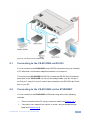
4 Connecting the VS-801USB ! Always switch off the power to each device before connecting it to your VS-801USB. After connecting your VS-801USB, connect its power and then switch on the power to each device. To connect the VS-801USB as illustrated in the example in Figure 2: 1. Connect the USB devices (for example, hard drives and/or memory sticks) to the DEVICE ports. For example, a: Hard drive to port 1 Memory stick to port 4 Hard drive to port 6 Memory stick to port 8 2. Connect the HOST USB port to an acceptor (for example, a laptop). 3. If required, you can connect a PC and/or controller to the: i RS-232 terminal block (see Section 4.1) Ethernet connector (see Section 4.2) For best results it is advised to use high quality USB cables 4. Connect the 5V DC power adapter to the power socket and connect the adapter to the mains electricity (not shown in Figure 2). 6 VS-801USB - Connecting the VS-801USB