1
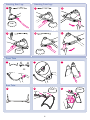
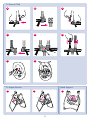
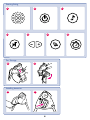
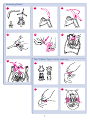
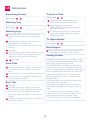
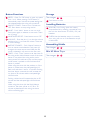
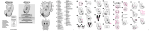
Button Functions Storage 39 SPEED – Press On /Off button or press any speed See images from 1 to 6. When pressing On/Off button, it automatically starts with the last speed setting that was selected before the swing was turned off. 46 - 47 46 Push buttons to fold. Installing Batteries 40 On/Off POWER - Press to turn ON and turn OFF. Press button to stop swing motion. 48 With baby out of swing, open the battery compartment lid by inserting a screwdriver into the coin slot. Insert three “D”-LR20 (1.5V) cell batteries. 41 MUSIC - Push “Music” button to turn on music. Push button again to advance to next track. There are 10 songs. 49 CHECK that the batteries are put in correctly. 42 Music/Nature OFF - Press button to turn OFF. Your swing will not run if the batteries are put in backwards. 43 VOLUME— Press the plus (+) to raise the volume and the minus (-) to lower the volume. There are 5 volume settings. Assembling Mobile 44 Nature sounds— Push “Nature” button to See images turn on nature sound selection. Each press will change to the next nature sound. After the 5th sound is selected, it will return to the first track. 50 - 56 Mix N’ Move Toys 45 TIMER— Push “Timer” button to set the timer for See images the swing and/or Music/Nature sounds. If the timer button is not pushed, the swing and/or music/ nature sound will continue to play until the power on/off button is pushed or the music/nature off button is pushed. When using the timer with the product on, if the button is pushed once, the red speed light will flash once and timer is set for 10 minutes. Pushing the timer button a second time will increase the run time to 20 minutes and the red speed light will flash twice. Pushing a third time will increase the time to 30 minutes and the red speed light will flash three times. When using the timer with the Music/Nature sounds on, the timer will set to 10, 20 or 30 minutes as described for the swing, but there will be no flashing light. 13 57 - 60