1
Chapter 1
I/O Ports
Or
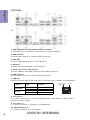
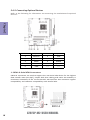
1. PS/2 Keyboard and PS/2 Mouse combo connector
Use the PS/2 port to connect a PS/2 mouse or a PS2 keyboard.
2. USB 2.0 Ports
Use the USB 2.0 ports to connect USB 2.0 devices.
3. VGA Port
Connect VGA display device to the VGA port.
4. DVI Port
Connect DVI display device to the DVI port.
5. HDMI Port (Co-lay with DP port)
Connect HDMI or DP display device to the HDMI or DP port.
6. USB 3.0 Ports
Use the USB 3.0 ports to connect USB 3.0 devices.
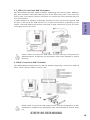
7. LAN Port
Connect an RJ-45 jack to the LAN port to connect your computer to the Network.
LAN LED
Activity LED
Link LED
Status
Description
OFF
Orange blinking
OFF
Green
No data
Active
No link
Link
Link LED
LAN Port
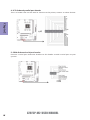
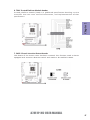
8. Line-in(blue)
It can be connected to an external CD/DVD player, tape player or other audio
devices for audio input.
9. Line-out(lime)
It is used to connect to speakers or headphones.
10. Microphone(pink)
It is used to connect to a microphone.
6
A78F2P-M2 USER MANUAL