1
6 Update software
To get the best features and support, update
your product with the latest software.
7
Wait until the upgrade is completed.
»» If the upgrade is complete, this product
automatically turns off and on again.
Caution
•• Do not turn off the power or remove the USB storage
Check software version
1
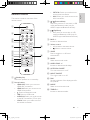
In any source mode, on the remote
control, within three seconds press once
then AUX twice.
»» On the display panel, the current
software version is displayed.
device when the software update is in progress because
you might damage this product.
Note
•• The upgrade time may take around 5 minutes.
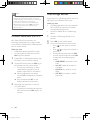
Update software via USB
1
2
Check the latest software version on
www.philips.com/support.
• Search for your model and click on
"Software and drivers".
Download the software into a USB storage
device.
aUnzip the download if zipped, and
make sure that the unzipped file is
named "XS1.bin".
bPut the "XS1.bin" file in the root
directory.
3
4
5
6
14
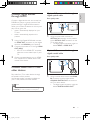
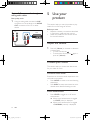
Connect the USB storage device to the
(USB) connector on this product.
Switch this product to HDMI ARC source
(press HDMI ARC).
On the remote control, within six seconds,
press twice then Volume + once, and
then hold down MOVIE.
»» On the display panel, "UPG" (upgrade)
blinks slowly, then blinks quickly.
When "UPG" (upgrade) blinks quickly,
press to start the upgrade.
»» Then "UPG" (upgrade) is displayed on
the display panel.
EN
XS1_12_UM_V2.0.indb 14
10/31/2014 10:07:21 AM