1
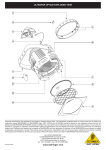
ULTRAPAR UP1000 3.1 + Dismounting the lens The lens gets very hot during operation of the spotlight, so let it cool down sufficiently before you attempt to dismount it! s Disconnect the spotlight from the mains and wait until it has cooled down. s Place the spotlight on a flat and stable surface. Never mount or dismount the lens, while the spotlight is fixed to a truss or stand. s Remove the protective mesh : press its two spring shackles, then pull out the mesh. attached to the s Directly in front of the lens, you will find a movable metal clamp . Turn the lens ring, until the metal clamp is located on the top side of the spotlight lens ring (directly below the locking bracket ). s Tilt the front side of the spotlight forward by at least 45°. s Push the movable metal clamp upward to dismount and pull out the lens 3.2 . Mounting the lens s Tilt the spotlight forward and turn the lens ring , until the movable metal clamp on the top side of the spotlight (directly below the locking bracket ). is located s Insert the lens with its rounded side towards the rear. The lower edge of the lens must be located behind the projecting elements of the lens ring. s Press the upper edge of the lens slightly towards the rear, until it locks in behind the metal clamp . s Installation of the protective mesh : Press the two spring shackles of the protective mesh and place it directly in front of the lens ring . There are two slots in the die-cast casing of your ULTRAPAR for the feet of the protective mesh. The two spring shackles must be located directly below the locking bracket . 4. COLOR FRAME The color frame the color frame: is used to hold color filters. Please observe the following instructions to install s Detach the locking bracket on the top side of the spotlight, by pushing it to the side. Then, open the bracket and tilt it towards the rear. s Insert the color frame into the frame holders and on three sides) on the front side of the ULTRAPAR. s Push the locking bracket + + 6 , i.e. the outer guiding rail (with stops to the side and move it down until it locks in. Only use color filters with appropriate temperature resistance! Never use your ULTRAPAR without the protective mesh in combination with the color frame because it prevents direct contact with the hot lamp surface. It also prevents pieces of broken glass from uncontrollably dispersing in the event of the lens being broken. 4. COLOR FRAME