1
Verifying Installation
Windows
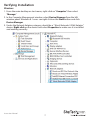
1. From the main desktop or start menu, right-click on “Computer” then select
“Manage.”
2. In the Computer Management window, select Device Manager from the left
window panel. Windows 8.1 users can right click on the Start button and click
Device Manager.
3. Under the Network Adapters category should be a “Tehuti Networks 10GbE Adapter”
device. Right-click on the device and select Properties to make sure it is installed
and working correctly.
Instruction Manual
7