1
Using the Softpre Applet
Once you have the Softpre software installed you can
operate your Q1U by following the simple instructions
outlined in the following sections of this manual.
Setting a Good Level
One of the most important fundamentals of good
audio engineering is setting proper levels. Even on a
small typical mixer, or basic multi-track recorder, there
are several controls that affect the level of a signal as it
makes it’s way from your sound source to your speakers and then, ultimately, the level of your headphone
or monitor system. These include pre-amp gain, EQ, aux sends and returns, channel
fader level, bus or group levels, and finally, the master fader. That’s not to mention
the level of the 5:15 train on its way to Pennsylvania station who’s thunderous crossing horn can be picked up from 5 miles away while miking a nylon string guitar,
despite the use of double moving blankets over the windows of your project studio.
But that’s another story with another set of disciplines. Start off by being aware that
anytime you change any control in the audio path, you are probably affecting gain
somewhere. Then, be sure to carefully monitor the levels on your input and output
meters to avoid a clipped signal. You should never record any peaks in any digital
recorder. Also, remember your ear is the most sophisticated and calibrated piece of
test gear you have. So, setting a good level should be approached from a technical
point of view, and then confirmed, by a creative point of view.
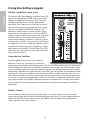
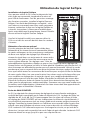
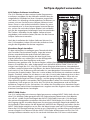
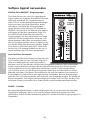
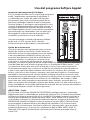
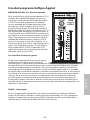
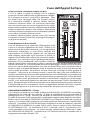
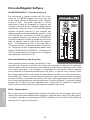
INPUT GAIN – Fader
The Q1U has an onboard, digitally controlled analog INPUT GAIN stage which is controlled by the Q1U software fader. The fader control provides a range of gain from
-62 to +48 dB. The Q1U can accept levels from most any sound source by using the
INPUT GAIN fader. You can use the INPUT GAIN control to adjust the level of your
input signal. It is a good idea to start with the level low and raise it up as you need.
Be sure to monitor the input digital VU METER and try to set the INPUT GAIN control
so that the meter reads just below the CLIP indicator. If you see the CLIP indicator
light you are “Over–Loading” and the sound may become distorted. If this happens,
simply back down on the INPUT GAIN Fader. The CLIP indicator will stay red until you
clear it by clicking on the CLIP icon.
ENGLISH
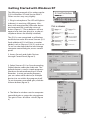
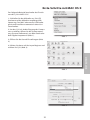
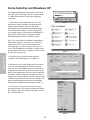
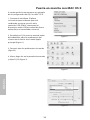
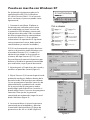
Installing the Q1U Softpre Software
The Q1U can work with most audio software by simply
connecting the microphone to your computer using
the supplied USB cable. However, to take advantage
of the advance features you should install the Samson
Softpre software. Getting the software is easy. Just
type samsontech.com into your favorite internet
browser, look for the Softpre applet link and follow the
on screen instructions to download the applet. After
you download the applet software, run the installation program and start to use the Samson Softpre
software.