1
3 | ENGLISH
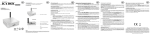
2.0 Explanation of the connections
•
•
•
•
•
•
•
Micro USB: Connection for the Micro USB power cable (5V).
Reset button: You can reset the WiFi Music Streamer to the factory settings by
pressing the “Reset button”. To do so, you could use a bent open paper clip.
SPDIF (optical) connection: Audio connection to connect to your digital audio
receiver.
3.5mm jack stereo: Used to connect to a analogue headphone/speaker or audio
receiver.
USB: used for service only.
Power Led: Indicates if the device is powered.
WiFi LED: Indicates the WiFi status of the device.
3.0 Connecting the WiFi Music Streamer
1.
2.
3.
Connect the power supply to a wall outlet.
Connect the Micro USB cable of the power supply to the ‘Micro USB’ of the
EM7410.
Connect the EM7410 to an audio device with the 3.5mm jack / 2x Cinch or SPDIF
optical cable. Preferably use the SPDIF optical cable (not included) for the best
possible audio playback.