1
Frequently asked questions
This can occur if you have, for example, defragmented your computer in the meantime. The newly structured file segments will then be recognized as “changes” and imaged as new files.
What does "Drive cannot be locked" mean? Does this affect the data imaging?
As a result of system processes having to be in constant operation, it's not normally possible for system partitions to
be locked. You get this notification even when you want to image a data drive and this is directly integrated into the system processes. The notification doesn’t generally have an effect on the imaging process; it is still able to be run without
a problem. To be totally sure, shut down all running system applications, e.g. defragmentation or cloning processes,
before imaging.
While duplicating, O&O DiskImage reports that the target volume is too small although the source drive is
smaller than the target disk. What is the reason for this?
Make sure you haven’t selected the entire hard disk as your source. Example:
You have a hard disk with 100GB that is divided into two partitions:
l
l
l
System partition (20GB)
Data partition (80GB)
While trying to duplicate the system partitions on an external 40GB hard disk, O&O DiskImage reports that the
target volume is too small.
By just making a check, you can select the system partitions as your only source, and not the entire hard disk.
What do I do if O&O DiskImage takes very long to start, or doesn't even start at all?
Please read the note about System requirements and make sure you're using the latest versions of your drivers.
During restoration, O&O DiskImage created a new temporary file on my hard disk. Where does this file come
from?
Before creating an image, O&O DiskImage normally deposits a number of metadata in a local file. This data is needed
by O&O DiskImage in order to create the image. The file will be included in the imaging to assure consistency in the
image. This file will normally be automatically removed during restoration.
Under certain circumstances, it's possible that another action of the operating system or the user will prevent this temporary file from being deleted. This will then result in the file remaining undeleted in the system. You can, however,
delete this temporary file without any risk.
Why are partitions that weren't imaged displayed when mounting an image in Explorer?
In addition to saving data from the partition being imaged, O&O DiskImage also needs to save information about the
disk on which that partition was originally located. All of this is required for mounting an image, converting it into a virtual disk, or performing any future restoration. There will also be information included about partitions that were not
imaged. When mounting an image, just as when using a virtual hard disk after conversion from an image, Microsoft
Windows uses this information to recognize that there were originally multiple partitions on the disk, and attempts to
integrate them into the system. Because information/data about these partitions is missing, it's not possible to assign
them to any file system. As a result, partitions that weren't imaged will be displayed as RAW, i.e., non-formatted.
Frequent questions on authentication
Where do I find the domain and user name to use for authentication?
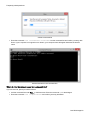
If you are not sure, please proceed as follows:
l
Call the command line under Run... in the Start menu. Enter the command cmd in the dialogue.
O&O DiskImage-81