1
Always there to help you
Register your product and get support at
www.philips.com/support
Question?
Contact
Philips
User manual
FXD58
1Important2
Safety2
Notice3
2 Your DVD Mini Hi-Fi System6
Introduction6
What’s in the box
6
Overview of the main unit
7
Overview of the remote control
8
3Connect10
Place the unit
Connect speakers
Connect video cables
Optional connections
Connect power
10
10
10
12
13
7 USB record22
8 Adjust settings23
General setup
23
Video setup
23
Audio setup
24
Preferences25
9 Product information27
Specifications
Supported disc formats
USB playability information
27
28
28
10Troubleshooting29
4 Get started14
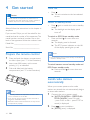
Prepare the remote control
Turn on
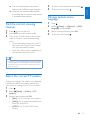
Install radio stations automatically
Find the correct viewing channel
Select the correct TV system
Change system menu language
14
14
14
15
15
15
5Play16
Play from a Bluetooth-enabled device
Play a disc
Play from USB or recorded discs
Play a slideshow with background music
Play control
Enjoy karaoke
Adjust volume level and sound effect
16
17
18
18
18
19
20
6 Listen to radio21
Tune to a radio station
Program radio stations automatically
Program radio stations manually
Select a preset radio station
21
21
21
21
EN
1
English
Contents
1Important
Safety
Know these safety symbols
This ‘bolt of lightning’ indicates uninsulated
material within your unit may cause an electrical
shock. For the safety of everyone in your
household, please do not remove product
covering.
The ‘exclamation mark’ calls attention to
features for which you should read the enclosed
literature closely to prevent operating and
maintenance problems.
WARNING: To reduce the risk of fire or
electric shock, this apparatus should not be
exposed to rain or moisture and objects filled
with liquids, such as vases, should not be placed
on this apparatus.
CAUTION: To prevent electric shock, match
wide blade of plug to wide slot, and fully insert
the plug.
Important Safety Instructions
a Read these instructions.
b Keep these instructions.
c Heed all warnings.
d Follow all instructions.
e Do not use this apparatus near water.
f Clean only with dry cloth.
2
EN
g Do not block any ventilation openings.
Install in accordance with the
manufacturer’s instructions.
h Do not install near any heat sources such
as radiators, heat registers, stoves, or
other apparatus (including amplifiers) that
produce heat.
i Protect the power cord from being
walked on or pinched, particularly at
plugs, convenience receptacles, and the
point where they exit from the apparatus.
j Only use attachments/accessories
specified by the manufacturer.
k Use only with the cart, stand, tripod,
bracket, or table specified by the
manufacturer or sold with the apparatus.
When a cart is used, use caution when
moving the cart/apparatus combination to
avoid injury from tip-over.
l Unplug this apparatus during lightning
storms or when unused for long periods
of time.
m Refer all servicing to qualified service
personnel. Servicing is required when
the apparatus has been damaged in any
way, such as power-supply cord or plug
is damaged, liquid has been spilled or
objects have fallen into the apparatus, the
apparatus has been exposed to rain or
moisture, does not operate normally, or
has been dropped.
n Battery usage CAUTION – To prevent
battery leakage which may result in bodily
injury, property damage, or damage to
the unit:
• Install all batteries correctly, + and - as
marked on the unit.
Notice
English
• Do not mix batteries (old and new or
carbon and alkaline, etc.).
• Remove batteries when the unit is not
used for a long time.
o Apparatus shall not be exposed to
dripping or splashing.
p Do not place any sources of danger on
the apparatus (e.g. liquid filled objects,
lighted candles).
q Where the MAINS plug or an appliance
coupler is used as the disconnect device,
the disconnect device shall remain readily
operable.
Risk of overheating! Never install this apparatus
in a confined space. Always leave a space of
at least four inches around this apparatus for
ventilation. Ensure curtains or other objects
never cover the ventilation slots on this
apparatus.
Caution
•• Use of controls or adjustments or performance of
procedures other than herein may result in hazardous
radiation exposure or other unsafe operation.
Warning
•• Never remove the casing of this unit.
•• Never lubricate any part of this unit.
•• Place this unit on a flat, hard and stable surface.
•• Never place this unit on other electrical equipment.
•• Only use this unit indoors. Keep this unit away from
water, moisture and liquid-filled objects.
•• Keep this unit away from direct sunlight, naked flames
or heat.
•• Never look into the laser beam inside the unit.
Hereby, WOOX Innovations declares that this
product is in compliance with the essential
requirements and other relevant provisions
of Directive 1999/5/EC. You can find the
Declaration of Conformity on www.philips.com/
support.
Any changes or modifications made to this
device that are not expressly approved by
WOOX Innovations may void the user’s
authority to operate the equipment.
Specifications are subject to change without
notice. WOOX reserves the right to change
products at any time without being obliged to
adjust earlier supplies accordingly.
Disposal of your old product and
batteries
Your product is designed and manufactured
with high quality materials and components,
which can be recycled and reused.
Never dispose of your product with other
household waste. Please inform yourself about
the local rules on the separate collection of
electrical and electronic products and batteries.
The correct disposal of these products helps
prevent potentially negative consequences on
the environment and human health.
Your product contains batteries, which cannot
be disposed of with normal household waste.
EN
3
Please inform yourself about the local rules on
separate collection of batteries. The correct
disposal of batteries helps prevent potentially
negative consequences on the environment and
human health.
Rovi Corporation. Reverse engineering and
disassembly are prohibited.
Please visit www.recycle.philips.com for
additional information on a recycling center in
your area.
Philips and the Philips’ Shield Emblem are
registered trademarks of Koninklijke Philips N.V.
and are used by WOOX Innovations Limited
under license from Koninklijke Philips N.V.”
Information about the use of batteries:
Caution
•• Risk of leakage: Only use the specified type of batteries.
Do not mix new and used batteries. Do not mix
different brands of batteries. Observe correct polarity.
Remove batteries from products that are not in use for
a longer period of time. Store batteries in a dry place.
•• Risk of injury: Wear gloves when handling leaking
batteries. Keep batteries out of reach of children and
pets.
•• Risk of explosion: Do not short circuit batteries. Do
not expose batteries to excessive heat. Do not throw
batteries into the fire. Do not damage or disassemble
batteries. Do not recharge non-rechargeable batteries.
Environmental information
All unnecessary packaging has been omitted.
We have tried to make the packaging easy to
separate into three materials: cardboard (box),
polystyrene foam (buffer) and polyethylene
(bags, protective foam sheet.)
Your system consists of materials which can
be recycled and reused if disassembled by
a specialized company. Please observe the
local regulations regarding the disposal of
packaging materials, exhausted batteries and old
equipment.
Copyright notice
This item incorporates copy protection
technology that is protected by U.S. patents
and other intellectual property rights of
4
EN
Trademark notice
Manufactured under license from Dolby
Laboratories. Dolby and the double-D symbol
are trademarks of Dolby Laboratories.
DivX , DivX Ultra , DivX Certified and
associated logos are trademarks of Rovi
Corporation or its subsidiaries and are used
under license.
DivX Ultra Certified to play DivX video
with advanced features and premium content.
ABOUT DIVX VIDEO: DivX is a digital video
format created by DivX, LLC, a subsidiary
of Rovi Corporation. This is an official DivX
Certified device that plays DivX video. Visit
divx.com for more information and software
tools to convert your files into DivX videos.
ABOUT DIVX VIDEO-ON-DEMAND: This
DivX Certified device must be registered
in order to play purchased DivX Video-onDemand (VOD) movies. To obtain your
registration code, locate the DivX VOD section
in your device setup menu. Go to vod.divx.com
for more information on how to complete your
registration.
‘DVD Video’ is a trademark of DVD Format/
Logo Licensing Corporation.
English
HDMI, and HDMI logo, and High-Definition
Multimedia Interface are trademarks or
registered trademarks of HDMI licensing LLC in
the United States and other countries.
The Bluetooth® word mark and logos are
registered trademarks owned by Bluetooth
SIG, Inc. and any use of such marks by WOOX
Innovations is under license.
Other trademarks and trade names are those
of their respective owners.
The N Mark is a trademark or registered
trademark of NFC Forum, Inc. in the United
States and in other countries.
This apparatus includes this label:
Note
•• The type plate is located on the back of the unit.
EN
5
2 Your DVD Mini
Hi-Fi System
Congratulations on your purchase, and
welcome to Philips! To fully benefit from the
support that Philips offers, register your product
at www.philips.com/welcome.
Introduction
With this unit, you can:
• Watch video from DVD/VCD/SVCD or
USB storage devices
• Enjoy audio from discs, USB storage
devices, Bluetooth enabled devices, or
other external devices
• View pictures from discs or USB storage
devices
• Listen to FM radio
You can enrich sound output with these sound
effects:
• Max Sound for instant power boost
• Bass boost
• EQ (equalizer) settings
The unit supports these media/disc formats:
6
EN
You can play DVD discs marked with the
following region code:
DVD region code
Countries
Asia Pacific
What’s in the box
Check and identify the contents of your
package:
• Main unit
• 2 x speakers
• 1 x subwoofer
• Remote control with battery
• Power cord
• FM antenna
• Printed materials
s rq p o
English
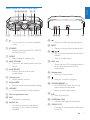
Overview of the main unit
n m
FXD58
SPEAKER
SUB
WOOFER
ANTENNA V I D E O O UT
FM
R
ab
a
c de f
g hijkl
tu v
l
• Turn on the unit or switch to standby
mode.
b SOURCE
• Select a sound source: DISC, USB, FM,
AUDIO IN or BT.
e BASS BOOST
• Select a level of dynamic bass
enhancement.
SUB
w
x
• Connect a USB mass storage device.
m EJECT
• Open or close the disc compartment.
n
c MODE
• Select repeat or random play.
d MAX SOUND
• Turn on or off instant power boost for
sound.
L
/
• Skip to the previous/next track, title, or
chapter.
• Tune to a radio station.
o NFC area
• Touch with an NFC compatible device
to set up Bluetooth connection
automatically.
p Display panel
• Show the current status.
f Volume knob
• Adjust speaker volume.
q
g EQUALIZER
• Select a preset sound equalizer setting.
r FOLDER/PRESET +/• For MP3/WMA tracks, skip to the
previous/next album/folder.
h USB REC
• Go to the screen for USB recording.
i Disc compartment door
j MIC
• Connect a microphone.
k AUDIO IN
• Connect an external audio device
through a 3.5mm audio cable (not
supplied).
• Stop play or erase a program.
• Select a preset radio station.
s
• Start or pause play.
t ANTENNA (FM)
• Connect the supplied FM antenna.
u VIDEO OUT
• Connect to the composite video input
on the TV.
EN
7
v HDMI
• Connect to the HDMI input on the TV.
w Speaker connection sockets
• Connect the supplied loudspeakers.
• Press and hold to access audio delay
setting, then press navigation buttons
(left/right) to delay the audio to match
the video.
c USB
• Switch to the USB source.
x AC power connection
d
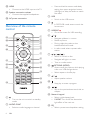
Overview of the remote
control
e USB REC
• Go to the screen for USB recording.
a
u
AUDIO
t
USB
DISC
SYNC
USB REC
s
f
b
c
d
g
BACK
OPTIONS
q
ID3/INFO
p
MODE
• During video play, select a slow
backward/forward mode.
• In radio mode, select a preset radio
station.
g
• Navigate left/right in a menu.
i
• Tune to a radio station.
h
k
1
2
3
4
5
6
7
n
8
9
0
EQ
i
l
m
j
k
• Turn on the unit or switch to standby
mode.
b AUDIO SYNC
• Select an audio language or channel.
8
EN
OPTIONS (MODE)
• Access more play options while playing
a disc or a USB storage device.
• Select repeat or shuffle play.
LIGHT
a
/ (
/
)
• Search in a track or disc.
h
j
o
/
• Navigate up/down in a menu.
• Rotate a picture.
e
f
r
• In DISC/USB mode, access or exit the
home menu.
/
• Adjust speaker volume.
• Stop play or erase a program.
/
• Skip to the previous/next track, title, or
chapter.
l Numeric keypad
• Select a title/chapter/track.
• 0 LIGHT: Turn on/off the decoration
light effect of the main set.
m EQ
• Select a preset sound equalizer setting.
o
p
q
English
n MAX SOUND
• Turn on or off instant power boost for
sound.
• Start or pause play.
• Mute or restore volume.
BACK (ID3/INFO)
• Return to the previous menu.
• For discs, access the play options or
display the current disc status.
• For slideshow, display a thumbnail view
of photo files.
• For MP3 discs, display ID3 information
if available.
r OK
• Confirm an operation or selection.
s DISC
• Select the disc source.
t FM/AUDIO IN
• Switch between the FM and AUDIO
IN source.
u
• Select the Bluetooth source.
EN
9
3Connect
Place the unit
Note
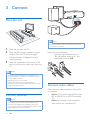
•• Make sure that the colors of the speaker wires and
terminals are matched.
1
2
3
Place the unit near the TV.
Place the left and right speakers at equal
distance from the TV and at an angle
of approximately 45 degrees from the
listening position.
Insert the wire completely.
• Insert the right speaker wires to
“R“, left speaker wires to “L“, and
subwoofer wires to ‘SUB‘.
Place the subwoofer at the corner of the
room or at least one meter away from the
TV.
Note
•• To avoid magnetic interference or unwanted noise,
never place both the main set and speakers too close
to any radiation devices.
•• Place this unit on top of a table.
•• Never place this unit in an enclosed cabinet.
•• Place this unit near the AC outlet where the AC power
plug can be easily reached.
Connect speakers
Note
•• For optimal sound, use the supplied speakers only.
•• Connect only speakers with impedance that is the
same or higher than the supplied speakers. Refer to the
Specifications section of this manual.
10
EN
Connect video cables
Select the best video connection that the TV
can support.
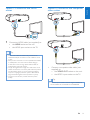
• Option 1: Connect to the HDMI socket
(for an HDMI, DVI or HDCP-compliant
TV).
• Option 2: Connect to the composite
video socket (for a standard TV).
Option 2: Connect to the composite
video socket
HDMI
VIDEO
HDMI IN
1
Connect an HDMI cable (not supplied) to:
• the HDMI socket on the unit.
• the HDMI input socket on the TV.
Tip
•• If the TV has a DVI connector only, connect via an
HDMI/DVI adaptor. Connect an audio cable for sound
output.
•• If this product connects to a TV compatible with 1080p
or 1080p/24Hz, we recommends HDMI category
2 cable, also known as High Speed HDMI cable, for
optimal video and audio output.
•• To play the digital video images of a DVD video via an
HDMI connection, it is necessary that both this product
and the display device (or an AV receiver/amplifier)
support a copyright protection system called HDCP
(high-bandwidth digital content protection system).
•• This type of connection provides the best picture
quality.
VIDEO
•
Connect a composite video cable (not
supplied) to:
• the VIDEO OUT socket on the unit.
• the VIDEO input socket on the TV.
Tip
•• The video input socket on the TV might be labeled as
A/V IN, VIDEO IN, COMPOSITE or BASEBAND.
EN
11
English
Option 1: Connect to the HDMI
socket
Optional connections
Route audio from other devices
Connect USB flash drive
FXD58
FXD58
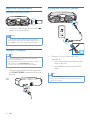
•
Connect a USB storage device to the
socket on the front panel.
Note
•• This unit only supports play of MP3, DivX (Ultra) or
JPEG files that are stored on a USB storage device.
•• Press USB to access the content and play the files.
Connect FM antenna
Tip
•• For optimal reception, fully extend and adjust the
position of the antenna.
•• For better FM stereo reception, connect an outdoor
FM antenna to the FM ANTENNA socket.
•• The unit does not support MW radio reception.
•
Connect the supplied FM wire antenna to
the FM ANTENNA socket on the back of
the unit.
Connect a 3.5mm audio cable (not
supplied) to:
• the 3.5mm audio input socket on the
front of the unit.
• the headphone socket on the MP3
player.
Tip
•• Press FM/AUDIO IN repeatedly to select the AUDIO
FM
12
•
IN source, then start play on the MP3 player (see the
player user manual).
EN
English
Connect power
Caution
•• Risk of product damage! Make sure that the power
supply voltage corresponds to the voltage printed on
the back or the underside of the unit.
•• Before connecting the AC power cord, make sure that
you have completed all other connections.
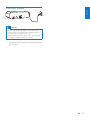
•
Connect the AC power cord to the socket
on this unit.
EN
13
4 Get started
Turn on
•
Caution
•• Use of controls or adjustments or performance of
procedures other than herein may result in hazardous
radiation exposure or other unsafe operation.
Switch to standby mode
•
Always follow the instructions in this chapter in
sequence.
If you contact Philips, you will be asked for the
model and serial number of this apparatus. The
model number and serial number are on the
back of the apparatus. Write the numbers here:
Model No. __________________________
2
»» The ECO power indicator on the left
of the display panel lights up red.
3
Note
•• The unit switches to Eco Power standby mode after 10
minutes in standby mode.
to slide it open (see “1” in the illustration).
Insert one AAA battery with correct
polarity (+/-) as indicated.
Push and slide back the battery
compartment (see “3” in the illustration).
Press again to switch the unit to standby
mode.
»» The backlight on the display panel
turns off.
To switch to ECO Power standby mode:
• Press and hold for more than two
seconds.
»» The display panel is dimmed.
Serial No. ___________________________
Prepare the remote control
1 Press and push the battery compartment
Press .
»» The unit switches to the last selected
source.
To switch between normal standby mode and
ECO Power standby mode:
»» Press and hold for more than two
seconds.
Install radio stations
automatically
Note
•• The battery shall not be exposed to excessive heat
such as sunshine, fire or the like.
•• If you are not going to use the remote control for a
long time, remove the battery.
•• Batteries contain chemical substances, so they should
be disposed of properly.
14
EN
When you connect power and no radio
stations are stored, the unit automatically begins
to store radio stations.
1
2
Connect the unit to power supply.
»» [AUTO FM INSTALL - PRESS PLAY-STOP CANCEL] (auto FM install
- press PLAY to start - press STOP to
cancel) is displayed.
Press
to start installation.
»» [AUTO] (auto) is displayed.
»» When all the available radio stations
are stored, the first preset radio station
is broadcast automatically.
Find the correct viewing
channel
1 Press to turn on the unit.
2 Press DISC to switch to disc mode.
3 Turn on the TV and switch to the correct
4
5
To return to the previous menu, press
To exit the menu, press
.
.
English
»» The unit automatically stores radio
stations with sufficient signal strength.
Change system menu
language
1 Press .
2 Select [Setup] -> [General] -> [OSD
3
4
Language], and press OK.
Select a setting and then press OK.
To exit the menu, press
.
video-in channel in one of the following
ways:
• Go to the lowest channel on your TV,
then press the Channel Down button
until you see the blue screen.
• Press the source button repeatedly on
the remote control of your TV.
Tip
•• The video-in channel is between the lowest and highest
channels and may be called FRONT, A/V IN, VIDEO etc.
See the TV user manual on how to select the correct
input on the TV.
Select the correct TV system
Change this setting if the video is not displayed
correctly. By default, this setting matches the
most common setting for TVs in your country.
1
2
3
Press
.
Select [Setup] -> [Video] -> [TV
System].
Select a setting and press OK.
• [PAL]- For TV with PAL color system.
• [Multi]- For TV that is compatible with
both PAL and NTSC.
• [NTSC]- For TV with NTSC color
system.
EN
15
5Play
Pair and connect
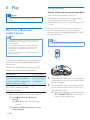
Option 1: Pair and connect through NFC
Caution
•• Risk of damage to the unit! During play, never move
the unit.
Play from a Bluetoothenabled device
Note
Near Field Communication (NFC) is a
technology that enables short-range wireless
communication between various NFC
compatible devices, such as mobile phones and
IC tags.
With the NFC function, data communication
can be achieved easily just by touching the
relevant symbol or designated location on NFC
compatible devices.
Note
•• The effective operation range between the unit and
your Bluetooth enabled device is approximately 10
meters (30 feet).
•• Any obstacle between the unit and the Bluetooth
enabled device can reduce the operational range.
•• Compatibility with all Bluetooth devices is not
guaranteed.
•• The unit can memorize up to 4 previously connected
Bluetooth devices.
•• Compatibility with all NFC devices is not guaranteed.
NFC
To enjoy music through the unit wirelessly, you
need to pair your Bluetooth enabled device
with the unit.
Choose your best Bluetooth pairing method
based on the preconditions listed below.
Precondition
Your Bluetooth device supports
both NFC (Near Field Communication) and A2DP (Advanced
Audio Distribution Profile).
Your Bluetooth device only supports A2DP (Advanced Audio
Distribution Profile).
•
Pairing method
Choose Option 1
(recommended)
or Option 2.
Choose Option
2.
Before pairing and connection, you need to:
apress to select the Bluetooth
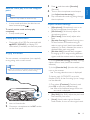
source.
»» [BT] (Bluetooth) flashes on the
screen.
benable the Bluetooth feature on your
external device.
16
EN
FXD58
1
2
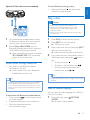
Enable the NFC feature on your Bluetooth
enabled device (see the user manual of the
device for details).
Touch the NFC area of the external device
with the NFC area on the top of the unit
until you hear a beep.
»» After successful pairing and connection,
‘BT CONNECTED‘ (BT connected)
scrolls on the screen once.
FXD58
To clear Bluetooth pairing history:
• Press and hold both on the remote
control for three seconds.
English
Option 2: Pair and connect manually
Play a disc
Caution
•• Never look at the laser beam inside the unit.
•• Risk of product damage! Never play discs with
Philips FXD58
1
2
accessories such as disc stabilizer rings or disc
treatment sheets.
•• Never put any objects other than discs into the disc
compartment.
On the Bluetooth enabled device, search
for Bluetooth devices that can be paired
(see the user manual of the device).
1
2
Select ‘Philips MINI FXD58‘ on your
Bluetooth enabled device and if necessary
input ‘0000’ as the pairing password.
»» After successful pairing and connection,
‘BT CONNECTED’ (BT connected)
scrolls on the screen once.
3
4
Stream music through Bluetooth
•
To disconnect the Bluetooth-enabled device:
• Press and hold
on the remote control
for three seconds.
• Deactivate Bluetooth on your device; or
• Move the device beyond the
communication range.
Place a disc onto the tray and press EJECT
again to close the disc tray.
»» Make sure that the label side faces up.
If play does not start automatically, select a
title/chapter/track, then press
to start
play.
• To stop play, press .
.
• To skip to the previous/next title/
chapter/track, press / .
Tip
•• To play a locked DVD, enter the 6-digit parental control
password.
•• If the Bluetooth enabled device also supports AVRCP
(Audio Video Remote Control Profile), you can use
some basic operation buttons of the unit (such as the
play/pause, stop and previous/next buttons) to control
music play.
Press EJECT on the front panel.
»» The disc tray opens.
• To pause or resume play, press
Play audio on the Bluetooth device
connected to the unit.
»» Audio streams from your Bluetooth
enabled device to the unit.
Tip
Press DISC to select the disc source.
Select a subtitle language
You can select an audio language for a DVD or
DivX (Ultra) video.
1
During disc play, press
OPTIONS
(MODE).
»» An option menu appears.
EN
17
2
3
Press / repeatedly to select [Subtitle],
then press OK to confirm.
»» The language options appear.
Press / repeatedly to select a subtitle
language, then press OK to confirm.
Play a slideshow with
background music
This unit can play MP3 files and JPEG photos
simultaneously.
Note
Note
•• For some DVDs, the language can only be changed
from the disc menu. Press
access the menu.
, then select
[Setup] to
•• The MP3 and JPEG files must be stored on the same
disc or USB storage device.
1
2
Play from USB or recorded
discs
2
3
4
• To return to the menu, press
BACK.
• To stop the slideshow, press .
Select a source.
• For a USB storage device, press USB.
• For a disc, press DISC.
Insert the USB storage device or load the
disc.
Press / to select a folder, then press
OK to confirm.
Press / to select a file, then press OK
to start play.
• To stop play, press .
• To pause/resume play, press
Play control
Select repeat or shuffle play options
•
• Single: play the current track/file once.
Note
18
EN
Folder: repeat all tracks/files in the
current album/folder.
• Folder: play all tracks/files in the
current album/folder once.
• To skip to the previous/next file, press
/ .
purchased through the DivX registration code of this
unit.
•• Subtitle files with the following filename extensions (.srt,
.smi, .sub, .ssa, .ass) are supported but do not appear on
the file navigation menu.
•• The subtitle filename has to be the same as the file
name of the video.
During MP3/CD play, press
OPTIONS
(MODE) repeatedly to select a play option.
•
One: repeat the current track/file.
•
.
• To return to the upper-level directory,
press
BACK.
•• You can only play DivX (Ultra) videos rented or
Select a photo from your photo folder,
then press OK to start the slideshow.
»» Slideshow begins and continues until
the end of the photo folder.
»» Audio continues until the end of the
last file.
You can play DivX (Ultra)/MP3/JPEG picture
files copied onto a CD-R/RW, recordable DVD
or USB storage device.
1
Play an MP3 file.
•
Off: resume normal play.
•
Shuffle: play all tracks/files randomly.
Search forward/backward
•
During video/audio play, press / (
/
) repeatedly to select a search speed.
• To resume play at normal speed, press
.
Note
In stop mode and when the disc has not
been removed, press
.
To cancel resume mode and stop play
completely:
• In stop mode, press .
•
•
During play of an MP3 file, press and hold
BACK (ID3/INFO) to display ID3
information (if available) on the front panel.
•
•
Enjoy karaoke
You can connect a microphone (not supplied)
to sing along with a music source.
Note
•• Before you connect a microphone, set the microphone
volume to the minimum level to prevent howling.
Press , and then select [Karaoke]
(Karaoke).
Turn on the microphone sound output
(see ‘Adjust karaoke settings’).
Play a Karaoke disc and sing along through
the microphone.
Adjust Karaoke settings
•
Display play information
•
4
5
•• This feature is only available for DVD/VCD play.
•
3
English
Resume video play from last stopped
point
[Microphone] (Microphone): turn on or
off the microphone sound output.
[Mic Volume] (Mic Volume): adjust the
microphone volume.
[Echo Level] (Echo Level): adjust echo
level.
[Karaoke Scoring] (Karaoke Scoring): turn
off the function of Karaoke scoring or
select a scoring level (basic/intermediate/
advance). If a level is selected, the score is
displayed after each song ends.
[Karaoke Idol] (Karaoke Idol): compete
for singing up to 4 songs among different
signers, and the contest result is displayed.
1) In the [Karaoke Scoring] (Karaoke Scoring)
option, select a level (basic/intermediate/
advance).
2) In the [Karaoke Idol] (Karaoke Idol) option,
turn on the contest.
»» The song selection menu is displayed.
3) Input a track (VCD/SVCD) or a title/
chapter (DVD) as the first song. Up to 4 songs
can be selected.
4) Then select [Continue] (Continue), and
press OK to start play selected songs.
»» After all the selected songs end, a contest result is displayed.
FXD58
MIC
•
•
1
2
[Key Shift] (Key Shift): adjust the pitch level
that matches your voice.
[Vocal] (Vocal): select various Karaoke
audio modes, or turn off the original vocal.
Insert a Karaoke disc.
Connect a microphone to the MIC socket
on the front panel.
EN
19
Adjust volume level and
sound effect
Note
•• MAX sound and bass boost cannot be activated at the
same time.
• DBB 3
Caution
•• For your hearing health and being consideration of
other people, it is not recommended to listen at high
volume levels for a long time.
During play, press VOL +/- to increase/
decrease the volume level.
Mute sound
•
During play, press
sound.
to mute/unmute
Boost sound power
The MAX sound feature gives an instant boost
to the sound power .
• Press MAX SOUND to turn on or off the
instant power boost.
Select a preset sound effect
The equalizer setting feature allows you to
enjoy special preset sound effects.
• During play, press EQ repeatedly to select:
• [JAZZ] (jazz)
• [ROCKJ (rock)
• [TECHNO] (techno)
• [POP] (pop)
• [SAMBA] (samba)
20
EN
You can manually select the level of dynamic
bass boost (DBB) that best suits your listening
environment.
• During play, press BASS BOOST
repeatedly to select:
• DBB 1
• DBB 2
Adjust volume level
•
Enhance bass
• DBB off
»» If DBB is activated, DBB is displayed.
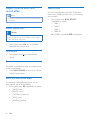
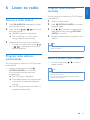
Tune to a radio station
1 Press FM/AUDIO IN repeatedly to select
2
3
the FM radio source.
Press and hold / (
/
) for more
than two seconds.
»» [SEARCH] (search) is displayed.
»» The radio tunes to a station with
strong reception automatically.
Repeat step 2 to tune to more stations.
• To tune to a weak station, press /
(
/
) repeatedly until you find
optimal reception.
Program radio stations
automatically
You can program a maximum of 20 FM preset
radio stations.
• In tuner mode, press and hold
OPTIONS (MODE) for more than
two seconds to activate automatic
programming.
»» [AUTO] (auto) is displayed.
»» All available stations are programmed
in the order of waveband reception
strength.
Program radio stations
manually
English
6 Listen to radio
You can program a maximum of 20 FM preset
radio stations.
1
2
3
4
Tune to a radio station.
Press
OPTIONS (MODE) to activate
program mode.
Press / to allocate a number to this
radio station, then press
OPTIONS
(MODE) to confirm.
Repeat the above steps to program other
stations.
Tip
•• To overwrite a programmed station, store another
station in its place.
Select a preset radio station
•
In tuner mode, press
preset number.
/
to select a
Tip
•• Position the antennas as far as possible from TV, VCR or
other radiation source.
•• For optimal reception, fully extend and adjust the
position of the antennas.
»» The first programmed radio station is
broadcast automatically.
EN
21
7 USB record
Audio CD tracks are recorded in .mp3 format.
The first time you record to USB, a folder is
automatically created in the USB device. Each
time you record to USB, the recorded files are
stored in a sub-folder. Files and sub-folders are
named numerically in the order by which they
are created.
AUDIO
USB
DISC
BACK
OPTIONS
ID3/INFO
1
4
7
SYNC
USB REC
MODE
2
5
MP3
3
6
8
9
0
EQ
LIGHT
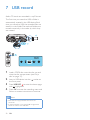
1
2
3
4
Load a CDDA disc onto the disc tray and
close the disc compartment (see ‘Play a
disc’ on page 17).
Insert a USB device into the
the front panel.
socket on
Press USB REC to enter the home page
with highlighted.
MP3
Press OK to enter the recording menu and
follow on-screen instructions to continue.
Note
•• DTS CDs and copy-protected CDs cannot be
converted.
•• A write-protected or encrypted USB storage device
cannot be used to store MP3 files.
22
EN
1
2
3
Press
.
Select the [Setup] (Setup) page.
Select a setting and press OK.
• To return to the previous menu, press
BACK.
• To exit the menu, press
.
General setup
On the [General] (general) page, you can set
the following options:
[Disc Lock]
Sets play restriction for a specific discs.
Before you start, place the disc in the disc
compartment (maximum 20 discs can be
locked).
• [Lock] – Restricts access to the current
disc. Once activated, a password is needed
to unlock and play the disc.
• [UnLock] – Plays all discs.
[Sleep Timer]
Switches to standby automatically after the
preset time.
• [15 mins], [30 mins], [45 mins], [60 mins]
– Selects the count down time before the
unit switches to standby.
• [Off] – Disables sleep timer mode.
[Auto Standby] (only available for DISC and
USB mode)
Turns off or on automatic standby switching
mode. It is an energy saving feature.
• [On] – Switches to standby after 15
minutes of inactivity (for example, in pause
or stop mode).
• [Off] – Disables auto standby mode.
[DivX(R) VOD Code]
Displays the DivX® registration code.
Tip
•• Enter the DivX registration code of the unit when you
rent or purchase video from www.divx.com/vod. The
DivX videos rented or purchased through the DivX®
VOD (Video On Demand) service can be played only
on the device to which it is registered.
Tip
•• You can set or change the password.
[Display Dim]
Changes the brightness level of the display
panel on the unit.
• [100%] – Normal brightness.
• [70%] – Medium brightness.
• [40%] – Dimmest display.
[OSD Language]
Selects the default on-screen menu language.
Video setup
On the [Video] (Video) page, you can set the
following options:
[TV System]
Changes this setting if the video does not
appear correctly. By default, this setting matches
the most common setting for TVs in your
country.
• [PAL] – For PAL-system TV.
• [NTSC] – For NTSC-system TV.
EN
23
English
8 Adjust settings
•
[Multi] – For TV that is compatible with
both PAL and NTSC.
[TV Display]
•
[Wide Screen Format] – Defines the wide
screen format for disc play.
Option
Description
[Superwide]
Center position of the
screen is stretched
less than the side.
Applicable only to
720p and above video
resolution setting.
No stretching of the
picture. Black bars
are displayed on both
sides of the screen.
Picture is displayed
according to the
format of the disc.
Selects one of the following display formats:
4:3 Pan Scan (PS)
•
•
•
4:3 Letter Box (LB)
16:9 (Wide Screen)
[4:3 Pan Scan] – For 4:3 screen TV: fullheight display with the trimmed sides.
[4:3 Letter Box] – For 4:3 screen TV:
wide-screen display with black bars on the
top and bottom of the screen.
[16:9 Wide Screen] – For wide-screen TV:
display ratio 16:9.
[Picture Setting] (for JPEG display)
Selects different slide-show play modes: [Wipe
Top], [Wipe Bottom], [Wipe Left], [Wipe
Right], [Left Top], [Right Top], [Left Bottom]
and [Right Bottom].
[HD JPEG]
Enjoys untouched and uncompressed JPEG
pictures at it’s original resolution when you
connect the unit and the TV with a HDMI cable.
• [On] – Displays high definition picture.
• [Off] – Displays standard picture.
Note
•• The unit supports the resolution display of 720p and
above.
[HDMI Setup]
Selects the HDMI video setting when you
connect the unit and the TV with a HDMI cable.
24
EN
[4:3 Pillar
Box]
[Off]
•
[HDMI Video] – Selects the HDMI video
output resolution that is compatible with
your TV display capability.
Option
Description
[Auto]
Detects and selects
the best supported
video resolution
automatically.
Selects a video
resolution that is
best supported by
the TV. See the TV
manual for details.
[480i], [576i],
[480p],
[576p],[720p],
[1080i],[1080p]
Audio setup
On the [Audio] (Audio) page, you can set the
following options:
[HDMI Audio]
Selects the HDMI audio setting when you
connect the unit and the TV with a HDMI cable.
• [On] – Allows audio output through the
TV and the speaker system. If the audio
[Audio Sync]
Sets the default delay time for audio output
when you play a video disc.
1) To start, press OK.
[Night Mode]
Makes loud sound level softer and soft sound
level louder so that you can watch the DVD
movies at a low volume, without disturbing
others.
• [On] – Enjoys quiet viewing at night.
• [Off] – Enjoys surround sound with a full
dynamic range.
English
•
format on the disc is not supported, it
will be downmixed to two-channel sound
(linear-PCM).
[Off] – Disables audio output from the
TV. The sound is only output through the
speaker system.
Note
•• This feature is applicable only to Dolby Digital encoded
discs.
2) Select a speaker delay in the menu, then
press
to set the delay time.
3) Press OK to confirm and exit.
[Speaker Setup]
Optimizes surround output for the connected
speakers system.
• [Speakers Volume] – Sets the volume level
of each speaker to get the ideal audio
balance.
• [Speakers Delay] - Sets the delay time for
the subwoofer to obtain an equal audio
transmission from all the speakers.
Preferences
On the [Preference] (Preference) page, you can
set the following options:
[Audio]
Selects the default audio language for disc play.
[Subtitle]
Selects the default subtitle language for disc play.
a Press OK.
b To set speaker volume: Select a speaker,
then press
to adjust the volume.
• To set speaker delay: Press
to
adjust the subwoofer delay.
c Press OK to confirm and exit.
[Sound Mode]
Selects a preset sound effect to enhance the
audio output.
• [MAX ON], [JAZZ], [ROCK], [TECHNO],
[POP]
[Disc Menu]
Selects the language for disc menu.
Note
•• If the language you have set is not available on the disc,
the disc uses its own default language.
•• For some discs, the subtitle/audio language can only be
changed from the disc menu.
•• To select the languages that are not listed in the menu,
select [Others]. Then check the Language Code list at
the back of this user manual and enter the respective
4-digit language code.
[Treble/Bass]
Sets the high frequency (treble) and low
frequency (bass) settings of the unit.
EN
25
[Parental Control]
Restricts access to discs that are unsuitable for
children. These types of discs must be recorded
with ratings.
Note
•• If you forget the password, enter '000000' before you
set a new password.
1) Press OK.
[DivX Subtitle]
2) Select a rating level, and then press OK.
Selects a character set that supports the DivX
subtitle.
3) Press the numeric keys to enter the
password.
Note
Note
•• Rated discs above the level you set in [Parental
Control] (Parental Control) require a password to be
played.
•• The ratings are country-dependent. To allow all discs to
play, select [8 Adult] (8 Adult).
•• Some discs have ratings printed on them but are not
recorded with ratings. This function has no effect on
such discs.
•• Make sure that the subtitle file has the exact same file
name as the movie file. If for example the file name of
the movie is ‘Movie.avi’, and then you will need to name
the text file ‘Movie.sub’ or ‘Movie.srt’.
[Version Info]
Displays the software version of the unit.
[Default]
[PBC]
Plays VCD interactively according to the menu
screen.
• [On] (On): The menu screen is displayed.
• [Off] (Off): Normal play is resumed.
[Password]
This setting allows you to change the password
for parental control. The default password is
000000.
1) Press the numeric keys to enter '000000'
or your last set password at [Old Password]
field.
2) Enter the new password at [New
Password] field.
3) Enter the new password again at [Confirm
PWD] field.
4) Press OK to exit the menu.
26
EN
Resets all the settings to factory default, except
for the password and parental settings.
Tuning grid
Sensitivity - Mono, 26dB S/N
Ratio
Total Harmonic Distortion
Signal to Noise Ratio
50 KHz
< 22 dBf
English
9Product
information
< 3%
> 50dB
Note
•• Product information is subject to change without prior
notice.
Speakers
Speaker
Impedance
Speaker Driver
Specifications
Sensitivity
3 ohm
5.25 inch woofer*2 + 2
inch tweeter*2 + 8 inch
subwoofer*1
84dB/1M/1W
Amplifier
Rated Output
Power
Frequency
Response
Signal to Noise
Ratio
AUDIO Input
240W x 2 + 240W RMS
Bluetooth
20 Hz-20 kHz / ±3 dB
Bluetooth version
Frequency band
≥ 65 dBA
Range
V2.1 + EDR
2.4GHz ~ 2.48GHz ISM
Band
10m (free space)
1V RMS 22k ohm
General information
Disc
Laser Type
Disc Diameter
Video Decoding
Video DAC
Signal System
Video Format
Video Luminance S/N
Audio DAC
Total Harmonic
Distortion
AC power
Semiconductor
12 cm/8 cm
MPEG-1 / MPEG-2
/ DivX
12 Bits
PAL / NTSC
4:3 / 16:9
> 55 dB
24 Bits / 96 kHz
≤ 1% (1 kHz)
Tuner (FM)
Tuning Range
87.5 - 108 MHz
Operation Power
Consumption
Standby Power
Consumption
Composite Video Output
USB Direct
Dimensions
110-240 V ~ 5060 Hz
130 W
< 0.5 W
1.0 Vp-p, 75 ohm
Version 2.0
- Main Unit (W x H x D)
467 X 140 X
320 mm
- Speaker (W x H x D)
204 X 309 X
145 mm
- Subwoofer (W x H x D)
299 X 308 X
248 mm
EN
27
Weight
- Main Unit
3.35 kg
- Speaker Box
2 x 2.2 kg
- Subwoofer
4.9 kg
USB playability information
Compatible USB storage devices:
• USB flash memory (USB 2.0 or
USB1.1)
• USB flash players (USB 2.0 or USB1.1)
Supported disc formats
•
•
•
•
•
•
•
•
Digital Video Discs (DVDs)
Video CDs (VCDs)
Super Video CDs (SVCDs)
Digital Video Discs + Rewritable
(DVD+RW)
Compact Discs (CDs)
Picture (Kodak, JPEG) files on CDR(W)
DivX(R) disc on CD-R(W):
DivX 3.11, 4.x and 5.x
Supported MP3-CD formats:
• ISO 9660
• Max. title/album name: 12 characters
• Max. title number plus album: 255.
• Max. nested directory: 8 levels.
• Max. album number: 32.
• Max. MP3 track number: 999.
• Supported sampling frequencies for MP3
disc: 32 kHz, 44.1 kHz, 48 kHz.
• Supported Bit-rates of MP3 disc are: 32, 64,
96, 128, 192, 256 (kbps).
• The following formats are not supported:
• Files like *.VMA, *.AAC, *.DLF, *.M3U,
Supported formats:
• USB or memory file format FAT12,
FAT16, FAT32 (sector size: 512 bytes)
• MP3 bit rate (data rate): 32-320 Kbps
and variable bit rate
• Directory nesting up to a maximum of
8 levels
• Number of albums/ folders: maximum
99
• Number of tracks/titles: maximum 999
• ID3 tag v2.0 or later
• File name in Unicode UTF8 (maximum
length: 128 bytes)
Unsupported formats:
• Empty albums: an empty album is an
album that does not contain MP3 files,
and is not be shown in the display.
• *.PLS, *.WAV
• Unsupported file formats are skipped.
For example, Word documents (.doc)
or MP3 files with extension .dlf are
ignored and not played.
• Non-English Album/Title name
• AAC, WAV, PCM audio files
• Discs recorded in Joliet format
• WMA files
• MP3 Pro and MP3 with ID3 tag
28
• memory cards (requires an additional
card reader to work with this
apparatus)
EN
Caution
•• Never remove the casing of this apparatus.
To keep the warranty valid, never try to repair
the system yourself.
If you encounter problems when using this
apparatus, check the following points before
requesting service. If the problem remains
unsolved, go to the Philips web site (www.
Philips.com/support). When you contact Philips,
ensure that your apparatus is nearby and the
model number and serial number are available.
No power
•• Make sure that the power cord of the unit
is connected properly.
•• Make sure that there is power at the AC
outlet.
•• If [Auto Standby] has been turned on, the
system switches off automatically after 15
minutes of inactivity (for example, in pause
or stop mode).
No disc detected
•• Insert a disc.
•• Check if the disc is inserted upside down.
•• Wait until the moisture condensation at
the lens has cleared.
•• Replace or clean the disc.
•• Use a finalized CD or correct format disc.
No picture
•• Check the video connection.
•• Turn on the TV to the correct Video-In
channel.
Black and white or distorted picture
•• The disc does not match the TV color
system standard (PAL/NTSC).
•• Sometimes a slight picture distortion may
appear. This is not a malfunction.
••
••
Clean the disc.
A distorted picture may appear during
progressive scan setup.
English
10Troubleshooting
The aspect ratio of the TV screen cannot be
changed even though you have set the TV
display format.
•• The aspect ratio is fixed on the loaded
DVD disc.
•• The aspect ratio may not be changed for
some TV systems.
No sound or poor sound
•• Adjust the volume.
•• Check whether the unit is muted.
•• Check that the speakers are connected
correctly.
•• Check if the stripped speaker wires are
clamped.
Remote control does not work
•• Before you press any function button, first
select the correct source with the remote
control instead of the main unit.
•• Reduce the distance between the remote
control and the unit.
•• Insert the battery with its polarities (+/–
signs) aligned as indicated.
•• Replace the battery.
•• Aim the remote control directly at the
sensor on the front of the unit.
Disc does not play
•• Insert a readable disc with the label side
facing up.
•• Check the disc type, color system and
regional code. Check for any scratches or
smudges on the disc.
•• Disable the password for parental control
or change the rating level.
•• Moisture has condensed inside the unit.
Remove the disc and leave the unit turned
on for about an hour. Disconnect and
reconnect the AC power plug, and then
turn on the unit again.
DivX video files cannot be played.
EN
29
••
••
••
Make sure that the DivX video file is
complete.
Make sure that the file extension is correct.
Due to Digital Rights issues, the DRMprotected video files cannot be played
through an analog video connection (for
example, composite and component
connection). Transfer the video content
onto the disc media and play these files.
Poor radio reception
•• Increase the distance between the
apparatus and your TV or VCR.
•• Fully extend the FM antenna.
•• Connect an outdoor FM antenna instead.
Audio or subtitle languages cannot be set
•• The disc is not recorded with sound or
subtitles in multiple languages.
•• The audio or subtitle language setting is
prohibited on the disc.
Cannot display some files in USB device
•• The number of folders or files in the USB
device has exceeded a certain limit. This
phenomenon is not a malfunction.
•• The formats of these files are not
supported.
USB device not supported
• The USB device is incompatible with the
unit. Try another one.
Music playback is unavailable on the system
even after successful Bluetooth connection.
•• The device cannot be used with the unit
to play music.
The audio quality is poor after connection
with a Bluetooth-enabled device.
•• The Bluetooth reception is poor. Move the
device closer to the unit or remove any
obstacle between the device and the unit.
Cannot connect with the unit.
30
EN
••
••
••
••
The device does not support the profiles
required for the unit.
The Bluetooth function of the device is not
enabled. Refer to the user manual of the
device for how to enable the function.
The unit is not in pairing mode.
The unit is already connected with another
Bluetooth-enabled device. Disconnect that
device or all other connected devices and
then try again.
The paired mobile phone connects and
disconnects constantly.
•• The Bluetooth reception is poor. Move the
mobile phone closer to the unit or remove
any obstacle between the mobile phone
and the unit.
•• Some mobile phones may connect and
disconnect constantly when you make
or end calls. This does not indicate any
malfunction of the unit.
•• For some mobile phones, the Bluetooth
connection may be deactivated
automatically as a power-saving feature.
This does not indicate any malfunction of
the unit.
2014 © WOOX Innovations Limited.
All rights reserved.
Philips and the Philips’ Shield Emblem are registered
trademarks of Koninklijke Philips N.V. and are used by WOOX
Innovations Limited under license from Koninklijke Philips N.V.
FXD58_98_User Manual_V2.0