1
User’s Guide
Quantum Scalar i40 and Scalar i80
6-66545-10 Rev A
Scalar i40 and Scalar i80 User’s Guide, 6-66545-10 Rev A, August 2014, Product of U.S.A.
Quantum Corporation provides this publication “as is” without warranty of any kind, either express or
implied, including but not limited to the implied warranties of merchantability or fitness for a particular
purpose. Quantum Corporation may revise this publication from time to time without notice.
Printed in USA.
COPYRIGHT STATEMENT
Copyright 2014 by Quantum Corporation. All rights reserved.
Your right to copy this manual is limited by copyright law. Making copies or adaptations without prior
written authorization of Quantum Corporation is prohibited by law and constitutes a punishable
violation of the law.
TRADEMARK STATEMENT
Quantum, the Quantum logo, and Scalar are registered trademarks of Quantum Corporation, registered
in the U.S.A. and other countries.
Preserving the World’s Most Important Data. Yours., StorageCare, and Vision are trademarks of
Quantum.
LTO and Ultrium are trademarks of , IBM, and Quantum in the U.S.A. and other countries. All other
trademarks are the property of their respective companies.
Specifications are subject to change without notice.
ii
Quantum Scalar i40 and Scalar i80 User’s Guide
Contents
Preface
xix
Taking ESD Precautions. . . . . . . . . . . . . . . . . . . . . . . . . . . . . xxiii
Worldwide End-User Product Warranty . . . . . . . . . . . . . . . . xxvi
Scalar i40 and i80 Supported Versions . . . . . . . . . . . . . . . . .xxvii
Chapter 1
Description
1
Overview . . . . . . . . . . . . . . . . . . . . . . . . . . . . . . . . . . . . . . . . . . . . . . . . 1
Library Components . . . . . . . . . . . . . . . . . . . . . . . . . . . . . . . . . . . . . . . 2
Front Panel . . . . . . . . . . . . . . . . . . . . . . . . . . . . . . . . . . . . . . . . 2
Robotic System and Barcode Scanner . . . . . . . . . . . . . . . . . . . . 3
Magazines . . . . . . . . . . . . . . . . . . . . . . . . . . . . . . . . . . . . . . . . 4
Power Supply . . . . . . . . . . . . . . . . . . . . . . . . . . . . . . . . . . . . . . 8
System Control Board . . . . . . . . . . . . . . . . . . . . . . . . . . . . . . . . 8
Tape Drives . . . . . . . . . . . . . . . . . . . . . . . . . . . . . . . . . . . . . . . . 9
Standard Features . . . . . . . . . . . . . . . . . . . . . . . . . . . . . . . . . . . . . . . . 11
User Interface . . . . . . . . . . . . . . . . . . . . . . . . . . . . . . . . . . . . . 11
Partitions . . . . . . . . . . . . . . . . . . . . . . . . . . . . . . . . . . . . . . . . 11
Control Path Modification. . . . . . . . . . . . . . . . . . . . . . . . . . . . 11
Support for WORM . . . . . . . . . . . . . . . . . . . . . . . . . . . . . . . . . 12
Licensable Features . . . . . . . . . . . . . . . . . . . . . . . . . . . . . . . . . . . . . . . 12
Capacity on Demand (COD) . . . . . . . . . . . . . . . . . . . . . . . . . . 12
Quantum Scalar i40 and Scalar i80 User’s Guide
iii
Contents
Advanced Reporting . . . . . . . . . . . . . . . . . . . . . . . . . . . . . . . . 13
Encryption Key Management . . . . . . . . . . . . . . . . . . . . . . . . . 14
Chapter 2
Unpacking the Library
15
Chapter 3
Understanding the User Interface
19
Operator Panel . . . . . . . . . . . . . . . . . . . . . . . . . . . . . . . . . . . . . . . . . . 19
Operator Panel Layout and Functions . . . . . . . . . . . . . . . . . . . 20
Navigating and Editing on the Operator Panel . . . . . . . . . . . . 25
Web Client. . . . . . . . . . . . . . . . . . . . . . . . . . . . . . . . . . . . . . . . . . . . . . 26
Tips . . . . . . . . . . . . . . . . . . . . . . . . . . . . . . . . . . . . . . . . . . . . . 26
Sorting Information in Tables . . . . . . . . . . . . . . . . . . . . . . . . . 27
Web Client Layout and Functions . . . . . . . . . . . . . . . . . . . . . . 27
Web Client Home Page . . . . . . . . . . . . . . . . . . . . . . . . . . . . . . 29
System Summary . . . . . . . . . . . . . . . . . . . . . . . . . . . . . . . . . . 30
Subsystem Status . . . . . . . . . . . . . . . . . . . . . . . . . . . . . . . . . . 30
Menu Trees . . . . . . . . . . . . . . . . . . . . . . . . . . . . . . . . . . . . . . . . . . . . . 31
Chapter 4
Configuring the Library
35
Using the Setup Wizard. . . . . . . . . . . . . . . . . . . . . . . . . . . . . . . . . . . . 37
Default Configuration . . . . . . . . . . . . . . . . . . . . . . . . . . . . . . . . . . . . . 38
Configuring Network Settings . . . . . . . . . . . . . . . . . . . . . . . . . . . . . . . 38
Library Host Name . . . . . . . . . . . . . . . . . . . . . . . . . . . . . . . . . 39
DHCP . . . . . . . . . . . . . . . . . . . . . . . . . . . . . . . . . . . . . . . . . . . 40
IP Addresses . . . . . . . . . . . . . . . . . . . . . . . . . . . . . . . . . . . . . . 40
Default Gateway, Subnet Mask, Network Prefix, and DNS
Addresses . . . . . . . . . . . . . . . . . . . . . . . . . . . . . . . . . . . . . . . . 41
Configuring SNMP Settings . . . . . . . . . . . . . . . . . . . . . . . . . . . . . . . . . 42
Registering External Management Applications . . . . . . . . . . . 42
Enabling SNMP Versions . . . . . . . . . . . . . . . . . . . . . . . . . . . . . 44
Enabling SNMP Authentication Traps . . . . . . . . . . . . . . . . . . . 44
Modifying the SNMP Community String . . . . . . . . . . . . . . . . . 45
Downloading the SNMP MIB. . . . . . . . . . . . . . . . . . . . . . . . . . 45
iv
Quantum Scalar i40 and Scalar i80 User’s Guide
Contents
Setting the Date, Time, and Time Zone . . . . . . . . . . . . . . . . . . . . . . . . 46
Setting the Date and Time Manually. . . . . . . . . . . . . . . . . . . . 47
Setting the Date and Time Using the Network Time Protocol . 47
Setting the Time Zone. . . . . . . . . . . . . . . . . . . . . . . . . . . . . . . 48
Setting Daylight Saving Time . . . . . . . . . . . . . . . . . . . . . . . . . 49
Working With Partitions . . . . . . . . . . . . . . . . . . . . . . . . . . . . . . . . . . . 49
Automatically Creating Partitions . . . . . . . . . . . . . . . . . . . . . . 51
Manually Creating Partitions. . . . . . . . . . . . . . . . . . . . . . . . . . 52
Modifying Partitions . . . . . . . . . . . . . . . . . . . . . . . . . . . . . . . . 55
Deleting Partitions . . . . . . . . . . . . . . . . . . . . . . . . . . . . . . . . . 55
Viewing the Current Partitions . . . . . . . . . . . . . . . . . . . . . . . . 56
Changing Access to Partitions. . . . . . . . . . . . . . . . . . . . . . . . . 57
Taking a Partition Online or Offline. . . . . . . . . . . . . . . . . . . . . 57
Configuring Cleaning Slots . . . . . . . . . . . . . . . . . . . . . . . . . . . . . . . . . 59
Configuring I/E Station Slots . . . . . . . . . . . . . . . . . . . . . . . . . . . . . . . . 62
Configuring Tape Drive Parameters . . . . . . . . . . . . . . . . . . . . . . . . . . . 64
Configuring Control Paths . . . . . . . . . . . . . . . . . . . . . . . . . . . . . . . . . . 66
Adding or Upgrading Licensable Features . . . . . . . . . . . . . . . . . . . . . . 68
About License Keys . . . . . . . . . . . . . . . . . . . . . . . . . . . . . . . . . 68
Viewing Your License Keys . . . . . . . . . . . . . . . . . . . . . . . . . . . 69
Viewing Installed Licenses. . . . . . . . . . . . . . . . . . . . . . . . . . . . 69
Obtaining a License Key . . . . . . . . . . . . . . . . . . . . . . . . . . . . . 69
Applying a License Key . . . . . . . . . . . . . . . . . . . . . . . . . . . . . . 70
Working With E-mail Notifications . . . . . . . . . . . . . . . . . . . . . . . . . . . 71
Creating E-mail Notifications . . . . . . . . . . . . . . . . . . . . . . . . . 72
Modifying E-mail Notifications . . . . . . . . . . . . . . . . . . . . . . . . 73
Deleting E-mail Notifications . . . . . . . . . . . . . . . . . . . . . . . . . 74
Configuring the Library E-Mail Account. . . . . . . . . . . . . . . . . . . . . . . . 75
Setting Customer Contact Information . . . . . . . . . . . . . . . . . . . . . . . . 77
Configuring the Service Port . . . . . . . . . . . . . . . . . . . . . . . . . . . . . . . . 78
Working With Local User Accounts and Passwords . . . . . . . . . . . . . . . 79
Using the Web Client Default Administrator Account . . . . . . . 79
Privilege Levels . . . . . . . . . . . . . . . . . . . . . . . . . . . . . . . . . . . . 80
Creating Local User Accounts on the Web Client . . . . . . . . . . 81
Modifying Local User Accounts on the Web Client . . . . . . . . . 82
Deleting Local User Accounts on the Web Client . . . . . . . . . . 83
Enabling and Creating Passwords on the Operator Panel . . . . 83
Disabling Passwords on the Operator Panel . . . . . . . . . . . . . . 86
Quantum Scalar i40 and Scalar i80 User’s Guide
v
Contents
Modifying Passwords on the Operator Panel . . . . . . . . . . . . . 86
Resetting Passwords on the Operator Panel . . . . . . . . . . . . . . 87
Working With LDAP User Accounts (Remote Authentication) . . . . . . . 87
Local Authentication vs. Remote Authentication . . . . . . . . . . 87
LDAP Server Guidelines . . . . . . . . . . . . . . . . . . . . . . . . . . . . . . 88
Configuring Secure LDAP on the Library . . . . . . . . . . . . . . . . . 89
Configuring LDAP on the Library . . . . . . . . . . . . . . . . . . . . . . 89
Testing LDAP Settings . . . . . . . . . . . . . . . . . . . . . . . . . . . . . . . 93
Configuring Kerberos . . . . . . . . . . . . . . . . . . . . . . . . . . . . . . . 93
Generating the Kerberos Service Keytab File . . . . . . . . . . . . . . 95
Setting the Session Timeout . . . . . . . . . . . . . . . . . . . . . . . . . . . . . . . . 96
Configuring System Settings . . . . . . . . . . . . . . . . . . . . . . . . . . . . . . . . 97
Unload Assist . . . . . . . . . . . . . . . . . . . . . . . . . . . . . . . . . . . . . 97
Logical Serial Number Addressing. . . . . . . . . . . . . . . . . . . . . . 98
Manual Cartridge Assignment . . . . . . . . . . . . . . . . . . . . . . . . 99
SNMP . . . . . . . . . . . . . . . . . . . . . . . . . . . . . . . . . . . . . . . . . . 100
SMI-S . . . . . . . . . . . . . . . . . . . . . . . . . . . . . . . . . . . . . . . . . . 100
Power Save . . . . . . . . . . . . . . . . . . . . . . . . . . . . . . . . . . . . . . 101
Configuring Security Settings . . . . . . . . . . . . . . . . . . . . . . . . . . . . . . 102
Network Interface . . . . . . . . . . . . . . . . . . . . . . . . . . . . . . . . . 102
SSH Services . . . . . . . . . . . . . . . . . . . . . . . . . . . . . . . . . . . . . 103
Internet Control Message Protocol (ICMP) . . . . . . . . . . . . . . 103
Remote Access Via Web Client . . . . . . . . . . . . . . . . . . . . . . . 104
Remote Service Login . . . . . . . . . . . . . . . . . . . . . . . . . . . . . . 104
SNMP V1/V2 . . . . . . . . . . . . . . . . . . . . . . . . . . . . . . . . . . . . . 104
SSL . . . . . . . . . . . . . . . . . . . . . . . . . . . . . . . . . . . . . . . . . . . . 105
Saving and Restoring the Library Configuration . . . . . . . . . . . . . . . . 106
Saving the Library Configuration . . . . . . . . . . . . . . . . . . . . . 106
Restoring the Library Configuration . . . . . . . . . . . . . . . . . . . 107
Registering the Library. . . . . . . . . . . . . . . . . . . . . . . . . . . . . . . . . . . . 108
Changing Operator Panel Home Screen View . . . . . . . . . . . . . . . . . . 108
Changing to Alternate Home Screen. . . . . . . . . . . . . . . . . . . 108
Returning to Default Home Screen . . . . . . . . . . . . . . . . . . . . 109
Chapter 5
Advanced Reporting
111
Advanced Reporting Features . . . . . . . . . . . . . . . . . . . . . . . . . . . . . . 112
Required Firmware . . . . . . . . . . . . . . . . . . . . . . . . . . . . . . . . 113
vi
Quantum Scalar i40 and Scalar i80 User’s Guide
Contents
Working with Control Path Failover (CPF) . . . . . . . . . . . . . . . . . . . . . 113
Prerequisites . . . . . . . . . . . . . . . . . . . . . . . . . . . . . . . . . . . . . 113
Configuring CPF . . . . . . . . . . . . . . . . . . . . . . . . . . . . . . . . . . 114
Forcing CPF . . . . . . . . . . . . . . . . . . . . . . . . . . . . . . . . . . . . . . 115
Using Advanced Reporting Reports . . . . . . . . . . . . . . . . . . . . . . . . . . 117
Configuring the Drive Resource Utilization Report . . . . . . . . 118
Configuring the Media Integrity Analysis Report. . . . . . . . . . 120
Using Advanced Reporting Templates. . . . . . . . . . . . . . . . . . 123
Loading and Reloading Advanced Reporting Data . . . . . . . . 124
Deleting Advanced Reporting Data . . . . . . . . . . . . . . . . . . . . 125
Saving and E-mailing Advanced Reporting Data Files . . . . . . 125
Working with the Media Security Log . . . . . . . . . . . . . . . . . . . . . . . . 126
Configuring Media Security . . . . . . . . . . . . . . . . . . . . . . . . . 127
Viewing, Saving, and E-mailing Media Security Log . . . . . . . 128
Viewing the Media Usage Log . . . . . . . . . . . . . . . . . . . . . . . . . . . . . . 129
Automatically E-mailing Advanced Reporting Reports and Logs . . . . 130
Creating a Recipient . . . . . . . . . . . . . . . . . . . . . . . . . . . . . . . 131
Modifying a Recipient . . . . . . . . . . . . . . . . . . . . . . . . . . . . . . 134
Deleting a Recipient . . . . . . . . . . . . . . . . . . . . . . . . . . . . . . . 134
Chapter 6
Performing Library Operations
135
Logging In . . . . . . . . . . . . . . . . . . . . . . . . . . . . . . . . . . . . . . . . . . . . . 136
Simultaneous Logins . . . . . . . . . . . . . . . . . . . . . . . . . . . . . . . 136
Logging in for the First Time . . . . . . . . . . . . . . . . . . . . . . . . . 136
Logging in Using the Operator Panel . . . . . . . . . . . . . . . . . . 137
Logging in Via the Web Client . . . . . . . . . . . . . . . . . . . . . . . 137
Logging in When LDAP or Kerberos is Enabled . . . . . . . . . . . 138
Logging Out . . . . . . . . . . . . . . . . . . . . . . . . . . . . . . . . . . . . . . . . . . . 138
Shutting Down, Restarting, Turning Off, and Removing Power. . . . . 139
Shutting Down the Library . . . . . . . . . . . . . . . . . . . . . . . . . . 140
Restarting the Library . . . . . . . . . . . . . . . . . . . . . . . . . . . . . . 142
Turning Off the Library . . . . . . . . . . . . . . . . . . . . . . . . . . . . . 143
Completely Removing Library Power. . . . . . . . . . . . . . . . . . . 144
Emergency Power-off Procedure . . . . . . . . . . . . . . . . . . . . . . 144
Taking the Library Offline . . . . . . . . . . . . . . . . . . . . . . . . . . . 145
Unlocking and Opening the I/E Station . . . . . . . . . . . . . . . . . . . . . . . 145
Quantum Scalar i40 and Scalar i80 User’s Guide
vii
Contents
Releasing Magazines . . . . . . . . . . . . . . . . . . . . . . . . . . . . . . . . . . . . . 148
Releasing Magazines via the User Interface. . . . . . . . . . . . . . 149
Releasing Magazines Manually . . . . . . . . . . . . . . . . . . . . . . . 150
Performing Media Operations . . . . . . . . . . . . . . . . . . . . . . . . . . . . . . 151
Importing Tape Cartridges . . . . . . . . . . . . . . . . . . . . . . . . . . 152
Bulk Loading Tape Cartridges . . . . . . . . . . . . . . . . . . . . . . . . 155
Moving Tape Cartridges . . . . . . . . . . . . . . . . . . . . . . . . . . . . 156
Exporting Tape Cartridges. . . . . . . . . . . . . . . . . . . . . . . . . . . 158
Loading Tape Drives . . . . . . . . . . . . . . . . . . . . . . . . . . . . . . . 160
Unloading Tape Drives . . . . . . . . . . . . . . . . . . . . . . . . . . . . . 161
Cleaning Tape Drives . . . . . . . . . . . . . . . . . . . . . . . . . . . . . . . . . . . . . 163
Valid Cleaning Cartridges . . . . . . . . . . . . . . . . . . . . . . . . . . . 164
About AutoClean . . . . . . . . . . . . . . . . . . . . . . . . . . . . . . . . . 165
Enabling AutoClean . . . . . . . . . . . . . . . . . . . . . . . . . . . . . . . 165
Importing Cleaning Cartridges . . . . . . . . . . . . . . . . . . . . . . . 166
Exporting Cleaning Cartridges . . . . . . . . . . . . . . . . . . . . . . . 168
Manually Cleaning Tape Drives . . . . . . . . . . . . . . . . . . . . . . . 170
Taking a Tape Drive Online or Offline . . . . . . . . . . . . . . . . . . . . . . . . 172
Chapter 7
Encryption Key Management
175
General Notes About Encryption on the Library . . . . . . . . . . . . . . . . 176
About the EKM License . . . . . . . . . . . . . . . . . . . . . . . . . . . . . . . . . . . 177
KMIP-compliant Encryption Key Management. . . . . . . . . . . . . . . . . . 177
About Key Reuse . . . . . . . . . . . . . . . . . . . . . . . . . . . . . . . . . . . . . . . . 178
Configuring Scalar Key Manager (SKM) on the Library . . . . . . . . . . . 179
Step 1: Upgrade Firmware . . . . . . . . . . . . . . . . . . . . . . . . . . 179
Step 2: Install the EKM License Key on the Library . . . . . . . . 180
Step 3: Prepare Partitions for Library Managed Encryption . . 180
Step 4: Configure Encryption Settings and Key Server
Addresses . . . . . . . . . . . . . . . . . . . . . . . . . . . . . . . . . . . . . . . 180
Step 5: Install TLS Communication Certificates on the
Library. . . . . . . . . . . . . . . . . . . . . . . . . . . . . . . . . . . . . . . . . . 183
Step 6: Run EKM Path Diagnostics . . . . . . . . . . . . . . . . . . . . 183
Step 7: Configure Partitions for Library Managed Encryption 183
Step 8: Save the Library Configuration . . . . . . . . . . . . . . . . . 186
viii
Quantum Scalar i40 and Scalar i80 User’s Guide
Contents
EKM Path Diagnostics . . . . . . . . . . . . . . . . . . . . . . . . . . . . . . . . . . . . 186
Description . . . . . . . . . . . . . . . . . . . . . . . . . . . . . . . . . . . . . . 186
Failure Scenarios . . . . . . . . . . . . . . . . . . . . . . . . . . . . . . . . . . 187
Running Manual EKM Path Diagnostics . . . . . . . . . . . . . . . . 187
Enabling Automatic EKM Path Diagnostics . . . . . . . . . . . . . . 188
Viewing Tape Drive Encryption Settings . . . . . . . . . . . . . . . . . . . . . . 189
Installing TLS Certificates on the Library . . . . . . . . . . . . . . . . . . . . . . 189
Checking for Current Certificates . . . . . . . . . . . . . . . . . . . . . 190
Installing Quantum-Supplied TLS Certificates on the Library. 191
Installing Your Own TLS Certificates on the Library. . . . . . . . 193
Performing Scalar Key Manager Functions Available on the Library . 196
Generating Data Encryption Keys . . . . . . . . . . . . . . . . . . . . . 199
Sharing Encrypted Tape Cartridges . . . . . . . . . . . . . . . . . . . . 203
Exporting Encryption Certificates . . . . . . . . . . . . . . . . . . . . . 204
Importing Encryption Certificates . . . . . . . . . . . . . . . . . . . . . 205
Exporting Data Encryption Keys . . . . . . . . . . . . . . . . . . . . . . 206
Importing Data Encryption Keys . . . . . . . . . . . . . . . . . . . . . . 208
Accessing the SKM Server Logs . . . . . . . . . . . . . . . . . . . . . . . 209
Using the SKM Encryption Key Import Warning Log . . . . . . . 210
Viewing Audit Logs. . . . . . . . . . . . . . . . . . . . . . . . . . . . . . . . 211
Performing KMIP Key Manager Functions on the Library . . . . . . . . . . 213
Viewing and Changing the Active Key Server . . . . . . . . . . . . 213
Chapter 8
Getting Information About the Library
215
Viewing Library Information . . . . . . . . . . . . . . . . . . . . . . . . . . . . . . . 216
Viewing System Information . . . . . . . . . . . . . . . . . . . . . . . . . . . . . . . 216
Viewing the Location of the Robot . . . . . . . . . . . . . . . . . . . . . . . . . . 217
Viewing the Library Configuration Report . . . . . . . . . . . . . . . . . . . . . 220
Saving and E-mailing the Library Configuration Record. . . . . . . . . . . 222
Saving the Configuration Record . . . . . . . . . . . . . . . . . . . . . 223
E-mailing the Configuration Record . . . . . . . . . . . . . . . . . . . 223
Viewing the Network Settings Report . . . . . . . . . . . . . . . . . . . . . . . . 224
Viewing the Logged in Users Report . . . . . . . . . . . . . . . . . . . . . . . . . 224
Viewing the All Slots Report . . . . . . . . . . . . . . . . . . . . . . . . . . . . . . . 225
Quantum Scalar i40 and Scalar i80 User’s Guide
ix
Contents
Viewing, Saving, and E-mailing Library Logs . . . . . . . . . . . . . . . . . . . 226
Cleaning Log. . . . . . . . . . . . . . . . . . . . . . . . . . . . . . . . . . . . . 227
Diagnostic Tickets Log . . . . . . . . . . . . . . . . . . . . . . . . . . . . . 227
Media Security Log (with Advanced Reporting License) . . . . 228
Media Usage Log (with Advanced Reporting License) . . . . . . 228
SKM Encryption Key Import Warning Log (with EKM
License) . . . . . . . . . . . . . . . . . . . . . . . . . . . . . . . . . . . . . . . . . 229
Tape Drive Log . . . . . . . . . . . . . . . . . . . . . . . . . . . . . . . . . . . 229
Viewing Library Information on the Operator Panel . . . . . . . . . . . . . 231
Viewing Partition Information. . . . . . . . . . . . . . . . . . . . . . . . 231
Viewing Tape Drive Information . . . . . . . . . . . . . . . . . . . . . . 231
Viewing Network Settings. . . . . . . . . . . . . . . . . . . . . . . . . . . 232
Viewing the Date, Time, and Time Zone . . . . . . . . . . . . . . . . 232
Viewing Licenses . . . . . . . . . . . . . . . . . . . . . . . . . . . . . . . . . . 232
Using Advanced Reporting Features . . . . . . . . . . . . . . . . . . . . . . . . . 233
Viewing the Open Source License Agreement . . . . . . . . . . . . . . . . . . 233
Viewing the Copyright Statement . . . . . . . . . . . . . . . . . . . . . . . . . . . 233
Chapter 9
Updating Firmware
235
Updating Library Firmware . . . . . . . . . . . . . . . . . . . . . . . . . . . . . . . . 235
Updating and Autoleveling Tape Drive Firmware . . . . . . . . . . . . . . . 240
About Tape Drive Firmware Autoleveling . . . . . . . . . . . . . . . 240
Uploading Tape Drive Firmware Used in Autoleveling. . . . . . 242
Deleting Tape Drive Firmware Used in Autoleveling . . . . . . . 244
Initiating Tape Drive Firmware Autoleveling . . . . . . . . . . . . . 245
Chapter 10
Troubleshooting
247
About Diagnostic Tickets . . . . . . . . . . . . . . . . . . . . . . . . . . . . . . . . . . 248
Viewing, Closing, and Resolving Diagnostic Tickets . . . . . . . 249
Closing Diagnostic Tickets Automatically . . . . . . . . . . . . . . . 252
Capturing Snapshots of Library Information . . . . . . . . . . . . . . . . . . . 253
Troubleshooting Library “Not Ready” Messages . . . . . . . . . . . . . . . . 254
“Not Ready” Messages on the Operator Panel . . . . . . . . . . . 254
“Not Ready” Messages on the Web Client . . . . . . . . . . . . . . 254
Retrieving Tape Drive Logs. . . . . . . . . . . . . . . . . . . . . . . . . . . . . . . . . 256
x
Quantum Scalar i40 and Scalar i80 User’s Guide
Contents
Interpreting LEDs. . . . . . . . . . . . . . . . . . . . . . . . . . . . . . . . . . . . . . . . 257
Front Panel LEDs . . . . . . . . . . . . . . . . . . . . . . . . . . . . . . . . . . 257
System Control Board LEDs . . . . . . . . . . . . . . . . . . . . . . . . . . 259
Tape Drive/Sled LEDs . . . . . . . . . . . . . . . . . . . . . . . . . . . . . . . 260
Power Supply LED . . . . . . . . . . . . . . . . . . . . . . . . . . . . . . . . . 261
Running the Installation and Verification Test (IVT). . . . . . . . . . . . . . 262
Running the IVT Diagnostic Subtests Individually – Robotics, Tape Drive,
and Magazine Tests. . . . . . . . . . . . . . . . . . . . . . . . . . . . . . . . . . . . . . 264
Running the Random Move Test . . . . . . . . . . . . . . . . . . . . . . . . . . . . 266
Performing Library Diagnostics . . . . . . . . . . . . . . . . . . . . . . . . . . . . . 267
Resetting a Tape Drive . . . . . . . . . . . . . . . . . . . . . . . . . . . . . 268
Robotics Get/Put Test . . . . . . . . . . . . . . . . . . . . . . . . . . . . . . 269
Resetting Factory Defaults . . . . . . . . . . . . . . . . . . . . . . . . . . . . . . . . . 270
Chapter 11
Working With Cartridges and Barcodes
271
Handling Tape Cartridges Properly . . . . . . . . . . . . . . . . . . . . . . . . . . 272
Write-Protecting Tape Cartridges. . . . . . . . . . . . . . . . . . . . . . . . . . . . 273
Barcode Label Requirements . . . . . . . . . . . . . . . . . . . . . . . . . . . . . . . 273
Supported Barcode Formats . . . . . . . . . . . . . . . . . . . . . . . . . . . . . . . 274
Installing Barcode Labels . . . . . . . . . . . . . . . . . . . . . . . . . . . . . . . . . . 275
Appendix A
Specifications
277
Physical Specifications . . . . . . . . . . . . . . . . . . . . . . . . . . . . . . . . . . . . 277
Capacity . . . . . . . . . . . . . . . . . . . . . . . . . . . . . . . . . . . . . . . . . . . . . . 278
Environmental Specifications. . . . . . . . . . . . . . . . . . . . . . . . . . . . . . . 279
Air Clearance Requirements. . . . . . . . . . . . . . . . . . . . . . . . . . . . . . . . 279
Library Power Specifications . . . . . . . . . . . . . . . . . . . . . . . . . . . . . . . 280
Power Consumption and Heat Output . . . . . . . . . . . . . . . . . . . . . . . 281
Communication Interfaces. . . . . . . . . . . . . . . . . . . . . . . . . . . . . . . . . 282
Supported Tape Drives . . . . . . . . . . . . . . . . . . . . . . . . . . . . . . . . . . . 282
Supported Media. . . . . . . . . . . . . . . . . . . . . . . . . . . . . . . . . . . . . . . . 283
Quantum Scalar i40 and Scalar i80 User’s Guide
xi
Contents
Supported Internet Browsers. . . . . . . . . . . . . . . . . . . . . . . . . . . . . . . 283
Supported Operating Systems . . . . . . . . . . . . . . . . . . . . . . . . . . . . . . 284
Appendix B
Tape Alert Flag Descriptions
285
Appendix C
Disposal of Electrical and Electronic Equipment
295
Glossary
297
Index
307
xii
Quantum Scalar i40 and Scalar i80 User’s Guide
Figures
Figure 1
Front Panel . . . . . . . . . . . . . . . . . . . . . . . . . . . . . . . . . . . . . 2
Figure 2
Scalar i40 Internal Layout and Magazine Slot Location
Coordinates . . . . . . . . . . . . . . . . . . . . . . . . . . . . . . . . . . . . 6
Figure 3
Scalar i80 Internal Layout and Magazine Slot Location
Coordinates . . . . . . . . . . . . . . . . . . . . . . . . . . . . . . . . . . . . 7
Figure 4
Scalar i40 Back Panel Components . . . . . . . . . . . . . . . . . . 10
Figure 5
Scalar i80 Back Panel Components . . . . . . . . . . . . . . . . . . 10
Figure 6
Packaging . . . . . . . . . . . . . . . . . . . . . . . . . . . . . . . . . . . . . 16
Figure 7
Removing the Robot Restraint . . . . . . . . . . . . . . . . . . . . . 18
Figure 8
Operator Panel User Interface - Home Screen . . . . . . . . . . 20
Figure 9
Operator Panel User Interface - Alternate Home Screen . . 21
Figure 10
Using the Buttons to Set the Date and Time. . . . . . . . . . . 26
Figure 11
Web Client User Interface - Home Page . . . . . . . . . . . . . . 28
Figure 12
Operator Panel Menus . . . . . . . . . . . . . . . . . . . . . . . . . . . 32
Figure 13
Web Client Menus . . . . . . . . . . . . . . . . . . . . . . . . . . . . . . 33
Figure 14
LDAP Setup Example. . . . . . . . . . . . . . . . . . . . . . . . . . . . . 92
Figure 15
Setup - Drive Settings Screen . . . . . . . . . . . . . . . . . . . . . 114
Figure 16
Setup - Control Path Screen . . . . . . . . . . . . . . . . . . . . . . 115
Quantum Scalar i40 and Scalar i80 User’s Guide
xiii
Tables
xiv
Figure 17
Tools - Drive Operations Screen for CPF . . . . . . . . . . . . . 116
Figure 18
Force CPF Screen. . . . . . . . . . . . . . . . . . . . . . . . . . . . . . . 117
Figure 19
Template and Report Data Functions . . . . . . . . . . . . . . . 123
Figure 20
Report Data Buttons . . . . . . . . . . . . . . . . . . . . . . . . . . . . 125
Figure 21
Saving and E-mailing the Report Data . . . . . . . . . . . . . . 126
Figure 22
Shutdown in Progress Message . . . . . . . . . . . . . . . . . . . 140
Figure 23
Ready to Power Down Message . . . . . . . . . . . . . . . . . . . 141
Figure 24
Ready to Power Down Message . . . . . . . . . . . . . . . . . . . 141
Figure 25
Series of Restart Messages . . . . . . . . . . . . . . . . . . . . . . . 142
Figure 26
I/E Station Unlocked Message. . . . . . . . . . . . . . . . . . . . . 146
Figure 27
I/E Station Locked Message . . . . . . . . . . . . . . . . . . . . . . 147
Figure 28
Magazine Unlocked Message . . . . . . . . . . . . . . . . . . . . . 149
Figure 29
Magazine Locked Timer Message . . . . . . . . . . . . . . . . . . 149
Figure 30
Magazine Release Latch Access . . . . . . . . . . . . . . . . . . . 151
Figure 31
Configuring Encryption Settings and Key Server
Addresses . . . . . . . . . . . . . . . . . . . . . . . . . . . . . . . . . . . . 181
Figure 32
Configuring Partition Encryption . . . . . . . . . . . . . . . . . . 184
Figure 33
Enabling Automatic EKM Path Diagnostics. . . . . . . . . . . 188
Figure 34
Tools - TLS Communication Certificate Import (SKM) . . . 191
Figure 35
Tools - EKM Communication Certificate . . . . . . . . . . . . . 192
Figure 36
Checking and Installing TLS Certificates . . . . . . . . . . . . . 198
Figure 37
Accessing the Encryption Partition Configuration
Screen. . . . . . . . . . . . . . . . . . . . . . . . . . . . . . . . . . . . . . . 201
Figure 38
Changing Encryption Method to Application Managed (LME
disabled). . . . . . . . . . . . . . . . . . . . . . . . . . . . . . . . . . . . . 202
Figure 39
Changing Encryption Method back to LME enabled . . . . 203
Figure 40
Exporting Encryption Certificates . . . . . . . . . . . . . . . . . . 205
Figure 41
Importing Encryption Certificates . . . . . . . . . . . . . . . . . . 206
Figure 42
Exporting Encryption Keys . . . . . . . . . . . . . . . . . . . . . . . 207
Figure 43
Importing Data Encryption Keys . . . . . . . . . . . . . . . . . . . 209
Quantum Scalar i40 and Scalar i80 User’s Guide
Tables
Figure 44
Audit Log Screen . . . . . . . . . . . . . . . . . . . . . . . . . . . . . . 212
Figure 45
Key Manager Status . . . . . . . . . . . . . . . . . . . . . . . . . . . . 213
Figure 46
Tools - Update Library Firmware Screen . . . . . . . . . . . . . 237
Figure 47
Front Panel LEDs . . . . . . . . . . . . . . . . . . . . . . . . . . . . . . . 258
Figure 48
System Control Board LEDs. . . . . . . . . . . . . . . . . . . . . . . 259
Figure 49
Fibre Channel Tape Drive LEDs . . . . . . . . . . . . . . . . . . . . 261
Figure 50
Power Supply LED. . . . . . . . . . . . . . . . . . . . . . . . . . . . . . 262
Figure 51
Barcode Label Orientation . . . . . . . . . . . . . . . . . . . . . . . 276
Quantum Scalar i40 and Scalar i80 User’s Guide
xv
Tables
xvi
Quantum Scalar i40 and Scalar i80 User’s Guide
Tables
Table 1
Front Panel Features . . . . . . . . . . . . . . . . . . . . . . . . . . . . . . 2
Table 2
Operator Panel Functions . . . . . . . . . . . . . . . . . . . . . . . . . 22
Table 3
Web Client Screen Elements . . . . . . . . . . . . . . . . . . . . . . . 29
Table 4
Scalar i80 I/E Slot Configuration . . . . . . . . . . . . . . . . . . . . 63
Table 5
Fibre Channel Tape Drive Configurable Settings . . . . . . . . 65
Table 6
Encryption Key Management Systems . . . . . . . . . . . . . . 175
Table 7
Encryption Methods . . . . . . . . . . . . . . . . . . . . . . . . . . . . 185
Table 8
Base Library
Table 9
Library Installed in a Desktop Kit . . . . . . . . . . . . . . . . . . 278
Table 10
Tape Alert Flag Severity Codes . . . . . . . . . . . . . . . . . . . . 285
Table 11
Tape Drive Tape Alert Flag Descriptions . . . . . . . . . . . . . 286
Quantum Scalar i40 and Scalar i80 User’s Guide
. . . . . . . . . . . . . . . . . . . . . . . . . . . . . . . . . 277
xvii
Tables
xviii
Quantum Scalar i40 and Scalar i80 User’s Guide
Preface
This manual introduces the Quantum Scalar® i40 and Scalar i80 and
discusses:
• System operations
• Configuration
• Web and operator panel interface
• Installation and replacement
• Basic troubleshooting
Audience
This manual is written for Scalar i40 and Scalar i80 operators, system
administrators, and field service engineers.
Document Organization
Following is a brief description of chapter contents.
• Chapter 1, Description provides a physical description of the library,
its components, and major features.
• Chapter 2, Unpacking the Library describes how to prepare a space
and unpack the library.
• Chapter 3, Understanding the User Interface describes the
appearance and function of the operator panel and Web client.
Quantum Scalar i40 and Scalar i80 User’s Guide
xix
Preface
• Chapter 4, Configuring the Library provides instruction and
description for all the configurable features of the library.
• Chapter 5, Advanced Reporting describes the features available with
the Advanced Reporting license.
• Chapter 6, Performing Library Operations explains how to run the
library from the operator panel and Web client.
• Chapter 7, Encryption Key Management describes the features
available with the Encryption Key Management (EKM) license.
• Chapter 8, Getting Information About the Library describes all of
the reporting features on the library.
• Chapter 9, Updating Firmware describes how to upgrade library
firmware and install and autolevel tape drive firmware.
• Chapter 10, Troubleshooting describes the library’s troubleshooting
tools, including diagnostic tickets, LEDs, and tests.
• Chapter 11, Working With Cartridges and Barcodes provides basic
information about how to label and care for media used in the
library.
• Appendix A, Specifications provides physical, environmental, power,
and other specifications about the library, tape drives, and media.
• Appendix B, Tape Alert Flag Descriptions lists all the Tape Alerts you
may encounter in a diagnostic ticket.
• Appendix C, Disposal of Electrical and Electronic Equipment
provides information on disposing and recycling.
The document concludes with a glossary and index.
xx
Quantum Scalar i40 and Scalar i80 User’s Guide
Preface
Notational Conventions
This manual uses the following conventions:
Convention
Example
File and directory names, menu
commands, button names, and
window names are shown in bold
font.
/data/upload
Menu names separated by arrows
indicate a sequence of menus to be
navigated.
Utilities > Firmware
The following formats indicate important information:
Note: Note emphasizes important information related to the main
topic.
Caution: Caution indicates potential hazards to equipment or data.
WARNING: Warning indicates potential hazards to personal safety.
• Right side of the system — Refers to the right side as you face the
component being described.
• Left side of the system — Refers to the left side as you face the
component being described.
Product Safety
Statements
Quantum will not be held liable for damage arising from unauthorized
use of the product. The user assumes all risk in this aspect.
This unit is engineered and manufactured to meet all safety and
regulatory requirements. Be aware that improper use may result in
bodily injury, damage to the equipment, or interference with other
equipment.
The System, Safety, and Regulatory Information Guide is located on the
Scalar i40 and Scalar i80 documentation website http://
www.quantum.com/ServiceandSupport/
SoftwareandDocumentationDownloads/SI40/Index.aspx.
Quantum Scalar i40 and Scalar i80 User’s Guide
xxi
Preface
WARNING: Before operating this product, read all instructions and
warnings in this document and in the System, Safety, and
Regulatory Information Guide.
xxii
Quantum Scalar i40 and Scalar i80 User’s Guide
Preface
Taking ESD Precautions
Some components within the Scalar i40 and Scalar i80 libraries contain
static-sensitive parts. To avoid damaging these parts while performing
installation procedures, always observe the following precautions:
• Use an antistatic wrist strap. If you do not have one, touch the
outside of the library on the sheet metal before touching any
components to discharge static from your body.
• Keep static-sensitive parts in their original shipping containers until
ready for installation. Look for the ESD sticker to identify static
sensitive parts.
• Avoid touching connectors and other components.
Note: Dry climates and cold-weather heating environments have
lower relative humidity and are more likely to produce static
electricity.
Quantum Scalar i40 and Scalar i80 User’s Guide
xxiii
Preface
Related Documents
The following Quantum documents are also available for Scalar i40 and
Scalar i80 systems:
Document
No.
Document Title
6-66546-xx
Scalar i40 and Scalar i80 Quick Start Guide
6-66547-xx
Scalar i40 and Scalar i80 Release Notes
6-00618-xx
System, Safety, and Regulatory Information
6-66773-xx
Scalar i40 and Scalar i80 Basic SNMP Reference
Guide
6-00423-xx
Quantum Intelligent Libraries SCSI Reference Guide
6-01317-xx
Quantum Intelligent Libraries SMI-S Reference
Guide
6-66531-xx
Scalar Key Manager User’s Guide
For the most up to date product information and documentation, see:
http://www.quantum.com/ServiceandSupport/Index.aspx
SCSI-2 Specification
The SCSI-2 communications specification is the proposed American
National Standard for information systems, dated March 9, 1990.
Copies may be obtained from:
Global Engineering Documents
15 Inverness Way, East
Englewood, CO 80112
(800) 854-7179 or (303) 397-2740
xxiv
Quantum Scalar i40 and Scalar i80 User’s Guide
Preface
Contacts
For information about contacting Quantum, including Quantum office
locations, go to:
http://www.quantum.com/aboutus/contactus/index.aspx
Comments
To provide comments or feedback about this document, or about other
Quantum technical publications, send e-mail to:
[email protected]
Getting More
Information or Help
StorageCare™, Quantum’s comprehensive service approach, leverages
advanced data access and diagnostics technologies with crossenvironment, multi-vendor expertise to resolve backup issues faster and
at lower cost.
Accelerate service issue resolution with these exclusive Quantum
StorageCare services:
• Service and Support Web site – Register products, license
software, browse Quantum Learning courses, check backup
software and operating system support, and locate manuals, FAQs,
firmware downloads, product updates and more in one convenient
location. Benefit today at:
http://www.quantum.com/ServiceandSupport/Index.aspx
• Telephone Support – Find contact information for your location at:
http://www.quantum.com/ServiceandSupport/Contacts/
ProductSelect/Index.aspx
• eSupport – Submit online service requests, update contact
information, add attachments, and receive status updates via
e-mail. Online Service accounts are free from Quantum. That
account can also be used to access Quantum’s Knowledge Base, a
comprehensive repository of product support information. Sign up
today at:
http://www.quantum.com/osr
• StorageCare Guardian – Securely links Quantum hardware and the
diagnostic data from the surrounding storage ecosystem to
Quantum's Global Services Team for faster, more precise root cause
diagnosis. StorageCare Guardian is simple to set up through the
Quantum Scalar i40 and Scalar i80 User’s Guide
xxv
Preface
Internet and provides secure, two-way communications with
Quantum’s Secure Service Center. More StorageCare Guardian
information can be found at:
http://www.quantum.com/ServiceandSupport/Services/
GuardianInformation/Index.aspx
• Quantum Vision – Quantum Vision software enables simplified
monitoring and reporting of Quantum DXi disk-based systems and
Scalar tape libraries. Especially powerful for customers with multiple
disk systems or a combination of Quantum disk and tape libraries
working together, Vision puts you in control to make better
decisions that will prevent issues, manage resources efficiently, and
improve uptime. Vision can aggregate data across multiple systems,
provide system status, and display trend information all from a
single console. More quantum Vision information can be found at:
http://www.quantum.com/Products/Software/QuantumVision/
Index.aspx
• Latest Library Firmware - You can view a listing of the latest
version of library firmware on the following Web site:
http://www.quantum.com/ServiceandSupport/
SoftwareandDocumentationDownloads/SI40/Index.aspx and click
the Firmware tab.
If your library has an Internet connection, you can log into your
library to view the latest firmware version available. Click Tools >
Update Library Firmware. The screen displays the firmware
currently loaded on your library and the latest available firmware.
Follow instructions in Chapter 9, Updating Firmware to upgrade
Firmware. For further assistance, or if training is desired, contact the
Quantum Customer Support Center.
Worldwide End-User
Product Warranty
For more information on the Quantum Worldwide End-User Standard
Limited Product Warranty:
http://www.quantum.com/pdf/QuantumWarranty.pdf
xxvi
Quantum Scalar i40 and Scalar i80 User’s Guide
Preface
Scalar i40 and i80
Supported Versions
Quantum provides support for the current release and the two previous
major releases.
For example, since i4 is the latest release, Quantum supports releases i4,
i3 and i2. Releases earlier than i2 are not supported.
Quantum Scalar i40 and Scalar i80 User’s Guide
xxvii
Preface
xxviii
Quantum Scalar i40 and Scalar i80 User’s Guide
Chapter 1
Description
This chapter covers the layout and basic functionality of the library,
including:
• Overview
• Library Components
• Standard Features
• Licensable Features
Overview
The Scalar i40 and i80 tape libraries automate the retrieval, storage, and
management of tape cartridges. Tape cartridges are stored in the library
and mounted and dismounted from tape drives using firmware running
on the library or software running on the host systems.
See Appendix A, Specifications for library capacity and a list of tape
drives and media supported by the Scalar i40 and Scalar i80 libraries.
Quantum Scalar i40 and Scalar i80 User’s Guide
1
Chapter 1: Description
Library Components
Library Components
Front Panel
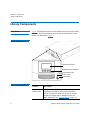
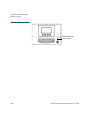
Figure 1 illustrates the features of the operator panel. The picture shows
the Scalar i40, but the features are the same on the Scalar i80. These
features are described in Table 1.
Figure 1 Front Panel
Operator panel screen
Navigation/selection buttons
Ticket indicator LED
Power-on LED
Power button
Table 1 Front Panel Features
2
Feature
Description
Operator
panel screen
The operator panel displays library status
information and allows you to access the library
menus. These menus allow you to view or change
the library settings and run diagnostic tests. For
more information, see Operator Panel on page 19.
Quantum Scalar i40 and Scalar i80 User’s Guide
Chapter 1: Description
Library Components
Feature
Description
Four navigation/selection
buttons
These buttons, in combination with the operator
panel display, are used to scroll through screens and
select options or commands. The functionality of
these buttons changes depending on the currently
displayed operator panel screen.
Ticket indicator LED
Indicates whether a diagnostic ticket exists on the
library. See Front Panel LEDs on page 257 and About
Diagnostic Tickets on page 248 for more information.
Power-on LED
Indicates whether library power is on or off. See
Front Panel LEDs on page 257 for more information.
Power button
Turns the library on or off.
Turning off the library using the power button turns
off the robot and operator panel, but power still
runs to the power supplies. See Shutting Down,
Restarting, Turning Off, and Removing Power on
page 139 for instructions on how to shut down the
library safely.
Robotic System and
Barcode Scanner
The robotic system identifies and moves the cartridges between the
storage slots, tape drives, and the I/E station. The robotic arm (picker)
has picker fingers that enable it to grab tape cartridges and move them
into and out of slots and tape drives.
A barcode scanner is attached to the library’s robotic hand. This barcode
scanner automatically identifies the slots and cartridges in the library, if
the cartridges are fitted with acceptable barcode labels.
Each tape cartridge must contain a unique, matching-readable barcode
that the barcode scanner reads during the inventory process. During the
inventory process, the barcode scanner reads the barcode labels on the
tape cartridges and empty slots to identify the types of tape cartridges
that are installed in the library.
Quantum Scalar i40 and Scalar i80 User’s Guide
3
Chapter 1: Description
Library Components
Tape cartridges cannot have duplicate barcode labels. This barcode
identifies the cartridge. The library stores the physical location of the
tape cartridge in an inventory database. All library or host requests
typically reference the location of the tape cartridges based on this
barcode number. Barcode labels are mandatory and must adhere to
specific standards. For more information on barcodes, see Chapter 11,
Working With Cartridges and Barcodes.
Robots can only be replaced by a Quantum Support technician.
Magazines
Magazines are removable and contain storage and import/export
station slots for cartridges. Each magazine has 20 slots, arranged in four
columns of five slots each. The Scalar i40 contains two magazines; the
Scalar i80 contains four. The right magazines provide up to five slots
each for use as an import/export (I/E) station. For more information on
I/E stations, see Configuring I/E Station Slots on page 62.
Note: Cartridges are gently restrained within the magazine by a
detent found on the left side of each individual magazine bin
slot. To manually remove a cartridge, pull a cartridge from the
front or push on the cartridge from the rear of the magazine
via an “access hole.” Be gentle to avoid any bending of the top
magazine cover sheet metal.
The library will run if one or more magazines is open or removed;
however, it runs at reduced speed. The library will not move a cartridge
to an open or removed magazine, but it will move a cartridge to any of
the other installed magazines.
You can open the magazines using library software or manually. For
information, see Releasing Magazines on page 148.
For information on removing and replacing magazines, see 6-66557-XX
Scalar i40 and Scalar i80: Magazine Replacement.
4
Quantum Scalar i40 and Scalar i80 User’s Guide
Chapter 1: Description
Library Components
Magazine Slot Location Coordinates
Each slot in the installed magazine is numbered with location
coordinates. The library location coordinate contains three digits as
follows: [Magazine],[Column],[Slot]. Figure 2 and Figure 3 show the
magazines and list all of the location coordinates.
• Magazine — Library magazine level is represented by the first digit
of a library coordinate. In a Scalar i40, there is only one level of
magazine. The coordinate is always zero. In a Scalar i80 library, the
bottom magazines are indicated by a zero; the top magazines are
indicated by the number 1.
• Column — A storage column is a group of slots arranged vertically
in the library. Columns are represented by the second digit of a
library coordinate. Columns are identified relative to the front left of
the library. The column in the front left of the library is number 1.
The column numbering continues around the library in a clockwise
direction. The I/E station column is always number 8.
• Slot — Slots (both storage and I/E station) are represented by the
third digit of the library location coordinate. Within each magazine
column, slots are numbered from 1 to 5, starting at the top of the
magazine.
Quantum Scalar i40 and Scalar i80 User’s Guide
5
Chapter 1: Description
Library Components
Figure 2 Scalar i40 Internal
Layout and Magazine Slot
Location Coordinates
Tape Drives
Robot on Y-tray
Right magazine
Left magazine
Left Magazine
0,1,1
0,2,1
0,3,1
0,4,1
0,5,1
0,6,1
0,7,1
0,8,1
0,1,2
0,2,2
0,3,2
0,4,2
0,5,2
0,6,2
0,7,2
0,8,2
0,1,3
0,2,3
0,3,3
0,4,3
0,5,3
0,6,3
0,7,3
0,8,3
0,1,4
0,2,4
0,3,4
0,4,4
0,5,4
0,6,4
0,7,4
0,8,4
0,1,5
0,2,5
0,3,5
0,4,5
0,5,5
0,6,5
0,7,5
0,8,5
Front
6
Right Magazine
Back
Front
Quantum Scalar i40 and Scalar i80 User’s Guide
Chapter 1: Description
Library Components
Figure 3 Scalar i80 Internal
Layout and Magazine Slot
Location Coordinates
Robot on Y-tray
Top right
magazine
Bottom right
magazine
Top left
magazine
Bottom left
magazine
Top Left Magazine
Top Right Magazine
1,1,1
1,2,1
1,3,1
1,4,1
1,5,1
1,6,1
1,7,1
1,8,1
1,1,2
1,2,2
1,3,2
1,4,2
1,5,2
1,6,2
1,7,2
1,8,2
1,1,3
1,2,3
1,3,3
1,4,3
1,5,3
1,6,3
1,7,3
1,8,3
1,1,4
1,2,4
1,3,4
1,4,4
1,5,4
1,6,4
1,7,4
1,8,4
1,1,5
1,2,5
1,3,5
1,4,5
1,5,5
1,6,5
1,7,5
1,8,5
Front
Back
Bottom Left Magazine
Front
Bottom Right Magazine
0,1,1
0,2,1
0,3,1
0,4,1
0,5,1
0,6,1
0,7,1
0,8,1
0,1,2
0,2,2
0,3,2
0,4,2
0,5,2
0,6,2
0,7,2
0,8,2
0,1,3
0,2,3
0,3,3
0,4,3
0,5,3
0,6,3
0,7,3
0,8,3
0,1,4
0,2,4
0,3,4
0,4,4
0,5,4
0,6,4
0,7,4
0,8,4
0,1,5
0,2,5
0,3,5
0,4,5
0,5,5
0,6,5
0,7,5
0,8,5
Front
Quantum Scalar i40 and Scalar i80 User’s Guide
Back
Front
7
Chapter 1: Description
Library Components
Power Supply
The Scalar i40 and Scalar i80 libraries support single power
configurations consisting of a single AC line input and single DC power
supply. The Scalar i80 library supports a redundant power configuration
consisting of a dual AC line input and dual DC power supplies.
If you have a Scalar i80 and are only using one power supply, the power
supply should be installed in the upper power supply slot, and a filler
plate must cover the empty power supply slot (see Figure 5 on page 10).
If you are using redundant power, you can hot add or hot swap a power
supply (power to the library remains on while you add or exchange the
hardware).
The Scalar i40 power supply cannot be installed in a Scalar i80. However,
the Scalar i80 power supply works in either the Scalar i40 or the
Scalar i80.
Warning: The power outlet must be available near the library and
must be easily accessible.
The power system consists of the following components:
• Power supply
• AC power cord
The power supply has one status LED. For more information, see Power
Supply LED on page 261.
For information on removing and replacing power supplies, see 666559-XX Scalar i40 and Scalar i80: Power Supply Replacement.
System Control Board
The system control board (SCB) contains the library firmware, all
configurable settings, license keys, and SKM TLS certificates. It manages
the entire library, including the operator panel and robot, and is
responsible for running system tests to ensure that the library is
functioning properly. The SCB has two Ethernet ports:
• Left port — For remote management (Web client)
• Right port — For service only. In rare cases, you may need to change
the IP address of the port if it conflicts with your library IP address
(see Configuring the Service Port on page 78).
See Figure 4 on page 10 and Figure 5 on page 10 for port locations.
8
Quantum Scalar i40 and Scalar i80 User’s Guide
Chapter 1: Description
Library Components
The SCB contains one LED, in addition to two LEDs on each Ethernet
port (for a total of 5 LEDs). For more information, see System Control
Board LEDs on page 259.
For information on removing and replacing the SCB, see 6-66556-XX
Scalar i40 and Scalar i80: System Control Board Replacement.
Tape Drives
Every library configuration must contain at least one tape drive.
See Appendix A, Specifications for a list of tape drives and media
supported by the Scalar i40 and Scalar i80 libraries.
The library supports mixing different tape drive types within the library
and within partitions. For information on how to do this, see Working
With Partitions on page 49.
Tape drives are installed into tape drive slots in the rear of the library. If a
tape drive slot is empty, a filler plate must cover the empty slot (see
Figure 5 on page 10).
Caution: Filler plates are required to maintain proper library cooling.
Do not run the library with uncovered slots.
SAS tape drives have one status LED. Fibre Channel tape drives contain a
status and a link LED. For more information on tape drive LEDs, see Tape
Drive/Sled LEDs on page 260.
All tape drives contain only one cable connector.
For information on removing and replacing tape drives, see 6-66561-XX
Scalar i40 and Scalar i80: Tape Drives Replacement.
Installed Tape Drive Location Coordinates
Installed tape drives have a two-digit location coordinate. These are the
coordinates shown in the library configuration report. The first digit is
always zero. The second digit indicates the location of the tape drive
relative to the other tape drives. The bottommost tape drive has
location coordinates [0,1], the next-to-bottom has location coordinates
[0,2], and so on.
Quantum Scalar i40 and Scalar i80 User’s Guide
9
Chapter 1: Description
Library Components
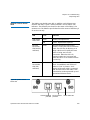
Figure 4 Scalar i40 Back Panel
Components
Half-height tape drives
Power supply cord
Tape drive cables
Figure 5 Scalar i80 Back Panel
Components
Ethernet
cable in LEFT
SCB port
Service port –
do not use
Half-height tape drives
Power supply cord
Power supply
filler plate
Tape drive cables
10
Ethernet cable in Service port –
LEFT SCB port do not use
Quantum Scalar i40 and Scalar i80 User’s Guide
Chapter 1: Description
Standard Features
Standard Features
This section describes several features of Scalar i40 and Scalar i80
libraries.
User Interface
The operator panel is located on the front of the library and allows you
to work locally on the library via the user interface. The Web client
allows you to view and perform library functions from remote sites and
is accessible through a browser. The operator panel and Web client each
contain a different user interface and functionality.
See Chapter 3, Understanding the User Interface for more information
about the operator panel and the Web client.
Partitions
Partitions are virtual sections within a library that present the
appearance of multiple, separate libraries for purposes of file
management, access by multiple users, or dedication to one or more
host applications.
Organizing the library into partitions divides the resources into virtual
sections. If one of the resources is not available due to a failure or other
cause, the other partitions and their assigned components are still
available. Partitions can also be used to control access to portions of the
library by granting permissions to user accounts to access certain
partitions (see Privilege Levels on page 80 and Creating Local User
Accounts on the Web Client on page 81).
For more information on partitions, see Working With Partitions on
page 49.
Control Path
Modification
The control path tape drive is used to connect a partition to a host
application. Only one tape drive can be selected as the control path at
one time. By default, the first tape drive assigned to a partition is
designated as the control path. In the event that the control path
connection to the host application fails, you can select a new control
path for the partition. See Configuring Control Paths on page 66.
Quantum Scalar i40 and Scalar i80 User’s Guide
11
Chapter 1: Description
Licensable Features
Support for WORM
Scalar i40 and Scalar i80 tape libraries support WORM (write once, read
many) technology. WORM allows non-rewriteable and non-erasable
data to be written and provides extra data security by prohibiting
accidental data erasure. The WORM feature is supported whenever you
use WORM cartridges.
Licensable Features
In addition to the standard features, the following additional, licensable
features are available:
• Capacity on Demand (COD)
• Advanced Reporting - includes custom reports and logs and Control
Path Failover functionality.
• Encryption Key Management
For information on how to obtain and install a license key, see Adding or
Upgrading Licensable Features on page 68.
Capacity on Demand
(COD)
All Scalar i40 and Scalar i80 library configurations ship with the
purchased number of slots pre-activated. After the initial purchase of
your library, you can activate any remaining inactive slots in your library
by purchasing a COD license upgrade.
• The Scalar i40 base configuration has 25 slots activated (these slots
comprise the first 5 magazine columns starting from the left front
magazine column going clockwise). You can buy a COD license to
activate the remaining 15 slots.
• The Scalar i80 base configuration has 50 slots activated (these slots
comprise the first 5 magazine columns starting from the left front
magazine column going clockwise). You can buy a COD license to
activate the remaining 30 slots.
To see your library’s current configuration and slot availability, open the
Library Configuration Report (choose Reports > Library Configuration
from the Web client).
12
Quantum Scalar i40 and Scalar i80 User’s Guide
Chapter 1: Description
Licensable Features
Advanced Reporting
The Advanced Reporting license applies to your entire library, regardless
of library size. This means you only need to purchase the license once. If
you increase the size of your library, your existing license applies to your
new library configuration.
Advanced Reporting provides the following features and reports that
you can configure for viewing and analysis:
Control Path Failover (CPF) - Provides support for configuring the
LTO-5 or LTO-6 drive for control path failover. When control path failover
is used, one drive is assigned as the primary control path and another
drive as the control path failover (secondary) drive. The control path
failover drive is used whenever the primary control path drive fails or is
inoperable
Reports - Listed below are report names. You can view, configure, send
via e-mail, and save and reuse report configurations as templates. In
addition, you can automatically e-mail any of the reports to designated
recipients at specified, scheduled times.
• Drive Resource Utilization Report—Provides tape drive usage
information, showing you which tape drives are working at
optimum capacity and which are under-utilized. This can help you
allocate your tape drive resources properly.
• Media Integrity Analysis Report—Provides Tape Alert count for
various combinations of tape drives, tape cartridges, and Tape Alert
flags. This can help you determine if a problem is due to a specific
tape drive or tape cartridge.
Logs - Listed below are available logs:
• Media Security Log - Lists media that has been removed from the
library.
• Media Usage Log - Lists information on all media that have ever been
in the library.
For information on how to use the advanced reporting features, see
Advanced Reporting on page 111.
Quantum Scalar i40 and Scalar i80 User’s Guide
13
Chapter 1: Description
Licensable Features
Encryption Key
Management
14
The Encryption Key Management (EKM) license enables tape drive
transparent encryption using library-managed encryption. The EKM
license applies to the entire library, regardless of how many slots are
licensed. If you increase the number of slots in your library, your existing
license applies to your new library configuration. For more information
about EKM, see Chapter 7, Encryption Key Management.
Quantum Scalar i40 and Scalar i80 User’s Guide
Chapter 2
Unpacking the Library
Choose a location in which to install the library that is as free from dust
as possible. Dust can damage or degrade performance of library
components and media.
Refer to the following sections of this manual for important information
that you need when installing and setting up your library:
• Environmental Specifications on page 279
• Taking ESD Precautions on page xxiii
Note: Unpack the library as close to the installation location as
possible.
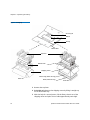
1 Inspect the outer library packaging for damage. If there is any
damage evident on the library packaging, do not continue with the
installation and contact Quantum customer support.
2 Open the library packing box and remove the kit tray containing the
accessory kit and the rail kit (see Figure 6). Some configurations
come with tape drives installed in the library, and some come with
tape drives packaged separately. If yours comes with tape drives
packaged separately, remove them and set aside for installation
later.
Quantum Scalar i40 and Scalar i80 User’s Guide
15
Chapter 2: Unpacking the Library
Figure 6 Packaging
Accessory kit
Rail kit
Kit tray
Media labels
Top foam
Bottom foam
Shipping carton
Bottom tray (Scalar i80 only)
Scalar i40
Pallet (Scalar i80 only)
Scalar i80
3 Remove the top foam.
4 Scalar i80 only: Remove the shipping carton by lifting it straight up
out of the bottom tray.
5 With the help of a second person, lift the library chassis out of the
shipping carton and place it on a table approximately waist high.
16
Quantum Scalar i40 and Scalar i80 User’s Guide
Chapter 2: Unpacking the Library
WARNING: Two people are required to safely lift the library out of
its packaging or into a rack.
Caution: Lift the library chassis at the sides. Avoid putting the
weight of the library chassis on the front bezel.
6 Remove the anti-static wrapping from the library. Keep the antistatic wrapping intact so that you can use it later if needed.
7 Save the packing box, packaging material, and anti-static wrapping
in case you need to move or ship the library in the future.
8 Remove the Y-tray restraint. The Y-tray restraint consists of four (4)
thumbscrews, a plastic sheet, a small metal clip, and underneath
the plastic sheet, an orange restraint tab—located on the top cover
of the library. See Figure 7.
a Unscrew and remove the four thumbscrews from the top cover
(see Figure 7). Save the thumbscrews in case you need to move
or ship the library in the future.
b Remove the plastic sheet and metal clip and discard. You will
not need to use them again.
Caution: Remove the orange shipping restraint tab and discard.
You will not need to use it again.
Quantum Scalar i40 and Scalar i80 User’s Guide
17
Chapter 2: Unpacking the Library
Figure 7 Removing the Robot
Restraint
Note: The Y-tray may stay at the top of the library, or it may
move downward toward the floor of the library. If it
moves downward, you will hear the gears turning as it
moves. This is normal.
9 Once you remove the Y-tray restraint, you may cover the holes in the
library top cover with stickers, which are provided in the accessory
kit for this purpose. This step is optional and is intended to prevent
small objects from accidentally falling into the library through the
holes.
10 Remove the protective plastic sheet covering the front panel display.
18
Quantum Scalar i40 and Scalar i80 User’s Guide
Chapter 3
Understanding the User
Interface
The user interface for the Scalar i40 and Scalar i80 libraries is available in
two formats: the operator panel and the Web client. Operations on the
library can be performed locally on the operator panel or remotely on
your computer using the Web client.
Both the operator panel and the Web client are required to operate the
library. Some functionality is only available through the Web client, and
some functionality is only available through the operator panel.
However, it is recommended that you use the Web client rather than the
operator panel to perform most library operations.
This chapter covers:
• Operator Panel
• Web Client
• Menu Trees
Operator Panel
The operator panel is located on the front panel of the physical library.
The operator panel screen contains a menu bar with operations that
correspond to the four physical buttons below it. The menu operations
and button functions change with each screen.
Quantum Scalar i40 and Scalar i80 User’s Guide
19
Chapter 3: Understanding the User Interface
Operator Panel
The operator panel home screen refreshes every 5 seconds to provide
up-to-date information about library performance.
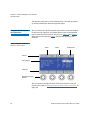
Operator Panel Layout
and Functions
You can choose your desired operator panel home screen that displays
on the local user interface—the default home screen or the alternate
home screen that allows easy I/E unlock access. Figure 8 and Figure 9
depict these screen options; Table 2 describes the operator panel
functions.
Figure 8 Operator Panel User
Interface - Home Screen
Name
Status
Health status
Title bar
Active display
Menu bar
Navigation/selection
buttons
You can choose to change the view of the home screen for easy I/E
unlock access. Refer to Changing Operator Panel Home Screen View on
page 108.
20
Quantum Scalar i40 and Scalar i80 User’s Guide
Chapter 3: Understanding the User Interface
Operator Panel
Figure 9 Operator Panel User
Interface - Alternate Home
Screen
Scalar i40
Number of occupied
I /E slots
Number of configured
I /E slots
Unlock I/E Station
Scalar i80
Number of occupied
I /E slots
Number of
configured I/E slots
Unlock bottom
I/E Station
Quantum Scalar i40 and Scalar i80 User’s Guide
Unlock top
I/E Station
21
Chapter 3: Understanding the User Interface
Operator Panel
Table 2 Operator Panel
Functions
Operator Panel
Element
Description
Title bar
The title bar is present on every screen, and
contains three fields: name, status, and health
status.
Name
The name field displays a description of the
current view. It changes depending on the menu
selection.
• On the home screen, the field displays the
library type (Scalar i40 or Scalar i80).
• On active pages, the field displays the name of
the main menu (Setup, Actions, Tools, Reports).
• When a message displays, the field displays the
message type (Success, Completed,
Information, FAILURE, NOTICE). Failure
messages will blink.
22
Quantum Scalar i40 and Scalar i80 User’s Guide
Chapter 3: Understanding the User Interface
Operator Panel
Operator Panel
Element
Status
Description
The status field displays the current state or
operation being performed by the robot. If the
robot is not idle, the status will blink. Status can
be any of the following:
• Initializing — The library is currently in the
process of initializing.
• Autoleveling — The robotics hardware is being
autoleveled.
• Homing — The robot is performing a home
operation.
• Teaching — The robot is performing a teach
operation.
• Calibrating — The robot is performing a
calibration operation.
• Scanning — The robot is performing an
inventory operation.
• Unlocking — The robot is in the process of
unlocking a magazine.
• Move Media — The robot is moving media
from one location to another.
• Loading — The robot is in the process of
moving a tape to load into a tape drive.
• Unloading — The robot is in the process of
unloading a tape drive and returning it to the
source location.
• Idle — The robot is ready and idle.
• Not Ready — The robotics system is not ready.
Quantum Scalar i40 and Scalar i80 User’s Guide
23
Chapter 3: Understanding the User Interface
Operator Panel
Operator Panel
Element
Health status
Description
The health status field displays an icon
representing the health of the library.
Heart — Library is in good health (no open
or unopened diagnostic tickets are present).
Triangle — Library health is degraded
(library contains open or unopened low- or
high-priority diagnostic tickets).
Exclamation point — Immediate attention
is required (library contains open or
unopened urgent diagnostic tickets).
Active display
The active display provides information or menu
items according to the selected menu item or
operation.
The default home screen displays the number and
state of partitions, tape drives, storage slots, and
I/E slots.
The alternate home screen displays the number
and state of the I/E slots, and provides access to
unlock I/E stations.
24
Menu bar
The menu bar displays the function associated
with each of the navigation/selection buttons.
The button function changes with each menu.
Common functions are navigation (up, down,
left, right, next) and menu selection (select, apply,
exit, yes, no, cancel).
Navigation/
Selection
Buttons
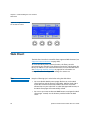
The physical buttons enable you to navigate
menus and start and stop library operations
according to the functions listed in the button
bar. Not all buttons are functional for every
operation. See Navigating and Editing on the
Operator Panel on page 25 for more information.
Quantum Scalar i40 and Scalar i80 User’s Guide
Chapter 3: Understanding the User Interface
Operator Panel
Navigating and Editing
on the Operator Panel
You use the four navigation/selection buttons exclusively to move
through the menus and commands on the operator panel.
From the default home screen, the menu bar lists the four main menu
headings. From the alternate home screen, you can select Menu to
return to the default home screen to access the four main menu
headings.
Press the button corresponding to a menu item to bring up the list of
sub-menu items. The item you are currently on is highlighted. Press the
buttons corresponding to Up, Down, Left, or Right to navigate to a
desired menu item. As you move through the items, the highlighting
moves with you so you always know which item you are on. Press the
button corresponding to Select to select a highlighted item or action.
This in turn brings up either another sub-menu, a screen where you can
modify settings or perform operations, or a screen displaying
information.
To edit a modifiable field, such as date, time, licenses, IP address, and so
on, use the Left and Right buttons to move through the field, one
segment at a time (for license keys and passwords, you will move one
digit or letter at a time). Use the Up and Down buttons to change the
value of each segment. When you reach the value you want, press the
Right button. As you press Right, the value fills in and you go to the
next segment. To edit a previous entry, press the Left button until you
reach the entry and edit as before. For multiple fields, continue to press
Right after each entry until you reach the last entry. At this point, the
Right button designation changes to Apply. Press the Apply button.
The new information displays. Press Exit to exit. For an example, see
Figure 10 on page 26.
To scroll through a list of items, or to edit letters and numbers, you can
press the appropriate button repeatedly to scroll one item at a time, or
you can hold the button down for fast scrolling through the available
options.
To exit a screen, press the Exit button.
To cancel an operation without saving any changes, press the Cancel
button. If you are in the middle of making changes, repeatedly press the
Left button until you are back at the first field on the screen, then press
the Cancel button.
Quantum Scalar i40 and Scalar i80 User’s Guide
25
Chapter 3: Understanding the User Interface
Web Client
Figure 10 Using the Buttons to
Set the Date and Time
Web Client
The Web client interface is accessible from supported Web browsers (see
Supported Internet Browsers on page 283).
To access the library from a remote location, the library must be
connected to your network via an Ethernet connection. Simply enter the
library’s IP address in your Internet browser bar to access the Web client.
See Configuring Network Settings on page 38 for information on
setting the network configuration settings for remote use.
Tips
Keep the following tips in mind when using the Web client:
• You must disable Web browser popup blockers to use the Web
client interface and the library’s online Help. Add the Scalar i40 or
Scalar i80’s Internet Protocol (IP) address to the list of trusted/
allowed sites on your Scalar i40- or Scalar i80-supported browser, so
the Web client pages will automatically refresh.
• Do not use your Internet browser Back button to navigate the Web
client pages. Instead, use the buttons provided within the Web
client.
26
Quantum Scalar i40 and Scalar i80 User’s Guide
Chapter 3: Understanding the User Interface
Web Client
• Optimum screen resolution for viewing using a Windows operating
system is 96 DPI. If your resolution is set higher, certain screen
messages may not display as intended. To change screen resolution,
show the desktop, right click to display the Properties window, and
click Settings > Advanced.
• Log out of the library before closing the Internet browser window
when you are using the Web client. If you do not log out, the
session will remain open. Clicking the close button (X) in the upperright corner of the Web client closes the browser window but does
not log you out.
Sorting Information in
Tables
You can sort information displayed in tables if the table column heading
is bold. Click the column heading and the information will sort. Click
again to toggle from ascending to descending.
Web Client Layout and
Functions
Figure 11 on page 28 shows the Web client interface. Table 3 on
page 29 explains the Web client interface elements.
Quantum Scalar i40 and Scalar i80 User’s Guide
27
Chapter 3: Understanding the User Interface
Web Client
Figure 11 Web Client User
Interface - Home Page
“Library is not ready”
message area
Home Online Logout
help
Header
Menu bar
Active
display
View diagnostic tickets
28
Quantum Scalar i40 and Scalar i80 User’s Guide
Chapter 3: Understanding the User Interface
Web Client
Table 3 Web Client Screen
Elements
Web Client
Element
Header
Description
The header is present on all pages and contains
the library type (Scalar i40 or Scalar i80) and three
buttons:
Home — Brings you to the home page.
Help — Displays the online help.
Logout — Logs out of the current session.
A message in the header alerts you when the
robot is not ready to perform library functions.
See Troubleshooting Library “Not Ready”
Messages on page 254 for more information on
“Library Not Ready” messages displayed in the
header.
Menu bar
Displays the available menu choices. The choices
vary depending on login privileges.
The far right of the menu bar also displays the
name of the logged-in user, with the associated
privilege level indicated in brackets.
If a menu item selected has a sub-menu, then >
is displayed to the right of the item.
Active display
Web Client Home Page
The active display provides information or menu
items according to the selected menu item or
operation.
The home page displays status and health information in the active
display portion of the window (see Figure 11 on page 28). See System
Summary and Subsystem Status below for more information.
Quantum Scalar i40 and Scalar i80 User’s Guide
29
Chapter 3: Understanding the User Interface
Web Client
System Summary
The system summary is available on the home page of the Web client.
It provides tabular data on the capacity of the library’s partitions, slots,
and tape drives. It also displays whether partitions are online or offline
(in the Storage Slots section). The current user’s login privileges
determine which partitions are displayed (see Privilege Levels on
page 80).
Subsystem Status
You can quickly gauge the health of the library by observing the color of
the three subsystem status buttons located at the bottom of the home
page. These buttons provide quick access to information about the
“health” of the library for faster recovery if problems occur. You can
select the buttons to view diagnostic tickets that report problems in the
subsystems.
The three subsystems are:
• Library — Represents connectivity, control, cooling, power, and
robotics.
• Drives — Represents tape drive components, such as tape drives,
tape drive firmware, and tape drive sleds.
• Media — Represents media components, such as cartridges and
barcode labels.
Each button has three states indicated by color. The three states are:
Green (check mark) — No diagnostic tickets exist, or, if any tickets
do exist, they have all been closed.
Yellow (exclamation point) — The library contains open or
unopened, low- or high-priority diagnostic tickets.
Red (“X” mark) — The library contains open or unopened urgent
diagnostic tickets.
If the color of a subsystem button is red or yellow, you can click the
button to display the corresponding Diagnostic Tickets screen. This
screen lists library, drives, or media tickets, depending on which button
was selected. See About Diagnostic Tickets on page 248 for more
information.
30
Quantum Scalar i40 and Scalar i80 User’s Guide
Chapter 3: Understanding the User Interface
Menu Trees
Menu Trees
The following menus organize operations and commands into logical
groupings:
• The Setup menu consists of commands that users with
administrator privileges can use to set up and configure various
aspects of the library, including partitions, I/E station slots, cleaning
slots, control paths, network settings, drive settings, users,
notifications, date and time, licenses, library registration, and email.
• The Operations/Actions menu consists of commands that enable
users to change the library’s mode of operations, import and export
cartridges, load and unload tape drives, move media, lock or unlock
the I/E station, log out, and shut the library down. The menu is
called Actions on the operator panel and Operations on the Web
client.
• The Tools menu consists of commands that you can use to maintain
your library such as viewing diagnostic tickets, generating
diagnostic logs, identifying drives, configuring the internal network,
saving and restoring the library configuration, setting system and
security settings, and updating firmware, and performing library
diagnostics.
• The Reports menu provides various kinds of library information.
Administrators have access to all menu commands, but users’ privileges
are more limited.
Figure 12 lists the operator panel menus. Figure 13 lists the Web client
menus.
Quantum Scalar i40 and Scalar i80 User’s Guide
31
Chapter 3: Understanding the User Interface
Menu Trees
Figure 12 Operator Panel
Menus
Operator Panel
Main Menu Bar
Setup
Network Configuration
Actions
I/E
Tools
IVT
Date & Time
Unlock I/E Station
Diagnostics
License Installation
Import Tape
Robotics Test
Dedicated Slots
Reports
Diagnostic Tickets
Library
Tape Drives
Import Cleaning Tape
Tape Drive Test
Media
Cleaning
Export Tape
Magazine Test
Close ALL
I/E
Export Cleaning Tape
Tape Drives (FC)
Configure Partitions
View Current
Partitions
Magazine
Release
Tape Drive
Random Move Test
About Library
Robotics View
Partitions
Service Network
Tape Drives
Modify Subnet
Auto-Create Partitions
Change Mode
Delete Partitions
Unload
Licenses
Manual Cleaning
Copyright Statement
Account Settings
Password Settings
Date/Time
Reset
Session Timeout
Change Partition Mode
Modify Password*
Shutdown
System Settings
Reset Factory Defaults
Network Settings
Shutdown Library
ACCESS KEY
Unload Assist
Logical SN Addr
Man Cart Assign
Restart Library
NOTE: If passwords are not
enabled on the operator
panel, all users have access
to all menus and functions.
All Users
SNMP
SMI-S
Power Save
Admin Privileges Only
* Only Available if LUI
Passwords are enabled
Alternate Home
Auto DT Close
Security Services
Network IF
SSH Services
ICMP
Web client
Service User
SNMP V1/V2
SSL
32
Quantum Scalar i40 and Scalar i80 User’s Guide
Chapter 3: Understanding the User Interface
Menu Trees
Figure 13 Web Client Menus
Web Client
Main Menu Bar
Setup
Setup Wizard
Operations
Media
Tools
Reports
All Diagnostic Tickets
System Information
Partitions
Move
Capture Snapshot
Library Configuration
Cleaning Slots
Import
Save/Restore
Configuration
Network Settings
I/E Station Slots
Export
E-mail Configuration
Record
Logged In Users
Save Configuration Record
All Slots
Drive Settings
Cleaning Media
Control Path
Import
Drive Operations
Log Viewer
License
Export
Download SNMP MIB
Advanced Reporting
Notification
E-mail Configuration
Advanced Reporting
Receiver
Addresses
Partitions
Change Mode
Drive
Load
Media Security
Unload
EKM Path Diagnostics
Drive Resource
Utilization
EKM Management
Media Integrity Analysis
Import Communication
Certificates
Encryption Certificate
Import
About
Scalar i40/i80
Open Source Licenses
Export
Diagnostic Tickets
Change Mode
Receiver
Addresses
Contact
Information
Encryption Key
I/E Station ,OCKUnlock
Release Magazines
Network Management
System Shutdown
Network
SNMP
Log Out
SNMP Trap
Registrations
User Management
User Accounts
Import
Export
Retrieve SKM Logs
3ERVER3TATUS
!UDIT,OG
Update Library Firmware
ACCESS KEY
All Users
Admin Privileges Only
Diagnostics
Remote Authentication
Reset Operator Panel
Passwords
Encryption
System Configuration
Partition Configuration
3YSTEM3ETTINGS
$ATE4IME
Quantum Scalar i40 and Scalar i80 User’s Guide
33
Chapter 3: Understanding the User Interface
Menu Trees
34
Quantum Scalar i40 and Scalar i80 User’s Guide
Chapter 4
Configuring the Library
A Setup Wizard is available to assist you with the initial configuration of
the library. The Setup Wizard, however, contains only a subset of
configuration tasks. The operator panel and Web client menus provide
access to all configuration options that are included in the Setup Wizard
and many that are not.
This chapter covers the Setup Wizard and all of the other configuration
options. Paths to open the appropriate screens on both the operator
panel and the Web client are given for each task. (For complete menu
trees, see Menu Trees on page 31.)
Note: These operations should not be performed concurrently by
multiple administrators logged in from different locations. You
can access the screens, but you cannot apply changes while
another administrator is performing the same operation.
Caution: Always save the library configuration after modifying a
configurable item. This will allow you to restore the most
current settings if necessary. See Saving and Restoring the
Library Configuration on page 106.
Note: Power cycling (powering the library on and off) is not necessary
to configure the library.
Quantum Scalar i40 and Scalar i80 User’s Guide
35
Chapter 4: Configuring the Library
This chapter covers:
• Using the Setup Wizard
• Configuring Network Settings
• Configuring SNMP Settings
• Setting the Date, Time, and Time Zone
• Working With Partitions
• Configuring Cleaning Slots
• Configuring I/E Station Slots
• Configuring Tape Drive Parameters
• Configuring Control Paths
• Adding or Upgrading Licensable Features
• Working With E-mail Notifications
• Configuring the Library E-Mail Account
• Setting Customer Contact Information
• Configuring the Service Port
• Working With Local User Accounts and Passwords
• Working With LDAP User Accounts (Remote Authentication)
• Setting the Session Timeout
• Configuring System Settings
• Configuring Security Settings
• Saving and Restoring the Library Configuration
• Registering the Library
• Changing Operator Panel Home Screen View
36
Quantum Scalar i40 and Scalar i80 User’s Guide
Chapter 4: Configuring the Library
Using the Setup Wizard
Using the Setup Wizard
WARNING: Follow all setup and cabling instructions in the Scalar i40
and Scalar i80 Quick Start Guide before using the Setup
Wizard.
When you first power on the library, the operator panel displays the
Setup Wizard, which walks you through the initial configuration of the
library’s basic operational settings.
Note: Library initialization can take approximately 9 to 23 minutes for
an i40, or 14 to 40 minutes for an i80. Do not interrupt the
library during initialization.
The Setup Wizard on the operator panel displays when you first install
your library. It displays only once, with the following exceptions: it will
also display after SCB replacement, resetting factory defaults, or
downgrading library firmware.
When the Setup Wizard displays on the operator panel, you must either
complete the Setup Wizard or cancel out of it. If you cancel, you accept
the library’s default configuration (see Default Configuration on
page 38). You can modify the configuration at any time later using the
Setup Wizard on the Web client, or by using the Setup menu options
from the operator panel or Web client.
Operator Panel
The Setup Wizard on the operator panel is covered in detail in the
Scalar i40 and Scalar i80 Quick Start Guide.
Web Client
To access the Setup Wizard, click Setup > Setup Wizard. Work through
several screens that enable you to add licenses; set date, time, and time
zone; configure cleaning slots; configure I/E station slots; and autocreate partitions.
Quantum Scalar i40 and Scalar i80 User’s Guide
37
Chapter 4: Configuring the Library
Default Configuration
Default Configuration
The library comes with a default configuration, which you can modify at
any time. The default configuration is as follows:
Feature
Default Configuration
Library host name
library
Network settings
IPv4, DHCP enabled
IPv6 disabled
Number of partitions
Equal to the number of unique tape
drives — based on interface type (Fibre
Channel or SAS) and drive generation
(LTO-4, LTO-5, LTO-6) — not currently
assigned to a partition.
Storage slots are divided equally
among the partitions.
Number of I/E station slots
5
Number of cleaning slots
0
Configuring Network Settings
The operator panel Setup Wizard allows you to configure network
settings that allow remote access to the library from the Web client. At a
minimum, you must initially configure the network IP address from the
operator panel. After the initial configuration, you can modify the
network settings from either the operator panel or the Web client.
38
Quantum Scalar i40 and Scalar i80 User’s Guide
Chapter 4: Configuring the Library
Configuring Network Settings
Note: Changing the network settings may interrupt the library
connection and library communication. Your current browser
session may become invalid. If this happens, you must close
your browser and then restart it to reconnect to the library with
your new configuration settings.
Note: Make sure that the library is connected to the network before
modifying network settings. If the Ethernet cable is not
installed properly, you cannot configure the network settings.
Install one end of the Ethernet cable in the left-most Ethernet
port of the system control board (SCB) located on the back of
the library (see Figure 4 or Figure 5 on page 10). Make sure the
other end of the Ethernet cable is installed in the appropriate
LAN port on your LAN.
You can configure the following network settings:
• Library Host Name
• DHCP
• IP Addresses
• Default Gateway, Subnet Mask, Network Prefix, and DNS Addresses
Some settings are only available on the Web client; others are only
available on the operator panel, as described below.
Library Host Name
The host name is the network name you want to assign to the library.
The host name is limited to 12 lowercase alphanumeric characters and
dashes (-).
You can view, but not modify, the host name on the operator panel. To
modify the host name, you must use the Web client.
Web Client
1 Select Setup > Network Management > Network.
2 Type a name in the Host Name field, and click Apply.
Quantum Scalar i40 and Scalar i80 User’s Guide
39
Chapter 4: Configuring the Library
Configuring Network Settings
DHCP
DHCP is enabled by default. When DHCP is enabled, the library obtains
an IP address automatically. If DHCP is disabled, you must manually
enter an IP address, default gateway, and subnet mask/net prefix. You
can enable/disable DHCP from the operator panel or Web client.
Operator Panel
Select Setup > Network Configuration.
Web Client
Select Setup > Network Management > Network.
IP Addresses
The library can support both IPv4 and IPv6 network settings at the same
time. For more details, see the bullets below.
Caution: If you change the IP address on your library, make sure to
change it on any host applications that access the library.
Note: Be sure to add your library’s IP address to the list of trusted/
allowed sites on your library-supported browser, so the Web
client pages automatically refresh.
• IPv4 Addresses — The library always supports IPv4 network
settings. The library can support either a DHCP-obtained or a static
IPv4 address.
IPv4 addresses must be entered in dot notation (for example,
192.168.0.1). They are limited to numeric characters and do not
allow values exceeding 255 for dot-separated values.
• IPv6 Addresses — IPv6 is disabled by default and can only be
enabled/disabled via the operator panel. Once enabled, you must
use the Web client to modify the address. Unlike IPv4, the library
can support both DHCP-obtained and static IPv6 addresses at the
same time.
40
Quantum Scalar i40 and Scalar i80 User’s Guide
Chapter 4: Configuring the Library
Configuring Network Settings
IPv6 addresses must be entered in the proper notation. IPv6 address
can be entered in the most common notation, as eight groups of
four hexadecimal digits. 2001:0ff8:55cc:033b:1319:8a2e:01de:1374
is an example of a valid IPv6 address. Also, if one or more of the
four-digit groups contains 0000, you can omit the zeros and replace
them with two colons (::), as long as there is only one double colon
used in an address. Using this notation,
2001:0ff8:0000:0000:0000:0000:01de:1374 is the same as
2001:0ff8::01de:1374.
You can configure IPv4 addresses on the operator panel or Web client.
You can set the library to use IPv6 via the operator panel, but you must
use the Web client to configure a static IPv6 address.
Operator Panel
1 Select Setup > Network Configuration.
2 Modify the IP address using the method described in Navigating
and Editing on the Operator Panel on page 25.
Web Client
Select Setup > Network Management > Network.
Default Gateway,
Subnet Mask, Network
Prefix, and DNS
Addresses
These settings have specific configuration requirements, as follows:
• Default Gateway — The IP address of the default gateway for your
portion of the Ethernet network. For IPv4, this setting can only be
changed if DHCP is disabled.
• Subnet Mask (IPv4 only) — Available only if DHCP is disabled.
• Network Prefix (IPv6 only). Can be entered only on the Web client.
• Primary DNS Address (optional, Web client only) — Must be entered
as an IP address. This text box is available only if DHCP is disabled.
• Secondary DNS Address (optional, Web client only) — Must be
entered as an IP address. This text box is available only if DHCP is
disabled.
Quantum Scalar i40 and Scalar i80 User’s Guide
41
Chapter 4: Configuring the Library
Configuring SNMP Settings
Operator Panel
1 Select Setup > Network Configuration.
2 Modify the fields using the method described in Navigating and
Editing on the Operator Panel on page 25.
Web Client
Select Setup > Network Management > Network.
Configuring SNMP Settings
Simple Network Management Protocol (SNMP) is a light-weight
protocol designed for remote management and monitoring of
infrastructure devices. The library provides SNMP support, so an external
management application can be configured to receive library SNMP
information. The library supports SNMP by publishing a Management
Information Base (MIB) that can be queried to obtain the status of the
library and many of its individual components. SNMP information can
be obtained from the library using SNMP Traps and GET queries.
For more information about SNMP, see the Scalar i40 and Scalar i80
Basic SNMP Reference Guide (6-66773-xx).
For information on integrating MIBs with an SNMP management
application, contact your network management application vendor.
Registering External
Management
Applications
Administrators can register transport protocols, IP addresses, and port
numbers of external management applications to enable them to
receive SNMP traps from the library. (By default, the library ignores all
SNMP SET operations, so external management applications cannot
register themselves to receive SNMP traps from the library.)
After registering the transport protocols, IP addresses, and
corresponding port numbers, you can perform a test to verify that the
library can send the SNMP traps to the addresses.
42
Quantum Scalar i40 and Scalar i80 User’s Guide
Chapter 4: Configuring the Library
Configuring SNMP Settings
When registering external management applications to receive SNMP
traps, you can set the following parameters:
• Transport — The transport protocol. This should be the same as the
transport protocol configured on the SNMP trap receiver. Select one
of the following:
• UDP — User Datagram Protocol for IPv4.
• UDP6 — User Datagram Protocol for IPv6.
• TCP — Transmission Control Protocol for IPv4.
• TCP6 — Transmission Control Protocol for IPv6.
• Host Name/IP Address — The host name or the IP address of the
external management application you want to register. A host name
may be entered only if DNS is enabled. Otherwise, IP addresses must
entered. For information on DNS, see Default Gateway, Subnet
Mask, Network Prefix, and DNS Addresses on page 41.
• Port — the port number of the external application you want to
register. The default port number for an external application is 162.
You can only perform these functions from the Web client.
Web Client
1 Select Setup > Network Management > SNMP Trap
Registrations.
2 Click one of the following buttons to perform these actions:
• Create — Adds the IP address and port number of the external
application to the list of registered addresses that will be sent
SNMP traps.
• Delete — Deletes a selected IP address and port number.
• Test — This test simply sends the traps; it does not check to see
if they were received. You must check the external management
applications to verify that the traps were received.
Quantum Scalar i40 and Scalar i80 User’s Guide
43
Chapter 4: Configuring the Library
Configuring SNMP Settings
Enabling SNMP
Versions
The library supports SNMP v1, v2c, and v3.
You can enable or disable support for SNMP v1 and v2c. They are
enabled by default. The recommended practice is to disable SNMP v1
and SNMP v2c in highly secure environments.
SNMP v3 is always enabled and cannot be disabled.
The authentication algorithm is set to MD5, and the encryption is
disabled system-wide.
Operator Panel
1 Select Setup > Security Services > SNMP V1/V2
2 Press Modify.
3 Use the Up and Down buttons to select Enabled or Disabled and
press Apply.
4 Press Exit.
Web Client
1 Select Setup > Network Management > SNMP.
2 Select the SNMP V1 and V2c check box (under New Settings) to
enable SNMP v1 and v2c. Clear the SNMP V1 and V2c check box to
disable SNMP v1 and v2c.
Enabling SNMP
Authentication Traps
44
The library allows you to enable or disable SNMP authentication traps.
When the library receives an SNMP message that does not contain the
correct community string or other authentication information, the
library sends an SNMP authentication trap message to the external
management application, indicating the authentication failure. SNMP
authentication traps are disabled by default.
Quantum Scalar i40 and Scalar i80 User’s Guide
Chapter 4: Configuring the Library
Configuring SNMP Settings
Web Client
1 Select Setup > Network Management > SNMP.
2 Select the SNMP Authentication Traps check box (under New
Settings) to enable SNMP authentication traps. Clear the SNMP
Authentication Traps check box to disable SNMP authentication
traps.
Modifying the SNMP
Community String
Administrators can modify the SNMP community string. The SNMP
community string is a text string that acts as a password to authenticate
GET and GET-NEXT SNMP v1 and SNMP v2c messages exchanged
between the library and an external management application. The
SNMP community string used by the library must match the string used
by the external management application.
The default SNMP community string on the library is: publicCmtyStr.
For security purposes, this string should be modified. When modifying
the community string, adhere to the following guidelines: the
community string is case-sensitive, cannot be empty, and cannot exceed
32 characters.
You can modify the SNMP community string from the Web client only.
Web Client
1 Select Setup > Network Management > SNMP.
2 Enter a new community string in the SNMP Community text box
under New Settings.
3 Click Apply.
Downloading the SNMP
MIB
The SNMP Management Information Base (MIB) is for library customers,
partners, third-party management software developers, and other
parties interested in integrating the Scalar i40 and Scalar i80 with
commercial management frameworks. The Scalar i40 and Scalar i80
libraries support SNMP by publishing a MIB that can be queried to
obtain the status of the library and many of its individual components.
Administrators can download the SNMP MIB from the library. The MIB
can then be installed on an SNMP external management application.
Quantum Scalar i40 and Scalar i80 User’s Guide
45
Chapter 4: Configuring the Library
Setting the Date, Time, and Time Zone
For more information about the library MIB, see the Scalar i40 and
Scalar i80 Basic SNMP Reference Guide (6-66773-xx) or contact
Quantum Support.
For information on integrating MIBs with an SNMP management
application, contact your network management application vendor.
Web Client
1 Select Tools > Download SNMP MIB.
2 Save the file to a known location.
Setting the Date, Time, and Time Zone
You can either set the library date, time, and time zone settings
manually or configure the Network Time Protocol (NTP). NTP allows you
to synchronize the library date and time with other components in your
IT infrastructure.
If you enable NTP, you must also configure the IP address of at least one
NTP server. Contact your network administrator for NTP server IP address
information.
You can configure the date and time on both the operator panel and
the Web client. You can view the time zone on the operator panel, but
must use the Web client to change it. You can only configure NTP
settings on the Web client.
Note: The following operations should not be performed
concurrently by multiple administrators logged in from
different locations. You can access the appropriate screens, but
you cannot apply changes while another administrator is
performing the same operation.
46
Quantum Scalar i40 and Scalar i80 User’s Guide
Chapter 4: Configuring the Library
Setting the Date, Time, and Time Zone
Setting the Date and
Time Manually
Date and time settings are used to log the date and time events take
place and to set the time for automatic backup and restore functions. At
a minimum, you should set the library’s date and time as part of the
initial library configuration.
The time is set to a 24 hour clock. For example, four o’clock in the
afternoon is entered as 16:00.
Operator Panel
1 Select Setup > Date & Time.
2 Modify the date and time using the method described in Navigating
and Editing on the Operator Panel on page 25.
Web Client
1 Select Setup > Date & Time.
2 Refer to the library Web client online help for detailed instructions.
To view the help, click the Help icon in the upper right corner of the
screen.
Setting the Date and
Time Using the Network
Time Protocol
The library supports the Network Time Protocol (NTP). NTP allows you to
synchronize the library date and time with other components in your IT
infrastructure. Administrators can either modify the date and time zone
settings manually or configure NTP.
If NTP is enabled, the time zone and IP addresses (or host names, if DNS
is configured) of at least one NTP server must be configured on the
library. Contact your network administrator for NTP server IP address
information.
Caution: Using two NTP servers can cause incorrect time
calculations. You should use either one NTP server, or more
than two, but not exactly two.
Quantum Scalar i40 and Scalar i80 User’s Guide
47
Chapter 4: Configuring the Library
Setting the Date, Time, and Time Zone
Details on NTP settings include:
• At least one NTP server must be configured and available.
• NTP is enabled on the Date & Time screen. When NTP is enabled,
you cannot manually configure date and time. For more information
on setting date and time manually, see Setting the Date and Time
Manually on page 47.
• You can enter an IP address (or host name, if DNS is configured) for
the NTP servers.
• NTP server IP addresses must be entered in the proper format. See
Configuring Network Settings on page 38 for the proper format of
IPv4 and IPv6 addresses.
• After you apply NTP settings, system clock synchronization may take
several minutes.
• Enter one or more valid NTP server IP addresses (or host names, if
DNS is configured) in the NTP servers text boxes. Using two NTP
servers can cause incorrect time calculations. You should use either
one NTP server, or three, but not exactly two.
You can only enable and configure NTP on the Web client.
Web Client
1 Select Setup > Date & Time.
2 Refer to the library Web client online help for detailed instructions.
To view the help, click the Help icon in the upper right corner of the
screen.
Setting the Time Zone
To select your time zone from a list, disable Use Custom Time Zone
setting and select your time zone from the list.
If your time zone does not appear on the list, or if you want more
control over your time settings, enable Use Custom Time Zone and set
a Universal Coordinated Time (UTC) offset.
You can only set the time zone via the Web client.
48
Quantum Scalar i40 and Scalar i80 User’s Guide
Chapter 4: Configuring the Library
Working With Partitions
Web Client
1 Select Setup > Date & Time.
2 Refer to the library Web client online help for detailed instructions.
To view the help, click the Help icon in the upper right corner of the
screen.
Setting Daylight Saving
Time
If you selected your time zone from the drop-down list (see Setting the
Time Zone on page 48), the library automatically adjusts for daylight
saving time. There is no need to manually reset the clock for time
changes.
However, if you set a custom time zone, the library will not
automatically adjust for daylight saving time. You must enable the Use
Custom Daylight Saving Time setting. Once enabled, you can set start
and stop times to an accuracy of one minute.
You can only set daylight saving time on the Web client.
Web Client
1 Select Setup > Date & Time.
2 Refer to the library Web client online help for detailed instructions.
To view the help, click the Help icon in the upper right corner of the
screen.
Working With Partitions
Partitions are virtual sections within a library that present the
appearance of multiple, separate libraries for purposes of file
management, access by multiple users, or dedication to one or more
host applications. The library must contain at least one unassigned tape
drive and slot to create a partition.
Quantum Scalar i40 and Scalar i80 User’s Guide
49
Chapter 4: Configuring the Library
Working With Partitions
There are two ways to create partitions:
• Automatically — Library resources are assigned proportionately
among the partitions. Tape drives are grouped according to their
interface type (Fibre Channel or SAS) and media generation (LTO-4,
LTO-5, LTO-6). When you automatically create partitions, you add to
the number of existing partitions. You can create partitions
automatically on either the operator panel or the Web client. For
more information, see Automatically Creating Partitions on page 51.
• Manually — An administrator can create partitions one at a time.
Creating partitions manually gives you more control over resource
allocation. When you manually create partitions, you add to the
number of existing partitions. You can only create partitions
manually on the Web client. For more information, see Manually
Creating Partitions on page 52.
You can modify a partition if you need to change its settings. For
example, the partition name, emulation type, media barcode format (to
report to host), and number of assigned tape drives and slots can be
modified. For information on modifying partitions, see Modifying
Partitions on page 55.
When a partition is no longer needed, it can be deleted. For information
on deleting partitions, see Deleting Partitions on page 55.
Administrators can create, delete, and control access to all library
partitions. Users can be given access to only certain partitions and
denied access to others. For information on changing partition access
for users, see Changing Access to Partitions on page 57.
Details on partitions include:
• A partition consists of one tape drive and one slot at a minimum.
The tape drive or slot cannot be shared with another partition.
• The default configuration for the library is one partition per unique
tape drive installed in the library, based on interface type (Fibre
Channel or SAS), media generation (LTO-4, LTO-5, LTO-6), and
vendor type (IBM or HP).
• Partition names are limited to 12 lower-case alphanumeric
characters and underscores (_).
• The maximum number of partitions that can be created is equal to
the number of tape drives in the library.
50
Quantum Scalar i40 and Scalar i80 User’s Guide
Chapter 4: Configuring the Library
Working With Partitions
• The minimum number of partitions is one (the minimum may be
higher when automatically creating partitions; see Automatically
Creating Partitions on page 51 for details).
• Import/export (I/E) station slots are shared between all partitions.
Partitions take temporary ownership of I/E station slots performing
certain operations, such as importing and exporting cartridges.
Automatically Creating
Partitions
Automatic partitioning assigns available library resources
proportionately among the partitions, grouping tape drives according
to their interface type (Fibre Channel or SAS), media generation (LTO-4,
LTO-5, LTO-6), and vendor type (IBM or HP).
The library must contain at least one unassigned tape drive and one
unassigned slot to automatically create a partition. If no unassigned
tape drives or slots exist, you must modify or delete one or more
partitions to free up resources. For more information, see Modifying
Partitions on page 55 and Deleting Partitions on page 55.
You can select the number of partitions to create. The maximum
number of partitions that you can create is equal to the number of tape
drives in the library that are not currently assigned to a partition. The
minimum number of partitions you can create automatically is the
number of unique tape drives — based on interface type (Fibre Channel
or SAS) and media generation (LTO-4, LTO-5, LTO-6) — not currently
assigned to a partition. For example, if your library contains two tape
drives, a Fibre Channel HP LTO-4 and a Fibre Channel HP LTO-5, two
partitions is the minimum because the tape drive generations are
different.
You cannot mix tape drive interface types or media generations within a
partition when creating partitions automatically. If you wish to do so,
you must create the partition manually (see Manually Creating Partitions
on page 52).
When the library automatically creates partitions, it assigns the first tape
drive in the partition as the control path. You can change the control
path at any time. See Configuring Control Paths on page 66 more
information.
Before automatically creating partitions, verify that all tape drives are
unloaded and that all cartridges are in their appropriate storage slots.
For information on unloading tape drives, see Unloading Tape Drives on
page 161.
Quantum Scalar i40 and Scalar i80 User’s Guide
51
Chapter 4: Configuring the Library
Working With Partitions
Operator Panel
1 Select Setup > Configure Partitions > Auto-Create Partitions.
2 Use the Up and Down buttons to select the number of partitions
you want to create. (If the Up and Down buttons are not available,
you do not have available resources. Modify or delete partitions to
create resources.)
3 Press Apply.
4 Save the library configuration (see Saving the Library Configuration
on page 106).
Web Client
1 Select Setup > Partitions.
2 Click Automatic. (If the Automatic button is not visible, you do not
have available resources. Modify or delete partitions to create
resources.)
The Automatically Create Partitions screen displays.
By default, the library applies the Scalar i40-i80 library emulation
type and Standard media barcode format to each partition. You can
change these settings by modifying the partition after it has been
created (see Modifying Partitions on page 55).
3 Using the Partitions drop-down list, select the number of partitions
to create.
4 Click Apply.
5 Save the library configuration (see Saving the Library Configuration
on page 106).
Manually Creating
Partitions
You can manually create partitions any time after the initial
configuration of the library. The maximum number of partitions that can
be created is equal to the number of tape drives in the library.
The library must contain at least one unallocated tape drive and one
unallocated slot to manually create a partition. If no unallocated tape
drives or slots exist, you must modify or delete partitions to free
resources. For more information, see Modifying Partitions on page 55
and Deleting Partitions on page 55.
52
Quantum Scalar i40 and Scalar i80 User’s Guide
Chapter 4: Configuring the Library
Working With Partitions
When the library creates partitions, it assigns the first tape drive in the
partition as the control path. You can change the control paths at any
time. See Configuring Control Paths on page 66 more information.
Before creating partitions, verify that all tape drives are unloaded and
that all cartridges are in their appropriate storage slots. For information
on unloading tape drives, see Unloading Tape Drives on page 161.
You can create partitions manually only on the Web client.
Web Client
1 Select Setup > Partitions.
2 Click Manual.
3 Type a name to describe the new partition into the Enter Name text
box.
4 Select one of the following emulation types from the Emulation
Type drop-down list:
• Scalar i40-i80 (default)
• ADIC Scalar i500
• Quantum Scalar i500
• Quantum Scalar i2000
• ADIC Scalar i2000
5 Select one of the following media barcode formats (for reporting to
host) from the Set Media Barcode Format drop-down list:
• Standard Six — Six character barcode number with or without
a one or two-character media ID; for example, “XXXXXX”
or”XXXXXXL4”. Only the six character barcode is reported to the
host.
• Plus Six — Six character barcode number followed by a media
ID; for example, “XXXXXXL3”. Six character barcode and media
ID are reported to the host.
Quantum Scalar i40 and Scalar i80 User’s Guide
53
Chapter 4: Configuring the Library
Working With Partitions
• Extended — Five to 15 characters total, including a barcode
number and optional media ID. All characters are reported to
the host, regardless of having a media ID or not. If a media ID is
included, the label must have a five to 13 character barcode
followed by a media ID; for example, “XXXXXL2” or
“XXXXXXXXXXXXXL2”. If a media ID is not included, the label
must have a five to 15 character barcode; for example, “XXXXX”
or “XXXXXXXXXXXXXXX”.
• Media ID Last — Five to 13 character barcode number followed
by media ID; for example, “XXXXXXXXXXXXXL4”. The media ID
is reported to the host last.
• Media ID First — Five to 13 character barcode number followed
by a two-character media ID, for example;
“XXXXXXXXXXXXXL4”. The media ID is reported to the host
first, as in “L4XXXXXXXXXXXXX”.
• Standard (default) — Five to 15 characters total, including a
barcode number and optional media ID. The media ID is not
reported to the host. If a media ID is included, the label must
have a five to 13 character barcode followed by a media ID; for
example, “XXXXXL3” or “XXXXXXXXXXXXXL3”. If a media ID is
not included, the label must have a five to 15 character barcode;
for example, “XXXXX” or “XXXXXXXXXXXXXXX”.
6 Select Multi-initiator Conflict Warning (selected by default) to be
alerted if a tape drive in the partition is receiving media access
commands from multiple initiators. These media access commands
may be expected depending on your host configuration; this option
will send alerts for all media access commands in the event some of
the commands are unexpected. Media access commands can
include erase, format, load/unload, locate, read, rewind, send
diagnostic, set capacity, verify, or write.
7 Type the number of slots to assign to the new partition into the
Enter Number of Slots text box.
8 Under the Select Drives section, assign one or more available tape
drives to the partition by selecting the check box located to the left
of the tape drive.
9 Click Apply.
10 Save the library configuration (see Saving the Library Configuration
on page 106).
54
Quantum Scalar i40 and Scalar i80 User’s Guide
Chapter 4: Configuring the Library
Working With Partitions
Modifying Partitions
You can modify partition settings any time after a partition is created.
For example, you can modify the name, emulation type, media barcode
format, and number of assigned tape drives and slots.
The library automatically takes the partition offline before modifying it
and places it back online after it has been modified.
The tape drive set as the control path for a particular partition cannot be
deleted from that partition. The check box associated with the control
path is grayed out. For more information on setting the control path,
see Configuring Control Paths on page 66.
Before modifying partitions, verify that all tape drives are unloaded and
that all cartridges are in their appropriate storage slot location. For
information on unloading tape drives, see Unloading Tape Drives on
page 161.
You can modify partitions only on the Web client.
Web Client
1 Select Setup > Partitions.
2 Select a partition and click Modify.
3 Modify any of the settings. For a description of what each setting
means, see Manually Creating Partitions on page 52.
4 Save the library configuration (see Saving the Library Configuration
on page 106).
Deleting Partitions
A partition can be deleted when it is no longer needed. After a partition
is deleted, its resources (tape drives and slots) become unassigned and
can be used to create new partitions or added to existing partitions.
Before deleting a partition, unload cartridges from the tape drives
within the partition and then export all cartridges from the partition.
Remove the cartridges from the I/E station after exporting them. For
information on unloading tape drives, see Unloading Tape Drives on
page 161. For information on exporting cartridges, see Exporting Tape
Cartridges on page 158s. You can also remove cartridges by releasing
the magazine and removing them by hand (see Releasing Magazines on
Quantum Scalar i40 and Scalar i80 User’s Guide
55
Chapter 4: Configuring the Library
Working With Partitions
page 148). If you do this, be sure to only remove cartridges assigned to
that partition (see Viewing the Library Configuration Report on
page 220).
After a partition is deleted, its resources (for example, tape drives and
slots) become available and can be reassigned to new or existing
partitions.
Deleting a partition does not delete users assigned to that partition.
However, if these users are not assigned to other partitions, they will not
be able to perform any library operations. For information on how to
assign a user to another partition, see Changing Access to Partitions on
page 57.
Note: You may need to modify settings in your host application as a
result of deleting a partition. See your host application
documentation.
You can delete partitions on both the operator panel and the Web
client.
Operator Panel
1 Select Setup > Configure Partitions > Delete Partition.
2 If more than one partition is configured on the library, use the Up
and Down buttons to select a partition from the list.
3 Press Delete.
4 Save the library configuration (see Saving the Library Configuration
on page 106).
Web Client
1 Select Setup > Partitions.
2 Select a partition and click Delete.
3 Save the library configuration (see Saving the Library Configuration
on page 106).
56
Quantum Scalar i40 and Scalar i80 User’s Guide
Chapter 4: Configuring the Library
Working With Partitions
Viewing the Current
Partitions
You can view basic details about all of your partitions, including online/
offline status, control path tape drive, number of tape drives in the
partition, number of storage slots, and number of I/E station slots
available to the partition.
Operator Panel
1 Select Reports > Partitions (alternatively, select Setup >
Configure Partitions > View Current Partitions).
2 If more than one partition is configured on the library, select a
partition and press Select.
Web Client
You can view partition information in several places:
• Library home page (see Web Client Home Page on page 29)
• Library configuration report (see Viewing the Library Configuration
Report on page 220).
• Partition modification screen (select Setup > Configure Partitions,
select a partition, and click Modify).
Changing Access to
Partitions
An administrator can control which partitions a specified user can
access by modifying the user’s account on the Web client. For more
information, see Working With Local User Accounts and Passwords on
page 79.
Web Client
Select Setup > User Management > User Accounts.
Taking a Partition
Online or Offline
There are two partition modes: online and offline.
• Online — SCSI hosts control the partition. In this mode, all host
application SCSI commands are processed.
Quantum Scalar i40 and Scalar i80 User’s Guide
57
Chapter 4: Configuring the Library
Working With Partitions
• Offline — SCSI hosts cannot control the partition. In this mode,
library operations can be performed via the local or remote user
interface.
Changing the partition mode changes whether or not the specified
partition is online or offline to the host application. Changing a
partition mode using the library interface may affect your host
application. See your host application documentation for more
information.
Note: The library automatically turns partitions offline when
performing certain operations, and turns them back online
again when the operation successfully completes. If the
operation fails, the partitions will remain offline until you
manually turn them back online again. Evaluate the issue to
determine if and when the partitions need to be brought
online again. When you are ready to bring the partitions back
online, you must do so manually (from the Web client, select
Operations > Partitions > Change Mode).
Note: Some maintenance activities require that the entire library be
taken offline. To take the library offline, change the mode of all
partitions from online to offline.
When you are changing the partition mode, be aware of the following:
• When you access the Change Partition Mode screen, you will see
only partitions to which you have been given access.
• When changing the partition mode from online to offline, all host
application commands in progress at the start of the mode change
are completed.
You can change partition modes from the operator panel or the Web
client.
Operator Panel
1 Select Actions > Change Partition Mode.
The partitions are displayed, along with their online/offline status.
2 If more than one partition is configured on the library, use the Up
and Down buttons to select a partition.
58
Quantum Scalar i40 and Scalar i80 User’s Guide
Chapter 4: Configuring the Library
Configuring Cleaning Slots
3 Press Modify.
4 Uses the Up and Down buttons to change the mode.
5 Press Apply.
Web Client
1 Select Operations > Partitions > Change Mode.
In the partition table under Mode, the Current column indicates
the current mode of the partition. The New column contains an
Online/Offline button. The button toggles between modes.
Note: If a partition is in use, the Online/Offline button is grayed
out.
2 In the partition table, identify the partition that requires a mode
change.
3 Click the Online/Offline button to toggle to the desired mode.
4 Click Apply.
5 Save the library configuration (see Saving the Library Configuration
on page 106).
Configuring Cleaning Slots
Cleaning slots are used exclusively to store cleaning cartridges.
Configuring one or more cleaning slots enables the library’s AutoClean
feature for all partitions in the library. When AutoClean is enabled, the
library is notified by a tape drive when cleaning is required, and the
library automatically cleans the tape drive using a cartridge from a
cleaning slot.
You can configure cleaning slots during the initial library configuration
or at any time in the future as long as there are licensed slots available
in the library.
If no licensed slots are available, you must purchase additional slots or
modify or delete a partition to free existing slots (see Working With
Quantum Scalar i40 and Scalar i80 User’s Guide
59
Chapter 4: Configuring the Library
Configuring Cleaning Slots
Partitions on page 49). Cleaning slots are not assigned to specific
partitions. They are shared by all partitions within a library.
A maximum of four cleaning slots can be configured. Zero cleaning slots
are configured by default.
The drive cleaning interval, or number of motion hours between drive
cleanings, can also be configured. If no interval is set:
• The drive will not be cleaned in regular intervals.
• The drive will be cleaned when the drive issues a Tape Alert
indicating the drive needs to be cleaned.
• The drive will be cleaned when a manual cleaning is performed.
Automatic Cleaning intervals vary based on the manufacturer of the
drive:
• If AutoClean is enabled for HP drives, you must specify a cleaning
interval to ensure the drives are cleaned. Cleaning intervals are
specified in motion hours, which is the time in hours that the tape
moves over the drive head. HP LTO-4 drives will be cleaned every
100 hours, and HP LTO-5 and higher drives can be cleaned in
specified longer intervals.
• If AutoClean is enabled for IBM drives, the drives will continue to
clean at intervals that are determined by the drive. The selected
cleaning interval does not apply to IBM drives.
Cleaning slots do not need to be configured if you clean tape drives
manually. For more information about manual tape drive cleaning, see
Manually Cleaning Tape Drives on page 170. In addition, you do not
need to configure cleaning slots if you use host-based cleaning.
Cleaning slots are not visible to the host application. To use host-based
cleaning, configure zero cleaning slots in the library and set up your
host application to manage the cleaning process. See your host
application documentation for more information.
Note: If you decrease the number of cleaning slots from what is
currently configured, the extra slots become unassigned and
available to use as storage slots in new or existing partitions.
For information on how to assign available storage slots, see
Manually Creating Partitions on page 52, and Modifying
Partitions on page 55.
60
Quantum Scalar i40 and Scalar i80 User’s Guide
Chapter 4: Configuring the Library
Configuring Cleaning Slots
Note: If the library contains zero import/export (I/E) station slots, you
will not be able to import or export cleaning cartridges. See
Configuring I/E Station Slots on page 62 for more information.
Note: The AutoClean or manual cleaning feature on the library
assumes that any tape cartridge imported into a cleaning slot is
a cleaning tape cartridge, regardless of the label on the
cartridge or type of cartridge. In order for a cleaning cartridge
to be recognized by the library as such, it must be imported
into the library cleaning slot(s). Be sure to label and import
cleaning cartridges appropriately. See Chapter 11, Working
With Cartridges and Barcodes and Valid Cleaning Cartridges on
page 164.
Note: This operation should not be performed concurrently by
multiple administrators logged in from different locations. You
can access the screen, but you cannot apply changes while
another administrator is performing the same operation.
Operator Panel
1 Select Setup > Dedicated Slots > Cleaning.
2 Press Modify.
3 Use the Up and Down buttons to select a value from zero to 4.
4 Press Apply.
5 Press Exit.
6 Save the library configuration (see Saving the Library Configuration
on page 106).
Web Client
1 Select Setup > Cleaning Slots.
2 Under the New Settings column, select the number of cleaning
slots to configure.
3 Under Setup Drive Cleaning Interval, the Current Settings column
lists the number of cleaning slots that are currently configured in
Quantum Scalar i40 and Scalar i80 User’s Guide
61
Chapter 4: Configuring the Library
Configuring I/E Station Slots
the library. Under the New Settings column, select the time interval
at which drives are cleaned.
4 Click Apply.
5 Save the library configuration (see Saving the Library Configuration
on page 106).
Configuring I/E Station Slots
I/E station slots are used to import and export tape cartridges into and
out of the library without disrupting normal library operations.
I/E station slots can be configured as either I/E station slots or storage
slots. I/E station slots are used to import and export cartridges and are
shared by all partitions. Storage slots are used to store data cartridges
and cleaning cartridges and are assigned to a single partition.
An I/E station that has been configured for storage may contain
cleaning slots. These cleaning slots must be deleted before you can
reconfigure the storage slots as I/E station slots. You can view the Library
Configuration Report to determine how I/E slots are configured. For
more information, see Viewing the Library Configuration Report on
page 220. For instructions on deleting cleaning slots, see Configuring
Cleaning Slots on page 59.
You cannot configure I/E station slots if cartridges are currently loaded
in the I/E station(s). Remove all cartridges from the I/E station(s) before
attempting the following procedure.
Each I/E station is configured as a complete unit. When configuring an
I/E station, all the slots in the I/E station are configured the same way.
The Scalar i40 and Scalar i80 are configured with 5 I/E station slots by
default.
On the Scalar i40, you can configure 0, 5, or 20 I/E station slots.
Configured I/E station slots are located in the right magazine—for 5, the
right front 5 are configured. On the Scalar i80, you can configure 0, 5,
10, 20, 25, or 40 I/E station slots. The table below lists slots that will be
configured based on setting selected.
62
Quantum Scalar i40 and Scalar i80 User’s Guide
Chapter 4: Configuring the Library
Configuring I/E Station Slots
Table 4 Scalar i80 I/E Slot
Configuration
Setting Selected
Slots Configured
5
Right top front 5
10
Right top front 5
Right bottom front 5
20
Right top 20
25
Right top 20
Right bottom front 5
40
Right top 20
Right bottom 20
You can configure zero I/E station slots. However, configuring zero I/E
station slots has the following consequences:
• You cannot import and export data or cleaning cartridges using I/E
stations.
• You cannot manually clean tape drives with a cleaning cartridge
using the operator panel.
• You will need to bulk load and bulk unload cartridges, disrupting
library operations (see Bulk Loading Tape Cartridges on page 155).
Note: Before using the I/E station to load and unload cartridges, you
need to unlock the I/E station, which allows you to slide the
magazine out just far enough to access the I/E station slots (see
Unlocking and Opening the I/E Station on page 145).
Caution: If the I/E station area needs to be reconfigured, consider
the affected I/E area slots, as well as any affected partition
storage slots to ensure:
- tape cartridges are not present in any storage slots that
will be included in the new I/E area configuration, and
- tape cartridges are not present when excluded from an I/E
area configuration.
Quantum Scalar i40 and Scalar i80 User’s Guide
63
Chapter 4: Configuring the Library
Configuring Tape Drive Parameters
Operator Panel
1 Select Setup > Dedicated Slots > I/E.
2 Press Modify.
3 Use the Up and Down buttons to select a value.
4 Press Apply.
5 Press Exit.
6 Save the library configuration (see Saving the Library Configuration
on page 106).
Web Client
1 Select Setup > I/E Station Slots.
The I/E Station Configuration screen displays. The Current
Settings column lists the number of I/E station slots that are
currently configured.
2 Under the New Settings column, select the number of I/E station
slots to configure.
3 Click Apply.
4 Save the library configuration (see Saving the Library Configuration
on page 106).
Configuring Tape Drive Parameters
You can configure Fibre Channel tape drive loop ID, topology, and speed
using the operator panel or the Web client. On the Web client, you can
also view the actual topology and speed, plus the tape drive’s worldwide node name (WWNN) and other information about the tape drives.
You cannot configure SAS tape drive settings. A SAS tape drive’s SAS
address is automatically and uniquely generated based on a unique
World Wide Name (WWN) that the drive receives when it is configured.
You can view SAS tape drive settings (but not change them) on the Web
client.
64
Quantum Scalar i40 and Scalar i80 User’s Guide
Chapter 4: Configuring the Library
Configuring Tape Drive Parameters
Note: If the affected partition is online, it will be taken offline before
the parameters are set, and brought back online after they are
set.
Table 5 Fibre Channel Tape
Drive Configurable Settings
Setting
Description
Loop ID
A unique loop ID is selected by default for all FC tape
drives installed in the library. For example, the tape
drive installed in the top drive bay is assigned a
default loop ID of 61. The tape drive installed in the
bottom drive bay is assigned a default loop ID of 63.
If you change the default loop IDs, make sure each FC
tape drive with a topology setting of Auto (LN), Loop
(L), or Auto (NL) has a unique loop ID.
Requested
Topology*
The requested topology connection mode can be set
to one of the following:
• Auto (LN) — Auto-configure trying L-Port first
• Loop (L) — Force L-Port
• Point to Point — Force N-Port
• Auto (NL) — Auto-configure trying N-Port first
(default)
Requested
Speed*
The requested interface speed can be set to Auto
(Auto-negotiate — default), 1 Gb/s, 2 Gb/s, 4 Gb/s, or
8 Gb/s, depending on the tape drive. For example,
LTO-4 drives will not support speeds faster than
4 GB/s, and LTO-6 tape drives will not support speeds
less than 2 Gb/s. .
* Auto tries to use the most appropriate/fastest drive settings. On the Web
client, the Setup - Drive Settings screen displays both the requested and the
actual FC topology connection mode and interface speed. If FC drives are not
connected to the host, the negotiated actual settings appear on the screen as
“unknown.”
Quantum Scalar i40 and Scalar i80 User’s Guide
65
Chapter 4: Configuring the Library
Configuring Control Paths
Operator Panel
1 Select Setup > Tape Drives (FC).
2 If more than one Fibre Channel tape drive is installed, use the Up
and Down buttons to select a tape drive and press Select.
3 Use the Up and Down buttons to select the item to configure
(Speed, Topology, or Loop ID) and press Modify.
4 Use the Up and Down buttons to scroll through the list of options
until you reach the one you want, then press Apply.
5 Continue to modify as above. When finished, press Exit.
6 Save the library configuration (see Saving the Library Configuration
on page 106).
Web Client
1 Select Setup > Drive Settings.
2 View the SAS tape drive settings, if desired.
3 Make changes to any of the Fibre Channel tape drive settings by
using the drop-down lists to select new values.
4 Click Apply.
5 Save the library configuration (see Saving the Library Configuration
on page 106).
Configuring Control Paths
A control path is the connection between a partition and host
application. The control path connection is made through a designated
tape drive.
When you create a partition, the library automatically assigns the first
tape drive in the partition as the control path. You can modify the
control path at any time.
Only one tape drive can be selected as the control path per partition. In
the event that the tape drive control path connection to the host
66
Quantum Scalar i40 and Scalar i80 User’s Guide
Chapter 4: Configuring the Library
Configuring Control Paths
application fails, you can manually select a different control path tape
drive for the partition.
Note: You might need to modify settings in your host application as a
result of modifying the control path. See your host application
documentation for more information.
You can only configure control paths via the Web client.
Web Client
1 Select Setup > Control Path.
2 If more than one partition exists, select a partition and click Next.
3 To select a new control path for the partition, select a tape drive
from the list of tape drives.
4 To delete the control path for the partition, locate the tape drive
that is currently selected as the control path and clear the selection.
5 Click Apply.
6 Save the library configuration (see Saving the Library Configuration
on page 106).
Note: You can configure a control path failover drive if you have an
Advanced Reporting license and HP LTO5 tape drives. See
Working with Control Path Failover (CPF) on page 113
Quantum Scalar i40 and Scalar i80 User’s Guide
67
Chapter 4: Configuring the Library
Adding or Upgrading Licensable Features
Adding or Upgrading Licensable Features
You can increase the functionality of your library by purchasing licenses
for the following upgrades:
• Capacity on Demand (COD)
• Advanced Reporting - includes custom reports and logs and Control
Path Failover (CPF) functionality.
• Encryption Key Management (EKM)
For more information about these features, see Licensable Features on
page 12.
A license key can be applied to only one library and is tied to the library's
serial number. If the license is not installed when you receive your
library, you will receive a License Key Certificate that contains an
authorization code and instructions on how to obtain your license key
from the Quantum Web site. Once you install the license key on the
library, the feature becomes available.
About License Keys
Details about license keys include:
• An authorization code to obtain a license key can be used one time
only.
• A license key consists of 5 characters randomly selected from the
following allowable characters: a-h, j-n, p-t, v-z, 2-9, and the
ampersand character (@). Alpha characters are always lower case.
• A given license key can only be used on the library to which it is
assigned and cannot be transferred to another library. The key is
verified when it is applied to the library to make sure it is the proper
key associated with the library serial number.
• License keys do not expire.
Once installed on the library, license keys cannot be removed (unless you
replace the library chassis or system control board (SCB).
• If you replace the library chassis: The license key is associated with
the serial number of the library. If you replace your library chassis,
you must replace all your installed license keys. Request replacement
license keys from Quantum.
68
Quantum Scalar i40 and Scalar i80 User’s Guide
Chapter 4: Configuring the Library
Adding or Upgrading Licensable Features
If you replace the SCB: The SCB contains information about your
library configuration. If you replace your SCB, you must reinstall your
license key(s) onto the library. You may be able to reinstall them yourself
if you have saved the license keys or can retrieve them from the Web
sites listed above. In some cases, factory installed license keys will not be
listed on the Web site and you will need to contact Quantum Support
for a replacement. If you cannot retrieve your license keys or need
assistance, contact Quantum Support.
Viewing Your License
Keys
To see the licenses you have purchased and obtained, go to the
following Web site: http://www.quantum.com/licensekeys. The license
history for each feature is listed (feature licensed, authorization code,
and date license key was obtained).
Viewing Installed
Licenses
To see which licenses are installed on your library, go to the following
screens:
Operator Panel
Select either of the following
• Reports > Licenses
• Setup > License Installation
Web Client
Select Setup > License.
Obtaining a License Key
To obtain your license key for a new feature or upgrade:
1 Contact your Quantum technical sales representative to submit your
order for the feature or upgrade.
2 Upon receipt of your order, Quantum will mail you a license key
certificate containing your authorization code.
Quantum Scalar i40 and Scalar i80 User’s Guide
69
Chapter 4: Configuring the Library
Adding or Upgrading Licensable Features
3 On your library, locate the serial number. You will need the serial
number to retrieve your license key from the Web site. To locate the
serial number:
• On the operator panel, select Reports > About Library.
• On the Web client, select Reports > About > Scalar i40/i80.
4 Access the License Key Management Web site: http://
www.quantum.com/licensekeys.
5 Enter the information requested on the screen to obtain your license
key.
You are now ready to apply the license key to the library. See Applying a
License Key on page 70.
Applying a License Key
Once purchased, you can apply a license key to the library.
Caution: While you are installing a license key, backup operations
may be interrupted.
Operator Panel
Note: Entering a license key on the operator panel is difficult. It is
recommended that you use the Web client, if possible.
1 Select Setup > License Installation and press Select.
The Current Licenses screen is displayed.
2 Select Add.
The Enter License Key screen is displayed. Five blank digits appear on
the screen. The first digit is highlighted.
3 Use the Up and Down buttons to scroll through the list of letters
and numbers until you reach the letter or number you want. Press
the Right button to advance to the next digit. Repeat for the
remaining digits.
4 When all the digits are entered correctly, press Apply.
70
Quantum Scalar i40 and Scalar i80 User’s Guide
Chapter 4: Configuring the Library
Working With E-mail Notifications
5 Press OK.
6 Save the library configuration (see Saving the Library Configuration
on page 106).
Web Client
1 From the Web client, select Setup > License.
2 Type the new license key in the Enter New License Key text box.
3 Click Apply.
4 Refresh your Internet browser. Adding a license can sometimes
affect menu display. Refreshing the browser updates all the menus.
5 Save the library configuration (see Saving the Library Configuration
on page 106).
Working With E-mail Notifications
The library can be configured to automatically send e-mail notifications
to specified e-mail addresses whenever an issue of a particular severity
level occurs with one of its components. The information in the e-mail
notification provides details about the issue and the library conditions at
the time of the error.
Before you can configure e-mail notifications, you must configure the
library’s e-mail account so that the library can send notifications to the
designated recipients. See Configuring the Library E-Mail Account on
page 75 for information on how to configure the e-mail account.
The library supports a maximum of 20 e-mail notification recipients,
including the default Quantum Support e-mail notification. See Creating
E-mail Notifications on page 72 for information on setting up additional
e-mail notifications.
If an e-mail notification is no longer needed, you can delete it. For
information on how to delete an e-mail notification, see Deleting E-mail
Notifications on page 74.
Quantum Scalar i40 and Scalar i80 User’s Guide
71
Chapter 4: Configuring the Library
Working With E-mail Notifications
There are three e-mail notification filter levels:
• All Tickets — Notifies e-mail recipients of all tickets.
• High and Urgent tickets only — Notifies e-mail recipients of highseverity and urgent tickets.
• Urgent tickets only — Notifies e-mail recipients of urgent tickets
only.
The library comes with one default e-mail notification recipient, for
Quantum Support. The filter level and e-mail address of the default
technical support notification cannot be modified, but the notification
can be enabled or disabled. It is disabled by default.
Users with administrator privileges can configure the library e-mail
account and e-mail notifications. Users with user privileges can receive
e-mail notifications, but they cannot configure the library e-mail
account or e-mail notifications.
You can view and configure e-mail notifications from the Web client
only.
Creating E-mail
Notifications
Administrators can create e-mail notifications. The library supports a
maximum of 20 e-mail notification recipients, including the default
support e-mail notification. Each e-mail notification recipient must have
a unique e-mail address.
To set e-mail notifications, you need to provide the e-mail address and
filter level setting for the recipient. For more information on filter levels,
see Working With E-mail Notifications on page 71.
Each e-mail notification includes an optional Comments text box you
can use to enter important system configuration details, such as the
network environment or third-party software applications that interface
with the library. Such information can help technical support personnel
to troubleshoot the library.
You can create e-mail notifications on the Web client only.
72
Quantum Scalar i40 and Scalar i80 User’s Guide
Chapter 4: Configuring the Library
Working With E-mail Notifications
Web Client
1 Select Setup > Notification > Setup.
The Setup - System E-mail Notifications screen displays. The
screen lists all e-mail notifications that have been created.
2 Click Create.
The Create System E-mail Notification screen displays.
3 In the Select Filter Level drop-down list, select the filter level to
assign to the e-mail notification. For more information on filter
levels, see Working With E-mail Notifications on page 71.
4 In the Enter E-mail Address text box, type the e-mail address that
you want to receive e-mail notifications.
Note: Do not enter more than one e-mail address in the Enter
E-mail Address text box. If you need to send e-mail
notifications to multiple e-mail addresses, create an e-mail
notification for each e-mail address.
5 In the Enter E-mail Comment text box, type a comment (optional).
Note: Only letters, numbers, spaces, and hyphens are allowed in
this fields. Do not use any special characters—like commas,
apostrophes to name a few.
6 Click Apply.
7 Save the library configuration (see Saving the Library Configuration
on page 106).
Modifying E-mail
Notifications
Administrators can modify existing e-mail notification settings at any
time after the e-mail notification is created.
Note: The e-mail address of the default technical support notification
(techsup@quantum) cannot be changed, but the notification
can be enabled or disabled.
You can modify e-mail notifications on the Web client only.
Quantum Scalar i40 and Scalar i80 User’s Guide
73
Chapter 4: Configuring the Library
Working With E-mail Notifications
Web Client
1 Select Setup > Notification > Setup.
The Setup - System E-mail Notifications screen displays. The
screen lists all the e-mail notifications that have been created.
2 Select an address to modify, and click Modify.
The Modify System E-mail Notification screen displays.
3 Modify any of the following settings:
• Under the New Settings column, select the Enabled check box
to enable e-mail notification. Clear the Enabled check box to
disable e-mail notification.
• Under the New Settings column, select a new filter level from
the Filter Level drop-down list. For more information on filter
levels, see Working With E-mail Notifications on page 71.
• In the E-mail Address text box, type a new e-mail address.
• In the E-mail Comment text box, type a new comment.
Note: Only letters, numbers, spaces, and hyphens are allowed in
this fields. Do not use any special characters—like commas,
apostrophes to name a few.
4 Click Apply.
5 Save the library configuration (see Saving the Library Configuration
on page 106).
Deleting E-mail
Notifications
Administrators can delete an e-mail notification when it is no longer
needed.
Note: The default [email protected] e-mail notification
cannot be deleted, but the notification can be enabled or
disabled. It is disabled by default.
You can delete e-mail notifications on the Web client only.
74
Quantum Scalar i40 and Scalar i80 User’s Guide
Chapter 4: Configuring the Library
Configuring the Library E-Mail Account
Web Client
1 Select Setup > Notification > Setup.
2 Select an e-mail notification and click Delete.
A confirmation dialog box displays.
3 Click OK.
4 Save the library configuration (see Saving the Library Configuration
on page 106).
Configuring the Library E-Mail Account
The library uses the library e-mail account whenever library e-mail
services are used, such as when the library automatically sends e-mail
notifications about library issues.
Before configuring the e-mail account, ask your network administrator
for the IP address, valid login account (optional), and valid password
(optional) of your SMTP server. E-mail account settings are not casesensitive.
Note: You may use a host name for the SMTP server instead of an IP
address only if the library is set up to use Domain Name System
(DNS) servers. See Default Gateway, Subnet Mask, Network
Prefix, and DNS Addresses on page 41 for more information.
After configuring the e-mail account, you can send a test message to an
e-mail address to verify that the account is configured properly.
You must have administrator privileges to configure the e-mail account.
You can configure the library e-mail account from the Web client only.
Web Client
1 Select Setup > Notification > E-mail Account.
The Setup - E-mail Account screen displays.
Quantum Scalar i40 and Scalar i80 User’s Guide
75
Chapter 4: Configuring the Library
Configuring the Library E-Mail Account
2 In the SMTP server text box, type the IP address or host name of the
SMTP server.
Note: IP addresses may be entered using the IPv4 dot notation or
using the IPv6 format. IPv4 addresses must be entered in
dot notation (for example, 192.168.0.1). IPv4 address text
boxes do not allow values exceeding 255 for dot-separated
values.
3 In the Sender e-mail address text box, type an e-mail address for
the SMTP server (for example, [email protected]). The
sender address indicates the originator of the e-mail message.
4 For Send snapshot with e-mail notifications, do one of the
following:
• To attach a library snapshot file to e-mail notifications, select the
check box.
• To not attach a library snapshot file to e-mail notifications, clear
the check box.
Note: Send snapshot with e-mail notifications instructs the
library to automatically attach a library snapshot file (ASCII
format) to most e-mail notifications. This feature is turned
off by default. Library snapshot files can also be sent to
specified e-mail addresses using the capture snapshot
operation. The capture snapshot operation allows you to
create the snapshot in ASCII format. See Capturing
Snapshots of Library Information on page 253.
5 For Authentication, do one of the following:
• If you do not need to configure login account and password
authentication settings, clear the Authentication check box.
Continue with Step 6.
• If you need to configure login account and password
authentication settings, select the Authentication check box.
The Login Account, Password, and Confirm Password text
boxes display. Do the following:
76
Quantum Scalar i40 and Scalar i80 User’s Guide
Chapter 4: Configuring the Library
Setting Customer Contact Information
a In the Login Account text box, type the name of a valid
account on the SMTP server (for example, john.user).
b In the Password text box, type the password for the
account that you specified in the Login Account text box.
c In the Confirm Password text box, retype the password to
confirm it.
6 Click Apply.
7 To test the e-mail account, type an e-mail address into the Send a
test e-mail to text box and click Send e-mail. Check the e-mail
account to verify that an e-mail message was sent from the library.
8 Save the library configuration (see Saving the Library Configuration
on page 106).
Setting Customer Contact Information
Administrators can enter contact information into the library for the
person who is the primary customer contact for the library. Keep this
information current to expedite the service process.
When a problem occurs with the library, the contact information is
mailed to [email protected] along with diagnostic ticket
information, assuming that the default e-mail notification has been
configured (see Creating E-mail Notifications on page 72).
You can set customer contact information from the Web client only.
Web Client
1 Select Setup > Notification > Contact Information.
2 Enter or modify any of the information in the following text boxes:
• First Name
• Last Name
• Company Name
• Phone Number
Quantum Scalar i40 and Scalar i80 User’s Guide
77
Chapter 4: Configuring the Library
Configuring the Service Port
• E-mail Address
• System Description
3 Click Apply.
4 Save the library configuration (see Saving the Library Configuration
on page 106).
Configuring the Service Port
There are two Ethernet ports on the SCB. The left port is for customer
use for remote access via the Web client, and the right port is for service
use only. The default service port IP address is 192.168.177.1.
You should never change the service port subnet unless it happens to
conflict with the subnet configured for the customer port. Incorrectly
setting the service port subnet could impact connectivity of the
customer port and network traffic attached to the customer port, even
when the service port is disconnected. If there is a subnet conflict you
must change the service port subnet to avoid ambiguity between the
two interfaces.
The instructions below explain how to change the IP address on the
service port. You can only change the subnet (third octet) of the IP
address: 192.168.xxx.1. The other sections must remain as they are. You
may choose a number from 1 to 255.
You can only configure the service network from the operator panel.
Operator Panel
1 Select Tools > Service Network.
Under “Modify Subnet” the three-digit octet of the IP address is
highlighted.
2 Use the Up and Down buttons to scroll to the desired subnet, and
press Apply.
For more information on scrolling, see Navigating and Editing on
the Operator Panel on page 25).
78
Quantum Scalar i40 and Scalar i80 User’s Guide
Chapter 4: Configuring the Library
Working With Local User Accounts and Passwords
3 Press OK.
4 Save the library configuration (see Saving the Library Configuration
on page 106).
Working With Local User Accounts and Passwords
Administrators can create and modify two types of local user accounts:
user and administrator. These users have different library privilege levels
and can access different things. The Web client requires user accounts
and user logins; the operator panel does not. You can configure the
operator panel to run with logins required. You can also configure the
library to use Lightweight Directory Access Protocol (LDAP) accounts.
This section covers:
• Using the Web Client Default Administrator Account on page 79
• Privilege Levels on page 80
• Creating Local User Accounts on the Web Client on page 81
• Modifying Local User Accounts on the Web Client on page 82
• Deleting Local User Accounts on the Web Client on page 83
• Enabling and Creating Passwords on the Operator Panel on page 83
• Disabling Passwords on the Operator Panel on page 86
• Resetting Passwords on the Operator Panel on page 87
You must have administrator privileges to create, modify, and delete
local user accounts.
Using the Web Client
Default Administrator
Account
The library ships with a default administrator account for use on the
Web client. The default administrator account has the following
settings:
• User name: admin
• Password: password.
Quantum Scalar i40 and Scalar i80 User’s Guide
79
Chapter 4: Configuring the Library
Working With Local User Accounts and Passwords
The first time you access the library via the Web client, when you see the
Login screen, type admin in the User name text box and type password in
the Password text box. As soon as you complete the initial library setup,
you should change the password on the default administrator account.
For information on changing passwords, see Modifying Local User
Accounts on the Web Client on page 82.
Note: You cannot delete the default administrator account or modify
the user name. You can, however, change the password.
Note: If you misplace the password for the default administrator
account, contact Quantum Support (see Getting More
Information or Help on page xxv).
Privilege Levels
Privilege levels are manually assigned to user accounts created within
the library. Controlling access to screens and operations within the
library preserves the integrity of the library and the data that is stored in
it.
Note: If passwords are not enabled on the operator panel, all users
have access to all privileges. See Enabling and Creating
Passwords on the Operator Panel on page 83.
Three types of users are defined in Scalar i40 and Scalar i80 libraries:
• Administrators have access to the entire physical library and all of
its partitions. The library ships with a default administrator account.
The user name for the default administrator account is admin and
the password is password. You cannot modify or delete the user
name for the default administrator account, but you can modify the
password. If you misplace the password for the default
administrator account, contact Quantum Support.
For security purposes, an administrator can prevent a service user
from logging on to the library remotely, from either the Web client
or over the Ethernet service port. The service user will still be able to
log in to the library from the operator panel interface. For more
information, see Remote Service Login on page 104.
80
Quantum Scalar i40 and Scalar i80 User’s Guide
Chapter 4: Configuring the Library
Working With Local User Accounts and Passwords
• Users have access to portions of the Actions, Operations, and
Reports menus. Users cannot access the Setup and Tools menus.
Users can perform functions within a partition (such as performing
cartridge and tape drive operations), but cannot perform operations
that affect the physical library (such as creating or deleting
partitions).
• On the Web client, users can only perform operations and view
reports within partitions to which they have been granted
access.
• On the operator panel, users can perform actions and view
reports for all partitions.
• Service users have access to the entire physical library and all of its
partitions as well as to service-only functions. Each library has only
one service user account. When a service user logs in, all other active
users are automatically logged out.
Creating Local User
Accounts on the Web
Client
During or after the initial configuration, you can use the default
administrator account to create additional local user accounts, including
other accounts with administrator privileges. These administrators can
themselves create other local administrator and user accounts. Users
without administrator privileges cannot create user accounts. The library
can contain a total of eighteen user/administrator accounts, including
the default administrator account.
Web Client
1 Select Setup > User Management > User Accounts.
2 Click Create.
The Create User Account screen displays.
3 Enter User Name - Type a name for the local user account. User
names are limited to 1–12 lower-case letters, numbers, and
underscores (_). For example: john_usa.
4 Enter Password - Type a password for the local user account.
Passwords are limited to 6–16 lower-case alphanumeric characters
and can also include underscores (_), periods (.), hyphens (-),
asterisks (*), and the “at” symbol (@). For example: pass_19.
5 Confirm Password - Retype the password.
Quantum Scalar i40 and Scalar i80 User’s Guide
81
Chapter 4: Configuring the Library
Working With Local User Accounts and Passwords
6 Select Privilege - Select a local user account privilege level by
selecting either Admin or User. For more information on users and
administrators, see Privilege Levels on page 80.
7 If the new local user account was given user privileges, click Next.
The Create User Account - User Name screen displays, where User
Name is the name of the user account. This screen lists all library
partitions.
8 Select the library partitions that you want the user to access.
9 Click Apply.
10 Save the library configuration (see Saving the Library Configuration
on page 106).
Modifying Local User
Accounts on the Web
Client
After a local user account has been created, administrators can modify
the account settings, such as the password, privilege level, and partition
access. You cannot modify the user name. Instead, you will need to
delete the user account and create a new one (see Deleting Local User
Accounts on the Web Client on page 83).
Web Client
1 Select Setup > User Management > User Accounts.
The Setup - Users screen displays.
2 Select a user account and click Modify.
The Modify User Account screen displays, where User Name is the
name of the local user account.
3 Enter your Admin password to verify you have privileges to modify
the account.
4 Enter new password for selected user name - Optionally, type a
new password. Passwords are limited to 6–16 lower-case
alphanumeric characters and can include also include underscores
(_), periods (.), hyphens (-), asterisks (*), and the “at” symbol (@).
For example: pass_19.
5 Confirm new password for selected user name - Retype the
password.
6 Select Privilege - Optionally, change privilege level.
82
Quantum Scalar i40 and Scalar i80 User’s Guide
Chapter 4: Configuring the Library
Working With Local User Accounts and Passwords
7 If the user account has user privileges and you want to modify
partition access, click Next.
The Modify User Account - User Name screen displays, where User
Name is the name of the user account. This screen lists all library
partitions, with the user’s assigned partitions checked.
8 Modify any of the partition selections.
9 Click Apply.
10 Save the library configuration (see Saving the Library Configuration
on page 106).
Deleting Local User
Accounts on the Web
Client
Administrators can delete other local administrator and user accounts
when they are no longer needed.
Note: You cannot delete the default administrator account.
Web Client
1 Select Setup > User Management > User Accounts.
The Setup - Users screen displays.
2 Select a user account and click Delete.
A confirmation dialog box displays.
3 Click OK.
4 Save the library configuration (see Saving the Library Configuration
on page 106).
Enabling and Creating
Passwords on the
Operator Panel
If you do not set passwords on the operator panel, all users will have
access to all functions, including administrator and service functions. If
you want to restrict access to some users, you must set passwords on
the operator panel.
Quantum Scalar i40 and Scalar i80 User’s Guide
83
Chapter 4: Configuring the Library
Working With Local User Accounts and Passwords
Passwords on the operator panel are disabled by default. Once you
enable and configure passwords on the operator panel, all users must
enter a password on the operator panel to log in. In addition, the
service login is automatically enabled and users with user or admin
privileges cannot access service functions. The service password is only
available to Quantum Support personnel.
Passwords on the operator panel are completely different and separate
from passwords on the Web client. On the Web client, you can create
and set up to 18 unique user accounts with different user names,
passwords, privileges, and partition access. On the operator panel, only
three unique accounts names are allowed, and the user names and
privileges cannot be changed (the only things you can change are the
passwords on the user and admin accounts). The accounts and
corresponding privilege levels are:
Account
Privilege Level
admin
Administrator
user
User
service
Service — Only service users may use this
account. You cannot change the password for
this account.
See Privilege Levels on page 80 for a description of administrator and
user privileges.
In order to use logins and passwords, you must set the passwords for at
least the admin account. You can only do this via the operator panel.
You can enable just the admin password (and NOT the user password).
However, you cannot enable just the user password.
Operator Panel
You start out by creating the admin account password. Once created,
you are logged out and need to log back in using the admin password.
Then you can create the user account password.
84
Quantum Scalar i40 and Scalar i80 User’s Guide
Chapter 4: Configuring the Library
Working With Local User Accounts and Passwords
1 Select Setup > Account Settings > Password Settings.
Admin Password is highlighted.
2 Press Modify.
Disabled is now highlighted.
3 Press the Up button to change the setting to Enabled.
4 Press Apply.
5 You are prompted to create the password. The password is a 4-digit
code (no letters or other characters). The first digit of the code is
highlighted. Use the Up and Down buttons to select a number for
the first digit, then press Right to go to the second digit. As you
move off the digit you created, it displays as a # symbol so that only
the digit you are working on displays actual numbers. If you need to
view or change a digit, press the Left button.
6 When you are finished creating the admin password, press Right
until the Validate Password prompt appears. Re-enter the
password the same way you created it. When finished, press Apply.
A confirmation screen displays.
7 Press OK.
The library logs the session out and the operator panel displays the
login screen, with the User ID of admin highlighted.
8 Press Apply to go to the password line.
9 Using the directional buttons, enter the admin password you
created and press Apply.
10 Select Setup > Account Settings > Password Settings.
11 Press the Down button to highlight User Password and press
Modify.
Disabled is highlighted.
12 Press the Up button to change the setting to Enabled.
13 Press Apply.
14 Create and validate the user password the same way you created
the admin password above.
15 Save the library configuration (see Saving the Library Configuration
on page 106).
Quantum Scalar i40 and Scalar i80 User’s Guide
85
Chapter 4: Configuring the Library
Working With Local User Accounts and Passwords
Disabling Passwords on
the Operator Panel
If you no longer want to use passwords on the operator panel, you can
disable them. Once you disable the admin password, the user password
is also automatically disabled. You can only do this on the operator
panel.
Operator Panel
1 Select Setup > Account Settings > Password Settings.
Admin Password is highlighted.
2 Press Modify to modify the Admin password.
Enabled is now highlighted.
3 Press the Down button to change the setting to Disabled.
4 Press Apply.
5 Save the library configuration (see Saving the Library Configuration
on page 106).
Modifying Passwords
on the Operator Panel
Once passwords are created, you can modify them.
Operator Panel
1 Select Setup > Account Settings > Modify Password.
2 Use the Up and Down buttons to select admin or user.
3 Press Apply.
4 Enter the current password and press Apply.
5 Enter a new password and press Apply.
6 Re-enter the new password to validate it and press Apply.
7 Save the library configuration (see Saving the Library Configuration
on page 106).
86
Quantum Scalar i40 and Scalar i80 User’s Guide
Chapter 4: Configuring the Library
Working With LDAP User Accounts (Remote Authentication)
Resetting Passwords on
the Operator Panel
If you forget your operator panel passwords and cannot log in, you
must reset the passwords. Resetting the passwords disables them and
deletes both the admin and user passwords. This means that no login is
required to access the operator panel. You can re-create the passwords
again as needed.
You can only reset operator panel passwords via the Web client.
Web Client
1 Select Setup > User Management > Reset Operator Panel
Passwords.
2 Click Apply.
Working With LDAP User Accounts (Remote
Authentication)
Local Authentication vs.
Remote Authentication
Local authentication control is managed on the library. An administrator
sets up accounts and privileges on the library. To use local
authentication, a user must enter a local user name and password.
Remote authentication is managed by a Lightweight Directory Access
Protocol (LDAP) server. Enabling LDAP allows existing user accounts
residing on an LDAP server to be integrated into the library’s current
user account management subsystem. User account information is
centralized and shared by different applications, simplifying user
account management tasks.
To use remote authentication, you must enable LDAP on the library.
Once LDAP is enabled, users can log into the library using either LDAP or
local authentication. To use LDAP authentication, a user must enter a
directory service user name and password. The Web client Login screen
displays the Remote Authentication login option only when LDAP is
enabled. See Logging in When LDAP or Kerberos is Enabled on
page 138.
LDAP logins are only available on the library Web client.
Quantum Scalar i40 and Scalar i80 User’s Guide
87
Chapter 4: Configuring the Library
Working With LDAP User Accounts (Remote Authentication)
LDAP Server Guidelines
The following groups must be created on the LDAP server to enable
remote login on the library:
• Library User Group — Assign users to this group who need userprivilege access to the library. Enter the name of this group in the
Library User Group field on the Setup - Remote Authentication
screen on the library Web client (see Configuring LDAP on the
Library on page 89).
• Partition Groups — For LDAP users with user privileges, access to
library partitions is determined by group assignment on the LDAP
server. Groups must be created on the LDAP server with names that
match the library partitions names (names must match but are not
case sensitive). Users with user privileges must be assigned to these
groups on the LDAP server to have access to the corresponding
partitions on the library.
• Library Admin Group — Assign users to this group who need
administrator-privilege access to the library. LDAP users with
administrator privileges have access to all partitions and
administrator functions and do not need to be assigned to
partition-related groups on the LDAP server. Enter the name of this
group in the Library Admin Group field on the Setup - Remote
Authentication screen on the library Web client (see Configuring
LDAP on the Library on page 89).
You will need to have at least one user assigned to both the Library User
Group and the Library Admin Group on the LDAP server in order to test
the LDAP settings on the library (see Testing LDAP Settings on page 93).
Since most normal users will not be members of both these groups, you
may need to create a special or temporary user specifically for this
purpose.
88
Quantum Scalar i40 and Scalar i80 User’s Guide
Chapter 4: Configuring the Library
Working With LDAP User Accounts (Remote Authentication)
Configuring Secure
LDAP on the Library
You can configure Secure LDAP using one of two methods (do not use
both).
• LDAPS —Uses Secure Sockets Layer (SSL) over a specific port for
LDAP (636). You may enable LDAP over SSL (LDAPS) by entering a
URI in the form of “ldaps://hostname” in the Server URI field. This
will use SSL to send secure communication via port 636. If the LDAP
server does not support LDAPS or does not have LDAPS enabled,
then login operations will fail. LDAPS has been deprecated in favor
of using StartTLS (see option below). Do not use LDAPS if you are
using StartTLS. Once you apply LDAPS, StartTLS will not be available.
• StartTLS — Uses Transport Layer Security (TLS) over the same port as
regular LDAP (389). Select the StartTLS check box to configure
secure LDAP communication using TLS. If TLS mode is not
supported on your LDAP server, then login operations will fail. Do
not use StartTLS if you are using LDAPS.
Additionally, if you are using one of these Secure LDAP methods listed
above, you can also Install a TLS CA certificate for additional verification
that the LDAP server has not been compromised. The certificate must be
the same certificate that is installed on your LDAP server and must be in
.pem format. The library will only perform the verification if you have
configured Secure LDAP (using either LDAPS or StartTLS). Place a copy of
the certificate file in an accessible location on your computer and use
the Browse button to locate and install it.
Once a certificate is installed, you can remove it by checking the
Remove TLS CA Certificate check box. This check box only becomes
available once a certificate is installed. The presence of this check box
lets you know that a certificate is installed. Refer to Figure 14 LDAP
Setup Example on page 92.
Configuring LDAP on
the Library
Administrators can enable and configure Lightweight Directory Access
Protocol (LDAP). LDAP is the industry standard Internet protocol that
provides centralized user account management.
Administrators can add, delete, and modify only local user account
information. The library Web client does not allow you to create,
modify, or delete user account information on an LDAP server. This must
be done by the directory service provider. For more information on
working with local user accounts, see Working With Local User Accounts
and Passwords on page 79.
Quantum Scalar i40 and Scalar i80 User’s Guide
89
Chapter 4: Configuring the Library
Working With LDAP User Accounts (Remote Authentication)
The library supports all LDAP servers. You can also use Kerberos for
added security. For specific instructions on configuring Kerberos, see
Configuring Kerberos on page 93.
Web Client
1 Select Setup > User Management > Remote Authentication.
The Setup - Remote Authentication screen displays.
2 Under Authentication Type, do one of the following:
• To enable LDAP, select LDAP and continue with Step 3.
• To disable LDAP, select Local Only and continue with Step 4.
• To modify LDAP configuration settings, continue with Step 3.
3 Obtain the following LDAP parameters from your network
administrator and enter them in the fields provided:
• Server URI — The Uniform Resource Identifier (URI) of the LDAP
server where user account information is stored. The URI
includes the LDAP server host name or IP address and can
include the LDAP server network port. Port 389 is the default.
Examples:
ldap://hostname:389
ldap://10.50.91.103
ldap://mycompany.com
LDAPS - Optional. See Configuring Secure LDAP on the Library
on page 89.
• StartTLS - Optional. See Configuring Secure LDAP on the Library
on page 89.
• Install TLS CA Certificate — Optional. See Configuring Secure
LDAP on the Library on page 89.
• Principal — An LDAP user login ID with permissions to search
the LDAP directory. The library logs into LDAP using this ID.
For an example, see Figure 14 on page 92.
• Password — The password for the principal authorization login
ID.
90
Quantum Scalar i40 and Scalar i80 User’s Guide
Chapter 4: Configuring the Library
Working With LDAP User Accounts (Remote Authentication)
• User DN — The Fully Qualified Distinguished Name that contains
the users.
For an example, see Figure 14 on page 92
• Group DN — The Fully Qualified Distinguished Name that
contains the groups.
For an example, see Figure 14 on page 92
• Library User Group — The name of the group on the LDAP server
associated with library users who have user-level privileges (see
Privilege Levels on page 80 for more information on user
privilege levels). This group must exist on your LDAP server (see
LDAP Server Guidelines on page 88).
For an example, see Figure 14 on page 92
• Library Admin Group — The name of the group on the LDAP
server associated with library users who have administrator-level
privileges (see Privilege Levels on page 80 for more information
on user privilege levels). This group must exist on your LDAP
server (see LDAP Server Guidelines on page 88).
For an example, see Figure 14 on page 92
A sample of a completed dialog box is depicted below:
Quantum Scalar i40 and Scalar i80 User’s Guide
91
Chapter 4: Configuring the Library
Working With LDAP User Accounts (Remote Authentication)
Figure 14 LDAP Setup Example
4 Click Apply to apply any changes.
If you enabled LDAP or modified LDAP settings, the Test Settings
button is activated.
5 Click the Test Settings button to test all the new or changed LDAP
settings. See Testing LDAP Settings on page 93 for more
information.
6 Save the library configuration (see Saving the Library Configuration
on page 106).
92
Quantum Scalar i40 and Scalar i80 User’s Guide
Chapter 4: Configuring the Library
Working With LDAP User Accounts (Remote Authentication)
Testing LDAP Settings
The Test Settings button tests communication between the library and
the LDAP server, and tests the currently applied LDAP settings. If there
are any problems, an error message identifies the problem area.
If you change the LDAP settings, click Apply before using this button.
Otherwise, any changes you made will be lost and will not be tested.
To test the settings, you must enter a user name and password, then
click the button. The user you use for the test must be a member of both
the Library User Group and the Library Admin Group on the LDAP server.
Since most normal users will not be members of both these groups, you
may need to create a special or temporary user specifically for this
purpose.
After configuring LDAP settings, save the library configuration.
Configuring Kerberos
Use Kerberos if you want extra security with remote authentication.
You can configure the Kerberos® settings any time after the initial
library configuration. Before you can configure Kerberos, you need to
generate the service keytab file on your Kerberos (AD) server. For
instructions, see Generating the Kerberos Service Keytab File on
page 95.
You must have administrator privileges to configure Kerberos.
You can only configure Kerberos on the Web client.
Web Client
1 Make sure that both the library and the Kerberos/Active Directory®
server are set to the same time (within 5 minutes). Otherwise, the
authentication will fail. It is recommended that you use Network
Time Protocol (NTP) to synchronize the time between the library and
the Kerberos server. See Setting the Date and Time Using the
Network Time Protocol on page 47.
2 Select Setup > User Management > Remote Authentication.
The Setup - Remote Authentication screen displays.
Quantum Scalar i40 and Scalar i80 User’s Guide
93
Chapter 4: Configuring the Library
Working With LDAP User Accounts (Remote Authentication)
3 Under Authentication Type, do one of the following:
• To enable Kerberos, select LDAP with Kerberos and continue
with Step 4.
• To disable Kerberos, select LDAP or Local Only and continue
with Step 6.
• To modify Kerberos configuration settings, continue with
Step 4.
4 Fill the following Kerberos fields:
• Realm — The Kerberos realm name, typed in all uppercase
letters. Usually the realm name is the DNS domain name.
Example: MYCOMPANY.COM
• KDC (AD Server) — The key distribution center (in other words,
the server on which Kerberos/Active Directory is installed).
Example: mycompany.com:88
• Domain Mapping — The domain portion of the library’s fully
qualified domain name.
Example: mycompany.com
• Service Keytab — Click the Browse button to select the service
keytab file. The service keytab file is a file you generate on your
Kerberos/Active Directory server. If you have not already
generated this file, do so now. For instructions, see Generating
the Kerberos Service Keytab File on page 95. Then click the
Browse button to upload the file.
5 Configure the LDAP settings as described in Configuring LDAP on
the Library on page 89.
6 Click Apply to apply any changes.
7 If you enabled LDAP or Kerberos, or modified LDAP or Kerberos
settings, click the Test Settings button to test all the new or
changed LDAP settings. See Testing LDAP Settings on page 93 for
more information.
8 Save the library configuration (see Saving the Library Configuration
on page 106).
94
Quantum Scalar i40 and Scalar i80 User’s Guide
Chapter 4: Configuring the Library
Working With LDAP User Accounts (Remote Authentication)
Generating the
Kerberos Service Keytab
File
These instructions are for generating the service keytab file for use with
Microsoft® Active Directory®. If you not using Active Directory, refer to
your Kerberos vendor for instructions on generating this file.
1 Set up an Active Directory domain on the Windows 2003 server.
2 If Active Directory is not already configured, run dcpromo.
3 Windows 2003 servers only: Install Windows Support Tools on the
Windows 2003 server as follows:
a Go to www.microsoft.com and search for “windows server
2003 support tools sp2” or click on the following link:
http://www.microsoft.com/downloads/
details.aspx?FamilyID=96a35011-fd83-419d-939b9a772ea2df90&DisplayLang=en
b Download both support.cab and suptools.msi.
c Run suptools.msi to begin installation.
4 Create a computer account in Active Directory.
• Do not select any of the check boxes during creation.
• The account name will be used for <computer account> fields
shown in the following steps.
5 At the command prompt, map SPN to the computer account. Use
the following format:
setspn -A library/<fqdn of library> <computer
account>
For example:
setspn -A library/delos.dvt.mycompany.com kerbtest
6 At the command prompt, create the keytab file for the SPN. Use one
of the following formats:
• For Windows 2003:
ktpass -out library.keytab -princ
library/<fqdn of library>@<realm>
+rndPass -ptype KRB5_NT_SRV_HST -crypto RC4HMAC-NT -mapUser <realm>/computers/<computer
account>
Quantum Scalar i40 and Scalar i80 User’s Guide
95
Chapter 4: Configuring the Library
Setting the Session Timeout
For example:
ktpass -out library.keytab -princ library/
[email protected]
+rndPass -ptype KRB5_NT_SRV_HST -crypto RC4HMAC-NT -mapUser ourrealm.local/computers/
kerbtest
• For Windows 2008:
ktpass -out library.keytab -princ library/
<fqdn of library>@<realm>
+rndPass -ptype KRB5_NT_SRV_HST -crypto AES256SHA1
-mapUser <realm>/computers/<computer account>
For example:
ktpass -out library.keytab -princ library/
[email protected]
+rndPass -ptype KRB5_NT_SRV_HST -crypto AES256SHA1
-mapUser ourrealm.local/computers/kerbtest
Setting the Session Timeout
The library automatically logs out a user or administrator when the
library has detected no activity for a specified length of time. This
always occurs on the Web client, and will occur on the operator panel if
passwords are enabled (see Enabling and Creating Passwords on the
Operator Panel on page 83). The default session timeout is 15 minutes.
You can change that to 30, 45, or 60 minutes. You can only change this
setting on the operator panel.
96
Quantum Scalar i40 and Scalar i80 User’s Guide
Chapter 4: Configuring the Library
Configuring System Settings
Operator Panel
1 Select Setup > Account Settings > Session Timeout.
The current timeout setting is highlighted.
2 Use the Up and Down buttons to select the desired timeout.
3 Press Apply.
4 Save the library configuration (see Saving the Library Configuration
on page 106).
Configuring System Settings
You can enable/disable the following system settings on the operator
panel:
• Unload Assist
• Logical Serial Number Addressing
• Manual Cartridge Assignment
• SNMP
• SMI-S
• Power Save
Unload Assist
When Unload Assist is enabled, the library will unload tape drives when
a move command from the tape drive is received. When Unload Assist is
disabled, the tape drive must be unloaded prior to a move command, or
the move command will fail. This setting is enabled by default.
Operator Panel
1 Select Setup > System Settings > Unload Assist.
2 Press Modify.
3 Use the Up and Down buttons to select Enabled or Disabled and
press Apply.
Quantum Scalar i40 and Scalar i80 User’s Guide
97
Chapter 4: Configuring the Library
Configuring System Settings
4 Make another selection or press Exit.
5 Save the library configuration (see Saving the Library Configuration
on page 106).
Logical Serial Number
Addressing
The library uses the actual tape drive serial numbers by default (logical
SN addressing is disabled). Enabling logical SN addressing enables the
library to assign logical serial numbers to all tape drives in the library.
Specifically, the library assigns a logical serial number to a tape drive in a
specific location, not the serial number of the particular tape drive. If
the tape drive is then replaced by another tape drive in the same library
location, the logical serial number remains the same. From the host
application’s perspective, the replacement tape drive is the same as the
original. This setting is disabled by default.
Caution: If you change the logical serial number addressing setting,
you must power cycle the library (perform a shutdown and
press the power button) or remove and replace each tape
drive in the library in order for the change to take effect.
Operator Panel
1 Select Setup > System Settings > Logical SN Addr.
2 Press Modify.
3 Use the Up and Down buttons to select Enabled or Disabled and
press Apply.
4 Make another selection or press Exit.
5 Power cycle the library.
6 Save the library configuration (see Saving the Library Configuration
on page 106).
98
Quantum Scalar i40 and Scalar i80 User’s Guide
Chapter 4: Configuring the Library
Configuring System Settings
Manual Cartridge
Assignment
Administrators can disable or enable (default setting) manual cartridge
assignment. When manual cartridge assignment is enabled, the I/E
Assign screen automatically displays on the operator panel once
cartridges are placed into the I/E station. The I/E Assign screen prompts
you to assign the cartridges to a specific partition. The cartridges can
then be used only by the assigned partition.
When manual cartridge assignment is disabled, the I/E Assign screen
does not display on the operator panel, and the cartridges in the I/E
station are visible to all partitions, as well as the System partition, and
can be used by any partition.
The manual cartridge setting is enabled by default. You can only change
this setting on the operator panel.
Understanding Host Application Notification
When manual cartridge assignment is enabled, SCSI Unit Attention 6/
2801 notifies the host application when the I/E station has been
accessed, allowing the host to automatically detect the presence of
media in the I/E station and update its I/E station status information.
When manual cartridge assignment is disabled, host notification via
SCSI Unit Attention 6/2801 depends on the number of configured
partitions:
If multiple partitions are defined, the host application is not notified
when the I/E station has been accessed. Media presence in the I/E
station is reported to any partition requesting it.
If a single partition is defined, the host application is notified when the
I/E station has been accessed. Media presence is reported to the sole
defined partition, as well as to the System partition, when either of
these partitions checks for changes in the status of the I/E station.
For information about using the host to perform tape operations, see
your host application documentation.
Operator Panel
1 Select Setup > System Settings > Man Cart Assign.
2 Press Modify.
3 Use the Up and Down buttons to select Enabled or Disabled and
press Apply.
Quantum Scalar i40 and Scalar i80 User’s Guide
99
Chapter 4: Configuring the Library
Configuring System Settings
4 Make another selection or press Exit.
5 Save the library configuration (see Saving the Library Configuration
on page 106).
SNMP
Enables or disables SNMP traffic to the library. This setting is enabled by
default.
Operator Panel
1 Select Setup > System Settings >SNMP.
2 Select the setting you want to modify and press Modify.
3 Use the Up and Down buttons to select Enabled or Disabled and
press Apply.
4 When finished making all changes, press Exit.
5 Save the library configuration (see Saving the Library Configuration
on page 106).
SMI-S
Allows you to enable or disable SMI-S running on the library. This
setting is disabled by default.
Operator Panel
1 Select Setup > System Settings > SMI-S.
2 Press Modify.
3 Use the Up and Down buttons to select Enabled or Disabled and
press Apply.
4 Make another selection or press Exit.
5 Save the library configuration (see Saving the Library Configuration
on page 106).
100
Quantum Scalar i40 and Scalar i80 User’s Guide
Chapter 4: Configuring the Library
Configuring System Settings
Power Save
To help save power, the operator panel goes dark after a period of
inactivity on the operator panel (meaning, no buttons have been
pressed). The default period is 30 minutes. You can set this period to 15
minutes, 30 minutes, 45 minutes, 60 minutes, or never.
To immediately restore the operator panel screen once it has gone dark,
press any of the four navigation buttons on the library.
The operator panel will restore when any of the following happens:
• Any navigation button is pressed.
• The Assign I/E screen displays (see Manual Cartridge Assignment on
page 99).
• Tape drives start to autolevel.
• The library receives a signal to shut down.
• Library health (diagnostic ticket) status changes.
• Library ready status changes.
The operator panel will NOT go dark when:
• The library is initializing.
• Tape drives are autoleveling.
• The Assign I/E screen is displayed (see Manual Cartridge Assignment
on page 99).
• An operator panel-initiated operation is in progress (such as IVT).
• The Setup Wizard is displayed.
• Passwords are enabled on the operator panel and a user is logged
in.
• The power save timeout value is set to NEVER.
Operator Panel
1 Select Setup > System Settings > Power Save.
2 Press Modify.
3 Use the Up and Down buttons to select the desired setting and
press Apply.
Quantum Scalar i40 and Scalar i80 User’s Guide
101
Chapter 4: Configuring the Library
Configuring Security Settings
Configuring Security Settings
You can enable/disable the following security settings on the operator
panel:
• Network Interface
• SSH Services
• Internet Control Message Protocol (ICMP)
• Remote Access Via Web Client
• Remote Service Login
• SNMP V1/V2
• SSL
Network Interface
Enables or disables all external access to the library. This setting is
enabled by default to allow external access.
Operator Panel
1 Select Setup > Security Services > Network IF.
2 Press Modify.
3 Use the Up and Down buttons to select Enabled or Disabled and
press Apply.
4 Make another selection or press Exit.
5 Save the library configuration (see Saving the Library Configuration
on page 106).
102
Quantum Scalar i40 and Scalar i80 User’s Guide
Chapter 4: Configuring the Library
Configuring Security Settings
SSH Services
Enables or disables Secure Shell (SSH) services, such as SSH, from
accessing the library. This setting is enabled by default.
Operator Panel
1 Select Setup > Security Services > SSH Services.
2 Press Modify.
3 Use the Up and Down buttons to select Enabled or Disabled and
press Apply.
4 Make another selection or press Exit.
5 Save the library configuration (see Saving the Library Configuration
on page 106).
Internet Control
Message Protocol
(ICMP)
Enables or disables external attempts to discover the library by pinging
it (by means of the ICMP Echo packets. This setting is enabled by
default.
You may disable this feature if you are using IPv4, but you should NOT
do so if you are using IPv6. Disabling this feature disables all IPv6
communication on the Scalar i40 and Scalar i80. There will be no error
messages, and the library will appear to be working, but it will not be
communicating.
Caution: Do NOT disable ICMP if you are using IPv6!
Operator Panel
1 Select Setup > Security Services > ICMP.
2 Press Modify.
3 Use the Up and Down buttons to select Enabled or Disabled and
press Apply.
4 Make another selection or press Exit.
5 Save the library configuration (see Saving the Library Configuration
on page 106).
Quantum Scalar i40 and Scalar i80 User’s Guide
103
Chapter 4: Configuring the Library
Configuring Security Settings
Remote Access Via Web
Client
Enables or disables remote access to the library via the Web client. This
setting is enabled by default (meaning remote access is allowed).
Operator Panel
1 Select Setup > Security Services > Web client.
2 Press Modify.
3 Use the Up and Down buttons to select Enabled or Disabled and
press Apply.
4 Make another selection or press Exit.
5 Save the library configuration (see Saving the Library Configuration
on page 106).
Remote Service Login
Enables or disables remote service user login (from the Web client or
over the Ethernet service port). The service user will still be able to log in
to the library from the operator panel. This setting is enabled by default
(meaning remote service login is allowed).
Operator Panel
1 Select Setup > Security Services > Service User
2 Press Modify.
3 Use the Up and Down buttons to select Enabled or Disabled and
press Apply.
4 Make another selection or press Exit.
5 Save the library configuration (see Saving the Library Configuration
on page 106).
SNMP V1/V2
104
This topic is discussed in Enabling SNMP Versions on page 44.
Quantum Scalar i40 and Scalar i80 User’s Guide
Chapter 4: Configuring the Library
Configuring Security Settings
SSL
Allows you to enable Secure Socket Layer (SSL) for secure data
transmission between the library and remote clients. This setting is
disabled by default.
Enabling SSL encrypts all Web browser connections to the Web client,
and it enables SSL-based authentication for SMI-S. SMI-S is the newest
standard of SNMP, which makes sets of data continuously available. For
more information about SMI-S on the library, see SMI-S on page 100.
Disabling SSL creates an unencrypted connection from a Web browser
to the Web client.
See the Quantum Intelligent Libraries SMI-S Reference Guide
(6-01317-xx) for further configuration and access details.
Note: Before enabling SSL, make sure you enter a name for the library
in the Host Name text box when configuring network settings
(Setup > Network Management > Network on the Web
client; see Library Host Name on page 39). After enabling SSL,
use that host name to access the library. If you do not use that
name, you will receive a security alert. In addition, make sure to
complete all the text boxes listed on the Web client Contact
Information screen (Setup > Notification > Contact
Information) before enabling SSL. This information is used to
identify company information in the SSL certificate.
Operator Panel
1 Select Setup > Security Services > SSL.
2 Press Modify.
3 Use the Up and Down buttons to select Enabled or Disabled and
press Apply.
4 Make another selection or press Exit.
5 Save the library configuration (see Saving the Library Configuration
on page 106).
Quantum Scalar i40 and Scalar i80 User’s Guide
105
Chapter 4: Configuring the Library
Saving and Restoring the Library Configuration
Saving and Restoring the Library Configuration
The library has many configurable items, such as tape drive IDs,
partitions, user accounts, import/export (I/E) stations, and cleaning slots.
In the event of a hardware failure or firmware upgrade, the save and
restore operations can be used to restore the library’s configurable
items to a previous state. The save/restore operation also saves and
restores library firmware and license keys installed on the library.
Note: The save/restore operations should not be performed
concurrently by multiple administrators logged in from
different locations. You can access the screens, but you cannot
apply changes while another administrator is performing the
same operation.
Saving the Library
Configuration
This operation saves your current library configuration and library
firmware.
It is recommended that you save the library configuration after
modifying a configurable item and before upgrading firmware. This
allows you to restore the most current settings if necessary.
Save your library configuration when it is in a known working state. In
the event of a hardware failure, the saved configuration can be used to
restore the configuration after hardware repairs are made.
Before initiating a firmware upgrade, you should save the library
configuration. You then have the option to restore the configuration
after either a successful or an unsuccessful upgrade.
You can only save the configuration from the Web client.
Web Client
1 Select Tools > Save/Restore Configuration.
2 Select Save System Configuration.
106
Quantum Scalar i40 and Scalar i80 User’s Guide
Chapter 4: Configuring the Library
Saving and Restoring the Library Configuration
3 Click Apply.
4 When the operation completes successfully, complete the next
screens to save the file to a known location.
Restoring the Library
Configuration
You can restore the library’s configurable items to a previous state using
a saved configuration file. If you updated the library firmware since last
saving the configuration, the library automatically restores the library
firmware to the version that was saved with the configuration.
Caution: After you restore the library’s configuration, verify that
your drive firmware version reflects the desired firmware
level.
Note: You can also downgrade library firmware to an earlier version
using the Tools > Update Library Firmware command (see
Updating Library Firmware on page 235). Note that you will
lose all your current library configuration information except
for network settings, date and time, and license keys. You can
restore the other configurable items using a configuration file
that was saved when the earlier version of library firmware was
installed on the library, or you can reconfigure your library’s
settings.
You can only restore the library configuration via the Web client.
Web Client
1 Select Tools > Save/Restore Configuration.
2 Select Restore System Configuration.
3 Click Apply.
4 Use the next screens to browse to the saved configuration file and
upload it to the library.
This operation saves your current library configuration and library
firmware.
5 Verify the drive firmware level, and if necessary, manually upgrade
to the desired firmware level.
Quantum Scalar i40 and Scalar i80 User’s Guide
107
Chapter 4: Configuring the Library
Registering the Library
Registering the Library
Registering the library activates the warranty. After completing the
initial setup of the library, choose Setup > Register Library on the Web
client to access the online product registration form.
You cannot register the library from the operator panel.
Web Client
Select Setup > Register Library.
Changing Operator Panel Home Screen View
From the operator panel, you may choose to change the default home
screen to an alternate home screen that facilitates easy I/E unlock
access, displays the number of I/E slots and the number of I/E slots that
are full.
Changes to the home screen can be made only from the operator panel.
Refer to Figure 9 on page 21.
Changing to Alternate
Home Screen
1 Select Setup > System Settings and press Select.
2 Select Alternate Home and press Modify.
3 Select Up to choose Unlock I/E, and press Apply.
4 Select Exit twice to return to the alternate home screen.
Note: From the alternate home screen, selecting Menu returns you to
the default home screen. To return to the alternate home
screen, select Actions > Alternate Home, and press Select.
The Alternate Home Screen as shown in Figure 9 displays.
108
Quantum Scalar i40 and Scalar i80 User’s Guide
Chapter 4: Configuring the Library
Changing Operator Panel Home Screen View
Unlocking the I/E is described in Unlocking and Opening the I/E Station
on page 145.
Returning to Default
Home Screen
1 From the alternate home screen, select Menu to return to the
default home screen.
The default home screen is displayed temporarily, however upon
power cycle will display the alternate home screen until reset
permanently.
2 To reset to view the default home screen permanently, select
Setup > System Settings and press Select.
3 Select Alternate Home and press Modify.
4 Select Down and press Apply.
Select Exit twice to return to the default home screen.
Quantum Scalar i40 and Scalar i80 User’s Guide
109
Chapter 4: Configuring the Library
Changing Operator Panel Home Screen View
110
Quantum Scalar i40 and Scalar i80 User’s Guide
Chapter 5
Advanced Reporting
Advanced Reporting is a licensable feature. You must have an Advanced
Reporting license installed on your library in order to use the features
described in this chapter. For more information on licensing, see Adding
or Upgrading Licensable Features on page 68.
The Advanced Reporting license applies to your entire library, regardless
of library size. This means you only need to purchase the license once. If
you increase the size of your library, your existing license applies to your
new library configuration.
Note: You can work with Advanced Reporting Data using only the
Web client.
This chapter covers:
• Advanced Reporting Features
• Working with Control Path Failover (CPF)
• Using Advanced Reporting Reports
• Configuring the Drive Resource Utilization Report
• Configuring the Media Integrity Analysis Report
• Using Advanced Reporting Templates
• Loading and Reloading Advanced Reporting Data
Quantum Scalar i40 and Scalar i80 User’s Guide
111
Chapter 5: Advanced Reporting
Advanced Reporting Features
• Deleting Advanced Reporting Data
• Saving and E-mailing Advanced Reporting Data Filess
• Working with the Media Security Log
• Viewing the Media Usage Log
• Automatically E-mailing Advanced Reporting Reports and Logs
Advanced Reporting Features
The Advanced Reporting license provides the following library features:
Control Path Failover (CPF) - Provides support for configuring the LTO5 or LTO-6 Fibre Channel (FC) drive for control path failover. To configure
a control path failover drive, you must also have an Advanced Reporting
license. When control path failover is used, one drive is assigned as the
primary control path and another drive as the control path failover
(secondary) drive. The control path failover drive is used whenever the
primary control path drive fails or is inoperable.
Reports - Listed below are Advanced Reporting report names. You can
view, configure, send via e-mail, and save and reuse report
configurations as templates. In addition, you can automatically e-mail
any of the reports to designated recipients at specified, scheduled times.
• Drive Resource Utilization Report - Provides tape drive usage
information, showing you which tape drives are working at
optimum capacity and which are under-utilized. This report can help
you allocate your tape drive resources properly.
• Media Integrity Analysis Report - Provides TapeAlert count for various
combinations of tape drives, tape cartridges, and TapeAlert flags.
This report can help you determine if a problem is due to a specific
tape drive or tape cartridge.
Logs - Listed below are available logs:
• Media Security Log - Lists media that has been removed from the
library.
• Media Usage Log - Lists media usage information regarding capacity,
and read and write errors for media ever mounted in a drive.-
112
Quantum Scalar i40 and Scalar i80 User’s Guide
Chapter 5: Advanced Reporting
Working with Control Path Failover (CPF)
Required Firmware
To use all the features of Advanced Reporting, you should install the
latest released version of library firmware on your library. For
information on installing library firmware, see Updating Library
Firmware on page 235.
Working with Control Path Failover (CPF)
If an LTO-5 or LTO-6 FC tape drive is the control path for a partition, you
can select another LTO-5 or LTO-6 FC tape drive in that partition for
control path failover. This means that if the control path tape drive fails,
the failover tape drive becomes the control path for the partition. The
failed-over tape drive remains the control path for the partition unless it
fails or the library is restarted. When either of these events occurs, the
library starts over and attempts to use the original control path tape
drive as the control path, and the original failover tape drive for failover.
The control path and failover tape drives are assigned by location in the
library, so even if you replace a tape drive with another LTO-5 or
LTO-6 FC tape drive, the library will still fail over or revert to the specified
location.
Prerequisites
To configure control path failover, you must have the following setup on
your library:
• Advanced Reporting License. Refer to Adding or Upgrading
Licensable Features on page 68.
• The control path and failover tape drives must both be LTO-5 or
LTO-6 FC tape drives, and you must have a minimum of two drives
in a single partition.
• The control path and failover tape drives must have their topology
configured as Point to Point. Refer to Configuring Tape Drive
Parameters on page 64.
• The control path and failover tape drives must be connected to an
NPIV-enabled switch on the same fabric.
Quantum Scalar i40 and Scalar i80 User’s Guide
113
Chapter 5: Advanced Reporting
Working with Control Path Failover (CPF)
When control path failover is configured for a partition, the partition
uses a virtual port as the control path communication port. The World
Wide Port Name (WWPN) for this virtual port is listed in the library’s
System Information Report in the Library Partitions section under
Control Path (see Viewing System Information on page 216).
Configuring CPF
You can configure control path failover from the Web client only.
Web Client
1 Setup the drive topology.
Set the topology for the control path and control path failover tape
drives to Point to Point. For more information, refer to Configuring
Tape Drive Parameters on page 64.
a Select Setup > Drive Settings.
The Setup - Drive Settings screen displays.
Figure 15 Setup - Drive
Settings Screen
b For the appropriate partition, select the Requested Topology of
Point to Point from the drop down menu.
c Click Apply.
114
Quantum Scalar i40 and Scalar i80 User’s Guide
Chapter 5: Advanced Reporting
Working with Control Path Failover (CPF)
2 Select Setup > Control Path.
The Control Path screen displays for that partition.
Figure 16 Setup - Control Path
Screen
3 Select the Failover drive by clicking the Failover option.
4 Click Apply.
You can also manually force a failover (see Forcing CPF on page 115).
Forcing CPF
Web Client
You can manually force a control path failover. You might want to force
a failover to check that the control path on the non-active tape drive is
operational, or to switch back to the original control path tape drive
once the issue that originally caused the failover has been fixed.
1 Click Tools > Drive Operations.
The Tools - Drive Operations screen displays.
Quantum Scalar i40 and Scalar i80 User’s Guide
115
Chapter 5: Advanced Reporting
Working with Control Path Failover (CPF)
Figure 17 Tools - Drive
Operations Screen for CPF
2 Select Force Control Path Failover and click Next.
The Force Control Path Failover screen displays (see Figure 18
below). All of the partitions that have control path failover enabled
are listed. The location and status of the tape drive that is currently
serving as the control path are listed in the Active columns. The
location and status of the tape drive that is currently serving as the
standby control path are listed in the Standby columns. For each
partition, the following information is listed:
116
Column
Indicates
Active Drive
Location of the current control path tape
drive.
Active Status
Ready status of the current control path
tape drive.
Active Connected
Whether the current control path tape drive
is connected and has a working link.
Standby Drive
Location of the standby tape drive.
Standby Status
Ready status of the standby tape drive.
Standby
Connected
Whether the standby tape drive is
connected and has a working link.
Quantum Scalar i40 and Scalar i80 User’s Guide
Chapter 5: Advanced Reporting
Using Advanced Reporting Reports
Figure 18 Force CPF Screen
3 Select the partition on which you want to force the failover, and
click Apply.
Note: The standby tape drive must be “ready” and “connected”
in order to force a failover.
4 Click Apply.
The new active tape drive location displays in the Active Drive
column. The new standby tape drive location displays in the
Standby Drive column.
Note: If the new tape drive locations do not display, refresh the
browser.
Using Advanced Reporting Reports
The following notes will help you interpret the data listed on the
reports.
• The data for the reports is collected in log files. When the log files
reach their maximum size, the oldest information is deleted as new
information is added. This may affect how much historical data you
can access.
• The on-screen reports contain a chart and a data table. When the
log files are large, it would take an excessively long time to load all
Quantum Scalar i40 and Scalar i80 User’s Guide
117
Chapter 5: Advanced Reporting
Using Advanced Reporting Reports
the historical data into the data table. For this reason, the table
displays a maximum of 1000 rows of data, beginning with the most
recent, even if more data is available. (The chart displays
information for the entire range.) To view all of the data, you need
to save or e-mail the data file. See Saving and E-mailing Advanced
Reporting Data Files on page 125.
• The reports are built according to data in the log files, not your
current library configuration. For this reason, your library may
contain tape drives or cartridges that do not show up in the report.
Similarly, the report may contain tape drives and cartridges that no
longer reside in the library.
• Information about a tape drive, cartridge, or operation is not
recorded in the Drive Resource Utilization log file until after a tape
cartridge has been mounted (loaded) and unmounted (unloaded)
from the tape drive.
• To see the exact values of each item in the displayed chart, move
your mouse so that it “hovers” over the item you wish to see. An
information bubble displays with the values listed in it. If you click
on a bar, point, or slice, the information bubble locks in place and
the hovering feature turns off until you reload the chart. The
hovering feature does not work when the value equals zero.
• Values of zero do not appear in Pie charts.
Configuring the Drive
Resource Utilization
Report
This report identifies how tape drive resources are utilized in your
library. You can use this report to help you determine the proper work
load distribution between the tape drives in your library.
The following information is collected for each tape drive installed in the
library:
• Drive location (module, row)
• Drive serial number
• Partition
• Megabytes read
• Megabytes written
• Time and date of mount (UTC)
• Time and date of dismount (UTC)
118
Quantum Scalar i40 and Scalar i80 User’s Guide
Chapter 5: Advanced Reporting
Using Advanced Reporting Reports
• Media motion time (in seconds)
• Tape cartridge barcode
You can only access this report from the Web client.
Web Client
1 From the library menu bar, select Reports > Advanced Reporting >
Drive Resource Utilization.
The Drive Resource Utilization Report configuration page opens.
This may take several minutes.
2 Configure the report by specifying the following:
• Date Range — Specifies the range of time covered by the report.
Choose Last 7 days; Last 4 weeks (default); Last 3 months; or All
History (as far back as there is data in the log file).
• Attribute — Specifies which value is included in the report.
Select one of the following:
• Data Written/Read (default) — The amount of data written
to and read from each tape drive, shown separately in the
chart.
• Total Read and Write — The combined total amount of data
written to and read from each tape drive.
• Media Mount Count — The number of tape cartridge
mounts.
• Media Mount Time — The total amount of time media
spent in the selected drive(s).
• Media Motion Time — The total amount of time media
spent in motion while in the tape drive (writing, reading,
rewinding, etc.).
• Chart — How the data is displayed in the chart. Choose Area,
Bar (default), Line, or Pie.
• Type — The chart type. Select one of the following:
• Rollup (default) — Displays the Grouping on the x-axis and
the Attribute amount on the y-axis.
• Trend — Shows how the Attribute amount changes over
time for the selected Grouping.
Quantum Scalar i40 and Scalar i80 User’s Guide
119
Chapter 5: Advanced Reporting
Using Advanced Reporting Reports
• Grouping — Specifies which tape drive(s) or partition(s) to
include in the report. Select one of the following:
• All Drives by Coordinate (default) — Presents the sum total
of the selected attribute for all tape drives according to their
location in the library. If more than one tape drive resided in
that location during the selected range, then the attribute
values for all the tape drives that resided in that location are
combined in the chart.
• All Drives by Physical SN — Presents the sum total of the
selected attribute for all drives according to the physical
tape drive serial number.
• All Partitions — Presents a comparison of all drives grouped
by partition in the physical library.
• Selected Drive by Coordinate — The report chart is based on
an individual tape drive location in the library. If more than
one tape drive resided in that location during the selected
range, then the attribute values for all the tape drives that
resided in that location are combined in the chart.
• Selected Drive by Physical SN — The report chart is based on
an individual tape drive identified by its physical drive serial
number.
• Selected Partition — The report chart is based on an
individual partition in the physical library.
Note: See Installed Tape Drive Location Coordinates on
page 9 for an explanation of the location coordinates.
3 Click Next.
The report is generated and displays on the screen.
Configuring the Media
Integrity Analysis
Report
120
This report provides TapeAlert counts for various combinations of tape
drives, tape cartridges, and TapeAlert flags. You can use this report to
help determine if a problem is due to a specific tape drive or tape
cartridge.
Quantum Scalar i40 and Scalar i80 User’s Guide
Chapter 5: Advanced Reporting
Using Advanced Reporting Reports
The Media Integrity Analysis report collects the following information
for each TapeAlert:
• Date/Time
• Tape drive physical serial number
• Cartridge barcode
• TapeAlert value
• TapeAlert Description
You can only access this report from the Web client.
Web Client
1 From the library menu bar, select Reports > Advanced Reporting >
Media Integrity Analysis.
The Media Integrity Analysis Report configuration page opens. This
may take several minutes.
2 Configure the report by specifying the following:
• Date Range — Specifies the range of time covered by the report.
Choose Last 7 days; Last 4 weeks (default); Last 3 months; or All
History (as far back as there is data in the log file).
• Attributes—Specifies which values are included in the report,
and how they are combined. Select in any combination,
including all (default) and none. If you select no attributes, the
chart displays the TapeAlert count for the selected Grouping.
• Cartridge Barcode — All relevant tape cartridges.
• Drive Physical SN — All relevant tape drives.
• TapeAlert — The TapeAlert flags that were issued. For a
description of all TapeAlert flags, see Appendix B, Tape Alert
Flag Descriptions.
• Chart — How the data is displayed in the chart. Choose Area,
Bar (default), Line, or Pie.
Quantum Scalar i40 and Scalar i80 User’s Guide
121
Chapter 5: Advanced Reporting
Using Advanced Reporting Reports
• Type — The chart type. Select one of the following:
• Rollup (default) — Displays the number of TapeAlerts for the
combination of Grouping and Attributes you selected
(default).
• Trend — Shows the occurrence of TapeAlerts over time.
• Grouping—Specifies which drive(s) or tape cartridge(s) on
which to base the report. Choose one of the following:
• All (default) — All tape drives and tape cartridges for which
a TapeAlert was issued during the specified range.
• Selected Drive by Physical SN — An individual tape drive.
Only tape drives which issued a TapeAlert during the
specified range appear in the report.
• Selected Cartridge by Barcode — An individual tape
cartridge. Only tape cartridges that were associated with a
TapeAlert during the specified range appear in the report.
• Sorting— Specifies how the data will be sorted. Choose from
the following:
• Alphabetical
• Count (ascending)
• Last Occurrence (default)
3 Click Next.
The report is generated and displays on the screen.
122
Quantum Scalar i40 and Scalar i80 User’s Guide
Chapter 5: Advanced Reporting
Using Advanced Reporting Reports
Using Advanced
Reporting Templates
If you want to use the same configuration repeatedly, you can save it as
a template. You can save up to 20 templates for each type of advanced
report.
You can only work with templates from the Web client.
Web Client
Creating or Accessing a Template
1 From the menu bar, select Reports > Advanced Reporting, and
then select the desired report.
The configuration screen for that report appears.
2
3 For a new template, in the Report Templates box at the bottom of
the screen, type a name for the template in the empty field next to
the Save button. The name can have a maximum of 15 characters.
You can use only lowercase letters, numbers, and the underscore
character (_) in template names.
Figure 19 Template and Report
Data Functions
1
Loads the selected template.
2
Template drop-down list.
3
Deletes the selected template.
4
Saves a report configuration as a template.
5
Type name of new report here.
6
Reloads the data from the library log file to the Internet browser.
Quantum Scalar i40 and Scalar i80 User’s Guide
123
Chapter 5: Advanced Reporting
Using Advanced Reporting Reports
7
Lists the number of records currently loaded in the Internet
browser for this report.
8
Deletes all the Advanced Reporting data.
4 Click Save.
The report appears in the drop-down list next to the Load button.
Using a Saved Template
To use a saved template, select the template from the drop-down list
and click Load.
Deleting a Template
To delete a template, select the template from the drop-down list and
click Delete.
Loading and Reloading
Advanced Reporting
Data
When you first open an Advanced Report configuration screen, the
system loads all the data from the library log file for that report to the
Internet browser in preparation for creating your reports. If there is a lot
of information in the log files, this may take several minutes.
The data that is loaded in the Internet browser remains unchanged until
you log out of your library session or reload the data. If new data is
added to the library log file during your session (for example, a
TapeAlert occurs), it will not appear in the on-screen report until you
either log out of the library and log on again, or reload the data.
To reload the data without logging out, click the Reload button on the
report’s configuration page. This action reloads the entire data for that
report, which may again take several minutes.
You can see how many records were loaded from the log files for this
report by looking at the Report Data section of the Report Configuration
page. A note says “XX records read,” where XX is the number of records
(see Figure 20 on page 125).
124
Quantum Scalar i40 and Scalar i80 User’s Guide
Chapter 5: Advanced Reporting
Using Advanced Reporting Reports
Deleting Advanced
Reporting Data
In some circumstances, you may wish to delete the information
contained in the log files used to build the advanced reports. To do this,
click the Delete button in the Report Data section of either report
configuration page—see Figure 20 on page 125. This action deletes the
data for both the Drive Resource Utilization report and the Media
Integrity Analysis report.
Caution: Once you delete the data in the log files, you cannot get it
back. The Reload button does NOT retrieve deleted data! It
is recommended that you save all the data for both the
Drive Resource Utilization report and the Media Integrity
Analysis report before deleting the data (see Saving and Emailing Advanced Reporting Data Files on page 125).
Figure 20 Report Data Buttons
Saving and E-mailing
Advanced Reporting
Data Files
You cannot save the report as it appears on the screen, but you can save
or e-mail the report data as a comma-separated values (.csv) file. You
can then import the .csv data into a spreadsheet program and
manipulate it to create your own reports for analysis. The .csv file
contains all of the data in the log file that falls within the date range
you specify.
You can only access this report from the Web client.
Web Client
1 Generate a report.
2 Scroll down to the bottom of the report viewing screen to a box
titled Retrieve the Report Data File. See Figure 21 on page 126.
3 To save the report data as a.csv file, click Save.
Quantum Scalar i40 and Scalar i80 User’s Guide
125
Chapter 5: Advanced Reporting
Working with the Media Security Log
4 To e-mail the report data as a .csv file, type the name of a recipient
in the empty field next to the E-mail button, then click E-mail.
Figure 21 Saving and Emailing the Report Data
Working with the Media Security Log
Note: You must have an Advanced Reporting license to use this
feature.
Media removal is detected by the library when it performs an inventory
(at boot up, for example). The media security log lists media that have
been removed from the library. You can configure the library to collect
any or all of the following media removal events for the log.
• Unexpected Removal Detection After Power-up and Reboot Only
• Unexpected Removal Detection During Library Operation
• Expected Removal Detection From I/E Slots During Library Operation
Unexpected removal refers to tape cartridges that were removed from
the library without being exported properly via the I/E station.
Expected removal refers to tape cartridges that were exported properly
via the I/E station.
By default, all the options are disabled and the library collects nothing.
You must enable at least one of the options for the library to begin
collecting data. The log only lists media that is completely removed
from the library. It does not list media that moves from one location to
another within the library.
126
Quantum Scalar i40 and Scalar i80 User’s Guide
Chapter 5: Advanced Reporting
Working with the Media Security Log
The log file contains the following information:
• Date and time of media removal
• Tape cartridge barcode
• Type of removal (expected or unexpected)
• Slot location coordinates (of the slot the cartridge is missing from)
• Slot type (I/E, storage, or cleaning)
When the log file reaches its maximum size, the oldest information is
replaced as new information is added.
You can access and configure this log from only the Web client.
Configuring Media
Security
You can choose to collect data in a log to list the following conditions
that occur in your library:
• Unexpected removal of media after a power-up and reboot
• Unexpected removal of media during library operation
• Expected removal of media from I/E Slots during library operation
Once configured, the library issues diagnostic tickets for the selected
conditions, and collects the media removal conditions in the logs. To
configure the Media Security, do the following:
You can only access this report from the Web client.
Web Client
1 Select Setup > Notifications > Advanced Reporting > Media Security.
The Setup - Advanced Reporting Media Security screen displays.
2 Click to enable any or all of the options.
• Unexpected Removal Detection After Power-Up and Reboot
Only
• Unexpected Removal Detection During Library Operation
• Expected Removal Detection From I/E Slots During Library
Operation
Note: These options are disabled by default.
Quantum Scalar i40 and Scalar i80 User’s Guide
127
Chapter 5: Advanced Reporting
Working with the Media Security Log
3 Click Apply.
The Progress Window displays. The Progress Window contains
information on the action, elapsed time, and status of the
requested operation.
• If Success appears in the Progress Window, the operation
completed successfully. Click Close to close the Progress
Window.
• If Failure appears in the Progress Window, the operation did
not successfully complete.
4 To view the Media Security Log, select Reports > Log Viewer and
then select Media Security Log.
Viewing, Saving, and Emailing Media Security
Log
Using the Web client, you can view, save, or e-mail the Media Security
Log.
You can only access this report from the Web client.
Web Client
1 Select Reports > Log Viewer.
2 Select Media Security Log from the list of logs and click Next.
The report displays in a new window for viewing.
3 You can save or e-mail the report following the on-screen
instructions.
Note: If you want to e-mail the log file to a recipient, type the
recipient’s name in the text box next to the E-mail button,
and then click the E-mail button. You must have your email notification configured in order to e-mail a log file.
See Configuring the Library E-Mail Account on page 75 for
more information.
128
Quantum Scalar i40 and Scalar i80 User’s Guide
Chapter 5: Advanced Reporting
Viewing the Media Usage Log
Viewing the Media Usage Log
The Media Usage Log lists information regarding data written and read
on the media and lists statistics pertaining to soft and hard read and
write errors. The media usage log collects information on all media that
have ever been in the library, including media that are no longer in the
library. Lifetime media usage metrics are associated with the cartridge
and are kept on the embedded cartridge memory.
The log reflects what the drive reports from the embedded cartridge
memory whenever the media is unloaded. If the tape cartridge was
never mounted and unloaded, it will not appear in the log. When the
log file reaches its maximum size, old information is deleted as new
information is added. This may affect the amount of available historical
data.
The log provides the following information:
• Volser — Media cartridge barcode label
• SN — Media cartridge serial number
• Mfr — Media cartridge manufacturer
• Date — Media cartridge manufacturing date (format: YYYYMMDD)
• Type — Media type
• Mounts — Cartridge mount count
• RRE — Recovered read errors
• URE — Unrecovered read errors
• RWE — Recovered write errors
• UWE — Unrecovered write errors
• LW — Cartridge lifetime MB written
• LR — Cartridge lifetime MB read
• Enc — Cartridge encryption status (U=Unknown, E=Encrypted,
N=Not Encrypted)
You can access and configure this log from only the Web client.
Quantum Scalar i40 and Scalar i80 User’s Guide
129
Chapter 5: Advanced Reporting
Automatically E-mailing Advanced Reporting Reports and Logs
Web Client
1 To view, save, or e-mail the report, select Reports > Log Viewer.
2 Select Media Usage Log from the list of logs and click Next.
Automatically E-mailing Advanced Reporting Reports
and Logs
You can configure the library to automatically e-mail Advanced
Reporting logs and reports to specified recipients on a daily or weekly
basis.
Note: Before the library can send e-mail notifications, you must
configure the library e-mail account. For information on how to
configure the e-mail account, see Configuring the Library EMail Account on page 75.
You can create up to 20 e-mail recipients. If you want to send the same
recipient a different set of reports, you can enter the same e-mail
address more than once, with different reports selected for each. Each
entry counts as a unique recipient toward the 20 total.
130
Quantum Scalar i40 and Scalar i80 User’s Guide
Chapter 5: Advanced Reporting
Automatically E-mailing Advanced Reporting Reports and Logs
Note: Duplicate entries are not allowed. A duplicate entry means the
same recipient is set to receive the exact same reports in two
different entries, regardless of the day or time. If you have
duplicate recipients, make sure that the reports selected in
each entry are not an exact match.
For example, if you have one entry in which Recipient A receives
the Drive Utilization and Media Integrity reports on Monday,
you cannot create another entry to send Recipient A the Drive
Utilization and Media Integrity reports on Thursday. Instead,
you can create one entry for Recipient A and send the reports
every day (select Daily as the day to send the report), or you can
change the reports you are sending so that they are not the
same as the first entry. You could create three entries for
Recipient A as follows: 1) send both reports out on Monday; 2)
send Drive Utilization out on Thursday; and 3) send Media
Integrity out on Thursday (in a different entry). The recipient is
the same, but the reports sent in each entry are different.
Each e-mail notification includes an optional comment text box you can
use to enter information about the library or the reports and logs that
you want the recipient to know. This information appears in the body of
the e-mail.
You can modify the settings of an existing e-mail notification at any time
after it is created. If an e-mail notification is no longer needed, you can
delete it.
Administrators can configure the library e-mail account and e-mail
notifications. Users with user privileges can receive e-mail notifications,
but they cannot configure the library e-mail account or e-mail
notifications.
Creating a Recipient
Web Client
1 Select Setup > Notifications > Advanced Reporting > Receiver
Addresses.
The Setup - Advanced Reporting Receiver Addresses screen displays.
Quantum Scalar i40 and Scalar i80 User’s Guide
131
Chapter 5: Advanced Reporting
Automatically E-mailing Advanced Reporting Reports and Logs
2 Click Create.
The Setup - Advanced Reporting Receiver Address Configuration
screen displays. The screen lists all Advanced Reporting e-mail
notifications that have been created, along with the day/time the email is scheduled to be sent, and which reports and logs will be
sent.
132
Quantum Scalar i40 and Scalar i80 User’s Guide
Chapter 5: Advanced Reporting
Automatically E-mailing Advanced Reporting Reports and Logs
3 Under Select Reports, select the check box of the report(s) and
log(s) you want to send.
4 Under Notification Day & Time, there are two drop-down lists.
From the first drop-down list, select the day of the week you want
to send the e-mail, or select Daily to send every day. From the
second drop-down list, select the time of day to send the e-mail
(hourly, using a 24-hour clock).
5 In the E-mail Address field, enter the recipient's e-mail address.
6 In the E-mail Comment field, enter a comment that will be sent in
the body of the e-mail (optional).
Note: Only letters, numbers, spaces and hyphens are allowed in
this fields. Do not use any special characters—like commas,
apostrophes to name a few.
7 Click Apply.
Quantum Scalar i40 and Scalar i80 User’s Guide
133
Chapter 5: Advanced Reporting
Automatically E-mailing Advanced Reporting Reports and Logs
8 On the Success window, click Close.
9 Save the library configuration. For instructions on how to save the
library configuration, see Saving the Library Configuration on
page 106.
Modifying a Recipient
Web Client
1 Select Setup > Notifications > Advanced Reporting > Receiver
Addresses.
The Setup - Advanced Reporting Receiver Addresses screen displays.
2 Click Modify.
3 Change any of the settings and click Apply.
4 On the Success window, click Close.
5 Save the library configuration. For instructions on how to save the
library configuration, see Saving the Library Configuration on
page 106.
Deleting a Recipient
Web Client
1 Select Setup > Notifications > Advanced Reporting > Receiver
Addresses.
The Setup - Advanced Reporting Receiver Addresses screen displays.
2 Select a recipient and click Delete.
3 On the Confirmation window, click OK.
Save the library configuration. For instructions on how to save the
library configuration, see Saving the Library Configuration on
page 106.
134
Quantum Scalar i40 and Scalar i80 User’s Guide
Chapter 6
Performing Library
Operations
This chapter explains how to access and operate your library. Most of
the library functions described here can be found on the Operations
menu of the Web client, or the Actions menu of the operator panel.
This chapter covers:
• Logging In
• Logging Out
• Shutting Down, Restarting, Turning Off, and Removing Power
• Emergency Power-off Procedure
• Unlocking and Opening the I/E Station
• Releasing Magazines
• Performing Media Operations
• Cleaning Tape Drives
• Taking a Tape Drive Online or Offline
Quantum Scalar i40 and Scalar i80 User’s Guide
135
Chapter 6: Performing Library Operations
Logging In
Logging In
All users, service users, and administrators must log in to the library to
perform library functions or view library operations. (Exception: If
passwords are not configured on the operator panel, login to the
operator panel is not required.)
Simultaneous Logins
Multiple users can be logged in to the library at the same time. The
same user can be logged from multiple locations. Note that multiple
users logged in from different locations cannot make changes to
configuration settings or perform certain library functions
simultaneously. The screens are visible, but access is denied. Whichever
one is logged in first has access to the screen until they exit the screens.
Logging in for the First
Time
When you first boot up the library, the operator panel does not require
you to log in. (In fact, if you do not configure passwords for the
operator panel, you never need to log in to the operator panel; see
Enabling and Creating Passwords on the Operator Panel on page 83 for
more information.)
To log in to the Web client for the first time:
1 Make note of your library’s IP address. From the operator panel,
select Reports > Network Settings to display the IP address.
2 Enter the IP address in your Internet browser to bring up the Web
client login screen.
3 Enter the default user name and password:
• Default user name: admin
• Default password: password
4 Click OK.
After you log in for the first time, change the password for the default
admin account. See Modifying Local User Accounts on the Web Client
on page 82.
136
Quantum Scalar i40 and Scalar i80 User’s Guide
Chapter 6: Performing Library Operations
Logging In
Note: If you misplace the password for the default admin account,
contact Quantum Support. For contact information, see
Getting More Information or Help on page xxv.
Logging in Using the
Operator Panel
If passwords have not been set on the operator panel, you do not need
to log in, and all operations are allowed to all users. It is recommended
that you set passwords on the operator panel (see Enabling and
Creating Passwords on the Operator Panel on page 83).
If passwords have been set on the operator panel, there are three
possible user IDs: admin, user, and service. Log in as follows:
1 At the login screen, use the Up and Down buttons to select admin,
user, or service.
2 Press Apply.
3 Enter the first digit of the password using the Up and Down
buttons to scroll to the correct number, then press Right to go to
the next digit. Enter the rest of the digits in the same way.
Note: Only the digit you are currently modifying displays an
actual number. When you finish one digit and move to the
next, the completed digit displays as a cross-hatch symbol
(#).
4 When finished entering all digits, press Apply.
Note: If you misplace the password for the operator panel logins, you
can clear operator panel passwords via the Web client (see
Resetting Passwords on the Operator Panel on page 87).
Logging in Via the Web
Client
1 Establish an Internet connection to the library by typing the library’s
IP address into your Internet browser.
If you do not know your library’s IP address, you can find it on the
operator panel by selecting Reports > Network Settings.
2 At the login screen, enter a user name and its associated password
and click OK.
Quantum Scalar i40 and Scalar i80 User’s Guide
137
Chapter 6: Performing Library Operations
Logging Out
Logging in When LDAP
or Kerberos is Enabled
When LDAP or Kerberos is enabled, the Web client Login screen displays
a Remote Authentication check box. Log in as follows:
• Select the Remote Authentication check box to log in using a
directory service user name and password.
• Clear the Remote Authentication check box to log in using a local
user name and password.
For more information on LDAP, see Configuring LDAP on the Library on
page 89.
For more information on Kerberos, see Configuring Kerberos on
page 93.
Logging Out
Logging out secures the library from being accessed by unauthorized
users. Log out whenever you have finished accessing the library.
Note: You will only be able to log out of the operator panel if
passwords have been configured (see Enabling and Creating
Passwords on the Operator Panel on page 83).
Note: Clicking the close button (X) in the upper-right corner of the
Web client closes the browser window but does not log you
out.
Note: All users are logged out automatically after a configurable
period of inactivity. The default timeout period is 15 minutes,
but you can change this (see Setting the Session Timeout on
page 96).
Operator Panel
1 Select Actions > Logout.
2 Press Yes to confirm.
138
Quantum Scalar i40 and Scalar i80 User’s Guide
Chapter 6: Performing Library Operations
Shutting Down, Restarting, Turning Off, and Removing Power
Web Client
1 Click the
Logout button in the upper right corner of the screen,
or select Operations > Log Out.
2 Click OK to confirm.
Shutting Down, Restarting, Turning Off, and
Removing Power
It is important to shut down the library properly before turning off the
library or completely removing library power.
Caution: You should always perform a shutdown before turning off
the library or completely removing power. Otherwise, the
following could occur:
– The library may not complete closing all data and log
files.
– If you turn off power or unplug the power cord while
writing to tape, the data on the tape could become
corrupted.
– If you unplug the power cord, the robot may
become frozen in the middle of an operation and unable
to move once library power is restored, possibly
requiring a service call.
The steps for shutting down, turning off, and completely removing
library power are:
1 Make sure the connected host applications are not sending
commands to the library and that all library operations have
stopped.
2 Shut down the library using the operator panel or Web client (see
Shutting Down the Library on page 140).
Quantum Scalar i40 and Scalar i80 User’s Guide
139
Chapter 6: Performing Library Operations
Shutting Down, Restarting, Turning Off, and Removing Power
3 Turn OFF the library by pressing the power button on the front
panel (see Turning Off the Library on page 143).
4 Remove library power by disconnecting the power supply cord from
the power supply on the back of the library. If there are two power
supplies, remove the cords to both. See Completely Removing
Library Power on page 144.
Shutting Down the
Library
Shutdown shuts down the library’s operating system and firmware,
closes data and log files, and retracts the picker so that a tape cartridge
or the picker fingers are not stuck part way into a tape drive or
magazine slot. If the robot was in the middle of a get or put operation,
it will attempt to complete the operation before shutting down, by
either pushing the cartridge into the destination slot, or removing it
completely from the slot and stopping in a safe location from which it
can move again once power is restored.
Once the shutdown is complete, you can safely turn off the library by
pressing the power button on the front panel (see Turning Off the
Library on page 143).
Operator Panel
1 Make sure the connected host applications are not sending
commands to the library and that all library operations have
stopped.
2 Press Actions > Shutdown > Shutdown Library.
3 Press Yes to confirm.
A “shutdown in progress” message displays on the operator panel
(see Figure 22).
Figure 22 Shutdown in
Progress Message
140
Quantum Scalar i40 and Scalar i80 User’s Guide
Chapter 6: Performing Library Operations
Shutting Down, Restarting, Turning Off, and Removing Power
4 Wait until the “ready to power down” message displays (see
Figure 23).
Figure 23 Ready to Power
Down Message
5 Turn OFF the library by pressing the power button on the front
panel.
Web Client
1 Press Operations > System Shutdown.
2 Select Shutdown and click Apply.
3 Click OK to confirm.
4 Wait until the “ready to power down” message displays on the
operator panel (see Figure 24).
Figure 24 Ready to Power
Down Message
5 Turn OFF the library by pressing the power button on the front
panel.
Quantum Scalar i40 and Scalar i80 User’s Guide
141
Chapter 6: Performing Library Operations
Shutting Down, Restarting, Turning Off, and Removing Power
Restarting the Library
Restart shuts down and then reboots the library's operating system and
firmware. During the reboot, the library performs an inventory of the
tape drives and magazine slots. If any tape drives or partitions were
previously taken offline, restarting the library brings them back online.
The reboot takes approximately 5 minutes.
Operator Panel
1 Make sure the connected host applications are not sending
commands to the library and that all library operations have
stopped.
2 Press Actions > Shutdown > Restart Library.
3 Press Yes to confirm.
4 Several messages appear on the screen, in the order shown in
Figure 25. Do not do anything in response to these messages. The
library will restart and initialize on its own.
Figure 25 Series of Restart
Messages
142
Quantum Scalar i40 and Scalar i80 User’s Guide
Chapter 6: Performing Library Operations
Shutting Down, Restarting, Turning Off, and Removing Power
Web Client
1 Make sure the connected host applications are not sending
commands to the library and that all library operations have
stopped.
2 Press Operations > System Shutdown.
3 Select Restart and click Apply.
4 Press OK to confirm.
5 Several messages appear on the operator, in the order shown in
Figure 25 on page 142. Do not do anything in response to these
messages. The library will restart and initialize on its own.
Turning Off the Library
Turning OFF the library means pressing the power button on the front
panel.
It is recommended that you perform a shutdown via the Web client or
operator panel before turning off the library. If you do not perform a
shutdown, the library attempts to complete all shutdown operations
before turning off the library. However, it may not have enough time to
shut down completely, and operations could be stopped mid-process.
Caution: You should always perform a shutdown before turning off
the library or completely removing power. Otherwise, the
following could occur:
– The library may not complete closing all data and log
files.
– If you turn off power while writing to tape, the data on
the tape could become corrupted.
1 Make sure the connected host applications are not sending
commands to the library and that all library operations have
stopped.
2 Shut down the library (see Shutting Down the Library on page 140).
3 Turn OFF the library by physically pressing the power button on the
library’s front panel. It can take up to 12 seconds for the power to
completely turn off.
Quantum Scalar i40 and Scalar i80 User’s Guide
143
Chapter 6: Performing Library Operations
Shutting Down, Restarting, Turning Off, and Removing Power
Note: Turning off the library does not completely remove library
power (see Completely Removing Library Power on page 144).
Completely Removing
Library Power
Completely removing library power means disconnecting the power
cord from each power supply on the library.
Caution: You should always perform a shutdown and then turn off
library power before completely removing power.
Otherwise, the following could occur:
– The library may not complete closing all data and log
files.
– If you turn off power or unplug the power cord while
writing to tape, the data on the tape could become
corrupted.
– The robot may become frozen in the middle of an
operation and unable to move once library power is
restored, possibly requiring a service call.
1 Make sure the connected host applications are not sending
commands to the library and that all library operations have
stopped.
2 Shut down the library (see Shutting Down the Library on page 140).
3 Turn OFF the library by physically pressing the power button on the
library’s front panel (see Turning Off the Library on page 143). Make
sure the operator panel turns off or the LED on the SCB turns off.
4 Disconnect the power cord(s) from all power supplies on the back of
the library. If there are two power supplies, disconnect both cords.
Power is completely removed from the library when the LED on each
power supply is off.
Emergency Power-off
Procedure
In an emergency, you may need to turn off power immediately to stop
robot motion, bypassing the normal shutdown process.
In an emergency, you can turn off power in one of two ways:
• Press the power button on the front of the library to turn the library
OFF. It may take up to 4 seconds for all motion to completely stop.
144
Quantum Scalar i40 and Scalar i80 User’s Guide
Chapter 6: Performing Library Operations
Unlocking and Opening the I/E Station
Note that this does not completely remove library power (you need
to disconnect the power cords to do that).
• Disconnect the power cord from each power supply on the back of
the library. It may take 1 to 2 seconds for motion to completely
stop.
Caution: These methods are not recommended except in case of
emergency where it is vital that library operations be
stopped immediately. If you do not first perform a
shutdown as described in the sections above, the following
could occur:
– The library may not complete closing all data and log
files.
– If you turn off power or unplug the power cord while
writing to tape, the data on the tape could become
corrupted.
– If you unplug the power cord, the robot may become
frozen in the middle of an operation and unable to move
once library power is restored, possibly requiring a
service call.
Taking the Library
Offline
Some maintenance activities require that the entire library be taken
offline. To take the library offline, change the mode of all partitions from
online to offline. See Taking a Partition Online or Offline on page 57 for
instructions.
Unlocking and Opening the I/E Station
The I/E station is locked during normal library operation. To access the
I/E station you must first unlock it. When you give the command to
unlock the I/E station, the robot physically moves to the unlock
mechanism and unlocks it. This takes a few seconds. Once unlocked,
you have 30 seconds to open the I/E station before it locks again.
Quantum Scalar i40 and Scalar i80 User’s Guide
145
Chapter 6: Performing Library Operations
Unlocking and Opening the I/E Station
Opening the I/E station consists of pulling outward on the magazine
bezel handle until the magazine stops moving. The magazine will
automatically stop when the entire I/E station is exposed.
Note: Because the I/E station is part of the magazine, all storage slots
contained in that magazine are unavailable to applications
during the time that the I/E station is open.
Note: On the Scalar i80, if you want to open more than one I/E
station, such as when importing multiple tape cartridges,
unlock and open both I/E stations before you close either of
them. Otherwise, if you open and close one at a time, you must
wait for the robot to complete inventory on the one being
closed before it can open the other one.
For more information about the physical location and capacity of the I/E
station, see Configuring I/E Station Slots on page 62.
Operator Panel
1 If viewing from the default home screen, select Actions >
I/E > Unlock I/E Station. If viewing from the alternate home
screen, select Unlock.
2 If more than one I/E station is configured on the library, select which
I/E station to unlock, and press Unlock for the desired selection.
Note: Only closed I/E stations are listed.
3 Wait until the robot unlocks the I/E station and the screen displays
the I/E Station is Unlocked message (see Figure 26).
Figure 26 I/E Station Unlocked
Message
146
Quantum Scalar i40 and Scalar i80 User’s Guide
Chapter 6: Performing Library Operations
Unlocking and Opening the I/E Station
4 Within 30 seconds, open the I/E station by pulling outward on the
magazine bezel handle until the magazine stops moving.
If you do not open the magazine within 30 seconds, it locks and you
receive the following failure message.
Figure 27 I/E Station Locked
Message
5 When finished, push the magazine in completely.
The I/E station is now locked.
Web Client
1 Select Operations > I/E Station Unlock.
2 Select an I/E station to unlock and click Apply.
Note: Only closed I/E stations are listed.
3 Click Apply to confirm, and click OK.
The Progress Window displays. The Progress Window contains
information on the action, elapsed time, and status of the
requested operation. Do one of the following:
• If Success appears in the Progress Window, the I/E station was
unlocked. Click Close to close the Progress Window. The
operator panel displays the status Unlocking and then Idle.
• If Failure appears in the Progress Window, the I/E station did
not unlock.
4 Within 30 seconds, pull outward on the magazine bezel handle to
open the I/E station.
If you do not open the magazine within 30 seconds, it locks.
Quantum Scalar i40 and Scalar i80 User’s Guide
147
Chapter 6: Performing Library Operations
Releasing Magazines
5 When finished, push the magazine in completely.
The I/E station is now locked.
Releasing Magazines
Magazines are locked during normal operation. Before you open or
completely remove a magazine, you must release it, either via the user
interface or manually, as described in:
• Releasing Magazines via the User Interface on page 149
• Releasing Magazines Manually on page 150
When you give the command to release a magazine via the operator
panel or Web client, the robot physically moves to the unlock
mechanism and unlocks it. This takes a few seconds. Once unlocked,
you have 30 seconds to open the magazine before it locks again.
Note: All storage slots contained in an open or removed magazine
are unavailable to applications.
Note: If you want to remove more than one magazine, such as when
bulk loading tape cartridges, release and remove all the
magazines you want to remove before you close any of them.
Otherwise, if you remove and replace them one at a time, you
must wait for the robot to complete inventory on the one
being replaced before it can release another one.
Caution: If the library is turned ON, always release the magazines via
the user interface. It is easier and will not result in a
diagnostic ticket (see About Diagnostic Tickets on
page 248). Additionally, the library makes sure nothing is
physically blocking the magazine that could cause damage
to library components before allowing you to release it.
148
Quantum Scalar i40 and Scalar i80 User’s Guide
Chapter 6: Performing Library Operations
Releasing Magazines
Releasing Magazines
via the User Interface
Use this method when the library is turned ON.
Operator Panel
1 Select Actions > Magazine.
2 Select a magazine and press Release.
Note: Only closed magazines are listed.
3 Wait until the robot unlocks the magazine and the screen displays
the Magazine is now unlocked message (see Figure 28).
Figure 28 Magazine Unlocked
Message
4 Pull outward on the magazine bezel handle to slide the magazine
out as far as you wish, or remove it completely. Once you slide the
magazine back into the slot all the way, it locks again automatically
If you do not open the magazine within 30 seconds, it locks and you
receive the following failure message.
Figure 29 Magazine Locked
Timer Message
Quantum Scalar i40 and Scalar i80 User’s Guide
149
Chapter 6: Performing Library Operations
Releasing Magazines
Web Client
1 Select Operations > Release Magazine.
2 Select a magazine and press Apply.
Note: Only closed magazines are listed.
3 Click OK to confirm.
The Progress Window displays. The Progress Window contains
information on the action, elapsed time, and status of the
requested operation. Do one of the following:
• If Success appears in the Progress Window, the magazine was
unlocked. Click Close to close the Progress Window. The
operator panel displays the status Unlocking and then Idle.
• If Failure appears in the Progress Window, the magazine did
not unlock.
4 Within 30 seconds, pull outward on the magazine bezel handle to
slide the magazine out as far as you wish, or remove it completely.
Once you slide the magazine back into the slot all the way, it locks
again automatically.
If you do not open the magazine within 30 seconds, it locks.
Releasing Magazines
Manually
Use this method when the library is turned OFF. If you use this method
when the library is turned ON, you will receive a diagnostic ticket.
Caution: If you use the manual method to remove magazine(s)
when the library is turned ON you risk a mechanical
collision between the magazine and the robotics that could
seriously damage components.
1 Insert an opened paperclip, small screwdriver, or other object
(3.5 mm or less in diameter that will not break off) into the access
hole in the bottom of the magazine bezel (see Figure 30).
2 Use the tool to depress the release latch (push straight in) while
gently pulling the magazine bezel handle to slide the magazine out.
3 If the magazine is on the right side, it will only slide out as far as the
I/E station. To release the magazine fully:
150
Quantum Scalar i40 and Scalar i80 User’s Guide
Chapter 6: Performing Library Operations
Performing Media Operations
• On the Scalar i40 and the bottom right magazine of the Scalar
i80, reach under the open magazine and insert the tool directly
into the access hole in the library chassis to depress the release
latch, while pulling outward on the magazine bezel handle.
• On the top right magazine of the Scalar i80, reach under the
open magazine and press the release latch directly with your
finger, while pulling outward on the magazine bezel handle.
Figure 30 Magazine Release
Latch Access
Magazine release latch access holes
Performing Media Operations
This section describes how to import, export, load, unload, and move
data cartridges in the library. The following section, Cleaning Tape Drives
on page 163, describes how to perform similar operations with cleaning
cartridges.
Note: The information and procedures in this user’s guide apply
specifically to the library Web client and the operator panel
user interface, not to the host application. Performing media
operations through the library user interface may affect your
host application. See your host application documentation for
information.
Quantum Scalar i40 and Scalar i80 User’s Guide
151
Chapter 6: Performing Library Operations
Performing Media Operations
Importing Tape
Cartridges
You can use the I/E station to import data cartridges into the library. The
library’s scanner automatically reads the barcode on new cartridges
imported into the library.
Tape cartridges must be present in the I/E station and assigned to a
partition before you can import them. You will select a partition into
which to import the cartridges. If the selected partition is online, it will
be taken offline before the import operation is performed, and brought
back online after the operation is complete. If the library contains
multiple partitions, the import operation will not affect operations in
other partitions.
You must have access to the library’s I/E station and the operator panel
to import cartridges.
Note: All tape cartridges must have a unique, external barcode label
that is machine readable. See Supported Barcode Formats on
page 274 and Installing Barcode Labels on page 275 for more
information.
Note: If your library has zero I/E station slots, you cannot import or
export media using the I/E station. See Configuring I/E Station
Slots on page 62.
Note: Importing cartridges using the library interface may necessitate
performing an inventory on your host application. You can also
import cartridges using your host application. See your host
application documentation for more information.
152
Quantum Scalar i40 and Scalar i80 User’s Guide
Chapter 6: Performing Library Operations
Performing Media Operations
Note: Note on importing unassigned tape cartridges: When the
manual cartridge assignment setting is enabled (the default
setting), the I/E Assign screen automatically displays on the
operator panel after you have loaded the cartridges into the I/E
station and closed the I/E station. The screen prompts you to
assign the cartridges to a specific partition or to the System
partition. The cartridges can then be used only by the assigned
partition. If you do not wish to assign cartridges to a partition
immediately, or you wish to assign them to different partitions
via the Web client, you can cancel out of this screen and the
cartridges are considered “unassigned.” Alternatively, you can
disable manual cartridge assignment (operator panel, Setup >
System Settings > Man Cart Assign; see Manual Cartridge
Assignment on page 99). In this case, the I/E Assign screen
does not appear on the operator panel and the cartridges are
considered “unassigned.” Unassigned cartridges in the I/E
station are available for use by any partition, including the
System partition. However, you can only import or move
unassigned cartridges into the library when manual cartridge
assignment is disabled. Once imported or moved into a
partition, the cartridges are considered assigned to that
partition and can only be used by that partition.
Caution: Some host applications may fail import/export operations
when the I/E station contains cartridges that are assigned
to another partition. Move cartridges from the I/E station
as soon as possible to avoid possible conflicts with the
other partitions.
The process for importing cartridges includes the following steps:
Inserting and Assigning Cartridges
1 Verify that all tape drives are unloaded and that all cartridges are in
their appropriate storage slot locations. Doing this will avoid overloading the library with cartridges.
2 Go to the front of the library and insert cartridges into the I/E
station.
Quantum Scalar i40 and Scalar i80 User’s Guide
153
Chapter 6: Performing Library Operations
Performing Media Operations
3 Close the I/E station.
The I/E Assign screen displays on the operator panel if Manual
Cartridge Assignment is enabled on the operator panel (Setup >
System Settings).
4
If the I/E Assign screen displays, do the following:
a Using the operator panel, select the partition to which you want
to assign the cartridges. All unassigned cartridges in the I/E
station will be assigned to the same partition.
b Press Apply. (Alternatively, you may press Cancel to bypass this
step if you wish to assign cartridges to different partitions using
the Web client. Note that you must disable manual cartridge
assignment from the operator panel before you can import
unassigned cartridges, as described in the Note above.)
5 Continue using one of these options:
• Importing Cartridges via the Operator Panel on page 154
• Importing Cartridges via Web Client on page 155
Importing Cartridges via the Operator Panel
You can import one cartridge at a time, or all cartridges at once, using
the operator panel.
1 Select Actions > I/E > Import Tape.
2 If the cartridges in the I/E station are assigned to multiple partitions,
select the partition into which you want to import.
3 If there is more than one cartridge in the I/E station, use the Up and
Down buttons to select a cartridge to import, or select ALL to
import all cartridges. The ALL option is only available if there are
enough empty slots in the selected partition to accommodate all the
cartridges.
4 Press Import.
The library imports the tape cartridge(s) into the first empty slot(s)
in the partition.
154
Quantum Scalar i40 and Scalar i80 User’s Guide
Chapter 6: Performing Library Operations
Performing Media Operations
Importing Cartridges via Web Client
1 Select Operations > Media > Import.
2 If more than one partition exists, select the partition into which you
want to import cartridges and click Next.
3 The Import Media - Partition (Mode) screen displays, where
Partition is the name of the partition and Mode is the current mode
of the partition. This screen contains a list of cartridges in the I/E
station that are ready for import.
4 Identify the number of empty storage slots that appear in the
Empty Partition Slots field. The number of cartridges you can
import is limited to the number of empty slots that exist in the
partition.
5 Select the cartridges to import into the partition.
Note: You can select all cartridges by selecting the top check box.
You can use the Filter by Barcode text box to filter the
available cartridge barcodes. Click the Help button next to
the Find button for more information about filtering
barcodes. In addition, if not all cartridges appear on the
screen, use the Page 1 of x arrows to view the additional
cartridges.
Note: Bold column headings in the table can be sorted. For
example, selecting the Location column heading will sort
by location coordinates.
6 Click Apply.
7 Click OK to confirm it is OK to take the partition offline.
The library imports the tape cartridge(s) into the first empty slot(s)
in the partition.
Bulk Loading Tape
Cartridges
Bulk loading is another way to load media into the library. If zero I/E
station slots are configured, you will always need to bulk load cartridges
into the library. If I/E station slots have been configured, you may want
to perform an initial bulk load when you first start using your library.
The library will perform an inventory after the bulk load is complete.
Quantum Scalar i40 and Scalar i80 User’s Guide
155
Chapter 6: Performing Library Operations
Performing Media Operations
Before bulk loading, print out the Library Configuration report from the
Web client to see how the physical slots of the library are configured.
The report shows what slots are unavailable or configured as cleaning
slots or as I/E station slots. For information on accessing the report, see
Viewing the Library Configuration Report on page 220.
Place cartridges in their appropriately configured slot location; for
example, cleaning cartridges should not be placed in slots configured
for storage.
To perform an initial bulk load, remove the magazine and manually
insert tape cartridges directly into storage slots (see Releasing
Magazines on page 148). When finished loading the cartridges, reinstall
the magazine and push it in until it is completely closed.
After the initial bulk load, you can use the Import Media screen to add
cartridges without interrupting library operations, as long as I/E station
slots have been configured. For more information, see Importing Tape
Cartridges on page 152.
Moving Tape Cartridges
Once a cartridge has been imported into a library and assigned to a
partition, it can be moved to a tape drive for data access, to a storage
slot for storage, or back to the I/E station for removal from the library.
Details on using the library to move media include:
• If your library has zero I/E station slots, you cannot move cartridges
to and from the I/E station. See Configuring I/E Station Slots on
page 62.
• You can move a cartridge from one location to another within a
partition. You can also move unassigned cartridges from the I/E
station to available locations in the library. If you move an
unassigned tape cartridge into a slot in a partition, it will become
assigned to that partition and will only be available for use by that
partition.
Note: If you move an unassigned tape cartridge directly from the
I/E station to a tape drive, you will not be able to perform
an “unload” operation on that tape drive later. The tape
drive can only “unload” a cartridge if that cartridge came
from a storage slot in the partition. You will need to
perform a “move” operation to move the tape drive to a
storage slot or back to the I/E station.
156
Quantum Scalar i40 and Scalar i80 User’s Guide
Chapter 6: Performing Library Operations
Performing Media Operations
• Moving cartridges using the library Web client may necessitate
performing an inventory on your host system. You can also move
cartridges using your host application. See your host application
documentation for more information.
• If the partition is online, it will be taken offline before the move is
performed and brought back online after the move is complete. You
will be asked to confirm that you want to take the partition offline.
• You can select only the partitions to which you have been given
access.
• You cannot move media directly from one partition to another.
You can only perform move commands from the Web client.
Web Client
1 Select Operations > Media > Move.
2 If more than one partition exists, select the partition that contains
the cartridge you want to move and click Next.
The Move Media - Partition (Mode) screen displays, where
Partition is the name of the partition and Mode is the current mode
of the partition.
3 In the Select Media section, select the source cartridge you want to
move.
Note: You can use the Filter by Barcode text box to filter the
available cartridge barcodes. Click the Help button next to
the Find button for more information about filtering
barcodes. In addition, if not all cartridges appear on the
screen, use the Page 1 of x arrows to view the additional
cartridges.
Note: Bold column headings in the table can be sorted. For
example, selecting the Location column heading will sort
by location coordinates.
4 In the Select Destination section, select a destination location for
the source cartridge.
Quantum Scalar i40 and Scalar i80 User’s Guide
157
Chapter 6: Performing Library Operations
Performing Media Operations
5 Click Apply.
6 Click OK to confirm it is OK to take the partition offline.
The robot moves the cartridge to the destination. A “success”
message displays when the move completes.
Exporting Tape
Cartridges
The Export Media operation enables you to export data cartridges from
storage slots to empty I/E station slots for removal from the library.
Details on exporting cartridges include:
• Exporting cartridges using the library Web client may necessitate
performing an inventory on your host application. If the host
application has issued a prevent media removal command to the
library, you will not be able to use the library Web client to export
cartridges. In addition, you can export cartridges using your host
application. For more information, see your host application
documentation.
• If the partition is online, it will be taken offline before the export is
performed, and brought back online after the export is complete.
You will be asked to confirm that you want to take the partition
offline.
• If your library has zero I/E station slots, you cannot export
cartridges. See Configuring I/E Station Slots on page 62.
• If you have AutoClean enabled, you can also export cleaning
cartridges. For information, see Exporting Cleaning Cartridges on
page 168.
• You can select only the partitions to which you have been given
access.
• You can only export cartridges if empty I/E station slots are available.
• You must have access to the library’s I/E station and the operator
panel to export cleaning cartridges.
Caution: Some host applications may fail import/export operations
when the I/E station contains cartridges that are assigned
to another partition. Move cartridges from the I/E station
as soon as possible to avoid possible conflicts with the
other partitions.
158
Quantum Scalar i40 and Scalar i80 User’s Guide
Chapter 6: Performing Library Operations
Performing Media Operations
You can export cartridges using either the operator panel or the Web
client.
Operator Panel
1 Select Actions > I/E > Export Tape.
2 If more than one partition exists, use the Up and Down buttons
select the partition that contains the source cartridge you want to
export, then press Select.
3 A list of all the tape cartridges in storage slots in the selected
partition displays. Use the Up and Down buttons to select a tape
cartridge for export. You may also select ALL to export all cartridges;
however, the ALL option is only available if there are enough empty
slots in the I/E station to accommodate all the cartridges in the
selected partition.
4 Press Export.
5 When the screen displays confirmation that the export completed,
press OK.
6 Once the operation completes, you may open the I/E station and
remove the cartridges (see Unlocking and Opening the I/E Station
on page 145).
Web Client
1 Select Operations > Media > Export.
2 If more than one partition exists, select the partition that contains
the source cartridge you want to export.
3 Click Next.
The Export Media - Partition (Mode) screen displays, where
Partition is the name of the partition and Mode is the current mode
(online or offline) of the partition.
4 Note the number of empty I/E station slots that appear in the
Empty I/E Station Slots field. The number of cartridges you can
export is limited to the number of empty I/E station slots. You
cannot export cartridges if all I/E station slots are full.
Quantum Scalar i40 and Scalar i80 User’s Guide
159
Chapter 6: Performing Library Operations
Performing Media Operations
5 Select one or more cartridges for export.
Note: You can use the Filter by Barcode text box to filter the
available cartridge barcodes. Click the Help button next to
the Find button for more information about filtering
barcodes. In addition, if not all cartridges appear on the
screen, use the Page 1 of x arrows to view the additional
cartridges.
Note: Bold column headings in the table can be sorted. For
example, selecting the Location column heading will sort
by location coordinates.
6 Click Apply.
7 Click OK to confirm it is OK to take the partition offline.
The robot moves the cartridge to the I/E station. A “success”
message displays when the export completes.
8 Once the operation completes, you may open the I/E station and
remove the cartridges (see Unlocking and Opening the I/E Station
on page 145).
Loading Tape Drives
The Load Drive operation enables you to load a cartridge from a storage
slot into a tape drive. The storage slot and tape drive must be assigned
to the same partition.
This topic focuses on using the library user interface, not the host
application, to load tape drives. Using the library to load tape drives
may necessitate performing an inventory with the host application. See
your host application documentation for more information.
Details on loading tape drives include:
• The storage slot and tape drive must be assigned to the same
partition.
• The tape cartridge must be compatible with the tape drive.
• If the partition is online, it will be taken offline before the load
operation is performed and brought back online after the operation
is complete. You will be asked to confirm that you want to take the
partition offline.
160
Quantum Scalar i40 and Scalar i80 User’s Guide
Chapter 6: Performing Library Operations
Performing Media Operations
• You can select only partitions to which you have been given access.
• Default tape drive locations are highlighted if the barcode field is
empty or the field is cleared.
You can only load tape drives from the Web client.
Web Client
1 Select Operations > Drive > Load.
2 If more than one partition exists, select the partition that contains
the tape drive you want to unload, and click Next.
3 The Load Drive - Partition (Mode) screen displays, where Partition
is the name of the partition and Mode is the current mode of the
partition (online or offline).
4 In the Select Media section, select the cartridge you want to load
into a tape drive.
Note: You can use the Filter by Barcode text box to filter the
available cartridge barcodes. Click the Help button next to
the Find button for more information about filtering
barcodes. In addition, if not all cartridges appear on the
screen, use the Page 1 of x arrows to view the additional
cartridges.
Note: Bold column headings in the table can be sorted. For
example, selecting the Location column heading will sort
by location coordinates.
5 In the Select Destination section, select the destination tape drive.
6 Click Apply.
7 Click OK to confirm it is OK to take the partition offline.
Unloading Tape Drives
The Unload Drive operation allows you to unload a cartridge from a
tape drive to a storage slot. The storage slot and tape drive must be
assigned to the same partition.
Quantum Scalar i40 and Scalar i80 User’s Guide
161
Chapter 6: Performing Library Operations
Performing Media Operations
This topic focuses on using the library user interface, not the host
application, to unload tape drives. Using the library to unload tape
drives may necessitate performing an inventory with the host
application. See your host application documentation for more
information.
Details about unloading tape drives include:
• The tape drive and storage slot must be assigned to the same
partition.
• Only drives with media loaded appear on the screen.
• You can select only partitions to which you have been given access.
• If the affected partition is online, it will be taken offline before the
unload operation is performed, and brought back online after it is
complete.
You can unload media from the operator panel or the Web client.
Operator Panel
1 Select Actions > Tape Drive > Unload.
2 If more than one tape drive is installed in the library, use the Up and
Down buttons to select a tape drive to unload.
3 Press Unload.
Web Client
1 Select Operations > Drive > Unload.
2 If more than one partition exists, select the partition that contains
the tape drive you want to unload.
3 Click Next.
The Unload Drive - Partition (Mode) screen displays, where
Partition is the name of the partition and Mode is the current
mode of the partition. The screen contains a list of all tape drives in
the partition that are loaded with a cartridge.
4 Select the tape drive you want to unload.
Note: If not all drives appear on the screen, use the Page 1 of x
arrows to view the additional cartridges.
162
Quantum Scalar i40 and Scalar i80 User’s Guide
Chapter 6: Performing Library Operations
Cleaning Tape Drives
Note: Bold column headings in the table can be sorted. For
example, selecting the Location column heading will sort
by location coordinates.
5 Click Apply.
6 Click OK to confirm it is OK to take the partition offline.
The library attempts to unload the tape cartridge and move it into
the storage slot it was in when it was originally loaded into the tape
drive. If that storage slot is full, the library will attempt to move it
into another empty slot in the partition. If no empty slots exist, the
unload operation will fail. If this happens, you can try to perform a
move operation to move the cartridge from the tape drive to an I/E
station instead (see Moving Tape Cartridges on page 156), or free
up a storage slot and try the unload operation again.
Cleaning Tape Drives
Tape drives require occasional cleaning. Cleaning cartridges are used to
remove accumulated residue from each tape drive’s read/write head.
Cleaning slots are used exclusively to store cleaning cartridges.
Configuring one or more cleaning slots enables the library’s AutoClean
feature for all partitions in the library. When AutoClean is enabled, the
library is notified by a tape drive when cleaning is required, and the
library automatically cleans the tape drive using a cartridge in a cleaning
slot. For more information about the AutoClean feature, see About
AutoClean on page 165.
You can configure cleaning slots during the initial library configuration
or at any time in the future as long as there are licensed slots available
in the library. For instructions on how to configure cleaning slots, see
Configuring Cleaning Slots on page 59.
A maximum of four cleaning slots can be configured. Zero cleaning slots
are configured by default.
Quantum Scalar i40 and Scalar i80 User’s Guide
163
Chapter 6: Performing Library Operations
Cleaning Tape Drives
If no licensed slots are available, you must purchase additional slots or
modify or delete a partition to free existing slots. For information on
how to modify partitions, see Modifying Partitions on page 55. For
information on how to delete partitions, see Deleting Partitions on
page 55. Cleaning slots are not assigned to specific partitions. They are
shared by all partitions within a library.
You do not need to configure cleaning slots if you clean tape drives
manually. For more information about manual tape drive cleaning, see
Manually Cleaning Tape Drives on page 170.
You do not need to configure cleaning slots if you use host-based
cleaning. Cleaning slots are not visible to the host application. To use
host-based cleaning, configure zero cleaning slots in the library and set
up your host application to manage the cleaning process. See your host
application documentation for more information.
Valid Cleaning
Cartridges
Use universal cleaning cartridges to clean tape drives. If you attempt to
clean a tape drive using a non-cleaning cartridge, the library may show
that the operation completed, but the tape drive will not be cleaned,
and the library will issue a diagnostic ticket.
The preferred method of labeling a cleaning cartridge is to have CLN or
CLNU as the prefix on the label. Any cartridge detected with a CLN or
CLNU prefix will be considered a universal cleaning cartridge, regardless
of any media identification extension. Cartridges containing a media
identification of C1, C2, C3, C4, C5, CU, etc. will be considered cleaning
cartridges and will be tracked and treated as if the media label
contained the prefix CLN or CLNU.
Note: While the library does not require cleaning tapes to be labeled
with CLN or CLNU in order to perform cleaning operations,
cleaning operations performed by an application may require
cleaning tapes to be labeled appropriately in order to be
recognized as such by the application. Refer to your cleaning
application documentation for more information.
Cleaning cartridges, like all other cartridges imported into the library,
must have a unique, external barcode label that is machine readable.
See Supported Barcode Formats on page 274 and Installing Barcode
Labels on page 275 for more information.
164
Quantum Scalar i40 and Scalar i80 User’s Guide
Chapter 6: Performing Library Operations
Cleaning Tape Drives
About AutoClean
Configuring one or more dedicated cleaning slots automatically enables
AutoClean see Configuring Cleaning Slots on page 59). Cleaning
cartridges are stored in designated cleaning slots. When a tape drive
needs cleaning, it notifies the library, and the library automatically
cleans the tape drive using a cartridge loaded in a cleaning slot.
Automatic cleaning is integrated into routine library operations. For
example, if the host application requests the library to move a tape
cartridge, and the tape drive performing the operation needs cleaning,
the library will perform the move operation and then automatically
clean the tape drive with a cleaning cartridge before informing the host
application that the move operation is complete.
Note: The AutoClean or manual cleaning feature on the library
assumes that any tape cartridge imported into a cleaning slot is
a cleaning tape cartridge, regardless of the label on the
cartridge or type of cartridge. In order for a cleaning cartridge
to be recognized by the library as such, it must be imported
into the library cleaning slot(s). Application-managed cleaning
uses the barcode label to determine if a tape cartridge is for
cleaning or data use. Be sure to label and import cleaning
cartridges appropriately. See Chapter 11, Working With
Cartridges and Barcodes and Valid Cleaning Cartridges on
page 164.
When a cleaning cartridge has expired, the library issues a diagnostic
ticket that tells you to export the expired tape from the library. If more
cleaning cartridges are present, the next cleaning cartridge will be used
for the next cleaning request. If no more cleaning cartridges are
available, the library issues a diagnostic ticket informing you that the
tape drive needs cleaning and that a cleaning cartridge needs to be
imported (see Importing Cleaning Cartridges on page 166 and
Exporting Cleaning Cartridges on page 168).
Enabling AutoClean
To enable AutoClean, all you need to do is configure at least one
cleaning slot in the library. For information on configuring cleaning
slots, see Configuring Cleaning Slots on page 59.
Quantum Scalar i40 and Scalar i80 User’s Guide
165
Chapter 6: Performing Library Operations
Cleaning Tape Drives
Importing Cleaning
Cartridges
When AutoClean is enabled (at least one cleaning slot has been
configured), you can import cleaning cartridges from the I/E station to
designated cleaning slots. For information on configuring cleaning slots,
see Configuring Cleaning Slots on page 59.
When manual cartridge assignment is enabled (the default setting), you
cannot import cartridges until you have assigned them to a specific
partition or to the System partition. Cleaning cartridges should always
be assigned to the System partition. Assigning cleaning cartridges to the
System partition makes them available to all partitions in the library. For
more information about manual cartridge assignment, see Manual
Cartridge Assignment on page 99.
You must have access to the library’s I/E station and the operator panel
to import cleaning cartridges.
Caution: Some host applications may fail import/export operations
when the I/E station contains cartridges that are assigned
to another partition. Move cartridges from the I/E station
as soon as possible to avoid possible conflicts with the
other partitions.
Note: If your library has zero I/E station slots, you cannot import or
export cleaning media. See Configuring I/E Station Slots on
page 62.
Note: Cleaning cartridges, like all other cartridges used in the library,
must have a valid, readable barcode label properly installed
(see Supported Barcode Formats on page 274 and Installing
Barcode Labels on page 275).
The process for importing cleaning cartridges includes the following
steps:
Inserting and Assigning Cartridges
1 Verify that there is an available, empty slot that is not assigned to a
partition. If needed, free up access by modifying a partition (see
Modifying Partitions on page 55).
2 Go to the front of the library and insert the cleaning cartridge(s)
into the I/E station.
166
Quantum Scalar i40 and Scalar i80 User’s Guide
Chapter 6: Performing Library Operations
Cleaning Tape Drives
3 Close the I/E station.
4 If manual cartridge assignment is enabled, the I/E Assign screen
displays on the operator panel. If manual cartridge assignment is
enabled, select the System partition.
5 Press Apply.
6 Continue using one of these options:
• Importing Cleaning Cartridges via the Operator Panel on
page 167
• Importing Cleaning Cartridges via the Web Client on page 167
Importing Cleaning Cartridges via the Operator Panel
1 Select Actions > I/E > Import Cleaning Tape.
A list of all the cleaning cartridges present in the I/E station displays.
2 If more than one cleaning cartridge is present in the I/E station, use
the Up and Down buttons to select a cleaning cartridge to import,
or select ALL to import all cleaning cartridges. The ALL option is
only available if there are enough empty cleaning slots in the library
to accommodate all the cleaning cartridges.
3 Press Import.
The library moves the cleaning cartridge to a previously configured
cleaning slot.
Importing Cleaning Cartridges via the Web Client
1 Select Operations > Cleaning Media > Import.
The Operations - Import Cleaning Media screen displays. This
screen contains a list of the cleaning cartridges in the I/E station. If
no cleaning slots are configured, a message displays stating that the
library cannot import cleaning cartridges.
2 Note the number of empty cleaning slots that appear in the Total
Empty Cleaning Slots field on the right side of the screen. The
number of cleaning cartridges you can import is limited to the
number of empty cleaning slots.
Quantum Scalar i40 and Scalar i80 User’s Guide
167
Chapter 6: Performing Library Operations
Cleaning Tape Drives
3 Select one or more cleaning cartridges to import. An error displays if
the number of selected cleaning cartridges is more than the number
of empty cleaning slots.
Note: If not all cartridges appear on the screen, use the Page 1 of
x arrows to view the additional cartridges.
Note: Bold column headings in the table can be sorted. For
example, selecting the Location column heading will sort
by location coordinates.
Exporting Cleaning
Cartridges
When AutoClean is enabled (at least one cleaning slot has been
configured), you can export one or more cleaning cartridges from
dedicated cleaning slots to the I/E station for removal from the library.
You may need to export expired cleaning cartridges or free up cleaning
slots for data storage.
After exporting cleaning cartridges, you can reduce the number of
configured cleaning slots. The extra slots become available for use as
storage slots. For information on configuring cleaning slots, see
Configuring Cleaning Slots on page 59. For a description of AutoClean,
see About AutoClean on page 165.
Note: If your library has zero I/E station slots, you cannot import or
export cleaning media. See Configuring I/E Station Slots on
page 62.
Caution: Some host applications may fail import/export operations
when the I/E station contains cartridges that are assigned
to another partition. Move cartridges from the I/E station
as soon as possible to avoid possible conflicts with the
other partitions.
The number of cleaning cartridges you can export is limited to the
number of empty I/E station slots.
You can export cleaning cartridges from either the operator panel or the
Web client.
168
Quantum Scalar i40 and Scalar i80 User’s Guide
Chapter 6: Performing Library Operations
Cleaning Tape Drives
Operator Panel
1 Select Actions > I/E > Export Cleaning Tape.
2 Use the Up and Down buttons to select a cleaning cartridge to
export. You may also select ALL to export all cleaning cartridges;
however, the ALL option is only available if there are enough empty
slots in the I/E station to accommodate all the cleaning cartridges.
3 Press Export.
The library moves the selected cleaning cartridge to an I/E station
slot.
Web Client
1 Select Operations > Cleaning Media > Export.
The Operations - Export Cleaning Media screen displays. This
screen contains a list of the cleaning cartridges in the library. The
media barcode, location coordinates, media type, and cleaning
status (usable/expired) are displayed for each cartridge.
2 Note the number of empty I/E station slots that appear in the
Empty I/E Station Slots field on the right side of the screen. The
number of cleaning cartridges you can export is limited to the
number of empty I/E station slots.
3 Select one or more cleaning cartridges to export. An error displays if
the number of selected cleaning cartridges is more than the number
of empty cleaning slots.
Note: If not all cartridges appear on the screen, use the Page 1 of
x arrows to view the additional cartridges.
Note: Bold column headings in the table can be sorted. For
example, selecting the Location column heading will sort
by location coordinates.
4 Click Apply.
The library moves the selected cleaning cartridge to an I/E station
slot.
Quantum Scalar i40 and Scalar i80 User’s Guide
169
Chapter 6: Performing Library Operations
Cleaning Tape Drives
Manually Cleaning Tape
Drives
When a tape drive needs cleaning, it notifies the library. If the library’s
AutoClean feature is not enabled (meaning, no cleaning slots have been
configured), the library generates a diagnostic ticket informing you that
the tape drive needs cleaning.
Details about manually cleaning tape drives include:
• Be sure to unload the tape drive before attempting to clean it. If the
tape drive is loaded with a cartridge, it will not be available for this
operation.
• Be sure to use a valid cleaning cartridge. If you use a data cartridge,
for example, the operation will not complete, and the library will
issue a diagnostic ticket. See Valid Cleaning Cartridges on page 164.
• If you have at least one cleaning slot configured (see Configuring
Cleaning Slots on page 59), the library uses a cleaning cartridge
from either the topmost I/E station slot, or a configured cleaning
slot. If the cleaning cartridge is in the top I/E station slot and manual
cartridge assignment is enabled, assign the cleaning cartridge to the
System partition.
• On the Web client, you can choose to use a configured cleaning
slot or the topmost I/E station slot. If two or more cleaning slots
are configured and have cleaning cartridges in them, the library
chooses which cleaning cartridge to use.
• On the operator panel, the library chooses which cleaning
cartridge to use, in this order: 1) topmost I/E station slot, and
2) one of the configured cleaning slots.
• If you have zero cleaning slots configured, you must use a cleaning
cartridge in the topmost I/E station slot. If manual cartridge
assignment is enabled, assign the cleaning cartridge to the System
partition.
• The associated partition is taken offline during the operation and
brought back online when the operation completes. You will be
asked to confirm that you want to take the partition offline.
• When the operation is complete, the library moves the cleaning
cartridge back to the I/E station slot or cleaning slot.
You can clean tape drives manually at any time using commands on the
operator panel or the Web client.
170
Quantum Scalar i40 and Scalar i80 User’s Guide
Chapter 6: Performing Library Operations
Cleaning Tape Drives
Operator Panel
1 Select Actions > Tape Drive > Manual Cleaning.
2 If more than one tape drive is in the library, use the Up and Down
buttons to select a tape drive to clean, then press Clean.
3 When the operation completes, press OK.
Web Client
1 Select Tools > Drive Operations.
2 Select Clean a tape drive and click Next.
3 If more than one partition exists, select the partition that contains
the tape drive you want to clean, and click Next.
The Clean Drive - Partition (Mode) screen displays, where Partition
is the name of the partition and Mode is the current mode (online/
offline) of the partition. This screen contains a list of tape drives
assigned to the partition.
4 If you have no cleaning slots configured, skip this step (you will use
the top I/E station slot as the source for your cleaning cartridge). If
you have at least one cleaning slot configured, you are asked to
Select Cleaning Source. Select which location to take the cleaning
cartridge from:
• Use the top I/E slot — Allows you to use a cleaning cartridge
from the topmost I/E station slot. Make sure to install a cleaning
cartridge in the topmost I/E station slot. If manual cartridge
assignment is enabled, assign the cleaning cartridge to the
System partition.
• Use configured cleaning tapes — Allows you to use a cleaning
cartridge from a configured cleaning slot. If two or more
cleaning slots are configured and have cleaning cartridges in
them, the library chooses which cleaning cartridge to use.
5 Select one or more tape drives to clean.
Note: If not all tape drives appear on the screen, use the Page 1
of x arrows to view the additional tape drives.
Quantum Scalar i40 and Scalar i80 User’s Guide
171
Chapter 6: Performing Library Operations
Taking a Tape Drive Online or Offline
Note: Bold column headings in the table can be sorted. For
example, selecting the Location column heading will sort
by location coordinates.
6 Click Apply.
7 Click OK to confirm it is OK to take the partition offline.
The library moves the cleaning cartridge to the tape drive and cleans
it. When finished, it moves the cartridge back to the cleaning slot or
I/E station.
Taking a Tape Drive Online or Offline
There are two tape drive modes: online and offline.
• Online — Tape drive is available for use. This is the normal operating
mode for the tape drive.
• Offline — Tape drive is offline to the host application and is not
available for cartridge load and unload (move) operations initiated
by the host application, but it remains available for Web client or
operator panel initiated move commands.
Note: If a cartridge is already in the tape drive when you take the
tape drive offline, then the host can still read and write
data on the tape.
Some operations require that the tape drive be offline. You can take a
tape drive offline rather than the entire library or partition so as to
minimize disruption of library operations. A drive taken offline will
remain offline until you bring it back online, or until the library is
rebooted.This topic focuses on using the library user interface, not the
host application, to change the tape drive mode. Using the library to
change tape drive mode may affect the host application. See your host
application documentation for more information.
172
Quantum Scalar i40 and Scalar i80 User’s Guide
Chapter 6: Performing Library Operations
Taking a Tape Drive Online or Offline
Details on changing the tape drive mode include:
• The online/offline state follows the tape drive slot, not the particular
tape drive (if the tape drive were to be moved to a different slot in
the library).
• You can select only tape drives in partitions to which you have been
given access.
• If you change the mode of a control path tape drive to offline, a
caution dialog displays asking you to confirm the mode change. For
information on control path tape drives, see Configuring Control
Paths on page 66.
You can change the tape drive mode from both the operator panel and
the Web client.
Operator Panel
1 Select Actions > Tape Drive > Change Mode.
2 If more than one tape drive is in the library, use the Up and Down
buttons to select a tape drive.
3 Press Modify.
4 Use the Up and Down buttons to select Online or Offline.
5 Press Apply.
The new mode is displayed.
6 Press Exit.
Web Client
1 Select Operations > Drive > Change Mode.
The Change Drive Mode screen displays. This screen lists each tape
drive’s partition, location, state, current mode, activity, and version.
Note: If more than four tape drives are installed in the library, use
the Page 1 of x arrows to view the additional tape drives.
2 Locate the tape drive that you want to take offline or bring online.
In the tape drive table under Mode, the Current column indicates
the current mode of the partition. The New column contains an
Online/Offline button. The button toggles between modes.
Quantum Scalar i40 and Scalar i80 User’s Guide
173
Chapter 6: Performing Library Operations
Taking a Tape Drive Online or Offline
3 Toggle the Online/Offline button to the desired mode.
Note: If you change the mode of a control path tape drive to
offline, a caution dialog displays asking you to confirm the
mode change. For information on control path tape drives,
see Configuring Control Paths on page 66.
4 Click Apply.
174
Quantum Scalar i40 and Scalar i80 User’s Guide
Chapter 7
Encryption Key
Management
Encryption Key Management (EKM) is a licensable feature. You must
have an EKM license installed on your library in order to use the
encryption key management features described in this chapter. For more
information on licensing, see Adding or Upgrading Licensable Features
on page 68.
The Scalar i40 and Scalar i80 support two encryption key management
systems, which are described in Table 6.
Table 6 Encryption Key
Management Systems
Encryption System
Supported Tape Drives
Supported Media
Scalar Key Manager (SKM)
LTO-4 Fibre Channel and SAS
LTO-4, LTO-5, and LTO-6 tape
cartridges
LTO-5 Fibre Channel and SAS
LTO-6 Fibre Channel and SAS
KMIP-compliant key managers
LTO-4 Fibre Channel and SAS
LTO-5 Fibre Channel and SAS
LTO-4, LTO-5, and LTO-6 tape
cartridges
LTO-6 Fibre Channel and SAS
These systems work in conjunction with the library to generate, protect,
store, and manage encryption keys. The keys are used by tape drives to
encrypt information being written to, and decrypt information being
Quantum Scalar i40 and Scalar i80 User’s Guide
175
Chapter 7: Encryption Key Management
General Notes About Encryption on the Library
read from, tape media. The library communicates with the encryption
key management server(s). The encryption keys pass through the library,
so that encryption is “transparent” to the applications. Using the library
in this way is known as “Library Managed Encryption” or LME.
If you purchase SKM, you will receive the software application, two
servers (optional beginning with SKM 1.1), and installation and
configuration instructions. Installation for KMIP-compliant systems
differ according to the manufacturer, and may include up to 10 key
servers.
Note: These two solutions are not interoperable. The Scalar i40 and
Scalar i80 libraries do not support more than one encryption
key management system on a single library.
This chapter covers:
• General Notes About Encryption on the Library
• About the EKM License
• KMIP-compliant Encryption Key Management
• Configuring Scalar Key Manager (SKM) on the Library
• EKM Path Diagnostics
• Viewing Tape Drive Encryption Settings
• Installing TLS Certificates on the Library
• Performing Scalar Key Manager Functions Available on the Library
• Performing KMIP Key Manager Functions on the Library
General Notes About Encryption on the Library
Keep the following points in mind when using encryption on the library:
• Data written to encryption-supported and encryption-capable
media in EKM-supported tape drives will be encrypted unless data
was previously written to the media in a non-encrypted format. In
order for data to be encrypted, the media must be blank or have
176
Quantum Scalar i40 and Scalar i80 User’s Guide
Chapter 7: Encryption Key Management
About the EKM License
been written to using Library Managed Encryption at the first write
operation at the beginning of tape (BOT).
• You cannot append encrypted data to a non-encrypted tape.
• You cannot append non-encrypted data to an encrypted tape.
• Only one data encryption key can be used per tape cartridge.
• Encryption is configured by partition. Partitions must be configured
for “Library Managed Encryption” or LME. EKM partitions must
contain only the tape drives supported by the encryption system
you are using. (For more information, see Step 7: Configure
Partitions for Library Managed Encryption on page 183.)
About the EKM License
If you purchase an EKM license after you purchased your library, you
must install the license key on your library to enable the EKM
functionality. See Adding or Upgrading Licensable Features on page 68
for instructions.
The EKM license applies to the entire library, regardless of how many
slots are licensed. If you increase the number of slots in your library,
your existing license applies to your new library configuration.
KMIP-compliant Encryption Key Management
The Key Management Interoperability Protocol (KMIP®) is a
specification developed by OASIS®. Its function is to standardize
communication between enterprise key management systems and
encryption systems. With version i4, the Scalar i40 and Scalar i80
provide a KMIP version 1.0 compliant encryption solution. With version
i6, the Scalar i40 and Scalar i80 provide a KMIP version 1.2 compliant
encryption solution.
KMIP is currently supported with SafeNet® KeySecure™ and Thales
keyAuthority® servers. Contact your Quantum representative for details.
Quantum Scalar i40 and Scalar i80 User’s Guide
177
Chapter 7: Encryption Key Management
About Key Reuse
Details about the Scalar i40 and Scalar i80 KMIP-compliant
implementation include:
• As with other encryption systems supported by the library, in order
to use KMIP-compliant encryption systems with the Scalar i40 or
Scalar i80, you must have an Encryption Key Management license
installed on the library.
• A minimum of two KMIP-compliant encryption servers are required
for failover purposes. A total of 10 KMIP-compliant encryption
servers are allowed, for increased failover capability.
• As of library firmware version i6 (160G), LTO-4, LTO-5 and LTO-6
tape cartridges that are encrypted using Library Managed
Encryption (LME) with a supported KMIP-encryption management
solution can only be decrypted using library firmware version i6 or
later. To check for newer library firmware versions, check the
Quantum Web site at http://www.quantum.com/ServiceandSupport/
SoftwareandDocumentationDownloads/SI40/Index.aspx for more
information about compatible firmware.
About Key Reuse
When using Library Managed Encryption (LME) to encrypt data in library
partitions, you can choose to re-use encryption keys. Each time a tape
cartridge is mounted in a drive and data is written to the beginning of a
tape cartridge, a new key is retrieved from the Encryption Key
Management (EKM) server with which to encrypt the data. By default,
any previously used encryption keys are not reused and a brand new
encryption key is retrieved each time data is written to the beginning of
the tape. In large tape libraries where tapes are over-written repeatedly,
this scenario could require the maintenance of tens of thousands of
encryption keys being managed for only a small fraction of that number
of data tape cartridges. For example, if 10 tape cartridges are written
from the beginning of tape each day, then 3650 keys would be used to
encrypt 10 tapes after one year, 7300 would be used by the same 10
tapes after two years, and so on.
Key reuse allows the previously used encryption key to be used to rewrite the same tape, if the previously used key can be determined and
verified with the key server. If the tape is lost or security is compromised,
178
Quantum Scalar i40 and Scalar i80 User’s Guide
Chapter 7: Encryption Key Management
Configuring Scalar Key Manager (SKM) on the Library
regardless of whether a new key or previously used key is applied, a
single key is still associated with each tape cartridge and quarantine
procedures can be applied to just that single key. In the example above,
the same 10 encryption keys can be used to encrypt the same 10 tapes
for the lifetime of each tape.
Configuring Scalar Key Manager (SKM) on the Library
Make sure your SKM or KMIP-compliant key servers are installed and
running before configuring the library (see the Scalar Key Manager
User's Guide, or your KMIP key manager user's guide for instructions).
Notes on SKM
• Scalar Key Manager is very sensitive to network instability due to the
large amount of operations occurring in rapid succession. If you get
an error stating that an SKM operation failed, check network
functionality and try the operation again.
• Make sure ports 80, 6000, and 6001 on the SKM servers are opened
up in a bi-directional mode on all firewalls in your network. If they
are not, the library will not be able to communicate with the SKM
servers.
After your key servers are installed and running, follow these steps, in
order, to configure the library:
Step 1: Upgrade
Firmware
Upgrade your library and tape drive firmware to the latest released
versions.
• The minimum library firmware version required for SKM is i2.
• The minimum library firmware version required for KMIP is i4.
Quantum Scalar i40 and Scalar i80 User’s Guide
179
Chapter 7: Encryption Key Management
Configuring Scalar Key Manager (SKM) on the Library
Step 2: Install the EKM
License Key on the
Library
If your EKM license key is not already installed on the library, install it
now (see Adding or Upgrading Licensable Features on page 68).
Step 3: Prepare
Partitions for Library
Managed Encryption
For each partition on which you want to enable Library Managed
Encryption, do the following:
1 Make sure the partition contains encryption-supported and
encryption-capable tape drives and media. Note the following:
• SKM partitions must contain only LTO-4, LTO-5, and/or LTO-6
tape drives. SKM media must have valid barcode labels affixed.
SKM does not support the use of unlabeled media.
• KMIP partitions must contain only LTO-4, LTO-5, and/or LTO-6
tape drives.
2 Unload tape cartridges from all tape drives in the partitions on
which you are configuring EKM.
Step 4: Configure
Encryption Settings and
Key Server Addresses
Make sure to complete the above steps before proceeding.
Note: You cannot edit the encryption system configuration settings
when any partition is enabled for Library Managed Encryption.
If this happens, go to Setup > Encryption > Partition
Configuration, change all EKM partition settings from LME
enabled to LME disabled. Then make your changes to the
system configuration settings. Finally, go back and change all
the EKM partition settings to LME enabled.
1 From the Web client, select Setup > Encryption > System
Configuration (see Figure 31).
180
Quantum Scalar i40 and Scalar i80 User’s Guide
Chapter 7: Encryption Key Management
Configuring Scalar Key Manager (SKM) on the Library
Figure 31 Configuring
Encryption Settings and Key
Server Addresses
2 Key Server Type: Select which encryption solution you plan to use:
SKM or KMIP Key Manager.
3 Automatic EKM Path Diagnostics: Enable or disable this feature
and set the test interval as desired. Quantum recommends
accepting the default value. For more information, see Enabling
Automatic EKM Path Diagnostics on page 188).
When enabled, this feature performs a check, at specified intervals,
to make sure both key servers are connected to the library and
functioning properly. The library generates a diagnostic ticket if
there are problems.
4 Interval: If Automatic EKM Path Diagnostics is enabled, select the
interval at which the library performs the diagnostics.
5 SSL Connection:
• SKM: SSL is always enabled. The SSL port number is always
6000.
• KMIP Key Manager: SSL is always enabled.
Quantum Scalar i40 and Scalar i80 User’s Guide
181
Chapter 7: Encryption Key Management
Configuring Scalar Key Manager (SKM) on the Library
Note: For SKM and KMIP Key Manager, the library actually
uses Transport Layer Security (TLS), a more secure
successor to SSL, to communicate with the encryption
servers.
6 Key Server IP Address or Host Name: In the text boxes, assign your
key servers in the order in which you want failover to occur. The #
column denotes the server failover order. Once you add the servers,
you can change the failover order by clicking the up/down arrow
buttons in the Order column.
Note: SKM requires two servers. KMIP Key Manager requires at
least two servers and can have up to 10 servers for
increased failover capacity.
For an initial key request, the library tries server #1 (the primary
server) first. If server #1 is not available to perform a key request,
the library tries server #2. For KMIP key managers, if server #2 is not
available, the library will try server #3, and so on, in order.
Once the library identifies a server that can perform the request, this
server remains the active server until it fails a key request or the
library is rebooted. At that point, the library starts over and uses
server #1 for key requests.
In the text boxes, type either:
• The IPv4 or IPv6 address of the key server (if DNS is not
enabled), or
• The host name of the key server (if DNS is enabled).
7 Port: In the Port text boxes, type the port numbers corresponding to
the listed servers. The port number listed in the text box must match
the port number on the server.
Note: For SKM the port number is always 6000. You cannot
change SKM port numbers.
For KMIP Key Manager the port number must match the
configured port number on the KMIP key manager server. A
typical port number used for communication between the
KMIP key manager server and the library is port 5696.
182
Quantum Scalar i40 and Scalar i80 User’s Guide
Chapter 7: Encryption Key Management
Configuring Scalar Key Manager (SKM) on the Library
8 Click Apply.
9 Ensure all ports corresponding to the EKM servers are open on your
firewall to allow the library to connect to the servers. For SKM, ports
80, 6000, and 6001 must be open.
Step 5: Install TLS
Communication
Certificates on the
Library
Depending on when your library was manufactured, TLS certificates may
already be installed. If they are not installed, you must install them. See
Checking and Installing TLS Certificates on page 198 for instructions on
how to verify whether they are installed, and how to install them.
Step 6: Run EKM Path
Diagnostics
Run the Manual EKM Path Diagnostics to be sure the library is
connected properly to both SKM servers. See Running Manual EKM Path
Diagnostics on page 187 for instructions.
Step 7: Configure
Partitions for Library
Managed Encryption
Encryption on the library is enabled by partition only. You cannot select
individual tape drives for encryption; you must select an entire partition
to be encrypted.
Data written to encryption-supported and encryption-capable media in
EKM-supported tape drives will be encrypted unless data was previously
written to the media in a non-encrypted format. For data to be
encrypted, the media must be blank or have been written to using
Library Managed Encryption at the first write operation at the beginning
of tape (BOT).
Configure the partition(s) as follows:
1 From the Web client, select Setup > Encryption > Partition
Configuration.
A list of all your partitions displays, along with the Encryption
Method for each partition (see Figure 32).
Quantum Scalar i40 and Scalar i80 User’s Guide
183
Chapter 7: Encryption Key Management
Configuring Scalar Key Manager (SKM) on the Library
Note: The default Encryption Method for a partition containing
encryption-capable tape drives is Application Managed
Encryption (LME disabled). To enable encryption on a
partition, you must select the LME check box to enable
Library Managed Encryption. This is explained in the
following steps.
Figure 32 Configuring
Partition Encryption
2 If you want to change the encryption method for a partition, make
sure that no tape drives in that partition have cartridges loaded in
them. If tape drives have cartridges loaded, you cannot change the
encryption method.
3 Select the encryption method for each partition. To enable Library
Managed Encryption for a partition, ensure the LME check box is
selected. See Table 7 on page 185 for a description of the
encryption methods. The encryption method applies to all
encryption-capable tape drives and media in that partition.
Note: When you change the encryption method on a partition,
the partition is taken offline. When the change completes,
the partition comes back online automatically.
184
Quantum Scalar i40 and Scalar i80 User’s Guide
Chapter 7: Encryption Key Management
Configuring Scalar Key Manager (SKM) on the Library
Table 7 Encryption Methods
Encryption
Method
Description
Library Managed
Encryption (LME)
- enabled
For use with EKM. Enables encryption support
via a connected EKM key server for all encryptioncapable tape drives and media assigned to the
partition.
Library Managed
Encryption disabled
Not for use with EKM. Allows an external
backup application to provide encryption support
to all encryption-capable tape drives and media
within the partition. The library will NOT
communicate with the EKM key server on this
partition.
This is the default setting if you have encryptioncapable tape drives in the partition. This option
should remain selected unless you are
connecting the library to an external EKM key
server.
Note: If you want an external application to
manage encryption, you must specifically
configure the application to do so. The library will
not participate in performing this type of
encryption.
Unsupported
Means that one or more tape drives in the
partition do not support encryption.
If Unsupported is shown, it will be greyed out
and you will not be able to change the setting.
4 If you want to enable Key Reuse for a partition, select the Key Reuse
check box. See About Key Reuse on page 178.
5 Click Apply.
SKM: When you set the Encryption Method to LME enabled on a
partition for the first time, the library automatically triggers each
SKM server to generate a set of unique data encryption keys. This
may take 15 minutes to an hour or longer, depending on network
performance. The library notifies you when the process is complete.
Wait for the process to complete before resuming library
operations.
Quantum Scalar i40 and Scalar i80 User’s Guide
185
Chapter 7: Encryption Key Management
EKM Path Diagnostics
6 SKM Only: Back up both SKM servers following the instructions in
the Scalar Key Manager User’s Guide.
Caution: You must back up both SKM servers every time you
generate new data encryption keys to protect against
catastrophic server failure.
Step 8: Save the Library
Configuration
See Saving the Library Configuration on page 106 for instructions.
EKM Path Diagnostics
The EKM Path Diagnostics consists of a series of short tests to validate
whether the key servers are running, connected, and able to serve keys
as required.
There are two ways to run EKM Path Diagnostics:
• Manually — Run the Manual EKM Path Diagnostics any time you
change the key server settings or library encryption settings. See
Running Manual EKM Path Diagnostics on page 187 for details.
• Automatically — This feature runs automatically in the background
and generates diagnostic tickets if there are problems. You can turn
this feature off but it is recommended that you leave it on. See
Enabling Automatic EKM Path Diagnostics on page 188 for details.
Description
The EKM Path Diagnostics consists of the following tests:
• Ping — Verifies the Ethernet communication link between the
library and the key servers.
• Path — Verifies that EKM services are running on the key servers.
• Config — Verifies that the key servers are capable of serving
encryption keys.
186
Quantum Scalar i40 and Scalar i80 User’s Guide
Chapter 7: Encryption Key Management
EKM Path Diagnostics
Failure Scenarios
If any of the tests fail, try the following resolutions and run the test
again to make sure it passes:
• Ping Test Failure — Verify that the key server host is running and
accessible from the network to which the library is connected.
• Path Test Failure — Verify that the key server is actually running
and that the IP address configured on the library is correct.
Check to see if there is a network configuration issue, such as a
firewall, preventing communication with the server.
• Config Test Failure — A database inconsistency has been
detected. Contact Quantum Support.
Running Manual EKM
Path Diagnostics
1 Access the EKM Path Diagnostics screen in one of two ways:
• Select Setup > Encryption > System Configuration or Setup
> Encryption > Partition Configuration and click the link that
says “Click here to run EKM Path Diagnostics.”
• Enter library Diagnostics (from the Web client select Tools >
Diagnostics) and then select EKM > EKM Path Diagnostics.
Note that entering Diagnostics will log off all other users of the
same or lower privileges and take your partitions offline. When
you exit Diagnostics, the partitions automatically come back
online. See Performing Library Diagnostics on page 267 for
more information.
2 Click Apply.
3 The library performs the diagnostics and displays pass/fail results on
each of the tests in the Progress Window. This may take several
minutes. If a test fails, try the solutions listed under Failure Scenarios
on page 187.
4 Do one of the following:
• If Completed appears in the Progress Window, the diagnostics
were performed (this does not mean that the diagnostics
passed, just that the diagnostics were performed). Click Close
to close the Progress Window.
• If Failure appears in the Progress Window, the diagnostics were
not able to be performed.
Quantum Scalar i40 and Scalar i80 User’s Guide
187
Chapter 7: Encryption Key Management
EKM Path Diagnostics
Enabling Automatic
EKM Path Diagnostics
You can enable the library to automatically perform EKM Path
Diagnostics at selected intervals. During each interval, the library tests
every configured key server. The default test interval is 10 minutes. The
library generates a diagnostic ticket if there are problems.
Automatic EKM Path Diagnostics is enabled by default and should
always be left enabled. You should not need to disable it unless
Quantum Support directs you to do so.
For a list of tests performed, see EKM Path Diagnostics on page 186.
To enable Automatic EKM Path Diagnostics:
1 From the Web client, select Setup > Encryption > System
Configuration (see Figure 33).
2 Select the Automatic EKM Path Diagnostics check box.
3 Select a test interval from the Interval drop-down list.
Figure 33 Enabling Automatic
EKM Path Diagnostics
188
Quantum Scalar i40 and Scalar i80 User’s Guide
Chapter 7: Encryption Key Management
Viewing Tape Drive Encryption Settings
Viewing Tape Drive Encryption Settings
You can view the encryption settings in the following ways:
• System Information Report — To view encryption information on
all key servers, partitions, and tape drives, select Reports > System
Information from the Web client. For more information, see
Viewing System Information on page 216.
• Library Configuration Report — To view the encryption status of a
selected tape drive or tape cartridge, select Reports > Library
Configuration from the Web client and click a tape drive or slot.
The encryption status is displayed in a pop-up status window. For
more information, see Viewing the Library Configuration Report on
page 220.
• Partition Encryption — From the Web client, select Setup >
Encryption > Partition Configuration to view and change the
encryption settings of partitions. See Step 7: Configure Partitions for
Library Managed Encryption on page 183 for more details.
Installing TLS Certificates on the Library
If you are running SKM or a KMIP key manager, Transport Layer Security
(TLS) communication certificates with valid dates must be installed on
the library in order for the library to communicate securely with
attached EKM servers.
At any time, you may install a new set of TLS certificates to overwrite the
existing set. The new TLS certificates must all be valid or the overwrite
will not occur and the existing certificates will remain in place.
Take one the following actions, according to which encryption system
you are using.
Quantum Scalar i40 and Scalar i80 User’s Guide
189
Chapter 7: Encryption Key Management
Installing TLS Certificates on the Library
Encryption System
Action
Scalar Key Manager
(SKM)
If you purchased your library with firmware
version i2 or higher, the library came with
TLS certificates pre-installed. You can check
the Web client to see whether TLS
certificates are installed (see Checking for
Current Certificates on page 34).
If valid TLS certificates are currently
installed, you do not need to do anything.
However, if you wish, you may install your
own certificates to replace the existing
certificates (see Installing Your Own TLS
Certificates on the Library on page 36).
If valid TLS certificates are not installed, you
must install them. You can install either of
the following:
• Quantum-provided TLS certificates (see
Installing Quantum-Supplied TLS
Certificates on the Library on page 191.)
• Your own TLS certificates (see Installing
Your Own TLS Certificates on the Library
on page 193.)
KMIP-compliant key
management
Checking for Current
Certificates
TLS certificates will be provided by your
KMIP server administrator. Install certificates
as described in Installing Your Own TLS
Certificates on the Library on page 36.
From the Tools menu, select EKM Management > Import
Communication Certificates.
The Tools - TLS Communication Certificate Import screen appears.
190
Quantum Scalar i40 and Scalar i80 User’s Guide
Chapter 7: Encryption Key Management
Installing TLS Certificates on the Library
Figure 34 Tools - TLS
Communication Certificate
Import (SKM)
If TLS certificates are currently installed, they will be listed in a table at
the bottom of the screen. If they are not installed, a message appears at
the bottom of the screen stating that certificates are not installed.
Installing QuantumSupplied TLS
Certificates on the
Library
Quantum-supplied TLS certificates are only available for use with SKM.
The Quantum-supplied certificates come on a CD which you received.
The TLS certificates are bundled in a single file.
1 Ensure that the date on both SKM servers and the library are set to
the current date. Incorrect date settings may interfere with the TLS
certificates and cause the library to stop communicating with the
SKM servers.
2 Insert the CD into the CD ROM drive of your computer. Either copy
the file to a known location on your computer or use the CD as the
location from which you will retrieve the file.
3 From the Tools menu, select EKM Management > Import
Communication Certificates.
The Tools - EKM Communication Certificate Import screen opens.
Quantum Scalar i40 and Scalar i80 User’s Guide
191
Chapter 7: Encryption Key Management
Installing TLS Certificates on the Library
Figure 35 Tools - EKM
Communication Certificate
Fill out this
section if
installing
user-supplied
TLS
certificates
Fill out this
section if
installing
Quantumsupplied TLS
certificates
Tells you
whether TLS
certificates
are currently
installed on
the library
At the top of the page, the primary and secondary key server status
is displayed. If the status is “Not Available,” it means there is no
communication with the server. The most likely causes are that the
server is down, not connected, or not configured correctly on the
192
Quantum Scalar i40 and Scalar i80 User’s Guide
Chapter 7: Encryption Key Management
Installing TLS Certificates on the Library
library; or that no TLS certificates are installed or the TLS certificates
are invalid or expired. At the bottom of the page, a message tells
you whether TLS certificates are currently installed. If certificates are
installed, a table appears below the message containing
information about the installed certificates.
4 From the Select the Certificate Type to install drop-down list,
select SKM.
5 Select the Use the Quantum Certificate Bundle checkbox.
6 Click the Browse button next to the Quantum Communication
Certificate Bundle File field and locate the TLS certificate file.
7 Click Open.
8 Click Apply.
9 Verify that the TLS certificates are now installed in the library. At the
bottom of the page is a statement letting you know whether the
certificates are currently installed. In addition, the three rows of the
table at the bottom of the screen should be filled in with the correct
information.
Installing Your Own TLS
Certificates on the
Library
Follow these instructions to install your own TLS certificates (for SKM),
or when installing TLS certificates for KMIP key managers. When
providing your own certificates, it is assumed you understand the
concepts of PKI and can access the tools or third-party resources needed
to generate or obtain certificates.
Note: If you are using SKM you must be running SKM 1.1 or higher
on your SKM servers in order to install your own TLS
certificates. If you install your own TLS certificates on the
library, you must also install your own certificates on the SKM
servers. Similarly, if you use the Quantum-provided TLS
certificates on the SKM servers, you must also use the
Quantum-provided TLS certificates on the library. See the Scalar
Key Manager User's Guide for information about installing TLS
certificates on the SKM servers.
Note: If you are using KMIP key managers your KMIP server
provider will provide TLS communication certificates.
Quantum Scalar i40 and Scalar i80 User’s Guide
193
Chapter 7: Encryption Key Management
Installing TLS Certificates on the Library
You must provide the following certificates:
Encryption System
Certificates Required
SKM
• Root Certificate (also called the
CA certificate, or Certificate
Authority Certificate)
• Client Certificate
• Admin Certificate
KMIP Key Managers
• Root Certificate (also called the
CA certificate, or Certificate
Authority Certificate)
• Client Certificate
These files must be in the proper format, as follows. If any of the
following requirements is not met, none of the certificates will be
imported.
• The Root Certificate must be 2048 bits and be in PEM format.
• Admin and Client certificates must be in pkcs12 (.p12) format, with
a separate certificate and private key contained in each.
• Admin and Client certificates must be 1024, 2048, or 4096 bits.
Note: SKM-attached Scalar libraries support communication
certificate key lengths of 1024 bits. Communication certificates
larger than 1024 bits, such as 2048 and 4096 bit key lengths,
are supported by the i40/i80 i6 (and later) release. (Refer to the
Scalar library release notes or contact Quantum/ technical
support for additional information and availability of required
library firmware). Note however, that the use of
communication certificates with key bit lengths larger than
1024 bits will affect library performance with respect to
encryption key retrieval times and encryption key generation,
import and export operations. While certificate key lengths of
2048 bits slightly slow operations in single and multi-library
attached SKM server environments, the use of communication
certificates with a key length of 4096 bits should be avoided in
SKM configuration environments where multiple Scalar tape
libraries are attached to a single SKM server pair.
• Admin and Client certificates must be signed by the Root Certificate.
194
Quantum Scalar i40 and Scalar i80 User’s Guide
Chapter 7: Encryption Key Management
Installing TLS Certificates on the Library
• Certificates must have the Organization name (O) set in the Issuer
and Subject information.
• The Admin certificate must have its Organizational Unit name (OU)
set as “akm_admin” in its Subject Information.
• The same Root certificate must be installed on the SKM servers and
the library.
• All the certificates have a valid validity period, according to the
library's date and time settings.
To Install Your Own Certificates:
1 Ensure that the date on both SKM servers and the library are set to
the current date. Incorrect date settings may interfere with the TLS
certificates and cause the library to stop communicating with the
SKM servers.
2 Place the TLS certificate files in a known location on your computer.
3 From the Tools menu, select EKM Management > Import
Communication Certificates.
The Tools - EKM Communication Certificate Import screen opens
(see Figure 36 on page 198).
At the top of the page, the primary and secondary key server status
is displayed. If the status is “Not Available,” it means there is no
communication with the server. The most likely causes are that the
server is down, not connected, or not configured correctly on the
library; or that no TLS certificates are installed or the TLS certificates
are invalid or expired. At the bottom of the page, a message
indicates whether TLS certificates are currently installed. If
certificates are installed, a table appears below the message
containing information about the installed certificates.
4 From the Select the Certificate Type to install drop-down list,
select your encryption key management system (SKM or KMIP Key
Manager).
5 Retrieve the certificate files as follows:
For SKM:
a Make sure the Use the Quantum Certificate Bundle check box
is deselected.
b Click Browse to retrieve the Root Certificate File.
Quantum Scalar i40 and Scalar i80 User’s Guide
195
Chapter 7: Encryption Key Management
Performing Scalar Key Manager Functions Available on the Library
c Click Browse to retrieve the Admin Certificate File.
d In the Admin Certificate Password field, type the password
used when you generated the certificate files.
e Click Browse to retrieve the Client Certificate File.
f In the Client Certificate Password field, type the password
used when you generated the certificate files.
g If you used the same password for the client and admin
certificates, you can select the Use Admin's Password check
box.
For KMIP Key Manager:
a Click Browse to retrieve the Root Certificate File.
b Click Browse to retrieve the Client Certificate File.
c In the Client Certificate Password field, type the password
used when generating the certificate files.
6 Click Apply to import the files onto the library.
7 Verify that the TLS certificates are now installed in the library. At the
bottom of the page is a statement indicating whether the
certificates are currently installed. In addition, the table at the
bottom of the screen should be filled in with the correct
information.
Performing Scalar Key Manager Functions Available on
the Library
Once the SKM servers are set up, most SKM functions occur
automatically without user action required. SKM provides some key
management capability through the library Web client.
For a complete description and instructions for using these features, see
the library Web client online help or the Scalar Key Manager User’s
Guide.
196
Quantum Scalar i40 and Scalar i80 User’s Guide
Chapter 7: Encryption Key Management
Performing Scalar Key Manager Functions Available on the Library
These functions are:
• Generating Data Encryption Keys
• Sharing Encrypted Tape Cartridges
• Exporting Encryption Certificates
• Importing Encryption Certificates
• Exporting Data Encryption Keys
• Importing Data Encryption Keys
• Accessing the SKM Server Logs
• Using the SKM Encryption Key Import Warning Log
Quantum Scalar i40 and Scalar i80 User’s Guide
197
Chapter 7: Encryption Key Management
Performing Scalar Key Manager Functions Available on the Library
Figure 36 Checking and
Installing TLS Certificates
Fill out this
section if
installing
user-supplied
TLS
certificates
Fill out this
section if
installing
Quantumsupplied TLS
certificates
Tells you
whether TLS
certificates
are currently
installed on
the library
198
Quantum Scalar i40 and Scalar i80 User’s Guide
Chapter 7: Encryption Key Management
Performing Scalar Key Manager Functions Available on the Library
Generating Data
Encryption Keys
Caution: Every time you generate new data encryption keys, you
must back up both SKM servers before you begin using the
keys to encrypt data. Refer to the Scalar Key Manager
User’s Guide for instructions.
Data encryption keys are generated in sets of a specified quantity (see
the Scalar Key Manager User’s Guide for more information).
The library tracks data encryption key usage and reminds you to
generate more keys when needed. If you try to generate data encryption
keys on an SKM server that already has sufficient unused data
encryption keys, then it will not create more. You will receive a message
to that effect on the library remote Web client.
Note: Each library that you connect to an SKM server requires its own
set of data encryption keys. Each library only pulls data
encryption keys from the set that “belongs” to it. This means
that an SKM server may contain several distinct sets of data
encryption keys. When the data encryption keys for one library
have all been used, then more keys must be generated.
You can generate data encryption keys in the following ways:
• Generating Data Encryption Keys at Initial Setup
• Generating Data Encryption Keys When 80% Depleted
• Generating Data Encryption Keys When 100% Depleted
• Manually Generating Data Encryption Keys
Generating Data Encryption Keys at Initial Setup
At initial setup, the library triggers each SKM server to generate a set of
data encryption keys. The process is described in Step 7: Configure
Partitions for Library Managed Encryption on page 183.
Generating Data Encryption Keys When 80% Depleted
When an SKM server has used 80 percent of the data encryption keys
assigned to a particular library, that library attempts to automatically
generate data encryption keys on the SKM server. Both SKM servers
must be running and operational in order for automatic key generation
to succeed.
Quantum Scalar i40 and Scalar i80 User’s Guide
199
Chapter 7: Encryption Key Management
Performing Scalar Key Manager Functions Available on the Library
• If automatic key generation succeeds, a RAS ticket informs you the
keys were generated and instructs you to back up both SKM server
keystores as soon as possible.
• If automatic key generation fails, the library tries again every time a
new key is requested, until the keys are 90 percent depleted. At that
point, the library stops trying to auto-generate keys and issues a
RAS ticket stating that you must manually generate keys. See
Manually Manually Generating Data Encryption Keys on page 200
and back up both SKM server keystores.
Generating Data Encryption Keys When 100% Depleted
If an SKM server completely runs out of data encryption keys for a
particular library, that library generates a diagnostic ticket, which states
that you have run out of data encryption keys and that the library
attempted to fail over to the other SKM server. If this happens, it is
imperative that you manually generate a new set of data encryption
keys on the depleted server immediately and then back up both SKM
server keystores. See Manually Generating Data Encryption Keys on
page 200.
Manually Generating Data Encryption Keys
To manually generate data encryption keys, you need to temporarily
disable Library Managed Encryption (LME) on a partition, and then
enable it again. Enabling LME on a partition triggers the library to check
both SKM servers to see if new data encryption keys are needed. If so, it
creates the keys.
Note: The key generation process takes 15 minutes to an hour,
depending on network performance and quantity of keys
already used. The library notifies you when the process
completes. During key generation and backup, the SKM server
will not be able to process any library requests for data
encryption keys. You should not run any library or host-initiated
operations on SKM partitions during key generation and
backup.
200
Quantum Scalar i40 and Scalar i80 User’s Guide
Chapter 7: Encryption Key Management
Performing Scalar Key Manager Functions Available on the Library
Caution: Avoid manually generating keys on more than five libraries
simultaneously as the key generation process is resourceintensive on the server. Generating keys manually on more
than five libraries at once could result in a failure to
complete the key generation operation, or interfere with
key retrieval operations.
If a failure does occur during key generation, wait 10
minutes, then try to start it again. The key generation
process will resume from where the error was encountered.
To manually generate data encryption keys:
1 Make sure that both SKM servers are running and operational.
2 From the library’s Web client, access the encryption partition
configuration screen (Setup > Encryption > Partition
Configuration). See Figure 37 on page 201.
Figure 37 Accessing the
Encryption Partition
Configuration Screen
3 Select an SKM partition configured for Library Managed Encryption,
and temporarily disable Library Managed Encryption by clearing the
check box under LME. (see Figure 38 on page 202). Remember
which partition it is, because you will be changing it back in a few
minutes.
4 Click Apply.
Quantum Scalar i40 and Scalar i80 User’s Guide
201
Chapter 7: Encryption Key Management
Performing Scalar Key Manager Functions Available on the Library
Caution: When you change the partition’s encryption method to
Application Managed (LME disabled), the data that
was written to the tapes while the partition was
configured for LME enabled can no longer be read,
until you change the partition back to LME enabled.
You will only be disabling for a short time, and then
changing back to LME enabled (just to trigger the key
generation process) so this should have little effect,
unless you forget to turn it back to LME enabled.
Figure 38 Changing
Encryption Method to
Application Managed (LME
disabled)
5 Wait 3 minutes to allow the changes to complete.
6 Go back to the encryption partition configuration screen and
change the encryption method back to LME enabled (see
Figure 39).
7 Click Apply.
Data encryption keys are generated. The library triggers the SKM
server to generate a set of unique data encryption keys. This takes
15 minutes to an hour or longer, depending on network
performance. The library notifies you when the process is complete.
202
Quantum Scalar i40 and Scalar i80 User’s Guide
Chapter 7: Encryption Key Management
Performing Scalar Key Manager Functions Available on the Library
Figure 39 Changing
Encryption Method back to
LME enabled
8 Wait for the process to complete before resuming library
operations.
9 Back up both SKM server keystores. See the Scalar Key Manager
User’s Guide for instructions on backing up the keystores.
Caution: You must back up the keystores every time you
generate new data encryption keys to protect against
catastrophic server failure.
Sharing Encrypted Tape
Cartridges
If you are using SKM, you can share encrypted tapes with other
companies and individuals who also use SKM for managing encryption
keys.
Each SKM server provides a unique encryption key for each tape
cartridge that is encrypted. To read an encrypted tape in a library that is
attached to an SKM server that is different than the server that originally
provided the encryption key, the encryption key from the originating
(i.e., source) SKM server needs to be shared with the receiving (i.e.,
destination) SKM server. The key (or list of keys, if there is more than one
tape), is exported from the source SKM server to a file, which is sent to
the destination recipient. Each key contained in the file is encrypted
using the public key of the destination SKM server. The destination SKM
server provides its public key to the source SKM server as part of an
Encryption Certificate, which the source SKM server uses to wrap
(encrypt) the encryption keys for transport. Upon arrival, the file
containing the wrapped encryption keys can only be unwrapped by the
corresponding private key, which resides on the destination SKM server
and is never shared.
Quantum Scalar i40 and Scalar i80 User’s Guide
203
Chapter 7: Encryption Key Management
Performing Scalar Key Manager Functions Available on the Library
The process is as follows:
1 The destination administrator exports the Encryption Certificate that
belongs to the destination SKM server. The Encryption Certificate is
saved as a file to a location specified by the administrator on a
computer (see Exporting Encryption Certificates on page 204).
2 The destination administrator e-mails the Encryption Certificate file
to the source administrator.
3 The source administrator saves the Encryption Certificate file to a
location on a computer, and then imports the Encryption Certificate
onto the source SKM server (see Importing Encryption Certificates
on page 205).
4 The source administrator exports the Encryption Keys, assigning the
same Encryption Certificate noted above to wrap (encrypt) the keys.
The file containing the wrapped encryption keys is saved to a
location on a computer specified by the source administrator. See
Exporting Data Encryption Keys on page 206.
5 The source administrator e-mails the file containing the wrapped
encryption keys to the destination administrator.
6 The destination administrator saves the file containing the wrapped
encryption keys to a location on a computer, and then imports the
keys onto the destination SKM server (see Importing Data
Encryption Keys on page 208).
7 The destination library can now read the encrypted tapes.
For more information about the key servers and Library Managed
Encryption best practices, please refer to the Scalar Key Manager User’s
Guide.
Exporting Encryption
Certificates
To receive encryption keys from another SKM server, you must first send
your native encryption certificate to that server. The public key
contained in the certificate will be used to wrap (encrypt) the encryption
keys to protect them during transport to you.
This function is available to administrators and only applies to SKM
servers. Both SKM servers must be connected and operational in order
to import encryption keys.
204
Quantum Scalar i40 and Scalar i80 User’s Guide
Chapter 7: Encryption Key Management
Performing Scalar Key Manager Functions Available on the Library
To export an encryption certificate:
1 Before starting this process, read and follow the sequence of steps
outlined in Sharing Encrypted Tape Cartridges on page 203.
2 From the Tools menu, select EKM Management > Encryption
Certificate > Export. See Figure 40.
Figure 40 Exporting
Encryption Certificates
3 Click Apply to export your SKM server’s native encryption
certificate.
4 Click Close to close the Progress Window.
5 In the File Download dialog box that appears, click Save.
6 In the Save As dialog box that opens, choose a location in which to
save the file, then click Save.
Importing Encryption
Certificates
The encryption certificate contains a public key that is used to wrap
(encrypt) encryption keys prior to transporting them to another SKM
server. When sharing tape cartridges, you need to import the encryption
certificate of the destination SKM server.
Note: This function is available to administrators and only applies to
SKM servers. Both SKM servers must be connected and
operational in order to import encryption keys.
Quantum Scalar i40 and Scalar i80 User’s Guide
205
Chapter 7: Encryption Key Management
Performing Scalar Key Manager Functions Available on the Library
To import encryption certificates:
1 Before starting this process, read and follow the sequence of steps
outlined in Sharing Encrypted Tape Cartridges on page 203.
2 Receive the encryption certificate file from the destination SKM
server administrator and save it to a known location on your
computer.
3 From the Tools menu, select EKM Management > Encryption
Certificate > Import.
Figure 41 Importing
Encryption Certificates
4 Click Browse to locate the saved encryption certificate file.
5 Click Open.
6 Click Apply to import the certificate onto your SKM server.
7 Back up both SKM servers to protect against catastrophic server
failure.
Exporting Data
Encryption Keys
SKM servers provide a unique encryption key for each tape cartridge
that is encrypted. For another (i.e., destination) SKM server to read
tapes encrypted by your SKM server (i.e., source), you need to export the
encryption keys used to encrypt those tapes and send them to the
destination server.
Note: This function is available to administrators and only applies to
SKM servers. Both SKM servers must be connected and
operational in order to import encryption keys.
206
Quantum Scalar i40 and Scalar i80 User’s Guide
Chapter 7: Encryption Key Management
Performing Scalar Key Manager Functions Available on the Library
To export encryption keys:
1 Before starting this process, read and follow the sequence of steps
outlined in Sharing Encrypted Tape Cartridges on page 203.
2 From the Tools menu, select EKM Management > Encryption Key
> Export.
Figure 42 Exporting
Encryption Keys
3 Assign the encryption certificate with which you will “wrap”
(encrypt) the keys by selecting it from the Certificate Name Used
For Export drop-down list. Choose the certificate that belongs to
the server to which the keys will be imported.
Note: The owner of that server should have sent you the
certificate and you should have imported it (see Sharing
Encrypted Tape Cartridges on page 203 and Importing
Encryption Certificates on page 205). The drop-down list
contains all of the encryption certificates that you have
ever imported onto your SKM server (indicated by the word
“imported” in the list), as well as the certificate belonging
to your SKM server pair (indicated by the word “native” in
the list).
4 Select which SKM encryption keys to export from the following
options:
• Export Used — Exports all the keys that have ever been used to
encrypt tape cartridges on the library performing this export.
Also exports all keys that were imported onto the key server, via
a “key import” operation, from any library.
Quantum Scalar i40 and Scalar i80 User’s Guide
207
Chapter 7: Encryption Key Management
Performing Scalar Key Manager Functions Available on the Library
• Export Current — Exports all the keys that were used to
encrypt the tape cartridges that are currently in the library
performing this export. This includes storage slots, I/E stations,
and tape drives. If a tape cartridge is no longer in the library, the
key used to encrypt it will not be exported. If a tape cartridge is
missing its label, the key used to encrypt it will not be exported.
• Export Selective — Exports only the key(s) associated with a
string of characters that you type into the text box. Each key is
associated with its encrypted tape cartridge, identified by the
tape cartridge barcode. You can type in all or part of a tape
cartridge barcode, and any keys that are associated with that
string will be exported. This is helpful if you only want to export
a single key associated with a particular tape cartridge.
5 Click Apply.
All the exported keys are saved to a single encryption key file.
6 A Save As dialog box opens allowing you to save the encryption key
file to a location on your computer. Choose a location and click
Save.
Importing Data
Encryption Keys
SKM servers provide a unique encryption key for each tape cartridge
that is encrypted. In order to read tapes encrypted by a different (i.e.,
source) SKM server, you need to import the encryption keys used to
encrypt those tapes onto your SKM server (i.e., destination).
Note: This function is available to administrators and only applies to
SKM servers. Both SKM servers must be connected and
operational in order to import encryption keys.
To import encryption keys:
1 Before starting this process, read and follow the sequence of steps
outlined in Sharing Encrypted Tape Cartridges on page 203.
2 Receive the file of encryption keys from the source SKM server and
save it in a known location on your computer.
3 From the Tools menu, select EKM Management > Encryption Key
> Import.
208
Quantum Scalar i40 and Scalar i80 User’s Guide
Chapter 7: Encryption Key Management
Performing Scalar Key Manager Functions Available on the Library
Figure 43 Importing Data
Encryption Keys
4 Click Browse to locate the saved file of encryption keys.
5 Click Open.
6 Click Apply to import the keys onto your SKM server.
7 Back up both SKM servers following the instructions in the Scalar
Key Manager User’s Guide.
Caution: You must back up both SKM servers every time you
import data encryption keys to protect against
catastrophic server failure.
In case of an incomplete import, the library displays a message and
generates a diagnostic ticket. For instructions on what to do if this
happens, see Using the SKM Encryption Key Import Warning Log on
page 210.
Accessing the SKM
Server Logs
The SKM server logs contain information about all activities performed
by the SKM servers. You should not need to retrieve these logs unless
Quantum Support directs you to do so. You can download the logs to
your computer or e-mail them to a recipient. In order to e-mail the logs,
the library e-mail account must be configured (see Configuring the
Library E-Mail Account on page 75).
The path to open the appropriate screen is as follows:
• From the Web client, select Tools > EKM Management > Retrieve
SKM Logs.
Quantum Scalar i40 and Scalar i80 User’s Guide
209
Chapter 7: Encryption Key Management
Performing Scalar Key Manager Functions Available on the Library
Using the SKM
Encryption Key Import
Warning Log
This log lists the tape cartridges for which encryption keys failed the
most recent encryption key import operation. If you have only partial
success when importing a file of encryption keys (meaning, some keys
import successfully but some keys do not), the library displays an
“import warning” message and generates a diagnostic ticket that
directs you to view this log to see which keys did not get imported.
For each key that failed the import, the log provides a message type that
is either:
• Error — The key could not be imported.
• Warning — The key was imported, but the metadata update failed.
For each key that failed the import, the log provides one of the
following message descriptions:
• CRC Data Missing — Error. Metadata is missing for the key. This
means that the export file is corrupt. Suggested Solution: Export
the key(s) for the listed tape cartridge(s) again, and then perform
the import operation again.
• CRC Check Failed — Error. The CRC data does not match the key or
key metadata. The export file is corrupt. Suggested solution: Try to
import the same file again. If this fails, export the key(s) for the
listed tape cartridge(s) again, and then perform the import
operation again.
• Import To Primary/Secondary Server Failed — Error. The key
import to the stated server failed (probably due to a network or
other connection issue). If the key failed to import to the secondary
server, it may have been imported successfully to the primary server.
Suggested solution: Check network connections and perform the
import operation again.
• Key Metadata Update Failed (but key data was imported
successfully) — Warning. The key was imported, but the metadata
update failed. You can access the key, but you cannot export it until
it is actually used in an encryption operation on the library.
Suggested solution: Use the key to read (decrypt) a tape. This
marks the key as “used” and updates the metadata, which will allow
you to export the key.
This log is only available if you are running SKM and have encryption key
management licensed on the library (see Adding or Upgrading
Licensable Features on page 68).
210
Quantum Scalar i40 and Scalar i80 User’s Guide
Chapter 7: Encryption Key Management
Performing Scalar Key Manager Functions Available on the Library
The log file is cleared and created new for each import operation so that
it shows only the key corruptions and import failures that occurred
during the latest encryption key import attempt.
For more information about library logs, see SKM Encryption Key Import
Warning Log (with EKM License) on page 229.
The path to open the appropriate screen is as follows:
• From the Web client, select Reports > Log Viewer.
Viewing Audit Logs
The EKM Audit Log reports the status of tape cartridges and partitions
in the library. The EKM audit log captures historical encryption key
management configuration data with respect to any logical library
partition, listing events for encryption method changes for every logical
library partition. Upon partition creation, modification, and deletion,
the encryption method is also captured to have complete records as to
when a partition was created, when the encryption method was
modified, and when a partition and its respective encryption method
was deleted.
The EKM Partition Method Activity section of the log shows when
actions are performed that change a partition's encryption state, and
which user performed the action. This section provides the following
specific information:
• Timestamp: date and time of any partition change operations
• Partition Name: name of the partition
• EKM Method: indicator of whether encryption was turned on or off
at creation, deletion, or during modification
• User: login ID of the person who made the change
The Media Encryption Status section of the log displays the most
recent encryption status for a given piece of media. This section
provides the following specific information:
• Timestamp: date and time of any dismount operations which
captured the encryption status
• Barcode: barcode label information
• Medium Serial Number: tape cartridge serial number
• Drive Serial Number: serial number of drive that determined the
tape cartridge encryption status
Quantum Scalar i40 and Scalar i80 User’s Guide
211
Chapter 7: Encryption Key Management
Performing Scalar Key Manager Functions Available on the Library
• Partition Name: name of the partition
• Encrypted: encryption status established upon the dismount
operation
1 To access the EKM Audit Log, from the Web client, select Tools >
Audit Log.
The Tools - EKM Management - EKM Audit Log screen appears.
Figure 44 Audit Log Screen
2 You can perform the following actions on the Audit Log:
• Filter the range of data shown by date: Select a Start Date and
End Date, and then click Filter to show the data for the
specified dates.
• Show more data: Click the green arrows at the bottom of each
report, or enter the page number you want to view in the Page
box.
• Refresh the data: Click Refresh.
• E-mail the data: Enter the address of the person you want to
send the report to in the box provided at the bottom of the
screen and click Send.
• Save the report: Click Save. A .tgz file is created which can be
saved.
212
Quantum Scalar i40 and Scalar i80 User’s Guide
Chapter 7: Encryption Key Management
Performing KMIP Key Manager Functions on the Library
Performing KMIP Key Manager Functions on the
Library
Viewing and Changing
the Active Key Server
The Key Manager Status screen shows you which encryption key server
is currently active, and allows you to change the active server. When you
change the active server, it means that the next key server operation and
all subsequent key server operations will be performed using the new
active server until that server fails or the key server settings are changed.
Note: This feature is currently only available with KMIP Key Manager.
1 From the Web client, select Tools > EKM Management > Server
Status.
The Key Manager Status screen appears.
Figure 45 Key Manager Status
A list of all your connected EKM servers displays. The currently active
server displays in bold green type with the word “(Active)” after it.
2 To choose a different server to be the active server, select that
server's radio button and click Apply.
Quantum Scalar i40 and Scalar i80 User’s Guide
213
Chapter 7: Encryption Key Management
Performing KMIP Key Manager Functions on the Library
214
Quantum Scalar i40 and Scalar i80 User’s Guide
Chapter 8
Getting Information About
the Library
There are a number of informational screens and reports you can use to
get information about the library.
This chapter covers:
• Viewing Library InformationViewing System Information
• Viewing the Location of the Robot
• Viewing the Library Configuration Report
• Saving and E-mailing the Library Configuration Record
• Viewing the Network Settings Report
• Viewing the Logged in Users Report
• Viewing the All Slots Report
• Viewing, Saving, and E-mailing Library Logs
• Viewing Library Information on the Operator Panel
• Using Advanced Reporting Features
• Viewing the Open Source License Agreement
• Viewing the Copyright Statement
Quantum Scalar i40 and Scalar i80 User’s Guide
215
Chapter 8: Getting Information About the Library
Viewing Library Information
Viewing Library Information
The About screen gives you a quick glance at the following library
settings:
• Library type (Scalar i40 or Scalar i80)
• Library serial number
• Copyright date
• Library firmware version
Web Client
Select Reports > About > Scalar i40/i80.
Viewing System Information
The System Information report contains information about the library.
On the operator panel, the report provides:
• Physical library information — serial number, system control board
(SCB) revision, firmware version, board support package (BSP)
version, date and time of last firmware update
• Tape drives — online/offline mode, firmware version, model,
physical serial number, logical serial number
• Robot firmware versions — XY control, picker, camera
On the Web client, the report provides:
• Date & Time — Current date, time, and time zone settings.
• Physical Library — Host name, IPv4 address, serial number, firmware
version of the physical library, IPv6 addresses if IPv6 support is
enabled, board support package (BSP) level, and the date the
firmware was last updated.
216
Quantum Scalar i40 and Scalar i80 User’s Guide
Chapter 8: Getting Information About the Library
Viewing the Location of the Robot
• Encryption (this section displays only if encryption key management
is licensed and configured on the library) — Key server type;
encryption software version; SSL connection (enabled/disabled);
primary host (primary key server IP address or host name), primary
key server port number; primary key server serial number; secondary
host (secondary key server IP address or host name); secondary key
server port number; secondary key server serial number.
• Library Partitions — Name, serial number, control path, online/
offline status, encryption method, encryption type, number of
storage slots, number of media, and number of tape drives
configured for each partition.
• Drives — Location coordinates, vendor, model, type, serial number,
physical serial number (P-SN), logical serial number (L-SN), firmware
level, and encryption method.
Operator Panel
1 Select Reports > About Library.
2 Press Next to scroll through all the screens. Press Exit to exit at any
time.
Web Client
Select Reports > System Information.
Viewing the Location of the Robot
You can set the operator panel to view the robot position as library
operations are performed. This view is helpful in diagnosing any library
problems because you can see where the robot is, whether it contains a
tape, and the finger position.
If you perform an operation from the remote interface, the operator
panel displays the operation as it is performed. If you perform an
operation from the operator panel, once complete, you can return to
the Robot View to view the completed operation status.
Quantum Scalar i40 and Scalar i80 User’s Guide
217
Chapter 8: Getting Information About the Library
Viewing the Location of the Robot
Note: The operator panel does not update the left side graphical
display until the motion is complete (success or failed)
On the operator panel, do the following:
Note: If you are viewing the alternate home screen, select Menu to
return to default home screen.
1 Select Tools > Robotic View.
The left graphical section depicts the top-down current location of
the robot on the X axis.
• The numbers indicate the storage column.
• The 'D' designates the tape drive column.
• The triangle represents the robot. If it is filled in, then the robot
contains the media, otherwise the robot is empty. The direction
the triangle points to indicates its location.
The right information section provides the following:
218
Quantum Scalar i40 and Scalar i80 User’s Guide
Chapter 8: Getting Information About the Library
Viewing the Location of the Robot
• Describes the current or last operation performed. If the
operation performed affects a device location, the description
will be numeric—for example Move Media: [1,2,5] to [1,5,1]. If
the operation affects a slot location, such as unlocking a
magazine, the description will be textual —for example, Unlock:
Left Magazine.
• Provides the status of the operation—Active, Completed, or
Failed.
2 For additional information about the status, select Details.
This screen provides details for the library status:
• Last Operation - Status of last completed operation—
Succeeded or Failed.
• Robot - The Robot location refers to where the robot was at the
end of the operation. For example, if the robot is between two
slots, it will display the robot location as “Robot: At [0,1,4] [0,1,5]”. If it is directly in front of a slot, it would then read, for
example “At [0,4,4]”.
• Picker - Extended or Retracted.
• Picker Fingers - Engaged or Released.
3 Select Exit to return to the View.
Quantum Scalar i40 and Scalar i80 User’s Guide
219
Chapter 8: Getting Information About the Library
Viewing the Library Configuration Report
Viewing the Library Configuration Report
The Library Configuration Report is a dynamic representation of the
various library resources, including tape drives, slots, partitions, and
library chassis. The report shows which slots are assigned to partitions,
I/E stations, configured as cleaning slots, or unassigned; whether the
slot contains a tape drive; and whether a tape drive is the control path
for its partition. You can view all slot location coordinates or media
barcodes at the click of a button, and get detailed information about a
specific resource by clicking on it.
You can view the report on the Web client.
Web Client
1 Select Reports > Library Configuration. The Library Configuration
Report displays in a new window.
2 Do any of the following:
• In the Legend, click a partition name to view information about
the partition.
Note: Each partition is assigned a number and color. All slots
and tape drives that are assigned to a partition are
represented in the library map by the partition number
and color.
• In the library map, click a specific slot to view information about
the slot.
• In the library map, click a specific tape drive to view information
about the tape drive.
• In the library map, click the chassis number (0) below the tape
drives to view information about the chassis.
• Click Show Barcodes to display the barcodes for all imported
cartridges.
220
Quantum Scalar i40 and Scalar i80 User’s Guide
Chapter 8: Getting Information About the Library
Viewing the Library Configuration Report
• By default, the Library Configuration Report displays the
coordinates for all licensed slots that are assigned to a partition.
To view all library slot coordinates, click Show ALL coordinates.
• To print the report, click the Print icon in the upper right of the
screen.
Clicking on a resource (tape drive, slot, partition, or chassis) brings up a
detailed window containing the following information:
• Tape Drives — The following information is provided for each
installed tape drive:
• Fibre Channel tape drive — interface type, tape drive type,
state (ready/not ready), status (online/offline), assigned partition
name, location coordinates, media barcode (if media is in slot;
“No_Label” means unreadable barcode), media type (if media is
in the slot), element address, vendor, model, form factor (half
height or full height), physical SN, logical SN, world wide node
name (WWNN), world wide port name (WWPN), loop ID,
requested topology, requested speed, actual topology, actual
speed, maximum speed, tape drive firmware level, whether the
tape drive is the control path for its partition, and encryption
method.
• Serial Attached SCSI (SAS) tape drive — interface type, tape
drive type, state (ready/not ready), mode (online/offline),
assigned partition name, location coordinates, media barcode
(if media is in slot; “No_Label” means unreadable barcode),
media type (if media is in slot), element address, vendor, model,
form factor (half height or full height), physical SN, logical SN,
SAS Address, tape drive firmware level, whether the tape drive is
the control path for its partition, and encryption method.
• Slots — The following information is provided for each slot: type,
assigned partition name (storage and I/E station slots only), location
coordinates, cartridge barcode (storage and I/E station slots only;
“No_Label” means unreadable barcode), media type, element
address, encryption method, get count, get retries, put count, and
put retries. If the slot is a cleaning slot, the cleaning status (usable/
expired) and cleaning count (the number of times the cartridge was
used to clean a tape drive) are also displayed.
• Partitions — The following information is provided for each
partition: name, status (online/offline), emulation type, barcode
Quantum Scalar i40 and Scalar i80 User’s Guide
221
Chapter 8: Getting Information About the Library
Saving and E-mailing the Library Configuration Record
policy, total number of tape drives, number of active tape drives,
total media, mounted media, total slots, full slots, total I/E station
slots, full (occupied) I/E station slots, and encryption method.
• Chassis — The following information is provided for each chassis:
manufacturer, model, and serial number.
Saving and E-mailing the Library Configuration Record
The library configuration record is a text file that contains details about
the library’s configuration. The configuration record can be saved or
e-mailed to a specified e-mail address.Information in the library. The
configuration record includes:
• Product information — Vendor, model, product ID, product version
(library firmware version), and serial number
• License information — License keys installed and descriptions,
installation date, and expiration date
• Primary Network Information —Host Name, DHCP enabled/disabled,
IP address, netmask, gateway, Ethernet MAC, Ethernet link speed
(Mbits/s), and Ethernet link present
• Chassis information — Manufacturer, model, serial number, and
location
• Tape drive information:
• Fibre Channel (FC) tape drives — Partition name, number of
tape drives in partition, drive location, SCSI element address,
online status, active status, ready state, vendor, model, form
factor, serial number, firmware version, drive type, logical serial
number, interface type, World Wide (WWN), loop ID, topology,
actual topology, speed, and actual speed
222
Quantum Scalar i40 and Scalar i80 User’s Guide
Chapter 8: Getting Information About the Library
Saving and E-mailing the Library Configuration Record
• Serial Attached SCSI (SAS) tape drives — partition name,
number of tape drives in partition, drive location, SCSI element
address, interface type, drive type, ready state, online status,
barcode, media type, element address, vendor, model, physical
serial number, logical serial number, SAS Address, firmware
level, control path status
• Partition information:
• Library information — Number of partitions, number of
cleaning slots, number of unassigned slots, number of import/
export (I/E) slots, I/E manual assignment setting
• Partition details — Partition name, number of slots, number of
tape drives, and number of cartridges
Saving the
Configuration Record
Administrators can use the Tools - Save Configuration Record screen on
the Web client to e-mail the library configuration record.
You can only save the library configuration record from the Web client.
Web Client
1 Select Tools > Save Configuration Record.
2 Save the file to a known location on your computer.
E-mailing the
Configuration Record
Administrators can use the Tools - E-mail Configuration Record screen on
the Web client to e-mail the library configuration record.
Note: Do not enter more than one e-mail address in the E-mail
Address text box on the Tools - E-mail Configuration Record
screen. If you need to send the configuration record to multiple
e-mail addresses, repeat the procedure for each e-mail address.
Before you can e-mail the configuration record, the library e-mail
account must be configured. For information on setting up the e-mail
account, see Configuring the Library E-Mail Account on page 75.
You can only e-mail the library configuration record from the Web
client.
Quantum Scalar i40 and Scalar i80 User’s Guide
223
Chapter 8: Getting Information About the Library
Viewing the Network Settings Report
Web Client
1 Select Tools > E-mail Configuration Record.
2 Type an e-mail address into the E-mail Address text box.
3 Click Apply.
Viewing the Network Settings Report
The Network Settings report provides information on the following
library settings:
• Network — Host name, primary DNS, and alternate DNS
• IPv4 Settings — DHCP enabled/disabled, IP address, gateway, and
netmask
• IPv6 Settings (if IPv6 is enabled) — DHCP enabled/disabled,
stateless configuration enabled/disabled, static configuration
enabled/disabled, net prefix, gateway, and all IPv6 addresses
• SSL — SSL, port, and cipher
• SMI-S — Access (enabled/disabled) and state (enabled/disabled)
• SNMP — Enabled/disabled status for Access, V1, V2, V3, and
encryption; algorithm; and port
• SNMP-Traps — IP addresses and ports
Web Client
Select Reports > Network Settings.
Viewing the Logged in Users Report
The Logged In Users report contains information about the users that
are currently logged in to the library.
224
Quantum Scalar i40 and Scalar i80 User’s Guide
Chapter 8: Getting Information About the Library
Viewing the All Slots Report
The report contains the following information about each user:
• User Name — User name of logged in user
• Privilege — Privilege level of the logged in user (Admin for
administrator, User for user)
• Login Date/Time — Date and time the user logged into the library
• Last Activity Date/Time — Date and time when the user last logged
into the library
• Login Location — IP address or host name of the system used to
access the library
• User Interface — User interface used to access the system (Web
Client or Operator Panel)
Web Client
Select Reports > Logged in Users. The report displays in a new
window.
Viewing the All Slots Report
The All Slots report contains information on all storage, import/export (I/
E) station, and tape drive slots that are currently assigned to one or
more partitions.
The report contains the following information about each slot:
• Slot Type — I/E station, storage, cleaning, or tape drive slot.
• Barcode — Barcode number of the cartridge installed in the slot. No
barcode number means the slot is empty. “No_Label” means the
barcode is unreadable.
• Partition — Partition that owns the slot (I/E station slots are shared
by all partitions).
• Location — Location coordinates of the slot.
• Element Address — Element address of the slot.
Quantum Scalar i40 and Scalar i80 User’s Guide
225
Chapter 8: Getting Information About the Library
Viewing, Saving, and E-mailing Library Logs
• Encryption — The encryption state of the media in the slot. In order
for the library to know the encryption state, the tape must have
been placed into an encryption-capable tape drive in the library. The
encryption-capable tape drive reads and records the encryption
state of the tape, and the encryption state displays as “Encrypted”
or “Not Encrypted.” If the tape was not placed into an encryptioncapable tape drive in the library, or if the slot is empty, the
encryption state displays as “Unknown.”
• Get Count — The number of times the picker successfully removed
a tape from the slot.
• Get Retries — The number of times the picker had to perform a
recovery operation to remove a tape from the slot.
• Put Count — The number of times the picker successfully placed a
tape into the slot.
• Put Retries — The number of times the picker had to perform a
recovery operation to place a tape into the slot.
Web Client
Select Reports > All Slots.
Viewing, Saving, and E-mailing Library Logs
You can view, save, and e-mail several logs containing information
about the library:
• Cleaning Log
• Diagnostic Tickets Log
• Media Security Log (available only with Advanced Reporting license)
• Media Usage Log (available only with Advanced Reporting license)
• SKM Encryption Key Import Warning Log (with EKM License)
• Tape Drive Log
226
Quantum Scalar i40 and Scalar i80 User’s Guide
Chapter 8: Getting Information About the Library
Viewing, Saving, and E-mailing Library Logs
Cleaning Log
The Cleaning Log shows all cleanings that have been performed in the
library. When the log reaches its maximum size, the oldest information
is replaced as new information is added.
The log provides the following information: Date Time (date and time);
Barcode (barcode of the cleaning cartridge); Drive (location coordinates
of the tape drive that was cleaned); mediaSN (Media cartridge serial
number); mediaMfg (Media cartridge manufacturer); mediaMfgDate
(Media cartridge manufacturing date - format: YYYYMMDD); Status
(pass/fail); Cleaning Type (Manual, Auto, MoveMedium); Expired
("Invalid"if the tape is expired or a data tape was improperly used to
clean; "-" if not applicable); and Usage Count ("N/A" if the cleaning did
not complete).
Web Client
1 Select Reports > Log Viewer.
2 Select Cleaning Log and press Next.
The report displays in a new window for viewing.
3 You can save or e-mail the report following the on-screen
instructions.
Note: If you want to e-mail the log file to a recipient, type the
recipient’s name in the text box next to the E-mail button,
and then click the E-mail button. You must have your email notification configured in order to e-mail a log file.
See Configuring the Library E-Mail Account on page 75 for
more information.
Diagnostic Tickets Log
The Diagnostic Tickets Log records all diagnostic tickets issued by the
library.
The log provides the following information: Num (ticket number to
provide a consecutive listing of tickets in the order issued; the first ticket
issued is assigned number 1, the second ticket 2, and so on); State
(open, unopened, closed); Priority (low, high, urgent); Created (date the
ticket was first issued); Last Updated (date the ticket was last issued);
Cause Code (the number assigned to the fault and which displays in the
Quantum Scalar i40 and Scalar i80 User’s Guide
227
Chapter 8: Getting Information About the Library
Viewing, Saving, and E-mailing Library Logs
full ticket name; for example, DT031- I/E Unlock Warning has cause code
31); Description; and Details.
Web Client
1 Select Reports > Log Viewer.
2 Select Diagnostic Tickets Log and press Next.
The report displays in a new window for viewing.
3 You can save or e-mail the report following the on-screen
instructions.
Note: If you want to e-mail the log file to a recipient, type the
recipient’s name in the text box next to the E-mail button,
and then click the E-mail button. You must have your e-mail account configured in order to e-mail a log file. See
Configuring the Library E-Mail Account on page 75 for
more information.
Media Security Log
(with Advanced
Reporting License)
Note: To access the Media Security log, your library must have an
Advanced Reporting license. To learn more about the Advanced
Reporting license, refer to Advanced Reporting on page 13.
Media removal is detected by the library when it performs an inventory
(at boot up; after an open door is closed, etc.). The media security log
lists media that have been removed from the library. By default, the
library collects nothing and the log is empty. You can configure the
library to collect information about media removal, and then view, save,
and/or e-mail the log. Refer to Working with the Media Security Log on
page 126.
Media Usage Log (with
Advanced Reporting
License)
Note: To access the Media Usage log, your library must have an
Advanced Reporting license. To learn more about the Advanced
Reporting license, refer to Advanced Reporting on page 13.
The media usage log lists media usage information regarding capacity
and read and write errors for media ever mounted in a drive., including
228
Quantum Scalar i40 and Scalar i80 User’s Guide
Chapter 8: Getting Information About the Library
Viewing, Saving, and E-mailing Library Logs
media that are no longer in the library. Refer to Viewing the Media
Usage Log on page 129.
SKM Encryption Key
Import Warning Log
(with EKM License)
Note: To access the SKM Encryption Key Import Warning log, your
library must have an Encryption Key Management (EKM)
license. To learn more about the EKM license, refer to
Encryption Key Management on page 14.
Lists keys that failed the most recent data key import operation. This log
is only available if you are running Scalar Key Manager (SKM). For
detailed information about this log, see Using the SKM Encryption Key
Import Warning Log on page 210.
Web Client
1 Select Reports > Log Viewer.
2 Select SKM Encryption Key Import Warning Log and press Next.
3 The report displays in a new window for viewing.
4 You can save or e-mail the report following the on-screen
instructions.
Note: If you want to e-mail the log file to a recipient, type the
recipient’s name in the text box next to the E-mail button,
and then click the E-mail button. You must have your
e-mail account configured in order to e-mail a log file. See
Configuring the Library E-Mail Account on page 75 for
more information.
Tape Drive Log
The library allows you to retrieve tape drive logs using the Web client.
Tape drive log information can be used to help troubleshoot the library,
the tape drive sled, and tape drive issues.
Since the log retrieval process can take up to 30 minutes, the tape drive
and associated partition are automatically taken offline during the
operation and brought back online when the operation completes. You
will be asked to confirm that you want to take the tape drive and
partition offline.
Quantum Scalar i40 and Scalar i80 User’s Guide
229
Chapter 8: Getting Information About the Library
Viewing, Saving, and E-mailing Library Logs
Tape drive log files adhere to the following naming convention:
UDS_ID_SN.DMP, where ID identifies the tape drive coordinate location
within the library and SN identifies the tape drive serial number.
Web Client
1 Select Tools > Drive Operations.
2 Select Retrieve tape drive log and click Next.
3 If your library contains multiple tape drive interface types, select the
interface type of the tape drive from which you want to retrieve logs
and click Next.
4 The Retrieve Drive Log screen displays. This screen lists the available
tape drives.
5 Select a tape drive from which you want to retrieve logs and click
Next.
Note: If there is more than one page of tape drives, use the Page
1 of x arrows to view the additional tape drives.
Note: Bold column headings in the table can be sorted. For
example, selecting the Location column heading will sort
by location coordinates.
6 Click Apply.
A dialog displays asking you to confirm you want to take the
partition offline.
7 Click OK.
The Progress Window displays, displaying information on the
action, elapsed time, and status of the operation.
8 If the Progress Window displays a “completed” message, you can
close the window and save the file to your computer.
9 If the screen displays a “failure” message, the tape drive log was not
successfully retrieved. Follow the instructions listed in the Progress
Window to resolve any issues that occurred during the operation. If
a complete tape drive log could not be retrieved, you may still be
able to access a partial log. If so, a note will appear stating, “A
complete tape drive log could not be retrieved, but a partial log is
230
Quantum Scalar i40 and Scalar i80 User’s Guide
Chapter 8: Getting Information About the Library
Viewing Library Information on the Operator Panel
available and may be saved for further analysis once the progress
window is closed.”
Viewing Library Information on the Operator Panel
The operator panel provides several brief reports about the library.
Viewing Partition
Information
The operator panel provides an overview of partition information. For
each partition, you can see the following information:
• Online/offline mode
• Control path tape drive location coordinates
• Number of tape drives
• Number of storage slots
• Number of I/E station slots containing a tape cartridge assigned to
the partition
Operator Panel
1 Select Reports > Partitions.
2 If the library contains more than one partition, use the Up and
Down buttons to select a partition and press Select.
Viewing Tape Drive
Information
The operator panel provides an overview of tape drive information. For
each installed tape drive, you can see the following information:
• Online/offline mode
• Partition to which the tape drive is assigned
• Whether the tape drive is the control path for the partition
• State (ready/active/mounted)
• WWNN (if Fibre Channel) or SAS address (if SAS)
Quantum Scalar i40 and Scalar i80 User’s Guide
231
Chapter 8: Getting Information About the Library
Viewing Library Information on the Operator Panel
Operator Panel
1 Select Reports > Tape Drives.
2 If the library contains more than one tape drive, use the Up and
Down buttons to select a tape drive and press Select.
Viewing Network
Settings
A short report on the operator panel displays the library’s network
settings: host name, IP address, and network configuration.
Operator Panel
1 Select Reports > Network Settings.
2 If IPv6 is enabled, the IPv4 information is shown on the first screen.
Press Next to see the IPv6 address information on the next two or
more screens. Although the library can have unlimited IPv6 address,
a maximum of three are shown in this report.
Viewing the Date, Time,
and Time Zone
The operator panel displays the current date, time and time zone
configured on the library.
Operator Panel
Select Reports > Date/Time.
Viewing Licenses
The operator panel displays a list of all the licenses currently installed on
the library: number of COD slots licensed, number of unlicensed slots,
and whether Advanced Reporting is licensed.
Operator Panel
Select Reports > Licenses.
232
Quantum Scalar i40 and Scalar i80 User’s Guide
Chapter 8: Getting Information About the Library
Using Advanced Reporting Features
Using Advanced Reporting Features
Advanced Reporting features are only available if you have Advanced
Reporting licensed on the library. See Chapter 5, Advanced Reporting
for more information.
Viewing the Open Source License Agreement
A number of open source packages were used to create the library
firmware. You can view the open source license agreement on the Web
client.
Web Client
Select Reports > About > Open Source Licenses.
Viewing the Copyright Statement
Operator Panel
Select Reports > Copyright Statement.
Web Client
Available in the Web client online help. To view the help, click the Help
icon in the upper right corner of the screen.
Quantum Scalar i40 and Scalar i80 User’s Guide
233
Chapter 8: Getting Information About the Library
Viewing the Copyright Statement
234
Quantum Scalar i40 and Scalar i80 User’s Guide
Chapter 9
Updating Firmware
This chapter covers updating library and tape drive firmware, including:
• Updating Library Firmware
• Updating and Autoleveling Tape Drive Firmware
• About Tape Drive Firmware Autoleveling
• Uploading Tape Drive Firmware Used in Autoleveling
• Deleting Tape Drive Firmware Used in Autoleveling
• Initiating Tape Drive Firmware Autoleveling
Updating Library Firmware
The library firmware update operation allows you to update library
firmware using the Web client. With the library firmware update
operation, you can upgrade firmware to a later version or downgrade
firmware to an earlier version. Upgrading library firmware can take up
to 30 minutes.
Quantum Scalar i40 and Scalar i80 User’s Guide
235
Chapter 9: Updating Firmware
Updating Library Firmware
Before updating library firmware, it is recommended that you capture
the library snapshot. The library snapshot file saves status information
and trace logs for library components. This information helps technical
support troubleshoot issues that might occur with the firmware
upgrade. For more information, see Capturing Snapshots of Library
Information on page 253.
In addition, it is recommended that you save the library configuration
before upgrading the library (in case the upgrade fails) and again after
the upgrade successfully completes. For more information, see Saving
the Library Configuration on page 106.
When you upgrade or downgrade library firmware, the library also
autolevels tape drive firmware, if needed. Autoleveling will not occur if
a tape drive has a cartridge loaded in it. Make sure to unload all tape
drives before updating library firmware. See Updating and Autoleveling
Tape Drive Firmware on page 240.
The library automatically restarts after the firmware update is complete.
Before logging into the library, clear the Web browser cache. See your
Web browser's documentation for instructions on how to clear the
cache.
Caution: After the update process starts, you must wait until it
completes. Do not attempt to interrupt the process in any
way, and do not power cycle the library. Loss of data or
library operability could occur.
Note: If you downgrade library firmware to an earlier version using
the firmware upgrade process, library configuration settings
will be reset to the factory defaults (see Resetting Factory
Defaults on page 270). You must manually reconfigure your
library’s settings. You can also downgrade library firmware by
restoring a configuration file that contains the version of
firmware to which you want to downgrade (see Restoring the
Library Configuration on page 107).
After downgrading, network settings are not reset, and
licenses remain—as long as the downgraded firmware version
supports that licensed feature
You can only update firmware from the Web client.
236
Quantum Scalar i40 and Scalar i80 User’s Guide
Chapter 9: Updating Firmware
Updating Library Firmware
Web Client
Caution: You must upgrade your library firmware to version i6.0
(160G) before it can be upgraded to any later firmware.
1 Log into your library to view the latest firmware version available.
Click Tools > Update Library Firmware.
The screen displays the firmware currently loaded on your library
and the latest available firmware.
Figure 46 Tools - Update
Library Firmware Screen
Quantum Scalar i40 and Scalar i80 User’s Guide
237
Chapter 9: Updating Firmware
Updating Library Firmware
Note: You can also view a listing of the latest version of library
firmware on the following Web site:
http://www.quantum.com/ServiceandSupport/
SoftwareandDocumentationDownloads/SI40/Index.aspx
and click the Firmware tab.
View your library’s current firmware version by selecting
Reports > About Library from the operator panel, or
Reports > About > Scalar i40/i80 from the Web client.
2 Unload tape cartridges from all tape drives installed in the library.
3 Capture a library snapshot (see Capturing Snapshots of Library
Information on page 253).
4 Save the library configuration (see Saving the Library Configuration
on page 106).
5 If the library has an Internet connection, use the Web client to
update the library to the latest firmware. If the library does not have
an Internet connection, use a Web browser to select a specific
firmware file with which to update the library.
Update using the Web Client
a From the Web client, return to Tools > Update Library
Firmware.
The Tools - Update Library Firmware screen displays.
b Click the check box next to Update library firmware with the
version from the Quantum Support Web site.
Note: If a newer version is already installed on your library,
you will receive a warning message.
c Click Read EULA to read and click Accept to accept the End
User License Agreement.
d Go to Step 6.
238
Quantum Scalar i40 and Scalar i80 User’s Guide
Chapter 9: Updating Firmware
Updating Library Firmware
Browse for a Specific File
a Using a Web browser connected to the Internet go to http://
www.quantum.com/ServiceandSupport/
SoftwareandDocumentationDownloads/SI40/Index.aspx and
click the Firmware tab.
b Download the library firmware to a known location on your
computer.
c From the Web client, return to Tools > Update Library
Firmware.
The Tools - Update Library Firmware screen displays.
d Click Browse.
e Locate the library firmware file and click Open.
f Go to Step 6.
6 Click Apply.
A confirmation dialog box displays asking you to confirm that you
want to update the library firmware and reboot the library.
7 Click OK to continue with the library firmware update operation.
Note: Library initialization can take approximately 9 to 23 minutes for
an i40, or 14 to 40 minutes for an i80. Do not interrupt the
library during initialization.
The Progress Window displays. The Progress Window contains
information on the action, elapsed time, and status of the
requested operation. The Progress Window closes automatically and
the library shuts down and then reboots. You will need to log back
into the library once it has finished rebooting. Wait for the library to
completely reboot before logging back in to the library. The reboot
takes several minutes.
If Failure appears in the Progress Window, the operation failed. The
library will automatically reload the previous version of library
firmware.
8 Clear the Web browser cache before logging in to the library. See
your Web browser’s documentation for instructions on how to clear
the cache.
9 Log in to the library.
Quantum Scalar i40 and Scalar i80 User’s Guide
239
Chapter 9: Updating Firmware
Updating and Autoleveling Tape Drive Firmware
Note: If the library is still in the process of restarting, the Web
browser may display an error page or message when you
try to access or log in to the Web client.
10 Verify the library firmware installed successfully. Go to Tools >
Update Library Firmware or view the About Scalar i40/i80 report
(on the Web client) by selecting Reports > About > Scalar i40/
i80).
11 Save the library configuration again (see Saving the Library
Configuration on page 106).
Updating and Autoleveling Tape Drive Firmware
The library firmware bundle file contains baseline tape drive firmware
image that Quantum has validated. Tape drive firmware is installed at
the same time as library firmware. (You can also install upgrades or
patches separately, which is described in the sections below.)
In addition, the library is equipped with a tape drive autoleveling
feature, that automatically updates firmware on all installed tape drives,
keeping all tape drives of the same type at the same firmware level.
About Tape Drive
Firmware Autoleveling
Autoleveling occurs only at specific times:
• Tape drive firmware is verified whenever a tape drive is added,
replaced, or power cycled, or when the library is rebooted. If the
firmware installed on the tape drive does not match the tape drive
firmware installed on the library, the tape drive firmware is
autoleveled.
• Tape drive firmware is autoleveled when library firmware is updated
(see Updating Library Firmware on page 235).
Details about Autoleveling include:
• The autoleveling feature is always enabled.
• The library firmware contains baseline tape drive firmware image
that Quantum has validated. You cannot delete any of the baseline
240
Quantum Scalar i40 and Scalar i80 User’s Guide
Chapter 9: Updating Firmware
Updating and Autoleveling Tape Drive Firmware
tape drive firmware images. You may, however, upload separate
tape drive firmware images to use instead (such as a patch or
upgrade provided by Quantum; see Uploading Tape Drive Firmware
Used in Autoleveling on page 242). If you upload a patch, the patch
will display instead of the baseline image, although the baseline
image will remain, hidden. Tape drives will be autoleveled to the
patch. If you delete the patch, then baseline image will reappear on
the screen and the tape drives will autolevel to the baseline image
(see Deleting Tape Drive Firmware Used in Autoleveling on
page 244).
• If you upgrade library firmware, the baseline tape drive firmware for
that version of library firmware will overwrite the existing baseline
tape drive firmware images. If you did not previously upload a
patch, all the tape drives will be autoleveled to the new baseline. If
you previously uploaded a patch, the patch remains and tape drive
firmware will remain autoleveled to the patch. You will need to
delete the patch in order to have the tape drives autoleveled to the
new baseline (see Deleting Tape Drive Firmware Used in Autoleveling
on page 244).
• If you downgrade library firmware, the baseline tape drive firmware
for that version of library firmware will overwrite the existing
baseline tape drive firmware images as well as any patches you may
have uploaded prior to the downgrade, and all tape drives will be
autoleveled to the new baseline. If you want to continue to use the
patch or a different version of tape drive firmware, you will need to
upload it again. Contact Quantum Support if you need help
obtaining firmware (see Getting More Information or Help on
page xxv).
• Autoleveling will not occur if a tape drive has a cartridge loaded in
it. Make sure to unload tape cartridges from all tape drives before
loading new firmware for autoleveling, or before upgrading library
firmware.
• Autoleveling occurs after the completes its initialization. This means
it is possible for a host to see the medium changer initially, but
when the autoleveling starts on the drives it is likely the medium
changer will disappear again. Wait until autoleveling completes
before starting backup applications. (The operator panel displays a
message indicating autoleveling is taking place. Wait until this
message disappears before starting backup applications.)
Quantum Scalar i40 and Scalar i80 User’s Guide
241
Chapter 9: Updating Firmware
Updating and Autoleveling Tape Drive Firmware
• If you reset factory defaults, any tape drive firmware images you
manually uploaded will be deleted (see Resetting Factory Defaults
on page 270).
Uploading Tape Drive
Firmware Used in
Autoleveling
Tape drive firmware is bundled with the library firmware and is
automatically installed and autoleveled on your tape drives when you
install library firmware.
In some cases, a tape drive firmware upgrade or patch may be available
from Quantum Support outside of the normal library firmware release
cycle. The instructions in this section explain how to install such an
upgrade or patch.
You can also use these instructions to install down-rev tape drive
firmware. If you wish to do this, contact Quantum Support for the
firmware image files.
Caution: Only install tape drive firmware image files that have been
tested and qualified by Quantum.
It is not necessary to delete an existing version of firmware before
uploading a new version. The new version overwrites the existing
version.
Note: Uploading tape drive firmware for autoleveling only uploads
the firmware to the library in preparation for autoleveling. It
does not initiate autoleveling or install firmware on the tape
drive. To initiate autoleveling, see Initiating Tape Drive Firmware
Autoleveling on page 245.
You can only upload tape drive firmware on the Web client.
Note: If the library is enabled for encryption, unload tapes from all
drives before upgrading the drive firmware.
242
Quantum Scalar i40 and Scalar i80 User’s Guide
Chapter 9: Updating Firmware
Updating and Autoleveling Tape Drive Firmware
Web Client
1 Check the Quantum Web site to see if you are running the current
level of firmware (go to http://www.quantum.com/
ServiceandSupport/SoftwareandDocumentationDownloads/SI40/
Index.aspx and click the Firmware tab).
2 If needed, obtain the firmware download file from Quantum
Support and place it in a known location on your computer.
3 Verify with the release notes or Quantum Support that you are
installing the correct version of tape drive firmware for your library.
For support contact information, see Getting More Information or
Help on page xxv.
4 Select Tools > Drive Operations.
The Tools - Drive Operations screen displays.
5 Select Upload/remove tape drive firmware for autoleveling and
click Next.
The Tape Drive Firmware Autolevel screen displays. The screen lists
the vendor, type, interface type, form factor, and firmware revision
number for all tape drives that the library supports, whether or not
they are installed in the library.
6 Click Upload.
The Upload Tape Drive Images screen displays. The screen lists the
vendor, type, form factor, and interface type of all tape drives
installed in the library. You can only upload tape drive images for
the listed tape drives.
7 Click Browse.
8 Locate the tape drive firmware image file and click Open.
9 Click Apply. The Progress Window displays. The Progress Window
contains information on the action, elapsed time, and status of the
requested operation. Do one of the following:
• If Complete appears in the Progress Window, the tape drive
firmware upload completed. Check to see if a diagnostic ticket
was generated for this operation. For information on diagnostic
tickets, see About Diagnostic Tickets on page 248. If no
diagnostic ticket(s) exists, continue to next step.
• If Failure appears in the Progress Window, the tape drive
firmware update was not successful.
Quantum Scalar i40 and Scalar i80 User’s Guide
243
Chapter 9: Updating Firmware
Updating and Autoleveling Tape Drive Firmware
10 To initiate autoleveling, see Initiating Tape Drive Firmware
Autoleveling on page 245.
Deleting Tape Drive
Firmware Used in
Autoleveling
If you installed a tape drive firmware image to override the library's
baseline image used for autoleveling, you can delete it. You cannot
delete the library's baseline tape drive firmware images. For more
information, see About Tape Drive Firmware Autoleveling on page 240.
Note: Deleting tape drive firmware for autoleveling only deletes the
firmware and makes the library's baseline tape drive firmware
available for autoleveling. It does not initiate autoleveling or
install firmware on the tape drives. To initiate autoleveling, see
Initiating Tape Drive Firmware Autoleveling on page 245.
You can only delete tape drive firmware on the Web client.
Web Client
1 Select Tools > Drive Operations.
The Tools - Drive Operations screen displays.
2 Select Upload/remove tape drive firmware for autoleveling and
click Next.
The Tape Drive Firmware Autolevel screen displays. The screen lists
the vendor, type, interface type, form factor, and firmware revision
number for all tape drives that the library supports, whether or not
they are installed in the library.
3 Select the tape drive firmware you want to delete.
4 Click Delete.
The Progress Window displays. The Progress Window contains
information on the action, elapsed time, and status of the
requested operation. Do one of the following:
• If Success appears in the Progress Window, the tape drive
firmware was successfully deleted. The library’s default baseline
tape drive firmware will now be used for autoleveling.
• If Failure appears in the Progress Window, the tape drive
firmware update was not successfully deleted.
244
Quantum Scalar i40 and Scalar i80 User’s Guide
Chapter 9: Updating Firmware
Updating and Autoleveling Tape Drive Firmware
5 To initiate autoleveling, see Initiating Tape Drive Firmware
Autoleveling on page 245.
Initiating Tape Drive
Firmware Autoleveling
Autoleveling occurs automatically at specific times (whenever a tape
drive is added, replaced, or power cycled; when the library is rebooted;
or when you update library firmware). If you upload or remove tape
drive firmware separately from library firmware (such as a Quantumprovided upgrade or patch) and want to autolevel the tape drives
immediately, follow these steps:
1 Unload tape cartridges from all tape drives you want to autolevel.
2 Stop all host commands to the tape drives you want to autolevel.
3 Initiate autoleveling by performing one of the following actions:
• Reset (power cycle) the tape drives on which you want to
install firmware. This autolevels only the tape drives you reset. If
you reset all tape drives at once, each tape drive is reset
sequentially, causing the autoleveling to occur one tape drive at
a time. If you reset each tape drive individually, you must wait
for the autolevel to occur before proceeding to the next tape
drive. It takes about 7 minutes to autolevel each tape drive. For
instructions, see Resetting a Tape Drive on page 268.
• Restart the library. This verifies and autolevels all tape drives
simultaneously. This process takes about 7 minutes for the
autolevel, plus the time it normally takes the library to reboot.
From the Web client, select Operations > System Shutdown.
Select Restart and click Apply. See Restarting the Library on
page 142 for more information.
The operator panel displays a message indicating autoleveling is
taking place. If the install or autolevel fails, you receive a diagnostic
ticket.
4 Wait until autoleveling is complete before resuming host
commands. To make sure autoleveling is complete, check the system
information report to see if the tape drive firmware is installed on all
intended tape drives. From the Web client, select Reports > System
Information.
Quantum Scalar i40 and Scalar i80 User’s Guide
245
Chapter 9: Updating Firmware
Updating and Autoleveling Tape Drive Firmware
246
Quantum Scalar i40 and Scalar i80 User’s Guide
Chapter 10
Troubleshooting
The Scalar i40 and Scalar i80 libraries include advanced system monitoring
and alerting mechanisms that inform you of library status and issues.
The library provides you with status information about various library
subsystems and components. It also notifies you of issues it detects and
guides you through diagnosing and correcting issues before problems
interfere with backups.
This chapter covers:
• About Diagnostic Tickets
• Capturing Snapshots of Library Information
• Troubleshooting Library “Not Ready” Messages
• Retrieving Tape Drive Logs
• Interpreting LEDs
• Running the Installation and Verification Test (IVT)
• Running the IVT Diagnostic Subtests Individually – Robotics, Tape
Drive, and Magazine Tests
• Running the Random Move Test
• Performing Library Diagnostics
• Resetting Factory Defaults
Quantum Scalar i40 and Scalar i80 User’s Guide
247
Chapter 10: Troubleshooting
About Diagnostic Tickets
About Diagnostic Tickets
The library uses advanced problem detection, reporting, and
notification technology to alert you of problems as soon as they occur.
The library performs numerous self-tests to monitor the library’s
temperature, voltage and currents, and standard library operations. It
performs these self-tests each time the library is powered on and during
normal operation when the library is idle.
If the self-test detects a problem, the library generates a diagnostic
ticket that identifies the component that is likely causing the problem. If
the problem is not severe, the library continues to provide full
functionality to all unaffected partitions.
The tickets are assigned one of three priority levels:
• Urgent — The highest level of priority. A ticket with urgent priority
indicates that a failure has occurred or a serious condition exists
within the library that requires immediate corrective action. In most
cases, a hardware component is no longer functioning at an
acceptable level or has failed. Typical library operations required for
backup or restore operations are either not possible or highly
unreliable. This level of priority is conveying a critical issue.
• High — The middle level of priority. A ticket with high priority
indicates that a condition exists within the library that impacts
system performance, redundancy, or just a specific host application.
Typical library operations can continue without immediate
corrective action, although an application may have failed and may
need to be restarted. A user should investigate the condition and
correct the problem soon. This level of priority is conveying a
warning message.
• Low — The lowest level of priority. A ticket with low priority
indicates that an abnormal condition existed within the library that
warrants investigation and correction but the nature of the
condition may have little or no effect on operations. This level of
priority is conveying an informational message.
248
Quantum Scalar i40 and Scalar i80 User’s Guide
Chapter 10: Troubleshooting
About Diagnostic Tickets
The library has a number of visual cues to alert you that one or more
diagnostic tickets exist:
• The library’s ticket indicator LED turns on to indicate that at least
one ticket exists (see Front Panel LEDs on page 257).
• The operator panel displays a health status icon (see Health status
on page 24 for description).
• The Web client displays a subsystem status icon (see Subsystem
Status on page 30).
You can frequently resolve a simple problem yourself, but if the problem
is complex or involves a field replaceable unit (FRU), you will be directed
to contact Quantum Support. Only qualified service technicians can
service FRUs.
Note: During startup, the system may generate Tape Alert ticket(s)
indicating a drive is not assigned to a partition. Note the drive
location on the ticket and review the Library Configuration
report to verify the drive partition assignment.
Viewing, Closing, and
Resolving Diagnostic
Tickets
The initial status of all diagnostic tickets is Unopened. Once you select
the Resolve button, the ticket status changes to Opened. When you
close the ticket, its status changes to Closed. You can view Opened and
Unopened tickets on both the operator panel and the Web client, but
you can view Closed tickets only on the Web client.
You can view and close diagnostic tickets on both the operator panel
and the Web client, but only the Web client provides a complete
description of the event and guides you through a series of steps to
resolve the issue. It is recommended that you use the Web client to view
and resolve all your diagnostic tickets.
You can close all tickets at once but this is not recommended. It is
recommended that each diagnostic ticket be viewed, analyzed, and
closed individually.
Only one person at a time can resolve a ticket. Multiple users can,
however, view ticket details simultaneously.
If your Web client session goes down while resolving a diagnostic ticket,
you must wait 3 minutes before you can continue resolving the
diagnostic ticket.
Quantum Scalar i40 and Scalar i80 User’s Guide
249
Chapter 10: Troubleshooting
About Diagnostic Tickets
If you do not close a diagnostic ticket and the issue recurs, the only
thing that gets updated in the ticket is the date and time the issue
recurred (listed under Last Occurrence on the Web client and Updated
on the operator panel). Ticket details are not updated because the
original issue is often the root cause. If the location of the error in the
library changed since the ticket was first issued, the ticket details will
continue to reflect the original error location.
Note: A diagnostic ticket can have a status of Cancelled. As discussed
below in Closing Diagnostic Tickets Automatically on page 252,
after a reboot or power request, the system may elect to close
a ticket. This cancelled state does not indicate that a problem
has been corrected. The system would re-open the ticket if the
issue is encountered again.
Operator Panel
1 Select Reports > Diagnostic Tickets.
2 Select Library, Tape Drives, or Media to view tickets related to the
selected subsystem. Only the subsystems that contain tickets are
listed.
3 You can also close all tickets at once by selecting Close ALL.
Caution: Be careful when choosing Close ALL. This closes all
diagnostic tickets even if they are not resolved. It is
recommended that each diagnostic ticket be viewed,
analyzed, and closed individually.
4 Press Select.
All of the tickets posted for the selected subsystem are displayed.
5 Scroll through the tickets and select the one you want to view. Press
View.
Basic details about the ticket are displayed, such as ticket ID
number, short description, priority, and when the ticket was created
and updated.
6 You can either press Close to close the ticket, or press Exit to exit
without closing the ticket.
250
Quantum Scalar i40 and Scalar i80 User’s Guide
Chapter 10: Troubleshooting
About Diagnostic Tickets
Web Client
1 You can view all diagnostic tickets by selecting Tools > All
Diagnostic Tickets. Alternatively, you can view library, tape drive,
and media tickets separately via the Home Page Subsystem Status
buttons (see Subsystem Status on page 30).
Whichever method you choose, the tickets are displayed in order of
last occurrence of each event, beginning with the most recent.
Note: Last Occurrence indicates the last time a ticket event
occurred. This information updates any time the event
recurs. Last Occurrence does NOT update if you open,
close, or resolve the diagnostic ticket. Ticket details are not
updated when a ticket recurs.
2 Identify the diagnostic ticket you want to resolve.
Note: You can use the Go to Diagnostic Ticket text box at the
bottom of the screen to locate a specific ticket number. In
addition, if there is more than one page of tickets, use the
Page 1 of x arrows to view the additional tickets.
3 To view more details about the ticket, including the location
coordinates of resources that may be involved, click the Details
button.
4 To resolve the ticket, click the Resolve button. A series of screens
guides you through steps to resolve the issue on your own. If the
situation cannot be resolved, you are instructed to contact technical
support. When you have finished reading all of the Resolution
screens, do one of the following:
• To close the ticket now, click Close. The Tools - All Diagnostic
Tickets window displays, with the ticket no longer in the list.
• To leave the ticket open for future troubleshooting, click Exit.
The ticket remains on the list.
Quantum Scalar i40 and Scalar i80 User’s Guide
251
Chapter 10: Troubleshooting
About Diagnostic Tickets
5 You can also close all tickets at once by clicking the Close All Tickets
button.
Caution: Be careful when pressing the Close All Tickets button.
This closes all diagnostic tickets even if they are not
resolved. It is recommended that each diagnostic ticket
be viewed, analyzed, and closed individually.
Note: To display all closed tickets, select the Include Closed Tickets
check box at the bottom of the screen. The Tools - All
Diagnostic Tickets screen refreshes, with the Resolve button
unavailable for all closed diagnostic tickets.
Closing Diagnostic
Tickets Automatically
When you reboot the library, all currently open diagnostic tickets are
closed automatically. If any errors occur during the reboot, the library
issues new tickets.
Automatic ticket closure occurs only when you intentionally initiate a
reboot, by either restarting the library, shutting down the library, or
upgrading library firmware. Automatic ticket closure will not occur if
the library shuts down unexpectedly or if the power cord is unplugged.
Disabling or Enabling this Feature
Automatic ticket closure is enabled by default. You can enable or disable
this feature from the operator panel.
1 Select Setup> System Settings.
2 Press Modify.
3 Press Up to change setting as desired,
4 Press Apply.
Viewing Closed Diagnostic Tickets
You can view closed diagnostic tickets from the Web client.
1 Select Tools > All Diagnostic Tickets.
2 Click the Include Closed Tickets check box.
252
Quantum Scalar i40 and Scalar i80 User’s Guide
Chapter 10: Troubleshooting
Capturing Snapshots of Library Information
Note: Tickets that were auto-closed are designated as
“Canceled.”
Capturing Snapshots of Library Information
Technical support personnel may ask you to capture a snapshot of the
library so they can better diagnose issues. The Capture Snapshot
operation captures detailed information about the entire library in a
single ASCII file that can be e-mailed to technical support personnel.
The logged information consists of configuration data, status
information, and trace logs for library components. Trace logs collect
problem data and provide support personnel with vital library
information for troubleshooting and solving problems.
You can e-mail the snapshot file from the Web client. You can also
download the Capture Snapshot file to a computer, however, you
cannot print Capture Snapshot files directly from the Web client.
Depending on the library configuration and your connection speed,
saving the snapshot file takes approximately 30 minutes. The resulting
file size can be large. Your firewall file-size limitations could prohibit you
from e-mailing the file.
On the Web client, ensure that the library e-mail account is
appropriately configured before you attempt to e-mail the snapshot
from the library. If the library e-mail account address is not configured,
an error appears. For information on setting up the e-mail account, see
Configuring the Library E-Mail Account on page 75.
You can set up the library to automatically capture and attach a
snapshot to specific diagnostic ticket e-mail notifications (see
Configuring the Library E-Mail Account on page 75). If the library is in
the process of capturing an automatic snapshot, you will not be able to
manually capture a snapshot via the Web client until the automatic
snapshot is complete. If this happens, an error message will display.
Wait about 10 minutes and try again.You can only capture a snapshot
via the Web client.
Quantum Scalar i40 and Scalar i80 User’s Guide
253
Chapter 10: Troubleshooting
Troubleshooting Library “Not Ready” Messages
Web Client
1 Select Tools > Capture Snapshot.
2 Select whether to download the file or e-mail it to a recipient, and
click Apply.
Troubleshooting Library “Not Ready” Messages
“Not Ready” Messages
on the Operator Panel
If a “not ready” message displays on the operator panel at startup, it
means the robot cannot move. The library may display a message
stating that it did not initialize. Try the following steps to resolve the
issue:
• If the “not ready” message occurs upon initial installation (first time
out of the box or after a chassis replacement), make sure you
removed the Y-tray restraint as described in Chapter 2, Unpacking
the Library.
• Press the Tickets button on the operator panel to view any
diagnostic tickets that occurred as a result of the error.
• Log in to the Web client using the IP address that is displayed on the
operator panel screen to view ticket details and resolution steps that
may help resolve the issue.
If none of the above steps works, contact Quantum Support.
“Not Ready” Messages
on the Web Client
The Web client includes a header that contains the company logo,
product name, and the three main navigation buttons (Home, Help, and
Logout). In addition, a message in the header alerts you when the
library is not ready. (No message displays in the header when the library
is in a ready state.) For more information on Web client user interface
elements, see Web Client Layout and Functions on page 27.
Library “not ready” messages continue to display in the header until the
issue has been resolved, and the robot has completed its calibration.
254
Quantum Scalar i40 and Scalar i80 User’s Guide
Chapter 10: Troubleshooting
Troubleshooting Library “Not Ready” Messages
If the library displays a “not ready” message, you may be able to tell
from the message how to remedy the situation. If not, the library
generates a diagnostic ticket whenever the library encounters a
problem. The diagnostic ticket may provide information that can help
you troubleshoot the problem. For more information, see About
Diagnostic Tickets on page 248. The library “not ready” messages
include the following, with possible solutions listed:
Message
Resolution
Library is not ready
The robotic subsystem is not ready for
robotic motion. Check the diagnostic
ticket and follow the resolution steps
listed (see About Diagnostic Tickets on
page 248).
Library is becoming ready
The library's robotic subsystem is
initializing and becoming ready. Wait
for the library to finish initialization.
Library is not initialized
The library control firmware failed to
initialize. Try the following:
• Check the diagnostic ticket and
follow the resolution steps listed (see
About Diagnostic Tickets on
page 248).
• Power cycle the library to clear the
error. If that fails, contact Quantum
Support.
Library needs manual
attention
The robotic subsystem encountered an
obstruction or hardware error. Try the
following:
• Check the diagnostic ticket and
follow the resolution steps listed (see
About Diagnostic Tickets on
page 248).
• Power cycle the library to clear the
error. If that fails, contact Quantum
Support.
Quantum Scalar i40 and Scalar i80 User’s Guide
255
Chapter 10: Troubleshooting
Retrieving Tape Drive Logs
Note: You may not see the “not ready” message in the Web client
until the browser refreshes. Similarly, even if the problem has
been resolved, the “not ready” message will not disappear
from the Web client until the browser refreshes.
Retrieving Tape Drive Logs
The library allows you to retrieve tape drive logs using the Web client.
Tape drive log information can be used to help troubleshoot the library,
the tape drive sled, and tape drive issues.
Since the log retrieval process can take up to 30 minutes, the tape drive
and associated partition are automatically taken offline during the
operation and brought back online when the operation completes. You
will be asked to confirm that you want to take the tape drive and
partition offline.
Tape drive log files adhere to the following naming convention:
UDS_ID_SN.DMP, where ID identifies the tape drive coordinate location
within the library and SN identifies the tape drive serial number.
You can only retrieve tape drive logs via the Web client.
Web Client
1 Select Tools > Drive Operations.
2 Select Retrieve Tape Drive Log.
3 Click Apply.
4 When the Success message displays, complete the next screens to
save the log file to your computer.
256
Quantum Scalar i40 and Scalar i80 User’s Guide
Chapter 10: Troubleshooting
Interpreting LEDs
Interpreting LEDs
LEDs provide a visual indication about the status of certain library
components. LEDs can sometimes communicate that a problem exists
when diagnostic tickets cannot.
The following components of the library have LEDs:
• Front panel
• System control board (SCB)
• Tape drives
• Power supplies
Front Panel LEDs
There are two LEDs on the front panel, above the power button. They
function as follows:
LED Location
Color
Indicates
Power-on LED
(closest to power
button)
Green
Library power is ON.
Ticket indicator
LED. (farthest from
power button)
Amber
The LED is illuminated when at least
one open or unopened diagnostic
ticket exists.
Quantum Scalar i40 and Scalar i80 User’s Guide
257
Chapter 10: Troubleshooting
Interpreting LEDs
Figure 47 Front Panel LEDs
Ticket indicator LED
Power-on LED
258
Quantum Scalar i40 and Scalar i80 User’s Guide
Chapter 10: Troubleshooting
Interpreting LEDs
System Control Board
LEDs
The SCB has one health status LED. In addition, each Ethernet port
contains two LEDs, a green “activity indicator” and an amber “link
indicator.” The Ethernet port closest to the center of the library is for
customer use. The Ethernet port farthest from the center of the library is
for service use only.
LED
Color
Indicates
SCB Health
Status LED
Green
Healthy and operational.
Red
Failure. Replacement required.
Ethernet
Port Green
LED (Activity
Indicator)
Green
This LED illuminates when actual
“traffic” is being sent over the Ethernet
cable. The LED may be blinking or on
solid; it blinks more rapidly the more
traffic is being sent over the
connection. When the LED is lit,
communications are in process and
when the LED is off no communication
is occurring.
Ethernet
Port Amber
LED (Link
Indicator)
Amber
This LED illuminates solidly when a
“link” is established, and will be off
when no “link” is present. “Link”
means an Ethernet cable is connected
and the other end of the cable is also
connected to another powered-up and
operational Ethernet device.
Figure 48 System Control
Board LEDs
Customer Ethernet
port LEDs
Quantum Scalar i40 and Scalar i80 User’s Guide
Service Ethernet
port LEDs
Health status LED
259
Chapter 10: Troubleshooting
Interpreting LEDs
Tape Drive/Sled LEDs
The library supports SAS and Fibre Channel tape drives. The drive sled
LEDs for each are described below.
SAS
SAS Tape Drive Sleds have one LED that indicates the following:
Color
Indicates
Green
Healthy and operational.
Amber
Tape drive is offline.
Red
Failure. Replacement required.
Fibre Channel
Fibre Channel tape drive sleds have two LEDs on their rear panel,
indicated on the drive sled as STATUS and LINK (see Figure 49).
LED
Color
Indicates
Status
Green
Healthy and operational.
Amber
Tape drive is offline.
Red
Failure. Replacement required.
Green
On solid — Fibre Channel link is
present
Link
Flashing — Fibre Channel link is
present and communications are in
process
Off
260
No Fibre Channel link is currently
present.
Quantum Scalar i40 and Scalar i80 User’s Guide
Chapter 10: Troubleshooting
Interpreting LEDs
Figure 49 Fibre Channel Tape
Drive LEDs
Link LED
Status LED
Half-height
FC tape
drive
Half-height
LTO-6 FC
tape drive
Link LED
Status LED
Power Supply LED
Diagnostic tickets typically report all problems related to power
supplies. You can also observe the power supply LED to see if the power
supply is functioning appropriately (see Figure 50). The power supply
LED indicates the following:
LED Color
Indicates
Green
AC power is present and the library front panel
power switch is turned ON.
Amber
AC power is present but the library front panel
switch is turned OFF.
Red
Power supply failure.
Off
No power. Ensure the power supply is correctly
plugged into a wall outlet.
Quantum Scalar i40 and Scalar i80 User’s Guide
261
Chapter 10: Troubleshooting
Running the Installation and Verification Test (IVT)
Figure 50 Power Supply LED
Power supply LED
Running the Installation and Verification Test (IVT)
The Installation and Verification Test (IVT) is used to evaluate a newly
installed library or one that has been moved. The test calibrates the
robot to the library, verifies that the robot is functioning properly, and
verifies that the magazines and tape drives are installed correctly and
reachable by the robot. The test also verifies that barcode labels can be
read by the robot scanning operation.
You should run the full IVT upon installation of a new library, and at any
other time you remove, replace, or service components that require you
to move the library into or out of a rack or desktop kit. You must run the
robotics test after a Y-tray replacement.
Note: Y-tray with Robot replacement is a service-only procedure. If
the Y-tray fails, you will need to call Quantum Support for a
replacement.
The full IVT consists of three subtests. You may run the subtests
separately (see Performing Library Diagnostics on page 267). The full IVT
takes up to 30 minutes to complete.
• Robotics Test — A series of tests that evaluates the basic
functionality of the robotics assembly, including picker travel,
Y-carriage assembly travel, barcode scanning, calibration sensors,
262
Quantum Scalar i40 and Scalar i80 User’s Guide
Chapter 10: Troubleshooting
Running the Installation and Verification Test (IVT)
and several moves of a scratch tape. It also calibrates the robot to
the library. The test takes up to 11 minutes to complete.
• Tape Drive Test — For each installed tape drive, the robot moves a
scratch tape into the tape drive, inventories the scratch tape, and
moves the scratch tape out of the tape drive. The test takes 1–2
minutes per tape drive.
• Magazine Test — Moves a scratch tape through all storage slots in
the library. These tests verify the robotics can reach all the slots in
the magazine for both get and put operations. The test takes up to
5 minutes per magazine.
Details about running the IVT include:
• Running the IVT takes partitions offline and logs all users off of the
Web client.
• The operator panel displays progress of all three subtests. Before a
test begins, its progress is “Scheduled.” When a test begins, its
progress changes to “Running.” Once a test completes, its progress
changes to either “Passed” or “Failed.”
• You can stop the IVT by pressing the Stop button. The progress of
the currently running test changes to “Stopping.” Once stopped,
the current test and all other scheduled tests display “Stopped.”
• You can only perform the IVT from the operator panel.
Prerequisites for Running IVT
Certain prerequisites must be met in order to run the IVT. Prior to
running the IVT, the library checks to make sure all the prerequisites are
met. If any is not, the operator panel displays a message telling you how
to resolve the issue. Prerequisites include:
• All diagnostic tickets must be closed.
• I/E station slots must be allocated (minimum of five).
• All magazines must be installed in the library (two in the Scalar i40;
four in the Scalar i80).
• At least one tape drive must be installed in the library.
• All installed tape drives must be in the ready state. (You can check
the Web client Setup > Drive Settings for listing of which drives
are in the ready state.)
Quantum Scalar i40 and Scalar i80 User’s Guide
263
Chapter 10: Troubleshooting
Running the IVT Diagnostic Subtests Individually – Robotics, Tape Drive, and Magazine Tests
• A scratch tape must be in the top I/E station slot. The scratch tape
must be assigned to the System partition. The scratch tape must be
compatible with all unloaded tape drives installed in the library. For
a list of supported media, see Supported Media on page 283.
Operator Panel
1 Make sure the prerequisites listed in Prerequisites for Running IVT
on page 263 are met.
2 Select Tools > IVT.
A message displays, telling you that partitions will be turned offline
and all Web client users will be logged out.
3 Press Yes to set partitions offline, log users off the Web client, and
continue with the test.
The library conducts a series of prerequisite checks to be sure
everything is in order. Each prerequisite is listed as the library checks
it. If something is not set up correctly to run the IVT, the operator
panel displays a message letting you know how to fix it. Once you
fix the issue, again select Tools > IVT. If all is in order, the test
begins.
4 When the test completes, if any of the three subtests fails, check the
library diagnostic tickets to help determine and resolve the problem.
Running the IVT Diagnostic Subtests Individually –
Robotics, Tape Drive, and Magazine Tests
If you do not need to run the full IVT, you can run the robotics, tape
drive, or magazine test separately to check an individual component.
You should do this when you remove, replace, or service a component
that does not require you to remove the library into or out of a rack or
desktop kit.
For a description of the diagnostic subtests, see Running the Installation
and Verification Test (IVT) on page 262.
264
Quantum Scalar i40 and Scalar i80 User’s Guide
Chapter 10: Troubleshooting
Running the IVT Diagnostic Subtests Individually – Robotics, Tape Drive, and Magazine Tests
Details about running the diagnostic subtests include:
• Running a diagnostic takes partitions offline and logs all users off of
the Web client.
• The operator panel displays progress of the diagnostic. When a test
begins, its progress displays as “Running.” Once a test completes,
its progress changes to either “Passed” or “Failed.”
• Once a diagnostic test starts, you cannot stop it. You must let it run
to completion.
• For the tape drive and magazine diagnostics, you may choose
just one device to test, or you can choose to test all. The magazine
diagnostic tests all the slots in the selected magazine(s).
• You can only perform the subtests from the operator panel.
Prerequisites for Running Diagnostic Subtests
Certain prerequisites must be met in order to run the diagnostics. Prior
to running a diagnostic, the library checks to make sure all the
prerequisites are met. If any is not, the operator panel displays a
message telling you how to resolve the issue. Prerequisites include:
• All diagnostic tickets must be closed.
• I/E station slots must be allocated (minimum of five).
• All magazines must be installed in the library (two in the Scalar i40;
four in the Scalar i80).
• A scratch tape must be in the top I/E station slot. The scratch tape
must be assigned to the System partition. The scratch tape must be
compatible with all unloaded tape drives installed in the library. For
a list of supported media, see Supported Media on page 283.
• For the tape drive diagnostics only, at least one tape drive must
be installed in the library. All installed tape drives must be in the
ready state. (You can check the Web client Setup > Drive Settings
for listing of which drives are in the ready state.)
Quantum Scalar i40 and Scalar i80 User’s Guide
265
Chapter 10: Troubleshooting
Running the Random Move Test
Operator Panel
1 Make sure the prerequisites listed in Prerequisites for Running
Diagnostic Subtests on page 265 are met.
2 Select Tools > Diagnostics.
3 Select Robotics Test, Tape Drive Test, or Magazine Test and press
Select.
4 For the tape drive or magazine test, select which tape drive or
magazine you want to test, or select ALL, then press Select.
5 Press Yes to set partitions offline, log users off the Web client, and
continue with the test.
The library conducts a series of prerequisite checks to be sure
everything is in order. Each prerequisite is listed as the library checks
it. If something is not set up correctly, the operator panel displays a
message letting you know how to fix it. Once you fix the issue, start
over from Step 1. If all is in order, the test begins.
6 Once complete, if the test fails, check the library diagnostic tickets
to help determine and resolve the problem.
Running the Random Move Test
The random move test is a demonstration that consists of moving a
scratch tape into random slots around the library. Partitions are set
offline and the test runs continuously until you stop it. You can only run
this test from the operator panel.
Operator Panel
1 Install a scratch tape in the top I/E station slot.
2 Assign the scratch tape to the System partition.
3 Select Tools > Random Move Test.
4 Press Run.
5 Press Yes to set partitions offline, log users off the Web client, and
continue with the test.
266
Quantum Scalar i40 and Scalar i80 User’s Guide
Chapter 10: Troubleshooting
Performing Library Diagnostics
6 When you are ready to stop the test, press Stop.
7 When the operator panel displays the message that the test has
stopped, press OK.
Performing Library Diagnostics
The Diagnostics menu on the Web client contains tests you can run to
determine if tape drives and robotics, are working as they should.
Notes about Diagnostics include:
• Entering Diagnostics takes all your library partitions offline. Be sure
any crucial operations have stopped before you enter Diagnostics.
When you exit Diagnostics, your partitions return to the online/
offline status they were in previously.
• Only users with Admin level privileges can access Diagnostics.
• Only one user can be logged into Diagnostics at a time. Entering
Diagnostics disconnects all other Web client users with the same or
lower privileges (the operator panel user is not logged out, but any
attempted operation using partitions will fail). Users will be unable
to log in to the Web client and will get an error message stating that
Diagnostics is in progress.
• You can only enter Diagnostics from the Web client.
Web Client
1 Select Tools > Diagnostics.
A confirmation dialog displays, alerting you that all other users will
be logged out and library partitions will be taken offline.
2 Click OK.
You are now in a page that looks much like the regular Home page,
but with different choices in the menu bars. Also, you will notice
that all your partitions are offline.
Quantum Scalar i40 and Scalar i80 User’s Guide
267
Chapter 10: Troubleshooting
Performing Library Diagnostics
3 Select the test you want to run from the menus. Your choices
include:
• Tape Drive Reset (see Resetting a Tape Drive on page 268 for
more information)
• Robotics Get/Put Test (see Robotics Get/Put Test on page 269 for
more information)
4 To exit Diagnostics, select Exit.
Resetting a Tape Drive
The Drive Reset operation power cycles the tape drive while the tape
drive remains in the drive sled in the library. You may want to perform a
reset if a tape drive does not come ready or it is not behaving properly
(for example, if a tape is stuck in the drive and will not unload).
The reset may take several minutes. After the reset operation completes,
the tape drive is rebooted and reconfigured. This takes about 60
seconds. Wait 60 seconds before performing further drive operations.
You may perform a tape drive reset from either the operator panel or
the Web client. If you use the Web client, you must enter Diagnostics,
which logs out all users of the same or lower privilege level (see
Performing Library Diagnostics on page 267).
Operator Panel
1 Select Actions > Tape Drive > Reset.
2 If more than one tape drive is installed in the library, select the tape
drive you want to reset and press Reset, or select ALL.
3 Once the operation completes, the operator panel displays a
message stating that the operation completed, and there will be
diagnostic tickets if it failed.
4 Press OK.
5 Check to see if the library generated diagnostic tickets.
268
Quantum Scalar i40 and Scalar i80 User’s Guide
Chapter 10: Troubleshooting
Performing Library Diagnostics
Web Client
1 Enter Diagnostics (Tools > Diagnostics, then click OK to take
partitions offline and log out all other users of the same or lower
privileges).
2 Select Drives > Drive Tests > Reset.
3 If the tape drives are assigned to more than one partition, select the
partition in which the tape drive(s) you want to reset are located.
Select Unassigned if the tape drive(s) you want to reset are not
assigned to a partition. Click Next.
4 Select the tape drive(s) you want to reset.
5 Click Apply.
6 The test runs. When complete, a “success” or “failure” message
displays.
Robotics Get/Put Test
The Get/Put Test requires the robot to remove one tape cartridge from
the top I/E station slot, and then put the tape cartridge back into the
same slot. To run this test, you must insert a tape into the library’s top
(uppermost) I/E station slot.
You can only perform this test from the Web client, by entering
Diagnostics (see Performing Library Diagnostics on page 267).
Web Client
1 Install a scratch tape in the top I/E station slot.
2 If manual cartridge assignment is enabled, assign the scratch tape
to the System partition.
3 Enter Diagnostics (Tools > Diagnostics, then click OK to take
partitions offline and log out all other users of the same or lower
privileges).
4 Select Robotics > Robotics Get/Put Test.
5 Click Apply.
6 The test runs. When complete, a “success” or “failure” message
displays.
Quantum Scalar i40 and Scalar i80 User’s Guide
269
Chapter 10: Troubleshooting
Resetting Factory Defaults
Resetting Factory Defaults
Resetting factory defaults restores the library’s default configuration
(see Default Configuration on page 38).
Resetting factory defaults clears:
• Most of the library’s configurable items, such as partitions, user
accounts, import/export (I/E) station slots, cleaning slots.
• All diagnostic tickets and log information.
• Any tape drive firmware images uploaded manually.
Resetting factory defaults does NOT clear:
Date and time, network configuration, or license key settings, nor does
it change the library firmware version.
You may want to reset factory defaults if you are completely reinstalling
or reconfiguring the library.
If you downgrade your library’s firmware version to an earlier released
version, library configuration settings will be reset to the factory
defaults for the newly installed firmware.
If you upgrade firmware, your library configuration settings remain as
you have set them.
Web Client
On the Web client, this feature is only available to service users using the
service login and password.
Operator Panel
On the operator panel, if logins are disabled (default), this operation is
available to all users. If logins are enabled, this operation is only
available to service users using the service login and password.
1 Select Tools > Reset Factory Defaults.
A message displays stating that configuration data will be cleared
and library rebooted.
2 Press Yes to continue.
270
Quantum Scalar i40 and Scalar i80 User’s Guide
Chapter 11
Working With Cartridges
and Barcodes
This chapter describes how to work with cartridges and barcodes. When
working with tape cartridges, certain considerations should be taken
into account. For example, all tape cartridges in the library must have a
barcode label. In addition, when loading your library, you should be
aware of whether or not your cartridges are write-protected.
This section discusses these types of items in general terms. See
Supported Media on page 283 for information on what type of tape
cartridges are supported for each drive type.
This chapter covers:
• Handling Tape Cartridges Properly
• Write-Protecting Tape Cartridges
• Supported Barcode Formats
• Barcode Label Requirements
• Installing Barcode Labels
Quantum Scalar i40 and Scalar i80 User’s Guide
271
Chapter 11: Working With Cartridges and Barcodes
Handling Tape Cartridges Properly
Handling Tape Cartridges Properly
To ensure the longest possible life for your cartridges, follow these
guidelines:
• Select a visible location to post procedures that describe proper
media handling.
• Ensure that anyone who handles cartridges has been properly
trained on all procedures.
• Do not drop or strike cartridges. Excessive shock could damage the
internal contents of cartridges or the casings themselves, rendering
the cartridges unusable.
• Do not expose cartridges to direct sunlight or sources of heat,
including portable heaters and heating ducts.
• Store cartridges in a location that is as free from dust as possible.
Dust can damage or degrade performance of tape media.
• Store cartridges in a vertical orientation, not horizontally. Vertical
orientation is particularly important for long-term or archival
storage.
• If cartridges must be stacked horizontally for moving and handling,
do not stack cartridges more than five high.
• The operating temperature range for Linear Tape Open (LTO)
cartridges is 50ºF to 113ºF (10ºC to 45ºC). The operating relative
humidity range is 10% to 80% (non-condensing).
• If cartridges have been exposed to temperatures outside the range
specified above, stabilize the cartridges at normal operating room
temperature for the same amount of time they were exposed to
extreme temperatures or 24 hours, whichever is less. Temperatures
above 125ºF (52ºC) can cause permanent damage.
• Do not place cartridges near sources of electromagnetic energy or
strong magnetic fields, such as computer monitors, electric motors,
speakers, or x-ray equipment. Exposure to electromagnetic energy
or magnetic fields can destroy data and the embedded servo code
written on the media by the cartridge manufacturer, rendering the
cartridges unusable.
• Place barcode labels only in the designated slots on the cartridges.
272
Quantum Scalar i40 and Scalar i80 User’s Guide
Chapter 11: Working With Cartridges and Barcodes
Write-Protecting Tape Cartridges
• If you ship cartridges, ship them in their original packaging or
something stronger.
• Do not insert damaged cartridges into tape drives.
• Do not touch the tape or tape leader.
Caution: Do not degauss cartridges that you intend to reuse.
Write-Protecting Tape Cartridges
All tape cartridges have a write-protect (write-inhibit) switch to prevent
accidental erasure or overwriting of data. Before loading a tape
cartridge into the library, make sure that the write-protect switch is
positioned correctly (either on or off).
Slide the red or orange write-protect switch to the right so that the
padlock shows in the closed position. The switch is located on the left
side of the cartridge front.
Barcode Label Requirements
Cartridges must have an external barcode label that is machine
readable. Quantum-supplied barcode labels provide the best results.
Barcode labels from other sources can be used, but they must meet the
following requirements:
• ANSI MH10.8M-1983 Standard.
• Type font: Code 39 (3 of 9).
• Characters: only uppercase letters A to Z and/or numeric values
0 to 9.
Quantum Scalar i40 and Scalar i80 User’s Guide
273
Chapter 11: Working With Cartridges and Barcodes
Supported Barcode Formats
• Number of digits: 5 to 15 (default for LTO is 6 + 2).
Note: A maximum of 12 characters is recommended. A barcode
label with more than 12 characters may not be printable
according to the Code 39 label specifications for the tape
cartridge area to which the label is attached. The effective
tape cartridge barcode label length, including any media
ID, may be limited to a maximum of 12 characters.
• Background reflection: greater than 25 percent.
• Print contrast: greater than 75 percent.
• Ratio: greater than 2.2.
• Module: minimum .254 mm (10 mil).
• Print tolerance: ± 57 mm.
• Length of the rest zones: 5.25 mm ± 0.25 mm.
• No black marks should be present in the intermediate spaces or rest
zones.
• No white areas should be present on the bars.
Supported Barcode Formats
Quantum supplies industry standard LTO barcode labels with a length of
6 + 2 corresponding to the Standard Six and Plus Six formats listed
below. For advanced uses, your Quantum library supports label lengths
of up to 15 characters allowing you to create custom labels. Refer to
Barcode Label Requirements on page 273 for label details.
The library supports the following tape cartridge barcode formats.
• Standard Six — Six character barcode number with or without a
one or two-character media ID; for example, “XXXXXX”
or”XXXXXXL4”. Only the six character barcode is reported to the
host.
• Plus Six — Six character barcode number followed by a media ID;
for example, “XXXXXXL3”. Six character barcode and media ID are
reported to the host.
274
Quantum Scalar i40 and Scalar i80 User’s Guide
Chapter 11: Working With Cartridges and Barcodes
Installing Barcode Labels
• Extended — Five to 15 characters total, including a barcode
number and optional media ID. All characters are reported to the
host, regardless of having a media ID or not. If a media ID is
included, the label must have a five to 13 character barcode
followed by a media ID; for example, “XXXXXL2” or
“XXXXXXXXXXXXXL2”. If a media ID is not included, the label must
have a five to 15 character barcode; for example, “XXXXX” or
“XXXXXXXXXXXXXXX”.
• Media ID Last — Five to 13 character barcode number followed by
media ID; for example, “XXXXXXXXXXXXXL4”. The media ID is
reported to the host last.
• Media ID First — Five to 13 character barcode number followed by
a two-character media ID, for example; “XXXXXXXXXXXXXL4”. The
media ID is reported to the host first, as in “L4XXXXXXXXXXXXX”.
• Standard (default) — Five to 15 characters total, including a
barcode number and optional media ID. The media ID is not
reported to the host. If a media ID is included, the label must have a
five to 13 character barcode followed by a media ID; for example,
“XXXXXL3” or “XXXXXXXXXXXXXL3”. If a media ID is not included,
the label must have a five to 15 character barcode; for example,
“XXXXX” or “XXXXXXXXXXXXXXX”.
Installing Barcode Labels
Each cartridge in the library must have an external label that is machine
readable to identify the barcode. Most manufacturers offer cartridges
with the labels already applied or with the labels included that you can
attach.
All barcode labels must be applied to the front of a cartridge. Peel off
the label and place it on the cartridge. The label must be placed entirely
within the recessed area on the cartridge. Verify that the label is
oriented so that the numbers appear above the barcode (see Figure 51
on page 276).
Place the barcode label as level as possible in the provided space for the
label. If the label is not placed horizontally level, barcode label scan/read
operations may encounter difficulties reading the label.
Quantum Scalar i40 and Scalar i80 User’s Guide
275
Chapter 11: Working With Cartridges and Barcodes
Installing Barcode Labels
The cartridge cannot have any stickers or labels attached to the top or
bottom because if the labels come loose, they can get caught in the
tape drives or become unreadable by the scanner.
Caution: Do not place a barcode label or any labels on the top or
bottom of a cartridge. Doing so can cause the tape
cartridge and tape drive operations to fail.
Figure 51 Barcode Label
Orientation
276
Quantum Scalar i40 and Scalar i80 User’s Guide
Appendix A
Specifications
Physical Specifications
Table 8 Base Library
Scalar i40
Scalar i80
Height
5.2 in. (132 mm)
10.4 in. (264 mm)
Width (excluding “rack ears”)
17.5 in. (445 mm)
17.5 (445 mm)
Depth (from library front bezel to back
of library; excluding drive sleds)*
31.2 in. (793 mm)
31.2 in. (793 mm)
Weight (one power supply, no tape
drives, and no tape cartridges installed)
34.9 lbs. (15.8kg)
52.4 lbs. (23.8 kg)
Weight (one power supply, two tape
drives, and no tape cartridges installed)
With 2 half-height SAS tape
drives: 44.2 lbs. (20 kg)
With 2 full-height SAS tape
drives: 65.7 lbs. (29.8 kg)
* Depths listed above exclude drive sleds. Drive sleds will add up to 50 mm to the overall length of the library
depending on tape drive type (half-height, Fibre Channel, SAS). Additionally, when planning space requirements,
take into account installed cables (particularly fibre-optic cable radius on Fibre Channel tape drives).
Quantum Scalar i40 and Scalar i80 User’s Guide
277
Appendix A: Specifications
Capacity
Table 9 Library Installed in a
Desktop Kit
Scalar i40
Scalar i80
Height (with desktop
“feet” installed)
5.3 in. (135.6 mm)
10.6 in. (268.8 mm)
Width
18.9 in. (480 mm)
18.9 in. (480 mm)
Depth (from library front
bezel to back of library;
excludes drive sleds)*
31.2 in. (793 mm)
31.2 in. (793 mm)
* Depths listed above exclude drive sleds. Drive sleds will add up to 50 mm to the overall length of
the library depending on tape drive type (half-height, Fibre Channel, SAS). Additionally, when
planning space requirements, take into account installed cables (particularly fibre-optic cable radius
on Fibre Channel tape drives).
Capacity
278
Scalar i40
Scalar i80
Form Factor
3U
6U
Maximum number of
tape drives
2 half-height tape drives
5 half-height tape drives
Number of magazines
2 magazines (20 slots
each
4 magazines (20 slots
each)
Number of cartridge
slots
Base unit: 25
Base unit: 50
Fully licensed: 40
Fully licensed: 80
Maximum native
capacity
25 slots: 20 TB
50 slots: 40 TB
40 slots: 32 TB
80 slots: 64 TB
Number of I/E station
slots
0, 5, or 20
0, 5, 10, 20, 25, or 40
Quantum Scalar i40 and Scalar i80 User’s Guide
Appendix A: Specifications
Environmental Specifications
Environmental Specifications
The environmental specifications of the library are listed below.
Note: Temperature ranges apply to product inlet temperatures, not
necessarily to ambient room temperatures. Airflow restrictions
or other heat-generating equipment within the rack enclosure
may cause a rise over ambient room temperatures.
Operating
Non-Operating
Shipping and Storage
Altitude
–500 to 10,000 ft
(–152 to 3,048 m)
–500 to 10,000 ft
(–152 to 3,048 m)
–500 to 10,000 ft
(–152 to 3,048 m)
Temperature
50º to 95º F
50º to 113º F
–40º to 140º F
(10º to 35º C)
(10º to 45º C)
(–40º to 60º C)
20 to 80%,
non-condensing
10 to 90%,
non-condensing
0 to 95%,
non-condensing
Relative Humidity
Air Clearance Requirements
There must be at least 4 in. (10 cm) of open space in front of and behind
the library for proper air flow
Quantum Scalar i40 and Scalar i80 User’s Guide
279
Appendix A: Specifications
Library Power Specifications
Library Power Specifications
Scalar i40
Scalar i80
Line voltage
100 – 240 VAC
100 – 240 VAC*
Line frequency
50 – 60 Hz
50 – 60 Hz*
Rated AC Input Current
100 Volt – 2.8 Amps
100 Volt – 5.0 Amps
240 Volt – 1.4 Amps
240 Volt – 2.5 Amps
100 watts
200 watts
Typical Power Consumption
* A Scalar i80 library with dual power supplies will have these requirement on both AC inputs to the library but
will load share the current draw equally between each supply and from each AC connection.
280
Quantum Scalar i40 and Scalar i80 User’s Guide
Appendix A: Specifications
Power Consumption and Heat Output
Power Consumption and Heat Output
Typical library power consumption (watts/hour) and heat output (BTU/
hour) are listed below. The values listed below are average (not peak or
maximum) values.
Typical Power
Consumption
(Watts/Hour)
Typical Heat
Output (BTU/
Hour)
Scalar i40 library minimum configuration:
no tape drives installed; random robot movement
18
61
Scalar i40 library maximum configuration:
two (2) tape drives*, writing
70
239
Scalar i80 library minimum configuration:
no tape drives installed; one power supply, random
robot movement
18
61
Scalar i80 library maximum configuration:
five (5) tape drives*, writing, two power supplies
159
544
LTO-4 tape drive*, writing, one power supply,
no robot movement
24
82
LTO-5 tape drive*, writing, one power supply,
no robot movement
30
102
LTO-6 tape drive*, writing, one power supply,
43
148
7
24
Component
no robot movement
Second power supply, Scalar i80
* The difference in power consumption and heat output between Fibre Channel and SAS tape drives, is
negligible.
Quantum Scalar i40 and Scalar i80 User’s Guide
281
Appendix A: Specifications
Communication Interfaces
Communication Interfaces
Library Control
Logical Unit Number (LUN)
Connectivity
Native drive interface (FC, SAS)
Library Management
Operator panel
Web client
SNMP protocol
SMI-S protocol
Supported Tape Drives
Vendor
Media
Generation
Interface Type
Speed
Connector
HP
LTO-4
Fibre Channel
4 Gb/s
LC
SAS
3 Gb/s
SFF-8088
Fibre Channel
8 Gb/s
LC
SAS
6 Gb/s
SFF-8088
Fibre Channel
8 Gb/s
LC
SAS
6 Gb/s
SFF-8088
Fibre Channel
4 Gb/s
LC
SAS
3 Gb/s
SFF-8482
Fibre Channel
8 Gb/s
LC
SAS
6 Gb/s
SFF-8482
HP
HP
IBM
IBM
282
LTO-5
LTO-6
LTO-4
LTO-5
Quantum Scalar i40 and Scalar i80 User’s Guide
Appendix A: Specifications
Supported Media
Vendor
Media
Generation
Interface Type
Speed
Connector
IBM
LTO-6
Fibre Channel
8 Gb/s
LC
SAS
6 Gb/s
SFF-8482
Supported Media
Cartridge Type
Access
LTO-6
Read/write in LTO-6 tape drives;
supports WORM functionality
LTO-5
Read/write in LTO-5 and LTO-6 tape drives;
supports WORM functionality
LTO-4
Read/write in LTO-4 and LTO-5 tape drives;
read-only in LTO-6 tape drives;
supports WORM functionality
LTO-3
Read/write in LTO-4 tape drives;
read-only in LTO-5 tape drives;
supports WORM functionality
LTO-2
Read/write in LTO-2 and LTO-3 tape drives;
read-only in LTO-4 tape drives
Supported Internet Browsers
The Internet browser software is not supplied with the Scalar i40 and
Scalar i80 systems; you must obtain and install it independently. The
Scalar i40 and Scalar i80 systems support the following Internet
browsers:
Quantum Scalar i40 and Scalar i80 User’s Guide
283
Appendix A: Specifications
Supported Operating Systems
Note: For correct operation of the software, disable any pop-up
blockers.
Microsoft® Windows®
• Internet Explorer® (IE) 7.0, 8.0 and 9.0
• Mozilla® Firefox® 3.5.x and 3.6.x and later
Linux®
• Firefox 1.0.6 or later
Solaris™
• Firefox 1.0.6 or later
Supported Operating Systems
The Scalar i40 and Scalar i80 systems support the following operating
systems:
• Microsoft® Windows® Enterprise Server
• Sun™ Solaris™
• HP-UX®
• IBM® AIX®
• Red Hat® Enterprise Linux®
284
Quantum Scalar i40 and Scalar i80 User’s Guide
Appendix B
Tape Alert Flag Descriptions
Tape Alert is an open industry standard that flags errors and provides
possible solutions for storage devices and their media. This section
provides information about Tape Alert flags issued by tape drives,
including the identifying number, severity, recommended message, and
probable cause. Table 10 explains the severity codes, and Table 11 lists
all the existing Tape Alert flags and their descriptions.
Support for specific Tape Alert flags may vary based on tape drive type
and firmware revision. Not all tape drives support every Tape Alert.
Consult your tape drive SCSI manual for more information.
For more information on Tape Alert, see http://www.t10.org/index.html
for INCITS SCSI Stream Commands - 3 (SSC-3).
Table 10 Tape Alert Flag
Severity Codes
I
Informational.
W
Warning — The system may not be operating optimally.
Continued operation without corrective action may cause a
failure or raise critical Tape Alert flags.
C
Critical — Either a failure has already occurred or a failure is
imminent. Corrective action is required.
Quantum Scalar i40 and Scalar i80 User’s Guide
285
Appendix B: Tape Alert Flag Descriptions
Table 11 Tape Drive Tape Alert
Flag Descriptions
Recommended Application Client
Message
No.
Flag
Severity
1
Read warning
W
The tape drive is having problems
reading data. No data has been lost,
but there has been a reduction in the
performance of the tape.
The drive is having
severe trouble
reading.
2
Write warning
W
The tape drive is having problems
writing data. No data has been lost, but
there has been a reduction in the
capacity of the tape.
The drive is having
severe trouble
writing.
3
Hard error
W
The operation has stopped because an
error has occurred while reading or
writing data which the drive cannot
correct.
The drive had a hard
read or write error.
4
Media
C
Your data is at risk:
Media can no longer
be written/read, or
performance is
severely degraded.
1 Copy any data you require from this
tape.
2 Do not use this tape again.
Probable Cause
3 Restart the operation with a different
tape.
5
Read failure
C
The tape is damaged or the drive is
faulty. Call the tape drive supplier help
line.
The drive can no
longer read data from
the tape.
6
Write failure
C
The tape is from a faulty batch or the
tape drive is faulty:
The drive can no
longer write data to
the tape.
1 Use a good tape to test the drive.
2 If the problem persists, call the tape
drive supplier help line.
7
Media life
W
The tape cartridge has reached the end
of its calculated useful life:
1 Copy any data you need to another
tape.
The media has
exceeded its specified
life.
2 Discard the old tape.
286
Quantum Scalar i40 and Scalar i80 User’s Guide
Appendix B: Tape Alert Flag Descriptions
Recommended Application Client
Message
No.
Flag
Severity
8
Not data grade
W
The tape cartridge is not data-grade.
Any data you write to the tape is at risk.
Replace the cartridge with a data-grade
tape.
The drive has not
been able to read the
MRS* stripes.
9
Write protect
C
You are trying to write to a writeprotected cartridge. Remove the writeprotection or use another tape.
Write command is
attempted to a writeprotected tape.
10
Media removal
prevented
I
You cannot eject the cartridge because
the tape drive is in use. Wait until the
operation is complete before ejecting
the cartridge.
Manual or software
unload attempted
when prevent media
removal on.
11
Cleaning media
I
The tape in the drive is a cleaning
cartridge.
Cleaning cartridge
loaded into drive.
12
Unsupported
format
I
You have tried to load a cartridge of a
type which is not supported by this
drive.
Attempted load of
unsupported tape
format.
13
Recoverable
mechanical
cartridge
failure
C
The operation has failed because the
tape in the drive has experienced a
mechanical failure:
Tape snapped/cut or
other cartridge
mechanical failure in
the drive where
medium can be
demounted.
1 Discard the old tape.
2 Restart the operation with a different
tape.
14
Unrecoverable
mechanical
cartridge
failure
C
The operation has failed because the
tape in the drive has experienced a
mechanical failure:
1 Do not attempt to extract the tape
cartridge.
2 Call the tape drive supplier help line.
15
Memory chip in
cartridge
failure
W
The memory in the tape cartridge has
failed, which reduces performance. Do
not use the cartridge for further write
operations.
Quantum Scalar i40 and Scalar i80 User’s Guide
Probable Cause
Tape snapped/cut or
other cartridge
mechanical failure in
the drive where
medium cannot be
demounted.
Memory chip failed in
cartridge.
287
Appendix B: Tape Alert Flag Descriptions
Recommended Application Client
Message
Probable Cause
C
The operation has failed because the
tape cartridge was manually
demounted while the tape drive was
actively writing or reading.
Manual or forced
eject while drive
actively writing or
reading.
Read-only
format
W
You have loaded a cartridge of a type
that is read-only in this drive. The
cartridge will appear as write protected.
Media loaded that is
read-only format.
18
Tape directory
corrupted on
load
W
The directory on the tape cartridge has
been corrupted. File search
performance will be degraded. The tape
directory can be rebuilt by reading all
the data on the cartridge.
Tape drive powered
down with tape
loaded, or permanent
error prevented the
tape directory being
updated.
19
Nearing media
life
I
The tape cartridge is nearing the end of
its calculated life. It is recommended
that you:
Media may have
exceeded its specified
number of passes.
No.
Flag
Severity
16
Forced eject
17
1 Use another tape cartridge for your
next backup.
2 Store this tape cartridge in a safe
place in case you need to restore data
from it.
20
Cleaning
required
C
The tape drive needs cleaning:
1 If the operation has stopped, eject
the tape and clean the drive.
The drive thinks it has
a head clog or needs
cleaning.
2 If the operation has not stopped,
wait for it to finish and then clean
the drive.
Check the tape drive user’s manual for
device-specific cleaning instructions.
288
Quantum Scalar i40 and Scalar i80 User’s Guide
Appendix B: Tape Alert Flag Descriptions
No.
Flag
Severity
21
Cleaning
requested
W
Recommended Application Client
Message
Probable Cause
The tape drive is due for routine
cleaning:
The drive is ready for
a periodic cleaning.
1 Wait for the current operation to
finish.
2 Then use a cleaning cartridge.
Check the tape drive user’s manual for
device-specific cleaning instructions.
22
Expired
cleaning media
C
The last cleaning cartridge used in the
tape drive has worn out:
The cleaning cartridge
has expired.
1 Discard the worn-out cleaning
cartridge.
2 Wait for the current operation to
finish.
3 Then use a new cleaning cartridge.
23
Invalid cleaning
tape
C
The last cleaning cartridge used in the
tape drive was an invalid type:
Invalid cleaning
cartridge type used.
1 Do not use this cleaning cartridge in
this drive.
2 Wait for the current operation to
finish.
3 Then use a valid cleaning cartridge.
24
Retension
requested
W
The tape drive has requested a
retension operation.
The drive is having
severe trouble
reading or writing,
which will be resolved
by a retension cycle.
25
Multi-port
interface error
on a primary
port
W
A redundant interface port on the tape
drive has failed.
Failure of one
interface port in a
dual-port
configuration (for
example, Fibre
Channel).
Quantum Scalar i40 and Scalar i80 User’s Guide
289
Appendix B: Tape Alert Flag Descriptions
No.
Flag
Severity
Recommended Application Client
Message
26
Cooling fan
failure
W
A tape drive cooling fan has failed.
Fan failure inside tape
drive mechanism or
tape drive enclosure.
27
Power supply
failure
W
A redundant power supply has failed
inside the tape drive enclosure. Check
the enclosure user’s manual for
instructions on replacing the failed
power supply.
Redundant power
supply unit failure
inside the tape drive
enclosure or rack
subsystem.
28
Power
consumption
W
The tape drive power consumption is
outside the specified range.
Power consumption
of the tape drive is
outside specified
range.
29
Drive
preventive
maintenance
required
W
Preventive maintenance of the tape
drive is required. Check the tape drive
user’s manual for device-specific
preventive maintenance tasks or call the
tape drive supplier help line.
The drive requires
preventative
maintenance (not
cleaning).
30
Hardware A
C
The tape drive has a hardware fault:
The drive has a
hardware fault that
requires reset to
recover.
1 Eject the tape or magazine.
2 Reset the drive.
3 Restart the operation.
31
Hardware B
C
The tape drive has a hardware fault:
1 Turn the tape drive off and then on
again.
2 Restart the operation.
3 If the problem persists, call the tape
drive supplier help line.
32
Primary
interface
W
The tape drive has a problem with the
host interface:
1 Check the cables and cable
connections.
Probable Cause
The drive has a
hardware fault that is
not read/write related
or requires a power
cycle to recover.
The drive has
identified an interface
fault.
2 Restart the operation.
290
Quantum Scalar i40 and Scalar i80 User’s Guide
Appendix B: Tape Alert Flag Descriptions
No.
Flag
Severity
Recommended Application Client
Message
Probable Cause
33
Eject media
C
The operation has failed:
Error recovery action.
1 Eject the tape or magazine.
2 Insert the tape or magazine again.
3 Restart the operation.
34
Microcode
update fail
W
The microcode update has failed
because you have tried to use the
incorrect microcode for this tape drive.
Obtain the correct microcode and try
again.
Microcode update
failed.
35
Drive humidity
W
Environmental conditions inside the
tape drive are outside the specified
humidity range.
Drive humidity limits
exceeded.
36
Drive
temperature
W
Environmental conditions inside the
tape drive are outside the specified
temperature range.
Cooling problem.
37
Drive voltage
W
The voltage supply to the tape drive is
outside the specified range.
Drive voltage limits
exceeded.
38
Predictive
failure
C
A hardware failure of the tape drive is
predicted. Call the tape drive supplier
help line.
Predictive failure of
drive hardware.
39
Diagnostics
required
W
The tape drive may have a hardware
fault. Run extended diagnostics to
verify and diagnose the problem. Check
the tape drive user’s manual for devicespecific instructions on running
extended diagnostic tests.
The drive may have a
hardware fault that
may be identified by
extended diagnostics
(i.e., SEND
40
–
46
Obsolete
47
–
49
Reserved
Quantum Scalar i40 and Scalar i80 User’s Guide
DIAGNOSTIC
command).
291
Appendix B: Tape Alert Flag Descriptions
Recommended Application Client
Message
No.
Flag
Severity
50
Lost statistics
W
Media statistics have been lost at some
time in the past.
Drive or library
powered down with
tape loaded.
51
Tape directory
invalid at
unload
W
The tape directory on the tape cartridge
just unloaded has been corrupted. File
search performance will be degraded.
The tape directory can be rebuilt by
reading all the data.
Error prevented the
tape directory being
updated on unload.
52
Tape system
area write
failure
C
The tape just unloaded could not write
its system area successfully:
Write errors while
writing the system
area on unload.
1 Copy data to another tape cartridge.
Probable Cause
2 Discard the old cartridge.
53
54
Tape system
area read
failure
C
No start of data
C
The tape system area could not be read
successfully at load time:
1 Copy data to another tape cartridge.
The start of data could not be found on
the tape:
1 Check that you are using the correct
format tape.
Read errors while
reading the system
area on load.
Tape damaged, bulk
erased, or incorrect
format.
2 Discard the tape or return the tape to
your supplier.
55
Loading or
threading
failure
C
The operation has failed because the
media cannot be loaded and threaded:
1 Remove the cartridge, inspect it as
specified in the product manual, and
retry the operation.
The drive is unable to
load the media and
thread the tape.
2 If the problem persists, call the tape
drive supplier help line.
56
Unrecoverable
unload failure
C
The operation has failed because the
medium cannot be unloaded:
The drive is unable to
unload the medium.
1 Do not attempt to extract the tape
cartridge.
2 Call the tape driver supplier help line.
292
Quantum Scalar i40 and Scalar i80 User’s Guide
Appendix B: Tape Alert Flag Descriptions
No.
Flag
Severity
57
Automation
interface failure
C
Recommended Application Client
Message
The tape drive has a problem with the
automation interface:
1 Check the power to the automation
system.
Probable Cause
The drive has
identified an interface
fault.
2 Check the cables and cable
connections.
3 Call the supplier help line if problem
persists.
58
Microcode
failure
W
The tape drive has reset itself due to a
detected microcode fault. If problem
persists, call the supplier help line.
Microcode bug.
59
WORM
medium —
integrity check
failed
W
The tape drive has detected an
inconsistency during the WORM
medium integrity checks. Someone may
have tampered with the cartridge.
Someone has
tampered with the
WORM medium.
60
WORM
medium —
overwrite
attempted
W
An attempt had been made to
overwrite user data on a WORM
medium:
The application
software does not
recognize the
medium as WORM.
1 If a WORM medium was used
inadvertently, replace it with a
normal data medium.
2 If a WORM medium was used
intentionally:
a) Check that the software
application is compatible with the
WORM medium format you are
using.
b) Check that the medium is barcoded correctly for WORM.
61
–
64
Reserved
* Media Recognition System (MRS) is a method where pre-defined stripes are placed at the beginning of the media
to identify the media. The MRS stripes are read to determine if the media is of data-grade. Data-grade media
should be used in SCSI streaming devices since it is of the required quality and consistency to be used to store data
(i.e., audio/video grade media should not be used).
Quantum Scalar i40 and Scalar i80 User’s Guide
293
Appendix B: Tape Alert Flag Descriptions
294
Quantum Scalar i40 and Scalar i80 User’s Guide
Appendix C
Disposal of Electrical and
Electronic Equipment
This symbol on the product or on its packaging
indicates that this product should not be disposed of
with your other waste. Instead, it should be handed
over to a designated collection point for the recycling
of electrical and electronic equipment. The separate
collection and recycling of your waste equipment at
the time of disposal will help to conserve natural
resources and ensure that it is recycled in a manner
that protects human health and the environment. For more information
about where you can drop off your waste equipment for recycling,
please visit our website at: http://qcare.quantum.com or contact your
local government authority, your household waste disposal service or
the business from which you purchased the product.
Quantum Scalar i40 and Scalar i80 User’s Guide
295
Appendix C: Disposal of Electrical and Electronic Equipment
296
Quantum Scalar i40 and Scalar i80 User’s Guide
Glossary
Numerals
1U, 2U, 3U, etc. Racks manufactured for mounting computer
hardware often define vertical space as “units.” The
components that are mounted in the racks are defined by how
many units of rack space they require. For example, the height
of a unit in a rack is 1.75 inches. If a component is 5.25 inches in
thickness, the component is said to be a 3U component.
A
Arbitrated loop A Fibre Channel configuration that attaches multiple
communicating ports in a loop. Two or more ports can
interconnect, but only two ports can communicate
simultaneously.
Arbitration The submission of a request to gain access to an
arbitrated loop by a device, so that it can transmit data in the
loop.
B
Barcode A printed array of varied rectangular bars and spaces that can
be scanned and read for object identification.
Bus
A transmission channel through which electrical signals are
carried from one device to another device.
Quantum Scalar i40 and Scalar i80 User’s Guide
297
Glossary
C
Cartridge A container that is a protective housing for storage media,
such as cartridges for tapes or optical disks.
Cleaning tape / cleaning cartridge A tape used to clean recording
heads and reading heads on a tape drive.
Cleaning slot The physical home where a cleaning tape or cartridge
resides.
COD (Capacity on Demand) A library feature that allows users to
have a large physical library, but only be licensed to use a subset
of its total capacity. Users pay only for what they are currently
using. License upgrades enable more capacity without causing a
system interruption.
Connectivity The method by which hardware devices or software
communicate with other hardware or software.
Control path The connection between a partition and host
application. The control path connection is made through a
designated tape drive. Only one tape drive can be selected as
the control path per partition.
Controller The PCB or system that translates computer data and
commands into a form suitable for use by the storage disks.
CRU (Customer Replaceable Unit) The smallest hardware component
that can be replaced at a customer installation by a customer.
D
Default A value or setting that is selected by the hardware or software
unless specified otherwise by the user.
DHCP (Dynamic Host Configuration Protocol) A protocol for
assigning dynamic IP addresses to devices on a network. DHCP
supports a mix of static and dynamic IP addresses.
Diagnostic ticket A ticket that alerts service personnel and customers
of an issue with the library. Diagnostic tickets identify which
library components are most likely causing the issue. When
possible, a diagnostic ticket provides instructions for resolving
the issue.
Directory A file that contains a list of other files. Directory is short for
directory file.
298
Quantum Scalar i40 and Scalar i80 User’s Guide
Glossary
Drivers Software programs that enable a computer to communicate
with hard drives, CD ROM drives, printers, and other
peripherals. Drivers are stored on a hard disk and loaded into
memory at boot up.
E
Element ID - Logical An address used by a library to locate and track
library component. The address is specified in programming
logic rather than on the physical location of a component
within a library. When a logical library is used, the logical
element ID masks the physical element ID.
Element ID - Physical An address used by a library to locate and track
library component. The address is based on the physical location
of a component within a library. Applications expect to see
resources at specific IDs.
Ethernet A type of local area network designed to transport data at
rates up to 100 million bits per second. Other software, such as
TCP/IP runs on top of Ethernet to provide high-level networking
services to applications.
Event A condition that matches a numbered, predefined set of
circumstances.
Event log A list of all predefined events logged by library and software
management tools.
F
FC (Fibre Channel) A high speed data transfer architecture. Using
optical fibre to connect devices, Fibre Channel communications
are serial communications that occur at full duplex and achieve
data transfer rates of 200 MBps.
FC-AL (Fibre Channel Arbitrated Loop) A form of Fibre Channel
network in which up to 126 nodes are connected in a loop
topology. See also Arbitrated loop.
FC-AL Device A device that employs Fibre Channel-Arbitrated Loop
and consists of one or more NL_Ports.
Fiber
A thin filament of glass. An optical waveguide consisting of a
core and a cladding which is capable of carrying information in
the form of light. Fiber is also a general term used to cover all
Quantum Scalar i40 and Scalar i80 User’s Guide
299
Glossary
physical media types supported by Fibre Channel, such as
optical fiber, twisted pair, and coaxial cable.
Firewall A set of security tools designed to separate an internal
network from the public Internet in order to keep unauthorized
users out of a restricted network. Firewalls are the primary line
of security defense for businesses.
FL_Port Fabric Loop Port. An F_Port that is capable of supporting an
attached Fibre Channel Arbitrated Loop. An FL_Port on a loop
will have the AL_PA hex’00’ giving the fabric the highest priority
access to the loop. N_Ports or NL_Ports can attach to it in an
Arbitrated Loop topology and are capable of communicating
with FC-AL protocol.
FRU (Field Replaceable Unit) The smallest hardware component that
can be replaced at a customer installation by a certified field
service representative.
G
GUI (Graphical User Interface) A computer environment that
provides a visual view of a system by incorporating windows,
icons, menus, and a pointing device. Also referred to as a
Windows, Icons, Mouse, and Pointers (WIMP) interface.
H
HDD (High Density Drive) A drive that contains increased storage
capacity of bits and/or tracks per square inch.
Home position Accessor axes positioned at 0 vertical and 0 horizontal,
that serve as the point of reference for the position of other
library components. Home position is used as a basis for
calibration.
Host
In general, a host is a computer or program that contains data
and provides services to other computers or devices. In Fibre
Channel terms, a host is a computer that initiates contact with
storage devices.
Hot swappable The ability to replace a defective component while the
system continues to function normally.
HTTP (Hypertext Transfer Protocol) The communication rules by
which a Web browser (client) and a server delivering Web pages
exchange information.
300
Quantum Scalar i40 and Scalar i80 User’s Guide
Glossary
I
I/E
Import/Export. The movement of data or hardware in and out of
processing and storage systems.
I/E slot A bin that contains a single piece of media in the station.
I/E station A door on the front of the library that contains tape
magazines, into which cartridges to be imported are placed
manually or cartridges to be exported are placed by the picker.
Interoperability The capability of two or more hardware devices or
two or more software routines to work together.
IP (Internet Protocol) A protocol that specifies the formats of packets
and addresses. Addresses are formulated as four groups of 2 or
3 digit numbers separated by periods, such as 255.255.255.255.
K
Kernel The heart of the UNIX operating system. The kernel is the part
of the operating system that allocates resources and controls
processes. The design strategy has been to keep the kernel as
small as possible and to put the rest of the UNIX functionality
into separately compiled and executed programs.
L
L_Port Loop Port. It only has the capability to communicate over FC-AL
hubs and through FL_Ports.
LED (Light Emitting Diode) The mode of data transmission for
multimode cables with short wave optical transceivers. Singlemode cables, by comparison, use high powered, long wave
lasers.
Library A large-scale tape device with robotics that can house multiple
tape drives and a significant amount of tape cartridges.
Library Control Module See Control module.
License key An absolute value that can only increase a licensed
feature. For example, a license key can be applied to the library
to enable unlicensed slots.
Logical library See Partition.
Loop
With this Fibre Channel option, the port operates with attached
loop-capable devices. If a point-to-point device is attached, the
appliance is not able to communicate with it.
Quantum Scalar i40 and Scalar i80 User’s Guide
301
Glossary
Loop ID A unique 7-bit value from 0 to 126 that represents the 127
valid AL_PAs (physical addresses) on a loop.
LTO (Linear Tape Open) A family of magnetic tape media that are
“open” in the sense of not being owned by a single proprietor.
LTO comes in two formats, Accelis and Ultrium. Accelis is the
fast access implementation, while Ultrium is the high capacity
implementation.
LUN (Logical Unit Number) A unique identifier used on a SCSI bus to
distinguish between devices that share the same bus. A LUN can
be an end user, a file, or an application. In storage technology, a
single large storage device might be divided into smaller pieces,
either to make the vast storage space more manageable or
because the storage space is dedicated to different servers,
drives, or applications. When the storage space is divided into
smaller parts, each part is configured with its own SCSI unique
identifier, or LUN.
M
Magazine A container for removable media storage used in tape
libraries.
Media A material that stores data, such as tapes in cartridges or
optical disks.
Media ID A barcode number attached to a specific piece of media.
Media type A format/size of media, for example, LTO.
Medium See Media.
Mixed media The ability of a library to simultaneously support
multiple types of storage media.
N
N_Port Node Port. It only has the capability to communicate through
an F-Port. It is a port on a computer, disk drive, and so on,
through which the device does its Fibre Channel communication
as a direct fabric-attached port for use with the point-to-point
or fabric topology. It is identified by a world wide name.
NL_Port Node Loop Port. It has the capability to communicate over
both FC-AL hubs and through F_Ports.
302
Quantum Scalar i40 and Scalar i80 User’s Guide
Glossary
O
Online A status for a component that indicates it is active and
available for use.
OS (Operating System) A control program for a computer that
allocates computer resources, schedules tasks, and provides the
user with a way to access the resources.
P
Partition An abstraction of an underlying physical library that may
present a different personality, capacity, or both to a host. It is a
representation of real physical elements, combined to create a
grouping that is different from the physical library. Also a logical
portion of the physical library that is viewed by the host as if it is
a complete library. Partitions present the appearance of
multiple, separate libraries for purposes of file management,
access by multiple users, or dedication to one or more host
application.
Pathname A list of directories separated by slashes (/) and ending with
the name of a directory or nondirectory file. A pathname is used
to trace a path through the file structure to locate or identify a
file.
Picker The robotic hand that handles cartridges.
Point to Point A Fibre Channel topology that consists of a dedicated
connection between two devices: a sending device and a
receiving device.
R
Rack Mount An industry standard communication and computer
equipment rack cabinet.
S
SAN (Storage Area Network) A dedicated network that connects
storage devices and servers in a pool, providing consolidated
storage and storage management. Storage interconnects
between many initiators and target devices. The SAN allows for
sharing resources (target devices) among multiple servers
(initiators).
SCSI (Small Computer System Interface) A set of standards for a
high-speed, parallel interface that connects processing devices
Quantum Scalar i40 and Scalar i80 User’s Guide
303
Glossary
to peripheral devices, such as storage subsystems. The acronym
is pronounced “scuzzy.”
Server A powerful, centralized computer (or program) designed to
provide information to clients (smaller computers or programs)
upon request.
Setup wizard A tool for initially configuring the library. It appears the
first time the user starts the library. However, it can be used to
modify configurable items anytime after the initial
configuration.
Sled The hardware that houses tape drives in the library.
SMI-S (Storage Management Initiative Specification) An industry
standard SMI-S application programming interface (API)
developed by SNIA that facilitates the management of multivendor devices in a storage area networks (SANs) environment.
Snapshot A rapid, point-in-time image of a volume created initially on
the same disk as the original by duplicating metadata rather
than copying the full data set. Snapshots are often used to
protect against data corruption (viruses, etc.) or to create test or
pre-production environments. Snapshots are also often used as
a first step for creating non-disruptive point-in-time backups,
and for copying datasets to a second disk to create a full
duplicate copy of the volume. Snapshots are created on disk,
and in the same format as the original data. Snapshots are also
referred to as point-in-time copies and as shadow copies.
SNMP (Simple Network Management Protocol) The protocol
governing network management and the monitoring of
network devices and their functions. Similar in function to SAM,
except SNMP governs LAN, whereas SAM governs SAN.
SSL (Secure Sockets Layer) A protocol that provides encrypted
communications on the Internet. SSL is layered beneath
application protocols such as HTTP, SMTP, Telnet, FTP, Gopher,
and NNTP and is layered above the connection protocol TCP/IP.
Storage device An appliance containing data that can be accessed,
added to, changed, or deleted by the user. The storage media
types include tapes and optical disks. A storage device can be a
single disk drive, or constitute thousands of tapes in a large
tape library.
Storage slot The physical home where a data cartridge resides.
304
Quantum Scalar i40 and Scalar i80 User’s Guide
Glossary
Subsystem status A feature that provides predictive alerts, warning of
any loss of connectivity or device failure using local or remote
alerts. Subsystem status allows administrators to correct faults
before they affect backup or other data transfer operations.
T
Tape drive A device that spins disks and tapes while it reads and writes
data in storage.
TCP/IP (Transmission Control Protocol/Internet Protocol) The
communications protocol used by the Internet. It runs on top of
Ethernet to provide high-level networking services to
applications.
Topology The logical and/or physical arrangement of stations on a
network.
Trap
An SNMP alert that is sent when predefined conditions are met.
For example, an error trap tests for an error condition and
provides a recovery routine.
U
User ID An alphanumeric value that the password database associates
with a login name. Also, UID.
UTC (Coordinated Universal Time) The world-wide standard for time,
commonly considered to be the equivalent of “Greenwich Mean
Time” and “Zulu time.” For all of these time standards, zero (0)
hours is midnight in Greenwich England, which lies on the zero
longitudinal meridian. The sequence of the letters in the
acronym is a compromise between the English and French terms
(Temps Universel Coordonné).
W
WORM (Write Once, Read Many) A common type of data storage
medium, in which data can be read and reread, but not altered,
after it has been recorded.
WWNN (World Wide Node Name) A unique number assigned by a
recognized naming authority. The world wide name is integral
to Fibre Channel operations.
Quantum Scalar i40 and Scalar i80 User’s Guide
305
Glossary
WWPN (World Wide Port Name) The WWPN is a 64-bit, hard-coded
address for each port on an FC-connected device. It is used to
identify available SAN devices at end points.
X
X-axis, X-position The horizontal position of the library’s robotic arm.
Y
Y-axis, Y-position The vertical position of the library’s robotic arm.
306
Quantum Scalar i40 and Scalar i80 User’s Guide
Index
A
aborting an operation 25
About Library 216
administrator privileges 80
advanced reporting 13, 233
bulk loading cartridges 155
community string 45
buttons
back, browser 26
navigation 3
navigation/selection 24
operator panel 25
power 3
configuration
default 38
record 222
report 220
restoring 107
saving 106
all slots report 225
authentication traps 44
authorization code 68
AutoClean 165
autoleveling 240
automatic EKM path diagnostics
188
B
C
contact information
customer 77
Quantum xxv
control path 66
canceling an operation 25
copyright 233
Capacity on Demand 12
customer contact information 77
cartridges, see tape cartridges 272
certificates, see encryption
certificates
cleaning cartridges
exporting 168
importing 166
valid 164
D
browser back button 26
cleaning tape drives 163
automatic 165
manually 170
data encryption keys
depletion of 200
exporting 204, 206
generating 199, 202
at initial setup 199
manually 201
when 100% depleted 200
when 80% depleted 199
importing 204, 208
browsers, supported 283
COD, see Capacity on Demand 12
date, setting 47
back button, browser 26
barcode
label requirements 273
labels, installing 275
scanner 3
supported formats 53, 274
cleaning log 227
cleaning slots, configuring 59
Quantum Scalar i40 and Scalar i80 User’s Guide
307
Index
daylight saving time, setting 49
default administrator account 79
default configuration 38
default gateway 41
default password 80, 136
default user name 80, 136
144
H
encryption certificates
exporting 204
importing 204, 205
health status icons 24
encryption key management, see
EKM
home page 28, 29
host name 39
defaults, resetting factory 270
encryption keys, see data
encryption keys
DHCP 40
encryption, see EKM and SKM
I
diagnostic tickets
about 248
log 227
viewing, closing, and resolving
248, 249
ESD precautions xxiii
I/E station
opening 145
unlocking 145
diagnostics 267
EKM path 183, 186
resetting a tape drive 268
robotics get/put 269
disabling library managed
encryption 202
disposal information 295
exiting an operation 25
exporting
cleaning cartridges 168
data encryption keys 204, 206
encryption certificates 204
tape cartridges 158
external management applications
42
DNS addresses 41
F
downgrading library firmware 107
factory defaults, resetting 270
dust 15
fast scrolling 25
E
EKM
about 175
license 14
path diagnostics 183
about 186
automatic 188
manual 187
e-mail account, library 75
e-mail notifications
about 71
creating 72
deleting 74
modifying 73
send snapshot 76
emergency power-off procedure
308
firmware
library, downgrading 107
library, updating 235
tape drive, autoleveling 240
tape drive, updating 240
front panel 2
G
I/E station slots, configuring 62
I/E station, unlocking more than
one 146
ICMP 103
importing
cleaning cartridges 166
data encryption keys 204, 208
encryption certificates 204,
205
tape cartridges 152
tape cartridges, unassigned
153
installation and verification test 262
Internet browsers, supported 283
internet control message protocol
103
IP address
configuring 40
IPv4 40
IPv6 40
library 137
IVT 262
gateway 41
generating data encryption keys
199, 202
get/put test 269
K
Kerberos 93
Kerberos service keytab file 95
key, public 203
keys, see data encryption keys
Quantum Scalar i40 and Scalar i80 User’s Guide
Index
L
LDAP
accounts 87
configuring 89
server guidelines 88
LEDs 257
front panel 257
power supply 261
power-on 3
system control board 259
tape drive/sled 260
ticket indicator 3
library configuration
record 222
report 220
saving 106
tape drive 9
logged in user’s report 224
logging off 138
automatically 138
logging on
first time 136
Kerberos enabled 138
LDAP enabled 138
operator panel 137
simultaneous 136
Web client 137
logical serial number addressing 98
logs
cleaning 227
diagnostic tickets 227
SKM encryption key import
warning log 210, 229
SKM server 209
tape drive 229, 256
library managed encryption
disabling 202
library name 39
library not ready messages 254
licensable features 68
license key certificate 68
license keys
about 68
applying 70
chassis replacement and 68
obtaining 69
SCB replacement and 69
viewing 69
M
magazines
description 4
releasing 148
test 264
manual cartridge assignment 99
manual EKM path diagnostics 187
mask, subnet 41
licenses
encryption key management
(EKM) 14
report 232
viewing 69
media barcode formats 53
loading tape drives 160
moving tape cartridges 156
local user accounts
about 79
creating 81
deleting 83
modifying 82
location coordinates
slot 5
menu trees 31
MIB, SNMP 45
move test 266
N
navigation buttons 3
network interface 102
network prefix 41
Quantum Scalar i40 and Scalar i80 User’s Guide
network settings
changing 38
configuring 38
report 224, 232
network time protocol 47
NTP 47
O
online/offline
library 145
partitions 57
tape drives 172
open source license agreement 233
opening the I/E station 145
operator panel
buttons 25
changing home screen view
108
description 2
functions 22
layout 20
passwords 83
power save 101
P
partitions
about 49
access 57
automatic creation 51
deleting 55
description 11
manual creation 52
modifying 55
reports 231
taking online/offline 57
viewing 56
passwords, operator panel
creating 83
disabling 86
misplaced 87
309
Index
passwords, Web client
creating 81
default 80, 136
misplaced 137
modifying 82
path diagnostics, EKM 183, 186
automatic 188
manual 187
popup blockers 26
power button 3
power save 101
power supply
description 8
resetting factory defaults 270
resetting tape drive 268
restart 139, 142
restoring the library configuration
107
restraint, robot 17
robot 3
get/put test 269
releasing 17
restraint 17
test 264
privilege levels 80
public key 203
subsystem status 30
system control board
description 8
running out of keys 200
system information report 216
system settings 97
system summary 30
S
saving the library configuration 106
scanner, barcode 3
random move test 266
Tape Alerts 285
secure socket layer, enabling/
disabling 105
tape cartridges
bulk loading 155
exporting 158
importing 152
moving 156
proper handling 272
storing 272
unassigned 153
write protecting 273
security settings 102
releasing magazines 148
service port 78
remote access, enabling/disabling
104
session timeout 96
remote service login 104
removing power 139, 144
reports
about 216
advanced reporting 233
all slots 225
date/time 232
library configuration 220
licenses 232
logged in users 224
network settings 224, 232
operator panel 231
partition 231
310
T
scrolling, fast 25
registering the library 108
remote authentication 87
SSH services, enabling/disabling
103
SSL, enabling/disabling 105
SCB, see system control board 8
R
specifications 277
subnet mask 41
power-off, emergency 144
power-on LED 3
authentication traps 44
community string 45
configuring 42
enabling/disabling 100
MIB, downloading 45
versions 44
system information 216
tape drives 231
modifying 86
resetting 87
setup wizard 37
sharing encrypted tapes 203
shut down 139, 140
SKM
configuring 179
encryption key import warning
log 210, 229
logs 209, 210, 229
server configuration 180
server log 209
TLS certificates 183
slots, location coordinates 5
SMI-S, enabling/disabling 100
SNMP
tape drives
autoleveling 240
cleaning, about 163
cleaning, automatically 165
cleaning, manual 170
description 9
loading 160
location coordinates 9
log 229
online/offline 172
paramaters, configuring 64
reports 231
resetting 268
Quantum Scalar i40 and Scalar i80 User’s Guide
Index
test 264
unloading 161
display 29
home page 28, 29
TCP 43
WORM 12
test LDAP 93
write protecting cartridges 273
tests
installation and verification
(IVT) 262
magazine 264
random move 266
robotics 264
robotics get/put 269
tape drive 264
ticket indicator LED 3
time zone, setting 48
time, setting 47
timeout 96
TLS certificates
installing 183
traps 44
troubleshooting 247
turning off 139, 143
U
UDP 43
unassigned tape cartridges,
importing 153
unload assist 97
unloading tape drives 161
unlocking the I/E station 145
unpacking the library 15
updating library firmware 235
user name, default 80, 136
user privileges 81
W
Web client
description 26
Quantum Scalar i40 and Scalar i80 User’s Guide
311
Index
312
Quantum Scalar i40 and Scalar i80 User’s Guide