1
psa220_eng.qxd
2/6/04
14:54
Page 2
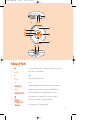
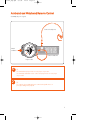
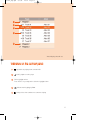
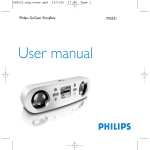
Name of Parts
1
2;
Press and hold to power on / off; press briefly to play / pause
2
3,5
Up / Previous / Fast rewind
3
2
Right
4
4,6
Down / Next / Fast forward
5
1
Left
6
LCD display
Dynamically displays menu, options and track information
7
−/+
Volume control, press − to decrease; press + to increase
8
Headphones jack
Connects headphones or waistband remote control
9
Stop watch, press to start, pause, or reset stop watch
0
USB port /
Charging socket
Connects to computer / charges your player
!
USB cover
Protects USB port / Charging socket
2