1
Register your product and get support at
www.philips.com/welcome
PPX3610
EN User Manual
Table of Contents
Overview ................................................... 3
8 Digital TV Playback........................... 28
Dear Customer ...................................................................
About this User Manual .....................................................
What's in the Box ...............................................................
Product Highlights ..............................................................
3
3
3
3
(Only for the country which support DVB-T)
Connecting the Aerial ..................................................... 28
First Playback ..................................................................... 29
Television ............................................................................ 30
1 General Safety Information ................ 4
9 Android............................................... 31
Setting up the Device ......................................................... 4
Repairs ................................................................................... 4
Power Supply ....................................................................... 5
Wireless Network (WLAN) ............................................ 5
Calling Android .................................................................
Exiting Android .................................................................
Resetting Android ............................................................
Installing Android-Apps ...................................................
Adjust Browser Mode .....................................................
2 Overview............................................... 6
Top of the Device ............................................................... 6
Bottom of the Device ........................................................ 6
Rear/Side View...................................................................... 6
Pico Station ........................................................................... 7
Touchpad .............................................................................. 8
Remote Control ............................................................... 10
Overview of the Menu Functions ................................. 11
Symbols in the Statusbar ................................................ 11
3 Initial Operation ................................ 12
Setting up the Device ......................................................
Connect Power Supply / Charge Battery ...................
Installing or Changing the Batteries of the Remote
Control ...............................................................................
Using the Remote Control ............................................
Initial Installation ...............................................................
12
12
12
13
14
31
31
31
31
33
10 Settings............................................... 35
Overview of the Menu Functions ................................. 35
11 Service ................................................ 37
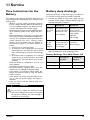
Care Instructions for the Battery .................................
Battery deep discharge ....................................................
Cleaning ..............................................................................
Device Overheated ..........................................................
Update Firmware with Memory Card .........................
Troubleshooting ................................................................
37
37
38
38
38
39
12 Appendix ............................................ 41
Technical Data ................................................................... 41
Accessories ........................................................................ 41
4 Connect to the Playback Device ...... 15
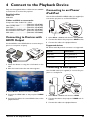
Connecting to Devices with HDMI Output ..............
Connecting to an iPhone/iPad/iPod .............................
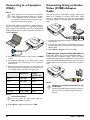
Connecting to a Computer (VGA) ..............................
Connecting Using an Audio/Video (CVBS) Adapter
Cable ...................................................................................
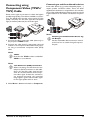
Connecting using Component-Video (YPbPr/YUV)
Cable ...................................................................................
Directly Connecting Projector to Computer using
WLAN (WiFi Streaming) ...............................................
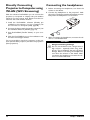
Connecting the headphones ..........................................
15
15
16
16
17
18
18
5 Memory............................................... 19
Inserting a Memory Card ............................................... 19
Connecting USB Storage Device .................................. 19
Connect to a Computer (USB) .................................... 20
6 Wireless Network (WLAN) ............. 21
Switching Wireless Networking (WLAN) on/off .....
Setting up a Wireless Network (WLAN) ..................
Setting up a Wireless Network (WLAN) Using the
Wizard ................................................................................
Digital Living Network Alliance (DLNA) ...................
21
21
22
22
7 Media Playback................................... 23
Video playback ..................................................................
Photo Playback .................................................................
Music Playback ..................................................................
ce Playback (YOZO
ce) ...................................
Managing Files ...................................................................
2
23
24
25
26
26
Philips · PPX3610
Overview
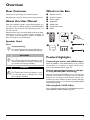
Dear Customer
What's in the Box
Thank you for purchasing our Pocket Projector.
We hope you enjoy your device and its many functions!
1 – Remote Control
2 – PicoPix Projector
3 – Power supply
4 – USB cable
5 – HDMI cable
6 – Quick Start Guide
7 – Pouch
About this User Manual
With the installation guide on the following pages, you
can start using your device quickly and easily. Detailed
descriptions can be found in the following sections of
this user manual.
Read the entire user manual carefully. Follow all safety
instructions in order to ensure proper operation of
your device. The manufacturer accepts no liability if
these instructions are not followed.
a
b
Symbols Used
Notice
Troubleshooting
This symbol designates tips that will help you
to use your device more effectively and easily.
c
d
g
f
e
CAUTION!
Damage to the Device or Loss of Data!
This symbol gives warning of damage to the
device and possible loss of data. This damage
can result from improper handling.
DANGER!
Danger to Persons!
This symbol gives warning of danger to persons. Physical injury or damage can result
from improper handling.
Product Highlights
Connecting to devices with HDMI output
With the HDMI to mini HDMI cable you can connect
the projector to a computer or laptop (see also Connect to the Playback Device, page 15).
Directly connecting projector to computer using WLAN (WiFi streaming)
With the software PicoPixWlink you can connect the
projector to a computer or a laptop over your wireless
network. For this purpose, both devices must be connected to the same wireless network (see also Directly
Connecting Projector to Computer using WLAN (WiFi
Streaming), page 18).
Office playback (YOZO Office)
You can display documents with YOZO Office (see also
Office Playback (YOZO Office), page 26).
3
1 General Safety Information
Do not make any changes or settings that are not
described in this user manual. Physical injury or damage
to the device or loss of data can result from improper
handling. Take note of all warning and safety notes indicated.
Setting up the Device
The product is for indoor use only. The device should
be placed securely on a stable, flat surface. Position all
cables in such a way that no one will trip on them, thus
avoiding possible injuries to persons or damage to the
device itself.
Do not plug in the device in humid rooms. Never touch
the electrical cable or the electrical connection with
wet hands.
The device must have sufficient ventilation and may not
be covered. Do not put your device in closed cabinets
or boxes.
Do not place the device on soft surfaces such as tablecloths or carpets and do not cover the ventilation slits.
Otherwise the device could overheat or catch fire.
Protect the device against direct sunlight, heat, large
temperature fluctuations and moisture. Do not place
the device in the vicinity of heaters or air conditioners.
Observe the information on temperature and humidity
in the technical data.
When the device is running for a long period of time in
fault condition (like ambient temperature over 35 °C or
ventilation openings blocked), the surface becomes hot
and a warning symbol appears on the projection (see
also Symbols in the Statusbar, page 11). The device
behaves as follows:
1 The fan turns to maximum level.
2 At maximum level of brightness the overheat symbol
appears in the status bar and the device turns automatically to minimum level of brightness.
3 At minimal level of brightness the overheat symbol
shows for three seconds in the middle of the screen.
Then the device turns off automatically.
Have the product inspected by a technical service
department.
Always handle the product with care. Avoid touching
the lens. Never place heavy or sharp objects on the projector or the power cable.
If the projector gets too hot or emits smoke, shut it
down immediately and unplug the power cable. Arrange
for your device to be investigated by a technical service
centre. To prevent the spread of fire, open flames
should be kept away from the device.
Under the following conditions, a layer of moisture can
appear inside the device which can lead to malfunctions:
• if the device is moved from a cold to a warm
area;
• after a cold room is heated;
• when this device is placed in a damp room.
Proceed as follows to avoid any moisture build-up:
1 Seal this device in a plastic bag before moving it to
another room, in order for it to adapt to room conditions.
2 Wait one to two hours before you take the device
out of the plastic bag.
The device should not be used in a very dusty environment. Dust particles and other foreign objects may
damage the product.
Do not expose the device to extreme vibrations. It may
damage the internal components.
Do not allow children to handle the device without
supervision. The packing materials should be kept out of
the hands of children.
Repairs
Do not repair the device yourself. Improper maintenance can result in injuries or damage to the device.
Your device must be repaired by an authorised service
centre.
Find details of authorised service centres on the warranty card.
Do not remove the type label from your device; this
would void the warranty.
After the device has cooled down, you can continue
playback.
Do not allow liquids to enter into the device. Switch off
the device and disconnect it from the power supply if
liquids or foreign substances end up inside the device.
4
Philips · PPX3610
Power Supply
Wireless Network (WLAN)
Use only the enclosed power adapter (see chapter Appendix / Technical Data). Check whether the electrical voltage
of the power supply matches the electrical voltage available
at the setup location. This equipment complies with the
voltage type specified on the product.
The product should be supplied by a power system compliant with LPS requirements of 2.5 of UL60950-1.
The capacity of the battery diminishes with time. If the
device functions only with the power supply, the battery
is defective. Contact an authorised service centre to
replace the battery.
Do not try to replace the battery yourself. Incorrect
handling of the battery or using the wrong type of battery can cause damage to the device or cause injury.
Batteries (battery pack or batteries installed) must not
be exposed to flame or excessive heat including from
direct sunshine or the like.
Attention should be drawn to the environment aspects
of battery disposal.
The functioning of security systems, medical equipment
or sensitive devices can be disrupted by the transmission power of the device. Observe any usage regulations (or restrictions) in the vicinity of such equipment.
The use of this device can affect the operation of insufficiently shielded medical devices and hearing aids and
pacemakers through the release of high frequency radiation. Also consult a doctor or the manufacturer of the
medical device to establish whether these are sufficiently shielded from external high frequency radiation.
DANGER!
Risk of explosion with incorrect type of
batteries
Do not try to replace the battery yourself.
There is a risk of explosion if the incorrect battery type is used.
Switch the device on or off using the power switch
before removing the power supply from the socket.
Turn off the device and remove it from the power supply before cleaning the surface. Use a soft, lint-free
cloth. Never use liquid, gaseous or easily flammable
cleansers (sprays, abrasives, polishes, alcohol). Do not
allow any moisture to reach the interior of the device.
DANGER!
Danger of Damage to the Eye by High
Power LED
This device is equipped with an high power
LED (Light Emitting Diode), which emits very
bright light. Do not look directly into the projector lens to avoid eyes injury or irritations
DANGER!
Danger of hearing damage
Do not use the device over a longer time at
high volume – especially when using headphones. This could lead to the risks of hearing
damage.
General Safety Information
5
2 Overview
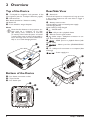
Top of the Device
Rear/Side View
1 – Touchpad for navigation and operation of the
mouse pointer (see also Touchpad / Gestures, page 8)
2 – LED status bar
Blue: device switched on / device in standby
Off: device off
3 – Focus wheel for image sharpness.
1 – Reset hole
The Pocket Projector is unresponsive or hung up: insert
a slim, pointy object into the reset hole to trigger a
hardware reset.
2 – Battery status monitor
Charge indicator with connected power supply:
red: Charging battery
Green: battery is fully charged
3 – On/Off switch
4
– A/V port for a playback device
5 – Remote-control signal receiver
6 Ï – Audio output – headphone connection or connection for external speakers
7
– HDMI port for a playback device (with
adapter cable)
– Memory card slot (SD/SDHC/SDXC/
8
MMC)
9 ý – USB port for connection to a computer (data
exchange)
– Power supply port
Notice
Note that the distance to the projection surface must be a minimum of 1.6 feet
(0.5 meters) and a maximum of 16.4 feet
(5 meters). If the Pocket Projector is located
outside of this range, it will not be possible to
focus the image. Turn the focus wheel carefully so as to avoid damaging the lens.
1
2
3
1
2
Bottom of the Device
3
1 – Pico Station connection socket
2 – Tripod socket
3 – Pico Station port
1
9
8
2
V
Y-PGA
HDb-P
MI r
7
6
4
5
3
6
Philips · PPX3610
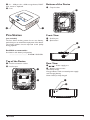
1 ý – USB port for a USB storage device, DVB-T
stick, mouse or keyboard.
2 – Lens
Bottom of the Device
1 – Tripod socket
1
1
2
Pico Station
Front View
(not included)
The Pico Station docking station has its own battery,
with which you can extend the replay time of the device.
The inbuilt speakers ensure improved sound quality
during playback.
1 – PicoPix port
2 – Eject button
1
2
Available as accessories
Pico Station with battery and speakers
................................................ PPA7300 / 253529749
Top of the Device
Rear View
1 – PicoPix connection socket
2 – PicoPix port
1
2
1
– Power supply port
2 – Battery status monitor
red: battery empty
Charge indicator with connected power supply:
red: Charging battery
Green: battery is fully charged
1
2
Overview
7
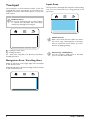
Touchpad
Input Area
The touchpad is a touch-sensitive surface. Touch the
touchpad with one or more fingers to move the cursor,
navigate in the menu, select menu options or carry out
other actions.
The input area is limited by the navigation area/scrolling
area. You can control the cursor using gestures in the
input area.
Ballpoint Pens!
Do not use a ball-point pen or other objects
to operate the touchpad. Hard and sharp
objects may damage the touchpad.
Hidden Cursor
After a short time, the cursor fades out. Move
the cursor using a brief gesture in the input
area to reveal the cursor before you call a
function by tapping/clicking.
– Calling the main menu
} – Calling the menu
| – One menu step back, one directory level back /
cancelling functions
Connecting a USB Mouse
You can connect a USB mouse to the USB
port on the side of the device.
Navigation Area / Scrolling Area
Swipe up and down on the right edge of the touchpad
to use vertical scroll.
Swipe left and right on the bottom edge of the touchpad
to use horizontal scroll.
8
Philips · PPX3610
Software Keyboard
1 Click in the input field (see also Touchpad / Gestures, page 8) using the touchpad or a mouse.
2 The software keyboard appears..
3 Using the touchpad or a mouse enter the text on the
software keyboard.
Overview
9
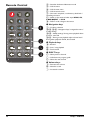
Remote Control
B – Switches the device hibernation mode
– Call the menu
u – Call the main menu
v – Call the search menu
¿ – One menu step back, one directory level back /
cancelling a function
w – Switch to the external video input HDMI, ,
or VGA
x – DVB-T mode: change to favourites
1 Navigation keys
à – Confirms selection
/, À/Á – Navigation keys / navigate the menu /
modify settings
/ – Modify settings / during music playback select
previous, next title
À/Á – During music playback adjust volume level /
during video playback rewind, fast forward
2 Playback keys
: – Rewind
T – Start / stop playback
; – Fast-forward
3 DVB-T keys
z – Select previous channel
y – Call electronic program guide
{ – Select the next channel
4 Volume keys
– Decrease the volume
– Mute the sound
– Increase the volume
10
Philips · PPX3610
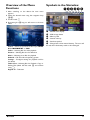
Overview of the Menu
Functions
Symbols in the Statusbar
123456
1 After switching on the device the main menu
appears.
2 Select the desired menu using the navigation keys
À/Á.
3 Confirm with à.
4 By pressing the u key you will return to the main
menu.
1 – WLAN status display
2 – USB storage device
3 – Memory card
4 – Internal memory
5 – Overheat symbol
6 – Charge level of the internal battery. The icon will
be red, when the battery needs to be recharged.
Source – Switch to the external video input HDMI,
, or VGA
Videos – Selecting files for video playback
Pictures – Selecting files for the slideshow
Music – Selecting music files for playback
Android – Call the android operating system
Settings – Configure settings for playback and for
the device
Folder View – Selecting files for Playback. Copy or
Delete Files (Mark the files with Á and confirm
using à).
Digital TV – Television
Overview
11
3 Initial Operation
Setting up the Device
Notice
Operate via Pico Station
The battery of the Pocket Projector is empty:
Connect the Pico Station to use the Pocket
Projector.
You can position the device so that it lies flat on a table
in front of the projection surface; it is not necessary to
tilt it towards the projection surface. The device compensates for the distortion from the slanted projection
(pincushion distortion).
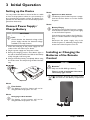
Connect Power Supply /
Charge Battery
CAUTION!
Electrical Voltage at the Site of Installation!
Check whether the electrical voltage of the
power supply matches the electrical voltage
available at the setup location.
1 Insert the small plug of the power supply into the
socket on the rear side of your device.
2 Plug the power supply into the power outlet.
3 During the charging process, the indicator light on
the side of the device will be red. When the battery
is fully charged, it will turn green.
4 Charge the built-in battery completely before using
for the first time. This will prolong the life of the battery.
Notice
Battery Empty
The battery of the Pocket Projector is empty:
Connect the Pico Station or the power supply
to use the Pocket Projector.
Connect the power supply to the Pocket Projector or the Pico Station to recharge the battery.
Disconnect the power supply only if the
Pocket Projector is sufficiently charged. Otherwise the Pocket Projector turns off.
Installing or Changing the
Batteries of the Remote
Control
DANGER!
Risk of Explosion with Incorrect Type of
Batteries
Only use the CR 2025 type battery.
There is a risk of explosion if the incorrect battery type is used.
V
Y-PGA
HDb-P
MI r
1 To access the battery, disengage the locking mechanism (1) and slide out the battery compartment
(2).
Notice
Pico Station
The battery of the Pico Station will not be
charged while the projector is in use.
Notice
Charging via Pico Station
The battery of the projector will not be
charged while the projector is in use.
12
Philips · PPX3610
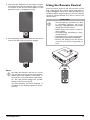
2 Insert the new batteries into the battery compartment with the positive and negative poles as shown
on the back of the remote control. Make sure the
polarities(+ and -) are aligned correctly.
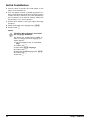
Using the Remote Control
Point the remote control at the remote sensor on the
back of the device. The remote can be used within an
angle of 60 degrees and up to 16.4 feet (5 meters) from
the device. When using the remote control, no obstacle
should be placed between the remote control and
remote sensor.
CAUTION!
3 Push the battery compartment back into the remote
control until the locking mechanism engages.
• The improper use of batteries can lead
to overheating, explosion, risk of fire
and injury. Leaking batteries can possibly
damage the remote control.
• Never expose the remote control to
direct sunlight.
• Avoid deforming, dismantling or charging the batteries.
• Avoid exposure to open fire and water.
• Replace empty batteries immediately.
• Remove the battery from the remote
control if not in use for long periods of
time.
V
Y-PGA
HDb-P
MI r
Notice
Normally the batteries will last for around
one year. If the remote control stops working,
please replace the batteries. If the device is
not used for a long time, take out the batteries. This will prevent leakage and possible
damage to the remote control.
The used batteries should be disposed of
according to the recycling regulations of your
country.
Initial Operation
13
Initial Installation
1 Push for about 3 seconds the on/off switch on the
side to turn the device on.
2 Turn the device towards a suitable projection surface or wall. Note that the distance to the projection
surface must be a minimum of 1.6 feet (0.5 meters)
and a maximum of 16.4 feet (5 meter)s. Make sure
the projector is in a secure position.
3 Use the focus wheel on the top to adjust the image
sharpness.
4 Select the desired menu language using /.
5 Confirm with à.
Notice
The Main Menu Appears Instead of
the Language Selection
The device has already been installed. In
order to change the menu language, proceed as follows:
1 Use the navigation keys to select Settings.
2 Confirm with à.
3 Select with / Language.
4 Confirm with à.
5 Select the desired language with /.
6 Confirm with à.
7 Exit with ¿.
14
Philips · PPX3610
4 Connect to the Playback Device
Supplied cables
Connecting to an iPhone/
iPad/iPod
HDMI cable
USB cable
Use the iPhone/iPad/iPod-HDMI cable (not supplied) to
connect the projector to an iPhone/iPad/iPod.
Only use the supplied cable or cables that are available
as accessories to connect the projector.
Cables available as accessories
Component Video Cable YUV / YPbPr
.............................................. (PPA1210 / 253447083)
Video-(CVBS) cable ................... (PPA1320 / 253526178)
VGA cable ................................... (PPA1250 / 253447070)
iPhone/iPad/iPod-HDMI cable . (PPA1280 / 253447091)
iPhone/iPad/iPod-A/V cable...... (PPA1160 / 253372471)
MHL cable .................................... (PPA1240 / 253520048)
Connecting to Devices with
HDMI Output
Use the HDMI to mini HDMI cable to connect the projector to a computer or laptop.
VG
Y-PbA
HD -P
MI r
1 Select Menu > Source and switch to Component.
2 Connect the cable to the projector's HDMI socket.
3 Connect the cable to the playback device.
Supported devices
All devices with 30-pin dock connector are supported.
VG
Y-PbA
HD -P
MI r
1 Switch the device on using the on/off switch on the
side.
2 After the initial screen the main menu appears.
Device
Generation
iPod nano
up to generation 6
iPod touch
up to generation 4
iPhone
up to generation 4
iPad
up to generation 2
Connecting to Smartphone
Use the HML cable (not supplied) to connect the projector to a smartphone.
VG
Y-P A
HDb-P
MI r
3 Select Menu > Source and switch to HDMI.
4 Connect the HDMI cable to the projector's HDMI
socket.
5 Connect the cable to the mini-HDMI socket of the
playback device.
Connect to the Playback Device
1 Select Menu > Source and switch to HDMI.
2 Connect the cable to the projector's HDMI and ý
sockets.
3 Connect the cable to the playback device.
15
Connecting to a Computer
(VGA)
Notice
Many laptops do not activate the external
video output automatically when you connect
a second display such as a projector. Check
your laptop's manual to find out how to activate the external video output.
Connecting Using an Audio/
Video (CVBS) Adapter
Cable
Use the projector's audio/video adapter cable (A/V
cable) (not included) to connect camcorders, DVD
players or digital cameras. The jacks for these devices
are yellow (video), red (audio right) and white (audio
left).
Use the VGA cable (not included) to connect the projector to a computer, laptop, or some PDAs. The projector supports the following resolutions: VGA/SVGA/
XGA. For best results, set the computer's resolution to
SVGA (800x600).
VG
Y-PbA
HD -P
MI r
VG
Y-PbA
HD -P
MI r
1 Connect the supplied A/V cable to the socket of
the projector.
2 Connect the video device's audio/video sockets to
the A/V cable using a conventional composite video
(RCA) cable.
3 Select Menu > Source and switch to AV.
Connecting to mobile multimedia devices
1 Connect the VGA cable to the projector's HDMI
socket.
2 Connect the VGA plug to the VGA socket of the
computer and the audio plug to the computer's
audio output.
3 Adjust the computer's resolution to the correct setting and switch the VGA signal to an external monitor. The following resolutions are supported:
Resolution
Some video devices (e.g.: pocket multimedia players, ...)
require specific connection cables. There are either
supplied with the device or acquired from the manufacturer of the multimedia device. Please note that only the
original cables from the device manufacturer may function.
Image
refresh rate
VGA
640 x 480
60 Hz
SVGA
800 x 600
60 Hz
XGA
1024 x 768
60 Hz
WXGA
1280 x 768
60 Hz
FULL HD
1920 x 1080
60 Hz
VG
Y-PbA
HD -P
MI r
Notice
Switching to the Multimedia Device Signal Output
See the multimedia device instruction manual
to find out how to switch the signal output to
this jack.
Notice
Screen Resolution
You can obtain the best results with the
800¦×¦600 (60Hz) resolution.
4 Select Menu > Source and switch to VGA.
16
Philips · PPX3610
Connecting using
Component-Video (YPbPr/
YUV) Cable
Please use this type of connection to obtain the highest
possible image quality. This cable is available as an accessory. The device jacks have the colours green (Y), blue
(U/Pb), red (V/Pr) for the video signal and red (audio
right) and white (audio left) for the audio signal.
Connecting to mobile multimedia devices
Some video devices (e.g.: pocket multimedia players, ...)
require specific connection cables. There are either
supplied with the device or acquired from the manufacturer of the multimedia device. Please note that only the
original cables from the device manufacturer may function.
VG
Y-PbA
HD -P
MI r
VG
Y-PbA
HD -P
MI r
Notice
1 Connect the video component cable (accessory) to
the projector's HDMI socket.
2 Connect the video device's appropriate coloured
sockets to the component video cable of the projector using a conventional component video (RCA)
cable.
Switching to the Multimedia Device Signal Output
See the multimedia device instruction manual
to find out how to switch the signal output to
this jack.
Notice
YCbCr
Note that the YPbPr outlets are labelled
YCbCr on some devices.
Notice
Two Red Phono (RCA) Connectors
When connecting, note that there are two
red phono (RCA) connectors on the cable.
One is for the right audio signal and the
other for the V/Pr element of the component video signal. If these two connectors
are inserted incorrectly, the projected
image appears green and the audio signal
for the right speaker will not work.
3 Select Menu > Source and switch to Component.
Connect to the Playback Device
17
Directly Connecting
Projector to Computer using
WLAN (WiFi Streaming)
With the software PicoPixWlink you can connect the
projector to a computer or a laptop over your wireless
network. For this purpose, both devices must be connected to the same wireless network.
1 Install the PicoPixWlink software (allready pre
installed on the projector) on your computer (see
also Connect to a Computer (USB), page 20).
2 Connect the device with the wireless network (see
also Wireless Network (WLAN), page 21).
3 Start PicoPixWlink (PicoPix Viewer) on your computer.
4 Click the PicoPixWlink icon in the notification area
and start the manager window.
You are now able to search for projectors in the network (Search WIFI projector) and start the projection
(Start projection).
18
Connecting the headphones
1 Before connecting the headphones, turn down the
volume on the device.
2 Connect the headphones to the projector's headphone slot. The device speakers deactivate automatically when the headphones are connected.
VG
Y-P A
HDb-P
MI r
3 After connecting the headphones, increase the volume to a comfortable level.
DANGER!
Danger of Hearing Damage
Do not use the device over a longer time at
high volume – especially when using headphones. This could lead to the risks of hearing
damage. Before connecting the headphones,
turn down the volume on the device. After
connecting the headphones, increase the volume to a comfortable level.
Philips · PPX3610
5 Memory
Inserting a Memory Card
Connecting USB Storage
Device
V
Y-PGA
HDb-P
MI r
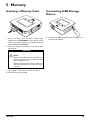
1 Insert a memory card with the contacts facing
upwards into the / slot at the back of the
device. Your device supports the following memory
cards: SD/SDHC/SDXC/MMC.
2 Insert the memory card into the slot until it snaps
into position.
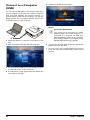
1 Connect the USB storage device to the USB port on
the side of the device.
DANGER!
Prematurely remove a Memory
Card!
Never pull out the memory card while the
device is accessing it. This could cause data
to be damaged or lost.
Switch the device off in order to make sure
that the device does not access the memory card.
3 Press lightly on the memory card to remove it.
4 The memory card is ejected.
Memory
19
Connect to a Computer
(USB)
5 Confirm to enable the connection.
You can use the USB cable to connect the Pocket Project to a computer. In this way, you are able to copy files
back and forth between the internal memory, an
inserted memory card and the computer. You can also
delete the files. You can playback the files saved on the
Pocket Projector on your computer.
Notice
VG
Y-PbA
HD -P
MI r
1 Switch the device on using the on/off switch on the
side.
2 After the initial screen the main menu appears.
Successful Connection
You cannot use the memory for media
playback when the Pocket Projector is
connected to a computer via USB. Use
WiFi Streaming instead (see also Directly
Connecting Projector to Computer using
WLAN (WiFi Streaming), page 18).
6 If a memory card has been inserted, it will be displayed as another disk drive.
7 You can move, copy or delete data from the computer, the memory card (if inserted) and the internal
memory.
3 Connect the mini-USB port to the Pocket Projector
and the USB socket to the computer.
4 A confirmation screen appears when the devices are
connected successfully.
20
Philips · PPX3610
6 Wireless Network (WLAN)
In a wireless network (Wireless Local Area Network,
WLAN) at least two computers, printers or other additional devices communicate with each other over radio
waves (high frequency waves). Data transmission in the
radio network is based on the standards 802.11b,
802.11g and 802.11n.
DANGER!
Information on Using WLAN!
The functioning of security systems, medical
equipment or sensitive devices can be disrupted by the transmission power of the
device. Observe any usage regulations (or
restrictions) in the vicinity of such equipment.
The use of this device can affect the operation
of insufficiently shielded medical devices and
hearing aids and pacemakers through the
release of high frequency radiation. Also consult a doctor or the manufacturer of the medical device to establish whether these are sufficiently shielded from external high frequency
radiation.
Infrastructure Wireless Network
In an infrastructure network, multiple devices communicate via a central access point (gateway, router). All
data are sent to the access point (gateway, router) and
distributed from there.
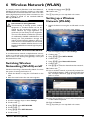
Switching Wireless
Networking (WLAN) on/off
Wireless networking is deactivated by default. You have
the option of turning this function on.
1 Switch the device on using the on/off switch on the
side.
2 After the initial screen the main menu appears.
3
4
5
6
7
8
Use the navigation keys to select Settings.
Confirm with à.
Using / select WIFI & DLNA.
Confirm with à.
Using / select WIFI Network.
Confirm with à.
Wireless Network (WLAN)
9 Modify the settings with /.
10 Confirm with à.
The ¿ key takes you one step back in the menu.
Setting up a Wireless
Network (WLAN)
1 Switch the device on using the on/off switch on the
side.
2 After the initial screen the main menu appears.
3 Use the navigation keys to select Settings.
4 Confirm with à.
5 Using / select WIFI & DLNA.
6 Confirm with à.
7 Using / select Network Selection.
8 Confirm with à.
9 Use / to select the desired wireless network..
10 Confirm with à.
11 If your wireless network is password protected, an
input window appears. Click in the input field (see
also Touchpad / Gestures, page 8) using the touchpad or a mouse.
12 Using the touchpad or a mouse enter the password
on the software keyboard.
13 Click on Connect.
The ¿ key takes you one step back in the menu.
21
Setting up a Wireless
Network (WLAN) Using the
Wizard
You can integrate your device very quickly and easily
into an existing wireless network using Wi-Fi Protected
Setup (WPS) or using a wireless network scan. Using
WPS, all important settings like network name (SSID)
are automatically configured and the connection protected with secure WPA Encryption.
Using Wi-Fi Protected Set-up
(WPS)
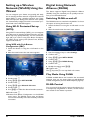
Digital Living Network
Alliance (DLNA)
This device supports Digital Living Network Alliance
(DLNA). Using this standard you can quickly interconnect your multimedia devices.
Switching DLNA on and off
The DLNA function is switched on by default. You have
the option of turning this function off.
1 Switch the device on using the on/off switch on the
side.
2 After the initial screen the main menu appears.
Using Wi-Fi Protected Setup (WPS), you can integrate
your device into an existing wireless network in two different ways very quickly and easily. You can activate the
login with a pin code or using Push Button Configuration (PBC), if your access point (Access Point, Router)
supports this method.
Using WPS with Push Button
Configuration (PBC)
1 Switch the device on using the on/off switch on the
side.
2 After the initial screen the main menu appears.
3 Use the navigation keys to select Settings.
4 Confirm with à.
5 Using / select WIFI & DLNA.
6 Confirm with à.
7 Using / select Network Selection.
8 Confirm with à.
9 Use / to select the desired wireless network..
10 Confirm with à.
11 Activate Push Button Configuration on the WLAN
access point. The WLAN access point and device
connect automatically and create a WPA protected
connection.
22
3 Use the navigation keys to select Settings.
4 Confirm with à.
5 Using / select WIFI & DLNA.
6 Confirm with à.
7 Using / select DLNA Sharing.
8 Confirm with à.
9 Modify the settings with /.
10 Confirm with à.
The ¿ key takes you one step back in the menu.
Play Media Using DLNA
If DLNA enabled devices are located in the connected
network, then you can access them in media playback
and file management (see also Media Playback, page 23).
DLNA Control
You can control the projector using another device (e.g.
a smartphone) using DLNA. To do this, see the instruction manual for the device in question.
Philips · PPX3610
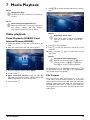
7 Media Playback
7 Use / to select the video file that you wish to
play.
Notice
Navigation Keys
All the keys shown are buttons on the remote
control.
Notice
Best Settings for Optimal Use
Read the informations on the best settings in
the chapter settings (see also Settings,
page 35) for optimal use of your device.
Video playback
Notice
Displaying Video Files
Only those videos that are compatible
with the Pocket Projector will be displayed.
Video Playback (USB/SD Card/
Internal Memory/DLNA)
1 Switch the device on using the on/off switch on the
side.
2 After the initial screen the main menu appears.
8 Press à to start playback.
9 Press ¿ to end the slide show and return to the
overview.
10 When you press ¿ again, you will return to the
main menu.
Notice
Navigation During Playback
Rewind / fast forward: Press :/; on the
remote control or À/Á on the device.
Press T to stop or continue playback.
3 Use the navigation keys to select Videos.
4 Confirm with à.
5 With connected memory: Using the keys /
select the internal memory, a DLNA device, the
USB storage device or the memory card.
6 Confirm with à.
Media Playback
During playback you can adjust the volume using /
on the remote control. Press or repeatedly to
shut off the volume completely.
File Format
There are various video file formats as *.mov, *.avi,
*.m4v. Many of these formats function as a container
that contains the various encoded audio and video files.
MPEG-4, H.264, MP3, and AAC are all examples of
encoded audio/video files. In order to play these files,
the projector must read them and decode the audio/
video signals.
23
Please note that some files cannot be played as a result
of different video and audio encoders.
Supported file formats
Container
Video format
*.avi, *.mov, *.mp4
MJPEG, MPEG-4, H.264
*.mkv
MPEG-4, H.264
*.ts
MPEG-2, H.264
*.m2ts
H.264
*.3gp
H.263
*.rm, *.rmvb
Real video
*.dat
MPEG-1
*.vob
MPEG-2
*.mpg, *.mpeg
MPEG-1, MPEG-2
Video Playback (Mini-HDMI
Socket)
1 Connect the audio/video output of the external
device to the Pocket Projector's socket. Use
the corresponding cable and cable adapter for this
purpose (see also Connect to the Playback Device,
page 15).
2 To find out how to deactivate the video output for
the external device, please see the relevant instruction manual. Most often, this option is labelled "TV
out" or "TV Output" in the corresponding menu.
3 Start the video playback on the external device.
4 Modify the volume with /.
Modify settings during playback
1 Press the or key.
2 Use the / keys to choose from the following
settings:
Volume: Adjust volume level
Smart Settings: Select predefined settings for
brightness / contrast / colour saturation
Saturation: Adjust colour saturation
Contrast: Adjust contrast
Brightness: Adjust brightness
3 Modify the setting using À/Á.
The device saves the modified settings automatically.
Photo Playback
1 Switch the device on using the on/off switch on the
side.
2 After the initial screen the main menu appears.
3 Use the navigation keys to select Pictures.
4 Confirm with à.
5 With connected memory: Using the keys /
select the internal memory, a DLNA device, the
USB storage device or the memory card.
6 Confirm with à.
7 Miniature photos are displayed on the screen as an
overview.
Notice
Miniature View or List
In the settings, you are able to select
whether the overview will be displayed as
miniatures or in a list.
Notice
Many Photos on the Memory Card or
the USB Storage Device
If there are a lot of photos on the memory
card or the USB storage device it can take
a moment before the overview appears.
8 Use À/Á or / to select the image that you
want to start the slide show with.
9 Press à to start the slide show.
24
Philips · PPX3610
Notice
Rotate the Image
Using your thumb contact the touchpad
and swipe with the forefinger in a circular
manner to rotate an image (see also
Touchpad / Gestures, page 8).
1 Switch the device on using the on/off switch on the
side.
2 After the initial screen the main menu appears.
10 Press T to pause the slide show.
11 Press ¿ to end the slide show and return to the
overview.
12 When you press ¿ again, you will return to the
main menu.
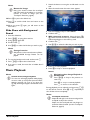
Slide Show with Background
Sound
1
2
3
4
5
Start the slideshow.
Press /, to open the menu bar.
Using À/Á select Ó.
Confirm with à.
Use / to select the file that you wish to play.
3 Use the navigation keys to select Music.
4 Confirm with à.
5 With connected memory: Using the keys /
select the internal memory, a DLNA device, the
USB storage device or the memory card.
6 Confirm with à.
7 Use / to select the file that you wish to play.
Notice
Storage Location
Only files from the internal memory/Memory Card/USB Storage Device can be
played.
6 To start the background sound confirm with à.
7 Press / to adjust the volume level.
8 If no input is made, the menu bar is hidden after 5
seconds.
Music Playback
8 Press à to start playback.
9 Press T to stop or continue playback.
Notice
Notice
Navigating when Image Playback is
Switched off
Press / to skip to the previous or
next song.
Press T to stop or continue playback.
Press ¿ to return to the selection.
Switch off the Image Playback
You can turn off image playback while playing
music in order to save power (see also Music
settings, page 35). As soon as you press the
¿ key, the image reappears and the fan starts
again.
During playback you can adjust the volume using /
on the remote control. Press or repeatedly to
shut off the volume completely.
Notice
Touchpad / Gestures
Swipe left and right on the bottom edge of the
touchpad to adjust the volume.
Swipe over the touchpad with two fingers to
rewind and fast forward (see also Touchpad /
Gestures, page 8).
Media Playback
25
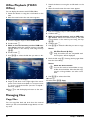
Office Playback (YOZO
Office)
1 Switch the device on using the on/off switch on the
side.
2 After the initial screen the main menu appears.
You can display documents with YOZO Office.
1 Switch the device on using the on/off switch on the
side.
2 After the initial screen the main menu appears.
3 Use the navigation keys to select Folder View.
4 Confirm with à.
5 With an inserted memory card or USB storage device: Select the internal memory, the USB
storage device or the memory card using the keys
/.
6 Confirm with à.
7 Use / to select the file that you want to display.
3 Use the navigation keys to select Folder View.
4 Confirm with à.
5 With an inserted memory card or USB storage device: Select the internal memory, the USB
storage device or the memory card using the keys
/.
6 Confirm with à.
7 Use / to select the file that you want to copy.
Notice
No Files Found (0 files)
Only those files that are compatible with
the Projector will be displayed.
8 Mark the file using Á. Pressing the key again deselects the chose file(s).
Notice
Mark the Entire Folder
You can also mark an entire folder to copy
all files from the folder. Note that the copy
process of large folders can takes some
time.
8 Press à to start the display.
9 Swipe up and down on the right edge of the touchpad to scroll. Use the touchpad or a mouse to zoom
in / zoom out the document (see also Touchpad /
Gestures, page 8).
10 Press ¿ to end the display and return to the overview.
9 Use / to select other files.
10 Press à.
11 Select with / Copy.
Managing Files
Copy Files
You can copy files back and forth from the internal
memory to the connected USB storage device or memory card.
26
12 Confirm with à.
Philips · PPX3610
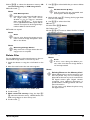
13 Use / to select the destination memory: SD
card, internal memory or USB storage device.
14 Confirm with à.
7 Use / to select the file that you want to delete.
Notice
No Files Found (0 files)
Only those files that are compatible with
the Projector will be displayed.
Notice
Files Already Exist
If the files you are copying already exist in
the target folder, you must choose
whether or not you want to overwrite
them using / and à. If you choose
not to overwrite these files, copies will be
created. The copies can be recognised by a
number added to the file names.
15 The files are copied.
Notice
8 Mark the file using Á. Pressing the key again deselects the chose file(s).
9 Use / to select other files.
10 Press à.
11 Select with / Delete.
12 Confirm with à.
13 Use / if you want to delete the files or cancel
the deletion process.
Error
If errors occur during the copying process,
make sure that enough free space is available on the device.
Notice
Removing Storage Device
Only remove the storage device after the
copy process is complete.
Delete Files
You can delete files from the internal memory, the connected USB storage device or the memory card.
1 Switch the device on using the on/off switch on the
side.
2 After the initial screen the main menu appears.
14 Confirm with à.
Notice
Error
If errors occur during the deletion process, make sure that the storage device is
not write-protected.
Notice
3 Use the navigation keys to select Folder View.
4 Confirm with à.
5 With connected memory: Using the keys /
select the internal memory, a DLNA device, the
USB storage device or the memory card.
6 Confirm with à.
Media Playback
Deleting Photos on the Memory Card
When deleting photos via the computer, note
that the photos may not be correctly displayed when the memory card is inserted into
the digital camera again. Digital cameras
sometimes store additional information in
specific folders, including previews and orientation information.
For this reason, only delete the photos using
the digital camera.
27
8 Digital TV Playback
(Only for the country which support DVB-T)
Notice
Necessary Accessories
To be able to use the DVB-T function of your
projector, you either require the Pico Station
PPA7301 (not supplied) or the USB DVB-T
stick PPA8301 (not supplied).
You can purchase the Pico Station docking
station and th USB DVB-T stick according to
the ordersheet.
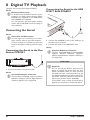
Connecting the Aerial to the USB
DVB-T Stick PPA8301
Connecting the Aerial
Notice
Aerial Size and Orientation
In some regions it is necessary to connect a
larger aerial in order to grant the reception.
In some countries it is necessary to point the
aerial horizontally in order to grant the reception.
Connecting the Aerial to the Pico
Station PPA7301
1 Connect the USB-DVB-T stick to the USB port on
the side of your projector.
2 Connect the aerial to the USB-DVB-T stick.
Notice
Standard Definition Television
The Pico StationUSB-DVB-T Stick PPA8301
supports Standard Definition Television
(SDTV). High Definition Television (HDTV) is
not supported.
CAUTION!
1 Connect the aerial to the aerial socket.
Notice
Standard Definition Television
The Pico Station PPA7301 supports Standard
Definition Television (SDTV). High Definition
Television (HDTV) is not supported.
28
Do not Remove DVB-T Stick During
Playback!
Do not pull out the DVB-T stick from the
device or remove the device from the Pico
Station (PPA7301) while you have accessed
the DVB sub menu. Preset channels may get
lost. Exit the DVB sub menu before pulling out
the DVB-T stick of the device or remove the
device from the Pico Station (PPA7301).
If the DVB-T stick is being removed during
playback you may have to restart the device.
Philips · PPX3610
First Playback
Notice
Navigation Keys
All the keys shown are buttons on the remote
control.
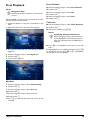
When the DVB-T function is first started, the automatic
channel search must be started.
1 Switch the device on using the on/off switch on the
side.
2 After the initial screen the main menu appears.
Scan Channels
14 Use the navigation keys to select Scan Channels.
15 Confirm with à.
16 Use the navigation keys to select OK.
17 Confirm with à.
18 Use the navigation keys to select Auto.
19 Confirm with à.
Television
20 Use the navigation keys to select Video Broadcast.
21 Confirm with à.
22 Change the channel using z/{.
Notice
Displaying Channel Information
When changing channel, channel information is displayed on the bottom projection
edge. The information bar is hidden after 5
seconds.
3 Connect the aerial (see also Connecting the Aerial,
page 28).
4 Use the navigation keys to select Digital TV.
5 Confirm with à.
6 The sub menu appears.
23 Press u to end playback and return to the main
menu.
During playback you can adjust the volume using /
on the remote control. Press or repeatedly to
shut off the volume completely.
Set Area
7 Use the navigation keys to select Utilities/Setup.
8 Confirm with à.
9 Use the navigation keys to select Area set.
10 Confirm with à.
11 Use the navigation keys to select your area.
12 Confirm with à.
13 Press ¿ to end the sub menu and return to the
overview.
Digital TV Playback
29
Television
Notice
Navigation Keys
All the keys shown are buttons on the remote
control.
1 Switch the device on using the on/off switch on the
side.
2 After the initial screen the main menu appears.
3 Connect the aerial (see also Connecting the Aerial,
page 28).
4 Use the navigation keys to select Digital TV.
5 Confirm with à.
6 The sub menu appears.
7 Use the navigation keys to select Video Broadcast.
8 Confirm with à.
9 The last viewed channel is played. Change the channel using z/{.
Notice
Displaying Channel Information
When changing channel, channel information is displayed on the bottom projection
edge. The information bar is hidden after 5
seconds.
10 Press u to end playback and return to the main
menu.
During playback you can adjust the volume using /
on the remote control. Press or repeatedly to
shut off the volume completely.
30
Philips · PPX3610
9 Android
Your Pocket Projector uses the Android operating system.
Installing Android-Apps
CAUTION!
Calling Android
Trusted Sources!
Apps from third party sources may be malicious. Only use installation packets from
trusted sources.
1 Switch the device on using the on/off switch on the
side.
2 After the initial screen the main menu appears.
You can install other apps. Use the APK installation
packets.
Notice
Compatibility
The manufacturer does not guarantee the
compatibility of third party apps.
Notice
Volume
In some apps, the volume may only be controlled via the remote control.
3 Use the navigation keys to select Android.
4 Confirm with à.
Exiting Android
Notice
Youtube
You need to install the latest version of the
Adobe Flash Player in order to play Youtube
videos (see also Install Adobe Flash Player,
page 32).
Press the | key to return to the main menu.
Software Reset
Resetting Android
If your Pocket Projector does not work properly, a
reset to factory defaults may solve the problem in many
cases.
DANGER!
Notice
Calendar
There is no calendar pre-installed on the
Pocket Projector.
All Settings and Data Will be Deleted!
This procedure erases all your settings and
data that is stored on the device.
Apps need to be reinstalled.
Notice
YOZO Office
By resetting Android YOZO Office will be
deleted. The reinstallation of YOZO Office
will start automatically when connecting the
device to the internet via WiFi.
Android
31
Install Adobe Flash Player
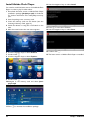
12 Use the navigation keys to select Install.
You need to install the latest version of the Adobe Flash
Player in order to play Youtube videos.
1 Download the latest version of Adobe Flash Player
installation package (flashplayer.apk) for Android.
For further information visit www.philips.com/support.
2 Save the package onto a memory card.
3 Insert the memory card into the device (see also
Inserting a Memory Card, page 19).
4 Switch the device on using the on/off switch on the
side.
5 After the initial screen the main menu appears.
13 Press à to start the installation.
14 Use the navigation keys to select Done.
6 Use the navigation keys to select Android.
7 Confirm with à.
8 Use the navigation keys to select Explorer.
15 Confirm with à.
16 The latest version of Adobe Flash Player is installed.
9 Confirm with à.
10 Navigate to the memory card and select flashplayer.apk.
11 Press à to execute the installation package.
32
Philips · PPX3610
Adjust Browser Mode
10 Use the navigation keys to select Settings.
Change the browser mode to display websites containing flash elements.
1 Switch the device on using the on/off switch on the
side.
2 After the initial screen the main menu appears.
11 Confirm with à.
12 Use the navigation keys to select User agent.
3 Use the navigation keys to select Android.
4 Confirm with à.
5 Use the navigation keys to select Browser.
13 Confirm with à.
14 Use the navigation keys to select Desktop.
6 Confirm with à.
7 Press the menu key to call the menu.
8 Use the navigation keys to select More.
15 Confirm with à.
16 Websites containing flash elements can be displayed.
9 Confirm with à.
Android
33
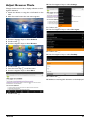
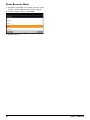
Reset Browser Mode
1 Proceed as described in the adjust browser mode
chapter (see also Adjust Browser Mode, page 33).
2 Use the navigation keys to select iPad.
3 Confirm with à.
34
Philips · PPX3610
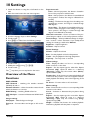
10 Settings
1 Switch the device on using the on/off switch on the
side.
2 After the initial screen the main menu appears.
3 Use the navigation keys to select Settings.
4 Confirm with à.
5 Use / to select from the following settings.
Projection mode
Front – Normal projection; the device is located in
front of the projection surface/screen
Rear – Rear projection; the device is located behind
the projection surface; the image is reflected horizontally.
Ceiling – The device is hanging from the ceiling in an
upside-down position; the image is rotated through
180 degrees.
Rear ceiling – The device is located behind the projection surface, hanging from the ceiling in an upsidedown position; the image is rotated through 180
degrees and reflected horizontally.
Wall color correction – Colour correction of the projected image to adjust to coloured projection surfaces
Smart Settings – Select predefined settings for brightness / contrast / colour saturation. If you modify these
settings, the setting is switched to Manual.
Brightness – Adjust brightness
Contrast – Adjust contrast
Sound Settings:
Volume – Adjust the volume
Bass – Set the playback of the low frequencies
Treble – Set the playback of the high frequencies
Key beep – Turn key tones on and off
6 Confirm with à.
7 Modify the settings using à, /,
8 Confirm with à.
The ¿ key takes you one step back in the menu.
Overview of the Menu
Functions
WIFI & DLNA
WIFI Network – switching the wireless network
(WLAN) off and on
Network Selection – select the wireless network with
which the device is to connect
DLNA Sharing – switching DLNA off and on
WIFI Hot Spot – activate and deactivate WLAN tethering
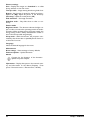
Image settings
Wall paper – Select background images
Fit Screen – Convert videos and images to 4:3 resolution
Settings
Video settings
View – Display all videos in a list or a corresponding
folder structure on the drive.
Repeat – Set the repeat type for video files: Repeat
deactivated (Off), repeat all videos in a directory
(Directory), repeat only the current video (Movie),
repeat all videos (All).
Resume play – If this function is activated, playback will
continue at the position it was last stopped. If deactivated, playback will always start at the beginning of the
video.
Fit Screen – Convert videos to 4:3 resolution
Music settings
View – Show all tracks in a list or a corresponding folder
structure on the drive.
Screen – Activate or deactivate the projection during
playback.
Repeat – Set the repeat type for music files: Repeat
deactivated (Off), repeat all songs in a directory
(Directory), repeat only the current song (Song),
repeat all songs (All).
Shuffle – Activate this function for random playback.
Otherwise, playback will take place in sequence.
35
Picture settings
View – Display the images as a thumbnail or as a list
during selection in the main menu.
Time per slide – Image viewing time during slide show
Repeat – Set the type of repeat for slide show photos:
Repeat off (Off), repeat all photos in the directory
(Directory), repeat all stored photos (All).
Slide transition – Set image transitions
Slideshow order – Play slide show in order or randomly
Power mode
Brightness mode – This function reduces the light output in order to increase the operating time for the builtin battery. When operating from the power supply, the
energy saving mode is always deactivated in order to
ensure the best-possible image display.
Sleep mode – With this function, the projector automatically shuts down after a specified period of time or
at the end of a movie.
Language
Select the desired language for the menu.
Maintenance
Reset settings – Reset settings to factory defaults.
Firmware Update – Update Firmware
Notice
Connect for the duration of the firmware
update the power adapter.
Information – Display free space in the internal memory and information on the device (Capacity: / Free
space: / Firmware version: / Device name: / Model:)
36
Philips · PPX3610
11 Service
Care Instructions for the
Battery
The capacity of the battery diminishes with time. You
can prolong the life of the battery if you observe the following points:
• Without a power supply, the device operates
from the built-in battery. When the battery does
not have sufficient capacity, the device turns off.
Connect the device to the power supply.
• When the battery does not have sufficient capacity, the battery symbol in the display and turns
red.
• When the device is running for a long period of
time in fault condition (like ambient temperature
over 35 °C or ventilation openings blocked), the
surface becomes hot and a warning symbol
appears on the projection (see also Symbols in
the Statusbar, page 11). The device behaves as
follows:
1 The fan turns to maximum level.
2 At maximum level of brightness the overheat
symbol appears in the status bar and the device
turns automatically to minimum level of brightness.
3 At minimal level of brightness the overheat
symbol shows for three seconds in the middle
of the screen. Then the device turns off automatically.
After the device has cooled down, you can continue playback.
• Use the device at least once a week.
• Charge the battery regularly. Don’t store the
device with a completely discharged battery.
• If the device is not used for several weeks, discharge the battery a little by using the device
before storing it.
• If the device only works using the USB connection or with the power supply, the battery is
defective.
• Keep the device and the battery away from
sources of heat.
Battery deep discharge
When the battery is in deep discharge or the device is
not used for a longer period, proceed as followed:
1 Connect the device to the power supply (see also
Connect Power Supply / Charge Battery, page 12).
The device behaves as follows:
Device off
Device on
Connect
to a computer
The indicator light
on the side of the
device turns red.
Slow charging
Connect to a computer (see also
Connect to a Computer (USB),
page 20)
No charging
Connect
to the
power
adapter
The indicator light
on the side of the
device turns red.
Fast charging
Device remains
turned on.
Slow charging
2 The device can be turned on and is ready to use after
approximately five minutes of charging time.
Battery Recharge Time With Device Off
Turning on
possible
Completely
charged
Slow charging
5 minutes
10 hours
Fast charging
5 minutes
2 hours
DANGER!
Do Not Replace the Battery Yourself
Do not try to replace the battery yourself.
Incorrect handling of the battery or using the
wrong type of battery can cause damage to
the device or cause injury.
Service
37
Cleaning
DANGER!
Instructions for Cleaning!
Use a soft, lint-free cloth. Never use liquid or
easily flammable cleansers (sprays, abrasives,
polishes, alcohol, etc.). Do not allow any
moisture to reach the interior of the device.
Do not spray the device with any cleaning fluids.
Wipe over the surfaces gently. Be careful that
you do not scratch the surfaces.
Update Firmware with
Memory Card
Notice
Keep the device connected to a power outlet
for the duration of the firmware update (see
also Connect Power Supply / Charge Battery,
page 12).
1 Format the memory card in the file system FAT16 or
FAT32.
DANGER!
Cleaning the Lens
All Data will be Deleted!
This procedure erases all your data that is
stored on the memory card.
Use a brush or lens cleaning paper for cleaning the lens
of the projector.
DANGER!
Do not use any Liquid Cleaning Agents
Do not use any liquid cleaning agents for
cleaning the lens, to avoid damaging the coating film on the lens.
Device Overheated
A overheat symbol appears if the device is overheated
(see also Symbols in the Statusbar, page 11). The device
behaves as follows:
1 The fan turns to maximum level.
2 At maximum level of brightness the symbol appears
in the status bar and the device turns automatically
to minimum level of brightness.
3 At minimal level of brightness the symbol shows for
three seconds in the middle of the screen. Then the
device turns off automatically.
After the device has cooled down, you can continue
playback.
2 Save the latest firmware update file to the memory
card.
3 Insert the memory card (see also Inserting a Memory
Card, page 19) and switch the device on.
4 Use the navigation keys to select Settings.
5 Confirm with à.
6 Use / to select Maintenance.
7 Confirm with à.
8 Use / to select Firmware Update.
9 Confirm with à.
10 Use / to select Install.
11 Confirm with à.
12 The device turns off and on again. After around 5
minutesthe Language Selection screen appears.
The firmware update is now completed.
DANGER!
Inserting a Memory Card!
Never pull out the memory card while the
device is accessing it. This could cause data
to be damaged or lost.
DANGER!
Power!
Do nut unplug the power adapter during
the firmware update.
Notice
If an error occurs during the firmware update
process retry the procedure or contact your
dealer.
38
Philips · PPX3610
Troubleshooting
1 Switch the device off using the on/off switch on the
side.
2 Wait at least ten seconds.
3 Switch the device on using the on/off switch on the
side.
4 If the problem repeats, please contact our technical
customer service or your retailer.
Power Cycling
If a problem occurs that cannot be corrected with the
instructions in this user manual (see also the help
below), follow the steps given here.
Problems
Solutions
The Pocket Projector is unresponsive or hung up
•
Insert a slim, pointy object into the reset hole to trigger a hardware reset (see also Side View, page 6)
The Pocket Projector cannot be switched on
•
Connect the supplied power supply to recharge the
internal battery.
No sound
•
Adjust the volume using the / key on the
remote control.
No sound from the external connected device
•
•
•
Check the cables to the external device
Set the volume on the external device
Only the original cables from the device manufacturer may function
Bad sound quality with your computer connection
•
Check if the audio cable is connected to the computers headphone socket or the line-out socket.
The volume setting on the computer should not be
too high.
•
Only the initial screen appears and not the image from
the external device
•
•
•
Only the initial screen appears and not the image from
the connected computer
•
•
Device switches turns off
•
•
The device is connected to the power supply and
switches to stand-by mode
Service
•
Check if the cables are connected to the right sockets.
Please check that the external device is switched on
Check if the video output of the external device is
switched on.
Please check that the VGA-output of the computer
is switched on.
Check if the resolution of the computer is set to
800x600.
When the device is running for a long period of time
in fault condition (like ambient temperature over
35 °C or ventilation openings blocked), the surface
becomes hot and a warning symbol appears on the
projection (see also Symbols in the Statusbar,
page 11). The device automatically turns off when it
gets too hot. After the device has cooled down, you
can continue playback.
When the battery does not have sufficient capacity,
the device turns off. Connect the device to the
power supply.
The battery is in deep discharge. The device can be
turned on and is ready to use after approximately
five minutes of charging time (see also Battery deep
discharge, page 37).
39
Problems
Solutions
Devices changes from maximum level of brightness to •
minimum level of brightness when the device is connected over USB to play videos.
•
When the environment temperature is too high, the
devices turns automatically from maximum level of
brightness to minimum level of brightness in order to
protect the high power LED.
Use the device with lower environment temperatures.
Device cannot connect with an Android device (for ex- •
ample a mobile phone/smartphone with the Android operating system) when connected via USB.
Deactivate the function „USB debugging“ in the settings menu of your Android device before connecting the Pocket Projector via USB; your Android
device should be recognized as USB storage device.
Bad image or color quality when connecting with HDMI •
Use the supplied HDMI cable (PPA1290). Thirdparty cables may cause signal distortions.
40
Philips · PPX3610
12 Appendix
Technical Data
Accessories
Dimensions (L¦×¦H¦×¦W).......................105¦×¦32¦×¦105¦mm
Weight .....................................................0.626 lb (0.284¦kg)
Recommended Ambient........................................5¦–¦35¦ºC
Relative Humidity ..................15¦–¦85¦% (non-condensing)
File format................... *.mp4, *.avi, *.mov, *.mkv, *.mpg,
..................................*.mpeg, *.flv, *.ts, *.m2ts, *.3gp
Photo formats ................................. JPEG, BMP, PNG, GIF
Music formats........................................MP3, WAV, WMA
Video Standard (CVBS)................... PAL, SECAM, NTSC
Video Standard (YPbPr)....480i/p, 576i/p, 720p, 1080i/p
Video connection ................................. Mini-HDMI socket
Headphone connection
.............................Stereo - jack plug: 0.14“ (3,5¦mm)
Internal speaker ...................................................mono 1¦W
Internal memory......................................................... 2.5¦GB
Compatible Memory Cards ......SD/SDHC/SDXC/MMC
USB connection max. power .........................5V, 500mA
Following accessories are available for your device:
Pico Station with battery and speakers
................................................ PPA7300 / 253529749
USB DVB-T Stick ...........................PPA8301 / 253529757
YUV/YPbPr cable ........................ PPA1210 / 253447083
Video-(CVBS) cable.......................PPA1320 / 253526178
VGA cable .................................... PPA1250 / 253447070
iPhone/iPad/iPod-HDMI cable .. PPA1280 / 253447091
iPhone/iPad/iPod-A/V cable ...... PPA1160 / 253372471
MHL cable .................................... PPA1240 / 253520048
All data are provided for reference purposes only.
Sagemcom Documents SAS reserves the right to
make any changes without prior notice.
Technology / optical
Display technology ..................................WVGA 0,3" DLP
Light source ........................................................... RGB LED
Resolution .......................................... 854¦x¦480¦Pixel¦(16:9)
Supported Resolutions..................... VGA/SVGA/WVGA
..............................................XGA/WXGA/FULL HD
Brightness (Bright Mode)........................up to 100 lumen
Contrast ratio .............................................................1000:1
Projected image size ....................................... 12¦–¦120¦inch
Screen distance ............. 1.6 ft (0,5¦m) up to 16.4 ft (5¦m)
Horizontal Scan Rate.........................................31¦–¦69¦kHz
Vertical Scan Rate ................................................56¦–¦85¦Hz
Power supply
Model No................................................................ MPA-630
Input .............................100¦–¦240V~, 50¦–¦60 Hz, max. 1A
Output ................................................................... 12V , 2A
Manufacturer ............................. Wanlida Group Co., Ltd.
Built-in rechargeable battery
Battery type .................................................................... LiPol
Capacity .........................................................1800mAh 7.4V
Charging time..................................................................... 2¦h
Operating time................................................................... 1¦h
Operating time (ECO mode) ......................................... 2¦h
Manufacturer ................................................... Great Power
Appendix
41
The CE marking certifies that the product meets the
main requirements of the European Parliament and
Council directives 1999/5/CE, 2006/95/CE, 2004/108/
CE and 2009/125/CE on information technology equipment, regarding safety and health of users and regarding
electromagnetic interference.
The declaration of compliance can be consulted on the
site www.picopix.philips.com.
Preservation of the environment as part of a sustainable
development plan is an essential concern of Sagemcom
Documents SAS. The desire of Sagemcom Documents
SAS is to operate systems observing the environment.
The desire of Sagemcom Documents SAS is to operate
systems observing the environment and consequently it
has decided to integrate environmental performances in
the life cycle of this products, from manufacturing to
commissioning use and elimination.
Federal Communications Commission (FCC)
Statement: You are cautioned that changes or modifications not expressly approved by the party responsible for compliance could void the user's authority to
operate the equipment.
This equipment has been tested and found to comply
with the limits for a Class B digital device, pursuant to
part 15 of the FCC rules. These limits are designed to
provide reasonable protection against harmful interference in a residential installation. This equipment generates, uses and can radiate radio frequency energy and, if
not installed and used in accordance with the instructions, may cause harmful interference to radio communications.
However, there is no guarantee that interference will
not occur in a particular installation.If this equipment
does cause harmful interference to radio or television
reception, which can be determined by turning the
equipment off and on,the user is encouraged to try to
correct the interference by one or more of the following measures:
• Reorient or relocate the receiving antenna.
• Increase the separation between the equipment and
receiver.
• Connect the equipment into an outlet on a circuit different from that to which the receiver is connected.
• Consult the dealer or an experienced radio/TV technician for help.
42
This device complies with Part 15 of the FCC Rules.
Operation is subject to the following two conditions:
(1) this device may not cause harmful interference;
(2) this device must accept any interference received,
including interference that may cause undesired operation.
FCC RF Radiation Exposure Statement: This
transmitter must not be co-location or operating in
conjunction with any other antenna or transmitter.
This equipment complies with FCC RF radiation exposure limits set forth for an uncontrolled environment.
This equipment should be installed and operated with a
minimum distance of 7.8 inches (20 centimeters)
between the radiator and your body.
Canada Regulatory Compliance: This device complies with Industry Canada CAN ICES-3 (B)/NMB-3(B)
RSS-Gen & RSS-210 statement: This device complies with Industry Canada licence-exempt RSS standard(s).
Operation is subject to the following two conditions:
(1) this device may not cause interference, and (2) this
device must accept any interference, including interference that may cause undesired operation of the device.
RF Radiation Exposure statement: The device
meets the exemption from the routine evaluation limits
in section 2.5 of RSS102 and users can obtain Canadian
information on RF exposure and compliance.
This equipment should be installed and operated with a
minimum distance of 7.8 inches (20 centimeters)
between the radiator and your body.
For Mexico only.
PROYECTOR DE BOLSILLO (PicoPix)
Alimentación: 100 – 240V ~ 50/60Hz 1A
Sal: 12Vcc '2A
Proyector: 12Vcc '2A
Importador:
P&F Mexicana, SA de C.V.
AV. La Palma No 6
Col. San Fernando la Herrudara
Huixquilucan, Edo. de Mexico CP 52787
Tel: 5269 9000
HECHO EN: China
LEA CUIDADOSAMENTE ESTE INSTRUCTIVO ANTES DE USAR SU APARATO.
Philips · PPX3610
Packaging: The presence of the logo (green dot)
means that a contribution is paid to an approved
national organisation to improve package recovery and
recycling infrastructures. Please respect the sorting
rules set up locally for this kind of waste.
Batteries: If your product contains batteries, they
must be disposed of at an appropriate collection point.
Trademarks: The mentioned references in this manual are trademarks of the respective companies. The
lack of the trademarks É and Ë does not justify the
assumption that these dedicated terminologies are free
trademarks. Other product names used herein are for
identification purposes only and may be trademarks of
their respective owners. Sagemcom Documents SAS
disclaims any and all rights in those marks.
Neither Sagemcom Documents SAS nor its affiliates
shall be liable to the purchaser of this product or third
parties for damages, losses, costs, or expenses incurred
by the purchaser or third parties as a result of accident,
misuse, or abuse of this product or unauthorized modifications, repairs, or alterations to this product, or failure to strictly comply with Sagemcom Documents SAS
operating and maintenance instructions.
Sagemcom Documents SAS shall not be liable for any
damages or problems arising from the use of any
options or any consumable materials other than those
designated as original Sagemcom Documents SAS /
PHILIPS products or Sagemcom Documents SAS /
PHILIPS approved products.
Sagemcom Documents SAS shall not be held liable for
any damage resulting from electromagnetic interference
that occurs from the use of any interface cables other
than those designated as Sagemcom Documents SAS /
PHILIPS products.
All rights reserved. No part of this publication may be
reproduced, stored in a retrieval system or transmitted
in any form or by any means, electronic, mechanical,
photocopying, recording, or otherwise, without the
prior written permission of Sagemcom Documents SAS.
The information contained herein is designed only for
use with this product. Sagemcom Documents SAS is not
responsible for any use of this information as applied to
other devices.
This user manual is a document that does not represent
a contract.
Errors, printing errors and changes are reserved.
Copyright È 2013 Sagemcom Documents SAS
Appendix
43
PHILIPS and the PHILIPS’ Shield Emblem are registered trademarks of Koninklijke Philips Electronics N.V.
and are used by Sagemcom under license from Koninklijke Philips Electronics N.V.
Sagemcom Documents SAS
Documents Business Unit
Headquarters : 250, route de l’Empereur
92500 Rueil-Malmaison Cedex · FRANCE
Tel: +33 (0)1 57 61 10 00 · Fax: +33 (0)1 57 61 10 01
www.sagemcom.com
Simplified Joint Stock Company · Capital 8.479.978 € · 509 448 841 RCS Nanterre
PPX3610
NORAM-EN
253542396-B