1
Installing the Batteries
This RF2.4GHz Touch keyboard use Built in lithium -ion rechargeable battery.
Charging step
This wireless touchpad built - in rechargeable battery .
1.When your touch pad not working smoothly due to lack of electricity ,
according to Figure 1 to charge the touchpad.
2.When your touch pad is fully charged , unplug the charging cable according
to Figure 2 direction.
1
2
Hotkeys on the keyboard
Press FN+F1 to enter IOS(Apple) system,FN+F2 to enter Android system,FN+F3
to enter Windows system.
Installing the Bluetooth Wireless Keyboard
Installing the Bluetooth Wireless Keyboard into Your Computer
Step 1. Before using the Bluetooth keyboard with your computer, you need to check whether
your computer is equipped with Bluetooth receiver.If not, you’ll need to purchase an
additional Bluetooth receiver and install it correctly onto your computer. Once your
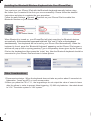
computer is Bluetooth-enabled, the setup applet’s icon will appear in the windows
taskbar as shown below.
2