1
Transfer Voltage and Sensitivity Settings
Automatic Voltage Regulation
Automatic Voltage Regulation boosts the AC voltage when it drops below safe levels. This allows the equipment that
is connected to the Back-UPS to operate during low voltage conditions. Automatic Voltage Regulation will also
regulate high voltage conditions down to a safe level.
The Back-UPS will switch to battery power if the AC input voltage level becomes too low or too high for the
Automatic Voltage Regulation feature to compensate, or if the AC power is experiencing voltage fluctuations.
No-load Shutdown
The UPS will shut down to conserve energy if while operating on battery power the UPS detects that connected
equipment is using less than 15 W of energy for more than 15 minutes.
No-load shutdown can be enabled or disabled through Program mode described below.
Voltage Sensitivity Adjustment
If the Back-UPS switches to battery power too frequently or too infrequently, adjust the transfer voltage and
sensitivity settings:
1. Verify that the Back-UPS battery is connected. Connect the Back-UPS to a wall outlet. The
Back-UPS should be turned off.
2. Press and hold the POWER ON/OFF button for 10 seconds. The LEDs will illuminate green and red alternately, to
indicate that the Back-UPS is in Program mode.
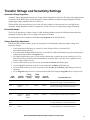
3. The LEDs will flash either green, red or green and red alternately to indicate the current sensitivity level. The
Back-UPS will beep to indicate that No-load Shutdown is enabled. Refer to the table for an explanation of the
transfer voltage sensitivity levels.
4. To select LOW sensitivity, press the ON/OFF button until the On Line LED flashes green.
5. To select MEDIUM sensitivity, press the ON/OFF button until the Battery LED flashes red.
6. To select HIGH sensitivity, press the ON/OFF button until the On Line and Battery LEDs flash green and red
alternately.
7. To exit Program mode wait for five seconds and both LEDs will extinguish. Program mode is no longer active.
Audible
Indicator
Voltage
Sensitivity
Setting
Green
None
Low
150-280
Disabled
Use this setting with equipment that is less sensitive to
fluctuations in voltage or waveform distortions.
Green
4 beeps per
second
Low
150-280
Enabled
Use this setting with equipment that is less sensitive to
fluctuations in voltage or waveform distortions.
Red
None
Medium
155-280
Disabled
Use this setting for normal operation conditions.
Red
4 beeps per
second
Medium
(factory
default)
155-280
Enabled
Use this setting for normal operation conditions.
Green and
Red
None
High
160-280
Disabled
Use this setting when connected equipment is sensitive
to voltage fluctuations or waveform distortions.
Green and
Red
4 beeps per
second
High
160-280
Enabled
Use this setting when connected equipment is sensitive
to voltage fluctuations or waveform distortions.
LED
Flashes
Input
Voltage
Range
No-load
Shutdown
Recommended Use
Back-UPS BX800CI-RS/BX1100CI-RS Installation and Operation
5