1
For Windows 2000/XP/2003 User:
As Windows starts, it will detect a new hardware has been plugged or added,
and start the " Add New Hardware Wizard / Found New Hardware Wizard ".
Click on " Cancel ".
For Windows Vista/Win7/2008 User:
As Windows starts, the following will appear on screen.
9. Please insert the analog Modem communication CD into your CD-ROM drive.
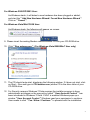
10. Click " Run autorun.exe ". (For Windows Vista/2008/Win7 User only)
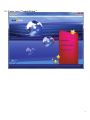
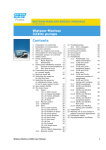
11. The CD should auto-start, displaying the following window. If it does not start, click
on Start – Run and type in CD:\autorun.exe (where CD is the drive letter of your
CD-ROM drive.
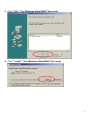
12. For Security reasons Windows 7/Vista requires the installer program to have
administrator privileges so the new policy called " User Account Control " has
been introduced in Windows 7/Vista. If UAC is enabled Windows pops up a
window " User Account Control " Windows need your permission to continue.
User needs to click " Yes / Allow / Continue " to proceed with the installation.
4