1
3 Headset Setup
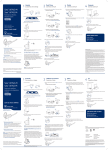
Installing the headset battery
4 Press in to attach.
Position the battery as shown on the headset and slide
into position until the battery snaps into place.
Left ear loop configuration
1 Choose the size of ear loop that fits most comfortably.
Align the ear loop as shown and insert it onto the
headset.
NOTE This product has a replaceable battery. Use only the
battery type supplied by Plantronics.
2 Rotate the ear loop up 90 degrees.
Customise the headset
The headset can be converted for wearing on the left or right ear
with either an earloop or headband.
90º
90º
Right ear loop configuration
1 Choose the size of ear loop that fits most comfortably.
Align the ear loop as shown and insert it onto the
headset.
3 Choose the size and style of ear tip that fits most
comfortably. Align the ear tip with the notch facing the
microphone as shown.
2 Rotate the ear loop up 90 degrees.
90º
90º
4 Press in to attach.
3 Choose the size and style of ear tip that fits most
comfortably. Align the ear tip with the notch facing the
microphone as shown.
Plantronics Savi User Guide
6