1
Premier by Draper
Page 3 of 3
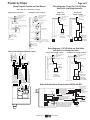
(Wiring Diagrams Standard and Quiet Motors)
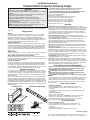
Wiring Diagrams—Plug & Play 110-120V Motor
with Built-in Low Voltage Controller
Please Note: Do not wire motors in parallel.
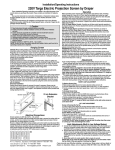
Internal Screen Wiring
Internal Screen Wiring
White (Common)
Black (Down)
White (Common)
Black (Down)
Red (Up)
Red (Up)
Green/Yellow (Ground)
Green/Yellow (Ground)
Control
switch
Red
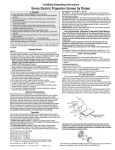
Internal Screen Wiring
Internal Screen Wiring
White (Neutral)
White (Neutral)
Black
Green (Ground)
Black
Green (Ground)
Cap off with wire
nut and tape
Dashed wiring
by electrician
Blue
Multiple Low
Voltage Controls
Single Low
Voltage Control
Multiple Station Control
Single Station Control
Single gang box by others
Min. 4" x 2 1/8" x 1 7/8" deep
Red
Data Cable
Blue
Black
Data
Cables
Dashed wiring
by electrician
Black
Red
Blue
Location of key
operated on-off
switch if furnished
Black
110-120V
Plug
Blue
Red
To 110-120V Line
Wall Switch,
RF or IR
Receiver,
or integrated
control system
Black
Wall Switches,
RF or IR
Receivers,
or integrated
control systems
110-120V
Plug
Single gang box by others
Min. 4" x 2 1/8" x 1 7/8" deep.
3 shown. More or less equally
feasible.
Location of key
operated on-off
switch if furnished
Wiring Diagrams—110-120V Motor and Quiet Motor
with Built-in Low Voltage Controller
To 110-120V Line
Single Low Voltage Control
Control
Switches
24v DC
STOP
STOP
Multiple Low Voltage Controls
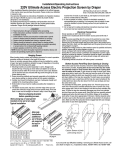
Internal Screen Wiring
White (Neutral)
Black
Green/Yellow (Ground)
Location of key
operated on-off
switch if furnished
To
110-120V
Line
Dashed wiring
by electrician
Internal Screen Wiring
White (Neutral)
Black
Green/Yellow (Ground)
Dashed wiring
by electrician
Data Cable
Data
Cables
Dashed wiring by electrician
Low voltage wiring by others
Eye Port for IR Eye, RF Receiver or LED
Wall Switch. For more than one of
these, a splitter is required.
3 Button Wall Switch
DOWN - Black
COM - White
UP - Red
RJ-9
connector
Aux Port for connecting additional LVC-III
modules (up to six total can be linkedconnect from Aux to Eye).
White (Common)
Red (Up)
Black (Down)
Green (Ground)
White-Common to screen & 110-120V AC Neutral
Red-to screen (directional)
Brown-to screen (directional)
Yellow-to 110-120V AC-Hot
Black-to 110-120V AC-Hot
Green-Ground
Internal Screen Wiring
External Low Voltage and Remote Control
RJ-9
connectors
Wall Switch,
RF or IR
Receiver,
or integrated
control system
To 110-120V Line
Wall Switches,
RF or IR
Receivers,
or integrated
control systems
To 110-120V Line
External Two-Way Serial Communication (RS232) with MC1
Internal Screen Wiring
Program LED
White-Common to screen & 110-120V AC Neutral
Red-to Screen (directional)
Brown-to Screen (directional)
Black-Hot to 110-120V AC
Green/Yellow-Ground
Low Voltage Wiring by others
AC Wiring by electrician
Fuse
RS232 Data FROM Control System
RS232 Data TO Control System
Signal Ground & Manual Switch Common
Manual Switch Down
Manual Switch Up
MC1
www.draperinc.com
White (Common)
Red (Up)
Black (Down)
Green/Yellow (Gnd)
Eye Port for IR Eye. For RF Receiver or LED
Wall Switch, a Splitter and a Power Supply
is required. Plug RF Receiver or LED Wall
Switch and Power Supply into splitter, then
run cable from Splitter to MC1 Eye Port.
(765) 987-7999
To
110-120V
Line
STOP
STOP
Control
Switches
24v DC
Location of key
operated on-off
switch if furnished