1
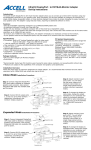
Infrared Control (IR)
The 1x4 Splitter featuring HDBaseT Lite includes 4 pairs of Infrared
Extenders, 4 IR Transmitters (IR-TX) and 4 IR Receivers (IR-RX). The
front panel of the splitter has 1 IR-TX port. The HDBaseT Receivers each
have one IR-TX port and one IR-RX port. Using the included extenders,
you can configure the IR to control the source devices when present at
any of the displays.
The port on the splitter labeled “IR” accepts an optional IR-TX, sending
commands received from the IR-RX at the display end (HDBaseT
receiver) to the IR “eye” on a source.
Plug an IR-RX into the IR-RX Port of the HDBaseT receiver. Place the end
of the IR-RX in an area that is in line-of-sight to the remote control.
Plug an IR-TX into the IR port on the splitter. Position the end of the IRTX in line of sight to the IR “eye” of the source device. The IR “eye” is
normally a small circle on the face of the source devices that receives the
IR signal from its remote control.
To control multiple source devices with one IR-TX, stack the sources
together and position the IR-TX, which is plugged into the IR port on the
splitter, so that all the source devices can receive the IR signal (Blast)
from the IR-TX.
Note: A remote control is not included. A remote control programmed to
control the source device/s is required for IR operation.
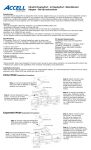
Ultra-IR Receiver (5 ft.)
Dual Frequency: 38KHZ-60KHZ
PN: B164B-002B
Ultra-IR Transmitter (5 ft.)
Dual Frequency: 38KHZ-60KHZ
PN: B164B-003B
Ultra-IR Receiver and
Transmitter Pin
Assignment
Troubleshooting
Q. One of the display does not show a picture or output audio.
A. Check the displays input setting to ensure it is set to receive a signal
from the connected HDMI port.
Q. One or more of the connected displays will not display a picture while
one or more of the displays do display a picture:
A1. Press the RESET button on the front of the splitter to reset it.
Alternatively turn off the power to the splitter, source and displays. Wait
60 seconds. Turn the source on and the displays on. Turn the splitter on.
A2. The HDMI cables on the non-functonal display/s cannot support
their long length. Use only high-quality High Speed HDMI cables. Keep
the cable length as short as possible. Test by locating the non-working
display close to the splitter. Use a short HDMI cable to connect the switch
to the TV. A working TV using a short HDMI cable indicates an issue with
the HDMI cable.
Q. The splitter is not down sampling the video and some of the TV’s are
not displaying a picture.
A1. Go into the TV’s setup and configure the resolution to match all the
connected TV’s. The TV’s should share the same resolution.
A2. In the source devices menu options set the source device to output a
resolution that matches all the connected displays.
Q. My TV’s resolution are not optimized.
A. The splitter will query the displays and provide the highest common
video resolution amongst them. Example: Using a 1080p source, if 3
of the displays support a maximum resolution of 1080p and 1 display
supports a maximim resolution of 720p, all 4 display will operate at a
resolution of 720p. If the 720p TV in the example is then turned off, the
other 3 displays can then operate in 1080p resolution. Press the RESET
button on the front panel of the splitter to refresh the configuration. The
three 1080p TV’s will refresh (flicker) then each will display a 1080p
resolution picture.
Q. My TV’s resolution are not optimized.
A. The splitter will query the displays and provide the highest common
video resolution amongst them. Example: Using a 1080p source, if 3
of the displays support a maximum resolution of 1080p and 1 display
supports a maximim resolution of 720p, all 4 display will operate at a
resolution of 720p. If the 720p TV in the example is then turned off, the
other 3 displays can then operate in 1080p resolution. Press the RESET
button on the front panel of the splitter to refresh the configuration. The
three 1080p TV’s will refresh (flicker) then each will display a 1080p
resolution picture.
Q. Get the message “This protocol is not supported” or other error
message.
A. See answer A1 above and repeat the steps outlined.
ASSISTANCE: Questions regarding this product or its product
warranty, please check out our Web site at: www.accellcables.com.
Customer service can be reached by email at [email protected]
or phone at 510-438-9288, toll free 877-353-0772 (M-F 9am-5pm PST).
1-YEAR MANUFACTURERS WARRANTY
The Accell UltraAV Splitter is warranted for one year from date
of purchase to be free of defects in material and workmanship.
In the event of such defects, the Accell product will be repaired
without charge or replaced with a new one at our option, if
delivered to Accell Corporation prepaid, together with a copy
of the sales receipt indicating the proof of purchase date and
place of purchase. This warranty excludes defects due to normal
wear, abuse, shipping damage, or failure to use the product in
accordance with the instructions. ACCELL CORPORATION SHALL
NOT BE LIABLE FOR DAMAGES BASED UPON INCONVENIENCE,
LOSS OF USE OF THE PRODUCT, LOSS OF TIME, INTERRUPTED
OPERATION OR COMMERCIAL LOSS, OR ANY OTHER DAMAGES,
WHETHER INCIDENTAL, CONSEQUENTIAL OR OTHERWISE. YOU
AGREE THAT ACCELL’S MAXIMUM LIABILITY ARISING FROM
ANY PRODUCT SOLD BY ACCELL SHALL NOT EXCEED THE PRICE
OF SUCH PRODUCT. SOME JURISDICTIONS DO NOT ALLOW
THE LIMITATION OF EXCLUSION OF LIABILITY FOR CERTAIN
DAMAGES, SO THE ABOVE MAY NOT APPLY TO YOU TO THE
EXTENT SUCH JURISDICTION’S LAW IS APPLICABLE TO THIS
AGREEMENT. This warranty gives you specific legal rights, and
you may have other rights that vary from state to state.
LIMITATION OF LIABILITY
IN NO EVENT SHALL ACCELL CORPORATION, ITS SUBSIDIARIES
OR AFFILIATES, OR THEIR RESPECTIVE PARTNERS, OFFICERS,
DIRECTORS, EMPLOYEES, SHAREHOLDERS, REPRESENTATIVES
OR AGENTS (COLLECTIVELY, “ACCELL”) BE LIABLE FOR
DIRECT, SPECIAL, INCIDENTAL, CONSEQUENTIAL, PUNITIVE,
OR INDIRECT DAMAGES (INCLUDING BUT NOT LIMITED
TO, LOSS OF DATA, USE OR PROFITS), HOWEVER CAUSED,
WHETHER FOR BREACH OF CONTRACT, NEGLIGENCE, OR
OTHERWISE, AND WHETHER OR NOT ACCELL HAS BEEN
ADVISED OF THE POSSIBILITY OF ANY SUCH DAMAGES. YOU
AGREE THAT ACCELL’S MAXIMUM LIABILITY ARISING FROM
ANY PRODUCT SOLD BY ACCELL SHALL NOT EXCEED THE PRICE
OF SUCH PRODUCT. SOME JURISDICTIONS DO NOT ALLOW
THE LIMITATION OF EXCLUSION OF LIABILITY FOR CERTAIN
DAMAGES, SO THE ABOVE MAY NOT APPLY TO YOU TO THE
EXTENT SUCH JURISDICTION’S LAW IS APPLICABLE TO THIS
AGREEMENT.
WARRANTY RETURNS PROCEDURE
Contact Customer Support to obtain a Return Authorization
(RMA) number. RMA numbers are valid for 30 days from the date
of issuance. We are unable to accept returns without an RMA
number. Returns without an RMA number clearly printed on the
outside of the package will be refused and returned unopened. All
returns must be shipped prepaid at the expense of the shipper.
Accell assumes no responsibility for any inaccuracies and liability
for direct, indirect, special, incidental, or consequential damages
as a result. Due to ongoing improvements, Accell reserves
the right to make changes to hardware, packaging and any
accompanying documentation without prior written notice.
©2013 Accell Corporation, All Rights Reserved. Accell and UltraAV
are registered trademarks of Accell Corporation.