1
5 Dock and
charge Androidpowered phone
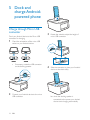
Charge through Micro USB
connector
3
Rotate the wheel to adjust the height of
micro USB connector.
4
Slide the connector to place your Android
device on the dock stably.
Dock your Android device to the Micro USB
connector for charging.
1
Check the orientation of the micro USB
socket on your Android device.
If necessary, rotate the USB connector
on the docking speaker.
2
12
Connect your Android device to the micro
USB connector.
EN
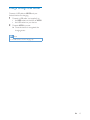
» when the docking speaker is
connected to the power, your docked
device starts charging automatically.