1
Bosch Video Management System
en
Configuration Manual
Bosch Video Management System
Table of Contents | en
3
Table of contents
1
Using the Help
12
1.1
Finding information
12
1.2
Printing the Help
13
2
Introduction
14
3
System overview
17
3.1
Hardware requirements
17
3.2
Software requirements
18
3.3
License requirements
18
3.4
Supported system structures
18
4
Concepts
20
4.1
Configuration Wizard
20
4.2
Enterprise System
20
4.2.1
Scenarios
20
4.2.2
Permissions
23
4.2.3
Types of user groups
24
4.2.4
Licensing
24
4.3
Server Lookup
24
4.4
Remote access
25
4.5
iSCSI storage pool
28
4.6
Alarm handling
28
4.7
DVR devices
30
4.8
Mobile Video Service
30
4.9
BVIP devices
31
5
Supported hardware
32
5.1
Installing hardware
33
5.2
Connecting a Bosch IntuiKey keyboard to Bosch VMS
33
5.2.1
Scenarios for Bosch IntuiKey keyboard connections
33
5.2.2
Connecting a Bosch IntuiKey keyboard to a decoder
35
5.2.3
Updating Bosch IntuiKey keyboard firmware
36
5.3
Connecting Bosch Allegiant Matrix to Bosch Video Management System
37
5.3.1
Bosch Allegiant Connection Overview
37
5.3.2
Configuring the control channel
39
5.3.3
Bosch Allegiant Satellite System Concept
40
5.3.4
Allegiant CCL commands supported in Bosch VMS
41
6
Getting started
44
6.1
Installing the software modules
44
6.2
Using Configuration Wizard
44
6.3
Accessing the system
55
6.4
Using Server Lookup
55
6.5
Configuring remote access
55
6.5.1
Configuring without Enterprise System
55
6.5.2
Configuring with Enterprise System
56
6.6
Activating the software licenses
56
6.7
Starting Configuration Client
57
6.8
Configuring the language of Configuration Client
57
6.9
Configuring the language of Operator Client
57
6.10
Adding a new license
58
Bosch Sicherheitssysteme GmbH
Configuration Manual
2013.07 | V1 | Configuration Client
4
en | Table of Contents
Bosch Video Management System
6.11
Working offline
58
7
Configuring the Server List for Enterprise System
59
8
Configuring Server Lookup
61
9
Managing VRM storage
62
9.1
Adding a VRM device with iSCSI device
62
9.1.1
Adding an iSCSI device
62
9.1.2
Adding a DSA E-Series iSCSI device
63
9.2
Adding a VRM pool
63
9.3
Configuring automatic recording mode on a pool
63
9.4
Configuring an iSCSI device
64
9.5
Moving an iSCSI system to another pool
65
9.6
Adding a LUN
65
9.7
Formatting a LUN
66
10
Managing encoders
67
10.1
Adding an encoder to a VRM pool
67
10.2
Moving an encoder to another pool
68
10.3
Adding a live only encoder
68
10.4
Adding a local storage encoder
68
10.5
Configuring an encoder / decoder
69
10.6
Updating the device capabilities
69
10.7
Configuring failover recording mode on an encoder
70
10.8
Configuring multiple encoders / decoders
71
11
Managing Video Streaming Gateway
72
11.1
Adding a Video Streaming Gateway device
72
11.2
Moving a VSG to another pool
72
11.3
Adding a Bosch camera to a VSG
73
11.4
Adding an ONVIF camera to a VSG
73
11.5
Configuring multicast for VSG
74
11.6
Switching on VSG recording
74
12
Managing NVRs
75
12.1
Adding NVRs, their recorded encoders, and decoders
75
12.2
Configuring NVRs
76
12.2.1
Configuring a Primary NVR
77
12.2.2
Switching an NVR to a Failover NVR
77
12.2.3
Switching an NVR to a Redundant NVR
78
12.2.4
Configuring a Failover NVR
78
12.2.5
Configuring a Redundant NVR
78
12.2.6
Assigning NVRs to Failover NVRs
79
12.2.7
Assigning NVRs to a Redundant NVR
79
12.2.8
Displaying information on an NVR
79
12.2.9
Changing the network address of an NVR / Failover NVR / Redundant NVR
80
13
Managing various devices
81
13.1
Adding devices
81
13.2
Adding a VIDOS NVR
84
13.3
Configuring a decoder for use with a Bosch IntuiKey keyboard
85
13.4
Configuring the integration of a DiBos system
85
13.5
Configuring the integration of a DVR
85
13.6
Configuring a Bosch Allegiant device
86
13.7
Configuring a startup Command Script
86
2013.07 | V1 | Configuration Client
Configuration Manual
Bosch Sicherheitssysteme GmbH
Bosch Video Management System
Table of Contents | en
5
13.8
Changing the network address of a workstation
87
13.9
Enabling Forensic Search on a workstation
87
13.10
Assigning an analog monitor group to a workstation
87
13.11
Configuring an analog monitor group
87
13.12
Adding a monitor wall
88
13.13
Configuring a communication device
88
13.14
Configuring a peripheral device
89
13.15
Configuring network monitoring
89
13.16
Configuring a Bosch IntuiKey keyboard (workstation)
89
13.17
Configuring a Bosch IntuiKey keyboard (decoder)
89
13.18
Configuring an I/O module
90
13.19
Configuring an Allegiant CCL emulation
90
13.20
Adding a Mobile Video Service
90
14
Configuring the structure
92
14.1
Configuring the Logical Tree
92
14.2
Adding a device to the Logical Tree
92
14.3
Removing a tree item
92
14.4
Managing resource files
93
14.5
Adding a Command Script
94
14.6
Managing pre-configured camera sequences
94
14.7
Adding a camera sequence
95
14.8
Adding a folder
96
14.9
Adding a map
96
14.10
Adding a link to another map
96
14.11
Assigning a map to a folder
97
14.12
Managing devices on a map
97
14.13
Adding a document
98
15
Configuring schedules
99
15.1
Configuring a Recording Schedule
99
15.2
Adding a Task Schedule
100
15.3
Configuring a standard Task Schedule
100
15.4
Configuring a recurring Task Schedule
100
15.5
Removing a Task Schedule
101
15.6
Adding holidays and exception days
101
15.7
Removing holidays and exception days
102
15.8
Renaming a schedule
102
16
Configuring cameras and recording settings
103
16.1
Copying and pasting in tables
103
16.2
Configuring stream quality settings
104
16.3
Configuring camera properties
104
16.4
Configuring recording settings (only VRM and Local Storage)
105
16.5
Configuring recording settings (only NVR)
105
16.6
Configuring PTZ port settings
107
16.7
Configuring PTZ camera settings
107
17
Configuring events and alarms
108
17.1
Copying and pasting in tables
109
17.2
Removing a table row
109
17.3
Managing resource files
109
17.4
Configuring an event
109
Bosch Sicherheitssysteme GmbH
Configuration Manual
2013.07 | V1 | Configuration Client
6
en | Table of Contents
Bosch Video Management System
17.5
Duplicating an event
110
17.6
Logging user events
110
17.7
Configuring user event buttons
110
17.8
Creating a Compound Event
111
17.9
Editing a Compound Event
112
17.10
Configuring an alarm
112
17.11
Configuring settings for all alarms
113
18
Configuring Command Scripts
114
18.1
Managing Command Scripts
114
18.2
Configuring a Command Script to be started automatically
115
18.3
Importing a Command Script
115
18.4
Exporting a Command Script
115
18.5
Configuring a startup Command Script
115
19
Configuring users, permissions and Enterprise Access
117
19.1
Creating a user
117
19.2
Creating a group or account
118
19.3
Creating a dual authorization group
119
19.4
Configuring LDAP settings
119
19.5
Associating an LDAP group
120
19.6
Scheduling user logon permission
120
19.7
Configuring operating permissions
121
19.8
Configuring user interface settings
121
19.9
Configuring permissions for Logical Tree
122
19.10
Configuring permissions for events and alarms
122
19.11
Configuring camera permissions
123
19.12
Configuring decoder permissions
123
19.13
Configuring various priorities
123
19.14
Copying user group permissions
124
20
Managing configuration data
125
20.1
Activating the working configuration
125
20.2
Activating a configuration
126
20.3
Exporting configuration data
126
20.4
Importing configuration data
126
20.5
Exporting configuration data to OPC
127
21
Configuration examples
128
21.1
Creating an Enterprise System
128
21.1.1
Configuring the Server List for Enterprise System
128
21.1.2
Creating an Enterprise User Group
130
21.1.3
Creating an Enterprise Account
130
21.2
Adding a Bosch ATM/POS bridge
131
21.3
Adding a Bosch Allegiant input alarm
132
21.4
Adding and configuring 2 Dinion IP cameras with VRM recording
133
22
Global Configuration Client windows
135
22.1
Configuration window
135
22.2
Menu commands
136
22.3
Activation Manager dialog box
137
22.4
Activate Configuration dialog box
138
22.5
License Manager dialog box
138
22.6
License Activation dialog box
138
2013.07 | V1 | Configuration Client
Configuration Manual
Bosch Sicherheitssysteme GmbH
Bosch Video Management System
Table of Contents | en
7
22.7
Alarm Settings dialog box
139
22.8
Stream Quality Settings dialog box
139
22.9
Options dialog box
140
22.10
Remote Access Settings dialog box
140
22.10.1
Show Port Mapping dialog box
141
23
Devices page
142
23.1
Server List page
143
23.1.1
Add Server dialog box
143
23.2
Initial Device Scan dialog box
143
23.3
NVR & Decoder Scan dialog box
144
23.4
Failover NVR Manager dialog box
144
23.5
IP Device Configuration dialog box
144
23.6
Set IP Addresses dialog box
145
23.7
Set Display Names dialog box
145
23.8
NVRs / Failover NVRs / Redundant NVRs page
146
23.8.1
Global Settings page
146
23.8.2
Disk Storage page
146
23.8.3
Camera Storage page
147
23.8.4
Assigned NVRs page
148
23.8.5
Assigned NVR page
148
23.8.6
Add Network Path dialog box
149
23.8.7
Add Local NVR Drive dialog box
149
23.9
Vidos NVRs page
149
23.10
DiBos page
150
23.10.1
Add DiBos System dialog box
150
23.10.2
Settings page
150
23.10.3
Cameras page
150
23.10.4
Inputs page
150
23.10.5
Relays page
151
23.11
DVR (Digital Video Recorder) page
151
23.11.1
Add DVR dialog box
151
23.11.2
Settings tab
151
23.11.3
Cameras tab
152
23.11.4
Inputs tab
152
23.11.5
Relays tab
152
23.12
Matrix Switches page
152
23.12.1
Connection page
152
23.12.2
Cameras page
152
23.12.3
Outputs page
153
23.12.4
Inputs page
153
23.13
Workstation page
154
23.13.1
Settings page
154
23.13.2
Assigned Analog Monitor Groups page
155
23.14
Decoders page
155
23.14.1
Add Encoder / Decoder dialog box
155
23.14.2
Edit Encoder / Decoder dialog box
156
23.15
Analog Monitor Groups page
158
23.15.1
Settings page
158
23.15.2
Advanced Configuration page
159
Bosch Sicherheitssysteme GmbH
Configuration Manual
2013.07 | V1 | Configuration Client
8
en | Table of Contents
Bosch Video Management System
23.16
Monitor Wall page
160
23.16.1
Add Monitor Wall dialog box
160
23.17
Communication Devices page
160
23.17.1
E-mail/SMTP Server dialog box
161
23.17.2
Add SMS Device dialog box
161
23.17.3
SMTP Server page
161
23.17.4
Send Test E-mail dialog box
162
23.17.5
GSM Settings / SMSC Settings page
162
23.18
POS + ATM page
163
23.18.1
Add Bosch ATM/POS-Bridge dialog box
163
23.18.2
Bosch ATM/POS-Bridge page
163
23.18.3
Inputs page
163
23.18.4
ATM Settings page
164
23.19
Virtual Inputs page
164
23.19.1
Add Virtual Inputs dialog box
164
23.20
SNMP page
164
23.20.1
Add SNMP dialog box
165
23.20.2
SNMP Trap Receiver page
165
23.20.3
SNMP Trap Logger dialog box
165
23.21
Assign Keyboard page
166
23.22
I/O Modules page
167
23.22.1
ADAM page
167
23.22.2
Inputs page
167
23.22.3
Relays page
167
23.23
Allegiant CCL Emulation page
167
23.24
Mobile Video Service page
168
23.24.1
Add Mobile Video Service dialog box
168
23.25
VRM Devices page
169
23.26
VRM Settings page
169
23.26.1
SNMP page
170
23.26.2
Advanced page
170
23.27
Pool page
170
23.27.1
Add Encoder / Decoder dialog box
171
23.27.2
Edit Encoder / Decoder dialog box
172
23.27.3
Change Pool for dialog box
174
23.27.4
Add iSCSI Device dialog box
174
23.27.5
Add DSA E-Series Device dialog box
174
23.27.6
Basic Configuration page
175
23.27.7
Load Balancing page
176
23.27.8
iqn-Mapper dialog box
177
23.27.9
LUNs page
177
23.27.10
Add LUN dialog box
178
23.28
Video Streaming Gateway device page
178
23.29
Assignment tab (Video Streaming Gateway)
178
23.30
Add/Edit dialog box (Video Streaming Gateway)
179
23.31
Recording profiles tab (Video Streaming Gateway)
180
23.32
Multicast tabs (Video Streaming Gateway)
180
23.33
Advanced tab (Video Streaming Gateway)
181
23.34
Live Only page
181
23.34.1
ONVIF Encoder page
2013.07 | V1 | Configuration Client
181
Configuration Manual
Bosch Sicherheitssysteme GmbH
Bosch Video Management System
Table of Contents | en
9
23.34.2
Add ONVIF dialog box
182
23.35
Local Storage page
182
24
Encoders / Decoders page
183
24.1
Unit Access page
183
24.1.1
Identification / Camera identification
183
24.1.2
Camera name
184
24.1.3
Version information
184
24.2
Date/Time page
184
24.3
Video Input page
184
24.3.1
Picture settings
186
24.3.2
Input termination
186
24.3.3
Source type
186
24.4
Installer Menu
187
24.4.1
Base frame rate
187
24.4.2
Camera LED
187
24.4.3
Mirror image
187
24.4.4
Flip image
187
24.4.5
Menu button
187
24.4.6
Heater (dome cameras only)
187
24.4.7
Reboot device
187
24.4.8
Factory defaults
187
24.4.9
Lens Wizard
187
24.5
Picture Settings
187
24.5.1
White balance
187
24.6
Recording Management page
188
24.7
Recording preferences page
188
24.8
VCA page
189
24.8.1
Motion detector (MOTION+ only)
190
24.8.2
Select Area dialog box
190
24.8.3
Tamper detection
191
24.9
Audio Alarm page
191
24.10
Privacy Masks page
192
24.11
Camera page
192
24.11.1
Mode page
194
24.11.2
ALC
194
24.11.3
Enhance
195
24.12
Lens page
196
24.12.1
Focus
196
24.12.2
Iris
196
24.12.3
Zoom
197
24.13
PTZ page
197
24.14
Prepositions and Tours page
197
24.15
Sectors page
198
24.16
Misc page
198
24.17
Logs page
198
24.18
Audio page
198
24.19
Relay page
199
24.20
Periphery page
200
24.20.1
COM1
200
Bosch Sicherheitssysteme GmbH
Configuration Manual
2013.07 | V1 | Configuration Client
10
en | Table of Contents
Bosch Video Management System
24.21
Network Access page
200
24.22
Advanced page
202
24.22.1
SNMP
202
24.22.2
802.1x
202
24.22.3
RTSP
202
24.22.4
UPnP
202
24.22.5
TCP metadata input
202
24.22.6
Quality of Service
203
24.23
Multicast page
203
24.24
FTP Posting page
204
24.24.1
JPEG posting
204
24.24.2
FTP server
204
24.25
IP v4 Filter
204
24.26
Licenses page
205
24.27
Decoder page
205
24.27.1
Decoder profile
205
24.27.2
Monitor display
205
25
Maps and Structure page
207
25.1
Resource Manager dialog box
208
25.2
Select Resource dialog box
208
25.3
Sequence Builder dialog box
209
25.4
Add Sequence dialog box
209
25.5
Add Sequence Step dialog box
210
25.6
Add URL dialog box
210
25.7
Select Map for Link dialog box
210
26
Schedules page
211
26.1
Recording Schedules page
211
26.2
Task Schedules page
211
27
Cameras and Recording page
213
27.1
Cameras page
213
27.2
Scheduled Recording Settings dialog box (only VRM and Local Storage)
215
27.3
Recording settings pages (NVR only)
216
27.4
Stream Quality Settings dialog box
217
27.5
PTZ Settings dialog box
218
28
Events page
220
28.1
Command Script Editor dialog box
221
28.2
Create Compound Event / Edit Compound Event dialog box
222
28.3
Select Script Language dialog box
222
28.4
Edit Priorities of Event Type dialog box
223
28.5
Select Devices dialog box
223
29
Alarms page
224
29.1
Alarm Settings dialog box
225
29.2
Select Image Pane Content dialog box
225
29.3
Select Resource dialog box
226
29.4
Alarm Options dialog box
226
30
User Groups page
229
30.1
New User Group/Enterprise Account dialog box
230
30.2
User Group Properties page
231
30.3
User Properties page
232
2013.07 | V1 | Configuration Client
Configuration Manual
Bosch Sicherheitssysteme GmbH
Bosch Video Management System
Table of Contents | en
11
30.4
Add New Dual Authorization Group dialog box
232
30.5
Logon Pair Properties page
233
30.6
Select User Groups dialog box
233
30.7
Camera Permissions page
234
30.8
Control Priorities
235
30.9
Copy User Group Permissions dialog box
235
30.10
Decoder Permissions page
236
30.11
Events and Alarms page
236
30.12
LDAP Server Settings dialog box
236
30.13
Credentials page
238
30.14
Logical Tree page
239
30.15
Operator Features page
239
30.16
Priorities page
241
30.17
User Interface page
241
30.18
Server Access page
242
31
Troubleshooting
244
31.1
Configuring the desired language in Windows
246
31.2
Reestablishing the connection to a Bosch IntuiKey keyboard
246
31.3
Reducing the number of Allegiant cameras
246
Glossary
247
Index
254
Bosch Sicherheitssysteme GmbH
Configuration Manual
2013.07 | V1 | Configuration Client
12
1
en | Using the Help
Bosch Video Management System
Using the Help
To find out more about how to do something in Bosch VMS, access the online Help using any
of the following methods.
To use the Contents, Index, or Search:
4
On the Help menu, click Help. Use the buttons and links to navigate.
To get Help on a window or dialog:
4
On the toolbar, click
.
OR
4
1.1
Press F1 for help on any program window or dialog.
Finding information
You can find information in the Help in several ways.
To find information in the Online Help:
1.
On the Help menu, click Help.
2.
If the left-hand pane is not visible, click the Show button.
3.
In the Help window, do the following:
Click:
To:
Contents
Display the table of contents for the Online Help. Click each book to
display pages that link to topics, and click each page to display the
corresponding topic in the right-hand pane.
Index
Search for specific words or phrases or select from a list of index
keywords. Double-click the keyword to display the corresponding topic
in the right-hand pane.
Search
Locate words or phrases within the content of your topics. Type the
word or phrase in the text field, press ENTER, and select the topic you
want from the list of topics.
Texts of the user interface are marked bold.
4
The arrow invites you to click on the underlined text or to click an item in the application.
Related Topics
4 Click to display a topic with information on the application window you currently use.
This topic provides information on the application window controls.
Concepts provides background information on selected issues.
Caution!
Medium risk (without safety alert symbol): Indicates a potentially hazardous situation.
If not avoided, this may result in property damage or risk of damage to the unit.
Cautionary messages should be heeded to help you avoid data loss or damaging the system.
Notice!
This symbol indicates information or a company policy that relates directly or indirectly to the
safety of personnel or protection of property.
2013.07 | V1 | Configuration Client
Configuration Manual
Bosch Sicherheitssysteme GmbH
Bosch Video Management System
1.2
Using the Help | en
13
Printing the Help
While using the Online Help, you can print topics and information right from the browser
window.
To print a Help topic:
1.
Right-click in the right pane and select Print.
The Print dialog box opens.
2.
Click Print. The topic is printed to the specified printer.
Bosch Sicherheitssysteme GmbH
Configuration Manual
2013.07 | V1 | Configuration Client
14
2
en | Introduction
Bosch Video Management System
Introduction
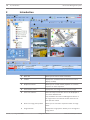
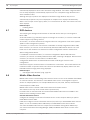
1
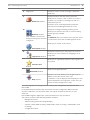
Menu bar
Allows you to select a menu command.
2
Toolbar
Displays the available buttons. Point to an icon to
display a tooltip.
3
Playback controls
Allows you to control instant playback or a camera
sequence or alarm sequence.
4
Performance meter
Displays the CPU usage and the memory usage.
5
Time zone selector
Select an entry for the time zone to be displayed in
most time related fields.
Only available if at least one Management Server in
the Logical Tree is located in another time zone as
your Operator Client.
6
Slider for Image pane pattern
Allows you to select the required number of Image
panes.
7
Image window
Displays the Image panes. Allows you to arrange the
Image panes.
2013.07 | V1 | Configuration Client
Configuration Manual
Bosch Sicherheitssysteme GmbH
Introduction | en
Bosch Video Management System
8
Image pane
15
Displays a camera, a map, an image, a document
(HTML file).
9
Displays all alarms that the system generates.
Allows you to accept or clear an alarm or to start a
Alarm List window
workflow, for example, by sending an E-mail to a
maintenance person.
The Alarm List is not being displayed, when the
connection to the Management Server is lost.
10
Displays the configured analog monitor groups.
Allows you to switch to the next or previous analog
Monitors window
(only available if at least one
analog monitor group has been
configured)
monitor group if available.
Note:
The Monitors tab is not visible if your Operator Client
is connected to more than one Management Server.
Allows you to control a PTZ camera.
PTZ Control window
11
Displays the devices your user group has access to.
Allows you to select a device for assigning it to an
Logical Tree window
Image pane.
Allows you to organize the devices of the Logical Tree
as required.
Favorites Tree
window
Allows to manage bookmarks.
Bookmarks window
Displays a site map. Allows you to drag the map to
display a particular section of the map.
Map window
If activated, a map is displayed automatically for each
camera displayed in an Image pane. In this case, the
camera must be configured on a map.
This manual guides you through the basic steps of the configuration and operation with
Bosch VMS.
For detailed help and step-by-step instructions read the Configuration Manual and the
Operator’s Manual or use the Online Help. You find the manuals as PDF files on your
Setup CD.
Bosch VMS integrates digital video, audio and data across any IP network.
The system consists of the following software modules:
–
Management Server
–
VRM recording (Video Recording Manager)
–
Operator Client (VRM recording / DiBos DVRs / iSCSI recording / VIDOS NVRs / local
recording)
–
Configuration Client
Bosch Sicherheitssysteme GmbH
Configuration Manual
2013.07 | V1 | Configuration Client
16
en | Introduction
Bosch Video Management System
To achieve a running system, you must perform the following tasks:
–
Install services (Management Server and VRM)
–
Install Operator Client and Configuration Client
–
Connect to network
–
Connect devices to network
–
Basic configuration:
–
Add devices (e.g. by device scan)
–
Build logical structure
–
Configure schedules, cameras, events, and alarms
–
Configure user groups
Bosch VMS Archive Player displays exported recordings.
2013.07 | V1 | Configuration Client
Configuration Manual
Bosch Sicherheitssysteme GmbH
Bosch Video Management System
3
System overview | en
17
System overview
If you plan to install and configure Bosch VMS, participate in a system training on Bosch VMS.
Refer to the Release Notes of the current Bosch VMS version for supported versions of
firmware and hardware and other important information.
See data sheets on Bosch workstations and servers for information on computers where
Bosch VMS can be installed.
The Bosch VMS software modules can optionally be installed on one PC.
Important components
–
Management Server (selectable in Setup): Stream management, alarm management,
priority management, Management logbook, user management, device state management.
Additional Enterprise System license: Managing Enterprise User Groups and Enterprise
Accounts.
–
Configuration Wizard: Easy and fast setup of a recording system.
–
Configuration Client (selectable in Setup): System configuration and administration for
Operator Client.
–
Operator Client (selectable in Setup): Live monitoring, storage retrieval and playback,
alarm and accessing multiple Management Server computers simultaneously.
–
Video Recording Manager (selectable in Setup): Distributing storage capacities on iSCSI
devices to the encoders, while handling load balancing between multiple iSCSI devices.
Streaming playback video and audio data from iSCSI to Operator Clients.
–
Mobile Video Service (selectable in Setup): Provides a transcoding service that
transcodes the live and recorded video stream from a camera configured in Bosch VMS to
the available network bandwidth. This service enables video clients like an iPhone or a
Web client to receive transcoded streams, for example for unreliable network
connections with limited bandwidth. Not supported on Windows XP.
–
Web Client: You can access live and playback videos via Web browser.
–
Mobile App: You can use the Mobile App on iPhone or iPad to access live and playback
video.
–
Bosch Video Streaming Gateway (selectable in Setup): Provides the integration of 3rd
party cameras and NVR-like recording, e.g. in low-bandwidth networks.
–
Cameo SDK (selectable in Setup): The Cameo SDK is used to embed Bosch VMS live and
playback Image panes to your external third-party application. The Image panes follow the
Bosch VMS based user permissions.
The Cameo SDK provides a subset of the Bosch VMS Operator Client functionalities that
enables you to create applications similar to the Operator Client.
–
Client Enterprise SDK: The Client Enterprise SDK is meant to control and monitor the
behaviour of Operator Client of an Enterprise System by external applications. The SDK
allows to browse devices that are accessible by the running, connected Operator Client
and to control some UI functionalities.
–
Client SDK / Server SDK: The Server SDK is used to control and monitor the Management
Server by scripts and external applications. You can use those interfaces with a valid
administrator account.
The Client SDK is used to control and monitor the Operator Client by external
applications and scripts (part of the related server configuration).
3.1
Hardware requirements
See the data sheet for Bosch VMS. Data sheets for platform PCs are also available.
Bosch Sicherheitssysteme GmbH
Configuration Manual
2013.07 | V1 | Configuration Client
18
3.2
en | System overview
Bosch Video Management System
Software requirements
See the data sheet for Bosch VMS.
Bosch VMS must not be installed on a computer where you want to install Bosch VMS Archive
Player.
3.3
License requirements
See the data sheet for Bosch VMS for the available licenses.
3.4
Supported system structures
An operator or installer can be responsible for the following system structures:
–
Single server system
–
Multi server system (Enterprise System)
–
Multi system environment
System with access point for logon
Single server system,
System access point: Management Server
Enterprise System,
System access point: Enterprise Management Server
2013.07 | V1 | Configuration Client
Configuration Manual
Bosch Sicherheitssysteme GmbH
System overview | en
Bosch Video Management System
1
Multi system environment
4
19
System access point:
Server on which logon request of an
operator or installer is processed.
2
Single server system
5
Management Server
3
Multi server system
6
Enterprise Management Server
Use cases for multi system access
Two Bosch VMS features valid for multi system environments are available:
–
Enterprise System
–
Server Lookup
An operator might want to access a multi system environment for the following reasons:
–
Configure multiple systems (Server Lookup)
–
Maintenance and monitoring of multiple systems (Server Lookup)
–
Alert (SMS, Email 3rd party) driven on-demand monitoring of multiple systems (Server
Lookup)
–
Simultaneous connection to multiple servers for seamless operation of one distributed
system (Enterprise System)
Related Topics
–
Enterprise System, page 20
–
Server Lookup, page 24
Bosch Sicherheitssysteme GmbH
Configuration Manual
2013.07 | V1 | Configuration Client
20
en | Concepts
4
Bosch Video Management System
Concepts
This chapter provides background information on selected issues.
4.1
Configuration Wizard
Intended use for Configuration Wizard is the quick and easy configuration of a smaller system.
Configuration Wizard helps you to achieve a configured system including VRM, iSCSI system,
Mobile Video Service, cameras, recording profiles and user groups.
User groups and their permissions are configured automatically. You can add or remove users
and set passwords.
Configuration Wizard can access Management Server only on the local computer.
You can save an activated configuration for backup purposes and import this configuration
later. You can change this imported configuration after import.
You must add iSCSI systems manually on a standard software installation.
Configuration Wizard adds the local VRM automatically both on a standard software
installation and on DIVAR IP 3000 and DIVAR IP 7000.
On a DIVAR IP 3000 and on a DIVAR IP 7000 the local iSCSI device is also added automatically
if not already available.
On a DIVAR IP 3000 and on a DIVAR IP 7000, a local Mobile Video Service is added
automatically if not already available.
Related Topics
–
Using Configuration Wizard, page 44
4.2
Enterprise System
The target of a Bosch VMS Enterprise System is to enable a user of Operator Client to
simultaneously access multiple Management Servers.
Related Topics
–
Configuring the Server List for Enterprise System, page 59
4.2.1
–
Configuring users, permissions and Enterprise Access, page 117
–
Accessing the system, page 55
Scenarios
The following three scenarios are covered.
–
Scenario 1: A dedicated server plays the role of Enterprise Management Server. This
server has the only task to manage the simultaneous access of an Operator Client
workstation to multiple Management Servers.
An Operator Client workstation logs on to Enterprise Management Server. After successful
logon the user of Operator Client has access to the devices of all configured
Management Servers according to the permissions in his Enterprise User Group.
2013.07 | V1 | Configuration Client
Configuration Manual
Bosch Sicherheitssysteme GmbH
Bosch Video Management System
Concepts | en
21
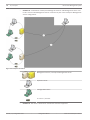
Figure 4.1: Enterprise Scenario 1
Management Server
Operator Client
Configuration Client
IP camera / encoder
Enterprise Management Server
Bosch Sicherheitssysteme GmbH
Configuration Manual
2013.07 | V1 | Configuration Client
22
en | Concepts
Bosch Video Management System
–
Scenario 2: Combination of Enterprise Management Server and Management Server role.
In this case the own Management Server must also be part of the Enterprise Management
Server configuration.
Figure 4.2: Enterprise Scenario 2
Management Server / Enterprise Management Server
/
Operator Client
Configuration Client
IP camera / encoder
–
Scenario 3: The classic client-server architecture remains supported.
2013.07 | V1 | Configuration Client
Configuration Manual
Bosch Sicherheitssysteme GmbH
Bosch Video Management System
Concepts | en
23
Figure 4.3: Classic Scenario 3
Management Server
Operator Client
Configuration Client
IP camera / encoder
4.2.2
Permissions
Permissions on an Enterprise System
For an Enterprise System you configure the following permissions:
–
Operating permissions of Operator Client defining the user interface for operating in the
Enterprise System, for example the user interface of the alarm monitor.
Use an Enterprise User Group. Configure it on the Enterprise Management Server.
Bosch Sicherheitssysteme GmbH
Configuration Manual
2013.07 | V1 | Configuration Client
24
en | Concepts
Bosch Video Management System
–
Device permissions that should be available for operating in an Enterprise Management
Server are defined on each Management Server.
Use Enterprise Accounts. Configure it on each Management Server.
Permissions on a single Management Server
For managing the access to one of the Management Servers, use the standard user group. You
configure all permissions on this Management Server in this user group.
You can configure dual authorization user groups for standard user groups and for Enterprise
User Groups.
4.2.3
Types of user groups
Type
User group
Enterprise User
Contains
Users
Users
Group
Available configuration
Where do you
settings
configure?
–
–
Operating and device
Management
permissions
Server
–
Operating permissions –
Enterprise
–
Per Management
Management
Server: Name of the
Server
corresponding
Enterprise Access
Accounts with logon
credentials
Enterprise Access
–
Device permissions
–
Account password
User groups
–
See user groups
–
See user groups
Enterprise dual
Enterprise User
–
See Enterprise User
–
See Enterprise
authorization
Groups
Dual authorization
–
–
Management
Server
user group
Groups
User Groups
Table 4.1: User groups
4.2.4
Licensing
Bosch VMS Enterprise (MBV-BENT) version license is required at each Enterprise Management
Server to enable the feature.
For each Management Server assigned to one or more Enterprise User Groups, 1 license
(MBV-XSUB) is required.
To update an existing MBV-BPRO Base license to an Enterprise System, you need an
Enterprise Upgrade license (MBV-FEUP).
Each Workstation connecting to an Enterprise Management Server requests one MBV-XWST
that is licensed at Enterprise Management Server. No additional MBV-XWST license is required
on each Management Server if accessed via Enterprise Management Server.
4.3
Server Lookup
A single user of Configuration Client or Operator Client may want to connect to multiple
system access points sequentially. This access is called Server Lookup. System access points
can be Management Server or Enterprise Management Server.
Server Lookup supports you in locating system access points by their names or descriptions.
The user retrieves the list of system access points during logon. He needs to connect to the
server hosting the configuration with Server List (Server List Provider).
2013.07 | V1 | Configuration Client
Configuration Manual
Bosch Sicherheitssysteme GmbH
Bosch Video Management System
Concepts | en
25
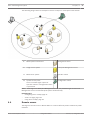
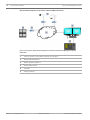
The following image shows an example for Server Lookup in a multi system environment:
1
Multi system environment
Management Server
2
Single server system
Enterprise Management Server
3
Multi server system
Operator Client
4
System access point:
Configuration Client
Server on which logon request of
Operator Client or Configuration Client
is processed.
When a client logs on to Enterprise Management Server, it is possible to get access to all
Management Servers of this Enterprise System simultaneously.
Related Topics
–
Configuring Server Lookup, page 61
4.4
–
Server List page, page 143
–
Using Server Lookup, page 55
Remote access
The target of remote access in Bosch VMS is to connect different private networks to public
networks.
Bosch Sicherheitssysteme GmbH
Configuration Manual
2013.07 | V1 | Configuration Client
26
en | Concepts
Bosch Video Management System
Multiple networks with private (local) network addresses can be accessed simultaneously or
sequentially by Operator Client computers via public interfaces (routers). Task of the router is
to translate the incoming public network traffic to the corresponding private network address.
The users of Operator Client can access Management Server or Enterprise Management Server
and their devices via remote access.
You cannot access the following devices/features via remote access:
–
Playback of local storage
–
ONVIF
–
DiBos
–
Direct iSCSI replay
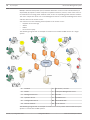
The following image shows an example of remote access to Bosch VMS devices in a single
system:
1
Firewall
6
IP camera / encoder
2
Router
7
Enterprise Management Server
3
Management Server
8
Decoder
4
Operator Client
9
DynDNS Server
5
Configuration Client
10
World Wide Web
A
Remote network
B
Local network
The following image shows an example of remote access from private network with Enterprise
System to remote Bosch VMS systems:
2013.07 | V1 | Configuration Client
Configuration Manual
Bosch Sicherheitssysteme GmbH
Bosch Video Management System
Concepts | en
1
Firewall
6
IP camera / encoder
2
Router
7
Enterprise Management Server
Port forwarding
3
27
Enterprise server list
Management Server
8
Decoder
9
DynDNS Server
Port mapping
4
Operator Client
Logon to
5
Dynamic naming
Configuration Client
10
World Wide Web
Logon to
To enable the remote access of an Operator Client to devices in a remote network, each
device is assigned a public port number in addition to the public network address of the
router. For access, Operator Client uses this public port number together with the public
network address. In the private network the incoming traffic for the public port number is
forwarded to the private network address and port number of the corresponding device.
You configure the port mapping in Configuration Client for use by Operator Client.
Notice!
Additionally the network administrator must configure the port forwarding on the router of
the private network. The network administrator must ensure that remote access via these
ports is running outside of Bosch VMS environment.
Bosch Sicherheitssysteme GmbH
Configuration Manual
2013.07 | V1 | Configuration Client
28
en | Concepts
Bosch Video Management System
Related Topics
–
Configuring remote access, page 55
4.5
–
Remote Access Settings dialog box, page 140
–
Show Port Mapping dialog box, page 141
iSCSI storage pool
As of VRM v.3.0, iSCSI storage pools are introduced. A storage pool is a container for one or
more iSCSI storage systems that share the same load balancing properties. The encoders / IP
cameras that are assigned to a storage pool, are recorded with these common load balancing
settings.
A storage pool can be used to have a logical mapping of the network topology to the VRM, for
example if you have two buildings, both containing storage and devices, you want to avoid
routing the network traffic from one building to the other.
Storage pools can also be used to group cameras and storage systems by an important aspect
of view. For example a system contains of some very important cameras and a lot of less
important ones. In this case it is possible to group them into two storage pools, one with a lot
of redundancy features and one with less redundancy.
You can configure the following load balancing properties for a storage pool:
–
Recording preferences (Automatic or Failover)
–
Secondary target usage
Secondary target is used in case of Failover mode if the assigned primary target fails. If
this option is turned off, the recording stops on all devices assigned to this failed primary
target.
In case of Automatic mode: if one target fails, VRM Server performs an automatic
reassign of the related devices to other storages. If VRM Server is down while a target
fails, the recording is stopped on the devices currently recording on the failed target.
–
Block reservation for downtime
–
Sanity check period
Notice!
As of Bosch VMS v. 4.5.5, multiple storage pools per VRM are supported.
Click below to get detailed information on the available pages:
–
Pool page, page 170
4.6
Alarm handling
Alarms can be individually configured to be handled by one or more user groups. When an
alarm occurs, it appears in the Alarm List of all users in the user groups configured to receive
that alarm. When any one of these users starts to work on the alarm, it disappears from the
Alarm List of all other users.
Alarms are displayed on a workstation’s alarm monitor and optionally on analog monitors. This
behavior is described in the following paragraphs.
Alarm flow
1. An alarm occurs in the system.
2.
Alarm notifications appear in the Alarm Lists of all users configured for this alarm. Alarm
video is immediately displayed on configured monitors. If it is an automatically displayed
alarm (auto pop-up), the alarm video is also automatically displayed on the
Operator Client workstation’s alarm monitors.
If the alarm is configured as an auto-clear alarm, the alarm is removed from the Alarm List
2013.07 | V1 | Configuration Client
Configuration Manual
Bosch Sicherheitssysteme GmbH
Concepts | en
Bosch Video Management System
29
after the auto-clear time (configured in the Configuration Client).
On analog monitors, any quad views from VIP XDs are temporarily replaced by full-screen
displays.
3.
One of the users accepts the alarm. The alarm video is then displayed on this user's
workstation (if it is not already displayed via auto pop-up). The alarm is removed from all
other Alarm Lists and alarm video displays.
4.
The user who accepted the alarm invokes a workflow that can include reading an action
plan and entering comments. This step is optional - requirements for workflow can be
configured by the administrator.
5.
Finally, the user clears the alarm. This removes the alarm from his Alarm List and alarm
display.
On an analog monitor group, the monitors return to the cameras that were displayed
before the alarm occurred.
Alarm Image window
1. To display alarm video, the Alarm Image window replaces the Live or Playback Image
window on the monitor that has been configured for alarm display.
2.
Each alarm gets a row of Image panes. Up to 5 Image panes can be associated with each
alarm. These Image panes can display live video, playback video, or maps.
On an analog monitor group, each alarm can call up cameras on a row of analog monitors.
The number of cameras in the row is limited by the number of columns in the analog
monitor group. Monitors in the row that are not used for alarm video can be configured to
either continue with their current display or to display a blank screen.
3.
Higher priority alarms are displayed above lower priority alarms on both analog monitor
rows and the Operator Client workstation display alarm rows.
4.
If the Alarm Image window is completely full of Alarm Image rows and an additional alarm
must be displayed, the lowest priority alarms "stack up" in the bottom row of the Alarm
Image window. You can step through the stacked alarms with the controls at the left side
of the alarm row.
You can step through the alarm stacks on analog monitor groups with control buttons in
the Monitors window of the Operator Client workstation display. Analog monitors in
alarm are indicated by red icons with blinking "LEDs".
The alarm title, time, and date can be optionally be displayed on all analog monitors, or
only the first monitor in the alarm row.
5.
For equal priority alarms, the administrator can configure the order behavior:
–
Last-in-First-out (LIFO) mode: in this configuration, new alarms are inserted above
older alarms of the same priority.
–
First-in-First-out (FIFO) mode; in this configuration, new alarms are inserted below
older alarms of the same priority.
6.
An alarm's Image row can appear in the Alarm Image window in one of two ways:
–
When it is generated (auto pop-up). This occurs when the alarm priority is higher
than display priority.
–
When the alarm is accepted. This occurs when the alarm priority is lower than
display priority.
Auto pop-up alarms
Alarms can be configured to automatically display (pop up) in the Alarm Image window, based
on the alarm priority. Each user group's live and playback displays are also assigned priorities.
When alarms are received with priority higher than that of the user's display, the alarm
Bosch Sicherheitssysteme GmbH
Configuration Manual
2013.07 | V1 | Configuration Client
30
en | Concepts
Bosch Video Management System
automatically displays its alarm row in the Alarm Image window. If the Alarm Image window is
not currently displayed, it automatically replaces the Live or Playback Image window on the
alarm-enabled monitor.
Although auto pop-up alarms are displayed in the Alarm Image window, they are not
automatically accepted. They can be displayed on multiple users' displays simultaneously.
When a user accepts an auto pop-up alarm, it is removed from all other users Alarm Lists and
alarm displays.
Related Topics
–
Handling alarms
4.7
DVR devices
This chapter gives background information on the DVR devices that you can integrate in
Bosch VMS.
Some DVR models (e.g. DHR-700) support recording from encoders / IP cameras. Other DVR
models support only analog cameras.
An encoder / IP camera should not be integrated into the configuration of two video systems
(DVRs or video management systems).
If encoders / IP cameras are connected to a DVR which is already integrated in Bosch VMS,
these encoders / IP cameras are not detected by the Bosch VMS network device scan. This
holds true for the network scan started from within Configuration Client or started from
within Configuration Wizard.
If a DVR with connected encoders / IP cameras is integrated in Bosch VMS and these
encoders / IP cameras are already added to Bosch VMS, a warning is displayed. Remove these
encoders / IP cameras from the DVR or from Bosch VMS.
Configuration Wizard does not add DVR devices with conflicting IP cameras to the
configuration.
DVR devices support a limited number of simultaneous connections. This number defines the
maximum number of Operator Client users that can simultaneously display videos from this
DVR without black Image panes being displayed.
Related Topics
–
DVR (Digital Video Recorder) page, page 151
4.8
Mobile Video Service
Mobile Video Service is transcoding video streams from the source to the available band-width
of connected clients. The interfaces of the Mobile Video Service are designed to support
clients on multiple platforms, for example Mobile devices (IOS; iPad, iPhone) and Windows
Internet Explorer HTML client.
Mobile Video Service is based on Microsoft Internet Information Service.
One mobile service may serve several clients synchronously.
For limits refer to data sheet and the Technical Note Mobile Video Service available in the
Online Product Catalog for Bosch VMS.
Internet Information Service
Configure the settings for Internet Information Service on the computer where you plan to
install MVS for Bosch VMS.
Install and configure Internet Information Service (IIS) before you install Mobile Video Service
(MVS). If IIS is not installed, Bosch VMS Setup to install Mobile Video Service aborts.
You select the Mobile Video Service component for installation during Bosch VMS Setup.
You cannot install Video Recording Manager (VRM) and Mobile Video Service on the same
computer.
2013.07 | V1 | Configuration Client
Configuration Manual
Bosch Sicherheitssysteme GmbH
Bosch Video Management System
Concepts | en
31
We recommend that you do not install Mobile Video Service on the same computer where you
install Management Server.
Related Topics
–
Adding a Mobile Video Service, page 90
–
4.9
Mobile Video Service page, page 168
BVIP devices
As of Bosch VMS version 4.5.5 and firmware version 5.70 you can add all BVIP encoders to
your system. You use the <Auto Detect> selection for adding these devices. An encoder that
you add with the <Auto Detect> selection, must be available in the network. The device
capabilities of the encoder are retrieved and default stream qualities are applied.
Notice:
You cannot add a device with the <Auto Detect> selection to an NVR.
Related Topics
–
Adding devices, page 81
–
Updating the device capabilities, page 69
–
Add Encoder / Decoder dialog box, page 155
–
Edit Encoder / Decoder dialog box, page 156
Bosch Sicherheitssysteme GmbH
Configuration Manual
2013.07 | V1 | Configuration Client
32
en | Supported hardware
5
Bosch Video Management System
Supported hardware
Caution!
!
Do not connect a device to more than one Bosch VMS! This can lead to recording gaps and
other undesired effects.
You can connect the following hardware to Bosch VMS:
–
Mobile video clients like iPhone or iPad via DynDNS
–
Various IP cameras. encoders and ONVIF cameras (live only or via Video Streaming
Gateway)
Connected via network
–
Live only encoders with local storage
Connected via network
–
iSCSI storage devices
Connected via network
–
VIDOS NVR computer
Connected via network
–
Analog cameras
Connected to encoders, BRS / DiBos devices
–
Decoders
Connected via network
–
Analog monitors
Connected to a decoder, to a Bosch Allegiant matrix, to a Bosch VMS Client workstation
–
BRS / DiBos devices (see the data sheet for Bosch VMS for supported software versions)
Connected via network
–
Bosch Allegiant matrix (Firmware version: 8.75 or greater, MCS version: 2.80 or greater)
Connected to a COM port of the Management Server or to a remote computer and to an
IP encoder on the network.
–
VideoTec DCZ keyboard
Connected to a USB port of a Bosch VMS workstation.
–
Bosch IntuiKey keyboard
Connected to the COM port of a Bosch VMS workstation (Firmware version: 1.82 or
greater) or to a hardware decoder (VIP XD).
If you connect the keyboard to a workstation, the user can control the complete system
with the keyboard. If you connect the keyboard to a VIP XD decoder, the user can only
control analog monitors with the keyboard.
–
SMS device
Connected to a COM port of the Management Server
–
SMTP E-mail server
Connected via network
–
POS
Connected via network
–
ATM
Connected via network
–
Network monitoring device
–
I/O modules
Connected via network
Connected via network
Only ADAM devices are supported.
2013.07 | V1 | Configuration Client
Configuration Manual
Bosch Sicherheitssysteme GmbH
Bosch Video Management System
Supported hardware | en
33
All devices connected via network are connected to a switch. The computers of the
Bosch VMS are also connected to this device.
5.1
Installing hardware
Bosch VMS supports the following hardware components:
–
VideoTec DCZ keyboard
–
Bosch IntuiKey keyboard
–
Bosch Allegiant matrix with cameras and monitor: Connected to a COM port of one of the
computers of the network and to IP encoders connected to the network
–
Encoders with analog cameras
–
Local storage encoders
–
IP cameras and IP AutoDomes
–
Monitors connected to a decoder (analog monitor groups for alarm processing are
possible)
–
DiBos Systems with cameras
–
DVR Systems with cameras
–
ATM / POS devices
–
I/O modules
Only ADAM devices are supported.
5.2
Connecting a Bosch IntuiKey keyboard to Bosch VMS
This chapter provides background information on configuring a Bosch IntuiKey keyboard.
5.2.1
Scenarios for Bosch IntuiKey keyboard connections
You can connect a Bosch IntuiKey keyboard to the COM port of a Bosch VMS workstation
(scenario 1) or to a hardware decoder (e.g. VIP XD, scenario 2).
If you connect the keyboard to a Bosch VMS workstation, you can control the complete
system. If you connect the keyboard to a decoder, you can only control the analog monitors of
the system.
If you connect the keyboard to an Enterprise Operator Client, you can control the cameras of a
specific Management Server by first pressing the server key to type in the number of this
server and then type the camera number.
Notice!
For connecting the Bosch IntuiKey keyboard with a Bosch VMS workstation, use the specified
Bosch cable.
For connecting the Bosch IntuiKey keyboard with a VIP XD decoder, you need a cable which
connects a serial COM port of the keyboard with the serial interface of the decoder. See
Connecting a CCTV keyboard to a decoder for connections.
Bosch Sicherheitssysteme GmbH
Configuration Manual
2013.07 | V1 | Configuration Client
34
en | Supported hardware
Bosch Video Management System
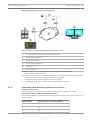
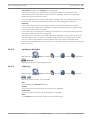
Bosch IntuiKey keyboard connected to a Bosch VMS workstation
Figure 5.1: Scenario 1: Bosch IntuiKey keyboard connected to a Bosch Video Management System
workstation
1
Various cameras connected to network via encoders
2
Bosch VMS workstation
3
Bosch IntuiKey keyboard
4
Bosch VMS network
5
Decoder
6
Analog monitors
2013.07 | V1 | Configuration Client
Configuration Manual
Bosch Sicherheitssysteme GmbH
Bosch Video Management System
Supported hardware | en
35
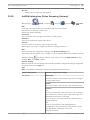
Bosch IntuiKey keyboard connected to a decoder
Figure 5.2: Scenario 2: Bosch IntuiKey keyboard connected to a decoder
1
Various cameras connected to network via encoders
2
Bosch VMS workstation
3
Bosch VMS network
4
Bosch IntuiKey keyboard
5
Decoder
6
Analog monitors
Follow these references to get detailed information on the available windows:
–
Assign Keyboard page, page 166
Follow these references to get detailed information on the available step-by-step instructions:
5.2.2
–
Configuring a Bosch IntuiKey keyboard (workstation), page 89
–
Configuring a Bosch IntuiKey keyboard (decoder), page 89
–
Configuring a decoder for use with a Bosch IntuiKey keyboard, page 85
Connecting a Bosch IntuiKey keyboard to a decoder
Configuring the decoder
See Configuring a decoder for use with a Bosch IntuiKey keyboard, page 85 for details.
Connections between COM port and VIP XD decoder
The following table lists the connections between an RS232 adapter and a serial interface of a
VIP XD decoder:
RS232 adapter
Serial interface of a VIP XD decoder
1
2
TX
3
RX
Bosch Sicherheitssysteme GmbH
Configuration Manual
2013.07 | V1 | Configuration Client
36
en | Supported hardware
Bosch Video Management System
RS232 adapter
Serial interface of a VIP XD decoder
4
5
GND
6
7
CTS
8
RTS
9
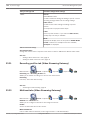
The following illustration shows the pinout of a standard RS232 adapter (1) and the pinout of
the decoder’s serial adapter (2):
1
2
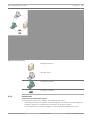
5 4 3 2 1
9 8 7 6
5.2.3
Updating Bosch IntuiKey keyboard firmware
1.
On any PC, install the IntuiKey downloader.
2.
Start IntuiKey Firmware Upgrade Utility.
3.
Connect the keyboard with a valid serial cable (refer to Bosch Support if such a cable is
not available) to this PC.
4.
On the keyboard, press Keyboard Control softkey, then Firmware Upgrade.
5.
Enter the password: 0 and 1 simultaneously.
The keyboard is in bootloader mode.
6.
On the PC, click Browse to select the firmware file: for example kbd.s20
7.
Set the COM port.
8.
Click the Download button to download the firmware.
On the keyboard display, Programming is displayed.
Do not press the Clr key now. Otherwise the keyboard is not usable after restart (see
Notice below).
9.
Click Browse to select the language: for example 8900_EN_..82.s20
On the keyboard display, Programming is displayed.
10. Close IntuiKey Firmware Upgrade Utility.
11. On the keyboard, press Clr key to exit.
The keyboard restarts. Wait some seconds until the menu for selecting the keyboard
language appears.
12. Select the desired language with a softkey.
The default start display appears.
2013.07 | V1 | Configuration Client
Configuration Manual
Bosch Sicherheitssysteme GmbH
Bosch Video Management System
Supported hardware | en
37
Notice!
For starting the bootloader mode directly, you can unplug the power supply from the
keyboard, press 0 and 1 simultaneously, plug In the power supply again, release 0 and 1.
5.3
Connecting Bosch Allegiant Matrix to Bosch Video
Management System
The Bosch VMSAllegiant Matrix interface provides seamless access to analog matrix cameras
in the Operator Client interface. Allegiant cameras appear almost identical to IP cameras. The
only difference is a small grid symbol on the camera to indicate that it is a Allegiant camera.
You can display cameras using the same tasks as for IP cameras. They are included both in the
Logical Tree and the site maps, and users can add them to their Favorites Trees. In-videowindow control for Allegiant-connected PTZ cameras is supported, and you can easily display
Allegiant cameras on analog monitors connected to IP decoders.
Bosch VMS provides an interface to the matrix switch via the Allegiant MCS (Master Control
Software) application). The MCS, in this case, runs invisibly in the background. This software
provides an efficient, event-driven interface to the Allegiant. It provides fast, real-time event
response from the Allegiant to Bosch VMS. So, for example, if a defective coax cable results in
video loss in the Allegiant, an immediate notification is sent to Bosch VMS. Also, you can
program Bosch VMS to respond to Allegiant alarms.
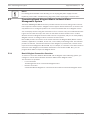
5.3.1
Bosch Allegiant Connection Overview
To achieve a connection between Bosch VMS and an Allegiant matrix switching system, you
configure a control channel between the Bosch VMS and the Allegiant matrix.
Two scenarios are possible:
–
Local connection
–
Remote connection
The Management Server controls the Allegiant matrix.
A dedicated Bosch Allegiant PC connected to the network controls the Allegiant matrix.
Bosch Sicherheitssysteme GmbH
Configuration Manual
2013.07 | V1 | Configuration Client
38
en | Supported hardware
Bosch Video Management System
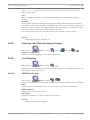
Local connection
Figure 5.3: Bosch Video Management System local connection to a Bosch Allegiant matrix switch
1
Bosch VMS Client workstations
2
Management Server with Master Control Software
3
RS-232 connection
4
Allegiant matrix
5
encoders
6
Network
Remote connection
2013.07 | V1 | Configuration Client
Configuration Manual
Bosch Sicherheitssysteme GmbH
Bosch Video Management System
Supported hardware | en
39
Figure 5.4: Bosch Video Management System remote connection to a Bosch Allegiant matrix switch
5.3.2
1
Bosch VMS Client workstations
2
Management Server with Master Control Software
3
Network
4
Allegiant PC with Master Control Software
5
RS-232 connection
6
encoders
7
Allegiant matrix
Configuring the control channel
Perform the following tasks to configure the control channel:
–
Wiring
–
Installing the software
–
Creating Allegiant configuration file
–
Adding the Allegiant matrix to Bosch VMS
–
Configuring user names
Wiring
To configure the control channel between Bosch VMS and the Allegiant matrix, connect one
PC through an RS-232 serial port to the Allegiant's console port (use the specified Bosch cable
for connection). This can be the Bosch VMS Management Server, or any other PC on the
network.
Bosch Sicherheitssysteme GmbH
Configuration Manual
2013.07 | V1 | Configuration Client
40
en | Supported hardware
Bosch Video Management System
Installing Allegiant Master Control Software
1. Stop the Management Server service if running (Start > Control Panel > Services > Rightclick Bosch VMS Management Server > Stop)
2.
Install the Allegiant Master Control Software on the Management Server and on the
Allegiant PC (if present).
3.
On an remote Allegiant PC configure it to start the Allegiant Network Host program
(ld_alghw.exe) on startup. This starts the necessary Allegiant services to allow other PCs
on the network to access the Allegiant. The software runs invisibly. It is not necessary to
have a dongle attached to this computer.
To have the service started on computer startup automatically, copy a link to
ld_alghw.exe to the Startup folder of your computer.
Creating a Bosch Allegiant configuration file
1. Using the Allegiant Master Control Software, create a Allegiant configuration file that
specifies the computer attached to the Allegiant matrix. For this task, the Master Control
dongle is required.
2.
On the Transfer menu, click Communication Setup. In the Current Host list, enter the
DNS name of the computer connected to the Allegiant matrix, and enter the serial port
parameters (COM port number, baud rate, etc.) of the Allegiant-connected serial port.
This allows the Master Control Software on the Management Server or PC to go on-line
with the Allegiant system. If this is not successful, ensure that either the Master Control
Software or the Allegiant Network Host program is running on the computer attached to
the Allegiant matrix, and that the network security is configured to allow remote access
to this computer.
3.
On the Transfer menu, click Upload. Select all tables and click Upload. To save the
configuration file, select a directory.
4.
Exit the Master Control Software.
Adding the Bosch Allegiant matrix to Bosch VMS
1. Start the Bosch VMS Management Server service, start the Configuration Client, and add
the Allegiant device by adding this configuration file (see Adding devices, page 81 for the
step-by-step instruction).
2.
Ensure that the Allegiant Master Control Software configuration file used in Bosch VMS
matches the current Allegiant configuration.
Bosch VMS runs the required components of Master Control Software invisibly in the
background.
Configuring the user name for logging on the Allegiant services
If the Allegiant matrix is connected to a PC in the network and not to the Management Server,
ensure that the Allegiant services on this PC and on the Management Server log on with the
same user account. This user must be member of an administrators group.
Further notes in the documentation
Follow these references to get detailed information on the available windows:
–
Matrix Switches page, page 152
Follow these references to get detailed information on the available step-by-step instructions:
–
5.3.3
Configuring a Bosch Allegiant device, page 86
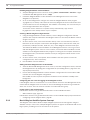
Bosch Allegiant Satellite System Concept
The Allegiant matrix switch allows multiple Allegiant systems to be tied together using the
Satellite concept. In this case, multiple Allegiant systems can appear to the Bosch VMS as one
large system, providing access to all cameras on all systems.
2013.07 | V1 | Configuration Client
Configuration Manual
Bosch Sicherheitssysteme GmbH
Bosch Video Management System
Supported hardware | en
41
In an Allegiant Satellite System, monitor outputs of a slave Allegiant are tied to video inputs on
the master Allegiant. This connection is called a trunk line. In addition, a control channel is
established between the master and the slave. When a camera from a slave Allegiant is
requested from the master Allegiant, a command is sent to the slave instructing it to switch
the requested camera to a trunk line. At the same time, the master Allegiant switches the
trunk input to the requested master Allegiant monitor output. This completes the video
connection from the requested slave camera to the desired master monitor.
Figure 5.5: Bosch Allegiant system extended with Satellite switches
1
Bosch VMS Client workstations
2
Management Server with Master Control Software
3
Network
4
Allegiant PC with Master Control Software
5
RS-232 connection
6
encoders
7
Allegiant matrix
8
Allegiant Satellite matrix
You can apply the Satellite concept such that an Allegiant can be both a master and a slave. In
this way, each Allegiant can view cameras from the others. It is only necessary to connect
trunk lines and control lines in both directions, and to properly configure the Allegiant tables.
The concept can be further extended, with no practical limit, to multiple Allegiant systems. An
Allegiant can have many slaves, and it can be a slave to many masters. You can program the
Allegiant tables to allow or disallow user access to camera views as required by site policies.
5.3.4
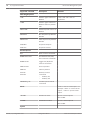
Allegiant CCL commands supported in Bosch VMS
To use the CCL commands you need the CCL User Guide. This manual is available in the
Online Product Catalog in the document section of each LTC Allegiant Matrix.
Bosch Sicherheitssysteme GmbH
Configuration Manual
2013.07 | V1 | Configuration Client
42
en | Supported hardware
Supported command
Bosch Video Management System
Description
Remarks
Switch Logical Camera to
LCM, LCM+ and LCM- are
Monitor
equivalent.
Switching/Sequence
LCM
LCMP
Switch Logical Camera to
Monitor with Pre-position
Call
MON+CAM
Switch Physical Camera to
Monitor
MON-RUN
Run Sequence by Monitor
Number
MON-HOLD
Hold Sequence by Monitor
Number
SEQ-REQ
Sequence Request
SEQ-ULD
Sequence Unload
Receiver/Driver
R/D
Basic Control commands
REMOTE-ACTION
Simultaneous Pan/Tilt/
Zoom Control commands
REMOTE-TGL
Toggle Pan/Tilt/Zoom
Control commands
PREPOS-SET
Set Pre-position
PREPOS
Call Pre-position
AUX-ON
Auxiliary Control
AUX-OFF
commands
VARSPEED_PTZ
–
Auxiliary On
–
Auxiliary Off
Variable Speed Control
commands
Alarm
Used to control virtual inputs. For
example "+alarm 1" closes virtual
input 1, "-alarm 1" opens virtual
input 1
+ALARM
Activate an alarm
Opens a virtual input in
Bosch VMS.
-ALARM
Deactivate an alarm
Closes a virtual input in
Bosch VMS.
System
2013.07 | V1 | Configuration Client
Configuration Manual
Bosch Sicherheitssysteme GmbH
Bosch Video Management System
Supported command
Supported hardware | en
Description
43
Remarks
Switching/Sequence
TC8x00>HEX
Set Hexadecimal Mode
TC8x00>DECIMAL
Set Decimal Mode
Bosch Sicherheitssysteme GmbH
Configuration Manual
2013.07 | V1 | Configuration Client
44
6
en | Getting started
Bosch Video Management System
Getting started
This chapter provides information on how to get started with Bosch VMS and with Bosch VMS
Archive Player
6.1
Installing the software modules
Caution!
Do not install DiBos Web client on any Bosch VMS computer.
Install every software module on the computer that is supposed to be used for this module.
To install:
6.2
1.
Insert the product CD-ROM.
2.
Start setup.exe or start the Bosch VMS Setup on the Welcome screen.
3.
In the next dialog box, select the modules to be installed on this computer.
4.
Follow the instructions on the screen.
Using Configuration Wizard
To start Configuration Wizard:
4
Click Start > All Programs > Bosch VMS > Configuration Wizard.
The Welcome page is displayed.
Related Topics
–
Configuration Wizard, page 20
Available pages
–
Welcome page, page 45
–
, page 46
–
, page 47
–
Latest saved configuration page, page 48
–
Select video devices to be added page, page 49
–
Enter password for added devices page, page 50
–
Select a recording profile page, page 51
–
Add storage page, page 52
–
User accounts and passwords page, page 53
–
Activate Configuration page, page 54
2013.07 | V1 | Configuration Client
Configuration Manual
Bosch Sicherheitssysteme GmbH
Bosch Video Management System
Getting started | en
45
Welcome page
If the connection to the Management Server cannot be established, a corresponding error
message is displayed. You cannot continue working with Configuration Wizard.
If VRM is not available on the computer, a corresponding error message is displayed. You
cannot continue working with Configuration Wizard.
If the license check fails, a corresponding error message is displayed. You cannot continue
working with Configuration Wizard.
Bosch Sicherheitssysteme GmbH
Configuration Manual
2013.07 | V1 | Configuration Client
46
en | Getting started
Bosch Video Management System
Network settings page
Notice!
Only available on DIVAR IP 3000 and DIVAR IP 7000.
You configure the network settings of the operating system.
As soon as you click Next button, the settings are activated.
2013.07 | V1 | Configuration Client
Configuration Manual
Bosch Sicherheitssysteme GmbH
Bosch Video Management System
Getting started | en
47
Time settings page
Notice!
Only available on DIVAR IP 3000 and DIVAR IP 7000.
You configure the time settings of the operating system.
Bosch Sicherheitssysteme GmbH
Configuration Manual
2013.07 | V1 | Configuration Client
48
en | Getting started
Bosch Video Management System
Latest saved configuration page
This page displays the latest saved configuration. You can import a BVMS file as a change to
the existing configuration. This change is saved but not activated when you click Next.
You can select the network adapter of your computer that is connected to the video devices
(IP cameras, encoders, decoders, iSCSI storage systems) of your system. The IP address of
this network adapter is used as IP address of the VRM, the VSG and the local iSCSI storage
system.
2013.07 | V1 | Configuration Client
Configuration Manual
Bosch Sicherheitssysteme GmbH
Bosch Video Management System
Getting started | en
49
Select video devices to be added page
This page displays all network devices that are already added to the system.
If you import a configuration, the time and network settings are not affected.
For multi-channel encoders, the recording profile is displayed as (non-uniform), if applicable.
Clicking Next starts scanning for devices.
Bosch Sicherheitssysteme GmbH
Configuration Manual
2013.07 | V1 | Configuration Client
50
en | Getting started
Bosch Video Management System
Enter password for added devices page
Password check is performed automatically, when you do not enter a character in a password
field for a few seconds or you click outside the password field.
2013.07 | V1 | Configuration Client
Configuration Manual
Bosch Sicherheitssysteme GmbH
Bosch Video Management System
Getting started | en
51
Select a recording profile page
For different profile assignments to different cameras you must execute Configuration Wizard
multiple times.
Bosch Sicherheitssysteme GmbH
Configuration Manual
2013.07 | V1 | Configuration Client
52
en | Getting started
Bosch Video Management System
Add storage page
If no iSCSI system is available on your system, you can add it manually in Configuration
Wizard.
If VRM is not already being added to the configuration, Configuration Wizard adds it
automatically using the IP address of your system.
2013.07 | V1 | Configuration Client
Configuration Manual
Bosch Sicherheitssysteme GmbH
Bosch Video Management System
Getting started | en
53
User accounts and passwords page
You can add users, you cannot add user groups.
Bosch Sicherheitssysteme GmbH
Configuration Manual
2013.07 | V1 | Configuration Client
54
en | Getting started
Bosch Video Management System
Activate Configuration page
After clicking Save and activate, the configuration is activated.
After successful activation the Activate Configuration page is displayed again. Now you can
store a backup of the configuration if desired: Click Save backup copy.
2013.07 | V1 | Configuration Client
Configuration Manual
Bosch Sicherheitssysteme GmbH
Bosch Video Management System
6.3
Getting started | en
55
Accessing the system
You access a system performing the following steps:
1.
2.
6.4
Perform one of the following steps to select the network address of the desired system:
–
Click a preselected list entry.
–
Enter a network address manually .
–
Select a network address using Server Lookup.
Log on to the desired system:
–
Single server system
–
Enterprise System
Using Server Lookup
A single user of Configuration Client or Operator Client may want to connect to multiple
system access points sequentially. This access is called Server Lookup. System access points
can be Management Server or Enterprise Management Server.
Server Lookup supports you in locating system access points by their names or descriptions.
The user retrieves the list of system access points during logon. He needs to connect to the
server hosting the configuration with Server List (Server List Provider).
To access:
1. Start Operator Client or Configuration Client.
The logon dialog box is displayed.
2.
In the Connection: list, select <Browse...>.
If private and public IP address has been configured for a server, this is indicated.
If you select <Browse...> for the first time, the Server List Provider dialog box is
displayed.
3.
In the (Enterprise) Management Server Address: field, type in a valid network address of
the desired server.
4.
Enter a valid user name and password.
5.
If required, click Remember Settings.
6.
Click OK.
7.
Select the desired server.
8.
Click OK.
9.
If the selected server has both a private and a public network address, a message box is
The Server Lookup dialog box is displayed.
displayed asking whether you are using a computer located in the private network of the
selected server.
The server name is added to the Connection: list in the logon dialog box.
10. Select this server in the Connection: list and click OK.
If you have selected the Remember Settings check box, you can select this server directly
when you again want to access this server.
6.5
Configuring remote access
You can configure remote access either for a single system without Enterprise System or for
an Enterprise System.
6.5.1
Configuring without Enterprise System
To configure:
1. Configure remote access settings in the Remote Access Settings dialog box.
2.
Configure the router.
Bosch Sicherheitssysteme GmbH
Configuration Manual
2013.07 | V1 | Configuration Client
56
en | Getting started
Bosch Video Management System
Related Topics
–
Remote Access Settings dialog box, page 140
6.5.2
Configuring with Enterprise System
To configure:
1. Configure the Server List.
2.
Configure Enterprise User Groups and Enterprise Accounts.
3.
Configure remote access settings in the Remote Access Settings dialog box.
4.
Configure the router.
Related Topics
–
Configuring the Server List for Enterprise System, page 59
6.6
–
Creating a group or account, page 118
–
Remote Access Settings dialog box, page 140
Activating the software licenses
Main window
When you install Bosch VMS for the first time, you must activate the licenses for the software
packages that you have ordered, including the base package and any expansions and/or
optional features.
To obtain the Activation Key for a license, you need the Authorization Number. This number is
included in your product box.
With a Bundle Information file you can ease the process of activating.
Caution!
The computer signature is used for licensing. This computer signature can change after
exchanging hardware on the Management Server computer. When the computer signature is
changed, the license for the base package becomes invalid.
To avoid licensing problems, finish the hardware and software configuration before you
generate the computer signature.
The following hardware changes can make the base license invalid:
Exchanging the network interface card.
Adding a VMWare or VPN virtual network interface.
Adding or activating a WLAN network interface.
Switchover of a Stratus server mainboard without teaming settings.
To activate the software:
1.
2.
Start Configuration Client.
On the Tools menu, click License Manager....
The License Manager dialog box is displayed.
3.
Click to check the boxes for the software package, the features, and the expansions that
you want to activate. For the expansions, enter the number of licenses.
If you have received a Bundle Information file, click Import Bundle Info to import it.
4.
Click Activate.
The License Activation dialog box is displayed.
5.
Write down the computer signature or copy and paste it into a text file.
6.
On a computer with Internet access, enter the following URL into your browser:
https://activation.boschsecurity.com
If you do not have an account to access the Bosch License Activation Center, either
create a new account (recommended) or click the link to activate a new license without
2013.07 | V1 | Configuration Client
Configuration Manual
Bosch Sicherheitssysteme GmbH
Bosch Video Management System
Getting started | en
57
logging on. If you create an account and log on before activating, the License Manager
keeps track of your activations. You can then review this at any time.
Follow the instructions to obtain the License Activation Key.
7.
Return to the Bosch VMS software. In the License Activation dialog box, type the License
Activation Key obtained from the License Manager and click Activate.
The software package is activated.
6.7
Starting Configuration Client
Only the user called Admin can log on to Configuration Client.
Note:
You cannot start Configuration Client when another user on another computer in the system
has already started Configuration Client.
To start Configuration Client:
1. From the Start menu, select Programs > Bosch VMS > Config Client.
The dialog box for logging on is displayed.
2.
In the User Name: field, type your user name.
When you start the application for the first time, enter Admin as user name, no password
required.
3.
In the Password: field, type your password.
4.
Click OK.
The application starts.
6.8
Configuring the language of Configuration Client
You configure the language of your Configuration Client independently of the language of your
Windows installation.
To configure the language:
1. On the Settings menu, click Options....
The Options dialog box is displayed.
2.
In the Language list, select the desired language.
If you select Default system language, the language of your Windows installation is used.
3.
Click OK.
The language is switched after the next restart of the application.
6.9
Configuring the language of Operator Client
You configure the language of your Operator Client independently of the language of your
Windows installation and of your Configuration Client. This step is performed in the
Configuration Client.
To configure the language:
1.
Click User Groups >
2.
In the Language: list, select the desired language.
. Click the User Group Properties tab.
3.
Click
4.
Click
to save the settings.
to activate the configuration.
Restart Operator Client.
Bosch Sicherheitssysteme GmbH
Configuration Manual
2013.07 | V1 | Configuration Client
58
en | Getting started
6.10
Bosch Video Management System
Adding a new license
Main window
Have the Activation Letter at hand that you received from Bosch.
To add a new license:
1.
On the Tools menu, click License Manager....
The License Manager dialog box is displayed.
2.
Select the software package that you want to activate.
3.
Click Activate.
The License Activation dialog box is displayed.
4.
Type the License Activation Key that you find in the Activation Letter.
5.
Click Activate.
The software package is activated.
6.
Repeat this procedure for each software package that you want to activate.
Related Topics
–
License Manager dialog box, page 138
–
6.11
License Activation dialog box, page 138
Working offline
When Operator Client is disconnected from a Management Server, a respective overlay icon is
displayed in the Logical Tree on the disconnected Management Server. You can continue
working with Operator Client even if the disconnection lasts longer, but some functions are
not available.
If the connection to the Management Server is reestablished, a respective overlay icon is
displayed.
If a new configuration on a Management Server has been activated, a respective icon is
displayed in the Logical Tree on the icon of the affected Management Server and a dialog box
is displayed for some seconds. Accept or refuse the new configuration.
If your Operator Client instance is scheduled to log off at a specific point in time, this logoff
occurs even when the connection to the Management Server is not reestablished at this point
in time.
When disconnected from a Management Server, all devices are indicated with the
icon. The
state overlay of a device in the Logical Tree or on a map when Operator Client is disconnected
from the Management Server
The following functions are not available in Operator Client when disconnected from the
Management Server for this connection:
–
Handling alarms, Alarm List
–
Indication of recording
–
Indication of state changes
–
PTZ control locking
–
Analog monitor group
–
Scripts
2013.07 | V1 | Configuration Client
Configuration Manual
Bosch Sicherheitssysteme GmbH
Bosch Video Management System
7
Configuring the Server List for Enterprise System | en
59
Configuring the Server List for Enterprise System
Main window >
Devices > Enterprise System > Server List
You configure multiple Management Server computers in the Server List of an appropriate
Management Server.
For simultaneous access you must configure one or more Enterprise User Groups. This
changes this Management Server to an Enterprise Management Server.
A user of Operator Client can log on with a user name of an Enterprise User Group to get
simultaneous access to the Management Server computers configured in the Server List.
Operating permissions are configured on the Enterprise Management Server in
User
Groups, Enterprise User Group tab.
Device permissions are configured on each Management Server in
User Groups,
Enterprise Access tab.
1.
Click
to save the settings.
2.
Click
to undo the last setting.
3.
Click
to activate the configuration.
To add servers:
1.
Click Add Server.
The Add Server dialog box is displayed.
2.
Type in a display name for the server and the network address (DNS name or IP address).
3.
If required, type in a public network address (DNS name or IP address) for remote
access.
4.
Click OK.
5.
Repeat these steps until you have added all desired Management Server computers.
The Management Server computers for your Enterprise System are configured.
Now configure the desired Enterprise User Groups and the Enterprise Access.
The following screenshot shows an example:
Bosch Sicherheitssysteme GmbH
Configuration Manual
2013.07 | V1 | Configuration Client
60
en | Configuring the Server List for Enterprise System
Bosch Video Management System
Related Topics
–
Enterprise System, page 20
–
Server List page, page 143
–
User Groups page, page 229
–
Using Server Lookup, page 55
2013.07 | V1 | Configuration Client
Configuration Manual
Bosch Sicherheitssysteme GmbH
Bosch Video Management System
8
Configuring Server Lookup | en
61
Configuring Server Lookup
Main window >
Devices > Enterprise System > Server List
For Server Lookup, the user of Operator Client or Configuration Client logs on with a user
name of a normal user group, not as a user of an Enterprise User Group.
1.
Click
to save the settings.
2.
Click
to undo the last setting.
3.
Click
to activate the configuration.
To add servers:
1.
Click Add Server.
The Add Server dialog box is displayed.
2.
Type in a display name for the server and the network address (DNS name or IP address).
3.
If required, type in a public network address (DNS name or IP address) for remote
access.
4.
Click OK.
5.
Repeat these steps until you have added all desired Management Server computers.
The Management Server computers for Server Lookup are configured.
The following screenshot shows an example:
Related Topics
–
Server Lookup, page 24
–
Server List page, page 143
–
Using Server Lookup, page 55
Bosch Sicherheitssysteme GmbH
Configuration Manual
2013.07 | V1 | Configuration Client
62
en | Managing VRM storage
9
Bosch Video Management System
Managing VRM storage
Main window >
Devices
This chapter provides information on how to configure the devices in your system.
Changing the Device Tree impacts other pages of the Configuration Client:
–
Maps and Structure
With the devices of the Device Tree you create a user defined structure called Logical
Tree. Hence, if you remove a device from the Device Tree, this device is automatically
removed from the Logical Tree. But adding a device to the Device Tree does not add this
device to the Logical Tree.
–
Cameras and Recording
All cameras of the Device Tree are available in the Camera Table and the Recording
Tables. You cannot modify DiBos or Bosch Allegiant cameras.
–
Events
All devices of the Device Tree are available in the corresponding Event Tables.
–
User Groups
You can reduce the functional range of the devices on several permission pages (per user
group or Enterprise Account).
9.1
1.
Click
to save the settings.
2.
Click
to undo the last setting.
3.
Click
to activate the configuration.
Adding a VRM device with iSCSI device
Main window >
Devices >
In your network, you need a VRM service running on a computer, and an iSCSI device.
Caution!
When you add an iSCSI device with no targets and LUNs configured, start a default
configuration and add the IQN of each encoder to this iSCSI device.
When you add an iSCSI device with targets and LUNs pre-configured, add the IQN of each
encoder to this iSCSI device.
See Configuring an iSCSI device, page 64 for details.
The system supports you with a scan for devices.
9.1.1
Adding an iSCSI device
Main window >
2013.07 | V1 | Configuration Client
Devices > Expand
Configuration Manual
> Expand
>
Bosch Sicherheitssysteme GmbH
Bosch Video Management System
Managing VRM storage | en
63
Notice!
When you add an iSCSI device with no targets and LUNs configured, start a default
configuration and add the IQN of each encoder to this iSCSI device.
When you add an iSCSI device with targets and LUNs pre-configured, add the IQN of each
encoder to this iSCSI device.
See Configuring an iSCSI device, page 64 for details.
To add:
1.
Right-click
and click Add iSCSI Device.
2.
Type in the desired display name, the network address of the iSCSI device, and select the
The Add iSCSI Device dialog box is displayed.
device type. Type in the password.
Click OK.
The iSCSI device is added to the VRM. Video streams from an IP device assigned to this
VRM are recorded on the added iSCSI device.
Related Topics
–
Pool page, page 170
–
9.1.2
Configuring an iSCSI device, page 64
Adding a DSA E-Series iSCSI device
Main window >
Devices >
> Expand
> Right-click
> Add DSA E-
Series Device > Add DSA E-Series Device dialog box
To add:
1. Type in a displayname, the management IP address and the password.
2.
Click Connect.
If connection is established, the fields in the Controller group and the 2nd Controller
group are filled.
3.
Click OK.
The device is added to the system.
Related Topics
–
Add DSA E-Series Device dialog box, page 174
9.2
Adding a VRM pool
Main window >
Devices > Expand
>
To add a VRM pool:
4
Right-click
and click Add Pool.
A new pool is added to the system.
9.3
Configuring automatic recording mode on a pool
Main window > Devices > Expand
Bosch Sicherheitssysteme GmbH
> Expand
Configuration Manual
>
2013.07 | V1 | Configuration Client
64
en | Managing VRM storage
Bosch Video Management System
Notice:
If you have configured a failover recording mode earlier, this configuration is overwritten.
To configure:
4
In the Recording preferences mode list, select Automatic.
After activation of the configuration the Automatic recording mode is active. On the
Recording Preferences page of an encoder, the primary and the secondary target list are
disabled.
Related Topics
–
Configuring failover recording mode on an encoder, page 70
9.4
Configuring an iSCSI device
After adding VRM devices, iSCSI devices, and encoders, perform the following tasks to ensure
that video data of encoders is stored on the iSCSI devices or video data can be retrieved from
these iSCSI devices:
–
Execute the default configuration to create LUNs on each target of the iSCSI device.
This step is optional. You do not need to perform this step on an iSCSI device with LUNs
pre-configured.
–
Scan the iSCSI device to add the targets and LUNs to the Device Tree after default
configuration.
Note:
Not all iSCSI devices support the default configuration and automatic IQN mapping.
To perform the default configuration of an iSCSI device:
1.
Expand the appropriate VRM device
2.
Click the Basic Configuration tab.
and
, click the appropriate iSCSI device
.
LUNs are created on the targets of the iSCSI device.
3.
Format these LUNs.
See Formatting a LUN, page 66.
4.
When the process has finished, click
5.
Click
to save the settings.
to activate the configuration.
To scan the iSCSI device:
1.
Expand the appropriate VRM device
and
, click the appropriate iSCSI device
.
2.
Right-click
and click Scan ISCSI Device.
The process is started.
Targets and LUNs are detected and added to the Device Tree below the iSCSI node.
3.
Click
2013.07 | V1 | Configuration Client
to save the settings.
Configuration Manual
Bosch Sicherheitssysteme GmbH
Bosch Video Management System
4.
Managing VRM storage | en
Click
65
to activate the configuration.
To perform IQN mapping:
1.
Expand the appropriate VRM device
and
, click the appropriate iSCSI device
.
2.
and click Map IQNs.
Right-click
The iqn-Mapper dialog box is displayed and the process is started.
The encoders that are assigned to the selected VRM device are evaluated and their IQNs
are added to this iSCSI device.
9.5
3.
Click
4.
Click
to save the settings.
to activate the configuration.
Moving an iSCSI system to another pool
Main window > Devices > Expand
> Expand
>
>
You move a device from one pool to another within the same VRM without any recording loss.
To move:
1.
Right-click
and click Change Pool ....
The Change Pool for is displayed.
2.
In the New Pool: list, select the desired pool.
3.
Click OK.
The device is moved to the selected pool.
Related Topics
–
Change Pool for dialog box, page 174
9.6
Adding a LUN
Main window >
Devices > Expand
> Expand
> Expand
Usually the network scan adds the desired iSCSI devices with their targets and LUNs
automatically. If your network scan did not work correctly or you want to configure your iSCSI
device offline before it is actually integrated into your network, you configure a target in your
iSCSI device and on this target you configure one or more LUNs.
To configure:
1.
Right-click
and click Add Target.
The Add Target dialog box is displayed.
2.
Enter the desired target number and click Ok.
The target
Bosch Sicherheitssysteme GmbH
is added.
Configuration Manual
2013.07 | V1 | Configuration Client
66
en | Managing VRM storage
3.
Bosch Video Management System
Click the new target.
The LUNs page is displayed.
4.
Click Add.
The Add LUN dialog box is displayed.
5.
Enter the desired LUN number and click Ok.
The LUN is added as a new table row.
Repeat this step for each desired LUN.
Notes:
–
To remove a LUN, click Remove.
The video data remains on this LUN.
–
To format a LUN, click Format.
All data on this LUN is removed!
9.7
Formatting a LUN
Main window >
Devices > Expand
> Expand
> Expand
> Expand
>
You format a LUN to prepare it for the first use.
Notice!
All data on the LUN is lost after formatting.
To configure:
1. On the LUNs page, select the desired LUN and, in the Format column, click to check.
2.
Click Format LUN.
3.
Read the displayed message carefully and confirm the message if desired.
The selected LUN is formatted. All data on this LUN is lost.
2013.07 | V1 | Configuration Client
Configuration Manual
Bosch Sicherheitssysteme GmbH
Bosch Video Management System
10
Managing encoders | en
67
Managing encoders
Main window >
Devices
This chapter provides information on how to configure the devices in your system.
Changing the Device Tree impacts other pages of the Configuration Client:
–
Maps and Structure
With the devices of the Device Tree you create a user defined structure called Logical
Tree. Hence, if you remove a device from the Device Tree, this device is automatically
removed from the Logical Tree. But adding a device to the Device Tree does not add this
device to the Logical Tree.
–
Cameras and Recording
All cameras of the Device Tree are available in the Camera Table and the Recording
Tables. You cannot modify DiBos or Bosch Allegiant cameras.
–
Events
All devices of the Device Tree are available in the corresponding Event Tables.
–
User Groups
You can reduce the functional range of the devices on several permission pages (per user
group or Enterprise Account).
10.1
1.
Click
to save the settings.
2.
Click
to undo the last setting.
3.
Click
to activate the configuration.
Adding an encoder to a VRM pool
Main window >
Devices > Expand
> Expand
>
The system supports you with a scan for devices.
To add an encoder:
1.
Right-click
and click Scan Encoders.
The Bosch VMS Scan Wizard dialog box is displayed.
2.
Select the required encoders, select the desired VRM pool and click Assign to assign
them to the VRM pool.
3.
Click Next >>.
4.
Type all user names and passwords of the listed devices in the appropriate cells.
Click Test all to authenticate all devices.
Click Test selected to authenticate only the selected devices. This is useful when you
repeat the device scan and you want only the new ones to be authenticated.
5.
Click Finish.
Bosch Sicherheitssysteme GmbH
Configuration Manual
2013.07 | V1 | Configuration Client
68
en | Managing encoders
10.2
Bosch Video Management System
Moving an encoder to another pool
Main window > Devices > Expand
> Expand
>
>
You move a device from one pool to another within the same VRM without any recording loss.
To move:
1.
Right-click
and click Change Pool ....
The Change Pool for is displayed.
2.
In the New Pool: list, select the desired pool.
3.
Click OK.
The device is moved to the selected pool.
Related Topics
–
Change Pool for dialog box, page 174
10.3
Adding a live only encoder
Main window >
Devices >
The system supports you with a scan for devices.
To add a Bosch live only device:
1.
Right-click
and click Scan live-only Encoders.
The Bosch VMS Scan Wizard is displayed.
2.
Assign the device.
If required assign multiple devices.
3.
Click Next >>.
The next step of the wizard is displayed.
4.
Click Finish.
The device is connected to your Bosch VMS.
To add an ONVIF live only device:
1.
Right-click
and click Scan live-only ONVIF Encoders.
The Bosch VMS Scan Wizard is displayed.
2.
Assign the device.
If required assign multiple devices.
3.
Click Next >>.
4.
Click Finish.
The next step of the wizard is displayed.
The device is connected to your Bosch Video Management System.
10.4
Adding a local storage encoder
Main window >
Devices >
The system supports you with a scan for devices.
2013.07 | V1 | Configuration Client
Configuration Manual
Bosch Sicherheitssysteme GmbH
Bosch Video Management System
Managing encoders | en
69
To add a local storage:
1.
Right-click
and click Scan Local Storage Encoders.
The Bosch VMS Scan Wizard is displayed.
2.
Assign the device.
If required assign multiple devices.
3.
Click Next >>.
The next step of the wizard is displayed.
4.
Click Finish.
The device is connected to your Bosch Video Management System.
Related Topics
–
Local Storage page, page 182
10.5
Configuring an encoder / decoder
To configure an encoder:
Devices > Expand
> Expand
>
Main window >
Devices > Expand
> Expand
> Expand
Main window >
Devices >
>
Main window >
Devices >
>
> Expand
>
Main window >
>
or
>
To configure a decoder:
Main window >
Devices > Expand
To configure an encoder or a decoder:
4 Make the appropriate settings on the tab pages of the encoder or decoder.
See the Online Help for the
pages for details.
Notice!
IP devices can be connected that do not have all configuration pages that are described here.
10.6
Updating the device capabilities
Main window >
Devices > Expand
> Expand
> Right-click
> Click
Edit Encoder > Edit Encoder dialog box
or
Bosch Sicherheitssysteme GmbH
Configuration Manual
2013.07 | V1 | Configuration Client
70
en | Managing encoders
Bosch Video Management System
Main window >
Devices > Right-click
> Click Edit Encoder > Edit Encoder
Devices > Right-click
> Click Edit Encoder > Edit Encoder
dialog box
or
Main window >
dialog box
or
Main window >
Devices > Expand
> Expand
> Right-click
> Click
Edit Encoder > Edit Encoder dialog box
or
Main window >
Devices > Expand
> Right-click
> Click Edit Decoder >
Edit Decoder dialog box
After an upgrade of the device, you can update its device capabilities. A message text informs
you whether the retrieved device capabilities match the device capabilities stored in
Bosch VMS.
To update:
1.
Click
.
A message box is displayed with the following text:
If you apply the device capabilities, the recording settings and the event settings for
this device may change. Check these settings for this device.
2.
Click OK.
The device capabilities are updated.
Related Topics
–
Edit Encoder / Decoder dialog box, page 156
10.7
Configuring failover recording mode on an encoder
Main window >
Devices > Expand
> Expand
>
>
Prerequisites: On the Pool page, in the Recording preferences mode list, select Failover. If
Automatic is selected, the settings are performed automatically and cannot be configured.
If you want to use a secondary target for both automatic or failover mode: On the Pool page,
in the Secondary target usage list, select On.
It is recommended to configure at least 2 iSCSI devices for failover mode.
To configure:
1.
Click Advanced Settings.
2.
Click Recording Preferences.
3.
Under Primary target, select the entry for the required target. All storage systems
entered under Storage Systems will be shown in the list.
2013.07 | V1 | Configuration Client
Configuration Manual
Bosch Sicherheitssysteme GmbH
Bosch Video Management System
4.
Managing encoders | en
71
Under Secondary target, select the entry for the required target. All storage systems
entered under Storage Systems are displayed in the list.
The changes are active immediately. An activation is not required.
Related Topics
–
Configuring automatic recording mode on a pool, page 63
10.8
Configuring multiple encoders / decoders
Main window
You can modify the following properties of multiple encoders and decoders at once:
–
Display names
–
IP addresses
–
Firmware versions
Notice!
Changing the IP address of an IP device can make it unreachable.
To configure multiple IP addresses:
1.
On the Hardware menu, click IP Device Configuration.... The IP Device Configuration
dialog box is displayed.
2.
Select the required devices. You can select multiple devices by pressing the CTRL- or the
SHIFT-key.
3.
Right-click the selected devices and click Set IP Addresses.... The Set IP Addresses
4.
In the Start with: field, type the first IP address.
5.
Click Calculate. In the End with: field, the last IP address of the range for the selected
dialog box is displayed.
devices is displayed.
6.
Click OK.
7.
In the IP Device Configuration... dialog box, click Apply.
The new IP addresses are updated in the selected devices.
To configure multiple display names:
1. On the Hardware menu, click IP Device Configuration.... The IP Device Configuration
dialog box is displayed.
2.
Select the required devices. Multiple selection is possible by pressing the SHIFT key.
3.
Right-click the selected devices and click Set Display Names... The Set Display Names
dialog box is displayed.
4.
In the Start with: field, type the first string.
5.
Click Calculate. In the End with: field, the last string of the range for the selected devices
is displayed.
6.
Click OK.
7.
In the IP Device Configuration... dialog box, click Apply.
The calculated names are updated in the selected devices.
To update firmware for multiple devices:
1. On the Hardware menu, click IP Device Configuration.... The IP Device Configuration
dialog box is displayed.
2.
Select the required devices.
3.
Click Update Firmware.
4.
Select the file containing the update.
5.
Click OK.
Bosch Sicherheitssysteme GmbH
Configuration Manual
2013.07 | V1 | Configuration Client
72
en | Managing Video Streaming Gateway
11
Bosch Video Management System
Managing Video Streaming Gateway
Main window >
Devices
This chapter provides information on how to configure the devices in your system.
Changing the Device Tree impacts other pages of the Configuration Client:
–
Maps and Structure
With the devices of the Device Tree you create a user defined structure called Logical
Tree. Hence, if you remove a device from the Device Tree, this device is automatically
removed from the Logical Tree. But adding a device to the Device Tree does not add this
device to the Logical Tree.
–
Cameras and Recording
All cameras of the Device Tree are available in the Camera Table and the Recording
Tables. You cannot modify DiBos or Bosch Allegiant cameras.
–
Events
All devices of the Device Tree are available in the corresponding Event Tables.
–
User Groups
You can reduce the functional range of the devices on several permission pages (per user
group or Enterprise Account).
11.1
1.
Click
to save the settings.
2.
Click
to undo the last setting.
3.
Click
to activate the configuration.
Adding a Video Streaming Gateway device
Main window >
Devices > Expand
>
> Right-click
> Click Add
Video Streaming Gateway > Add Video Streaming Gateway dialog box
You add a VSG to the system to enable assigning and configuring cameras to this VSG.
To add a VSG:
1. Make the required settings for your VSG device.
2.
Click Add.
P
The VSG device is added to the system. The cameras assigned to this VSG are recorded.
See also
–
11.2
Video Streaming Gateway device page, page 178
Moving a VSG to another pool
Main window > Devices > Expand
> Expand
>
>
You move a device from one pool to another within the same VRM without any recording loss.
2013.07 | V1 | Configuration Client
Configuration Manual
Bosch Sicherheitssysteme GmbH
Bosch Video Management System
Managing Video Streaming Gateway | en
73
To move:
1.
Right-click
and click Change Pool ....
The Change Pool for is displayed.
2.
In the New Pool: list, select the desired pool.
3.
Click OK.
The device is moved to the selected pool.
Related Topics
–
Change Pool for dialog box, page 174
11.3
Adding a Bosch camera to a VSG
Main window >
Devices > Expand
> Expand
> Expand
>
To add a camera:
1.
Select the desired cameras and click
to add them to the VSG cameras list.
The Add/Edit dialog box is displayed.
Note: Select cameras of the same type, for example only Bosch cameras. Otherwise the
button is disabled.
2.
Type in user name and password and click Connect.
If the connection to the encoder is established successfully, the configuration settings in
the Protocol settings group are active.
If you do not want to wait until the connection is established, click Skip.
3.
In the Type list, select Bosch RCP+.
4.
In the Video input and Stream and Protocol lists make the required settings.
5.
If required, type a name for the camera in the VSG Camera Name column.
6.
Click OK.
7.
Click
.
See also
11.4
–
Add/Edit dialog box (Video Streaming Gateway), page 179
–
Assignment tab (Video Streaming Gateway), page 178
Adding an ONVIF camera to a VSG
Main window >
Devices > Expand
> Expand
> Expand
>
To add a camera:
1.
Select the desired cameras and click
to add them to the VSG cameras list.
The Add/Edit dialog box is displayed.
Note: Select cameras of the same type, for example only Bosch cameras. Otherwise the
button is disabled.
Bosch Sicherheitssysteme GmbH
Configuration Manual
2013.07 | V1 | Configuration Client
74
en | Managing Video Streaming Gateway
2.
Bosch Video Management System
Type in user name and password and click Connect.
If the connection to the encoder is established successfully, the configuration settings in
the Protocol settings group are active.
If you do not want to wait until the connection is established, click Skip.
3.
In the Type list, select ONVIF.
4.
In the Stream and Token lists make the required settings.
5.
If required, type a name for the camera in the VSG Camera Name column.
6.
Click OK.
7.
Click
.
See also
–
11.5
Add/Edit dialog box (Video Streaming Gateway), page 179
Configuring multicast for VSG
Main window >
Devices > Expand
> Expand
> Expand
>
For each camera assigned to a Video Streaming Gateway device you can configure a multicast
address with port.
To configure multicast:
1.
Click to enable multicast.
2.
Type in a valid multicast address and a port number.
3.
If required, configure continuous multicast streaming.
4.
Click
.
See also
–
11.6
Multicast tabs (Video Streaming Gateway), page 180
Switching on VSG recording
Main window >
Devices > Expand
> Expand
> Expand
>
To switch on:
1.
Click the Recording Profiles tab.
2.
Select the line of the camera, for which you want to switch on recording.
3.
In the Recording list, select On.
4.
Click
.
Recording for this camera starts.
See also
–
Recording profiles tab (Video Streaming Gateway), page 180
2013.07 | V1 | Configuration Client
Configuration Manual
Bosch Sicherheitssysteme GmbH
Bosch Video Management System
12
Managing NVRs | en
75
Managing NVRs
Main window >
Devices
This chapter provides information on how to configure the devices in your system.
Changing the Device Tree impacts other pages of the Configuration Client:
–
Maps and Structure
With the devices of the Device Tree you create a user defined structure called Logical
Tree. Hence, if you remove a device from the Device Tree, this device is automatically
removed from the Logical Tree. But adding a device to the Device Tree does not add this
device to the Logical Tree.
–
Cameras and Recording
All cameras of the Device Tree are available in the Camera Table and the Recording
Tables. You cannot modify DiBos or Bosch Allegiant cameras.
–
Events
All devices of the Device Tree are available in the corresponding Event Tables.
–
User Groups
You can reduce the functional range of the devices on several permission pages (per user
group or Enterprise Account).
12.1
1.
Click
to save the settings.
2.
Click
to undo the last setting.
3.
Click
to activate the configuration.
Adding NVRs, their recorded encoders, and decoders
Main window >
Devices >
NVR & Decoder Scan > NVR & Decoder Scan dialog
box
You scan the network to detect the following devices:
–
NVRs
–
Decoders
–
Encoders
The system automatically adds a default analog monitor group with the detected decoders
assigned. This analog monitor group is added below
.
When you scan the network for the first time, NVRs and decoders are automatically assigned
to the system.
You must manually assign detected encoders to NVRs.
To avoid conflicts with duplicate IP addresses you start the initial device scan. This is useful
when you integrate new devices in your network which have duplicate IP addresses or the
factory default IP address (192.168.0.1). You cannot perform this initial device scan
successfully with devices that are password protected.
Bosch Sicherheitssysteme GmbH
Configuration Manual
2013.07 | V1 | Configuration Client
76
en | Managing NVRs
Bosch Video Management System
When you want to add devices that are not members of the same subnet, perform the initial
device scan.
To start the initial device scan:
1. On the Hardware menu, click Initial Device Scan....
The Initial Device Scan dialog box is displayed.
2.
Click a cell to change the desired address. For changing multiple devices, select the
desired rows. You can select multiple devices by pressing the CTRL- or the SHIFT-key.
Then right-click the selected rows and click Set IP Addresses... or click Set Subnet
Mask... to change the corresponding values.
You must enter the correct subnet mask before changing an IP address.
3.
Click OK.
To scan the network:
1.
Click
.
The NVR & Decoder Scan dialog box is displayed and all available NVRs, decoders, and
encoders are detected.
The detected decoders are listed in the Decoders list and assigned automatically to the
tree item of the Device Tree. If no analog monitor group has already been created,
the detected decoders are added to a new analog monitor group under
>
.
If you do not want to use a decoder or an NVR, remove the item manually: right-click the
item and click Remove.
The detected NVRs are assigned automatically to the
2.
tree item of the Device Tree.
In the Unassigned Encoders list, select an encoder and drag it to an NVR in the Assigned
Encoders and NVRs list. The encoder’s cameras are recorded on the selected NVR.
3.
Repeat the above step for every detected encoder that you want to be part of your
system. Encoders that you do not drag to an NVR, are completely invisible in Bosch VMS.
4.
Click Next >.
If required, a dialog box is displayed for changing the device names of the connected
devices of the detected IP devices to be used for display. Bosch VMS names the devices
with default names. If desired, you can use the existing names of the devices.
5.
Make the required settings. For changing the displayed device names of a complete
column at once, right-click a column with check boxes and click Select Column.
6.
12.2
Click Finish.
Configuring NVRs
Main window >
Devices
This chapter provides information on how to configure NVRs in your system.
Primary NVRs record the images of all assigned encoders and IP cameras connected to your
system.
A Failover NVR is a server that takes over the tasks of a failing Primary NVR. The Failover NVR
starts recording as soon as the Primary NVR fails. A Failover NVR cannot have any encoders
directly assigned. A Failover NVR can take over the tasks of a Primary NVR even when
Management Server is not available.
2013.07 | V1 | Configuration Client
Configuration Manual
Bosch Sicherheitssysteme GmbH
Bosch Video Management System
Managing NVRs | en
77
You can assign maximum one Failover NVR to a Primary NVR and you can assign multiple
Primary NVRs to one Failover NVR.
When the Primary NVR works correctly again, the Primary NVR takes back his tasks from the
Failover NVR automatically. The Failover NVR stops recording some seconds after the Primary
NVR has started recording. The recordings of the down time stay on the Failover NVR.
A Redundant NVR performs the same recording tasks as the assigned Primary NVR. A Primary
NVR can have maximum one Redundant NVR assigned. On a Redundant NVR, you cannot
configure the recording and event settings of the assigned devices independently from the
Primary NVR. A Redundant NVR just retrieves video and audio streams and forwards them to a
database. When you change the recording settings on the Primary NVR, these settings are
synchronized on the Redundant NVR.
If you remove an NVR from the Device Tree, the recordings of this NVR are not deleted. You
can retrieve them by activating a previous configuration version containing this NVR.
You can assign a Failover NVR to a Redundant NVR. When the Redundant NVR fails, the
Failover NVR takes over its tasks, i.e. it acts like a Redundant NVR.
The recordings are performed in different modes depending on your configuration:
12.2.1
–
Continuous recording
–
Pre-event recording
–
Motion recording
–
Alarm recording
1.
Click
to save the settings.
2.
Click
to undo the last setting.
3.
Click
to activate the configuration.
Configuring a Primary NVR
Main window >
Devices > Expand
> Expand
>
You can perform the following tasks to configure a selected NVR:
–
Configure video and audio storage
–
Assign a Failover NVR
–
Configure backup
To configure an NVR:
1.
Click the Global Settings tab to assign a Failover NVR to this NVR. The Switch over to:
list contains only NVRs that have been configured as Failover NVRs.
2.
3.
Click the Disk Storage tab to configure the storage settings of the selected NVR.
Click the Camera Storage tab to define minimum and maximum storage times, manage
protected recordings, and to optionally schedule the backup of the assigned cameras. If
scheduled backups are desired, you must first create a Task Schedule in Schedules.
12.2.2
Switching an NVR to a Failover NVR
Main window >
Devices > Expand
> Expand
>
To configure a Failover NVR you must first change an NVR to a Failover NVR.
Bosch Sicherheitssysteme GmbH
Configuration Manual
2013.07 | V1 | Configuration Client
78
en | Managing NVRs
Bosch Video Management System
To switch an NVR:
12.2.3
1.
Right-click an NVR. This NVR must not have any encoders assigned.
2.
Click Act as Failover NVR. The NVR is moved to the Failover NVRs node.
Switching an NVR to a Redundant NVR
Main window >
Devices > Expand
> Expand
>
To configure a Redundant NVR you must first change an NVR to a Redundant NVR.
To switch an NVR:
12.2.4
1.
Right-click an NVR. This NVR must not have any encoders assigned.
2.
Click Act as Redundant. The NVR is moved to the Redundant NVRs node.
Configuring a Failover NVR
Main window >
Devices > Expand
> Expand
>
Before you can configure a Failover NVR you must switch a Primary NVR to a Failover NVR.
After having configured a Failover NVR, you assign it to one or multiple NVRs.
You can perform the following tasks to configure a selected Failover NVR:
–
Configuring video and audio storage
–
Assigning NVRs
To configure a Failover NVR:
1.
Click the Global Settings tab to display network settings of the selected Failover NVR.
2.
Click the Disk Storage tab to configure the storage settings of the selected Failover NVR.
3.
Click the Assigned NVRs tab to add or remove NVRs to the selected Failover NVR.
For detailed information on the various fields, see the Online Help for the appropriate
application window.
12.2.5
Configuring a Redundant NVR
Main window >
Devices > Expand
> Expand
>
Before you can configure a Redundant NVR you must switch a Primary NVR to a Redundant
NVR.
After having configured a Redundant NVR, you assign it to one or multiple NVRs.
You can perform the following tasks to configure a selected Redundant NVR:
–
Configuring video and audio storage
–
Assigning NVRs
To configure a Redundant NVR:
1.
Click the Global Settings tab to display network settings of the selected Redundant NVR.
2.
Click the Disk Storage tab to configure the storage settings of the selected Redundant
NVR.
3.
Click the Camera Storage tab to configure the camera settings of the selected Redundant
NVR. This page is only available, if on the Assigned NVR page the Backup option is
checked.
4.
Click the Assigned NVR tab to add or remove NVRs to the selected Redundant NVR
For detailed information on the various fields, see the Online Help for the appropriate
application window.
2013.07 | V1 | Configuration Client
Configuration Manual
Bosch Sicherheitssysteme GmbH
Bosch Video Management System
12.2.6
Managing NVRs | en
79
Assigning NVRs to Failover NVRs
Main window >
Devices > Expand
> Expand
Devices > Expand
> Expand
or
Main window >
For an NVR, you can configure a Failover NVR that takes over the tasks of the NVR if it fails.
Ensure that an NVR is switched to a Failover NVR.
You can easily configure several NVRs to have a Failover NVR assigned.
To assign an NVR to a Failover NVR:
.
1.
Expand
2.
Select an NVR as required.
3.
Click the Global Settings tab.
4.
In the Failover NVR list, select the required Failover NVR.
To assign multiple NVRs to a Failover NVR:
.
1.
Expand
2.
Select the desired Failover NVR.
3.
Click the Assigned NVRs tab.
4.
In the Time [h] column, select the required NVRs.
5.
Click Add NVR.
Each added Primary NVR has the selected Failover NVR assigned.
12.2.7
Assigning NVRs to a Redundant NVR
Main window >
Devices > Expand
> Expand
You can only assign one NVR to a Redundant NVR. If you select a Primary NVR that already has
been assigned to another Redundant NVR, the assignment to the previous Redundant NVR is
removed.
Ensure that an NVR is switched to a Redundant NVR.
To assign a Primary NVR to a Redundant NVR:
1.
Select the desired Redundant NVR.
2.
Click the Assigned NVR tab.
The table displays all Primary NVRs.
3.
In the first column, click to check the desired NVR.
Each checked primary NVR has the selected Redundant NVR assigned.
4.
In the Backup column, make the desired setting.
When cleared, the Camera Storage tab becomes active.
12.2.8
Displaying information on an NVR
Main window >
Bosch Sicherheitssysteme GmbH
Devices > Expand
Configuration Manual
> Expand
>
2013.07 | V1 | Configuration Client
80
en | Managing NVRs
Bosch Video Management System
You can display the following information on an NVR:
–
Network related information
–
Disk usage statistics and the available disk space on the NVR.
To display information on an NVR:
4
12.2.9
Click the Disk Storage tab to view information on the selected NVR.
Changing the network address of an NVR / Failover NVR / Redundant NVR
Main window >
Devices > Expand
> Expand
or
Main window >
Devices > Expand
> Expand
or
Devices > Expand
Main window >
> Expand
To change the IP address of an NVR / Failover NVR / Redundant NVR:
1.
Right-click
/
/
and click Change network address.
The Network address dialog box is displayed.
2.
Change the entry in the field according to your requirements.
2013.07 | V1 | Configuration Client
Configuration Manual
Bosch Sicherheitssysteme GmbH
Bosch Video Management System
13
Managing various devices | en
81
Managing various devices
Main window >
Devices
This chapter provides information on how to configure the devices in your system.
Changing the Device Tree impacts other pages of the Configuration Client:
–
Maps and Structure
With the devices of the Device Tree you create a user defined structure called Logical
Tree. Hence, if you remove a device from the Device Tree, this device is automatically
removed from the Logical Tree. But adding a device to the Device Tree does not add this
device to the Logical Tree.
–
Cameras and Recording
All cameras of the Device Tree are available in the Camera Table and the Recording
Tables. You cannot modify DiBos or Bosch Allegiant cameras.
–
Events
All devices of the Device Tree are available in the corresponding Event Tables.
–
User Groups
You can reduce the functional range of the devices on several permission pages (per user
group or Enterprise Account).
13.1
1.
Click
to save the settings.
2.
Click
to undo the last setting.
3.
Click
to activate the configuration.
Adding devices
Main window >
Devices
You add the following devices to the Device Tree manually:
–
BVIP device
–
ONVIF camera
–
Video Streaming Gateway device
–
Bosch Recording Station/DiBos system
–
Digital Video Recorder
–
Analog matrix
For adding a Bosch Allegiant device, you need a valid Allegiant configuration file.
–
Bosch VMS workstation
A workstation must have the Operator Client software installed.
–
Communication device
–
Bosch ATM/POS Bridge, ATM device
–
Virtual input
–
Network monitoring device
–
Bosch IntuiKey keyboard
–
VideoTec DCZ keyboard
–
Analog monitor group
Bosch Sicherheitssysteme GmbH
Configuration Manual
2013.07 | V1 | Configuration Client
82
en | Managing various devices
Bosch Video Management System
–
I/O module
–
Allegiant CCL emulation
Decoders, encoders, NVRs including VIDOS NVRs, Digital Video Recorders, and VRMs are
detected by the network scan.
Notice:
After having added a device, click
to save the settings.
Notice:
If you add a BVIP encoder with the <Auto Detect> selection, this device must be available in
the network.
To add a BVIP device:
1.
Expand
, expand
, right-click
.
Or
.
Right-click
Or
Right-click
2.
.
Click Add Encoder.
The Add Encoder dialog box is displayed.
3.
Enter the appropriate IP address.
4.
In the list, select <Auto Detect>.
5.
Click OK.
The device is added to the system.
To add a DiBos system:
.
1.
Right-click
2.
Click Add BRS/DiBos System.
3.
Enter the appropriate values.
4.
Click Scan.
The Add BRS/DiBos System dialog box is displayed.
The DiBos system is added to your system.
5.
In the displayed message box, click OK to confirm.
To add a DVR:
1.
Right-click
2.
Click Add DVR Recorder.
.
The Add Dvr dialog box is displayed.
3.
Enter the appropriate values.
4.
Click Scan.
The DVR is added to your system.
5.
In the displayed message box, click OK to confirm.
To add a Bosch Allegiant device:
1.
Right-click
and click Add Allegiant.
The Open dialog box is displayed.
2.
Select the appropriate Allegiant configuration file and click OK.
The Bosch Allegiant device is added to your system.
Note: You can add only one Bosch Allegiant matrix.
2013.07 | V1 | Configuration Client
Configuration Manual
Bosch Sicherheitssysteme GmbH
Managing various devices | en
Bosch Video Management System
83
To add a Bosch VMS workstation:
1.
Right-click
and click Add Workstation.
The Add Workstation dialog box is displayed.
2.
Enter the appropriate value click OK.
The workstation
is added to your system.
To add an analog monitor group:
1.
Expand
, right-click
and click Add Monitor Group.
The Create New Analog Monitor Group dialog box is displayed.
If you already have performed a network scan, and decoders have been detected, there is
already a default analog monitor group available with all detected decoders assigned.
2.
Make the appropriate settings.
3.
Click OK.
The analog monitor group is added to your system.
To add a communication device:
1.
Expand
, right-click
and click the required command.
The appropriate dialog box is displayed.
2.
Enter the appropriate settings.
3.
Click OK.
The communication device is added to your system.
To add a peripheral device:
1.
Expand
, right-click
and click the required command.
The appropriate dialog box is displayed.
2.
Enter the appropriate settings.
3.
Click OK.
The peripheral device is added to your system.
To add a virtual input:
1.
Expand
, click
.
The corresponding page is displayed.
2.
Click Add Inputs.
3.
Make the appropriate settings.
4.
Click Add .
A row is added to the table.
The virtual input is added to your system.
To add a network monitoring device:
1.
Expand
, right-click
and click Add SNMP.
The Add SNMP dialog box is displayed.
2.
Type a name for the SNMP device.
The network monitoring device is added to your system.
To add a CCTV keyboard:
Note: For adding a keyboard you must have added a workstation.
Bosch Sicherheitssysteme GmbH
Configuration Manual
2013.07 | V1 | Configuration Client
84
en | Managing various devices
1.
Expand
Bosch Video Management System
, click
.
The corresponding page is displayed.
2.
Click Add Keyboard.
A row is added to the table.
3.
In the appropriate field of the Keyboard Type column, select the desired keyboard type:
IntuiKey
VideoTec DCZ
4.
In the appropriate field of the Connection column, select the workstation that is
connected with the keyboard.
5.
Make the appropriate settings.
The keyboard is added to your system.
To add an I/O module:
1.
Expand
, right-click
and click Add New ADAM Device.
The Add ADAM dialog box is displayed.
2.
Type the IP address of the device.
If you want to skip the currently selected device and jump to the next one, click Skip.
3.
Select the device type.
The corresponding page is displayed.
4.
Click the ADAM tab to change the display names of the inputs if required.
5.
Click the Name tab to change the display names of the Relays if required.
Notice!
You can also perform a scan for ADAM devices (Scan for ADAM Devices). The IP addresses of
the devices are detected. If available the device type is preselected. You must confirm this
selection.
To add an Allegiant CCL emulation:
1.
Expand
, click
.
The Allegiant CCL Emulation tab is displayed.
2.
Click to check Enable Allegiant CCL Emulation.
3.
Make the required settings.
The Allegiant CCL emulation service is started on the Management Server.
13.2
Adding a VIDOS NVR
Main window >
Devices > Expand
>
The system supports you with a scan for devices.
To add a VIDOS NVR:
1.
Right-click
and click Start Vidos NVR Scan.
The Bosch VMS Scan Wizard dialog box is displayed.
2.
Select the desired VIDOS NVRs.
Click Next >>.
2013.07 | V1 | Configuration Client
Configuration Manual
Bosch Sicherheitssysteme GmbH
Bosch Video Management System
3.
Managing various devices | en
85
Type all user names and passwords of the listed device in the appropriate cells.
Click Test all to authenticate all devices.
Click Test selected to authenticate only the selected devices. This is useful when you
repeat the device scan and you want only the new ones to be authenticated.
4.
13.3
Click Finish.
Configuring a decoder for use with a Bosch IntuiKey keyboard
Main window >
Devices > Expand
> Expand
Perform the following steps to configure a VIP XD decoder that is connected to a Bosch
IntuiKey keyboard.
To configure a decoder:
1. Click the appropriate decoder which is used for connecting a Bosch IntuiKey keyboard.
13.4
2.
Click the Periphery tab.
3.
Ensure that the following settings are applied:
–
Serial port function: Transparent
–
Baud rate: 19200
–
Stop bits: 1
–
Parity check: None
–
Interface mode: RS232
–
Half-duplex mode: Off
Configuring the integration of a DiBos system
Main window >
Devices > Expand
>
Notice!
You do not configure the DiBos system itself but only the integration into Bosch VMS.
To scan for new DiBos devices:
4
Right-click
and click Scan for BRS/DiBos Systems.
The DiBos system is scanned for new devices and they are added.
To remove an item:
1.
Click the Cameras tab, the Relays tab, or the Inputs tab.
2.
Right-click an item and click Remove. The item is removed.
To rename a DiBos device:
13.5
1.
Right-click a DiBos device and click Rename.
2.
Type the new name for the item.
Configuring the integration of a DVR
Main window >
Bosch Sicherheitssysteme GmbH
Devices > Expand
Configuration Manual
>
2013.07 | V1 | Configuration Client
86
en | Managing various devices
Bosch Video Management System
Notice!
You do not configure the DVR itself but only the integration of the DVR device into
Bosch VMS.
To scan for new DVR devices:
1.
Right-click
and click Scan for DVR Devices.
The Bosch VMS Scan Wizard dialog box for integrating DVR devices is displayed.
2.
Select the desired devices and click Next >>.
The next Bosch VMS Scan Wizard dialog box for entering the connection password for
DVR devices is displayed.
3.
In the Password column, type in the appropriate passwords and click Finish.
The selected DVR devices are added.
To remove an item:
1.
Click the Settings tab, the Cameras tab, the Inputs tab, or the Relays tab.
2.
Right-click an item and click Remove. The item is removed.
Notice!
To restore a removed item, right-click the DVR device and click Rescan DVR Device.
To rename a DVR device:
1.
Right-click a DVR device and click Rename.
2.
Type the new name for the item.
Related Topics
–
DVR (Digital Video Recorder) page, page 151
13.6
Configuring a Bosch Allegiant device
Main window >
Devices > Expand
>
You do not configure the Bosch Allegiant device itself but only the Bosch VMS related
properties.
To assign an output to an encoder:
1.
Click the Outputs tab.
2.
In the Usage column, click Digital Trunk in the desired cells.
3.
In the Encoder column, select the desired encoder.
Adding an input to a Bosch Allegiant device:
1.
Click the Inputs tab.
2.
Click Add Inputs. A new row is added to table.
3.
Type the required settings in the cells.
Deleting an input:
13.7
1.
Click the Inputs tab.
2.
Click the required table row.
3.
Click Delete Input. The row is deleted from the table.
Configuring a startup Command Script
Main window >
2013.07 | V1 | Configuration Client
Devices > Expand
Configuration Manual
>
> Settings page
Bosch Sicherheitssysteme GmbH
Bosch Video Management System
Managing various devices | en
87
You configure a Command Script to be started when the Operator Client on the selected
workstation is started.
You must create a corresponding Command Script.
For creating a Command Script, see Managing Command Scripts, page 114.
To configure a startup script:
4
13.8
In the Startup script: list, select the required Command Script.
Changing the network address of a workstation
Main window >
Devices > Expand
To change the IP address:
1.
Right-click
and click Change Network Address.
The Change Network Address dialog box is displayed.
2.
13.9
Change the entry in the field according to your requirements.
Enabling Forensic Search on a workstation
Main window >
Devices > Expand
>
> Settings page
You must enable Forensic Search on a workstation.
Note:
Enable video content analysis on each encoder. Use the VCA page of the encoder in the Device
Tree.
To enable Forensic Search:
4
13.10
Click to select the Enable Forensic Search check box.
Assigning an analog monitor group to a workstation
Main window >
Devices > Expand
>
> Analog Monitor Groups page
You assign an analog monitor group to a Bosch VMS workstation. In the Options dialog box,
you can configure that all workstations can control analog monitor groups regardless of the
setting here.
To assign an analog monitor group:
4
13.11
In the Assigned Analog Monitor Groups column, select the check box.
Configuring an analog monitor group
Main window >
Devices > Expand
>
Caution!
You cannot control an analog monitor group from within Operator Client when the connection
to the Management Server is lost or when Operator Client with Enterprise System is used.
Bosch Sicherheitssysteme GmbH
Configuration Manual
2013.07 | V1 | Configuration Client
88
en | Managing various devices
Bosch Video Management System
You configure the monitors in an analog monitor group logically in rows and columns. This
arrangement does not have to meet the physical arrangement of the monitors.
To configure an analog monitor group:
1.
In the Name: field, type a name for the analog monitor group.
2.
In the Columns: and Rows: fields, enter the desired values.
3.
Drag each available decoder to an analog monitor image on the right.
The logical number of the decoder is displayed as a black number on the monitor image
and the color of this image changes.
If no decoder is available, unassign a decoder from another analog monitor group or
repeat network scan.
4.
Click the Advanced Configuration tab.
5.
Change the logical numbers of the assigned decoders as required. If you enter an already
used number, a message box is displayed.
6.
Click Quad View to enable quad view for this decoder.
Note:
We do not recommend configuring quad view for H.264 cameras.
13.12
7.
In the Initial Camera column, select the desired camera.
8.
In the OSD related columns, select the desired options.
Adding a monitor wall
Main window >
Devices > Right-click
Main window >
Maps and Structure
> Click Add Monitor Wall
After having added the monitor wall, the user of Operator Client can control this monitor wall.
The user can change the monitor layout and assign encoders to monitors.
To add:
1.
Select the desired decoder.
2.
If required, enter the maximum number of monitors and configure thumbnails.
3.
Click
4.
Click
5.
Drag the monitor wall to the Logical Tree.
6.
If required, configure the access to the monitor wall with corresponding user group
.
Maps and Structure.
permissions.
See also
–
13.13
Add Monitor Wall dialog box, page 160
Configuring a communication device
Main window >
2013.07 | V1 | Configuration Client
Devices > Expand
Configuration Manual
> Expand
Bosch Sicherheitssysteme GmbH
Bosch Video Management System
Managing various devices | en
89
To configure a communication device:
1.
Click the required device:
2.
Make the appropriate settings.
or
.
For detailed information on the various fields, see the Online Help for the appropriate
application window.
13.14
Configuring a peripheral device
Main window >
Devices > Expand
> Expand
>
or
To configure a peripheral device:
4
Change the required settings.
For detailed information on the various fields, see the Online Help for the appropriate
application window.
13.15
Configuring network monitoring
Main window >
Devices> Expand
To configure the SNMP trap receiver:
1.
Click
2.
Make the required settings.
to display the SNMP Trap Receiver page.
For detailed information on the various fields, see the Online Help for the appropriate
application window.
13.16
Configuring a Bosch IntuiKey keyboard (workstation)
Main window >
Devices> Expand
>
To configure a Bosch IntuiKey keyboard connected to a workstation:
1. Click the Settings tab.
2.
In the Keyboard Settings field, make the required settings.
For detailed information on the various fields, see the Online Help for the appropriate
application window.
13.17
Configuring a Bosch IntuiKey keyboard (decoder)
Main window >
Devices> Expand
>
Notice!
You cannot connect a VideoTec DCZ keyboard to a decoder.
Bosch Sicherheitssysteme GmbH
Configuration Manual
2013.07 | V1 | Configuration Client
90
en | Managing various devices
Bosch Video Management System
To configure a Bosch IntuiKey keyboard connected to a decoder:
1. In the Connection column, click a cell, and select the appropriate decoder.
You can also select a workstation, if the Bosch IntuiKey keyboard is connected to it.
A workstation must be configured on the
2.
page.
In the Connection Settings field, make the required settings.
For detailed information on the various fields, see the Online Help for the appropriate
application window.
13.18
Configuring an I/O module
Main window >
Devices> Expand
> Expand
>
To configure an I/O module:
1. Click the ADAM tab.
2.
In the ADAM type: list, select the appropriate device type.
Caution!
Do not change the device type if not really necessary.
If you for example change the device type to a type with fewer inputs, all configuration data
for the removed inputs get lost.
1.
Click the Inputs tab.
2.
In the Name column, change the display name of an input if required.
3.
Click the Relays tab.
4.
In the Relays column, change the name of a relay if required.
For detailed information on the various fields, see the Online Help for the appropriate
application window.
13.19
Configuring an Allegiant CCL emulation
Main window >
Devices> Expand
>
To use the CCL commands you need the CCL User Guide. This manual is available in the
Online Product Catalog in the document section of each LTC Allegiant Matrix.
Allegiant CCL commands supported in Bosch VMS lists the CCL commands supported in
Bosch Video Management System.
To configure an Allegiant CCL emulation:
1. Click Enable Allegiant CCL Emulation.
2.
Configure the communication settings as required.
For detailed information on the various fields, see the Online Help for the appropriate
application window.
13.20
Adding a Mobile Video Service
Main window >
Devices > Right-click
> Click Add Mobile Video Service
You can add one or more Mobile Video Service entries to your Bosch VMS.
2013.07 | V1 | Configuration Client
Configuration Manual
Bosch Sicherheitssysteme GmbH
Bosch Video Management System
Managing various devices | en
91
To add:
1.
Type in the URI of your Mobile Video Service.
2.
Click OK.
P
Mobile Video Service and Management Server now know each other and the Mobile Video
Service can receive configuration data from Management Server.
Related Topis
–
Mobile Video Service page, page 168
Bosch Sicherheitssysteme GmbH
Configuration Manual
2013.07 | V1 | Configuration Client
92
en | Configuring the structure
14
Bosch Video Management System
Configuring the structure
This chapter provides information on how to configure the Logical Tree and how to manage
resource files such as maps.
Notice!
If you move a group of devices in the Logical Tree, these devices loose their permission
settings. You must set the permissions in the User Groups page again.
Follow these references to get detailed information on the available application windows:
–
Resource Manager dialog box, page 208
–
Select Resource dialog box, page 208
–
Sequence Builder dialog box, page 209
–
Add Sequence dialog box, page 209
–
Add Sequence Step dialog box, page 210
–
Add URL dialog box, page 210
–
Select Map for Link dialog box, page 210
1.
Click
to save the settings.
2.
Click
to undo the last setting.
3.
Click
to activate the configuration.
14.1
Configuring the Logical Tree
14.2
Adding a device to the Logical Tree
Main window >
Maps and Structure
To add a device:
4
Drag an item from the Device Tree to the required location in the Logical Tree.
You can drag a complete node with all sub-items from the Device Tree to the Logical Tree.
You can select multiple devices by pressing the CTRL- or the SHIFT-key.
14.3
Removing a tree item
Main window >
Maps and Structure
To remove a tree item from the Logical Tree:
4
Right-click an item in the Logical Tree and click Remove. If the selected item has subitems, a message box is displayed. Click OK to confirm. The item is removed.
When you remove an item from a map folder of the Logical Tree, it is also removed from
the map.
2013.07 | V1 | Configuration Client
Configuration Manual
Bosch Sicherheitssysteme GmbH
Bosch Video Management System
14.4
Configuring the structure | en
93
Managing resource files
Main window >
Maps and Structure >
or
Main window >
Alarms >
You can import resource files in the following formats:
–
DWF files (2 D, map resource files)
For use in Operator Client, these files are converted to a bitmap format.
–
HTML files (map document files)
–
MP3 (audio file)
–
TXT files (Command Scripts or camera sequences)
–
MHT files (Web archives)
–
URL files (links to Web pages)
–
WAV (audio file)
The imported resource files are added to a database. They are not linked to the original files.
Notice!
After each of the following tasks:
Click
to save the settings.
To import a resource file:
1.
Click
.
The Import Resource dialog box is displayed.
2.
Select one or more files.
3.
Click Open.
The selected files are added to the list.
If a file has already been imported, a message box is displayed.
If you decide to import an already imported file again, a new entry is added to the list.
To remove a resource file:
1.
2.
Select a resource file.
Click
.
The selected resource file is removed from the list.
To rename a resource file:
1.
Select a resource file.
2.
Click
3.
Enter the new name.
.
The original file name and creation date persists.
To replace the content of a resource file:
1.
Select a resource file.
Bosch Sicherheitssysteme GmbH
Configuration Manual
2013.07 | V1 | Configuration Client
94
en | Configuring the structure
2.
Click
Bosch Video Management System
.
The Replace Resource dialog box is displayed.
3.
Select a file with the appropriate content and click Open.
The resource name persists, the original file name is exchanged with the new file name.
To export a resource file:
1.
2.
Select a resource file.
Click
.
A dialog box for selecting a directory is displayed.
3.
Select the appropriate directory and click OK.
The original file is exported.
14.5
Adding a Command Script
Main window >
Maps and Structure
Before you can add a Command Script, you must have Command Script files imported or
created.
If required, see Configuring Command Scripts, page 114 for details.
To add a Command Script file:
1.
Select a folder where you want to add the new Command Script.
2.
Click
3.
Select a file in the list.
4.
Click OK.
. The Select Client Script dialog box is displayed.
A new Command Script is added under the selected folder.
14.6
Managing pre-configured camera sequences
Main window >
Maps and Structure
You can perform the following tasks for managing camera sequences:
–
Create a camera sequence
–
Add a step with a new dwell time to an existing camera sequence
–
Remove a step from camera sequence
–
Delete a camera sequence
Notice!
When the configuration is changed and activated, a camera sequence (pre-configured or
automatic) usually is continued after restart of the Operator Client.
But in the following cases the sequence is not continued:
A monitor where the sequence is configured to be displayed has been removed.
The mode of a monitor (single/quad view) where the sequence is configured to be displayed
has been changed.
The logical number of a monitor where the sequence is configured to be displayed is
changed.
2013.07 | V1 | Configuration Client
Configuration Manual
Bosch Sicherheitssysteme GmbH
Bosch Video Management System
Configuring the structure | en
95
Notice!
After each of the following tasks:
Click
to save the settings.
To create a camera sequence:
1.
2.
In the Logical Tree, select a folder where you want to create the camera sequence.
Click
.
The Sequence Builder dialog box is displayed.
3.
In the Sequence Builder dialog box, click
.
The Add Sequence dialog box is displayed.
4.
Enter the appropriate values.
For detailed information on the various fields, see the Online Help for the appropriate
application window.
4
Click OK.
A new camera sequence
is added.
To add a step with a new dwell time to a camera sequence:
1.
Select the desired camera sequence.
2.
Click Add Step.
The Add Sequence Step dialog box is displayed.
3.
Make the appropriate settings.
4.
Click OK.
A new step is added to the camera sequence.
To remove a step from a camera sequence:
4
Right-click the desired camera sequence and click Remove Step.
The step with the highest number is removed.
To delete a camera sequence:
14.7
1.
Select the desired camera sequence.
2.
Click
. The selected camera sequence is removed.
Adding a camera sequence
Main window >
Maps and Structure
You add a camera sequence to the root directory or to a folder of the Logical Tree.
To add a camera sequence:
1.
In the Logical Tree, select a folder where you want to add the new camera sequence.
2.
Click
3.
In the list, select a camera sequence.
4.
Click Add to Logical Tree. A new
Bosch Sicherheitssysteme GmbH
. The Sequence Builder dialog box is displayed.
is added under the selected folder.
Configuration Manual
2013.07 | V1 | Configuration Client
96
en | Configuring the structure
14.8
Bosch Video Management System
Adding a folder
Main window >
Maps and Structure
To add a folder:
14.9
1.
Select a folder where you want to add the new folder.
2.
Click
3.
Click
4.
Type the new name and press ENTER.
. A new folder is added under the selected folder.
to rename the folder.
Adding a map
Main window >
Maps and Structure
Before you can add a map, you must have map resource files imported.
To import a map resource file see Managing resource files, page 93 for details.
To add a map:
1.
Ensure that the map resource file that you want to add has already been imported.
2.
Select a folder where you want to add the new map.
3.
Click
4.
Select a file in the list.
. The Select Resource dialog box is displayed.
If the required files are not available in the list, click Manage... to display the Resource
Manager dialog box for importing files.
5.
Click OK.
A new map
is added under the selected folder.
The map is displayed.
All devices within this folder are displayed in the upper left corner of the map.
14.10
Adding a link to another map
Main window >
Maps and Structure
After you have added at least two maps, you can add a link on one map to the other so that
the user can click from one map to a linked one.
To add a link:
1.
Click a map folder
2.
Right-click the map and click Create Link.
in the Logical Tree.
The Select Map for Link dialog box is displayed.
3.
In the dialog box, click a map
4.
Click Select.
2013.07 | V1 | Configuration Client
.
Configuration Manual
Bosch Sicherheitssysteme GmbH
Bosch Video Management System
5.
14.11
Configuring the structure | en
97
Drag the item to the appropriate place on the map.
Assigning a map to a folder
Main window >
Maps and Structure
Before you can assign maps, you must have map resource files imported.
If required, see Managing resource files, page 93 for details.
To assign a map resource file:
1.
Right-click a folder and click Assign Map.
The Select Resource dialog box is displayed.
2.
Select a map resource file in the list.
3.
Click OK. The selected folder is displayed as
.
The map is displayed in the map window.
All items within this folder are displayed in the upper left corner of the map.
14.12
Managing devices on a map
Main window >
Maps and Structure
Before you can manage devices on a map you must add a map or assign a map to a folder and
add devices to this folder.
Notice!
After each of the following tasks:
Click
to save the settings.
To place items on a map:
1.
Select a map folder.
2.
Drag devices from the Device Tree to the map folder.
The devices of a map folder are located on the left upper corner of the map.
3.
Drag the items to the appropriate places on the map.
To remove an item in the Logical Tree only from the map:
1.
Right-click the item on the map and click Invisible.
The item is removed from the map.
The item remains in the Logical Tree.
2.
To make it visible again, right-click the device in the Logical Tree and click Visible In Map.
To remove an item from the map and from the Full Logical Tree:
4
Right-click the item in the Logical Tree and click Remove.
The item is removed from the map and from the Logical Tree.
To change the icon for the orientation of a camera:
4
Right-click the item, point to Change Image, and then click the appropriate icon.
The icon changes accordingly.
To change the color of an item:
4
Right-click the item and click to Change Color. Select the appropriate color.
The icon changes accordingly.
Bosch Sicherheitssysteme GmbH
Configuration Manual
2013.07 | V1 | Configuration Client
98
en | Configuring the structure
14.13
Bosch Video Management System
Adding a document
Main window >
Maps and Structure
You can add text files, HTML files (including MHT files) or an URL file (containing an Internet
address) as documents. And you can add a link to another application.
Before you can add a document, you must have document files imported.
To import document files see Managing resource files, page 93 for details.
To add a map document file:
1.
Ensure that the document file that you want to add has already been imported.
2.
Select a folder where you want to add the new document.
3.
Click
4.
Select a file in the list. If the required files are not available in the list, click Manage... to
. The Select Resource dialog box is displayed.
display the Resource Manager dialog box for importing files.
5.
Click OK. A new document is added under the selected folder.
2013.07 | V1 | Configuration Client
Configuration Manual
Bosch Sicherheitssysteme GmbH
Bosch Video Management System
15
Configuring schedules | en
99
Configuring schedules
Main window >
Schedules
There are two schedule types available:
–
Recording Schedules
–
Task Schedules
You can configure a maximum of 10 different Recording Schedules in the Recording Schedule
Table. In these segments the cameras can behave differently. For example, they can have
different frame rate and resolution settings (to be configured in the Cameras and Recording
page). In every point in time, exactly one Recording Schedule is valid. There are no gaps and
no overlaps.
You configure Task Schedules for scheduling various events which can occur in your system
(to be configured in the Events page).
See glossary for definitions of Recording Schedules and Task Schedules.
The schedules are used in other pages of the Configuration Client:
–
Cameras and Recording page
Used to configure recording.
–
Events page
Used to determine when events cause logging, alarms, or execution of Command Scripts.
–
User Groups page
Used to determine when the members of a user group can log on.
Follow these references to get detailed information on the available application windows:
15.1
–
Recording Schedules page, page 211
–
Task Schedules page, page 211
4
Click
to save the settings.
4
Click
to undo the last setting.
4
Click
to activate the configuration.
Configuring a Recording Schedule
Main window >
Schedules
You can add exception days and holidays to any Recording Schedule. These settings override
the normal weekly settings.
The sequence of decreasing priority is: exception days, holidays, weekdays.
The maximum number of Recording Schedules is 10. The first three entries are configured by
default. You can change these settings. Entries with the gray icon
do not have a time
period configured.
Recording Schedules share the same weekdays.
Each Standard Task Schedule has its own weekdays patterns.
Bosch Sicherheitssysteme GmbH
Configuration Manual
2013.07 | V1 | Configuration Client
100
en | Configuring schedules
Bosch Video Management System
To configure a Recording Schedule:
1.
In the Recording Schedules tree, select a schedule.
2.
Click the Weekdays tab.
3.
In the Schedule Table field, drag the pointer to select the time periods for the selected
schedule. The selected cells are displayed in the color of the selected schedule.
Notes:
–
You can mark a time period on a weekday of a Recording Schedule with the color of
another Recording Schedule.
15.2
Adding a Task Schedule
Main window >
Schedules
To add a Task Schedule:
1.
Click Add.
A new entry is added.
2.
Enter the appropriate name.
3.
Click Standard for a standard Task Schedule or Recurring for a recurring Task Schedule.
If you change the setting, a message box is displayed. Click OK if you want to change the
schedule type.
A standard Task Schedule is displayed as
4.
15.3
, a recurring Task Schedule as
.
Make the appropriate settings for the selected schedule.
Configuring a standard Task Schedule
Main window >
Schedules
Each standard Task Schedule has its own weekdays patterns.
To configure a standard Task Schedule:
1.
In the Task Schedules tree, select a standard Task Schedule.
2.
Click the Weekdays tab.
3.
In the Schedule Table field, drag the pointer to select the time periods for the selected
schedule.
15.4
Configuring a recurring Task Schedule
Main window >
Schedules
Each recurring Task Schedule has its own day pattern.
To configure a recurring Task Schedule:
1.
In the Task Schedules tree, select a recurring Task Schedule
.
2.
In the Recurrence Pattern field, click the frequency with which you want the Task
Schedule to recur (Daily, Weekly, Monthly, Yearly) and then make the corresponding
settings.
3.
In the Start date: list, select the appropriate start date.
4.
In the Day Pattern field, drag the pointer to select the appropriate time period.
2013.07 | V1 | Configuration Client
Configuration Manual
Bosch Sicherheitssysteme GmbH
Bosch Video Management System
Configuring schedules | en
101
Removing a Task Schedule
15.5
Main window >
> Select an item in the Task Schedules tree
To remove a Task Schedule:
1.
In the Task Schedules tree, select an item.
2.
Click Delete.
The Task Schedule is deleted. All items that are assigned to this schedule, are not
scheduled.
15.6
Adding holidays and exception days
Main window >
Schedules
Caution!
You can configure empty exception days and holidays. Exception days and holidays replace
the schedule of the corresponding week day.
Example:
!
Old configuration:
Weekday schedule configured to be active from 9:00 to 10:00
Exception day schedule configured to be active from 10:00 to 11:00
Result: activity from 10:00 to 11:00
Same behavior is valid for holidays.
You can add holidays and exception days to a Recording Schedule or to a Task Schedule.
Recording Schedules share the same holidays and exception days.
Each standard Task Schedule has its own holidays or exception days patterns.
To add holidays and exception days to a schedule:
1.
In the Recording Schedules or Task Schedules tree, select a schedule.
2.
Click the Holidays tab.
3.
Click Add.
The Add Holiday(s) dialog box is displayed.
4.
Select one or more holidays and click OK.
The selected holidays are added to the Schedule Table.
5.
Drag the pointer to select the appropriate time period (this is not possible for Recording
Schedules).
The selected cells are cleared and vice versa.
6.
Click the Exception Days tab.
7.
Click Add.
The Add Exception Day(s) dialog box is displayed.
8.
Select one or more special days and click OK.
The selected exception days are added to the Schedule Table.
9.
Drag the pointer to select the appropriate time period (this is not possible for Recording
Schedules).
The selected cells are cleared and vice versa.
The sorting order of the added holidays and exception days is chronological.
Bosch Sicherheitssysteme GmbH
Configuration Manual
2013.07 | V1 | Configuration Client
102
en | Configuring schedules
Bosch Video Management System
Notes:
–
You can mark a time period on a holiday or exception day of a Recording Schedule with
the color of another Recording Schedule.
15.7
Removing holidays and exception days
Main window >
Schedules
You can remove holidays and exception days from a Recording Schedule or a Task Schedule.
To remove holidays and exception days from a Task Schedule:
1.
In the Recording Schedules or Task Schedules tree, select a schedule.
2.
Click the Holidays tab.
3.
Click Delete.
4.
Select one or more holidays and click OK.
The Select the holidays to delete dialog box is displayed.
The selected holidays are removed from the Schedule Table.
5.
Click the Exception Days tab.
6.
Click Delete.
The Select the exception days to delete. dialog box is displayed.
7.
Select one or more exception days and click OK.
The selected exception days are removed from the Schedule Table.
15.8
Renaming a schedule
Main window >
To rename a schedule:
1.
In the Recording Schedules or Task Schedules tree, select an item.
2.
Click
3.
Enter the new name and press ENTER. The entry is renamed.
2013.07 | V1 | Configuration Client
.
Configuration Manual
Bosch Sicherheitssysteme GmbH
Bosch Video Management System
16
Configuring cameras and recording settings | en
103
Configuring cameras and recording settings
Main window >
Cameras and Recording
This chapter provides information on how to configure the cameras in your Bosch VMS.
You configure various camera properties and the recording settings.
Follow these references to get detailed information on the available application windows:
16.1
–
Cameras page, page 213
–
Scheduled Recording Settings dialog box (only VRM and Local Storage), page 215
–
Stream Quality Settings dialog box, page 217
–
COM1, page 200
–
PTZ Settings dialog box, page 218
–
Copy Recording Settings dialog box (NVR only)
4
Click
to save the settings.
4
Click
to undo the last setting.
4
Click
to activate the configuration.
Copying and pasting in tables
You can configure many objects simultaneously within a Camera Table, an Event Configuration
Table, or an Alarm Configuration Table.
You can copy the configurable values of a table row in other rows:
–
Copy all values of a row to other rows.
–
Copy only one value of a row to another row.
–
Copy the value of one cell to a complete column.
You can copy the values in two different ways:
–
Copy into the clipboard and then paste.
–
Direct copy and paste.
You can determine in which rows to paste:
–
Copy in all rows.
–
Copy in selected rows.
To copy and paste all configurable values of a row into another row:
1.
Right-click the row with the desired values and click Copy Row.
2.
Click the row heading of the row that you want to modify.
To select more than one row press the CTRL key and point to the other row headings.
3.
Right-click the table and click Paste.
The values are copied.
To copy and paste one value of a row into another row:
1.
2.
Right-click the row with the desired values and click Copy Row.
Right-click the cell that you want to modify, point to Paste Cell to, and click Current Cell.
The value is copied.
To copy all configurable values directly:
1.
Click the row heading of the row that you want to modify.
To select more than one row press the CTRL key and point to the other row headings.
Bosch Sicherheitssysteme GmbH
Configuration Manual
2013.07 | V1 | Configuration Client
104
en | Configuring cameras and recording settings
2.
Bosch Video Management System
Right-click the row with the desired values, point to Copy Row to, and click Selected
Rows.
The values are copied.
To copy one value directly:
1.
Click the row heading of the row that you want to modify.
To select more than one row press the CTRL key and point to the other row headings.
2.
Right-click the cell with the desired value, point to Copy Cell to, and click Selection in
Column .
The value is copied.
To copy a value of a cell to all other cells in this column:
4
Right-click the cell with the desired value, point to Copy Cell to, and click Complete
Column.
The value is copied.
To duplicate a row:
4
Right-click the row and click Add Duplicated Row.
The row is added below with a new name.
16.2
Configuring stream quality settings
To add a stream quality settings entry:
1.
Click
2.
Type in a name.
to add a new entry in the list.
To remove a stream quality settings entry:
4
Select an entry in the list and click
to delete the entry.
You cannot delete default entries.
To rename a stream quality settings entry:
1.
2.
Select an entry in the list.
Enter the new name in the Name: field.
You cannot rename default entries.
3.
Click OK.
To configure stream quality settings:
1.
Select an entry in the list.
2.
Make the appropriate settings.
For detailed information on the various fields, see the Online Help for the appropriate
application window.
16.3
Configuring camera properties
Main window >
Cameras and Recording >
To change camera properties:
1.
In the Camera column, click a cell and type a new name for the camera.
This name is displayed in all other places where cameras are listed.
2.
Only for VRM and Live Only: In the Stream 1 - Codec or Stream 2 - Codec column, select
3.
Only for VRM and Live Only: In the Live Video column, configure the quality of live
the appropriate codec for encoding stream 1 or stream 2.
display. For these devices, you can only set the live quality per camera, not per schedule.
4.
Make the appropriate settings in the other columns.
2013.07 | V1 | Configuration Client
Configuration Manual
Bosch Sicherheitssysteme GmbH
Bosch Video Management System
Configuring cameras and recording settings | en
105
For detailed information on the various fields, see the Online Help for the appropriate
application window.
16.4
Configuring recording settings (only VRM and Local Storage)
To add a recording settings entry:
1.
Click
2.
Type in a name.
to add a new entry in the list.
To remove a recording settings entry:
4
Select an entry in the list and click
to delete the entry.
You cannot delete default entries.
To rename a recording settings entry:
1.
2.
Select an entry in the list.
Enter the new name in the Name: field.
You cannot rename default entries.
3.
Click OK.
To configure recording settings:
1.
Select an entry in the list.
2.
Make the appropriate settings and click OK.
3.
Click
4.
In the Recording column, select the desired recording setting for each encoder.
or
.
For detailed information on the various fields, see the Online Help for the appropriate
application window.
16.5
Configuring recording settings (only NVR)
Main window >
tab (for example
Cameras and Recording > Click
> Click a Recording Schedule
)
Before you configure the recording settings, configure the stream quality levels.
Note: For recording, ensure that the corresponding NVR is configured properly (Devices >
Expand
Bosch Sicherheitssysteme GmbH
>
> Disk Storage tab).
Configuration Manual
2013.07 | V1 | Configuration Client
106
en | Configuring cameras and recording settings
Bosch Video Management System
Notice!
For all encoders, live view settings are also used for pre-event recording.
For encoders that support dual-streaming, the settings for live/pre-event recording, motion
recording, and alarm recording are all configured independently.
For encoders that support only a single stream (e.g., the VideoJet 8004), live viewing and
recording use the same stream. In this case, the recording settings take priority, so the live
view uses the stream quality settings for continuous, motion, and alarm recording. You can
enter a setting for live/pre-event only if continuous recording is disabled.
You can switch the live stream from stream 2 (default) to stream 1 for a workstation
(Devices > Expand
>
> Settings tab > Override recording settings) or for an
encoder. This setting does not affect pre-event recording.
To configure recording settings:
1.
In the
column of Continuous Recording, select the desired stream quality or disable
continuous recording.
2.
3.
In the
column, select a check box to activate audio.
In the
column of Live/Pre-event Recording, select the desired stream quality or
select stream 1.
4.
In the
column, select a check box to activate audio.
5.
In the
column of Motion Recording, select the desired stream quality or disable
motion recording.
6.
In the
column, select a check box to activate audio.
7.
In the Pre-event [s] column, click a cell and type the appropriate time.
8.
In the Post-event [s] column, click a cell and type the appropriate time.
9.
In the
column of Alarm Recording, select the desired stream quality or disable alarm
recording.
10. In the
column, select a check box to activate audio.
11. In the Pre-event [s] column, click a cell and type the appropriate time.
12. In the Post-event [s] column, click a cell and type the appropriate time.
Notice!
If pre-event time for motion recording and pre-event time for alarm recording differ, the
higher value is used for both.
If the configured pre-event time would overlap a preceding alarm or motion recording, the
pre-event recording starts after the preceding recording is finished.
For detailed information on the various fields, see the Online Help for the appropriate
application window.
2013.07 | V1 | Configuration Client
Configuration Manual
Bosch Sicherheitssysteme GmbH
Bosch Video Management System
16.6
Configuring cameras and recording settings | en
107
Configuring PTZ port settings
Main window >
Devices > Expand
> Expand
> Expand
> Expand
>
>
>
Interfaces tab > Periphery tab
or
Devices > Expand
Main window >
> Interfaces tab >
Periphery tab
or
Devices >
Main window >
>
> Interfaces tab > Periphery tab
You can only configure port settings for an encoder where the control of the camera is
available and activated.
When the encoder or PTZ camera is exchanged, the port settings are not retained. You must
again configure them.
After a firmware update check the port settings.
To configure the port settings of an encoder:
4
Make the appropriate settings.
The settings are valid immediately after saving. You do not have to activate the
configuration.
For detailed information on the various fields, see the Online Help for the appropriate
application window.
16.7
Configuring PTZ camera settings
Main window >
Cameras and Recording >
First configure the port settings of your PTZ camera before you can configure the PTZ camera
settings. Otherwise the PTZ control is not working in this dialog box.
To configure a control of a camera:
1.
In the Camera Table, select the required encoder.
2.
To activate the control of a camera: In the
3.
Click the
column, select the check box.
button.
The dialog box for configuring PTZ settings is displayed.
4.
Make the appropriate settings.
For detailed information on the various fields, see the Online Help for the appropriate
application window.
4
Click OK.
Bosch Sicherheitssysteme GmbH
Configuration Manual
2013.07 | V1 | Configuration Client
108
17
en | Configuring events and alarms
Bosch Video Management System
Configuring events and alarms
Main window >
Events
or
Main window >
Alarms
This chapter provides information on how to configure events and alarms in your system.
The available events are grouped beyond their corresponding devices.
In the Events page, you configure when an event in your Bosch VMS triggers an alarm,
executes a Command Script, and is logged.
Example (part of an Event Configuration Table):
This example means:
If the video signal of the selected camera gets lost, an alarm is triggered, the event is logged,
and no script is executed.
In Alarms, you define how an alarm is displayed, and which cameras are displayed and
recorded in case of an alarm.
Some system events are configured as alarms by default.
Follow these references to get detailed information on the available application windows:
–
Command Script Editor dialog box, page 221
–
Create Compound Event / Edit Compound Event dialog box, page 222
–
Select Script Language dialog box, page 222
–
Alarm Settings dialog box, page 225
–
Select Image Pane Content dialog box, page 225
–
Alarm Options dialog box, page 226
2013.07 | V1 | Configuration Client
Configuration Manual
Bosch Sicherheitssysteme GmbH
Bosch Video Management System
17.1
Configuring events and alarms | en
4
Click
to save the settings.
4
Click
to undo the last setting.
4
Click
109
to activate the configuration.
Copying and pasting in tables
You can configure many objects simultaneously within a Camera Table, an Event Configuration
Table, or an Alarm Configuration Table with a few clicks.
For detailed information, see Copying and pasting in tables, page 103.
17.2
Removing a table row
Main window >
Alarms
You can only remove a table row that you or another user have added, i.e. you can delete
duplicated events or Compound Events.
Compound Events are located in the Event Tree under System Devices > Compound Events.
To remove a table row:
17.3
1.
Select the row.
2.
Click
.
Managing resource files
For detailed information see:
–
17.4
Managing resource files, page 93.
Configuring an event
Main window >
Events
To configure an event:
1.
In the tree, select an event or event state, for example System Devices > Authentication
> Operator Authentication Rejected.
The corresponding Event Configuration Table is displayed.
2.
In the Trigger Alarm - Schedule column, click a cell and select the appropriate schedule.
The schedule determines when the alarm is triggered.
Select one of the Recording Schedules or Task Schedules that you have configured in the
Schedules page.
3.
In the Log - Schedule column, click a cell and select the appropriate schedule.
4.
In the Script - Script column, click a cell and select an appropriate Command Script.
5.
In the Script - Schedule column, click a cell and select the appropriate schedule.
The schedule determines when the event is logged.
The schedule determines when the event triggers the start of the Command Script.
Bosch Sicherheitssysteme GmbH
Configuration Manual
2013.07 | V1 | Configuration Client
110
en | Configuring events and alarms
17.5
Bosch Video Management System
Duplicating an event
Main window >
Events
You can duplicate an event to trigger different alarms for a particular event.
To duplicate an event:
1.
In the tree, select an event condition. The corresponding Event Configuration Table is
displayed.
17.6
2.
Select a table row.
3.
Click
. A new table row is added below. It has the default settings.
Logging user events
Main window >
Events > Expand System Devices > User Actions
You can configure the logging behavior of several user actions for each available user group
individually.
Example:
To log user events:
1.
Select a user event to configure its logging behavior, e.g. Operator Logon.
The corresponding Event Configuration Table is displayed.
Each user group is displayed in the Device column.
2.
If available: In the Trigger Alarm - Schedule column, click a cell and select the
appropriate schedule.
The schedule determines when the alarm that is supposed to notify the user is triggered.
You can select one of the Recording Schedules or Task Schedules that you have
configured in Schedules.
3.
In the Log - Schedule column, click a cell and select the appropriate schedule.
The schedule determines when the event is logged.
In the example, the Operator logon of the Admin Group and the Power User Group are
not logged whereas the Operator logon of the Live User Group are logged during Day
schedule.
17.7
Configuring user event buttons
Main window >
Events
You can configure the user event buttons available in the Operator Client. You can configure
that one or more user event buttons are not displayed in the Operator Client.
On the User Groups page, you configure that the user event buttons are only available in the
Operator Client of the corresponding user group.
To configure user event buttons:
1.
In the tree, select System Devices > Operator Client Event Buttons > Event Button
Pressed.
The corresponding Event Configuration Table is displayed.
2.
Select a user event button to configure its behavior.
2013.07 | V1 | Configuration Client
Configuration Manual
Bosch Sicherheitssysteme GmbH
Bosch Video Management System
3.
Configuring events and alarms | en
111
In the Trigger Alarm - Schedule column, click a cell and select the appropriate schedule.
The schedule determines when the alarm that is supposed to notify the user is triggered.
4.
In the Log - Schedule column, click a cell and select the appropriate schedule.
The schedule determines when the event is logged.
Selecting Never makes the user event button unavailable in the Operator Client of all user
groups that have the user event button permission.
5.
In the Script - Script column, click a cell and select an appropriate Command Script.
6.
In the Script - Schedule column, click a cell and select the appropriate schedule.
The schedule determines when the Command Script is executed.
17.8
Creating a Compound Event
Main window >
Events >
You create a Compound Event. You can combine only state changes and their objects. Objects
can be for example schedules or devices. You can combine both the state changes and their
objects with the Boolean expressions AND and OR.
Example: You combine the connection states of an IP camera and a decoder. The Compound
Event shall only occur when both the devices loose their connection. In this case you use the
AND operator for the two objects (the IP camera and the decoder) and for the two connection
states Video Signal Lost and Disconnected.
To create a Compound Event:
1.
2.
In the Event name: field, enter a name for the Compound Event.
In the Event States: field, select an event state.
The available objects are displayed in the Objects: field.
Bosch Sicherheitssysteme GmbH
Configuration Manual
2013.07 | V1 | Configuration Client
112
en | Configuring events and alarms
3.
Bosch Video Management System
In the Objects: field select device as required.
The corresponding event and the selected devices are added to the Compound Event
pane.
4.
In the Compound Event: field, right-click a Boolean operation and change it where
required.
A Boolean operation defines the combination of its immediate child elements.
5.
Click OK.
The new Compound Event is added to the Event Configuration Table. You find it in the
Event Tree below System Devices.
17.9
Editing a Compound Event
Main window >
Events
You can change a previously created Compound Event.
To edit a Compound Event:
1.
In the Event Tree, expand System Devices > Compound Event State > Compound Event
is True.
2.
In the Event Configuration Table, in the Device column, right-click the required
Compound Event and click Edit.
The Edit Compound Event dialog box is displayed.
3.
Make the required changes.
4.
Click OK.
The Compound Event is changed.
17.10
Configuring an alarm
Main window >
Alarms
Before configuring an alarm you must configure the trigger in Events.
To configure an alarm:
1.
In the tree, select an alarm, for example System Devices > Authentication > Operator
Authentication Rejected.
The corresponding Alarm Configuration Table is displayed.
2.
In the Priority column, click ... in a cell to type the alarm priority for the selected alarm
(100 is low priority, 1 is high priority).
In the Title column, click ... in a cell to type the title of the alarm to be displayed in
Bosch VMS, for example in the Alarm List.
In the Color column, click ... in a cell to display a dialog box for selecting a color for the
alarm to be displayed in the Operator Client, for example in the Alarm List.
3.
In the 1-5 columns, click ... in a cell to display the Select Image Pane Content dialog box.
Make the required settings.
4.
In the Audio File column, click ... in a cell to display a dialog box for selecting an audio
file that is played in case of an alarm.
5.
In the Alarm Options column, click ... in a cell to display the Alarm Options dialog box.
This dialog box allows you to configure the following settings for alarms:
–
Cameras that start recording in case of an alarm
–
Triggering PTZ commands in case of alarm
2013.07 | V1 | Configuration Client
Configuration Manual
Bosch Sicherheitssysteme GmbH
Bosch Video Management System
–
Configuring events and alarms | en
113
Notifications that are sent in case of an alarm
Note: The date of the time zone of the Management Server is used.
–
Workflow that has to be processed in case of an alarm
–
Assigning cameras that are displayed in analog monitor groups in case of an alarm.
For detailed information on the various fields, see the Online Help for the appropriate
application window.
17.11
Configuring settings for all alarms
Main window >
Alarms
You can set the following alarm settings that are valid for this Management Server:
–
Number of Image panes per alarm
–
Auto-clear time
–
Manual alarm recording time
–
Configure the behavior of all analog monitor groups
To configure all alarms:
.
1.
Click
2.
Make the appropriate settings.
The Alarm Settings dialog box is displayed.
For detailed information on the various fields, see the Online Help for the appropriate
application window.
4
Click OK.
Bosch Sicherheitssysteme GmbH
Configuration Manual
2013.07 | V1 | Configuration Client
114
en | Configuring Command Scripts
18
Bosch Video Management System
Configuring Command Scripts
This chapter describes how to configure Command Scripts. Command Scripts appear at
various places of Bosch VMS.
18.1
4
Click
to save the settings.
4
Click
to undo the last setting.
4
Click
to activate the configuration.
Managing Command Scripts
Main window
You can create a Command Script using the following scripting languages:
–
C#
–
VB.Net
You cannot change the scripting language of an existing Command Script.
You can create a Client Script or a Server Script.
You can add scriptlets to every script.
To get help on entering code, click
in the Command Script Editor dialog box. The Bosch
Script API help is displayed.
To add a server scriptlet:
1.
On the Tools menu, click the Command Script Editor... command.
The Select Script Language dialog box is displayed if no Command Script was created
yet.
2.
In the Script Language: list, select the required entry.
The Command Script Editor dialog box is displayed.
3.
In the left pane of the Command Script Editor dialog box, right-click ServerScript and
click New Scriptlet.
A new scriptlet is added.
4.
Enter your code.
To add a client scriptlet
1.
On the Tools menu, click the Command Script Editor... command.
The Select Script Language dialog box is displayed if no Command Script was created
yet.
2.
In the Script Language: list, select the required entry.
The Command Script Editor dialog box is displayed.
3.
In the left pane of the Command Script Editor dialog box, right-click ClientScript and
click New Scriptlet.
A new scriptlet is added.
4.
Enter your code.
To delete a scriptlet:
1.
Open the Command Script Editor dialog box.
2.
Click the Server Script tab or the Client Script tab as required.
3.
In the Event Tree, right-click the required event and click
.
The scriptlet is removed.
2013.07 | V1 | Configuration Client
Configuration Manual
Bosch Sicherheitssysteme GmbH
Bosch Video Management System
Configuring Command Scripts | en
115
To exit the Command Script Editor dialog box:
4
18.2
Click
.
Configuring a Command Script to be started automatically
Alarms >
Main window >
or
> Alarm Options column > ...
You configure a Client Command Script to be started in the following cases:
–
Workstation starts up.
–
User accepts an alarm.
To configure a Command Script at workstation startup:
See Configuring a startup Command Script.
To configure a Command Script after user has accepted an alarm:
1. Click the Workflow tab.
2.
In the Execute the following Client Script when alarm is accepted: list, select the
desired Client Script.
This script is started as soon as a user accepts the selected alarm.
18.3
Importing a Command Script
Main window
You can import Command Scripts that have been developed on another computer. The file
must be written in the same scripting language that you used on your system.
To import a Command Script:
1.
On the Tools menu, click the Command Script Editor... command.
The Command Script Editor dialog box is displayed.
2.
Click
.
The dialog box for opening a file is displayed.
3.
18.4
Select the required script file and click OK.
Exporting a Command Script
Main window
You can export Command Scripts that have been developed on another computer.
To export a Command Script:
1.
On the Tools menu, click the Command Script Editor... command.
The Command Script Editor dialog box is displayed.
2.
Click
.
The dialog box for saving a file is displayed.
3.
18.5
Type the required script file name and click OK.
Configuring a startup Command Script
Main window >
Devices > Expand
>
> Settings page
You configure a Command Script to be started when the Operator Client on the selected
workstation is started.
Bosch Sicherheitssysteme GmbH
Configuration Manual
2013.07 | V1 | Configuration Client
116
en | Configuring Command Scripts
Bosch Video Management System
You must create a corresponding Command Script.
For creating a Command Script, see Managing Command Scripts, page 114.
To configure a startup script:
4
In the Startup script: list, select the required Command Script.
2013.07 | V1 | Configuration Client
Configuration Manual
Bosch Sicherheitssysteme GmbH
Bosch Video Management System
19
Configuring users, permissions and Enterprise Access | en
117
Configuring users, permissions and Enterprise Access
Main window >
User Groups
This chapter provides information on how to configure user groups, Enterprise User Groups
and Enterprise Access. You make all settings per user group and not per user. A user can only
be the member of one user group or Enterprise User Group.
You cannot change the settings of a default user group.
This user group has access to all the devices of the Full Logical Tree and is assigned the
Always schedule.
For accessing the Windows user groups of a domain, LDAP user groups are used.
Follow these references to get detailed information on the available application windows:
–
19.1
User Properties page, page 232
–
New User Group/Enterprise Account dialog box, page 230
–
User Group Properties page, page 231
–
Add New Dual Authorization Group dialog box, page 232
–
LDAP Server Settings dialog box, page 236
–
Copy User Group Permissions dialog box, page 235
–
Select User Groups dialog box, page 233
–
Logical Tree page, page 239
–
Events and Alarms page, page 236
–
Operator Features page, page 239
–
Priorities page, page 241
–
Camera Permissions page, page 234
–
Decoder Permissions page, page 236
–
User Interface page, page 241
1.
Click
to save the settings.
2.
Click
to undo the last setting.
3.
Click
to activate the configuration.
Creating a user
Main window >
User Groups > User Groups tab
or
Main window >
User Groups > Enterprise User Groups tab
You create a user as a new member of an existing user group or Enterprise User Group.
Bosch Sicherheitssysteme GmbH
Configuration Manual
2013.07 | V1 | Configuration Client
118
en | Configuring users, permissions and Enterprise Access
Bosch Video Management System
Notice!
A user who wants to operate a Bosch IntuiKey keyboard connected to a decoder, must have a
number-only user name and password. The user name can have maximum 3 numbers; the
password can have maximum 6 numbers.
To create a user:
1.
Select a group and click
.
A new user is added to the User Groups tree.
19.2
2.
Right-click the new user and click Rename.
3.
Enter the desired name and press ENTER.
4.
On the User Properties page, enter the user name and the password.
Creating a group or account
Main window >
User Groups
You can create a standard user group, an Enterprise User Group or an Enterprise Account.
For adapting the user group permissions to your requirements, create a new user group and
change its settings.
You perform the task of creating an Enterprise User Group for an Enterprise Management
system on the Enterprise Management Server.
You create an Enterprise User Group with users to configure their operating permissions.
These operating permissions are available on an Operator Client that is connected to the
Enterprise Management Server. An example of an operating permission is the user interface of
the alarm monitor.
You perform the task of creating an Enterprise Account on a Management Server. Repeat this
task on each Management Server that is a member of your Enterprise System.
You create an Enterprise Account to configure the device permissions for an Operator Client
using an Enterprise System.
To create a group or account:
1. Click the desired tab for the group or account that you want to add:
- User Groups
- Enterprise User Groups
- Enterprise Access
2.
Click
.
The appropriate dialog box is displayed.
3.
Type in the name and a description.
4.
For an Enterprise Account enter a password and confirm this password.
5.
Click OK.
A new group or account is added to the corresponding tree.
For detailed information on the various fields, see the Online Help for the appropriate
application window.
Related Topics
–
Enterprise System, page 20
–
User Group Properties page, page 231
–
Credentials page, page 238
–
Server Access page, page 242
2013.07 | V1 | Configuration Client
Configuration Manual
Bosch Sicherheitssysteme GmbH
Bosch Video Management System
19.3
Configuring users, permissions and Enterprise Access | en
–
New User Group/Enterprise Account dialog box, page 230
–
Add New Dual Authorization Group dialog box, page 232
119
Creating a dual authorization group
Main window >
User Groups > User Groups tab >
> New Dual Authorization
Group dialog box
or
User Groups > Enterprise User Groups tab >
Main window >
> New Enterprise
Dual Authorization Group dialog box
You select two groups. The members of these groups are the members of the new dual
authorization group.
You can configure dual authorization for user groups and for Enterprise User Groups.
To create:
1. Type in a name and description.
2.
Click
.
The appropriate dialog box is displayed.
3.
Select a group in each list.
It is possible to select the same group in the second list.
4.
For each group, select Force dual authorization if required.
When this check box is selected, each user of the first group can only log on together
with a user of the second group.
When this check box is cleared, each user of the first group can log on alone but he only
has the access rights of his group.
Related Topics
–
Logon Pair Properties page, page 233
19.4
–
Add New Dual Authorization Group dialog box, page 232
–
Select User Groups dialog box, page 233
Configuring LDAP settings
Main window >
User Groups > User Groups tab >
> Operating Permissions
tab
or
Main window >
User Groups > Enterprise User Groups tab >
> Operating
Permissions tab
Caution!
Do not assign an LDAP group to different Bosch VMS user groups. This can result in not
intended permissions for these users.
Bosch Sicherheitssysteme GmbH
Configuration Manual
2013.07 | V1 | Configuration Client
120
en | Configuring users, permissions and Enterprise Access
Bosch Video Management System
Notice!
Type the search paths accurately. Wrong paths can make the search on an LDAP server very
slow.
You configure LDAP groups in standard user groups or Enterprise User Groups.
To configure LDAP settings:
1. Click the User Group Properties tab.
2.
In the LDAP Properties field, make the appropriate settings.
For detailed information on the various fields, see the Online Help for the appropriate
application window.
19.5
Associating an LDAP group
Main window >
User Groups > User Groups tab >
> Operating Permissions
tab
or
Main window >
User Groups > Enterprise User Groups tab >
> Operating
Permissions tab
You associate an LDAP group with a Bosch VMS user group to give the users of this LDAP
group access to the Operator Client. The users of the LDAP group have the access rights of
the user group where you configure the LDAP group.
You probably need the help of the IT administrator who is responsible for the LDAP server.
You configure LDAP groups in standard user groups or Enterprise User Groups.
To associate an LDAP group:
1. Click the User Group Properties tab.
2.
In the LDAP Properties field, click Settings.
The LDAP Server Settings dialog box is displayed.
3.
Enter the settings of your LDAP server and click OK.
For detailed information on the various fields, see the Online Help for the appropriate
application window.
4
In the LDAP Groups: list, double-click an LDAP group.
This LDAP group is entered in the Associated LDAP group: field.
19.6
Scheduling user logon permission
Main window >
User Groups > User Groups tab >
> Operating Permissions
tab
or
Main window >
User Groups > Enterprise User Groups tab >
> Operating
Permissions tab
You can limit the members of a user group or Enterprise User Group to log on to their
computers at specified time periods.
2013.07 | V1 | Configuration Client
Configuration Manual
Bosch Sicherheitssysteme GmbH
Bosch Video Management System
Configuring users, permissions and Enterprise Access | en
121
You cannot change these settings for a default user group.
To schedule logging on:
19.7
1.
Click the User Group Properties tab.
2.
In the Logon schedule: list, select a schedule.
Configuring operating permissions
Main window >
User Groups > User Groups tab >
> Operating Permissions
tab
or
Main window >
User Groups > Enterprise User Groups tab >
> Operating
Permissions tab
You can configure operating permissions like Logbook access or user interface settings.
You cannot change these settings for a default user group.
You configure operating permissions in standard user groups or Enterprise User Groups.
To configure operating permissions:
1.
Click the Operating Permissions tab.
2.
Select or clear the check boxes as appropriate.
For detailed information on the various fields, see the Online Help for the appropriate
application window.
See also
19.8
–
User Group Properties page, page 231
–
User Interface page, page 241
–
Operator Features page, page 239
–
Server Access page, page 242
–
Priorities page, page 241
Configuring user interface settings
Main window >
User Groups > User Groups tab >
> Operating Permissions
tab
or
Main window >
User Groups > Enterprise User Groups tab >
> Operating
Permissions tab
You can configure a multi monitor mode with up to 4 monitors. You set for every monitor what
is displayed on it, e.g. monitor 2 only displays Live Image panes or Monitor 1 and Monitor 2
use the 16:9 aspect ratio for HD cameras.
You configure operating permissions in standard user groups or Enterprise User Groups.
To configure user interface settings:
1.
Click the User Interface tab.
Bosch Sicherheitssysteme GmbH
Configuration Manual
2013.07 | V1 | Configuration Client
122
en | Configuring users, permissions and Enterprise Access
2.
Bosch Video Management System
In the 4 monitor list, select the required entries.
If you click Restore Default, all list entries are reset to their default settings.
3.
If required, select the Save settings when shutting down check box to enable the user to
save his individual settings when shutting down the Operator Client.
19.9
Configuring permissions for Logical Tree
Main window >
User Groups > User Groups tab > Device Permissions tab
or
Main window >
User Groups > Enterprise Access tab > Device Permissions tab
You can set the permissions for all devices of the Logical Tree independently.
In an Enterprise System, these permissions are valid for the access of Enterprise User Group
users to the devices of a local Management Server, controlled by Enterprise Accounts.
After you have moved permitted devices to a folder that is not permitted for this user group,
you must set the permissions for the folder to grant access to its devices.
You cannot change these settings for a default user group.
You configure device permissions in standard user groups or Enterprise Accounts.
To configure permissions:
1.
In the User Groups tree, select a user group or account.
2.
Click the Logical Tree tab.
3.
Select or clear the check boxes as appropriate.
Selecting an item below a node, automatically selects the node.
Selecting a node, automatically selects all items below.
For detailed information on the various fields, see the Online Help for the appropriate
application window.
19.10
Configuring permissions for events and alarms
Main window >
User Groups > User Groups tab > Device Permissions tab
or
Main window >
User Groups > Enterprise Access tab > Device Permissions tab
You configure which events the user group or account is authorized to process.
You cannot change these settings for a default user group.
You configure permissions for events and alarms in standard user groups or Enterprise
Accounts.
To configure permission for events and alarms:
1.
In the User Groups tree, select a user group or account.
2.
Click the Events and Alarms tab.
3.
Select the check box to enable all available events and alarms.
Or:
Select the required check boxes to enable the appropriate events and alarms.
2013.07 | V1 | Configuration Client
Configuration Manual
Bosch Sicherheitssysteme GmbH
Bosch Video Management System
19.11
Configuring users, permissions and Enterprise Access | en
123
Configuring camera permissions
Main window >
User Groups > User Groups tab > Device Permissions tab
or
Main window >
User Groups > Enterprise Access tab > Device Permissions tab
You can configure various permissions for cameras, e.g. PTZ control.
You cannot change these settings for a default user group.
You configure camera permissions in standard user groups or Enterprise Accounts.
To configure camera permissions:
1.
In the User Groups tree, select a user group or account.
2.
Click the Camera Permissions tab.
3.
Select or clear the check boxes as appropriate.
For detailed information on the various fields, see the Online Help for the appropriate
application window.
19.12
Configuring decoder permissions
Main window >
User Groups > User Groups tab > Device Permissions tab
or
Main window >
User Groups > Enterprise Access tab > Device Permissions tab
You can configure permissions for decoders.
You cannot change these settings for a default group.
You configure decoder permissions in standard user groups or Enterprise Accounts.
To configure decoder permissions:
19.13
1.
In the User Groups tree, select a user group or account.
2.
Click the Decoder Permissions tab.
3.
Select or clear the check boxes as appropriate.
Configuring various priorities
Main window >
User Groups > User Groups tab
or
Main window >
User Groups > Enterprise User Groups tab
or
Main window >
Bosch Sicherheitssysteme GmbH
User Groups > Enterprise Access tab
Configuration Manual
2013.07 | V1 | Configuration Client
124
en | Configuring users, permissions and Enterprise Access
Bosch Video Management System
You can configure the following priorities:
–
For standard user groups and Enterprise User Groups : You can configure the alarm
priorities for Live Mode and Playback Mode.
–
For standard user groups and Enterprise Access : You can configure the priorities for
acquiring PTZ controls and Bosch Allegiant trunk lines.
You can configure a time period for PTZ locking, i.e. a user with higher priority can take
over the camera control from a user with a lower priority and locks it for this time period.
To configure live and playback priorities:
1.
Select a standard user group or an Enterprise User Group.
2.
Click Operating Permissions .
3.
Click the Priorities tab.
4.
In the Automatic Popup Behavior field, move the sliders as required.
To configure priorities for PTZ and Bosch Allegiant trunk lines:
19.14
1.
Select a standard user group or an Enterprise Account.
2.
Click Device Permissions tab.
3.
Click the Control Priorities tab.
4.
In the Control Priorities field, move the sliders as required.
5.
In the Timeout in min. list, select the required entry.
Copying user group permissions
Main window >
User Groups > User Groups tab
or
User Groups > Enterprise User Groups tab
Main window >
or
Main window >
User Groups > Enterprise Access tab
You can copy permissions from one group or account to another. You must have configured at
least 2 groups or accounts.
To copy permissions:
1.
In the User Groups tree, select a group or account.
2.
Click
.
The Copy User Group Permissions dialog box is displayed.
3.
Select the appropriate permissions and the appropriate target group or account.
4.
Click OK. The group permissions of this group are copied to the other group or account.
The dialog box is closed.
2013.07 | V1 | Configuration Client
Configuration Manual
Bosch Sicherheitssysteme GmbH
Bosch Video Management System
20
Managing configuration data | en
125
Managing configuration data
Main window
You must activate the current configuration to make it valid for the Management Server and
Operator Client. The system reminds you to activate when exiting the Configuration Client.
Every activated configuration is saved with the date and with a description if required.
At every point in time you can restore a recently activated configuration. All configurations
saved in the meantime get lost.
You can export the current configuration in a configuration file and import this file later. This
restores the exported configuration. All configurations saved in the meantime get lost.
Follow these references to get detailed information on the available application windows:
20.1
–
Activation Manager dialog box, page 137
–
Activate Configuration dialog box, page 138
–
License Manager dialog box, page 138
–
License Activation dialog box, page 138
–
Alarm Settings dialog box, page 139
–
Stream Quality Settings dialog box, page 139
–
Options dialog box, page 140
Activating the working configuration
Main window
You activate the currently working configuration. The Operator Client uses the activated
configuration after the next start if the user accepted it. If the activation is enforced, all open
instances of the Operator Client in the network exit and start again. The user of each
Operator Client instance usually does not have to log on again.
You can configure a delayed activation time. If you configure a delayed activation time, the
working configuration is not activated at once but at the time configured. If you configure
another activation time later (delayed or not does not matter), this time is active now. The
first configured activation time is removed.
When you exit the Configuration Client the system reminds you to activate the current working
copy of the configuration.
Notice!
If the activation is enforced, each instance of Operator Client restarts when the configuration
is activated. Avoid unnecessary activations. Perform activations preferably in the night or
during time periods with low activities.
To activate the currently working configuration:
1.
Click
.
The Activate Configuration dialog box is displayed.
2.
If appropriate, enter a delayed activation time. As per default, the present point in time is
configured as activation time. If you do not change the delayed activation time, the
activation is performed immediately.
If appropriate, click to check Force activation for all Operator Clients.
3.
Type a description and click OK.
The current configuration is activated.
Each Operator Client workstation is instantly restarted, if connected to the network and
Bosch Sicherheitssysteme GmbH
Configuration Manual
2013.07 | V1 | Configuration Client
126
en | Managing configuration data
Bosch Video Management System
the activation is enforced. If a workstation is not connected, it is restarted as soon it is
connected again.
If you configured a delayed activation time, the configuration will be activated later.
20.2
Activating a configuration
Main window
You can activate a previous version of the configuration that you have saved earlier.
To activate a configuration:
1.
On the System menu, click Activation Manager....
The Activation Manager dialog box is displayed.
2.
In the list, select the configuration you want to activate.
3.
Click Activate.
A message box is displayed.
4.
Click OK.
The Activate Configuration dialog box is displayed.
5.
If appropriate, click to check Force activation for all Operator Clients. Each
Operator Client workstation is automatically restarted to activate the new configuration.
The user cannot refuse the new configuration.
If Force activation for all Operator Clients is not checked, on each Operator Client
workstation a dialog box appears for some seconds. The user can refuse or accept the
new configuration. The dialog box is closed after a few seconds without user interaction.
In this case the new configuration is not accepted.
20.3
Exporting configuration data
Main window
You can export the device configuration data of Bosch VMS in a .zip file. This .zip file contains
the database file (Export.bvms) and the user data (.dat file).
You can use these files for restoring a system configuration that has been exported before on
the same (Enterprise) Management Server or for importing it on another (Enterprise)
Management Server. The user data file cannot be imported but you can use it to manually
restore the user configuration.
To export configuration data:
1. On the System menu, click Export Configuration....
The Export Configuration File dialog box is displayed.
Note: If your current working copy configuration is not activated (
is active), you
export this working copy and not the activated configuration.
2.
Click Save.
3.
Enter a filename.
The current configuration is exported. A .zip file with database and user data is created.
20.4
Importing configuration data
Main window
The following use cases are covered:
–
Importing a configuration that has been exported (backup has been performed) before on
the same server
–
Importing a configuration template that has been prepared and exported on another
server
–
Importing the configuration of an earlier Bosch VMS version.
2013.07 | V1 | Configuration Client
Configuration Manual
Bosch Sicherheitssysteme GmbH
Bosch Video Management System
Managing configuration data | en
127
You can only import a configuration if the latest changes of the current working copy are saved
and activated.
For importing the configuration data you need the appropriate password.
You cannot import user data.
To import configuration data:
1. On the System menu, click Import Configuration....
The Import Configuration File dialog box is displayed.
2.
Select the desired file for import and click Open.
The Import Configuration... dialog box is displayed.
3.
Enter the appropriate password and click OK.
The Configuration Client is restarted. You must logon again.
The imported configuration is not activated but editable in Configuration Client.
Notice!
If you want to continue editing the configuration that has been activated for your
Management Server, perform a rollback in the Activate Configuration dialog box.
20.5
Exporting configuration data to OPC
Main window
You can export the device configuration data of Bosch VMS in an XML file to import it in an
OPC Server application. The file must be stored in the bin directory of your Bosch VMS
installation.
For configuring a Bosch VMS - BIS connection the Bosch VMS - BIS Interface Configuration
Manual is available.
Caution!
Install OPC server and Bosch VMS Management Server on different computers.
If both the servers run on the same computer, the performance of the systems is reduced.
Additionally serious software crashes can appear.
To export configuration data:
1. On the System menu, click Export Device Information for OPC....
The Export Device Information File dialog box is displayed.
2.
Enter a file name and click Save.
The file is saved.
You can import this file in your OPC server application.
Bosch Sicherheitssysteme GmbH
Configuration Manual
2013.07 | V1 | Configuration Client
128
en | Configuration examples
21
Bosch Video Management System
Configuration examples
This chapter contains examples on how to configure selected devices in Bosch VMS.
21.1
Creating an Enterprise System
You perform the tasks for creating an Enterprise System on a Enterprise Management Server
and on multiple Management Server computers.
This example covers the Scenario 1 described in the Enterprise System chapter:
Figure 21.1: Enterprise Scenario 1
You need valid licenses for using an Enterprise System.
21.1.1
Configuring the Server List for Enterprise System
Main window >
Devices > Enterprise System > Server List
You configure multiple Management Server computers in the Server List of an appropriate
Management Server.
For simultaneous access you must configure one or more Enterprise User Groups. This
changes this Management Server to an Enterprise Management Server.
A user of Operator Client can log on with a user name of an Enterprise User Group to get
simultaneous access to the Management Server computers configured in the Server List.
2013.07 | V1 | Configuration Client
Configuration Manual
Bosch Sicherheitssysteme GmbH
Bosch Video Management System
Configuration examples | en
Operating permissions are configured on the Enterprise Management Server in
129
User
Groups, Enterprise User Group tab.
Device permissions are configured on each Management Server in
User Groups,
Enterprise Access tab.
1.
Click
to save the settings.
2.
Click
to undo the last setting.
3.
Click
to activate the configuration.
To add servers:
1.
Click Add Server.
The Add Server dialog box is displayed.
2.
Type in a display name for the server and the network address (DNS name or IP address).
3.
If required, type in a public network address (DNS name or IP address) for remote
access.
4.
Click OK.
5.
Repeat these steps until you have added all desired Management Server computers.
The Management Server computers for your Enterprise System are configured.
Now configure the desired Enterprise User Groups and the Enterprise Access.
The following screenshot shows an example:
Related Topics
–
Enterprise System, page 20
–
Server List page, page 143
–
User Groups page, page 229
–
Using Server Lookup, page 55
Bosch Sicherheitssysteme GmbH
Configuration Manual
2013.07 | V1 | Configuration Client
130
en | Configuration examples
21.1.2
Bosch Video Management System
Creating an Enterprise User Group
Main window >
User Groups
You perform the task of creating an Enterprise User Group for an Enterprise Management
system on the Enterprise Management Server.
You create an Enterprise User Group with users to configure their operating permissions.
These operating permissions are available on an Operator Client that is connected to the
Enterprise Management Server. An example of an operating permission is the user interface of
the alarm monitor.
To create an Enterprise User Group:
1. Click the Enterprise User Groups tab.
2.
Click
.
The New Enterprise User Group dialog box is displayed.
3.
Type in the name and a description.
4.
Click OK.
The Enterprise User Group is added to the corresponding tree.
5.
Configure the operating permissions and server access for the configured Management
Server computers as required.
The following screenshot shows an example:
21.1.3
Creating an Enterprise Account
Main window >
User Groups
You perform the task of creating an Enterprise Account on a Management Server. Repeat this
task on each Management Server that is a member of your Enterprise System.
You create an Enterprise Account to configure the device permissions for an Operator Client
using an Enterprise System.
To create an Enterprise Account:
1. Click the Enterprise Access tab.
2013.07 | V1 | Configuration Client
Configuration Manual
Bosch Sicherheitssysteme GmbH
Bosch Video Management System
2.
Configuration examples | en
Click
131
.
The New Enterprise Account dialog box is displayed.
3.
Type in the name and a description.
4.
Click OK.
The Enterprise Account is added to the corresponding tree.
5.
Configure the credentials and the device permissions as required.
The following screenshot shows an example:
21.2
Adding a Bosch ATM/POS bridge
This example describes how to set up a Bosch ATM/POS bridge.
Configuring the ATM/POS bridge
1. Ensure that the device is powered.
2.
To configure the IP address and subnet mask of the device connect it to a COM port of
your computer with a RS232 cable (use the specified Bosch cable for connection). See
the Installation Manual of the Bosch ATM/POS bridge for details.
3.
On this computer, start a Hyper terminal session (usually: Start > Programs >
4.
Type a name for the session and click OK.
5.
Select the COM port number and click OK.
6.
Enter the following COM port settings:
Accessories > Communications > Hyper Terminal).
–
9600 bits/s
–
8 data bits
Bosch Sicherheitssysteme GmbH
Configuration Manual
2013.07 | V1 | Configuration Client
132
en | Configuration examples
Bosch Video Management System
–
no parity
–
1 stop bit
–
hardware flow control
Click OK.
7.
Press F1 for displaying the system options menu of the device.
8.
Enter 1 to set the IP address and the subnet mask as required.
9.
Leave the default settings for the ports:
–
port1: 4201
–
port2: 4200
Adding the ATM/POS bridge to Bosch VMS
1. Connect the device to your Bosch VMS network.
2.
3.
Start Configuration Client.
Click
Devices, expand the Logical Tree, expand
, right-click
, click
Add Bosch ATM/POS-Bridge.
The Add Bosch ATM/POS-Bridge dialog box is displayed.
4.
Type a name as desired and type the settings that you configured earlier.
5.
Click the Inputs tab and select the required inputs.
6.
Click
7.
Click
8.
Expand
9.
In the Trigger Alarm list, select Always to ensure that this event always triggers an alarm.
to save the settings.
Events.
, expand POS Bridge Input, click Data Input.
If you want the event trigger an alarm only during a certain time span, select a schedule.
10. Click
to save the settings.
11. Click
Alarms.
12. Configure the desired alarm settings for this event.
13. Click
to save the settings and click
to activate the configuration.
14. Perform a test to ensure that the alarm is working as desired.
21.3
Adding a Bosch Allegiant input alarm
After a Bosch Allegiant device is added to Bosch VMS, you add Allegiant alarm inputs.
1.
On the Device Tree, click the Allegiant device entry.
2.
Click the Inputs tab and click Add Input.
3.
Add the desired input alarms.
4.
Click Events.
5.
In the Event Tree, expand Allegiant Devices, expand Allegiant Input, and click Input
Closed or Input Opened (depends on your application).
2013.07 | V1 | Configuration Client
Configuration Manual
Bosch Sicherheitssysteme GmbH
Bosch Video Management System
6.
Configuration examples | en
133
In the Trigger Alarm list, select Always to ensure that an event always triggers an alarm.
If you want the event trigger an alarm only during a certain time span, select a schedule.
21.4
to save the settings and click
to activate the configuration.
7.
Click
8.
Perform a test to ensure that the alarm is working as desired.
Adding and configuring 2 Dinion IP cameras with VRM
recording
This section describes how to add 2 Dinion IP cameras for VRM recording, how to configure
different recording settings and how to configure Forensic Search for these cameras.
Prerequisite:
VRM and iSCSI devices are properly configured.
This means:
–
The VRM is added to the Device Tree.
–
An iSCSI device with configured target and LUN is assigned to this VRM.
To add the IP cameras to an existing VRM:
Main window >
1.
Devices > Expand
Right-click
and click Add Encoder.
The Add Encoder dialog box is displayed.
2.
Type the IP address of the IP camera and select the encoder type (Dinion IP).
Click OK.
Repeat this step for the other IP camera.
To add the IP cameras to the Logical Tree:
Maps and Structure
Main window >
4
Drag the cameras to the Logical Tree.
To change camera properties:
Cameras and Recording >
Main window >
1.
>
tab
In the Live Video column, configure the quality of live display. For these devices, you can
only set the live quality per camera, not schedule dependent.
2.
Make the appropriate settings in the other columns.
To configure recording settings for the cameras:
.
1.
Click a schedule tab, for example
2.
In the
3.
Under Continuous or Prealarm Recording, in the Select column, select the desired
column, click a cell and select the appropriate stream quality.
recording mode.
If you click Prealarm: Click a cell in the Duration column to select the alarm recording
time before the alarm in seconds.
Bosch Sicherheitssysteme GmbH
Configuration Manual
2013.07 | V1 | Configuration Client
134
en | Configuration examples
4.
Bosch Video Management System
Under Alarm Recording, in the Duration column, click a cell and type the desired
recording time.
5.
Repeat the previous steps to configure the recording settings for the other camera.
To enable Forensic Search on a workstation:
Main window >
1.
Devices > Expand
Click the
icon of your workstation.
2.
Click the Settings tab.
3.
Click to select the Enable Forensic Search check box.
Performing a Forensic Search
Operator Client VRM main window >
>
Timeline tab
Perform the Forensic Search on the workstation where you have enabled Forensic Search.
To perform a Forensic Search:
1.
Using the Hairline, select the time period on the Timeline and select the corresponding
Image pane.
2.
Click
.
The Forensic Search dialog box is displayed.
The selected time period is copied to the Start: and End: fields.
If required, change the values. Click
.
3.
In the Algorithm: list, select an IVA entry.
4.
In the Surveillance Tasks field, configure your Forensic Search.
You can find information on this in the relevant documents on the product CD supplied.
5.
Click Search to start the Forensic Search.
The
2013.07 | V1 | Configuration Client
window with the matching entries is displayed.
Configuration Manual
Bosch Sicherheitssysteme GmbH
Bosch Video Management System
22
Global Configuration Client windows | en
135
Global Configuration Client windows
This chapter contains information on some basic application windows available in Bosch VMS
Configuration Client.
22.1
Configuration window
Main window
Allows you to configure your system. The buttons in the toolbar represent the various pages
which you must configure to get a running system. Their sequence represents the
recommended workflow of configuration.
4
Click a tree item to display the available property pages.
Devices
Click to display the Devices page with all devices connected to the system.
Maps and Structure
Click to display the Maps and Structure page with Logical Tree, Device Tree, and maps.
Schedules
Click to display the Recording Schedules and Task Schedules page.
Cameras and Recording
Click to display the Cameras and Recording page with the Camera Table and the recording
settings of all cameras.
Events
Click to display the Events page.
Alarms
Click to display the Alarms page.
User Groups
Click to display the User Groups page with all users.
Click to save the changed settings of the current window.
Click to restore the saved settings of the current window.
Bosch Sicherheitssysteme GmbH
Configuration Manual
2013.07 | V1 | Configuration Client
136
en | Global Configuration Client windows
Bosch Video Management System
Click to display the Activate Configuration dialog box.
Click to delete the selected item. (Not available on every page).
Click to rename the selected item. (Not available on every page).
Click to display help information on the current window.
Click to refresh the state information for all devices (not available on every page). You can
refresh the state of a single device: Right-click the device and click Refresh state.
Note: When you have a large system with several 1000 devices configured, the process of
refreshing states can take a long time.
22.2
Menu commands
System menu commands
Save Changes
Saves all changes made on this page.
Undo All Changes on Page
Restores the settings of this page since the last
saving.
Activation Manager...
Displays the Activation Manager dialog box.
Export Configuration...
Displays the Export Configuration File dialog box.
Import Configuration...
Displays the Import Configuration File dialog box.
Export Device Information for
Displays a dialog box for creating a configuration
OPC...
file that you can import in a 3rd party management
system.
Exit
Exits the program.
Hardware menu commands
Initial Device Scan...
Displays the Initial Device Scan dialog box.
NVR & Decoder Scan...
Displays the NVR & Decoder Scan dialog box.
Failover NVR Manager...
Displays a dialog box for re-assigning cameras to a
fixed NVR.
Tools menu commands
2013.07 | V1 | Configuration Client
Command Script Editor...
Displays the Command Script Editor dialog box
Resource Manager...
Displays the Resource Manager dialog box.
Sequence Builder...
Displays the Sequence Builder dialog box.
Configuration Manual
Bosch Sicherheitssysteme GmbH
Bosch Video Management System
Global Configuration Client windows | en
Resource Converter
137
Displays the Resource Converter dialog box if old
map resources in DWF format are available.
License Manager...
Displays the License Manager dialog box.
Settings menu commands
Alarm Settings...
Displays the Alarm Settings dialog box.
Set Recording Qualities...
Displays the Stream Quality Settings dialog box.
Remote Access Settings...
Displays the Remote Access Settings dialog box.
Options...
Displays the Options dialog box.
Help menu commands
Help
Displays the Bosch VMS Application Help.
About...
Displays a dialog box containing information on the
installed system, e.g., the version number.
22.3
Activation Manager dialog box
Main window > System menu > Activation Manager... command
Allows you to activate the current configuration or to rollback to a previous configuration.
Activate
Click to display the Activate Configuration dialog box.
Bosch Sicherheitssysteme GmbH
Configuration Manual
2013.07 | V1 | Configuration Client
138
en | Global Configuration Client windows
22.4
Bosch Video Management System
Activate Configuration dialog box
Main window >
Allows you to type a description for the working copy of the configuration to be activated.
Set Delayed Activation time
Click to select a delayed activation time.
Force activation for all Operator Clients
If checked, each Operator Client workstation is automatically restarted to activate the new
configuration. The user cannot refuse the new configuration.
If not checked, on each Operator Client workstation a dialog box appears for some seconds.
The user can refuse or accept the new configuration. The dialog box is closed after a few
seconds without user interaction. In this case the new configuration is not accepted.
22.5
License Manager dialog box
Main window > Tools menu > License Manager... command
Allows you to license the Bosch VMS package that you have ordered and to upgrade with
additional features.
Base Packages
Displays the available base packages.
Type Number
Displays the Commercial Type Number (CTN) of the selected package, feature or expansion.
Status
Displays the licensing status if applicable.
Optional Features
Displays the available features.
Expansion
Displays the available expansions and their count. To change the count point right from a
check box and click the up or down arrow.
Activate
Click to display the License Activation dialog box.
Import Bundle Info
Click to import an XML file containing a Bundle Information that you received from Bosch.
Add New Package
Click to display a dialog box for selecting a new license file.
22.6
License Activation dialog box
Main window > Tools menu > License Manager... command > License Manager dialog box >
Activate button
Allows you to license the Bosch VMS packages that you have ordered and to upgrade with
additional packages.
For obtaining the License Activation Key you must contact the Bosch Activation Center and
specify the desired package and the computer signature of the Management Server.
Additionally you need the Authorization Number. This number is included in your software box.
License Activation Key:
Allows you to type the License Activation Key received from the Bosch Activation Center.
2013.07 | V1 | Configuration Client
Configuration Manual
Bosch Sicherheitssysteme GmbH
Bosch Video Management System
22.7
Global Configuration Client windows | en
139
Alarm Settings dialog box
See Alarm Settings dialog box, page 225 for details.
22.8
Stream Quality Settings dialog box
Main window >
Cameras and Recording >
Allows you to configure stream quality profiles that you can later assign to the recording
modes.
A stream quality combines video resolution, frame rate, maximum bandwidth, and video
compression.
Click to add a new stream quality.
Click to delete a selected stream quality. You cannot delete the default recording
settings.
Name:
Displays the name of the stream quality. When you add a new stream quality, you can change
the name.
SD video resolution:
Select the desired video resolution. For an HD quality you configure the SD quality of
stream 2.
Image encoding interval:
Move the slider or type the appropriate value.
The system calculates the corresponding values for IPS (PAL and NTSC).
With the image encoding interval you configure the interval at which images are encoded and
transmitted. If 1 is entered, all images are encoded. Entering 4 means that only every fourth
image is encoded, the following three images are skipped - this can be particularly
advantageous with low bandwidths. The lower the bandwidth the higher this value should be
to achieve best-quality video.
Target bit rate [Kbps]:
Move the slider or type the appropriate value.
You can limit the data rate for the encoder to optimize usage of bandwidth in your network.
The target data rate should be set according to the desired picture quality for typical scenes
with no excessive motion.
For complex images or frequent changes of image content due to frequent movements, this
limit can be temporarily exceeded up to the value you enter in the Maximum bit rate [Kbps]:
field.
Maximum bit rate [Kbps]:
Move the slider or type the appropriate value.
With the maximum bit rate you configure the maximum transmission speed which cannot be
exceeded.
You set a bit rate limit to be able to reliably determine the appropriate disk space for storage
of the video data.
Depending on the video quality settings for the I- and P-Frames, this fact can result in
individual images being skipped.
The value entered here must be at least 10% higher than the value entered in the Target bit
rate [Kbps]: field. If the value entered here is too low, it will automatically be adjusted.
Bosch Sicherheitssysteme GmbH
Configuration Manual
2013.07 | V1 | Configuration Client
140
en | Global Configuration Client windows
Bosch Video Management System
I-Frame Distance
This parameter allows you to set the intervals in which the I-Frames are coded. Click
Automatic, to insert I-Frames as necessary. An entry of 1 indicates that I-Frames are
continuously generated. An entry of 2 indicates that only every second image is an I-Frame,
and 3 only every third image etc. The I-Frames in between are coded as P-Frames.
Frame Quality Level
Here you can set a value between 0 and 100 for both the I-Frames and the P-Frames. The
lowest value results in the highest quality and the lowest frame refresh rate. The highest value
results in the highest frame refresh rate and the lowest image quality.
The lower the available transmission bandwidth, the higher adjust the quality level to maintain
high quality of the video.
Note:
You adjust the video quality dependent on the motion and level of detail in the video. If you
check the Automatic check boxes, the optimum relationship between motion and image
definition is automatically adjusted.
VIP X1600 XFM4 Settings
Allows you to configure the following H.264 settings for the VIP X 1600 XFM4 encoder module.
H.264 deblocking filter: Select to improve visual quality and prediction performance by
smoothing the sharp edges.
CABAC: Select to activate high efficient compression. Uses a large amount of processing
power.
22.9
Options dialog box
Main window > Settings menu > Options... command
Language
Allows you to configure the language of your Configuration Client. If you select Default system
language the language of your Windows installation is used.
Scan Options
Allows you to configure the scan process. Subnet allows that scanning is only active in the
current subnet. Cross subnet allows for scanning beyond a router in other subnets. If the scan
process does not find devices with one of these options, try the other one.
Analog Monitor Group (AMG) Settings
Allows you to configure that the users can control all analog monitor groups with each
Bosch VMS client computer. It is then not required to configure this computer as a
workstation in the Device Tree.
Logbook Configuration
Allows you to configure the connection string for the Logbook database. Change this string
only when you want to configure a remote SQL server for the Logbook and only when you are
familiar with SQL server technology.
Automatic Device Configuration
Enables that configurations of encoders and decoders are automatically aligned with the
Bosch VMS configuration settings. You can check the configuration settings of a device on its
property pages in the Device Tree.
22.10
Remote Access Settings dialog box
Main window > Settings menu > Remote Access Settings... command
Allows you to configure the port mapping for remote access.
You add one or more port ranges. Bosch VMS automatically assigns each private IP address of
a configured device to a different public port number of one these ranges.
2013.07 | V1 | Configuration Client
Configuration Manual
Bosch Sicherheitssysteme GmbH
Bosch Video Management System
Global Configuration Client windows | en
141
In the router that connects your private network with the public network, you configure the
same port mapping. The router then forwards each packet with public port number from the
public network to the private IP address and port number. Private IP address and port number
have been configured in the port mapping table for this public port number.
Notice!
Additionally in the router you must manually configure the port forwarding according to the
settings in the port mapping table.
Enable Port Mapping
Click to enable / disable port mapping.
Add
Click to add a port range in the Port ranges list.
Edit
Click to change a selected entry in the Port ranges list.
Remove
Click to remove a selected entry in the Port ranges list.
Private IP address (for access within the LAN)
Select the private IP address of your Management Server local network adapter.
Public network address (for access from external, e.g. via Internet)
Type in the public network address of this private network. The remote Operator Client logs
on with this public network address to get access to the devices of this Management Server.
Show Port Fowarding...
Click to display the Port Mapping Table dialog box.
Related Topics
–
Remote access, page 25
22.10.1
Show Port Mapping dialog box
Main window > Settings menu > Remote Access Settings... command > Show Port
Fowarding... button
Displays the port mapping for the IP addresses of the configured devices in your Bosch VMS.
Private IP
Displays the private network address of each configured device.
Private Port
Displays the private port number used in the private network for this device.
Allows you to change the value manually.
Public Port
Displays the public port number used by Operator Client from public networks to access this
device.
Allows you to change the value manually.
Fixed
Click to check to fix the manually assigned port number.
Click to uncheck to enable the automatic assignment of a port number.
Copy to Clipboard
Click to copy the mapping table to the clipboard. This helps you in creating a configuration
script for a port mapping in a router (for example a RRAS service).
Bosch Sicherheitssysteme GmbH
Configuration Manual
2013.07 | V1 | Configuration Client
142
23
en | Devices page
Bosch Video Management System
Devices page
Main window >
Devices
Displays the Device Tree and the configuration pages.
The count of items below an entry is displayed in square brackets.
Allows you to configure the available devices, such as mobile video services, ONVIF encoders,
Bosch Video Streaming Gateway devices, encoders, decoders, VRMs, local storage encoders,
analog matrices, or peripheral devices like ATM / POS bridges.
To add NVRs, decoders, and encoders to the system, click
. The network is scanned for
new devices. NVRs and decoders are automatically added to your system. Encoders must be
manually assigned to NVRs, even if they are not recorded.
To add VRMs, iSCSI storage, encoders (live only, local storage, recorded), click VRM & iSCSI
Devices Scan.
Unassigned encoders do not appear in the Device Tree. They are not part of your system until
you assign them to a VRM or NVR.
Note:
Video data from encoders that are assigned to an NVR, is always encoded with MPEG-4.
Devices are represented in a tree and grouped by the physical network structure and the
device categories.
Video sources like encoders are grouped under VRMs. Digital video recorders such as DiBos
are listed separately.
NVR & Decoder Scan
Click to display the NVR & Decoder Scan dialog box.
Scans the network for NVRs, decoders, and encoders. When the scan process is finished, a
dialog box for assigning the detected encoders to NVRs is displayed.
Failover NVR Manager
Click to display the Failover NVR Manager dialog box.
IP Device Configuration
Click to display the IP Device Configuration dialog box.
Type in a string and press the ENTER key to filter the
displayed items. Only items containing the string and their corresponding parent items (only
in trees) are displayed. The count of filtered items and the total count of items is provided. An
. Enclose strings with double quotes to find them exactly, for
active filter is indicated by
example "Camera 1" exactly filters the cameras with this name, not camera 201.
To cancel filtering, click
4
.
Click a tree item to display the corresponding page.
2013.07 | V1 | Configuration Client
Configuration Manual
Bosch Sicherheitssysteme GmbH
Bosch Video Management System
23.1
Devices page | en
143
Server List page
Main window >
Devices > Enterprise System > Server List
You can add multiple Management Server computers for simultaneous access in an Bosch VMS
Enterprise System.
Add Server
Click to display the Add Server dialog box.
Delete Server
Click to remove the Management Server entries.
Management Server
Displays the names of all added Management Server computers. You can change each entry.
Private Network Address
Displays the private network addresses of all added Management Server computers. You can
change each entry.
Public Network Address
Displays the public network addresses of all added Management Server computers. You can
change each entry. You need the public network address for accessing this Management
Server computer via remote access.
Server Number
Displays the logical numbers of all added Management Server computers. You can change
each entry.
Server Description
Type in a description for this Management Server. You need this description to find it in the
list of all available servers when you want to access the Management Server exclusively, for
example to clarify an alarm coming from another management system.
Click to get a step-by-step instruction:
–
Configuring the Server List for Enterprise System, page 128
23.1.1
Add Server dialog box
Main window >
Devices > Enterprise System > Server List
Server Name:
Type in the display name of the Management Server.
Private Network Address:
Type in the private IP address or DNS name of the Management Server.
Public Network Address:
Type in the public network address or DNS name used for routed access.
Server Description:
Type in a description for the Management Server.
23.2
Initial Device Scan dialog box
Main window > Hardware menu > Initial Device Scan... command
Displays the devices which have duplicate IP addresses or a default IP address (192.168.0.1).
Allows you to change such IP addresses and subnet masks.
You must enter the correct subnet mask before changing an IP address.
Bosch Sicherheitssysteme GmbH
Configuration Manual
2013.07 | V1 | Configuration Client
144
en | Devices page
23.3
Bosch Video Management System
NVR & Decoder Scan dialog box
Main window >
Devices >
NVR & Decoder Scan
Displays detected encoders, NVRs, and decoders.
Allows you to assign detected encoders to an NVR. This is required to store the video data of
the encoder on an NVR and to manage events of their assigned devices.
Unassigned devices do not appear in the Device Tree.
Notice!
Only devices in the local subnet are detected automatically. If a device is located in another
subnet, add it manually to the Device Tree. To perform this, right-click the required node (for
example an NVR), click Add Encoder, type the IP address of the device, click the Network tab
and enter the subnet mask of the device.
Unassigned Encoders
Displays the unassigned encoders that were detected.
Assigned Encoders and NVRs
Displays assigned encoders and NVRs. NVRs are automatically assigned when they are
detected. For assigning encoders you must drag them from the Unassigned Encoders list to
an NVR.
Decoders
Displays the detected decoders.
Configure Devices
Click to display the IP Device Configuration dialog box.
Next >
Click to display the next page of this dialog box. If the device names differ from their names in
Bosch VMS, a dialog box is displayed for changing the names as required.
Finish
Click to confirm the scan results and the assignments of encoders and close the dialog box.
23.4
Failover NVR Manager dialog box
Main window >
Devices >
Displays status information on your Failover NVRs.
23.5
IP Device Configuration dialog box
Main window >
Devices >
Displays the following properties of the available IP devices:
–
Device name and type
–
Connection type (BVIP or ONVIF)
–
IP address
–
Subnet mask
–
System password
–
Firmware version
2013.07 | V1 | Configuration Client
Configuration Manual
Bosch Sicherheitssysteme GmbH
Bosch Video Management System
–
Devices page | en
145
Gateway IP address
Allows you to set the following properties of the available IP devices:
–
Display name
–
IP address
–
Firmware version
You can configure display names, IP addresses and firmware versions for multiple devices at
once.
Click to refresh the state information for all devices (not available on every page). You can
refresh the state of a single device: Right-click the device and click Refresh state.
Note: When you have a large system with several 1000 devices configured, the process of
refreshing states can take a long time.
Update Firmware
Click to update the firmware version of the selected device.
Show Passwords
Click to clear when you want the configured passwords being displayed in readable form.
Type in a string and press the ENTER key to filter the
displayed items. Only items containing the string and their corresponding parent items (only
in trees) are displayed. The count of filtered items and the total count of items is provided. An
active filter is indicated by
. Enclose strings with double quotes to find them exactly, for
example "Camera 1" exactly filters the cameras with this name, not camera 201.
To cancel filtering, click
.
Apply
Click to configure the devices with the entered values without closing the dialog box.
23.6
Set IP Addresses dialog box
Main window >
Devices >
> IP Device Configuration dialog box > Right-click
two or more entries > Click Set IP Addresses...
Allows you to set the IP addresses for multiple IP devices.
Start with:
Type the first IP address.
End with:
Displays the last IP address for the selected devices after having clicked Calculate.
Calculate
Click to calculate the range of IP addresses for the selected devices.
23.7
Set Display Names dialog box
Main window >
Devices >
> IP Device Configuration dialog box > Right-click
two or more entries > Click Set Display Names...
Allows you to set the display names for multiple IP devices.
Bosch Sicherheitssysteme GmbH
Configuration Manual
2013.07 | V1 | Configuration Client
146
en | Devices page
Bosch Video Management System
Start with:
Type the first name.
End with:
Displays the last name for the selected devices after having clicked Calculate.
Calculate
Click to calculate the range of display names for the selected devices.
23.8
NVRs / Failover NVRs / Redundant NVRs page
Main window >
Devices > Expand
> Expand
>
Devices > Expand
> Expand
>
Devices > Expand
> Expand
>
or
Main window >
or
Main window >
Displays the property pages of a selected NVR, Failover NVR, or Redundant NVR.
4
23.8.1
Click a tab to display the corresponding property page.
Global Settings page
Main window >
Devices > Expand
> Expand
>
> Global Settings
Devices > Expand
> Expand
>
> Global Settings
tab
or
Main window >
tab
Displays the following information:
–
DNS name or IP address of the NVR.
This name is used for display in the Device Tree. You can only change this name in the
Windows settings of the computer serving as NVR.
–
Several network related settings like MAC address or Default Gateway.
Allows you to configure a Failover NVR for the currently selected NVR.
Switch over to:
Select a Primary NVR to change its role to a Failover NVR.
23.8.2
Disk Storage page
Main window >
Devices > Expand
> Expand
>
> Disk Storage tab
or
2013.07 | V1 | Configuration Client
Configuration Manual
Bosch Sicherheitssysteme GmbH
Bosch Video Management System
Main window >
Devices page | en
147
Devices > Expand
> Expand
>
> Disk Storage tab
Devices > Expand
> Expand
>
> Disk Storage tab
or
Main window >
Allows you to configure the disks and network directories for storing the video data.
Caution!
We recommend to store all video data on only one storage drive. Do not use multiple paths.
Even if you must use more than 2 TB you can achieve such a large partition with appropriate
formatting settings.
Add Network Path
Click to display a dialog box for selecting a network path.
Add Local Drive
Click to display a dialog box for selecting a local drive. This button is active only when a not
configured local drive is available. You cannot select drive C:\ for storage.
Remove Storage
Click to display a dialog box for removing an added storage drive.
Use
Select a check box to select a drive for storage.
Drive
Displays the letter and the name of the drive.
Usage
Displays how much GB are used.
23.8.3
Camera Storage page
Main window >
Devices > Expand
> Expand
>
> Camera Storage
tab
Allows you to configure the backup settings for video data for assigned cameras.
Name
Displays the camera name as configured on the Cameras and Recording page.
Location
Displays the location of the camera as configured on the Maps and Structure page.
Min Time [days]
Click a cell to edit the minimum number of days that video data from this camera is to be
retained. Recordings younger than this number of days are not deleted automatically.
Max Time [days]
Click a cell to edit the maximum number of days that video data from this camera is to be
retained. All recordings including protected recordings older than this number of days are
deleted automatically.
Caution!
Select the maximum number of days according to the available disk space or enlarge the disk
space. Ensure that maximum 85% of the available disk space is used.
Bosch Sicherheitssysteme GmbH
Configuration Manual
2013.07 | V1 | Configuration Client
148
en | Devices page
Bosch Video Management System
Caution!
Recordings with a time stamp lying between minimum and maximum time except for
protected recordings are automatically deleted when disk space is low.
Keep Protected Recordings
Select the check box to ensure that protected recordings are not deleted when their time
stamp exceeds the maximum storage time. If this option was configured for a camera that has
been removed from the Device Tree afterwards, all recordings including protected recordings
of this camera are deleted after exceeding the maximum storage time.
Export on
Select the computer where videos are exported for backup. You can select the Management
Server computer or this NVR computer. Exporting on the NVR is faster because exporting on
the Management Server creates an additional network load.
Caution!
If you select the Primary NVR computer, video data that has been recorded on a Failover NVR
during a downtime of the Primary NVR is not backed up.
Backup of video data uses as much network bandwidth as possible. Ensure that enough
network performance is available.
Path
Select the path for the backup.
Schedule
Select the schedule for the backup.
Time [h]
Enter the number of hours into the past beginning with the scheduled time that you want to
back up.
23.8.4
Assigned NVRs page
Main window >
Devices > Expand
> Expand
>
> Assigned NVRs tab
Displays the Primary NVRs in your system and their assignment to the selected Failover NVR.
Allows you to assign or un-assign the available NVRs as required.
Remove NVR
Click to move the selected Primary NVRs to the Time [h] column.
Export on
Displays all Primary NVRs that are assigned to the selected Failover NVR.
Add NVR
Click to move the selected Primary NVRs to the Export on column.
Time [h]
Displays all Primary NVRs that are not assigned to the selected Failover NVR.
23.8.5
Assigned NVR page
Main window >
Devices > Expand
> Expand
>
> Assigned NVR tab
Displays the Primary NVRs in your system and their assignment to the selected Redundant
NVR.
Allows you to assign or un-assign the available NVRs as required.
2013.07 | V1 | Configuration Client
Configuration Manual
Bosch Sicherheitssysteme GmbH
Bosch Video Management System
Devices page | en
149
Click left to the Primary NVR name to configure this Primary NVR to be mirrored by the
selected Redundant NVR.
Backup
Click to use the same camera storage settings as the Primary NVR. If you clear, the Camera
Storage tab becomes active and you can configure specific camera storage settings for this
Redundant NVR.
23.8.6
Add Network Path dialog box
Main window >
Devices > Expand
> Expand
>
> Disk Storage tab >
Add Network Path button
Allows you to add a network path as storage location.
UNC path (e.g. \\VideoStorage2\NVR4)
Type a network path. Use the syntax required for UNC paths: \\<computer_name>\<directory>
...
Click to display a dialog box for selecting a network path.
Logon necessary
Select the check box if the network path is protected by a user ID.
User name
Type the required user name.
Password
Type the required password.
23.8.7
Add Local NVR Drive dialog box
Main window >
Devices > Expand
> Expand
>
> Disk Storage tab >
Add Local Drive button
Allows you to add a local drive of the selected NVR as storage location. Select a check box to
activate the corresponding drive.
Select All
Click to select all check boxes.
Clear All
Click to clear all check boxes.
23.9
Vidos NVRs page
Main window >
Devices > Expand
> Expand
>
Allows you to add and configure VIDOS NVRs.
You cannot configure VIDOS systems from within Bosch VMS.
Network Address:
Type the DNS name or the IP address of your VIDOS NVR.
User Name:
Type the user name for logging on to the VIDOS NVR.
Password:
Type the password for logging on to the VIDOS NVR.
Bosch Sicherheitssysteme GmbH
Configuration Manual
2013.07 | V1 | Configuration Client
150
en | Devices page
23.10
Bosch Video Management System
DiBos page
Main window >
Devices >
>
Displays the property pages of a selected DiBos system.
Allows you to integrate a DiBos system into your system.
Notice!
You do not configure the DiBos system itself but only the Bosch VMS related properties.
4
23.10.1
Click a tab to display the corresponding property page.
Add DiBos System dialog box
Main window >
Devices > Right-click
> Add BRS/DiBos System command
Allows you to add a DiBos system to your Bosch VMS.
Network Address:
Type the DNS name or the IP address of your DiBos system.
User name:
Type the user name for logging on to the DiBos system.
Password:
Type the password for logging on to the DiBos system.
23.10.2
Settings page
Main window >
Devices > Expand
>
> Settings tab
Displays the network settings of the DiBos system connected to your system. Allows you to
change the settings if required.
23.10.3
Cameras page
Main window >
Devices > Expand
>
> Cameras tab
Displays all cameras available on the DiBos system connected to your system.
Allows you to remove cameras.
23.10.4
Inputs page
Main window >
Devices > Expand
>
> Inputs tab
Displays all inputs available on the DiBos system connected to your system.
Allows you to remove items.
2013.07 | V1 | Configuration Client
Configuration Manual
Bosch Sicherheitssysteme GmbH
Bosch Video Management System
23.10.5
Devices page | en
151
Relays page
Main window >
Devices > Expand
>
> Relays tab
Displays all relays available on the DiBos system connected to your system.
Allows you to remove items.
23.11
DVR (Digital Video Recorder) page
Main window >
Devices >
>
Displays the property pages of a selected DVR.
Allows you to integrate a DVR into your system.
4
Click a tab to display the corresponding property page.
Notice!
You do not configure the DVR itself but only the integration of the DVR device into
Bosch VMS.
Click below to get detailed information on the available pages:
–
Settings tab, page 151
–
Cameras tab, page 152
–
Inputs tab, page 152
–
Relays tab, page 152
Click below to get step-by-step instructions:
–
Adding devices, page 81
–
23.11.1
Configuring the integration of a DVR, page 85
Add DVR dialog box
Main window >
Devices > Expand
>
> Add DVR Recorder
Allows you to manually add a DVR device.
Network Address:
Type the DNS name or the IP address of your DVR.
User name:
Type the user name for connecting to the DVR.
Password:
Type the password for connecting to the DVR.
Click below to get step-by-step instructions:
–
Adding devices, page 81
23.11.2
Settings tab
Main window > Devices >
>
> Settings tab
Displays the network settings of the DVR connected to your system. Allows you to change the
settings if required.
Bosch Sicherheitssysteme GmbH
Configuration Manual
2013.07 | V1 | Configuration Client
152
en | Devices page
23.11.3
Bosch Video Management System
Cameras tab
Main window > Devices >
>
> Cameras tab
Displays all video channels of the DVR as cameras. Allows you to remove cameras.
23.11.4
Inputs tab
Main window > Devices >
>
> Inputs tab
Displays all inputs of the DVR.
Allows you to remove items.
23.11.5
Relays tab
Main window > Devices >
>
> Relays tab
Displays all relays of the DVR. Allows you to remove items.
23.12
Matrix Switches page
Main window >
Devices >
>
Displays the property pages of the Bosch Allegiant device.
You do not configure the Bosch Allegiant device itself but only the Bosch VMS related
properties. For connecting an Allegiant device with Bosch VMS, see the Concepts chapter in
this Online Help. This chapter provides background information on selected issues.
You can additionally configure control priorities for Allegiant trunk lines.
4
23.12.1
Click a tab to display the corresponding property page.
Connection page
Main window >
Devices > Expand
>
> Connection tab
Displays the name of the Bosch Allegiant configuration file.
Bosch VMS can read out a configuration file in structured storage format with the names and
configuration information of all cameras connected to the Bosch Allegiant device.
Update Configuration
Click to select an updated Bosch Allegiant configuration file.
23.12.2
Cameras page
Main window >
Devices > Expand
>
> Cameras tab
Displays a camera table of the cameras that are connected to the Bosch Allegiant device.
No.
Displays the consecutive number of the camera.
Logical Number
Displays the logical number of the camera.
Camera Name
Displays the name of the camera.
2013.07 | V1 | Configuration Client
Configuration Manual
Bosch Sicherheitssysteme GmbH
Bosch Video Management System
23.12.3
Devices page | en
153
Outputs page
Main window >
Devices > Expand
>
> Outputs tab
Allows you to configure the usage of a Bosch Allegiant device output and to assign an encoder
to an output.
To store the video data of a Bosch Allegiant device output in Bosch VMS, you must assign an
encoder to the output. This encoder must be connected to the output.
No.
Displays the number of the output.
Allegiant Logical No.
Displays the logical number of the output within Allegiant.
Bosch VMS Logical No.
Allows you to change the logical number of the output within Bosch VMS. If you enter an
already used number, a message is displayed.
Name
Displays the name of the output.
Usage
Allows you to change the usage of the output.
If you select Digital Trunk, you can assign an encoder to this output in the Encoder field. The
Allegiant output becomes network-compatible.
If you select Allegiant Monitor, in the Operator Client the user can assign the camera signal to
a hardware monitor. PTZ control is possible if the camera is configured as PTZ camera. In the
Operator Client, the user cannot drag this camera on an Image pane.
If you select Unused, the user cannot assign a monitor to an Allegiant camera.
Encoder
Allows you to assign an output to an encoder. You can only select an encoder when you have
checked Digital Trunk. The encoder is locked for the Logical Tree. If you assign an encoder
that is already in the Logical Tree, it is removed from there. In the Operator Client, the user
can drag the camera to an Image pane.
23.12.4
Inputs page
Main window >
Devices > Expand
>
> Inputs tab
Allows you to add inputs to a Bosch Allegiant device.
Add Input
Click to add a new row in the table for specifying a new input.
Delete Input
Click to remove a row from the table.
Input No.
Type the required number of the input. If you enter an already used number, a message is
displayed.
Input Name
Type the required name of the input.
Bosch Sicherheitssysteme GmbH
Configuration Manual
2013.07 | V1 | Configuration Client
154
en | Devices page
23.13
Bosch Video Management System
Workstation page
Main window >
Devices > Expand
>
Allows you to configure the following settings for a workstation:
–
Add a CCTV keyboard connected to a Bosch Video Management System workstation.
–
Assign a Command Script that is executed on startup of the workstation.
–
Select the data stream for live display.
–
Enable Forensic Search.
–
Assign analog monitor groups to a workstation.
A workstation must have the Operator Client software installed.
To add a Bosch IntuiKey keyboard that is connected to a decoder, expand
To assign an analog monitor group, configure such a group in
23.13.1
>
, click
>
.
.
Settings page
Main window >
Devices > Expand
>
> Settings tab
Allows you to configure a script that is executed when the Operator Client on the workstation
is started.
Allows you to configure which stream of an IP device is used for live display.
Allows you to enable Forensic Search for this workstation.
And you can configure the keyboard that is connected to this workstation.
Network address:
Type the DNS name or the IP address of your workstation.
Startup script:
Select the desired script that you want to be started when the workstation’s Operator Client
is started. You create or import such a script on the Events page.
Override recording settings
Select the check box to enable selecting the desired stream for live view. The other one is
used for continuous, motion, and alarm recording for this workstation.
See dual streaming in the glossary.
Enable Forensic Search
Click to enable Forensic Search for this workstation.
Use direct playback from storage
Select the check box to send the video stream directly from the storage device to this
workstation. Now the stream is not sent via VRM. The workstation still needs connection to
the VRM to ensure correct playback.
Retrieve Live video from Streaming Gateway instead of camera
Displays the list of Video Streaming Gateway devices. Select the desired entries to enable the
transmission of video data via low bandwidth segments between the video source and this
workstation.
Keyboard type:
Select the type of the keyboard that is connected to your workstation.
2013.07 | V1 | Configuration Client
Configuration Manual
Bosch Sicherheitssysteme GmbH
Bosch Video Management System
Devices page | en
155
Port:
Select the COM port that is used to connect your keyboard.
Baudrate:
Select the maximum rate, in bits per second (bps), that you want data to be transmitted
through this port. Usually, this is set to the maximum rate supported by the computer or
device you are communicating with.
Data bits:
Displays the number of data bits you want to use for each character that is transmitted and
received.
Stop bits:
Displays the time between each character being transmitted (where time is measured in bits).
Parity:
Displays the type of error checking you want to use for the selected port.
Port type:
Displays the connection type that is used to connect the Bosch IntuiKey keyboard with the
workstation.
23.13.2
Assigned Analog Monitor Groups page
Main window >
Devices > Expand
>
> Assigned Analog Monitor Groups
tab
Allows you to assign an analog monitor group to this workstation. Beforehand you must have
added an analog monitor group in
>
>
.
Assigned Analog Monitor Groups
Select the check box to assign the analog monitor group to this workstation. In the Options
dialog box, you can configure that all other workstations can also control analog monitor
groups.
Analog Monitor Group
Displays the name of each analog monitor group.
23.14
Decoders page
Main window >
Devices > Expand
>
Allows you to add and configure decoders.
See Encoders / Decoders page, page 183 for details.
23.14.1
Add Encoder / Decoder dialog box
Main window >
Devices > Expand
> Expand
> Right-click
> Click
Add Encoder > Add Encoder dialog box
or
Bosch Sicherheitssysteme GmbH
Configuration Manual
2013.07 | V1 | Configuration Client
156
en | Devices page
Bosch Video Management System
Main window >
Devices > Right-click
> Click Add Encoder > Add Encoder
Devices > Right-click
> Click Add Encoder > Add Encoder
dialog box
or
Main window >
dialog box
or
Main window >
Devices > Expand
> Expand
> Right-click
> Click
Add Encoder > Add Encoder dialog box
or
Main window >
Devices > Expand
> Right-click
> Click Add Decoder >
Add Decoder dialog box
Allows you to add an encoder or decoder manually. This is especially useful when you want to
add any BVIP encoder (not for NVR).
IP address:
Type in a valid IP address.
Encoder type:
For a device with known device type, select the appropriate entry. It is not necessary that the
device is available in the network.
If you want to add any BVIP encoder, select <Auto Detect>. The device must be available in
the network.
Related Topics
–
Adding devices, page 81
23.14.2
Edit Encoder / Decoder dialog box
Main window >
Devices > Expand
> Expand
> Right-click
> Click
Edit Encoder > Edit Encoder dialog box
or
Main window >
Devices > Right-click
> Click Edit Encoder > Edit Encoder
Devices > Right-click
> Click Edit Encoder > Edit Encoder
dialog box
or
Main window >
dialog box
or
2013.07 | V1 | Configuration Client
Configuration Manual
Bosch Sicherheitssysteme GmbH
Devices page | en
Bosch Video Management System
Main window >
Devices > Expand
> Expand
> Right-click
157
> Click
Edit Encoder > Edit Encoder dialog box
or
Main window >
Devices > Expand
> Right-click
> Click Edit Decoder >
Edit Decoder dialog box
Allows you to check and update the device capabilities of a device. On opening this dialog box
the device is connected. The password is checked and the device capabilities of this device
are compared with the device capabilities stored in Bosch VMS.
Name
Displays the device name. When you add a BVIP encoder, the device name is generated. If
required change the entry.
Network address
Type in the network address of the device.
User name
Displays the user name used for authenticating at the device.
Password
Type in the valid password for authenticating at the device.
Bosch Sicherheitssysteme GmbH
Configuration Manual
2013.07 | V1 | Configuration Client
158
en | Devices page
Bosch Video Management System
Show password
Click to enable that the entered password is displayed. Be careful that nobody can spy out
this password.
Authenticate
Click to authenticate at the device with the credentials entered above.
Device Capabilities
You can sort the displayed device capabilities per category or alphabetically.
A message text informs you whether the detected device capabilities match the current device
capabilities. Click to apply the changes of the device capabilities after an upgrade of the
device.
Related Topics
–
Updating the device capabilities, page 69
23.15
Analog Monitor Groups page
Main window >
Devices > Expand
>
Allows you to add and configure analog monitor groups. You assign an analog monitor group to
a Bosch VMS workstation in
.
Caution!
You cannot control an analog monitor group from within Operator Client when the connection
to the Management Server is lost or when Operator Client with Enterprise System is used.
23.15.1
Settings page
Main window >
Devices > Expand
>
> Settings tab
Allows you to perform the following tasks:
–
Configure an analog monitor group
–
Assign decoders to an analog monitor group
–
Enable quad view for decoders that support quad view
Name:
Type the name of the analog monitor group.
Columns:
Enter the number of columns for the analog monitor group. The result is displayed.
Rows:
Enter the number of rows for the analog monitor group. The result is displayed.
Unassigned Decoder Channels
Drag a decoder to an available analog monitor.
Monitor image
The white number, if present, displays the logical number of the initial camera. The black
number displays the logical number of the decoder.
Right-click an analog monitor image to toggle between single view and quad view. On the
Advanced Configuration page, the Quad View column displays the corresponding setting.
2013.07 | V1 | Configuration Client
Configuration Manual
Bosch Sicherheitssysteme GmbH
Bosch Video Management System
Devices page | en
159
To un-assign a decoder, right-click the analog monitor image and click Clear Monitor.
23.15.2
Advanced Configuration page
Main window >
Devices > Expand
>
> Advanced Configuration tab
Allows you to perform the following tasks:
–
Configure the logical number of a decoder or decoder channel.
–
Enable quad view for decoders that support quad view
–
Configure the OSD.
Notice!
We do not recommend configuring quad view for H.264 cameras.
Note the following hints on switching the decoder between quad view and single view in the
Operator Client:
–
The user can manually switch the decoder back to single view when it is configured as
quad view.
–
When the decoder is switched to single view or to quad view and a sequence is just
running, only the last video stream remains visible.
–
When the user switches to quad view, the last cameras that have been displayed on
Image pane 2-4 are reconnected.
–
This is also valid for trunk lines. There is only one limitation: If the matrix camera cannot
be reconnected, this is ignored without an error message. A black Image pane is visible.
–
When switching to single view, all trunk lines that are displayed on Image pane 2-4 are
disconnected. Only the camera number is stored for a later switch to quad view.
Decoder Name
Displays the display name of the decoder.
Network Address
Displays the IP address of the decoder.
Logical Number
Enter the logical number of the decoder. If you enter an already used number, a message is
displayed.
Quad
Displays the position of the decoder on the quad view. 1 is left upper corner, 4 is right lower
corner.
Quad View
Select the check box to enable quad view for this decoder. On the Settings page, the
corresponding analog monitor image displays the quad view. Logical numbers are created
automatically. If you want the Operator Client user to be able to switch between quad view
and single view, then check Quad View. If you clear Quad View, the Operator Client user
cannot switch.
AMG
Displays the analog monitor group that the decoder in this row is assigned to.
Initial Camera
Click to select the camera that is displayed initially on the monitor after having started the
Operator Client. The logical number of the initial camera is displayed as the white number on
the monitor image in the Settings page.
Bosch Sicherheitssysteme GmbH
Configuration Manual
2013.07 | V1 | Configuration Client
160
en | Devices page
Bosch Video Management System
OSD Camera Name
Check to display the camera name as OSD.
OSD Camera No.
Check to display the logical number of the camera as OSD.
OSD Position
To set the location of an OSD, select the desired entry.
23.16
Monitor Wall page
Main window >
Devices >
Allows you to add a monitor wall application. This application allows for controlling the
monitor wall hardware from within Operator Client. No server is involved in controlling the
monitor wall. This ensures that the user of Operator Client is always able to control the
monitor wall even if the Management Server is offline.
See also
–
23.16.1
Adding a monitor wall, page 88
Add Monitor Wall dialog box
Main window >
Devices > Right-click
> Click Add Monitor Wall
Add the required decoder to your Bosch VMS before you add the monitor wall.
Decoder:
Select the decoder that is connected to the monitor wall.
Max. number of monitors:
Type in the number of used decoder channels if you do not want to use all available channels.
If you leave the field empty, the maximum number of channels that is supported by the
decoder, is displayed in Operator Client.
Enable thumbnails
Click to check if you want to display a snapshot in Operator Client for each monitor. This
snapshot is regularly updated.
See also
–
23.17
Adding a monitor wall, page 88
Communication Devices page
Main window >
Devices > Expand
>
Allows you to add or configure a communication device.
You can configure the following communication devices:
–
E-mail
–
SMS (GSM or SMSC dial-up provider)
2013.07 | V1 | Configuration Client
Configuration Manual
Bosch Sicherheitssysteme GmbH
Bosch Video Management System
23.17.1
Devices page | en
161
E-mail/SMTP Server dialog box
Main window >
Devices > Expand
> Right-click
> Add E-mail/SMTP
Device command
Allows you to add an e-mail server to your Bosch VMS.
Name:
Type the display name of the e-mail server.
23.17.2
Add SMS Device dialog box
Main window >
Devices > Expand
> Right-click
> Add SMS Device
command
Allows you to add an SMS device to your system.
Name:
Type the name of the SMS server that is used for being displayed.
GSM modem
Click to add a GSM modem.
SMSC dial up
Click to add a Hayes compatible modem which can connect to an SMSC provider.
23.17.3
SMTP Server page
Main window >
Devices > Expand
> Expand
>
Allows you to configure the e-mail settings of your system. On the Events page, you can assign
an event to an e-mail. When this event occurs, the systems sends an e-mail. You cannot receive
e-mails in Bosch VMS.
SMTP Server Name:
Type the name of the e-mail server. You get the information about the required entry from your
provider. Usually this is the IP address or DNS name of your e-mail server.
Port:
Type the required network port number for outgoing mails. You get the information about the
required entry from your provider.
Connection time-out [s]:
Type the number of seconds of inactivity until the connection is disconnected.
Authentification:
Select a check box for the required authentication method. You get the information about the
required entry from your provider.
Username:
Type the user name for authenticating at the e-mail server. You get the information about the
required entry from your provider.
Password:
Type the password for authenticating at the e-mail server. You get the information about the
required entry from your provider.
Send Test E-mail
Click to display the Send Test E-mail dialog box.
Bosch Sicherheitssysteme GmbH
Configuration Manual
2013.07 | V1 | Configuration Client
162
en | Devices page
23.17.4
Bosch Video Management System
Send Test E-mail dialog box
Main window >
Devices > Expand
> Expand
>
> Expand
>
> Send Test E-mail
button
Allows you to send a test e-mail.
From:
Type the e-mail address of the sender.
To:
Type the e-mail address of the recipient.
Subject:
Type the subject of the e-mail.
Message:
Type the message.
Send Test E-mail
Click to send the e-Mail.
23.17.5
GSM Settings / SMSC Settings page
Main window >
Devices > Expand
Allows you to configure the SMS settings of your Bosch VMS. On the Events page, you can
assign an event to a short message. When this event occurs, the system sends a short
message. If the number of entered characters exceeds the highest permitted number (usually
160), an SMS is divided into multiple parts.
Device:
Select the required COM port where the external modem is connected to. If your computer
has an internal modem, select the corresponding entry.
Speed:
Select the required transfer rate.
Pin: (for GSM device only)
Type the personal identification number for authenticating at the device.
Data format: (for SMSC device only)
Select the required data format. You get the information about the required entry from your
provider.
Unicode (for GSM device only)
Select the check box to enable unicode characters. This reduces the highest number of
permitted characters to 80.
Dial string: (for SMSC device only)
Type the number to connect to the SMSC dial-up provider. You get this number from your
provider.
Password: (for SMSC device only)
Type the password that the device needs to connect to the SMSC dial-up provider if required.
You get the information about the required entry from your provider.
Protocol: (for SMSC device only)
Select the required protocol that the device uses to connect to the SMSC dial-up provider.
You get the information about the required entry from your provider.
2013.07 | V1 | Configuration Client
Configuration Manual
Bosch Sicherheitssysteme GmbH
Bosch Video Management System
Devices page | en
163
Recipient:
Type the mobile phone number of the recipient of the short messages. Include the country
prefix without + sign (e.g. 0049170123456).
Message (max. 160 chars):
Type the text for the short message.
SMS Test Message
Click to send a test short message.
23.18
POS + ATM page
Main window >
Devices > Expand
>
Allows you to add and configure peripheral devices, for example, a Bosch ATM/POS Bridge.
If you want to add multiple bridges at one server, you must use different ports.
23.18.1
Add Bosch ATM/POS-Bridge dialog box
Main window >
Devices > Expand
> Right-click
> Add Bosch ATM/POS-
Bridge command
Allows you to add a Bosch ATM/POS Bridge.
Name:
Type an appropriate name for the device.
IP address:
Type the IP address of the device.
Port 1:
Type the appropriate port number used for transmitting the keep alive signal (every 5
seconds).
Port 2:
Type the appropriate port number used for transmitting messages from the device.
23.18.2
Bosch ATM/POS-Bridge page
Main window >
Devices > Expand
> Expand
>
> Bosch ATM/POS-
Bridge tab
Allows you to configure a Bosch ATM/POS Bridge.
IP address:
Type the IP address of the device.
Port 1:
Type the appropriate port number used for transmitting the keep alive signal (every 5
seconds).
Port 2:
Type the appropriate port number used for transmitting messages from the device.
23.18.3
Inputs page
Main window >
Bosch Sicherheitssysteme GmbH
Devices > Expand
Configuration Manual
> Expand
>
> Inputs tab
2013.07 | V1 | Configuration Client
164
en | Devices page
Bosch Video Management System
Allows you to configure an ATM device.
23.18.4
ATM Settings page
Main window >
Devices > Expand
> Expand
>
Allows you to configure an ATM device.
Serial Port:
In the list, select the appropriate port.
Inputs
Select a check box to enable the corresponding input.
23.19
Virtual Inputs page
Main window >
Devices > Expand
>
Displays the virtual inputs configured in your system.
Allows you to add new virtual inputs and to delete existing ones.
Add Inputs
Click to display a dialog box for adding new virtual inputs.
Delete Inputs
Click to delete a selected virtual input.
Number
Displays the number of the virtual input.
Name
Click a cell to modify the name of the virtual input.
23.19.1
Add Virtual Inputs dialog box
Main window >
Devices > Expand
> Add Inputs button
Allows you to add new virtual inputs.
Start:
Select the first number of the new virtual inputs.
End:
Select the last number of the new virtual inputs.
Name:
Type in the name of each new virtual input. A consecutive number is appended.
Add
Click to add the new virtual inputs.
23.20
SNMP page
Main window >
Devices > Expand
>
Allows you to add or configure an SNMP measurement for maintaining the network quality.
2013.07 | V1 | Configuration Client
Configuration Manual
Bosch Sicherheitssysteme GmbH
Bosch Video Management System
23.20.1
Devices page | en
165
Add SNMP dialog box
Main window >
Devices > Expand
> Right-click
> Add SNMP command
Allows you to add a network monitoring system to your Bosch VMS.
Name:
Type a name for the network monitoring device.
23.20.2
SNMP Trap Receiver page
Main window >
Devices > Expand
> Expand
Allows you to select devices for monitoring and to select SNMPtrapOIDs that trigger an event
for the selected device when they are received.
Notice!
You must enter the IP address of the Bosch Video Management System Management Server
as the trap receiver in your devices that you want to monitor.
SNMP Trap Sending Devices:
Allows you to enter a range of IP addresses of the monitored network devices. To monitor a
single device enter the corresponding IP address in the Range From cell.
Be careful when changing these addresses. Entering a wrong address stops network
monitoring of this device.
SNMP Trap Filter Rules:
Allows you to enter OIDs and corresponding values. You can use wildcards as * and ? to
enhance the filter range. If you enter OIDs and values in more than one row, these filter rules
must match simultaneously to trigger an event. In both columns, you can enter a regular
expression in {}. If there are characters outside the brackets, the regular expression is not
evaluated.
Show Trap Logger Tool
Click to display the SNMP Trap Logger dialog box for tracing SNMP trap OIDs.
23.20.3
SNMP Trap Logger dialog box
Main window >
Devices > Expand
> Expand
> Select a generic SNMP
Trap Receiver > Click Show Trap Logger Tool
Allows you to trace SNMPtrapOIDs. You can receive traps from all devices in your network or
only from selected ones. You can filter the traps to be received and you can add OIDs and
values of selected traps to the SNMP Trap Filter Rules: table.
Start/Pause
Click to start or stop a tracing process.
Only Traps From Sender
Enter the IP address or DNS name of a device. Only traps from this device are traced.
Only Traps Containing
Enter a string a trap can contain. You can use * and ? as wildcards. Strings in {} are treated as
regular expressions. Only traps containing such a string are traced.
Bosch Sicherheitssysteme GmbH
Configuration Manual
2013.07 | V1 | Configuration Client
166
en | Devices page
Bosch Video Management System
Received Traps
Displays the traps that are received by a tracing process.
Click to remove all entries in the Received Traps field.
Trap Details
Displays the trap details. You can copy the OID and the Value entry to the SNMP Trap Filter
Rules: table.
23.21
Assign Keyboard page
Main window >
Devices > Expand
>
Allows you to add a VideoTec DCZ keyboard (connected to a Bosch VMS workstation) or a
Bosch IntuiKey keyboard (connected to a Bosch VMS workstation or to a decoder).
Add Keyboard
Click to add a row to the table for configuring a keyboard.
Delete Keyboard
Click to remove the selected row.
Keyboard Type
Displays the type of the keyboard that is connected to your workstation or decoder.
Click a cell to select the required keyboard type.
–
IntuiKey Keyboard
Select this type if you have attached an IntuiKey keyboard from Bosch.
–
VideoTec DCZ
Select this type if you have attached a VideoTec DCZ keyboard.
Connection
In a cell, select the device your keyboard is connected to. If you select a workstation, the
keyboard is also added to the
>
page.
Port
In a cell, select the desired COM port.
Baudrate
In a cell, select the maximum rate, in bits per second (bps), that you want data to be
transmitted through this port. Usually, this is set to the maximum rate supported by the
computer or device you are communicating with.
Data bits
Displays the number of data bits you want to use for each character that is transmitted and
received.
Stop bits
Displays the time between each character being transmitted (where time is measured in bits).
Parity
Displays the type of error checking you want to use for the selected port.
Port type
Displays the connection type that is used to connect the Bosch IntuiKey keyboard with the
workstation.
2013.07 | V1 | Configuration Client
Configuration Manual
Bosch Sicherheitssysteme GmbH
Bosch Video Management System
23.22
Devices page | en
167
I/O Modules page
Main window >
Devices > Expand
>
Allows you to add or configure an I/O module.
Currently only ADAM devices are supported.
23.22.1
ADAM page
Main window >
Devices > Expand
>
>
> ADAM tab
Displays information on the selected ADAM device.
Allows you to change the display name of an ADAM device.
ADAM type:
Select the appropriate device type.
Inputs total:
Displays the total number of inputs available with this device type.
Relays/Outputs total:
Displays the total number of relays available with this device type.
23.22.2
Inputs page
Main window >
Devices > Expand
>
>
> Inputs tab
Allows you to change the display names of the inputs of the selected ADAM device.
Number
Displays the logical number of the input.
Name
Click a cell to change the display name of an input.
23.22.3
Relays page
Main window >
Devices > Expand
>
>
> Relays tab
Allows you to change the display names of the relays of the selected ADAM device.
Number
Click a cell to change the logical number of a relay.
Name
Type the display name of the relay.
23.23
Allegiant CCL Emulation page
Main window >
Devices > Expand
>
Allows you to activate the Bosch AllegiantCCL emulation. This emulation starts an internal
Bosch VMS service that translates CCL commands of the Matrix Switch into Bosch VMS. You
configure a COM port of the Management Server to listen to these CCL commands. The CCL
Bosch Sicherheitssysteme GmbH
Configuration Manual
2013.07 | V1 | Configuration Client
168
en | Devices page
Bosch Video Management System
emulation helps to exchange existing Allegiant devices with Bosch Video Management System
or to use Bosch Video Management System with applications that support the Allegiant CCL
commands.
Allegiant CCL commands supported in Bosch VMS lists the CCL commands supported in
Bosch Video Management System.
Note:
Do not configure the Allegiant CCL emulation and an Allegiant device to the same COM port. If
for both devices the same COM port is configured, the Allegiant device wins. The access of the
Allegiant CCL emulation device fails with an appropriate message.
To solve this, the Management Server must have two different COM ports or connect the
Allegiant device to another computer.
Enable Allegiant CCL Emulation
Select the check box to enable the emulation.
Baud rate
Select the value for the transmission rate in bit/s.
Stop bits
Select the number of stop bits per character.
Parity check
Select the type of parity check.
Interface mode
Select the desired protocol for the serial interface.
Half-duplex mode
Select the setting appropriate for your application.
23.24
Mobile Video Service page
Main window >
Devices >
Allows you to add one or more transcoding service entries to your Bosch VMS. This
transcoding service adapts the video stream from a camera configured in Bosch VMS to the
available network bandwidth. This enables mobile video clients like an iPhone, iPad or Web
Client to receive live or playback video data via unreliable network connections with limited
bandwidth.
See also
–
23.24.1
Adding a Mobile Video Service, page 90
Add Mobile Video Service dialog box
Main window >
Devices > Right-click
> Click Add Mobile Video Service
URI
Type in the URI of your Mobile Video Service. Follow the syntax rules of the example:
https://www.MyDomain.org/mvs
You must start the entry always with https://, even when you did not configure an encrypted
access to your Web server.
See also
–
Adding a Mobile Video Service, page 90
2013.07 | V1 | Configuration Client
Configuration Manual
Bosch Sicherheitssysteme GmbH
Bosch Video Management System
23.25
Devices page | en
169
VRM Devices page
Main window >
Devices > Expand
>
Allows you to add and configure VRM devices. A VRM device needs at least an encoder, an
iSCSI device, and a LUN assigned to the iSCSI device, and a storage pool. See the Release
Notes and the data sheet for current firmware versions.
Caution!
After you have added an iSCSI device with respective encoders to your Bosch VMS, you must
add the IQN of each encoder to this iSCSI device (valid for some iSCSI device types).
See Configuring an iSCSI device, page 64 for details.
Caution!
Ensure that the time of the VRM computer is synchronized with the Management Server.
Otherwise you can loose recordings.
Configure the time server software on the Management Server. On the VRM computer,
configure the IP address of the Management Server as time server using standard Windows
procedures.
23.26
VRM Settings page
Main window >
Devices > Expand
>
>
VRM Server name
Type a name that is displayed in the device tree of Bosch Video Client.
Server initiator name
Displays the iSCSI initiator name of VRM Server.
System-wide CHAP password
Enter the password that you have configured in the iSCSI storage device. The CHAP password
is valid for the VRM and is sent to all devices automatically. Replay clients do not need
additional configuration. You must configure the iSCSI systems manually with the CHAP
password. If you are using a CHAP password, all storage systems have to be configured to use
the CHAP password. Only one system wide CHAP password is supported by the VRM system.
Use as failover server / Master server IP address / Password
You can set up a computer as the master server, provided that VRM Server is started on it, and
set up another computer as a failover server. The configuration settings of the master server
are then synchronized on the failover server. If the master server fails, the failover server
automatically takes over the management of the VRM system.
Check Now
Click to reassign the devices of all storage pools to their iSCSI storage systems. This is only
being performed on storage pools with Automatic recording mode.
Bosch Sicherheitssysteme GmbH
Configuration Manual
2013.07 | V1 | Configuration Client
170
en | Devices page
23.26.1
Bosch Video Management System
SNMP page
Main window >
Devices > Expand
> Expand
>
1. SNMP host address 2. SNMP host address
VRM supports the SNMP V2 (Simple Network Management Protocol) for managing and
monitoring network components, and can send SNMP messages (traps) to IP addresses. The
unit supports SNMP MIB II in the unified code. If you wish to send SNMP traps, enter the IP
addresses of one or two required target units here.
Some events are sent as SNMP traps only. Refer to the MIB file for descriptions.
23.26.2
Advanced page
Main window >
Devices > Expand
> Expand
>
Activate the different logs for VRM Server and Configuration Manager, and specify the
retention time for log files in days. We recommend that you configure a logging retention time
not less than the longest minimum retention time of the cameras.
The log files for VRM Server are stored on the computer on which VRM Server has been
started, and can be viewed or downloaded with VRM Monitor.
The log files for Configuration Manager are stored locally in the following directory:
C:\Documents and Settings\<User>\My Documents\Bosch\Video Recording Manager\Log
Complete memory dump file
Only activate this option if necessary, for example if the Technical Customer Service team
requests a complete summary of the main memory.
Telnet support
Activate this option if access with the Telnet protocol is to be supported. Only activate if
necessary.
Caution!
Extensive logging requires considerable CPU power and HDD capacity.
Do not use extensive logging in continuous operation.
23.27
Pool page
Main window > Devices > Expand
> Expand
>
Allows you to configure recording settings valid for all devices that are collected in this
storage pool.
Recording preferences mode
–
Failover
Recordings are saved only to primary target. If it is not possible to save to this target, the
recording will be saved to the target entered under secondary target.
A failure situation is reached if the primary target does not provide storage blocks due to
whatever reason: system down, network error, no capacity left.
You can leave the second list empty. In this case no failover is possible but the number of
required iSCSI sessions is reduced and no disk space on secondary target is allocated.
This reduces system overhead and extends the system retention time.
–
Automatic
2013.07 | V1 | Configuration Client
Configuration Manual
Bosch Sicherheitssysteme GmbH
Bosch Video Management System
Devices page | en
171
Load balancing is configured automatically. Each encoder is automatically assigned
2 iSCSI targets and blocks on these 2 iSCSI targets are assigned to the encoder.
Sanity check period (days)
Move the slider to configure the required time period. After this time period the iSCSI target is
checked and blocks are reassigned if needed.
Secondary target usage
Enable or disable the use of a secondary target.
Block reservation for downtime
Enter the number of days that the assigned encoders will be recorded although the
VRM Server is down.
For example, if you set 4, the encoders will be recorded during approximately 4 days of
VRM Server downtime.
If your system has encoders with low bit rate, you can significantly reduce the pre-allocated
disk space. This ensures a proper distribution of storage capacity and extends the retention
time.
Further information
–
iSCSI storage pool
23.27.1
Add Encoder / Decoder dialog box
Main window >
Devices > Expand
> Expand
> Right-click
> Click
Add Encoder > Add Encoder dialog box
or
Main window >
Devices > Right-click
> Click Add Encoder > Add Encoder
Devices > Right-click
> Click Add Encoder > Add Encoder
dialog box
or
Main window >
dialog box
or
Main window >
Devices > Expand
> Expand
> Right-click
> Click
Add Encoder > Add Encoder dialog box
or
Main window >
Devices > Expand
> Right-click
> Click Add Decoder >
Add Decoder dialog box
Allows you to add an encoder or decoder manually. This is especially useful when you want to
add any BVIP encoder (not for NVR).
IP address:
Type in a valid IP address.
Bosch Sicherheitssysteme GmbH
Configuration Manual
2013.07 | V1 | Configuration Client
172
en | Devices page
Bosch Video Management System
Encoder type:
For a device with known device type, select the appropriate entry. It is not necessary that the
device is available in the network.
If you want to add any BVIP encoder, select <Auto Detect>. The device must be available in
the network.
Related Topics
–
Adding devices, page 81
23.27.2
Edit Encoder / Decoder dialog box
Main window >
Devices > Expand
> Expand
> Right-click
> Click
Edit Encoder > Edit Encoder dialog box
or
Main window >
Devices > Right-click
> Click Edit Encoder > Edit Encoder
Devices > Right-click
> Click Edit Encoder > Edit Encoder
dialog box
or
Main window >
dialog box
or
Main window >
Devices > Expand
> Expand
> Right-click
> Click
Edit Encoder > Edit Encoder dialog box
or
Main window >
Devices > Expand
> Right-click
> Click Edit Decoder >
Edit Decoder dialog box
2013.07 | V1 | Configuration Client
Configuration Manual
Bosch Sicherheitssysteme GmbH
Devices page | en
Bosch Video Management System
173
Allows you to check and update the device capabilities of a device. On opening this dialog box
the device is connected. The password is checked and the device capabilities of this device
are compared with the device capabilities stored in Bosch VMS.
Name
Displays the device name. When you add a BVIP encoder, the device name is generated. If
required change the entry.
Network address
Type in the network address of the device.
User name
Displays the user name used for authenticating at the device.
Password
Type in the valid password for authenticating at the device.
Show password
Click to enable that the entered password is displayed. Be careful that nobody can spy out
this password.
Authenticate
Click to authenticate at the device with the credentials entered above.
Device Capabilities
You can sort the displayed device capabilities per category or alphabetically.
Bosch Sicherheitssysteme GmbH
Configuration Manual
2013.07 | V1 | Configuration Client
174
en | Devices page
Bosch Video Management System
A message text informs you whether the detected device capabilities match the current device
capabilities. Click to apply the changes of the device capabilities after an upgrade of the
device.
Related Topics
–
Updating the device capabilities, page 69
23.27.3
Change Pool for dialog box
Main window > Devices > Expand
> Expand
>
> Right-click
> Expand
>
>
> Expand
>
>
> Change
Pool ... command > Change Pool for dialog box
or
Main window > Devices > Expand
or
Main window > Devices > Expand
Allows you to change the pool assignment of a device.
Current Pool:
Displays the number of the pool which the selected device is currently assigned to.
New Pool:
Select the desired pool number.
Related Topics
–
Moving an encoder to another pool, page 68
23.27.4
–
Moving an iSCSI system to another pool, page 65
–
Moving a VSG to another pool, page 72
Add iSCSI Device dialog box
Main window >
Devices >
> Expand
> Right-click
> Add iSCSI
> Right-click
> Add DSA E-
Device > Add iSCSI Device dialog box
Allows you to add an iSCSI devices to a VRM.
Name
Type in a display name for the device.
Network Address
Type in a valid network address of the device.
iSCSI Device Type
Select the appropriate device type.
Password
Type in the password for authenticating at the device.
Related Topics
–
Adding a VRM device with iSCSI device, page 62
23.27.5
Add DSA E-Series Device dialog box
Main window >
Devices >
> Expand
Series Device > Add DSA E-Series Device dialog box
2013.07 | V1 | Configuration Client
Configuration Manual
Bosch Sicherheitssysteme GmbH
Bosch Video Management System
Devices page | en
175
Allows you to add a DSA E-Series iSCSI device. This device type has a management IP address
different from the IP address of the iSCSI storage. Via this management IP address the device
is automatically detected and configured.
Name:
Type in a display name for the device.
Management address:
Type in the IP address for automatic configuration of the device.
Password:
Type the password of this device.
DSA E-Series type:
Displays the device type.
Network address iSCSI port:
Displays the IP address of the iSCSI port of the device. If available you can select another IP
address.
Management address:
Displays the IP address for automatic configuration of the second controller if available. If
available you can select another IP address.
Network address iSCSI port:
Displays the IP address of the iSCSI port of the second controller if available. If available you
can select another IP address.
Connect
Click to detect the settings of the device.
If connection is established, the fields in the Controller group and the 2nd Controller group
are filled.
Related Topics
–
Adding a DSA E-Series iSCSI device, page 63
23.27.6
Basic Configuration page
Main window >
Devices > Expand
> Expand
> Expand
> Click
> Basic Configuration tab
Allows you to perform a basic configuration of your iSCSI device. You create LUNs on the
iSCSI hard drive and format these LUNs.
Only displayed if the device is one of the iSCSI storage systems supported by Bosch, for
example DSA or DLS 1x00.
The displayed options can differ depending on the used type of iSCSI storage system.
Notice!
After the basic configuration of an E-Series the system needs many hours (or even days) to
initialize. In this phase the full performance is not available and in phase 1.5 formatting can
fail.
Physical capacity [GB]
Information on the total capacity of the storage system.
Number of LUNs
You can change the number of LUNs.
Bosch Sicherheitssysteme GmbH
Configuration Manual
2013.07 | V1 | Configuration Client
176
en | Devices page
Bosch Video Management System
Caution!
If you change the number of LUNs, the entire iSCSI system is reorganized and any sequences
!
saved on the system are lost.
Therefore, before making changes, check the recordings and back up any important
sequences.
Capacity for new LUNs [GB]
This option is only displayed for E-Series.
As 256 is the maximum number of LUNs of a storage array, the LUN size should not be set to a
too small value (otherwise no more LUNs can be created in the future, if an additional shelf is
installed).
Target spare disks
Number of spare disks the user wants the system to have.
Actual spare disks
Number of spare disks which are currently in the system. This number can differ from the
number above, e.g. if the storage system is reconfigured manually or if disks are broken.
Initialization status (%)
Additional information is displayed during initialization. When initialization is complete
(100%), you will also have the opportunity to delete all LUNs again.
Note: On FAS storage systems, it can take several hours before LUNs are fully deleted. During
that time, the total capacity of newly created LUNs can be reduced. You can only create new
LUNs with full capacity after the old LUNs have been completely deleted.
RAID-DP (reliability focused)
Activate this option if you do not wish to use the specified RAID type RAID-4, but would prefer
to use the more reliable RAID type RAID DP.
RAID 6 (reliability focused)
Activate this option if you do not wish to use the specified RAID type RAID-5, but would prefer
to use the more reliable RAID type RAID 6.
Clear
Clears the configuration, i.e. deleting all LUNs.
Defaults
Sets the storage system back to its factory default. Additionally to clear the storage system
name and all iSCSI IP addresses are deleted. Only management addresses and the
configuration password are retained.
Serial number
The serial number needed for support cases. It is only correct if the controller is not moved to
a different shelf.
Delete all LUNs
As already stated above the user should wait some hours before he creates new LUNs.
Additional information
Additional information is displayed here, for example information that the storage system is
not configured correctly and that therefore no setup is possible.
23.27.7
Load Balancing page
Main window >
Devices > Expand
> Expand
> Expand
>
>
Load Balancing tab
2013.07 | V1 | Configuration Client
Configuration Manual
Bosch Sicherheitssysteme GmbH
Bosch Video Management System
Devices page | en
177
Prerequisite: Configure the Automatic recording mode.
Set the upper limits for the permitted bit rate and the number of simultaneous iSCSI
connections for each iSCSI system. If these limits are exceeded, data is no longer being
written to the iSCSI system and is lost.
For supported systems (for example Bosch RAID, NetApp, DLA), use the default values. For
another device see the documentation of this device. Start testing with small values.
Hard limit
These values represent a security margin in relation to the soft limit values. If the write
accesses are in this range, internal allocation of addressed blocks must be reorganized. This
does not affect the current recording.
If this value is also exceeded, the recording is interrupted for a few seconds and the internal
allocation of addressed blocks is reorganized.
If the system as a whole does not provide sufficient bandwidth or iSCSI connections for the
allocated devices, this can result in recordings being impossible on a regular basis. If this is
the case, increase the available overall bandwidth and/or the number of possible iSCSI
connections by adding further storage systems, or reduce the number of cameras recording on
the iSCSI system.
23.27.8
iqn-Mapper dialog box
Main window >
Devices > Expand
> Expand
> Expand
> Right-click
> Expand
> Expand
> Expand
> Map IQNs
Allows you to start the IQN mapping process.
23.27.9
LUNs page
Main window >
Devices > Expand
>
Allows you to add, remove, or format LUNs.
Add
Click to display the Add LUN dialog box.
Remove
Click to remove the selected LUNs. A message box is displayed.
Format LUN
Click to format the selected LUN. A message box is displayed.
Note:
In the Format column, click the check box for the desired LUN.
Bosch Sicherheitssysteme GmbH
Configuration Manual
2013.07 | V1 | Configuration Client
178
en | Devices page
23.27.10
Bosch Video Management System
Add LUN dialog box
Main window >
>
Devices > Expand
> Expand
> Expand
> Expand
> Expand
>
> Click Add
Allows you to add a LUN.
Id
Enter the ID of the desired LUN.
23.28
Video Streaming Gateway device page
Main window >
Devices > Expand
> Expand
Allows you to add and configure Video Streaming Gateway devices.
See also
–
23.29
Adding a Video Streaming Gateway device, page 72
Assignment tab (Video Streaming Gateway)
Main window >
Devices > Expand
> Expand
> Expand
>
>
Assignment tab
Allows you to assign cameras to the selected VSG device and to configure the VSG cameras.
Network scan
In the list, select the camera type that you want to display.
Click to assign or de-assign selected cameras to or from VSG.
Note: When you select multiple cameras in the Network scan list, select only cameras of the
same type, for example only Bosch cameras or only ONVIF cameras. Otherwise the
button is disabled.
Refresh
Click to update the list of scanned cameras.
VSG cameras
Displays the cameras that are assigned to a Video Streaming Gateway device and the lines
that are available for assigning a camera.
Add...
Click to display the Add/Edit dialog box for assigning a camera to your Video Streaming
Gateway device. Allows you to configure properties like IP address or protocol settings.
Note: When you add multiple ONVIF cameras in the Network scan list, in the Token list only
the common tokens are displayed.
Edit... (only available if you select an entry in the VSG cameras list)
Click to display a dialog box for editing the properties of a VSG camera.
2013.07 | V1 | Configuration Client
Configuration Manual
Bosch Sicherheitssysteme GmbH
Bosch Video Management System
Devices page | en
179
See also
–
23.30
Adding a Bosch camera to a VSG, page 73
Add/Edit dialog box (Video Streaming Gateway)
Main window >
Devices > Expand
> Expand
> Expand
>
> Add...
URL
In the list, select the IP address or the URL of the desired VSG device.
Bosch device: IP address or DNS name
ONVIF: URL (starts with http)
User name
Type in the user name for logon to the device, usually service.
Password
Type in the password for logon to the device.
Connect
Click to connect to the device and to assign it to VSG.
When logon is successful, configure the protocol settings if required.
Skip
Click to activate the configuration settings in the Protocol settings group.
This button does not appear, if you configure a camera that was detected by network scan and
added by clicking
. The button appears, if you select a line in the VSG cameras list and
click the Add... or the Edit... button.
Protocol settings
Make the desired protocol settings. Note that the available configuration settings change with
the selected entry in the Type list.
Type
Note: The available configuration settings change with the selected entry.
Entry in the Type list
Available configuration settings
Bosch RCP+
Video input
Select the number of the desired camera if you configure
a multichannel device.
Stream
Select the number of the stream of the selected camera.
Protocol
TCP
Used for transmission in the Internet and / or for lossless
data transmission. Ensures that no data packet gets lost.
Bandwidth requirement can be high.
Use if the device is located behind a Firewall. Does not
support multicast.
UDP
Used for connectionless and lightweight data
transmission in private networks. Data packets can get
lost. Bandwidth requirement can be low.
Supports multicast.
Bosch Sicherheitssysteme GmbH
Configuration Manual
2013.07 | V1 | Configuration Client
180
en | Devices page
Bosch Video Management System
Entry in the Type list
Available configuration settings
ONVIF
Stream
ONVIF Media Profile
Contains advanced settings including a specific camera
including amongst others the encoding settings.
Video source
Contains basic video settings including a specific
camera.
Corresponds to a physical video input.
Token
Select a profile number. If you selected Video source,
usually only one entry is available.
Name
Displays the display name of the profile if ONVIF Media
Profile is selected. If multiple names are available,
<multiple> is displayed.
Table 23.1: Protocol settings
VSG Camera Name
Change the camera name if required. This name is used for VRM and for Bosch Video Client.
See also
23.31
–
Adding a Bosch camera to a VSG, page 73
–
Adding an ONVIF camera to a VSG, page 73
Recording profiles tab (Video Streaming Gateway)
Main window >
Devices > Expand
> Expand
> Expand
>
>
> Expand
>
>
Recording tab > Recording Profiles tab
Allows you to switch recording on or off for each VSG camera.
Recording
In the list, select the desired entry.
See also
–
23.32
Switching on VSG recording, page 74
Multicast tabs (Video Streaming Gateway)
Main window >
Devices > Expand
> Expand
Network tab > Multicast tab
Allows you to configure multicast for the assigned cameras.
Enable
Click to enable multicast for this camera.
Multicast Address
Insert a valid multicast address (in the range 224.0.0.0 - 239.255.255.255).
2013.07 | V1 | Configuration Client
Configuration Manual
Bosch Sicherheitssysteme GmbH
Bosch Video Management System
Devices page | en
181
Type in 1.0.0.0. A unique multicast address is automatically inserted based on the MAC
address of the device.
Port
When a firewall is used, enter a port value that is configured as non-blocked port in the
firewall.
Streaming
Click to enable continuous multicast streaming to the switch. This means that the multicast
connection is not preceded by a RCP+ registration. The encoder streams always all data to the
switch. The switch in return (if no IGMP multicast filtering is supported or configured) sends
this data to all ports, with the result that the switch will flood.
You need streaming when using a non-Bosch device for receiving a multicast stream.
See also
–
23.33
Configuring multicast for VSG, page 74
Advanced tab (Video Streaming Gateway)
Main window >
Devices > Expand
> Expand
> Expand
>
>
Service tab > Advanced tab
Allows you to activate logging for Video Streaming Gateway.
23.34
Live Only page
Main window >
Devices > Expand
>
Allows you to add and configure encoders used for live only. You can add Bosch encoders and
ONVIF network video transmitters.
23.34.1
ONVIF Encoder page
Main window >
Devices > Expand
>
Displays information on a live only ONVIF network video transmitter added to your Bosch VMS.
Name
Displays the name of the ONVIF device. You can rename it in the Device Tree directly.
Network Address
Displays the IP address of the device.
Video Inputs
Displays the number of cameras connected to this encoder.
See also
–
Adding a live only encoder, page 68
Bosch Sicherheitssysteme GmbH
Configuration Manual
2013.07 | V1 | Configuration Client
182
en | Devices page
23.34.2
Bosch Video Management System
Add ONVIF dialog box
Main window >
> Click Add ONVIF Encoder
Devices > Right-click
Network Address
Type in the IP address of your ONVIF encoder.
Number of video inputs
Type in the number of cameras connected to this encoder.
See also
–
23.35
Adding a live only encoder, page 68
Local Storage page
Main window >
Devices > Expand
>
Allows you to add and configure encoders with local storage.
2013.07 | V1 | Configuration Client
Configuration Manual
Bosch Sicherheitssysteme GmbH
Bosch Video Management System
24
Encoders / Decoders page | en
183
Encoders / Decoders page
The count of items below an entry is displayed in square brackets.
To configure an encoder:
Main window >
Devices > Expand
> Expand
> Expand
Devices > Expand
> Expand
>
>
or
Main window >
>
or
Main window >
Devices >
>
To configure a decoder:
Main window >
Devices > Expand
> Expand
>
Most of the settings on the encoder/ decoder pages are active immediately after you click
. If you click another tab without clicking
and changes have occurred, two
corresponding message boxes are displayed. Confirm them both if you want to save.
To change the access password right-click the device icon and click Change password....
To display the device in a Web browser right-click the device icon and click Show Webpage in
Browser.
Note:
Depending on the selected encoder or camera, not all pages described here are available for
each device. The wording used here for describing the field labels can deviate from your
software.
4
Click a tab to display the corresponding property page.
24.1
Unit Access page
24.1.1
Identification / Camera identification
Device name
Type the name of the device.
The name simplifies the management of multiple devices in large systems. The name is used
for identification of a device. Use a name that makes it as easy as possible to identify its
location.
Do not use any special characters in the name. Special characters are not supported and may
cause problems, e.g. with playback.
Click
to update the name in the Device Tree.
Device ID
Type the ID of the device.
Camera ID
Type the ID of the camera.
Bosch Sicherheitssysteme GmbH
Configuration Manual
2013.07 | V1 | Configuration Client
184
en | Encoders / Decoders page
Bosch Video Management System
Initiator name
Displays the iSCSI initiator name. The initiator name is automatically displayed after a
connection is established.
Initiator extension
Type your own text to make the unit easier to identify in large iSCSI systems. This text is
added to the initiator name, separated from it by a full stop.
24.1.2
Camera name
Camera
Type the name of the camera. Ensure that Camera 1 is allocated to Video Input 1, Camera 2 to
Video Input 2, etc.
The camera name facilitates the identification of the remote camera location, for example in
case of an alarm. Use a name that makes it as easy as possible to identify the location.
Do not use any special characters in the name. Special characters are not supported and may
cause problems, for example the play back of recordings. The settings on this page apply to all
camera inputs.
Click
24.1.3
to update the name in the Device Tree.
Version information
Hardware version
Displays the version of the hardware.
Firmware version
Displays the version of the firmware.
24.2
Date/Time page
If there are multiple units operating in your system or network, it is necessary to synchronize
their internal clocks.
Device date format Device date Device time
If there are multiple devices operating in your system or network, it is important to
synchronize their internal clocks. For example, it is only possible to identify and correctly
evaluate simultaneous recordings when all devices are operating on the same time.
Synchr. PC
Click to apply the system time from your computer to the device.
Device time zone
Select your time zone from the list.
Daylight saving time
Set by Bosch VMS Management Server.
Time server IP address
Set by Bosch VMS Management Server.
Time server type
Set by Bosch VMS Management Server. Default setting is SNTP .
24.3
Video Input page
This function allows you to display important supplementary information in the video image.
These information can be enabled individually.
Camera name stamping
Set the position of the camera name overlay.
Click the item you want to select.
–
Off
2013.07 | V1 | Configuration Client
Configuration Manual
Bosch Sicherheitssysteme GmbH
Encoders / Decoders page | en
Bosch Video Management System
185
No camera name is displayed in the video image.
–
Bottom
The camera name is displayed at the bottom of the video image.
–
Top
The camera name is displayed on the top of the video image.
–
Custom
Enter the position where the camera name is displayed in the video image.
Time stamping
Sets the position of the time overlay.
Click the item you want to select.
–
Off
No time and date is displayed in the video image.
–
Bottom
The time and date is displayed at the bottom of the video image.
–
Top
The time and date is displayed on the top of the video image.
–
Custom
Enter the position where the time and date is displayed in the video image.
Display milliseconds
If necessary, you can also display milliseconds. This information can be useful for recorded
video images; however, it does increase the processor's computing time.
Click the item you want to select.
–
On
Milliseconds are displayed in the video image.
–
Off
Milliseconds are not displayed in the video image.
Alarm mode stamping
If necessary, a text message is displayed in the image in case of an alarm.
–
On
A text message is displayed in the video image.
–
Off
No text message is displayed in the video image.
–
Custom
Enter the position where the text message is displayed in the video image.
Displayed alarm message
Type the message to be displayed in case of an alarm. The maximum text length is
31 characters.
Click the item you want to select.
–
On
In case of an alarm a message is displayed in the video image.
–
Off
No alarm message is displayed in the video image.
–
Custom
Enter the position where a message is displayed in the video image.
Title OSD
OSD titles can be displayed at a position of your choice.
–
On
Continuously displays sector or shot title overlays in the image. Enter the position.
–
Off
Bosch Sicherheitssysteme GmbH
Configuration Manual
2013.07 | V1 | Configuration Client
186
en | Encoders / Decoders page
Bosch Video Management System
Does not displays sector or shot title overlays in the image.
–
Momentary
Continuously displays sector or shot title overlays in the image for a few seconds. Enter
the position.
Camera OSD
Displays camera information, such as Digital Zoom, Iris open/close, and Focus near/far
overlays in the image.
–
On
Displays camera information in the window. Enter the position.
–
Off
Does not display camera information in the window.
24.3.1
Picture settings
Allows you to adjust each video image to your requirements. All changes are displayed
immediately. Be aware that changes in the image quality affects processor performance.
Video
Enter the number of the camera you want to adjust. If you want to do this for each camera,
enter the number of the camera, adjust the settings (brightness, contrast, etc.), and then
enter the next camera number, and adjust their settings.
Brightness
Enter the value to adjust the brightness of the video image to your working environment.
Contrast
Enter the value to adjust the contrast of the video image to your working environment.
Saturation
Enter the value to adjust the color saturation of the video image on your monitor as realistic as
possible.
Low-pass filter
Enter the value to remove very fine noise from the image. This reduces and optimizes the
bandwidth necessary for the image transmission over the network. The image resolution may
be impaired. The higher the value, the flatter the image signal.
Default
Click to change the current settings to the factory settings.
Show Image
Click to display the image window of the encoder. In the menu bar of the video image you can
select the video input that you want to display.
24.3.2
Input termination
Allows you to activate or deactivate the 75 Ohm terminating resistor for each video input.
The numbering follows the labeling of the video inputs on the device. Every video input is
closed at the time of delivery.
75 Ohm termination
Select one of the following:
24.3.3
–
Off: Deactivates the 75 Ohm terminating resistor and loops through the video signal.
–
On: Activates the 75 Ohm terminating resistor. No loop through of the video signal.
Source type
Allows you to connect video recorders as video source. Video recorders require a more
tolerant setting as a result of unwanted effects caused by the mechanical components of a
video recorder.
2013.07 | V1 | Configuration Client
Configuration Manual
Bosch Sicherheitssysteme GmbH
Bosch Video Management System
Encoders / Decoders page | en
187
Input 1-Input 4
Select VCR to connect video recorders as video source. Select Camera to connect cameras.
In some cases, selecting VCR also for cameras can lead to an improvement in the video image.
24.4
Installer Menu
24.4.1
Base frame rate
Select 25 ips or 30 ips as the base frame rate for the camera.
Note:
Shutter times and frame rates are affected by this value.
24.4.2
Camera LED
Disable the Camera LED on the camera to switch it off.
24.4.3
Mirror image
Select On to output a mirror image of the camera picture.
24.4.4
Flip image
Select On to output an upside down camera image.
24.4.5
Menu button
Select Disabled to prevent access to the install wizard via the menu button on the camera
itself.
24.4.6
Heater (dome cameras only)
Select Auto to let the camera determine when the heater should be switched on.
24.4.7
Reboot device
Click Reboot to restart the camera.
24.4.8
Factory defaults
Click Defaults to restore the factory defaults for the camera. A confirmation screen appears.
Allow 5 seconds for the camera to optimize the picture after a mode reset.
24.4.9
Lens Wizard
Click Lens Wizard... to open a separate window which can be used to focus the camera lens.
24.5
Picture Settings
Contrast (0...255)
Adjust the contrast with the slider from 0 to 255.
Saturation (0...255)
Adjust the color saturation with the slider from 0 to 255.
Brightness (0...255)
Adjust the brightness with the slider from 0 to 255.
24.5.1
White balance
–
Indoor: Allows the camera to continually adjust for optimal color reproduction in an
indoor environment.
–
Outdoor: Allows the camera to continually adjust for optimal color reproduction in an
outdoor environment.
–
In Manual mode the Red, Green, and Blue gain can be manually set to a desired position.
Hold
Click Hold to put ATW on hold and save the color settings.
Bosch Sicherheitssysteme GmbH
Configuration Manual
2013.07 | V1 | Configuration Client
188
en | Encoders / Decoders page
Bosch Video Management System
R-gain
In Manual white balance mode, adjust the red gain from -50 to +50 to offset the factory white
point alignment (reducing red introduces more cyan).
G-gain
In Manual white balance mode, adjust the green gain from -50 to +50 to offset the factory
white point alignment.
B-gain
In Manual white balance mode, adjust the blue gain from -50 to +50 to offset the factory white
point alignment (reducing blue introduces more yellow).
It is only necessary to change the white point offset for special scene conditions.
Default
Click Default to set all video values to their factory setting.
24.6
Recording Management page
Active recordings are indicated by
.
Point to the icon. Detailed information about the active recordings are displayed.
Before you make any changes, you must stop any active recordings. Active recordings are
indicated by an icon:
If you hover the pointer over the icon, detailed information about the active recordings are
displayed.
4
To stop the recordings, click the Recording Scheduler tab and click Stop Recording.
Recordings manually managed
The recordings are managed locally on this encoder. All relevant settings must be carried out
manually. The encoder / IP camera acts as a live only device. It is not be removed from VRM
automatically.
Recording 1 managed by VRM
The recordings of this encoder are managed by the VRM system.
iSCSI Media tab
Only available if you click Recordings manually managed. Click to display the available iSCSI
storage connected to this encoder.
Local Media tab
Only available if you click Recordings manually managed. Click to display the available local
storage on this encoder.
Add
Only available if you click Recordings manually managed. Click to add a storage device to the
list of managed storage media.
Remove
Only available if you click Recordings manually managed. Click to remove a storage device
from the list of managed storage media.
Overwrite older recordings
If activated, the oldest recordings are deleted as soon as the medium is full. A loop recording
process occurs.
If not activated, nothing more is recorded on the disk once it is full.
24.7
Recording preferences page
The Recording preferences page is displayed for each encoder. This page only appears if a
device is assigned to a VRM system.
Pool page, page 170
2013.07 | V1 | Configuration Client
Configuration Manual
Bosch Sicherheitssysteme GmbH
Bosch Video Management System
Encoders / Decoders page | en
189
Primary target
Only visible if the Recording preferences mode list on the Pool page is set to Failover.
Select the entry for the required target.
Secondary target
Only visible if the Recording preferences mode list on the Pool page is set to Failover.
Select the entry for the required target for configuring failover mode.
See also
–
24.8
Pool page, page 170
VCA page
The device contains an integrated Video Content Analysis (VCA), which can detect and analyze
changes in the signal using image processing algorithms. Such changes are triggered by
motion in the camera's field of view.
If there is not enough computing power, priority is given to live images and recordings. This
can lead to impairment of the VCA system. Observe the processor load and optimize the
settings of the device or the VCA settings, if necessary.
VCA configuration
You can configure profiles with different VCA configurations. You can save profiles on your
computer's hard drive and load saved profiles from there. This can be useful if you want to
test a number of different configurations. Save a functioning configuration and test new
settings. You can use the saved configuration to restore the original settings at any time.
4
Select a VCA profile and change the settings if necessary.
To rename the VCA profile:
4
Click
. The Edit dialog box is displayed. Type the new name, and then click OK.
Preset
Select the preset if required.
Alarm status
Displays the current alarm state to check the effects of your settings immediately.
Aggregation time [s]
You can set an aggregation time of between 0 and 20 seconds if necessary. The aggregation
time always starts when an event occurs. All following events that occur during the
aggregation time are counted as one event. This ensures that events following in quick
succession do not trigger many alarms. During the aggregation time no further event is
counted.
The post-alarm time set for alarm recordings only starts once the aggregation time has
expired.
Analysis type
Select the analysis algorithm. By default, only MOTION+ is available. MOTION+ offers a motion
detector and essential tamper detection functionality.
Additional analysis algorithms with comprehensive functions, such as IVA, are available from
Bosch Security Systems.
Metadata is always created for a video content analysis, unless this was explicitly excluded.
Depending on the analysis type selected and the relevant configuration, additional information
overlays the video image in the preview window next to the parameter settings. With the
MOTION+ analysis type, for example, the sensor fields in which motion is recorded will be
marked with rectangles.
Motion detector
See Motion detector (MOTION+ only), page 190.
Bosch Sicherheitssysteme GmbH
Configuration Manual
2013.07 | V1 | Configuration Client
190
en | Encoders / Decoders page
Bosch Video Management System
Tamper detection
See Tamper detection, page 191
Load...
Click to load a saved profile. The the Open dialog box is displayed. Select the filename of the
profile you want to load, and then click OK.
Save...
Click to save the profile settings to another file. The Save dialog box is displayed. Type the
filename, select the folder where to save the file, and then click OK.
Default
Click to return all settings to their default values.
24.8.1
Motion detector (MOTION+ only)
Reflections of light (from glass surfaces, etc.), lights switching on and off, or changes in the
light level caused by cloud movement on a sunny day can trigger unintended responses from
the motion detector and generate false alarms. For indoor surveillance, ensure constant
lighting of the areas during the day and at night. Run a series of tests at different times of the
day and night to ensure that the video sensor is operating as intended.
Debounce time 1s (MOTION+ only)
The debounce time is intended to prevent very brief events from triggering individual alarms. If
the Debounce time 1s option is activated, an event must last at least 1 second to trigger an
alarm.
Select Area...
Click to configure the areas to be monitored by the motion detector. The Select Area dialog
box is displayed.
See Select Area dialog box, page 190.
Sensitivity (only with MOTION+ functionality)
Move the slider to adjust the sensitivity of the motion detector. The motion detector reacts to
variations in the brightness of the video image. The darker the observation area, the higher the
value that must be selected.
Minimum object size (only with MOTION+ functionality)
Specify the number of sensor fields that a moving object must cover to generate an alarm.
This settings prevents small objects from triggering an alarm.
A minimum value of 4 is recommended. This value corresponds to four sensor fields.
24.8.2
Select Area dialog box
This dialog box displays the camera image. Within this window you can activate the areas of
the image to be monitored.
To activate an area:
In the camera image, drag over the area you want to activate. Activated areas are marked
yellow.
To deactivate an area:
In the camera image, press the SHIFT key and click the area you want to deactivate.
To obtain commands in the window:
To see the commands for activating or deactivating the areas, right-click anywhere in the
window. The following commands are available:
–
Undo
Undoes the last command.
–
Set All
–
Clear All
Activates the entire camera image.
2013.07 | V1 | Configuration Client
Configuration Manual
Bosch Sicherheitssysteme GmbH
Bosch Video Management System
Encoders / Decoders page | en
191
Deactivates the entire camera image.
–
Tool
Defines the shape of the mouse pointer.
–
Settings
Displays the Editor Settings dialog box. In this dialog box you can change the sensitivity
and the minimum object size.
24.8.3
Tamper detection
You can detect tampering of cameras and video cables by means of various options. Run a
series of tests at different times of the day and night to ensure that the video sensor is
operating as intended.
The options for tamper detection can only be set for fixed cameras. Dome cameras or other
motorized cameras cannot be protected in this manner as the movement of the camera itself
causes changes in the video image that are too great.
Scene too bright
Select the check box if tampering associated with exposure to extreme light (for instance,
shining a flashlight directly on the lens) should trigger an alarm. The average brightness of the
scene provides a basis for recognition.
Global change
Select the check box if the changes, set with the Global change slider, should lead to trigger
an alarm.
Move the slider to set how large the changes in the video image must be for an alarm to be
triggered. Set a high value if changes that occur simultaneously in few areas should lead to
trigger an alarm. Set a low value if changes that occur simultaneously in a large number of
areas should lead to trigger an alarm. This setting allows you to detect, independently of
motion alarms, manipulation of the orientation or location of a camera resulting from turning
the camera mount bracket.
This setting is independent of the areas selected in the Select Area window (see Select Area
dialog box, page 190).
Scene too dark
Select the check box if tampering associated with covering the lens (for instance, by spraying
paint on the lens) should trigger an alarm. The average brightness of the scene provides a
basis for recognition.
Scene too noisy
Select the check box if tampering associated with EMC interference (noisy scene as the result
of a strong interference signal in the vicinity of the video lines) should trigger an alarm.
24.9
Audio Alarm page
Some encoders can create alarms on the basis of audio signals. You can configure signal
strengths and frequency ranges in such a way that false alarms, for example due to machine
noise or background noise, are avoided.
Note: First set up normal audio transmission before you configure the audio alarm.
See Audio page, page 198
Audio alarm
Select On if you want the device to generate audio alarms.
Name
Enter a unique and clear name. The name makes it easier to identify the alarm in extensive
video monitoring systems.
Bosch Sicherheitssysteme GmbH
Configuration Manual
2013.07 | V1 | Configuration Client
192
en | Encoders / Decoders page
Bosch Video Management System
Caution!
Do not use any special characters, for example &, in the name.
Special characters are not supported by the internal recording management and may
therefore result in the Bosch VMS Archive Player being unable to play back the recording.
Signal Ranges
You can exclude particular signal ranges in order to avoid false alarms. For this reason the
total signal is divided into 13 tonal ranges (mel scale). Select or clear the boxes below the
graphic to include or exclude individual ranges.
Threshold
Set up the threshold on the basis of the signal visible in the graphic You can set the threshold
using the slide control or, alternatively, you can move the white line directly in the graphic
using the mouse.
Sensitivity
You can use this setting to adapt the sensitivity to the sound environment. You can effectively
suppress individual signal peaks. A high value represents a high level of sensitivity.
24.10
Privacy Masks page
Privacy Masking is used to block out an area of a scene from being viewed and recorded. For
example, you might want to hide public places adjacent to your property. You can define
15 privacy masks in total.
Hide masks
To hide all masks from an image view, select the check box.
Privacy masks
Select the privacy mask number. The preview window displays a gray rectangle in the scene.
Enabled
Select the check box to activate the privacy mask. After saving, the content inside the privacy
mask is no longer visible in the preview. This area is blocked out from being viewing and
recording.
Pattern
Pattern of the privacy mask.
Preview window
If necessary, change the size of the privacy mask area and move it to the position you want.
24.11
Camera page
White Balance
Adjusts the color settings to maintain the quality of the white areas of the image.
–
ATW: Allows the camera to continuously adjust color reproduction.
–
Indoor: White balance tracking for indoor use.
–
Outdoor: White balance tracking for outdoor use.
–
AWB Hold: Places the ATW on hold and saves the color settings.
–
Extended ATW (default): Allows the camera to constantly adjust for optimal color
reproduction.
–
Manual: Red and Blue gain can be manually set to a desired position.
Red Gain
The red gain adjustment offsets the factory white point alignment (reducing red introduces
more cyan).
2013.07 | V1 | Configuration Client
Configuration Manual
Bosch Sicherheitssysteme GmbH
Encoders / Decoders page | en
Bosch Video Management System
193
Blue Gain
The blue gain adjustment offsets the factory white point alignment (reducing blue introduces
more yellow). It is only necessary to change the white point offset for special scene
conditions.
Gain Control
Adjusts the automatic gain control (AGC). Automatically sets the gain to the lowest possible
value needed to maintain a good picture.
–
Fixed: no enhancement. This setting disables the Max. Gain Level option.
If you select this option, for example the AutoDome Junior HD makes the following
changes automatically:
–
–
Night Mode: Switches to value Color.
–
Auto Iris: Switches to value Constant.
AGC (default): electronically brightens dark scenes, which may cause graininess in low
light scenes
Max Gain Level
Controls the maximum value the gain can have during AGC operation. To set the maximum
gain level, choose from:
–
Normal
–
Medium
–
High
Sharpness
Adjusts the sharpness of the picture. To set the sharpness, type a value between 1 and 15
inclusive. The default setting is 12.
Shutter Mode
–
Off: Turns the Auto SensUP off.
–
Auto SensUp: Increases camera sensitivity by increasing the integration time on the CCD.
This is accomplished by integrating the signal from a number of consecutive video frames
to reduce signal noise.
If you select this option, for example the AutoDome Junior HD makes the following
change automatically:
–
Auto Iris: Switches to value Constant.
Shutter
Adjusts the electronic shutter speed (AES). Controls the time period for which light is
gathered by the collecting device. The default setting is 1x (60 Hz: 1/30, 50 Hz: 1/25)
Auto SensUp Maximum
Sets the Auto SensUp minimum value. The Auto SensUp Min. value is the factor by which the
sensitivity of the camera is increased. The default setting is 15x
Backlight Comp
–
On: Optimizes the video level for the selected area of the image. Parts outside this area
may be underexposed or overexposed.
–
Off: default setting
Stabilization
–
On: Turns on video stabilization.
–
Off: Turns off video stabilization.
Night Mode
Selects night mode (Black/White) to enhance lighting in low light scenes. Select from the
following options:
–
Monochrome: Forces the camera to stay in Night Mode and transmit monochrome
images.
Bosch Sicherheitssysteme GmbH
Configuration Manual
2013.07 | V1 | Configuration Client
194
en | Encoders / Decoders page
Bosch Video Management System
–
Color: The camera does not switch to Night Mode regardless of ambient light conditions.
–
Auto: The camera switches out of Night Mode after the ambient light level reaches a predefined threshold.
Night Mode Threshold
Adjusts the level of light at which the camera automatically switches out of night mode (B/W)
operation. Select a value between 10 and 55 (in increments of 5), where 10 is earlier and 55 is
later.
24.11.1
Mode page
A mode is a set of image parameters that are set in the camera when that mode is selected
(Installer menu settings are excluded). Six pre-defined modes are available for typical
scenarios. After a mode has been selected, additional changes can be made through the user
interface.
Current mode
Select the mode you wish to use from the drop-down menu.
Mode ID
The name of the selected mode is displayed.
Copy mode to
Select the mode from the drop-down menu to which you wish to copy the active user mode.
Restore Mode Defaults
Click Restore Mode Defaults to restore the factory default modes. Confirm you decision.
The six factory default modes are as follows:
Mode 1 - Outdoor
This mode covers most situations. It should be used in applications where the lighting changes
from day to night. It takes into account sun highlights and street lighting.
Mode 2 - Motion
This mode is used for monitoring the traffic movement on roads or parking lots. It can also be
used for industrial applications where fast moving objects are to be monitored. Motion
artifacts are minimized. This mode should be optimized for a sharp and detailed picture in
colour and black/white mode.
Mode 3 - Low light
This mode is optimized for sufficient details at low light. It requires more bandwidth and can
introduce motion judder.
Mode 4 - Intelligent AE
This mode is optimized for scenes with people moving in front of a bright background.
Mode 5 - Indoor
This mode is similar to the outdoor mode but it avoids the limitations imposed by the sun or
street lighting.
Mode 6 - Vibrant
This mode has enhanced contrast, sharpness and saturation.
24.11.2
ALC
ALC mode
Select the mode:
–
Fluorescent 50 Hz
–
Fluorescent 60 Hz
–
Outdoor
2013.07 | V1 | Configuration Client
Configuration Manual
Bosch Sicherheitssysteme GmbH
Bosch Video Management System
Encoders / Decoders page | en
195
ALC level
Adjust the video output level (-15 to 0 to +15).
Select the range within which the ALC will operate. A positive value is more useful for lowlight conditions; a negative value is more useful for very bright conditions.
Exposure/frame rate
Auto exposure/frame rate
Select to let the camera automatically set the optimum shutter speed. The camera tries to
maintain the selected default shutter speed as long as the light level of the scene permits.
Select the minimum frame rate for automatic exposure:
–
1.5625 to 25 ips
or
–
1.875 to 30 ips
The values available depend on the value set for the Base Frame Rate in the Installer Menu.
Fixed exposure
Select to set a fixed shutter speed.
Select the shutter speed for fixed exposure:
–
1/25, 1/30, 1/33, 1/40, 1/50, 1/60, 1/100, 1/120 1/250,
1/500, 1/1000, 1/2500, 1/5000, 1/7500, 1/15000)
The values available depend on the value set for the ALC mode.
Day/night
Auto - the camera switches the IR cut-off filter on and off depending on the scene illumination
level.
Monochrome - the IR cut-off filter is removed, giving full IR sensitivity.
Color - the camera always produces a color signal regardless of light levels.
Switch level
Set the video level at which the camera in Auto mode switches to monochrome operation (-15
to 0 to +15).
A low (negative) value means that the camera switches to monochrome at a lower light level. A
high (positive) value means that the camera switches to monochrome at a higher light level.
24.11.3
Enhance
Wide dynamic range
Select Auto for automatic Wide Dynamic Range (WDR); select Off to disable WDR.
Note:
WDR can only be active if Auto exposure is selected, and there is a match between the base
frame rate selected in the installer menu and the ALC fluorescent mode frequency. If there is a
conflict, a pop-up window will suggest a solution and adjust the appropriate settings.
Sharpness level
Adjusts the black level between -15 and +15. Zero position of slider corresponds to the factory
default level.
A low (negative) value makes the picture less sharp. Increasing sharpness brings out more
detail. Extra sharpness can enhance the details of license plates, facial features and the edges
of certain surfaces but can increase bandwidth requirements.
Backlight compensation
Select Off to switch off backlight compensation.
Select Auto to capture details in high-contrast and extremely bright-dark conditions.
Select Intelligent AE to capture object detail in scenes with people moving in front of a bright
background
Contrast enhancement
Select On to increase the contrast in low contrast conditions.
Bosch Sicherheitssysteme GmbH
Configuration Manual
2013.07 | V1 | Configuration Client
196
en | Encoders / Decoders page
Bosch Video Management System
Intelligent DNR
Select On to activate intelligent Dynamic Noise Reduction (DNR) which reduces noise based
on motion and light levels.
Temporal noise filtering
Adjusts the temporal noise filtering level between -15 and +15. The higher the value, the more
noise filtering.
Spatial noise filtering
Adjusts the spatial noise filtering level between -15 and +15. The higher the value, the more
noise filtering.
24.12
24.12.1
Lens page
Focus
Autofocus
Continuously adjusts the lens automatically to the correct focus for the sharpest picture.
–
One push (default): Activates the Auto Focus feature after the camera stops moving.
Once focused, Auto Focus is inactive until the camera is moved again.
–
Auto focus: Auto Focus is always active.
–
Manual: Auto Focus is inactive.
Focus Polarity
–
Normal (default): Focus controls operate normally.
–
Reverse: Focus controls are reversed.
Focus Speed
Controls how fast the Auto focus will readjust when the focus becomes blurred. Select from
the following options:
24.12.2
–
Super slow
–
Slow
–
Medium
–
Fast
Iris
Auto Iris
Automatically adjusts the lens to allow the correct illumination of the camera sensor. This type
of lens is recommended for use when there are low light or changing light conditions.
–
Constant (default): Camera constantly adjusts to varying light conditions.
If you select this option, for example the AutoDome Junior HD makes the following
changes automatically:
–
–
Gain Control: switches to AGC
–
Shutter Mode: switches to Normal
Manual: Camera must be manually adjusted to compensate for varying light conditions.
Iris Polarity
Capability to reverse the operation of the iris button on the controller.
–
Normal (default): Iris controls operate normally.
–
Reverse: Iris controls are reversed.
Auto Iris Level
Increases or decreases brightness according to the amount of light. Type a value between 1
and 15, inclusive. The default setting is 8.
Iris Speed
Controls how fast the Iris will adjust the opening according to the illumination of the scene.
Type a value between 1 and 10, inclusive. The default setting is 5.
2013.07 | V1 | Configuration Client
Configuration Manual
Bosch Sicherheitssysteme GmbH
Bosch Video Management System
24.12.3
Encoders / Decoders page | en
197
Zoom
Max Zoom Speed
Controls the zoom speed. Default setting: Fast
Zoom Polarity
Capability to reverse the operation of the zoom button on the controller.
–
Normal (default): Zoom controls operate normally.
–
Reverse: Zoom controls are reversed.
Digital Zoom
Digital zoom is a method of decreasing (narrowing) the apparent angle of view of a digital
video image. It is accomplished electronically, without any adjustment of the camera's optics,
and no optical resolution is gained in the process.
24.13
–
Off (default): Enables the Digital Zoom feature.
–
On: Disables the Digital Zoom feature.
PTZ page
Auto Pan Speed
Continuously pans the camera at a speed between right and left limit settings. Type a value
between 1 and 60 (expressed in degrees), inclusive. The default setting is 30.
Inactivity
Selects the time period the dome must be not controlled until the inactivity event will be
executed.
–
Off (default): Camera remains on a current scene indefinitely.
–
Scene 1: Camera returns to Preset 1.
–
Previous Aux: Camera returns to the previous activity.
Inactivity Period
Determines the behavior of the dome when the control for dome is inactive. Select a time
period from the pull-down list (3 sec. - 10 min.). The default setting is 2 minutes.
Auto Pivot
The Auto Pivot tilts the camera through the vertical position as the camera is rotated to
maintain the correct orientation of the image.
Set the Auto Pivot to On (default) to automatically rotate the camera 180º when following a
subject traveling directly beneath the camera. To disable this feature, click Off.
Freeze Frame
Select On (default) to freeze the image while the camera moves to a predetermined scene
position.
Tilt up limit
Click Set, to set the upper tilt limit of the camera.
Tilt limits
Click Reset to clear the upper tilt limit.
24.14
Prepositions and Tours page
Allows you to define the individual scenes and a preposition tour comprised of the defined
scenes.
To add scenes:
Click
.
To delete scenes:
Select the scene, then click
Bosch Sicherheitssysteme GmbH
.
Configuration Manual
2013.07 | V1 | Configuration Client
198
en | Encoders / Decoders page
Bosch Video Management System
To overwrite (save) scenes:
Click
.
To view scenes:
Select the scene, then click
.
Include in standard tour (marked with *)
Select the check box if the scene should be part of the preposition tour. The asterisk (*) on
the left of the scene name indicates this.
24.15
Sectors page
Sector
The pan capability (for example for the AutoDome Junior HD camera) is 360° and is divided
into eight equal sectors. This allows you to apply a title for each sector and to designate any
sectors as a Blanked Sector.
To define a title for sectors:
24.16
1.
Place the pointer in the input box to the right of the sector number.
2.
Type a title for the sector, up to 20 characters long.
3.
To blank the sector, click the check box to the right of the sector title.
Misc page
Address
Allows the appropriate device to be operated via the numerical address in the control system.
Type a number between 0000 and 9999, inclusive, to identify the camera.
24.17
Logs page
This page allows you to display and to save log files.
Download
Click to obtain the log file information. The log files are displayed in the overview.
Save
Click to save the log files.
24.18
Audio page
This function allows you to set the gain of the audio signals to suit your specific requirements.
The current video image is shown in the small window next to the slide controls to help you
check the selected audio source and improve assignments. Your changes are effective
immediately.
The numbering of the audio inputs follows the labeling on the device and the assignment to
the respective video inputs. The assignment cannot be changed for Web browser connections.
Audio
The audio signals are sent in a separate data stream parallel to the video data, and so increase
the network load. The audio data are encoded according to G.711 and require an additional
bandwidth of approximately 80 kbps for each connection.
–
On: Transmits audio data.
–
Off: No transmission of audio data.
Line In 1 - Line In 4
Enter the value of the gain of the audio signal. Make sure that the display of the slider
remains green.
Line Out
Enter the value of the gain. Make sure that the display of the slider
2013.07 | V1 | Configuration Client
Configuration Manual
remains green.
Bosch Sicherheitssysteme GmbH
Bosch Video Management System
Encoders / Decoders page | en
199
Microphone (MIC)
Enter the value of the gain for the microphone.
Line Out/Speaker (SPK)
Enter the value of the gain of the line and the loudspeaker.
Recording format
Select a format for audio recording.
G.711: default value.
L16: Select L16 if you want better audio quality with higher sampling rates. This requires
approximately eight times the G.711 bandwidth.
24.19
Relay page
This function allows you to configure the switching behavior of the relay outputs.
You can configure the switching behavior of the relay outputs. For each relay, you can specify
an open switch relay (normally closed contact) or a closed switch relay (normally open
contact).
You can also specify whether an output should operate as a bistable or monostable relay. In
bistable mode, the triggered state of the relay is maintained. In monostable mode, you can set
the time after which the relay returns to the idle state.
You can select different events that automatically activate an output. It is possible, for
example, to turn on a floodlight by triggering a motion alarm and then turning the light off
again when the alarm has stopped.
Idle state
Select Open if you want the relay to operate as an NO contact, or select Closed if the relay is
to operate as an NC contact.
Operating mode
Select an operating mode for the relay.
For example, if you want an alarm-activated lamp to stay on after the alarm ends, select the
Bistable entry. If you wish an alarm-activated siren to sound for ten seconds, select the 10 s
entry.
Relay follows
If required, select a specific event that will trigger the relay. The following events are possible
triggers:
Off: Relay is not triggered by events
Connection: Trigger whenever a connection is made
Video alarm: Trigger by interruption of the video signal at the corresponding input
Motion alarm: Trigger by motion alarm at the corresponding input, as configured on the VCA
page.
Local input: Trigger by the corresponding external alarm input
Remote input: Trigger by remote station's corresponding switching contact (only if a
connection exists)
Note:
The numbers in the lists of selectable events relate to the corresponding connections on the
device, Video alarm 1, for example to the Video In 1 connection.
Trigger relay
Click the relay button to trigger the relay manually (for example, for testing purposes or to
activate a door opener).
The relay button displays the state of each relay.
Red: Relay is activated.
Blue: Relay is not activated.
Bosch Sicherheitssysteme GmbH
Configuration Manual
2013.07 | V1 | Configuration Client
200
en | Encoders / Decoders page
24.20
Periphery page
24.20.1
COM1
Bosch Video Management System
This function allows you to configure the serial interface parameters according to your
requirements.
If the device is working in multicast mode, the first remote location to establish a video
connection to the device is also assigned the transparent data connection. However, after
about 15 seconds of inactivity the data connection is automatically terminated and another
remote location can exchange transparent data with the device.
Serial port function
Select a controllable device from the list. Select Transparent data to transmit transparent data
via the serial port. Select Terminal to operate the device from a terminal.
After selecting a device, the remaining parameters in the window are set automatically and
should not be changed.
Baud rate (bps)
Select the value for the transmission rate.
Stop bits
Select the number of stop bits per character.
Parity check
Select the type of parity check.
Interface mode
Select the protocol for the serial interface.
24.21
Network Access page
The settings on this page are used to integrate the device into an existing network.
Note:
After changing the Subnet mask and/or the Gateway address, restart the computer.
Automatic IP assignment
Notice!
If a DHCP server is employed in the network for the dynamic assignment of IP addresses,
activate acceptance of IP addresses automatically assigned to the device.
Certain applications (VRM, Bosch Video Management System, Bosch Video
Client,Configuration Manager) use the IP address for the unique assignment of the device. If
using these applications, the DHCP server must support the fixed assignment between IP
address and MAC address, and must be appropriately set up so that, once an IP address is
assigned, it is retained each time the system is rebooted.
Subnet mask:
Type the subnet mask number of the device obtained from your network administrator.
Gateway address
Type the IP address for the gateway to connect the device to a remote location in a different
subnet. Otherwise, this box can remain empty (0.0.0.0).
Prefix length
Enter the appropriate prefix length for the set IP address.
Gateway address
For the device to establish a connection to a remote location in a different subnet, enter the IP
address of the gateway here. Otherwise, this field can remain empty (0.0.0.0).
2013.07 | V1 | Configuration Client
Configuration Manual
Bosch Sicherheitssysteme GmbH
Encoders / Decoders page | en
Bosch Video Management System
201
DNS server address
Type the IP address of the DNS server for this device.
Units listed on a DNS server are easier to access. To establish an Internet connection to the
device, it is sufficient to enter the name of the device - used in the DNS server - as URL in the
browser. Secure and dynamic DNS servers are supported.
Video transmission
Select TCP as protocol for units used behind firewalls. Select UDP for units used in a local
network.
Note:
–
UDP supports multicast. TCP does not. The Maximum Transmission Unit (MTU) value in
UDP mode is 1514 bytes.
–
Bosch VMS NVR only supports UDP.
HTTP browser port
Select the HTTP browser port from the list. The default port is 80. To limit connection to
HTTPS, deactivate the HTTP port. To do this, select Off.
HTTPS browser port
To limit browser access to encrypted connections, choose an HTTPS port from the list. The
standard HTTPS port is 443. Select the Off option to deactivate HTTPS ports and limit
connections to unencrypted ports.
The camera uses the TLS 1.0 protocol. Ensure that the browser has been configured to
support this protocol. Also ensure that Java application support is activated (in the Java Plugin Control Panel of the Windows Control Panel).
To limit connections to SSL encryption, set the Off option in the HTTP browser port, the RCP+
port, and Telnet support. This deactivates all unencrypted connections allowing connections
on the HTTPS port only.
Configure and activate encryption for media data (video, audio, metadata) on the Encryption
page.
RCP+ port 1756
Select On to allow unencrypted connections on this port. Select Off to allow only encrypted
connections (not supported).
Telnet support
Select On to allow unencrypted connections on this port. Select Off to allow only encrypted
connections (not supported).
Interface mode ETH 1 / Interface mode ETH 2
If necessary select the value for the interface, for example 100 Mbps HD. This value is device
dependent and must be set individually.
Network MSS [Byte]
Enter the maximum segment size (MSS) for the IP packet's user data.
This setting allows you to adjust the size of the data packets to the network environment and
to optimize data transmission. Observe the MTU value of 1514 bytes in UDP mode.
iSCSI MSS [Byte]
Enter the Maximum Segment Size (MSS) for a connection to the iSCSI system.
The maximum segment size for a connection to the iSCSI system can be higher than for the
other data traffic via the network. The size depends on the network structure. A higher value is
only useful if the iSCSI system is located in the same subnet as the device.
MAC address
Displays the MAC address.
Bosch Sicherheitssysteme GmbH
Configuration Manual
2013.07 | V1 | Configuration Client
202
en | Encoders / Decoders page
24.22
Advanced page
24.22.1
SNMP
Bosch Video Management System
The device supports the SNMP V2 (Simple Network Management Protocol) for managing and
monitoring network components, and can send SNMP messages (traps) to IP addresses. The
device supports SNMP MIB II in the unified code.
SNMP
Select On to activate the SNMP function.
1. SNMP host address / 2. SNMP host address
Type the IP addresses of one or two target units. The device (for example encoder, camera)
sends SNMP traps automatically to the target units.
If you do not enter IP addresses, the device only replies to SNMP requests and does not send
SNMP traps to the target units.
SNMP traps
Allows you to select which traps the device sends to the target units. To do this, click Select.
The SNMP traps dialog box is displayed.
SNMP traps dialog box
Select the check boxes of the appropriate traps, and then click OK.
24.22.2
802.1x
IEEE 802.1x allows you to communicate with the device if a RADIUS server is used in a
network.
Authentication
Select On to activate 802.1x.
Identity
Type the user name that the RADIUS server uses for identifying the device.
Password
Type the password that the RADIUS server uses for identifying the device.
24.22.3
RTSP
RTSP port
If necessary, select a different port for the exchange of the RTSP data. The default port is 554.
Off disables the RTSP function.
24.22.4
UPnP
You can activate the universal plug and play function (UPnP). When activated the camera
reacts on requests from the network and will be registered automatically as a new network
device on the inquiring computers. The access to the camera is then possible using the
Windows file explorer, and without knowledge of the camera’s IP address.
Note:
In order to use the UPnP function on a computer with Windows XP or Windows Vista, the
Universal Plug and Play Device Host and the SSDP Discovery services must be activated.
24.22.5
TCP metadata input
This feature allows a device to receive data from an external TCP sender, for example an ATM
or POS device, and store it as metadata.
TCP port
Select the port for TCP communication. Select Off to deactivate the TCP metadata function.
2013.07 | V1 | Configuration Client
Configuration Manual
Bosch Sicherheitssysteme GmbH
Bosch Video Management System
Encoders / Decoders page | en
203
Sender IP address
Type the IP address of the TCP metadata sender here.
24.22.6
Quality of Service
Quality of service
The priority of the different data channels can be set by defining the DiffServ Code Point
(DSCP). Enter a number between 0 and 252 as a multiple of four. For alarm video you can set
a higher priority than for regular video and you can define a Post Alarm Time over which this
priority is maintained.
24.23
Multicast page
In addition to a 1:1 connection between an encoder and a single receiver (unicast), the device
enables multiple receivers to receive the video signal from an encoder simultaneously.
The device either duplicates the data stream itself and then distributes it to multiple receivers
(Multi-unicast) or it sends a single data stream to the network, where the data stream is
simultaneously distributed to multiple receivers in a defined group (Multicast). You can enter a
dedicated multicast address and port for each stream.
The prerequisite for multicast operation is a multicast-capable network that uses the UDP and
IGMP protocols. Other group management protocols are not supported. The TCP protocol
does not support multicast connections.
A special IP address (class D address) must be configured for multicast operation in a
multicast-enabled network. The network must support group IP addresses and the Internet
Group Management Protocol (IGMP V2). The address range is from 225.0.0.0 to
239.255.255.255. The multicast address can be the same for multiple streams. However, it is
then necessary to use a different port in each case so that multiple data streams are not sent
simultaneously using the same port and the same multicast address.
Note: The settings must be done for each encoder (video input) and for each stream
individually. The numbering follows the labeling of the video inputs on the device.
Enable
To enable simultaneous data reception on several receivers you need to activate the multicast
function. To do this, select the check box. Then enter the multicast address.
Multicast Address
Enter a valid multicast address for each stream from the relevant encoder (video input) to be
operated in multicast mode (duplication of the data streams in the network).
With the setting 0.0.0.0 the encoder for the relevant stream operates in multi-unicast mode
(copying of data streams in the device). The device supports multi-unicast connections for up
to five simultaneously connected receivers.
Note: Duplication of data places a heavy demand on the device and can lead to impairment of
the image quality under certain circumstances.
Port
Assign a different port to each data stream if there are simultaneous data streams at the same
multicast address.
Enter the port address of the required stream here.
Streaming
Select the check box to activate multicast streaming mode for the relevant stream. The device
even streams multicast data if no connection is active.
For normal multicast operation, streaming is typically not required.
Bosch Sicherheitssysteme GmbH
Configuration Manual
2013.07 | V1 | Configuration Client
204
en | Encoders / Decoders page
Bosch Video Management System
Packet TTL (only for Dinion IP, Gen4 and FlexiDome)
Enter a value to specify how long the multicast data packets are active on the network. If
multicast is to be run via a router, the value must be greater than 1.
24.24
FTP Posting page
24.24.1
JPEG posting
This function allows you to save individual JPEG images on an FTP server at specific intervals.
Then, retrieve these images at a later date to reconstruct alarm events, if required.
Image size
Select the resolution for the JPEG images.
File name
Select how file names are created for the individual images that are transmitted.
–
Overwrite
The same file name is always used. An existing file is overwritten by the current file.
–
Increment
A number from 000 to 255 is added to the file name and automatically incremented by 1.
When the number reaches 255, the number starts again from 000.
–
Date/time suffix
The date and time are automatically added to the file name. Ensure that the date and
time of the device are always set correctly. For example, the file snap011008_114530.jpg
was stored on October 1, 2008 at 11.45 and 30 seconds.
Posting interval (s; 0 = Off)
Enter the interval in seconds at which the images is sent to an FTP server. Enter zero for no
images to be sent.
24.24.2
FTP server
FTP server IP address
Type the IP address of the FTP server on which to save the JPEG images.
FTP server login
Type your login name for the FTP server.
FTP server password
Type the password for the FTP server.
Path on FTP server
Type the exact path where to save the images on the FTP server.
Post JPEG from camera
Select the check box to activate the camera input for the JPEG image. The numbering follows
the labeling of the video inputs on the device.
Max. bit rate
You can limit the bit rate for FTP posting.
24.25
IP v4 Filter
To restrict the range of IP addresses within which you can actively connect to the device, fill-in
an IP address and mask. Two ranges can be defined.
4
Click Set and confirm to restrict access.
If either of these ranges are set, no IP V6 addresses are allowed to actively connect to the
device.
2013.07 | V1 | Configuration Client
Configuration Manual
Bosch Sicherheitssysteme GmbH
Bosch Video Management System
Encoders / Decoders page | en
205
The device itself may initiate a connection (for example, to send an alarm) outside the defined
ranges if it is configured to do so.
24.26
Licenses page
This page allows you to enable additional functions or software modules.
Installation code
Displays the installation code.
Activation key
Type the activation key. The activation key cannot be deactivated and is not transferable to
other units.
Installed licenses
Displays the installed licenses after their activation.
24.27
Decoder page
24.27.1
Decoder profile
Allows you to set the various options for the display of video images on an analog monitor or
VGA monitor.
Monitor name
Type the name of the monitor. The monitor name facilitates the identification of the remote
monitor location. Use a name that makes it as easy as possible to identify the location.
Click
to update the name in the Device Tree.
Standard
Select the video output signal of the monitor you are using. Eight pre-configured settings for
the VGA monitors are available in addition to the PAL and NTSC options for analog video
monitors.
Caution!
Selecting a VGA setting with values outside the technical specification of the monitor can
result in severe damage to the monitor. Refer to the technical documentation of the monitor
you are using.
Window layout
Select the default image layout for the monitor.
VGA screen size
Type the aspect ratio of the screen (for example 4 x 3) or the physical size of the screen in
millimeters. The device uses this information to accurately scale the video image for
distortion-free display.
24.27.2
Monitor display
The device recognizes transmission interruptions and displays a warning on the monitor.
Display transmission disturbance
Select On to display a warning in case of transmission interruption.
Disturbance sensitivity
Move the slider to adjust the level of the interruption that triggers the warning.
Disturbance notification text
Type the text of the warning the monitor displays when connection is lost. The maximum text
length is 31 characters.
Bosch Sicherheitssysteme GmbH
Configuration Manual
2013.07 | V1 | Configuration Client
206
en | Encoders / Decoders page
Bosch Video Management System
Delete decoder logo
Click to delete the logo that has been configured on the Web page of the decoder.
2013.07 | V1 | Configuration Client
Configuration Manual
Bosch Sicherheitssysteme GmbH
Bosch Video Management System
25
Maps and Structure page | en
207
Maps and Structure page
The count of items below an entry is displayed in square brackets.
Main window >
Maps and Structure
Permissions can get lost. If you move a group of devices, these devices loose their permission
settings. You must set the permissions on the User Groups page again.
Displays the Device Tree, the Logical Tree, and the map window.
Allows you to introduce a structure for all the devices in your Bosch VMS. Your structure is
displayed in the Logical Tree.
Allows you to perform the following tasks:
–
Configuring the Full Logical Tree
–
Managing resource files, assigning them to nodes
–
Creating hot spots on a map
Resource files can be:
–
Site map files
–
Document files
–
Web files
–
Audio files
–
Command Scripts
–
Camera sequence files
Hot spots can be:
–
Cameras
–
Inputs
–
Relays
–
Command Scripts
–
Sequences
–
Links to other maps
Displays a dialog box for managing resource files.
Displays a dialog box for adding a Command Script to the Logical Tree.
Displays a dialog box for adding a camera sequence file.
Displays a dialog box for adding a node.
Displays a dialog box for adding map resource files.
Displays a dialog box for adding an HTML file.
Type in a string and press the ENTER key to filter the
displayed items. Only items containing the string and their corresponding parent items (only
in trees) are displayed. The count of filtered items and the total count of items is provided. An
active filter is indicated by
. Enclose strings with double quotes to find them exactly, for
example "Camera 1" exactly filters the cameras with this name, not camera 201.
Bosch Sicherheitssysteme GmbH
Configuration Manual
2013.07 | V1 | Configuration Client
208
en | Maps and Structure page
To cancel filtering, click
25.1
Bosch Video Management System
.
Resource Manager dialog box
Main window >
Maps and Structure >
or
Main window >
Maps and Structure >
> Manage...
Allows you to manage resource files.
You can manage the following file formats:
–
DWF files (map resource files)
–
HTML files (HTML documents, e.g. action plans)
–
MP3 (audio file)
–
TXT files (text files)
–
URL files (contain links to Web pages)
–
MHT files (Web archives)
–
WAV (audio file)
For use in Operator Client, these files are converted to a bitmap format.
Click to display a dialog box for importing a resource file.
Click to display the Add URL dialog box.
Click to remove the selected resource file.
Click to rename the selected resource file.
Click to display a dialog box for replacing the selected resource file with another one.
Click to display a dialog box for exporting the selected resource file.
25.2
Select Resource dialog box
Main window >
Maps and Structure >
Allows you to add a map file in DWF format to the Logical Tree.
Select a resource file:
Click a filename to select a map file. The content of the selected file is displayed in the
preview pane.
Manage...
Click to display the Resource Manager dialog box.
2013.07 | V1 | Configuration Client
Configuration Manual
Bosch Sicherheitssysteme GmbH
Bosch Video Management System
25.3
Maps and Structure page | en
209
Sequence Builder dialog box
Main window >
Maps and Structure >
Allows you to manage camera sequences.
Click to display the Add Sequence dialog box.
Click to rename a camera sequence.
Click to remove the selected camera sequence.
Add Step
Click to display the Add Sequence Step dialog box.
Remove Step
Click to remove selected steps.
Step
Displays the number of the step. All cameras of a particular step have the same dwell time.
Dwell
Allows you to change the dwell time (seconds).
Camera Number
Click a cell to select a camera via its logical number.
Camera
Click a cell to select a camera via its name.
Camera Function
Click a cell to change the function of the camera in this row.
Data
Type the time for the duration of the selected camera function. To configure this, you must
have selected an entry in the Camera column and an entry in the Camera Function column.
Data Unit
Select the unit for the selected time, for example seconds. To configure this, you must have
selected an entry in the Camera column and an entry in the Camera Function column.
Add to Logical Tree
Click to add the selected camera sequence to the Logical Tree and to close the dialog box.
25.4
Add Sequence dialog box
Main window >
Maps and Structure >
> Sequence Builder dialog box >
Allows you to configure the properties of a camera sequence.
Sequence name:
Type an appropriate name for the new camera sequence.
Logical number:
For using with a Bosch IntuiKey keyboard, enter a logical number for the sequence.
Dwell time:
Enter the appropriate dwell time.
Cameras per step:
Enter the number of cameras in each step.
Bosch Sicherheitssysteme GmbH
Configuration Manual
2013.07 | V1 | Configuration Client
210
en | Maps and Structure page
Bosch Video Management System
Steps:
Enter the appropriate number of steps.
25.5
Add Sequence Step dialog box
Main window >
Maps and Structure >
> Add Step button
Allows you to add a step with a new dwell time to an existing camera sequence.
Dwell time:
Enter the appropriate dwell time.
25.6
Add URL dialog box
Main window >
Maps and Structure >
>
Allows you to add an Internet address (URL) to your system. You can add this Internet address
to the Logical Tree as a document. The user can display an Internet page in his
Operator Client.
Name:
Type a display name for the URL.
URL:
Type the URL.
25.7
Select Map for Link dialog box
Main window >
Maps and Structure > Select a map folder
in the Logical Tree >
On the map, right-click and click Create Link
Allows you to select a map for creating a link to another map.
Click another map to select.
Select
Click to insert the link to the selected map.
2013.07 | V1 | Configuration Client
Configuration Manual
Bosch Sicherheitssysteme GmbH
Bosch Video Management System
26
Schedules page | en
211
Schedules page
Main window >
Allows you to configure Recording Schedules and Task Schedules.
Click to rename the selected Recording or Task Schedule.
Recording Schedules
Displays the Recording Schedules Tree. Select an entry for configuring.
Task Schedules
Displays the Task Schedules Tree. Select an entry for configuring.
Add
Click to add a new Task Schedule.
Delete
Click to delete the selected Task Schedule.
26.1
Recording Schedules page
Main window >
> Select an item in the Recording Schedules tree
Allows you to configure Recording Schedules.
Weekdays
Click to display the Schedule Table for weekdays. The time periods of all configured Recording
Schedules are displayed.
Drag the pointer to select the time periods for the selected schedule. All selected cells get the
color of the selected schedule.
The 24 hours of the day are displayed horizontally. Every hour is divided into 4 cells. One cell
represents 15 minutes.
Holidays
Click to display the Schedule Table for holidays.
Exception Days
Click to display the Schedule Table for exception days.
Add
Click to display a dialog box for adding the required holidays or exception days.
Delete
Click to display a dialog box for removing holidays or exception days.
26.2
Task Schedules page
Main window >
> Select an item in the Task Schedules tree
Allows you to configure the available Task Schedules. You can configure a standard or a
recurring pattern.
Standard
Click to display the Schedule Table for configuring standard Task Schedules. If you configure a
Standard Pattern, no Recurring Pattern is valid for the selected schedule.
Bosch Sicherheitssysteme GmbH
Configuration Manual
2013.07 | V1 | Configuration Client
212
en | Schedules page
Bosch Video Management System
Recurring
Click to display the Schedule Table for configuring a recurring pattern for the selected Task
Schedule. For example, you configure a schedule for every second Tuesday of every month or
for the 4th of July of every year. If you configure a recurring pattern, no standard pattern is
valid for the selected Task Schedule.
Weekdays
Click to display the Schedule Table for weekdays.
Drag the pointer to select the time periods for the selected schedule. The selected cells are
displayed in the color of the selected schedule.
The 24 hours of the day are displayed horizontally. Every hour is divided into 4 cells. One cell
represents 15 minutes.
Holidays
Click to display the Schedule Table for holidays.
Exception Days
Click to display the Schedule Table for exception days.
Clear All
Click to clear the time periods of all available days (weekdays, holidays, exception days).
Select All
Click to select the time periods of all available days (weekdays, holidays, exception days).
Add...
Click to display a dialog box for adding the required holidays or exception days.
Delete...
Click to display a dialog box for deleting holidays or exception days.
Recurrence Pattern
Click the frequency with which you want the Task Schedule to recur (Daily, Weekly, Monthly,
Yearly) and then select the corresponding options.
Day Pattern
Drag the pointer to select the time period(s) for the recurring pattern.
2013.07 | V1 | Configuration Client
Configuration Manual
Bosch Sicherheitssysteme GmbH
Bosch Video Management System
27
Cameras and Recording page | en
213
Cameras and Recording page
Main window >
Cameras and Recording
Displays the Camera Table page or a Recording Table page.
Allows you to configure camera properties and recording settings.
Allows you to filter the cameras that are displayed according to their type.
Click to copy recording settings from one Recording Schedule to another.
Click to display the Stream Quality Settings dialog box.
Click to display the Scheduled Recording Settings dialog box.
Click to display the dialog box for configuring a selected PTZ camera.
Displays all available cameras regardless of their storage device.
Click to filter the displayed cameras according to their storage device.
Displays the corresponding Camera Table. No recording settings
are available because these cameras are not recorded in Bosch VMS.
Type in a string and press the ENTER key to filter the
displayed items. Only items containing the string and their corresponding parent items (only
in trees) are displayed. The count of filtered items and the total count of items is provided. An
active filter is indicated by
. Enclose strings with double quotes to find them exactly, for
example "Camera 1" exactly filters the cameras with this name, not camera 201.
To cancel filtering, click
27.1
.
Cameras page
Main window >
Cameras and Recording > Click a recording device, for example
Displays various information on the cameras available in your Bosch VMS.
Allows you to change the following camera properties:
–
Camera name
–
Assignment of an audio source
–
Logical number
–
PTZ control, if available
–
Live quality (VRM and Live / Local Storage)
–
Recording settings profile
–
Minimum and maximum storage time
Bosch Sicherheitssysteme GmbH
Configuration Manual
2013.07 | V1 | Configuration Client
214
en | Cameras and Recording page
4
Bosch Video Management System
Click a column title to sort the table by this column.
Encoder
Displays the device type.
Camera
Displays the name of the camera.
Network Address
Displays the IP address of the camera.
Location
Displays the location of the camera. If the camera is not assigned to a location yet,
Unassigned Location is displayed.
Number
Click a cell to edit the logical number that the camera received automatically when it was
detected. If you enter an already used number, a corresponding error message is displayed.
The logical number is "free" again when the camera is removed.
Audio
Click a cell to assign an audio source to the camera.
If an alarm occurs with low priority and with a camera that has audio configured, this audio
signal is played even when an alarm with higher priority is currently being displayed. But this
is only true, if the high priority alarm has no audio configured.
Stream 1 - Codec / Stream 2 - Codec (only VRM and Local Storage)
Click a cell to select the desired codec for encoding the stream.
The following entries are available:
–
MPEG-4 SH++ (only for encoders that do not support H.264)
Classic codec for MPEG-4 encoding.
–
H.264 BP+ (only for VIPX and ARM)
Codec for H.264 encoding with the Baseline+ Profile optimized for low bit rates. Use for
live viewing with VIPX.
Note: If live video is to be displayed on a VIPX Decoder, select H.264 BP+.
–
H.264 MP (only for VIPX)
Codec for H.264 encoding with the Main Profile optimized for efficient encoding. Use for
recording.
–
H.264 MP Low Latency (only for ARM)
Codec for H.264 encoding with the Main Profile optimized for low bit rates and efficient
encoding. Use for live viewing and recording.
For ARM: Use H.264 MP Low Latency for both live viewing and for recording.
Stream 1 - Quality / Stream 2 - Quality
Select the desired quality of the stream used for live or recording. You configure quality
settings in the Stream Quality Settings dialog box.
Live Video (only VRM and Live Only / Local Storage)
Click a cell to select the stream for a VRM or a local storage / live only encoder.
Recording - Device Family
Displays the name of the device family to which the selected camera belongs.
Recording - Setting (only VRM and Local Storage)
Click a cell to select the required recording setting. You configure the available recording
settings in the Scheduled Recording Settings dialog box.
(Only visible when you click
All)
Select a check box to activate PTZ control.
2013.07 | V1 | Configuration Client
Configuration Manual
Bosch Sicherheitssysteme GmbH
Bosch Video Management System
Cameras and Recording page | en
215
Note:
For port settings refer to COM1, page 200.
Port (Only visible when you click
All)
Click a cell to specify which encoder serial port is used for PTZ control. For a PTZ camera
connected to a Bosch Allegiant system, you can select Allegiant. For such a camera you do not
need to use a trunk line.
Protocol (Only visible when you click
All)
Click a cell to select the appropriate protocol for the PTZ control.
PTZ Address (Only visible when you click
All)
Type the address number for the PTZ control.
Storage Min Time [days] (only VRM and Local Storage)
Click a cell to edit the minimum number of days that video data from this camera is retained.
Recordings younger than this number of days are not deleted automatically.
Storage Max Time [days] (only VRM and Local Storage)
Click a cell to edit the maximum number of days that video data from this camera is retained.
Only recordings older than this number of days are deleted automatically.
27.2
Scheduled Recording Settings dialog box (only VRM and Local
Storage)
Main window >
Cameras and Recording >
Allows you to configure schedule-dependent recording settings for each available device
family. A device family is available when at least one encoder of this device family has been
added to the Device Tree. In the Cameras table, you assign such a recording setting to each
camera.
You use the Recording Schedules configured on the Schedules page.
Note: Switching on or off the normal recording is valid for all device families.
Available Recording Settings
Select a pre-defined recording setting to change its properties. You can add or delete a userdefined setting.
Name:
Type in a name for the new recording setting.
Select the desired device family to configure the recording settings valid for this device
family.
For the selected device family, select a Recording Schedule to configure the recording
settings.
Recording:
Switch on or off the normal recording (continuous and prealarm).
Recording Mode
Select the desired recording mode.
The following items are available:
–
Continuous
Bosch Sicherheitssysteme GmbH
Configuration Manual
2013.07 | V1 | Configuration Client
216
en | Cameras and Recording page
–
Bosch Video Management System
Prealarm
Stream:
Select the desired stream used for normal recording.
Note: It depends on the device family which streams are available.
Quality:
Select the desired stream quality used for normal recording. The available quality settings are
configured in the Stream Quality Settings dialog box.
Duration
Enter the desired recording time before an alarm. You enter the time in the format hh.mm.ss.
Note: Only enabled when Prealarm is selected.
Alarm Recording:
Allows you to switch on or off the alarm recording for this camera.
Motion Alarm:
Allows you to switch on or off alarm recording triggered by motion.
Stream:
Select the stream used for alarm recording.
Note: It depends on the device family which streams are available.
Quality:
Select the desired stream quality used for alarm recording. The available quality settings are
configured in the Stream Quality Settings dialog box.
Only for CPP: When you select the No modification entry, alarm recording uses the same
quality as used for continuous/prealarm recording. We recommend using the No modification
entry. When you select a stream quality for alarm recording, only the values for image
encoding interval and target bit rate are modified according to the settings in this stream
quality. The other quality settings are used that are configured in the quality setting assigned
to the continuous/prealarm recording.
Duration
Enter the desired alarm recording time. You enter the time in the format hh.mm.ss.
27.3
Recording settings pages (NVR only)
Main window >
(for example
Cameras and Recording >
> Click a Recording Schedule tab
)
Allows you to configure the recording settings for all encoders assigned to your system’s NVR.
The displayed Recording Schedules are configured in Schedules.
Only those columns are described that are not part of a Camera Table.
4
Click a column title to sort the table by this column.
Continuous Recording
In the Quality column, click a cell to disable recording or to select the stream quality of
stream 1.
In the
column, select a check box to activate audio.
Live/Pre-event Recording
In the Quality column, click a cell to select the stream quality of the live view (required for
instant playback) and the pre-event recording (required for motion and alarm recording) mode
of stream 2. If dual streaming is active on this encoder, you can select stream 1 to use for live
or pre-event recording.
2013.07 | V1 | Configuration Client
Configuration Manual
Bosch Sicherheitssysteme GmbH
Bosch Video Management System
In the
Cameras and Recording page | en
217
column, select a check box to activate audio.
Motion Recording
In the Quality column, click a cell to disable recording or to select the stream quality of
stream 1.
In the
column, click a cell to activate audio.
In the Pre-event [s] column, click a cell to select the recording time before the motion event
in seconds.
In the Post-event [s] column, click a cell to select the recording time after the motion event in
seconds.
Alarm Recording
In the Quality column, click a cell to select the stream quality of stream 1.
To enable alarm recording, configure a corresponding alarm.
In the
column, select a check box to activate audio.
In the Pre-event [s] column, click a cell to select the time before the alarm in seconds.
In the Post-event [s] column, click a cell to select the time after the alarm in seconds.
27.4
Stream Quality Settings dialog box
Main window >
Cameras and Recording >
Allows you to configure stream quality profiles that you can later assign to the recording
modes.
A stream quality combines video resolution, frame rate, maximum bandwidth, and video
compression.
Click to add a new stream quality.
Click to delete a selected stream quality. You cannot delete the default recording
settings.
Name:
Displays the name of the stream quality. When you add a new stream quality, you can change
the name.
SD video resolution:
Select the desired video resolution. For an HD quality you configure the SD quality of
stream 2.
Image encoding interval:
Move the slider or type the appropriate value.
The system calculates the corresponding values for IPS (PAL and NTSC).
With the image encoding interval you configure the interval at which images are encoded and
transmitted. If 1 is entered, all images are encoded. Entering 4 means that only every fourth
image is encoded, the following three images are skipped - this can be particularly
advantageous with low bandwidths. The lower the bandwidth the higher this value should be
to achieve best-quality video.
Target bit rate [Kbps]:
Move the slider or type the appropriate value.
Bosch Sicherheitssysteme GmbH
Configuration Manual
2013.07 | V1 | Configuration Client
218
en | Cameras and Recording page
Bosch Video Management System
You can limit the data rate for the encoder to optimize usage of bandwidth in your network.
The target data rate should be set according to the desired picture quality for typical scenes
with no excessive motion.
For complex images or frequent changes of image content due to frequent movements, this
limit can be temporarily exceeded up to the value you enter in the Maximum bit rate [Kbps]:
field.
Maximum bit rate [Kbps]:
Move the slider or type the appropriate value.
With the maximum bit rate you configure the maximum transmission speed which cannot be
exceeded.
You set a bit rate limit to be able to reliably determine the appropriate disk space for storage
of the video data.
Depending on the video quality settings for the I- and P-Frames, this fact can result in
individual images being skipped.
The value entered here must be at least 10% higher than the value entered in the Target bit
rate [Kbps]: field. If the value entered here is too low, it will automatically be adjusted.
I-Frame Distance
This parameter allows you to set the intervals in which the I-Frames are coded. Click
Automatic, to insert I-Frames as necessary. An entry of 1 indicates that I-Frames are
continuously generated. An entry of 2 indicates that only every second image is an I-Frame,
and 3 only every third image etc. The I-Frames in between are coded as P-Frames.
Frame Quality Level
Here you can set a value between 0 and 100 for both the I-Frames and the P-Frames. The
lowest value results in the highest quality and the lowest frame refresh rate. The highest value
results in the highest frame refresh rate and the lowest image quality.
The lower the available transmission bandwidth, the higher adjust the quality level to maintain
high quality of the video.
Note:
You adjust the video quality dependent on the motion and level of detail in the video. If you
check the Automatic check boxes, the optimum relationship between motion and image
definition is automatically adjusted.
VIP X1600 XFM4 Settings
Allows you to configure the following H.264 settings for the VIP X 1600 XFM4 encoder module.
H.264 deblocking filter: Select to improve visual quality and prediction performance by
smoothing the sharp edges.
CABAC: Select to activate high efficient compression. Uses a large amount of processing
power.
27.5
PTZ Settings dialog box
Main window >
Cameras and Recording >
> Select a PTZ camera >
Allows you to configure a PTZ camera.
Note:
First configure the port settings of your PTZ camera before you can configure the PTZ camera
settings. Otherwise the PTZ control is not working in this dialog box.
You set predefined positions and auxiliary commands.
Click to move the camera to the predefined position or to execute the command.
2013.07 | V1 | Configuration Client
Configuration Manual
Bosch Sicherheitssysteme GmbH
Cameras and Recording page | en
Bosch Video Management System
219
Click to save the predefined position or command.
Click to rename the predefined position or command.
Click to remove the predefined position or command.
Predefined Positions tab
Click to display the table with the predefined positions.
Nr
Displays the number of the predefined position.
Name
Click a cell to edit the name of the predefined position.
Aux Commands tab
Click to display the table with the auxiliary commands.
Nr
Displays the number of the auxiliary command.
Name
Click a cell to edit the name of the command.
Code
Click a cell to edit the command´s code.
Bosch Sicherheitssysteme GmbH
Configuration Manual
2013.07 | V1 | Configuration Client
220
28
en | Events page
Bosch Video Management System
Events page
Main window >
Events
Displays the Event Tree with all available events and an Event Configuration Table for each
event. The events are grouped by their type, for example, all camera recording events like
continuous recording or alarm recording are grouped under Recording Mode.
The available events are grouped beyond their corresponding devices. A state change of a
device is displayed beyond
dependant groups as
as
. All other events are displayed under device
.
You can configure for each event:
–
Trigger an alarm according to a schedule (not available for all events)
–
Log the event according to a schedule. An event is displayed in the Event List of the
Operator Client if it is logged.
–
Execute a Command Script according to a schedule (not available for all events)
If the event occurs, your settings are executed.
You can create a Compound Event which combines several events with Boolean expressions.
4
Click a tree item to display the corresponding Event Configuration Table.
Click to duplicate an event. Use it to generate multiple alarms for a certain event.
Click to delete a duplicated or a Compound Event.
Click to rename the selected Compound Event.
Click to display a dialog box for creating Compound Events using Boolean expressions
of other events (maximum 10).
Compound Events are added to the Event Configuration Table.
Click to edit the selected Compound Event.
Click to display a dialog box for creating and editing Command Scripts.
Type in a string and press the ENTER key to filter the
displayed items. Only items containing the string and their corresponding parent items (only
in trees) are displayed. The count of filtered items and the total count of items is provided. An
. Enclose strings with double quotes to find them exactly, for
active filter is indicated by
example "Camera 1" exactly filters the cameras with this name, not camera 201.
To cancel filtering, click
.
Debounce Settings tab
Note: For some events the Debounce Settings tab is not available due to technical limitations.
Allows you to configure debounce settings for the selected event.
Debounce Time:
During the entered time period all further events are ignored.
2013.07 | V1 | Configuration Client
Configuration Manual
Bosch Sicherheitssysteme GmbH
Bosch Video Management System
Events page | en
221
Event State Priority:
For an event state you can assign a priority setting.
Edit Priorities
Click to display a dialog box for configuring a priority setting.
Add Setting
Click to add a row for configuring a debounce setting that is deviating from the debounce
settings for all devices.
Remove Setting
Click to remove a selected row. To select a row click the left row header.
Settings tab
Device
Displays the name of the device or schedule.
Network
Displays the IP address of the corresponding IP device.
Trigger Alarm
Click a cell to select a Recording or Task Schedule for triggering an alarm.
Select Always if you want the alarm to be triggered independently from the point in time.
Select Never if you do not want the alarm to be triggered.
Log
In the Schedule column, click a cell to select a Recording or Task Schedule for logging.
Select Always if you want the event to be logged independently from the point in time.
Select Never if you do not want the event to be logged.
Script
In the Script column, click a cell to select a Command Script.
In the Schedule column, click a cell to select a Recording or Task Schedule for executing a
Command Script.
Select Always if you want the Command Script to be executed independently from the point
in time.
Select Never if you do not want the Command Script to be executed.
28.1
Command Script Editor dialog box
Main window >
Events >
Allows you to create and edit Command Scripts.
Click to save the changed settings.
Click to restore the saved settings.
Click to check the code of a script.
Click to create a scriptlet file.
Click to delete a scriptlet file.
Click to display a dialog box for importing a script file.
Bosch Sicherheitssysteme GmbH
Configuration Manual
2013.07 | V1 | Configuration Client
222
en | Events page
Bosch Video Management System
Click to display a dialog box for exporting a script file.
Click to convert an existing script to the other available script language. All existing
script text is deleted.
Click to display the Online Help for Bosch VMS Script API.
Click to display the Online Help for Bosch VMS.
Click to close the Command Script Editor dialog box.
28.2
Create Compound Event / Edit Compound Event dialog box
Main window >
Events >
Allows you to create or modify a Compound Event.
Type in a string and press the ENTER key to filter the
displayed items. Only items containing the string and their corresponding parent items (only
in trees) are displayed. The count of filtered items and the total count of items is provided. An
active filter is indicated by
. Enclose strings with double quotes to find them exactly, for
example "Camera 1" exactly filters the cameras with this name, not camera 201.
To cancel filtering, click
.
Event name:
Type the required name for the Compound Event.
Event States:
Select the state change that shall be part of a Compound Event.
Objects:
Select one or more of the available objects of the selected event state. This state and the
selected object appear in the Compound Event Tree, as immediate child of the root operator.
Compound Event:
Allows you to build compound events in the Compound Event Tree. All immediate children of a
Boolean operator (AND, OR) are combined by this operator.
28.3
Select Script Language dialog box
Main window >
Events >
Allows you to set the script language for your Command Scripts.
You cannot change the script language for existing Command Scripts.
Script Language:
Select the required script language.
2013.07 | V1 | Configuration Client
Configuration Manual
Bosch Sicherheitssysteme GmbH
Bosch Video Management System
28.4
Events page | en
223
Edit Priorities of Event Type dialog box
Main window >
Events > Debounce Settings tab > Edit Priorities button
You can configure priorities for the different state changes of an event type if applicable, for
example Virtual Input Closed and Virtual Input Opened. A state change with higher priority
overrides the debounce time of another state change with lower priority.
Name of Priority:
Type in a name for the priority setting.
State Value
Displays the names of the event states of the select event.
State Priority
Enter the desired priority. 1=highest priority, 10=lowest priority.
28.5
Select Devices dialog box
Select
Select the check box for the desired entry and click OK to add a row in the Devices with
Deviating Debounce Settings table.
Bosch Sicherheitssysteme GmbH
Configuration Manual
2013.07 | V1 | Configuration Client
224
29
en | Alarms page
Bosch Video Management System
Alarms page
Main window >
Alarms
Displays the Event Tree and an Alarm Configuration Table for each event. Only the events
configured on the Events page are displayed.
In the tables you configure for each event how an alarm triggered by this event is displayed
and which cameras are recorded and displayed when this alarm occurs.
Some events are configured as alarms per default, e.g., a system error.
For the following events you cannot configure an alarm:
–
Change of a recording mode
–
Change of an alarm state
–
Most of the user actions, e.g. PTZ action
Click to display the Resource Manager dialog box.
Displays a dialog box to set alarm settings valid for this Management Server.
Type in a string and press the ENTER key to filter the
displayed items. Only items containing the string and their corresponding parent items (only
in trees) are displayed. The count of filtered items and the total count of items is provided. An
active filter is indicated by
. Enclose strings with double quotes to find them exactly, for
example "Camera 1" exactly filters the cameras with this name, not camera 201.
To cancel filtering, click
4
.
Click a tree item to display the corresponding Alarm Configuration Table.
Device
Displays the device of the event condition selected in the Events Tree.
Network Address
Displays the IP address of the corresponding IP device.
Alarm Identity
In the Priority column, click in a cell to type the alarm priority for the selected alarm (100 is
low priority, 1 is high priority). In the Title column, click in a cell to type the title of the alarm
to be displayed in Bosch VMS, for example in the Alarm List. In the Color column, click in a
cell to display a dialog box for selecting a color for the alarm to be displayed in the
Operator Client, for example in the Alarm List.
Alarm Image Panes
In one of the 1-5 columns, click ... in a cell to display a dialog box for selecting a camera.
You can only select a camera that was added to the Logical Tree in Maps and Structure.
You can configure the number of available Alarm Image panes in the Alarm Settings dialog
box.
In the Audio File column, click ... in a cell to display a dialog box for selecting an audio file
that is played in case of an alarm.
Alarm Options
Click ... in a cell to display the Alarm Options dialog box.
2013.07 | V1 | Configuration Client
Configuration Manual
Bosch Sicherheitssysteme GmbH
Bosch Video Management System
29.1
Alarms page | en
225
Alarm Settings dialog box
Main window >
Alarms >
Alarm Settings tab
Max. Image panes per alarm:
Enter the maximum count of Alarm Image panes to be displayed in case of an alarm.
Auto-clear time:
Enter the number of seconds until an alarm is automatically cleared.
This only applies for alarms that are set to Auto-clear in the Alarms page.
Manual alarm recording time:
Only valid for NVR recordings.
Enter the number of minutes for the duration of alarm recording that a user can start manually
in the Operator Client.
The user can stop the manual recording before this time is elapsed.
Analog Monitor Groups tab
Display order in case of same alarm priority:
Select the desired entry for sorting alarms of the same priority according to their time stamp.
Show blank screen
Click to configure that on a monitor not being used for alarm display nothing is shown.
Continue live display
Click to configure that on a monitor not being used for alarm display live display is shown.
29.2
Select Image Pane Content dialog box
Main window >
Alarms >
or
> Alarm Image Panes column > Click ... in
one of the 1-5 columns
Allows you to select the Logical tree item that is displayed and recorded (if the item is a
camera) in case of the selected alarm.
Notice!
A map displayed in an Alarm Image pane is optimized for display and contains only the initial
view of the basic .dwf file.
Search Item
Enter text to find an item in the Logical Tree.
Find
Click to find the camera with the entered search text in its description.
Live
Click to determine that the live image of the camera is displayed in case of an alarm.
Instant playback
Click to determine that instant playback of the camera is displayed.
The rewind time for instant playback is configured in the Alarm Settings dialog box, see Alarm
Settings dialog box, page 225.
Pause playback
Select the check box to display the alarm instant playback camera with paused instant
playback. The user can start instant playback if needed.
Bosch Sicherheitssysteme GmbH
Configuration Manual
2013.07 | V1 | Configuration Client
226
en | Alarms page
Bosch Video Management System
Record this camera
Select the check box to enable alarm recording for this camera in case of an alarm. If an alarm
is triggered, this camera is recorded in alarm recording quality. The duration of the recording
is the duration of the alarm state plus pre- and post-alarm time. This setting directly changes
the setting for alarm recording in the Alarm Options dialog box and vice versa.
29.3
Select Resource dialog box
Main window >
Alarms >
or
> Alarm Image Panes column > Audio File
column > Click ...
Allows you to select an audio file that is played in case of an alarm.
Play
Click to play the selected audio file.
Pause
Click to pause the selected audio file.
Stop
Click to stop the selected audio file.
Manage...
Click to display the Resource Manager dialog box.
29.4
Alarm Options dialog box
Main window >
Alarms >
or
> Alarm Options column > ...
Allows you to configure the following settings for alarms:
–
Cameras that start recording in case of an alarm
–
Enabling protection for these alarm recordings (only for NVR recording)
–
Triggering PTZ commands in case of alarm
–
Notifications that are sent in case of an alarm
–
Workflow that has to be processed in case of an alarm
–
Assigning cameras that are displayed in analog monitor groups in case of an alarm.
Cameras tab
Nr
Displays the camera number as configured on the Cameras and Recording page.
Name
Displays the camera name as configured on the Cameras and Recording page.
Location
Displays the location as configured on the Maps and Structure page.
Record
Select a check box to enable alarm recording for this camera in case of an alarm. If an alarm is
triggered, this camera is recorded in alarm recording quality. The duration of the recording is
the duration of the alarm state plus pre- and post-alarm time. This setting directly changes the
setting for alarm recording in the Select Image Pane Content dialog box and vice versa.
Protect Recording (only for NVR recording)
Select a check box to protect the alarm recording of this camera.
Auxiliary Command
Click a cell to select an auxiliary command to be executed in case of an alarm.
2013.07 | V1 | Configuration Client
Configuration Manual
Bosch Sicherheitssysteme GmbH
Alarms page | en
Bosch Video Management System
227
Entries in this list are only available for a PTZ camera.
Predefined Position
Click a cell to select a predefined position to be set in case of an alarm.
Entries in this list are only available for a PTZ camera.
Notifications tab
E-mail
Select the check box to send an e-mail in case of an alarm.
Server:
Select an e-mail server.
Recipients:
Type the e-mail addresses of the recipients separated by commas (example:
[email protected]).
SMS
Select the check box to send an SMS in case of an alarm.
Device:
Select an SMS device.
Recipients:
Type the mobile numbers of the recipients.
Text:
Type the text of the notification.
Information:
Select the check box to add the corresponding information to the notification text.
Note: For an e-mail the date of the time zone of the Management Server is used.
Workflow tab
Record only alarm
Select the check box to specify that the camera is only recorded and not being displayed in
case of this alarm. This check box is only active if the Record check box on the Cameras tab is
selected.
Auto-clear alarm after configured time ('Alarm Settings' dialog box)
Select the check box to specify that this alarm is automatically cleared.
Auto-clear alarm when event state changes back to normal
Select the check box to specify that this alarm is automatically cleared when the event that
triggers this alarm changes its state. The alarm will not be cleared automatically if it is
accepted and unaccepted.
Show action plan
Select the check box to enable the workflow that must be processed in case of an alarm.
Resources...
Click to display the Resource Manager dialog box. Select a document with a description of
the corresponding workflow.
Display a comment box
Select the check box to enable displaying a comment box in case of an alarm. In this comment
box the user can type comments on the alarm.
Force the operator to process the workflow
Select the check box to force the user to process the workflow. If selected, the user cannot
clear the alarm until he has entered a comment on the alarm.
Execute the following Client Script when alarm is accepted:
Select a Client Command Script that is executed automatically, when the user accepts an
alarm.
Bosch Sicherheitssysteme GmbH
Configuration Manual
2013.07 | V1 | Configuration Client
228
en | Alarms page
Bosch Video Management System
Analog Monitor Group tab
1...10
In a numbered column, click a cell and select a camera from the Logical Tree. This camera will
be displayed in the assigned monitor in case of an alarm.
Clear table
Click to remove all camera assignments to analog monitor groups.
Alarm title
Select the check box to configure that the title of the alarm is displayed on the analog
monitors as an on-screen display.
Alarm time
Select the check box to configure that the time of the alarm is displayed on the analog
monitors as an on-screen display.
Alarm date
Select the check box to configure that the date of the alarm is displayed on the analog
monitors as an on-screen display.
Alarm camera name
Select the check box to configure that the name of the alarm camera is displayed on the
analog monitors as an on-screen display.
Alarm camera number
Select the check box to configure that the number of the alarm camera is displayed on the
analog monitors as an on-screen display.
Only on 1st monitor
Select the check box to configure that the title and the time of the alarm is displayed only on
the first monitor of the analog monitor group as an on-screen display.
2013.07 | V1 | Configuration Client
Configuration Manual
Bosch Sicherheitssysteme GmbH
Bosch Video Management System
30
User Groups page | en
229
User Groups page
Main window >
User Groups
The following user group is available by default:
–
Admin Group (user name: Admin)
Allows you to configure user groups, Enterprise User Groups and Enterprise Access.
User Groups tab
Click to display the pages available for configuring the rights of the standard user group.
Enterprise User Groups tab (only available with valid Enterprise license)
Click to display the pages available for configuring the permissions of an Enterprise User
Group.
Enterprise Access tab (only available with valid Enterprise license)
Click to display the pages available for adding and configuring Enterprise Access.
Click to delete a selected entry.
Click to add a new group or account.
Click to add a new user to the selected user group. Change the default user name if
desired.
Click to add a new dual authorization group.
Click to add a new logon pair for dual authorization.
Displays a dialog box for copying permissions from a selected user group to another
user group.
Click to display the pages available for configuring the permissions of this group.
Click to display the page available for configuring the properties of this user.
Click to display the page available for configuring the properties of this logon pair.
Click to display the pages available for configuring the permissions of this dual
authorization group.
Permissions on an Enterprise System
For an Enterprise System you configure the following permissions:
–
Operating permissions of Operator Client defining the user interface for operating in the
Enterprise System, for example the user interface of the alarm monitor.
Use an Enterprise User Group. Configure it on the Enterprise Management Server.
–
Device permissions that should be available for operating in an Enterprise Management
Server are defined on each Management Server.
Use Enterprise Accounts. Configure it on each Management Server.
Bosch Sicherheitssysteme GmbH
Configuration Manual
2013.07 | V1 | Configuration Client
230
en | User Groups page
Bosch Video Management System
Permissions on a single Management Server
For managing the access to one of the Management Servers, use the standard user group. You
configure all permissions on this Management Server in this user group.
You can configure dual authorization user groups for standard user groups and for Enterprise
User Groups.
Type
User group
Enterprise User
Contains
Users
Users
Group
Available configuration
Where do you
settings
configure?
–
–
Operating and device
Management
permissions
Server
–
Operating permissions –
Enterprise
–
Per Management
Management
Server: Name of the
Server
corresponding
Enterprise Access
Accounts with logon
credentials
Enterprise Access
–
Device permissions
–
Account password
User groups
–
See user groups
–
See user groups
Enterprise dual
Enterprise User
–
See Enterprise User
–
See Enterprise
authorization
Groups
Dual authorization
–
–
Management
Server
user group
Groups
User Groups
Table 30.1: User groups
Type in a string and press the ENTER key to filter the
displayed items. Only items containing the string and their corresponding parent items (only
in trees) are displayed. The count of filtered items and the total count of items is provided. An
active filter is indicated by
. Enclose strings with double quotes to find them exactly, for
example "Camera 1" exactly filters the cameras with this name, not camera 201.
To cancel filtering, click
30.1
.
New User Group/Enterprise Account dialog box
Main window >
User Groups > User Groups tab >
or
Main window >
User Groups > Enterprise User Groups tab >
or
Main window >
2013.07 | V1 | Configuration Client
User Groups > Enterprise Access tab >
Configuration Manual
Bosch Sicherheitssysteme GmbH
Bosch Video Management System
User Groups page | en
231
Allows you to create a standard user group, an Enterprise User Group or an Enterprise
Account.
The Enterprise User Groups tab is only available if the appropriate license is available and if
Devices > Enterprise
one or more Management Server computers are configured in
System > Server List.
Name:
Type in a name for the group or account.
Description:
Type in a description for the group or account.
For Enterprise Accounts:
Password:
Type in a password.
Confirm Password:
Enter the new password again.
Related Topics
–
Creating a group or account, page 118
30.2
User Group Properties page
Main window >
User Groups > User Groups tab >
> Operating Permissions tab
> User Group Properties tab
or
Main window >
User Groups > Enterprise User Groups tab >
> Operating
Permissions tab > User Group Properties tab
Allows you to configure the following settings for the selected user group:
–
Logon schedule
–
Association of an LDAP user group
Description:
Type an informative description for the user group.
Language:
Select the language of the Operator Client (both NVR and VRM).
Logon schedule:
Select a task or recording schedule. The users of the selected group can only log on to the
system in the times defined by this schedule.
Associated LDAP group:
Type the name of the LDAP user group that you want to use for your system.
You can also double-click an item in the LDAP Groups: list.
LDAP Groups:
Displays the available LDAP user groups. You configure LDAP groups in the LDAP Server
Settings dialog box.
Search for Groups
Click to display the available LDAP user groups in the LDAP Groups: list. To find user groups
you must make the appropriate settings in the LDAP Server Settings dialog box.
Bosch Sicherheitssysteme GmbH
Configuration Manual
2013.07 | V1 | Configuration Client
232
en | User Groups page
Bosch Video Management System
Settings
Click to display the LDAP Server Settings dialog box.
Associate Group
Click to associate the selected LDAP group with this user group.
Clear Group
Click to clear the Associated LDAP group: field. The association of the LDAP group to the
Bosch VMS user group is removed.
30.3
User Properties page
Main window >
User Groups > User Groups tab
>
or
Main window >
User Groups > Enterprise User Groups tab >
>
If you change the password for a user or delete a user while this user is logged on, this user
can still continue working with Operator Client after password change or deletion. If after
password change or deletion the connection to Management Server is interrupted (for
example after activating the configuration), the user cannot automatically reconnect to the
Management Server again without logoff/logon at Operator Client.
Allows you to configure a new user in a standard user group or in an Enterprise User Group.
Full name:
Type the full name of the user.
Description:
Type an informative description for the user.
Enter new password:
Type the password for the new user.
Confirm password:
Type the new password again.
Apply
Click to apply the settings.
30.4
Add New Dual Authorization Group dialog box
Main window >
User Groups > User Groups tab >
or
Main window >
User Groups > Enterprise User Groups tab >
Allows to create a dual authorization for a standard user group or for an Enterprise User
Group.
For Enterprise Access, a dual authorization is not available.
Name:
Type in a name for the group.
Description:
Type in description for the group.
2013.07 | V1 | Configuration Client
Configuration Manual
Bosch Sicherheitssysteme GmbH
Bosch Video Management System
User Groups page | en
233
See also
–
30.5
Creating a dual authorization group, page 119
Logon Pair Properties page
Main window >
User Groups > User Groups tab >
New Dual Authorization
Group >
or
Main window >
User Groups > Enterprise User Groups tab >
New Enterprise
Dual Authorization Group >
Allows you to modify a pair of user groups to a dual authorization group. The users of the first
user group are the users that must log on in the first dialog box for logging on, the users of the
second user group confirm the logon.
Select Logon Pair
In each list, select a user group.
Force dual authorization
Select the check box to force each user to log on only together with a user of the second user
group.
30.6
Select User Groups dialog box
Main window >
User Groups > User Groups tab >
New Dual Authorization
Group >
or
Main window >
User Groups > Enterprise User Groups tab >
New Enterprise
Dual Authorization Group >
Allows you to add a pair of user groups to a dual authorization group. The users of the first
user group are the users that must log on in the first dialog box for logging on, the users of the
second user group confirm the logon.
Select Logon Pair
In each list, select a user group.
Force dual authorization
Select the check box to force each user to log on only together with a user of the second user
group.
Bosch Sicherheitssysteme GmbH
Configuration Manual
2013.07 | V1 | Configuration Client
234
en | User Groups page
30.7
Bosch Video Management System
Camera Permissions page
Main window >
User Groups > User Groups tab >
> Device Permissions tab >
Camera Permissions tab
or
Main window >
User Groups > Enterprise Access tab >
> Device Permissions
tab > Camera Permissions tab
Allows you to configure the access rights for the features of a selected camera or camera
group for the selected user group.
If new components are added, camera permissions must be configured afterwards.
You can recall the access to a camera on the Logical Tree page.
Camera
Displays the camera name as configured on the Cameras and Recording page.
Location
Displays the location of the camera as configured on the Maps and Structure page.
Access
Select a check box to allow access to this camera.
Live Video
Select a check box to allow using live video.
Live Audio
Select a check box to allow using live audio.
Manual Recording
Select a check box to allow manual recording (alarm recording).
You can select or clear this check box only when the manual alarm recording is enabled on the
Operator Features page.
Playback Video
Select a check box to allow using playback video.
You can select or clear this check box only when playback is enabled on the Operator
Features page.
Playback Audio
Select a check box to allow using playback audio.
You can select or clear this check box only when playback is enabled on the Operator
Features page.
Metadata
Select a check box to allow displaying metadata.
You can select or clear this check box only when the display of metadata is enabled on the
Operator Features page.
Export
Select a check box to allow exporting video data.
You can select or clear this check box only when the export of video data is enabled on the
Operator Features page.
PTZ
Select a check box to allow using the control of this camera.
2013.07 | V1 | Configuration Client
Configuration Manual
Bosch Sicherheitssysteme GmbH
Bosch Video Management System
User Groups page | en
235
You can select or clear this check box only when the PTZ control of a camera is enabled on the
Operator Features page.
Aux
Select a check box to allow executing auxiliary commands.
You can select or clear this check box only when the PTZ control of a camera is enabled on the
Operator Features page.
Set Presets
Select a check box to allow the user to set prepositions of this PTZ camera.
You can select or clear this check box only when the PTZ control of a camera is enabled on the
Operator Features page.
Reference Image
Select a check box to allow updating the reference image of this camera.
30.8
Control Priorities
Main window >
User Groups > User Groups tab >
> Device Permissions tab >
Control Priorities tab
or
Main window >
User Groups > Enterprise Access tab >
> Device Permissions
tab > Control Priorities tab
Control Priorities
Move the appropriate slider to the right to decrease the priority for acquiring PTZ controls and
Bosch Allegiant trunk lines. A user with a high priority can lock the PTZ controls or the control
of a trunk line for users with lower priorities. You set the timeout for locking PTZ control on
the Timeout in min. field. The default setting is 1 minute.
Timeout in min.
Enter the time period in minutes.
See also
–
30.9
Configuring various priorities, page 123
Copy User Group Permissions dialog box
Main window >
User Groups > User Groups tab >
>
or
Main window >
User Groups > Enterprise User Groups tab >
>
Allows you to select user group permissions to be copied to selected user groups.
Copy from:
Displays the selected user group. Its permissions are to be copied to another user group.
Settings to Copy
Select a check box to select the desired user group permissions for copying.
Bosch Sicherheitssysteme GmbH
Configuration Manual
2013.07 | V1 | Configuration Client
236
en | User Groups page
Bosch Video Management System
Copy to:
Select a check box to specify the user group where to copy the selected user group
permissions to.
30.10
Decoder Permissions page
Main window > User Groups > User Groups tab >
> Device Permissions tab > Camera
Permissions tab
or
Main window >
User Groups > Enterprise Access tab >
> Device Permissions
tab > Camera Permissions tab
Allows you to configure the decoders that the users of this group have access to.
Decoder
Displays the available decoders.
Click the check box to give the user group access to this decoder.
30.11
Events and Alarms page
Main window >
User Groups > User Groups tab >
> Device Permissions tab >
Events and Alarms tab
or
Main window >
User Groups > Enterprise Access tab >
> Device Permissions
tab > Events and Alarms tab
Allows to configure the permissions for the Events Tree, i.e. you set the events the user group
is authorized or not authorized to use.
For each event there is at least one device. For example, for the Video Loss event the available
cameras are the devices. For an event like Backup Finished the corresponding device is Time
Controlled Backup. Hence, a device can be a software process.
1.
Expand a tree item and click the required check boxes for enabling the events. In the
Camera column, select the check box to enable the events of all the available devices.
This ensures that the user group gets events from devices that this user group has no
access to. The access to the devices is configured on the Logical Tree page and on the
Camera Permissions page.
2.
30.12
To enable or disable all events at once, select or clear the Events and Alarms check box.
LDAP Server Settings dialog box
Main window >
User Groups > User Groups tab >
> Operating Permissions
tab > User Group Properties tab > Settings button
or
2013.07 | V1 | Configuration Client
Configuration Manual
Bosch Sicherheitssysteme GmbH
User Groups page | en
Bosch Video Management System
Main window >
User Groups > Enterprise User Groups tab >
237
> Operating
Permissions tab > User Group Properties tab > Settings button
You enter the LDAP server settings that are configured outside of Bosch VMS. You will need
the assistance of your IT administrator who set up the LDAP server for the following entries.
All fields are mandatory except the fields in the Test User / User Group group box.
LDAP Server Settings
LDAP Server:
Type the name of the LDAP server.
Port:
Type the port number of the LDAP server (default unencrypted: 389, encrypted: 636)
Secure connection
Select the check box to activate encrypted data transmission.
Bosch Sicherheitssysteme GmbH
Configuration Manual
2013.07 | V1 | Configuration Client
238
en | User Groups page
Bosch Video Management System
LDAP basis for user:
Type the unique name (DN = distinguished name) of the LDAP path in which you can search
for a user. Example for a DN of the LDAP
basis:CN=Users,DC=Security,DC=MyCompany,DC=com
Filter for user:
Select a filter used to search for a unique user name. Examples are predefined. Replace
%username% with the actual user name.
LDAP basis for group:
Type the unique name of the LDAP path in which you can search for groups.
Example for a DN of the LDAP basis: CN=Users,DC=Security,DC=MyCompany,DC=com
Filter for group member search:
Select a filter used to search for a group member.
Examples are predefined. Replace %usernameDN% with the actual user name and his DN.
Proxy User
User name (DN):
Type the unique name of the proxy user. This user is required to allow the users of this
Bosch VMS user group to access the LDAP server.
Password:
Type the proxy user password.
Test
Click to test whether the proxy user has access to the LDAP server.
Test User / User Group
The entries in this group box are not saved after clicking OK. They only serve for testing.
User name:
Type the name of a test user. Omit the DN.
Password:
Type the test user password.
Test User
Click to test whether the combination of user name and password is correct.
Group (DN):
Type the unique group name with which the user is associated.
Test Group
Click to test the association of the user with the group.
Group search filter:
Do not leave this field empty. If there is no entry, you cannot assign an LDAP group to a
Bosch VMS user group.
Select a filter to find a user group.
Examples are predefined.
30.13
Credentials page
Main window > User Groups > Enterprise Access tab >
> Device Permissions tab >
Credentials tab
Configure the credentials of an Enterprise Account on a Management Server.
You configure Enterprise Access on each Management Server that is member of your
Enterprise System. The Enterprise Management Server uses this credential to grant access to
the devices of this Management Server for the Operator Client that logs on as a user of an
Enterprise User Group.
2013.07 | V1 | Configuration Client
Configuration Manual
Bosch Sicherheitssysteme GmbH
Bosch Video Management System
Rename the
User Groups page | en
239
item as desired. This is the name of the Enterprise Account.
Description:
Type in a description for this Enterprise Account.
Enter new password: / Confirm password:
Type in and confirm the password for this Management Server.
See also
–
30.14
New User Group/Enterprise Account dialog box, page 230
Logical Tree page
Main window >
User Groups > User Groups tab >
> Device Permissions tab >
Logical Tree tab
or
Main window >
User Groups > Enterprise Access tab >
> Device Permissions
tab > Logical Tree tab
Allows you to configure the Logical Tree for each user group.
Logical Tree
Select a check box to give the users of the selected user group access to the corresponding
devices.
You can recall the access to a camera on the Camera Permissions page.
30.15
Operator Features page
Main window >
User Groups > User Groups tab >
> Operating Permissions tab
> Operator Features tab
or
Main window >
User Groups > Enterprise User Groups tab >
> Operating
Permissions tab > Operator Features tab
Allows you to configure various permissions for the selected user group.
PTZ control of dome cameras
Select the check box to allow the control of a camera.
Control Priorities page: In the Control Priorities field, you can set the priority for acquiring
the control of a camera.
Allegiant trunk lines
Select the check box to allow accessing Bosch Allegianttrunk lines.
Control Priorities page: In the Control Priorities field, you can set the priority for acquiring
Bosch Allegiant trunk lines.
Print and save video data
Select the check box to allow printing and saving video data.
Bosch Sicherheitssysteme GmbH
Configuration Manual
2013.07 | V1 | Configuration Client
240
en | User Groups page
Bosch Video Management System
Alarm processing
Select the check box to allow alarm processing.
Interrupt the Windows Screen Saver for incoming alarms
Select the check box to ensure that an incoming alarm is displayed even when the screen
saver is active. If the screen saver requires a user name and password for being interrupted,
this setting has no effect.
Alarm display
Select the check box to allow alarm display. If you select this option, the Alarm processing is
deactivated simultaneously.
Playback
Select the check box to allow a higher priority for Playback Mode and to allow the other
playback features.
If you clear this check box, the Export video files, Protect and unprotect video data, Delete
video, and Access to video data that has been recorded in periods when the user group has
not been allowed to logon permissions and the Live Video permissions for all available
cameras on the Camera Permissions page are cleared and disabled.
Export video files
Select the check box to allow exporting video data.
If you clear this check box, the permissions for all available cameras on the Camera
Permissions page are disabled also.
Protect and unprotect video data
Select the check box to allow protecting video data.
Delete video
Select the check box to allow deleting video data.
Access to video data that has been recorded in periods when the user group has not been
allowed to logon
Select the check box to allow accessing the described video data.
Logbook access
Select the check box to allow accessing the Logbook.
Operator event buttons
Select the check box to allow user event buttons in the Operator Client.
Close Operator Client
Select the check box to allow closing the Operator Client.
Minimize Operator Client
Select the check box to allow minimizing the Operator Client.
Audio Intercom
Select the check box to allow the user to speak on the loudspeakers of an encoder with audioin and audio-out function.
Manual Alarm Recording
Select the check box to allow manual alarm recording.
If you clear this check box, the Metadata permissions for all available cameras on the Camera
Permissions page are cleared and disabled.
Access VRM Monitor
Select the check box to allow access to the VRM Monitor software.
Set reference image
Select the check box to allow updating the reference image in the Operator Client.
Set area selection for reference image
Select the check box to allow selecting the area in the camera image for updating the
reference image in the Operator Client.
2013.07 | V1 | Configuration Client
Configuration Manual
Bosch Sicherheitssysteme GmbH
Bosch Video Management System
User Groups page | en
241
Display order in case of same alarm priority:
Select the appropriate value to configure the order of Alarm Image panes in the Alarm Display
of the Operator Client.
Instant playback rewind time:
Enter the number of seconds for the duration of instant playback.
Repeat alarm audio:
Select the check box and enter the number of seconds after an alarm sound is repeated.
Limit access to recorded video to the last n minutes.
Select the check box to limit the access to recorded videos.
In the list, enter the number of minutes.
See also
–
30.16
Configuring operating permissions, page 121
Priorities page
Main window >
User Groups > User Groups tab >
> Operating Permissions
tab > Priorities tab
or
Main window >
User Groups > Enterprise User Groups tab >
> Operating
Permissions tab > Priorities tab
Allows you to configure the timeout for explicit PTZ locking. You can set the priorities for PTZ
control and the display of incoming alarms.
Automatic Popup Behavior
Move the slider to adjust the priority value of Live Image window or Playback Image window.
This value is required for incoming alarms to decide whether this alarm is automatically
displayed in the Alarm Image window.
For example: If you move the slider for Live Image window to 50 and for the Playback Display
to 70 and an alarm comes in with a priority of 60, the alarm is only automatically displayed if
the user has Playback Display active. The alarm is not automatically displayed when the user
has Live Display active.
30.17
User Interface page
Main window >
User Groups > User Groups tab >
> Operating Permissions tab
> User Interface tab
or
Main window >
User Groups > Enterprise User Groups tab >
> Operating
Permissions tab > User Interface tab
Allows you to configure the user interface of 4 monitors used by Operator Client.
Control Monitor
Select the control monitor which displays Live Mode only.
Bosch Sicherheitssysteme GmbH
Configuration Manual
2013.07 | V1 | Configuration Client
242
en | User Groups page
Bosch Video Management System
Alarm Monitor
Select the alarm monitor which can display either Live and Alarm Mode or only Alarm Mode.
Monitor 1 - 4
In the corresponding list, select the required entry.
Image panes aspect ratio
For each monitor select the required aspect ratio for the initial startup of Operator Client. Use
16:9 for HD cameras.
Save settings when shutting down
Select the check box to activate that the system remembers the last state of the user interface
when the user logs off from the Operator Client. If the check box is not selected, the
Operator Client starts always with the configured user interface.
Restore Default
Click to restore the default settings of this page.
Load Custom Layout
Click to import an XML file with user interface settings.
Unload Custom Layout
Click to display a dialog box for unloading imported interface settings.
30.18
Server Access page
Main window >
User Groups > Enterprise User Groups tab >
> Server Access
tab
You configure the server access on an Enterprise Management Server.
You enter the name of the Enterprise Account and its password for each Management Server
of your Enterprise System. This account is configured on each Management Server.
Management Server
Displays the name of the Management Server that you configured on this Enterprise
Management Server.
Private Network Address
Displays the IP address or DNS name of the Management Server.
Server Number
Displays the number of the Management Server. This number is used by an IntuiKey keyboard
to select the desired Management Server.
Access
Click to check when you want to grant access to the Management Server. This Management
Server is now an Enterprise Management Server.
Enterprise Account
Type in the name of the Enterprise Account that has been configured on the Management
Server.
Enterprise Account Password
Click to display a dialog box for typing in the password of the Enterprise Account that has
been configured on the Management Server.
Server Description
Displays the descriptive text for this server.
See also
–
Configuring the Server List for Enterprise System, page 128
2013.07 | V1 | Configuration Client
Configuration Manual
Bosch Sicherheitssysteme GmbH
Bosch Video Management System
–
User Groups page | en
243
Creating a group or account, page 118
Bosch Sicherheitssysteme GmbH
Configuration Manual
2013.07 | V1 | Configuration Client
244
31
en | Troubleshooting
Bosch Video Management System
Troubleshooting
This chapter contains information on how to handle known problems using Bosch VMS
Configuration Client.
Problems after updating Bosch Video Management System
Issue
Cause
Solution
The NVR does not record
The connection between NVR
Reestablish the connection
after updating Bosch Video
and Management Server was
between NVR and
Management System.
lost after the update. The
Management Server.
update can potentially have
changed the Bosch VMS
database on the Management
Server. The NVR must “know”
these changes.
Problems during installation
Issue
Cause
Solution
Setup displays wrong
The Windows language
Configuring the desired
characters.
settings are not correct.
language in Windows, page
246
Setup stops with a message
OPC Server files cannot be
Uninstall OPC Core
that OPC Server cannot be
overwritten.
Components Redistributable
installed.
and restart Bosch VMS Setup.
The software cannot be
Start Control Panel > Add/
uninstalled by executing
Remove Programs and
Setup.
uninstall Bosch VMS.
Problems immediately after starting the application
Issue
Cause
Solution
Bosch VMS displays the
Windows is not switched to
Configuring the language of
wrong language.
the desired language.
Configuration Client, page 57
or
Configuring the language of
Operator Client, page 57
The logon dialog box of
Although you have changed
Configuring the desired
Operator Client shows the
the language for
language in Windows, page
wrong language.
Operator Client in
246
Configuration Client, the
language for the logon dialog
box of Operator Client
depends on the Windows
language.
2013.07 | V1 | Configuration Client
Configuration Manual
Bosch Sicherheitssysteme GmbH
Bosch Video Management System
Troubleshooting | en
245
Problems with display language
Issue
Cause
Solution
Some display texts in
The OS language of the
Do not change this.
Configuration Client or
computer where the
Operator Client are in a
Management Server is
foreign language, usually
installed, is often English.
English.
Hence, when the Bosch VMS
database is generated on this
computer, many display texts
are created in English. They
remain unchanged regardless
of the Windows language of
an Operator Client computer.
To avoid such language
discrepancies, install
Management Server software
on a computer with the
desired Windows interface
language.
Problems with Bosch IntuiKey keyboard
Issue
Cause
Solution
The Bosch IntuiKey keyboard
The connection to the
Reestablishing the connection
triggers an alarm and the
workstation is lost. Either the to a Bosch IntuiKey keyboard,
softkey display displays Off
cable is damaged or
Line.
unplugged, or the workstation
page 246
has been reset.
Problems with the settings in the recording control of your soundcard
Issue
Cause
Solution
Feedbacks occur when using
In the recording control of
Change the setting in the
a microphone for Intercom
your soundcard the
configuration file of
functionality.
microphone must be
Operator Client to
selected, not the stereo mix
microphone.
(or something else).
Operator Client checks its
configuration file during
startup and changes the
settings in the recording
control accordingly. This
configuration file contains a
default entry which might not
match your system
configuration. This setting is
restored during each start of
Operator Client.
Bosch Sicherheitssysteme GmbH
Configuration Manual
2013.07 | V1 | Configuration Client
246
en | Troubleshooting
Bosch Video Management System
Crashing Configuration Client
Issue
Cause
Solution
Configuration Client crashes.
If there are many cameras
See Reducing the number of
configured in an Allegiant file
Allegiant cameras, page 246.
which are not connected to
Bosch Video Management
System, you can reduce this
number. This avoids
unnecessary system load.
Crashing Operator Client
Issue
Cause
Solution
Operator Client crashes.
DiBos Web client is installed
Uninstall the DiBos Web
and has been started on the
client.
computer where Operator
Client is installed.
31.1
Configuring the desired language in Windows
If you want to change the display language for the setup of Bosch VMS, you must switch the
language in your Windows. For activating the language settings the computer is restarted after
performing the following steps.
To configure the desired language:
1.
2.
Click Start, click Control Panel, and then double-click Regional and Language Options.
Click the Advanced tab, under Language for non-Unicode programs, select the desired
language.
3.
Click OK.
4.
In each of the next message boxes, click Yes.
Your computer is restarted.
31.2
Reestablishing the connection to a Bosch IntuiKey keyboard
1.
Plug in the cable again or wait until the workstation is online.
The Off Line message disappears.
2.
31.3
Press the Terminal softkey to enter Bosch VMS.
Reducing the number of Allegiant cameras
You need the Allegiant Master Control Software to edit the Allegiant file.
To reduce the number of Allegiant cameras:
1.
Start the Master Control Software.
2.
Open the Allegiant file.
3.
Click the Camera tab.
4.
Mark the cameras that are not required.
5.
On the Edit menu, click Delete.
6.
Save the file. The file size remains unchanged.
7.
Repeat the last step for monitors that you do not need. Click the Monitors tab.
8.
Import this file in Bosch Video Management System (see Adding devices, page 81).
2013.07 | V1 | Configuration Client
Configuration Manual
Bosch Sicherheitssysteme GmbH
Bosch Video Management System
Glossary | en
247
Glossary
802.1x
The IEEE 802.1x standard provides a general
BRS
Bosch Recording Station. Video recording and
method for authentication and authorization in
IEEE-802 networks. Authentication is carried out
via the authenticator, which checks the
management software.
BVIP
Bosch Video over IP. Name of a growing family of
transmitted authentication information using an
video products, cameras, encoders and decoders
authentication server (see RADIUS server) and
that communicate via IP (Internet Protocol).
approves or denies access to the offered services
(LAN, VLAN or WLAN) accordingly.
Alarm
Event that is configured to create an alarm. This is
a particular situation (motion detected, doorbell
rung, signal lost, etc.) that requires immediate
CCL
Command Console Language. Set of commands
that is used to control the functions of a Bosch
Allegiant device.
Command Script
Macro, that the administrator can program to
attention. An alarm can display live video,
build an automatic action like positioning a PTZ
playback video, an action plan, a web page, or a
camera or send E-mails. For that functionality
map.
Bosch Video Management System provides a
Alarm Image window
Image window for displaying one or more Alarm
Image panes.
specific set of commands. Command Scripts are
divided into Client Scripts and Server Scripts.
Client Scripts are used on client workstations to
Alarm List
Window in Bosch Video Management System used
execute certain tasks that can run on a client
workstation. Server Scripts are executed
automatically by an event that was triggered in the
to display a list of active alarms.
Allegiant
Bosch family of analog matrix switching systems.
system. They get arguments provided by the event
Analog monitor group
A set of analog monitors connected to decoders.
of several scriptlets. You can create a Command
like date and time. A Command Script can consist
Script using the following scripting languages: C#,
The analog monitor group can be used for alarm
VB.Net. Command Scripts are executed in
processing in a given physical area. For example,
response to events or alarms automatically
an installation with three physically separated
according to a schedule (Server Scripts only),
control rooms might have three monitor groups.
manually from the Logical Tree, or manually from
icons or on maps.
The monitors in an analog monitor group are
logically configured into rows and columns and
can be set to full-screen or quad view.
Compound Event
Combination of different events. The combination
ATM
Automatic Teller Machine
uses Boolean expressions, i.e. AND and OR. You
Bookmark
Used for storing a time period of live or recorded
change of a connection state to disconnected or
can combine only state changes, for example the
video. This allows for tagging particular scenes for
the activation of a schedule.
later investigation. Additionally you can share your
Debounce time
Time period starting with the occurrence of an
investigation results with other users by exporting
event. During this time period usually no other
a bookmark.
event of the same type is accepted. This prevents
Bosch ATM/POS Bridge
Receives string via serial cable / COM interface
for example that a switching sensor creates a
large number of events. For events with several
and forwards these strings via Ethernet cable
states, you can configure a different priority
(TCP/IP). The strings are usually POS data or
setting for each state. The following examples
transactions from ATMs.
Bosch Sicherheitssysteme GmbH
Configuration Manual
2013.07 | V1 | Configuration Client
248
en | Glossary
Bosch Video Management System
help you in getting a deeper understanding of the
concept of debounce time. Example 1 deals with
events creating the same state: The System Info
event occurs and the configured debounce time
starts. During this time another System Info event
occurs. This System Info event is not accepted as
a new event. Example 2 deals with events creating
different states with the same priority: A Motion
Detected event occurs and the configured
Device family
Bosch encoders / IP cameras can belong to one of
the following device families: CPP-ENC , CPP3 ,
CPP4. Each device family uses another hardware
platform with different functionality. CPP4
provides extended support for H.264 and HD
video resolution.
Device Tree
Hierarchical list of all the available devices in the
system.
debounce time starts. During this time, the
Motion Stopped event with the same priority
occurs. The Motion Stopped event is not accepted
DNS
Domain Name System. A DNS server converts a
as a new event. Example 3 also deals with events
URL (www.myDevice.com, for example) into an IP
creating different states with the same priority:
address on networks that use the TCP/IP
The state of a virtual input is on. The state
protocol.
priorities for both state changes are identical. At a
specific point in time, the virtual input is switched
Dual authorization
Security policy that requires two different users to
off, the debounce time is started. During this
log on to the Operator Client. Both the users must
debounce time the virtual input is switched on.
be member of a normal Bosch Video Management
This state change is not accepted as a new event
System user group. This user group (or these user
because it has the same priority. After the
groups if the users are members of different user
debounce time has elapsed, the virtual input is in
groups) must be part of a dual authorization
another state. The switch-on gets the time stamp
group. A dual authorization group has its own
of the end of the debounce time and no new
access rights within Bosch Video Management
debounce time starts. Example 4 deals with
System. This dual authorization group should have
events with different priorities creating different
more access rights than the normal user group
states: The Motion Detected event occurs and the
that the user belongs to. Example: User A is
configured debounce time starts. During this time
member of a user group called Group A. User B is
the Motion Stopped event with a higher priority
member of Group B. Additionally a dual
occurs. The Motion Stopped event is accepted as
authorization group is configured with Group A
a new event but the debounce time does not start
and Group B as members. For the users of Group
again. Example 5 also deals with events with
A, dual authorization is optional, for users of
different priorities creating different states: The
Group B it is mandatory. When user A logs on, a
state of a virtual input is off. The state priority for
second dialog box for confirming the logon is
switched on is "5", for switched off is "2". At a
displayed. In this dialog box, a second user can
specific point in time, the virtual input is switched
log on if he is available. If not, user A can continue
on (prio "5"), the debounce time is started. During
and start the Operator Client. He then has only
this debounce time the virtual input is switched
the access rights of Group A. When user B logs
off (prio "2"). This state change is accepted as a
on, again a second dialog box for logging on is
new event because it has a higher priority. The
displayed. In this dialog box, a second user must
debounce time of the first switch-on is continued.
log on. If not, user B cannot start the Operator
Further state changes are not accepted during
Client.
this debounce time.
Decoder
Changes a digital stream to an analog stream, e.g.,
to display digital video on a analog monitor.
Dual streaming
Dual streaming allows an incoming data stream to
be encoded simultaneously according to two
different, individually configured settings. This
creates two data streams: one for live and preevent recording, the other for continuous, motion,
and alarm recording.
2013.07 | V1 | Configuration Client
Configuration Manual
Bosch Sicherheitssysteme GmbH
Bosch Video Management System
Glossary | en
249
Enterprise Management Server
Bosch VMS Management Server hosting the
Duplex
Term used to define the direction of data
transmission between two parties. Half-duplex
configuration of Enterprise User groups. You need
allows data transmission in both directions but
one or more Enterprise User groups referring to
not simultaneously. Full-duplex allows
one or more servers computers. The roles of
simultaneous data transmission.
Enterprise Management Server and Management
Server can be combined in one configuration.
DVR
Digital Video Recorder
Dwell time
Preset amount of time a camera is displayed in an
Enterprise System
Feature of Bosch Video Management System that
allows a user of Operator Client to access
Image window until the next camera is displayed
multiple Management Server computers
during a camera sequence.
simultaneously.
DWF
Design Web Format. Used to display technical
Enterprise System
Feature of Bosch Video Management System that
allows a user of Operator Client to access
drawings on a computer monitor.
multiple Management Server computers
DynDNS
Dynamic Domain Name System. A DNS host
simultaneously.
service that holds IP addresses ready in a
database. Dynamic DNS allows you to connect to
Enterprise User Group
User group that is configured on an Enterprise
the device via the Internet using the host name of
Management Server. Defines the users that are
the device. See DNS.
authorized to access multiple Management Server
Encoder
Changes an analog stream to a digital stream, e.g.,
computers simultaneously. Defines the operating
to integrate analog cameras in a digital system like
Event
A circumstance or state that is linked to an alarm
Bosch Video Management System. Some encoders
permissions available for these users.
can have a local storage like a flash card, a USB
and/or an action. Events can arise from many
hard disk, or they can store their video data on
sources such as cameras, archivers, directories,
iSCSI devices. IP cameras have an encoder built
digital inputs, etc. They can include start-
in.
recording states, loss of signal states, disk full
messages, user logons, digital input triggers, etc.
Enterprise Access
Consists of one or more Enterprise Accounts.
Failover NVR
Computer in the Bosch Video Management
Each Enterprise Account contains device
permissions to devices of a particular
System environment. Takes over the tasks of a
Management Server.
Primary NVR in case this server fails. This takeover
Enterprise Account
Authorization that enables an Operator Client to
can happen even when the Central Server is not
working. Now the Failover NVR records all the
connect to the devices of a Management Server
cameras of the Primary NVR. When the Primary
being part of an Enterprise System. In an
NVR is fixed and online again, the recordings are
Enterprise Account, all permissions for the
again stored on this NVR, the cameras are
devices of this Management Server are
switched back automatically. The Failover NVR
configured. Operator Client can simultaneously
stops recording. The recordings of the down time
connect to all Management Server computers that
are part of this Enterprise System. This access is
either controlled by the membership to an
Enterprise User Group, and is controlled by the
of the Primary NVR stay on the Failover NVR.
GSM
Global System for Mobile Communication.
Standard for digital mobile phones.
device permissions configured in the Enterprise
Account for this Management Server.
Bosch Sicherheitssysteme GmbH
Configuration Manual
2013.07 | V1 | Configuration Client
250
en | Glossary
Bosch Video Management System
H.264
Standard for encoding (compressing) digital audio
iSCSI
Internet Small Computer System Interface.
and video for multimedia applications. This
Protocol that manages storage via a TCP/IP
standard includes different profiles that can be
network. iSCSI enables access to stored data
manufacturer-dependent. The following profiles
from everywhere in the network. Especially with
are available: Baseline, Baseline+, Main Profile.
the advent of Gigabit Ethernet, it has become
Baseline (not used in Bosch Video Management
affordable to attach iSCSI storage servers simply
System) supports 2 CIF. Baseline+ supports 4 CIF
as remote hard disks to a computer network. In
and provides a better image quality than Baseline.
iSCSI terminology, the server providing storage
Main Profile supports 4 CIF and provides a high
resources is called an iSCSI target, while the
efficient compression algorithm called CABAC
client connecting to the server and accessing the
(Context-adaptive binary arithmetic coding). This
resources of the server is called iSCSI initiator.
serves for high quality encoding for storage.
IVA
Hot spot
Mouse sensitive icon in map that is configured in
Intelligent Video Analysis. Algorithm that detects
specific properties and the behavior of objects in
Configuration Client. Hot spots are cameras,
a scene monitored by a video camera and from
relays, Command Scripts. The user uses it for
this generates alarm events that, in turn, can be
localizing and selecting a device in a building.
processed in a CCTV system. Recording with IVA
Image pane
Used for displaying live and recorded video of a
settings activated is a precondition to be able to
selectively and quickly search through video
material later. IVA makes it possible to capture
single camera, a map, or an HTML file.
and evaluate directional movement of objects in
Image window
Container for Image panes, structured by an
such a way that false alarms are prevented to a
large extent. IVA adapts automatically to changing
Image window pattern.
Instant playback
Plays the recorded image of the selected camera
environmental conditions and is therefore largely
non-sensitive to perturbing influences such as rain
in an Image pane on the live screen. The start time
and tree movement. Especially when used for
(number of seconds in the past, or rewind time)
forensic search, IVA allows for filtering moving
can be configured.
objects by their color specifications. With the aid
Intercom functionality
Used to talk on the loudspeakers of an encoder.
This encoder must have audio-in and audio-out.
The Intercom functionality can be granted per
user group.
of IVA algorithm extensive video material can be
searched selectively for objects with specific color
properties.
LDAP
Lightweight Directory Access Protocol. Network
protocol running over TCP / IP that allows
IPS
accessing directories. A directory can be for
Images per second. Number of video images
transmitted or recorded per second.
example a list of user groups and their access
iSCSI Qualified Name. The initiator name in IQN
get access to the same user groups as MS
rights. Bosch Video Management System uses it to
IQN
format is used for provisioning addresses for both
iSCSI initiators and targets. With IQN mapping
you create an initiator group that controls the
access to the LUNs on an iSCSI target and you
write the initiator names of each encoder and the
VRM into this initiator group. Only the devices
whose initiator names are added to an initiator
Windows or another enterprise user management
system.
Logbook
Container for logging all events in Bosch Video
Management System.
Logical Tree
Tree with a customized structure of all the
group are permitted to access a LUN. See LUN
devices. The Logical Tree is used in the Operator
and see iSCSI.
Client to select cameras and other devices. In the
Configuration Client, the "Full Logical Tree" is
2013.07 | V1 | Configuration Client
Configuration Manual
Bosch Sicherheitssysteme GmbH
Glossary | en
Bosch Video Management System
configured (on the Maps and Structure page) and
tailored for each user group (on the User Groups
Network monitoring
Measurement of network related values and
evaluation of these values against configurable
page).
thresholds.
LUN
Logical Unit Number. Used in the iSCSI
environment to address an individual disk drive or
NVR
Bosch Network Video Recorder; computer in the
Bosch Video Management System storing audio
a virtual partition (volume). The partition is part of
and video data, acting as Failover NVR, or as
a RAID disk array (the iSCSI target).
Redundant NVR. This NVR is different from the
Management Server
Bosch VMS server managing devices.
VIDOS NVR which can be integrated in Bosch
Master Control Software
Software used as interface between Bosch Video
Management System and an Allegiant device.
Video Management System.
OID
Object Identifier. Term in the SNMP environment.
Determines a MIB variable.
Version 2.8 or greater is used.
Metadata
Data of a POS or ATM like date and time or bank
account number stored with the corresponding
video data to provide additional information for
evaluation.
MHT
Also called 'Web Archive'. File format that can
save all HTML and image files of an Internet site in
one file. To avoid problems we recommend to
create MHT files with Internet Explorer 7.0 or
Operator Client
Component of Bosch Video Management System
that provides the user interface for system
monitoring and operation.
OSD
On-screen Display: Menus are shown on the
display monitor.
Port
1) On computer and telecommunication devices, a
port (noun) is generally a specific place for being
physically connected to some other device,
higher only.
usually with a socket and plug of some kind.
MPEG-4
Motion Picture Expert Group. Standard for
Typically, a personal computer is provided with
encoding (compressing) digital audio and video
for multimedia applications.
MSS
Maximum Segment Size. The largest amount of
data, specified in bytes, that a computer or
communications device can handle in a single,
unfragmented piece.
one or more serial ports and usually one parallel
port. 2) In programming, a port (noun) is a "logical
connection place" and specifically, using the
Internet protocol, TCP/IP, the way a client
program specifies a particular server program on a
computer in a network. Higher-level applications
that use TCP/IP such as the Web protocol,
Hypertext Transfer Protocol, have ports with
MTU
Maximum Transmission Unit. Describes the
preassigned numbers. These are known as "well-
maximum amount of data (in bytes) that can be
transferred without being fragmented.
Multicast
Communication between a single transceiver and
multiple receivers on a network by distribution of
a single data stream on the network to a number
of receivers in a defined group. Requirement for
multicast operation is a multicast compliant
network with implementation of the UDP protocol
and the IGMP protocol.
251
known ports" that have been assigned by the
Internet Assigned Numbers Authority (IANA).
Other application processes are given port
numbers dynamically for each connection. When a
service (server program) initially is started, it is
said to bind to its designated port number. As any
client program wants to use that server, it also
must request to bind to the designated port
number. Port numbers are from 0 to 65535. Ports
1 to 1023 are reserved for use by certain
privileged services. For the HTTP service, port 80
is defined as a default and it does not have to be
specified in the Uniform Resource Locator (URL).
Bosch Sicherheitssysteme GmbH
Configuration Manual
2013.07 | V1 | Configuration Client
252
en | Glossary
Bosch Video Management System
Port mapping
Port mapping allows remote computers to
RTSP
Real Time Streaming Protocol. A network protocol
connect to a specific computer or service within a
which allows to control the continuous
private local area network (LAN).
transmission of audio-visual data or software over
IP-based networks.
POS
Point of sale.
Server Lookup
Access method for a user of Configuration Client
Primary NVR
Computer in the Bosch Video Management
or Operator Client to sequentially connect to
System environment. A Primary NVR stores audio
multiple system access points. A system access
and video data.
point can be a Management Server or an
Enterprise Management Server.
PTZ camera
Camera with pan, tilt, and zoom function.
SNMP
Simple Network Management Protocol. IP based
RADIUS server
Remote Authentication Dial-In User Service: a
protocol that allows to get information from
client/server protocol for the authentication,
networking devices (GET), to set parameters on
authorization and accounting of users with dial-up
network devices (SET) and to be notified about
connections on a computer network. RADIUS is
certain events (EVENT).
the de-facto standard for central authentication of
dial-up connections via Modem, ISDN, VPN,
SNTP
Simple Network Time Protocol is a simplified
version of NTP (see NTP). SNTP can be used when
Wireless LAN (see 802.1x) and DSL.
RAID
Redundant array of independent disks. Used for
the ultimate performance of the full NTP
implementation described in RFC 1305 is not
organizing two or more hard disks as if they were
needed or justified. SNTP version 4 is described in
one drive. On such a drive data is shared or
RFC 2030 (see RFC).
replicated. This is used to achieve greater
Task Schedule
Used for scheduling events which can occur in
capacity, reliability, and speed.
Recording Schedule
Used for scheduling recording and for scheduling
Bosch Video Management System, for example
executing a Command Script. In Events you assign
some events like starting backup or limiting log
Task Schedules to events. For scheduling events
on. Recording Schedules cannot have gaps or
you can also use Recording Schedules. With a
overlaps. It also determines the video recording
standard Task Schedule you configure time
quality.
periods for every day of the week, for holidays,
and for exception days. With a recurring Task
Redundant NVR
Computer in the Bosch Video Management
Schedule you configure recurring time periods.
System environment. Records the same video and
They can recur every day, every week, every
audio data as the Primary NVR. A Primary NVR can
month, or every year.
have maximum one Redundant NVR.
Reference image
A reference image is continuously compared with
Timeline
Part of the Bosch Video Management System user
interface. Displays lines as graphical
the current video image. If the current video
representations of the recordings of the selected
image in the marked areas differs from the
cameras. The Timeline allows you to navigate
reference image, an alarm is triggered. This allows
you to detect tampering that would otherwise not
be detected, for example if the camera is turned.
Rewind time
Number of seconds in the past when an Image
pane is switched to instant playback.
2013.07 | V1 | Configuration Client
through recorded videos.
Trap
Term in the SNMP environment for an
unrequested message from a monitored device
(agent) to the network monitoring system
(manager) about an event in this device.
Configuration Manual
Bosch Sicherheitssysteme GmbH
Bosch Video Management System
Glossary | en
253
VIDOS NVR
VIDOS Network Video Recorder. Software that
Trunk line
Analog outputs of an analog matrix that are
connected to an encoder device. Thereby matrix
stores the audio and video data of IP encoders on
video sources can be used in the Bosch Video
a RAID 5 disk array or any other storage medium.
Management System.
VIDOS NVR provides functions for playback and
retrieval of the recorded video. You can integrate
URI
Uniform Resource Identifier. String for identifying
cameras in your Bosch Video Management System
a network resorce. Each URI consists of scheme,
that are connected to a VIDOS NVR computer.
authority, path, query, fragment. Only scheme and
fragment are mandatory. Example:
http:<scheme>//example.com<authority>/over/
therepath>?name=ferret<query>#nose<fragment>
User group
User groups are used to define common user
Virtual input
Used for forwarding events from third-party
systems to Bosch Video Management System.
VRM
Video Recording Manager. Software package in
Bosch Video Management System which manages
attributes, such as permissions, privileges and
storing video (MPEG-4 SH++ and H.264) and audio
PTZ priority. By becoming a member of a group, a
data on iSCSI devices in the network. VRM
user automatically inherits all the attributes of the
maintains a database containing the recording
group.
source information and a list of associated iSCSI
drives. VRM is realized as a service running on a
Video resolution
Specification of horizontal and vertical pixels
computer in the Bosch Video Management System
transferred with video signals. PAL: 1CIF = 352 x
network. VRM does not store data itself but
288 2CIF = 704 x 288 4CIF = 704 x 576 QCIF =
distributes storage capacities on iSCSI devices to
176 x 144 NTSC 1CIF = 352 x 240 2CIF = 704 x
the encoders, while handling load balancing
240 4CIF = 704 x480 QCIF = 176 x120 HD 720p =
between multiple iSCSI devices. VRM streams
encoded 1280 x 720 1080p = encoded 1920 x
playback video and audio data from iSCSI to
1080
Operator Clients.
Video Streaming Gateway
Virtual device that allows integrating Bosch
WAN
Wide Area Network.
cameras, ONVIF cameras.
Bosch Sicherheitssysteme GmbH
Configuration Manual
2013.07 | V1 | Configuration Client
254
en | Index
Bosch Video Management System
Index
A
initial camera, 88
OSD, 88
access denied
quad view, 88
Allegiant CCL emulation, 168
single view, 88
accessing the Help, 12
startup camera, 88
acquire PTZ control, 124
archive, 77
activate, 125
ARM firmware, 214
Bosch Video Management System, 56
aspect ration 16
previous configuration, 126
9, 121
activation, 58
ATM POS device, 81
configuration, 125
Audio Intercom functionality, 240
delayed, 125, 138
Authorization Number , 138
Activation Key , 138
automatic alarm popup behavior, 29
add Bosch Allegiant input alarm, 132
automatic display of alarms, 29
add Bosch ATM/POS bridge, 131
automatic recording mode, 170
add BVIP decoder, 70
automatic relogon, 125
add BVIP encoder, 31, 70, 82, 156, 157, 171, 173
add pool:VRM, 63
automatic restart, 125
alarm map, 225
B
alarm message, 185
backup
alarm mode stamping, 185
NVR, 148
alarm priority, 124
basic configuration, 64
alarm recording, 225
Bosch IntuiKey keyboard, 32, 33, 36, 81, 85, 154, 166
alarm recording mode, 215
Bosch IntuiKey Keyboard, 33
alarm recording time (NVR), 225
Bosch Script API help, 114
alarm sequence, 225
Bosch Video Management System, 15
alarms
activate, 56
sort order, 225
GUI language, 245
Allegiant
licensing, 56
CCL emulation, 82, 90
Online Help, 12
control channel, 39, 41
overview, 15
firmware version, 32
update, 244
Network Host program, 40
BVIP decoder:add, 70
PTZ camera, 215
BVIP device
Satellite System, 41
password, 183
too many cameras, 246
Web page, 183
Allegiant CCL commands, 41
BVIP encoder:add, 31, 70, 82, 156, 157, 171, 173
Allegiant CCL emulation
access denied, 168
Allegiant file, 246
Allegiant matrix, 81, 86, 152
all-in-one system, 20
analog matrix, 152
analog monitor group, 15, 75, 81, 83, 87, 88, 140,
155, 158, 225, 228
add, 83
controlled by workstations, 87, 140
default, 83
2013.07 | V1 | Configuration Client
Configuration Manual
Bosch Sicherheitssysteme GmbH
Bosch Video Management System
Index | en
C
D
CABAC, 140, 218
data sheet, 17
camera mode, 139, 217
DCZ keyboard, 83, 166
camera name stamping, 184
decoder
camera round, 207
Bosch IntuiKey keyboard, 85
camera round , 94, 209
decoupled, 58
camera sequence, 207
default analog monitor group, 83
camera sequence , 94, 209
default configuration, 64
CCL emulation, 90
default IP address, 143
CCTV keyboard, 83
delayed activation, 125, 138
connection loss, 245
delete user, 232
change IP address, 71, 75, 80, 87, 144, 145
device capabilities:update, 70
change network address, 71, 75, 80, 87
device ID, 183
change password, 232
device identification, 183
change pool, 174
device name, 183
CHAP password, 169
Device Tree, 142, 207
chattering sensors, 109, 112
Devices pane, 207
Client Command Script
DiBos
alarm accepted, 227
executed on startup, 87, 115
version, 32
DiBos device, 81
codecs, 104, 214
digital keyboard, 83
Command Script, 207
disconnected, 58
Bosch Script API help, 114
dome camera , 107, 218
export, 115
DSA E-Series, 63, 175
import, 115
dual authorization, 233
Command Script , 94
dual streaming, 154
Commercial Type Number, 138
duplicate IP addresses, 75, 143
Compound Events , 111, 220
duplicating an event , 110
configuration data
DVR device, 30
export, 126
configuration data to OPC
export, 127
Configuration Wizard
Mobile Video Service, 20
configure VRM recording, 133
conflicts with IP addresses, 75
connecting
Allegiant matrix and Bosch VMS, 37
Bosch IntuiKey keyboard and Bosch VMS, 33
connection string, 140
control of a camera, 133
control of a camera , 104
copy and paste , 103
crash
Configuration Client, 246
Operator Client, 246
create
Command Script , 114
255
DynDNS, 25
E
E-mail device, 81
Encoder
Web page, 183
encoder:failover recording mode, 70
encoding on NVRs, 142
Enterprise Management Server, 242
Enterprise System, 20, 59, 128
examples, 128
add Bosch Allegiant input alarm, 132
add Bosch ATM/POS bridge, 131
configure VRM recording, 133
exception days, 101
export
Command Script , 115
configuration data, 126
configuration data to OPC, 127
customized events , 111, 220
Bosch Sicherheitssysteme GmbH
Configuration Manual
2013.07 | V1 | Configuration Client
256
en | Index
Bosch Video Management System
F
I
factory default IP address, 75
I/O modules, 82
Failover NVR, 144, 146
identification, 183
failover recording mode, 170
import
Command Script , 115
encoder, 70
resource files, 93
filtering, 142, 145, 207, 213, 220, 222, 224, 230
initial camera, 158
finding
devices, 142, 145, 207, 213, 220, 222, 224, 230
initial device scan, 75
information in the Help , 12
Initiator extension, 184
Firewall, 179
Initiator name, 184
firmware upgrade
Intercom functionality, 240
Bosch IntuiKey keyboard, 36
interface settings
VIP XD, 85
Forensic Search, 87, 134, 154
G
global alarm settings, 113
IntuiKey keyboard, 83
IP address
change, 71, 75, 80, 87, 144, 145
GUI language, 245
conflict, 75
H
duplicate, 75
H.264, 140, 218
duplicates, 143
H.264 BP, 214
iPad, 90, 168
H.264 BP+, 214
iPhone, 90, 168
H.264 deblocking filter, 140, 218
IQN mapping, 64
H.264 MP, 214
iSCSI device, 64
H.264 MP Low Latency, 214
iSCSI password, 169
HD cameras, 121
iSCSI storage pool, 28, 169
help, 12, 13
iSCSI storage system, 28
help , 12
holidays, 101
hot spots, 207
HTML files, 207
K
KBD Universal XF keyboard, 32, 33, 81, 154
keep protected recordings, 148
L
language, 245
Configuration Client, 140
Operator Client, 231
license, 58
licensing
Bosch Video Management System, 56
Stratus server, 56
link to map , 96
local drive, 149
log file information, 198
Logbook database, 140
connection string, 140
logging, 109, 110, 112
Logging, 170
Logical Tree, 92, 228
2013.07 | V1 | Configuration Client
Configuration Manual
Bosch Sicherheitssysteme GmbH
Bosch Video Management System
Index | en
M
P
Management Server, 17, 20, 58
password, 183
manual recording, 225
password change, 232
manual recording time (NVR), 225
peripheral device, 81
map link , 96
permissions, 92, 207
maps, 207
pool:change, 174
Master server, 169
pool:move device, 65, 68, 72
menu commands, 136
pool:VRM, 63, 174
Mobile Video Service, 20, 30
pooling, 28, 169
move device, 65, 68, 72
port forwarding, 25
multi monitor mode, 121
port mapping, 25, 140
multicast, 179
post-event time, 215
multi-select , 92
post-event time , 216
N
pre-event time, 215
network address
change, 71, 75, 80, 87
network monitoring device, 81
network scan, 144
new DiBos devices, 85, 151
NVR, 17
backup, 148
local drive, 149
remove, 77
O
257
pre-event time , 216
previous configuration, 126
Primary NVR, 144, 146
printing the Help, 13
profile, 139, 217
PTZ blocking, 124, 235, 241
PTZ camera
Allegiant, 215
PTZ camera , 107, 218
PTZ control
blocking, 124, 235, 241
offline, 58, 232
online application Help, 12
ONVIF
stream, 180
token, 180
push-to-talk, 240
Q
quad view, 88, 159
Quality of Service, 203
OPC Server, 244
R
Operator Client, 15, 92
recording mode
automatic, 170
failover, 170
Recording preferences, 188
recording quality, 139, 217
Recording Table, 213
Redundant NVR, 78, 146
refresh states, 136, 145
Release Notes, 17
remote access, 25, 59, 61, 129, 140
remove
NVR, 77
remove user, 232
replace content, 93
resource files
import, 93
resource files , 93
routed access, 143
Bosch Sicherheitssysteme GmbH
Configuration Manual
2013.07 | V1 | Configuration Client
258
en | Index
Bosch Video Management System
S
U
scan
unreliable network, 168
across subnets, 140
update, 244
in subnets, 140
update:device capabilities, 70
scan for conflicting IP addresses, 75, 143
user
scan network, 75, 144
delete, 232
sequence , 209
remove, 232
Server initiator name, 169
Server Lookup, 61
Server name, 169
Server Network, 59, 61, 128
SMS device, 81
software package, 58
software update, 244
sort order
alarms, 225
states, 136, 145
Stratus server
licensing, 56
stream, 216
system access, 19
system requirements, 17
system structures, 18
T
Target data rate, 139, 218
time stamping, 185
time zone, 14
token, 180
user event button, 110
V
VCA, 189
VIDOS NVR, 84
VIP X1600 XFM4, 140, 218
VIP XD, 32
half-duplex mode, 85
interface settings, 85
quad view, 88
VIPX firmware, 214
virtual input, 81
VPN, 25
VRM storage pool, 28, 169
VRM:add pool, 63
VRM:pool, 63, 174
W
WAN, 25, 140
Web client, 90
WLAN, 90, 168
workstation, 87, 140
too many Allegiant cameras, 246
transcoding service, 90, 168
2013.07 | V1 | Configuration Client
Configuration Manual
Bosch Sicherheitssysteme GmbH
Bosch Sicherheitssysteme GmbH
Robert-Bosch-Ring 5
85630 Grasbrunn
Germany
www.boschsecurity.com
© Bosch Sicherheitssysteme GmbH, 2013