1
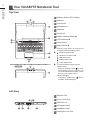
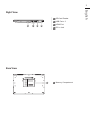
English 2 Your GIGABYTE Notebook Tour Top View 1 Webcam Status LED Indicator 2 Webcam 3 Light sensor 4 Microphone x 2 5 Speakers 6 TouchPad 7 Battery Indicator Button 10 8 LED Indicators 9 9 Power Button 2 1 3 4 5 10 Smart+ Button 6 HDD Status LED Battery Status LED 8 Power Status LED 2 3 Bluetooth Status LED Wireless Lan Status LED 7 U2442T Press the right button of touchpad to check the remaining battery power. To call out smart manager function. ● Smart Setup : Under off condition, Push " " to enter "Smart Setup" menu in off mode. You can choose BIOS Setup Utility, Smart Recovery in the setup menu. ● Smart Manager : In Windows® Mode Press " " button to initiate "Smart Manager". 1 Ethernet Port 2 D-sub (VGA) Port 3 USB Port x 2 4 Microphone Jack 5 Headphone Jack 6 Kensington Lock Slot 1 4 Left View 4 1 2 3 5 6